Mapgears Location Intelligence
Platform presentation
BRIDGING THE WORLDS OF THE WEB AND GIS
Bridge the gap between the web and GIS
with the Mapgears Location Platform
(eVouala). This solution is the result of more
than 15 years of working with all our
wonderful customers and our involvement in
the Open source community. It brings a user-
friendly Enterprise Data sharing solution and
a powerful collaboration cloud platform that
makes powerful Location Intelligence tools
accessible to non-technical people.
WEB PLATFORM
WEB PLATFORM
WHAT IS IT?
eVouala is a sophisticated web platform that allows users to drag and
drop GIS files (imported from anywhere in a multitude of formats)
which then populate immediately on a base mapping layer.
It makes what would otherwise be a static mapping environment into
a dynamic, customizable GIS platform, and this can be done on the fly
without the involvement of a developer. Major aspects are:
• Solid Open source foundation
• Simple and powerful generic basic features
• Elegant in its simplicity and ease of use
• Flexible configurable workflows
• Fully customizable
KEY FEATURES
▸ Platform available on Cloud or can be installed on your infrastructure;
▸ Centralize and interconnect all spatial and operational datasets;
▸ Manage user access permissions and privileges of groups;
▸ Usable "out of the box" without any custom programming required;
▸ Can be used as a self-service Platform or as a dedicated enterprise
solution;
‣ Low-cost solution based on open source software;
‣ Key real-time metrics available to optimize operational efficiency;
WEB PLATFORM
FEATURES
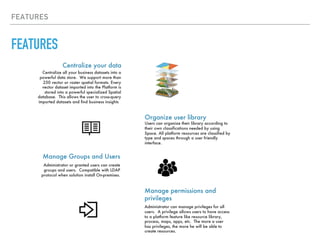
FEATURES
Organize user library
Centralize your data
Centralize all your business datasets into a
powerful data store. We support more than
250 vector or raster spatial formats. Every
vector dataset imported into the Platform is
stored into a powerful specialized Spatial
database. This allows the user to cross-query
imported datasets and find business insights
Users can organize their library according to
their own classifications needed by using
Space. All platform resources are classified by
type and spaces through a user friendly
interface.
Manage permissions and
privileges
Administrator can manage privileges for all
users. A privilege allows users to have access
to a platform feature like resource library,
process, maps, apps, etc. The more a user
has privileges, the more he will be able to
create resources.
Manage Groups and Users
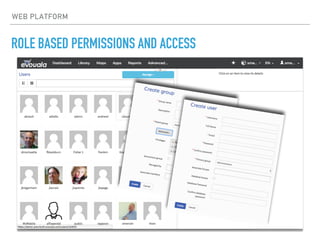
Administrator or granted users can create
groups and users. Compatible with LDAP
protocol when solution install On-premises.
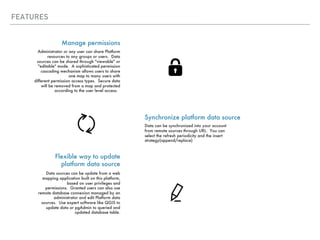
FEATURES
Synchronize platform data source
Manage permissions
Administrator or any user can share Platform
resources to any groups or users. Data
sources can be shared through "viewable" or
"editable" mode. A sophisticated permission
cascading mechanism allows users to share
one map to many users with
different permission access types. Secure data
will be removed from a map and protected
according to the user level access.
Data can be synchronized into your account
from remote sources through URL. You can
select the refresh periodicity and the insert
strategy(append/replace)
Flexible way to update
platform data source
Data sources can be update from a web
mapping application built on this platform,
based on user privileges and
permissions. Granted users can also use
remote database connexion managed by an
administrator and edit Platform data
sources. Use expert software like QGIS to
update data or pgAdmin to queried and
updated database table.
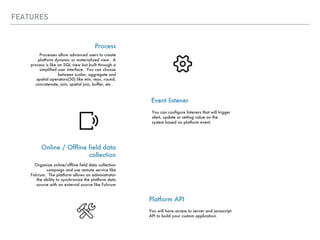
FEATURES
Event listener
Process
Processes allow advanced users to create
platform dynamic or materialized view. A
process is like an SQL view but built through a
simplified user interface. You can choose
between scalar, aggregate and
spatial operators(30) like min, max, round,
concatenate, join, spatial join, buffer, etc..
You can configure listeners that will trigger
alert, update or setting value on the
system based on platform event.
Online / Offline field data
collection
Organize online/offline field data collection
campaign and use remote service like
Fulcrum. The platform allows an administrator
the ability to synchronize the platform data
source with an external source like Fulcrum
Platform API
You will have access to server and javascript
API to build your custom application.
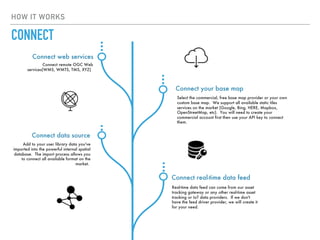
HOW IT WORKS
Connect web services
Select the commercial, free base map provider or your own
custom base map. We support all available static tiles
services on the market (Google, Bing, HERE, Mapbox,
OpenStreetMap, etc). You will need to create your
commercial account first then use your API key to connect
them.
Connect remote OGC Web
services(WMS, WMTS, TMS, XYZ)
Connect your base map
Connect data source
Add to your user library data you've
imported into the powerful internal spatial
database. The import process allows you
to connect all available format on the
market.
Connect real-time data feed
Real-time data feed can come from our asset
tracking gateway or any other real-time asset
tracking or IoT data providers. If we don't
have the feed driver provider, we will create it
for your need.
CONNECT
HOW IT WORKS
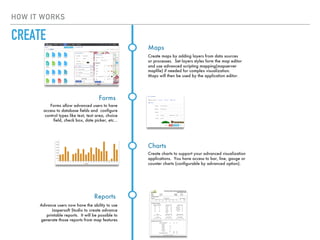
Forms allow advanced users to have
access to database fields and configure
control types like text, text area, choice
field, check box, date picker, etc…
Forms
Create charts to support your advanced visualization
applications. You have access to bar, line, gauge or
counter charts (configurable by advanced option).
Charts
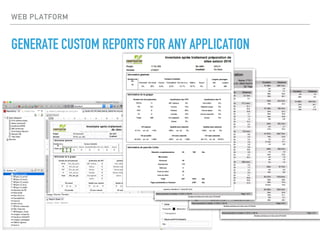
Advance users now have the ability to use
Jaspersoft Studio to create advance
printable reports. It will be possible to
generate those reports from map features
Reports
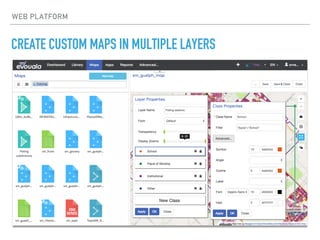
Create maps by adding layers from data sources
or processes. Set layers styles form the map editor
and use advanced scripting mapping(mapserver
mapfile) if needed for complex visualization.
Maps will then be used by the application editor.
Maps
CREATE
HOW IT WORKS
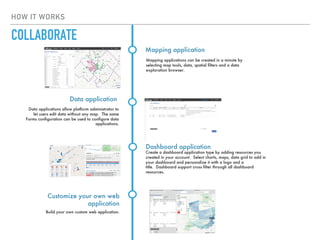
Mapping applications can be created in a minute by
selecting map tools, data, spatial filters and a data
exploration browser.
Mapping application
Data applications allow platform administrator to
let users edit data without any map. The same
Forms configuration can be used to configure data
applications.
Data application
Create a dashboard application type by adding resources you
created in your account. Select charts, maps, data grid to add in
your dashboard and personalize it with a logo and a
title. Dashboard support cross filter through all dashboard
resources.
Dashboard application
Build your own custom web application.
Customize your own web
application
COLLABORATE
ROLE BASED PERMISSIONS AND ACCESS
WEB PLATFORM
ROLE BASED PERMISSIONS AND ACCESS
WEB PLATFORM
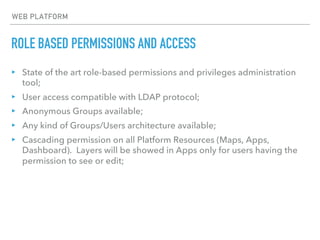
▸ State of the art role-based permissions and privileges administration
tool;
▸ User access compatible with LDAP protocol;
▸ Anonymous Groups available;
▸ Any kind of Groups/Users architecture available;
▸ Cascading permission on all Platform Resources (Maps, Apps,
Dashboard). Layers will be showed in Apps only for users having the
permission to see or edit;
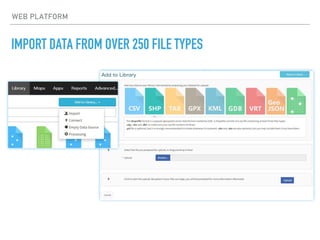
IMPORT DATA FROM OVER 250 FILE TYPES
WEB PLATFORM
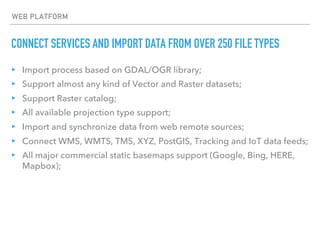
CONNECT SERVICES AND IMPORT DATA FROM OVER 250 FILE TYPES
▸ Import process based on GDAL/OGR library;
▸ Support almost any kind of Vector and Raster datasets;
▸ Support Raster catalog;
▸ All available projection type support;
▸ Import and synchronize data from web remote sources;
▸ Connect WMS, WMTS, TMS, XYZ, PostGIS, Tracking and IoT data feeds;
▸ All major commercial static basemaps support (Google, Bing, HERE,
Mapbox);
WEB PLATFORM
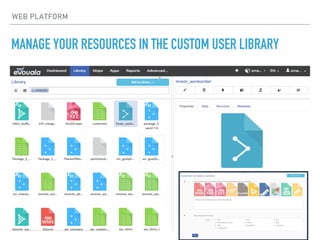
MANAGE YOUR RESOURCES IN THE CUSTOM USER LIBRARY
WEB PLATFORM
MANAGE YOUR RESOURCES IN THE CUSTOM USER LIBRARY
WEB PLATFORM
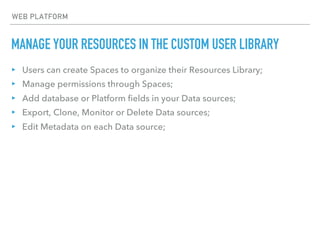
▸ Users can create Spaces to organize their Resources Library;
▸ Manage permissions through Spaces;
▸ Add database or Platform fields in your Data sources;
▸ Export, Clone, Monitor or Delete Data sources;
▸ Edit Metadata on each Data source;
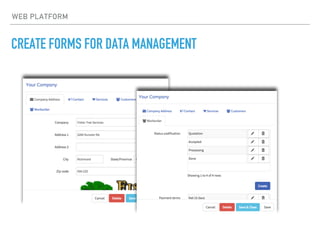
CREATE FORMS FOR DATA MANAGEMENT
WEB PLATFORM
CREATE FORMS FOR DATA MANAGEMENT
WEB PLATFORM
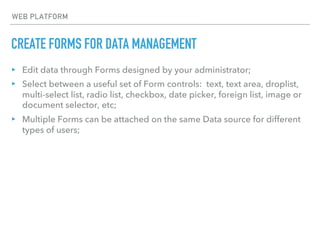
▸ Edit data through Forms designed by your administrator;
▸ Select between a useful set of Form controls: text, text area, droplist,
multi-select list, radio list, checkbox, date picker, foreign list, image or
document selector, etc;
▸ Multiple Forms can be attached on the same Data source for different
types of users;
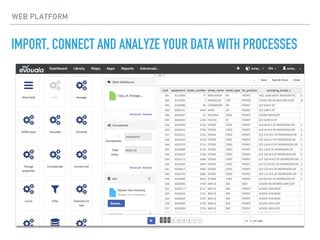
IMPORT, CONNECT AND ANALYZE YOUR DATA WITH PROCESSES
WEB PLATFORM
IMPORT, CONNECT AND ANALYZE YOUR DATA WITH PROCESSES
WEB PLATFORM
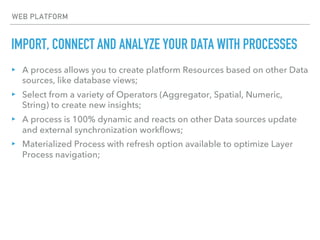
▸ A process allows you to create platform Resources based on other Data
sources, like database views;
▸ Select from a variety of Operators (Aggregator, Spatial, Numeric,
String) to create new insights;
▸ A process is 100% dynamic and reacts on other Data sources update
and external synchronization workflows;
▸ Materialized Process with refresh option available to optimize Layer
Process navigation;
CREATE CUSTOM MAPS IN MULTIPLE LAYERS
WEB PLATFORM
CREATE CUSTOM MAPS IN MULTIPLE LAYERS
WEB PLATFORM
▸ Users can easily create their own maps;
▸ Drag and drop Data source on your map;
▸ Create Layer classification based on database field value;
▸ Select between predefined layer symbology;
▸ Mapfile scripting available for advanced users;
▸ Choose your base map (Google, Bing, HERE, OpenStreetMap,
Mapbox, custom, etc);
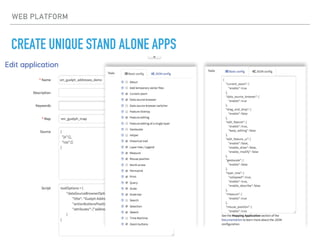
CREATE UNIQUE STAND ALONE APPS
WEB PLATFORM
CREATE UNIQUE STAND ALONE APPS
WEB PLATFORM
▸ Create Mapping Apps, Data Apps or Dashboards based on your
Library Resources;
▸ Selectable predefined App tool (measure, sketch, print, etc);
▸ Include remote Javascript or CSS libraries;
▸ Customize your Apps by adding your own Javascript or CSS code
snippet;
CLONE, PUBLISH AND SHARE MAPS AND APPS
WEB PLATFORM
CLONE, PUBLISH AND SHARE MAPS AND APPS
WEB PLATFORM
CLONE, PUBLISH AND SHARE MAPS AND APPS
WEB PLATFORM
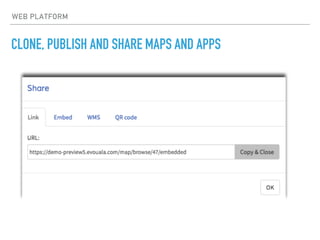
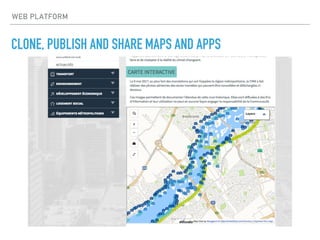
▸ Add Apps to an existing Web site;
▸ Share Apps to external partners;
▸ Share Apps without all the Platform’s main menu;
▸ Apps can be published to public or specific users protected through a
username and a password;
COLLABORATE DURING DATA COLLECTION
WEB PLATFORM
COLLABORATE DURING DATA COLLECTION
WEB PLATFORM
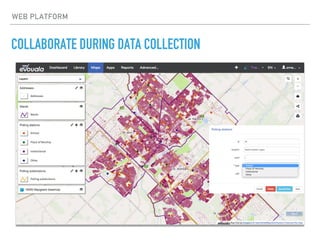
▸ Add new layer features on your map;
▸ Edit existing geometry data (add, move, delete vertex of lines and
polygons);
▸ Topology editing support;
▸ Collect or update database attributes with Forms;
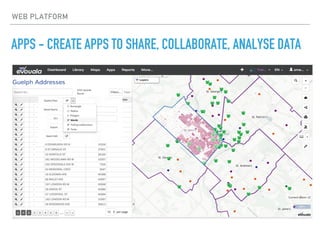
APPS - CREATE APPS TO SHARE, COLLABORATE, ANALYSE DATA
WEB PLATFORM
WEB PLATFORM
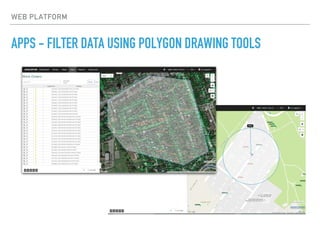
APPS - FILTER DATA USING POLYGON DRAWING TOOLS
CREATE APPS TO SHARE, COLLABORATE AND ANALYZE DATA
WEB PLATFORM
▸ Filter data through text string, date picker, checkbox or droplist choice
▸ Filter data through polygon type Data sources;
▸ Filter data with radius, rectangle and polygon drawn by users;
▸ Export selected data from data browse;
▸ Batch edit data based on selected data;
▸ Advanced filtering data by using multiple field criterias (customized in
your Layer map) and spatial filter;
WEB PLATFORM
GENERATE CUSTOM REPORTS FOR ANY APPLICATION
WEB PLATFORM
GENERATE CUSTOM REPORTS FOR ANY APPLICATION
▸ Create your own report based on your customer's needs
▸ Access to all powerful report features of Jaspersoft Studio
▸ Attach Form to Reports to filter data;
▸ Generate Reports from a popup feature;
WEB PLATFORM
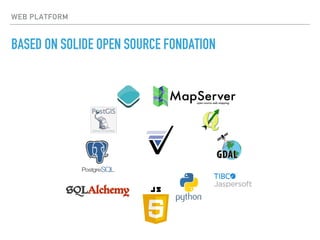
BASED ON SOLIDE OPEN SOURCE FONDATION
ABOUT US
▸ Mapgears is a Canadian company and an early adopter of open source
web mapping software and is still an active contributor to many
projects under the Open Source Geospatial Foundation.
▸ The Mapgears Location platform was developed and has been
maintained by the Mapgears team since early 2014. This product is
constantly being improved and enhanced by the team, in response to
feedback received from client users.
▸ Our focus as experts in open source web mapping technology is to
deliver innovative and high-quality software solutions that provide
greater insight into business processes.
www.evouala.com
sales@evouala.com
1.888.696.5056

Mapgears - Technical product overview

  • 1.
  • 2.
    BRIDGING THE WORLDSOF THE WEB AND GIS Bridge the gap between the web and GIS with the Mapgears Location Platform (eVouala). This solution is the result of more than 15 years of working with all our wonderful customers and our involvement in the Open source community. It brings a user- friendly Enterprise Data sharing solution and a powerful collaboration cloud platform that makes powerful Location Intelligence tools accessible to non-technical people. WEB PLATFORM
  • 3.
    WEB PLATFORM WHAT ISIT? eVouala is a sophisticated web platform that allows users to drag and drop GIS files (imported from anywhere in a multitude of formats) which then populate immediately on a base mapping layer. It makes what would otherwise be a static mapping environment into a dynamic, customizable GIS platform, and this can be done on the fly without the involvement of a developer. Major aspects are: • Solid Open source foundation • Simple and powerful generic basic features • Elegant in its simplicity and ease of use • Flexible configurable workflows • Fully customizable
  • 4.
    KEY FEATURES ▸ Platformavailable on Cloud or can be installed on your infrastructure; ▸ Centralize and interconnect all spatial and operational datasets; ▸ Manage user access permissions and privileges of groups; ▸ Usable "out of the box" without any custom programming required; ▸ Can be used as a self-service Platform or as a dedicated enterprise solution; ‣ Low-cost solution based on open source software; ‣ Key real-time metrics available to optimize operational efficiency; WEB PLATFORM
  • 5.
    FEATURES FEATURES Organize user library Centralizeyour data Centralize all your business datasets into a powerful data store. We support more than 250 vector or raster spatial formats. Every vector dataset imported into the Platform is stored into a powerful specialized Spatial database. This allows the user to cross-query imported datasets and find business insights Users can organize their library according to their own classifications needed by using Space. All platform resources are classified by type and spaces through a user friendly interface. Manage permissions and privileges Administrator can manage privileges for all users. A privilege allows users to have access to a platform feature like resource library, process, maps, apps, etc. The more a user has privileges, the more he will be able to create resources. Manage Groups and Users Administrator or granted users can create groups and users. Compatible with LDAP protocol when solution install On-premises.
  • 6.
    FEATURES Synchronize platform datasource Manage permissions Administrator or any user can share Platform resources to any groups or users. Data sources can be shared through "viewable" or "editable" mode. A sophisticated permission cascading mechanism allows users to share one map to many users with different permission access types. Secure data will be removed from a map and protected according to the user level access. Data can be synchronized into your account from remote sources through URL. You can select the refresh periodicity and the insert strategy(append/replace) Flexible way to update platform data source Data sources can be update from a web mapping application built on this platform, based on user privileges and permissions. Granted users can also use remote database connexion managed by an administrator and edit Platform data sources. Use expert software like QGIS to update data or pgAdmin to queried and updated database table.
  • 7.
    FEATURES Event listener Process Processes allowadvanced users to create platform dynamic or materialized view. A process is like an SQL view but built through a simplified user interface. You can choose between scalar, aggregate and spatial operators(30) like min, max, round, concatenate, join, spatial join, buffer, etc.. You can configure listeners that will trigger alert, update or setting value on the system based on platform event. Online / Offline field data collection Organize online/offline field data collection campaign and use remote service like Fulcrum. The platform allows an administrator the ability to synchronize the platform data source with an external source like Fulcrum Platform API You will have access to server and javascript API to build your custom application.
  • 8.
    HOW IT WORKS Connectweb services Select the commercial, free base map provider or your own custom base map. We support all available static tiles services on the market (Google, Bing, HERE, Mapbox, OpenStreetMap, etc). You will need to create your commercial account first then use your API key to connect them. Connect remote OGC Web services(WMS, WMTS, TMS, XYZ) Connect your base map Connect data source Add to your user library data you've imported into the powerful internal spatial database. The import process allows you to connect all available format on the market. Connect real-time data feed Real-time data feed can come from our asset tracking gateway or any other real-time asset tracking or IoT data providers. If we don't have the feed driver provider, we will create it for your need. CONNECT
  • 9.
    HOW IT WORKS Formsallow advanced users to have access to database fields and configure control types like text, text area, choice field, check box, date picker, etc… Forms Create charts to support your advanced visualization applications. You have access to bar, line, gauge or counter charts (configurable by advanced option). Charts Advance users now have the ability to use Jaspersoft Studio to create advance printable reports. It will be possible to generate those reports from map features Reports Create maps by adding layers from data sources or processes. Set layers styles form the map editor and use advanced scripting mapping(mapserver mapfile) if needed for complex visualization. Maps will then be used by the application editor. Maps CREATE
  • 10.
    HOW IT WORKS Mappingapplications can be created in a minute by selecting map tools, data, spatial filters and a data exploration browser. Mapping application Data applications allow platform administrator to let users edit data without any map. The same Forms configuration can be used to configure data applications. Data application Create a dashboard application type by adding resources you created in your account. Select charts, maps, data grid to add in your dashboard and personalize it with a logo and a title. Dashboard support cross filter through all dashboard resources. Dashboard application Build your own custom web application. Customize your own web application COLLABORATE
  • 11.
    ROLE BASED PERMISSIONSAND ACCESS WEB PLATFORM
  • 12.
    ROLE BASED PERMISSIONSAND ACCESS WEB PLATFORM ▸ State of the art role-based permissions and privileges administration tool; ▸ User access compatible with LDAP protocol; ▸ Anonymous Groups available; ▸ Any kind of Groups/Users architecture available; ▸ Cascading permission on all Platform Resources (Maps, Apps, Dashboard). Layers will be showed in Apps only for users having the permission to see or edit;
  • 13.
    IMPORT DATA FROMOVER 250 FILE TYPES WEB PLATFORM
  • 14.
    CONNECT SERVICES ANDIMPORT DATA FROM OVER 250 FILE TYPES ▸ Import process based on GDAL/OGR library; ▸ Support almost any kind of Vector and Raster datasets; ▸ Support Raster catalog; ▸ All available projection type support; ▸ Import and synchronize data from web remote sources; ▸ Connect WMS, WMTS, TMS, XYZ, PostGIS, Tracking and IoT data feeds; ▸ All major commercial static basemaps support (Google, Bing, HERE, Mapbox); WEB PLATFORM
  • 15.
    MANAGE YOUR RESOURCESIN THE CUSTOM USER LIBRARY WEB PLATFORM
  • 16.
    MANAGE YOUR RESOURCESIN THE CUSTOM USER LIBRARY WEB PLATFORM ▸ Users can create Spaces to organize their Resources Library; ▸ Manage permissions through Spaces; ▸ Add database or Platform fields in your Data sources; ▸ Export, Clone, Monitor or Delete Data sources; ▸ Edit Metadata on each Data source;
  • 17.
    CREATE FORMS FORDATA MANAGEMENT WEB PLATFORM
  • 18.
    CREATE FORMS FORDATA MANAGEMENT WEB PLATFORM ▸ Edit data through Forms designed by your administrator; ▸ Select between a useful set of Form controls: text, text area, droplist, multi-select list, radio list, checkbox, date picker, foreign list, image or document selector, etc; ▸ Multiple Forms can be attached on the same Data source for different types of users;
  • 19.
    IMPORT, CONNECT ANDANALYZE YOUR DATA WITH PROCESSES WEB PLATFORM
  • 20.
    IMPORT, CONNECT ANDANALYZE YOUR DATA WITH PROCESSES WEB PLATFORM ▸ A process allows you to create platform Resources based on other Data sources, like database views; ▸ Select from a variety of Operators (Aggregator, Spatial, Numeric, String) to create new insights; ▸ A process is 100% dynamic and reacts on other Data sources update and external synchronization workflows; ▸ Materialized Process with refresh option available to optimize Layer Process navigation;
  • 21.
    CREATE CUSTOM MAPSIN MULTIPLE LAYERS WEB PLATFORM
  • 22.
    CREATE CUSTOM MAPSIN MULTIPLE LAYERS WEB PLATFORM ▸ Users can easily create their own maps; ▸ Drag and drop Data source on your map; ▸ Create Layer classification based on database field value; ▸ Select between predefined layer symbology; ▸ Mapfile scripting available for advanced users; ▸ Choose your base map (Google, Bing, HERE, OpenStreetMap, Mapbox, custom, etc);
  • 23.
    CREATE UNIQUE STANDALONE APPS WEB PLATFORM
  • 24.
    CREATE UNIQUE STANDALONE APPS WEB PLATFORM ▸ Create Mapping Apps, Data Apps or Dashboards based on your Library Resources; ▸ Selectable predefined App tool (measure, sketch, print, etc); ▸ Include remote Javascript or CSS libraries; ▸ Customize your Apps by adding your own Javascript or CSS code snippet;
  • 25.
    CLONE, PUBLISH ANDSHARE MAPS AND APPS WEB PLATFORM
  • 26.
    CLONE, PUBLISH ANDSHARE MAPS AND APPS WEB PLATFORM
  • 27.
    CLONE, PUBLISH ANDSHARE MAPS AND APPS WEB PLATFORM ▸ Add Apps to an existing Web site; ▸ Share Apps to external partners; ▸ Share Apps without all the Platform’s main menu; ▸ Apps can be published to public or specific users protected through a username and a password;
  • 28.
    COLLABORATE DURING DATACOLLECTION WEB PLATFORM
  • 29.
    COLLABORATE DURING DATACOLLECTION WEB PLATFORM ▸ Add new layer features on your map; ▸ Edit existing geometry data (add, move, delete vertex of lines and polygons); ▸ Topology editing support; ▸ Collect or update database attributes with Forms;
  • 30.
    APPS - CREATEAPPS TO SHARE, COLLABORATE, ANALYSE DATA WEB PLATFORM
  • 31.
    WEB PLATFORM APPS -FILTER DATA USING POLYGON DRAWING TOOLS
  • 32.
    CREATE APPS TOSHARE, COLLABORATE AND ANALYZE DATA WEB PLATFORM ▸ Filter data through text string, date picker, checkbox or droplist choice ▸ Filter data through polygon type Data sources; ▸ Filter data with radius, rectangle and polygon drawn by users; ▸ Export selected data from data browse; ▸ Batch edit data based on selected data; ▸ Advanced filtering data by using multiple field criterias (customized in your Layer map) and spatial filter;
  • 33.
    WEB PLATFORM GENERATE CUSTOMREPORTS FOR ANY APPLICATION
  • 34.
    WEB PLATFORM GENERATE CUSTOMREPORTS FOR ANY APPLICATION ▸ Create your own report based on your customer's needs ▸ Access to all powerful report features of Jaspersoft Studio ▸ Attach Form to Reports to filter data; ▸ Generate Reports from a popup feature;
  • 35.
    WEB PLATFORM BASED ONSOLIDE OPEN SOURCE FONDATION
  • 36.
    ABOUT US ▸ Mapgearsis a Canadian company and an early adopter of open source web mapping software and is still an active contributor to many projects under the Open Source Geospatial Foundation. ▸ The Mapgears Location platform was developed and has been maintained by the Mapgears team since early 2014. This product is constantly being improved and enhanced by the team, in response to feedback received from client users. ▸ Our focus as experts in open source web mapping technology is to deliver innovative and high-quality software solutions that provide greater insight into business processes. www.evouala.com sales@evouala.com 1.888.696.5056