University Libraries
                Map and Geographic Information Center -
                MAGIC


                   Map and Geographic
                  Information Center 2.0
                        http://magic.lib.uconn.edu

         Digitizing the Past to Empower
                       21st Century Research

University of Connecticut Libraries - Map and Geographic Information Center - MAGIC – http://magic.lib.uconn.edu
University Libraries
                Map and Geographic Information Center -
                MAGIC

                 The University of Connecticut Libraries’ Map and
                 Geographic Information Center (MAGIC) collaborates
                 with university departments and state agencies to
                 provide the citizens of the state of Connecticut and
                 researchers across the globe with access to
                 Connecticut focused geographic information. With a
                 focus on providing access to maps, geographic data
                 and resources MAGIC is committed to “Digitizing the
                 Past to Empower 21st Century Research” through
                 providing online access to Connecticut geographic
                 data via the world wide web with tools and resources
                 which enable anyone to explore our resources.


                                                MAGIC’s Mission
University of Connecticut Libraries - Map and Geographic Information Center - MAGIC – http://magic.lib.uconn.edu
University Libraries
                Map and Geographic Information Center -
                MAGIC

              MAGIC 2.0 – What is it?
• Online ability to browse and display
  geospatial data
• Anyone can quickly explore data and
  create customized maps
• Flexible – enables visualization of
  shapefiles, rasters, coverages, CAD, and
  other spatial data formats


University of Connecticut Libraries - Map and Geographic Information Center - MAGIC – http://magic.lib.uconn.edu
University Libraries
                Map and Geographic Information Center -
                MAGIC

MAGIC 2.0 – User Focused Features
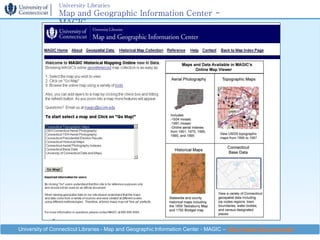
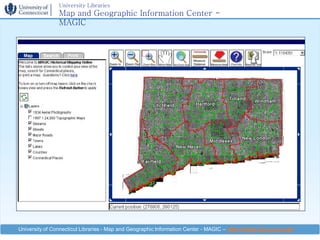
•    Create customized .pdf maps
•    Searching – town level
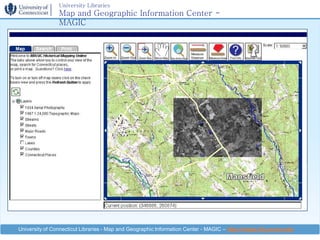
•    Keyhole tool
•    Display layers with one click
•    Fast map updating
•    Web Mapping Services (WMS)
•    Mash-up Friendly

University of Connecticut Libraries - Map and Geographic Information Center - MAGIC – http://magic.lib.uconn.edu
University Libraries
                Map and Geographic Information Center -
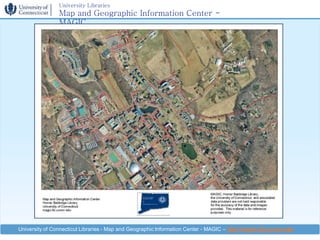
                MAGIC


University of Connecticut Libraries - Map and Geographic Information Center - MAGIC – http://magic.lib.uconn.edu
University Libraries
                Map and Geographic Information Center -
                MAGIC


University of Connecticut Libraries - Map and Geographic Information Center - MAGIC – http://magic.lib.uconn.edu
University Libraries
                Map and Geographic Information Center -
                MAGIC


University of Connecticut Libraries - Map and Geographic Information Center - MAGIC – http://magic.lib.uconn.edu
University Libraries
                Map and Geographic Information Center -
                MAGIC


University of Connecticut Libraries - Map and Geographic Information Center - MAGIC – http://magic.lib.uconn.edu
University Libraries
                Map and Geographic Information Center -
                MAGIC

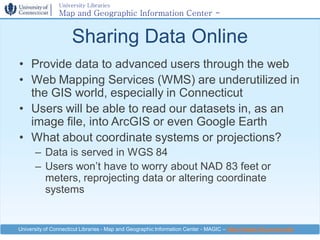
                     Sharing Data Online
• Provide data to advanced users through the web
• Web Mapping Services (WMS) are underutilized in
  the GIS world, especially in Connecticut
• Users will be able to read our datasets in, as an
  image file, into ArcGIS or even Google Earth
• What about coordinate systems or projections?
      – Data is served in WGS 84
      – Users won’t have to worry about NAD 83 feet or
        meters, reprojecting data or altering coordinate
        systems


University of Connecticut Libraries - Map and Geographic Information Center - MAGIC – http://magic.lib.uconn.edu
University Libraries
                   Map and Geographic Information Center -
                   MAGIC

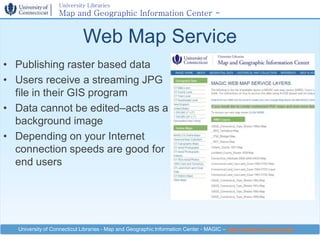
                             Web Map Service
• Publishing raster based data
• Users receive a streaming JPG
  file in their GIS program
• Data cannot be edited–acts as a
  background image
• Depending on your Internet
  connection speeds are good for
  end users


   University of Connecticut Libraries - Map and Geographic Information Center - MAGIC – http://magic.lib.uconn.edu
University Libraries
                Map and Geographic Information Center -
                MAGIC

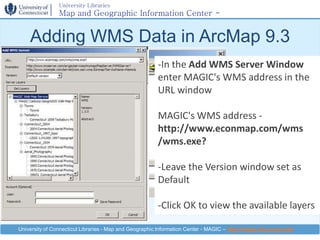
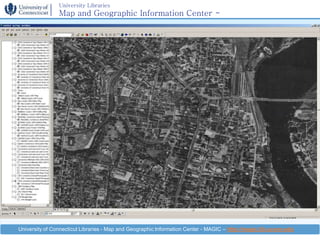
    Adding WMS Data in ArcMap 9.3
                                                        -In the Add WMS Server Window
                                                        enter MAGIC's WMS address in the
                                                        URL window     In the GIS Servers
                                                                      Window select Add
                                                        MAGIC's WMS addressServer
                                                                      WMS -
                                                        http://www.econmap.com/wms
                                                        /wms.exe?

                                                        -Leave the Version window set as
                                                        Default

                                                        -Click OK to view the available layers

University of Connecticut Libraries - Map and Geographic Information Center - MAGIC – http://magic.lib.uconn.edu
University Libraries
                Map and Geographic Information Center -
                MAGIC

     Adding WMS Data to ArcMap

                                                                              -In Add Data Window
                                                                              the available layers will
                                                                              appear

                                                                              -Select the desired layer
                                                                              and click OK


University of Connecticut Libraries - Map and Geographic Information Center - MAGIC – http://magic.lib.uconn.edu
University Libraries
                 Map and Geographic Information Center -
                 MAGIC
    Adding MAGIC WMS Data into Google Maps

• Through some
  simple javascript and
  html programming
  users can take
  MAGIC’s streaming
  WMS data and read
  it into a Google Map


 University of Connecticut Libraries - Map and Geographic Information Center - MAGIC – http://magic.lib.uconn.edu
University Libraries
                 Map and Geographic Information Center -
                 MAGIC
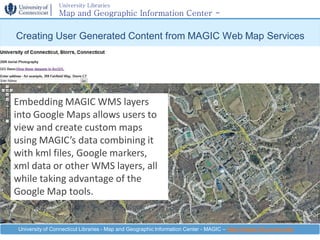
Creating User Generated Content from MAGIC Web Map Services


Embedding MAGIC WMS layers
into Google Maps allows users to
view and create custom maps
using MAGIC’s data combining it
with kml files, Google markers,
xml data or other WMS layers, all
while taking advantage of the
Google Map tools.


 University of Connecticut Libraries - Map and Geographic Information Center - MAGIC – http://magic.lib.uconn.edu
University Libraries
                Map and Geographic Information Center -
                MAGIC

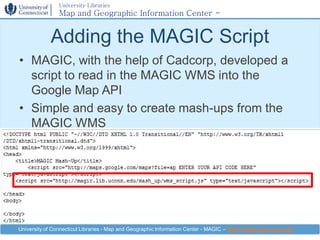
             Adding the MAGIC Script
• MAGIC, with the help of Cadcorp, developed a
  script to read in the MAGIC WMS into the
  Google Map API
• Simple and easy to create mash-ups from the
  MAGIC WMS


University of Connecticut Libraries - Map and Geographic Information Center - MAGIC – http://magic.lib.uconn.edu
University Libraries
                Map and Geographic Information Center -
                MAGIC

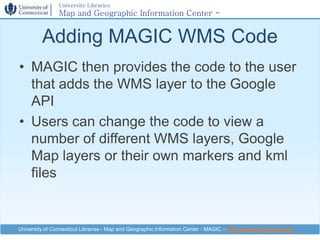
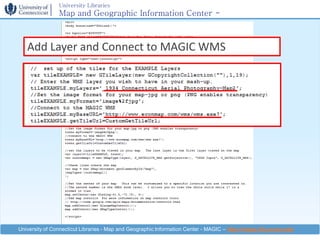
         Adding MAGIC WMS Code
• MAGIC then provides the code to the user
  that adds the WMS layer to the Google
  API
• Users can change the code to view a
  number of different WMS layers, Google
  Map layers or their own markers and kml
  files


University of Connecticut Libraries - Map and Geographic Information Center - MAGIC – http://magic.lib.uconn.edu
University Libraries
                 Map and Geographic Information Center -
                 MAGIC

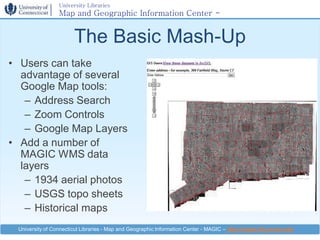
                       The Basic Mash-Up
• Users can take
  advantage of several
  Google Map tools:
   – Address Search
   – Zoom Controls
   – Google Map Layers
• Add a number of
  MAGIC WMS data
  layers
   – 1934 aerial photos
   – USGS topo sheets
   – Historical maps
 University of Connecticut Libraries - Map and Geographic Information Center - MAGIC – http://magic.lib.uconn.edu
University Libraries
                Map and Geographic Information Center -
                MAGIC


   Add Layer and Connect to MAGIC WMS


University of Connecticut Libraries - Map and Geographic Information Center - MAGIC – http://magic.lib.uconn.edu
University Libraries
                Map and Geographic Information Center -
                MAGIC

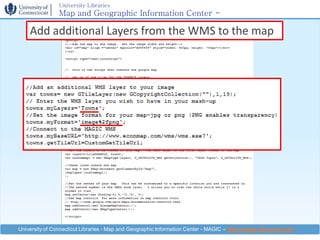
     Viewing Multiple WMS Layers
• Users can add
  vector layers or
  other raster
  datasets from
  MAGIC’s WMS into
  a single page
• Can turn on
  multiple maps
  using simple
  controls

University of Connecticut Libraries - Map and Geographic Information Center - MAGIC – http://magic.lib.uconn.edu
University Libraries
                Map and Geographic Information Center -
                MAGIC
    Add additional Layers from the WMS to the map


University of Connecticut Libraries - Map and Geographic Information Center - MAGIC – http://magic.lib.uconn.edu
University Libraries
                 Map and Geographic Information Center -
                 MAGIC

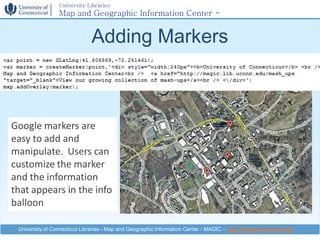
                              Adding Markers


Google markers are
easy to add and
manipulate. Users can
customize the marker
and the information
that appears in the info
balloon

 University of Connecticut Libraries - Map and Geographic Information Center - MAGIC – http://magic.lib.uconn.edu
University Libraries
                 Map and Geographic Information Center -
                 MAGIC

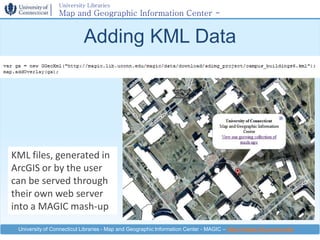
                           Adding KML Data


KML files, generated in
ArcGIS or by the user
can be served through
their own web server
into a MAGIC mash-up

 University of Connecticut Libraries - Map and Geographic Information Center - MAGIC – http://magic.lib.uconn.edu
University Libraries
                Map and Geographic Information Center -
                MAGIC

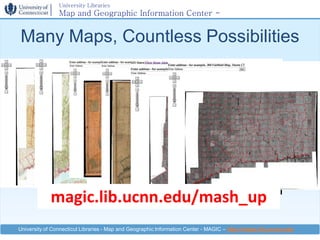
Many Maps, Countless Possibilities


             magic.lib.ucnn.edu/mash_up
University of Connecticut Libraries - Map and Geographic Information Center - MAGIC – http://magic.lib.uconn.edu
University Libraries
                Map and Geographic Information Center -
                MAGIC

      Data Sharing & Collaborating
• MAGIC is interested in collaborating with
  any agency that has Connecticut
  geospatial data which can be shared
  publicly.
• Willing to collaborate on grants and other
  opportunities which enhance public access
  to spatial data and maps for Connecticut.


University of Connecticut Libraries - Map and Geographic Information Center - MAGIC – http://magic.lib.uconn.edu
University Libraries
                  Map and Geographic Information Center -
                  MAGIC

                                         Questions?
Map and Geographic Information Center - MAGIC
   Homer Babbidge Library, Level 4
   369 Fairfield Way
   Phone: 860-486-4589 (p)
   E-mail: magic@uconn.edu
   IM (AOL): uconnlibmagic


                             magic.lib.uconn.edu
  University of Connecticut Libraries - Map and Geographic Information Center - MAGIC – http://magic.lib.uconn.edu

Using Web Map Services for Historical Maps Mash-Ups

  • 1.
    University Libraries Map and Geographic Information Center - MAGIC Map and Geographic Information Center 2.0 http://magic.lib.uconn.edu Digitizing the Past to Empower 21st Century Research University of Connecticut Libraries - Map and Geographic Information Center - MAGIC – http://magic.lib.uconn.edu
  • 2.
    University Libraries Map and Geographic Information Center - MAGIC The University of Connecticut Libraries’ Map and Geographic Information Center (MAGIC) collaborates with university departments and state agencies to provide the citizens of the state of Connecticut and researchers across the globe with access to Connecticut focused geographic information. With a focus on providing access to maps, geographic data and resources MAGIC is committed to “Digitizing the Past to Empower 21st Century Research” through providing online access to Connecticut geographic data via the world wide web with tools and resources which enable anyone to explore our resources. MAGIC’s Mission University of Connecticut Libraries - Map and Geographic Information Center - MAGIC – http://magic.lib.uconn.edu
  • 3.
    University Libraries Map and Geographic Information Center - MAGIC MAGIC 2.0 – What is it? • Online ability to browse and display geospatial data • Anyone can quickly explore data and create customized maps • Flexible – enables visualization of shapefiles, rasters, coverages, CAD, and other spatial data formats University of Connecticut Libraries - Map and Geographic Information Center - MAGIC – http://magic.lib.uconn.edu
  • 4.
    University Libraries Map and Geographic Information Center - MAGIC MAGIC 2.0 – User Focused Features • Create customized .pdf maps • Searching – town level • Keyhole tool • Display layers with one click • Fast map updating • Web Mapping Services (WMS) • Mash-up Friendly University of Connecticut Libraries - Map and Geographic Information Center - MAGIC – http://magic.lib.uconn.edu
  • 5.
    University Libraries Map and Geographic Information Center - MAGIC University of Connecticut Libraries - Map and Geographic Information Center - MAGIC – http://magic.lib.uconn.edu
  • 6.
    University Libraries Map and Geographic Information Center - MAGIC University of Connecticut Libraries - Map and Geographic Information Center - MAGIC – http://magic.lib.uconn.edu
  • 7.
    University Libraries Map and Geographic Information Center - MAGIC University of Connecticut Libraries - Map and Geographic Information Center - MAGIC – http://magic.lib.uconn.edu
  • 8.
    University Libraries Map and Geographic Information Center - MAGIC University of Connecticut Libraries - Map and Geographic Information Center - MAGIC – http://magic.lib.uconn.edu
  • 9.
    University Libraries Map and Geographic Information Center - MAGIC Sharing Data Online • Provide data to advanced users through the web • Web Mapping Services (WMS) are underutilized in the GIS world, especially in Connecticut • Users will be able to read our datasets in, as an image file, into ArcGIS or even Google Earth • What about coordinate systems or projections? – Data is served in WGS 84 – Users won’t have to worry about NAD 83 feet or meters, reprojecting data or altering coordinate systems University of Connecticut Libraries - Map and Geographic Information Center - MAGIC – http://magic.lib.uconn.edu
  • 10.
    University Libraries Map and Geographic Information Center - MAGIC Web Map Service • Publishing raster based data • Users receive a streaming JPG file in their GIS program • Data cannot be edited–acts as a background image • Depending on your Internet connection speeds are good for end users University of Connecticut Libraries - Map and Geographic Information Center - MAGIC – http://magic.lib.uconn.edu
  • 11.
    University Libraries Map and Geographic Information Center - MAGIC Adding WMS Data in ArcMap 9.3 -In the Add WMS Server Window enter MAGIC's WMS address in the URL window In the GIS Servers Window select Add MAGIC's WMS addressServer WMS - http://www.econmap.com/wms /wms.exe? -Leave the Version window set as Default -Click OK to view the available layers University of Connecticut Libraries - Map and Geographic Information Center - MAGIC – http://magic.lib.uconn.edu
  • 12.
    University Libraries Map and Geographic Information Center - MAGIC Adding WMS Data to ArcMap -In Add Data Window the available layers will appear -Select the desired layer and click OK University of Connecticut Libraries - Map and Geographic Information Center - MAGIC – http://magic.lib.uconn.edu
  • 13.
    University Libraries Map and Geographic Information Center - MAGIC Adding MAGIC WMS Data into Google Maps • Through some simple javascript and html programming users can take MAGIC’s streaming WMS data and read it into a Google Map University of Connecticut Libraries - Map and Geographic Information Center - MAGIC – http://magic.lib.uconn.edu
  • 14.
    University Libraries Map and Geographic Information Center - MAGIC Creating User Generated Content from MAGIC Web Map Services Embedding MAGIC WMS layers into Google Maps allows users to view and create custom maps using MAGIC’s data combining it with kml files, Google markers, xml data or other WMS layers, all while taking advantage of the Google Map tools. University of Connecticut Libraries - Map and Geographic Information Center - MAGIC – http://magic.lib.uconn.edu
  • 15.
    University Libraries Map and Geographic Information Center - MAGIC Adding the MAGIC Script • MAGIC, with the help of Cadcorp, developed a script to read in the MAGIC WMS into the Google Map API • Simple and easy to create mash-ups from the MAGIC WMS University of Connecticut Libraries - Map and Geographic Information Center - MAGIC – http://magic.lib.uconn.edu
  • 16.
    University Libraries Map and Geographic Information Center - MAGIC Adding MAGIC WMS Code • MAGIC then provides the code to the user that adds the WMS layer to the Google API • Users can change the code to view a number of different WMS layers, Google Map layers or their own markers and kml files University of Connecticut Libraries - Map and Geographic Information Center - MAGIC – http://magic.lib.uconn.edu
  • 17.
    University Libraries Map and Geographic Information Center - MAGIC The Basic Mash-Up • Users can take advantage of several Google Map tools: – Address Search – Zoom Controls – Google Map Layers • Add a number of MAGIC WMS data layers – 1934 aerial photos – USGS topo sheets – Historical maps University of Connecticut Libraries - Map and Geographic Information Center - MAGIC – http://magic.lib.uconn.edu
  • 18.
    University Libraries Map and Geographic Information Center - MAGIC Add Layer and Connect to MAGIC WMS University of Connecticut Libraries - Map and Geographic Information Center - MAGIC – http://magic.lib.uconn.edu
  • 19.
    University Libraries Map and Geographic Information Center - MAGIC Viewing Multiple WMS Layers • Users can add vector layers or other raster datasets from MAGIC’s WMS into a single page • Can turn on multiple maps using simple controls University of Connecticut Libraries - Map and Geographic Information Center - MAGIC – http://magic.lib.uconn.edu
  • 20.
    University Libraries Map and Geographic Information Center - MAGIC Add additional Layers from the WMS to the map University of Connecticut Libraries - Map and Geographic Information Center - MAGIC – http://magic.lib.uconn.edu
  • 21.
    University Libraries Map and Geographic Information Center - MAGIC Adding Markers Google markers are easy to add and manipulate. Users can customize the marker and the information that appears in the info balloon University of Connecticut Libraries - Map and Geographic Information Center - MAGIC – http://magic.lib.uconn.edu
  • 22.
    University Libraries Map and Geographic Information Center - MAGIC Adding KML Data KML files, generated in ArcGIS or by the user can be served through their own web server into a MAGIC mash-up University of Connecticut Libraries - Map and Geographic Information Center - MAGIC – http://magic.lib.uconn.edu
  • 23.
    University Libraries Map and Geographic Information Center - MAGIC Many Maps, Countless Possibilities magic.lib.ucnn.edu/mash_up University of Connecticut Libraries - Map and Geographic Information Center - MAGIC – http://magic.lib.uconn.edu
  • 24.
    University Libraries Map and Geographic Information Center - MAGIC Data Sharing & Collaborating • MAGIC is interested in collaborating with any agency that has Connecticut geospatial data which can be shared publicly. • Willing to collaborate on grants and other opportunities which enhance public access to spatial data and maps for Connecticut. University of Connecticut Libraries - Map and Geographic Information Center - MAGIC – http://magic.lib.uconn.edu
  • 25.
    University Libraries Map and Geographic Information Center - MAGIC Questions? Map and Geographic Information Center - MAGIC Homer Babbidge Library, Level 4 369 Fairfield Way Phone: 860-486-4589 (p) E-mail: magic@uconn.edu IM (AOL): uconnlibmagic magic.lib.uconn.edu University of Connecticut Libraries - Map and Geographic Information Center - MAGIC – http://magic.lib.uconn.edu