MacLean Engineering - Case Study - Transform CAD data
October 2nd 2015
Presenters – Don Larson, Larson Software Technology & David Manock, Vizualsite LLC
www.cgmlarson.com
Copyright Larson Software Technology (c) 2015
Agenda
• Introduction
• Housekeeping
• Manufacturing Day
• Company Overviews
• Slide Presentation
• Live Software Demo
• Summary
• Closing Information
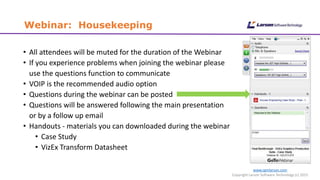
Webinar: Housekeeping
• All attendees will be muted for the duration of the Webinar
• If you experience problems when joining the webinar please
use the questions function to communicate
• VOIP is the recommended audio option
• Questions during the webinar can be posted
• Questions will be answered following the main presentation
or by a follow up email
• Handouts - materials you can downloaded during the webinar
• Case Study
• VizEx Transform Datasheet
www.cgmlarson.com
Copyright Larson Software Technology (c) 2015
www.cgmlarson.com
Copyright Larson Software Technology (c) 2015
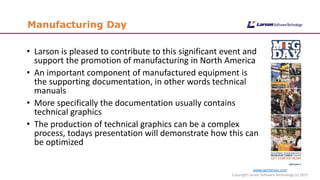
Manufacturing Day
• Larson is pleased to contribute to this significant event and
support the promotion of manufacturing in North America
• An important component of manufactured equipment is
the supporting documentation, in other words technical
manuals
• More specifically the documentation usually contains
technical graphics
• The production of technical graphics can be a complex
process, todays presentation will demonstrate how this can
be optimized
www.cgmlarson.com
Copyright Larson Software Technology (c) 2015
Larson Software Technology
• Based in Houston, Texas
• Founded in 1984, CGM Experts for 30 years
• Develops powerful, innovative CGM graphics software, based on
open standards
• Promoting CGM Usage, VizEx Reader a free CGM and TIFF viewer
• Larson technology simplifies the graphics workflow for Technical
Publications Professionals, Engineers, Geologists, and
Geophysicists.
www.cgmlarson.com
Copyright Larson Software Technology (c) 2015
MacLean Engineering
• MacLean Engineering is a privately owned Canadian company
• Specializes in the design, manufacture and marketing of high
quality mechanized equipment
• Target market is the Underground Mining, Commercial
and Municipal Sectors
• MacLean products are supplied with a
comprehensive suite of technical manuals
• Manage approximately 30,000 technical
graphics, taking into account the support of
3 languages the total is nearer 90,000
www.macleanengineering.com
Webinar Objective
www.cgmlarson.com
Copyright Larson Software Technology (c) 2015
• The focus will be on technical graphics production using
Larson’s CGM technology
• Featuring - VizEx Transform
• Additionally – VizEx Edit and VizEx View
• How do we?
• Optimize the transformation of 2D and 3D CAD data
• Add value to the transformed graphics
• All the data we demonstrate today is with the kind permission
of MacLean Engineering
Introduction
www.cgmlarson.com
Copyright Larson Software Technology (c) 2015
• In the distant past technical graphics were originated on the
drawing board
• A Technical Illustrator would create the illustration by interpreting
engineering drawings
• First the pencil stage, usually on tracing paper overlaying a perspective grid
• When complete the illustrator would overlay the pencil
illustration with drafting film and ink the drawing usually
with Rotring rapidograph pen
• You could even call it ‘Art’
• Today the same process is very different!
www.cgmlarson.com
Copyright Larson Software Technology (c) 2015
Today’s Technical Graphics Process
• Technical graphics are now usually generated or revised in a
electronic format
• The file could be legacy, possibly a scan of one of the illustrations
created on the drawing board
• The most likely starting point for a new graphic today is
probably from a CAD system
• This could be a 2D or 3D CAD system
• The scenario for this presentation is where the data originates
in 2D and 3D CAD Systems
• Real company data and processes
www.cgmlarson.com
Copyright Larson Software Technology (c) 2015
The MacLean Requirement
• A new Technical Publications system
• MacLean selected an S1000D based system as opposed to a DITA
solution.
• Both based on XML , structured information strategy
• PERCEPTION: S1000D is only for the Aerospace & Defense industry
• FACT: it can be implemented for any piece of complex equipment
• ADVANTAGES: provides a modern, granular and
controlled process to produce and deliver technical
publications
• INVESTMENT: All software tools are off the shelf and affordable
www.s1000d.org
www.cgmlarson.com
Copyright Larson Software Technology (c) 2015
The MacLean Objectives
• Replace a proprietary graphics transformation system and file
format
• Reuse CAD data generated by SolidWorks (3D) and AutoCAD (2D)
• Reuse existing non-proprietary material and processes
• Use the CGM (Computer Graphics Metafile) file format, compliant
with the S1000D specification
• CGM Open Foundation – www.cgmopen.org
• Manage the CGM files in an S1000D CSDB
• Common Source Database / Content Management System
• Publish the CGM files to PDF and an Interactive Electronic
Technical Manual
www.cgmlarson.com
Copyright Larson Software Technology (c) 2015
The Solution
• The MacLean S1000D Publishing Solution is based on a
collaboration between 2 vendors
• Larson Software Technology provide the automated graphics
transformation engine
• ADG provide the Data Management and Publishing Solution
• A great combination which can be replicated in other scenarios
www.cgmlarson.com
Copyright Larson Software Technology (c) 2015
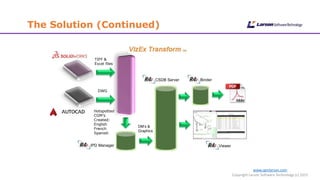
The Solution (Continued)
Binder
Viewer
CSDB Server
IPD Manager
TIFF &
Excel files
DWG
Hotspotted
CGM’s
Created:
English
French
Spanish
DM’s &
Graphics
www.cgmlarson.com
Copyright Larson Software Technology (c) 2015
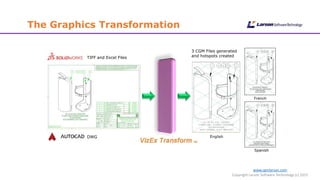
The Graphics Transformation
DWG
3 CGM Files generated
and hotspots created
English
French
Spanish
TIFF and Excel Files
www.cgmlarson.com
Copyright Larson Software Technology (c) 2015
VizEx Transform
• VizEx Transform is a truly unique application
• Enables the transformation of multiple graphical data formats into CGM in one
simple to use interface
• Why use the term transformation and not conversion
• During the process, VizEx Transform can add value to the graphic by generating
hotspot information on the graphics
• The process is automated, with the ability to run in a batch mode and
from a command line, triggered by an event
• Input Formats: DWG, DXF, PDF, AI, EPS, CGM V1-V3, BMP, CALS-G4,
EMF, GIF, JPEG, PNG, TIFF
• Output Formats: CGM V4, WebCGM, SVG
www.cgmlarson.com
Copyright Larson Software Technology (c) 2015
• VizEx Edit the CGM Native Editor
• Edit S1000D graphics for use in Technical Manuals, IETMs & Illustrated Parts
Catalogs
• Quickly add hotspots and enter associated metadata
• "Tree View” window makes it easy to modify hotspot attributes
• Tabs permit several files to be opened in a single session
• Hotspotter technology is available as a fully integrated option
• Input:
• Vector: CGM V1-V4, DWG, DXF, PDF, AI, EPS
• Raster: BMP, CALS, EMF, GIF, JPEG, PNG,
• Output:
• CGM, JPEG, PNG, TIFF, SVG
www.cgmlarson.com
Copyright Larson Software Technology (c) 2015
• VizEx View - Family of Viewers for deploying CGM files
• Distribute your CGM graphics easily to co-workers, customers, partners and suppliers
• VizEx View HTML5
• Enables delivery of quality native CGM graphics in a
web browser on virtually any platform, including Apple iOS.
No app or plug-in required.
• VizEx View Plugin Supports:
• Chrome, Internet Explorer and Firefox browsers
• Platforms include Windows and Linux (Firefox only)
• VizEx View C++ (Software Development Kit)
• C++ library for Windows and Linux developers
• Includes sample code, documentation, object code library (.DLL or .SO on Linux)
www.cgmlarson.com
Copyright Larson Software Technology (c) 2015
Case Study Demonstration
www.cgmlarson.com
Copyright Larson Software Technology (c) 2015
Summary
• Technical Graphics are a significant part of the technical publications
process
• There are some keywords and phrases that need to be considered as
part of the process
• Quality – Maintain a high level when publishing and deploying
• Reuse – Leverage data already created, legacy and new
• Management – Effectively manage the technical graphics post transformation
• Cost Effective – Decrease time to market and return the investment
• Valid – The graphic files are conforming to the chosen specification, preferably
an open format
• Consistent – The technical graphics conform to the project business rules
www.cgmlarson.com
Copyright Larson Software Technology (c) 2015
Closing Information
• You can discover more information about
Larson Software Technology at www.cgmlarson.com
• A link to a recording of the webinar will be sent via email
• All the materials will be available:
• www.slideshare.net/donlarson1
• Twitter feed, follow us!
• www.twitter.com/cgmlarson
• Next Webinar:
VizEx Edit – The Native CGM Editor
Wed, Oct 28, 2015 11:00 AM - 12:00 PM Eastern

Manufacturing Day - Case Study - MacLean Engineering

  • 1.
    MacLean Engineering -Case Study - Transform CAD data October 2nd 2015 Presenters – Don Larson, Larson Software Technology & David Manock, Vizualsite LLC
  • 2.
    www.cgmlarson.com Copyright Larson SoftwareTechnology (c) 2015 Agenda • Introduction • Housekeeping • Manufacturing Day • Company Overviews • Slide Presentation • Live Software Demo • Summary • Closing Information
  • 3.
    Webinar: Housekeeping • Allattendees will be muted for the duration of the Webinar • If you experience problems when joining the webinar please use the questions function to communicate • VOIP is the recommended audio option • Questions during the webinar can be posted • Questions will be answered following the main presentation or by a follow up email • Handouts - materials you can downloaded during the webinar • Case Study • VizEx Transform Datasheet www.cgmlarson.com Copyright Larson Software Technology (c) 2015
  • 4.
    www.cgmlarson.com Copyright Larson SoftwareTechnology (c) 2015 Manufacturing Day • Larson is pleased to contribute to this significant event and support the promotion of manufacturing in North America • An important component of manufactured equipment is the supporting documentation, in other words technical manuals • More specifically the documentation usually contains technical graphics • The production of technical graphics can be a complex process, todays presentation will demonstrate how this can be optimized
  • 5.
    www.cgmlarson.com Copyright Larson SoftwareTechnology (c) 2015 Larson Software Technology • Based in Houston, Texas • Founded in 1984, CGM Experts for 30 years • Develops powerful, innovative CGM graphics software, based on open standards • Promoting CGM Usage, VizEx Reader a free CGM and TIFF viewer • Larson technology simplifies the graphics workflow for Technical Publications Professionals, Engineers, Geologists, and Geophysicists.
  • 6.
    www.cgmlarson.com Copyright Larson SoftwareTechnology (c) 2015 MacLean Engineering • MacLean Engineering is a privately owned Canadian company • Specializes in the design, manufacture and marketing of high quality mechanized equipment • Target market is the Underground Mining, Commercial and Municipal Sectors • MacLean products are supplied with a comprehensive suite of technical manuals • Manage approximately 30,000 technical graphics, taking into account the support of 3 languages the total is nearer 90,000 www.macleanengineering.com
  • 7.
    Webinar Objective www.cgmlarson.com Copyright LarsonSoftware Technology (c) 2015 • The focus will be on technical graphics production using Larson’s CGM technology • Featuring - VizEx Transform • Additionally – VizEx Edit and VizEx View • How do we? • Optimize the transformation of 2D and 3D CAD data • Add value to the transformed graphics • All the data we demonstrate today is with the kind permission of MacLean Engineering
  • 8.
    Introduction www.cgmlarson.com Copyright Larson SoftwareTechnology (c) 2015 • In the distant past technical graphics were originated on the drawing board • A Technical Illustrator would create the illustration by interpreting engineering drawings • First the pencil stage, usually on tracing paper overlaying a perspective grid • When complete the illustrator would overlay the pencil illustration with drafting film and ink the drawing usually with Rotring rapidograph pen • You could even call it ‘Art’ • Today the same process is very different!
  • 9.
    www.cgmlarson.com Copyright Larson SoftwareTechnology (c) 2015 Today’s Technical Graphics Process • Technical graphics are now usually generated or revised in a electronic format • The file could be legacy, possibly a scan of one of the illustrations created on the drawing board • The most likely starting point for a new graphic today is probably from a CAD system • This could be a 2D or 3D CAD system • The scenario for this presentation is where the data originates in 2D and 3D CAD Systems • Real company data and processes
  • 10.
    www.cgmlarson.com Copyright Larson SoftwareTechnology (c) 2015 The MacLean Requirement • A new Technical Publications system • MacLean selected an S1000D based system as opposed to a DITA solution. • Both based on XML , structured information strategy • PERCEPTION: S1000D is only for the Aerospace & Defense industry • FACT: it can be implemented for any piece of complex equipment • ADVANTAGES: provides a modern, granular and controlled process to produce and deliver technical publications • INVESTMENT: All software tools are off the shelf and affordable www.s1000d.org
  • 11.
    www.cgmlarson.com Copyright Larson SoftwareTechnology (c) 2015 The MacLean Objectives • Replace a proprietary graphics transformation system and file format • Reuse CAD data generated by SolidWorks (3D) and AutoCAD (2D) • Reuse existing non-proprietary material and processes • Use the CGM (Computer Graphics Metafile) file format, compliant with the S1000D specification • CGM Open Foundation – www.cgmopen.org • Manage the CGM files in an S1000D CSDB • Common Source Database / Content Management System • Publish the CGM files to PDF and an Interactive Electronic Technical Manual
  • 12.
    www.cgmlarson.com Copyright Larson SoftwareTechnology (c) 2015 The Solution • The MacLean S1000D Publishing Solution is based on a collaboration between 2 vendors • Larson Software Technology provide the automated graphics transformation engine • ADG provide the Data Management and Publishing Solution • A great combination which can be replicated in other scenarios
  • 13.
    www.cgmlarson.com Copyright Larson SoftwareTechnology (c) 2015 The Solution (Continued) Binder Viewer CSDB Server IPD Manager TIFF & Excel files DWG Hotspotted CGM’s Created: English French Spanish DM’s & Graphics
  • 14.
    www.cgmlarson.com Copyright Larson SoftwareTechnology (c) 2015 The Graphics Transformation DWG 3 CGM Files generated and hotspots created English French Spanish TIFF and Excel Files
  • 15.
    www.cgmlarson.com Copyright Larson SoftwareTechnology (c) 2015 VizEx Transform • VizEx Transform is a truly unique application • Enables the transformation of multiple graphical data formats into CGM in one simple to use interface • Why use the term transformation and not conversion • During the process, VizEx Transform can add value to the graphic by generating hotspot information on the graphics • The process is automated, with the ability to run in a batch mode and from a command line, triggered by an event • Input Formats: DWG, DXF, PDF, AI, EPS, CGM V1-V3, BMP, CALS-G4, EMF, GIF, JPEG, PNG, TIFF • Output Formats: CGM V4, WebCGM, SVG
  • 16.
    www.cgmlarson.com Copyright Larson SoftwareTechnology (c) 2015 • VizEx Edit the CGM Native Editor • Edit S1000D graphics for use in Technical Manuals, IETMs & Illustrated Parts Catalogs • Quickly add hotspots and enter associated metadata • "Tree View” window makes it easy to modify hotspot attributes • Tabs permit several files to be opened in a single session • Hotspotter technology is available as a fully integrated option • Input: • Vector: CGM V1-V4, DWG, DXF, PDF, AI, EPS • Raster: BMP, CALS, EMF, GIF, JPEG, PNG, • Output: • CGM, JPEG, PNG, TIFF, SVG
  • 17.
    www.cgmlarson.com Copyright Larson SoftwareTechnology (c) 2015 • VizEx View - Family of Viewers for deploying CGM files • Distribute your CGM graphics easily to co-workers, customers, partners and suppliers • VizEx View HTML5 • Enables delivery of quality native CGM graphics in a web browser on virtually any platform, including Apple iOS. No app or plug-in required. • VizEx View Plugin Supports: • Chrome, Internet Explorer and Firefox browsers • Platforms include Windows and Linux (Firefox only) • VizEx View C++ (Software Development Kit) • C++ library for Windows and Linux developers • Includes sample code, documentation, object code library (.DLL or .SO on Linux)
  • 18.
    www.cgmlarson.com Copyright Larson SoftwareTechnology (c) 2015 Case Study Demonstration
  • 19.
    www.cgmlarson.com Copyright Larson SoftwareTechnology (c) 2015 Summary • Technical Graphics are a significant part of the technical publications process • There are some keywords and phrases that need to be considered as part of the process • Quality – Maintain a high level when publishing and deploying • Reuse – Leverage data already created, legacy and new • Management – Effectively manage the technical graphics post transformation • Cost Effective – Decrease time to market and return the investment • Valid – The graphic files are conforming to the chosen specification, preferably an open format • Consistent – The technical graphics conform to the project business rules
  • 20.
    www.cgmlarson.com Copyright Larson SoftwareTechnology (c) 2015 Closing Information • You can discover more information about Larson Software Technology at www.cgmlarson.com • A link to a recording of the webinar will be sent via email • All the materials will be available: • www.slideshare.net/donlarson1 • Twitter feed, follow us! • www.twitter.com/cgmlarson • Next Webinar: VizEx Edit – The Native CGM Editor Wed, Oct 28, 2015 11:00 AM - 12:00 PM Eastern