2014 Larson Software Technology, Inc. For more information on Larson Software Technology and its products and solutions, please refer to
our website at wwww.cgmlarson.com, email sales@cgmlarson.com, or call us at +713.977.4177.
VizEx Transform TM
Transform common file formats to quality CGM files
VizEx Transform is a truly unique application
enabling the transformation of multiple graphical
data formats into CGM in one simple to use
interface. The application also has the ability to add
hotspot information to the CGM graphics during the
transformation process. This is all done using a
batch process saving time and money.
Transform Image files
Common image formats such JPEG, PNG, TIFF and
BMP are transformed into the CGM format. CGM is
commonly thought of as a vector format, but CGM
V3 onwards includes the support for raster files.
 Supports Raster to Raster CGM conversion
 Options for file compressions, image quality,
grayscale, size (pixels, inches, metric)
 Advanced features include color swapping,
convert to monochrome.
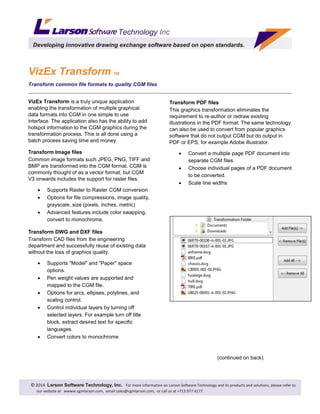
Transform DWG and DXF files
Transform CAD files from the engineering
department and successfully reuse of existing data
without the loss of graphics quality.
 Supports "Model" and "Paper" space
options.
 Pen weight values are supported and
mapped to the CGM file.
 Options for arcs, ellipses, polylines, and
scaling control.
 Control individual layers by turning off
selected layers. For example turn off title
block, extract desired text for specific
languages.
 Convert colors to monochrome
Transform PDF files
This graphics transformation eliminates the
requirement to re-author or redraw existing
illustrations in the PDF format. The same technology
can also be used to convert from popular graphics
software that do not output CGM but do output in
PDF or EPS, for example Adobe Illustrator.
 Convert a multiple page PDF document into
separate CGM files.
 Choose individual pages of a PDF document
to be converted.
 Scale line widths
(continued on back)
Developing innovative drawing exchange software based on open standards.
Technology Inc
2014 Larson Software Technology, Inc. For more information on Larson Software Technology and its products and solutions, please refer to
our website at wwww.cgmlarson.com, email sales@cgmlarson.com, or call us at +713.977.4177.
Automatically create intelligent CGM graphics
Larson’s VizEx Transform automates the creation of
hotspot information in CGM files during the
conversion process.
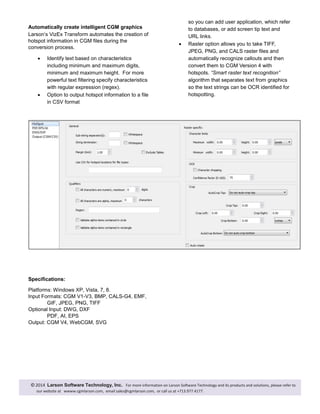
 Identify text based on characteristics
including minimum and maximum digits,
minimum and maximum height. For more
powerful text filtering specify characteristics
with regular expression (regex).
 Option to output hotspot information to a file
in CSV format
so you can add user application, which refer
to databases, or add screen tip text and
URL links.
 Raster option allows you to take TIFF,
JPEG, PNG, and CALS raster files and
automatically recognize callouts and then
convert them to CGM Version 4 with
hotspots. “Smart raster text recognition”
algorithm that separates text from graphics
so the text strings can be OCR identified for
hotspotting.
Specifications:
Platforms: Windows XP, Vista, 7, 8.
Input Formats: CGM V1-V3, BMP, CALS-G4, EMF,
GIF, JPEG, PNG, TIFF
Optional Input: DWG, DXF
PDF, AI, EPS
Output: CGM V4, WebCGM, SVG

VizEx Transform Datasheet

  • 1.
    2014 Larson SoftwareTechnology, Inc. For more information on Larson Software Technology and its products and solutions, please refer to our website at wwww.cgmlarson.com, email sales@cgmlarson.com, or call us at +713.977.4177. VizEx Transform TM Transform common file formats to quality CGM files VizEx Transform is a truly unique application enabling the transformation of multiple graphical data formats into CGM in one simple to use interface. The application also has the ability to add hotspot information to the CGM graphics during the transformation process. This is all done using a batch process saving time and money. Transform Image files Common image formats such JPEG, PNG, TIFF and BMP are transformed into the CGM format. CGM is commonly thought of as a vector format, but CGM V3 onwards includes the support for raster files.  Supports Raster to Raster CGM conversion  Options for file compressions, image quality, grayscale, size (pixels, inches, metric)  Advanced features include color swapping, convert to monochrome. Transform DWG and DXF files Transform CAD files from the engineering department and successfully reuse of existing data without the loss of graphics quality.  Supports "Model" and "Paper" space options.  Pen weight values are supported and mapped to the CGM file.  Options for arcs, ellipses, polylines, and scaling control.  Control individual layers by turning off selected layers. For example turn off title block, extract desired text for specific languages.  Convert colors to monochrome Transform PDF files This graphics transformation eliminates the requirement to re-author or redraw existing illustrations in the PDF format. The same technology can also be used to convert from popular graphics software that do not output CGM but do output in PDF or EPS, for example Adobe Illustrator.  Convert a multiple page PDF document into separate CGM files.  Choose individual pages of a PDF document to be converted.  Scale line widths (continued on back) Developing innovative drawing exchange software based on open standards. Technology Inc
  • 2.
    2014 Larson SoftwareTechnology, Inc. For more information on Larson Software Technology and its products and solutions, please refer to our website at wwww.cgmlarson.com, email sales@cgmlarson.com, or call us at +713.977.4177. Automatically create intelligent CGM graphics Larson’s VizEx Transform automates the creation of hotspot information in CGM files during the conversion process.  Identify text based on characteristics including minimum and maximum digits, minimum and maximum height. For more powerful text filtering specify characteristics with regular expression (regex).  Option to output hotspot information to a file in CSV format so you can add user application, which refer to databases, or add screen tip text and URL links.  Raster option allows you to take TIFF, JPEG, PNG, and CALS raster files and automatically recognize callouts and then convert them to CGM Version 4 with hotspots. “Smart raster text recognition” algorithm that separates text from graphics so the text strings can be OCR identified for hotspotting. Specifications: Platforms: Windows XP, Vista, 7, 8. Input Formats: CGM V1-V3, BMP, CALS-G4, EMF, GIF, JPEG, PNG, TIFF Optional Input: DWG, DXF PDF, AI, EPS Output: CGM V4, WebCGM, SVG