WELCOME
TO
LAB SESSION 1:CABLING
PreparingUnshielded Twisted Pair (UTP) cable
(Both straight through & cross over)
Monday, March 31, 2025
Data Communication & Computer Networking Lab
session1 1
2.
Objective:
After the completionof this lab, you
are able to:-
Make the two types of UTP cables,
(straight through and cross over)
Crimp them appropriately
Test the cable to check whether it was
correctly arranged or not
Monday, March 31, 2025 Data Communication & Computer Networking Lab session1 2
3.
Equipments Required:
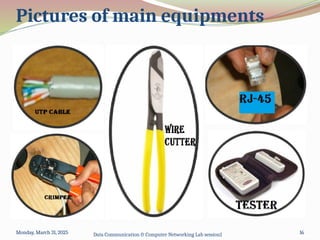
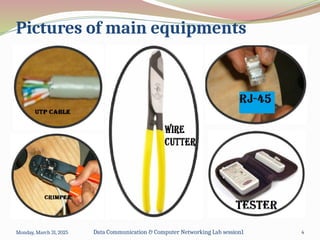
UTP cable(Cat 5 or above): is a cable consists of 4
twisted & color coded pairs of wire which is not
shielded parley.
RJ-45 connectors: is a jack used to end twisted pair
cables and enable to connect cable with other devices
Wire cutter: a tool used to cut the wire easily.
Crimper: is a tool used for fixing the connector to the
cable.
Tester: a tool used to check whether the cable
arranged and crimped correctly or not.
Monday, March 31, 2025 Data Communication & Computer Networking Lab session1 3
4.
Pictures of mainequipments
Monday, March 31, 2025 Data Communication & Computer Networking Lab session1 4
5.
Two ways ofconnecting UTP cable:
1.Straight through
2.Crossover
Monday, March 31, 2025 Data Communication & Computer Networking Lab session1 5
6.
Straight through cable:is used to
connect dissimilar devices. E.g.
Computer to a switch,
Computer to a hub,
Switch to router,
Router to hub
Crossover cable: is used to connect similar
devices. E.g.
Computer-to-computer;
Hub-to-hub;
Switch-to- switch;
Router-to-router
Monday, March 31, 2025 Data Communication & Computer Networking Lab session1
6
7.
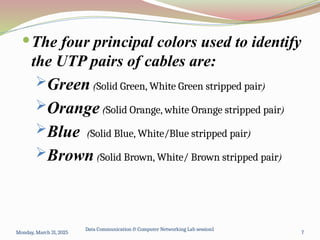
The four principalcolors used to identify
the UTP pairs of cables are:
Green (Solid Green, White Green stripped pair)
Orange (Solid Orange, white Orange stripped pair)
Blue (Solid Blue, White/Blue stripped pair)
Brown (Solid Brown, White/ Brown stripped pair)
Monday, March 31, 2025
Data Communication & Computer Networking Lab session1
7
8.
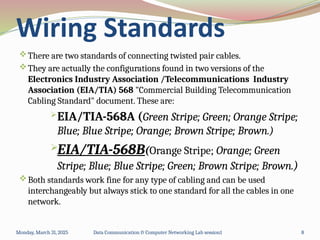
There are twostandards of connecting twisted pair cables.
They are actually the configurations found in two versions of the
Electronics Industry Association /Telecommunications Industry
Association (EIA/TIA) 568 "Commercial Building Telecommunication
Cabling Standard" document. These are:
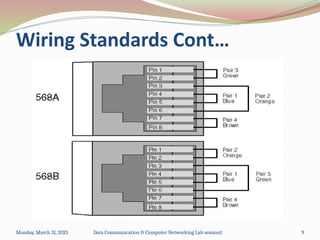
EIA/TIA-568A (Green Stripe; Green; Orange Stripe;
Blue; Blue Stripe; Orange; Brown Stripe; Brown.)
EIA/TIA-568B(Orange Stripe; Orange; Green
Stripe; Blue; Blue Stripe; Green; Brown Stripe; Brown.)
Both standards work fine for any type of cabling and can be used
interchangeably but always stick to one standard for all the cables in one
network.
Monday, March 31, 2025 Data Communication & Computer Networking Lab session1 8
Wiring Standards
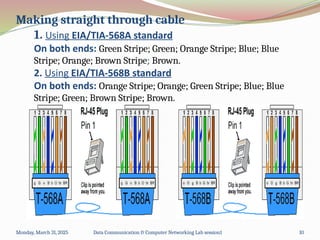
Making straight throughcable
1. Using EIA/TIA-568A standard
On both ends: Green Stripe; Green; Orange Stripe; Blue; Blue
Stripe; Orange; Brown Stripe; Brown.
2. Using EIA/TIA-568B standard
On both ends: Orange Stripe; Orange; Green Stripe; Blue; Blue
Stripe; Green; Brown Stripe; Brown.
Monday, March 31, 2025 Data Communication & Computer Networking Lab session1 10
11.
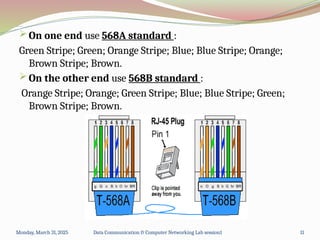
Making Crossover cable
On one end use 568A standard :
Green Stripe; Green; Orange Stripe; Blue; Blue Stripe; Orange;
Brown Stripe; Brown.
On the other end use 568B standard :
Orange Stripe; Orange; Green Stripe; Blue; Blue Stripe; Green;
Brown Stripe; Brown.
Monday, March 31, 2025 Data Communication & Computer Networking Lab session1 11
12.
Steps to makeUTP cable (both crossover and straight through) are as follows.
1. Determine how long your UTP cable should be, roll out the appropriate length of
cable and cut the cable cleanly using wire cutter.
2. Check the inner TP wires for any damage, irregularities or nicks: if so repeat the
above step.
3. Spread out the wires (which were twisted inside the jacket) and arrange them
according to their color code (using the EIA568A/568B standard)
4. Trim (cut) the wire edges very equally so that eight wires are even (level) with
one another. Wires are about 1cm long (measured from the end of the cable
jacket). [use Crimper or wire cutter to do so]
5. Slide them carefully into the connector and push the cable hard to make sure
that the end of the wires reached the front end of the RJ-45 connector.
6. Verify that the wires are arranged according to the T568A/B standard before you
do the next step.
7. Squeeze(crimp) the RJ-45 connector on to the cable using crimper.
8. Repeat steps 2-7 for the other end of the cable. Re-cut the end of the cable if
needed [remember that the order of the wires at other end is altered if the wire
is across over]
9. Check the cable to ensure that it is connected correctly or not using tester.
Monday, March 31, 2025 Data Communication & Computer Networking Lab session1 12
Procedures
Q1) Which typeof guided media
(cable) we have practiced with?
ANS. Unshielded Twisted pair(UTP)
both Straight Through and Crossover
Monday, March 31, 2025 Data Communication & Computer Networking Lab session1 14
15.
Q2) What arethe main equipments
required to prepare UTP cable?
ANS. UTP raw cable
Crimper
RJ-45 connector
Wire cutter
Tester
Monday, March 31, 2025 Data Communication & Computer Networking Lab session1 15
16.
Monday, March 31,2025 Data Communication & Computer Networking Lab session1 16
Pictures of main equipments
Monday, March 31, 2025 16
17.
Q3) We use____UTP cable to
connect similar devices. E.g.
Computer-to-computer.
ANS. CROSSOVER UTP cable
Monday, March 31, 2025 Data Communication & Computer Networking Lab session1 17
18.
Q4) What arethe four principal
colors used in UTP cable pairs?
ANS. GREEN,
ORANGE,
BLUE &
BROWN
Monday, March 31, 2025 Data Communication & Computer Networking Lab session1 18
19.
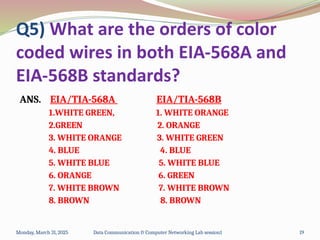
Q5) What arethe orders of color
coded wires in both EIA-568A and
EIA-568B standards?
ANS. EIA/TIA-568A EIA/TIA-568B
1.WHITE GREEN, 1. WHITE ORANGE
2.GREEN 2. ORANGE
3. WHITE ORANGE 3. WHITE GREEN
4. BLUE 4. BLUE
5. WHITE BLUE 5. WHITE BLUE
6. ORANGE 6. GREEN
7. WHITE BROWN 7. WHITE BROWN
8. BROWN 8. BROWN
Monday, March 31, 2025 Data Communication & Computer Networking Lab session1 19
20.
THANK YOU FORYOUR ATTENTION
THE END!
Monday, March 31, 2025 Data Communication & Computer Networking Lab session1 20

![Steps to make UTP cable (both crossover and straight through) are as follows.
1. Determine how long your UTP cable should be, roll out the appropriate length of
cable and cut the cable cleanly using wire cutter.
2. Check the inner TP wires for any damage, irregularities or nicks: if so repeat the
above step.
3. Spread out the wires (which were twisted inside the jacket) and arrange them
according to their color code (using the EIA568A/568B standard)
4. Trim (cut) the wire edges very equally so that eight wires are even (level) with
one another. Wires are about 1cm long (measured from the end of the cable
jacket). [use Crimper or wire cutter to do so]
5. Slide them carefully into the connector and push the cable hard to make sure
that the end of the wires reached the front end of the RJ-45 connector.
6. Verify that the wires are arranged according to the T568A/B standard before you
do the next step.
7. Squeeze(crimp) the RJ-45 connector on to the cable using crimper.
8. Repeat steps 2-7 for the other end of the cable. Re-cut the end of the cable if
needed [remember that the order of the wires at other end is altered if the wire
is across over]
9. Check the cable to ensure that it is connected correctly or not using tester.
Monday, March 31, 2025 Data Communication & Computer Networking Lab session1 12
Procedures](https://image.slidesharecdn.com/networkinglabsession1ppt-250331192426-bfa26b1d/85/manual-Networking-LAB-SESSION-1-PPT-pptx-12-320.jpg)