Hidden Gems

Manage Transaction Controls with UI-Apps

Copyright © Project Partners, LLC
Setting Up Transaction Controls on Projects
 Transaction Controls are used to control charges to

Projects in Oracle
 Can be setup at the Project or any task level
 Control Chargeability and Billability
 Controls can be enabled by Person, Expenditure

Type, Category, non-Labor Resource
 Controls defined can be exclusive or inclusive
 Cumbersome to setup as navigation is needed to the

project option or to each task option
 UI-Apps offers easier approach in one MS-Excel

Worksheet
Copyright © Project Partners, LLC
Four Steps – with UI-Apps
 Step 1: Choose level – Project or Task
 Step 2: Select Criteria – Person, Type, Category, NLR

 Step 3: Choose Chargeability/Billability
 Step 4: Set Control – Inclusive/Exclusive

 UI-Apps offers easier approach in one MS-Excel

Worksheet

Copyright © Project Partners, LLC
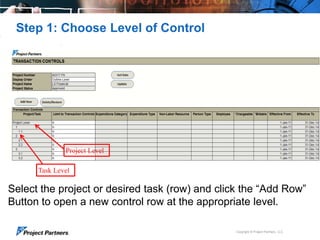
Step 1: Choose Level of Control

Project Level
Task Level

Select the project or desired task (row) and click the “Add Row”
Button to open a new control row at the appropriate level.
Copyright © Project Partners, LLC
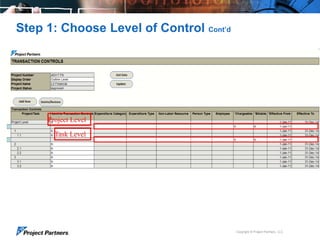
Step 1: Choose Level of Control Cont’d

Project Level
Task Level

Copyright © Project Partners, LLC
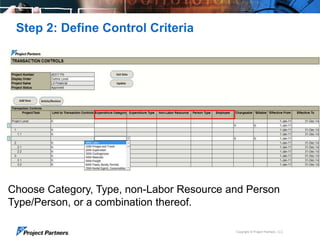
Step 2: Define Control Criteria

Choose Category, Type, non-Labor Resource and Person
Type/Person, or a combination thereof.
Copyright © Project Partners, LLC
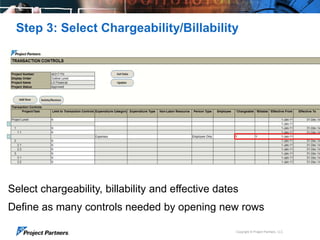
Step 3: Select Chargeability/Billability

Select chargeability, billability and effective dates
Define as many controls needed by opening new rows
Copyright © Project Partners, LLC
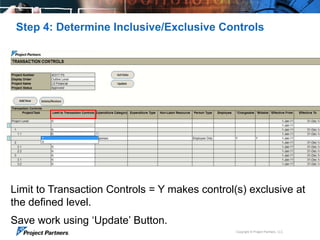
Step 4: Determine Inclusive/Exclusive Controls

Limit to Transaction Controls = Y makes control(s) exclusive at
the defined level.
Save work using „Update‟ Button.
Copyright © Project Partners, LLC
Manage Transaction Controls with UI-Apps
 Use the power of transaction controls in Oracle Projects

to manage charges to your project
 Quickly and Easily manage your controls with one MS-

Excel worksheet using UI-Apps

 Stay tuned for more Hidden Gems from Project Partners

Copyright © Project Partners, LLC
UI-Apps Hidden Gems
A series of videos describing unique features of Project Partners
UI-Apps which add significant functionality to Oracle Projects
 Hidden Gems Series


See them all here: http://www.projectp.com/demos/?product=ui

Copyright © Project Partners, LLC
For more information:
Phone: 650.712.6200
email: info@projectp.com
www.projectp.com
Copyright © Project Partners, LLC

11

Maintain Transaction Controls for Oracle EBS Projects using a single MS-Excel Worksheet with Project Partners UI-Apps

  • 1.
    Hidden Gems Manage TransactionControls with UI-Apps Copyright © Project Partners, LLC
  • 2.
    Setting Up TransactionControls on Projects  Transaction Controls are used to control charges to Projects in Oracle  Can be setup at the Project or any task level  Control Chargeability and Billability  Controls can be enabled by Person, Expenditure Type, Category, non-Labor Resource  Controls defined can be exclusive or inclusive  Cumbersome to setup as navigation is needed to the project option or to each task option  UI-Apps offers easier approach in one MS-Excel Worksheet Copyright © Project Partners, LLC
  • 3.
    Four Steps –with UI-Apps  Step 1: Choose level – Project or Task  Step 2: Select Criteria – Person, Type, Category, NLR  Step 3: Choose Chargeability/Billability  Step 4: Set Control – Inclusive/Exclusive  UI-Apps offers easier approach in one MS-Excel Worksheet Copyright © Project Partners, LLC
  • 4.
    Step 1: ChooseLevel of Control Project Level Task Level Select the project or desired task (row) and click the “Add Row” Button to open a new control row at the appropriate level. Copyright © Project Partners, LLC
  • 5.
    Step 1: ChooseLevel of Control Cont’d Project Level Task Level Copyright © Project Partners, LLC
  • 6.
    Step 2: DefineControl Criteria Choose Category, Type, non-Labor Resource and Person Type/Person, or a combination thereof. Copyright © Project Partners, LLC
  • 7.
    Step 3: SelectChargeability/Billability Select chargeability, billability and effective dates Define as many controls needed by opening new rows Copyright © Project Partners, LLC
  • 8.
    Step 4: DetermineInclusive/Exclusive Controls Limit to Transaction Controls = Y makes control(s) exclusive at the defined level. Save work using „Update‟ Button. Copyright © Project Partners, LLC
  • 9.
    Manage Transaction Controlswith UI-Apps  Use the power of transaction controls in Oracle Projects to manage charges to your project  Quickly and Easily manage your controls with one MS- Excel worksheet using UI-Apps  Stay tuned for more Hidden Gems from Project Partners Copyright © Project Partners, LLC
  • 10.
    UI-Apps Hidden Gems Aseries of videos describing unique features of Project Partners UI-Apps which add significant functionality to Oracle Projects  Hidden Gems Series  See them all here: http://www.projectp.com/demos/?product=ui Copyright © Project Partners, LLC
  • 11.
    For more information: Phone:650.712.6200 email: info@projectp.com www.projectp.com Copyright © Project Partners, LLC 11

Editor's Notes

  • #3 Depending on your organization’s requirements, it could be either one or a blended solution of both…If you have sophisticated, complex timecards or want to enter timecards for groups of people, TimeSpeed is right for youIf you have a mobile workforce that needs the convenience and flexibility to enter time while on the job, or on the go, mProjects is the answer3 flavors here?
  • #4 Depending on your organization’s requirements, it could be either one or a blended solution of both…If you have sophisticated, complex timecards or want to enter timecards for groups of people, TimeSpeed is right for youIf you have a mobile workforce that needs the convenience and flexibility to enter time while on the job, or on the go, mProjects is the answer3 flavors here?
  • #5 Depending on your organization’s requirements, it could be either one or a blended solution of both…If you have sophisticated, complex timecards or want to enter timecards for groups of people, TimeSpeed is right for youIf you have a mobile workforce that needs the convenience and flexibility to enter time while on the job, or on the go, mProjects is the answer3 flavors here?
  • #6 Depending on your organization’s requirements, it could be either one or a blended solution of both…If you have sophisticated, complex timecards or want to enter timecards for groups of people, TimeSpeed is right for youIf you have a mobile workforce that needs the convenience and flexibility to enter time while on the job, or on the go, mProjects is the answer3 flavors here?
  • #7 (e.g. Only S/Cs can charge expenses, …..)
  • #8 Depending on your organization’s requirements, it could be either one or a blended solution of both…If you have sophisticated, complex timecards or want to enter timecards for groups of people, TimeSpeed is right for youIf you have a mobile workforce that needs the convenience and flexibility to enter time while on the job, or on the go, mProjects is the answer3 flavors here?
  • #9 Depending on your organization’s requirements, it could be either one or a blended solution of both…If you have sophisticated, complex timecards or want to enter timecards for groups of people, TimeSpeed is right for youIf you have a mobile workforce that needs the convenience and flexibility to enter time while on the job, or on the go, mProjects is the answer3 flavors here?
  • #10 Depending on your organization’s requirements, it could be either one or a blended solution of both…If you have sophisticated, complex timecards or want to enter timecards for groups of people, TimeSpeed is right for youIf you have a mobile workforce that needs the convenience and flexibility to enter time while on the job, or on the go, mProjects is the answer3 flavors here?