MEASUREEvaluation
Managing a Global DATIM
Help Desk:
Lessons Learned
Manish Kumar, MEASURE Evaluation
Steffen Tengesdal, BAO Systems
August 9, 2016
DHIS 2 Experts Academy
Oslo, Norway
Agenda
Global DATIM Implementation
• Purpose
• Scope
• Users
Help Desk Management
• Objectives
• Technical Support Tiers
• Technology
• Performance Management
Challenges
Lessons Learned
Going Forward
Global DATIM Implementation
DATIM stands for Data for Accountability, Transparency,
and Impact.
It’s a PEPFAR-specific version of DHIS 2.
• Purpose: Collect, analyze, and use data to improve the
accountability, transparency, and impact of PEPFAR’s
programs.
• Scope: More than 10,000 people in 58 countries have
used DATIM’s DHIS 2 platform since its launch in 2015.
Users: Diverse and Distributed
• Collect and analyze data to review results and monitor
progress against targets at different levels. For
example:
o Target vs. results
o Care vs. treatment at different levels
o Program review and planning
• Different user types and roles
o Type: implementing partner, agency, interagency, and
global
o Roles: read-only, data entry and submit, accept, recall,
return, de-duplication, user admin, site admin
• Spread across 58 countries PEPFAR operating units
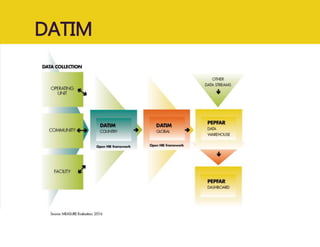
DATIM
DATIM Help Desk Management
Help Desk Objectives
• Provide timely and high-quality user-
support services.
• Connect DATIM users with PEPFAR’s
policy and programs and with the DATIM
systems team.
• Build and improve a user knowledge
base.
• Build the capacity of support staff.
• Facilitate continuous quality improvement
efforts.
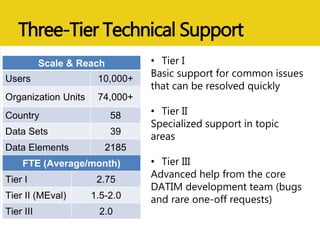
Three-Tier Technical Support
• Tier I
Basic support for common issues
that can be resolved quickly
• Tier II
Specialized support in topic
areas
• Tier III
Advanced help from the core
DATIM development team (bugs
and rare one-off requests)
Scale & Reach
Users 10,000+
Organization Units 74,000+
Country 58
Data Sets 39
Data Elements 2185
FTE (Average/month)
Tier I 2.75
Tier II (MEval) 1.5-2.0
Tier III 2.0
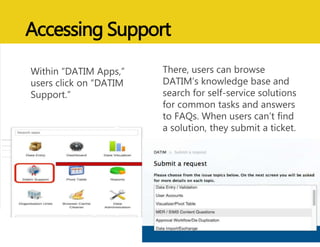
Accessing Support
Within “DATIM Apps,”
users click on “DATIM
Support.”
There, users can browse
DATIM’s knowledge base and
search for self-service solutions
for common tasks and answers
to FAQs. When users can’t find
a solution, they submit a ticket.
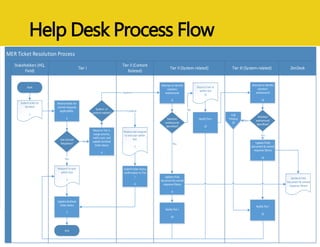
Help Desk Process Flow
MER Ticket Resolution Process
Tier II (Content
Related)
Tier I
Stakeholders (HQ,
Field)
Tier II (System-related) Tier III (System-related) ZenDesk
Submit ticket to
ZenDesk
1
Review ticket for
canned response
applicability.
2
Use Canned
Response?
Respond to user
within SLA
3
End
Start
Submit ticket status
confirmation to Tier
I.
6
Review and respond
to end user within
SLA.
5
UpdateZenDesk
ticket status
7
No
Yes
Routeto Tier II,
assign priority,
notify user, and
update ZenDesk
ticket status
4
System- or
content-related?
Content
System
Notify Tier I
12
Routeto tier III
within SLA
11
Attempt to identify
solution/
workaround
8
Solution/
workaround
identified?
No
Yes
ZenDesk FAQ
Document & canned
response library
UpdateFAQs
document & canned
response library
9
Attempt to identify
solution/
workaround
13
Solution/
workaround
identified?
CCB
Process
16
No
Notify Tier I
10
UpdateFAQs
document & canned
response library
14
Notify Tier I
15
Yes
Help Desk Technology Platform
• ZenDesk help desk SaaS platform
• Custom app and single sign-on with DATIM
• Good Data analytics engine
• Enable help desk performance monitoring
• Ability to empower the largest number of users
at the lowest cost
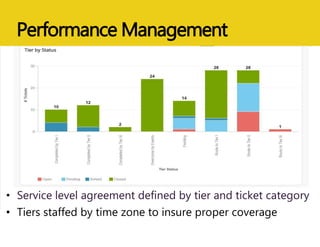
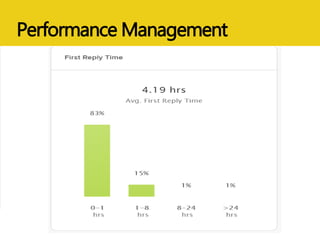
Performance Management
• Service level agreement defined by tier and ticket category
• Tiers staffed by time zone to insure proper coverage
Performance Management
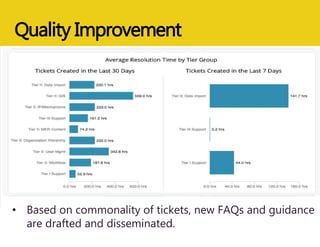
Quality Improvement
• Based on commonality of tickets, new FAQs and guidance
are drafted and disseminated.
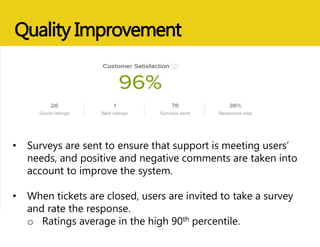
Quality Improvement
• Surveys are sent to ensure that support is meeting users’
needs, and positive and negative comments are taken into
account to improve the system.
• When tickets are closed, users are invited to take a survey
and rate the response.
o Ratings average in the high 90th percentile.
Challenges
• Dynamic program environment.
• Users are diverse and geographically
dispersed.
• Knowledge and skills gaps.
• Input from others is required; hence longer response
time.
• Users do not always submit enough information
• Permissions need verification to confirm access; each
user has different roles and access level.
• User training needs are evolving.
Lessons Learned
• Set policies, procedures, standards, and guidelines.
• Build and nurture a team.
• Provide virtual and classroom training to users.
• Ensure users have access to training and knowledge
resources.
• Create and support communities of practice
(PEPFAR Data Exchange Implementer
Community, under OpenHIE).
Going Forward
• Integration of help desk
o Extension of help desk to other PEPFAR
reporting tools
• Building on current help desk model
and leveraging particular resources
from Tier 1 and cross training
• Expansion of help desk support services
with relatively low cost
DATIM Resources
• DATIM support page
• PEPFAR.gov
• DATIM OpenHIE Community
https://wiki.ohie.org/display/SUB/DATIM+Data+E
xchange+Implementer+Community
• MEASURE Evaluation project website
(www.measureevaluation.org)
Thank You!
Q&A
www.measureevaluation.org
MEASURE Evaluation is funded by the U.S. Agency for
International Development (USAID) under terms of
Cooperative Agreement AID-OAA-L-14-00004 and
implemented by the Carolina Population Center,
University of North Carolina at Chapel Hill in partnership
with ICF International; John Snow, Inc.; Management
Sciences for Health; Palladium; and Tulane University. The
views expressed in this presentation do not necessarily
reflect the views of USAID or the United States
government.
www.measureevaluation.org

Managing a Global DATIM Help Desk: Lessons Learned

  • 1.
    MEASUREEvaluation Managing a GlobalDATIM Help Desk: Lessons Learned Manish Kumar, MEASURE Evaluation Steffen Tengesdal, BAO Systems August 9, 2016 DHIS 2 Experts Academy Oslo, Norway
  • 2.
    Agenda Global DATIM Implementation •Purpose • Scope • Users Help Desk Management • Objectives • Technical Support Tiers • Technology • Performance Management Challenges Lessons Learned Going Forward
  • 3.
    Global DATIM Implementation DATIMstands for Data for Accountability, Transparency, and Impact. It’s a PEPFAR-specific version of DHIS 2. • Purpose: Collect, analyze, and use data to improve the accountability, transparency, and impact of PEPFAR’s programs. • Scope: More than 10,000 people in 58 countries have used DATIM’s DHIS 2 platform since its launch in 2015.
  • 4.
    Users: Diverse andDistributed • Collect and analyze data to review results and monitor progress against targets at different levels. For example: o Target vs. results o Care vs. treatment at different levels o Program review and planning • Different user types and roles o Type: implementing partner, agency, interagency, and global o Roles: read-only, data entry and submit, accept, recall, return, de-duplication, user admin, site admin • Spread across 58 countries PEPFAR operating units
  • 5.
  • 6.
    DATIM Help DeskManagement
  • 7.
    Help Desk Objectives •Provide timely and high-quality user- support services. • Connect DATIM users with PEPFAR’s policy and programs and with the DATIM systems team. • Build and improve a user knowledge base. • Build the capacity of support staff. • Facilitate continuous quality improvement efforts.
  • 8.
    Three-Tier Technical Support •Tier I Basic support for common issues that can be resolved quickly • Tier II Specialized support in topic areas • Tier III Advanced help from the core DATIM development team (bugs and rare one-off requests) Scale & Reach Users 10,000+ Organization Units 74,000+ Country 58 Data Sets 39 Data Elements 2185 FTE (Average/month) Tier I 2.75 Tier II (MEval) 1.5-2.0 Tier III 2.0
  • 9.
    Accessing Support Within “DATIMApps,” users click on “DATIM Support.” There, users can browse DATIM’s knowledge base and search for self-service solutions for common tasks and answers to FAQs. When users can’t find a solution, they submit a ticket.
  • 10.
    Help Desk ProcessFlow MER Ticket Resolution Process Tier II (Content Related) Tier I Stakeholders (HQ, Field) Tier II (System-related) Tier III (System-related) ZenDesk Submit ticket to ZenDesk 1 Review ticket for canned response applicability. 2 Use Canned Response? Respond to user within SLA 3 End Start Submit ticket status confirmation to Tier I. 6 Review and respond to end user within SLA. 5 UpdateZenDesk ticket status 7 No Yes Routeto Tier II, assign priority, notify user, and update ZenDesk ticket status 4 System- or content-related? Content System Notify Tier I 12 Routeto tier III within SLA 11 Attempt to identify solution/ workaround 8 Solution/ workaround identified? No Yes ZenDesk FAQ Document & canned response library UpdateFAQs document & canned response library 9 Attempt to identify solution/ workaround 13 Solution/ workaround identified? CCB Process 16 No Notify Tier I 10 UpdateFAQs document & canned response library 14 Notify Tier I 15 Yes
  • 11.
    Help Desk TechnologyPlatform • ZenDesk help desk SaaS platform • Custom app and single sign-on with DATIM • Good Data analytics engine • Enable help desk performance monitoring • Ability to empower the largest number of users at the lowest cost
  • 12.
    Performance Management • Servicelevel agreement defined by tier and ticket category • Tiers staffed by time zone to insure proper coverage
  • 13.
  • 14.
    Quality Improvement • Basedon commonality of tickets, new FAQs and guidance are drafted and disseminated.
  • 15.
    Quality Improvement • Surveysare sent to ensure that support is meeting users’ needs, and positive and negative comments are taken into account to improve the system. • When tickets are closed, users are invited to take a survey and rate the response. o Ratings average in the high 90th percentile.
  • 16.
    Challenges • Dynamic programenvironment. • Users are diverse and geographically dispersed. • Knowledge and skills gaps. • Input from others is required; hence longer response time. • Users do not always submit enough information • Permissions need verification to confirm access; each user has different roles and access level. • User training needs are evolving.
  • 17.
    Lessons Learned • Setpolicies, procedures, standards, and guidelines. • Build and nurture a team. • Provide virtual and classroom training to users. • Ensure users have access to training and knowledge resources. • Create and support communities of practice (PEPFAR Data Exchange Implementer Community, under OpenHIE).
  • 18.
    Going Forward • Integrationof help desk o Extension of help desk to other PEPFAR reporting tools • Building on current help desk model and leveraging particular resources from Tier 1 and cross training • Expansion of help desk support services with relatively low cost
  • 19.
    DATIM Resources • DATIMsupport page • PEPFAR.gov • DATIM OpenHIE Community https://wiki.ohie.org/display/SUB/DATIM+Data+E xchange+Implementer+Community • MEASURE Evaluation project website (www.measureevaluation.org)
  • 20.
  • 21.
    MEASURE Evaluation isfunded by the U.S. Agency for International Development (USAID) under terms of Cooperative Agreement AID-OAA-L-14-00004 and implemented by the Carolina Population Center, University of North Carolina at Chapel Hill in partnership with ICF International; John Snow, Inc.; Management Sciences for Health; Palladium; and Tulane University. The views expressed in this presentation do not necessarily reflect the views of USAID or the United States government. www.measureevaluation.org