Chapter 6
Inside Computers
and Mobile Devices
Discovering Computers
Technology in a World of Computers,
Mobile Devices, and the Internet
Objectives Overview
Describe the various
computer and mobile
device cases and the
contents they
protect
Describe multi-core
processors the components
of a processor, and the four
steps in a machine cycle
Identify characteristics of
various personal computer
processors on the market
today, and describe the
ways processors are cooled
Explain the advantages and
services of cloud computing
Define a bit, and describe
how a series of bits
represents data
Explain how program and
application instructions
transfer in and out of
memory
Discovering Computers 2014: Chapter 6 2
See Page 248
for Detailed Objectives
Objectives Overview
Differentiate among
the various types
of memory
Describe the purpose
of adapter cards,
USB adapters, and
ExpressCard modules
Explain the function
of a bus
Explain the purpose
of a power supply
and batteries
Understand how to
care for computers
and mobile
devices
Discovering Computers 2014: Chapter 6 3
See Page 248
for Detailed Objectives
Inside the Case
• The case contains and protects the electronics of the
computer or mobile device from damage
Discovering Computers 2014: Chapter 6 4
Page 248
Figure 6-1
Inside the Case
Discovering Computers 2014: Chapter 6 5
Page 250
Figure 6-2
Inside the Case
• The motherboard is the main circuit board of the
computer
– A computer chip contains integrated circuits
Discovering Computers 2014: Chapter 6 6
Pages 250 - 251
Figure 6-3
Processors
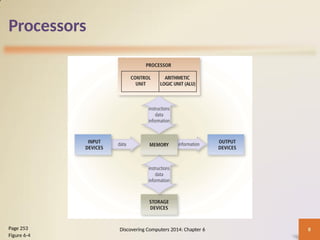
• The processor, also called the central processing
unit (CPU), interprets and carries out the basic
instructions that operate a computer
– Contain a control unit and an arithmetic logic unit
(ALU)
• A multi-core processor is a single chip with two or
more separate processor cores
Discovering Computers 2014: Chapter 6 7
Pages 252 - 253
Processors
Discovering Computers 2014: Chapter 6 8
Page 253
Figure 6-4
Processors
• The control unit is the component of the
processor that directs and coordinates most of
the operations in the computer
• The arithmetic logic unit (ALU) performs
arithmetic, comparison, and other operations
Discovering Computers 2014: Chapter 6 9
Page 253
Processors
• For every instruction, a processor repeats a set of
four basic operations, which comprise a machine
cycle
Discovering Computers 2014: Chapter 6 10
Page 254
Figure 6-5
Processors
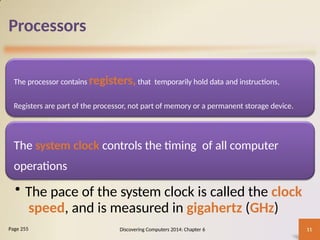
The processor contains registers,that temporarily hold data and instructions,
Registers are part of the processor, not part of memory or a permanent storage device.
The system clock controls the timing of all computer
operations
• The pace of the system clock is called the clock
speed, and is measured in gigahertz (GHz)
Discovering Computers 2014: Chapter 6 11
Page 255
Processors
• The leading
manufacturers of
personal computer
processor chips are Intel
and AMD
Discovering Computers 2014: Chapter 6 12
Page 255
Processors
• A processor chip generates heat that could cause
the chip to malfunction or fail
• Require additional cooling
– Heat sinks
– Liquid cooling technology
– Cooling mats
Discovering Computers 2014: Chapter 6 13
Pages 256 - 257
Figures 6-6 – 6-7
Cloud Computing
Discovering Computers 2014: Chapter 6 14
Page 257
• Home and business users choose cloud computing
for a variety of reasons
Accessibility Cost savings
Space
savings
Scalability
Cloud Computing
• Accessibility: Data and/or applications are available
worldwide from any computer or device with an Internet
connection.
• Cost savings: The expense of software and high-end
hardware, such as fast processors and high-capacity
memory and storage devices, shifts away from the user.
• Space savings: Floor space required for servers, storages
devices, and other hardware shifts away from the user.
• Scalability: Provides the flexibility to increase or
decrease computing requirements as needed.
Data Representation
Analog signals are continuous and vary in
strength and quality
Digital signals are in one of two states: on
or off
• Most computers are digital
• The binary system uses two unique digits (0 and 1)
• Bits and bytes
Discovering Computers 2014: Chapter 6 15
Page 259
Data Representation
The circuitry in a computer or
mobile device represents the on or
the off states electronically by the
presence or absence of an electronic
charge
Eight bits grouped together as a
unit are called a byte. A byte
represents a single character in
the computer or mobile device
Discovering Computers 2014: Chapter 6 16
Pages 259 - 260
Figures 6-8 – 6-9
Data Representation
Discovering Computers 2014: Chapter 6 17
Page 260
Figure 6-10
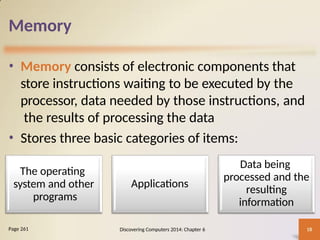
Memory
• Memory consists of electronic components that
store instructions waiting to be executed by the
processor, data needed by those instructions, and
the results of processing the data
• Stores three basic categories of items:
Discovering Computers 2014: Chapter 6 18
Page 261
The operating
system and other
programs
Applications
Data being
processed and the
resulting
information
Memory
1. The operating system and other programs that control
or maintain the computer and its devices
2. Applications that carry out a specific task, such as word
processing
3. The data being processed by the applications and the
resulting information
This role of memory to store both data and programs is
known as the stored program concept.
Memory
• Each location in memory has an address
• Memory size commonly is measured in gigabytes
(GB) or terabytes (TB)
Discovering Computers 2014: Chapter 6 19
Page 261
Figure 6-11
Memory
Discovering Computers 2014: Chapter 6 20
Page 262
Loses its contents when
power is turned off
Example includes RAM
• The system unit contains two types of memory:
Volatile memory Nonvolatile
memory
Does not lose contents
when power is removed
Examples include ROM,
flash memory CMOS
Memory
Discovering Computers 2014: Chapter 6 21
Page 262
Figure 6-12
Memory
• Two common types of RAM chips exist:
Discovering Computers 2014: Chapter 6 22
Page 263
Table 6-
Dynamic RAM
(DRAM)
Static RAM (SRAM)
Memory
• RAM chips usually reside on a memory module
and are inserted into memory slots
Discovering Computers 2014: Chapter 6 23
Page 263
Figure 6-13
Memory
• Memory cache speeds the processes of the computer
because it stores frequently used instructions and data
Discovering Computers 2014: Chapter 6 24
Page 265
Figure 6-14
Memory
Read-only memory (ROM)
refers to memory chips
storing permanent data and
instructions
•Firmware
Discovering Computers 2014: Chapter 6 25
Page 265
Memory
• Flash memory can be erased electronically and
rewritten
– CMOS technology provides high speeds and consumes
little power
Discovering Computers 2014: Chapter 6 26
Pages 266 - 267
Memory
• Access time is the amount of time it takes the
processor to read from memory
– Measured in nanoseconds
Discovering Computers 2014: Chapter 6 27
Page 267
Table 6-2 and Figure 6-15
Adapter
s
• An adapter card enhances
functions of a component of
a desktop or server system
unit and/or provides
connections to peripherals
– Sound card and graphics
card
• An expansion slot is a
socket on a desktop or
server motherboard that
can hold an adapter
card
Discovering Computers 2014: Chapter 6 28
Page 269
Table 6-
Adapter
s
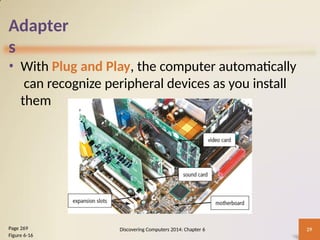
• With Plug and Play, the computer automatically
can recognize peripheral devices as you install
them
Discovering Computers 2014: Chapter 6 29
Page 269
Figure 6-16
Adapter
s
• Adapters for mobile computers are in the form of
a removable flash memory device
– USB adapter
– ExpressCard module
Discovering Computers 2014: Chapter 6 30
Page 269
Figures 6-17 – 6-18
Buses
• A bus allows the various
devices both inside and
attached to the system
unit to communicate with
each other
– Data bus
– Address bus
• Word size is the number
of bits the processor can
interpret and execute at a
given time
Discovering Computers 2014: Chapter 6 31
Pages 270 - 271
Figure 6-19
Buses
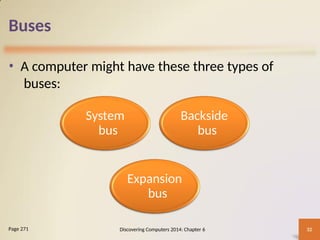
• A computer might have these three types of
buses:
Discovering Computers 2014: Chapter 6 32
Page 271
System
bus
Backside
bus
Expansion
bus
Types of Buses
A computer has a system bus, possibly a backside bus, and
an expansion bus.
• A system bus, also called the front side bus (FSB), is part
of the motherboard and connects the processor to main
memory.
• A backside bus (BSB) connects the processor to cache.
• An expansion bus allows the processor to communicate
with peripheral devices.
Power Supply and Battery
• The power supply or
laptop AC adapter
converts the wall outlet
AC power into DC
power
• alternating ­
current (AC)
• a direct current (DC)
Discovering Computers 2014: Chapter 6 33
Page 271
Figure 6-20
Power Supply and Battery
• Mobile computers and devices can run using
either a power supply or batteries
• Batteries typically are rechargeable lithium-ion
batteries
Discovering Computers: Chapter 6 34
Page 272
Figure 6-21
Summary
Various components
inside computers
and mobile devices
Types of processors,
steps in a machine
cycle, and processor
cooling methods
Advantages and
services of cloud
computing
How memory stores
data and described
various types of
memory
Adapters, buses,
power supplies and
batteries
Ways to care for
computers and
mobile devices
Discovering Computers: Chapter 6 35
Page 275
Discovering Computers
Technology in a World of Computers,
Mobile Devices, and the Internet
Chapter 6
Inside Computers
and Mobile Devices
Chapter 6 Complete

Management information system chapter111

  • 1.
    Chapter 6 Inside Computers andMobile Devices Discovering Computers Technology in a World of Computers, Mobile Devices, and the Internet
  • 2.
    Objectives Overview Describe thevarious computer and mobile device cases and the contents they protect Describe multi-core processors the components of a processor, and the four steps in a machine cycle Identify characteristics of various personal computer processors on the market today, and describe the ways processors are cooled Explain the advantages and services of cloud computing Define a bit, and describe how a series of bits represents data Explain how program and application instructions transfer in and out of memory Discovering Computers 2014: Chapter 6 2 See Page 248 for Detailed Objectives
  • 3.
    Objectives Overview Differentiate among thevarious types of memory Describe the purpose of adapter cards, USB adapters, and ExpressCard modules Explain the function of a bus Explain the purpose of a power supply and batteries Understand how to care for computers and mobile devices Discovering Computers 2014: Chapter 6 3 See Page 248 for Detailed Objectives
  • 4.
    Inside the Case •The case contains and protects the electronics of the computer or mobile device from damage Discovering Computers 2014: Chapter 6 4 Page 248 Figure 6-1
  • 5.
    Inside the Case DiscoveringComputers 2014: Chapter 6 5 Page 250 Figure 6-2
  • 6.
    Inside the Case •The motherboard is the main circuit board of the computer – A computer chip contains integrated circuits Discovering Computers 2014: Chapter 6 6 Pages 250 - 251 Figure 6-3
  • 7.
    Processors • The processor,also called the central processing unit (CPU), interprets and carries out the basic instructions that operate a computer – Contain a control unit and an arithmetic logic unit (ALU) • A multi-core processor is a single chip with two or more separate processor cores Discovering Computers 2014: Chapter 6 7 Pages 252 - 253
  • 8.
    Processors Discovering Computers 2014:Chapter 6 8 Page 253 Figure 6-4
  • 9.
    Processors • The controlunit is the component of the processor that directs and coordinates most of the operations in the computer • The arithmetic logic unit (ALU) performs arithmetic, comparison, and other operations Discovering Computers 2014: Chapter 6 9 Page 253
  • 10.
    Processors • For everyinstruction, a processor repeats a set of four basic operations, which comprise a machine cycle Discovering Computers 2014: Chapter 6 10 Page 254 Figure 6-5
  • 11.
    Processors The processor containsregisters,that temporarily hold data and instructions, Registers are part of the processor, not part of memory or a permanent storage device. The system clock controls the timing of all computer operations • The pace of the system clock is called the clock speed, and is measured in gigahertz (GHz) Discovering Computers 2014: Chapter 6 11 Page 255
  • 12.
    Processors • The leading manufacturersof personal computer processor chips are Intel and AMD Discovering Computers 2014: Chapter 6 12 Page 255
  • 13.
    Processors • A processorchip generates heat that could cause the chip to malfunction or fail • Require additional cooling – Heat sinks – Liquid cooling technology – Cooling mats Discovering Computers 2014: Chapter 6 13 Pages 256 - 257 Figures 6-6 – 6-7
  • 14.
    Cloud Computing Discovering Computers2014: Chapter 6 14 Page 257 • Home and business users choose cloud computing for a variety of reasons Accessibility Cost savings Space savings Scalability
  • 15.
    Cloud Computing • Accessibility:Data and/or applications are available worldwide from any computer or device with an Internet connection. • Cost savings: The expense of software and high-end hardware, such as fast processors and high-capacity memory and storage devices, shifts away from the user. • Space savings: Floor space required for servers, storages devices, and other hardware shifts away from the user. • Scalability: Provides the flexibility to increase or decrease computing requirements as needed.
  • 16.
    Data Representation Analog signalsare continuous and vary in strength and quality Digital signals are in one of two states: on or off • Most computers are digital • The binary system uses two unique digits (0 and 1) • Bits and bytes Discovering Computers 2014: Chapter 6 15 Page 259
  • 17.
    Data Representation The circuitryin a computer or mobile device represents the on or the off states electronically by the presence or absence of an electronic charge Eight bits grouped together as a unit are called a byte. A byte represents a single character in the computer or mobile device Discovering Computers 2014: Chapter 6 16 Pages 259 - 260 Figures 6-8 – 6-9
  • 18.
    Data Representation Discovering Computers2014: Chapter 6 17 Page 260 Figure 6-10
  • 19.
    Memory • Memory consistsof electronic components that store instructions waiting to be executed by the processor, data needed by those instructions, and the results of processing the data • Stores three basic categories of items: Discovering Computers 2014: Chapter 6 18 Page 261 The operating system and other programs Applications Data being processed and the resulting information
  • 20.
    Memory 1. The operatingsystem and other programs that control or maintain the computer and its devices 2. Applications that carry out a specific task, such as word processing 3. The data being processed by the applications and the resulting information This role of memory to store both data and programs is known as the stored program concept.
  • 21.
    Memory • Each locationin memory has an address • Memory size commonly is measured in gigabytes (GB) or terabytes (TB) Discovering Computers 2014: Chapter 6 19 Page 261 Figure 6-11
  • 22.
    Memory Discovering Computers 2014:Chapter 6 20 Page 262 Loses its contents when power is turned off Example includes RAM • The system unit contains two types of memory: Volatile memory Nonvolatile memory Does not lose contents when power is removed Examples include ROM, flash memory CMOS
  • 23.
    Memory Discovering Computers 2014:Chapter 6 21 Page 262 Figure 6-12
  • 24.
    Memory • Two commontypes of RAM chips exist: Discovering Computers 2014: Chapter 6 22 Page 263 Table 6- Dynamic RAM (DRAM) Static RAM (SRAM)
  • 25.
    Memory • RAM chipsusually reside on a memory module and are inserted into memory slots Discovering Computers 2014: Chapter 6 23 Page 263 Figure 6-13
  • 26.
    Memory • Memory cachespeeds the processes of the computer because it stores frequently used instructions and data Discovering Computers 2014: Chapter 6 24 Page 265 Figure 6-14
  • 27.
    Memory Read-only memory (ROM) refersto memory chips storing permanent data and instructions •Firmware Discovering Computers 2014: Chapter 6 25 Page 265
  • 28.
    Memory • Flash memorycan be erased electronically and rewritten – CMOS technology provides high speeds and consumes little power Discovering Computers 2014: Chapter 6 26 Pages 266 - 267
  • 29.
    Memory • Access timeis the amount of time it takes the processor to read from memory – Measured in nanoseconds Discovering Computers 2014: Chapter 6 27 Page 267 Table 6-2 and Figure 6-15
  • 30.
    Adapter s • An adaptercard enhances functions of a component of a desktop or server system unit and/or provides connections to peripherals – Sound card and graphics card • An expansion slot is a socket on a desktop or server motherboard that can hold an adapter card Discovering Computers 2014: Chapter 6 28 Page 269 Table 6-
  • 31.
    Adapter s • With Plugand Play, the computer automatically can recognize peripheral devices as you install them Discovering Computers 2014: Chapter 6 29 Page 269 Figure 6-16
  • 32.
    Adapter s • Adapters formobile computers are in the form of a removable flash memory device – USB adapter – ExpressCard module Discovering Computers 2014: Chapter 6 30 Page 269 Figures 6-17 – 6-18
  • 33.
    Buses • A busallows the various devices both inside and attached to the system unit to communicate with each other – Data bus – Address bus • Word size is the number of bits the processor can interpret and execute at a given time Discovering Computers 2014: Chapter 6 31 Pages 270 - 271 Figure 6-19
  • 34.
    Buses • A computermight have these three types of buses: Discovering Computers 2014: Chapter 6 32 Page 271 System bus Backside bus Expansion bus
  • 35.
    Types of Buses Acomputer has a system bus, possibly a backside bus, and an expansion bus. • A system bus, also called the front side bus (FSB), is part of the motherboard and connects the processor to main memory. • A backside bus (BSB) connects the processor to cache. • An expansion bus allows the processor to communicate with peripheral devices.
  • 36.
    Power Supply andBattery • The power supply or laptop AC adapter converts the wall outlet AC power into DC power • alternating ­ current (AC) • a direct current (DC) Discovering Computers 2014: Chapter 6 33 Page 271 Figure 6-20
  • 37.
    Power Supply andBattery • Mobile computers and devices can run using either a power supply or batteries • Batteries typically are rechargeable lithium-ion batteries Discovering Computers: Chapter 6 34 Page 272 Figure 6-21
  • 38.
    Summary Various components inside computers andmobile devices Types of processors, steps in a machine cycle, and processor cooling methods Advantages and services of cloud computing How memory stores data and described various types of memory Adapters, buses, power supplies and batteries Ways to care for computers and mobile devices Discovering Computers: Chapter 6 35 Page 275
  • 39.
    Discovering Computers Technology ina World of Computers, Mobile Devices, and the Internet Chapter 6 Inside Computers and Mobile Devices Chapter 6 Complete