Spring Quick Start Introducing the Spring Application Context and Spring’s XML-based configuration language
Topics in this session Spring quick start Writing bean definitions Configuring objects Going beyond constructor instantiation Creating an application context Summary
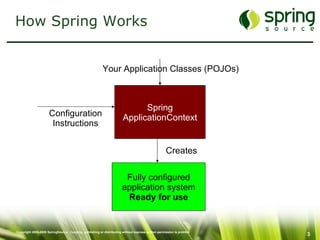
How Spring Works Spring ApplicationContext Fully configured application system Ready for use Configuration Instructions Your Application Classes (POJOs) Creates
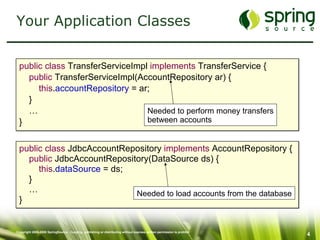
Your Application Classes public class  TransferServiceImpl  implements  TransferService { public  TransferServiceImpl(AccountRepository ar) { this . accountRepository  = ar; } … } public class  JdbcAccountRepository  implements  AccountRepository { public  JdbcAccountRepository(DataSource ds) { this . dataSource  = ds; } … } Needed to load accounts from the database Needed to perform money transfers between accounts
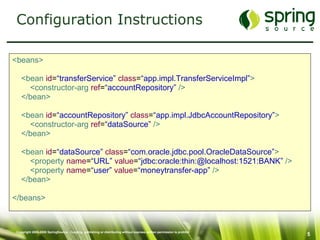
Configuration Instructions <beans> <bean   id = “transferService”   class = “app.impl.TransferServiceImpl” > <constructor-arg   ref = “accountRepository”  /> </bean> <bean   id = “accountRepository”   class = “app.impl.JdbcAccountRepository” > <constructor-arg   ref = “dataSource”  /> </bean> <bean   id = “dataSource”   class = “com.oracle.jdbc.pool.OracleDataSource” > <property  name = “URL”   value = “jdbc:oracle:thin:@localhost:1521:BANK”  /> <property   name = “user”   value = “moneytransfer-app”  /> </bean> </beans>
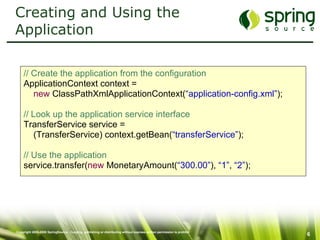
Creating and Using the Application // Create the application from the configuration ApplicationContext context = new  ClassPathXmlApplicationContext( “application-config.xml” ); // Look up the application service interface TransferService service =  (TransferService) context.getBean( “transferService” ); // Use the application service.transfer( new  MonetaryAmount( “300.00” ),  “1” ,  “2” );
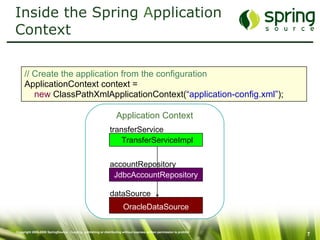
Inside the Spring  A pplication Context // Create the application from the configuration ApplicationContext context = new  ClassPathXmlApplicationContext( “application-config.xml” ); Application Context OracleDataSource dataSource JdbcAccountRepository accountRepository TransferServiceImpl transferService
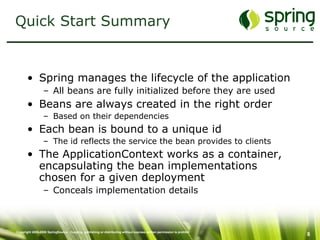
Quick Start Summary Spring manages the lifecycle of the application All beans are fully initialized before they are used Beans are always created in the right order Based on their dependencies Each bean is bound to a unique id The id reflects the service the bean provides to clients The ApplicationContext works as a container, encapsulating the bean implementations chosen for a given deployment Conceals implementation details
Topics in this session Spring quick start Writing bean definitions Configuring objects Going beyond constructor instantiation Creating an application context Summary
Register… To register for this training please visit http://www.springpeople.com/courses/regular/spr-001.php For further info please contact SpringPeople Technologies [email_address] +91 80 4114 6519 http://www.springpeople.com

Corespring

  • 1.
    Spring Quick StartIntroducing the Spring Application Context and Spring’s XML-based configuration language
  • 2.
    Topics in thissession Spring quick start Writing bean definitions Configuring objects Going beyond constructor instantiation Creating an application context Summary
  • 3.
    How Spring WorksSpring ApplicationContext Fully configured application system Ready for use Configuration Instructions Your Application Classes (POJOs) Creates
  • 4.
    Your Application Classespublic class TransferServiceImpl implements TransferService { public TransferServiceImpl(AccountRepository ar) { this . accountRepository = ar; } … } public class JdbcAccountRepository implements AccountRepository { public JdbcAccountRepository(DataSource ds) { this . dataSource = ds; } … } Needed to load accounts from the database Needed to perform money transfers between accounts
  • 5.
    Configuration Instructions <beans><bean id = “transferService” class = “app.impl.TransferServiceImpl” > <constructor-arg ref = “accountRepository” /> </bean> <bean id = “accountRepository” class = “app.impl.JdbcAccountRepository” > <constructor-arg ref = “dataSource” /> </bean> <bean id = “dataSource” class = “com.oracle.jdbc.pool.OracleDataSource” > <property name = “URL” value = “jdbc:oracle:thin:@localhost:1521:BANK” /> <property name = “user” value = “moneytransfer-app” /> </bean> </beans>
  • 6.
    Creating and Usingthe Application // Create the application from the configuration ApplicationContext context = new ClassPathXmlApplicationContext( “application-config.xml” ); // Look up the application service interface TransferService service = (TransferService) context.getBean( “transferService” ); // Use the application service.transfer( new MonetaryAmount( “300.00” ), “1” , “2” );
  • 7.
    Inside the Spring A pplication Context // Create the application from the configuration ApplicationContext context = new ClassPathXmlApplicationContext( “application-config.xml” ); Application Context OracleDataSource dataSource JdbcAccountRepository accountRepository TransferServiceImpl transferService
  • 8.
    Quick Start SummarySpring manages the lifecycle of the application All beans are fully initialized before they are used Beans are always created in the right order Based on their dependencies Each bean is bound to a unique id The id reflects the service the bean provides to clients The ApplicationContext works as a container, encapsulating the bean implementations chosen for a given deployment Conceals implementation details
  • 9.
    Topics in thissession Spring quick start Writing bean definitions Configuring objects Going beyond constructor instantiation Creating an application context Summary
  • 10.
    Register… To registerfor this training please visit http://www.springpeople.com/courses/regular/spr-001.php For further info please contact SpringPeople Technologies [email_address] +91 80 4114 6519 http://www.springpeople.com

Editor's Notes

  • #2 Emphasize this presentation will show how to hit the ground running with core Spring feature set.
  • #3 The quick start should be “quick” -- communicate at a high level what has to be done to get a basic Spring-powered application up and running
  • #4 Let’s start with a high level picture of how Spring works… A good analogy is an automobile plant. At a auto plant cars are assembled from parts on an assembly line. Workers on the line have an instruction manual that tells how to piece together the parts to build a car. So, you can view Spring as an application assembler where the parts are your Java components, and the instructions provided to Spring act as the manual for the assembly process. After assembly, you have a fully configured system ready to be used--just like after car assembly, you have a fully configured car ready to be driven. Parts can be interchanged, can be used in other vehicles (systems), etc.
  • #6 Focus on the relationships between the elements rather than they syntax itself.