This Tutorial explains how to consume a
webservice using mule Web Service Consumer.
Pre-requisites:
● Anypoint Studio
● Weather Web Service
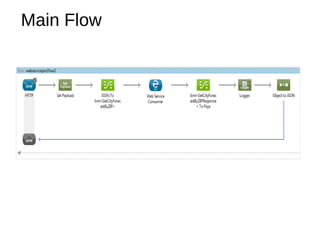
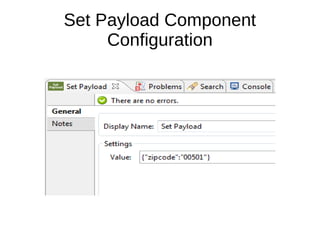
In the below flow I am setting the city zip code as payload in
“Set Payload” Component.
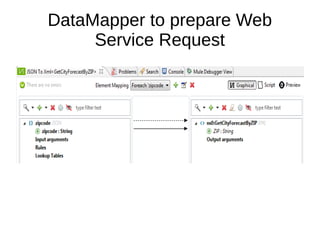
DataMapper component maps this value to the Weather
Webservice Operation “GetCityForecastByZip” Request xml
Field as “ZIP”.
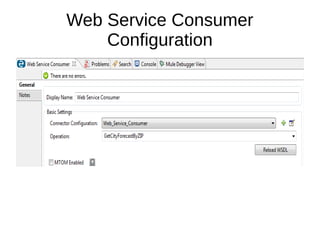
Webservice Consumer component calls the Weather Web
Service to fetch the “GetCityForecastByZipResponse”.
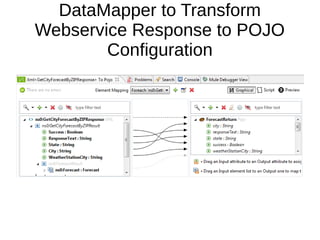
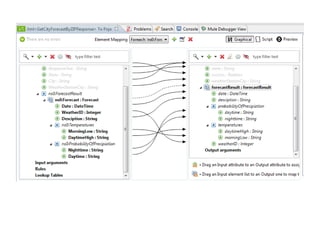
The Next DataMapper Transforms the XML to POJO Object
i.e. GetCityForecastByZipResponse (Used for testing purpose
only, Can be removed).
Finally GetCityForecastByZipResponse Java Object will be
transformed to JSON String and given as response to Http
Component.
Which gives the City Weather Information
Main Flow
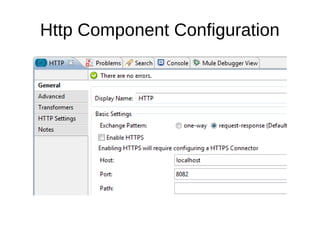
Http Component Configuration
Set Payload Component
Configuration
DataMapper to prepare Web
Service Request
Web Service Consumer
Configuration
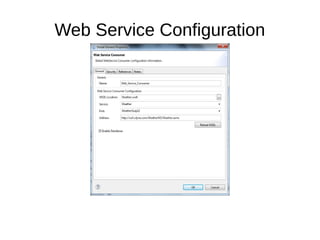
Web Service Configuration
DataMapper to Transform
Webservice Response to POJO
Configuration
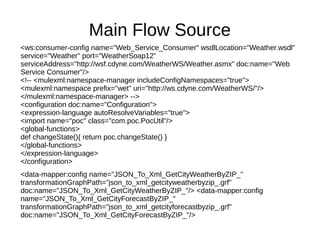
Main Flow Source
<ws:consumer-config name="Web_Service_Consumer" wsdlLocation="Weather.wsdl"
service="Weather" port="WeatherSoap12"
serviceAddress="http://wsf.cdyne.com/WeatherWS/Weather.asmx" doc:name="Web
Service Consumer"/>
<!-- <mulexml:namespace-manager includeConfigNamespaces="true">
<mulexml:namespace prefix="wet" uri="http://ws.cdyne.com/WeatherWS/"/>
</mulexml:namespace-manager> -->
<configuration doc:name="Configuration">
<expression-language autoResolveVariables="true">
<import name="poc" class="com.poc.PocUtil"/>
<global-functions>
def changeState(){ return poc.changeState() }
</global-functions>
</expression-language>
</configuration>
<data-mapper:config name="JSON_To_Xml_GetCityWeatherByZIP_"
transformationGraphPath="json_to_xml_getcityweatherbyzip_.grf"
doc:name="JSON_To_Xml_GetCityWeatherByZIP_"/> <data-mapper:config
name="JSON_To_Xml_GetCityForecastByZIP_"
transformationGraphPath="json_to_xml_getcityforecastbyzip_.grf"
doc:name="JSON_To_Xml_GetCityForecastByZIP_"/>
<data-mapper:config name="Xml_GetCityForecastByZIPResponse__To_Pojo"
transformationGraphPath="xml_getcityforecastbyzipresponse__to_pojo.grf"
doc:name="Xml_GetCityForecastByZIPResponse__To_Pojo"/>
<flow name="webservicepocFlow2" doc:name="webservicepocFlow2">
<http:inbound-endpoint exchange-pattern="request-response" host="localhost"
port="8082" doc:name="HTTP"/>
<set-payload value="{&quot;zipcode&quot;:&quot;00501&quot;}" doc:name="Set
Payload"/>
<data-mapper:transform config-ref="JSON_To_Xml_GetCityForecastByZIP_"
doc:name="JSON To Xml&lt;GetCityForecastByZIP&gt;"/>
<ws:consumer config-ref="Web_Service_Consumer" operation="GetCityForecastByZIP"
doc:name="Web Service Consumer"/>
<data-mapper:transform config-ref="Xml_GetCityForecastByZIPResponse__To_Pojo"
doc:name="Xml&lt;GetCityForecastByZIPResponse&gt; To Pojo">
<data-mapper:input-arguments>
</data-mapper:input-arguments>
</data-mapper:transform>
<logger message="#[payload.getCity()]" level="INFO" doc:name="Logger"/>
<json:object-to-json-transformer doc:name="Object to JSON"/>
</flow>

Web service invocation in mule

  • 1.
    This Tutorial explainshow to consume a webservice using mule Web Service Consumer. Pre-requisites: ● Anypoint Studio ● Weather Web Service
  • 2.
    In the belowflow I am setting the city zip code as payload in “Set Payload” Component. DataMapper component maps this value to the Weather Webservice Operation “GetCityForecastByZip” Request xml Field as “ZIP”. Webservice Consumer component calls the Weather Web Service to fetch the “GetCityForecastByZipResponse”. The Next DataMapper Transforms the XML to POJO Object i.e. GetCityForecastByZipResponse (Used for testing purpose only, Can be removed). Finally GetCityForecastByZipResponse Java Object will be transformed to JSON String and given as response to Http Component. Which gives the City Weather Information
  • 3.
  • 4.
  • 5.
  • 6.
    DataMapper to prepareWeb Service Request
  • 7.
  • 8.
  • 9.
    DataMapper to Transform WebserviceResponse to POJO Configuration
  • 11.
    Main Flow Source <ws:consumer-configname="Web_Service_Consumer" wsdlLocation="Weather.wsdl" service="Weather" port="WeatherSoap12" serviceAddress="http://wsf.cdyne.com/WeatherWS/Weather.asmx" doc:name="Web Service Consumer"/> <!-- <mulexml:namespace-manager includeConfigNamespaces="true"> <mulexml:namespace prefix="wet" uri="http://ws.cdyne.com/WeatherWS/"/> </mulexml:namespace-manager> --> <configuration doc:name="Configuration"> <expression-language autoResolveVariables="true"> <import name="poc" class="com.poc.PocUtil"/> <global-functions> def changeState(){ return poc.changeState() } </global-functions> </expression-language> </configuration> <data-mapper:config name="JSON_To_Xml_GetCityWeatherByZIP_" transformationGraphPath="json_to_xml_getcityweatherbyzip_.grf" doc:name="JSON_To_Xml_GetCityWeatherByZIP_"/> <data-mapper:config name="JSON_To_Xml_GetCityForecastByZIP_" transformationGraphPath="json_to_xml_getcityforecastbyzip_.grf" doc:name="JSON_To_Xml_GetCityForecastByZIP_"/>
  • 12.
    <data-mapper:config name="Xml_GetCityForecastByZIPResponse__To_Pojo" transformationGraphPath="xml_getcityforecastbyzipresponse__to_pojo.grf" doc:name="Xml_GetCityForecastByZIPResponse__To_Pojo"/> <flow name="webservicepocFlow2"doc:name="webservicepocFlow2"> <http:inbound-endpoint exchange-pattern="request-response" host="localhost" port="8082" doc:name="HTTP"/> <set-payload value="{&quot;zipcode&quot;:&quot;00501&quot;}" doc:name="Set Payload"/> <data-mapper:transform config-ref="JSON_To_Xml_GetCityForecastByZIP_" doc:name="JSON To Xml&lt;GetCityForecastByZIP&gt;"/> <ws:consumer config-ref="Web_Service_Consumer" operation="GetCityForecastByZIP" doc:name="Web Service Consumer"/> <data-mapper:transform config-ref="Xml_GetCityForecastByZIPResponse__To_Pojo" doc:name="Xml&lt;GetCityForecastByZIPResponse&gt; To Pojo"> <data-mapper:input-arguments> </data-mapper:input-arguments> </data-mapper:transform> <logger message="#[payload.getCity()]" level="INFO" doc:name="Logger"/> <json:object-to-json-transformer doc:name="Object to JSON"/> </flow>