

BUILDING ACTIVITIES USING MAHARA 
Sam Taylor 
Southampton Solent University 
@samwisefox
WHAT DO YOU WANT YOUR STUDENTS TO DO? 
The concept of a portfolio can be confusing to students 
Maharais such a versatile multi-purpose tool 
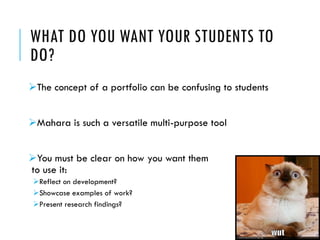
You must be clear on how you want them to use it: 
Reflect on development? 
Showcase examples of work? 
Present research findings?
It can (and does) go wrong! 
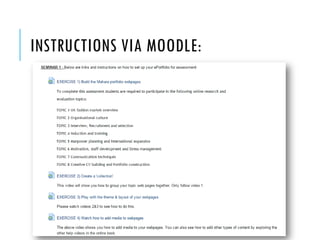
On the following page you will see a series of activities that were set for students to help them construct their portfolios. 
All of the students followed the instructions correctly, however it is evident that the lecturer did not give the correct guidance when it came to compiling their portfolio pages…
INSTRUCTIONS VIA MOODLE:
IT CAN (AND DOES) GO WRONG: 
You need to make sure that you –the teacher -understands the system so you can give your students the correct advice: 
‘Upload to Mahara’ 
‘Do it in Word first’ 
‘Go to Mahara.org’NO!!!
A teacher’s understanding Maharacould mean the difference between…
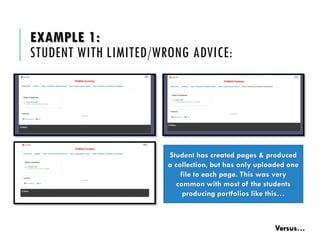
EXAMPLE 1: STUDENT WITH LIMITED/WRONG ADVICE: Student has created pages & produced a collection, but has only uploaded one file to each page. This was very common with most of the students producing portfolios like this… Versus…
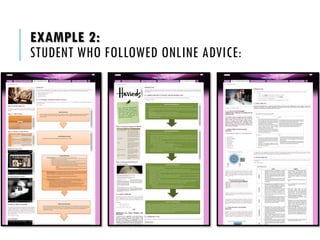
EXAMPLE 2: STUDENT WHO FOLLOWED ONLINE ADVICE:
MORE GREAT EXAMPLES: 
‘About me’ career development & skills portfolio 
http://mahara.solent.ac.uk/view/view.php?t=Z5rY8yOvtqlD7CsaW0eh 
http://mahara.solent.ac.uk/view/view.php?t=HjklXu1Z8e5oaOEtKrnD 
http://mahara.solent.ac.uk/view/view.php?t=yxpgnbW7fsK5GkcEZzjH 
All students were given clear instructions with a ‘tick list’ of items that they needed to showcase
HELP RESOURCE 
Below is an activity that lecturers can now use with their students to showcase how great Maharapages can look: 
Induction activity: 
Create an ‘about me’ page 
Showcase at least 3 things that you are interested in 
http://myportfolio.solent.ac.uk/induction
FORMULA: 
Stage 1: 
1.Decide on what you want your students to do 
2.Identify tools to use in Mahara 
3.Choose how you want your students to share their work 
Stage 2: 
1.Write activity/assessment brief 
2.Consult Maharachampion (optional) 
3.Put resources in place for your students
ACTIVITY: WHAT WILL YOUR STUDENTS DO? 
Have a think about the type of activity you want your students to do: 
Examples: 
Showcase English skills? 
Record progress on a task? 
Build group resources for a project? 
Feel free to share your thoughts and ideas with your neighbour
ACTIVITY: WHAT TOOLS WILL YOUR STUDENTS USE? 
Journal 
Plans 
Text boxes 
File storage 
Resume/CV Builder 
CPD (Plugin) 
My Learning (Plugin) 
EuroPass(Plugin) 
Other online tools (Using the Embedlyblock)
ACCESSING WORK 
How do you want to see your students’ work? 
Do you have the technology/knowledge to do this? 
Have you had a go yourself? 
Does your school/college/university have any regulations in place that may restrict your choice?
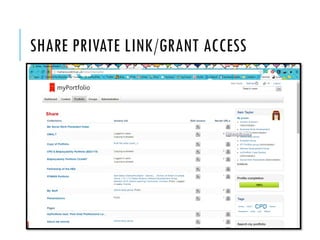
SHARE PRIVATE LINK/GRANT ACCESS
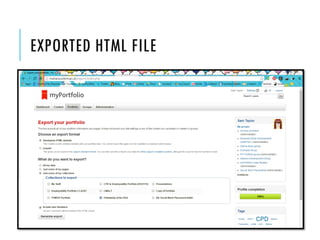
EXPORTED HTML FILE
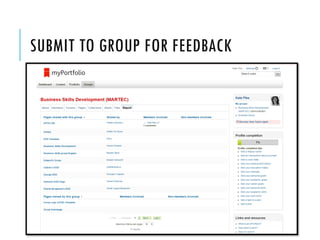
SUBMIT TO GROUP FOR FEEDBACK
NEXT STEPS: 
Write your task/brief 
Ask a colleague to have a look at it 
Develop/choose help resources for your students 
Give it to your students!
THANK YOU! 
Sam Taylor 
Learning TechnologistSouthampton Solent University 
@samwisefox 
http://about.me/samtayloruk

Supporting students with Mahara - MaharaMoot 14 Workshop (#MahDE14)

  • 1.
    BUILDING ACTIVITIES USINGMAHARA Sam Taylor Southampton Solent University @samwisefox
  • 2.
    WHAT DO YOUWANT YOUR STUDENTS TO DO? The concept of a portfolio can be confusing to students Maharais such a versatile multi-purpose tool You must be clear on how you want them to use it: Reflect on development? Showcase examples of work? Present research findings?
  • 3.
    It can (anddoes) go wrong! On the following page you will see a series of activities that were set for students to help them construct their portfolios. All of the students followed the instructions correctly, however it is evident that the lecturer did not give the correct guidance when it came to compiling their portfolio pages…
  • 4.
  • 5.
    IT CAN (ANDDOES) GO WRONG: You need to make sure that you –the teacher -understands the system so you can give your students the correct advice: ‘Upload to Mahara’ ‘Do it in Word first’ ‘Go to Mahara.org’NO!!!
  • 6.
    A teacher’s understandingMaharacould mean the difference between…
  • 7.
    EXAMPLE 1: STUDENTWITH LIMITED/WRONG ADVICE: Student has created pages & produced a collection, but has only uploaded one file to each page. This was very common with most of the students producing portfolios like this… Versus…
  • 8.
    EXAMPLE 2: STUDENTWHO FOLLOWED ONLINE ADVICE:
  • 9.
    MORE GREAT EXAMPLES: ‘About me’ career development & skills portfolio http://mahara.solent.ac.uk/view/view.php?t=Z5rY8yOvtqlD7CsaW0eh http://mahara.solent.ac.uk/view/view.php?t=HjklXu1Z8e5oaOEtKrnD http://mahara.solent.ac.uk/view/view.php?t=yxpgnbW7fsK5GkcEZzjH All students were given clear instructions with a ‘tick list’ of items that they needed to showcase
  • 10.
    HELP RESOURCE Belowis an activity that lecturers can now use with their students to showcase how great Maharapages can look: Induction activity: Create an ‘about me’ page Showcase at least 3 things that you are interested in http://myportfolio.solent.ac.uk/induction
  • 11.
    FORMULA: Stage 1: 1.Decide on what you want your students to do 2.Identify tools to use in Mahara 3.Choose how you want your students to share their work Stage 2: 1.Write activity/assessment brief 2.Consult Maharachampion (optional) 3.Put resources in place for your students
  • 12.
    ACTIVITY: WHAT WILLYOUR STUDENTS DO? Have a think about the type of activity you want your students to do: Examples: Showcase English skills? Record progress on a task? Build group resources for a project? Feel free to share your thoughts and ideas with your neighbour
  • 13.
    ACTIVITY: WHAT TOOLSWILL YOUR STUDENTS USE? Journal Plans Text boxes File storage Resume/CV Builder CPD (Plugin) My Learning (Plugin) EuroPass(Plugin) Other online tools (Using the Embedlyblock)
  • 14.
    ACCESSING WORK Howdo you want to see your students’ work? Do you have the technology/knowledge to do this? Have you had a go yourself? Does your school/college/university have any regulations in place that may restrict your choice?
  • 15.
  • 16.
  • 17.
    SUBMIT TO GROUPFOR FEEDBACK
  • 18.
    NEXT STEPS: Writeyour task/brief Ask a colleague to have a look at it Develop/choose help resources for your students Give it to your students!
  • 19.
    THANK YOU! SamTaylor Learning TechnologistSouthampton Solent University @samwisefox http://about.me/samtayloruk