Loop And For Loop
SlideMake.com
Introduction to Loops
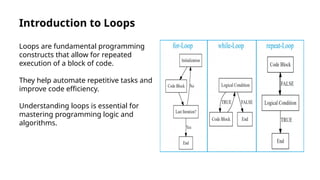
Loops are fundamental programming
constructs that allow for repeated
execution of a block of code.
They help automate repetitive tasks and
improve code efficiency.
Understanding loops is essential for
mastering programming logic and
algorithms.
Types of Loops
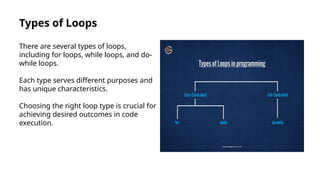
There are several types of loops,
including for loops, while loops, and do-
while loops.
Each type serves different purposes and
has unique characteristics.
Choosing the right loop type is crucial for
achieving desired outcomes in code
execution.
What is a For Loop?
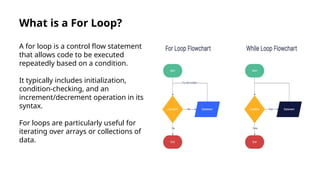
A for loop is a control flow statement
that allows code to be executed
repeatedly based on a condition.
It typically includes initialization,
condition-checking, and an
increment/decrement operation in its
syntax.
For loops are particularly useful for
iterating over arrays or collections of
data.
For Loop Syntax
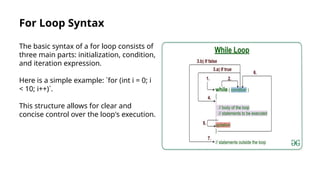
The basic syntax of a for loop consists of
three main parts: initialization, condition,
and iteration expression.
Here is a simple example: `for (int i = 0; i
< 10; i++)`.
This structure allows for clear and
concise control over the loop's execution.
Example of a For Loop
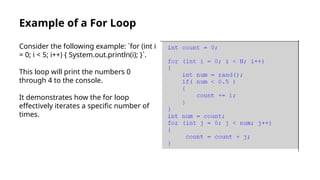
Consider the following example: `for (int i
= 0; i < 5; i++) { System.out.println(i); }`.
This loop will print the numbers 0
through 4 to the console.
It demonstrates how the for loop
effectively iterates a specific number of
times.
Use Cases for For Loops
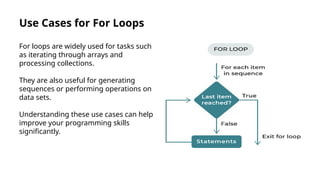
For loops are widely used for tasks such
as iterating through arrays and
processing collections.
They are also useful for generating
sequences or performing operations on
data sets.
Understanding these use cases can help
improve your programming skills
significantly.
Advantages of For Loops
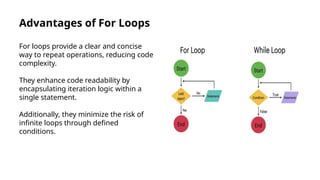
For loops provide a clear and concise
way to repeat operations, reducing code
complexity.
They enhance code readability by
encapsulating iteration logic within a
single statement.
Additionally, they minimize the risk of
infinite loops through defined
conditions.
Common Mistakes with For Loops
One common mistake is misconfiguring
the loop condition, leading to infinite
loops.
Another error is neglecting to update the
loop variable, which can cause the loop
to behave unexpectedly.
Understanding these pitfalls can help
improve debugging skills and code
quality.
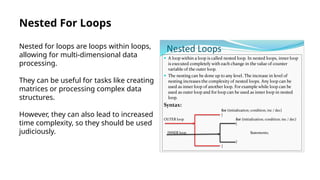
Nested For Loops
Nested for loops are loops within loops,
allowing for multi-dimensional data
processing.
They can be useful for tasks like creating
matrices or processing complex data
structures.
However, they can also lead to increased
time complexity, so they should be used
judiciously.
Conclusion
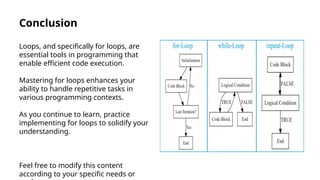
Loops, and specifically for loops, are
essential tools in programming that
enable efficient code execution.
Mastering for loops enhances your
ability to handle repetitive tasks in
various programming contexts.
As you continue to learn, practice
implementing for loops to solidify your
understanding.
Feel free to modify this content
according to your specific needs or

Loop And For Loop in C++ language .pptx

  • 1.
    Loop And ForLoop SlideMake.com
  • 2.
    Introduction to Loops Loopsare fundamental programming constructs that allow for repeated execution of a block of code. They help automate repetitive tasks and improve code efficiency. Understanding loops is essential for mastering programming logic and algorithms.
  • 3.
    Types of Loops Thereare several types of loops, including for loops, while loops, and do- while loops. Each type serves different purposes and has unique characteristics. Choosing the right loop type is crucial for achieving desired outcomes in code execution.
  • 4.
    What is aFor Loop? A for loop is a control flow statement that allows code to be executed repeatedly based on a condition. It typically includes initialization, condition-checking, and an increment/decrement operation in its syntax. For loops are particularly useful for iterating over arrays or collections of data.
  • 5.
    For Loop Syntax Thebasic syntax of a for loop consists of three main parts: initialization, condition, and iteration expression. Here is a simple example: `for (int i = 0; i < 10; i++)`. This structure allows for clear and concise control over the loop's execution.
  • 6.
    Example of aFor Loop Consider the following example: `for (int i = 0; i < 5; i++) { System.out.println(i); }`. This loop will print the numbers 0 through 4 to the console. It demonstrates how the for loop effectively iterates a specific number of times.
  • 7.
    Use Cases forFor Loops For loops are widely used for tasks such as iterating through arrays and processing collections. They are also useful for generating sequences or performing operations on data sets. Understanding these use cases can help improve your programming skills significantly.
  • 8.
    Advantages of ForLoops For loops provide a clear and concise way to repeat operations, reducing code complexity. They enhance code readability by encapsulating iteration logic within a single statement. Additionally, they minimize the risk of infinite loops through defined conditions.
  • 9.
    Common Mistakes withFor Loops One common mistake is misconfiguring the loop condition, leading to infinite loops. Another error is neglecting to update the loop variable, which can cause the loop to behave unexpectedly. Understanding these pitfalls can help improve debugging skills and code quality.
  • 10.
    Nested For Loops Nestedfor loops are loops within loops, allowing for multi-dimensional data processing. They can be useful for tasks like creating matrices or processing complex data structures. However, they can also lead to increased time complexity, so they should be used judiciously.
  • 11.
    Conclusion Loops, and specificallyfor loops, are essential tools in programming that enable efficient code execution. Mastering for loops enhances your ability to handle repetitive tasks in various programming contexts. As you continue to learn, practice implementing for loops to solidify your understanding. Feel free to modify this content according to your specific needs or

Editor's Notes

  • #2 Image source: https://statisticsglobe.com/loops-in-r/
  • #3 Image source: https://telgurus.co.uk/types-of-loops-in-programming%E2%80%AF/
  • #4 Image source: https://www.zenflowchart.com/blog/for-loop-flowchart
  • #5 Image source: https://www.geeksforgeeks.org/while-loop-syntax/
  • #6 Image source: https://www.chegg.com/homework-help/questions-and-answers/int-count-0-int-0-n-int-num-rand-num-05-count-1-int-num-count-int-j-0-j-num-j-count-count--q56655866
  • #7 Image source: https://openclassrooms.com/en/courses/6902811-learn-python-basics/7090826-easily-repeat-tasks-using-loops
  • #8 Image source: https://www.edrawmax.com/flowchart/repetition-in-flowcharts.html
  • #9 Image source: https://dxoljlybq.blob.core.windows.net/make-sentence-of-empty-as-verb.html
  • #10 Image source: https://www.studypool.com/documents/21699843/nested-loops
  • #11 Image source: https://statisticsglobe.com/loops-in-r/