Copyright © 2015 Pearson Education, Inc. Publishing as Pearson Addison-Wesley
C H A P T E R 4
Repetition
Structures
Copyright © 2015 Pearson Education, Inc. Publishing as Pearson Addison-Wesley
Topics
Introduction to Repetition Structures
The while Loop: a Condition-
Controlled Loop
The for Loop: a Count-Controlled Loop
Calculating a Running Total
Sentinels
Input Validation Loops
Nested Loops
Copyright © 2015 Pearson Education, Inc. Publishing as Pearson Addison-Wesley
Introduction to Repetition
Structures
Often have to write code that performs
the same task multiple times
Disadvantages to duplicating code
Makes program large
Time consuming
May need to be corrected in many places
Repetition structure: makes computer
repeat included code as necessary
Includes condition-controlled loops and count-
controlled loops
Copyright © 2015 Pearson Education, Inc. Publishing as Pearson Addison-Wesley
The while Loop: a Condition-
Controlled Loop
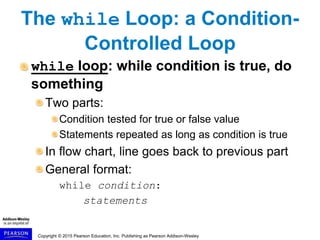
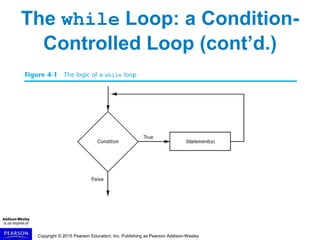
while loop: while condition is true, do
something
Two parts:
Condition tested for true or false value
Statements repeated as long as condition is true
In flow chart, line goes back to previous part
General format:
while condition:
statements
Copyright © 2015 Pearson Education, Inc. Publishing as Pearson Addison-Wesley
The while Loop: a Condition-
Controlled Loop (cont’d.)
Copyright © 2015 Pearson Education, Inc. Publishing as Pearson Addison-Wesley
The while Loop: a Condition-
Controlled Loop (cont’d.)
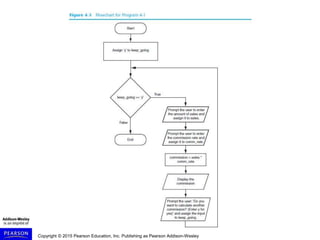
In order for a loop to stop executing,
something has to happen inside the
loop to make the condition false
Iteration: one execution of the body of
a loop
while loop is known as a pretest loop
– Tests condition before performing an iteration
Will never execute if condition is false to start with
Requires performing some steps prior to the loop
Copyright © 2015 Pearson Education, Inc. Publishing as Pearson Addison-Wesley
Infinite Loops
Loops must contain within themselves
a way to terminate
Something inside a while loop must
eventually make the condition false
Infinite loop: loop that does not have a
way of stopping
Repeats until program is interrupted
Occurs when programmer forgets to include
stopping code in the loop
Copyright © 2015 Pearson Education, Inc. Publishing as Pearson Addison-Wesley
The for Loop: a Count-
Controlled Loop
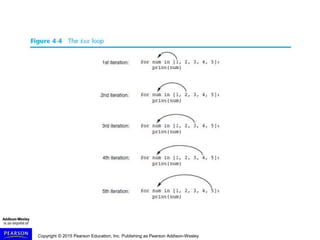
Count-Controlled loop: iterates a
specific number of times
Use a for statement to write count-controlled
loop
Designed to work with sequence of data items
– Iterates once for each item in the sequence
General format:
for variable in [val1, val2, etc]:
statements
Target variable: the variable which is the target of
the assignment at the beginning of each iteration
Copyright © 2015 Pearson Education, Inc. Publishing as Pearson Addison-Wesley
Using the range Function
with the for Loop
The range function simplifies the
process of writing a for loop
range returns an iterable object
Iterable: contains a sequence of values that can be
iterated over
range characteristics:
One argument: used as ending limit
Two arguments: starting value and ending
limit
Three arguments: third argument is step value
Copyright © 2015 Pearson Education, Inc. Publishing as Pearson Addison-Wesley
The Augmented Assignment
Operators
In many assignment statements, the
variable on the left side of the =
operator also appears on the right side
of the = operator
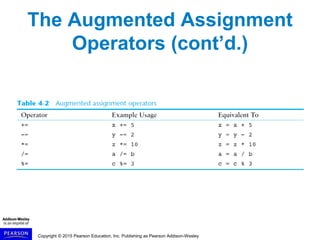
Augmented assignment operators:
special set of operators designed for
this type of job
Shorthand operators
Copyright © 2015 Pearson Education, Inc. Publishing as Pearson Addison-Wesley
The Augmented Assignment
Operators (cont’d.)
Copyright © 2015 Pearson Education, Inc. Publishing as Pearson Addison-Wesley
Sentinels
Sentinel: special value that marks the
end of a sequence of items
When program reaches a sentinel, it knows
that the end of the sequence of items was
reached, and the loop terminates
Example: when reading an input file, empty
line can be used as a sentinel
Copyright © 2015 Pearson Education, Inc. Publishing as Pearson Addison-Wesley
Input Validation Loops
Computer cannot tell the difference
between good data and bad data
If user provides bad input, program will
produce bad output
GIGO: garbage in, garbage out
It is important to design program such that
bad input is never accepted
Copyright © 2015 Pearson Education, Inc. Publishing as Pearson Addison-Wesley
Input Validation Loops
(cont’d.)
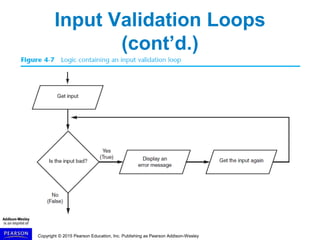
Input validation: inspecting input
before it is processed by the program
If input is invalid, prompt user to enter correct
data
Commonly accomplished using a while loop
which repeats as long as the input is bad
If input is bad, display error message and receive
another set of data
If input is good, continue to process the input
Copyright © 2015 Pearson Education, Inc. Publishing as Pearson Addison-Wesley
Input Validation Loops
(cont’d.)
Copyright © 2015 Pearson Education, Inc. Publishing as Pearson Addison-Wesley
Nested Loops
Nested loop: loop that is contained
inside another loop
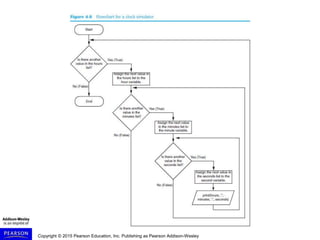
Example: analog clock works like a nested
loop
Hours hand moves once for every twelve
movements of the minutes hand: for each iteration
of the “hours,” do twelve iterations of “minutes”
Seconds hand moves 60 times for each movement
of the minutes hand: for each iteration of “minutes,”
do 60 iterations of “seconds”
Copyright © 2015 Pearson Education, Inc. Publishing as Pearson Addison-Wesley
Summary
This chapter covered:
Repetition structures, including:
Condition-controlled loops
Count-controlled loops
Nested loops
Infinite loops and how they can be avoided
range function as used in for loops
Calculating a running total and augmented
assignment operators
Use of sentinels to terminate loops

Gaddis Python 3e Chapter 04 PPT.ppt

  • 1.
    Copyright © 2015Pearson Education, Inc. Publishing as Pearson Addison-Wesley C H A P T E R 4 Repetition Structures
  • 2.
    Copyright © 2015Pearson Education, Inc. Publishing as Pearson Addison-Wesley Topics Introduction to Repetition Structures The while Loop: a Condition- Controlled Loop The for Loop: a Count-Controlled Loop Calculating a Running Total Sentinels Input Validation Loops Nested Loops
  • 3.
    Copyright © 2015Pearson Education, Inc. Publishing as Pearson Addison-Wesley Introduction to Repetition Structures Often have to write code that performs the same task multiple times Disadvantages to duplicating code Makes program large Time consuming May need to be corrected in many places Repetition structure: makes computer repeat included code as necessary Includes condition-controlled loops and count- controlled loops
  • 4.
    Copyright © 2015Pearson Education, Inc. Publishing as Pearson Addison-Wesley The while Loop: a Condition- Controlled Loop while loop: while condition is true, do something Two parts: Condition tested for true or false value Statements repeated as long as condition is true In flow chart, line goes back to previous part General format: while condition: statements
  • 5.
    Copyright © 2015Pearson Education, Inc. Publishing as Pearson Addison-Wesley The while Loop: a Condition- Controlled Loop (cont’d.)
  • 6.
    Copyright © 2015Pearson Education, Inc. Publishing as Pearson Addison-Wesley The while Loop: a Condition- Controlled Loop (cont’d.) In order for a loop to stop executing, something has to happen inside the loop to make the condition false Iteration: one execution of the body of a loop while loop is known as a pretest loop – Tests condition before performing an iteration Will never execute if condition is false to start with Requires performing some steps prior to the loop
  • 7.
    Copyright © 2015Pearson Education, Inc. Publishing as Pearson Addison-Wesley
  • 8.
    Copyright © 2015Pearson Education, Inc. Publishing as Pearson Addison-Wesley Infinite Loops Loops must contain within themselves a way to terminate Something inside a while loop must eventually make the condition false Infinite loop: loop that does not have a way of stopping Repeats until program is interrupted Occurs when programmer forgets to include stopping code in the loop
  • 9.
    Copyright © 2015Pearson Education, Inc. Publishing as Pearson Addison-Wesley The for Loop: a Count- Controlled Loop Count-Controlled loop: iterates a specific number of times Use a for statement to write count-controlled loop Designed to work with sequence of data items – Iterates once for each item in the sequence General format: for variable in [val1, val2, etc]: statements Target variable: the variable which is the target of the assignment at the beginning of each iteration
  • 10.
    Copyright © 2015Pearson Education, Inc. Publishing as Pearson Addison-Wesley
  • 11.
    Copyright © 2015Pearson Education, Inc. Publishing as Pearson Addison-Wesley Using the range Function with the for Loop The range function simplifies the process of writing a for loop range returns an iterable object Iterable: contains a sequence of values that can be iterated over range characteristics: One argument: used as ending limit Two arguments: starting value and ending limit Three arguments: third argument is step value
  • 12.
    Copyright © 2015Pearson Education, Inc. Publishing as Pearson Addison-Wesley The Augmented Assignment Operators In many assignment statements, the variable on the left side of the = operator also appears on the right side of the = operator Augmented assignment operators: special set of operators designed for this type of job Shorthand operators
  • 13.
    Copyright © 2015Pearson Education, Inc. Publishing as Pearson Addison-Wesley The Augmented Assignment Operators (cont’d.)
  • 14.
    Copyright © 2015Pearson Education, Inc. Publishing as Pearson Addison-Wesley Sentinels Sentinel: special value that marks the end of a sequence of items When program reaches a sentinel, it knows that the end of the sequence of items was reached, and the loop terminates Example: when reading an input file, empty line can be used as a sentinel
  • 15.
    Copyright © 2015Pearson Education, Inc. Publishing as Pearson Addison-Wesley Input Validation Loops Computer cannot tell the difference between good data and bad data If user provides bad input, program will produce bad output GIGO: garbage in, garbage out It is important to design program such that bad input is never accepted
  • 16.
    Copyright © 2015Pearson Education, Inc. Publishing as Pearson Addison-Wesley Input Validation Loops (cont’d.) Input validation: inspecting input before it is processed by the program If input is invalid, prompt user to enter correct data Commonly accomplished using a while loop which repeats as long as the input is bad If input is bad, display error message and receive another set of data If input is good, continue to process the input
  • 17.
    Copyright © 2015Pearson Education, Inc. Publishing as Pearson Addison-Wesley Input Validation Loops (cont’d.)
  • 18.
    Copyright © 2015Pearson Education, Inc. Publishing as Pearson Addison-Wesley Nested Loops Nested loop: loop that is contained inside another loop Example: analog clock works like a nested loop Hours hand moves once for every twelve movements of the minutes hand: for each iteration of the “hours,” do twelve iterations of “minutes” Seconds hand moves 60 times for each movement of the minutes hand: for each iteration of “minutes,” do 60 iterations of “seconds”
  • 19.
    Copyright © 2015Pearson Education, Inc. Publishing as Pearson Addison-Wesley
  • 20.
    Copyright © 2015Pearson Education, Inc. Publishing as Pearson Addison-Wesley Summary This chapter covered: Repetition structures, including: Condition-controlled loops Count-controlled loops Nested loops Infinite loops and how they can be avoided range function as used in for loops Calculating a running total and augmented assignment operators Use of sentinels to terminate loops