Lesson 6:
Understanding Loops and
Conditional Statements
ICT
•In Java, you can control the flow of
a program using both loops and
conditional statements.
•Conditional statements allow your
program to make decisions, while
loops help to execute repetitive tasks
more efficiently.
•This lesson will cover the different
types of loops, compare them with
conditionals, and help you decide
when to use each.
What Are Loops?
What are Loops?
•Loops allow you to execute a block of
code repeatedly, based on a condition.
They are essential for handling repetitive
tasks without writing redundant code.
What are Loops?
•Key Features:
•Repetition: Executes a block of code multiple
times.
•Condition: Loops continue until the condition
becomes false.
•Control: You have control over the number of
iterations.
Types of Loops in Java
Java provides several types of loops, each suited for different
situations.
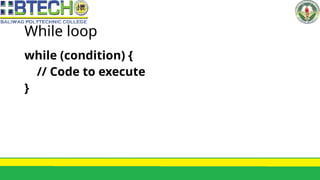
While loop
while (condition) {
// Code to execute
}
While loop
How It Works:
•Checks the condition first, before entering the
loop.
•Executes the code block only if the condition is
true.
•Continues looping until the condition is false
While loop
When to Use:
Use the while loop when the number of
iterations is unknown, and you want to keep
looping while a condition remains true.
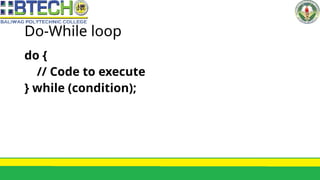
Do-While loop
do {
// Code to execute
} while (condition);
Do-While loop
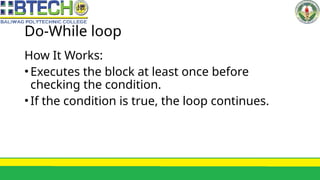
How It Works:
•Executes the block at least once before
checking the condition.
•If the condition is true, the loop continues.
Do-While loop
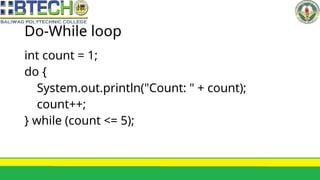
int count = 1;
do {
System.out.println("Count: " + count);
count++;
} while (count <= 5);
Do-While loop
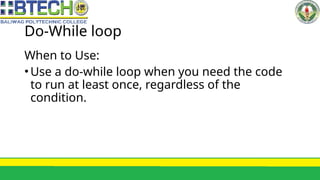
When to Use:
•Use a do-while loop when you need the code
to run at least once, regardless of the
condition.
For loop
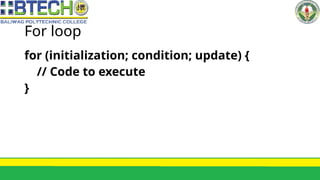
for (initialization; condition; update) {
// Code to execute
}
For loop
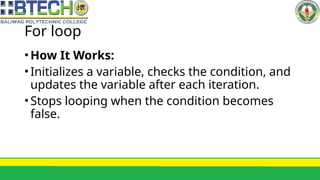
•How It Works:
•Initializes a variable, checks the condition, and
updates the variable after each iteration.
•Stops looping when the condition becomes
false.
For loop
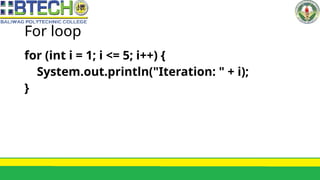
for (int i = 1; i <= 5; i++) {
System.out.println("Iteration: " + i);
}
For loop
When to Use:
•Use the for loop when the number of
iterations is known beforehand, such as
counting loops.
Enhanced For loop
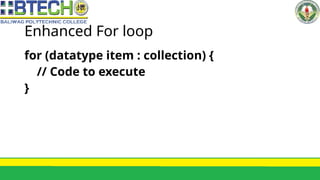
for (datatype item : collection) {
// Code to execute
}
Enhanced For loop
• How It Works:
• Iterates over each element in an array or collection.
• Easier to use when you don’t need to know the index
of the elements.
Enhanced For loop
• int[] numbers = {1, 2, 3, 4, 5};
• for (int num : numbers) {
• System.out.println("Number: " + num);
• }
Enhanced For loop
When to Use:
•Use when you want to iterate over arrays or
collections, especially for read-only access.
Loops vs. Conditional
Statements
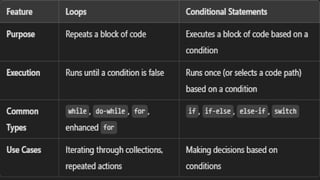
Loops and conditional statements serve different purposes.
Let’s compare them:
Conditional Statements Recap:
•if, if-else, else-if: Used to choose
between multiple possible paths in
the code based on conditions.
Conditional Statements Recap:
•switch: Selects one of many possible
code blocks to run, based on a single
expression (ideal for fixed options like
cases).
When to Use Loops:
•Use loops when you need to repeat
tasks, like processing data in arrays or
collections, counting, or repeated
calculations.
When to Use Conditionals:
•Use conditionals to make
decisions, such as running a
certain block of code based on
user input or program state.
When to Use Each Loop Type
•while Loop: Use when you don’t
know how many times the loop will
run and you want to loop based on
a condition.
When to Use Each Loop Type
•do-while Loop: Use when the code
inside the loop should execute at
least once, even if the condition is
false initially.
When to Use Each Loop Type
•for Loop: Use when you know how
many times the loop should iterate
(e.g., counting).
When to Use Each Loop Type
•Enhanced for Loop: Use when you
want to loop through arrays or
collections without modifying the
elements.
Practical Examples:
Combining Loops and
Conditionals
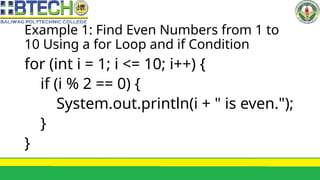
Example 1: Find Even Numbers from 1 to
10 Using a for Loop and if Condition
for (int i = 1; i <= 10; i++) {
if (i % 2 == 0) {
System.out.println(i + " is even.");
}
}
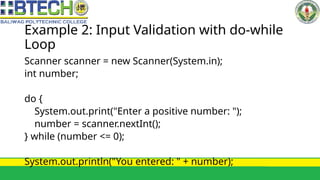
Example 2: Input Validation with do-while
Loop
Scanner scanner = new Scanner(System.in);
int number;
do {
System.out.print("Enter a positive number: ");
number = scanner.nextInt();
} while (number <= 0);
System.out.println("You entered: " + number);
Description
The loop ensures the user is asked
for input until they enter a positive
number.
Summary
Loops (while, do-while, for,
enhanced for) help you repeat
tasks, while conditional statements
(if, if-else, switch) allow you to make
decisions.
Summary
Use loops when you need to repeat
a block of code, and conditionals
when you need to choose a path
based on conditions.
Summary
Each loop has its use case: while
and do-while for unknown
iterations, for for known iterations,
and enhanced for for collections.
Summary
By understanding when to use
loops and conditionals, you can
write efficient and well-structured
Java programs. Happy coding!

Lesson 6 Understanding Loops and Conditional Statements.pptx

  • 1.
    Lesson 6: Understanding Loopsand Conditional Statements ICT
  • 2.
    •In Java, youcan control the flow of a program using both loops and conditional statements.
  • 3.
    •Conditional statements allowyour program to make decisions, while loops help to execute repetitive tasks more efficiently.
  • 4.
    •This lesson willcover the different types of loops, compare them with conditionals, and help you decide when to use each.
  • 5.
  • 6.
    What are Loops? •Loopsallow you to execute a block of code repeatedly, based on a condition. They are essential for handling repetitive tasks without writing redundant code.
  • 7.
    What are Loops? •KeyFeatures: •Repetition: Executes a block of code multiple times. •Condition: Loops continue until the condition becomes false. •Control: You have control over the number of iterations.
  • 8.
    Types of Loopsin Java Java provides several types of loops, each suited for different situations.
  • 9.
    While loop while (condition){ // Code to execute }
  • 10.
    While loop How ItWorks: •Checks the condition first, before entering the loop. •Executes the code block only if the condition is true. •Continues looping until the condition is false
  • 11.
    While loop When toUse: Use the while loop when the number of iterations is unknown, and you want to keep looping while a condition remains true.
  • 12.
    Do-While loop do { //Code to execute } while (condition);
  • 13.
    Do-While loop How ItWorks: •Executes the block at least once before checking the condition. •If the condition is true, the loop continues.
  • 14.
    Do-While loop int count= 1; do { System.out.println("Count: " + count); count++; } while (count <= 5);
  • 15.
    Do-While loop When toUse: •Use a do-while loop when you need the code to run at least once, regardless of the condition.
  • 16.
    For loop for (initialization;condition; update) { // Code to execute }
  • 17.
    For loop •How ItWorks: •Initializes a variable, checks the condition, and updates the variable after each iteration. •Stops looping when the condition becomes false.
  • 18.
    For loop for (inti = 1; i <= 5; i++) { System.out.println("Iteration: " + i); }
  • 19.
    For loop When toUse: •Use the for loop when the number of iterations is known beforehand, such as counting loops.
  • 20.
    Enhanced For loop for(datatype item : collection) { // Code to execute }
  • 21.
    Enhanced For loop •How It Works: • Iterates over each element in an array or collection. • Easier to use when you don’t need to know the index of the elements.
  • 22.
    Enhanced For loop •int[] numbers = {1, 2, 3, 4, 5}; • for (int num : numbers) { • System.out.println("Number: " + num); • }
  • 23.
    Enhanced For loop Whento Use: •Use when you want to iterate over arrays or collections, especially for read-only access.
  • 24.
    Loops vs. Conditional Statements Loopsand conditional statements serve different purposes. Let’s compare them:
  • 26.
    Conditional Statements Recap: •if,if-else, else-if: Used to choose between multiple possible paths in the code based on conditions.
  • 27.
    Conditional Statements Recap: •switch:Selects one of many possible code blocks to run, based on a single expression (ideal for fixed options like cases).
  • 28.
    When to UseLoops: •Use loops when you need to repeat tasks, like processing data in arrays or collections, counting, or repeated calculations.
  • 29.
    When to UseConditionals: •Use conditionals to make decisions, such as running a certain block of code based on user input or program state.
  • 30.
    When to UseEach Loop Type •while Loop: Use when you don’t know how many times the loop will run and you want to loop based on a condition.
  • 31.
    When to UseEach Loop Type •do-while Loop: Use when the code inside the loop should execute at least once, even if the condition is false initially.
  • 32.
    When to UseEach Loop Type •for Loop: Use when you know how many times the loop should iterate (e.g., counting).
  • 33.
    When to UseEach Loop Type •Enhanced for Loop: Use when you want to loop through arrays or collections without modifying the elements.
  • 34.
  • 35.
    Example 1: FindEven Numbers from 1 to 10 Using a for Loop and if Condition for (int i = 1; i <= 10; i++) { if (i % 2 == 0) { System.out.println(i + " is even."); } }
  • 36.
    Example 2: InputValidation with do-while Loop Scanner scanner = new Scanner(System.in); int number; do { System.out.print("Enter a positive number: "); number = scanner.nextInt(); } while (number <= 0); System.out.println("You entered: " + number);
  • 37.
    Description The loop ensuresthe user is asked for input until they enter a positive number.
  • 38.
    Summary Loops (while, do-while,for, enhanced for) help you repeat tasks, while conditional statements (if, if-else, switch) allow you to make decisions.
  • 39.
    Summary Use loops whenyou need to repeat a block of code, and conditionals when you need to choose a path based on conditions.
  • 40.
    Summary Each loop hasits use case: while and do-while for unknown iterations, for for known iterations, and enhanced for for collections.
  • 41.
    Summary By understanding whento use loops and conditionals, you can write efficient and well-structured Java programs. Happy coding!