Progressive downloads
and rendering


Stoyan Stefanov, Yahoo!
Fronteers, Amsterdam, 2010
http://slideshare.net/stoyan/
About me
           YSlow 2.0
Why progressive?
Importance of performance
•  Psychology, physiology
•  Effects of waiting
•  “Time is money”
•  Make people happy
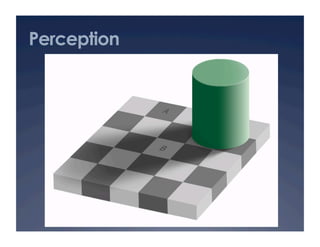
Perception
Perception
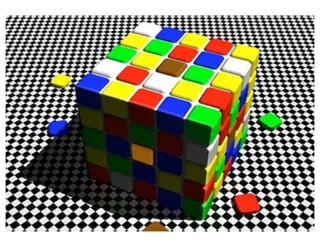
Perception
Perception
Durations
               actual
            expected
            perceived
                rem’d

                 time
It feels slower when…
•  Unpleasant
•  Unknown
•  Boring
•  Too much to keep track
First time experience
•  Unfamiliar = slow
•  Optimize empty cache or
   there will be no full cache
So… go progressive!
But before we begin…
The basics
•  Reducing the # HTTP
•  Gzip
•  Minification
•  Image smushing
•  Expires
•  CDN
The basics
•  Yahoo!’s best practices
•  Google’s
•  perfplanet.com
Progressive
Progressive enhancement
Progressive downloads
Progressive rendering
Agenda
•  Blocking JavaScript
•  Flushing
•  CSS and rendering
•  Blocking <!--[if IE 6]>	
•  Preloading, MHTML…
Blocking JavaScript
JavaScript blocks


   html
          js
               png

               png
JavaScript blocks
•  A no-no!

<script src="jquery.js"></script> 
<script src="jquery.twitter.js"></script> 
<script src="jquery.cookie.js"></script> 
<script src="myapp.js"></script> 
This waterfall looks ridiculous


html
       js
             js

                  js

                        js

                             png

                             png
JavaScript at the bottom


   html
          png

          png

                js
Non-blocking JavaScript
•  defer and async	
•  Defer: IE innovation, ok to
   delay, but keep order
•  Async: HTML5, whatever
<script async src="my.js" onload="doIt()"></script> 
<script defer src="my.js" onload="doIt()"></script> 
defer and async timeline

               async


     defer


         DOMContentLoaded
                        	   load
Non-blocking JavaScript
•    Asynchronous loading
     html
                  js

            png

            png


var js = document.createElement('script'); 
js.src = 'myscript.js'; 
var h = document.getElementsByTagName('head')[0]; 
h.appendChild(js); 
Flush
flush() early
 html
                         png

                    js               
                               css


 html


   js
        png
                                     ✔
              css
flush()
<html>	
<head>	
  <script src="my.js" 	
   	type="text/javascript"></script>	
  <link href="my.css" 	
   	type="text/css" rel="stylesheet" />	
</head>	

<?php flush() ?>
<body>	
  ....
Chunked encoding
HTTP/1.1 200 OK 
Content‐Type: text/plain 
Transfer‐Encoding: chunked 

25 
This is the data in the first chunk 

1C 
and this is the second one 

0 
Chunked encoding

•  Progressive rendering
   - Semantic app chunks
   vs.
   - Server-level chunks
Progressive rendering
                        Chunk
                        #1


                        Chunk
                        #2


                        Chunk
                        #3
<!doctype html>	
<html>	
<head><title>My App</title></head>	
<body>	
  <div id="header">	
     <img src="logo.png" />	
     ...	
  </div>                   <!-- end of chunk #1 -->	

  ... The full body of the page ...	
                           <!-- end of chunk #2 -->	


<script src="all_20100925.js"></script>	
</body>	
</html>                    <!-- end of chunk #3 -->
Progressive + source order
                             1


3
                             2
4
HTTP chunking: not only HTML
•  Google Instant
•  /*""*/ - delimited JSON
   pieces
•  Chunk #1 suggestions
•  Chunk #2 results

                    http://tinyurl.com/chunkview
CSS and rendering
Worst enemy?


        CSS
CSS blocks rendering
•  The worst component type
•  Place way at the top
•  Inline all @media print, etc


http://www.phpied.com/delay-loading-your-print-css/
http://www.phpied.com/rendering-styles/
CSS
CSS
CSS block
downloads?

But they do block:
•  When followed
   by an inline script
•  When in conditional
   comments
Inline CSS
•  Google search
•  Bing.com: inline + postload
Same domain
•  If you split across domains
•  and if you don’t use CDN
•  Saves a DNS lookup
CC block
Normal page
With conditionally commented
CSS file
What…?! Case #1
  <link type="text/css" rel="stylesheet" 
        href="1.css"> 
  <!‐‐[if IE 6 ]> 
    <link type="text/css" rel="stylesheet" 
          href="ie.css"> 
  <![endif]‐‐> 
What…?! Case #2
<!‐‐[if IE 6]> 
    <body class="ie6">  
<![endif]‐‐> 
<!‐‐[if !IE]><!‐‐> 
    <body> 
<!‐‐<![endif]‐‐> 
Solution for case #1
<!DOCTYPE html> 
<!‐‐[if IE 6]><![endif]‐‐> 

<html> 
    ... 
Solution for case #2
<!‐‐[if IE 6]> 
    <html class="ie6">  
<![endif]‐‐> 
<!‐‐[if !IE]><!‐‐> 
    <html> 
<!‐‐<![endif]‐‐> 
Preloads
Preloads
•  Anticipate next page
•  Problems:
 - does next page anticipate you?
 - parsing and execution time
•  <link prefetch="http://..">
Preload sans execute
var preload; 	
if (/*@cc_on!@*/false) { // IE 	
    preload = function (file) {	
        new Image().src = file;	
    };	
} else {	
    preload = function (file) {	
        var obj = document.createElement('object'),	
            body = document.body;	
        obj.width = 0;	
        obj.height = 0;	
        obj.data = file;	
        body.appendChild(obj);	
    };	
}
Blocking favicon
Data URIs
Fewer HTTP requests
•  Inline images:
   in CSS sprites
   with data: URI scheme


                    http://csssprites.com	
                    http://spriteme.org
Fewer HTTP requests
•  data: URI scheme

$ php ‐r "echo base64_encode(file_get_contents('my.png'));” 
iVBORw0KGgoAAAANSUhEUgAAAAQAAAADCAIAAAA7ljmRAAAAGElEQVQIW2P4
DwcMDAxAfBvMAhEQMYgcACEHG8ELxtbPAAAAAElFTkSuQmCC 
Fewer HTTP requests
•  data: URI scheme

background‐image: url("data:image/png;base64,iVBORw0KG..."); 
Fewer HTTP requests
•  data: URI scheme

<img src="data:image/png;base64,iVBOR..." /> 
Both
•  flushes
•  data: URIs
Fewer HTTP requests
•  data: URI scheme
•  works in IE!...
Fewer HTTP requests
•  data: URI scheme
•  works in IE8!
Fewer HTTP requests
•  data: URI scheme
•  MHTML for IE < 8
MHTML
•  MIME HTML
•  Works in IE 6,7
•  Indeed it actually absolutely
does work in IE7/Vista too


                     http://phpied.com

                     /the-proper-mhtml-syntax/
MHTML - one part
Content-Location: myimage	
Content-Transfer-Encoding: base64	

iVBORw0KGgoAAAANSU....U5ErkJggg==
MHTML - multi parts
Content-Type: multipart/related; boundary="MYSEPARATOR"	

--MYSEPARATOR	

[here comes part one]	                    The
                                          double-
--MYSEPARATOR	                            dash of
                                          doom
[here's part two]	

--MYSEPARATOR--
MHTML.css – all together
/*	
Content-Type: multipart/related; boundary="MYSEPARATOR"	

--MYSEPARATOR	
Content-Location: myimage	
Content-Transfer-Encoding: base64	

iVBORw0KGgoAAAANSUhEUgAAABgAAAAYCAMAAADXqc3KAAAD....U5ErkJggg==	
--MYSEPARATOR	
Content-Location: another	
Content-Transfer-Encoding: base64	

iVBORw0KGgoAAAANSUhEUgAAABgAAAAYCAMAAADXqc3KAAAA....U5ErkJggg==	
--MYSEPARATOR--	
*/	
.myclass {	
    background-image:url(mhtml:http://example.org/styles.css!myimage);	
}	
.myotherclass {	
    background-image:url(mhtml:http://example.org/styles.css!another);	
}
MHTML: inline too
<!doctype html>
<html>
 <head>
     <title>Look Ma' No HTTP requests</title>
     <style type="text/css">
/*
Content-Type: multipart/related; boundary="_"

--_
Content-Location:locoloco
Content-Transfer-Encoding:base64

iVBOR...CC
--_
Content-Location:polloloco
Content-Transfer-Encoding:base64

iVBOR....gg==
--_--
*/
.image1 {
  background-image: url("data:image/png;base64,iVBOR...CC"); /* normal */
    *background-image: url(mhtml:http://...html!locoloco); /* IE < 8 */
}
.image2 {
  background-image: url("data:image/png;base64,iVBOR...gg=="); /* normal */
    *background-image: url(mhtml:http://...html!polloloco); /* IE < 8 */
}
body {
 font: bold 24px Arial;
}
     </style>
    </head>
    <body>

                                                                              http://phpied.com

  <h1>MHTML + Data:URIs inline in <code>style</code></h1>
  <p class="image1">hello<br>hello</p>
  <p class="image2">bonjour<br>bonjour</p>
 </body>
</html>
                                                                              /inline-mhtml-data-uris/
MHTML + data URI
•  X-browser
   single request
      web apps
Single request
•  WT☠?
•  Separation of concerns
•  Content-presentation-
behavior
•  yes, it’s a tradeoff
MHTML + data URI
•  drawback: repeats the same
encoded image
•  solutions:
    - browser-specific CSS
    - keep close = better gzip
    - or… an ingenious hack
MHTML + data URI
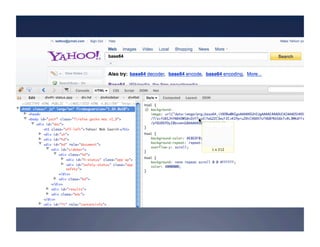
•  image header + css + data
/9j/4AA0;background-image:url(data:image/jpeg;base64;00,/9j/4AA0


Reality:

IE:

Others:


http://habrahabr.ru/blogs/webdev/90761/
Animations as distractions…
Distractimations
Parting words
What not to say…
•  “Everyone is on high-speed
these days”
•  “It’s all in the cache”
Do care about
•  Progressive,
     non-blocking,
       asynchronous downloads
•  Progressive rendering
Thank you!


Stoyan Stefanov
@stoyanstefanov
http://www.phpied.com

Progressive Downloads and Rendering