
















Who Am I ?
▪ Apurv Singh Gautam | Sc0rpi0n
▪ Network PenetrationTester,
Security Enthusiast, Hacker, CTF
Player
▪ Speaker at Null the Open
Security Community, Pune
▪ From the Past 4 years in this
field
Why Am I Doing This ?
▪ Have too much of free time ☺
▪ Want others to be aware
▪ Can’t help everyone on Quora
CYBER SECURITY
FUNDAMENTALS
WHAT TO EXPECT??
NEED OF SECURITY
▪ Increasing awareness of technology but not Security
▪ Continuous Development & Competition in IT
▪ Increasing number of Cyber Criminals
▪ Increasing use of Network elements & applications
▪ Decreasing level of skill set
NEED OF SECURITY
▪ Any Security breach in the website of any person increases the risk of
the public image
▪ Any Security breach in the website of any company increases the risk
of company reputation
▪ Any Security breach in the government website may increase the risk
on project management and government operations
▪ Any Security breach in the Military sector may jeopardise the safety
of any country
What is HACKING??
▪ Hacking is an art of exploring various security breaches
▪ What people believe: It’s an anti-social activity
: All the hackers are bad people
▪ The terms Hacker and Hacking are being misinterpreted and misunderstood with
negative sidelines
COMMUNITIES OF HACKERS
▪ Hackers
▪ Crackers
▪ Phreaks
▪ Script Kiddies
TYPES OF HACKERS
▪ White Hat Hacker -They use their knowledge and skill set for good constructive
intents.They find out new security loopholes and their solutions
▪ Black Hat Hacker -They use their knowledge and skill set for illegal activities and
destructive intents
▪ Grey Hat Hacker –They use their knowledge and skill set for legal and illegal
purpose.They are white hats in public but internally they do some black hat work
HACKING STRATEGY
▪ Reconnaissance (Information Gathering)
▪ Scanning
▪ Gaining Access
▪ Maintaining Access
▪ CoveringTracks
Cyber Crime is no more FUN…!!!
▪ Cyber crime controlled by IT ACT 2008 and respective IPC (constantly
evolving)
▪ Complete control of Govt agencies over information stored,
processed and transmitted over internet
▪ Upgradation of Investigating agencies with latest technology
▪ Service providers like ISPs, email service providers, etc are liable to
share information with Govt agencies
▪ Upgradation of Forensic labs
▪ Stringent punishment for cyber crimes
Common Scenarios - Cyber Pornography
▪ Cyber pornography covers pornographic websites, pornographic
magazines produced using computers and the Internet.
▪ Whoever publishes or transmits or causes to be published in the
electronic form, any material which is obscene in nature falls under cyber
pornography
▪ Section 67: Punishment for publishing or transmitting obscene material
in electronic form
▪ Punishment – Imprisonment from 2 – 10 years with fine upto 10 lakhs
Common Scenarios – Identity Theft
▪ Identity theft is a term used to refer to fraud that involves stealing money or
getting other benefits by pretending to be someone else.
▪ Section 66C Punishment for identity theft.
Whoever, fraudulently or dishonestly make use of the electronic signature, password
or any other unique identification feature of any other person, shall be punished with
imprisonment of either description for a term which may extend to three years and
shall also be liable to fine which may extend to rupees one lakh.
▪ Section 66D Punishment for cheating by personation by using computer
resource
Whoever, by means of any communication device or computer resource cheats by
personation, shall be punished with imprisonment of either description for a term
which may extend to three years and shall also be liable to fine which may extend to
one lakh rupees.
INTRODUCTION TO
SOCIAL ENGINEERING
“Cause there’s no PATCH for HUMAN STUPIDITY”
What is SOCIAL ENGINEERING??
In context of Information Security, it is the use of deception
to manipulate individuals into divulging confidential or
personal information that may be used for fraudulent
purposes.
TECHNIQUE
▪ Human Interaction
▪ Respectable & Known Person or Entity
▪ Assembling all gathered information together
TYPES OF SOCIAL ENGINEERING
▪ Quid Pro Quo – Something for something
▪ Phishing
▪ Baiting
▪ Pretexting
▪ DiversionTheft
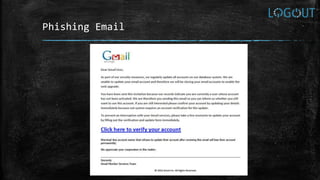
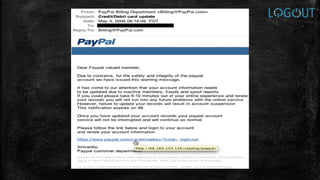
Phishing Email
WEAKEST LINK??
No matter how strong your:
▪ Firewalls
▪ IDS & IPS
▪ Cryptography
▪ Anti-Virus Software
▪ You are the weakest link in computer security. People are more vulnerable than
computers.
▪ “The weakest link in the security chain is the human element: - Kevin Mitnick
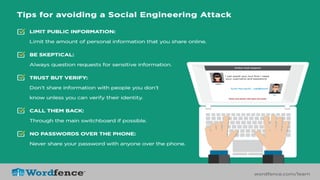
WAYS TO PREVENT SOCIAL ENGINEERING
▪ User Awareness
▪ Policies
▪ Third partyTest
▪ Be Smart
Students prone to Cyber Crime
REASONS:
▪ Prank
▪ Jealousy
▪ Revenge
▪ Ignorance
▪ Ex-relationships
▪ Curiosity
▪ Blackmailing
▪ Pornography
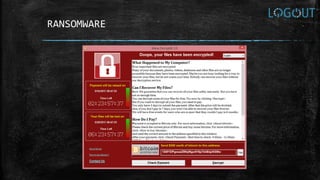
RANSOMWARE
CYBER SECURITY
AWARENESS TIPS
Safe Computing Tips
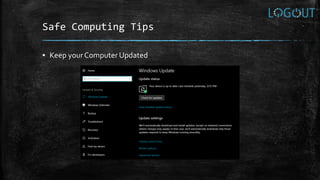
▪ Keep yourComputer Updated
▪ Keep all the software up to date
▪ Do not use openWi-Fi
▪ Lock the system when not in use
▪ Download Files Legally (Don’t useTorrents :P)
▪ Backup on regular basis
▪ Use goodAnti-Virus
▪ Use good Proxy/VPN
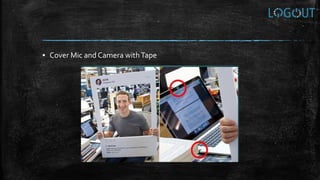
▪ Cover Mic and Camera withTape
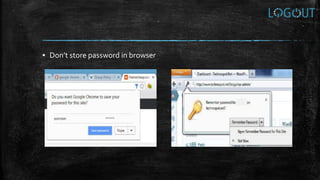
▪ Don’t store password in browser
▪ UseTOR
Internet Surfing Tips
▪ Use private browsing in Chrome/Firefox
▪ Check for green lock and HTTPS in URL
▪ Keep your browser Up to Date
▪ Never click on unknown links
▪ Turn on Do NotTrack feature in the browser
▪ Delete your profile from sites which you don’t use
(http://backgroundchecks.org/justdeleteme/)
▪ Use Sandboxie
▪ Use DuckDuckGo browser
▪ Use Panopticlick (https://panopticlick.eff.org/)
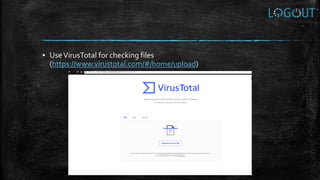
▪ UseVirusTotal for checking files
(https://www.virustotal.com/#/home/upload)
Mobile Security Tips
▪ Lock your phone using screen lock
▪ Do not connect to unknownWi-Fi networks
▪ Do not connect your phone using USB to unknown devices
▪ Always update OS as soon as it releases
▪ Use LockApps for Files and Media
▪ Use Guest Mode
▪ Keep sensitive files on authentic Cloud Storages
▪ Do not Jailbreak or Root your smartphone
▪ Download apps from authorized app stores only
▪ Use Privacy options and disallow any permissions that is not
necessary
▪ Do not accept calls from weird numbers (VoIP Calls)
▪ Schedule Routine Scans
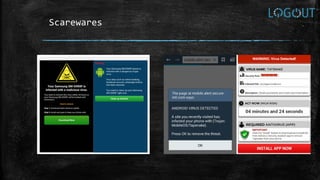
▪ Don’t react to Scarewares and Adwares
Scarewares
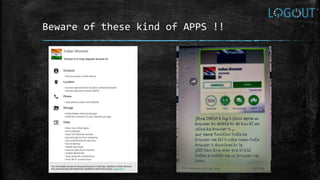
Beware of these kind of APPS !!
Password Protection Tips
▪ Use different passwords for each account
▪ Always log off from your accounts
▪ Avoid entering password on computer that you don’t control
▪ Beware of keyloggers
▪ Use complex password (Take help of password generators)
▪ Use reliable password vaults (KeepPass, PassPack)
▪ Use two-factor authentication
▪ Don’t write true answers during security questions
Email & Chatting Tips
▪ Use encrypted emails like Proton Mail, Mailvelope
▪ Use end-to-end encrypted chat applications likeTelegram, Signal,
Wickr, CHatSecure
▪ Delete unused accounts
▪ Don’t fill out your full information on social sites
▪ Use temporary mails for services you do not trust (Temp-Mail,
Guerrilla Mail)
▪ Use Mail2Tor for sharing sensitive information
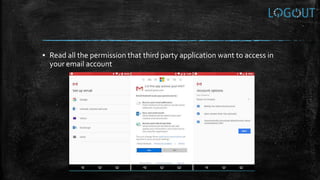
▪ Read all the permission that third party application want to access in
your email account
Social Media Tips
▪ Check privacy settings. Do not show anything which is sensitive
▪ Limit your Bio information
▪ Avoid sharing account details
▪ Choose friends wisely over the internet
▪ Think before you share something online (status, pics, videos)
▪ Use different passwords for each social media account
▪ Restrict friend requests
▪ Access Control (who can see what)
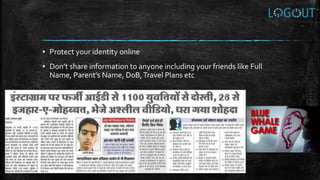
▪ Protect your identity online
▪ Don’t share information to anyone including your friends like Full
Name, Parent’s Name, D0B,Travel Plans etc
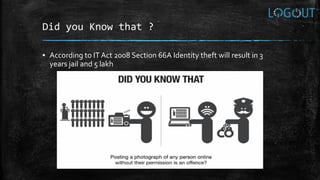
Did you Know that ?
▪ According to IT Act 2008 Section 66A Identity theft will result in 3
years jail and 5 lakh
Banking Tips
▪ Use OnlineVirtual Keyboard provided by the Banking website
▪ Never check “Remember Me” on banking websites
▪ Never use banking services on publicWi-Fis or cyber café.
▪ Always use 2 Factor Authentication
▪ Create a really strong password for Banking
▪ Change your password and ATM Pin regularly
▪ Beware of Shoulder Surfing
Preventing Online Scams
▪ Always check URLs of the sites you visit
▪ Always write the URL yourself instead of clicking on the link
▪ For suspicious links check the links on AVG ThreatLabs, Kaspersky
VirusDesk, Scanurl, PhishTank, etc
▪ Never believe in any offers saying “you won something”. No one is giving
free money
▪ Never click on unknown ads or pics
▪ Use pop-up blockers
▪ Try to avoid and make a distance with people having malicious intents
THANK YOU !!
▪ Email – apurvsinghgautam@gmail.com
▪ Social Handle – apurvsinghgautam
(LinkedIn,Twitter, Quora)

Log Out Cyber Awareness

  • 2.
    Who Am I? ▪ Apurv Singh Gautam | Sc0rpi0n ▪ Network PenetrationTester, Security Enthusiast, Hacker, CTF Player ▪ Speaker at Null the Open Security Community, Pune ▪ From the Past 4 years in this field Why Am I Doing This ? ▪ Have too much of free time ☺ ▪ Want others to be aware ▪ Can’t help everyone on Quora
  • 3.
  • 5.
  • 6.
    NEED OF SECURITY ▪Increasing awareness of technology but not Security ▪ Continuous Development & Competition in IT ▪ Increasing number of Cyber Criminals ▪ Increasing use of Network elements & applications ▪ Decreasing level of skill set
  • 8.
    NEED OF SECURITY ▪Any Security breach in the website of any person increases the risk of the public image ▪ Any Security breach in the website of any company increases the risk of company reputation ▪ Any Security breach in the government website may increase the risk on project management and government operations ▪ Any Security breach in the Military sector may jeopardise the safety of any country
  • 10.
    What is HACKING?? ▪Hacking is an art of exploring various security breaches ▪ What people believe: It’s an anti-social activity : All the hackers are bad people ▪ The terms Hacker and Hacking are being misinterpreted and misunderstood with negative sidelines
  • 11.
    COMMUNITIES OF HACKERS ▪Hackers ▪ Crackers ▪ Phreaks ▪ Script Kiddies
  • 12.
    TYPES OF HACKERS ▪White Hat Hacker -They use their knowledge and skill set for good constructive intents.They find out new security loopholes and their solutions ▪ Black Hat Hacker -They use their knowledge and skill set for illegal activities and destructive intents ▪ Grey Hat Hacker –They use their knowledge and skill set for legal and illegal purpose.They are white hats in public but internally they do some black hat work
  • 13.
    HACKING STRATEGY ▪ Reconnaissance(Information Gathering) ▪ Scanning ▪ Gaining Access ▪ Maintaining Access ▪ CoveringTracks
  • 14.
    Cyber Crime isno more FUN…!!! ▪ Cyber crime controlled by IT ACT 2008 and respective IPC (constantly evolving) ▪ Complete control of Govt agencies over information stored, processed and transmitted over internet ▪ Upgradation of Investigating agencies with latest technology ▪ Service providers like ISPs, email service providers, etc are liable to share information with Govt agencies ▪ Upgradation of Forensic labs ▪ Stringent punishment for cyber crimes
  • 15.
    Common Scenarios -Cyber Pornography ▪ Cyber pornography covers pornographic websites, pornographic magazines produced using computers and the Internet. ▪ Whoever publishes or transmits or causes to be published in the electronic form, any material which is obscene in nature falls under cyber pornography ▪ Section 67: Punishment for publishing or transmitting obscene material in electronic form ▪ Punishment – Imprisonment from 2 – 10 years with fine upto 10 lakhs
  • 16.
    Common Scenarios –Identity Theft ▪ Identity theft is a term used to refer to fraud that involves stealing money or getting other benefits by pretending to be someone else. ▪ Section 66C Punishment for identity theft. Whoever, fraudulently or dishonestly make use of the electronic signature, password or any other unique identification feature of any other person, shall be punished with imprisonment of either description for a term which may extend to three years and shall also be liable to fine which may extend to rupees one lakh. ▪ Section 66D Punishment for cheating by personation by using computer resource Whoever, by means of any communication device or computer resource cheats by personation, shall be punished with imprisonment of either description for a term which may extend to three years and shall also be liable to fine which may extend to one lakh rupees.
  • 17.
    INTRODUCTION TO SOCIAL ENGINEERING “Causethere’s no PATCH for HUMAN STUPIDITY”
  • 18.
    What is SOCIALENGINEERING?? In context of Information Security, it is the use of deception to manipulate individuals into divulging confidential or personal information that may be used for fraudulent purposes.
  • 20.
    TECHNIQUE ▪ Human Interaction ▪Respectable & Known Person or Entity ▪ Assembling all gathered information together
  • 21.
    TYPES OF SOCIALENGINEERING ▪ Quid Pro Quo – Something for something ▪ Phishing ▪ Baiting ▪ Pretexting ▪ DiversionTheft
  • 22.
  • 25.
    WEAKEST LINK?? No matterhow strong your: ▪ Firewalls ▪ IDS & IPS ▪ Cryptography ▪ Anti-Virus Software ▪ You are the weakest link in computer security. People are more vulnerable than computers. ▪ “The weakest link in the security chain is the human element: - Kevin Mitnick
  • 26.
    WAYS TO PREVENTSOCIAL ENGINEERING ▪ User Awareness ▪ Policies ▪ Third partyTest ▪ Be Smart
  • 29.
    Students prone toCyber Crime REASONS: ▪ Prank ▪ Jealousy ▪ Revenge ▪ Ignorance ▪ Ex-relationships ▪ Curiosity ▪ Blackmailing ▪ Pornography
  • 31.
  • 32.
  • 33.
    Safe Computing Tips ▪Keep yourComputer Updated
  • 34.
    ▪ Keep allthe software up to date ▪ Do not use openWi-Fi ▪ Lock the system when not in use ▪ Download Files Legally (Don’t useTorrents :P) ▪ Backup on regular basis ▪ Use goodAnti-Virus ▪ Use good Proxy/VPN
  • 35.
    ▪ Cover Micand Camera withTape
  • 36.
    ▪ Don’t storepassword in browser
  • 37.
  • 38.
    Internet Surfing Tips ▪Use private browsing in Chrome/Firefox ▪ Check for green lock and HTTPS in URL ▪ Keep your browser Up to Date ▪ Never click on unknown links ▪ Turn on Do NotTrack feature in the browser ▪ Delete your profile from sites which you don’t use (http://backgroundchecks.org/justdeleteme/) ▪ Use Sandboxie
  • 39.
    ▪ Use DuckDuckGobrowser ▪ Use Panopticlick (https://panopticlick.eff.org/)
  • 40.
    ▪ UseVirusTotal forchecking files (https://www.virustotal.com/#/home/upload)
  • 41.
    Mobile Security Tips ▪Lock your phone using screen lock ▪ Do not connect to unknownWi-Fi networks ▪ Do not connect your phone using USB to unknown devices ▪ Always update OS as soon as it releases ▪ Use LockApps for Files and Media ▪ Use Guest Mode ▪ Keep sensitive files on authentic Cloud Storages
  • 42.
    ▪ Do notJailbreak or Root your smartphone ▪ Download apps from authorized app stores only ▪ Use Privacy options and disallow any permissions that is not necessary ▪ Do not accept calls from weird numbers (VoIP Calls) ▪ Schedule Routine Scans ▪ Don’t react to Scarewares and Adwares
  • 43.
  • 44.
    Beware of thesekind of APPS !!
  • 45.
    Password Protection Tips ▪Use different passwords for each account ▪ Always log off from your accounts ▪ Avoid entering password on computer that you don’t control ▪ Beware of keyloggers ▪ Use complex password (Take help of password generators) ▪ Use reliable password vaults (KeepPass, PassPack) ▪ Use two-factor authentication ▪ Don’t write true answers during security questions
  • 47.
    Email & ChattingTips ▪ Use encrypted emails like Proton Mail, Mailvelope ▪ Use end-to-end encrypted chat applications likeTelegram, Signal, Wickr, CHatSecure ▪ Delete unused accounts ▪ Don’t fill out your full information on social sites ▪ Use temporary mails for services you do not trust (Temp-Mail, Guerrilla Mail) ▪ Use Mail2Tor for sharing sensitive information
  • 48.
    ▪ Read allthe permission that third party application want to access in your email account
  • 49.
    Social Media Tips ▪Check privacy settings. Do not show anything which is sensitive ▪ Limit your Bio information ▪ Avoid sharing account details ▪ Choose friends wisely over the internet ▪ Think before you share something online (status, pics, videos) ▪ Use different passwords for each social media account ▪ Restrict friend requests ▪ Access Control (who can see what)
  • 51.
    ▪ Protect youridentity online ▪ Don’t share information to anyone including your friends like Full Name, Parent’s Name, D0B,Travel Plans etc
  • 53.
    Did you Knowthat ? ▪ According to IT Act 2008 Section 66A Identity theft will result in 3 years jail and 5 lakh
  • 54.
    Banking Tips ▪ UseOnlineVirtual Keyboard provided by the Banking website ▪ Never check “Remember Me” on banking websites ▪ Never use banking services on publicWi-Fis or cyber café. ▪ Always use 2 Factor Authentication ▪ Create a really strong password for Banking ▪ Change your password and ATM Pin regularly ▪ Beware of Shoulder Surfing
  • 57.
    Preventing Online Scams ▪Always check URLs of the sites you visit ▪ Always write the URL yourself instead of clicking on the link ▪ For suspicious links check the links on AVG ThreatLabs, Kaspersky VirusDesk, Scanurl, PhishTank, etc ▪ Never believe in any offers saying “you won something”. No one is giving free money ▪ Never click on unknown ads or pics ▪ Use pop-up blockers ▪ Try to avoid and make a distance with people having malicious intents
  • 61.
    THANK YOU !! ▪Email – apurvsinghgautam@gmail.com ▪ Social Handle – apurvsinghgautam (LinkedIn,Twitter, Quora)