Andrew Grace

Education 3100
What is Poll Everywhere?
This is an online audience response system service.
 Teachers can create polls and have students
 respond immediately using a computer or mobile
 device, or leave the poll open for a longer period
 of time for responses. They feature educational
 pricing and a free option that allows up to 32
 responses per poll.
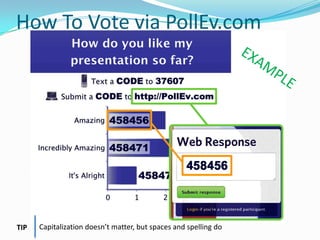
How To Vote via PollEv.com


TIP   Capitalization doesn’t matter, but spaces and spelling do
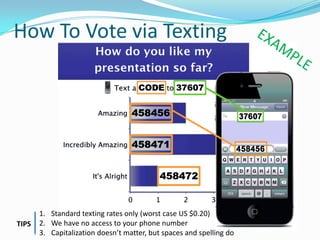
How To Vote via Texting


       1. Standard texting rates only (worst case US $0.20)
TIPS   2. We have no access to your phone number
       3. Capitalization doesn’t matter, but spaces and spelling do
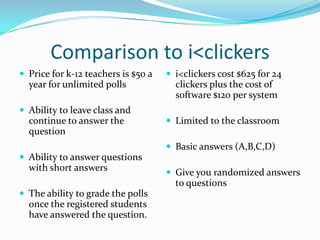
Comparison to i<clickers
ď‚— Price for k-12 teachers is $50 a   ď‚— i<clickers cost $625 for 24
  year for unlimited polls             clickers plus the cost of
                                       software $120 per system
ď‚— Ability to leave class and
  continue to answer the             ď‚— Limited to the classroom
  question
                                     ď‚— Basic answers (A,B,C,D)
ď‚— Ability to answer questions
  with short answers                 ď‚— Give you randomized answers
                                       to questions
ď‚— The ability to grade the polls
  once the registered students
  have answered the question.
Positives
Poll Everywhere turns cell phones into student responders—
  something most schools can't afford—that teachers can use
  to gather information about content mastery in their class.
  ...Considering how important efficiently collecting data has
  become in today's classroom—and that 75 percent of all
  students with cell phones have unlimited texting plans—
  services like Poll Everywhere should be an instant hit in
  most schools.
As long as Wi-Fi is available, responses to Poll Everywhere
  surveys also can be sent in by laptops, iPads and iPod
  Touches. Answers can also be tweeted and still come
  straight into the presenter's PowerPoint slides in seconds.
No Spam or Advertisements
No advertisements or text message spam for you
           or your participants, ever.
Complaints:
“This is so frustrating and upsetting. I am a teacher who JUST
  started using Poll Everywhere two weeks ago in my
  classroom after learning about it at a technology
  integration day. My students loved it the ONE time we used
  it, when Clear Results still worked. My district will NOT
  PURCHASE a membership; they don’t believe in supporting
  this sort of technology; we are on our own to find and use
  this stuff. Your rate for one teacher is MUCH TOO HIGH
  for me to pay out of my own pocket! How frustrating that I
  cannot compile results any longer without forking over such
  a steep fee. And to think that I was considering this to be a
  very advantageous tool to use in my classroom! I can use it
  but not compile results for separate classes. How unfair of
  you, and how greedy” (TRACYTC)
Threats


ď‚—No Threats Found.
Poll everywhere
Poll everywhere

Poll everywhere

  • 1.
  • 2.
    What is PollEverywhere? This is an online audience response system service. Teachers can create polls and have students respond immediately using a computer or mobile device, or leave the poll open for a longer period of time for responses. They feature educational pricing and a free option that allows up to 32 responses per poll.
  • 3.
    How To Votevia PollEv.com TIP Capitalization doesn’t matter, but spaces and spelling do
  • 4.
    How To Votevia Texting 1. Standard texting rates only (worst case US $0.20) TIPS 2. We have no access to your phone number 3. Capitalization doesn’t matter, but spaces and spelling do
  • 7.
    Comparison to i<clickers ď‚—Price for k-12 teachers is $50 a ď‚— i<clickers cost $625 for 24 year for unlimited polls clickers plus the cost of software $120 per system ď‚— Ability to leave class and continue to answer the ď‚— Limited to the classroom question ď‚— Basic answers (A,B,C,D) ď‚— Ability to answer questions with short answers ď‚— Give you randomized answers to questions ď‚— The ability to grade the polls once the registered students have answered the question.
  • 8.
    Positives Poll Everywhere turnscell phones into student responders— something most schools can't afford—that teachers can use to gather information about content mastery in their class. ...Considering how important efficiently collecting data has become in today's classroom—and that 75 percent of all students with cell phones have unlimited texting plans— services like Poll Everywhere should be an instant hit in most schools. As long as Wi-Fi is available, responses to Poll Everywhere surveys also can be sent in by laptops, iPads and iPod Touches. Answers can also be tweeted and still come straight into the presenter's PowerPoint slides in seconds.
  • 9.
    No Spam orAdvertisements No advertisements or text message spam for you or your participants, ever.
  • 10.
    Complaints: “This is sofrustrating and upsetting. I am a teacher who JUST started using Poll Everywhere two weeks ago in my classroom after learning about it at a technology integration day. My students loved it the ONE time we used it, when Clear Results still worked. My district will NOT PURCHASE a membership; they don’t believe in supporting this sort of technology; we are on our own to find and use this stuff. Your rate for one teacher is MUCH TOO HIGH for me to pay out of my own pocket! How frustrating that I cannot compile results any longer without forking over such a steep fee. And to think that I was considering this to be a very advantageous tool to use in my classroom! I can use it but not compile results for separate classes. How unfair of you, and how greedy” (TRACYTC)
  • 11.

Editor's Notes

  • #4 This slide is for display to the audience to show them how they will vote on your polls in your presentation. You can remove this slide if you like or if the audience is already comfortable with texting and/or voting with Poll Everywhere.Sample Oral Instructions:Ladies and gentlemen, throughout today’s meeting we’re going to engage in some audience polling to find out what you’re thinking, what you’re up to and what you know. Now I’m going to ask for your opinion. We’re going to use your phones or laptops to do some audience voting just like on American Idol.So please take out your mobilephones or laptops, but remember to leave them on silent. You can participate by submitting an answer atPollEv.com on your laptop or a mobile phone.The service we are using is serious about privacy. I cannot see who you are or who voted.
  • #5 This slide is for display to the audience to show them how they will vote on your polls in your presentation. You can remove this slide if you like or if the audience is already comfortable with texting and/or voting with Poll Everywhere.Sample Oral Instructions:Ladies and gentlemen, throughout today’s meeting we’re going to engage in some audience polling to find out what you’re thinking, what you’re up to and what you know. Now I’m going to ask for your opinion. We’re going to use your phones to do some audience voting just like on American Idol.So please take out your cell phones, but remember to leave them on silent. You can participate by sending a text message.This is a just standard rate text message, so it may be free for you, or up to twenty cents on some carriers if you do not have a text messaging plan. The service we are using is serious about privacy. I cannot see your phone numbers, and you’ll never receive follow-up text messages outside this presentation. There’s only one thing worse than email spam – and that’s text message spam because you have to pay to receive it!
  • #6 Press F5 or enter presentation mode to view the poll\r\nIn an emergency during your presentation, if the poll isn&apos;t showing, navigate to this link in your web browser:\r\nhttp://www.polleverywhere.com/multiple_choice_polls/MjEyNjI0MjUzNgIf you like, you can use this slide as a template for your own voting slides. You might use a slide like this if you feel your audience would benefit from the picture showing a text message on a phone.
  • #7 Press F5 or enter presentation mode to view the poll\r\nIn an emergency during your presentation, if the poll isn&apos;t showing, navigate to this link in your web browser:\r\nhttp://www.polleverywhere.com/free_text_polls/MTUxOTU1Njc5MgIf you like, you can use this slide as a template for your own voting slides. You might use a slide like this if you feel your audience would benefit from the picture showing a text message on a phone.
  • #11 High cost,
  • #13 Press F5 or enter presentation mode to view the poll\r\nIn an emergency during your presentation, if the poll isn&apos;t showing, navigate to this link in your web browser:\r\nhttp://www.polleverywhere.com/multiple_choice_polls/MjEyNjI0MjUzNgIf you like, you can use this slide as a template for your own voting slides. You might use a slide like this if you feel your audience would benefit from the picture showing a text message on a phone.
  • #14 Press F5 or enter presentation mode to view the poll\r\nIn an emergency during your presentation, if the poll isn&apos;t showing, navigate to this link in your web browser:\r\nhttp://www.polleverywhere.com/free_text_polls/MTUxOTU1Njc5MgIf you like, you can use this slide as a template for your own voting slides. You might use a slide like this if you feel your audience would benefit from the picture showing a text message on a phone.