Evolutionary Database Design
Synopsis
• Let Database Design evolves as Application
evolves
• Continuous integration and automated
refactoring to database development
• Collaboration between DBA and Application
Developer
• Pre-production and Released System
• Green field and Legacy systems
Authors
• Pramod Sadalage
– Developed the techniques of evolutionary
Database design and database refactoring used by
Thoughtworks in 2000
• Martin Fowler
– Thoughtworks
Background
• Agile Methodologies
• Evolutionary Architecture
• Detailed Design phase is impractical
• System Architecture evolves through various
iteration
• In 2000, a Project ThoughtWorks
• Desire to solve database evolving issue
• Developed techniques to allow schema change
and data migration comfortable
A User Story
• As a User, I want to see, search and update the
location, batch and serial numbers of a
product in inventory
• At the moment, Inventory table has column
inventory_code which concatenates the three
fields
• Developer needs to split this single
inventory_code into three separate fields
Development Steps
• Add new columns to the table, Inventory
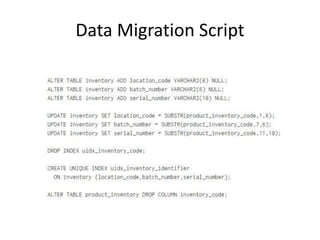
• Data Migration script to split data from the existing
inventory_code column and update the three new
columns
• Change the Application code to use the new columns
• Change any database code (view, sp, triggers etc.) to
use the new columns
• Change index based on inventory_code column
• Commit data migration scripts and application code
change to the version control system
Data Migration Script
Commit Steps
• Run migration script on local copy of database
• Update the Application code to use these new
columns
• Run the Test Suite to detect application’s issues
due to the change
• Update test cases who relied on the old column
• Add new tests based on the new columns
• Once all green on local, push the changes
(migration script + application code) to the
version control
Integration Steps
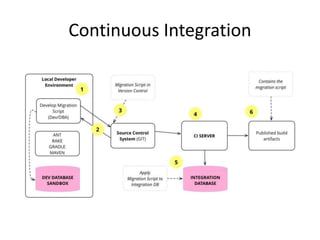
• CI Server will pick up the commit
• Run the migration script on the master
branch’s database
• Run the Application Tests
• Repeated across the deployment pipeline (QA,
Staging etc.)
• Finally, to production
?
• Small Stories
• Database Refactoring
DBA, Developer Collaborates
• In agile, people collaborate
• Analyst, PM, Domain Expert, Developers and DBA
• Generally, DBA and Devlopers work separately.
• Development task may require database schema
change
• Developer knows the functionality
• DBA knows the global view of the data
• DBA may check the user story for data change
• DBA may review the migration scripts
• For Evolutionary DB Design, DBA, Developer must work
closely
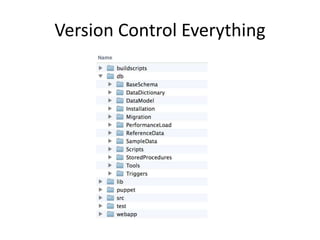
Version Control Everything
• All database artifacts should be version
controlled
• Benefits
– Only one place to look
– On issues, auditing is easy
– Deployment with out of sync database is
prevented
– Easy to create new environment for development,
testing, production
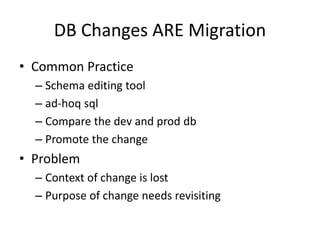
DB Changes ARE Migration
• Common Practice
– Schema editing tool
– ad-hoq sql
– Compare the dev and prod db
– Promote the change
• Problem
– Context of change is lost
– Purpose of change needs revisiting
DB Changes ARE Migration
• Capture the change during development
• Change is first class artifact
• Deploy using same process and control as
Application Code
• All changes have Database Migration Script
• Version controlled
Migration Scripts
• Schema Changes
• Database Code change
• Reference data update
• Transaction data update
• Fix to production data due to bugs
Migration Management
• Unique identification
• Track which migrations are applied to the db
• Migration Order
Migration Management
• Give sequence number (unique identifier and
migration order)
– Use current highest number + 1
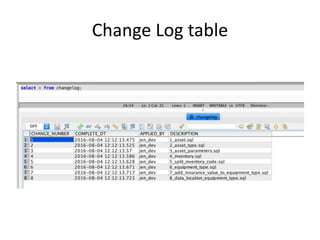
• Changelog table
– Database Migration Frameworks
– Or, automate with script
Change Log table
Migration Life Cycle
Migration Tools
• Flyway
• Dbdeploy
• MyBatis
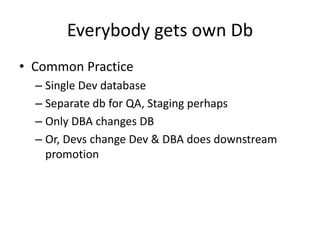
Everybody gets own Db
• Common Practice
– Single Dev database
– Separate db for QA, Staging perhaps
– Only DBA changes DB
– Or, Devs change Dev & DBA does downstream
promotion
Everyone get own Db
• Developers can experiement with changes
• Shared Db will interrupt others by half done
changes
• QA can work on controlled environment/db
Shared vs Own
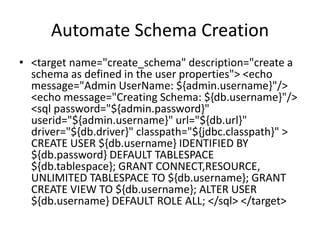
Automate Schema Creation
• <target name="create_schema" description="create a
schema as defined in the user properties"> <echo
message="Admin UserName: ${admin.username}"/>
<echo message="Creating Schema: ${db.username}"/>
<sql password="${admin.password}"
userid="${admin.username}" url="${db.url}"
driver="${db.driver}" classpath="${jdbc.classpath}" >
CREATE USER ${db.username} IDENTIFIED BY
${db.password} DEFAULT TABLESPACE
${db.tablespace}; GRANT CONNECT,RESOURCE,
UNLIMITED TABLESPACE TO ${db.username}; GRANT
CREATE VIEW TO ${db.username}; ALTER USER
${db.username} DEFAULT ROLE ALL; </sql> </target>
Drop Schema
• <target name="drop_schema"> <echo
message="Admin UserName:
${admin.username}"/> <echo
message="Working UserName:
${db.username}"/> <sql
password="${admin.password}"
userid="${admin.username}" url="${db.url}"
driver="${db.driver}"
classpath="${jdbc.classpath}" > DROP USER
${db.username} CASCADE; </sql> </target>
Developer’s Workflow
• Join a project
• Check out code base
• Change build.properties file
• Run ant create_schema
• Run the database migration scripts
Non-developers
• QA can test on their own copy without
surprise changes in db
• DBA can do experiments on their own copy
like, modeling options or performance tuning
Continuous Integration
Database=Schema+Data
• Not only Schema and Code
• Standing data
– States
– Products
– ProductIndustryMapping
– Insurer table data etc.
• Test data
– Application
– Application_Product etc.
– To Automate Testing
• Data needs to be version Controlled
– Helps test the migration after schema changed
Database Changes == Refactoring
• Change the way information is stored
• Introduce new ways to store information
• Remove unnecessary storage
• Software behavior is not change by db change
only
• a change made to the internal structure of
software to make it easier to understand and
cheaper to modify without changing its
observable behavior ~ Refactoring (Ch-2)
Database Refactoring
• Refactoring Catalogue
• 3D perspective
– Changing the schema
– Migrate the data
– Change the db access code
• Very very small
• Ex: Introduce New Column (Backward
compatible)
• Ex: Make column non nullable (Destructive)
• Ex: Split Table (More Destructive)
Transition Phase
• Destructive Refactoring
• Data Access Code change isn’t easy
• Shared DB
• Allow both old access and new access
• Ex: Rename Table
Transition Phase
Automate Refactoring
• Well known for Application Code
– Resharper etc.
• Tools For Database
– Liquibase
– Active Record Migrations
• Tools not adequate
– Rule of DB migration and handling legacy data is complex
• Preferred = Script + Automate Migration
• Keep the scripts version controlled
• Use metadata (e.g. change log table)
– Know current version
– Apply migration scripts
Automate Refactoring
• Migration tools
– Flyway
– Liquibase
– MyBatis Migration
– DBDeploy
Automate Migration
Devs update DB on demand
Separate DB Access Code
• Do not scatter SQL
• Clean Data Access Layer
Release Frequently
• Small changes are easy to manage
Reference
• https://martinfowler.com/articles/evodb.html

Evolutionary database design

  • 1.
  • 2.
    Synopsis • Let DatabaseDesign evolves as Application evolves • Continuous integration and automated refactoring to database development • Collaboration between DBA and Application Developer • Pre-production and Released System • Green field and Legacy systems
  • 3.
    Authors • Pramod Sadalage –Developed the techniques of evolutionary Database design and database refactoring used by Thoughtworks in 2000 • Martin Fowler – Thoughtworks
  • 4.
    Background • Agile Methodologies •Evolutionary Architecture • Detailed Design phase is impractical • System Architecture evolves through various iteration • In 2000, a Project ThoughtWorks • Desire to solve database evolving issue • Developed techniques to allow schema change and data migration comfortable
  • 5.
    A User Story •As a User, I want to see, search and update the location, batch and serial numbers of a product in inventory • At the moment, Inventory table has column inventory_code which concatenates the three fields • Developer needs to split this single inventory_code into three separate fields
  • 6.
    Development Steps • Addnew columns to the table, Inventory • Data Migration script to split data from the existing inventory_code column and update the three new columns • Change the Application code to use the new columns • Change any database code (view, sp, triggers etc.) to use the new columns • Change index based on inventory_code column • Commit data migration scripts and application code change to the version control system
  • 7.
  • 8.
    Commit Steps • Runmigration script on local copy of database • Update the Application code to use these new columns • Run the Test Suite to detect application’s issues due to the change • Update test cases who relied on the old column • Add new tests based on the new columns • Once all green on local, push the changes (migration script + application code) to the version control
  • 9.
    Integration Steps • CIServer will pick up the commit • Run the migration script on the master branch’s database • Run the Application Tests • Repeated across the deployment pipeline (QA, Staging etc.) • Finally, to production
  • 10.
    ? • Small Stories •Database Refactoring
  • 11.
    DBA, Developer Collaborates •In agile, people collaborate • Analyst, PM, Domain Expert, Developers and DBA • Generally, DBA and Devlopers work separately. • Development task may require database schema change • Developer knows the functionality • DBA knows the global view of the data • DBA may check the user story for data change • DBA may review the migration scripts • For Evolutionary DB Design, DBA, Developer must work closely
  • 12.
  • 13.
    Version Control Everything •All database artifacts should be version controlled • Benefits – Only one place to look – On issues, auditing is easy – Deployment with out of sync database is prevented – Easy to create new environment for development, testing, production
  • 14.
    DB Changes AREMigration • Common Practice – Schema editing tool – ad-hoq sql – Compare the dev and prod db – Promote the change • Problem – Context of change is lost – Purpose of change needs revisiting
  • 15.
    DB Changes AREMigration • Capture the change during development • Change is first class artifact • Deploy using same process and control as Application Code • All changes have Database Migration Script • Version controlled
  • 16.
    Migration Scripts • SchemaChanges • Database Code change • Reference data update • Transaction data update • Fix to production data due to bugs
  • 17.
    Migration Management • Uniqueidentification • Track which migrations are applied to the db • Migration Order
  • 18.
    Migration Management • Givesequence number (unique identifier and migration order) – Use current highest number + 1 • Changelog table – Database Migration Frameworks – Or, automate with script
  • 19.
  • 20.
  • 21.
    Migration Tools • Flyway •Dbdeploy • MyBatis
  • 22.
    Everybody gets ownDb • Common Practice – Single Dev database – Separate db for QA, Staging perhaps – Only DBA changes DB – Or, Devs change Dev & DBA does downstream promotion
  • 23.
    Everyone get ownDb • Developers can experiement with changes • Shared Db will interrupt others by half done changes • QA can work on controlled environment/db
  • 24.
  • 25.
    Automate Schema Creation •<target name="create_schema" description="create a schema as defined in the user properties"> <echo message="Admin UserName: ${admin.username}"/> <echo message="Creating Schema: ${db.username}"/> <sql password="${admin.password}" userid="${admin.username}" url="${db.url}" driver="${db.driver}" classpath="${jdbc.classpath}" > CREATE USER ${db.username} IDENTIFIED BY ${db.password} DEFAULT TABLESPACE ${db.tablespace}; GRANT CONNECT,RESOURCE, UNLIMITED TABLESPACE TO ${db.username}; GRANT CREATE VIEW TO ${db.username}; ALTER USER ${db.username} DEFAULT ROLE ALL; </sql> </target>
  • 26.
    Drop Schema • <targetname="drop_schema"> <echo message="Admin UserName: ${admin.username}"/> <echo message="Working UserName: ${db.username}"/> <sql password="${admin.password}" userid="${admin.username}" url="${db.url}" driver="${db.driver}" classpath="${jdbc.classpath}" > DROP USER ${db.username} CASCADE; </sql> </target>
  • 27.
    Developer’s Workflow • Joina project • Check out code base • Change build.properties file • Run ant create_schema • Run the database migration scripts
  • 28.
    Non-developers • QA cantest on their own copy without surprise changes in db • DBA can do experiments on their own copy like, modeling options or performance tuning
  • 29.
  • 30.
    Database=Schema+Data • Not onlySchema and Code • Standing data – States – Products – ProductIndustryMapping – Insurer table data etc. • Test data – Application – Application_Product etc. – To Automate Testing • Data needs to be version Controlled – Helps test the migration after schema changed
  • 31.
    Database Changes ==Refactoring • Change the way information is stored • Introduce new ways to store information • Remove unnecessary storage • Software behavior is not change by db change only • a change made to the internal structure of software to make it easier to understand and cheaper to modify without changing its observable behavior ~ Refactoring (Ch-2)
  • 32.
    Database Refactoring • RefactoringCatalogue • 3D perspective – Changing the schema – Migrate the data – Change the db access code • Very very small • Ex: Introduce New Column (Backward compatible) • Ex: Make column non nullable (Destructive) • Ex: Split Table (More Destructive)
  • 33.
    Transition Phase • DestructiveRefactoring • Data Access Code change isn’t easy • Shared DB • Allow both old access and new access • Ex: Rename Table
  • 34.
  • 35.
    Automate Refactoring • Wellknown for Application Code – Resharper etc. • Tools For Database – Liquibase – Active Record Migrations • Tools not adequate – Rule of DB migration and handling legacy data is complex • Preferred = Script + Automate Migration • Keep the scripts version controlled • Use metadata (e.g. change log table) – Know current version – Apply migration scripts
  • 36.
    Automate Refactoring • Migrationtools – Flyway – Liquibase – MyBatis Migration – DBDeploy
  • 37.
  • 38.
    Devs update DBon demand
  • 39.
    Devs update DBon demand
  • 40.
    Separate DB AccessCode • Do not scatter SQL • Clean Data Access Layer
  • 41.
    Release Frequently • Smallchanges are easy to manage
  • 42.