UNDERSTANDING WMI
OVERVIEW
• What is WMI?
• Exploring WMI
• Troubleshooting WMI
• WMI Error Codes
• Why do we care
WHAT IS WMI?
• History
• Uses
• Components
 Repository
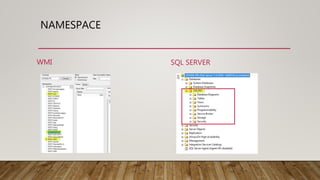
 Namespace
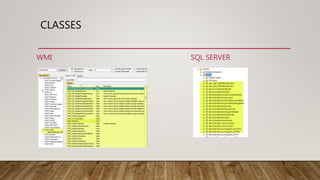
 Class
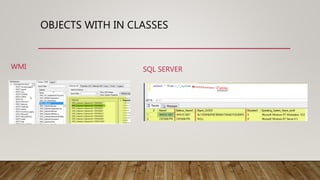
 Object
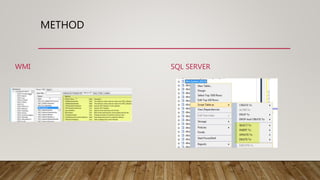
 Method
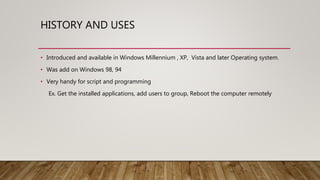
HISTORY AND USES
• Introduced and available in Windows Millennium , XP, Vista and later Operating system.
• Was add on Windows 98, 94
• Very handy for script and programming
Ex. Get the installed applications, add users to group, Reboot the computer remotely
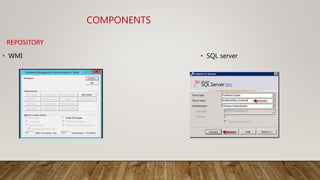
• SQL server• WMI
COMPONENTS
REPOSITORY
NAMESPACE
WMI SQL SERVER
CLASSES
WMI SQL SERVER
OBJECTS WITH IN CLASSES
WMI SQL SERVER
METHOD
WMI SQL SERVER
EXPLORING
WMI
• WMI Control , WBEMTest
• File System
• Registry
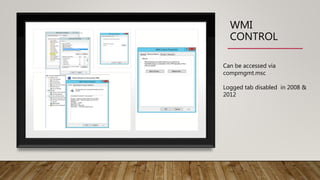
WMI
CONTROL
Can be accessed via
compmgmt.msc
Logged tab disabled in 2008 &
2012
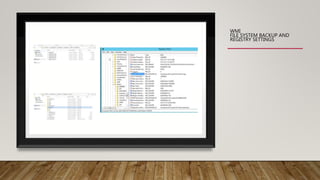
WMI
FILE SYSTEM BACKUP AND
REGISTRY SETTINGS
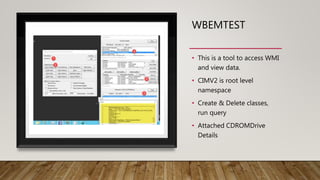
WBEMTEST
• This is a tool to access WMI
and view data.
• CIMV2 is root level
namespace
• Create & Delete classes,
run query
• Attached CDROMDrive
Details
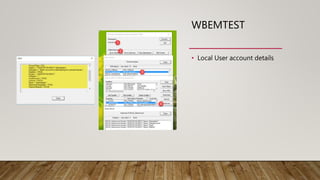
WBEMTEST
• Local User account details
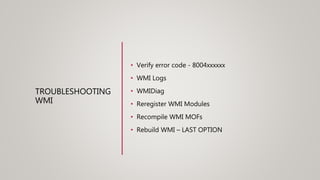
TROUBLESHOOTING
WMI
• Verify error code - 8004xxxxxx
• WMI Logs
• WMIDiag
• Reregister WMI Modules
• Recompile WMI MOFs
• Rebuild WMI – LAST OPTION
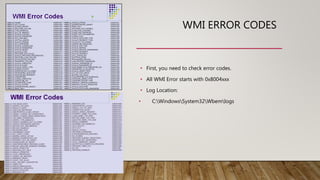
WMI ERROR CODES
• First, you need to check error codes.
• All WMI Error starts with 0x8004xxx
• Log Location:
• C:WindowsSystem32Wbemlogs
WMIDIAG
• It’s a free tool, available in Microsoft
Download Link : https://blogs.technet.microsoft.com/askperf/2015/05/12/wmidiag-
2-2-is-here/
• Looks whether WMI is healthy or not and within WMI like Namespaces are
healthy or corrupted
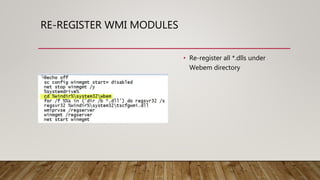
RE-REGISTER WMI MODULES
• Re-register all *.dlls under
Webem directory
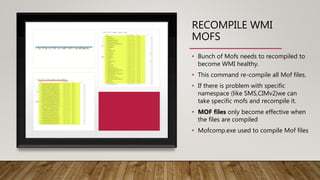
RECOMPILE WMI
MOFS
• Bunch of Mofs needs to recompiled to
become WMI healthy.
• This command re-compile all Mof files.
• If there is problem with specific
namespace (like SMS,CIMv2)we can
take specific mofs and recompile it.
• MOF files only become effective when
the files are compiled
• Mofcomp.exe used to compile Mof files
REBUILD REPOSITORY
• Stop WMI service and rename Repository folder under Wbem folder and start
WMI service.
• It is the last option and it resets the repository fresh.
• Very quick to do that but don’t necessarily fix anything.
• Need to find Root cause and fix the problem.
• Can take backup of WMI and restore it to anyother computer to find what is
going on
WHY DO WE CARE?
• Core Dependency for Servers and clients
• SCCM Administrator console
• Engine to access database
• Storage of client data and settings
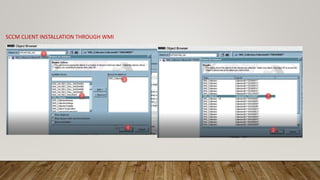
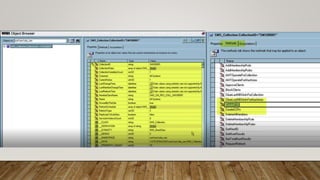
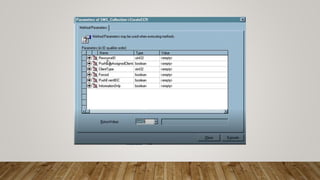
SCCM CLIENT INSTALLATION THROUGH WMI
Understanding WMI
Understanding WMI
Understanding WMI
Understanding WMI

Understanding WMI

  • 1.
  • 2.
    OVERVIEW • What isWMI? • Exploring WMI • Troubleshooting WMI • WMI Error Codes • Why do we care
  • 3.
    WHAT IS WMI? •History • Uses • Components  Repository  Namespace  Class  Object  Method
  • 4.
    HISTORY AND USES •Introduced and available in Windows Millennium , XP, Vista and later Operating system. • Was add on Windows 98, 94 • Very handy for script and programming Ex. Get the installed applications, add users to group, Reboot the computer remotely
  • 5.
    • SQL server•WMI COMPONENTS REPOSITORY
  • 6.
  • 7.
  • 8.
    OBJECTS WITH INCLASSES WMI SQL SERVER
  • 9.
  • 10.
    EXPLORING WMI • WMI Control, WBEMTest • File System • Registry
  • 11.
    WMI CONTROL Can be accessedvia compmgmt.msc Logged tab disabled in 2008 & 2012
  • 12.
    WMI FILE SYSTEM BACKUPAND REGISTRY SETTINGS
  • 13.
    WBEMTEST • This isa tool to access WMI and view data. • CIMV2 is root level namespace • Create & Delete classes, run query • Attached CDROMDrive Details
  • 14.
    WBEMTEST • Local Useraccount details
  • 15.
    TROUBLESHOOTING WMI • Verify errorcode - 8004xxxxxx • WMI Logs • WMIDiag • Reregister WMI Modules • Recompile WMI MOFs • Rebuild WMI – LAST OPTION
  • 16.
    WMI ERROR CODES •First, you need to check error codes. • All WMI Error starts with 0x8004xxx • Log Location: • C:WindowsSystem32Wbemlogs
  • 17.
    WMIDIAG • It’s afree tool, available in Microsoft Download Link : https://blogs.technet.microsoft.com/askperf/2015/05/12/wmidiag- 2-2-is-here/ • Looks whether WMI is healthy or not and within WMI like Namespaces are healthy or corrupted
  • 18.
    RE-REGISTER WMI MODULES •Re-register all *.dlls under Webem directory
  • 19.
    RECOMPILE WMI MOFS • Bunchof Mofs needs to recompiled to become WMI healthy. • This command re-compile all Mof files. • If there is problem with specific namespace (like SMS,CIMv2)we can take specific mofs and recompile it. • MOF files only become effective when the files are compiled • Mofcomp.exe used to compile Mof files
  • 20.
    REBUILD REPOSITORY • StopWMI service and rename Repository folder under Wbem folder and start WMI service. • It is the last option and it resets the repository fresh. • Very quick to do that but don’t necessarily fix anything. • Need to find Root cause and fix the problem. • Can take backup of WMI and restore it to anyother computer to find what is going on
  • 21.
    WHY DO WECARE? • Core Dependency for Servers and clients • SCCM Administrator console • Engine to access database • Storage of client data and settings
  • 22.