Inside debian-installer
Wouter Verhelst
<wouter@debian.org>
LOADays 2014
2014-03-05
Wilrijk, Belgium
debian-installer?
● Used since 2005
● “embedded” environment running from initramfs
● Modular; uses debian package files (udeb). Every udeb
is a module.
● Main components:
– cdebconf
– main-menu
– partman
● Mostly shellscripts (busybox and dash)
cdebconf
● Based on debconf, but C rather than perl
● Questions asked through (translatable)
templates
● Instanciated templates have priorities
– Low-priority questions are not shown to the user
(default is returned instead)
● MVC system
– Thus, UI-agnostic (GTK or curses)
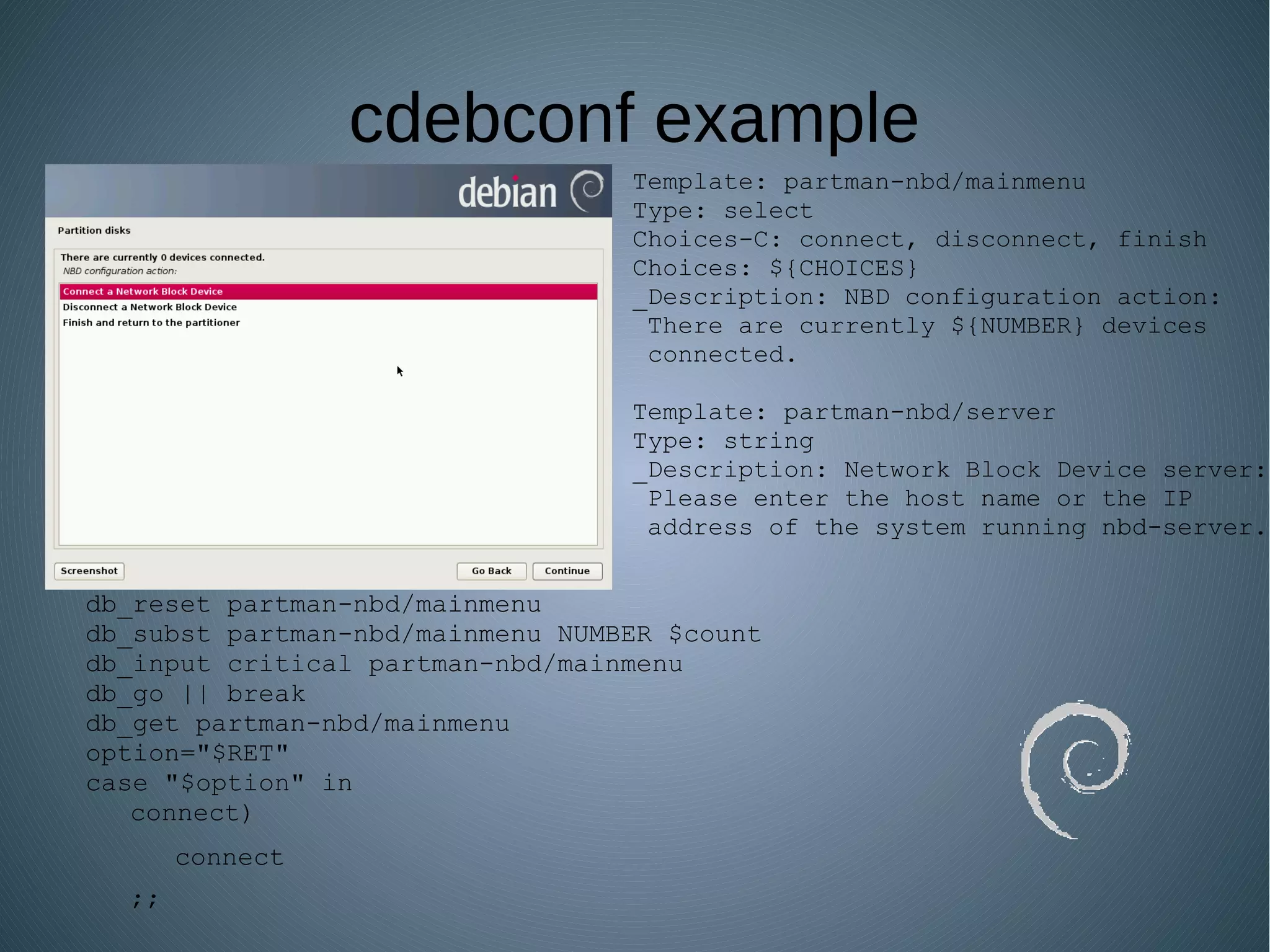
cdebconf example
Template: partman-nbd/mainmenu
Type: select
Choices-C: connect, disconnect, finish
Choices: ${CHOICES}
_Description: NBD configuration action:
There are currently ${NUMBER} devices
connected.
Template: partman-nbd/server
Type: string
_Description: Network Block Device server:
Please enter the host name or the IP
address of the system running nbd-server.
db_reset partman-nbd/mainmenu
db_subst partman-nbd/mainmenu NUMBER $count
db_input critical partman-nbd/mainmenu
db_go || break
db_get partman-nbd/mainmenu
option="$RET"
case "$option" in
connect)
connect
;;
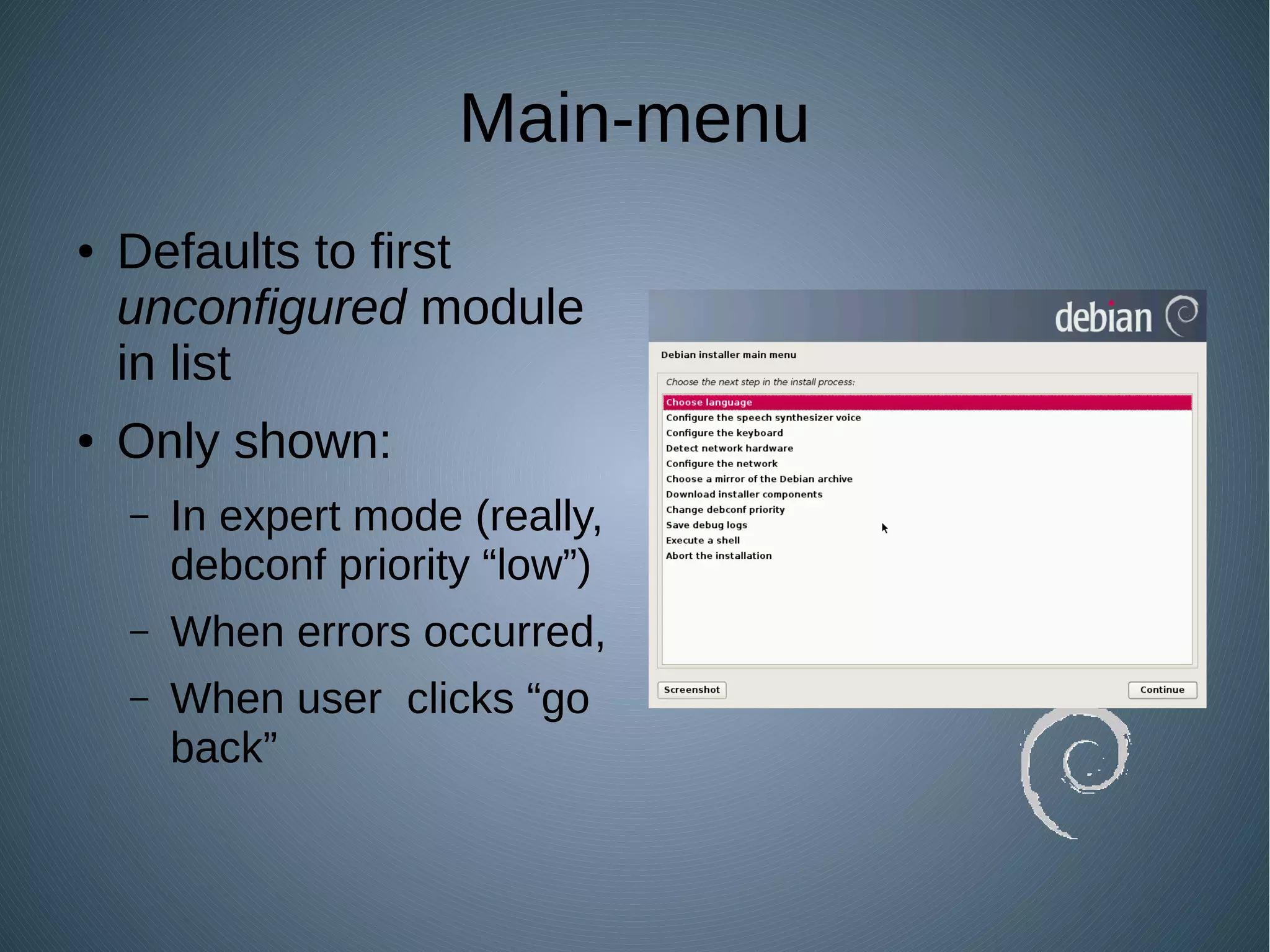
Main-menu
● Defaults to first
unconfigured module
in list
● Only shown:
– In expert mode (really,
debconf priority “low”)
– When errors occurred,
– When user clicks “go
back”
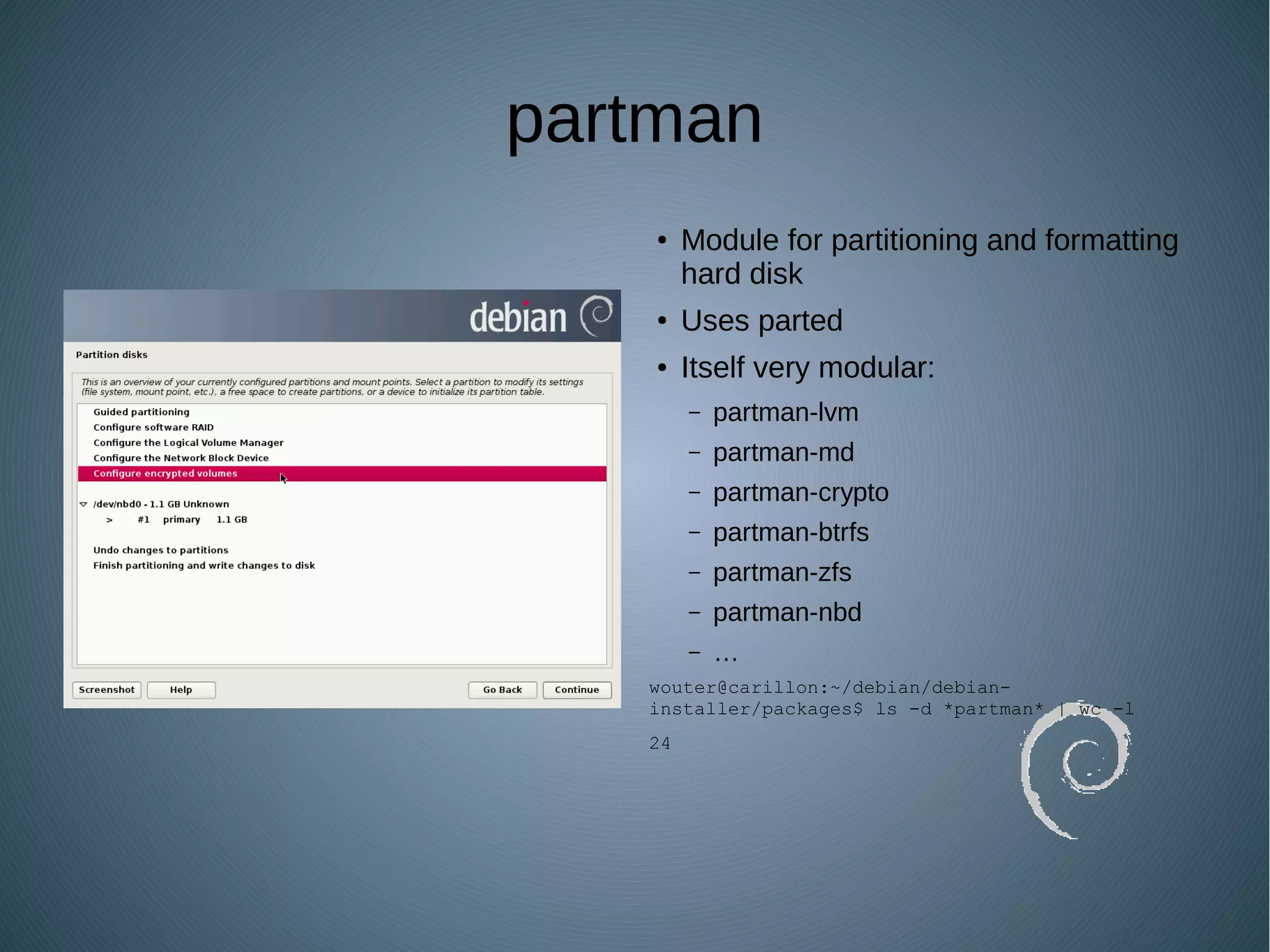
partman
● Module for partitioning and formatting
hard disk
● Uses parted
● Itself very modular:
– partman-lvm
– partman-md
– partman-crypto
– partman-btrfs
– partman-zfs
– partman-nbd
– …
wouter@carillon:~/debian/debian-
installer/packages$ ls -d *partman* | wc -l
24
Module interface
● Modules:
– postinst implements functionality; config script
asks questions (debconf templates)
– “Installer-Menu-Item”: location in main-menu
● Retrievers can fetch more modules
Preseeding
● Providing the answers to debconf templates ahead of
time, rather than interactively
– Not a good option for changing defaults
● Several options:
– Kernel command line
– Installer/medium remastering
– HTTP (not HTTPS)
URL:
● Enter interactively
– Or preseed that...
● DHCP
● DEBCONF_DEBUG
Preseeding example file
Demo!
(questions?)

Inside debian-installer

  • 1.
  • 2.
    debian-installer? ● Used since2005 ● “embedded” environment running from initramfs ● Modular; uses debian package files (udeb). Every udeb is a module. ● Main components: – cdebconf – main-menu – partman ● Mostly shellscripts (busybox and dash)
  • 3.
    cdebconf ● Based ondebconf, but C rather than perl ● Questions asked through (translatable) templates ● Instanciated templates have priorities – Low-priority questions are not shown to the user (default is returned instead) ● MVC system – Thus, UI-agnostic (GTK or curses)
  • 4.
    cdebconf example Template: partman-nbd/mainmenu Type:select Choices-C: connect, disconnect, finish Choices: ${CHOICES} _Description: NBD configuration action: There are currently ${NUMBER} devices connected. Template: partman-nbd/server Type: string _Description: Network Block Device server: Please enter the host name or the IP address of the system running nbd-server. db_reset partman-nbd/mainmenu db_subst partman-nbd/mainmenu NUMBER $count db_input critical partman-nbd/mainmenu db_go || break db_get partman-nbd/mainmenu option="$RET" case "$option" in connect) connect ;;
  • 5.
    Main-menu ● Defaults tofirst unconfigured module in list ● Only shown: – In expert mode (really, debconf priority “low”) – When errors occurred, – When user clicks “go back”
  • 6.
    partman ● Module forpartitioning and formatting hard disk ● Uses parted ● Itself very modular: – partman-lvm – partman-md – partman-crypto – partman-btrfs – partman-zfs – partman-nbd – … wouter@carillon:~/debian/debian- installer/packages$ ls -d *partman* | wc -l 24
  • 7.
    Module interface ● Modules: –postinst implements functionality; config script asks questions (debconf templates) – “Installer-Menu-Item”: location in main-menu ● Retrievers can fetch more modules
  • 8.
    Preseeding ● Providing theanswers to debconf templates ahead of time, rather than interactively – Not a good option for changing defaults ● Several options: – Kernel command line – Installer/medium remastering – HTTP (not HTTPS) URL: ● Enter interactively – Or preseed that... ● DHCP ● DEBCONF_DEBUG
  • 9.
  • 10.

Editor's Notes

  • #2 Who has created Debian packages before? Who has created Debian packages with debconf questions? Who has tried preseeding before? Did you succeed? Who has done both preseeding and kickstart? Which do you prefer? Will talk about how things are written, since that makes it easier to understand how to do preseeding
  • #3 Under development pretty much since before I became a Debian Developer Also used by Ubuntu since 6.06, though recent versions use “Ubiquity” (itself based on d-i) Since debian-installer runs completely from memory, an increase in used space for the installer bumps the memory requirement for the user. Embedded techniques are used to reduce that as much as possible .udeb, because QWERTY keyboards and ASCII don&amp;apos;t know about µ Only difference between udebs and regular .deb packages is that for the former it&amp;apos;s okay to ignore Debian Policy; e.g., there&amp;apos;s no /usr/share/doc etc, so no copyright or changelog files (which wouldn&amp;apos;t make much sense...)
  • #4 C, &amp;apos;cause it&amp;apos;s embedded, ya know Original plan was to replace debconf at some point with cdebconf, probably shelved by now Four priorities: “low”, “medium”, “high”, “critical” - critical questions are always shown (cannot be disabled, except through preseeding) - high questions are shown in normal installations, but can be disabled by changing the debconf priority - medium questions are not usually shown, except if something goes wrong - low questions are only shown in expert mode
  • #5 The “critical” in the db_input line determines the priority of the question; this may mean the question isn&amp;apos;t shown if the cdebconf priority is set too high The use of db_reset means that this particular option cannot be preseeded. Debian-installer “expert mode” really is nothing more than changing the debconf priority to “low” (really!)
  • #6 The main-menu drives the installer, even when the menu itself isn&amp;apos;t shown
  • #7 Some of these modules are things like partman-auto-raid, which don&amp;apos;t provide interactive functionality but instead only allow for preseeding options; this also includes partman itself. Still, that&amp;apos;s a lot of stuff A detailed description of how partman itself works would be out of scope for this talk, though
  • #8 Retriever options include “cdrom-retriever”, “net-retriever”, or “media-retriever” (removable media, like USB key)
  • #9 Shortcuts exist to avoid having to enter something like debian-installer/locale=nl_BE on the kernel command line, instead allowing “locale=nl_BE” The kernel command line is always parsed. One exception to defaults: debconf priority itself can always be changed The URL to an HTTP location is itself a question which is asked through debconf, and which can therefore be preseeded (e.g., from the command line) Next release of Debian (“Jessie”) might support HTTPS The DHCP option goes one better, and allows one to specify the location for a preseed file which can be downloaded with TFTP. To specify DHCP preseed file, use option “filename” The DEBCONF_DEBUG variable is something one can put on the kernel command line. (Not preseeding). Valid options: 0 (error) 1 (warning) 5 (debug; alternative = “developer”) 20 (verbose; you probably don&amp;apos;t want this)
  • #10 ~/data/fosdem/fosdemvideo/doc/src/preseed.cfg
  • #11 The whole point of preseeding is for things to not ask questions, so this won&amp;apos;t be very interesting... any questions?