How can OpenNebula fit your needs ?
Or “I want to write my own (transfer) managers.”
Maxence Dunnewind
OpenNebulaConf 2013 - Berlin
24 - 26 Sept. 2013
Maxence Dunnewind - OpenNebulaConf
2
Who am I ?
● French system engineer
● Working at Inria on BonFIRE european project
● Working with OpenNebula inside BonFIRE
● Free software addict
● Puppet, Nagios, Git, Redmine, Jenkins, etc ...
● Sysadmin of french Ubuntu community ( http://www.ubuntu-fr.org )
●
More about me at:
● http://www.dunnewind.net (fr)
● http://www.linkedin.com/in/maxencedunnewind
24 - 26 Sept. 2013
Maxence Dunnewind - OpenNebulaConf
3
What's BonFIRE ?
European project which aims at delivering :
« … a robust, reliable and sustainable facility for large scale
experimentally-driven cloud research. »
● Provides extra set of tools to help experimenters :
● Improved monitoring
● Centralized services with common API for all testbeds
● OpenNebula project is involved in BonFIRE
● 4 testbeds provide OpenNebula infrastructure
24 - 26 Sept. 2013
Maxence Dunnewind - OpenNebulaConf
4
What's BonFIRE …
technically ?
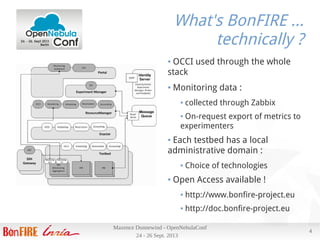
● OCCI used through the whole
stack
● Monitoring data :
● collected through Zabbix
● On-request export of metrics to
experimenters
● Each testbed has a local
administrative domain :
● Choice of technologies
● Open Access available !
● http://www.bonfire-project.eu
● http://doc.bonfire-project.eu
24 - 26 Sept. 2013
Maxence Dunnewind - OpenNebulaConf
5
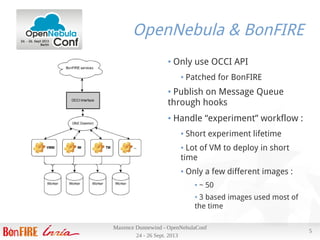
OpenNebula & BonFIRE
● Only use OCCI API
● Patched for BonFIRE
● Publish on Message Queue
through hooks
● Handle “experiment” workflow :
● Short experiment lifetime
● Lot of VM to deploy in short
time
● Only a few different images :
● ~ 50
● 3 based images used most of
the time
24 - 26 Sept. 2013
Maxence Dunnewind - OpenNebulaConf
6
Testbed infrastructure
● One disk server :
● 4 TB RAID-5 on 8 600GB SAS 15k hard drive
● 48 Gb of RAM
● 1 * 6 cores E5-2630
● 4 * 1 Gb Ethernet links aggregated using Linux bonding 802.3ad
● 4 workers :
● Dell C6220, 1 blade server with 4 blades
● Each blade has :
● 64G of RAM
● 2 * 300G SAS 10k (grouped in one LVM VG)
● 2 * E5-2620
● 2 * 1Gb Ethernet aggregated
24 - 26 Sept. 2013
Maxence Dunnewind - OpenNebulaConf
7
Testbed infrastructure
● Drawbacks & constraints :
● Not a lot of disks
● Not a lot of time to deploy
things like Ceph backend
● Network is fine, but still
Ethernet (no low-latency
network)
● Only a few servers for VM
● Disk server is shared with
other things (backup for
example)
● Advantages :
● Network not heavily used
● Can use it for deployment
● Disk server is fine for
virtualization
● Workers have a Xen with
LVM backend
● Both server and workers
have enough RAM to benefits
of caches
24 - 26 Sept. 2013
Maxence Dunnewind - OpenNebulaConf
8
First iteration
● Pros :
● Fast boot process when image is
already copied
● Network saving
● Cons :
● LVM snapshot performance
● Cache coherency
● Custom Housekeeping scripts need to
be maintained
● Before the blade, we had 8 small servers :
●
4G of RAM
● 500G of disk space
●
4 cores
●
Our old setup based on customized SSH TM was to :
● Make a local copy of each image on the host
●
Only once per image
●
Snapshot the local copy to boot the VM on it
24 - 26 Sept. 2013
Maxence Dunnewind - OpenNebulaConf
9
Second iteration
● Requirements :
● Efficient copy through network
● ONE frontend hosted on the disks server as a VM
● Use of LVM backend (easy for backup / snapshot etc …)
● Try to benefit from cache when copying one image many times in a row
● Efficient use of network bonding when deploying on blades
● No copy if possible when image is persistent
But :
● OpenNebula doesn't support Copy + LVM backend (only ssh OR clvm)
● OpenNebula main daemon is written in compiled language (C/C++)
● But all mads are written in shell (or ruby ) !
● Creating a mad is just a new directory with a few shell files
24 - 26 Sept. 2013
Maxence Dunnewind - OpenNebulaConf
10
What's wrong ?
● What's wrong with SSH TM :
● It uses ssh … which drops the performance
● Images need to be present inside the frontend VM to be copied,
so a deployment will need to go through :
hypervisor's disk VM memory network→ → →
● One ssh connection needs to be opened for each transfer
● Reduce the benefits of cache
● No cache on client/blade side
● What's wrong with NFS TM :
● Almost fine if you have very strong network / hard drives
● Disastrous when you try to do (write) something with VMs if you
don't have strong network / hard drives :)
24 - 26 Sept. 2013
Maxence Dunnewind - OpenNebulaConf
11
Let's customize !
● Let's create our own Transfer Manager mad :
● Used for image transfer
● Only need a few files in (for system-wide install)
/var/lib/one/remotes/tm/mynewtm
● clone => Main script called to copy an OS image to the node
● context => Manage context ISO creation and copy
● delete => Delete OS image
● ln => Called when a persistent (not cloned) image is used in a VM
Only clone, delete and context will be updated, ln is the same as the NFS one
24 - 26 Sept. 2013
Maxence Dunnewind - OpenNebulaConf
12
Let's customize !
How can we improve ?
● Avoid SSH to improve copy
● Netcat ?
● Require complex script to create netcat servers dynamically
● NFS ?
● Avoid to run ssh command if possible
● Try to improve cache use
● On server
● On clients / blades
● Optimize network for parallel copy
● Blade IP's need to be carefully chosen to use one 1Gb link of disk server
for each blade ( 4 links, 4 blades )
24 - 26 Sept. 2013
Maxence Dunnewind - OpenNebulaConf
13
Infrastructure setup
● Disk server acts has NFS server
● Datastore is exported from the disk server as a NFS share :
● To the ONE frontend (VM on the same host)
● To the blades (through network)
● Each blade mounts the datastore directory locally
● Copy of base images is done from NFS mount to local LVM
● Or linked in case of persistent image => only persistent images
write directly on NFS
● Almost all commands are done directly on NFS share for VM
deployment
● No extra ssh sessions
24 - 26 Sept. 2013
Maxence Dunnewind - OpenNebulaConf
14
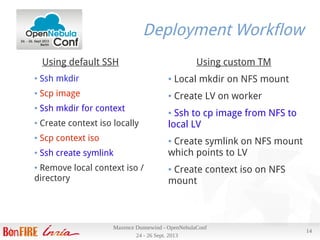
Deployment Workflow
Using default SSH
● Ssh mkdir
● Scp image
● Ssh mkdir for context
● Create context iso locally
● Scp context iso
● Ssh create symlink
● Remove local context iso /
directory
Using custom TM
● Local mkdir on NFS mount
● Create LV on worker
● Ssh to cp image from NFS to
local LV
● Create symlink on NFS mount
which points to LV
● Create context iso on NFS
mount
24 - 26 Sept. 2013
Maxence Dunnewind - OpenNebulaConf
15
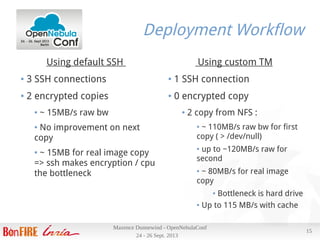
Deployment Workflow
Using default SSH
● 3 SSH connections
● 2 encrypted copies
● ~ 15MB/s raw bw
● No improvement on next
copy
● ~ 15MB for real image copy
=> ssh makes encryption / cpu
the bottleneck
Using custom TM
● 1 SSH connection
● 0 encrypted copy
● 2 copy from NFS :
● ~ 110MB/s raw bw for first
copy ( > /dev/null)
● up to ~120MB/s raw for
second
● ~ 80MB/s for real image
copy
● Bottleneck is hard drive
● Up to 115 MB/s with cache
24 - 26 Sept. 2013
Maxence Dunnewind - OpenNebulaConf
16
Results
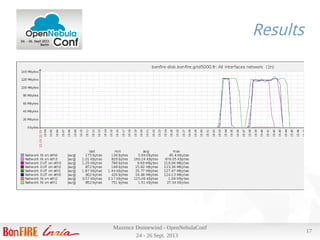
Deploying a VM using our most commonly used image (700M) :
● Scheduler interval is 10s, and can deploy 30 VMs per run, 3 per host
● Takes ~ 13s from ACTIVE to RUNNING
● Image copy ~ 7s
Tue Sep 24 22:51:11 2013 [TM][I]: 734003200 bytes (734 MB) copied, 6.49748 s, 113 MB/s'
● 4 VMs on 4 nodes (one per node) from submission to RUNNING in 17
s , 12 VMs in 2 minutes 6s (+/- 10s)
● Transfer between 106 and 113 MB/s on the 4 nodes at same time
● Thanks to efficient 802.3ad bonding
24 - 26 Sept. 2013
Maxence Dunnewind - OpenNebulaConf
17
Results
24 - 26 Sept. 2013
Maxence Dunnewind - OpenNebulaConf
18
Conclusion
With no extra hardware, just updating 3 scripts in ONE and our network configuration, we :
● Reduced contention on SSH, speedup command doing them locally (NFS then sync with
nodes)
● Reduced CPU used by deployment for SSH encryption
● Removed SSH bottleneck on encryption
● Improved almost by 8 our deployment time
● Optimized parallel deployment, so that we reach (network) hardware limitation :
● Deploying images in parallel have almost no impact on each deployment performance
All this without need for a huge (and expensive) NFS server (and network) which would have to
host images of running VMs !
Details on http://blog.opennebula.org/?p=4002
The END ….The END ….
Thanks for your attention !
Maxence Dunnewind
OpenNebulaConf 2013 - Berlin

How can OpenNebula fit your needs - OpenNebulaConf 2013

  • 1.
    How can OpenNebulafit your needs ? Or “I want to write my own (transfer) managers.” Maxence Dunnewind OpenNebulaConf 2013 - Berlin
  • 2.
    24 - 26Sept. 2013 Maxence Dunnewind - OpenNebulaConf 2 Who am I ? ● French system engineer ● Working at Inria on BonFIRE european project ● Working with OpenNebula inside BonFIRE ● Free software addict ● Puppet, Nagios, Git, Redmine, Jenkins, etc ... ● Sysadmin of french Ubuntu community ( http://www.ubuntu-fr.org ) ● More about me at: ● http://www.dunnewind.net (fr) ● http://www.linkedin.com/in/maxencedunnewind
  • 3.
    24 - 26Sept. 2013 Maxence Dunnewind - OpenNebulaConf 3 What's BonFIRE ? European project which aims at delivering : « … a robust, reliable and sustainable facility for large scale experimentally-driven cloud research. » ● Provides extra set of tools to help experimenters : ● Improved monitoring ● Centralized services with common API for all testbeds ● OpenNebula project is involved in BonFIRE ● 4 testbeds provide OpenNebula infrastructure
  • 4.
    24 - 26Sept. 2013 Maxence Dunnewind - OpenNebulaConf 4 What's BonFIRE … technically ? ● OCCI used through the whole stack ● Monitoring data : ● collected through Zabbix ● On-request export of metrics to experimenters ● Each testbed has a local administrative domain : ● Choice of technologies ● Open Access available ! ● http://www.bonfire-project.eu ● http://doc.bonfire-project.eu
  • 5.
    24 - 26Sept. 2013 Maxence Dunnewind - OpenNebulaConf 5 OpenNebula & BonFIRE ● Only use OCCI API ● Patched for BonFIRE ● Publish on Message Queue through hooks ● Handle “experiment” workflow : ● Short experiment lifetime ● Lot of VM to deploy in short time ● Only a few different images : ● ~ 50 ● 3 based images used most of the time
  • 6.
    24 - 26Sept. 2013 Maxence Dunnewind - OpenNebulaConf 6 Testbed infrastructure ● One disk server : ● 4 TB RAID-5 on 8 600GB SAS 15k hard drive ● 48 Gb of RAM ● 1 * 6 cores E5-2630 ● 4 * 1 Gb Ethernet links aggregated using Linux bonding 802.3ad ● 4 workers : ● Dell C6220, 1 blade server with 4 blades ● Each blade has : ● 64G of RAM ● 2 * 300G SAS 10k (grouped in one LVM VG) ● 2 * E5-2620 ● 2 * 1Gb Ethernet aggregated
  • 7.
    24 - 26Sept. 2013 Maxence Dunnewind - OpenNebulaConf 7 Testbed infrastructure ● Drawbacks & constraints : ● Not a lot of disks ● Not a lot of time to deploy things like Ceph backend ● Network is fine, but still Ethernet (no low-latency network) ● Only a few servers for VM ● Disk server is shared with other things (backup for example) ● Advantages : ● Network not heavily used ● Can use it for deployment ● Disk server is fine for virtualization ● Workers have a Xen with LVM backend ● Both server and workers have enough RAM to benefits of caches
  • 8.
    24 - 26Sept. 2013 Maxence Dunnewind - OpenNebulaConf 8 First iteration ● Pros : ● Fast boot process when image is already copied ● Network saving ● Cons : ● LVM snapshot performance ● Cache coherency ● Custom Housekeeping scripts need to be maintained ● Before the blade, we had 8 small servers : ● 4G of RAM ● 500G of disk space ● 4 cores ● Our old setup based on customized SSH TM was to : ● Make a local copy of each image on the host ● Only once per image ● Snapshot the local copy to boot the VM on it
  • 9.
    24 - 26Sept. 2013 Maxence Dunnewind - OpenNebulaConf 9 Second iteration ● Requirements : ● Efficient copy through network ● ONE frontend hosted on the disks server as a VM ● Use of LVM backend (easy for backup / snapshot etc …) ● Try to benefit from cache when copying one image many times in a row ● Efficient use of network bonding when deploying on blades ● No copy if possible when image is persistent But : ● OpenNebula doesn't support Copy + LVM backend (only ssh OR clvm) ● OpenNebula main daemon is written in compiled language (C/C++) ● But all mads are written in shell (or ruby ) ! ● Creating a mad is just a new directory with a few shell files
  • 10.
    24 - 26Sept. 2013 Maxence Dunnewind - OpenNebulaConf 10 What's wrong ? ● What's wrong with SSH TM : ● It uses ssh … which drops the performance ● Images need to be present inside the frontend VM to be copied, so a deployment will need to go through : hypervisor's disk VM memory network→ → → ● One ssh connection needs to be opened for each transfer ● Reduce the benefits of cache ● No cache on client/blade side ● What's wrong with NFS TM : ● Almost fine if you have very strong network / hard drives ● Disastrous when you try to do (write) something with VMs if you don't have strong network / hard drives :)
  • 11.
    24 - 26Sept. 2013 Maxence Dunnewind - OpenNebulaConf 11 Let's customize ! ● Let's create our own Transfer Manager mad : ● Used for image transfer ● Only need a few files in (for system-wide install) /var/lib/one/remotes/tm/mynewtm ● clone => Main script called to copy an OS image to the node ● context => Manage context ISO creation and copy ● delete => Delete OS image ● ln => Called when a persistent (not cloned) image is used in a VM Only clone, delete and context will be updated, ln is the same as the NFS one
  • 12.
    24 - 26Sept. 2013 Maxence Dunnewind - OpenNebulaConf 12 Let's customize ! How can we improve ? ● Avoid SSH to improve copy ● Netcat ? ● Require complex script to create netcat servers dynamically ● NFS ? ● Avoid to run ssh command if possible ● Try to improve cache use ● On server ● On clients / blades ● Optimize network for parallel copy ● Blade IP's need to be carefully chosen to use one 1Gb link of disk server for each blade ( 4 links, 4 blades )
  • 13.
    24 - 26Sept. 2013 Maxence Dunnewind - OpenNebulaConf 13 Infrastructure setup ● Disk server acts has NFS server ● Datastore is exported from the disk server as a NFS share : ● To the ONE frontend (VM on the same host) ● To the blades (through network) ● Each blade mounts the datastore directory locally ● Copy of base images is done from NFS mount to local LVM ● Or linked in case of persistent image => only persistent images write directly on NFS ● Almost all commands are done directly on NFS share for VM deployment ● No extra ssh sessions
  • 14.
    24 - 26Sept. 2013 Maxence Dunnewind - OpenNebulaConf 14 Deployment Workflow Using default SSH ● Ssh mkdir ● Scp image ● Ssh mkdir for context ● Create context iso locally ● Scp context iso ● Ssh create symlink ● Remove local context iso / directory Using custom TM ● Local mkdir on NFS mount ● Create LV on worker ● Ssh to cp image from NFS to local LV ● Create symlink on NFS mount which points to LV ● Create context iso on NFS mount
  • 15.
    24 - 26Sept. 2013 Maxence Dunnewind - OpenNebulaConf 15 Deployment Workflow Using default SSH ● 3 SSH connections ● 2 encrypted copies ● ~ 15MB/s raw bw ● No improvement on next copy ● ~ 15MB for real image copy => ssh makes encryption / cpu the bottleneck Using custom TM ● 1 SSH connection ● 0 encrypted copy ● 2 copy from NFS : ● ~ 110MB/s raw bw for first copy ( > /dev/null) ● up to ~120MB/s raw for second ● ~ 80MB/s for real image copy ● Bottleneck is hard drive ● Up to 115 MB/s with cache
  • 16.
    24 - 26Sept. 2013 Maxence Dunnewind - OpenNebulaConf 16 Results Deploying a VM using our most commonly used image (700M) : ● Scheduler interval is 10s, and can deploy 30 VMs per run, 3 per host ● Takes ~ 13s from ACTIVE to RUNNING ● Image copy ~ 7s Tue Sep 24 22:51:11 2013 [TM][I]: 734003200 bytes (734 MB) copied, 6.49748 s, 113 MB/s' ● 4 VMs on 4 nodes (one per node) from submission to RUNNING in 17 s , 12 VMs in 2 minutes 6s (+/- 10s) ● Transfer between 106 and 113 MB/s on the 4 nodes at same time ● Thanks to efficient 802.3ad bonding
  • 17.
    24 - 26Sept. 2013 Maxence Dunnewind - OpenNebulaConf 17 Results
  • 18.
    24 - 26Sept. 2013 Maxence Dunnewind - OpenNebulaConf 18 Conclusion With no extra hardware, just updating 3 scripts in ONE and our network configuration, we : ● Reduced contention on SSH, speedup command doing them locally (NFS then sync with nodes) ● Reduced CPU used by deployment for SSH encryption ● Removed SSH bottleneck on encryption ● Improved almost by 8 our deployment time ● Optimized parallel deployment, so that we reach (network) hardware limitation : ● Deploying images in parallel have almost no impact on each deployment performance All this without need for a huge (and expensive) NFS server (and network) which would have to host images of running VMs ! Details on http://blog.opennebula.org/?p=4002
  • 19.
    The END ….TheEND …. Thanks for your attention ! Maxence Dunnewind OpenNebulaConf 2013 - Berlin