
www.impetus.com
Handling
Data Corruption
in Elasticsearch
This white paper focuses on handling data corruption in Elasticsearch. It describes
how to recover data from corrupted indices of Elasticsearch and
re-index that data in a new index.
The paper also guides you about Lucene’s index terminology.
Elasticsearch is an Open Source, schema free, and restful search engine built
on Apache Lucene. It has a stand-alone database server for data intake and
storage in a format optimized for language-based searches and a JSON-based
access API for ease-of-use.
An Elasticsearch cluster can be horizontally scaled by adding a new node at
runtime to cater to the increased volume of data as per need. It uses
zen-discovery for internal co-ordination between the nodes in a cluster.
Failover and high availability can be achieved by using replication and using a
distributed cluster setup.
What is Elasticsearch?
2
Data Replication
Data replication is used for high data availability. For example, if the replication
factor is 1, then there will be one replica of each primary shard. In case of
replication, there are rare chances of data loss. If the primary shard fails, then a
replica of that shard is used to manage the cluster in a stable state. If we
perform any query or other operation, it will be served by that shard. This
enables us to recover the data in case of data replication.
However, data replication has its own set of limitations like storage. In such
cases, where users do not want to replicate due to storage issues, recovering
the data of index if any primary shard gets corrupt is a major challenge.
Data Recovery from Corrupted Index
Data can be recovered from corrupted index by reading data files of an index
and re-indexing it to a new index. However, to recover the data, the user needs
to store all the fields in Elasticsearch, which stores and indexes the data as
Lucene files.
Each shard in the index may have multiple segments, which, if corrupt, makes
the index unstable. To make the data searchable, index must be in stable
state, which can be ensured in two ways:
• Run optimize operation on an index and merge all segments to one in a
shard. This may cause data loss since it removes the reference of that
particular segment of which data got corrupt.
• Recover the data by reading data files and re-indexing the same.
3
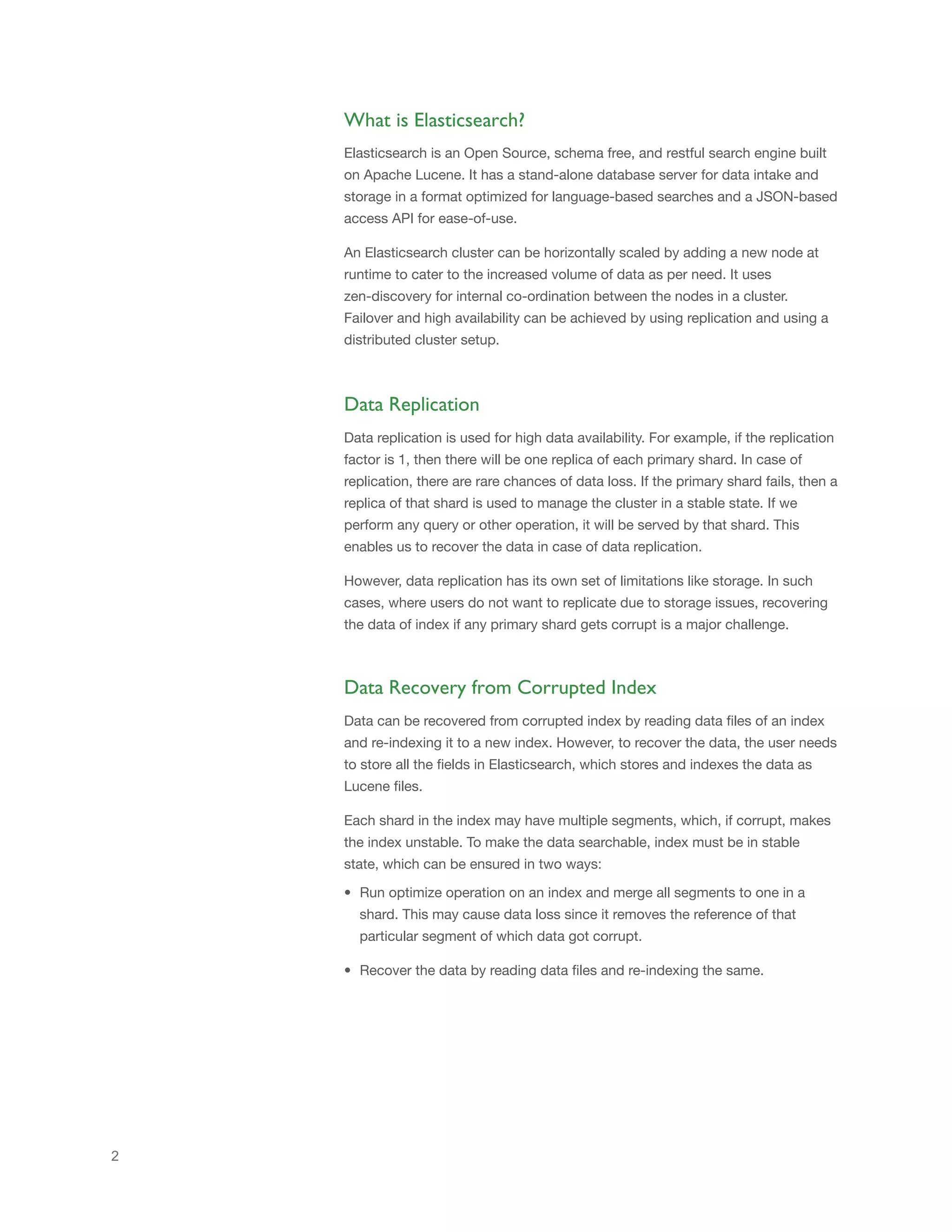
Lucene uses many files for an index. The table below highlights the four major
files that can be used to recover the data:
Name Extension Brief Description
Fields .fnm Stores information about the fields
Field Index .fdx Contains pointers to field data
Field Data .fdt The stored fields for documents
Segment Info .si Stores metadata about a segment
Note: If any of these files are corrupt, there are chances of data loss in case of
zero replication.
There are four steps to recover data from the corrupted index, which are
detailed below:
Before data recovery, it is important to identify the shard id of corrupted shard
of an index. Corrupted shards can be identified using UNASSIGNED state of
shard. However, you need to ensure that the whole cluster is in running state
and all the nodes are up. You can find a list of unassigned shards from
Elasticsearch cluster state. There are different ways of getting cluster state, for
example using curl request:
$ curl -XGET 'http://localhost:9200/_cluster/state'
Identify corrupted shards of index
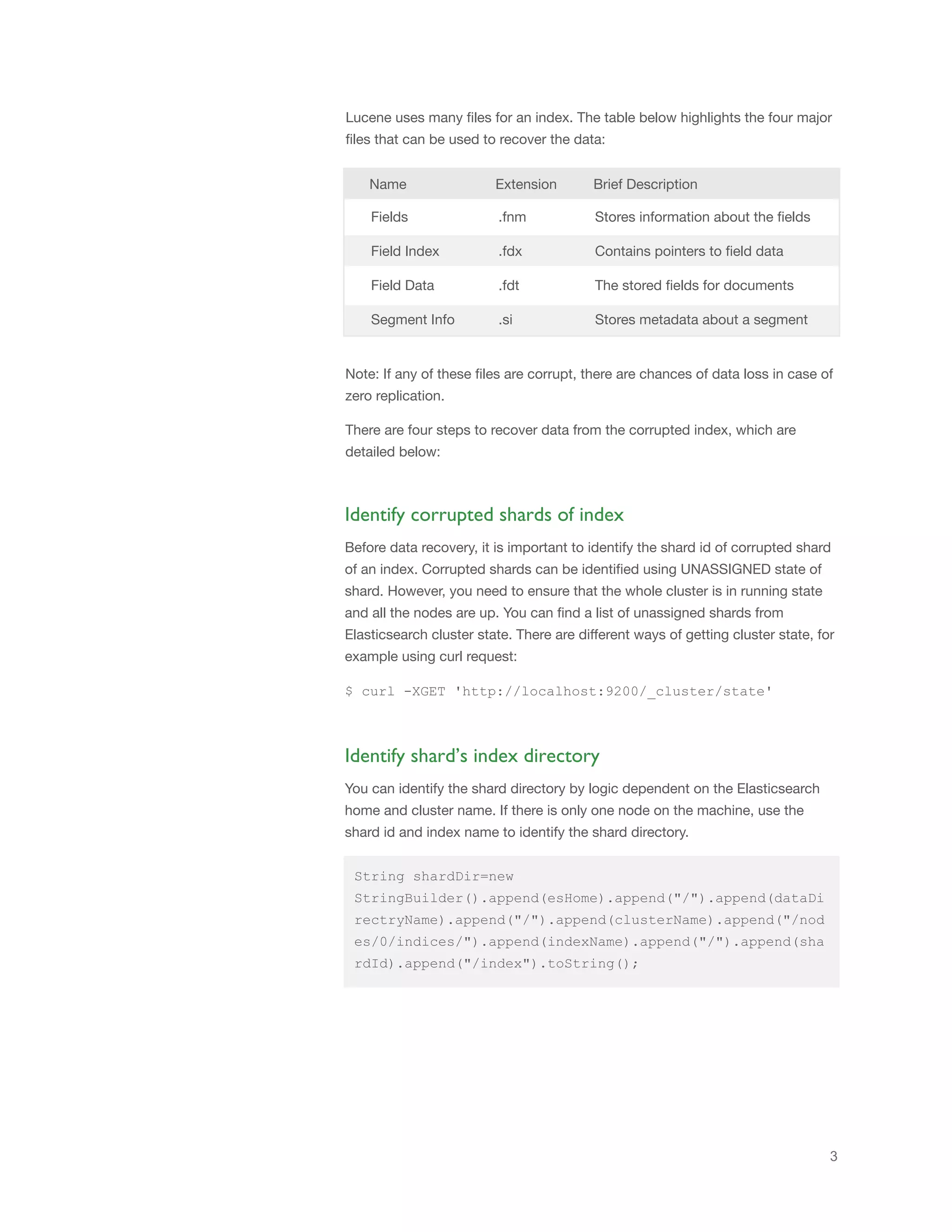
You can identify the shard directory by logic dependent on the Elasticsearch
home and cluster name. If there is only one node on the machine, use the
shard id and index name to identify the shard directory.
Identify shard’s index directory
String shardDir=new
StringBuilder().append(esHome).append("/").append(dataDi
rectryName).append("/").append(clusterName).append("/nod
es/0/indices/").append(indexName).append("/").append(sha
rdId).append("/index").toString();
4
public void readAndReindexData(String indexName, String
indexDir,String newIndexName) {
try {
Codec codec = new Lucene42Codec();
File indexDirectory = new File(indexDir);
Directory dir = FSDirectory.open(indexDirectory);
List<String> segmentList = new ArrayList<String>();
/* Identify segment list by listing files in shard
directory. Each segment will have .si file */
for (File f : FileUtils.listFiles(indexDirectory, new
RegexFileFilter("_.*.si"), null)) {
String s = f.getName();
segmentList.add(s.substring(0,
s.indexOf('.')));
}
int total=0;
// Iterate over each segment of that shard and reindex
that
for (String segmentName : segmentList) {
try{
IOContext ioContext = new IOContext();
SegmentInfo segmentInfos =
codec.segmentInfoFormat().getSegmentInfoReader().read(dir,
segmentName, ioContext);
Directory segmentDir;
if (segmentInfos.getUseCompoundFile()) {
segmentDir = new CompoundFileDirectory(dir,
IndexFileNames.segmentFileName(segmentName, "",
IndexFileNames.COMPOUND_FILE_EXTENSION), ioContext,
false);
} else {
segmentDir = dir;
}
// Collect fields information
FieldInfos fieldInfos =
codec.fieldInfosFormat().getFieldInfosReader().read(segmen
tDir, segmentName, ioContext);
StoredFieldsReader storedFieldsReader =
codec.storedFieldsFormat() .fieldsReader(segmentDir,
segmentInfos, fieldInfos, ioContext);
Read data of corrupted shard using .fdt, .fdx files
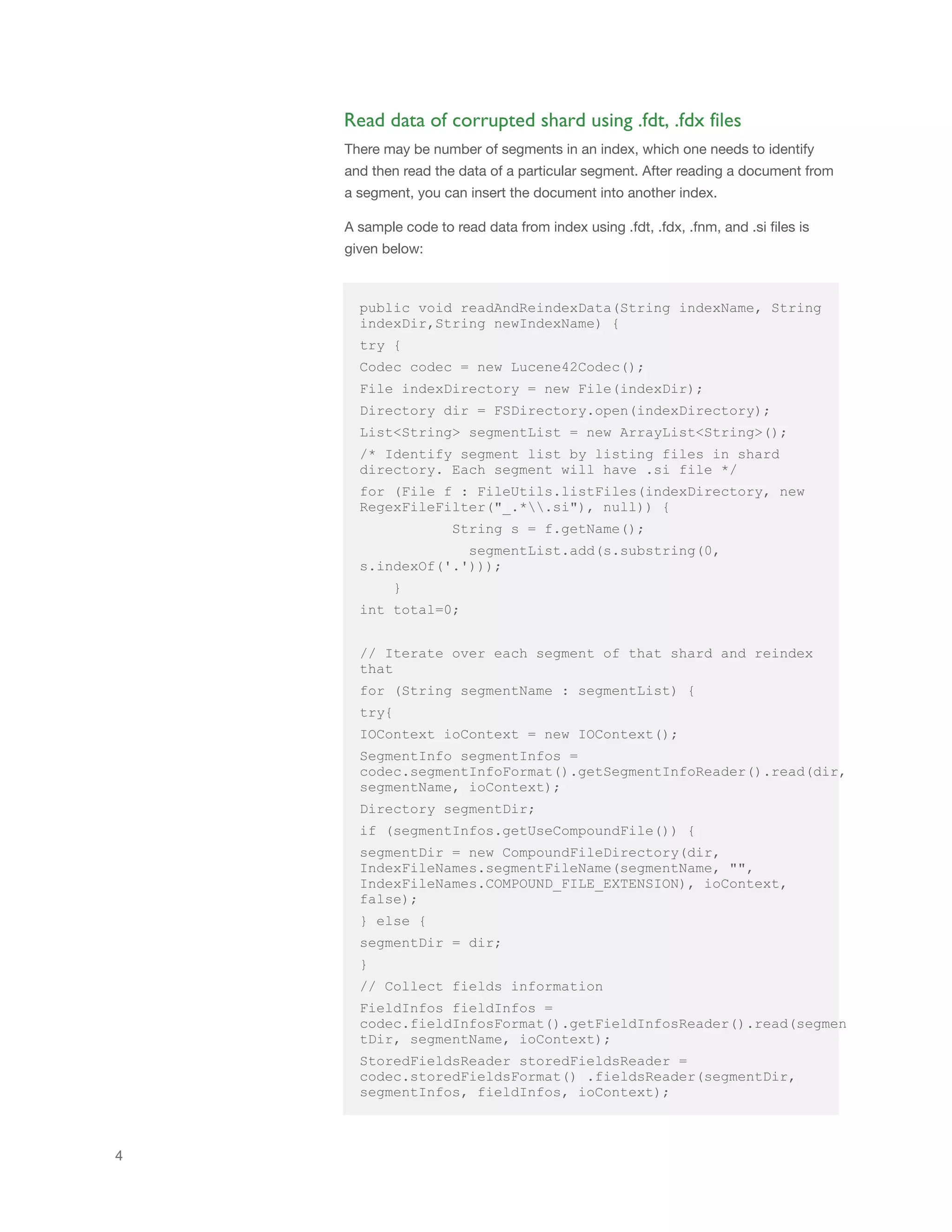
There may be number of segments in an index, which one needs to identify
and then read the data of a particular segment. After reading a document from
a segment, you can insert the document into another index.
A sample code to read data from index using .fdt, .fdx, .fnm, and .si files is
given below:
5
total=total+segment?Infos.getDocCount();
for (int i = 0; i < segmentInfos.getDocCount(); ++i) {
try {
DocumentStoredFieldVisitor visitor = new
DocumentStoredFieldVisitor();
storedFieldsReader.visitDocument(i, visitor);
Document doc = visitor.getDocument();
// Get list of fields of a document
List<IndexableField> list = doc.getFields();
Map<String, Object> tempMap = new HashMap<String,
Object>();
for (IndexableField indexableField : list) {
tempMap.put(indexableField.name(),
indexableField.stringValue());
}
// Re-index the document in new index
this.index(tempMap,newIndexName);
} catch (Exception e) {
System.out.println("Couldn't get document " + i + ",
stored fields corruption.");
}}}catch(Exception e){}
}
System.out.println(total+" documents recovered.");
}catch (Exception e) {
e.printStackTrace();
}
}
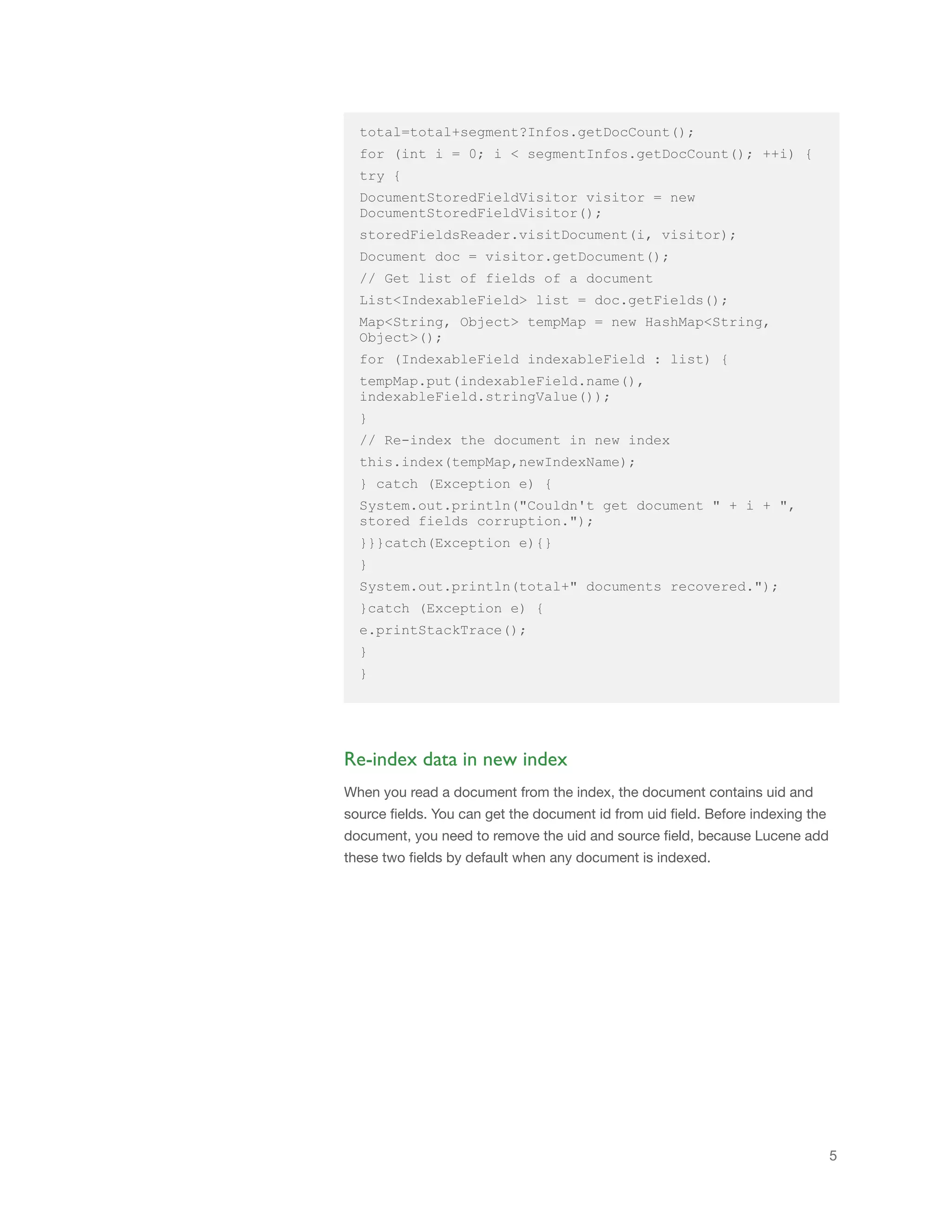
When you read a document from the index, the document contains uid and
source fields. You can get the document id from uid field. Before indexing the
document, you need to remove the uid and source field, because Lucene add
these two fields by default when any document is indexed.
Re-index data in new index
© 2014 Impetus Technologies, Inc.
All rights reserved. Product and
company names mentioned herein
may be trademarks of their
respective companies.
August 2014
Impetus is a Software Solutions and Services Company with deep technical
maturity that brings you thought leadership, proactive innovation, and a
track record of success. Our Services and Solutions portfolio includes
Carrier grade large systems, Big Data, Cloud, Enterprise Mobility, and Test
and Performance Engineering.
Visit www.impetus.com or write to us at inquiry@impetus.com
About Impetus
Conclusion
As the data volume is increasing rapidly, it is a challenge for organizations to
replicate the data due to storage cost. Elasticsearch addresses this challenge
effectively and helps organizations recover data from corrupted Elasticsearch
index.
// Re-index the document in new index
private void index(Map<String, Object> record,String
newIndexName){
String docId=((String) record.get("_uid")).split("#")[1];
String mappingType=((String)
record.get("_uid")).split("#")[0];
record.remove("_uid");
record.remove("_source");
IndexRequest indexRequest = new IndexRequest(newIndexName,
mappingType, docId);
indexRequest.source(record);
BulkRequestBuilder bulkRequestBuilder =
client.prepareBulk();
bulkRequestBuilder.add(indexRequest);
bulkRequestBuilder.execute().actionGet();
}
Testing Environment:
Elasticsearch- 0.90.5
Java - 1.6.45
Operating System- RHEL
A sample code to re-index the documents using same document ids is given
below:

Impetus White Paper- Handling Data Corruption in Elasticsearch

  • 1.
    www.impetus.com Handling Data Corruption in Elasticsearch Thiswhite paper focuses on handling data corruption in Elasticsearch. It describes how to recover data from corrupted indices of Elasticsearch and re-index that data in a new index. The paper also guides you about Lucene’s index terminology.
  • 2.
    Elasticsearch is anOpen Source, schema free, and restful search engine built on Apache Lucene. It has a stand-alone database server for data intake and storage in a format optimized for language-based searches and a JSON-based access API for ease-of-use. An Elasticsearch cluster can be horizontally scaled by adding a new node at runtime to cater to the increased volume of data as per need. It uses zen-discovery for internal co-ordination between the nodes in a cluster. Failover and high availability can be achieved by using replication and using a distributed cluster setup. What is Elasticsearch? 2 Data Replication Data replication is used for high data availability. For example, if the replication factor is 1, then there will be one replica of each primary shard. In case of replication, there are rare chances of data loss. If the primary shard fails, then a replica of that shard is used to manage the cluster in a stable state. If we perform any query or other operation, it will be served by that shard. This enables us to recover the data in case of data replication. However, data replication has its own set of limitations like storage. In such cases, where users do not want to replicate due to storage issues, recovering the data of index if any primary shard gets corrupt is a major challenge. Data Recovery from Corrupted Index Data can be recovered from corrupted index by reading data files of an index and re-indexing it to a new index. However, to recover the data, the user needs to store all the fields in Elasticsearch, which stores and indexes the data as Lucene files. Each shard in the index may have multiple segments, which, if corrupt, makes the index unstable. To make the data searchable, index must be in stable state, which can be ensured in two ways: • Run optimize operation on an index and merge all segments to one in a shard. This may cause data loss since it removes the reference of that particular segment of which data got corrupt. • Recover the data by reading data files and re-indexing the same.
  • 3.
    3 Lucene uses manyfiles for an index. The table below highlights the four major files that can be used to recover the data: Name Extension Brief Description Fields .fnm Stores information about the fields Field Index .fdx Contains pointers to field data Field Data .fdt The stored fields for documents Segment Info .si Stores metadata about a segment Note: If any of these files are corrupt, there are chances of data loss in case of zero replication. There are four steps to recover data from the corrupted index, which are detailed below: Before data recovery, it is important to identify the shard id of corrupted shard of an index. Corrupted shards can be identified using UNASSIGNED state of shard. However, you need to ensure that the whole cluster is in running state and all the nodes are up. You can find a list of unassigned shards from Elasticsearch cluster state. There are different ways of getting cluster state, for example using curl request: $ curl -XGET 'http://localhost:9200/_cluster/state' Identify corrupted shards of index You can identify the shard directory by logic dependent on the Elasticsearch home and cluster name. If there is only one node on the machine, use the shard id and index name to identify the shard directory. Identify shard’s index directory String shardDir=new StringBuilder().append(esHome).append("/").append(dataDi rectryName).append("/").append(clusterName).append("/nod es/0/indices/").append(indexName).append("/").append(sha rdId).append("/index").toString();
  • 4.
    4 public void readAndReindexData(StringindexName, String indexDir,String newIndexName) { try { Codec codec = new Lucene42Codec(); File indexDirectory = new File(indexDir); Directory dir = FSDirectory.open(indexDirectory); List<String> segmentList = new ArrayList<String>(); /* Identify segment list by listing files in shard directory. Each segment will have .si file */ for (File f : FileUtils.listFiles(indexDirectory, new RegexFileFilter("_.*.si"), null)) { String s = f.getName(); segmentList.add(s.substring(0, s.indexOf('.'))); } int total=0; // Iterate over each segment of that shard and reindex that for (String segmentName : segmentList) { try{ IOContext ioContext = new IOContext(); SegmentInfo segmentInfos = codec.segmentInfoFormat().getSegmentInfoReader().read(dir, segmentName, ioContext); Directory segmentDir; if (segmentInfos.getUseCompoundFile()) { segmentDir = new CompoundFileDirectory(dir, IndexFileNames.segmentFileName(segmentName, "", IndexFileNames.COMPOUND_FILE_EXTENSION), ioContext, false); } else { segmentDir = dir; } // Collect fields information FieldInfos fieldInfos = codec.fieldInfosFormat().getFieldInfosReader().read(segmen tDir, segmentName, ioContext); StoredFieldsReader storedFieldsReader = codec.storedFieldsFormat() .fieldsReader(segmentDir, segmentInfos, fieldInfos, ioContext); Read data of corrupted shard using .fdt, .fdx files There may be number of segments in an index, which one needs to identify and then read the data of a particular segment. After reading a document from a segment, you can insert the document into another index. A sample code to read data from index using .fdt, .fdx, .fnm, and .si files is given below:
  • 5.
    5 total=total+segment?Infos.getDocCount(); for (int i= 0; i < segmentInfos.getDocCount(); ++i) { try { DocumentStoredFieldVisitor visitor = new DocumentStoredFieldVisitor(); storedFieldsReader.visitDocument(i, visitor); Document doc = visitor.getDocument(); // Get list of fields of a document List<IndexableField> list = doc.getFields(); Map<String, Object> tempMap = new HashMap<String, Object>(); for (IndexableField indexableField : list) { tempMap.put(indexableField.name(), indexableField.stringValue()); } // Re-index the document in new index this.index(tempMap,newIndexName); } catch (Exception e) { System.out.println("Couldn't get document " + i + ", stored fields corruption."); }}}catch(Exception e){} } System.out.println(total+" documents recovered."); }catch (Exception e) { e.printStackTrace(); } } When you read a document from the index, the document contains uid and source fields. You can get the document id from uid field. Before indexing the document, you need to remove the uid and source field, because Lucene add these two fields by default when any document is indexed. Re-index data in new index
  • 6.
    © 2014 ImpetusTechnologies, Inc. All rights reserved. Product and company names mentioned herein may be trademarks of their respective companies. August 2014 Impetus is a Software Solutions and Services Company with deep technical maturity that brings you thought leadership, proactive innovation, and a track record of success. Our Services and Solutions portfolio includes Carrier grade large systems, Big Data, Cloud, Enterprise Mobility, and Test and Performance Engineering. Visit www.impetus.com or write to us at inquiry@impetus.com About Impetus Conclusion As the data volume is increasing rapidly, it is a challenge for organizations to replicate the data due to storage cost. Elasticsearch addresses this challenge effectively and helps organizations recover data from corrupted Elasticsearch index. // Re-index the document in new index private void index(Map<String, Object> record,String newIndexName){ String docId=((String) record.get("_uid")).split("#")[1]; String mappingType=((String) record.get("_uid")).split("#")[0]; record.remove("_uid"); record.remove("_source"); IndexRequest indexRequest = new IndexRequest(newIndexName, mappingType, docId); indexRequest.source(record); BulkRequestBuilder bulkRequestBuilder = client.prepareBulk(); bulkRequestBuilder.add(indexRequest); bulkRequestBuilder.execute().actionGet(); } Testing Environment: Elasticsearch- 0.90.5 Java - 1.6.45 Operating System- RHEL A sample code to re-index the documents using same document ids is given below: