LinkedIn X-Ray Search
Contents of the Webinar
What is a X-Ray Search & Advantages
 Understand the URL pattern of LinkedIn
 Examples of Search Strings
 Online tools for X-ray Search
 SourcePro Workshop
www.certifiedsourcingpro.com 2
LinkedIn X-Ray Search
X-ray Search and Its Advantages
X-ray search is a process of identifying information
from a particular website/domain. It is called a site
search.
Syntax used
Google - site:
Yahoo - domain: or site:
Live (MSN) - domain: or site:
www.certifiedsourcingpro.com 3
Advantages of X-ray search on LinkedIn:
• Unlimited profile views for free
• 88% of all the LinkedIn profiles are publicly accessible, that means we can view
these profiles for free
• Full names are visible for any degree (for free)
• Can view out of network connections (for free)
LinkedIn X-Ray Search
URL Patterns on Linkedin
www.certifiedsourcingpro.com 4
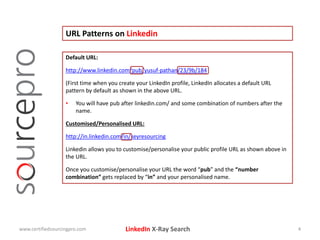
Default URL:
http://www.linkedin.com/pub/yusuf-pathan/23/9b/184
(First time when you create your LinkedIn profile, LinkedIn allocates a default URL
pattern by default as shown in the above URL.
• You will have pub after linkedin.com/ and some combination of numbers after the
name.
Customised/Personalised URL:
http://in.linkedin.com/in/keyresourcing
Linkedin allows you to customise/personalise your public profile URL as shown above in
the URL.
Once you customise/personalise your URL the word “pub” and the “number
combination” gets replaced by “in” and your personalised name.
LinkedIn X-Ray Search
URL Patterns on Linkedin
www.certifiedsourcingpro.com 5
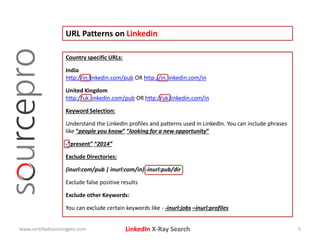
Country specific URLs:
India
http://in.linkedin.com/pub OR http://in.linkedin.com/in
United Kingdom
http://uk.linkedin.com/pub OR http://uk.linkedin.com/in
Keyword Selection:
Understand the LinkedIn profiles and patterns used in LinkedIn. You can include phrases
like “people you know” “looking for a new opportunity”
-“present” “2014”
Exclude Directories:
(inurl:com/pub | inurl:com/in) -inurl:pub/dir
Exclude false positive results
Exclude other Keywords:
You can exclude certain keywords like - -inurl:jobs –inurl:profiles
LinkedIn X-Ray Search
Examples of Search Strings on Linkedin
www.certifiedsourcingpro.com 6
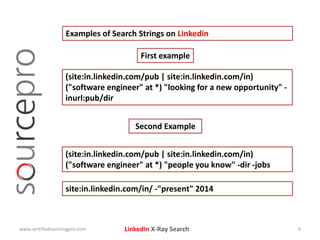
(site:in.linkedin.com/pub | site:in.linkedin.com/in)
("software engineer" at *) "looking for a new opportunity" -
inurl:pub/dir
First example
Second Example
(site:in.linkedin.com/pub | site:in.linkedin.com/in)
("software engineer" at *) "people you know" -dir -jobs
site:in.linkedin.com/in/ -"present" 2014
LinkedIn X-Ray Search
Online tools for X-ray Search on LinkedIn
www.certifiedsourcingpro.com 7
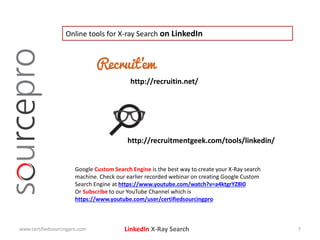
http://recruitin.net/
http://recruitmentgeek.com/tools/linkedin/
Google Custom Search Engine is the best way to create your X-Ray search
machine. Check our earlier recorded webinar on creating Google Custom
Search Engine at https://www.youtube.com/watch?v=a4ktgrYZ8I0
Or Subscribe to our YouTube Channel which is
https://www.youtube.com/user/certifiedsourcingpro
LinkedIn X-Ray Search
Hint for the contest
www.certifiedsourcingpro.com 8
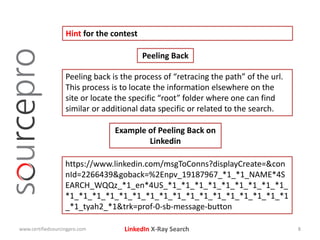
Peeling back is the process of “retracing the path” of the url.
This process is to locate the information elsewhere on the
site or locate the specific “root” folder where one can find
similar or additional data specific or related to the search.
Peeling Back
Example of Peeling Back on
Linkedin
https://www.linkedin.com/msgToConns?displayCreate=&con
nId=2266439&goback=%2Enpv_19187967_*1_*1_NAME*4S
EARCH_WQQz_*1_en*4US_*1_*1_*1_*1_*1_*1_*1_*1_*1_
*1_*1_*1_*1_*1_*1_*1_*1_*1_*1_*1_*1_*1_*1_*1_*1_*1
_*1_tyah2_*1&trk=prof-0-sb-message-button
LinkedIn X-Ray Search
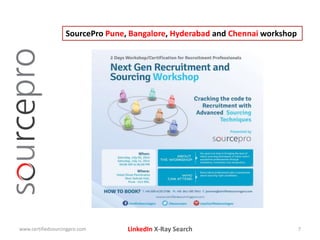
SourcePro Pune, Bangalore, Hyderabad and Chennai workshop
www.certifiedsourcingpro.com 7
LinkedIn X-Ray Searchwww.certifiedsourcingpro.com 10

Linkedin X-ray Search

  • 1.
  • 2.
    LinkedIn X-Ray Search Contentsof the Webinar What is a X-Ray Search & Advantages  Understand the URL pattern of LinkedIn  Examples of Search Strings  Online tools for X-ray Search  SourcePro Workshop www.certifiedsourcingpro.com 2
  • 3.
    LinkedIn X-Ray Search X-raySearch and Its Advantages X-ray search is a process of identifying information from a particular website/domain. It is called a site search. Syntax used Google - site: Yahoo - domain: or site: Live (MSN) - domain: or site: www.certifiedsourcingpro.com 3 Advantages of X-ray search on LinkedIn: • Unlimited profile views for free • 88% of all the LinkedIn profiles are publicly accessible, that means we can view these profiles for free • Full names are visible for any degree (for free) • Can view out of network connections (for free)
  • 4.
    LinkedIn X-Ray Search URLPatterns on Linkedin www.certifiedsourcingpro.com 4 Default URL: http://www.linkedin.com/pub/yusuf-pathan/23/9b/184 (First time when you create your LinkedIn profile, LinkedIn allocates a default URL pattern by default as shown in the above URL. • You will have pub after linkedin.com/ and some combination of numbers after the name. Customised/Personalised URL: http://in.linkedin.com/in/keyresourcing Linkedin allows you to customise/personalise your public profile URL as shown above in the URL. Once you customise/personalise your URL the word “pub” and the “number combination” gets replaced by “in” and your personalised name.
  • 5.
    LinkedIn X-Ray Search URLPatterns on Linkedin www.certifiedsourcingpro.com 5 Country specific URLs: India http://in.linkedin.com/pub OR http://in.linkedin.com/in United Kingdom http://uk.linkedin.com/pub OR http://uk.linkedin.com/in Keyword Selection: Understand the LinkedIn profiles and patterns used in LinkedIn. You can include phrases like “people you know” “looking for a new opportunity” -“present” “2014” Exclude Directories: (inurl:com/pub | inurl:com/in) -inurl:pub/dir Exclude false positive results Exclude other Keywords: You can exclude certain keywords like - -inurl:jobs –inurl:profiles
  • 6.
    LinkedIn X-Ray Search Examplesof Search Strings on Linkedin www.certifiedsourcingpro.com 6 (site:in.linkedin.com/pub | site:in.linkedin.com/in) ("software engineer" at *) "looking for a new opportunity" - inurl:pub/dir First example Second Example (site:in.linkedin.com/pub | site:in.linkedin.com/in) ("software engineer" at *) "people you know" -dir -jobs site:in.linkedin.com/in/ -"present" 2014
  • 7.
    LinkedIn X-Ray Search Onlinetools for X-ray Search on LinkedIn www.certifiedsourcingpro.com 7 http://recruitin.net/ http://recruitmentgeek.com/tools/linkedin/ Google Custom Search Engine is the best way to create your X-Ray search machine. Check our earlier recorded webinar on creating Google Custom Search Engine at https://www.youtube.com/watch?v=a4ktgrYZ8I0 Or Subscribe to our YouTube Channel which is https://www.youtube.com/user/certifiedsourcingpro
  • 8.
    LinkedIn X-Ray Search Hintfor the contest www.certifiedsourcingpro.com 8 Peeling back is the process of “retracing the path” of the url. This process is to locate the information elsewhere on the site or locate the specific “root” folder where one can find similar or additional data specific or related to the search. Peeling Back Example of Peeling Back on Linkedin https://www.linkedin.com/msgToConns?displayCreate=&con nId=2266439&goback=%2Enpv_19187967_*1_*1_NAME*4S EARCH_WQQz_*1_en*4US_*1_*1_*1_*1_*1_*1_*1_*1_*1_ *1_*1_*1_*1_*1_*1_*1_*1_*1_*1_*1_*1_*1_*1_*1_*1_*1 _*1_tyah2_*1&trk=prof-0-sb-message-button
  • 9.
    LinkedIn X-Ray Search SourceProPune, Bangalore, Hyderabad and Chennai workshop www.certifiedsourcingpro.com 7
  • 10.