




Sourcing, as the most attractive part
of recruiting 
We’ll cover
 LinkedIn. New interface makes things pretty complicated.
LinkedIn X-Ray/Custom Search Engine.
Alumni Search.
• Google Open Web. Let’s explain the Search engine what we want from it.
X-Ray Formula.
• Screw LinkedIn. Github/StackOveflow/AngelList/DOU/Slideshare/Meetups. X-Ray is the way to go there.
• Diving into FB Graph Search:
We'll do "URL way"
Or, you can make it easier with Shane McCusker’s FB search tool.
• What's in your recruiting/sourcing toolbox:
- Email extractors. 2 coolest Github hacks to get the email 
- Browser extensions.
- Contact info/People aggregators.
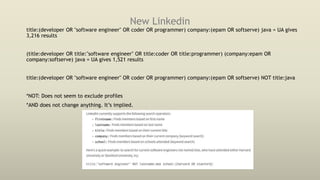
New Linkedin
title:(developer OR "software engineer" OR coder OR programmer) company:(epam OR softserve) java = UA gives
3,216 results
(title:developer OR title:"software engineer" OR title:coder OR title:programmer) (company:epam OR
company:softserve) java = UA gives 1,521 results
title:(developer OR "software engineer" OR coder OR programmer) company:(epam OR softserve) NOT title:java
*NOT: Does not seem to exclude profiles
*AND does not change anything. It’s implied.
Getting back to the old Ln interface
Reasons to use the old LinkedIn interface:
 The ability to use the full Advanced People Search
 The ability to see results “relevant” to your search query
 With the old interface you still need to fight with the Commercial Use Limit which limits the number of
searches you can do in an actual month.
Getting back to the old Ln interface
How to:
-either downgrade your internet browser to an earlier version,
-or mask your current internet browser to be seen as, for example, Internet Explorer 6.
• You can fool LinkedIn with the plugin User-Agent Switcher for Chrome. Add it to your
Chrome>>open LinkedIn >>click on the plugin icon in the top right corner >> mask Chrome as
Internet Explorer 6
Chrome: https://chrome.google.com/webstore/detail/user-agent-switcher-for-
c/djflhoibgkdhkhhcedjiklpkjnoahfmg
• http://italabre.blogspot.com/2017/01/linkedin.html
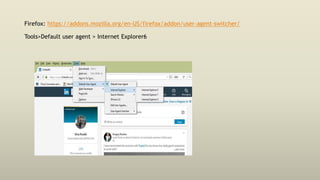
Firefox: https://addons.mozilla.org/en-US/firefox/addon/user-agent-switcher/
Tools>Default user agent > Internet Explorer6
Thought process behind search
• There is no search to find all the people
Q; What is your competitive advantage?
A: Aim for maximum inclusion =Try to think of all ways to express a particular skill
• For anything you’re looking for there is going to be more than 1 way to say it:
for the title (“program manager” OR “project manager” OR “technical manager”);
for the key words (javascript OR js OR jscript OR “java script”),
for the company (“red hat” OR redhat).
Basic conceptual search
• Related terms/keywords not mentioned in JD that
mean the same thing
 This is where we start leveraging “OR statements”
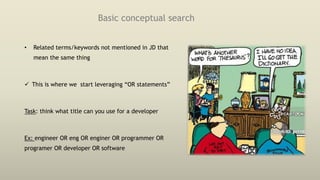
Task: think what title can you use for a developer
Ex: engineer OR eng OR enginer OR programmer OR
programer OR developer OR software
Natural Language
• Use action words that people “do” in their jobs, such as: manage, report, oversee, verify, crunch,
code, and so on
• Ex: j2ee (development OR developing OR developed OR built OR building OR build OR constructed
OR construction OR construct OR implemented OR implement OR implements OR design OR
designed OR designs) = in keywords
Task: Do complex search combining
terms and modifiers
Profile: Java developer w/angular OR react
expertise.
Source: Ln/UA
Leveraging Linkedin: Where do we lose top talent to
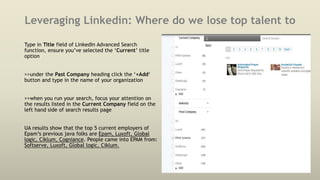
Type in Title field of LinkedIn Advanced Search
function, ensure you’ve selected the ‘Current’ title
option
>>under the Past Company heading click the ‘+Add‘
button and type in the name of your organization
>>when you run your search, focus your attention on
the results listed in the Current Company field on the
left hand side of search results page
UA results show that the top 5 current employers of
Epam’s previous java folks are Epam, Luxoft, Global
logic, Ciklum, Cogniance. People came into EPAM from:
Softserve, Luxoft, Global logic, Ciklum.
Leveraging Linkedin: Messaging group members
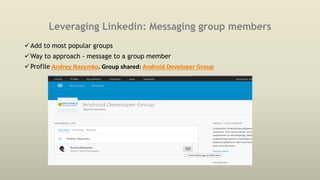
Add to most popular groups
Way to approach - message to a group member
Profile Andrey Nazymko. Group shared: Android Developer Group
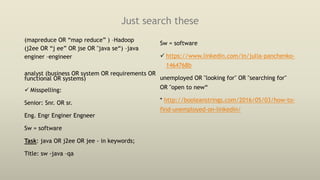
Just search these
(mapreduce OR “map reduce” ) –Hadoop
(j2ee OR “j ee” OR jse OR "java se“) –java
enginer –engineer
analyst (business OR system OR requirements OR
functional OR systems)
 Misspelling:
Senior: Snr. OR sr.
Eng. Engr Enginer Engneer
Sw = software
Task: java OR j2ee OR jee - in keywords;
Title: sw -java –qa
Sw = software
 https://www.linkedin.com/in/julia-panchenko-
1464768b
unemployed OR "looking for" OR "searching for"
OR "open to new“
* http://booleanstrings.com/2016/05/03/how-to-
find-unemployed-on-linkedin/
Alumni search
Connections –Find Alumni section
 can leverage specific university by changing school in “change university” field
Task: Try to identify guys who graduated from “Kyiv National Taras Shevchenko University” and
filter them by skills/location etc
 can include simultaniuosly a couple of unversities:
Base for alumni:
https://www.linkedin.com/edu/alumni?name= +now build your url adding cities with the help of
city+OR+city
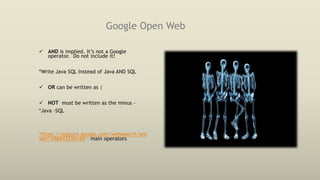
Google Open Web
 AND is implied. It’s not a Google
operator. Do not include it!
*Write Java SQL instead of Java AND SQL
 OR can be written as |
 NOT must be written as the minus -
*Java –SQL
*https://support.google.com/websearch/ans
wer/2466433?hl=en – main operators
These words help us here
 site: to search within
particular site
site:linkedin.com;
site:www.meetup.com
site:www.meetup.com lviv
python
 intitle: gives you documents
containing specific word in
title
Ex: intitle:resume java
developer lviv "* gmail.com" OR
"* yahoo.com"
 inurl: particular word in a
web address
inurl:resume
 filetype: filetype:doc |
filetype:rtf OR filetype:pdf
attendees filetype:xls
 asterisk: (to match up to 4
words)
site:www.linkedin.com inurl:in
OR inurl:pub -inurl:dir HR
"attended * * conference”
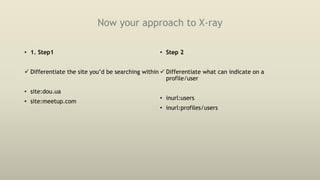
Now your approach to X-ray
• 1. Step1
 Differentiate the site you’d be searching within
• site:dou.ua
• site:meetup.com
• Step 2
 Differentiate what can indicate on a
profile/user
• inurl:users
• inurl:profiles/users
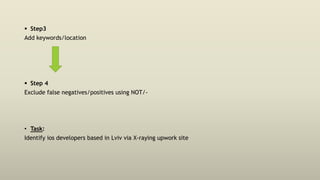
 Step3
Add keywords/location
 Step 4
Exclude false negatives/positives using NOT/-
• Task:
Identify ios developers based in Lviv via X-raying upwork site
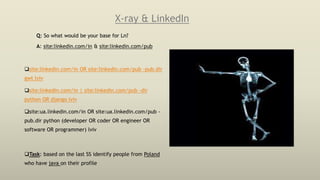
X-ray & LinkedIn
Q: So what would be your base for Ln?
A: site:linkedin.com/in & site:linkedin.com/pub
site:linkedin.com/in OR site:linkedin.com/pub -pub.dir
gwt lviv
site:linkedin.com/in | site:linkedin.com/pub -dir
python OR django lviv
site:ua.linkedin.com/in OR site:ua.linkedin.com/pub -
pub.dir python (developer OR coder OR engineer OR
software OR programmer) lviv
Task: based on the last SS identify people from Poland
who have java on their profile
Custom Search. Linkedin.
What is this CSE? Why do we need it for Linkedin?
Let’s build one.
URL to the built LN CSE:
• https://www.google.com/cse/publicurl?cx=009462381166450434430:ecyvn9zudgu
Open Web. Google resume search
intitle:resume OR inurl:resume OR inurl:резюме -job -jobs -вакансія -робота "web developer"
львів OR lviv
(intitle:resume | inurl:resume | intitle:cv | inurl:cv | intitle:vitae | inurl:vitae) ..
resume (filetype:doc | filetype:rtf OR filetype:pdf) j2ee [location]
• Not only including long OR statements doesn’t help, because Google would search for synonyms
anyway, it may hurt the search.
• Google knows about synonyms and keyword variations
X-Ray & Stackoverflow
The structure of the URL makes it very easy to concentrate just on users
Q: So what would be your base for stack?
A: site:stackoverflow.com/users or site:stackoverflow.com inurl:users
Github
Social Coding 
has a pretty neat and advanced built-in search
engine
here: https://github.com/search/advanced
 scroll down in the search site linked above,
type in a location and hit the Search button.
 Searching for San Francisco, CA will give you
user profiles who have set up either San
Francisco OR CA as their location
 To correct: location:”San Francisco,CA”
 AND, OR and NOT are supported
https://github.com/search not using advanced
engine:
 location:
 language: the most frequently used
programming language in their repositories
!
http://sourcingrecruitment.info/2015/05/github-
and-stackoverflow-in-technical-recruitment/
Ex: location:lviv language:ios
Task: identify guys from lviv with python lan-ge
*they can and can not indicate their location
Github and X-Ray
Unlike Stackoverflow, GitHub has no part in the URL which directly shows you that a certain page is
a profile page.
“contributions in the last year” / “joined on” might indicate that it’s a profile
SSs:
site:github.com "joined on" "lviv" "gmail.com" ruby developer
site:github.com "contributions in the last year" lviv
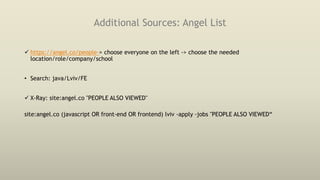
Additional Sources: Angel List
 https://angel.co/people-> choose everyone on the left -> choose the needed
location/role/company/school
• Search: java/Lviv/FE
 X-Ray: site:angel.co "PEOPLE ALSO VIEWED"
site:angel.co (javascript OR front-end OR frontend) lviv -apply -jobs "PEOPLE ALSO VIEWED“
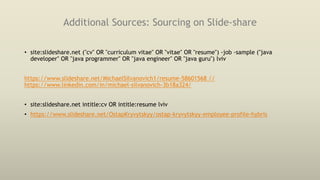
Additional Sources: Sourcing on Slide-share
• site:slideshare.net ("cv" OR "curriculum vitae" OR "vitae" OR "resume") -job -sample ("java
developer" OR "java programmer" OR "java engineer" OR "java guru") lviv
https://www.slideshare.net/MichaelSilvanovich1/resume-58601568 //
https://www.linkedin.com/in/michael-silvanovich-3b18a324/
• site:slideshare.net intitle:cv OR intitle:resume lviv
• https://www.slideshare.net/OstapKryvytskyy/ostap-kryvytskyy-employee-profile-hybris
Custom Search. Slide-share
Slideshare Resumes:
https://cse.google.com/cse/publicurl?cx=009462381166450434430:vkdxe7pcnzg
Slideshare CV's:
https://cse.google.com/cse/publicurl?cx=009462381166450434430:o71s9mk6brk
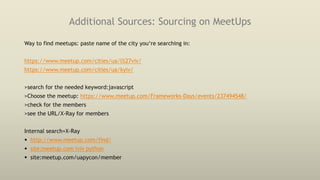
Additional Sources: Sourcing on MeetUps
Way to find meetups: paste name of the city you‘re searching in:
https://www.meetup.com/cities/ua/l%27viv/
https://www.meetup.com/cities/ua/kyiv/
>search for the needed keyword:javascript
>Choose the meetup: https://www.meetup.com/Frameworks-Days/events/237494548/
>check for the members
>see the URL/X-Ray for members
Internal search+X-Ray
 http://www.meetup.com/find/
 site:meetup.com lviv python
 site:meetup.com/uapycon/member
Additional Sources: Google+
 site:plus.google.com inurl:about lives OR lived in lviv python
 site:plus.google.com/*/about lives OR lived in lviv python
 site:plus.google.com/*/about "javascript developer" "new york" -jobs
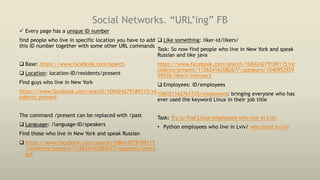
Social Networks. “URL’ing” FB
 Every page has a unique ID number
find people who live in specific location you have to add
this ID number together with some other URL commands
 Base: https://www.facebook.com/search
 Location: location-ID/residents/present
Find guys who live in New York
https://www.facebook.com/search/108424279189115/re
sidents/present
The command /present can be replaced with /past
 Language: /language-ID/speakers
Find those who live in New York and speak Russian
 https://www.facebook.com/search/108424279189115
/residents/present/112624162082677/speakers/inters
ect
 Like something: liker-id/likers/
Task: So now find people who live in New York and speak
Russian and like java
https://www.facebook.com/search/108424279189115/re
sidents/present/112624162082677/speakers/1040952929
59576/likers/intersect
 Employees: ID/employees
106021162761735/employees: bringing everyone who has
ever used the keyword Linux in their job title
Task: Try to find Linux employees who live in Lviv
• Python employees who live in Lviv/ who lived in lviv
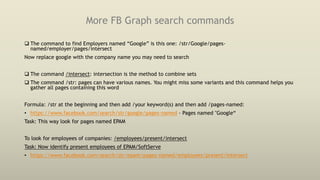
More FB Graph search commands
 The command to find Employers named “Google” is this one: /str/Google/pages-
named/employer/pages/intersect
Now replace google with the company name you may need to search
 The command /intersect: intersection is the method to combine sets
 The command /str: pages can have various names. You might miss some variants and this command helps you
gather all pages containing this word
Formula: /str at the beginning and then add /your keyword(s) and then add /pages-named:
• https://www.facebook.com/search/str/google/pages-named - Pages named "Google“
Task: This way look for pages named EPAM
To look for employees of companies: /employees/present/intersect
Task: Now identify present employees of EPAM/SoftServe
• https://www.facebook.com/search/str/epam/pages-named/employees/present/intersect
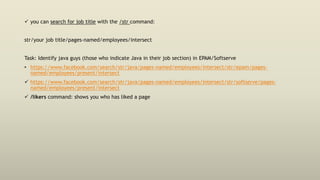
 you can search for job title with the /str command:
str/your job title/pages-named/employees/intersect
Task: Identify java guys (those who indicate Java in their job section) in EPAM/Softserve
• https://www.facebook.com/search/str/java/pages-named/employees/intersect/str/epam/pages-
named/employees/present/intersect
 https://www.facebook.com/search/str/java/pages-named/employees/intersect/str/softserve/pages-
named/employees/present/intersect
 /likers command: shows you who has liked a page
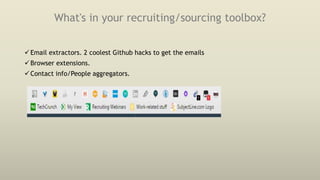
What's in your recruiting/sourcing toolbox?
Email extractors. 2 coolest Github hacks to get the emails
Browser extensions.
Contact info/People aggregators.
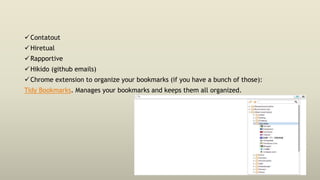
Contatout
Hiretual
Rapportive
Hikido (github emails)
Chrome extension to organize your bookmarks (if you have a bunch of those):
Tidy Bookmarks. Manages your bookmarks and keeps them all organized.
ContactOut
 Find anyone's email;
 Grabs personal emails;
 Personal experience: finds emails in~60% of profiles;
 Has limit/per month. Don’t worry, it’s still enough.
Hiretual
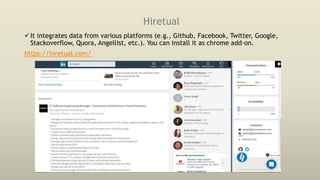
It integrates data from various platforms (e.g., Github, Facebook, Twitter, Google,
Stackoverflow, Quora, Angellist, etc.). You can install it as chrome add-on.
https://hiretual.com/
Hiretual tutorials
Hiretual functionality:
Hiretual sourcing w/ Katie Gechijian
https://www.youtube.com/watch?v=qb6c5MKHHDs&feature=youtu.be
Official tutorial:
https://docs.google.com/presentation/d/1vyLvQq2vCyx4oTrx7aozlj2fWv8UOBCgk
nwZfyG1LHg/edit#slide=id.g1bf98f1337_3_142
What’s cool about this tool?
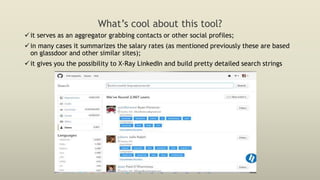
it serves as an aggregator grabbing contacts or other social profiles;
in many cases it summarizes the salary rates (as mentioned previously these are based
on glassdoor and other similar sites);
it gives you the possibility to X-Ray LinkedIn and build pretty detailed search strings
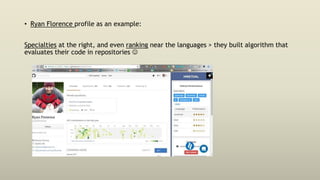
• Ryan Florence profile as an example:
Specialties at the right, and even ranking near the languages > they built algorithm that
evaluates their code in repositories 
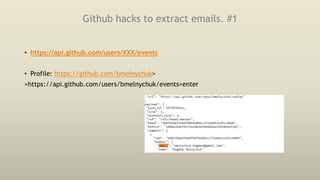
Github hacks to extract emails. #1
• https://api.github.com/users/XXX/events
• Profile: https://github.com/bmelnychuk>
>https://api.github.com/users/bmelnychuk/events>enter
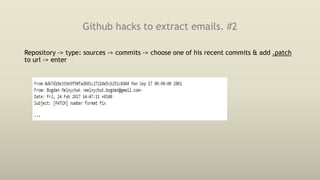
Github hacks to extract emails. #2
Repository -> type: sources -> commits -> choose one of his recent commits & add .patch
to url -> enter
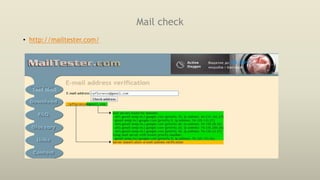
Mail check
• http://mailtester.com/
Hidden profiles on LinkedIn
Open the profile in the old LinkedIn >>Click with the right mouse button and open the
source of the page>>Then hit Ctrl+F on Windows or Cmd+F on Mac and type
“membered”>>type the URL address below followed by the ID you found>enter
• https://www.linkedin.com/vsearch/ic?f_INF=
Happy Sourcing 

Shall we search? Lviv.

  • 1.
    Sourcing, as themost attractive part of recruiting 
  • 2.
    We’ll cover  LinkedIn.New interface makes things pretty complicated. LinkedIn X-Ray/Custom Search Engine. Alumni Search. • Google Open Web. Let’s explain the Search engine what we want from it. X-Ray Formula. • Screw LinkedIn. Github/StackOveflow/AngelList/DOU/Slideshare/Meetups. X-Ray is the way to go there. • Diving into FB Graph Search: We'll do "URL way" Or, you can make it easier with Shane McCusker’s FB search tool. • What's in your recruiting/sourcing toolbox: - Email extractors. 2 coolest Github hacks to get the email  - Browser extensions. - Contact info/People aggregators.
  • 3.
    New Linkedin title:(developer OR"software engineer" OR coder OR programmer) company:(epam OR softserve) java = UA gives 3,216 results (title:developer OR title:"software engineer" OR title:coder OR title:programmer) (company:epam OR company:softserve) java = UA gives 1,521 results title:(developer OR "software engineer" OR coder OR programmer) company:(epam OR softserve) NOT title:java *NOT: Does not seem to exclude profiles *AND does not change anything. It’s implied.
  • 4.
    Getting back tothe old Ln interface Reasons to use the old LinkedIn interface:  The ability to use the full Advanced People Search  The ability to see results “relevant” to your search query  With the old interface you still need to fight with the Commercial Use Limit which limits the number of searches you can do in an actual month.
  • 5.
    Getting back tothe old Ln interface How to: -either downgrade your internet browser to an earlier version, -or mask your current internet browser to be seen as, for example, Internet Explorer 6. • You can fool LinkedIn with the plugin User-Agent Switcher for Chrome. Add it to your Chrome>>open LinkedIn >>click on the plugin icon in the top right corner >> mask Chrome as Internet Explorer 6 Chrome: https://chrome.google.com/webstore/detail/user-agent-switcher-for- c/djflhoibgkdhkhhcedjiklpkjnoahfmg • http://italabre.blogspot.com/2017/01/linkedin.html
  • 6.
  • 7.
    Thought process behindsearch • There is no search to find all the people Q; What is your competitive advantage? A: Aim for maximum inclusion =Try to think of all ways to express a particular skill • For anything you’re looking for there is going to be more than 1 way to say it: for the title (“program manager” OR “project manager” OR “technical manager”); for the key words (javascript OR js OR jscript OR “java script”), for the company (“red hat” OR redhat).
  • 8.
    Basic conceptual search •Related terms/keywords not mentioned in JD that mean the same thing  This is where we start leveraging “OR statements” Task: think what title can you use for a developer Ex: engineer OR eng OR enginer OR programmer OR programer OR developer OR software
  • 9.
    Natural Language • Useaction words that people “do” in their jobs, such as: manage, report, oversee, verify, crunch, code, and so on • Ex: j2ee (development OR developing OR developed OR built OR building OR build OR constructed OR construction OR construct OR implemented OR implement OR implements OR design OR designed OR designs) = in keywords
  • 10.
    Task: Do complexsearch combining terms and modifiers Profile: Java developer w/angular OR react expertise. Source: Ln/UA
  • 11.
    Leveraging Linkedin: Wheredo we lose top talent to Type in Title field of LinkedIn Advanced Search function, ensure you’ve selected the ‘Current’ title option >>under the Past Company heading click the ‘+Add‘ button and type in the name of your organization >>when you run your search, focus your attention on the results listed in the Current Company field on the left hand side of search results page UA results show that the top 5 current employers of Epam’s previous java folks are Epam, Luxoft, Global logic, Ciklum, Cogniance. People came into EPAM from: Softserve, Luxoft, Global logic, Ciklum.
  • 12.
    Leveraging Linkedin: Messaginggroup members Add to most popular groups Way to approach - message to a group member Profile Andrey Nazymko. Group shared: Android Developer Group
  • 13.
    Just search these (mapreduceOR “map reduce” ) –Hadoop (j2ee OR “j ee” OR jse OR "java se“) –java enginer –engineer analyst (business OR system OR requirements OR functional OR systems)  Misspelling: Senior: Snr. OR sr. Eng. Engr Enginer Engneer Sw = software Task: java OR j2ee OR jee - in keywords; Title: sw -java –qa Sw = software  https://www.linkedin.com/in/julia-panchenko- 1464768b unemployed OR "looking for" OR "searching for" OR "open to new“ * http://booleanstrings.com/2016/05/03/how-to- find-unemployed-on-linkedin/
  • 14.
    Alumni search Connections –FindAlumni section  can leverage specific university by changing school in “change university” field Task: Try to identify guys who graduated from “Kyiv National Taras Shevchenko University” and filter them by skills/location etc  can include simultaniuosly a couple of unversities: Base for alumni: https://www.linkedin.com/edu/alumni?name= +now build your url adding cities with the help of city+OR+city
  • 15.
    Google Open Web AND is implied. It’s not a Google operator. Do not include it! *Write Java SQL instead of Java AND SQL  OR can be written as |  NOT must be written as the minus - *Java –SQL *https://support.google.com/websearch/ans wer/2466433?hl=en – main operators
  • 16.
    These words helpus here  site: to search within particular site site:linkedin.com; site:www.meetup.com site:www.meetup.com lviv python  intitle: gives you documents containing specific word in title Ex: intitle:resume java developer lviv "* gmail.com" OR "* yahoo.com"  inurl: particular word in a web address inurl:resume  filetype: filetype:doc | filetype:rtf OR filetype:pdf attendees filetype:xls  asterisk: (to match up to 4 words) site:www.linkedin.com inurl:in OR inurl:pub -inurl:dir HR "attended * * conference”
  • 17.
    Now your approachto X-ray • 1. Step1  Differentiate the site you’d be searching within • site:dou.ua • site:meetup.com • Step 2  Differentiate what can indicate on a profile/user • inurl:users • inurl:profiles/users
  • 18.
     Step3 Add keywords/location Step 4 Exclude false negatives/positives using NOT/- • Task: Identify ios developers based in Lviv via X-raying upwork site
  • 19.
    X-ray & LinkedIn Q:So what would be your base for Ln? A: site:linkedin.com/in & site:linkedin.com/pub site:linkedin.com/in OR site:linkedin.com/pub -pub.dir gwt lviv site:linkedin.com/in | site:linkedin.com/pub -dir python OR django lviv site:ua.linkedin.com/in OR site:ua.linkedin.com/pub - pub.dir python (developer OR coder OR engineer OR software OR programmer) lviv Task: based on the last SS identify people from Poland who have java on their profile
  • 20.
    Custom Search. Linkedin. Whatis this CSE? Why do we need it for Linkedin? Let’s build one. URL to the built LN CSE: • https://www.google.com/cse/publicurl?cx=009462381166450434430:ecyvn9zudgu
  • 21.
    Open Web. Googleresume search intitle:resume OR inurl:resume OR inurl:резюме -job -jobs -вакансія -робота "web developer" львів OR lviv (intitle:resume | inurl:resume | intitle:cv | inurl:cv | intitle:vitae | inurl:vitae) .. resume (filetype:doc | filetype:rtf OR filetype:pdf) j2ee [location] • Not only including long OR statements doesn’t help, because Google would search for synonyms anyway, it may hurt the search. • Google knows about synonyms and keyword variations
  • 22.
    X-Ray & Stackoverflow Thestructure of the URL makes it very easy to concentrate just on users Q: So what would be your base for stack? A: site:stackoverflow.com/users or site:stackoverflow.com inurl:users
  • 23.
    Github Social Coding  hasa pretty neat and advanced built-in search engine here: https://github.com/search/advanced  scroll down in the search site linked above, type in a location and hit the Search button.  Searching for San Francisco, CA will give you user profiles who have set up either San Francisco OR CA as their location  To correct: location:”San Francisco,CA”  AND, OR and NOT are supported https://github.com/search not using advanced engine:  location:  language: the most frequently used programming language in their repositories ! http://sourcingrecruitment.info/2015/05/github- and-stackoverflow-in-technical-recruitment/ Ex: location:lviv language:ios Task: identify guys from lviv with python lan-ge *they can and can not indicate their location
  • 24.
    Github and X-Ray UnlikeStackoverflow, GitHub has no part in the URL which directly shows you that a certain page is a profile page. “contributions in the last year” / “joined on” might indicate that it’s a profile SSs: site:github.com "joined on" "lviv" "gmail.com" ruby developer site:github.com "contributions in the last year" lviv
  • 25.
    Additional Sources: AngelList  https://angel.co/people-> choose everyone on the left -> choose the needed location/role/company/school • Search: java/Lviv/FE  X-Ray: site:angel.co "PEOPLE ALSO VIEWED" site:angel.co (javascript OR front-end OR frontend) lviv -apply -jobs "PEOPLE ALSO VIEWED“
  • 26.
    Additional Sources: Sourcingon Slide-share • site:slideshare.net ("cv" OR "curriculum vitae" OR "vitae" OR "resume") -job -sample ("java developer" OR "java programmer" OR "java engineer" OR "java guru") lviv https://www.slideshare.net/MichaelSilvanovich1/resume-58601568 // https://www.linkedin.com/in/michael-silvanovich-3b18a324/ • site:slideshare.net intitle:cv OR intitle:resume lviv • https://www.slideshare.net/OstapKryvytskyy/ostap-kryvytskyy-employee-profile-hybris
  • 27.
    Custom Search. Slide-share SlideshareResumes: https://cse.google.com/cse/publicurl?cx=009462381166450434430:vkdxe7pcnzg Slideshare CV's: https://cse.google.com/cse/publicurl?cx=009462381166450434430:o71s9mk6brk
  • 28.
    Additional Sources: Sourcingon MeetUps Way to find meetups: paste name of the city you‘re searching in: https://www.meetup.com/cities/ua/l%27viv/ https://www.meetup.com/cities/ua/kyiv/ >search for the needed keyword:javascript >Choose the meetup: https://www.meetup.com/Frameworks-Days/events/237494548/ >check for the members >see the URL/X-Ray for members Internal search+X-Ray  http://www.meetup.com/find/  site:meetup.com lviv python  site:meetup.com/uapycon/member
  • 29.
    Additional Sources: Google+ site:plus.google.com inurl:about lives OR lived in lviv python  site:plus.google.com/*/about lives OR lived in lviv python  site:plus.google.com/*/about "javascript developer" "new york" -jobs
  • 30.
    Social Networks. “URL’ing”FB  Every page has a unique ID number find people who live in specific location you have to add this ID number together with some other URL commands  Base: https://www.facebook.com/search  Location: location-ID/residents/present Find guys who live in New York https://www.facebook.com/search/108424279189115/re sidents/present The command /present can be replaced with /past  Language: /language-ID/speakers Find those who live in New York and speak Russian  https://www.facebook.com/search/108424279189115 /residents/present/112624162082677/speakers/inters ect  Like something: liker-id/likers/ Task: So now find people who live in New York and speak Russian and like java https://www.facebook.com/search/108424279189115/re sidents/present/112624162082677/speakers/1040952929 59576/likers/intersect  Employees: ID/employees 106021162761735/employees: bringing everyone who has ever used the keyword Linux in their job title Task: Try to find Linux employees who live in Lviv • Python employees who live in Lviv/ who lived in lviv
  • 31.
    More FB Graphsearch commands  The command to find Employers named “Google” is this one: /str/Google/pages- named/employer/pages/intersect Now replace google with the company name you may need to search  The command /intersect: intersection is the method to combine sets  The command /str: pages can have various names. You might miss some variants and this command helps you gather all pages containing this word Formula: /str at the beginning and then add /your keyword(s) and then add /pages-named: • https://www.facebook.com/search/str/google/pages-named - Pages named "Google“ Task: This way look for pages named EPAM To look for employees of companies: /employees/present/intersect Task: Now identify present employees of EPAM/SoftServe • https://www.facebook.com/search/str/epam/pages-named/employees/present/intersect
  • 32.
     you cansearch for job title with the /str command: str/your job title/pages-named/employees/intersect Task: Identify java guys (those who indicate Java in their job section) in EPAM/Softserve • https://www.facebook.com/search/str/java/pages-named/employees/intersect/str/epam/pages- named/employees/present/intersect  https://www.facebook.com/search/str/java/pages-named/employees/intersect/str/softserve/pages- named/employees/present/intersect  /likers command: shows you who has liked a page
  • 33.
    What's in yourrecruiting/sourcing toolbox? Email extractors. 2 coolest Github hacks to get the emails Browser extensions. Contact info/People aggregators.
  • 34.
    Contatout Hiretual Rapportive Hikido (github emails) Chromeextension to organize your bookmarks (if you have a bunch of those): Tidy Bookmarks. Manages your bookmarks and keeps them all organized.
  • 35.
    ContactOut  Find anyone'semail;  Grabs personal emails;  Personal experience: finds emails in~60% of profiles;  Has limit/per month. Don’t worry, it’s still enough.
  • 36.
    Hiretual It integrates datafrom various platforms (e.g., Github, Facebook, Twitter, Google, Stackoverflow, Quora, Angellist, etc.). You can install it as chrome add-on. https://hiretual.com/
  • 37.
    Hiretual tutorials Hiretual functionality: Hiretualsourcing w/ Katie Gechijian https://www.youtube.com/watch?v=qb6c5MKHHDs&feature=youtu.be Official tutorial: https://docs.google.com/presentation/d/1vyLvQq2vCyx4oTrx7aozlj2fWv8UOBCgk nwZfyG1LHg/edit#slide=id.g1bf98f1337_3_142
  • 38.
    What’s cool aboutthis tool? it serves as an aggregator grabbing contacts or other social profiles; in many cases it summarizes the salary rates (as mentioned previously these are based on glassdoor and other similar sites); it gives you the possibility to X-Ray LinkedIn and build pretty detailed search strings
  • 39.
    • Ryan Florenceprofile as an example: Specialties at the right, and even ranking near the languages > they built algorithm that evaluates their code in repositories 
  • 40.
    Github hacks toextract emails. #1 • https://api.github.com/users/XXX/events • Profile: https://github.com/bmelnychuk> >https://api.github.com/users/bmelnychuk/events>enter
  • 41.
    Github hacks toextract emails. #2 Repository -> type: sources -> commits -> choose one of his recent commits & add .patch to url -> enter
  • 42.
  • 43.
    Hidden profiles onLinkedIn Open the profile in the old LinkedIn >>Click with the right mouse button and open the source of the page>>Then hit Ctrl+F on Windows or Cmd+F on Mac and type “membered”>>type the URL address below followed by the ID you found>enter • https://www.linkedin.com/vsearch/ic?f_INF=
  • 44.