
LinkedIn :
       Making It Work For You
            February 14, 2013
              Gordon College


            JULIA CLAIRE CAMPBELL
     JULIA@JCSOCIALMARKETING.COM
WWW.JCAMPBELLSOCIALMARKETING.COM
WELCOME!
 Objectives   for this talk
     What is LinkedIn?


                                                    http://www.jcsocialmarketing.com
      Why should you use it?
     Identify the different parts
       of the LinkedIn profile.
     Learn some of the best practices for using
      LinkedIn.
     Learn ways to connect with people and grow
      your professional network using this online
      tool.
     Get your questions answered!
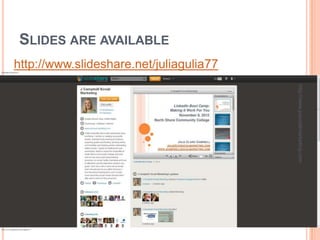
SLIDES ARE AVAILABLE
http://www.slideshare.net/juliagulia77


                                         http://www.jcsocialmarketing.com
LINKEDIN STATISTICS
 More than 200 million members in over 200
  countries and territories.


                                                            http://www.jcsocialmarketing.com
 Professionals are signing up at a rate of approximately
  two new members per second.
LINKEDIN STATISTICS
 Sixty-four percent of LinkedIn members are located
  outside of the United States.


                                                          http://www.jcsocialmarketing.com
 As of the school year ending May 2012, there are over
  20 million students and recent college graduates
  on LinkedIn. They are LinkedIn's fastest-growing
  demographic.
LINKEDIN BEST PRACTICES
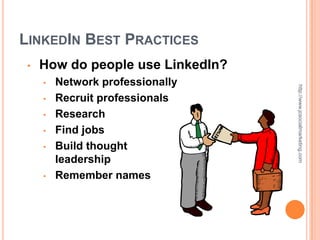
 •   How do people use LinkedIn?
     •   Network professionally


                                   http://www.jcsocialmarketing.com
     •   Recruit professionals
     •   Research
     •   Find jobs
     •   Build thought
         leadership
     •   Remember names
LINKEDIN BEST PRACTICES
 •   Students can use
     LinkedIn to:


                                    http://www.jcsocialmarketing.com
     •   Connect with
         classmates, faculty and
         family (professionally)
     •   Find new opportunities
         for internships and jobs
     •   Manage what potential
         employers learn about
         you online
     •   Research companies
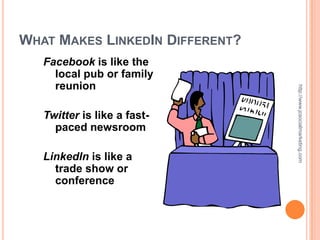
WHAT MAKES LINKEDIN DIFFERENT?
   Facebook is like the
     local pub or family
     reunion


                                 http://www.jcsocialmarketing.com
   Twitter is like a fast-
     paced newsroom

   LinkedIn is like a
     trade show or
     conference
LINKEDIN BEST PRACTICES
 Let’s explore the home
   page!
     Login


                             http://www.jcsocialmarketing.com
 •
 •   Notifications
 •   LinkedIn Today
 •   People You May Know
 •   Who’s Viewed Your
     Profile?
 •   Your LinkedIn Network
 •   Jobs You May Be
     Interested In
LINKEDIN BEST PRACTICES
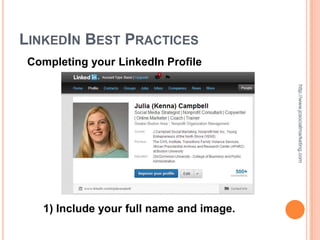
 Completing your LinkedIn Profile


                                          http://www.jcsocialmarketing.com
   1) Include your full name and image.
LINKEDIN         BEST PRACTICES
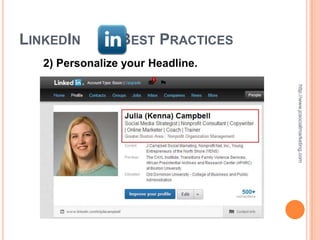
   2) Personalize your Headline.


                                   http://www.jcsocialmarketing.com
LINKEDIN         BEST PRACTICES
   Headline Tips!
   • Job seekers, use “Talented [Your Profession]


                                                    http://www.jcsocialmarketing.com
     Seeking New Opportunity” not “Unemployed”.
   • Students: “Aspiring [Your Profession]
     Seeking Internship” not “Student at Gordon
     College”.
   • Target audience – Who do you want reading
     this?
LINKEDIN                 BEST PRACTICES
 3) Write a great Summary.
 •   Use key words (think about people searching
     for you).


                                                   http://www.jcsocialmarketing.com
 •   Show people how awesome you are!

 When writing, answer these questions:
 • Who are you?
 • What are your specialties?
 • How can you help people/solve problems?
 • How do you want to connect?

 •   Tip: Make it personal but professional.
LINKEDIN                BEST PRACTICES
4) Add Work History to
   the Experience


                                         http://www.jcsocialmarketing.com
   section.
•   Be brief!
•   Short, short bullet points.
•   DO NOT cut and paste your
    resume.
•   Try to avoid jargon and
    industry speak.
•   Make it accessible.
•   Add videos, images,
    documents, portfolio.
LINKEDIN               BEST PRACTICES
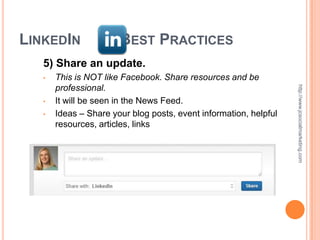
   5) Share an update.
   •   This is NOT like Facebook. Share resources and be
       professional.


                                                                   http://www.jcsocialmarketing.com
   •   It will be seen in the News Feed.
   •   Ideas – Share your blog posts, event information, helpful
       resources, articles, links
LINKEDIN               BEST PRACTICES
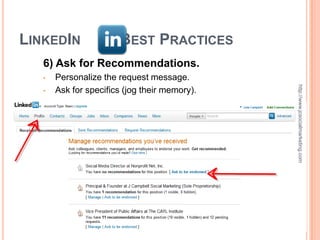
   6) Ask for Recommendations.
   •   Personalize the request message.


                                               http://www.jcsocialmarketing.com
   •   Ask for specifics (jog their memory).
LINKEDIN         BEST PRACTICES
   7) Grow your Network!
   • Request connections – use a short,


                                          http://www.jcsocialmarketing.com
      personalized message.
   • Be helpful.

   • Offer advice.

   • Connect others.
LINKEDIN          BEST PRACTICES
   8) Connect with care.
   • For job hunters, it is advantageous to connect


                                                      http://www.jcsocialmarketing.com
      generously.
   • But… some people are picky.

   • It’s up to you!
LINKEDIN         BEST PRACTICES
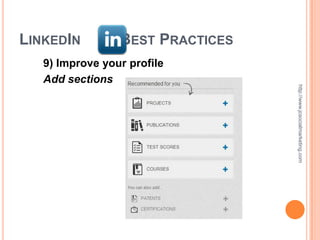
   9) Improve your profile
   Add sections


                                  http://www.jcsocialmarketing.com
LINKEDIN            BEST PRACTICES
   Sample profiles
   Pam Moore www.linkedin.com/in/pmoore


                                                http://www.jcsocialmarketing.com
   John Haydon www.linkedin.com/in/johnhaydon
LINKEDIN              BEST PRACTICES
   10) Using Groups wisely
   •   Remember the social media rules!


                                                            http://www.jcsocialmarketing.com
   •   Choose Groups carefully – you can join 50.
   •   Smaller more local groups yield better results.
   •   Check out the “Most Popular Discussions”.
   •   Schedule time to visit each group at least once a
       week.
   •   Turn off email notifications if they become too
       overwhelming.
   •   Make sure to follow the group rules and etiquette!
MORE RESOURCES

•   LinkedIn for Students –


                                          http://www.jcsocialmarketing.com
    http://learn.linkedin.com/students/
•   Mashable – www.mashable.com
•   HubSpot – www.hubspot.com
•   Social Media Examiner –
    www.socialmediaexaminer.com

LinkedIn for Students

  • 1.
    LinkedIn : Making It Work For You February 14, 2013 Gordon College JULIA CLAIRE CAMPBELL JULIA@JCSOCIALMARKETING.COM WWW.JCAMPBELLSOCIALMARKETING.COM
  • 2.
    WELCOME!  Objectives for this talk  What is LinkedIn? http://www.jcsocialmarketing.com Why should you use it?  Identify the different parts of the LinkedIn profile.  Learn some of the best practices for using LinkedIn.  Learn ways to connect with people and grow your professional network using this online tool.  Get your questions answered!
  • 3.
  • 4.
    LINKEDIN STATISTICS  Morethan 200 million members in over 200 countries and territories. http://www.jcsocialmarketing.com  Professionals are signing up at a rate of approximately two new members per second.
  • 5.
    LINKEDIN STATISTICS  Sixty-fourpercent of LinkedIn members are located outside of the United States. http://www.jcsocialmarketing.com  As of the school year ending May 2012, there are over 20 million students and recent college graduates on LinkedIn. They are LinkedIn's fastest-growing demographic.
  • 6.
    LINKEDIN BEST PRACTICES • How do people use LinkedIn? • Network professionally http://www.jcsocialmarketing.com • Recruit professionals • Research • Find jobs • Build thought leadership • Remember names
  • 7.
    LINKEDIN BEST PRACTICES • Students can use LinkedIn to: http://www.jcsocialmarketing.com • Connect with classmates, faculty and family (professionally) • Find new opportunities for internships and jobs • Manage what potential employers learn about you online • Research companies
  • 8.
    WHAT MAKES LINKEDINDIFFERENT? Facebook is like the local pub or family reunion http://www.jcsocialmarketing.com Twitter is like a fast- paced newsroom LinkedIn is like a trade show or conference
  • 9.
    LINKEDIN BEST PRACTICES Let’s explore the home page! Login http://www.jcsocialmarketing.com • • Notifications • LinkedIn Today • People You May Know • Who’s Viewed Your Profile? • Your LinkedIn Network • Jobs You May Be Interested In
  • 10.
    LINKEDIN BEST PRACTICES Completing your LinkedIn Profile http://www.jcsocialmarketing.com 1) Include your full name and image.
  • 11.
    LINKEDIN BEST PRACTICES 2) Personalize your Headline. http://www.jcsocialmarketing.com
  • 12.
    LINKEDIN BEST PRACTICES Headline Tips! • Job seekers, use “Talented [Your Profession] http://www.jcsocialmarketing.com Seeking New Opportunity” not “Unemployed”. • Students: “Aspiring [Your Profession] Seeking Internship” not “Student at Gordon College”. • Target audience – Who do you want reading this?
  • 13.
    LINKEDIN BEST PRACTICES 3) Write a great Summary. • Use key words (think about people searching for you). http://www.jcsocialmarketing.com • Show people how awesome you are! When writing, answer these questions: • Who are you? • What are your specialties? • How can you help people/solve problems? • How do you want to connect? • Tip: Make it personal but professional.
  • 14.
    LINKEDIN BEST PRACTICES 4) Add Work History to the Experience http://www.jcsocialmarketing.com section. • Be brief! • Short, short bullet points. • DO NOT cut and paste your resume. • Try to avoid jargon and industry speak. • Make it accessible. • Add videos, images, documents, portfolio.
  • 15.
    LINKEDIN BEST PRACTICES 5) Share an update. • This is NOT like Facebook. Share resources and be professional. http://www.jcsocialmarketing.com • It will be seen in the News Feed. • Ideas – Share your blog posts, event information, helpful resources, articles, links
  • 16.
    LINKEDIN BEST PRACTICES 6) Ask for Recommendations. • Personalize the request message. http://www.jcsocialmarketing.com • Ask for specifics (jog their memory).
  • 17.
    LINKEDIN BEST PRACTICES 7) Grow your Network! • Request connections – use a short, http://www.jcsocialmarketing.com personalized message. • Be helpful. • Offer advice. • Connect others.
  • 18.
    LINKEDIN BEST PRACTICES 8) Connect with care. • For job hunters, it is advantageous to connect http://www.jcsocialmarketing.com generously. • But… some people are picky. • It’s up to you!
  • 19.
    LINKEDIN BEST PRACTICES 9) Improve your profile Add sections http://www.jcsocialmarketing.com
  • 20.
    LINKEDIN BEST PRACTICES Sample profiles Pam Moore www.linkedin.com/in/pmoore http://www.jcsocialmarketing.com John Haydon www.linkedin.com/in/johnhaydon
  • 21.
    LINKEDIN BEST PRACTICES 10) Using Groups wisely • Remember the social media rules! http://www.jcsocialmarketing.com • Choose Groups carefully – you can join 50. • Smaller more local groups yield better results. • Check out the “Most Popular Discussions”. • Schedule time to visit each group at least once a week. • Turn off email notifications if they become too overwhelming. • Make sure to follow the group rules and etiquette!
  • 22.
    MORE RESOURCES • LinkedIn for Students – http://www.jcsocialmarketing.com http://learn.linkedin.com/students/ • Mashable – www.mashable.com • HubSpot – www.hubspot.com • Social Media Examiner – www.socialmediaexaminer.com