PRESENTATION ON
LINKED LIST
Presentation Topic:
• Introduction to Linked List
• Single linked list with All
Operations.
CONTENTS
 Introduction of Linked list.
 Advantages and disadvantages of Linked list.
 Comparing B/W Array and Linked list.
 Singly linked list.
 Schematic represenatation of Single linked list.
 Basic operations on a Single linked list.
Creating a Link List.
Displaying a Link List.
Inserting an element in Link List(Front, Mid, End).
Deleting an element from Link List(Front, Mid, End).,
Linked Lists
What are Linked Lists?
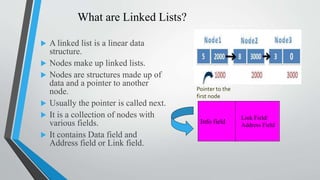
 A linked list is a linear data
structure.
 Nodes make up linked lists.
 Nodes are structures made up of
data and a pointer to another
node.
 Usually the pointer is called next.
 It is a collection of nodes with
various fields.
 It contains Data field and
Address field or Link field.
Pointer to the
first node
Info field
Link Field/
Address Field
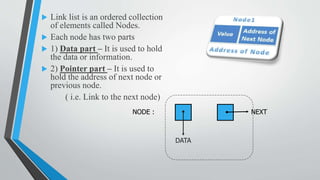
 Link list is an ordered collection
of elements called Nodes.
 Each node has two parts
 1) Data part – It is used to hold
the data or information.
 2) Pointer part – It is used to
hold the address of next node or
previous node.
( i.e. Link to the next node)
NODE :
DATA
NEXT
Advantages:
1. Link list are dynamic data structure.
2. Efficient memory utilization.
3. Insertion and deletion are easier.
Disadvantages:
1. If the number of fields are more then more memory
space is needed.
2. Access to an data item is little bit time consuming.
Linked List
What are the problems with Arrays
-Size is fixed
-Array Items are stored contiguously
-Insertions and deletion at particular position is complex
Why Linked list ?
-Size is not fixed , Grow and contract according to
insertions and deletions.
-Data can be stored at any place
-Insertions and deletions are simple and faster
Singly Linked list
Singly Linked list
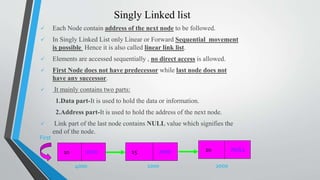
 Each Node contain address of the next node to be followed.
 In Singly Linked List only Linear or Forward Sequential movement
is possible Hence it is also called linear link list.
 Elements are accessed sequentially , no direct access is allowed.
 First Node does not have predecessor while last node does not
have any successor.
 It mainly contains two parts:
1.Data part-It is used to hold the data or information.
2.Address part-It is used to hold the address of the next node.
 Link part of the last node contains NULL value which signifies the
end of the node.
1000 2000
First
10 15 NULL20
4000
1000 2000
Schematic representation:
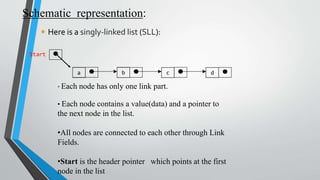
 Here is a singly-linked list (SLL):
a b c d
Start
• Each node has only one link part.
• Each node contains a value(data) and a pointer to
the next node in the list.
•All nodes are connected to each other through Link
Fields.
•Start is the header pointer which points at the first
node in the list
Basic operations in Single Link Lists
• Creating a Link List.
• Displaying a Link List.
• Inserting an element in Link List(Front, Mid, End).
• Deleting an element from Link List(Front, Mid, End).
Creating a link list
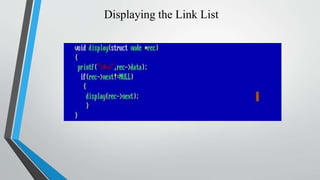
Displaying the Link List
Inserting the node in a SLL
There are 3 cases here:-
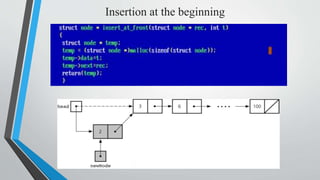
Insertion at the beginning
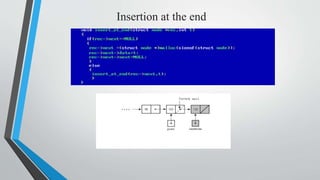
Insertion at the end
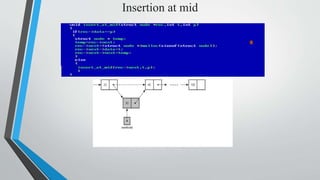
Insertion at mid
Insertion at the beginning
Insertion at the end
Insertion at mid
Deleting a node in SLL
Here also we have three cases:-
Deleting the first node
Deleting the last node
Deleting the intermediate node
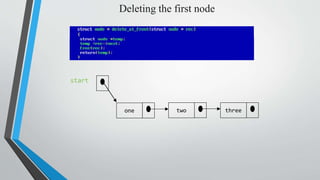
Deleting the first node
threetwoone
start
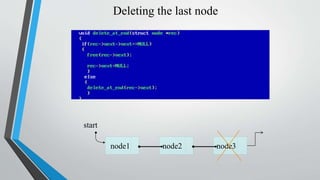
Deleting the last node
node3node2node1
start
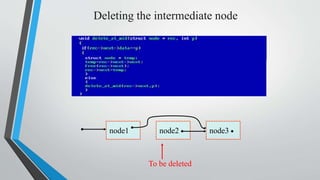
Deleting the intermediate node
node1 node2 node3
To be deleted
THANK YOU..!!!!!!!!!!

Linked list

  • 1.
  • 2.
    Presentation Topic: • Introductionto Linked List • Single linked list with All Operations.
  • 3.
    CONTENTS  Introduction ofLinked list.  Advantages and disadvantages of Linked list.  Comparing B/W Array and Linked list.  Singly linked list.  Schematic represenatation of Single linked list.  Basic operations on a Single linked list. Creating a Link List. Displaying a Link List. Inserting an element in Link List(Front, Mid, End). Deleting an element from Link List(Front, Mid, End).,
  • 4.
  • 5.
    What are LinkedLists?  A linked list is a linear data structure.  Nodes make up linked lists.  Nodes are structures made up of data and a pointer to another node.  Usually the pointer is called next.  It is a collection of nodes with various fields.  It contains Data field and Address field or Link field. Pointer to the first node Info field Link Field/ Address Field
  • 6.
     Link listis an ordered collection of elements called Nodes.  Each node has two parts  1) Data part – It is used to hold the data or information.  2) Pointer part – It is used to hold the address of next node or previous node. ( i.e. Link to the next node) NODE : DATA NEXT
  • 7.
    Advantages: 1. Link listare dynamic data structure. 2. Efficient memory utilization. 3. Insertion and deletion are easier. Disadvantages: 1. If the number of fields are more then more memory space is needed. 2. Access to an data item is little bit time consuming.
  • 8.
    Linked List What arethe problems with Arrays -Size is fixed -Array Items are stored contiguously -Insertions and deletion at particular position is complex Why Linked list ? -Size is not fixed , Grow and contract according to insertions and deletions. -Data can be stored at any place -Insertions and deletions are simple and faster
  • 9.
  • 10.
    Singly Linked list Each Node contain address of the next node to be followed.  In Singly Linked List only Linear or Forward Sequential movement is possible Hence it is also called linear link list.  Elements are accessed sequentially , no direct access is allowed.  First Node does not have predecessor while last node does not have any successor.  It mainly contains two parts: 1.Data part-It is used to hold the data or information. 2.Address part-It is used to hold the address of the next node.  Link part of the last node contains NULL value which signifies the end of the node. 1000 2000 First 10 15 NULL20 4000 1000 2000
  • 11.
    Schematic representation:  Hereis a singly-linked list (SLL): a b c d Start • Each node has only one link part. • Each node contains a value(data) and a pointer to the next node in the list. •All nodes are connected to each other through Link Fields. •Start is the header pointer which points at the first node in the list
  • 12.
    Basic operations inSingle Link Lists • Creating a Link List. • Displaying a Link List. • Inserting an element in Link List(Front, Mid, End). • Deleting an element from Link List(Front, Mid, End).
  • 13.
  • 14.
  • 15.
    Inserting the nodein a SLL There are 3 cases here:- Insertion at the beginning Insertion at the end Insertion at mid
  • 16.
  • 17.
  • 18.
  • 19.
    Deleting a nodein SLL Here also we have three cases:- Deleting the first node Deleting the last node Deleting the intermediate node
  • 20.
    Deleting the firstnode threetwoone start
  • 21.
    Deleting the lastnode node3node2node1 start
  • 22.
    Deleting the intermediatenode node1 node2 node3 To be deleted
  • 23.