Library Tech Tools
1
AMBER REWIS
REWISAMBER@GMAIL.COM
Library Tech Tools
2

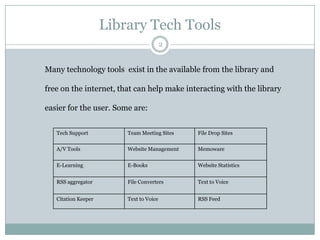
Many technology tools exist in the available from the library and

free on the internet, that can help make interacting with the library
easier for the user. Some are:
Tech Support

Team Meeting Sites

File Drop Sites

A/V Tools

Website Management

Memoware

E-Learning

E-Books

Website Statistics

RSS aggregator

File Converters

Text to Voice

Citation Keeper

Text to Voice

RSS Feed
E mail and Messages
3

 Allows users to manage numerous library cards from one account
 User creates account and adds barcodes and PINs of the library cards
 Notifies the user when books are due, overdue, ready to be picked up

http://www.libraryelf.com/
E-mail and Messages
4

 Allows the user to easily send email messages to ones self and others
 User adds the bookmark to the users toolbar
 User finds something to share and clicks the bookmark to email it to others

http://www.emailthis.clickability.com/et/emailThis?clickMap=browserButtons
E-mail and Messaging
5

 Allows users to put files, photos, videos, and documents in a safety box
 Put stuff in to it from your computers, phones, or tablets
 Share with confidence

https://www.dropbox.com/
Email and Messaging
6

 Allows users the ability to upload a file via HTTP-Protocol
 User receives a custom URL address to download the file from Senduit
 Can be shared by the user freely and can be used up to 1 week

http://www.senduit.com/
Email and Messaging
7

 Choose, drag, and drop files up to 100MB to convert after agreeing to terms
 Choose the format to convert to:
 Enter your email address to receive converted files

 http://www.zamzar.com/
Book Lists
8

 Allows readers to easily keep track of the books read
 User creates accounts to contain a little or a lot of personal information
 Account is very easy to add books to and has an organized display

http://www.librarything.com/
Book Lists
9

 Designed to connect people through the books they read
 Users set up reading lists and view what friends are reading
 Getting reading suggestions from people with similar reading tastes is easy

http://www.goodreads.com/
Research
10

 Allows a user to collect, organize, cite, and share your research sources
 Automatically senses content in the web browser for later use
 User to add it to your personal library with a single click

http://www.zotero.org/
Research
11

 Allows the user to search for an item in general
 Search for a book, movie, etc. and view what local libraries own it
 Search the world based on ZIP code

http://www.worldcat.org/
Research
12

 Users create flow charts, wireframes, diagrams, and mind maps, and org charts
 Rethought and redesigned the entire diagramming process to make it easier
 Diagrams Done Right

https://www.lucidchart.com/
Downloads
13

 Allows the user to download audio books in digital format
 They can be transferred to PC, mp3 player, or CD
 Sponsored through MVLC

http://mvlc.lib.overdrive.com/BCCB083A-7990-408A9AAA58C3880B7D1E/10/50/en/Default.htm
Thank You
14

Websites to view:
http://www.chelmsfordlibrary.org/reference/techtools.html
http://library.wrdsb.ca/research/tech-tools-for-learning/
https://sites.google.com/a/laconiahs.org/media-center/home/technology
http://ralston-web.jeffco.k12.co.us/ralston/html/library/tech_tools.html
http://www.symbaloo.com/mix/librarytechnologytools

Library Tech Tools

  • 1.
    Library Tech Tools 1 AMBERREWIS REWISAMBER@GMAIL.COM
  • 2.
    Library Tech Tools 2 Manytechnology tools exist in the available from the library and free on the internet, that can help make interacting with the library easier for the user. Some are: Tech Support Team Meeting Sites File Drop Sites A/V Tools Website Management Memoware E-Learning E-Books Website Statistics RSS aggregator File Converters Text to Voice Citation Keeper Text to Voice RSS Feed
  • 3.
    E mail andMessages 3  Allows users to manage numerous library cards from one account  User creates account and adds barcodes and PINs of the library cards  Notifies the user when books are due, overdue, ready to be picked up http://www.libraryelf.com/
  • 4.
    E-mail and Messages 4 Allows the user to easily send email messages to ones self and others  User adds the bookmark to the users toolbar  User finds something to share and clicks the bookmark to email it to others http://www.emailthis.clickability.com/et/emailThis?clickMap=browserButtons
  • 5.
    E-mail and Messaging 5 Allows users to put files, photos, videos, and documents in a safety box  Put stuff in to it from your computers, phones, or tablets  Share with confidence https://www.dropbox.com/
  • 6.
    Email and Messaging 6 Allows users the ability to upload a file via HTTP-Protocol  User receives a custom URL address to download the file from Senduit  Can be shared by the user freely and can be used up to 1 week http://www.senduit.com/
  • 7.
    Email and Messaging 7 Choose, drag, and drop files up to 100MB to convert after agreeing to terms  Choose the format to convert to:  Enter your email address to receive converted files  http://www.zamzar.com/
  • 8.
    Book Lists 8  Allowsreaders to easily keep track of the books read  User creates accounts to contain a little or a lot of personal information  Account is very easy to add books to and has an organized display http://www.librarything.com/
  • 9.
    Book Lists 9  Designedto connect people through the books they read  Users set up reading lists and view what friends are reading  Getting reading suggestions from people with similar reading tastes is easy http://www.goodreads.com/
  • 10.
    Research 10  Allows auser to collect, organize, cite, and share your research sources  Automatically senses content in the web browser for later use  User to add it to your personal library with a single click http://www.zotero.org/
  • 11.
    Research 11  Allows theuser to search for an item in general  Search for a book, movie, etc. and view what local libraries own it  Search the world based on ZIP code http://www.worldcat.org/
  • 12.
    Research 12  Users createflow charts, wireframes, diagrams, and mind maps, and org charts  Rethought and redesigned the entire diagramming process to make it easier  Diagrams Done Right https://www.lucidchart.com/
  • 13.
    Downloads 13  Allows theuser to download audio books in digital format  They can be transferred to PC, mp3 player, or CD  Sponsored through MVLC http://mvlc.lib.overdrive.com/BCCB083A-7990-408A9AAA58C3880B7D1E/10/50/en/Default.htm
  • 14.
    Thank You 14 Websites toview: http://www.chelmsfordlibrary.org/reference/techtools.html http://library.wrdsb.ca/research/tech-tools-for-learning/ https://sites.google.com/a/laconiahs.org/media-center/home/technology http://ralston-web.jeffco.k12.co.us/ralston/html/library/tech_tools.html http://www.symbaloo.com/mix/librarytechnologytools