Objectives
• By theend of this lesson, students will be able to:
1.Define what a GUI (Graphical User Interface) is and
understand its importance.
2.Identify key Java Swing components used in GUI
applications.
3.Understand the purpose and usage of each Swing
component introduced in the sample program.
4.Create a basic Java GUI application using Swing
components.
3.
What is GUI?
•Definition:
•GUI(Graphical User Interface) is a user-
friendly interface that allows users to
interact with software applications
through graphical elements like buttons,
text fields, and labels, instead of text-
based commands or code.
4.
Importance of GUI:
•Makessoftware more accessible and user-
friendly.
•Reduces the learning curve for users
unfamiliar with command-line interfaces.
•Enhances productivity and user
engagement by simplifying interaction.
Comparison:
•CLI (Command LineInterface): Relies on
text commands (e.g., Terminal, Command
Prompt).
•GUI: Uses visual elements (e.g., Microsoft
Word, web browsers).
7.
Introduction to JavaSwing
•What is Swing?
•Swing is a part of Java’s standard library used
for building graphical user interfaces.
•Provides lightweight and platform-
independent GUI components.
8.
Why Swing?
•Easy touse for small-to-medium
applications.
•Customizable and flexible.
•Compatible across different operating
systems.
9.
Swing Components Usedin the Sample Program
•1. JFrame
•Purpose: Serves as the main window of a GUI
application.
10.
Example Usage:
•JFrame frame= new JFrame("Simple
Addition");frame.setSize(400,
200);frame.setDefaultCloseOperation(JFrame.E
XIT_ON_CLOSE);
11.
JFrame
•Features: Contains othercomponents like
buttons and text fields.Provides methods
to set title, size, layout, and behavior.
12.
Swing Components Usedin the Sample Program
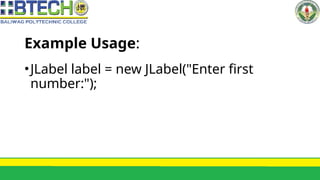
•2. JLabel
•Purpose: Displays static text or
instructions to the user.
Importance of aGUI in Applications
•Advantages:
•Simplifies user interaction, making the
application more intuitive.
•Attracts more users by providing a
visually appealing interface.
26.
Importance of aGUI in Applications
•Advantages:
•Enhances functionality with
interactive features like buttons and
dialogs.
•Enables multitasking through multiple
windows and components.
27.
Importance of aGUI in Applications
•Real-World Examples:
•Education: Interactive learning tools
and simulators.
•E-commerce: Shopping websites with
buttons for adding items to the cart.
28.
Importance of aGUI in Applications
•Real-World Examples:
•Entertainment: Media players with
play, pause, and stop buttons.
29.
Summary
• GUI simplifiesuser interaction and enhances the usability of
applications.
• Java Swing provides a flexible and lightweight toolkit for
building GUIs.
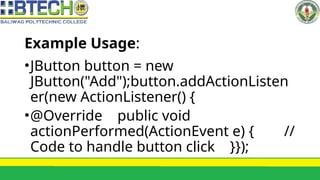
• Key components like JFrame, JLabel, JTextField, and JButton
allow developers to create functional and user-friendly
interfaces.