.1 1999©UCB
CS 161
Design and Architecture of Computer Systems
Lecture 2
Instructor: L.N. Bhuyan
(http://www.engr.ucr.edu/faculty/cs/bhuyan.html)
.2 1999©UCB
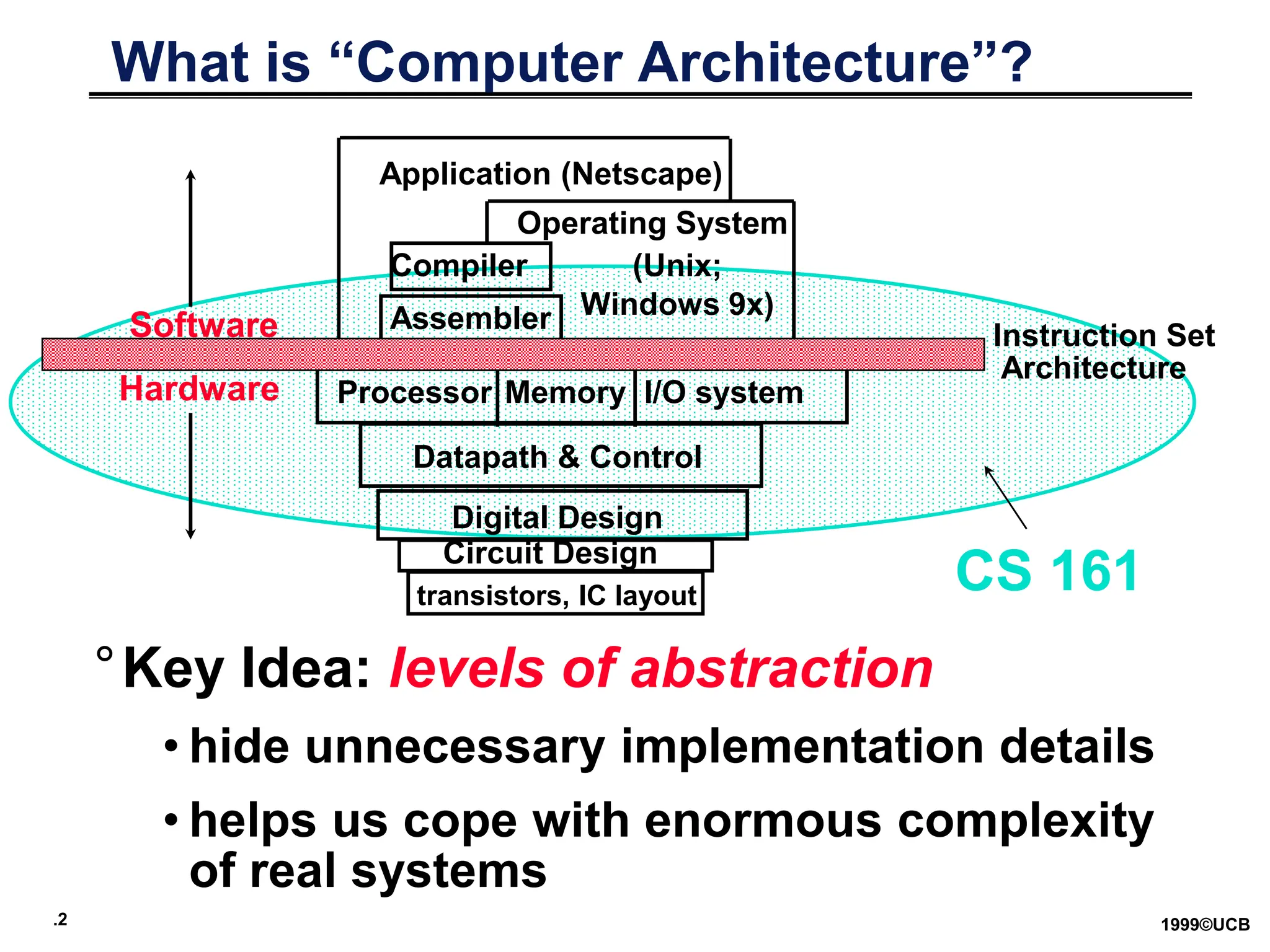
What is “Computer Architecture”?
I/O system
Processor
Compiler
Operating System
(Unix;
Windows 9x)
Application (Netscape)
Digital Design
Circuit Design
Instruction Set
Architecture
°Key Idea: levels of abstraction
• hide unnecessary implementation details
• helps us cope with enormous complexity
of real systems
Datapath & Control
transistors, IC layout
Memory
Hardware
Software Assembler
CS 161
.3 1999©UCB
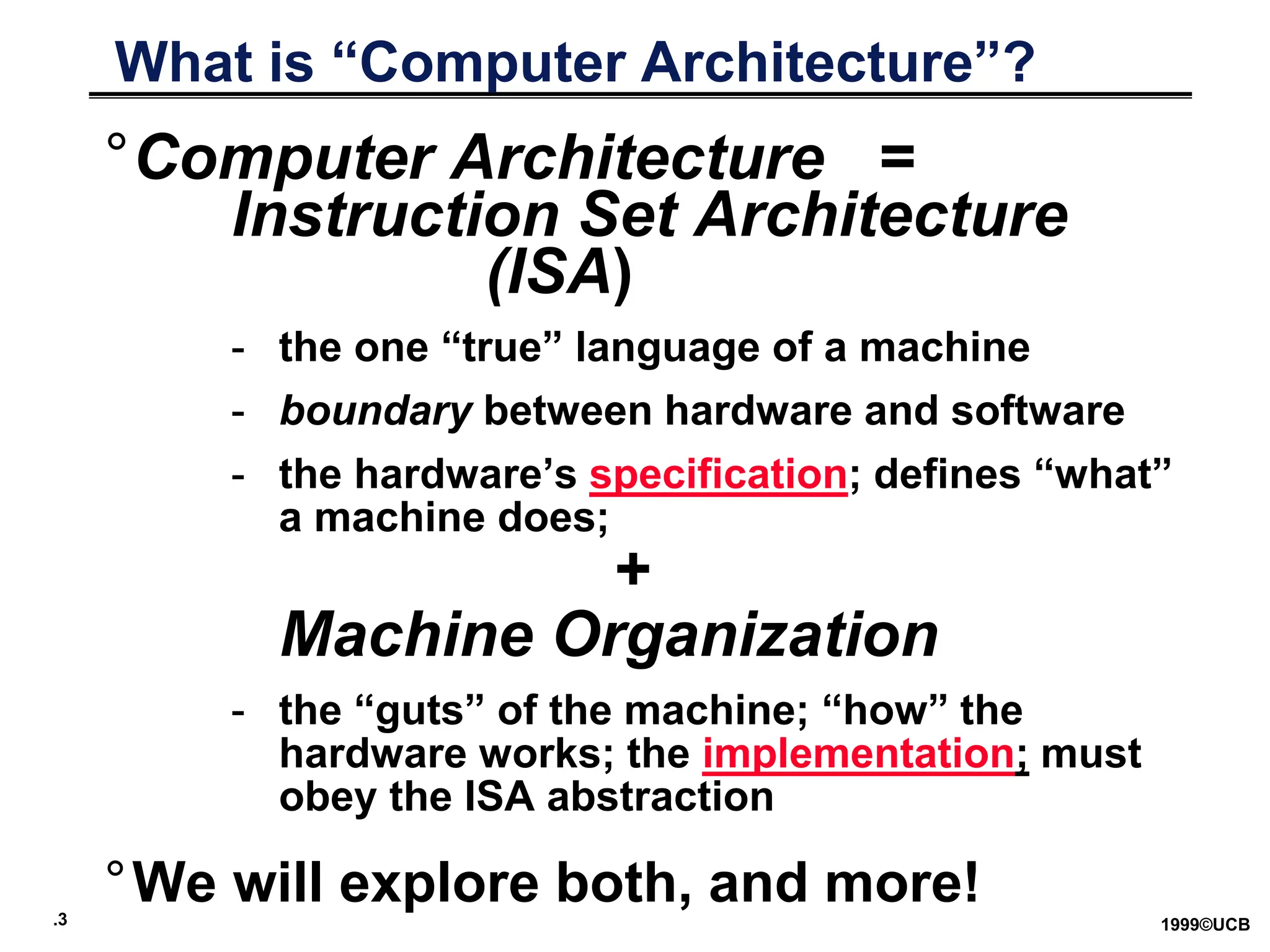
What is “Computer Architecture”?
°Computer Architecture =
Instruction Set Architecture
(ISA)
- the one “true” language of a machine
- boundary between hardware and software
- the hardware’s specification; defines “what”
a machine does;
+
Machine Organization
- the “guts” of the machine; “how” the
hardware works; the implementation; must
obey the ISA abstraction
°We will explore both, and more!
.4 1999©UCB
Levels of Abstraction
High Level Language
Program (e.g., C)
Assembly Language
Program (e.g.,MIPS)
Machine Language
Program (MIPS)
Datapath Transfer
Specification
Compiler
Assembler
Machine Interpretation
temp = v[k];
v[k] = v[k+1];
v[k+1] = temp;
lw $15, 0($2)
lw $16, 4($2)
sw $16, 0($2)
sw $15, 4($2)
0000 1001 1100 0110 1010 1111 0101 1000
1010 1111 0101 1000 0000 1001 1100 0110
1100 0110 1010 1111 0101 1000 0000 1001
0101 1000 0000 1001 1100 0110 1010 1111
°
°
IR <- Imem[PC]; PC <- PC + 4
• reasons to use HLL language?
.5 1999©UCB
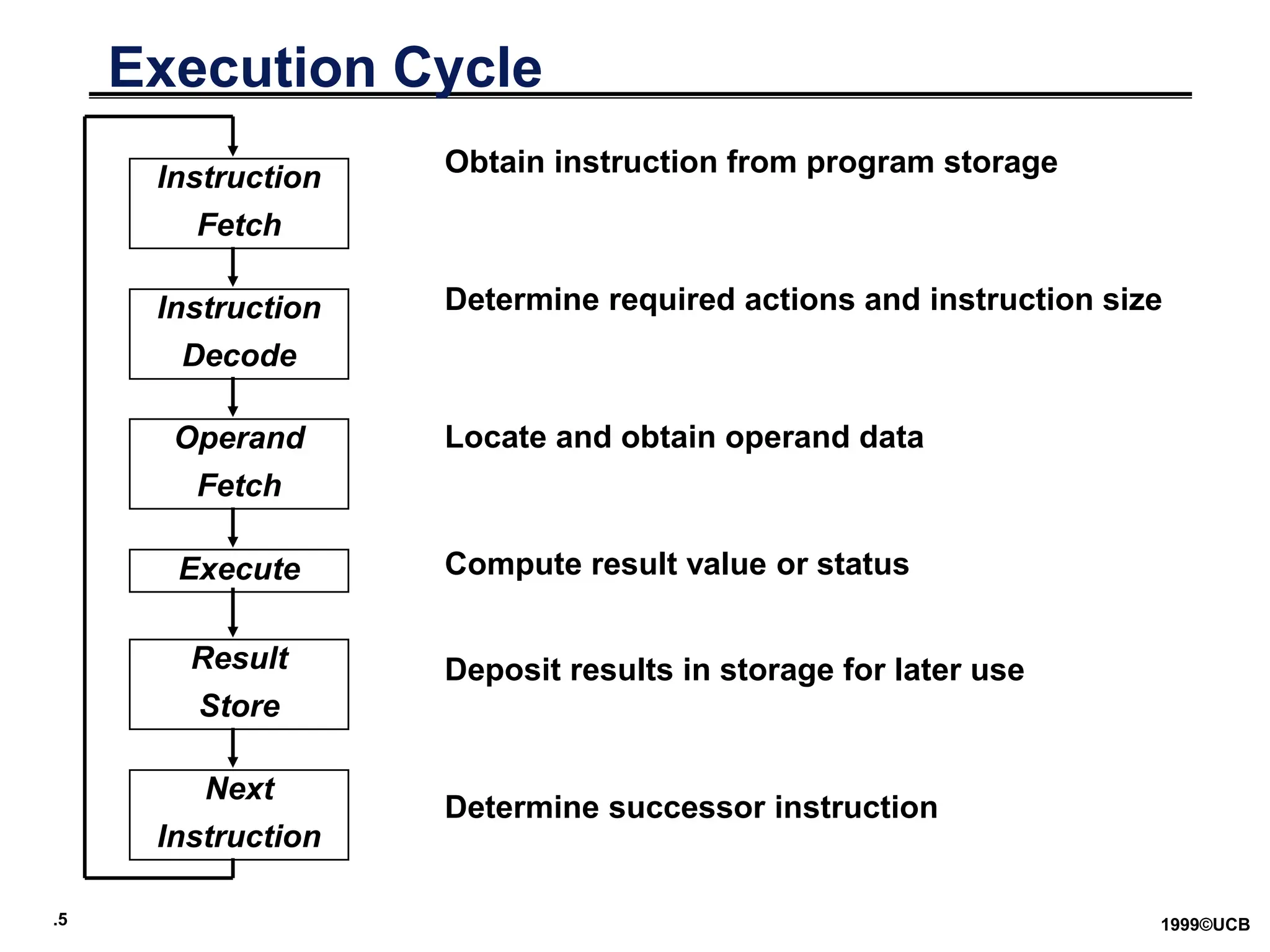
Execution Cycle
Instruction
Fetch
Instruction
Decode
Operand
Fetch
Execute
Result
Store
Next
Instruction
Obtain instruction from program storage
Determine required actions and instruction size
Locate and obtain operand data
Compute result value or status
Deposit results in storage for later use
Determine successor instruction
.6 1999©UCB
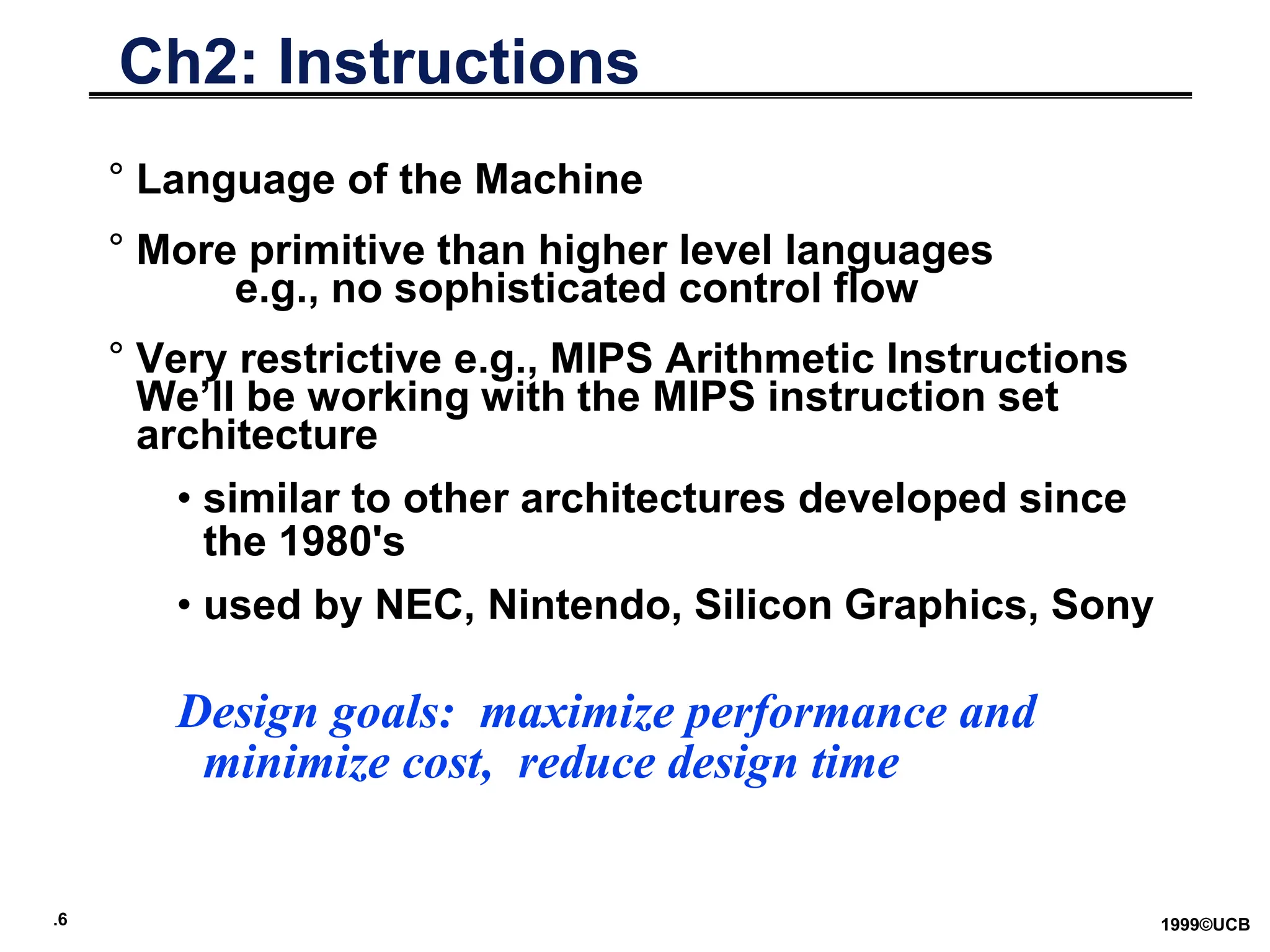
Ch2: Instructions
° Language of the Machine
° More primitive than higher level languages
e.g., no sophisticated control flow
° Very restrictive e.g., MIPS Arithmetic Instructions
We’ll be working with the MIPS instruction set
architecture
• similar to other architectures developed since
the 1980's
• used by NEC, Nintendo, Silicon Graphics, Sony
Design goals: maximize performance and
minimize cost, reduce design time
.7 1999©UCB
Basic ISA Classes
Accumulator (1 register):
1 address add A acc acc + mem[A]
1+x address addx A acc acc + mem[A + x]
Stack:
0 address add tos tos + next
General Purpose Register:
2 address add A B EA(A) EA(A) + EA(B)
3 address add A B C EA(A) EA(B) + EA(C)
Load/Store:
load Ra Rb Ra mem[Rb]
store Ra Rb mem[Rb] Ra
Memory to Memory:
All operands and destinations can be memory addresses.
.8 1999©UCB
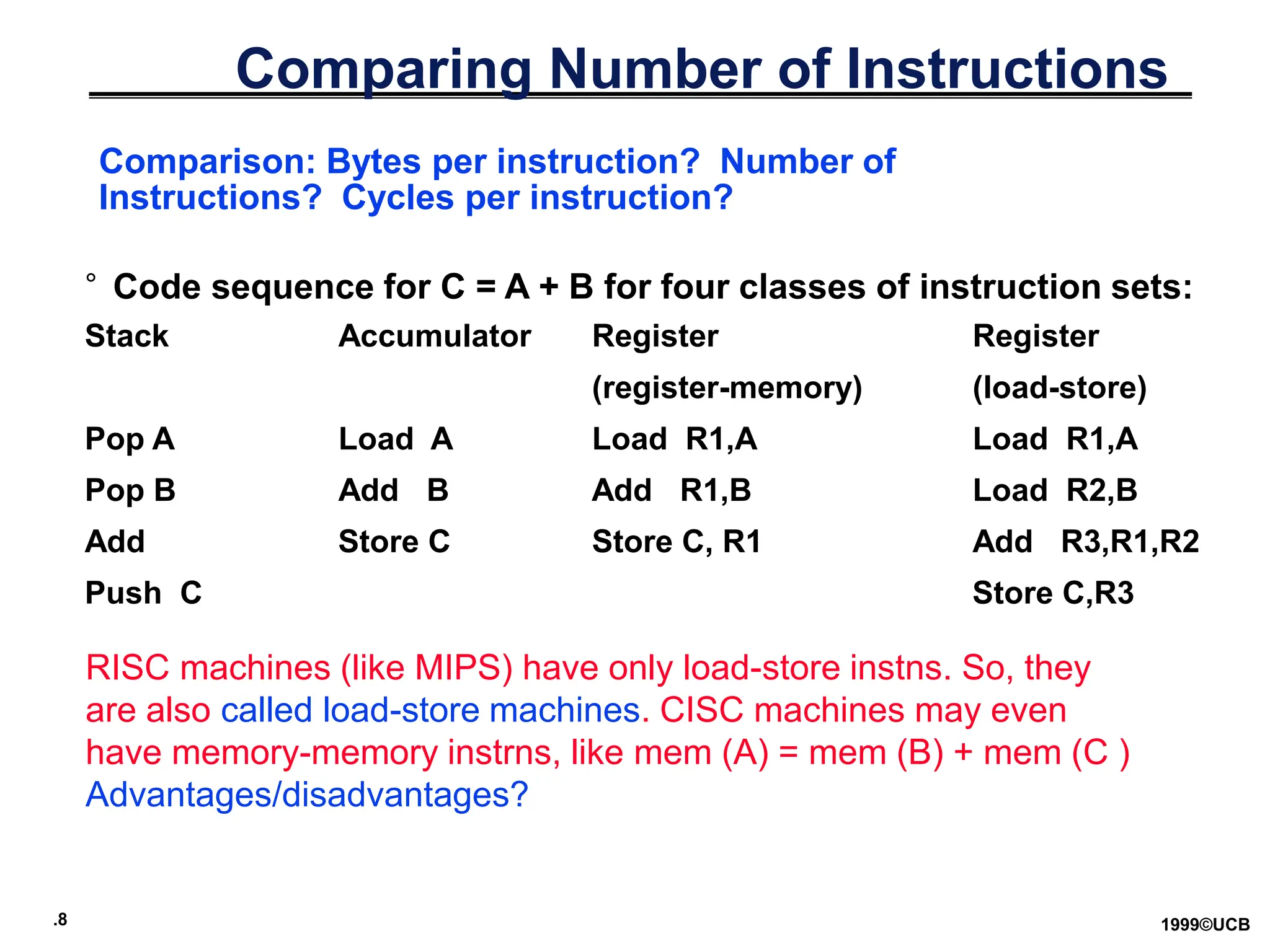
Comparing Number of Instructions
° Code sequence for C = A + B for four classes of instruction sets:
Stack Accumulator Register Register
(register-memory) (load-store)
Pop A Load A Load R1,A Load R1,A
Pop B Add B Add R1,B Load R2,B
Add Store C Store C, R1 Add R3,R1,R2
Push C Store C,R3
Comparison: Bytes per instruction? Number of
Instructions? Cycles per instruction?
RISC machines (like MIPS) have only load-store instns. So, they
are also called load-store machines. CISC machines may even
have memory-memory instrns, like mem (A) = mem (B) + mem (C )
Advantages/disadvantages?
.9 1999©UCB
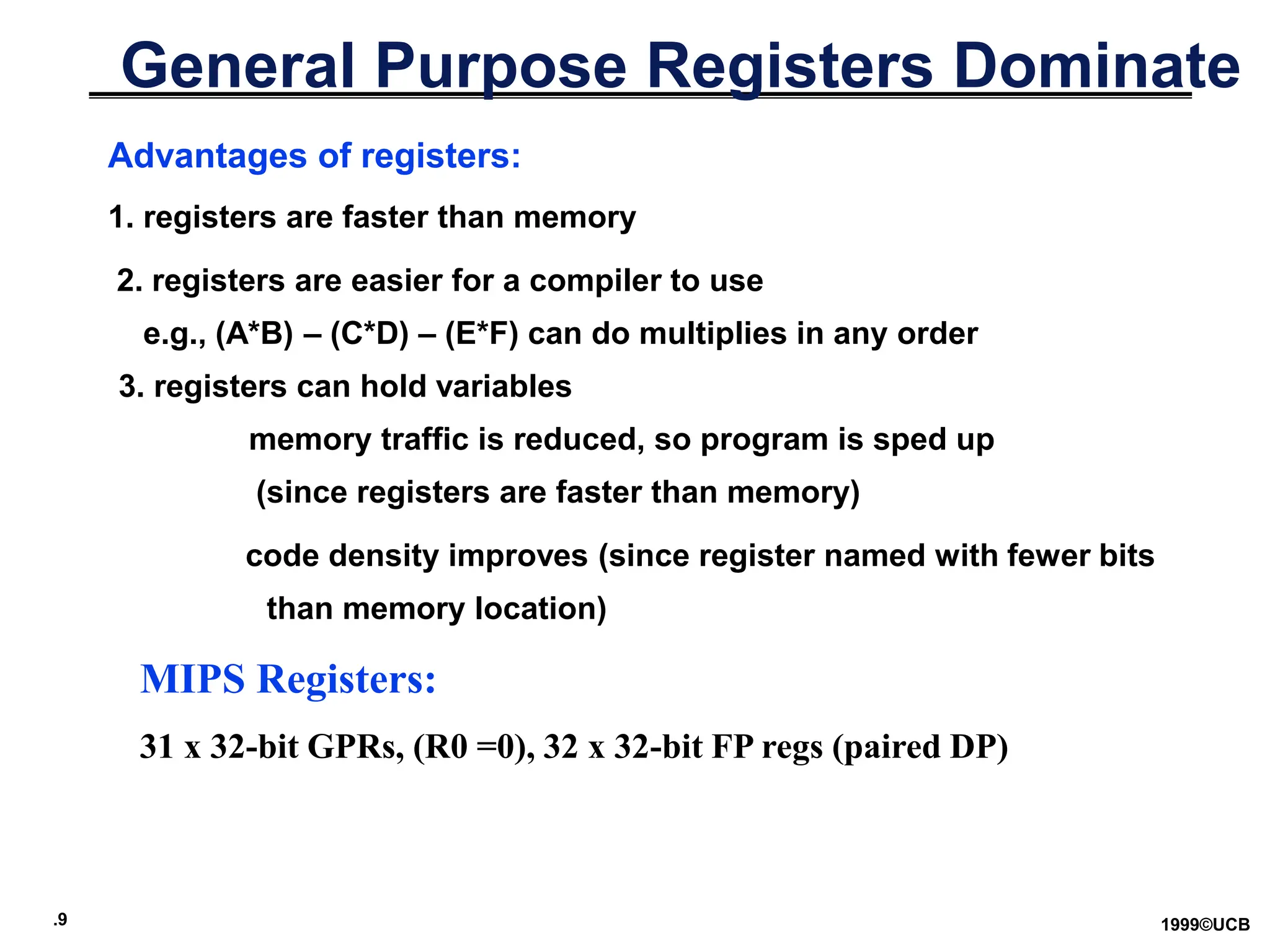
General Purpose Registers Dominate
Advantages of registers:
1. registers are faster than memory
2. registers are easier for a compiler to use
e.g., (A*B) – (C*D) – (E*F) can do multiplies in any order
3. registers can hold variables
memory traffic is reduced, so program is sped up
(since registers are faster than memory)
code density improves (since register named with fewer bits
than memory location)
MIPS Registers:
31 x 32-bit GPRs, (R0 =0), 32 x 32-bit FP regs (paired DP)
.10 1999©UCB
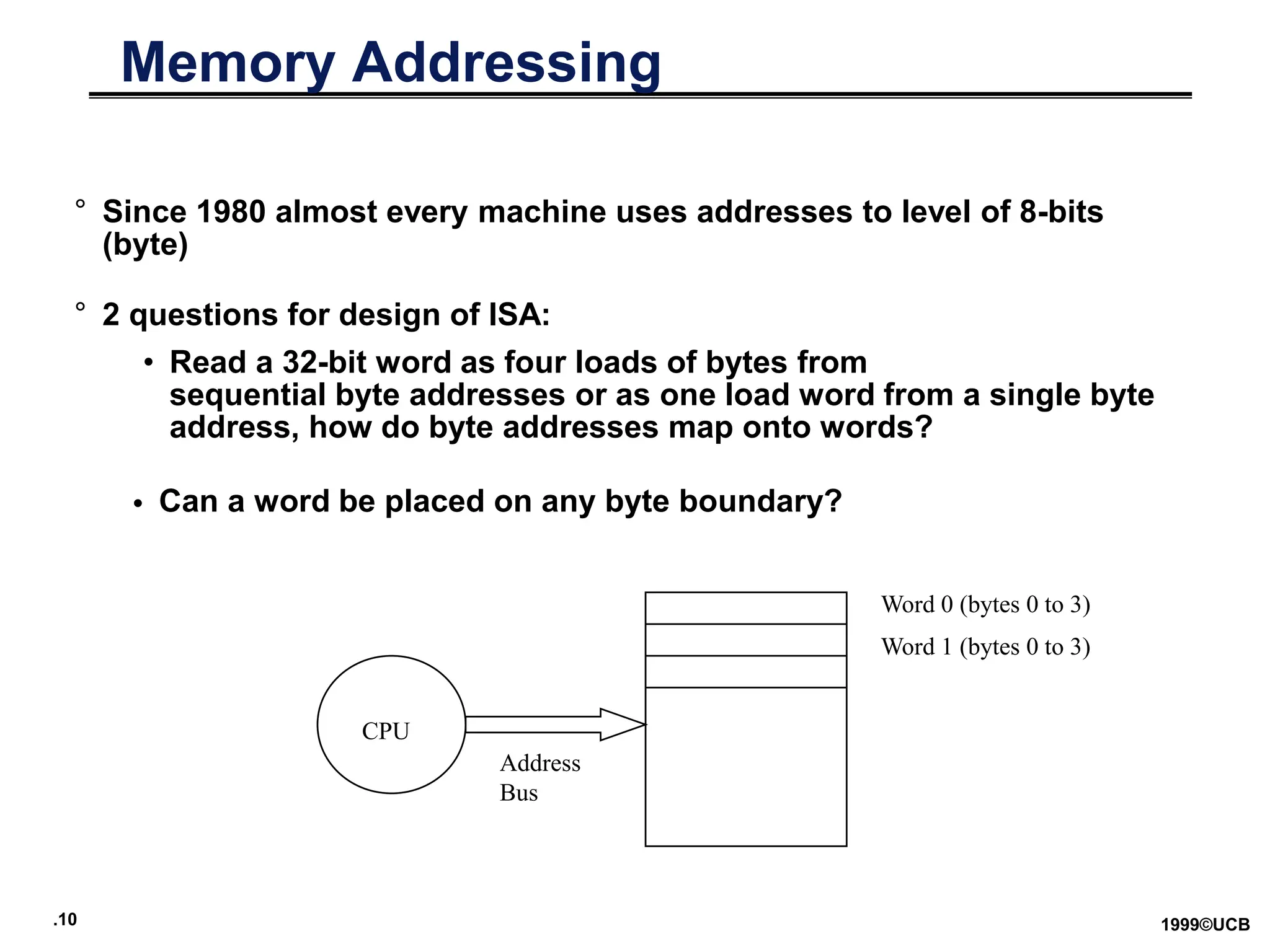
Memory Addressing
° Since 1980 almost every machine uses addresses to level of 8-bits
(byte)
° 2 questions for design of ISA:
• Read a 32-bit word as four loads of bytes from
sequential byte addresses or as one load word from a single byte
address, how do byte addresses map onto words?
• Can a word be placed on any byte boundary?
CPU
Address
Bus
Word 0 (bytes 0 to 3)
Word 1 (bytes 0 to 3)
.11 1999©UCB
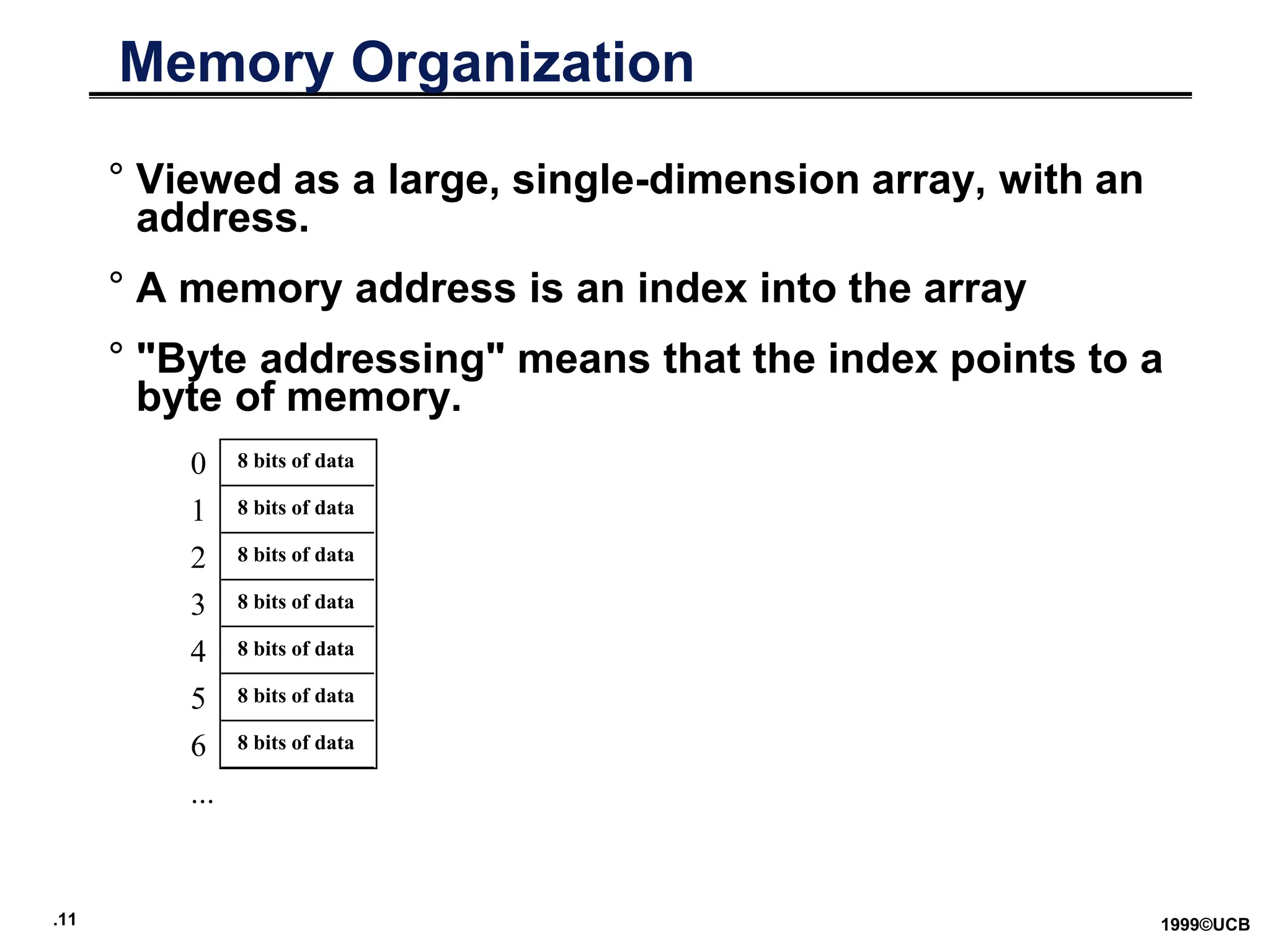
Memory Organization
° Viewed as a large, single-dimension array, with an
address.
° A memory address is an index into the array
° "Byte addressing" means that the index points to a
byte of memory.
0
1
2
3
4
5
6
...
8 bits of data
8 bits of data
8 bits of data
8 bits of data
8 bits of data
8 bits of data
8 bits of data
.12 1999©UCB
Addressing: Byte vs. word
° Every word in memory has an address, similar to an
index in an array
° Early computers numbered words like C numbers
elements of an array:
•Memory[0], Memory[1], Memory[2], …
° Today machines address memory as bytes, hence
word addresses differ by 4
•Memory[0], Memory[4], Memory[8], …
• Computers needed to access 8-bit bytes as well
as words (4 bytes/word)
Called the “address” of a word
Called “byte addressing”
.13 1999©UCB
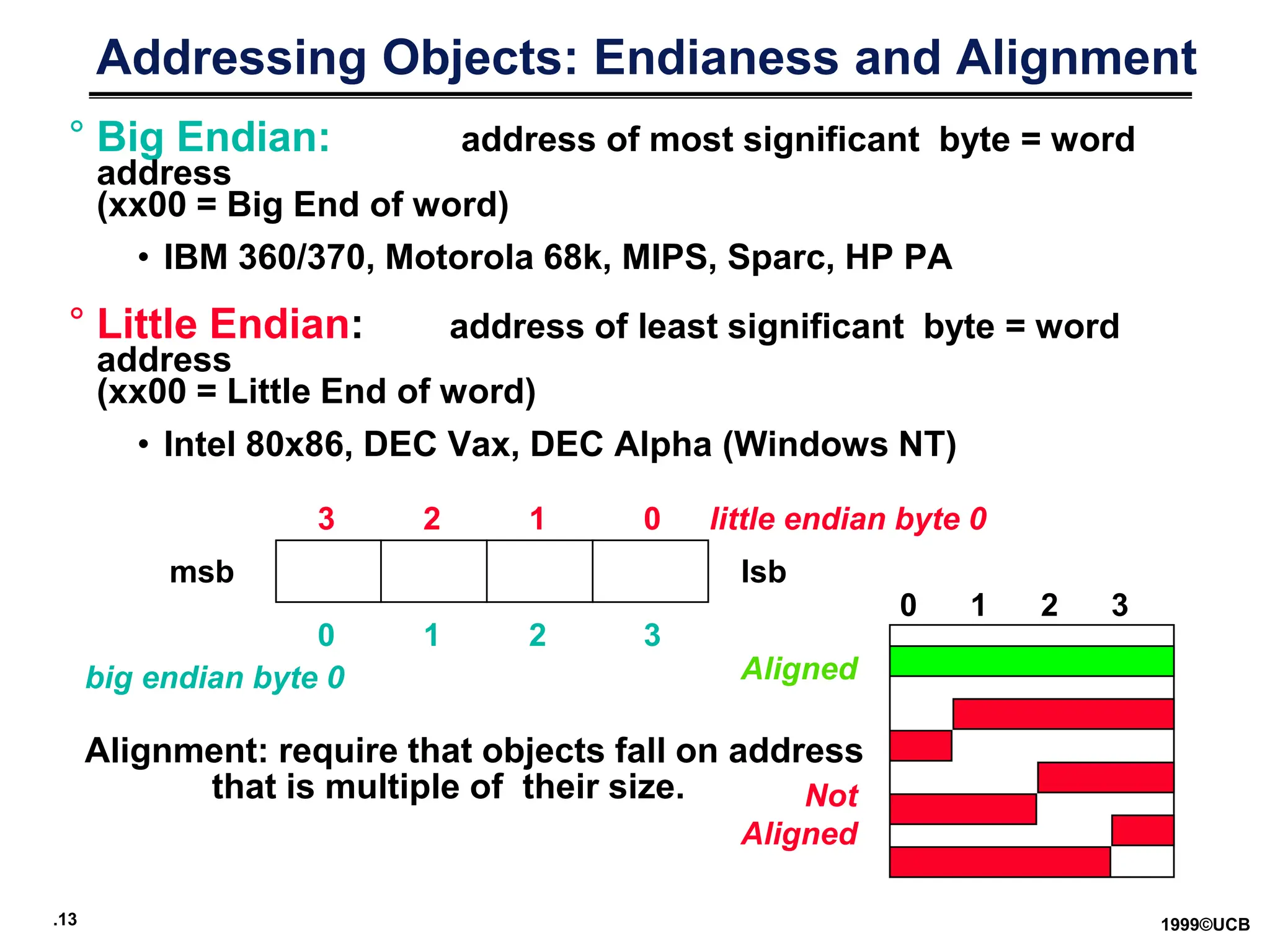
Addressing Objects: Endianess and Alignment
° Big Endian: address of most significant byte = word
address
(xx00 = Big End of word)
• IBM 360/370, Motorola 68k, MIPS, Sparc, HP PA
° Little Endian: address of least significant byte = word
address
(xx00 = Little End of word)
• Intel 80x86, DEC Vax, DEC Alpha (Windows NT)
msb lsb
3 2 1 0 little endian byte 0
0 1 2 3
big endian byte 0
Alignment: require that objects fall on address
that is multiple of their size.
0 1 2 3
Aligned
Not
Aligned
.14 1999©UCB
Addressing Modes
Addressing mode Example Meaning
Register Add R4,R3 R4R4+R3
Immediate Add R4,#3 R4 R4+3
Displacement Add R4,100(R1) R4 R4+Mem[100+R1]
Register indirect Add R4,(R1) R4 R4+Mem[R1]
Indexed / Base Add R3,(R1+R2) R3 R3+Mem[R1+R2]
Direct or absolute Add R1,(1001) R1 R1+Mem[1001]
Memory indirect Add R1,@(R3) R1 R1+Mem[Mem[R3]]
Auto-increment Add R1,(R2)+ R1 R1+Mem[R2]; R2 R2+d
Auto-decrement Add R1,–(R2) R2 R2–d; R1 R1+Mem[R2]
Scaled Add R1,100(R2)[R3] R1  R1+Mem[100+R2+R3*d]
Why Auto-increment/decrement? Scaled?
.15 1999©UCB
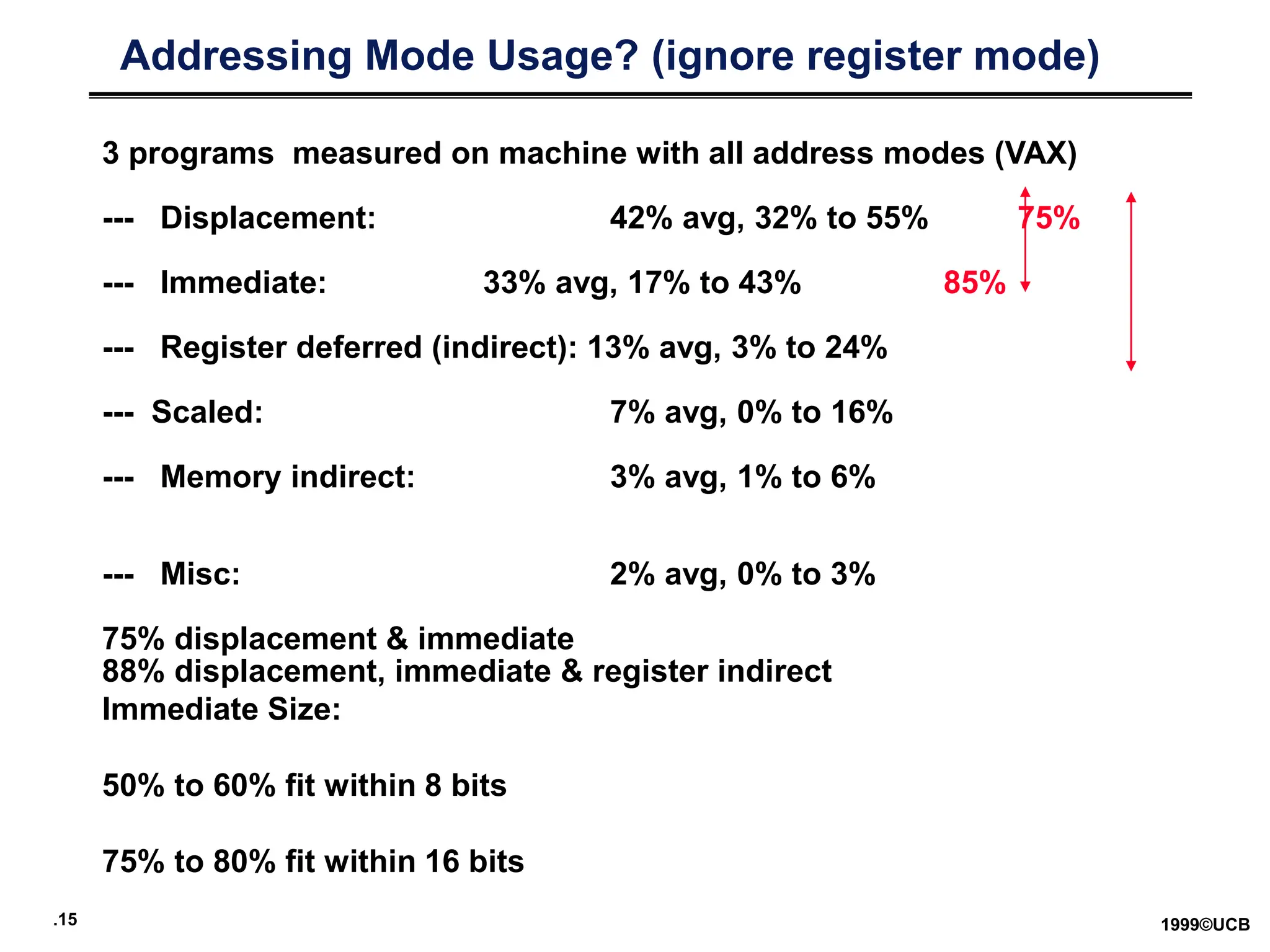
Addressing Mode Usage? (ignore register mode)
3 programs measured on machine with all address modes (VAX)
--- Displacement: 42% avg, 32% to 55% 75%
--- Immediate: 33% avg, 17% to 43% 85%
--- Register deferred (indirect): 13% avg, 3% to 24%
--- Scaled: 7% avg, 0% to 16%
--- Memory indirect: 3% avg, 1% to 6%
--- Misc: 2% avg, 0% to 3%
75% displacement & immediate
88% displacement, immediate & register indirect
Immediate Size:
50% to 60% fit within 8 bits
75% to 80% fit within 16 bits
.16 1999©UCB
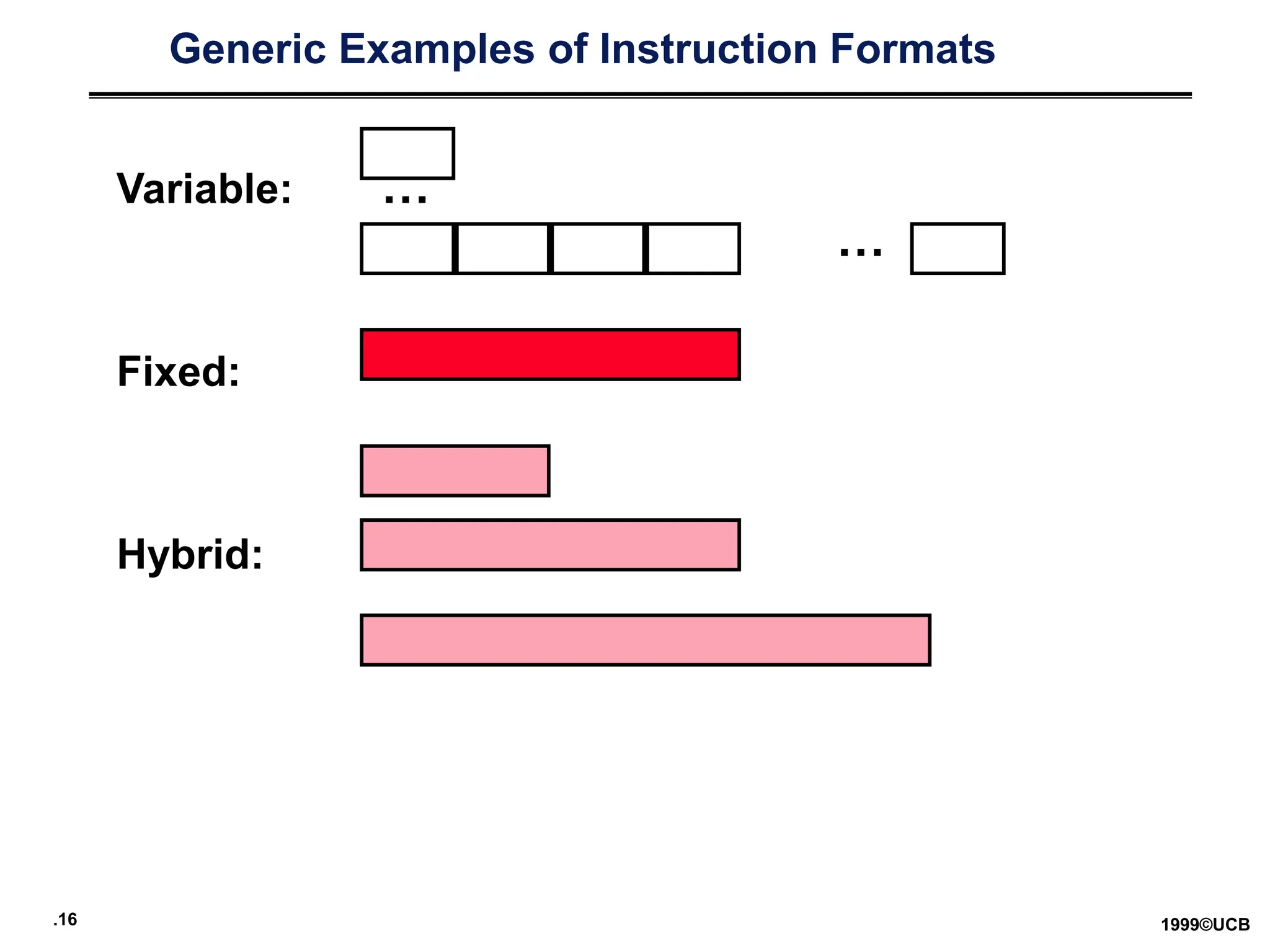
Generic Examples of Instruction Formats
Variable:
Fixed:
Hybrid:
…
…
.17 1999©UCB
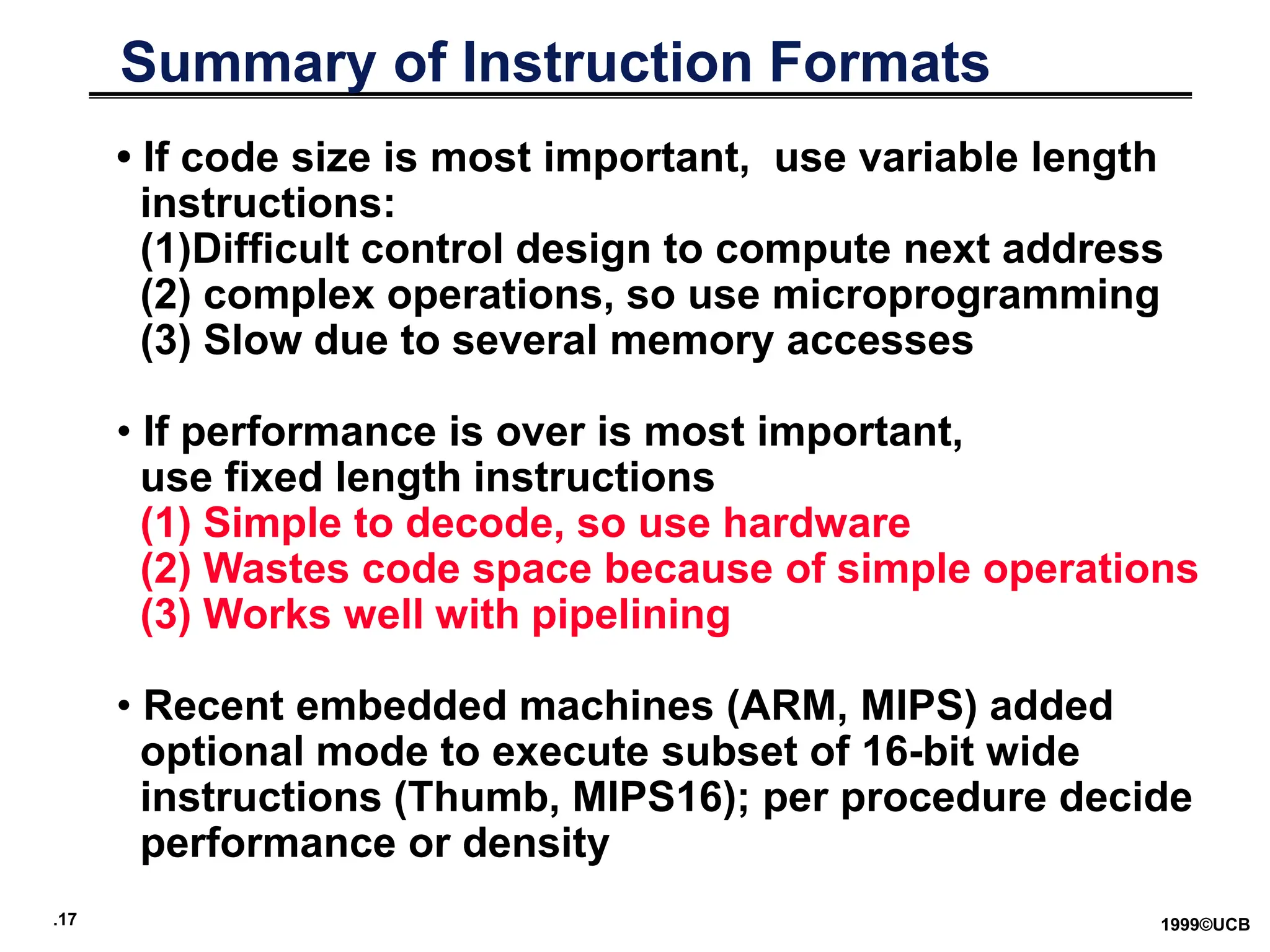
Summary of Instruction Formats
• If code size is most important, use variable length
instructions:
(1)Difficult control design to compute next address
(2) complex operations, so use microprogramming
(3) Slow due to several memory accesses
• If performance is over is most important,
use fixed length instructions
(1) Simple to decode, so use hardware
(2) Wastes code space because of simple operations
(3) Works well with pipelining
• Recent embedded machines (ARM, MIPS) added
optional mode to execute subset of 16-bit wide
instructions (Thumb, MIPS16); per procedure decide
performance or density
.18 1999©UCB
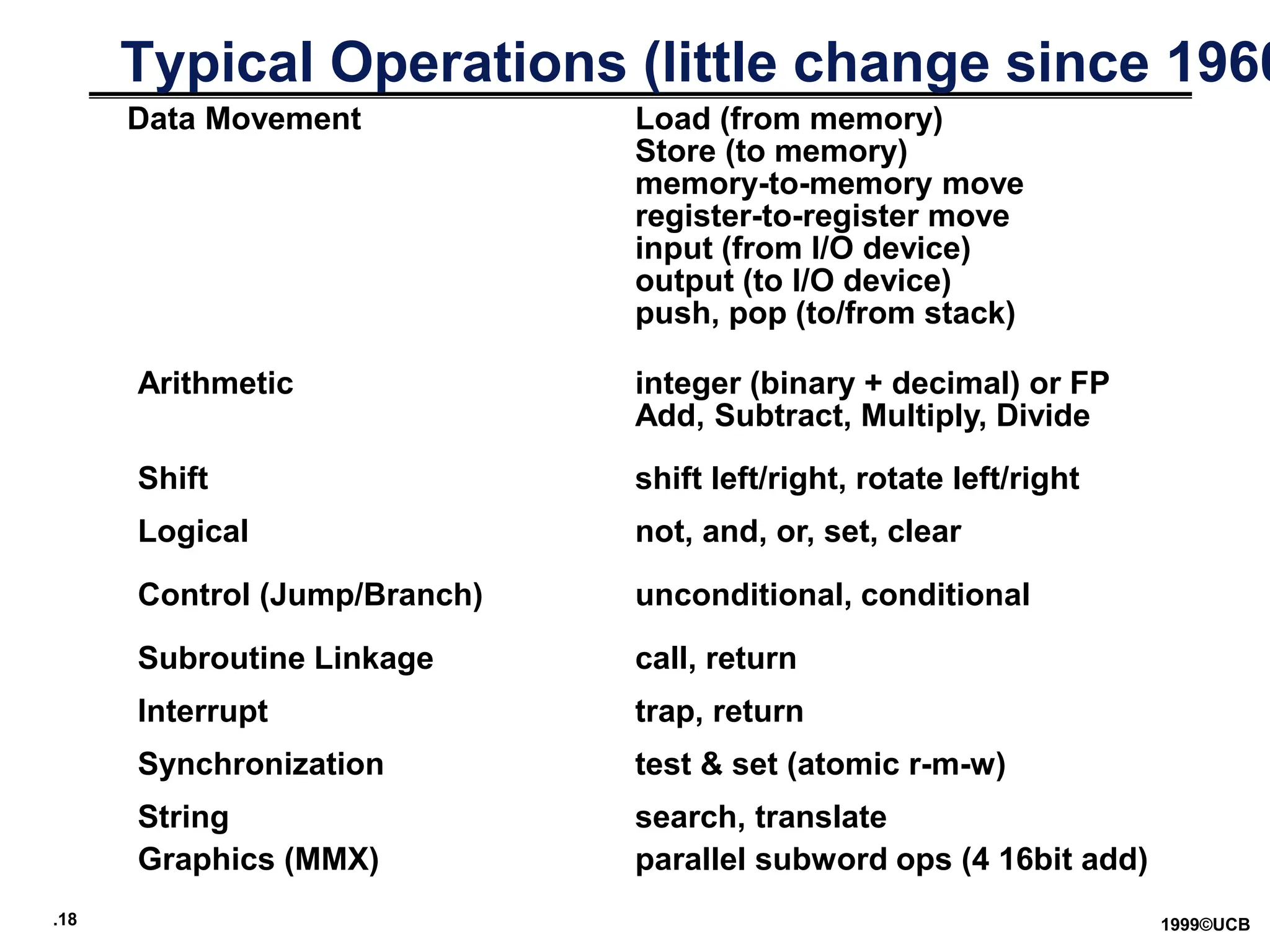
Typical Operations (little change since 1960
Data Movement Load (from memory)
Store (to memory)
memory-to-memory move
register-to-register move
input (from I/O device)
output (to I/O device)
push, pop (to/from stack)
Arithmetic integer (binary + decimal) or FP
Add, Subtract, Multiply, Divide
Logical not, and, or, set, clear
Shift shift left/right, rotate left/right
Control (Jump/Branch) unconditional, conditional
Subroutine Linkage call, return
Interrupt trap, return
Synchronization test & set (atomic r-m-w)
String search, translate
Graphics (MMX) parallel subword ops (4 16bit add)
.19 1999©UCB
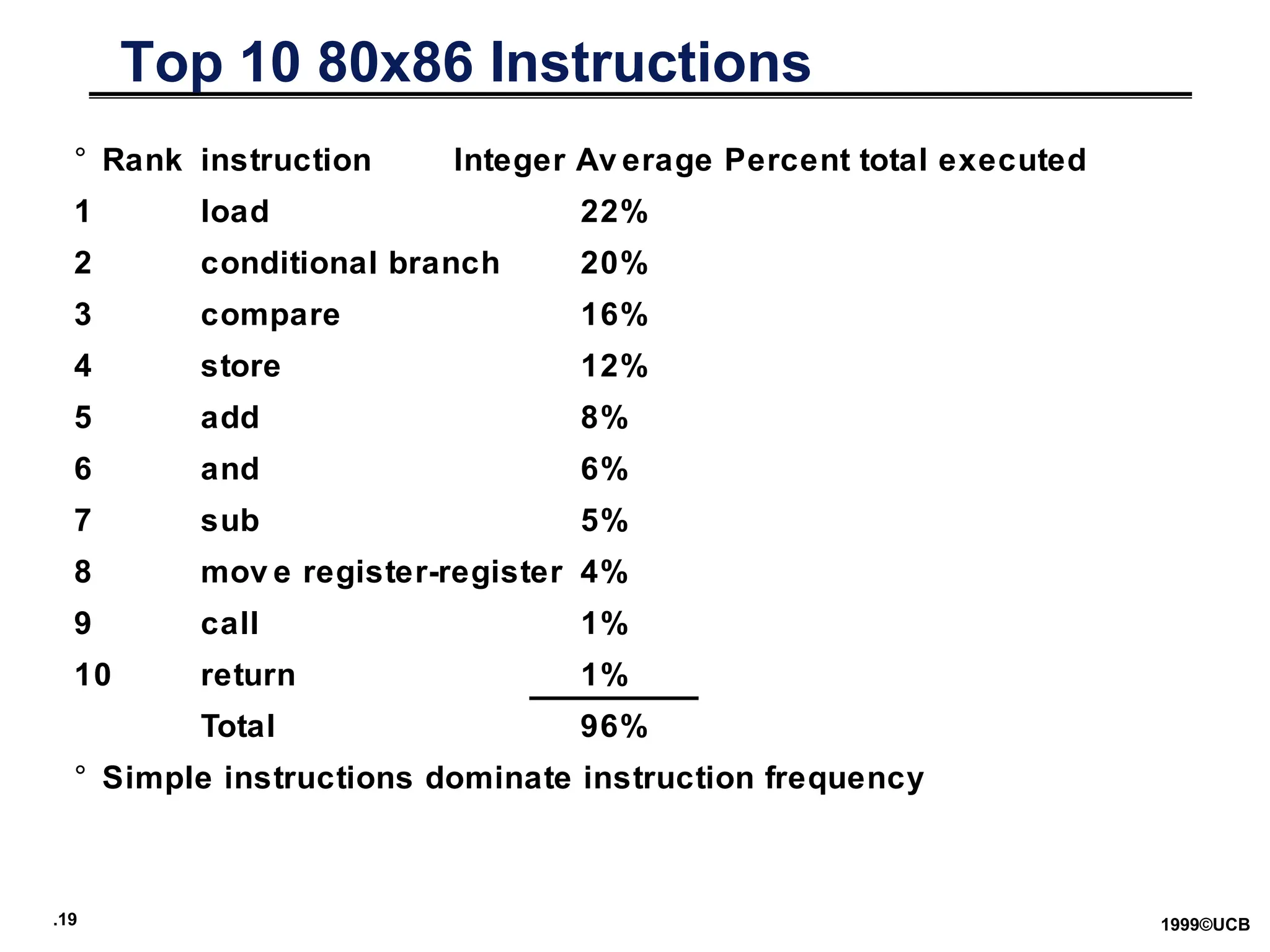
Top 10 80x86 Instructions
° Rank instruction Integer Av erage Percent total executed
1 load 22%
2 conditional branch 20%
3 compare 16%
4 store 12%
5 add 8%
6 and 6%
7 sub 5%
8 mov e register-register 4%
9 call 1%
10 return 1%
Total 96%
° Simple instructions dominate instruction frequency
.20 1999©UCB
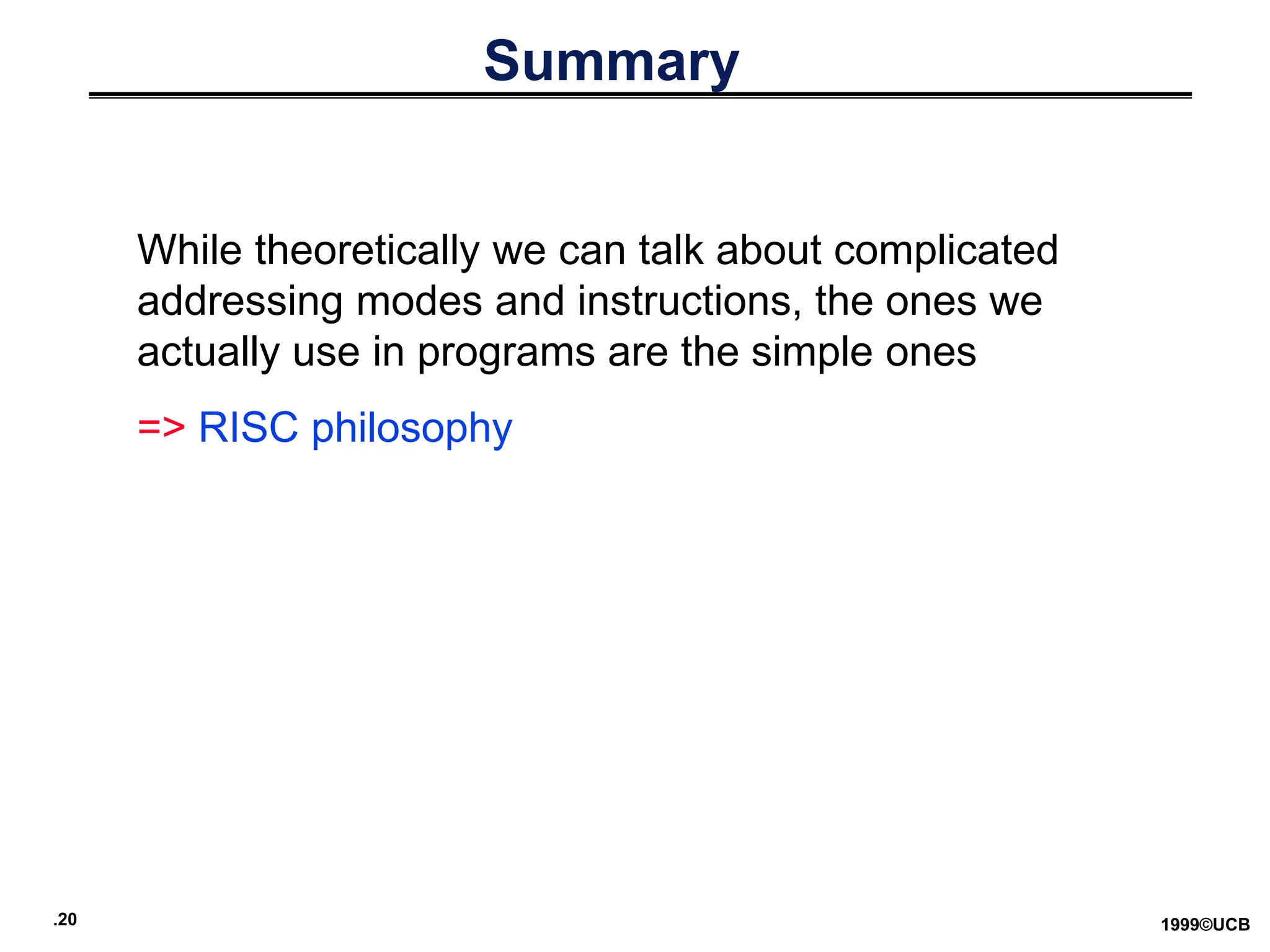
Summary
While theoretically we can talk about complicated
addressing modes and instructions, the ones we
actually use in programs are the simple ones
=> RISC philosophy
.21 1999©UCB
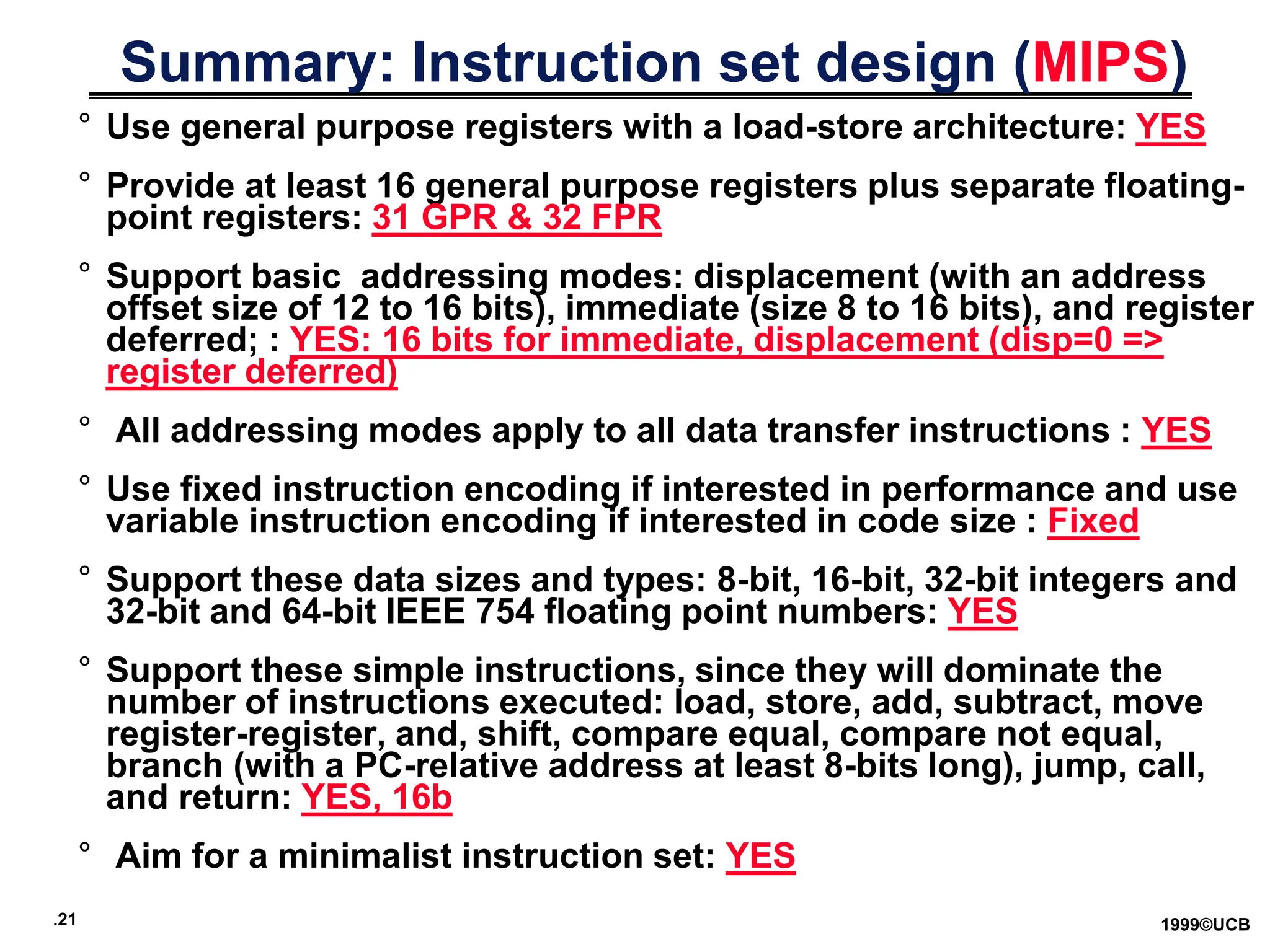
Summary: Instruction set design (MIPS)
° Use general purpose registers with a load-store architecture: YES
° Provide at least 16 general purpose registers plus separate floating-
point registers: 31 GPR & 32 FPR
° Support basic addressing modes: displacement (with an address
offset size of 12 to 16 bits), immediate (size 8 to 16 bits), and register
deferred; : YES: 16 bits for immediate, displacement (disp=0 =>
register deferred)
° All addressing modes apply to all data transfer instructions : YES
° Use fixed instruction encoding if interested in performance and use
variable instruction encoding if interested in code size : Fixed
° Support these data sizes and types: 8-bit, 16-bit, 32-bit integers and
32-bit and 64-bit IEEE 754 floating point numbers: YES
° Support these simple instructions, since they will dominate the
number of instructions executed: load, store, add, subtract, move
register-register, and, shift, compare equal, compare not equal,
branch (with a PC-relative address at least 8-bits long), jump, call,
and return: YES, 16b
° Aim for a minimalist instruction set: YES
.22 1999©UCB
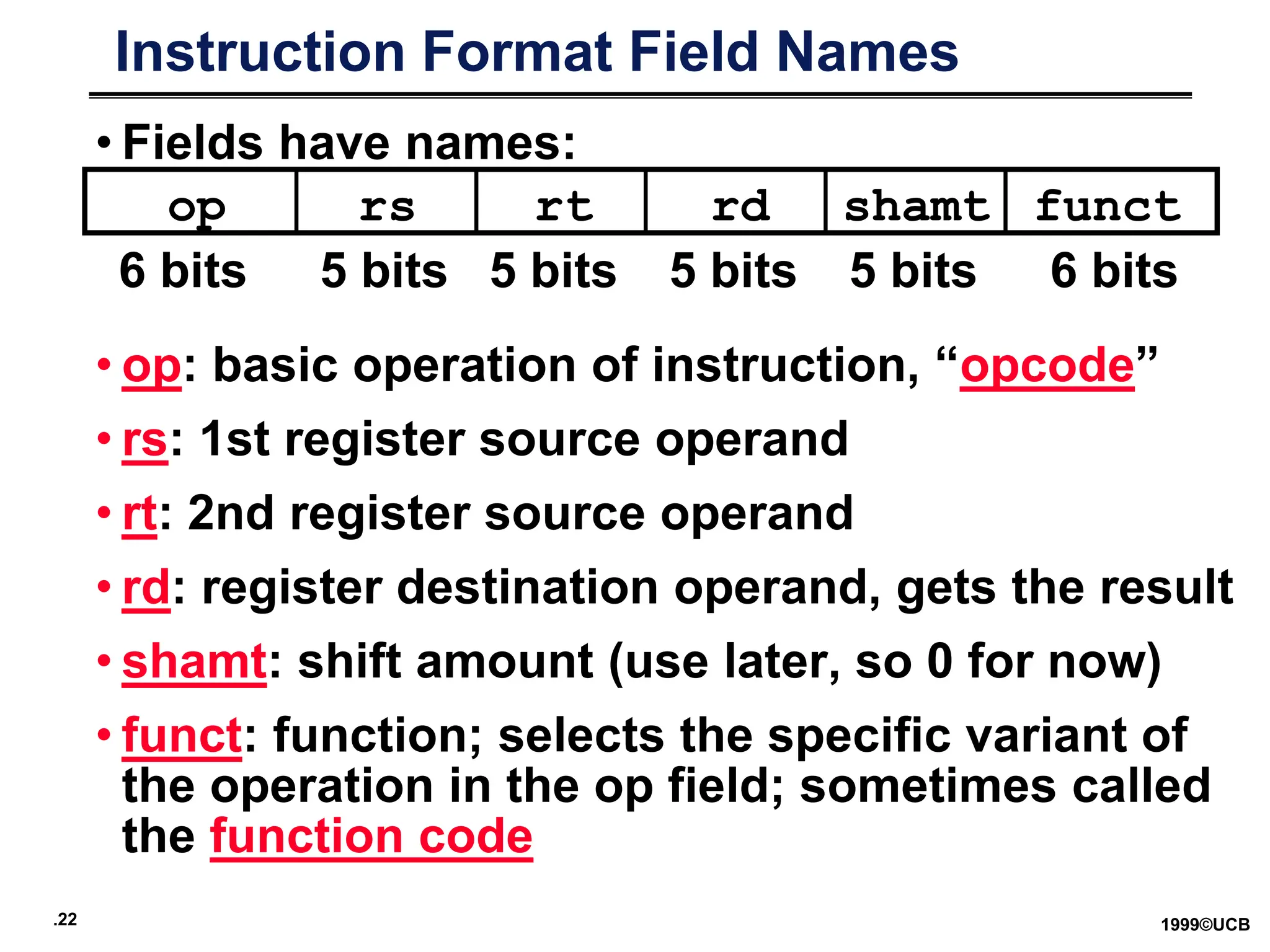
Instruction Format Field Names
• Fields have names:
• op: basic operation of instruction, “opcode”
• rs: 1st register source operand
• rt: 2nd register source operand
• rd: register destination operand, gets the result
• shamt: shift amount (use later, so 0 for now)
• funct: function; selects the specific variant of
the operation in the op field; sometimes called
the function code
op rs rt rd funct
shamt
6 bits 5 bits 5 bits 5 bits 5 bits 6 bits
.23 1999©UCB
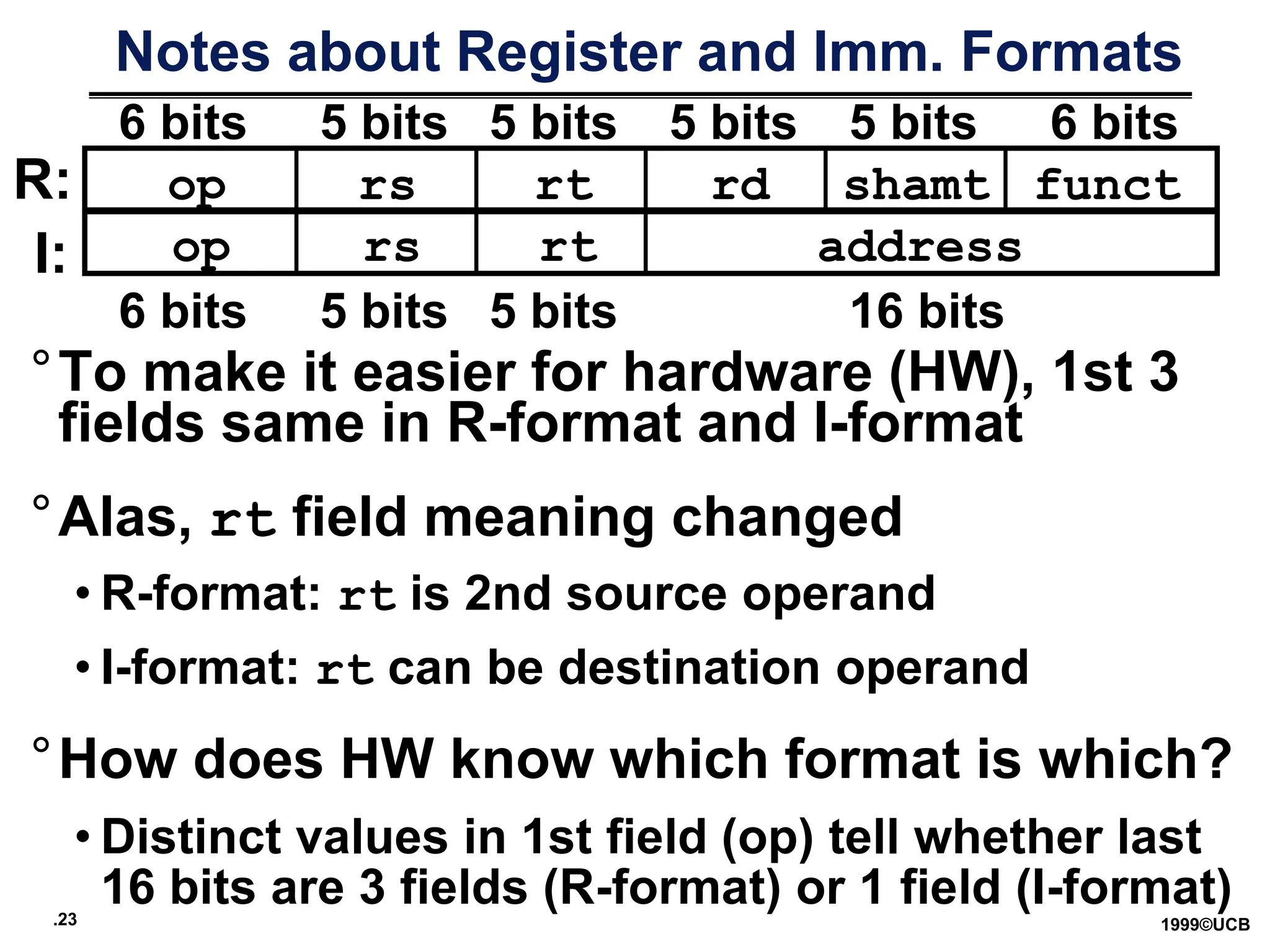
Notes about Register and Imm. Formats
°To make it easier for hardware (HW), 1st 3
fields same in R-format and I-format
°Alas, rt field meaning changed
• R-format: rt is 2nd source operand
• I-format: rt can be destination operand
°How does HW know which format is which?
• Distinct values in 1st field (op) tell whether last
16 bits are 3 fields (R-format) or 1 field (I-format)
6 bits 5 bits 5 bits 5 bits 5 bits 6 bits
op rs rt rd funct
shamt
op rs rt address
6 bits 5 bits 5 bits 16 bits
R:
I:
.24 1999©UCB
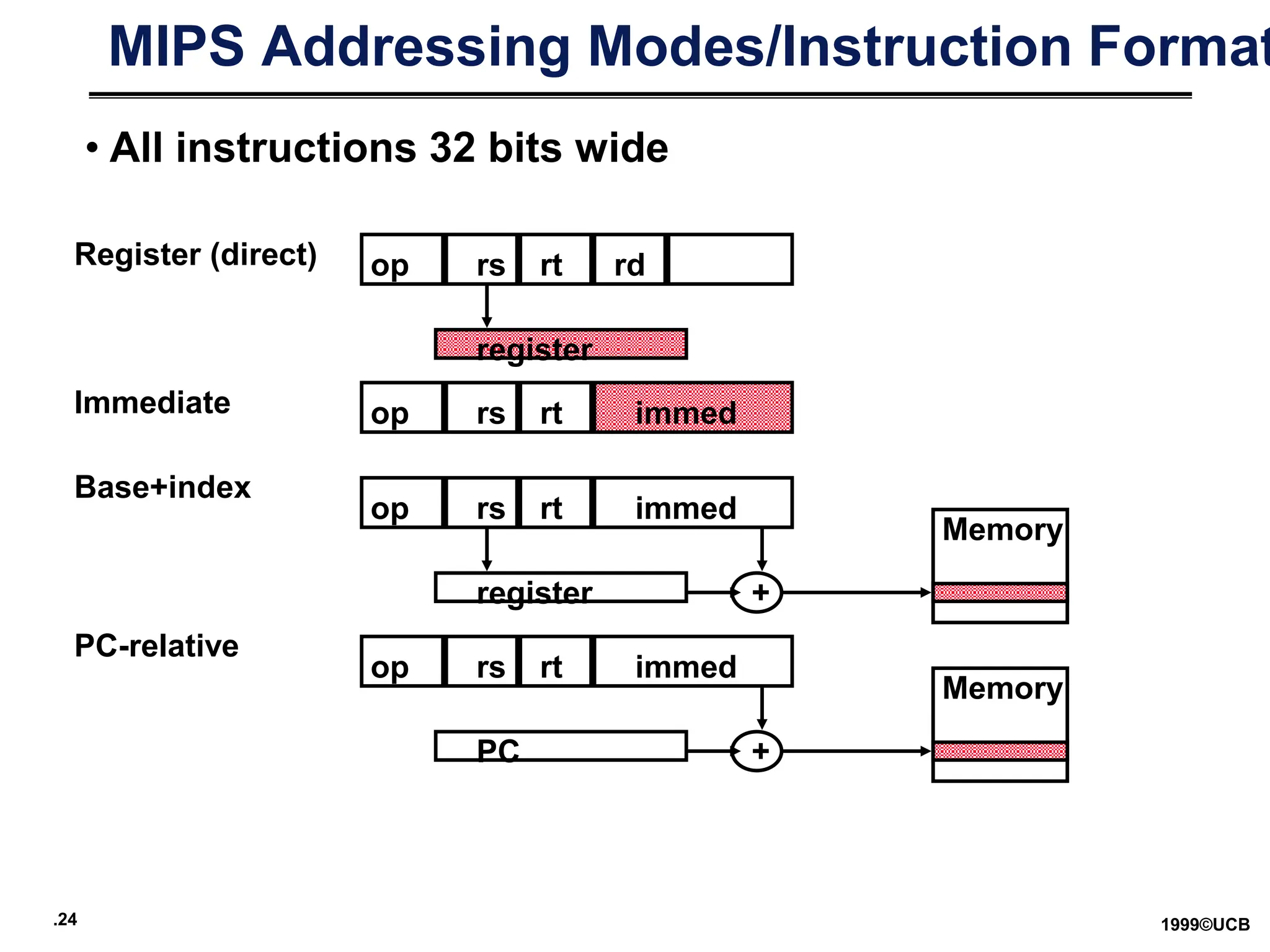
MIPS Addressing Modes/Instruction Format
op rs rt rd
immed
register
Register (direct)
op rs rt
register
Base+index
+
Memory
immed
op rs rt
Immediate
immed
op rs rt
PC
PC-relative
+
Memory
• All instructions 32 bits wide
.25 1999©UCB
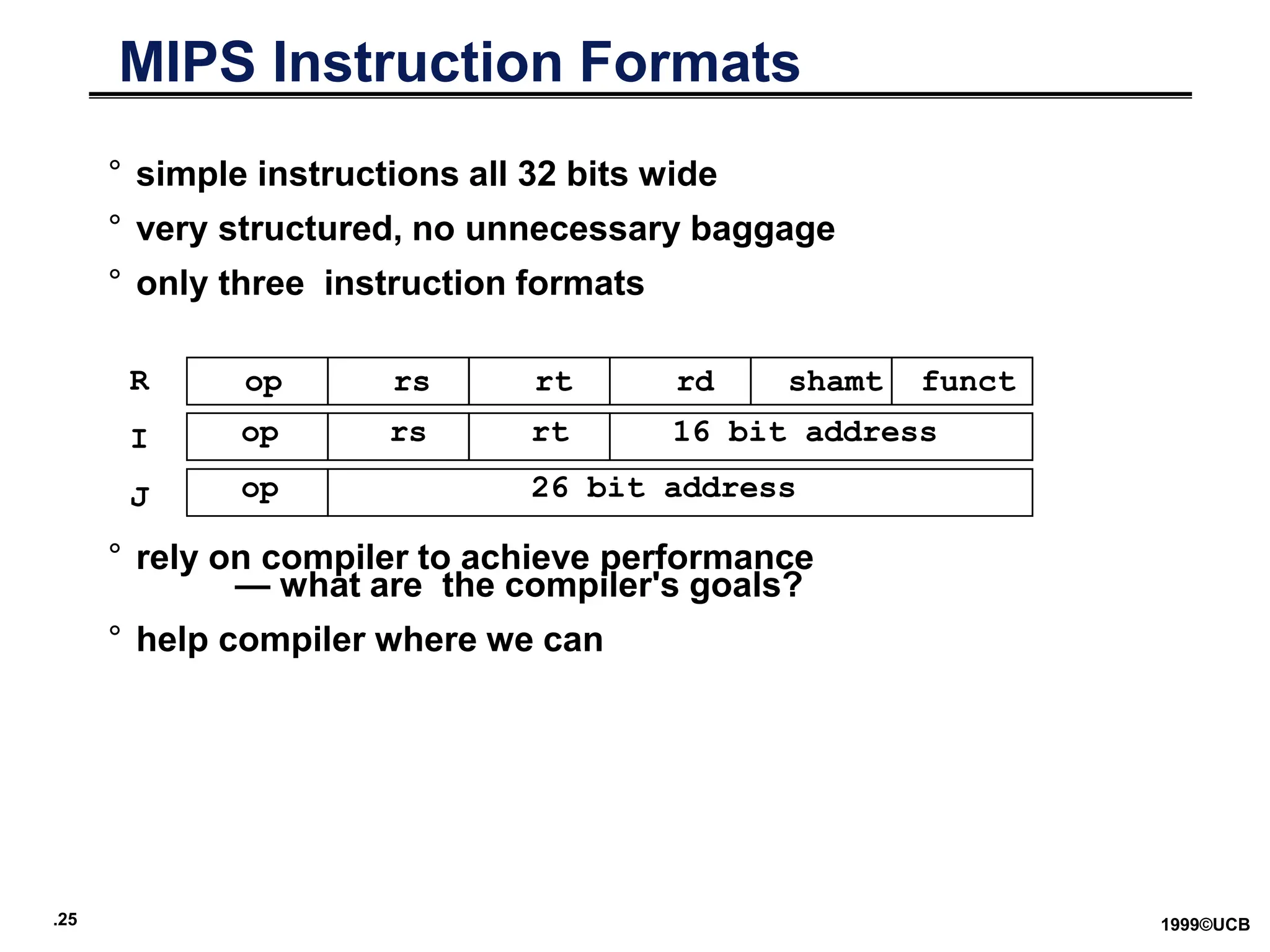
° simple instructions all 32 bits wide
° very structured, no unnecessary baggage
° only three instruction formats
° rely on compiler to achieve performance
— what are the compiler's goals?
° help compiler where we can
op rs rt rd shamt funct
op rs rt 16 bit address
op 26 bit address
R
I
J
MIPS Instruction Formats
.26 1999©UCB
MIPS Instructions:
Name Example Comments
$s0-$s7, $t0-$t9, $zero, Fast locations for data. In MIPS, data must be in registers to perform
32 registers $a0-$a3, $v0-$v1, $gp, arithmetic. MIPS register $zero alw ays equals 0. Register $at is
$fp, $sp, $ra, $at reserved for the assembler to handle large constants.
Memory[0], Accessed only by data transfer instructions. MIPS uses byte addresses, so
230
memory Memory[4], ..., sequential w ords differ by 4. Memory holds data structures, such as arrays,
words Memory[4294967292] and spilled registers, such as those saved on procedure calls.
MIPS assembly language
Category Instruction Example Meaning Comments
add add $s1, $s2, $s3 $s1 = $s2 + $s3 Three operands; data in registers
Arithmetic subtract sub $s1, $s2, $s3 $s1 = $s2 - $s3 Three operands; data in registers
add immediate addi $s1, $s2, 100 $s1 = $s2 + 100 Used to add constants
load word lw $s1, 100($s2) $s1 = Memory[$s2 + 100] Word from memory to register
store word sw $s1, 100($s2) Memory[$s2 + 100] = $s1 Word from register to memory
Data transfer load byte lb $s1, 100($s2) $s1 = Memory[$s2 + 100] Byte from memory to register
store byte sb $s1, 100($s2) Memory[$s2 + 100] = $s1 Byte from register to memory
load upper immediate lui $s1, 100
$s1 = 100 * 2
16 Loads constant in upper 16 bits
branch on equal beq $s1, $s2, 25 if ($s1 == $s2) go to
PC + 4 + 100
Equal test; PC-relative branch
Conditional
branch on not equal bne $s1, $s2, 25 if ($s1 != $s2) go to
PC + 4 + 100
Not equal test; PC-relative
branch set on less than slt $s1, $s2, $s3 if ($s2 < $s3) $s1 = 1;
else $s1 = 0
Compare less than; for beq, bne
set less than
immediate
slti $s1, $s2, 100 if ($s2 < 100) $s1 = 1;
else $s1 = 0
Compare less than constant
jump j 2500 go to 10000 Jump to target address
Uncondi- jump register jr $ra go to $ra For switch, procedure return
tional jump jump and link jal 2500 $ra = PC + 4; go to 10000 For procedure call

LECTURE2 td 2 sue les theories de graphes

  • 1.
    .1 1999©UCB CS 161 Designand Architecture of Computer Systems Lecture 2 Instructor: L.N. Bhuyan (http://www.engr.ucr.edu/faculty/cs/bhuyan.html)
  • 2.
    .2 1999©UCB What is“Computer Architecture”? I/O system Processor Compiler Operating System (Unix; Windows 9x) Application (Netscape) Digital Design Circuit Design Instruction Set Architecture °Key Idea: levels of abstraction • hide unnecessary implementation details • helps us cope with enormous complexity of real systems Datapath & Control transistors, IC layout Memory Hardware Software Assembler CS 161
  • 3.
    .3 1999©UCB What is“Computer Architecture”? °Computer Architecture = Instruction Set Architecture (ISA) - the one “true” language of a machine - boundary between hardware and software - the hardware’s specification; defines “what” a machine does; + Machine Organization - the “guts” of the machine; “how” the hardware works; the implementation; must obey the ISA abstraction °We will explore both, and more!
  • 4.
    .4 1999©UCB Levels ofAbstraction High Level Language Program (e.g., C) Assembly Language Program (e.g.,MIPS) Machine Language Program (MIPS) Datapath Transfer Specification Compiler Assembler Machine Interpretation temp = v[k]; v[k] = v[k+1]; v[k+1] = temp; lw $15, 0($2) lw $16, 4($2) sw $16, 0($2) sw $15, 4($2) 0000 1001 1100 0110 1010 1111 0101 1000 1010 1111 0101 1000 0000 1001 1100 0110 1100 0110 1010 1111 0101 1000 0000 1001 0101 1000 0000 1001 1100 0110 1010 1111 ° ° IR <- Imem[PC]; PC <- PC + 4 • reasons to use HLL language?
  • 5.
    .5 1999©UCB Execution Cycle Instruction Fetch Instruction Decode Operand Fetch Execute Result Store Next Instruction Obtaininstruction from program storage Determine required actions and instruction size Locate and obtain operand data Compute result value or status Deposit results in storage for later use Determine successor instruction
  • 6.
    .6 1999©UCB Ch2: Instructions °Language of the Machine ° More primitive than higher level languages e.g., no sophisticated control flow ° Very restrictive e.g., MIPS Arithmetic Instructions We’ll be working with the MIPS instruction set architecture • similar to other architectures developed since the 1980's • used by NEC, Nintendo, Silicon Graphics, Sony Design goals: maximize performance and minimize cost, reduce design time
  • 7.
    .7 1999©UCB Basic ISAClasses Accumulator (1 register): 1 address add A acc acc + mem[A] 1+x address addx A acc acc + mem[A + x] Stack: 0 address add tos tos + next General Purpose Register: 2 address add A B EA(A) EA(A) + EA(B) 3 address add A B C EA(A) EA(B) + EA(C) Load/Store: load Ra Rb Ra mem[Rb] store Ra Rb mem[Rb] Ra Memory to Memory: All operands and destinations can be memory addresses.
  • 8.
    .8 1999©UCB Comparing Numberof Instructions ° Code sequence for C = A + B for four classes of instruction sets: Stack Accumulator Register Register (register-memory) (load-store) Pop A Load A Load R1,A Load R1,A Pop B Add B Add R1,B Load R2,B Add Store C Store C, R1 Add R3,R1,R2 Push C Store C,R3 Comparison: Bytes per instruction? Number of Instructions? Cycles per instruction? RISC machines (like MIPS) have only load-store instns. So, they are also called load-store machines. CISC machines may even have memory-memory instrns, like mem (A) = mem (B) + mem (C ) Advantages/disadvantages?
  • 9.
    .9 1999©UCB General PurposeRegisters Dominate Advantages of registers: 1. registers are faster than memory 2. registers are easier for a compiler to use e.g., (A*B) – (C*D) – (E*F) can do multiplies in any order 3. registers can hold variables memory traffic is reduced, so program is sped up (since registers are faster than memory) code density improves (since register named with fewer bits than memory location) MIPS Registers: 31 x 32-bit GPRs, (R0 =0), 32 x 32-bit FP regs (paired DP)
  • 10.
    .10 1999©UCB Memory Addressing °Since 1980 almost every machine uses addresses to level of 8-bits (byte) ° 2 questions for design of ISA: • Read a 32-bit word as four loads of bytes from sequential byte addresses or as one load word from a single byte address, how do byte addresses map onto words? • Can a word be placed on any byte boundary? CPU Address Bus Word 0 (bytes 0 to 3) Word 1 (bytes 0 to 3)
  • 11.
    .11 1999©UCB Memory Organization °Viewed as a large, single-dimension array, with an address. ° A memory address is an index into the array ° "Byte addressing" means that the index points to a byte of memory. 0 1 2 3 4 5 6 ... 8 bits of data 8 bits of data 8 bits of data 8 bits of data 8 bits of data 8 bits of data 8 bits of data
  • 12.
    .12 1999©UCB Addressing: Bytevs. word ° Every word in memory has an address, similar to an index in an array ° Early computers numbered words like C numbers elements of an array: •Memory[0], Memory[1], Memory[2], … ° Today machines address memory as bytes, hence word addresses differ by 4 •Memory[0], Memory[4], Memory[8], … • Computers needed to access 8-bit bytes as well as words (4 bytes/word) Called the “address” of a word Called “byte addressing”
  • 13.
    .13 1999©UCB Addressing Objects:Endianess and Alignment ° Big Endian: address of most significant byte = word address (xx00 = Big End of word) • IBM 360/370, Motorola 68k, MIPS, Sparc, HP PA ° Little Endian: address of least significant byte = word address (xx00 = Little End of word) • Intel 80x86, DEC Vax, DEC Alpha (Windows NT) msb lsb 3 2 1 0 little endian byte 0 0 1 2 3 big endian byte 0 Alignment: require that objects fall on address that is multiple of their size. 0 1 2 3 Aligned Not Aligned
  • 14.
    .14 1999©UCB Addressing Modes Addressingmode Example Meaning Register Add R4,R3 R4R4+R3 Immediate Add R4,#3 R4 R4+3 Displacement Add R4,100(R1) R4 R4+Mem[100+R1] Register indirect Add R4,(R1) R4 R4+Mem[R1] Indexed / Base Add R3,(R1+R2) R3 R3+Mem[R1+R2] Direct or absolute Add R1,(1001) R1 R1+Mem[1001] Memory indirect Add R1,@(R3) R1 R1+Mem[Mem[R3]] Auto-increment Add R1,(R2)+ R1 R1+Mem[R2]; R2 R2+d Auto-decrement Add R1,–(R2) R2 R2–d; R1 R1+Mem[R2] Scaled Add R1,100(R2)[R3] R1  R1+Mem[100+R2+R3*d] Why Auto-increment/decrement? Scaled?
  • 15.
    .15 1999©UCB Addressing ModeUsage? (ignore register mode) 3 programs measured on machine with all address modes (VAX) --- Displacement: 42% avg, 32% to 55% 75% --- Immediate: 33% avg, 17% to 43% 85% --- Register deferred (indirect): 13% avg, 3% to 24% --- Scaled: 7% avg, 0% to 16% --- Memory indirect: 3% avg, 1% to 6% --- Misc: 2% avg, 0% to 3% 75% displacement & immediate 88% displacement, immediate & register indirect Immediate Size: 50% to 60% fit within 8 bits 75% to 80% fit within 16 bits
  • 16.
    .16 1999©UCB Generic Examplesof Instruction Formats Variable: Fixed: Hybrid: … …
  • 17.
    .17 1999©UCB Summary ofInstruction Formats • If code size is most important, use variable length instructions: (1)Difficult control design to compute next address (2) complex operations, so use microprogramming (3) Slow due to several memory accesses • If performance is over is most important, use fixed length instructions (1) Simple to decode, so use hardware (2) Wastes code space because of simple operations (3) Works well with pipelining • Recent embedded machines (ARM, MIPS) added optional mode to execute subset of 16-bit wide instructions (Thumb, MIPS16); per procedure decide performance or density
  • 18.
    .18 1999©UCB Typical Operations(little change since 1960 Data Movement Load (from memory) Store (to memory) memory-to-memory move register-to-register move input (from I/O device) output (to I/O device) push, pop (to/from stack) Arithmetic integer (binary + decimal) or FP Add, Subtract, Multiply, Divide Logical not, and, or, set, clear Shift shift left/right, rotate left/right Control (Jump/Branch) unconditional, conditional Subroutine Linkage call, return Interrupt trap, return Synchronization test & set (atomic r-m-w) String search, translate Graphics (MMX) parallel subword ops (4 16bit add)
  • 19.
    .19 1999©UCB Top 1080x86 Instructions ° Rank instruction Integer Av erage Percent total executed 1 load 22% 2 conditional branch 20% 3 compare 16% 4 store 12% 5 add 8% 6 and 6% 7 sub 5% 8 mov e register-register 4% 9 call 1% 10 return 1% Total 96% ° Simple instructions dominate instruction frequency
  • 20.
    .20 1999©UCB Summary While theoreticallywe can talk about complicated addressing modes and instructions, the ones we actually use in programs are the simple ones => RISC philosophy
  • 21.
    .21 1999©UCB Summary: Instructionset design (MIPS) ° Use general purpose registers with a load-store architecture: YES ° Provide at least 16 general purpose registers plus separate floating- point registers: 31 GPR & 32 FPR ° Support basic addressing modes: displacement (with an address offset size of 12 to 16 bits), immediate (size 8 to 16 bits), and register deferred; : YES: 16 bits for immediate, displacement (disp=0 => register deferred) ° All addressing modes apply to all data transfer instructions : YES ° Use fixed instruction encoding if interested in performance and use variable instruction encoding if interested in code size : Fixed ° Support these data sizes and types: 8-bit, 16-bit, 32-bit integers and 32-bit and 64-bit IEEE 754 floating point numbers: YES ° Support these simple instructions, since they will dominate the number of instructions executed: load, store, add, subtract, move register-register, and, shift, compare equal, compare not equal, branch (with a PC-relative address at least 8-bits long), jump, call, and return: YES, 16b ° Aim for a minimalist instruction set: YES
  • 22.
    .22 1999©UCB Instruction FormatField Names • Fields have names: • op: basic operation of instruction, “opcode” • rs: 1st register source operand • rt: 2nd register source operand • rd: register destination operand, gets the result • shamt: shift amount (use later, so 0 for now) • funct: function; selects the specific variant of the operation in the op field; sometimes called the function code op rs rt rd funct shamt 6 bits 5 bits 5 bits 5 bits 5 bits 6 bits
  • 23.
    .23 1999©UCB Notes aboutRegister and Imm. Formats °To make it easier for hardware (HW), 1st 3 fields same in R-format and I-format °Alas, rt field meaning changed • R-format: rt is 2nd source operand • I-format: rt can be destination operand °How does HW know which format is which? • Distinct values in 1st field (op) tell whether last 16 bits are 3 fields (R-format) or 1 field (I-format) 6 bits 5 bits 5 bits 5 bits 5 bits 6 bits op rs rt rd funct shamt op rs rt address 6 bits 5 bits 5 bits 16 bits R: I:
  • 24.
    .24 1999©UCB MIPS AddressingModes/Instruction Format op rs rt rd immed register Register (direct) op rs rt register Base+index + Memory immed op rs rt Immediate immed op rs rt PC PC-relative + Memory • All instructions 32 bits wide
  • 25.
    .25 1999©UCB ° simpleinstructions all 32 bits wide ° very structured, no unnecessary baggage ° only three instruction formats ° rely on compiler to achieve performance — what are the compiler's goals? ° help compiler where we can op rs rt rd shamt funct op rs rt 16 bit address op 26 bit address R I J MIPS Instruction Formats
  • 26.
    .26 1999©UCB MIPS Instructions: NameExample Comments $s0-$s7, $t0-$t9, $zero, Fast locations for data. In MIPS, data must be in registers to perform 32 registers $a0-$a3, $v0-$v1, $gp, arithmetic. MIPS register $zero alw ays equals 0. Register $at is $fp, $sp, $ra, $at reserved for the assembler to handle large constants. Memory[0], Accessed only by data transfer instructions. MIPS uses byte addresses, so 230 memory Memory[4], ..., sequential w ords differ by 4. Memory holds data structures, such as arrays, words Memory[4294967292] and spilled registers, such as those saved on procedure calls. MIPS assembly language Category Instruction Example Meaning Comments add add $s1, $s2, $s3 $s1 = $s2 + $s3 Three operands; data in registers Arithmetic subtract sub $s1, $s2, $s3 $s1 = $s2 - $s3 Three operands; data in registers add immediate addi $s1, $s2, 100 $s1 = $s2 + 100 Used to add constants load word lw $s1, 100($s2) $s1 = Memory[$s2 + 100] Word from memory to register store word sw $s1, 100($s2) Memory[$s2 + 100] = $s1 Word from register to memory Data transfer load byte lb $s1, 100($s2) $s1 = Memory[$s2 + 100] Byte from memory to register store byte sb $s1, 100($s2) Memory[$s2 + 100] = $s1 Byte from register to memory load upper immediate lui $s1, 100 $s1 = 100 * 2 16 Loads constant in upper 16 bits branch on equal beq $s1, $s2, 25 if ($s1 == $s2) go to PC + 4 + 100 Equal test; PC-relative branch Conditional branch on not equal bne $s1, $s2, 25 if ($s1 != $s2) go to PC + 4 + 100 Not equal test; PC-relative branch set on less than slt $s1, $s2, $s3 if ($s2 < $s3) $s1 = 1; else $s1 = 0 Compare less than; for beq, bne set less than immediate slti $s1, $s2, 100 if ($s2 < 100) $s1 = 1; else $s1 = 0 Compare less than constant jump j 2500 go to 10000 Jump to target address Uncondi- jump register jr $ra go to $ra For switch, procedure return tional jump jump and link jal 2500 $ra = PC + 4; go to 10000 For procedure call