Data Structure and
Algorithm (CS-102)
Ashok K Turuk
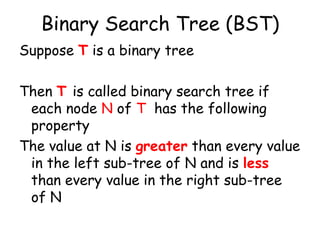
Binary Search Tree (BST)
Suppose T is a binary tree

Then T is called binary search tree if
each node N of T has the following
property
The value at N is greater than every value
in the left sub-tree of N and is less
than every value in the right sub-tree
of N
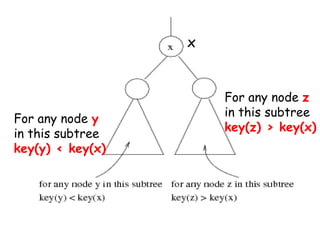
x

For any node y
in this subtree
key(y) < key(x)

For any node z
in this subtree
key(z) > key(x)
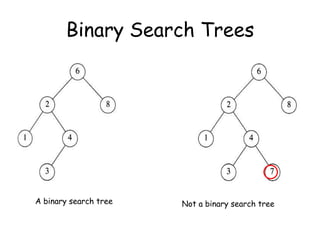
Binary Search Trees

A binary search tree

Not a binary search tree
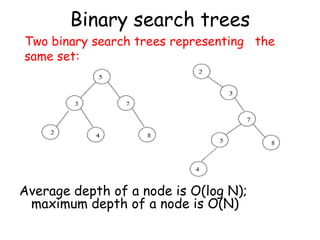
Binary search trees

Two binary search trees representing the
same set:

Average depth of a node is O(log N);
maximum depth of a node is O(N)
Searching and Inserting in BST

Algorithm to find the location of ITEM in
the BST T or insert ITEM as a new
node in its appropriate place in the tree
[a] Compare ITEM with the root node N
of the tree
(i) If ITEM < N, proceed to the left
child of N
(ii) If ITEM > N, proceed to the right
child of N
Searching and Inserting in BST

Algorithm to find the location of ITEM in
the BST T or insert ITEM as a new node
in its appropriate place in the tree

[b] Repeat Step (a) until one of the following
occurs
(i) We meet a node N such that ITEM = N.
In this case search is successful
(ii) We meet an empty sub-tree, which
indicates that search is unsuccessful and
we insert ITEM in place of empty subtree
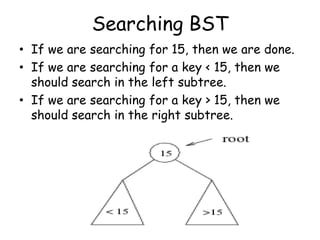
Searching BST
• If we are searching for 15, then we are done.
• If we are searching for a key < 15, then we
should search in the left subtree.
• If we are searching for a key > 15, then we
should search in the right subtree.
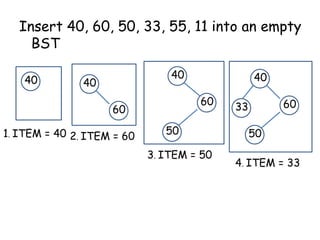
Insert 40, 60, 50, 33, 55, 11 into an empty
BST
40

40

40

60

60

1. ITEM = 40 2. ITEM = 60

40

50
3. ITEM = 50

60

33

50
4. ITEM = 33
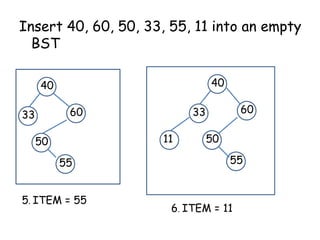
Insert 40, 60, 50, 33, 55, 11 into an empty
BST
40

40
60

33

11

50
55
5. ITEM = 55

60

33

50
55

6. ITEM = 11
Locating an ITEM
A binary search tree T is in memory and
an ITEM of information is given. This
procedure finds the location LOC of
ITEM in T and also the location of the
parent PAR of ITEM.
Locating an ITEM

Three special cases:
[1] LOC == NULL and PAR == NULL, tree is
empty
[2] LOC and PAR == NULL, ITEM is the
root of T
[3] LOC == NULL and PAR NULL, ITEM
is not in T and can be added to T as
child of the node N with location PAR.
FIND(INFO,LEFT,RIGHT,ROOT,ITEM,LOC,PAR)

[1] [Tree empty ?]
If ROOT == NULL, then
Set LOC = NULL, PAR = NULL,
Exit
[2] [ITEM at root ?]
If ROOT->INFO == ITEM, then
Set LOC = ROOT, PAR = NULL, Exit
[3] [Initialize pointer PTR and SAVE]
If ITEM < ROOT->INFO then
Set PTR = ROOT->LEFT, SAVE = ROOT
Else
Set PTR = ROOT->RIGHT, SAVE =ROOT
[4] Repeat Step 5 and 6 while PTR

NULL

[5] [ITEM Found ?]
If ITEM == PTR->INFO, then
Set LOC = PTR, PAR = SAVE, Exit
[6]

If ITEM < PTR->INFO, then
Set SAVE = PTR, PTR = PTR->LEFT
Else
Set SAVE = PTR, PTR = PTR->RIGHT

[7] [Search Unsuccessful]
Set LOC = NULL, PAR = SAVE
[8] Exit
A binary search Tree T is in memory and
an ITEM of information is given.
Algorithm to find the location LOC of
ITEM in T or adds ITEM as a new node
in T at location LOC.
[1] Call FIND(INFO,
LEFT,RIGHT,ROOT,ITEM,LOC,PAR)
[2] If LOC NULL, then Exit
[3] [Copy the ITEM into the node NEW]
(a) Create a node NEW
(b) NEW->INFO = ITEM
( c) Set LOC = NEW, NEW->LEFT =
NULL, NEW->RIGHT = NULL
[4] [Add ITEM to tree]
If PAR = NULL
Set ROOT = NEW
Else
If ITEM < PAR->INFO, then
Set PAR->LEFT = NEW
Else
Set PAR->RIGHT = NEW
[5] Exit
Binary Search Tree
Insert Algorithm

•
•
•

If value we want to insert < key of
current node, we have to go to the left
subtree
Otherwise we have to go to the right
subtree
If the current node is empty (not
existing) create a node with the value
we are inserting and place it here.
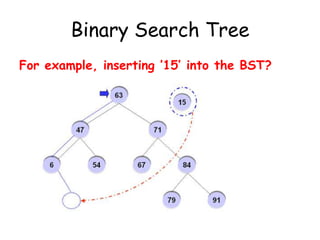
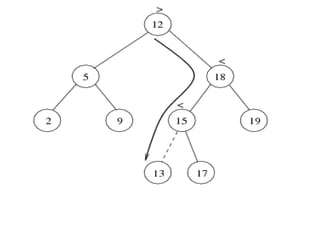
Binary Search Tree
For example, inserting ’15’ into the BST?
Deletion from BST
T is a binary tree. Delete an ITEM from
the tree T
Deleting a node N from tree depends
primarily on the number of children of
node N
Deletion
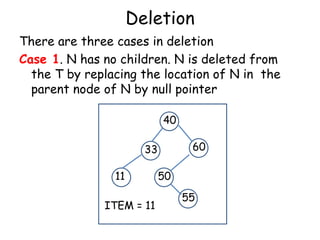
There are three cases in deletion
Case 1. N has no children. N is deleted from
the T by replacing the location of N in the
parent node of N by null pointer
40
60

33
11
ITEM = 11

50
55
Deletion
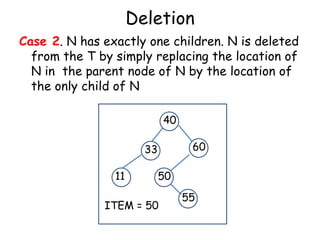
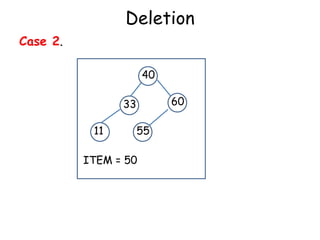
Case 2. N has exactly one children. N is deleted
from the T by simply replacing the location of
N in the parent node of N by the location of
the only child of N
40
60

33
11

50

ITEM = 50

55
Deletion
Case 2.
40
60

33

11

55

ITEM = 50
Deletion

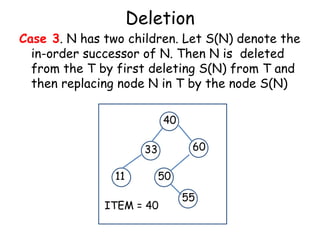
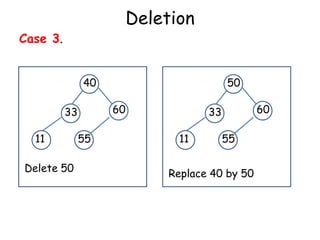
Case 3. N has two children. Let S(N) denote the
in-order successor of N. Then N is deleted
from the T by first deleting S(N) from T and
then replacing node N in T by the node S(N)
40
60

33
11

50

ITEM = 40

55
Deletion

Case 3.
40

60

33

11
Delete 50

50

55

60

33

11

55

Replace 40 by 50
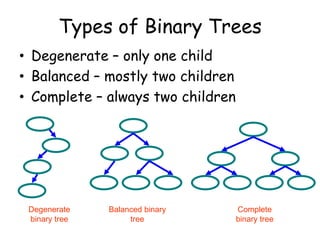
Types of Binary Trees
• Degenerate – only one child
• Balanced – mostly two children
• Complete – always two children

Degenerate
binary tree

Balanced binary
tree

Complete
binary tree
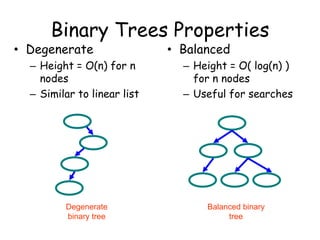
Binary Trees Properties

• Degenerate

• Balanced

– Height = O(n) for n
nodes
– Similar to linear list

– Height = O( log(n) )
for n nodes
– Useful for searches

Degenerate
binary tree

Balanced binary
tree
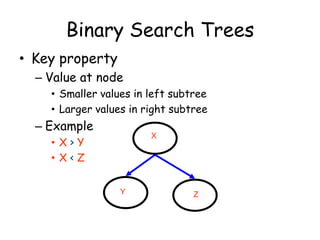
Binary Search Trees
• Key property
– Value at node
• Smaller values in left subtree
• Larger values in right subtree

– Example

X

• X>Y
• X<Z
Y

Z
Binary Search Trees
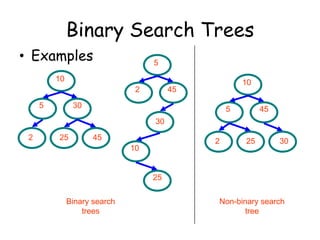
• Examples

5

10
2
5

10

45

30

5

45

30

2

25

45

2

10

25

30

25
Binary search
trees

Non-binary search
tree
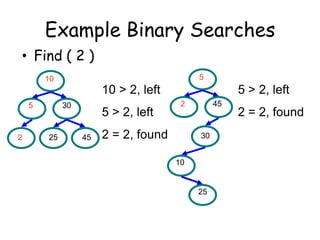
Example Binary Searches
• Find ( 2 )
5

10

10 > 2, left
5

2

30

25

5 > 2, left
45

5 > 2, left
2

2 = 2, found

45

30
10

25

2 = 2, found
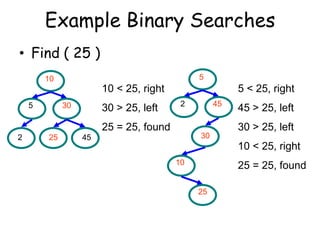
Example Binary Searches
• Find ( 25 )
5

10

10 < 25, right
5

30

30 > 25, left

5 < 25, right
2

45

25 = 25, found
2

25

45 > 25, left
30 > 25, left

30

45

10 < 25, right
10

25 = 25, found
25
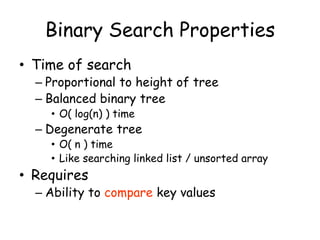
Binary Search Properties
• Time of search

– Proportional to height of tree
– Balanced binary tree
• O( log(n) ) time

– Degenerate tree

• O( n ) time
• Like searching linked list / unsorted array

• Requires

– Ability to compare key values
Binary Search Tree Construction
• How to build & maintain binary trees?
– Insertion
– Deletion

• Maintain key property (invariant)
– Smaller values in left subtree
– Larger values in right subtree
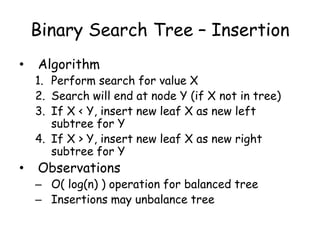
Binary Search Tree – Insertion
•

Algorithm

1. Perform search for value X
2. Search will end at node Y (if X not in tree)
3. If X < Y, insert new leaf X as new left
subtree for Y
4. If X > Y, insert new leaf X as new right
subtree for Y

•

Observations

– O( log(n) ) operation for balanced tree
– Insertions may unbalance tree
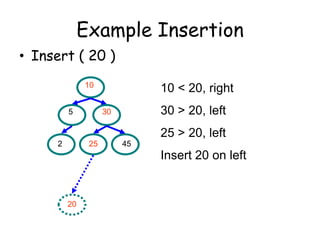
Example Insertion
• Insert ( 20 )
10
5

10 < 20, right
30 > 20, left

30

25 > 20, left
2

25

45

Insert 20 on left

20
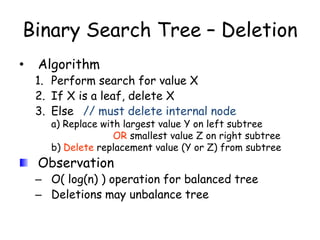
Binary Search Tree – Deletion
•

Algorithm

1. Perform search for value X
2. If X is a leaf, delete X
3. Else // must delete internal node

a) Replace with largest value Y on left subtree
OR smallest value Z on right subtree
b) Delete replacement value (Y or Z) from subtree

Observation

– O( log(n) ) operation for balanced tree
– Deletions may unbalance tree
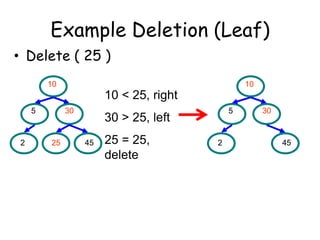
Example Deletion (Leaf)
• Delete ( 25 )
10

10

10 < 25, right
5

2

30

25

5

30 > 25, left
45

25 = 25,
delete

2

30

45

Lecture 9 data structures and algorithms

  • 1.
    Data Structure and Algorithm(CS-102) Ashok K Turuk
  • 2.
    Binary Search Tree(BST) Suppose T is a binary tree Then T is called binary search tree if each node N of T has the following property The value at N is greater than every value in the left sub-tree of N and is less than every value in the right sub-tree of N
  • 3.
    x For any nodey in this subtree key(y) < key(x) For any node z in this subtree key(z) > key(x)
  • 4.
    Binary Search Trees Abinary search tree Not a binary search tree
  • 5.
    Binary search trees Twobinary search trees representing the same set: Average depth of a node is O(log N); maximum depth of a node is O(N)
  • 6.
    Searching and Insertingin BST Algorithm to find the location of ITEM in the BST T or insert ITEM as a new node in its appropriate place in the tree [a] Compare ITEM with the root node N of the tree (i) If ITEM < N, proceed to the left child of N (ii) If ITEM > N, proceed to the right child of N
  • 7.
    Searching and Insertingin BST Algorithm to find the location of ITEM in the BST T or insert ITEM as a new node in its appropriate place in the tree [b] Repeat Step (a) until one of the following occurs (i) We meet a node N such that ITEM = N. In this case search is successful (ii) We meet an empty sub-tree, which indicates that search is unsuccessful and we insert ITEM in place of empty subtree
  • 8.
    Searching BST • Ifwe are searching for 15, then we are done. • If we are searching for a key < 15, then we should search in the left subtree. • If we are searching for a key > 15, then we should search in the right subtree.
  • 10.
    Insert 40, 60,50, 33, 55, 11 into an empty BST 40 40 40 60 60 1. ITEM = 40 2. ITEM = 60 40 50 3. ITEM = 50 60 33 50 4. ITEM = 33
  • 11.
    Insert 40, 60,50, 33, 55, 11 into an empty BST 40 40 60 33 11 50 55 5. ITEM = 55 60 33 50 55 6. ITEM = 11
  • 12.
    Locating an ITEM Abinary search tree T is in memory and an ITEM of information is given. This procedure finds the location LOC of ITEM in T and also the location of the parent PAR of ITEM.
  • 13.
    Locating an ITEM Threespecial cases: [1] LOC == NULL and PAR == NULL, tree is empty [2] LOC and PAR == NULL, ITEM is the root of T [3] LOC == NULL and PAR NULL, ITEM is not in T and can be added to T as child of the node N with location PAR.
  • 14.
    FIND(INFO,LEFT,RIGHT,ROOT,ITEM,LOC,PAR) [1] [Tree empty?] If ROOT == NULL, then Set LOC = NULL, PAR = NULL, Exit [2] [ITEM at root ?] If ROOT->INFO == ITEM, then Set LOC = ROOT, PAR = NULL, Exit [3] [Initialize pointer PTR and SAVE] If ITEM < ROOT->INFO then Set PTR = ROOT->LEFT, SAVE = ROOT Else Set PTR = ROOT->RIGHT, SAVE =ROOT
  • 15.
    [4] Repeat Step5 and 6 while PTR NULL [5] [ITEM Found ?] If ITEM == PTR->INFO, then Set LOC = PTR, PAR = SAVE, Exit [6] If ITEM < PTR->INFO, then Set SAVE = PTR, PTR = PTR->LEFT Else Set SAVE = PTR, PTR = PTR->RIGHT [7] [Search Unsuccessful] Set LOC = NULL, PAR = SAVE [8] Exit
  • 16.
    A binary searchTree T is in memory and an ITEM of information is given. Algorithm to find the location LOC of ITEM in T or adds ITEM as a new node in T at location LOC.
  • 17.
    [1] Call FIND(INFO, LEFT,RIGHT,ROOT,ITEM,LOC,PAR) [2]If LOC NULL, then Exit [3] [Copy the ITEM into the node NEW] (a) Create a node NEW (b) NEW->INFO = ITEM ( c) Set LOC = NEW, NEW->LEFT = NULL, NEW->RIGHT = NULL
  • 18.
    [4] [Add ITEMto tree] If PAR = NULL Set ROOT = NEW Else If ITEM < PAR->INFO, then Set PAR->LEFT = NEW Else Set PAR->RIGHT = NEW [5] Exit
  • 19.
    Binary Search Tree InsertAlgorithm • • • If value we want to insert < key of current node, we have to go to the left subtree Otherwise we have to go to the right subtree If the current node is empty (not existing) create a node with the value we are inserting and place it here.
  • 20.
    Binary Search Tree Forexample, inserting ’15’ into the BST?
  • 22.
    Deletion from BST Tis a binary tree. Delete an ITEM from the tree T Deleting a node N from tree depends primarily on the number of children of node N
  • 23.
    Deletion There are threecases in deletion Case 1. N has no children. N is deleted from the T by replacing the location of N in the parent node of N by null pointer 40 60 33 11 ITEM = 11 50 55
  • 24.
    Deletion Case 2. Nhas exactly one children. N is deleted from the T by simply replacing the location of N in the parent node of N by the location of the only child of N 40 60 33 11 50 ITEM = 50 55
  • 25.
  • 26.
    Deletion Case 3. Nhas two children. Let S(N) denote the in-order successor of N. Then N is deleted from the T by first deleting S(N) from T and then replacing node N in T by the node S(N) 40 60 33 11 50 ITEM = 40 55
  • 27.
  • 28.
    Types of BinaryTrees • Degenerate – only one child • Balanced – mostly two children • Complete – always two children Degenerate binary tree Balanced binary tree Complete binary tree
  • 29.
    Binary Trees Properties •Degenerate • Balanced – Height = O(n) for n nodes – Similar to linear list – Height = O( log(n) ) for n nodes – Useful for searches Degenerate binary tree Balanced binary tree
  • 30.
    Binary Search Trees •Key property – Value at node • Smaller values in left subtree • Larger values in right subtree – Example X • X>Y • X<Z Y Z
  • 31.
    Binary Search Trees •Examples 5 10 2 5 10 45 30 5 45 30 2 25 45 2 10 25 30 25 Binary search trees Non-binary search tree
  • 32.
    Example Binary Searches •Find ( 2 ) 5 10 10 > 2, left 5 2 30 25 5 > 2, left 45 5 > 2, left 2 2 = 2, found 45 30 10 25 2 = 2, found
  • 33.
    Example Binary Searches •Find ( 25 ) 5 10 10 < 25, right 5 30 30 > 25, left 5 < 25, right 2 45 25 = 25, found 2 25 45 > 25, left 30 > 25, left 30 45 10 < 25, right 10 25 = 25, found 25
  • 34.
    Binary Search Properties •Time of search – Proportional to height of tree – Balanced binary tree • O( log(n) ) time – Degenerate tree • O( n ) time • Like searching linked list / unsorted array • Requires – Ability to compare key values
  • 35.
    Binary Search TreeConstruction • How to build & maintain binary trees? – Insertion – Deletion • Maintain key property (invariant) – Smaller values in left subtree – Larger values in right subtree
  • 36.
    Binary Search Tree– Insertion • Algorithm 1. Perform search for value X 2. Search will end at node Y (if X not in tree) 3. If X < Y, insert new leaf X as new left subtree for Y 4. If X > Y, insert new leaf X as new right subtree for Y • Observations – O( log(n) ) operation for balanced tree – Insertions may unbalance tree
  • 37.
    Example Insertion • Insert( 20 ) 10 5 10 < 20, right 30 > 20, left 30 25 > 20, left 2 25 45 Insert 20 on left 20
  • 38.
    Binary Search Tree– Deletion • Algorithm 1. Perform search for value X 2. If X is a leaf, delete X 3. Else // must delete internal node a) Replace with largest value Y on left subtree OR smallest value Z on right subtree b) Delete replacement value (Y or Z) from subtree Observation – O( log(n) ) operation for balanced tree – Deletions may unbalance tree
  • 39.
    Example Deletion (Leaf) •Delete ( 25 ) 10 10 10 < 25, right 5 2 30 25 5 30 > 25, left 45 25 = 25, delete 2 30 45