Unit-5
MANAGING KERNEL MODULES
KErnel
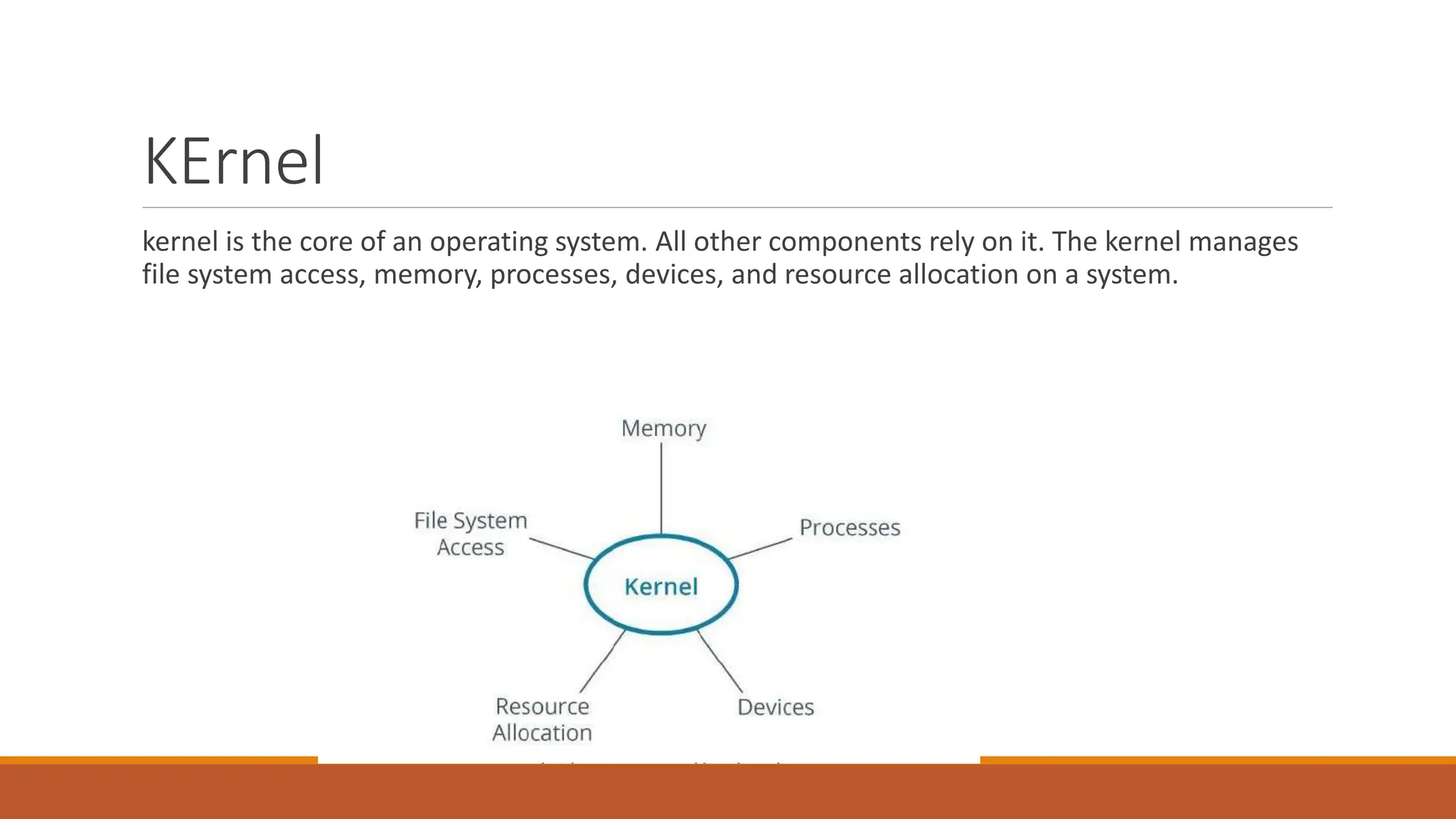
kernel is the core of an operating system. All other components rely on it. The kernel manages
file system access, memory, processes, devices, and resource allocation on a system.
KERNEL SPACE AND USER SPACE
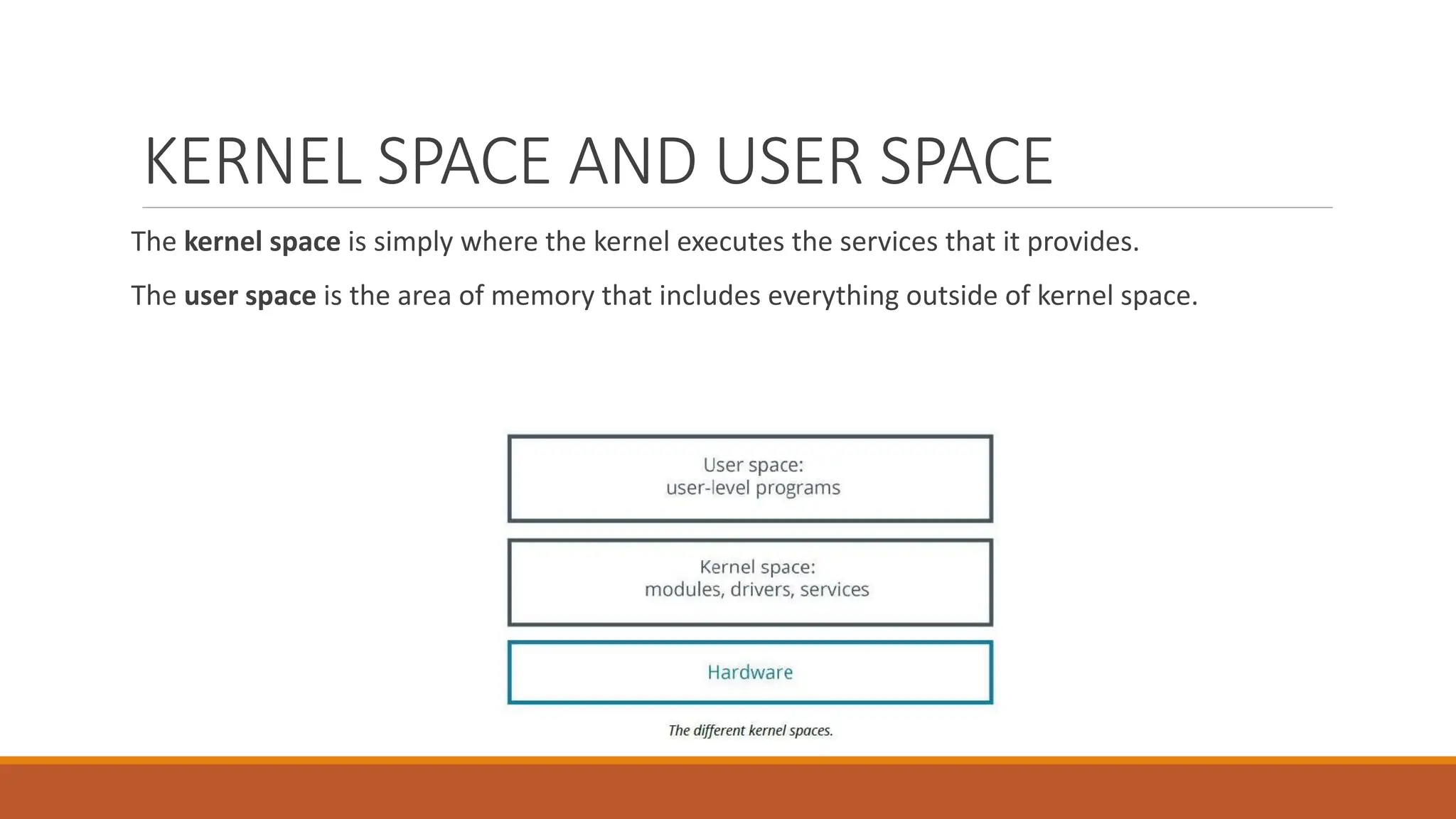
The kernel space is simply where the kernel executes the services that it provides.
The user space is the area of memory that includes everything outside of kernel space.
TYPES OF KERNELS
In a monolithic kernel, all system modules, such as device drivers or file systems, run in kernel
space. As a result, a monolithic kernel can interact quickly with devices.
a microkernel architecture, the kernel itself runs the minimum amount of resources necessary
to actually implement a fully functional operating system.
Compared to monolithic kernels, microkernels have smaller kernel spaces and instead have
larger user spaces. This means microkernels are smaller in overall size and consume less
memory
DEVICE DRIVERS
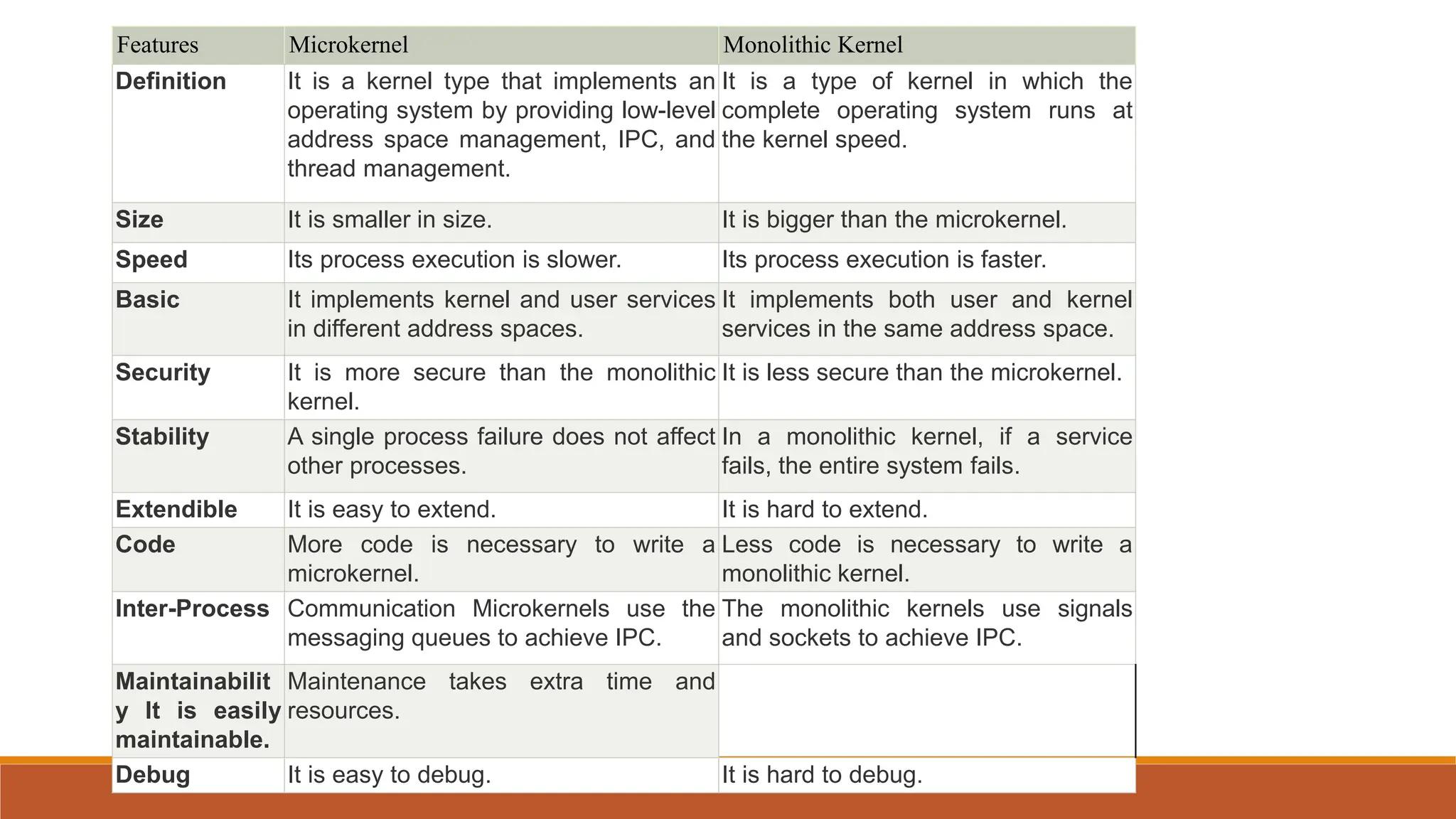
Features Microkernel Monolithic Kernel
Definition It is a kernel type that implements an
operating system by providing low-level
address space management, IPC, and
thread management.
It is a type of kernel in which the
complete operating system runs at
the kernel speed.
Size It is smaller in size. It is bigger than the microkernel.
Speed Its process execution is slower. Its process execution is faster.
Basic It implements kernel and user services
in different address spaces.
It implements both user and kernel
services in the same address space.
Security It is more secure than the monolithic
kernel.
It is less secure than the microkernel.
Stability A single process failure does not affect
other processes.
In a monolithic kernel, if a service
fails, the entire system fails.
Extendible It is easy to extend. It is hard to extend.
Code More code is necessary to write a
microkernel.
Less code is necessary to write a
monolithic kernel.
Inter-Process Communication Microkernels use the
messaging queues to achieve IPC.
The monolithic kernels use signals
and sockets to achieve IPC.
Maintainabilit
y It is easily
maintainable.
Maintenance takes extra time and
resources.
Debug It is easy to debug. It is hard to debug.
THE LINUX KERNEL
The Linux kernel is a free and open source monolithic kernel that manages all other resources
on the operating system.
THE uname COMMAND
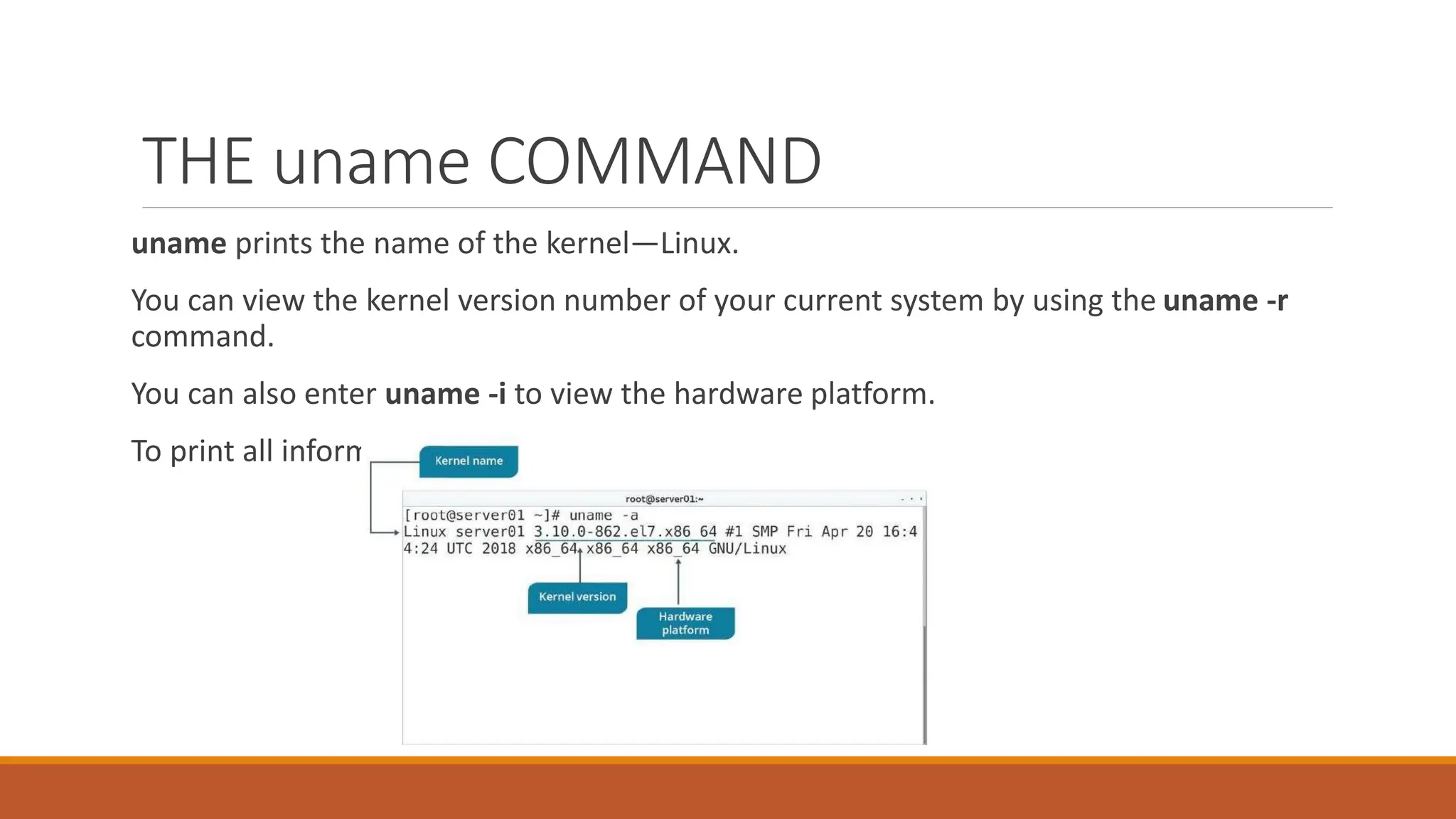
uname prints the name of the kernel—Linux.
You can view the kernel version number of your current system by using the uname -r
command.
You can also enter uname -i to view the hardware platform.
To print all information, enter the uname -a command.
Kernel layers
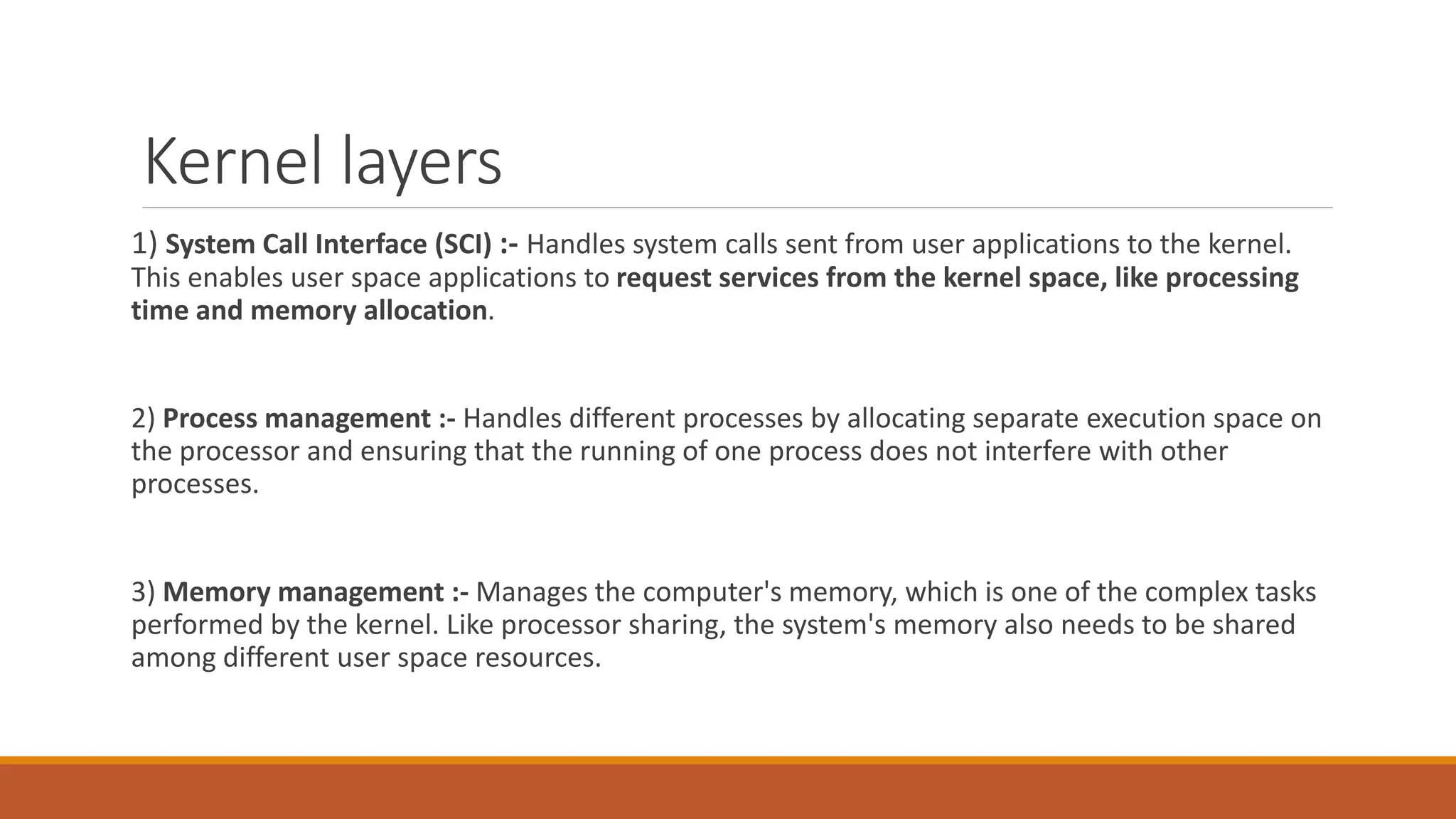
1) System Call Interface (SCI) :- Handles system calls sent from user applications to the kernel.
This enables user space applications to request services from the kernel space, like processing
time and memory allocation.
2) Process management :- Handles different processes by allocating separate execution space on
the processor and ensuring that the running of one process does not interfere with other
processes.
3) Memory management :- Manages the computer's memory, which is one of the complex tasks
performed by the kernel. Like processor sharing, the system's memory also needs to be shared
among different user space resources.
4) File system management :- Manages the filesystem, which involves storing, organizing, and
tracking files and data on a computer.
5) Device management :- Manages devices by controlling device access and interfacing between
user applications and hardware devices of the computer.
Which function is associated with the SCI layer of the kernel?
A. Passing requests to device drivers.
B. Sending service requests to the kernel.
C. Allocating processor time for functions.
D. Processing scheduling functions.
E. Organizing files on the file system.
Which function is associated with the SCI layer of the kernel?
A. Passing requests to device drivers.
B. Sending service requests to the kernel.
C. Allocating processor time for functions.
D. Processing scheduling functions.
E. Organizing files on the file system.
KERNEL MODULES
kernel module is a system-level object that extends the functionality of the kernel. It can
be dynamically loaded into the kernel or unloaded from the kernel when required.
THE /usr/lib/ DIRECTORY
The /usr/lib/ directory contains shared libraries and binaries for general programs and software
packages.
More specifically, the /usr/lib/ modules/ directory contains the modules of different kernel
versions that are installed.
For example, a Bluetooth® driver may be stored in:
◦ /usr/lib/modules/<kernel version>/kernel/drivers/bluetooth/
KERNEL MODULE SUBDIRECTORIES
Inside /usr/lib/modules/<kernel version>/kernel/ are several subdirectories
1) arch --contain modules for Architecture-specific support.
2) crypto Encryption and other cryptographic functions.
3) drivers Various types of hardware.
4) fs Various types of file systems.
5) net Networking components such as firewalls and protocols.
THE modprobe COMMAND
The modprobe command is used to add or remove modules from a kernel. This command is
capable of loading all the dependent modules before inserting the specified module. It is
therefore preferred over using the insmod and rmmod commands.
To add modules using modprobe, use the -a option and specify the modules you
want to add. To unload a module, use the -r option and specify the modules you want to remove.
SYNTAX
The syntax of the modprobe command is modprobe [options] [modulenames]
Kernel module configuration
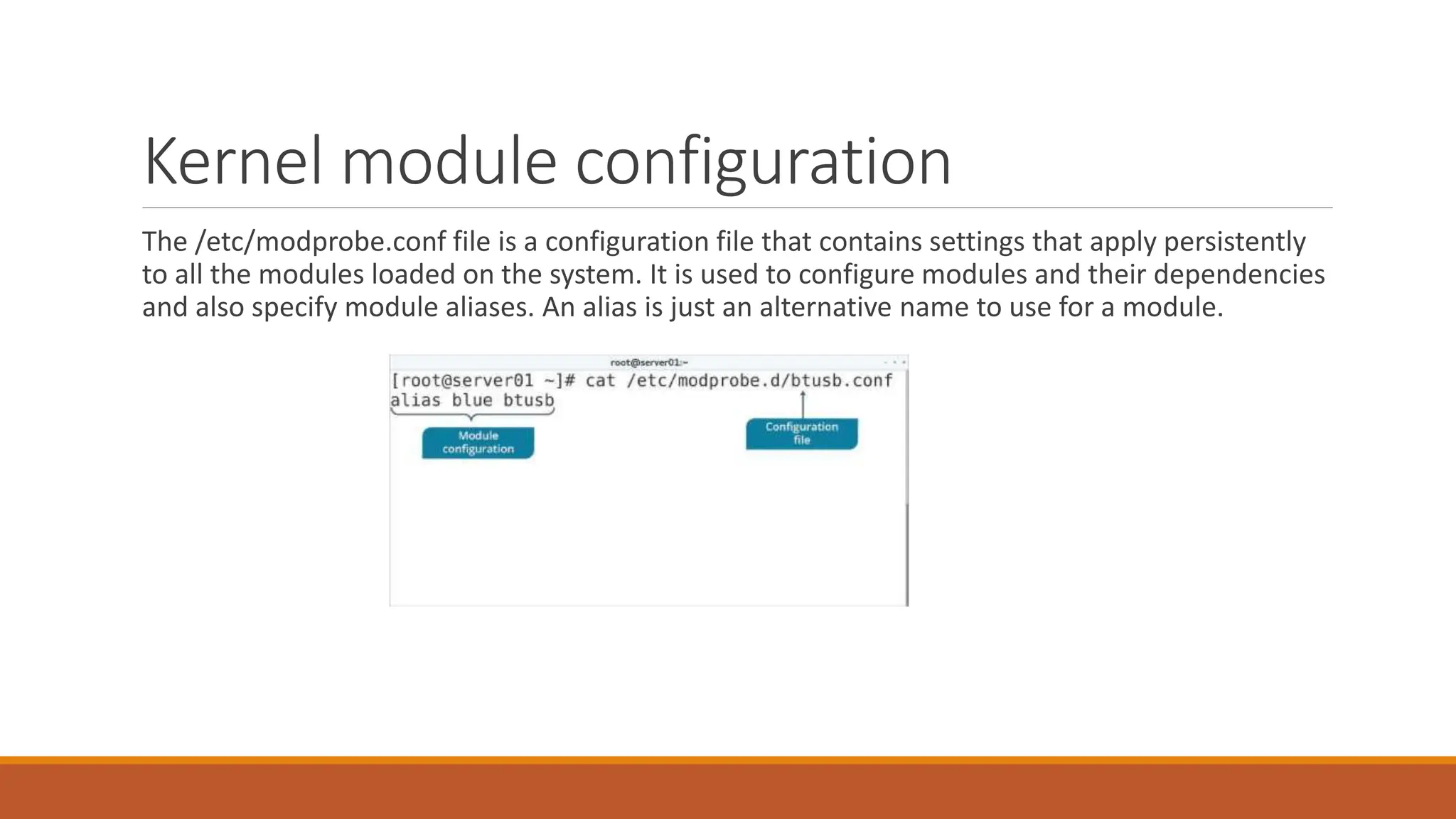
The /etc/modprobe.conf file is a configuration file that contains settings that apply persistently
to all the modules loaded on the system. It is used to configure modules and their dependencies
and also specify module aliases. An alias is just an alternative name to use for a module.
THE sysctl COMMAND
The sysctl command is used to view or set kernel parameters at runtime.
Option Used To
-a Display all parameters and their current values.
-w {parameter}={value} Set a parameter value.
-p[file name] Load sysctl settings from the specified file,
or /etc/sysctl.conf if no file name is provided.
-e Ignore errors about unknown keys.
-r {pattern} Apply a command to parameters matching a
given pattern, using extended regular expressions.
SYNTAX
The syntax of the sysctl command is sysctl [options]
THE /etc/sysctl.conf FILE
The /etc/sysctl.conf file enables configuration changes to a running Linux kernel. These changes might include improvements to networking, security configurations, or logging of
information.
Monitoring kernel Modules
THE /proc/ DIRECTORY
The /proc/ directory is a virtual file system (VFS) that provides significant information about the
kernel's running process.
/proc/cmdline Options passed to the kernel by the boot loader at boot time, such as mounting the
kernel as read-only.
/proc/cpuinfo  CPU information, such as its architecture, name, clock peed, cache size, and more.
/proc/devices  A list of character and block device drivers loaded into the currently running kernel.
/proc/filesystems  A list of file systems types that are supported by the kernel, as well as if any are
currently mounted.
/proc/meminfo  Information about RAM usage, including total memory, free memory, and much
more.
/proc/modules Information about modules currently installed on the system. An alternative to the
lsmod command.
/proc/stat  Various statistics about the system since it was last rebooted.
THE /proc/version FILE
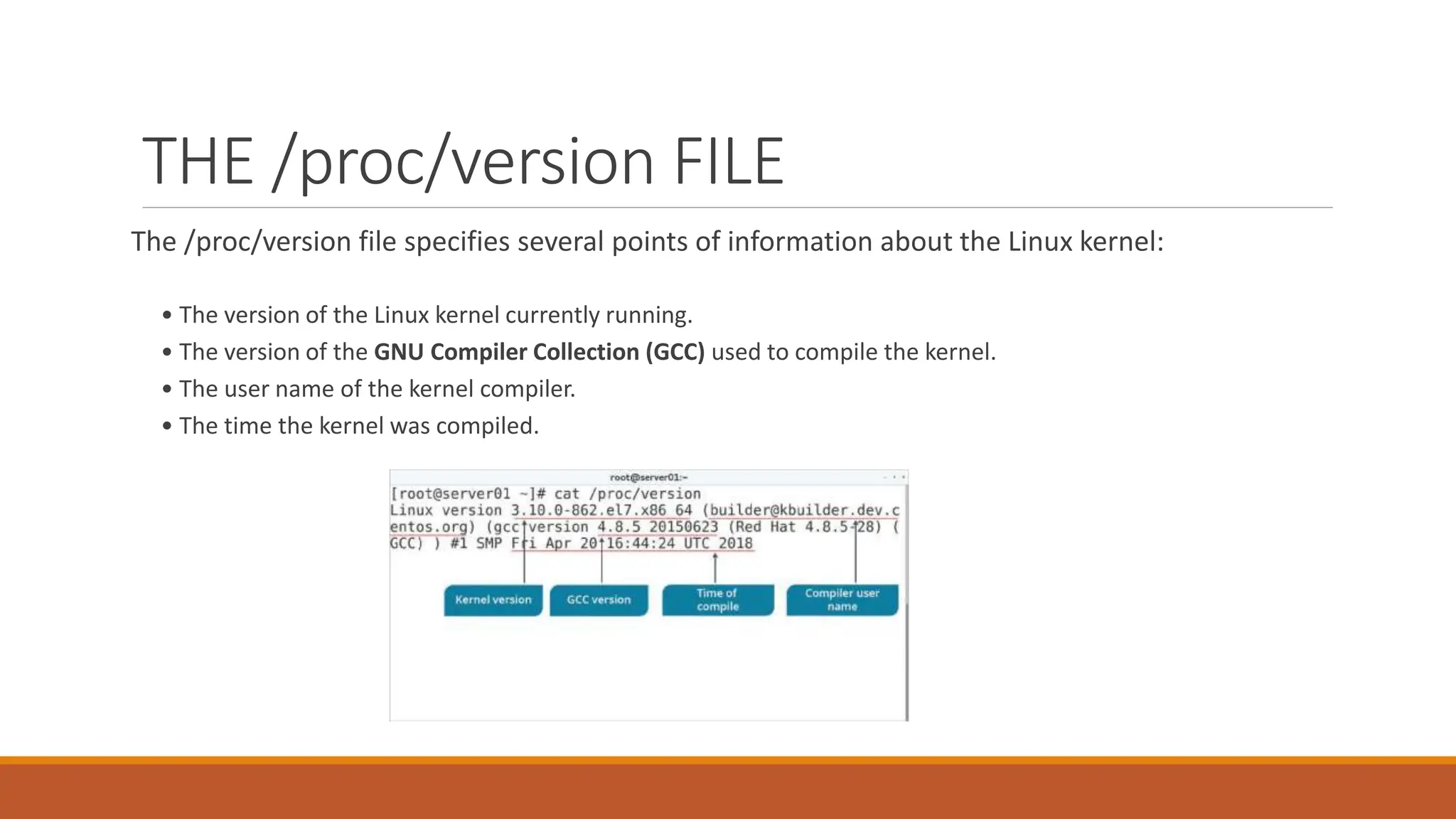
The /proc/version file specifies several points of information about the Linux kernel:
• The version of the Linux kernel currently running.
• The version of the GNU Compiler Collection (GCC) used to compile the kernel.
• The user name of the kernel compiler.
• The time the kernel was compiled.
THE dmesg COMMAND
The dmesg ("display message" or "driver message") command is used to print any messages that
have been sent to the kernel's message buffer during and after system boot.
SYNTAX
The syntax of the dmesg command is dmesg [options]
Configuring Boot Components
The Boot ProcessThe boot process can be initiated in one of a couple ways.
First, if power is turned off, turning on the power will begin the boot process. If
the computer is already running a local user, including root or an unprivileged user,
the user can programmatically initiate the boot sequence by using the GUI or
command line to initiate a reboot. A reboot will first do a shutdown and then
restart the computer.
Booting a Linux installation involves multiple stages and software components,
including firmware initialization, execution of a boot loader, loading and startup of
a Linux kernel image, and execution of various startup scripts and daemons. For
each of these stages and components there are different variations and
approaches
The Boot Loader
A boot loader is a small, simple program responsible for loading the Linux kernel
with optional kernel parameters and the Linux initial RAM disk, known as initrd.
Linux kernel is the core of the Linux operating system, and it starts the init (short for
initialization) process, or an init replacement such as systemd, immediately after
being loaded. The Linux initial RAM disk provides a temporary storage space for
loading critical files into memory before the real root file system can be mounted.
The BIOS
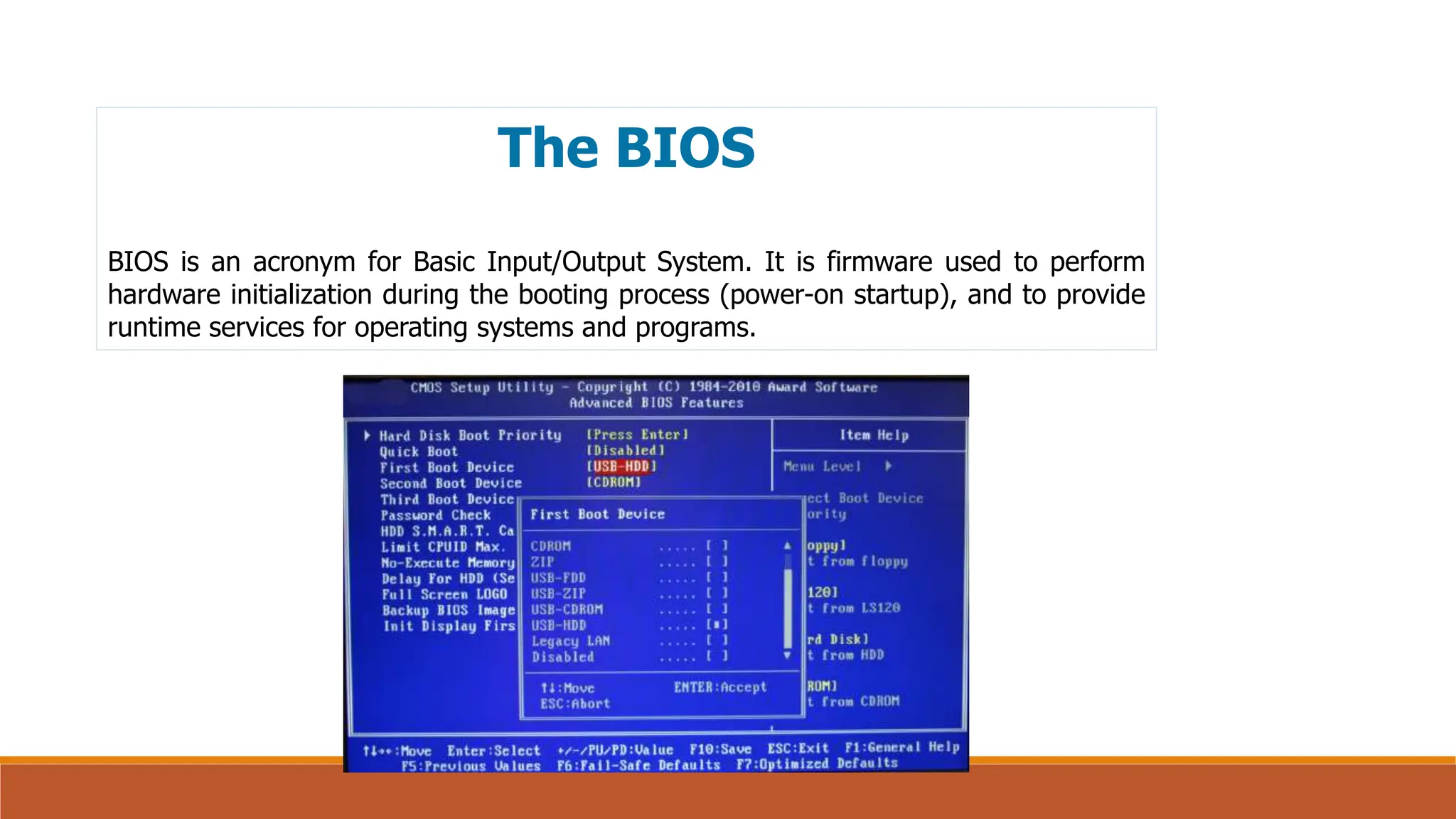
BIOS is an acronym for Basic Input/Output System. It is firmware used to perform
hardware initialization during the booting process (power-on startup), and to provide
runtime services for operating systems and programs.
UEFI
The Unified Extensible Firmware Interface (UEFI) is a specification that defines a
software interface between an operating system and platform firmware. UEFI
replaces the legacy Basic Input/Output System (BIOS) firmware interface
originally present in all IBM PC-compatible personal computers,[1][2] with most
UEFI firmware implementations providing support for legacy BIOS services. UEFI
can support remote diagnostics and repair of computers, even with no operating
system installed.
Just like the BIOS, UEFI is an environment in which to execute a boot loader, and
both eventually execute the operating system.
Server Security
As long as we are discussing BIOS/UEFI, its a good time to mention the idea of
password protecting the boot sequence. Many Linux system administrators make use
of the capability that both BIOS and UEFI have to put a password on the boot
sequence. This prevents someone from gaining access to a corporate server, simply
rebooting it and taking control. Sometimes it takes a bit of searching around in the
BIOS/UEFI menu to find the place to enter a password. As there is greater focus
being placed on security - both hardware and software - this is something to consider.
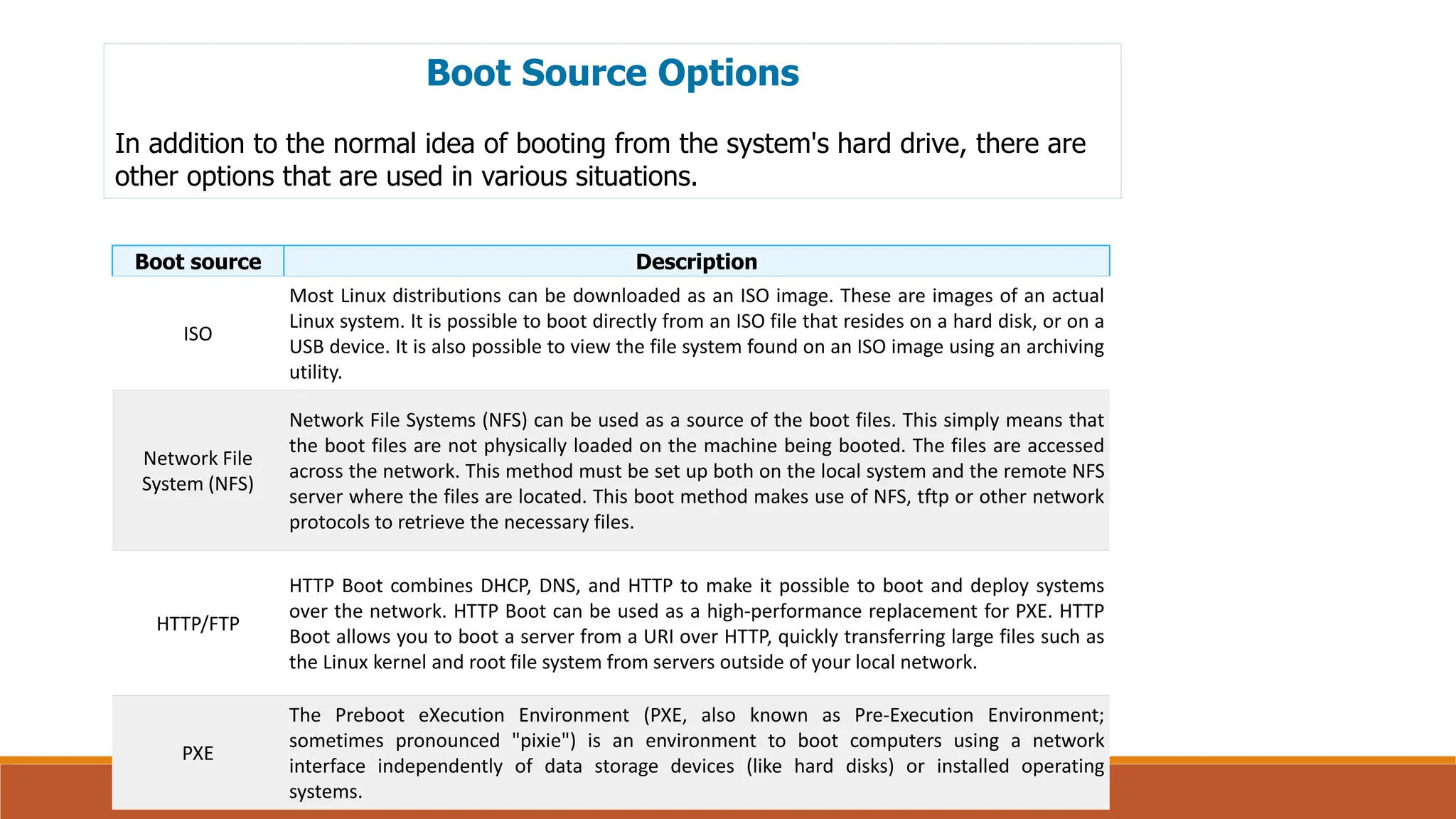
Boot Source Options
In addition to the normal idea of booting from the system's hard drive, there are
other options that are used in various situations.
Boot source Description
ISO
Most Linux distributions can be downloaded as an ISO image. These are images of an actual
Linux system. It is possible to boot directly from an ISO file that resides on a hard disk, or on a
USB device. It is also possible to view the file system found on an ISO image using an archiving
utility.
Network File
System (NFS)
Network File Systems (NFS) can be used as a source of the boot files. This simply means that
the boot files are not physically loaded on the machine being booted. The files are accessed
across the network. This method must be set up both on the local system and the remote NFS
server where the files are located. This boot method makes use of NFS, tftp or other network
protocols to retrieve the necessary files.
HTTP/FTP
HTTP Boot combines DHCP, DNS, and HTTP to make it possible to boot and deploy systems
over the network. HTTP Boot can be used as a high-performance replacement for PXE. HTTP
Boot allows you to boot a server from a URI over HTTP, quickly transferring large files such as
the Linux kernel and root file system from servers outside of your local network.
PXE
The Preboot eXecution Environment (PXE, also known as Pre-Execution Environment;
sometimes pronounced "pixie") is an environment to boot computers using a network
interface independently of data storage devices (like hard disks) or installed operating
systems.
The Boot Process
The Linux startup process is the multi-stage initialization process performed during
booting a Linux installation. It is in many ways similar to the BSD(Berkeley Software
Distribution) and other Unix-style boot processes, from which it derives.
https://eng.libretexts.org/Bookshelves/Computer_Science/Operating_Systems/Linux_-
_The_Penguin_Marches_On_(McClanahan)/07%3A_Linux_Boot_Process/1.01%3A_Configuring_Boot
_Components
Kernel Panic
A kernel panic is a safety measure taken by an operating system's kernel upon
detecting an internal fatal error, in which it either is unable to safely recover or cannot
have the system continue to run without having a much higher risk of major data loss.
The term is largely specific to Unix and Unix-like systems.
GNU GRUB
GNU GRUB (short for GNU GRand Unified Bootloader, commonly referred to as GRUB)
is a boot loader package from the GNU Project. GRUB is the reference implementation
of the Free Software Foundation's Multiboot Specification, which provides a user the
choice to boot one of multiple operating systems installed on a computer or select a
specific kernel configuration available on a particular operating system's partitions.
The grub2-install Command
grub2-install installs GRUB onto a device. This includes copying GRUB
images into the target directory (generally /boot/grub), and on some platforms
may also include installing GRUB onto a boot sector. If grub2 is being installed on
a UEFI system make sure to use the --efi-directory option so the files get
placed in the proper directory.
Syntax:
grub-install [OPTIONS]... INSTALL_DEVICE
Notice the command is grub-install even though it installs
grub2
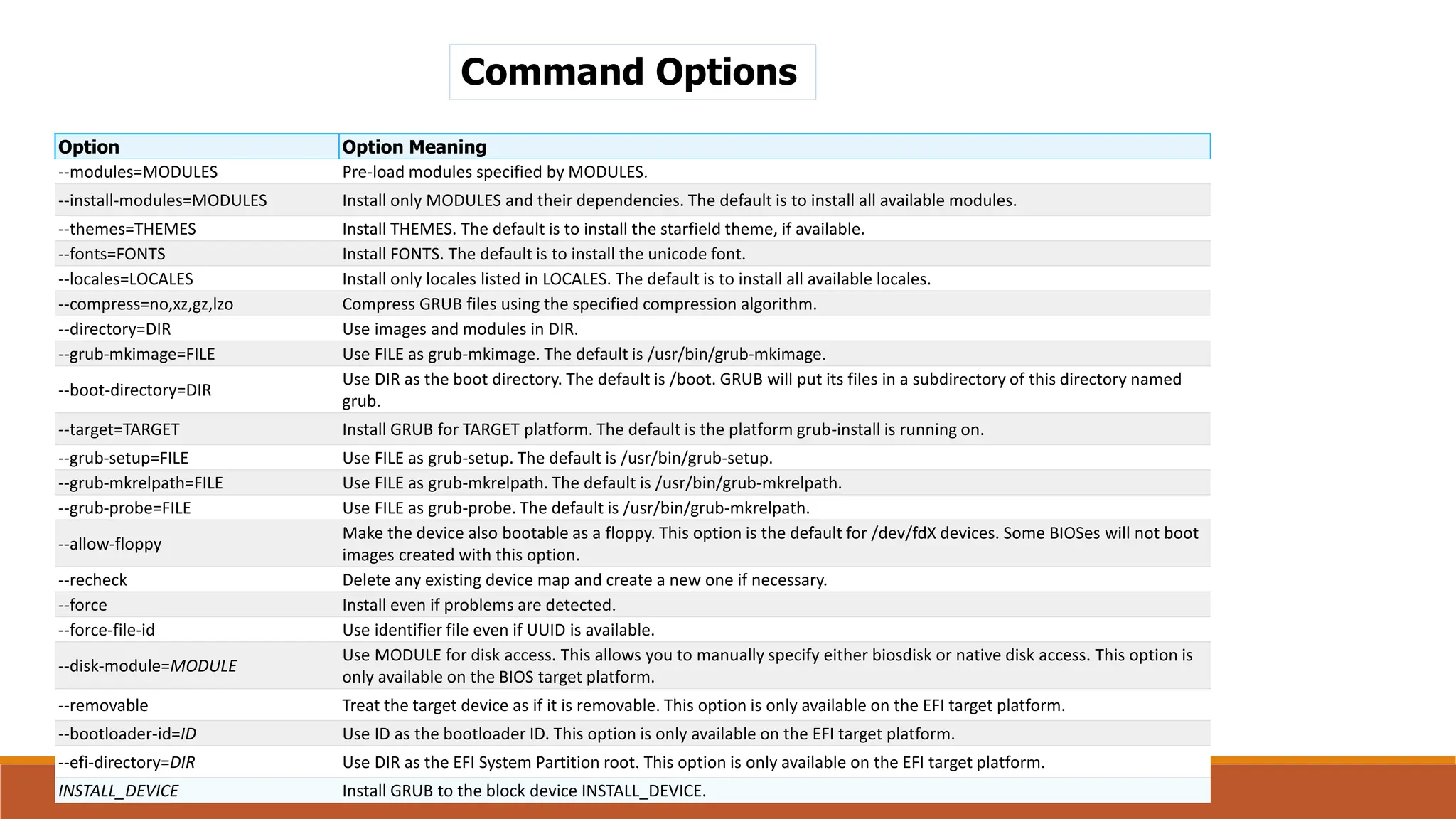
Command Options
Option Option Meaning
--modules=MODULES Pre-load modules specified by MODULES.
--install-modules=MODULES Install only MODULES and their dependencies. The default is to install all available modules.
--themes=THEMES Install THEMES. The default is to install the starfield theme, if available.
--fonts=FONTS Install FONTS. The default is to install the unicode font.
--locales=LOCALES Install only locales listed in LOCALES. The default is to install all available locales.
--compress=no,xz,gz,lzo Compress GRUB files using the specified compression algorithm.
--directory=DIR Use images and modules in DIR.
--grub-mkimage=FILE Use FILE as grub-mkimage. The default is /usr/bin/grub-mkimage.
--boot-directory=DIR
Use DIR as the boot directory. The default is /boot. GRUB will put its files in a subdirectory of this directory named
grub.
--target=TARGET Install GRUB for TARGET platform. The default is the platform grub-install is running on.
--grub-setup=FILE Use FILE as grub-setup. The default is /usr/bin/grub-setup.
--grub-mkrelpath=FILE Use FILE as grub-mkrelpath. The default is /usr/bin/grub-mkrelpath.
--grub-probe=FILE Use FILE as grub-probe. The default is /usr/bin/grub-mkrelpath.
--allow-floppy
Make the device also bootable as a floppy. This option is the default for /dev/fdX devices. Some BIOSes will not boot
images created with this option.
--recheck Delete any existing device map and create a new one if necessary.
--force Install even if problems are detected.
--force-file-id Use identifier file even if UUID is available.
--disk-module=MODULE
Use MODULE for disk access. This allows you to manually specify either biosdisk or native disk access. This option is
only available on the BIOS target platform.
--removable Treat the target device as if it is removable. This option is only available on the EFI target platform.
--bootloader-id=ID Use ID as the bootloader ID. This option is only available on the EFI target platform.
--efi-directory=DIR Use DIR as the EFI System Partition root. This option is only available on the EFI target platform.
INSTALL_DEVICE Install GRUB to the block device INSTALL_DEVICE.
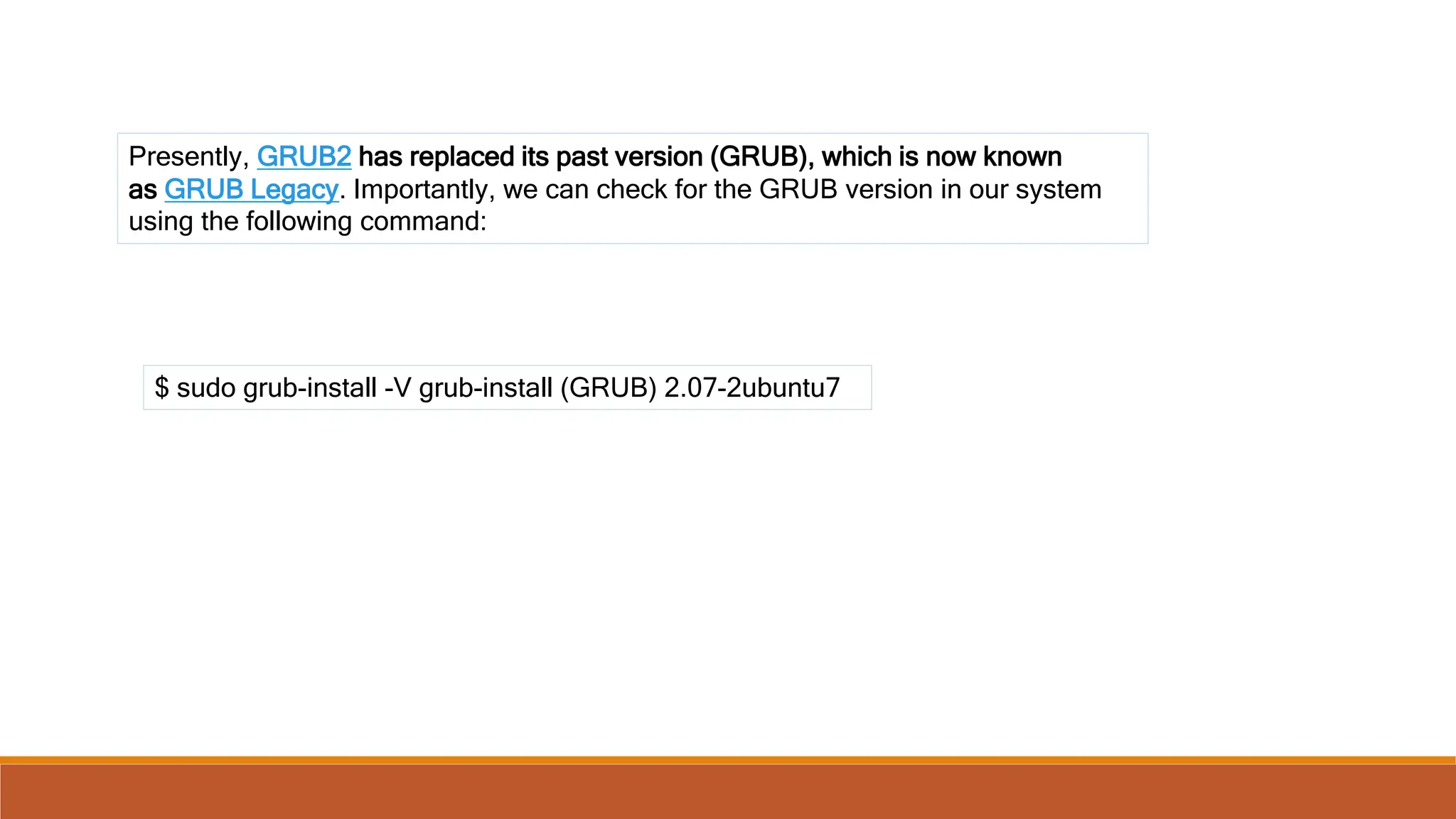
Presently, GRUB2 has replaced its past version (GRUB), which is now known
as GRUB Legacy. Importantly, we can check for the GRUB version in our system
using the following command:
$ sudo grub-install -V grub-install (GRUB) 2.07-2ubuntu7
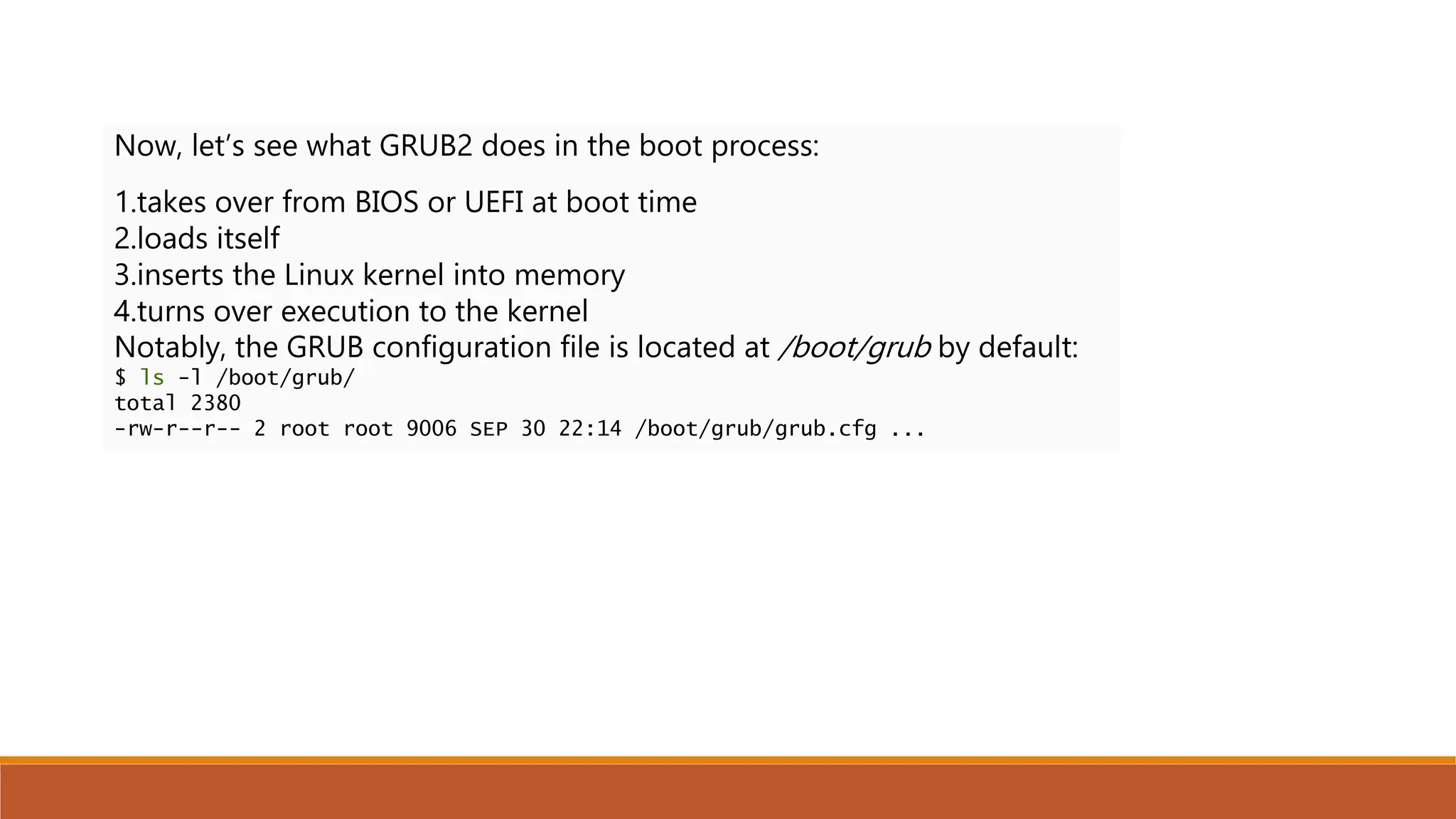
Now, let’s see what GRUB2 does in the boot process:
1.takes over from BIOS or UEFI at boot time
2.loads itself
3.inserts the Linux kernel into memory
4.turns over execution to the kernel
Notably, the GRUB configuration file is located at /boot/grub by default:
$ ls -l /boot/grub/
total 2380
-rw-r--r-- 2 root root 9006 SEP 30 22:14 /boot/grub/grub.cfg ...
You are logged in to CLI as your student account.SCENARIOSome of your fellow administrators are
claiming that their Linux servers aren't booting properly. You are assigned to the task of
troubleshooting these issues. You find that someone has modified the settings in the boot loader
because there is no password protection. After correcting the boot configuration, you decide to
protect GRUB 2 with a password so that only authorized users can modify it.

managing kernal module from egineering sunject operating system

  • 1.
  • 2.
    KErnel kernel is thecore of an operating system. All other components rely on it. The kernel manages file system access, memory, processes, devices, and resource allocation on a system.
  • 3.
    KERNEL SPACE ANDUSER SPACE The kernel space is simply where the kernel executes the services that it provides. The user space is the area of memory that includes everything outside of kernel space.
  • 4.
    TYPES OF KERNELS Ina monolithic kernel, all system modules, such as device drivers or file systems, run in kernel space. As a result, a monolithic kernel can interact quickly with devices. a microkernel architecture, the kernel itself runs the minimum amount of resources necessary to actually implement a fully functional operating system. Compared to monolithic kernels, microkernels have smaller kernel spaces and instead have larger user spaces. This means microkernels are smaller in overall size and consume less memory DEVICE DRIVERS
  • 5.
    Features Microkernel MonolithicKernel Definition It is a kernel type that implements an operating system by providing low-level address space management, IPC, and thread management. It is a type of kernel in which the complete operating system runs at the kernel speed. Size It is smaller in size. It is bigger than the microkernel. Speed Its process execution is slower. Its process execution is faster. Basic It implements kernel and user services in different address spaces. It implements both user and kernel services in the same address space. Security It is more secure than the monolithic kernel. It is less secure than the microkernel. Stability A single process failure does not affect other processes. In a monolithic kernel, if a service fails, the entire system fails. Extendible It is easy to extend. It is hard to extend. Code More code is necessary to write a microkernel. Less code is necessary to write a monolithic kernel. Inter-Process Communication Microkernels use the messaging queues to achieve IPC. The monolithic kernels use signals and sockets to achieve IPC. Maintainabilit y It is easily maintainable. Maintenance takes extra time and resources. Debug It is easy to debug. It is hard to debug.
  • 6.
    THE LINUX KERNEL TheLinux kernel is a free and open source monolithic kernel that manages all other resources on the operating system.
  • 7.
    THE uname COMMAND unameprints the name of the kernel—Linux. You can view the kernel version number of your current system by using the uname -r command. You can also enter uname -i to view the hardware platform. To print all information, enter the uname -a command.
  • 8.
    Kernel layers 1) SystemCall Interface (SCI) :- Handles system calls sent from user applications to the kernel. This enables user space applications to request services from the kernel space, like processing time and memory allocation. 2) Process management :- Handles different processes by allocating separate execution space on the processor and ensuring that the running of one process does not interfere with other processes. 3) Memory management :- Manages the computer's memory, which is one of the complex tasks performed by the kernel. Like processor sharing, the system's memory also needs to be shared among different user space resources.
  • 9.
    4) File systemmanagement :- Manages the filesystem, which involves storing, organizing, and tracking files and data on a computer. 5) Device management :- Manages devices by controlling device access and interfacing between user applications and hardware devices of the computer.
  • 10.
    Which function isassociated with the SCI layer of the kernel? A. Passing requests to device drivers. B. Sending service requests to the kernel. C. Allocating processor time for functions. D. Processing scheduling functions. E. Organizing files on the file system.
  • 11.
    Which function isassociated with the SCI layer of the kernel? A. Passing requests to device drivers. B. Sending service requests to the kernel. C. Allocating processor time for functions. D. Processing scheduling functions. E. Organizing files on the file system.
  • 12.
    KERNEL MODULES kernel moduleis a system-level object that extends the functionality of the kernel. It can be dynamically loaded into the kernel or unloaded from the kernel when required.
  • 13.
    THE /usr/lib/ DIRECTORY The/usr/lib/ directory contains shared libraries and binaries for general programs and software packages. More specifically, the /usr/lib/ modules/ directory contains the modules of different kernel versions that are installed. For example, a Bluetooth® driver may be stored in: ◦ /usr/lib/modules/<kernel version>/kernel/drivers/bluetooth/
  • 14.
    KERNEL MODULE SUBDIRECTORIES Inside/usr/lib/modules/<kernel version>/kernel/ are several subdirectories 1) arch --contain modules for Architecture-specific support. 2) crypto Encryption and other cryptographic functions. 3) drivers Various types of hardware. 4) fs Various types of file systems. 5) net Networking components such as firewalls and protocols.
  • 15.
    THE modprobe COMMAND Themodprobe command is used to add or remove modules from a kernel. This command is capable of loading all the dependent modules before inserting the specified module. It is therefore preferred over using the insmod and rmmod commands. To add modules using modprobe, use the -a option and specify the modules you want to add. To unload a module, use the -r option and specify the modules you want to remove. SYNTAX The syntax of the modprobe command is modprobe [options] [modulenames]
  • 16.
    Kernel module configuration The/etc/modprobe.conf file is a configuration file that contains settings that apply persistently to all the modules loaded on the system. It is used to configure modules and their dependencies and also specify module aliases. An alias is just an alternative name to use for a module.
  • 17.
    THE sysctl COMMAND Thesysctl command is used to view or set kernel parameters at runtime. Option Used To -a Display all parameters and their current values. -w {parameter}={value} Set a parameter value. -p[file name] Load sysctl settings from the specified file, or /etc/sysctl.conf if no file name is provided. -e Ignore errors about unknown keys. -r {pattern} Apply a command to parameters matching a given pattern, using extended regular expressions. SYNTAX The syntax of the sysctl command is sysctl [options] THE /etc/sysctl.conf FILE The /etc/sysctl.conf file enables configuration changes to a running Linux kernel. These changes might include improvements to networking, security configurations, or logging of information.
  • 18.
    Monitoring kernel Modules THE/proc/ DIRECTORY The /proc/ directory is a virtual file system (VFS) that provides significant information about the kernel's running process. /proc/cmdline Options passed to the kernel by the boot loader at boot time, such as mounting the kernel as read-only. /proc/cpuinfo  CPU information, such as its architecture, name, clock peed, cache size, and more. /proc/devices  A list of character and block device drivers loaded into the currently running kernel. /proc/filesystems  A list of file systems types that are supported by the kernel, as well as if any are currently mounted. /proc/meminfo  Information about RAM usage, including total memory, free memory, and much more. /proc/modules Information about modules currently installed on the system. An alternative to the lsmod command. /proc/stat  Various statistics about the system since it was last rebooted.
  • 19.
    THE /proc/version FILE The/proc/version file specifies several points of information about the Linux kernel: • The version of the Linux kernel currently running. • The version of the GNU Compiler Collection (GCC) used to compile the kernel. • The user name of the kernel compiler. • The time the kernel was compiled.
  • 20.
    THE dmesg COMMAND Thedmesg ("display message" or "driver message") command is used to print any messages that have been sent to the kernel's message buffer during and after system boot. SYNTAX The syntax of the dmesg command is dmesg [options]
  • 21.
    Configuring Boot Components TheBoot ProcessThe boot process can be initiated in one of a couple ways. First, if power is turned off, turning on the power will begin the boot process. If the computer is already running a local user, including root or an unprivileged user, the user can programmatically initiate the boot sequence by using the GUI or command line to initiate a reboot. A reboot will first do a shutdown and then restart the computer. Booting a Linux installation involves multiple stages and software components, including firmware initialization, execution of a boot loader, loading and startup of a Linux kernel image, and execution of various startup scripts and daemons. For each of these stages and components there are different variations and approaches
  • 22.
    The Boot Loader Aboot loader is a small, simple program responsible for loading the Linux kernel with optional kernel parameters and the Linux initial RAM disk, known as initrd. Linux kernel is the core of the Linux operating system, and it starts the init (short for initialization) process, or an init replacement such as systemd, immediately after being loaded. The Linux initial RAM disk provides a temporary storage space for loading critical files into memory before the real root file system can be mounted.
  • 23.
    The BIOS BIOS isan acronym for Basic Input/Output System. It is firmware used to perform hardware initialization during the booting process (power-on startup), and to provide runtime services for operating systems and programs.
  • 24.
    UEFI The Unified ExtensibleFirmware Interface (UEFI) is a specification that defines a software interface between an operating system and platform firmware. UEFI replaces the legacy Basic Input/Output System (BIOS) firmware interface originally present in all IBM PC-compatible personal computers,[1][2] with most UEFI firmware implementations providing support for legacy BIOS services. UEFI can support remote diagnostics and repair of computers, even with no operating system installed. Just like the BIOS, UEFI is an environment in which to execute a boot loader, and both eventually execute the operating system.
  • 25.
    Server Security As longas we are discussing BIOS/UEFI, its a good time to mention the idea of password protecting the boot sequence. Many Linux system administrators make use of the capability that both BIOS and UEFI have to put a password on the boot sequence. This prevents someone from gaining access to a corporate server, simply rebooting it and taking control. Sometimes it takes a bit of searching around in the BIOS/UEFI menu to find the place to enter a password. As there is greater focus being placed on security - both hardware and software - this is something to consider.
  • 26.
    Boot Source Options Inaddition to the normal idea of booting from the system's hard drive, there are other options that are used in various situations. Boot source Description ISO Most Linux distributions can be downloaded as an ISO image. These are images of an actual Linux system. It is possible to boot directly from an ISO file that resides on a hard disk, or on a USB device. It is also possible to view the file system found on an ISO image using an archiving utility. Network File System (NFS) Network File Systems (NFS) can be used as a source of the boot files. This simply means that the boot files are not physically loaded on the machine being booted. The files are accessed across the network. This method must be set up both on the local system and the remote NFS server where the files are located. This boot method makes use of NFS, tftp or other network protocols to retrieve the necessary files. HTTP/FTP HTTP Boot combines DHCP, DNS, and HTTP to make it possible to boot and deploy systems over the network. HTTP Boot can be used as a high-performance replacement for PXE. HTTP Boot allows you to boot a server from a URI over HTTP, quickly transferring large files such as the Linux kernel and root file system from servers outside of your local network. PXE The Preboot eXecution Environment (PXE, also known as Pre-Execution Environment; sometimes pronounced "pixie") is an environment to boot computers using a network interface independently of data storage devices (like hard disks) or installed operating systems.
  • 27.
    The Boot Process TheLinux startup process is the multi-stage initialization process performed during booting a Linux installation. It is in many ways similar to the BSD(Berkeley Software Distribution) and other Unix-style boot processes, from which it derives. https://eng.libretexts.org/Bookshelves/Computer_Science/Operating_Systems/Linux_- _The_Penguin_Marches_On_(McClanahan)/07%3A_Linux_Boot_Process/1.01%3A_Configuring_Boot _Components
  • 28.
    Kernel Panic A kernelpanic is a safety measure taken by an operating system's kernel upon detecting an internal fatal error, in which it either is unable to safely recover or cannot have the system continue to run without having a much higher risk of major data loss. The term is largely specific to Unix and Unix-like systems.
  • 29.
    GNU GRUB GNU GRUB(short for GNU GRand Unified Bootloader, commonly referred to as GRUB) is a boot loader package from the GNU Project. GRUB is the reference implementation of the Free Software Foundation's Multiboot Specification, which provides a user the choice to boot one of multiple operating systems installed on a computer or select a specific kernel configuration available on a particular operating system's partitions.
  • 30.
    The grub2-install Command grub2-installinstalls GRUB onto a device. This includes copying GRUB images into the target directory (generally /boot/grub), and on some platforms may also include installing GRUB onto a boot sector. If grub2 is being installed on a UEFI system make sure to use the --efi-directory option so the files get placed in the proper directory. Syntax: grub-install [OPTIONS]... INSTALL_DEVICE Notice the command is grub-install even though it installs grub2
  • 31.
    Command Options Option OptionMeaning --modules=MODULES Pre-load modules specified by MODULES. --install-modules=MODULES Install only MODULES and their dependencies. The default is to install all available modules. --themes=THEMES Install THEMES. The default is to install the starfield theme, if available. --fonts=FONTS Install FONTS. The default is to install the unicode font. --locales=LOCALES Install only locales listed in LOCALES. The default is to install all available locales. --compress=no,xz,gz,lzo Compress GRUB files using the specified compression algorithm. --directory=DIR Use images and modules in DIR. --grub-mkimage=FILE Use FILE as grub-mkimage. The default is /usr/bin/grub-mkimage. --boot-directory=DIR Use DIR as the boot directory. The default is /boot. GRUB will put its files in a subdirectory of this directory named grub. --target=TARGET Install GRUB for TARGET platform. The default is the platform grub-install is running on. --grub-setup=FILE Use FILE as grub-setup. The default is /usr/bin/grub-setup. --grub-mkrelpath=FILE Use FILE as grub-mkrelpath. The default is /usr/bin/grub-mkrelpath. --grub-probe=FILE Use FILE as grub-probe. The default is /usr/bin/grub-mkrelpath. --allow-floppy Make the device also bootable as a floppy. This option is the default for /dev/fdX devices. Some BIOSes will not boot images created with this option. --recheck Delete any existing device map and create a new one if necessary. --force Install even if problems are detected. --force-file-id Use identifier file even if UUID is available. --disk-module=MODULE Use MODULE for disk access. This allows you to manually specify either biosdisk or native disk access. This option is only available on the BIOS target platform. --removable Treat the target device as if it is removable. This option is only available on the EFI target platform. --bootloader-id=ID Use ID as the bootloader ID. This option is only available on the EFI target platform. --efi-directory=DIR Use DIR as the EFI System Partition root. This option is only available on the EFI target platform. INSTALL_DEVICE Install GRUB to the block device INSTALL_DEVICE.
  • 32.
    Presently, GRUB2 hasreplaced its past version (GRUB), which is now known as GRUB Legacy. Importantly, we can check for the GRUB version in our system using the following command: $ sudo grub-install -V grub-install (GRUB) 2.07-2ubuntu7
  • 33.
    Now, let’s seewhat GRUB2 does in the boot process: 1.takes over from BIOS or UEFI at boot time 2.loads itself 3.inserts the Linux kernel into memory 4.turns over execution to the kernel Notably, the GRUB configuration file is located at /boot/grub by default: $ ls -l /boot/grub/ total 2380 -rw-r--r-- 2 root root 9006 SEP 30 22:14 /boot/grub/grub.cfg ...
  • 34.
    You are loggedin to CLI as your student account.SCENARIOSome of your fellow administrators are claiming that their Linux servers aren't booting properly. You are assigned to the task of troubleshooting these issues. You find that someone has modified the settings in the boot loader because there is no password protection. After correcting the boot configuration, you decide to protect GRUB 2 with a password so that only authorized users can modify it.

Editor's Notes

  • #24 The BIOS firmware comes pre-installed on a personal computer's system board, and it is the first software to run when powered on.
  • #28 Booting a Linux installation involves multiple stages and software components, including firmware initialization, execution of a boot loader, loading and startup of a Linux kernel image, and execution of various startup scripts
  • #29 A panic may occur as a result of a hardware failure or a software bug in the operating system. In many cases, the operating system is capable of continued operation after an error has occurred. However, the system is in an unstable state and rather than risking security breaches and data corruption, the operating system stops to prevent further damage and facilitate diagnosis of the error and, in usual cases, restart.
  • #30 Need of grub The GRUB (Grand Unified Bootloader) is a tool for booting and loading operating system kernels and the default bootloader for systems based on the Linux kernel. Although it runs first when a machine is turned on, regular users rarely see GRUB in action.