Mobile Application
Development
Lecture 2
Layout
App UI Sizing and Positioning
T. Yousef Alamir
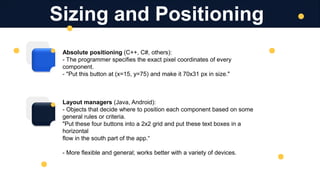
Absolute positioning (C++, C#, others):
- The programmer specifies the exact pixel coordinates of every
component.
- "Put this button at (x=15, y=75) and make it 70x31 px in size."
Layout managers (Java, Android):
- Objects that decide where to position each component based on some
general rules or criteria.
"Put these four buttons into a 2x2 grid and put these text boxes in a
horizontal
flow in the south part of the app.“
- More flexible and general; works better with a variety of devices.
Sizing and Positioning
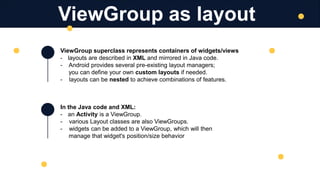
ViewGroup superclass represents containers of widgets/views
- layouts are described in XML and mirrored in Java code.
- Android provides several pre-existing layout managers;
you can define your own custom layouts if needed.
- layouts can be nested to achieve combinations of features.
In the Java code and XML:
- an Activity is a ViewGroup.
- various Layout classes are also ViewGroups.
- widgets can be added to a ViewGroup, which will then
manage that widget's position/size behavior
ViewGroup as layout
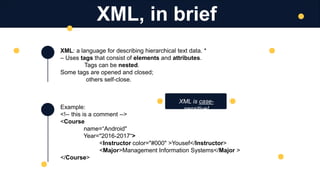
XML: a language for describing hierarchical text data. *
– Uses tags that consist of elements and attributes.
Tags can be nested.
Some tags are opened and closed;
others self-close.
Example:
<!-- this is a comment -->
<Course
name=“Android"
Year="2016-2017“>
<Instructor color="#000" >Yousef</Instructor>
<Major>Management Information Systems</Major >
</Course>
XML, in brief
XML is case-
sensitive!
Example of LinearLayout:
<LinearLayout ...
android:orientation="horizontal"
tools:context=".MainActivity">
<Button … android:text= “Button 1“ />
<Button … android:text= “Button 2“ />
<Button … android:text= “Button 3“ />
</LinearLayout>
lays out widgets/views in a single line.
LinearLayout
orientation of horizontal (default) or vertical
items do not wrap if they reach the edge
of the screen
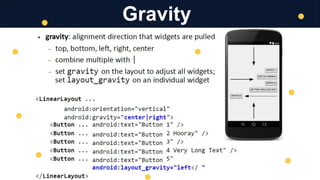
Gravity
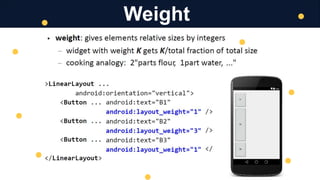
Weight
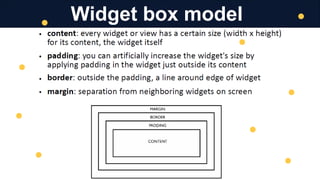
Widget box model
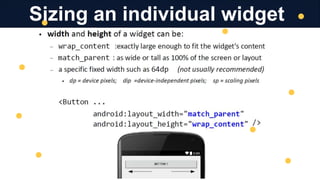
Sizing an individual widget
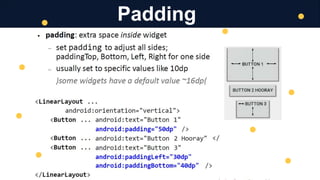
Padding
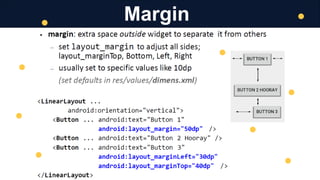
Margin
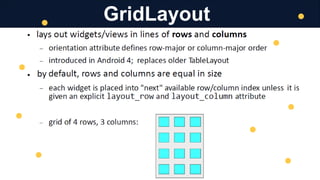
GridLayout
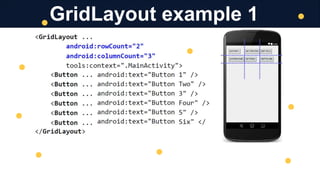
GridLayout example 1
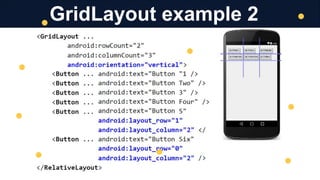
GridLayout example 2
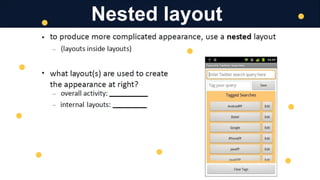
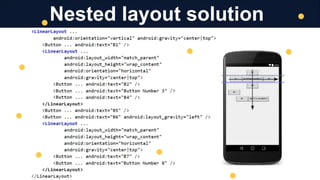
Nested layout
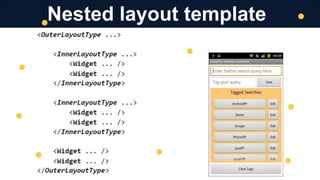
Nested layout template
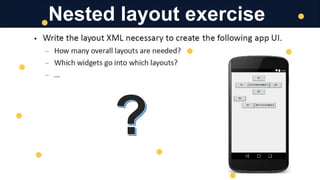
Nested layout exercise
Nested layout solution
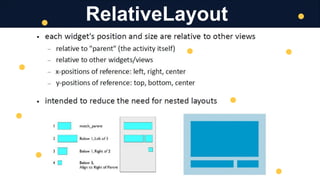
RelativeLayout
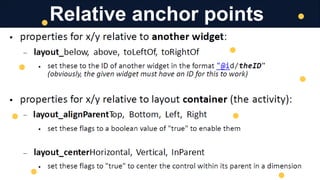
Relative anchor points
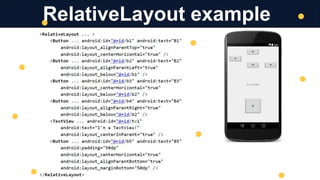
RelativeLayout example
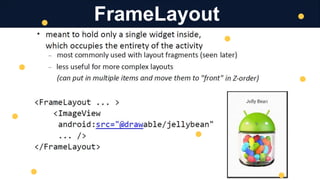
FrameLayout
Thank You
T. Yousef Alamir 2023
http://Yousef.omairtech.com

Lecture 02: Android Layouts.pptx

  • 1.
    Mobile Application Development Lecture 2 Layout AppUI Sizing and Positioning T. Yousef Alamir
  • 2.
    Absolute positioning (C++,C#, others): - The programmer specifies the exact pixel coordinates of every component. - "Put this button at (x=15, y=75) and make it 70x31 px in size." Layout managers (Java, Android): - Objects that decide where to position each component based on some general rules or criteria. "Put these four buttons into a 2x2 grid and put these text boxes in a horizontal flow in the south part of the app.“ - More flexible and general; works better with a variety of devices. Sizing and Positioning
  • 3.
    ViewGroup superclass representscontainers of widgets/views - layouts are described in XML and mirrored in Java code. - Android provides several pre-existing layout managers; you can define your own custom layouts if needed. - layouts can be nested to achieve combinations of features. In the Java code and XML: - an Activity is a ViewGroup. - various Layout classes are also ViewGroups. - widgets can be added to a ViewGroup, which will then manage that widget's position/size behavior ViewGroup as layout
  • 4.
    XML: a languagefor describing hierarchical text data. * – Uses tags that consist of elements and attributes. Tags can be nested. Some tags are opened and closed; others self-close. Example: <!-- this is a comment --> <Course name=“Android" Year="2016-2017“> <Instructor color="#000" >Yousef</Instructor> <Major>Management Information Systems</Major > </Course> XML, in brief XML is case- sensitive!
  • 5.
    Example of LinearLayout: <LinearLayout... android:orientation="horizontal" tools:context=".MainActivity"> <Button … android:text= “Button 1“ /> <Button … android:text= “Button 2“ /> <Button … android:text= “Button 3“ /> </LinearLayout> lays out widgets/views in a single line. LinearLayout orientation of horizontal (default) or vertical items do not wrap if they reach the edge of the screen
  • 6.
  • 7.
  • 8.
  • 9.
  • 10.
  • 11.
  • 12.
  • 13.
  • 14.
  • 15.
  • 16.
  • 17.
  • 18.
  • 19.
  • 20.
  • 21.
  • 22.
  • 23.
    Thank You T. YousefAlamir 2023 http://Yousef.omairtech.com