Mobile Application
Development
Lecture 6
Activity Lifecycle
Activity Lifecycle, Toasts, and Logs
T. Yousef Alamir
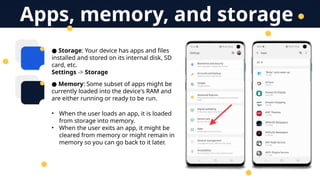
● Storage: Your device has apps and files
installed and stored on its internal disk, SD
card, etc.
Settings -> Storage
● Memory: Some subset of apps might be
currently loaded into the device's RAM and
are either running or ready to be run.
• When the user loads an app, it is loaded
from storage into memory.
• When the user exits an app, it might be
cleared from memory or might remain in
memory so you can go back to it later.
Apps, memory, and storage
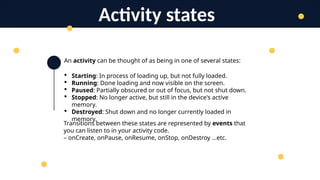
An activity can be thought of as being in one of several states:
 Starting: In process of loading up, but not fully loaded.
 Running: Done loading and now visible on the screen.
 Paused: Partially obscured or out of focus, but not shut down.
 Stopped: No longer active, but still in the device's active
memory.
 Destroyed: Shut down and no longer currently loaded in
memory.
Activity states
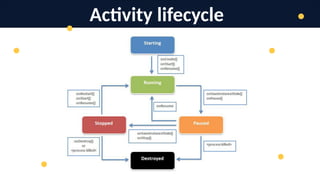
Transitions between these states are represented by events that
you can listen to in your activity code.
– onCreate, onPause, onResume, onStop, onDestroy …etc.
Activity lifecycle
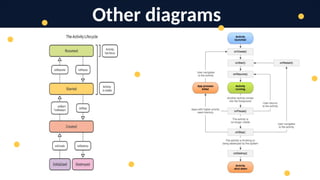
Other diagrams
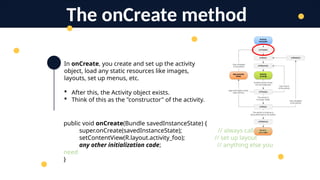
In onCreate, you create and set up the activity
object, load any static resources like images,
layouts, set up menus, etc.
 After this, the Activity object exists.
 Think of this as the "constructor" of the activity.
The onCreate method
public void onCreate(Bundle savedInstanceState) {
super.onCreate(savedInstanceState); // always call super
setContentView(R.layout.activity_foo); // set up layout
any other initialization code; // anything else you
need
}
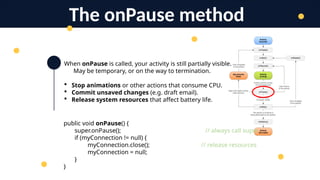
When onPause is called, your activity is still partially visible.
May be temporary, or on the way to termination.
 Stop animations or other actions that consume CPU.
 Commit unsaved changes (e.g. draft email).
 Release system resources that affect battery life.
The onPause method
public void onPause() {
super.onPause(); // always call super
if (myConnection != null) {
myConnection.close(); // release resources
myConnection = null;
}
}
When onResume is called, your activity is coming out of
the Paused state and into the Running state again.
Also called when the activity is first created/loaded!
 Initialize resources that you will release in onPause.
 Start/resume animations or other ongoing actions
that should only run when activity is visible on screen.
The onResume method
public void onResume() {
super.onResume(); // always call super
if (myConnection == null) {
myConnection = new ExampleConnect(); // init.resources
myConnection.connect();
}
}
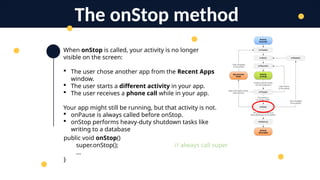
When onStop is called, your activity is no longer
visible on the screen:
 The user chose another app from the Recent Apps
window.
 The user starts a different activity in your app.
 The user receives a phone call while in your app.
Your app might still be running, but that activity is not.
 onPause is always called before onStop.
 onStop performs heavy-duty shutdown tasks like
writing to a database
The onStop method
public void onStop()
super.onStop(); // always call super
...
}
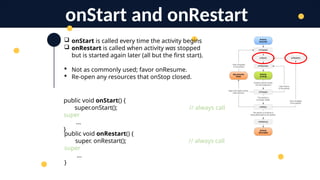
 onStart is called every time the activity begins
 onRestart is called when activity was stopped
but is started again later (all but the first start).
 Not as commonly used; favor onResume.
 Re-open any resources that onStop closed.
onStart and onRestart
public void onStart() {
super.onStart(); // always call
super
...
}
public void onRestart() {
super. onRestart(); // always call
super
...
}
When onDestroy is called, your entire app is
being shut down and unloaded from memory.
 Unpredictable exactly when/if it will be
called.
 Can be called whenever the system wants
to reclaim the memory used by your app.
 Generally favor onPause or onStop because
they are called in a predictable and timely
manner.
The onDestroy method
public void onDestroy() {
super.onDestroy(); // always call super
...
}
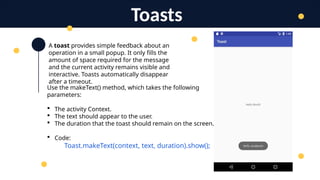
A toast provides simple feedback about an
operation in a small popup. It only fills the
amount of space required for the message
and the current activity remains visible and
interactive. Toasts automatically disappear
after a timeout.
Toasts
Use the makeText() method, which takes the following
parameters:
 The activity Context.
 The text should appear to the user.
 The duration that the toast should remain on the screen.
 Code:
Toast.makeText(context, text, duration).show();
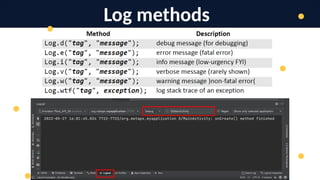
Log methods
Thank You
T. Yousef Alamir 2023
http://Yousef.omairtech.com

Lecture 6: Android Activity Life Cycle.pptx

  • 1.
    Mobile Application Development Lecture 6 ActivityLifecycle Activity Lifecycle, Toasts, and Logs T. Yousef Alamir
  • 2.
    ● Storage: Yourdevice has apps and files installed and stored on its internal disk, SD card, etc. Settings -> Storage ● Memory: Some subset of apps might be currently loaded into the device's RAM and are either running or ready to be run. • When the user loads an app, it is loaded from storage into memory. • When the user exits an app, it might be cleared from memory or might remain in memory so you can go back to it later. Apps, memory, and storage
  • 3.
    An activity canbe thought of as being in one of several states:  Starting: In process of loading up, but not fully loaded.  Running: Done loading and now visible on the screen.  Paused: Partially obscured or out of focus, but not shut down.  Stopped: No longer active, but still in the device's active memory.  Destroyed: Shut down and no longer currently loaded in memory. Activity states Transitions between these states are represented by events that you can listen to in your activity code. – onCreate, onPause, onResume, onStop, onDestroy …etc.
  • 4.
  • 5.
  • 6.
    In onCreate, youcreate and set up the activity object, load any static resources like images, layouts, set up menus, etc.  After this, the Activity object exists.  Think of this as the "constructor" of the activity. The onCreate method public void onCreate(Bundle savedInstanceState) { super.onCreate(savedInstanceState); // always call super setContentView(R.layout.activity_foo); // set up layout any other initialization code; // anything else you need }
  • 7.
    When onPause iscalled, your activity is still partially visible. May be temporary, or on the way to termination.  Stop animations or other actions that consume CPU.  Commit unsaved changes (e.g. draft email).  Release system resources that affect battery life. The onPause method public void onPause() { super.onPause(); // always call super if (myConnection != null) { myConnection.close(); // release resources myConnection = null; } }
  • 8.
    When onResume iscalled, your activity is coming out of the Paused state and into the Running state again. Also called when the activity is first created/loaded!  Initialize resources that you will release in onPause.  Start/resume animations or other ongoing actions that should only run when activity is visible on screen. The onResume method public void onResume() { super.onResume(); // always call super if (myConnection == null) { myConnection = new ExampleConnect(); // init.resources myConnection.connect(); } }
  • 9.
    When onStop iscalled, your activity is no longer visible on the screen:  The user chose another app from the Recent Apps window.  The user starts a different activity in your app.  The user receives a phone call while in your app. Your app might still be running, but that activity is not.  onPause is always called before onStop.  onStop performs heavy-duty shutdown tasks like writing to a database The onStop method public void onStop() super.onStop(); // always call super ... }
  • 10.
     onStart iscalled every time the activity begins  onRestart is called when activity was stopped but is started again later (all but the first start).  Not as commonly used; favor onResume.  Re-open any resources that onStop closed. onStart and onRestart public void onStart() { super.onStart(); // always call super ... } public void onRestart() { super. onRestart(); // always call super ... }
  • 11.
    When onDestroy iscalled, your entire app is being shut down and unloaded from memory.  Unpredictable exactly when/if it will be called.  Can be called whenever the system wants to reclaim the memory used by your app.  Generally favor onPause or onStop because they are called in a predictable and timely manner. The onDestroy method public void onDestroy() { super.onDestroy(); // always call super ... }
  • 12.
    A toast providessimple feedback about an operation in a small popup. It only fills the amount of space required for the message and the current activity remains visible and interactive. Toasts automatically disappear after a timeout. Toasts Use the makeText() method, which takes the following parameters:  The activity Context.  The text should appear to the user.  The duration that the toast should remain on the screen.  Code: Toast.makeText(context, text, duration).show();
  • 13.
  • 14.
    Thank You T. YousefAlamir 2023 http://Yousef.omairtech.com