Ultranet Learning Tasks and
       Learner Profile
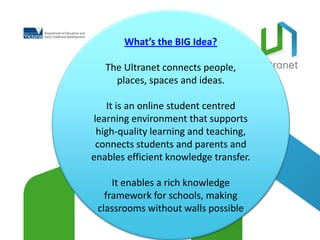
What’s the BIG Idea?

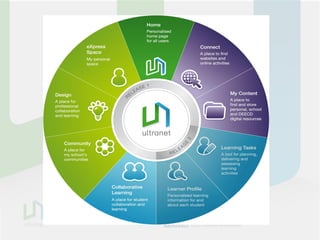
   The Ultranet connects people,
     places, spaces and ideas.

   It is an online student centred
learning environment that supports
 high-quality learning and teaching,
 connects students and parents and
enables efficient knowledge transfer.

     It enables a rich knowledge
   framework for schools, making
 classrooms without walls possible
leading tools forstudents to take students,
                 Web 2.0information
                 facilitated knowledgeof studentfor greater
                 opportunities for in online curriculum curriculum
                 student practice lookingpersonalised planning,
                 a continuous recordfor access for teachers
                 online, 24/7 anywheretransferstudents to &
                   contemporary teachers & learning
                                           system & customised
                 delivery
                 collaborate within
                 for Victoria delivery
                 sharing &assessment
                 responsibility the&
                 planning&overfor their learning
                 progress& teachers across
                 parents acrosstime State schools


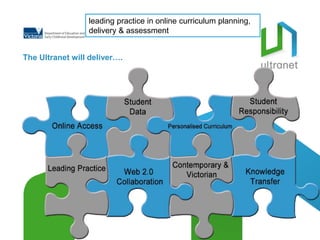
The Ultranet will deliver….
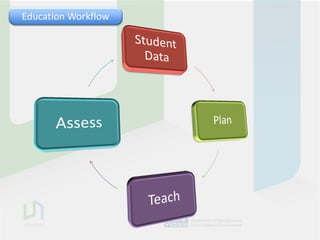
Education Workflow
EducationWorkflow
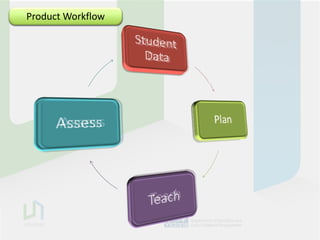
 Product Workflow
EducationWorkflow
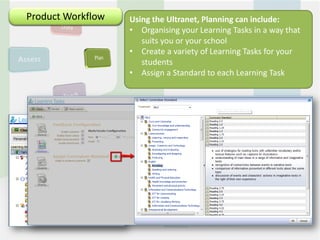
 Product Workflow   Using the Ultranet, Planning can include:
                    • Organising your Learning Tasks in a way that
                       suits you or your school
                    • Create a variety of Learning Tasks for your
                       students
                    • Assign a Standard to each Learning Task
EducationWorkflow
 Product Workflow   Using the Ultranet, Planning can include:
                                        Teaching
                    • Organising your resourcesTasks Spaces that
                       Using Release 1 Learning and in a way
                    • suits you or youraccess to web-based content
                       Providing direct school
                    • Create a variety of Learning Tasks for your
                       Providing self-paced learning opportunities
                    • students individualised curriculum
                       Providing
                    • Assign a Standard to each Learning Task


                                             STUDENT VIEW
                                             TEACHER
EducationWorkflow
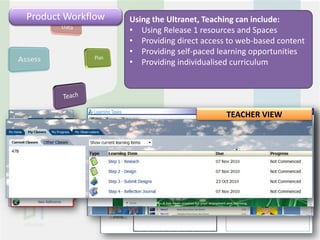
 Product Workflow   Using the Ultranet, Teaching cancan include:
                                        Assessment include:
                    • Using Release 1 resources and Spaces
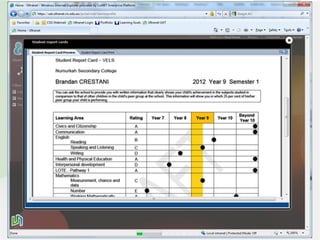
                       Dynamic Reporting
                    • ProvidingFeedback (Observations) content
                       Dynamic direct access to web-based
                    • Providing self-pacedvisual data
                        • Student Profile learning opportunities
                    • Providing individualised curriculum


                                            STUDENT VIEW
                                            TEACHER


                        4.50       4.75        4.50
                        4.50       4.75        4.50
                        4.75       5.00        5.00
EducationWorkflow
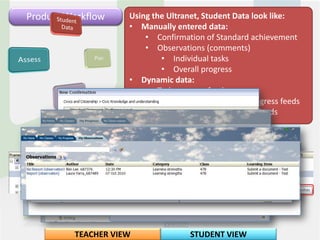
 Product Workflow    Using the Ultranet, Student Data look like:
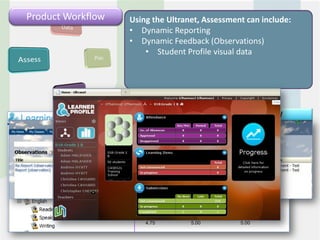
                     Using the Ultranet, Assessment can include:
                     • ManuallyReportingdata:
                     • Dynamic entered
                         • Confirmation of Standard achievement
                     • Dynamic Feedback (Observations)
                         • Observations (comments)
                     • Coming soon:
                             • Individual visual
                         • Student Profiletasks data
                             • Overall progress
                     • Dynamic data:
                         • Task progress feeds
                         • Standard demonstration progress feeds
                         • Individual Task Observation feeds


          TEACHER VIEW              STUDENT VIEW
Privacy (who sees what?)


IMPORTANT: This should be a key component of
      your communication with staff

                        Key areas of interest
DYNAMIC SYSTEMS
• Creation of Learning Tasks in a class means instant access by students and
  parents (by default)
• Learning Tasks and Observations won’t go through a peer monitoring system
  to check for errors (by default)
PARENT AND STUDENT COLLABORATION IN THE REPORTING SYSTEM
• Parents have access to tasks and observations created by teachers for their
  child (by default)
• Parents and students can comment on teacher observations (by default)
QUESTIONS?


1. CONNECT
How are the ideas and information connected to what you
already know?

2.EXTEND
What new ideas did you get that extend your thinking in new
directions?

3. CHALLENGE
What is still challenging or confusing for you?
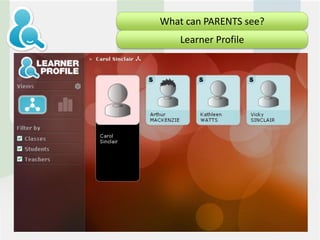
What can PARENTS see?
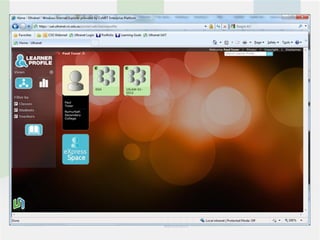
    Learner Profile
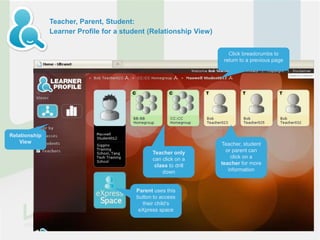
Teacher, Parent, Student:
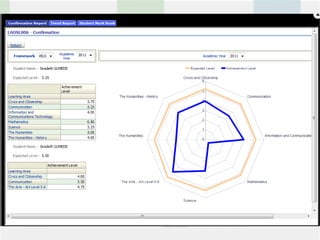
               Learner Profile for a student (Relationship View)


                                                                      Click breadcrumbs to
                                                                    return to a previous page


Relationship
    View                                                           Teacher, student
                                               Teacher only          or parent can
                                               can click on a          click on a
                                                class to drill     teacher for more
                                                   down               information


                                         Parent uses this
                                         button to access
                                           their child’s
                                          eXpress space
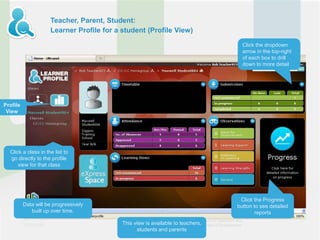
Teacher, Parent, Student:
                     Learner Profile for a student (Profile View)

                                                                                   Click the dropdown
                                                                                   arrow in the top-right
                                                                                   of each box to drill
                                                                                   down to more detail


Profile
 View


  Click a class in the list to
  go directly to the profile
      view for that class


                                                                                  Click the Progress
          Data will be progressively                                             button to see detailed
             built up over time.                                                         reports
                                           This view is available to teachers,
                                                  students and parents
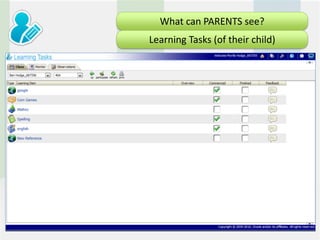
What can PARENTS see?
Learning Tasks (of their child)
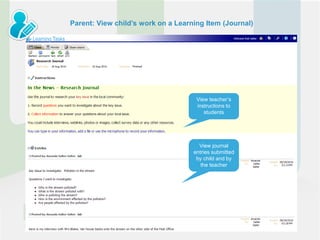
Parent: View child’s work on a Learning Item (Journal)


                                     View teacher’s
                                     instructions to
                                        students


                                      View journal
                                    entries submitted
                                     by child and by
                                       the teacher
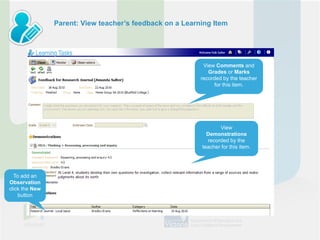
Parent: View teacher’s feedback on a Learning Item


                                                           View Comments and
                                                             Grades or Marks
                                                          recorded by the teacher
                                                               for this item.


                                                                 View
                                                            Demonstrations
                                                            recorded by the
                                                          teacher for this item.


  To add an
Observation
click the New
    button
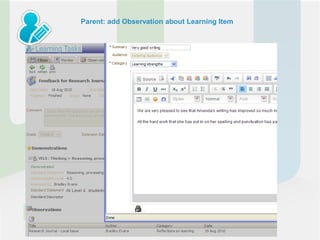
Parent: add Observation about Learning Item
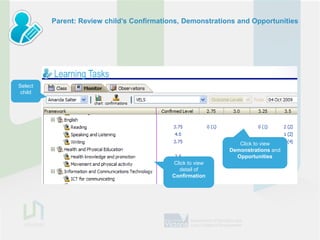
Parent: Review child’s Confirmations, Demonstrations and Opportunities


Select
 child


                                                              Click to view
                                                           Demonstrations and
                                                             Opportunities
                                           Click to view
                                             detail of
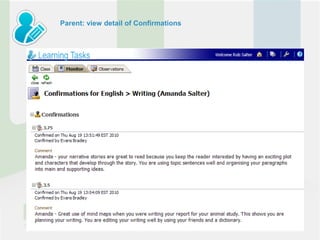
                                           Confirmation
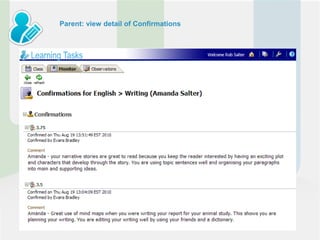
Parent: view detail of Confirmations
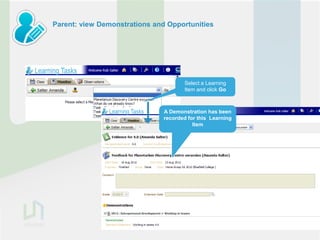
Parent: view Demonstrations and Opportunities


                                      Select a Learning
                                      Item and click Go


                               A Demonstration has been
                               recorded for this Learning
                                          Item
Parent: view detail of Confirmations
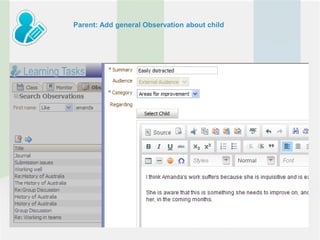
Parent: Add general Observation about child
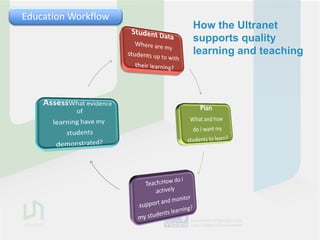
Education Workflow
                     How the Ultranet
                     supports quality
                     learning and teaching
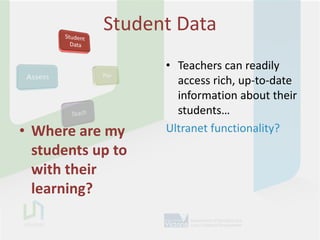
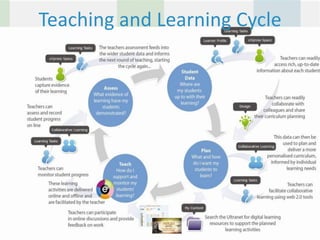
Student Data
                   • Teachers can readily
                     access rich, up-to-date
                     information about their
                     students…
• Where are my     Ultranet functionality?
  students up to
  with their
  learning?
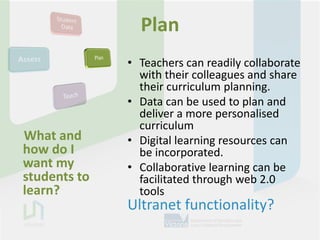
Plan
              • Teachers can readily collaborate
                with their colleagues and share
                their curriculum planning.
              • Data can be used to plan and
                deliver a more personalised
                curriculum
What and      • Digital learning resources can
how do I        be incorporated.
want my       • Collaborative learning can be
students to     facilitated through web 2.0
learn?          tools
              Ultranet functionality?
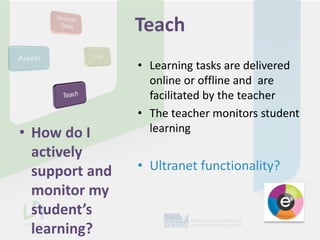
Teach
                • Learning tasks are delivered
                  online or offline and are
                  facilitated by the teacher
                • The teacher monitors student
• How do I        learning
  actively
  support and   • Ultranet functionality?
  monitor my
  student’s
  learning?
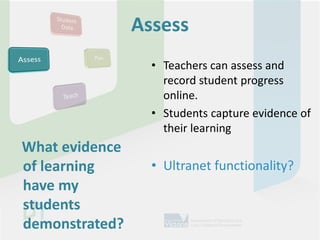
Assess
                  • Teachers can assess and
                    record student progress
                    online.
                  • Students capture evidence of
                    their learning
What evidence
of learning       • Ultranet functionality?
have my
students
demonstrated?
Teaching and Learning Cycle
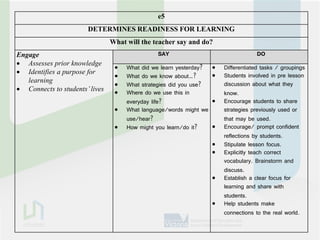
e5
                       DETERMINES READINESS FOR LEARNING
                                What will the teacher say and do?
Engage                                         SAY                                   DO
 Assesses prior knowledge
                                    What did we learn yesterday?      Differentiated tasks / groupings
 Identifies a purpose for                                             Students involved in pre lesson
                                    What do we know about…?
   learning                                                             discussion about what they
                                    What strategies did you use?
 Connects to students’ lives       Where do we use this in            know.
                                     everyday life?                    Encourage students to share
                                    What language/words might we       strategies previously used or
                                     use/hear?                          that may be used.
                                    How might you learn/do it?        Encourage/ prompt confident
                                                                        reflections by students.
                                                                       Stipulate lesson focus.
                                                                       Explicitly teach correct
                                                                        vocabulary. Brainstorm and
                                                                        discuss.
                                                                       Establish a clear focus for
                                                                        learning and share with
                                                                        students.
                                                                       Help students make
                                                                        connections to the real world.
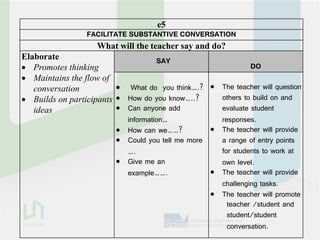
e5
                 FACILITATE SUBSTANTIVE CONVERSATION
                   What will the teacher say and do?
Elaborate                           SAY
 Promotes thinking                                          DO
 Maintains the flow of
   conversation           What do you think….?  The teacher will question
 Builds on participants  How do you know…..?      others to build on and
   ideas                  Can anyone add           evaluate student
                           information…             responses.
                          How can we……?           The teacher will provide
                          Could you tell me more   a range of entry points
                           ….                       for students to work at
                          Give me an               own level.
                           example…….              The teacher will provide
                                                    challenging tasks.
                                                   The teacher will promote
                                                      teacher /student and
                                                      student/student
                                                      conversation.
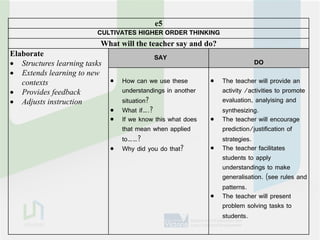
e5
                         CULTIVATES HIGHER ORDER THINKING
                          What will the teacher say and do?
Elaborate                                   SAY
 Structures learning tasks                                                  DO
 Extends learning to new
   contexts                      How can we use these           The teacher will provide an
 Provides feedback               understandings in another       activity /activities to promote
 Adjusts instruction             situation?                      evaluation, analyising and
                                 What if….?                      synthesizing.
                                 If we know this what does      The teacher will encourage
                                  that mean when applied          prediction/justification of
                                  to……?                           strategies.
                                 Why did you do that?           The teacher facilitates
                                                                  students to apply
                                                                  understandings to make
                                                                  generalisation. (see rules and
                                                                  patterns.
                                                                 The teacher will present
                                                                  problem solving tasks to
                                                                  students.
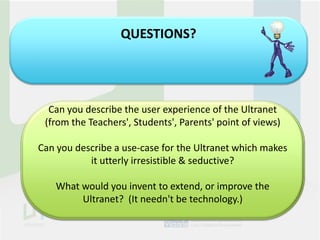
QUESTIONS?


  Can you describe the user experience of the Ultranet
 (from the Teachers', Students', Parents' point of views)

Can you describe a use-case for the Ultranet which makes
           it utterly irresistible & seductive?

    What would you invent to extend, or improve the
         Ultranet? (It needn't be technology.)

Learning tasks pd 2012

  • 1.
    Ultranet Learning Tasksand Learner Profile
  • 2.
    What’s the BIGIdea? The Ultranet connects people, places, spaces and ideas. It is an online student centred learning environment that supports high-quality learning and teaching, connects students and parents and enables efficient knowledge transfer. It enables a rich knowledge framework for schools, making classrooms without walls possible
  • 3.
    leading tools forstudentsto take students, Web 2.0information facilitated knowledgeof studentfor greater opportunities for in online curriculum curriculum student practice lookingpersonalised planning, a continuous recordfor access for teachers online, 24/7 anywheretransferstudents to & contemporary teachers & learning system & customised delivery collaborate within for Victoria delivery sharing &assessment responsibility the& planning&overfor their learning progress& teachers across parents acrosstime State schools The Ultranet will deliver….
  • 4.
  • 5.
  • 6.
    EducationWorkflow Product Workflow Using the Ultranet, Planning can include: • Organising your Learning Tasks in a way that suits you or your school • Create a variety of Learning Tasks for your students • Assign a Standard to each Learning Task
  • 7.
    EducationWorkflow Product Workflow Using the Ultranet, Planning can include: Teaching • Organising your resourcesTasks Spaces that Using Release 1 Learning and in a way • suits you or youraccess to web-based content Providing direct school • Create a variety of Learning Tasks for your Providing self-paced learning opportunities • students individualised curriculum Providing • Assign a Standard to each Learning Task STUDENT VIEW TEACHER
  • 8.
    EducationWorkflow Product Workflow Using the Ultranet, Teaching cancan include: Assessment include: • Using Release 1 resources and Spaces Dynamic Reporting • ProvidingFeedback (Observations) content Dynamic direct access to web-based • Providing self-pacedvisual data • Student Profile learning opportunities • Providing individualised curriculum STUDENT VIEW TEACHER 4.50 4.75 4.50 4.50 4.75 4.50 4.75 5.00 5.00
  • 9.
    EducationWorkflow Product Workflow Using the Ultranet, Student Data look like: Using the Ultranet, Assessment can include: • ManuallyReportingdata: • Dynamic entered • Confirmation of Standard achievement • Dynamic Feedback (Observations) • Observations (comments) • Coming soon: • Individual visual • Student Profiletasks data • Overall progress • Dynamic data: • Task progress feeds • Standard demonstration progress feeds • Individual Task Observation feeds TEACHER VIEW STUDENT VIEW
  • 10.
    Privacy (who seeswhat?) IMPORTANT: This should be a key component of your communication with staff Key areas of interest DYNAMIC SYSTEMS • Creation of Learning Tasks in a class means instant access by students and parents (by default) • Learning Tasks and Observations won’t go through a peer monitoring system to check for errors (by default) PARENT AND STUDENT COLLABORATION IN THE REPORTING SYSTEM • Parents have access to tasks and observations created by teachers for their child (by default) • Parents and students can comment on teacher observations (by default)
  • 12.
    QUESTIONS? 1. CONNECT How arethe ideas and information connected to what you already know? 2.EXTEND What new ideas did you get that extend your thinking in new directions? 3. CHALLENGE What is still challenging or confusing for you?
  • 13.
    What can PARENTSsee? Learner Profile
  • 14.
    Teacher, Parent, Student: Learner Profile for a student (Relationship View) Click breadcrumbs to return to a previous page Relationship View Teacher, student Teacher only or parent can can click on a click on a class to drill teacher for more down information Parent uses this button to access their child’s eXpress space
  • 15.
    Teacher, Parent, Student: Learner Profile for a student (Profile View) Click the dropdown arrow in the top-right of each box to drill down to more detail Profile View Click a class in the list to go directly to the profile view for that class Click the Progress Data will be progressively button to see detailed built up over time. reports This view is available to teachers, students and parents
  • 17.
    What can PARENTSsee? Learning Tasks (of their child)
  • 18.
    Parent: View child’swork on a Learning Item (Journal) View teacher’s instructions to students View journal entries submitted by child and by the teacher
  • 19.
    Parent: View teacher’sfeedback on a Learning Item View Comments and Grades or Marks recorded by the teacher for this item. View Demonstrations recorded by the teacher for this item. To add an Observation click the New button
  • 20.
    Parent: add Observationabout Learning Item
  • 21.
    Parent: Review child’sConfirmations, Demonstrations and Opportunities Select child Click to view Demonstrations and Opportunities Click to view detail of Confirmation
  • 22.
    Parent: view detailof Confirmations
  • 23.
    Parent: view Demonstrationsand Opportunities Select a Learning Item and click Go A Demonstration has been recorded for this Learning Item
  • 24.
    Parent: view detailof Confirmations
  • 25.
    Parent: Add generalObservation about child
  • 27.
    Education Workflow How the Ultranet supports quality learning and teaching
  • 28.
    Student Data • Teachers can readily access rich, up-to-date information about their students… • Where are my Ultranet functionality? students up to with their learning?
  • 29.
    Plan • Teachers can readily collaborate with their colleagues and share their curriculum planning. • Data can be used to plan and deliver a more personalised curriculum What and • Digital learning resources can how do I be incorporated. want my • Collaborative learning can be students to facilitated through web 2.0 learn? tools Ultranet functionality?
  • 30.
    Teach • Learning tasks are delivered online or offline and are facilitated by the teacher • The teacher monitors student • How do I learning actively support and • Ultranet functionality? monitor my student’s learning?
  • 31.
    Assess • Teachers can assess and record student progress online. • Students capture evidence of their learning What evidence of learning • Ultranet functionality? have my students demonstrated?
  • 32.
  • 35.
    e5 DETERMINES READINESS FOR LEARNING What will the teacher say and do? Engage SAY DO  Assesses prior knowledge  What did we learn yesterday?  Differentiated tasks / groupings  Identifies a purpose for  Students involved in pre lesson  What do we know about…? learning discussion about what they  What strategies did you use?  Connects to students’ lives  Where do we use this in know. everyday life?  Encourage students to share  What language/words might we strategies previously used or use/hear? that may be used.  How might you learn/do it?  Encourage/ prompt confident reflections by students.  Stipulate lesson focus.  Explicitly teach correct vocabulary. Brainstorm and discuss.  Establish a clear focus for learning and share with students.  Help students make connections to the real world.
  • 36.
    e5 FACILITATE SUBSTANTIVE CONVERSATION What will the teacher say and do? Elaborate SAY  Promotes thinking DO  Maintains the flow of conversation  What do you think….?  The teacher will question  Builds on participants  How do you know…..? others to build on and ideas  Can anyone add evaluate student information… responses.  How can we……?  The teacher will provide  Could you tell me more a range of entry points …. for students to work at  Give me an own level. example…….  The teacher will provide challenging tasks.  The teacher will promote teacher /student and student/student conversation.
  • 37.
    e5 CULTIVATES HIGHER ORDER THINKING What will the teacher say and do? Elaborate SAY  Structures learning tasks DO  Extends learning to new contexts  How can we use these  The teacher will provide an  Provides feedback understandings in another activity /activities to promote  Adjusts instruction situation? evaluation, analyising and  What if….? synthesizing.  If we know this what does  The teacher will encourage that mean when applied prediction/justification of to……? strategies.  Why did you do that?  The teacher facilitates students to apply understandings to make generalisation. (see rules and patterns.  The teacher will present problem solving tasks to students.
  • 38.
    QUESTIONS? Canyou describe the user experience of the Ultranet (from the Teachers', Students', Parents' point of views) Can you describe a use-case for the Ultranet which makes it utterly irresistible & seductive? What would you invent to extend, or improve the Ultranet? (It needn't be technology.)