An Insider’s View of Changes and Challenges
That Affect Small and Medium Businesses

By Randy Bridges
L5 Consulting


General Review of Small Business Today



Evolving Changes and Challenges to SMBs



Wrap-Up / Q & A
Significant changes over past 5-10 years

Banking industry failures and changes
 Lack of financing options
Conversion from Worker to Sole Proprietor
 Many businesses running from home
Changing Tax Code - More Audits and Penalties

Creates a “Churn and Burn” domino effect
SMB purchasing profiles have changed …
 Few major purchases
 Very little leasing
 Budgets on capital options are limited

As a result, most companies are …
 Reliant on older technology and software
 Only making purchases when necessary
Major IT industry players are changing the way
technology is available to SMBs.
Good:
 Greater expansion capabilities
 Faster response to changing needs
 Simpler decision making

However …
Who Microsoft, Apple, Dell, Intel, HP, IBM, Comcast, Ora
cle, Google, Samsung, etc.
Strategy - Market for mindshare; acquire for
strategic benefit
The Focus is on …
 Enterprise, Data Center – Their $$ equal growth
 Consumers – Drive new products into businesses
SMB agenda - Push to Cloud
As SMBs are pushed out, the choice will be:
 “Long row to hoe” vs. “Easy path to walk”
The “long row” will be …
 Higher costs
 Fewer choices
 Incompatibility with today’s choices
 Need for longer planning cycles
◦ 10-15 years will become the new normal

?
All Microsoft products released from 2002-2004
will reach “End of Support” in the next 2 years
First target date: April 8, 2014
 Desktop - Windows XP, Office XP, Office 2003
 Servers – Small Business Server/Exchange 2003
Next target date: July 14, 2015
 Windows Server 2003


Desktops – Buy new; use “newer” Technology
◦ Desktop Virtualization solutions



Servers – Path not so clear
◦ SBS can go to 2012 Essentials, no email or firewall
◦ No upgrade path - Reinstall is the only choice
◦ Server costs 1.5-2.5x higher than previous models



Change to something “Not Microsoft”
◦ Higher support costs, fewer experienced people



Go to Cloud Servers, Cloud Desktops

?
Great confusion about:
 What it is
 Why have it
 How it is different
 Why it may not always be cheaper




Any system, application or service that is
available to … and accessed from …
The Internet
Requires two pieces
◦ Cloud Apps run on a device or in a browser
◦ Cloud Services run on a server on the Internet








No up-front capital expenses
On-demand, flexible and scalable
Easier, safer from a Mobility POV
Better TCO than “Do It Yourself”
Fewer Purchasing requirements
Greater simplicity in your business


Built with mobility in mind

◦ Anywhere Access with an Internet connection



People-Centric, where personalization follows
the user



Removes processing from business



Own devices, rent software and services

◦ By Subscription (Salesforce, GoogleApps, Office365)
◦ By Resource (Virtual Servers, “Cloud Desktops”)
Also called “Hosted Virtual Desktop”, HVDI,
“Cloud Computing”
 Outsourcing your desktop experience, usually
to a third-party provider
“Desktop Image” as a starting point
 Add a personalized look and feel
 Applications are shared among all users
Implemented with Cloud Integrator
Managed by IT team
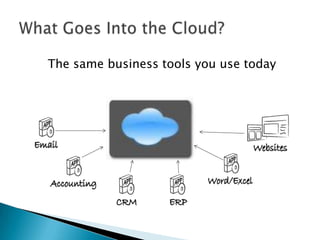
The same business tools you use today






Bypass economic challenges (financing,
interest rates, energy costs)
No up-front CapEx purchases
Reduce reliance on physical locations
Built-In Disaster Recovery

The Big Question:
How easy do you want to make the bulk of
your IT decisions?

?


General Review of Small Business Today



Evolving Changes and Challenges to SMBs
◦ Change - Alliance Among “Big Boys”
◦ Challenge - Microsoft “End of Support”
◦ Change & Challenge - Cloud
For more information,
Email info@L5Consulting.com

Or call
(510) 764-2369

An Insider's Guide to the SMB Techology Playing Field

  • 1.
    An Insider’s Viewof Changes and Challenges That Affect Small and Medium Businesses By Randy Bridges L5 Consulting
  • 2.
     General Review ofSmall Business Today  Evolving Changes and Challenges to SMBs  Wrap-Up / Q & A
  • 3.
    Significant changes overpast 5-10 years Banking industry failures and changes  Lack of financing options Conversion from Worker to Sole Proprietor  Many businesses running from home Changing Tax Code - More Audits and Penalties Creates a “Churn and Burn” domino effect
  • 4.
    SMB purchasing profileshave changed …  Few major purchases  Very little leasing  Budgets on capital options are limited As a result, most companies are …  Reliant on older technology and software  Only making purchases when necessary
  • 5.
    Major IT industryplayers are changing the way technology is available to SMBs. Good:  Greater expansion capabilities  Faster response to changing needs  Simpler decision making However …
  • 6.
    Who Microsoft, Apple,Dell, Intel, HP, IBM, Comcast, Ora cle, Google, Samsung, etc. Strategy - Market for mindshare; acquire for strategic benefit The Focus is on …  Enterprise, Data Center – Their $$ equal growth  Consumers – Drive new products into businesses SMB agenda - Push to Cloud
  • 7.
    As SMBs arepushed out, the choice will be:  “Long row to hoe” vs. “Easy path to walk” The “long row” will be …  Higher costs  Fewer choices  Incompatibility with today’s choices  Need for longer planning cycles ◦ 10-15 years will become the new normal ?
  • 8.
    All Microsoft productsreleased from 2002-2004 will reach “End of Support” in the next 2 years First target date: April 8, 2014  Desktop - Windows XP, Office XP, Office 2003  Servers – Small Business Server/Exchange 2003 Next target date: July 14, 2015  Windows Server 2003
  • 9.
     Desktops – Buynew; use “newer” Technology ◦ Desktop Virtualization solutions  Servers – Path not so clear ◦ SBS can go to 2012 Essentials, no email or firewall ◦ No upgrade path - Reinstall is the only choice ◦ Server costs 1.5-2.5x higher than previous models  Change to something “Not Microsoft” ◦ Higher support costs, fewer experienced people  Go to Cloud Servers, Cloud Desktops ?
  • 10.
    Great confusion about: What it is  Why have it  How it is different  Why it may not always be cheaper
  • 11.
      Any system, applicationor service that is available to … and accessed from … The Internet Requires two pieces ◦ Cloud Apps run on a device or in a browser ◦ Cloud Services run on a server on the Internet
  • 12.
          No up-front capitalexpenses On-demand, flexible and scalable Easier, safer from a Mobility POV Better TCO than “Do It Yourself” Fewer Purchasing requirements Greater simplicity in your business
  • 13.
     Built with mobilityin mind ◦ Anywhere Access with an Internet connection  People-Centric, where personalization follows the user  Removes processing from business  Own devices, rent software and services ◦ By Subscription (Salesforce, GoogleApps, Office365) ◦ By Resource (Virtual Servers, “Cloud Desktops”)
  • 14.
    Also called “HostedVirtual Desktop”, HVDI, “Cloud Computing”  Outsourcing your desktop experience, usually to a third-party provider “Desktop Image” as a starting point  Add a personalized look and feel  Applications are shared among all users Implemented with Cloud Integrator Managed by IT team
  • 15.
    The same businesstools you use today
  • 16.
        Bypass economic challenges(financing, interest rates, energy costs) No up-front CapEx purchases Reduce reliance on physical locations Built-In Disaster Recovery The Big Question: How easy do you want to make the bulk of your IT decisions? ?
  • 17.
     General Review ofSmall Business Today  Evolving Changes and Challenges to SMBs ◦ Change - Alliance Among “Big Boys” ◦ Challenge - Microsoft “End of Support” ◦ Change & Challenge - Cloud
  • 19.
    For more information, Emailinfo@L5Consulting.com Or call (510) 764-2369