Learn Sass + Compass
Quick
Billy Shih - Code Fellows - May 21, 2013
Demo and notes on
http://github.com/bbshih/sass_presentation
Syntactically Awesome
Stylesheets
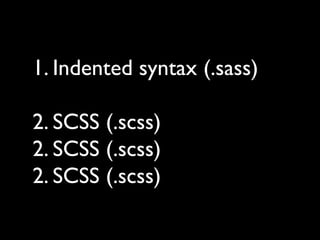
1. Indented syntax (.sass)
2. SCSS (.scss)
2. SCSS (.scss)
2. SCSS (.scss)
.sass .scss become .css
Variables
Nesting
Mixins
Selector Inheritence
Compass = CSS SASS
Framework
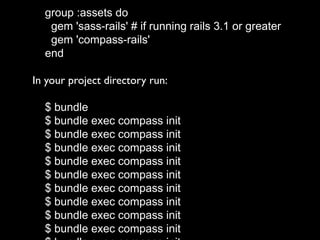
group :assets do
gem 'sass-rails' # if running rails 3.1 or greater
gem 'compass-rails'
end
In your project directory run:
$ bundle
$ bundle exec compass init
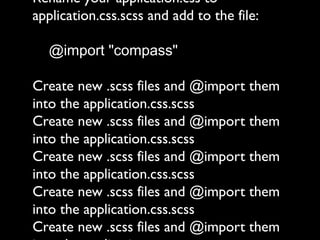
Rename your application.css to
application.css.scss and add to the file:
@import "compass"
Create new .scss files and @import them
into the application.css.scss
Create new .scss files and @import them
into the application.css.scss
Create new .scss files and @import them
into the application.css.scss
Create new .scss files and @import them
into the application.css.scss
Create new .scss files and @import them
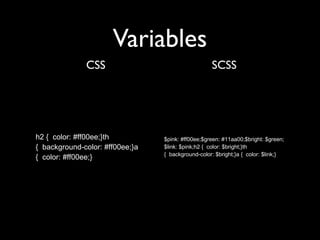
Variables
CSS SCSS
h2 { color: #ff00ee;}th
{ background-color: #ff00ee;}a
{ color: #ff00ee;}
$pink: #ff00ee;$green: #11aa00;$bright: $green;
$link: $pink;h2 { color: $bright;}th
{ background-color: $bright;}a { color: $link;}
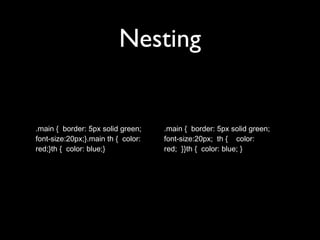
Nesting
.main { border: 5px solid green;
font-size:20px;}.main th { color:
red;}th { color: blue;}
.main { border: 5px solid green;
font-size:20px; th { color:
red; }}th { color: blue; }
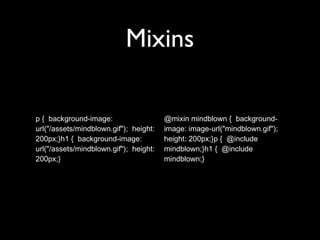
Mixins
p { background-image:
url("/assets/mindblown.gif"); height:
200px;}h1 { background-image:
url("/assets/mindblown.gif"); height:
200px;}
@mixin mindblown { background-
image: image-url("mindblown.gif");
height: 200px;}p { @include
mindblown;}h1 { @include
mindblown;}
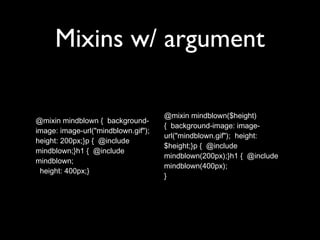
Mixins w/ argument
@mixin mindblown { background-
image: image-url("mindblown.gif");
height: 200px;}p { @include
mindblown;}h1 { @include
mindblown;
height: 400px;}
@mixin mindblown($height)
{ background-image: image-
url("mindblown.gif"); height:
$height;}p { @include
mindblown(200px);}h1 { @include
mindblown(400px);
}
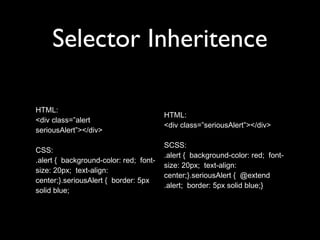
Selector Inheritence
HTML:
<div class=”alert
seriousAlert”></div>
CSS:
.alert { background-color: red; font-
size: 20px; text-align:
center;}.seriousAlert { border: 5px
solid blue;
HTML:
<div class=”seriousAlert”></div>
SCSS:
.alert { background-color: red; font-
size: 20px; text-align:
center;}.seriousAlert { @extend
.alert; border: 5px solid blue;}
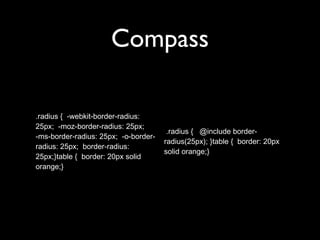
Compass
.radius { -webkit-border-radius:
25px; -moz-border-radius: 25px;
-ms-border-radius: 25px; -o-border-
radius: 25px; border-radius:
25px;}table { border: 20px solid
orange;}
.radius { @include border-
radius(25px); }table { border: 20px
solid orange;}
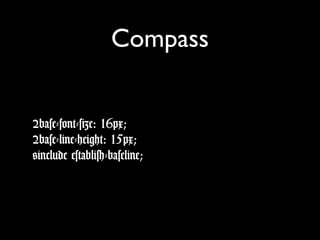
Compass
$base-font-size: 16px;
$base-line-height: 15px;
@include establish-baseline;
Links
• http://sass-lang.com/
• http://compass-style.org/
@tobillys
me@billyshih.com
me@billyshih.com

Learn Sass and Compass quick

Editor's Notes

  • #4 - Extension of CSS3 that adds features that programming languages have - Make it easier to write and manage CSS - Interpreter translates Sass into CSS
  • #5 2 acceptable syntaxes with 2 file types: - Indented syntax(.sass) - Similar to Haml - SCSS Uses CSS semantics, so CSS is valid SCSS (I&apos;ll be using this in the demo)
  • #6 - Sass interpreter spits out css files from sass files - Automatic with rails and Sass gem - Also has a watcher that can look for updates to sass files and automatically generate .css
  • #7 - Variables allow you to set a value in one place - Nesting organizes styles and saves you from typing our classes or selectors over and over - Mixins
  • #8 - Open-source CSS framework - Uses Sass to provide mixins that solve common problems encountered when creating CSS files