___ FOUNDATION
1.1 Sass,Not SASS
1.2 SCSS: Sassy CSS
1.3 Commenting
1.4 Importing
1.5 Nesting Selectors
1.6 The Parent Selector
1.7 Nesting Pitfalls
1.1 Sass,Not SASS
CSS is crafted to be simple,
but scaling simplicity is difficult.
1.1 Sass,Not SASS
At Scale
๏ Slight variations of colors, fonts, numbers,
& other properties arise
๏ Effective curbing of repetition can decline
๏ Stylesheet size may become unmanageable
1.1 Sass,Not SASS
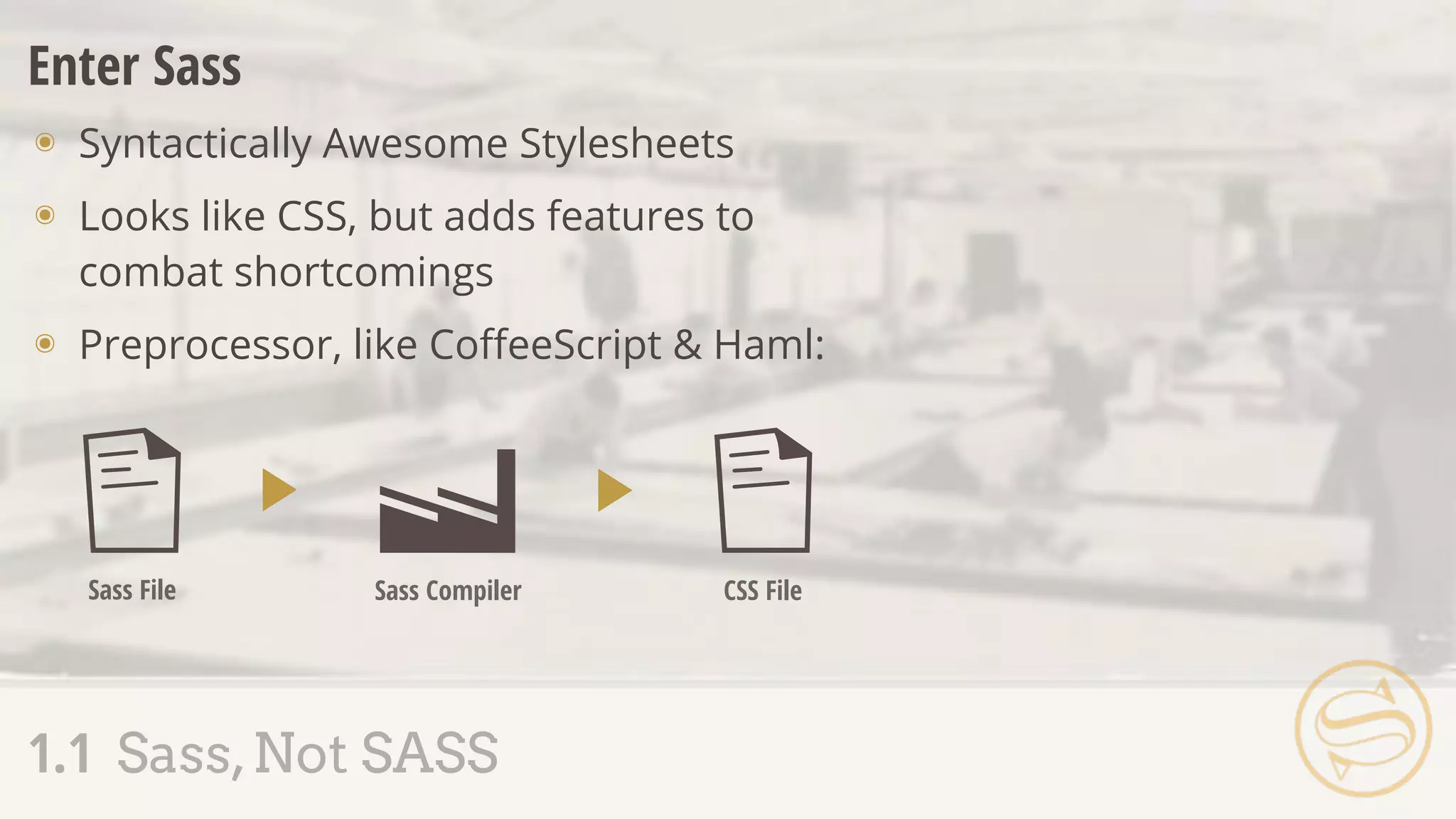
Enter Sass
๏ Syntactically Awesome Stylesheets
๏ Looks like CSS, but adds features to
combat shortcomings
๏ Preprocessor, like CoffeeScript & Haml:
Sass File Sass Compiler CSS File
๏ Created by Hampton Catlin
๏ Primary developers:
Nathan Weizenbaum & Chris Eppstein
๏ Baked into Rails
1.1 Sass,Not SASS
Assembly Tip
SASS Sass
1.1 Sass,Not SASS
1.2 SCSS: Sassy CSS
1.3 Commenting
1.4 Importing
1.5 Nesting Selectors
1.6 The Parent Selector
1.7 Nesting Pitfalls
๏ Sassy CSS (.scss) is the default file extension
๏ CSS is valid SCSS
๏ A second syntax (.sass) exists, but we'll focus on SCSS
for the course
1.2 SCSS: Sassy CSS
$main: #444;
.btn {
color: $main;
display: block;
}
.btn-a {
color: lighten($main, 30%);
&:hover {
color: lighten($main, 40%);
}
}
.btn {
color: #444444;
display: block;
}
.btn-a {
color: #919191;
}
.btn-a:hover {
color: #aaaaaa;
}
application.scss application.css
1.2 SCSS: Sassy CSS
Assembly Tip
Since CSS doubles as valid
SCSS, try writing styles
normally & slowly incorporate
new techniques.
๏ Sass adds // for single line comments - not
output after compile
1.3 Commenting
// These comments will
// not be output to the
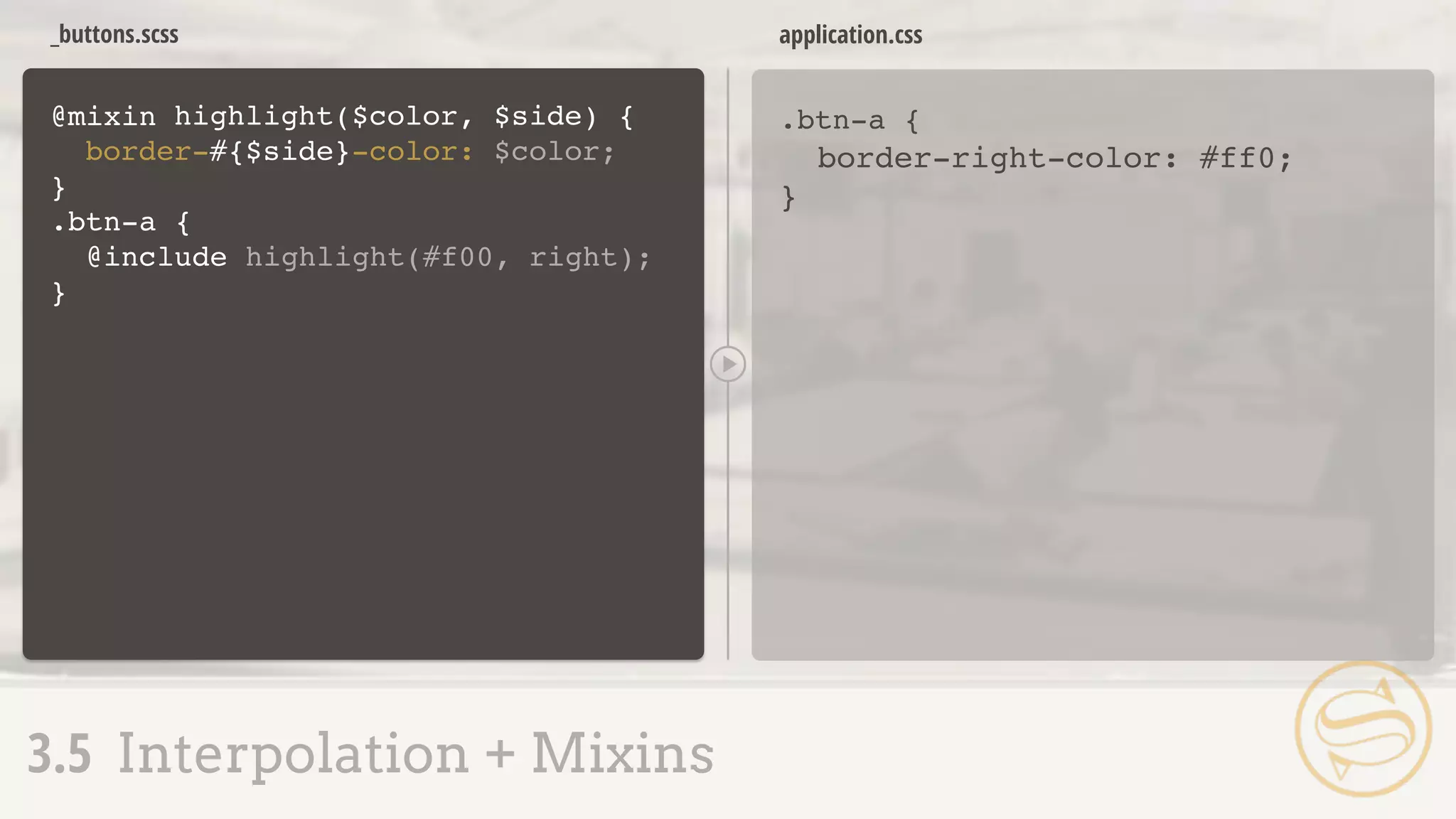
// compiled CSS file
/* This comment will */
application.scss application.css
1.3 Commenting
A S S E M B L Y
R
E J E C T E D
/*
* Imports styles found in 'buttons.css'
* when the browser requests application.css
*/
@import "buttons.css";
application.css
1.4 Importing
๏ The CSS @import rule has been avoided:
prevents parallel downloading
๏ @import with .scss or .sass happens
during compile rather than client-side
๏ File extension is optional
1.4 Importing
// Imports styles found in 'buttons.scss'
// when the compiler processes application.scss
@import "buttons";
application.scss
application.scss
buttons.scss
application.css
buttons.css
?
1.4 Importing
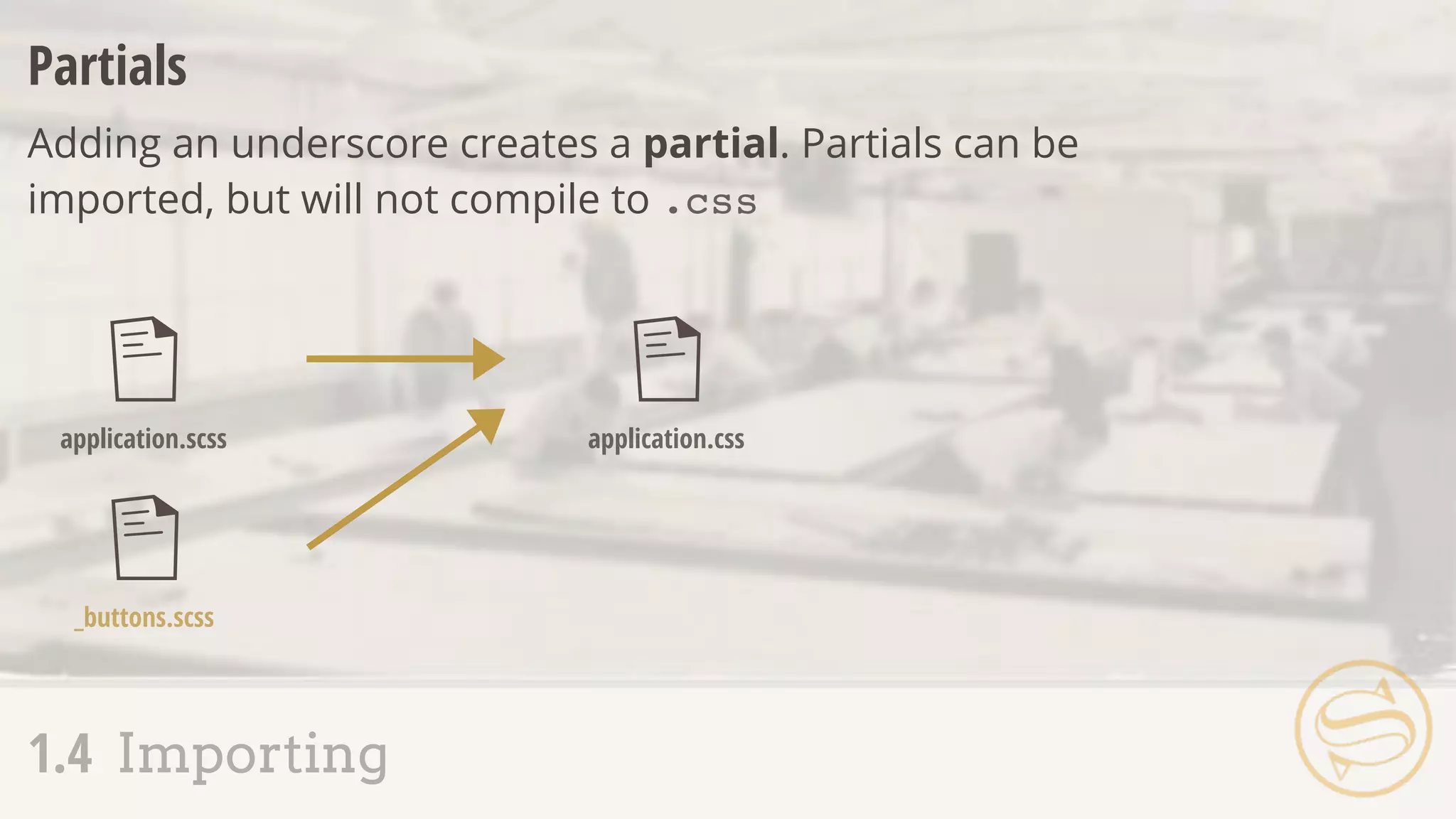
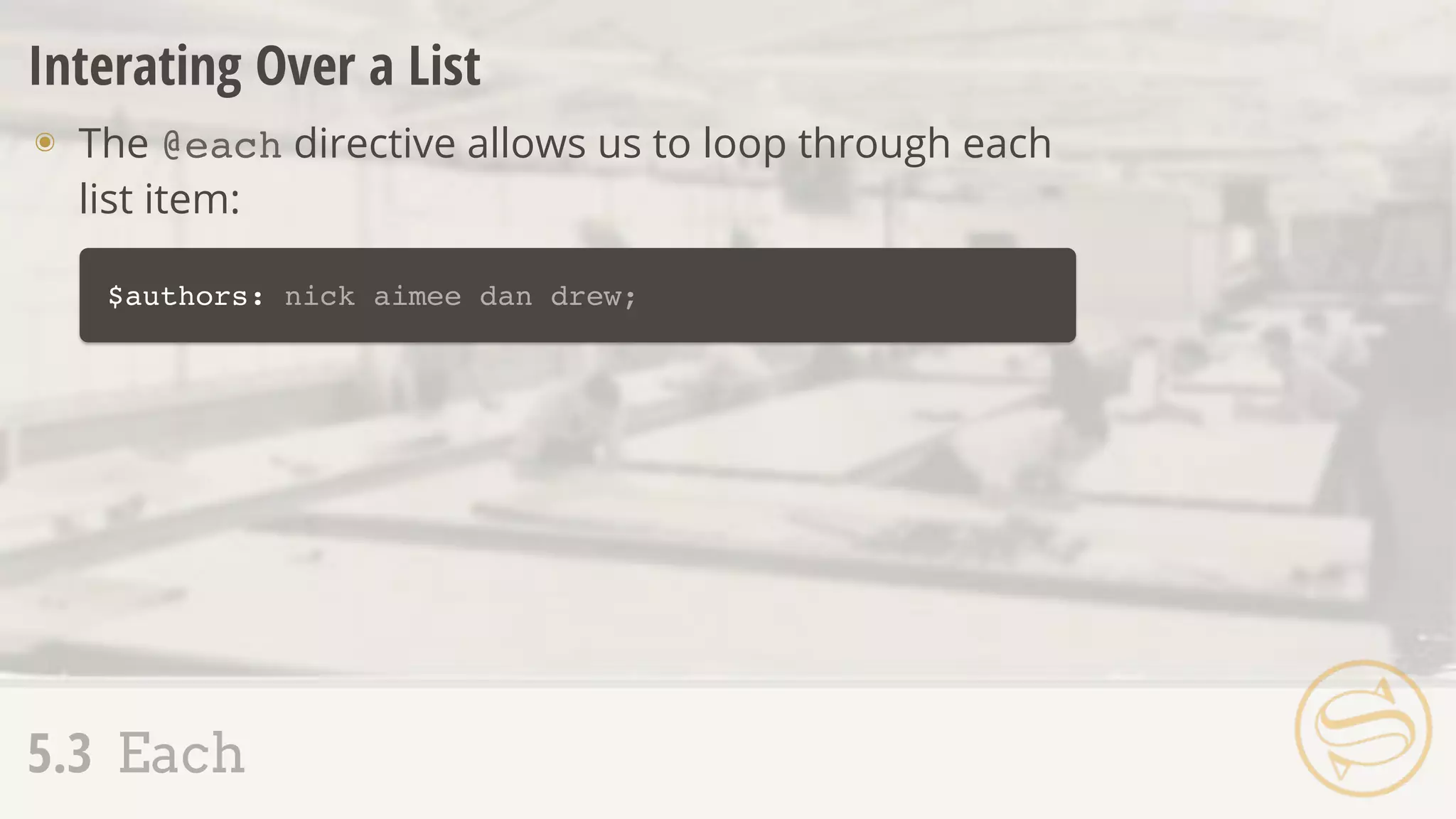
Partials
Adding an underscore creates a partial. Partials can be
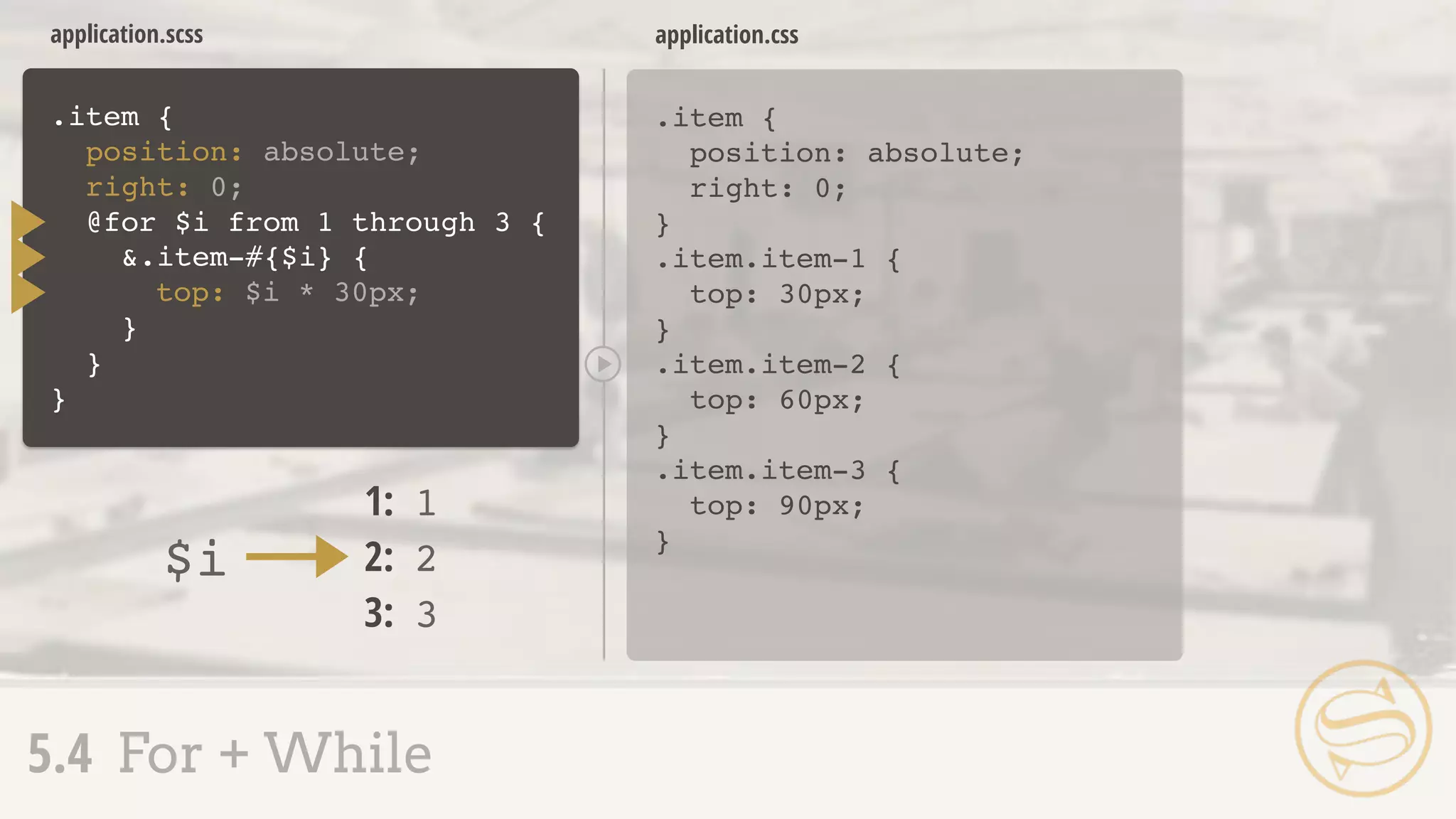
imported, but will not compile to .css
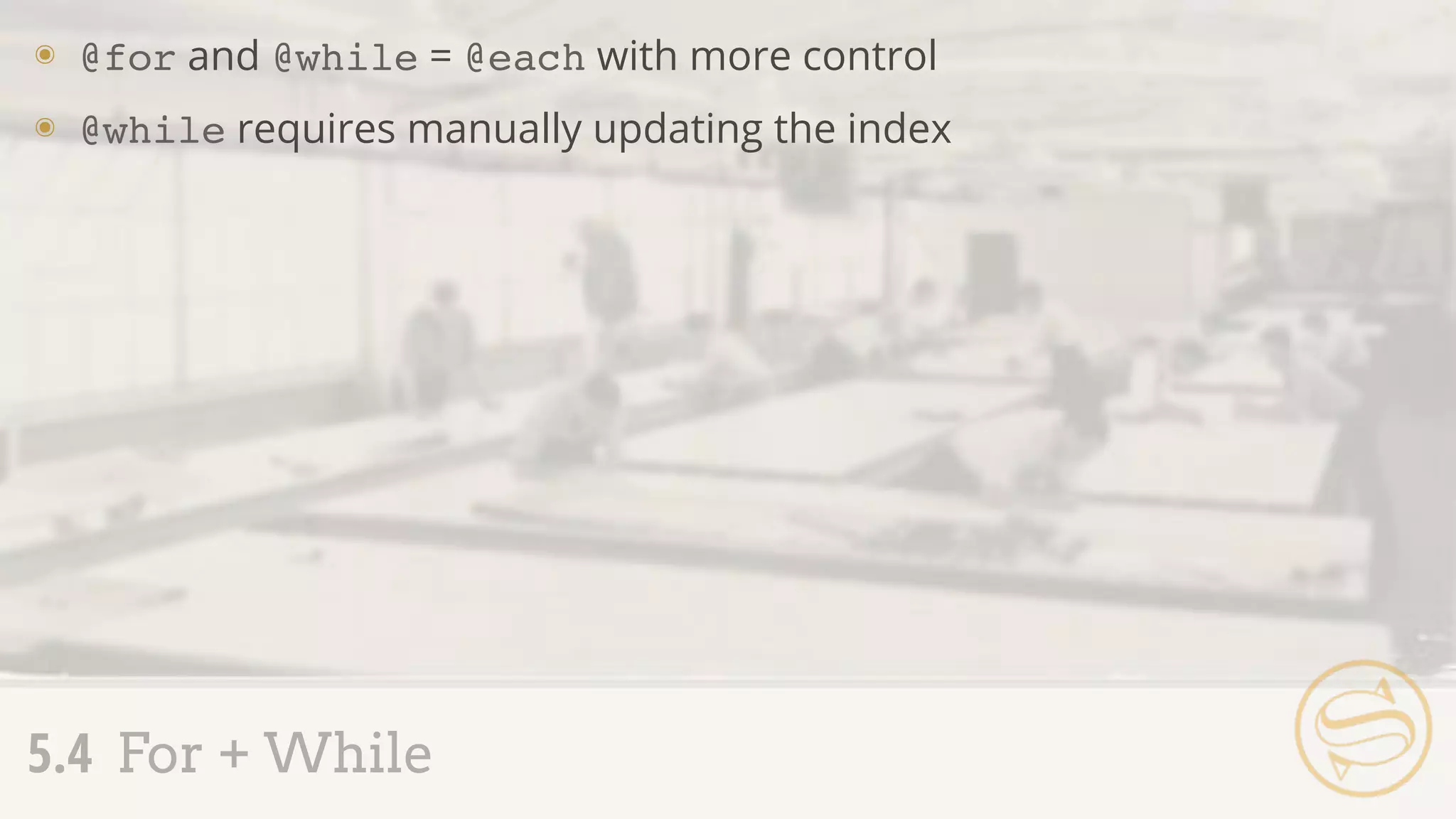
application.scss
_buttons.scss
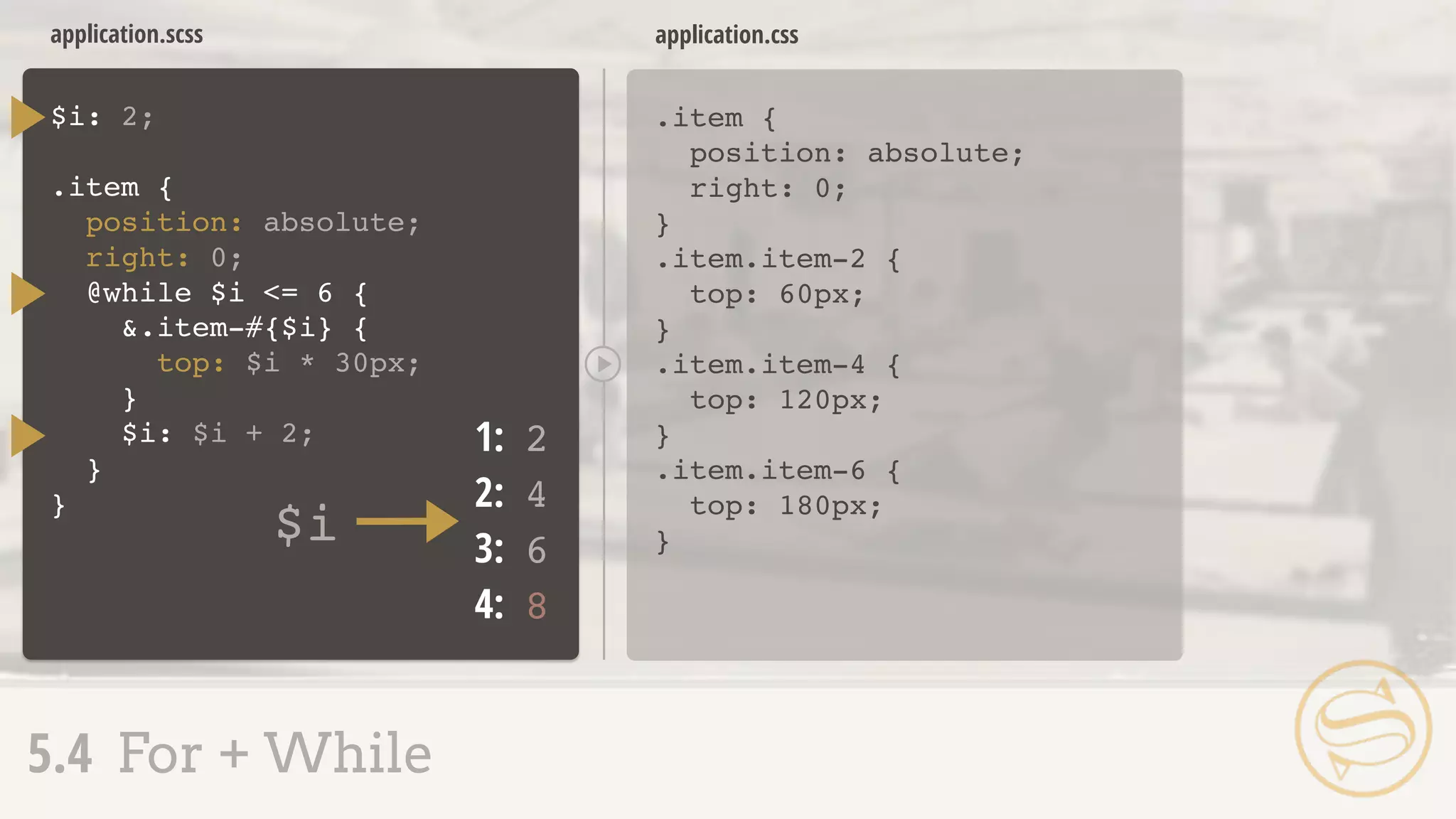
application.css
1.4 Importing
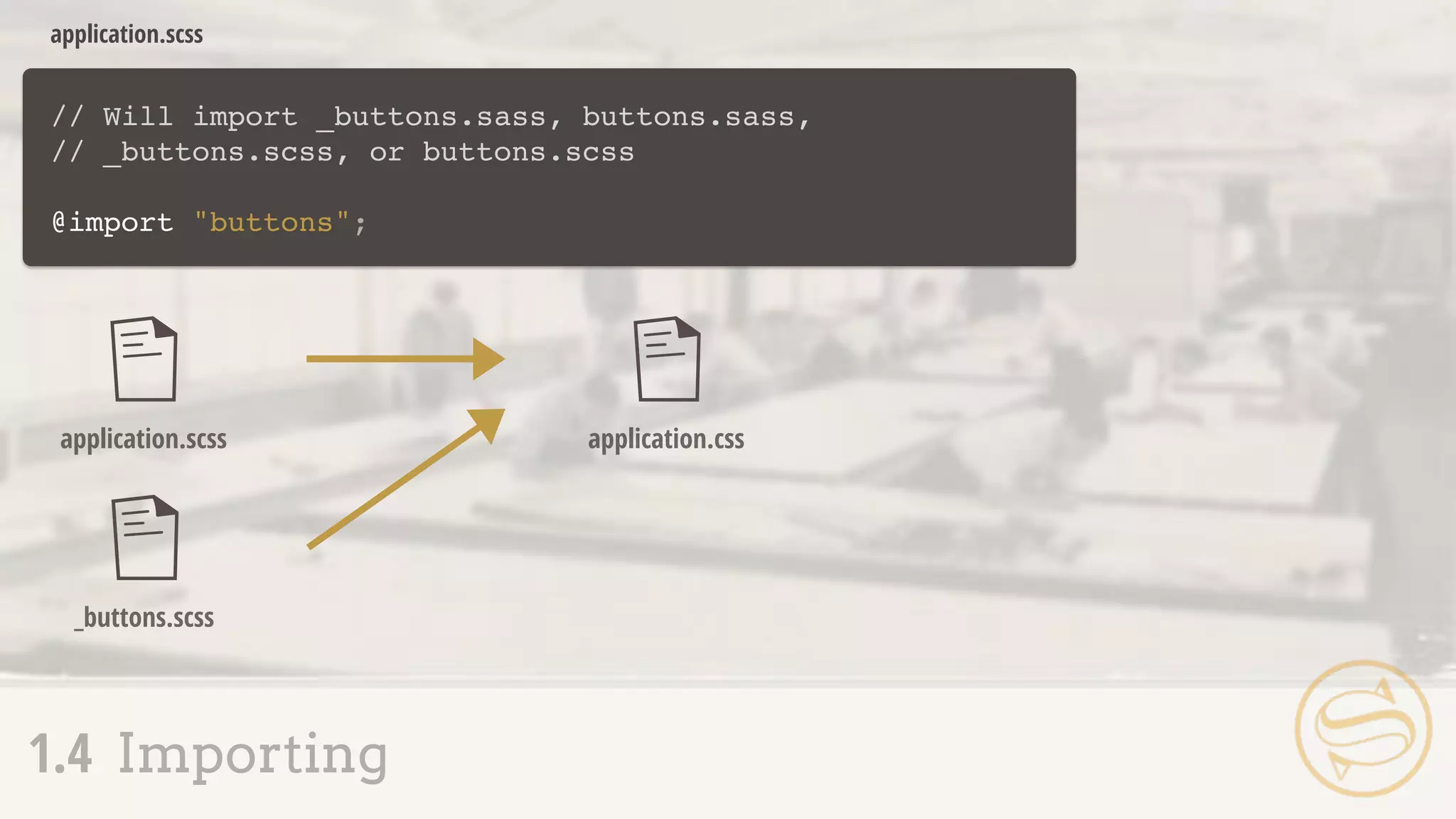
// Will import _buttons.sass, buttons.sass,
// _buttons.scss, or buttons.scss
@import "buttons";
application.scss
application.scss
_buttons.scss
application.css
1.4 Importing
1.1 Sass,Not SASS
1.2 SCSS: Sassy CSS
1.3 Commenting
1.4 Importing
1.5 Nesting Selectors
1.6 The Parent Selector
1.7 Nesting Pitfalls
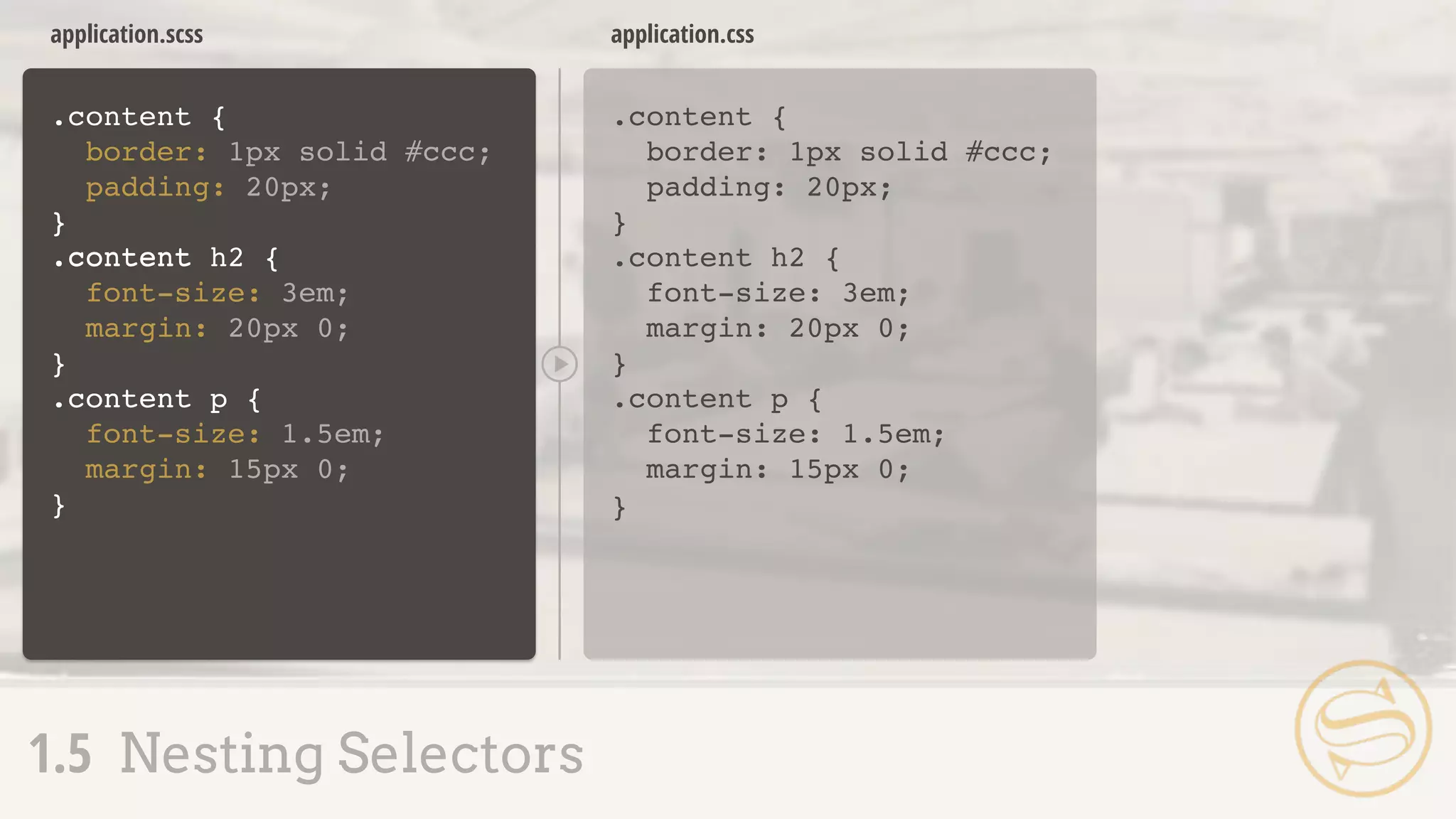
.content {
border: 1px solid #ccc;
padding: 20px;
}
.content h2 {
font-size: 3em;
margin: 20px 0;
}
.content p {
font-size: 1.5em;
margin: 15px 0;
}
application.css
1.5 Nesting Selectors
A S S E M B L Y
R
E J E C T E D
application.css
.content {
border: 1px solid #ccc;
padding: 20px;
}
.content h2 {
font-size: 3em;
margin: 20px 0;
}
.content p {
font-size: 1.5em;
margin: 15px 0;
}
.content {
border: 1px solid #ccc;
padding: 20px;
}
.content h2 {
font-size: 3em;
margin: 20px 0;
}
.content p {
font-size: 1.5em;
margin: 15px 0;
}
application.scss
1.5 Nesting Selectors
}
.content
.content
application.css
.content {
border: 1px solid #ccc;
padding: 20px;
}
.content h2 {
font-size: 3em;
margin: 20px 0;
}
.content p {
font-size: 1.5em;
margin: 15px 0;
}
.content {
border: 1px solid #ccc;
padding: 20px;
application.scss
1.5 Nesting Selectors
}
.content.content
h2 {
font-size: 3em;
margin: 20px 0;
}
p {
font-size: 1.5em;
margin: 15px 0;
}
A
S S E M B L Y
A P P R O V
E
D
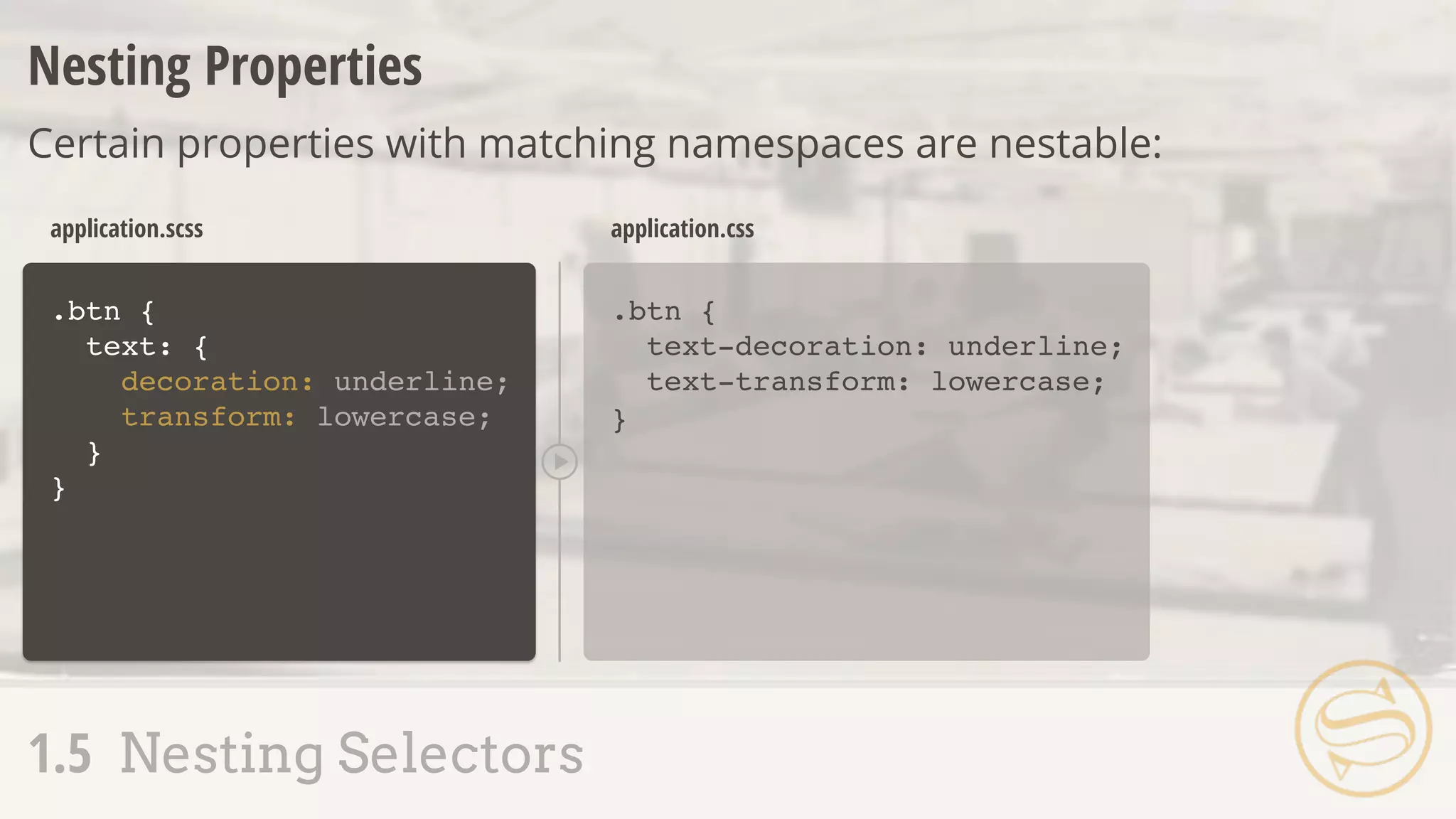
.btn {
text: {
decoration: underline;
transform: lowercase;
}
}
.btn {
text-decoration: underline;
text-transform: lowercase;
}
application.scss application.css
Nesting Properties
Certain properties with matching namespaces are nestable:
1.5 Nesting Selectors
1.6 The Parent Selector
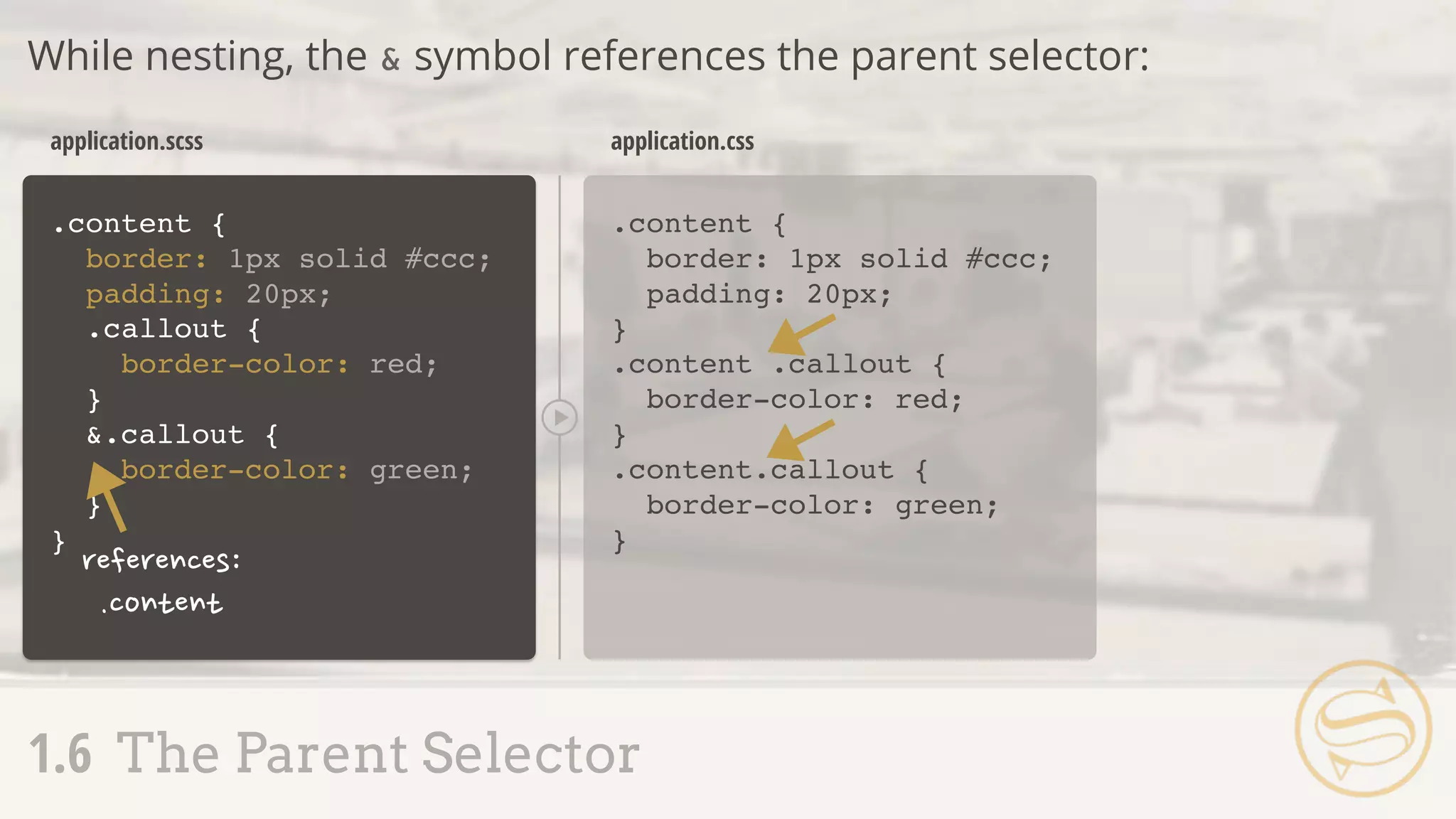
While nesting, the & symbol references the parent selector:
.content {
border: 1px solid #ccc;
padding: 20px;
}
.content {
border: 1px solid #ccc;
padding: 20px;
}
application.scss application.css
.callout {
border-color: red;
}
&.callout {
border-color: green;
}
.content .callout {
border-color: red;
}
.content.callout {
border-color: green;
}
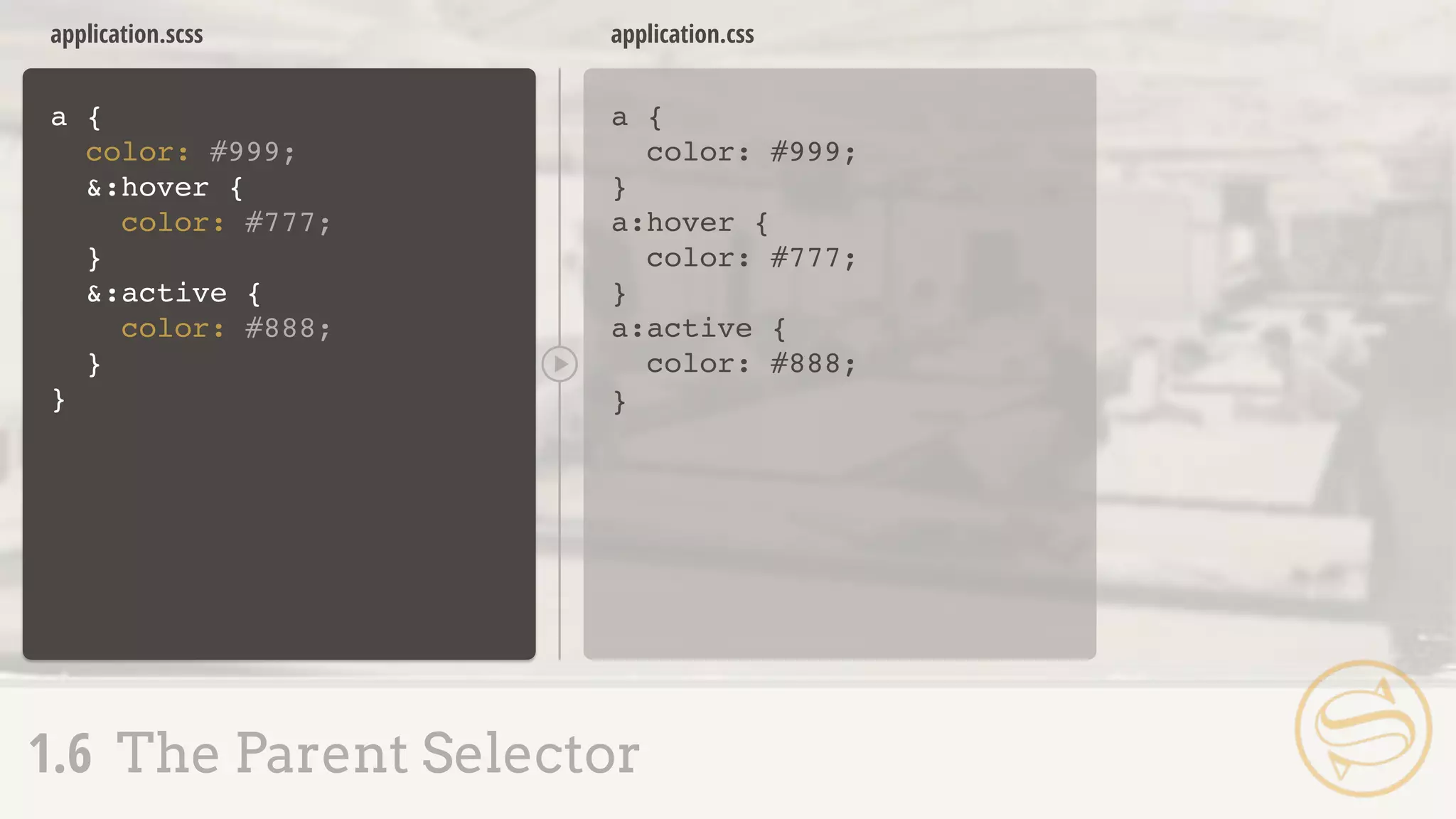
a {
color: #999;
&:hover {
color: #777;
}
&:active {
color: #888;
}
}
a {
color: #999;
}
a:hover {
color: #777;
}
a:active {
color: #888;
}
application.scss application.css
1.6 The Parent Selector
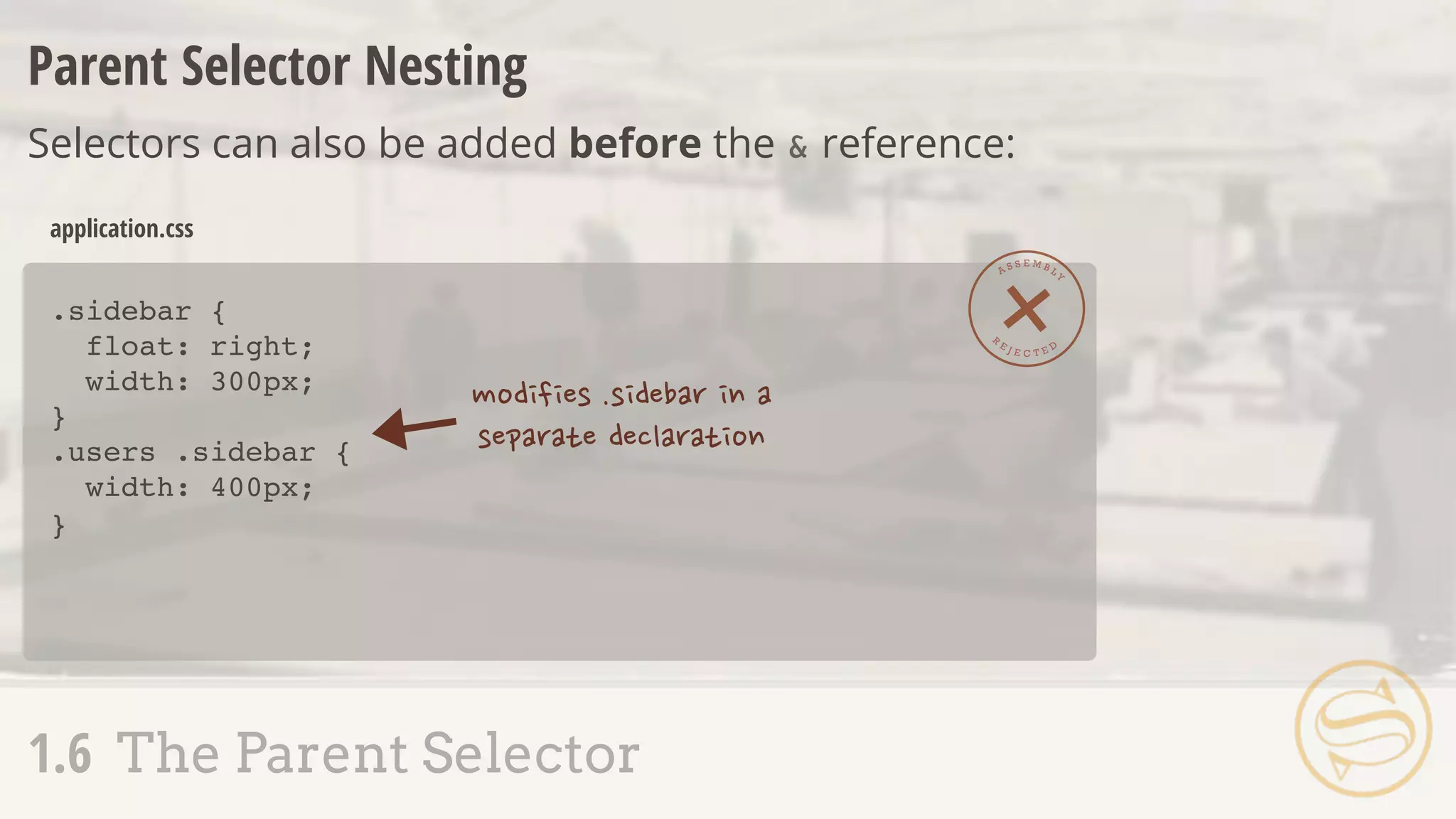
Parent Selector Nesting
Selectors can also be added before the & reference:
.sidebar {
float: right;
width: 300px;
}
.users .sidebar {
width: 400px;
}
application.css
A S S E M B L Y
R
E J E C T E D
1.6 The Parent Selector
.sidebar {
float: right;
width: 300px;
{
width: 400px;
}
}
.sidebar {
float: right;
width: 300px;
}
.users .sidebar {
width: 400px;
}
application.scss application.css
1.6 The Parent Selector
.users &
A
S S E M B L Y
A P P R O V
E
D
.sidebar {
float: right;
width: 300px;
h2 {
color: #777;
.users & {
color: #444;
}
}
}
.sidebar {
float: right;
width: 300px;
}
.sidebar h2 {
color: #777;
}
.users .sidebar h2 {
color: #444;
}
application.scss application.css
1.6 The Parent Selector
๏ Nesting is easy, but dangerous
๏ Do not nest unnecessarily
1.7 Nesting Pitfalls
.content {
background: #ccc;
.cell {
h2 {
a {
&:hover {
color: red;
}
}
}
}
}
.content {
background: #ccc;
}
.content .cell h2 a:hover {
color: red;
}
application.scss application.css
A S S E M B L Y
R
E J E C T E D
1.7 Nesting Pitfalls
Assembly Tip
Try limiting your nesting to 3
or 4 levels and consider
refactoring anything deeper.
___ VARIABLE
2.1 Variable Declaration + Use
2.2 Types
2.3 Scope
2.4 Interpolation
๏ Native CSS variable support is still in its infancy,
but Sass affords us a way to set reusable values
๏ Variable names begin with $, like $base
2.1 Variable Declaration + Use
$base: #777777; .sidebar {
border: 1px solid #777777;
}
.sidebar p {
color: #777777;
}
application.scss application.css
2.1 Variable Declaration + Use
.sidebar {
border: 1px solid $base;
p {
color: $base;
}
}
$title: 'My Blog';
$title: 'About Me'
h2:before {
content: $title;
}
h2:before {
content: 'About Me';
}
application.scss application.css
The Default Flag
Variable definitions can optionally take the !default flag:
2.1 Variable Declaration + Use
;
h2:before {
content: 'My Blog';
}
application.scss application.css
2.1 Variable Declaration + Use
$title: 'My Blog';
$title: 'About Me'
h2:before {
content: $title;
}
!default;
$rounded: 5px;
@import "buttons";
application.scss
2.1 Variable Declaration + Use
$rounded: 3px !default;
.btn-a {
border-radius: $rounded;
color: #777;
}
.btn-b {
border-radius: $rounded;
color: #222;
}
_buttons.scss
$rounded: 5px;
@import "buttons";
application.scss
2.1 Variable Declaration + Use
.btn-a {
border-radius: 5px;
color: #777;
}
.btn-b {
border-radius: 5px;
color: #222;
}
application.css
$rounded: false;
$shadow: true;
2.2 Types
Booleans
$rounded: 4px;
$line-height: 1.5;
$font-size: 3rem;
Numbers - can be set with or without units:
$base: purple;
$border: rgba(0, 255, 0, 0.5);
$shadow: #333;
2.2 Types
Colors
$header: 'Helvetica Neue';
$callout: Arial;
$message: "Loading...";
Strings - can be set with or without quotes:
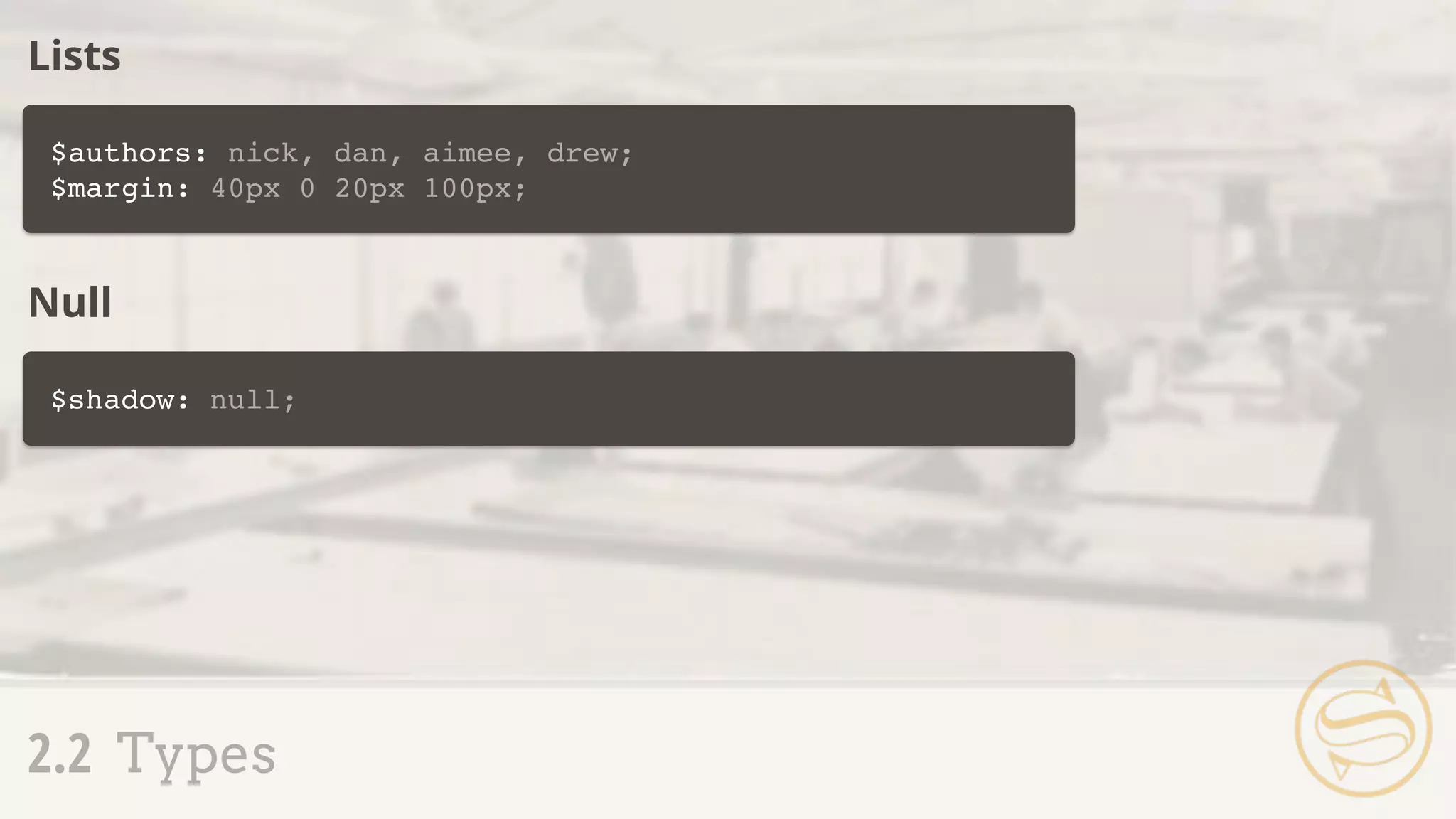
$authors: nick, dan, aimee, drew;
$margin: 40px 0 20px 100px;
2.2 Types
Lists
$shadow: null;
Null
2.1 Variable Declaration + Use
2.2 Types
2.3 Scope
2.4 Interpolation
p {
$border: #ccc;
border-top: 1px solid $border;
}
h1 {
border-top: 1px solid $border;
}
Syntax error: Undefined
variable: "$border"
application.scss application.css
2.3 Scope
2.3 Scope
Reassignment in a Declaration
๏ Variables set inside a declaration (within { }) aren't
usable outside that block
๏ Setting new values to variables set outside a
declaration changes future instances
$color-base: #777777;
.sidebar {
$color-base: #222222;
background: $color-base;
}
application.scss
.sidebar {
background: #222222;
}
application.css
2.3 Scope
p {
color: #222222;
}
p {
color: $color-base;
}
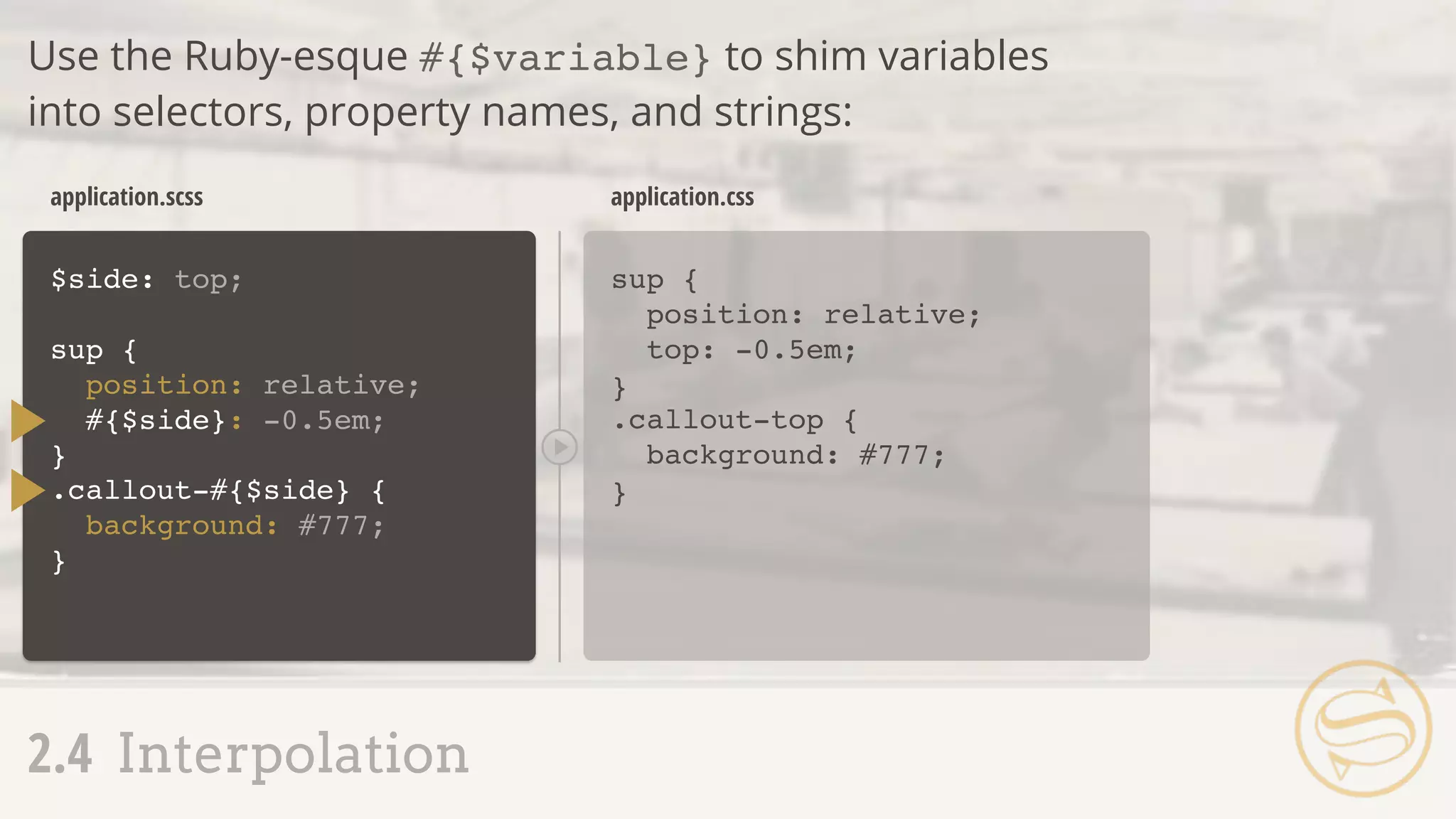
$side: top;
sup {
position: relative;
#{$side}: -0.5em;
}
sup {
position: relative;
top: -0.5em;
}
application.scss application.css
2.4 Interpolation
Use the Ruby-esque #{$variable} to shim variables
into selectors, property names, and strings:
.callout-#{$side} {
background: #777;
}
.callout-top {
background: #777;
}
Assembly Tip
Be considerate of variable
naming. $color-base
gets a lot more mileage
than $color-blue.
___ MIXIN
3.1 Mixin Setup + Use
3.2 Adding Arguments
3.3 Multiple Arguments
3.4 Variable Arguments
3.5 Interpolation + Mixins
.btn-a {
background: #777;
border: 1px solid #ccc;
font-size: 1em;
text-transform: uppercase;
}
.btn-b {
background: #ff0;
border: 1px solid #ccc;
font-size: 1em;
text-transform: uppercase;
}
application.css
3.1 Mixin Setup + Use
A S S E M B L Y
R
E J E C T E D
]
]
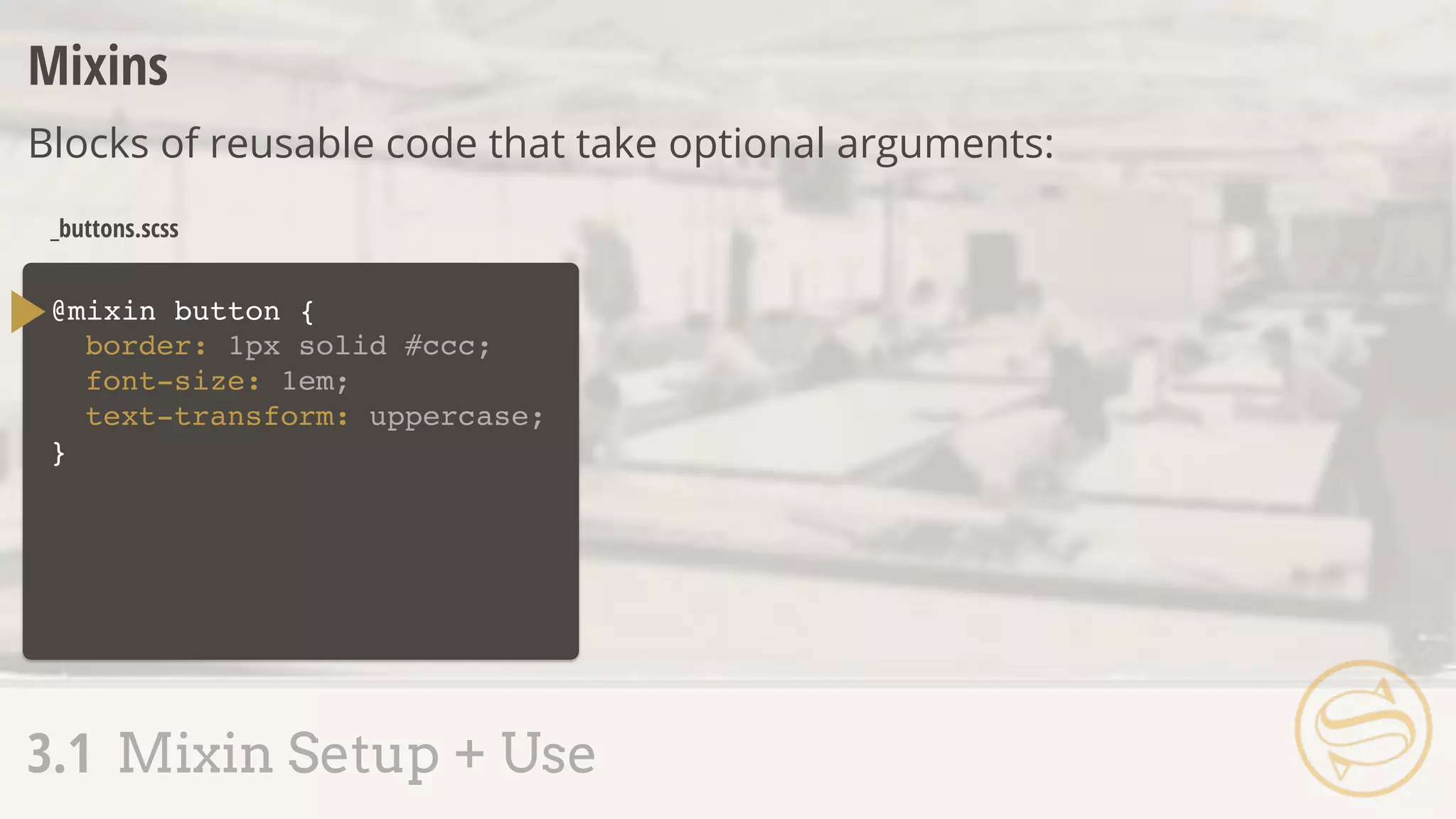
@mixin button {
}
_buttons.scss
Mixins
Blocks of reusable code that take optional arguments:
3.1 Mixin Setup + Use
border: 1px solid #ccc;
font-size: 1em;
text-transform: uppercase;
_buttons.scss
.btn-a {
border: 1px solid #ccc;
font-size: 1em;
text-transform: uppercase;
background: #777;
}
application.css
3.1 Mixin Setup + Use
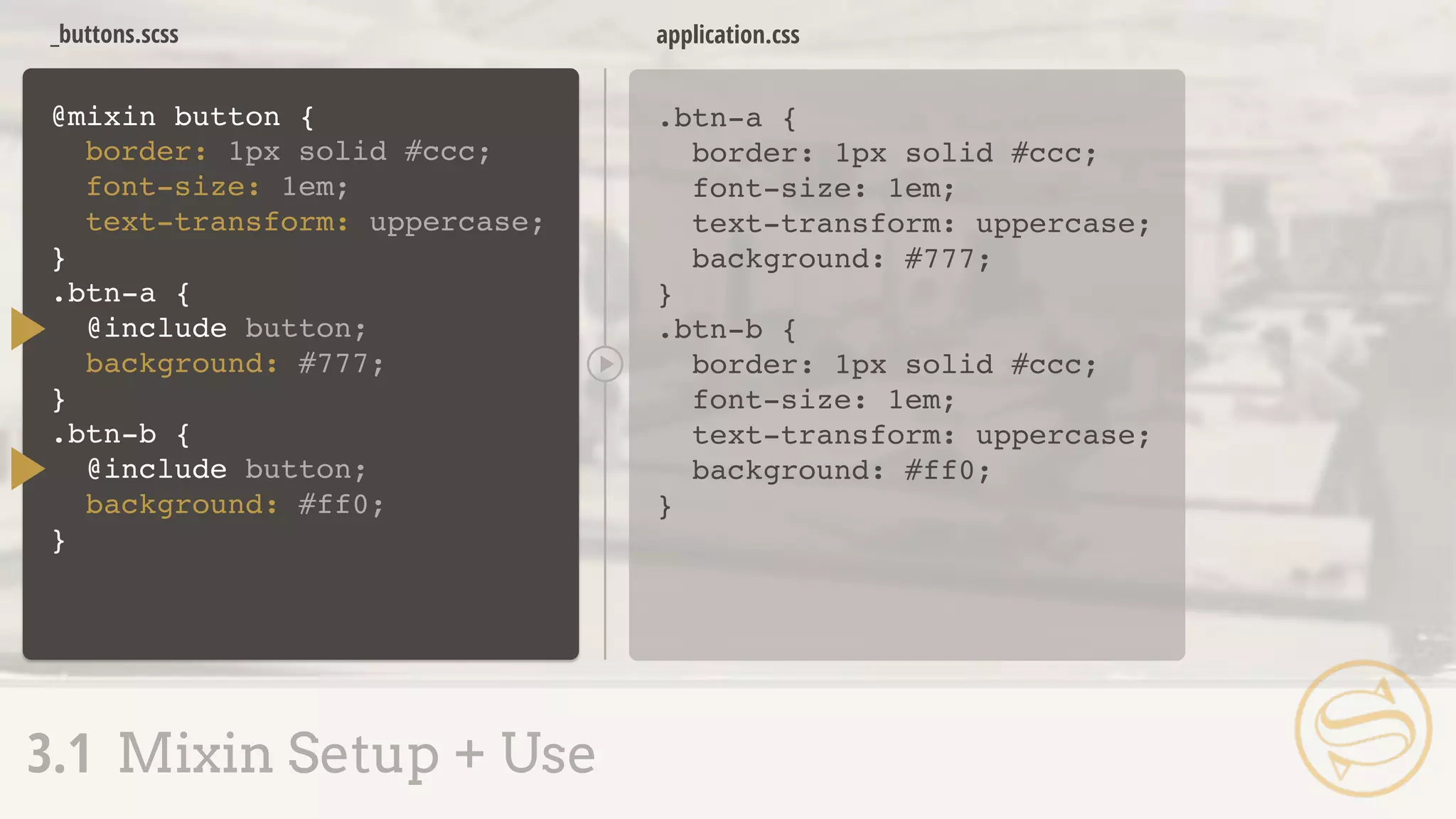
@mixin button {
}
border: 1px solid #ccc;
font-size: 1em;
text-transform: uppercase;
.btn-a {
@include button;
background: #777;
}
.btn-b {
@include button;
background: #ff0;
}
.btn-b {
border: 1px solid #ccc;
font-size: 1em;
text-transform: uppercase;
background: #ff0;
}
Assembly Tip
Make sure the @mixin block
comes before the @include,
especially when importing
files containing mixins.
Assembly Tip
@include = use a mixin
@import = import a file
@mixin button {
border: 1px solid #ccc;
font-size: 1em;
text-transform: uppercase;
}
.btn-a {
@include button;
background: #777;
}
.btn-b {
@include button;
background: #ff0;
}
_buttons.scss
.btn-a {
border: 1px solid #ccc;
font-size: 1em;
text-transform: uppercase;
background: #777;
}
.btn-b {
border: 1px solid #ccc;
font-size: 1em;
text-transform: uppercase;
background: #ff0;
}
application.css
A S S E M B L Y
R
E J E C T E D
3.1 Mixin Setup + Use
]
]
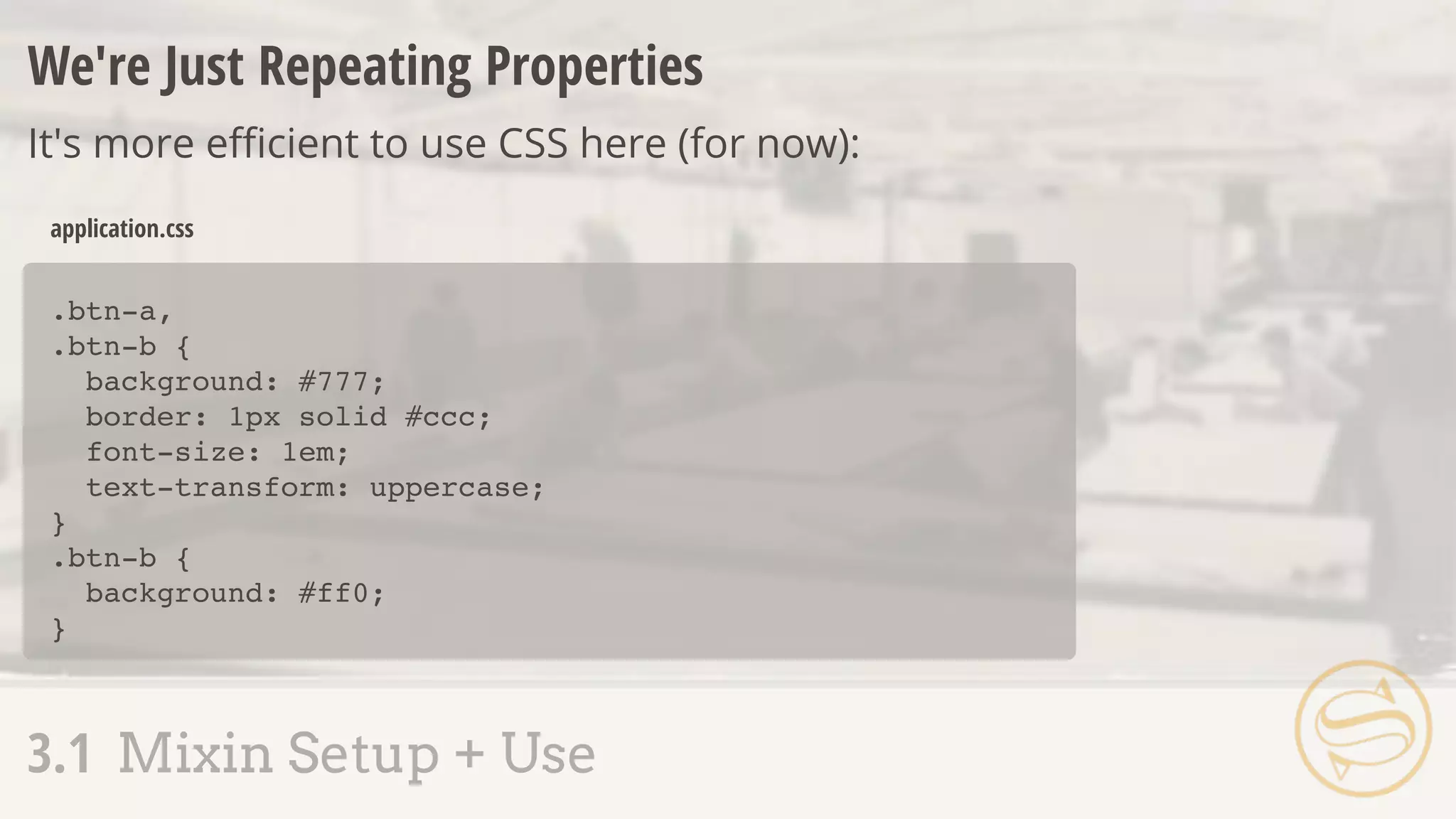
.btn-a,
.btn-b {
background: #777;
border: 1px solid #ccc;
font-size: 1em;
text-transform: uppercase;
}
.btn-b {
background: #ff0;
}
application.css
We're Just Repeating Properties
It's more efficient to use CSS here (for now):
3.1 Mixin Setup + Use
If that's the case, what are
mixins good for then?
3.1 Mixin Setup + Use
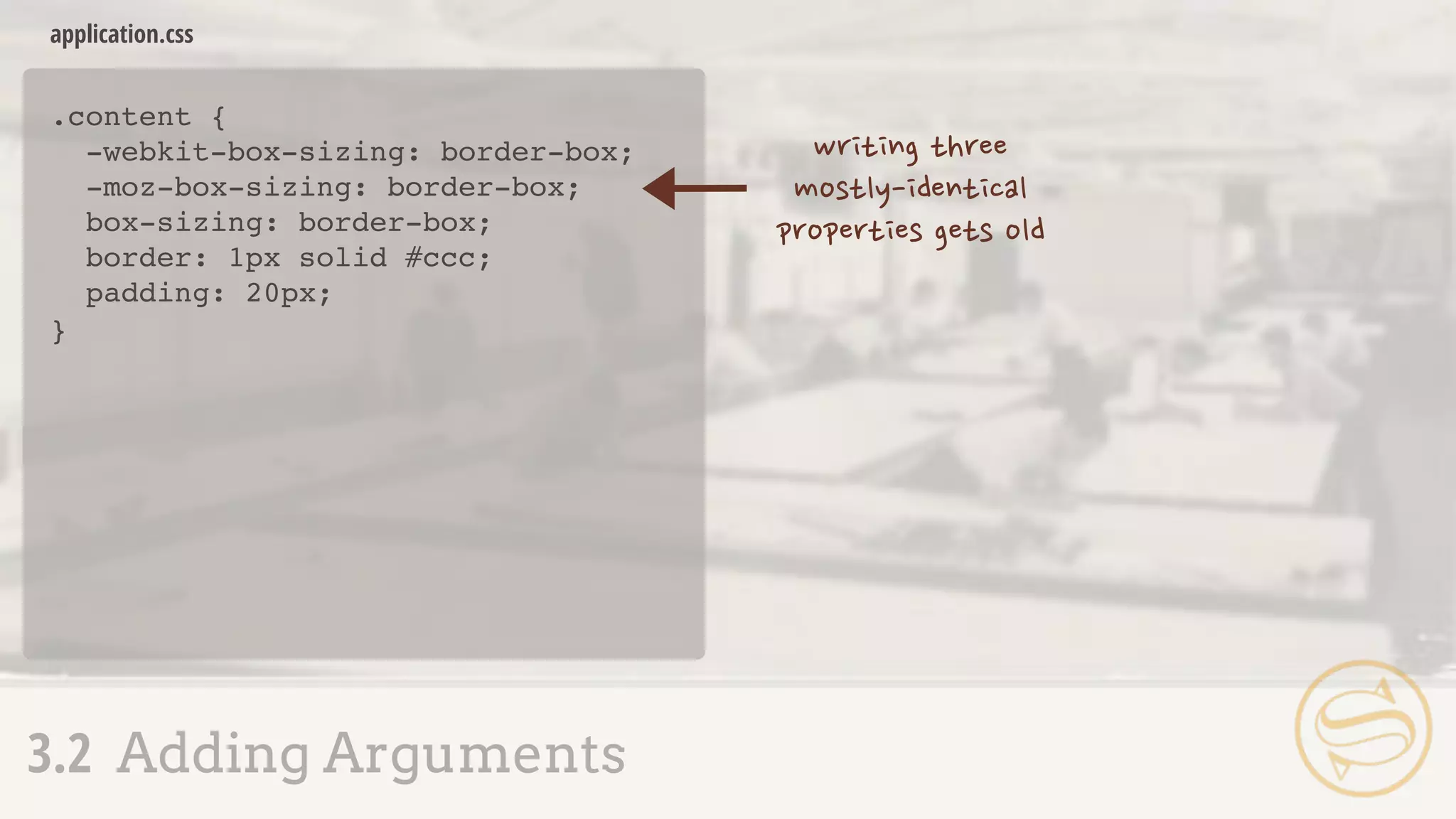
.content {
-webkit-box-sizing: border-box;
-moz-box-sizing: border-box;
box-sizing: border-box;
border: 1px solid #ccc;
padding: 20px;
}
application.css
3.2 Adding Arguments
.content {
-webkit-box-sizing: border-box;
-moz-box-sizing: border-box;
box-sizing: border-box;
border: 1px solid #ccc;
padding: 20px;
}
application.css
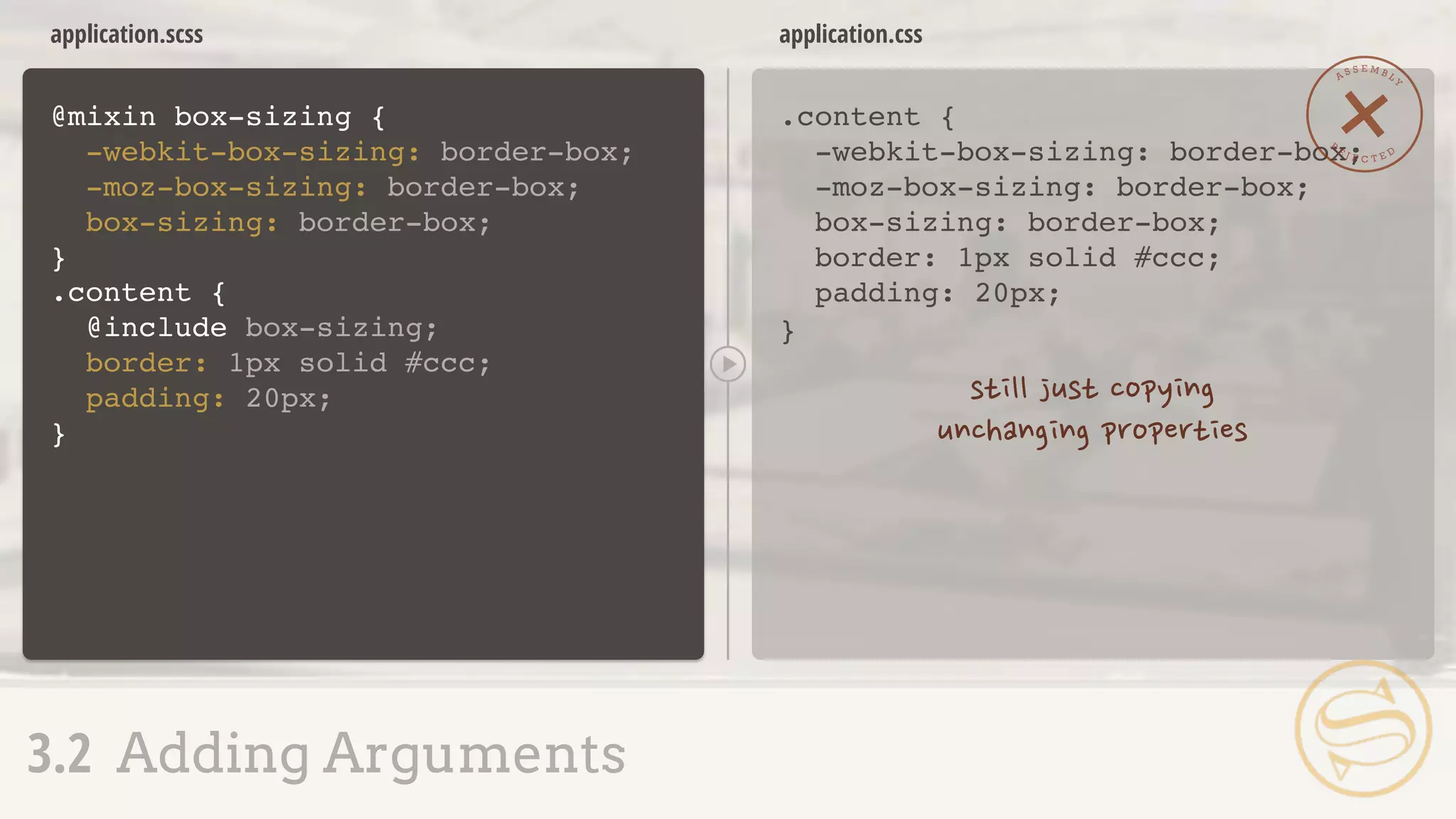
@mixin box-sizing {
-webkit-box-sizing: border-box;
-moz-box-sizing: border-box;
box-sizing: border-box;
}
application.scss
A S S E M B L Y
R
E J E C T E D
3.2 Adding Arguments
.content {
@include box-sizing;
border: 1px solid #ccc;
padding: 20px;
}
@mixin box-sizing {
-webkit-box-sizing:
-moz-box-sizing:
box-sizing:
}
application.scss
Arguments
Values passed into a mixin, potentially altering output:
3.2 Adding Arguments
($x)
$x;
$x;
$x;
application.scss
.content {
-webkit-box-sizing: border-box;
-moz-box-sizing: border-box;
box-sizing: border-box;
border: 1px solid #ccc;
padding: 20px;
}
application.css
3.2 Adding Arguments
.content {
@include box-sizing(border-box);
border: 1px solid #ccc;
padding: 20px;
}
@mixin box-sizing {
-webkit-box-sizing:
-moz-box-sizing:
box-sizing:
}
($x)
$x;
$x;
$x;
.callout {
@include box-sizing(content-box);
}
.callout {
-webkit-box-sizing: content-box;
-moz-box-sizing: content-box;
box-sizing: content-box;
}
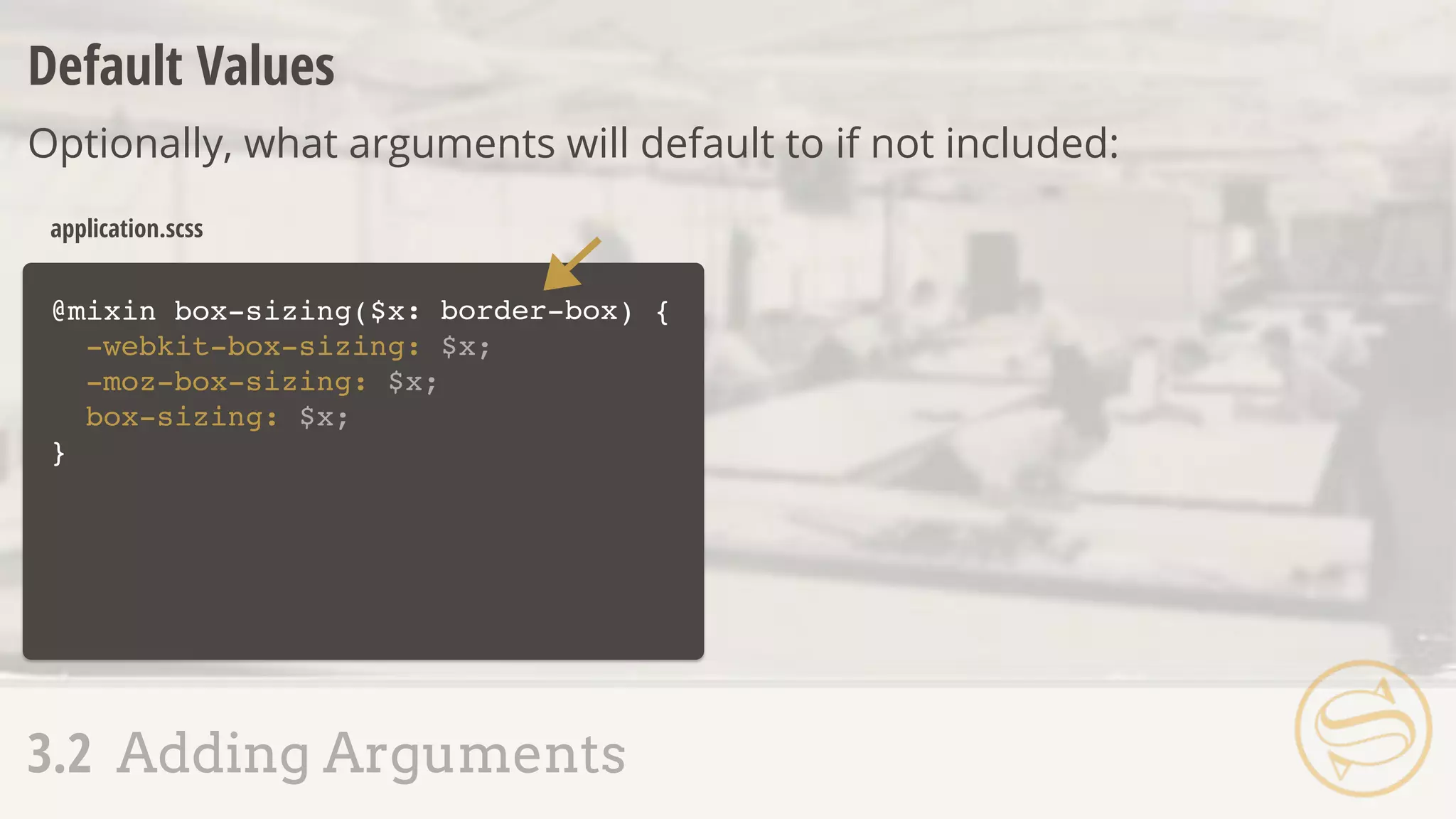
@mixin box-sizing($x ) {
-webkit-box-sizing: $x;
-moz-box-sizing: $x;
box-sizing: $x;
}
application.scss
Default Values
Optionally, what arguments will default to if not included:
3.2 Adding Arguments
: border-box
application.scss
.content {
-webkit-box-sizing: border-box;
-moz-box-sizing: border-box;
box-sizing: border-box;
border: 1px solid #ccc;
padding: 20px;
}
application.css
3.2 Adding Arguments
.content {
@include box-sizing;
border: 1px solid #ccc;
padding: 20px;
}
.callout {
@include box-sizing(content-box);
}
@mixin box-sizing($x ) {
-webkit-box-sizing: $x;
-moz-box-sizing: $x;
box-sizing: $x;
}
: border-box
.callout {
-webkit-box-sizing: content-box;
-moz-box-sizing: content-box;
box-sizing: content-box;
}
A
S S E M B L Y
A P P R O V
E
D
3.1 Mixin Setup + Use
3.2 Adding Arguments
3.3 Multiple Arguments
3.4 Variable Arguments
3.5 Interpolation + Mixins
@mixin button(
border-radius: $radius;
color: $color;
}
.btn-a {
@include button(
_buttons.scss
.btn-a {
border-radius: 4px;
color: #000;
}
application.css
3.3 Multiple Arguments
$radius, $color) {
4px, #000);
}
_buttons.scss
Syntax error: Mixin button is
missing argument $color.
application.css
3.3 Multiple Arguments
@mixin button(
border-radius: $radius;
color: $color;
}
.btn-a {
@include button(
$radius, $color) {
4px);
}
@mixin button(
border-radius: $radius;
color: $color;
}
.btn-a {
@include button(
_buttons.scss
.btn-a {
border-radius: 4px;
color: #000;
}
application.css
3.3 Multiple Arguments
$radius, $color ) {
4px);
}
: #000
_buttons.scss
Syntax error: Required argument
$color must come before any
optional arguments.
application.css
3.3 Multiple Arguments
@mixin button(
border-radius: $radius;
color: $color;
}
.btn-a {
@include button(
$color: #000, $radius) {
4px);
}
_buttons.scss
.btn-a {
border-radius: 5px;
color: #777777;
}
application.css
3.3 Multiple Arguments
@mixin button(
border-radius: $radius;
color: $color;
}
.btn-a {
@include button(
$radius, $color: #000) {
$color: #777777,
$radius: 5px);
}
.btn-a {
-webkit-transition: color 0.3s ease-in, background 0.5s ease-out;
-moz-transition: color 0.3s ease-in, background 0.5s ease-out;
transition: color 0.3s ease-in, background 0.5s ease-out;
}
application.css
3.4 Variable Arguments
@mixin transition(
-webkit-transition: $val;
-moz-transition: $val;
transition: $val;
}
Mixin transition takes 1
argument but 2 were passed.
_buttons.scss application.css
Passing valid, comma-separated CSS as a single value:
3.4 Variable Arguments
) {$val
.btn-a {
@include transition(color 0.3s
ease-in, background 0.5s ease-out);
}
.btn-a {
-webkit-transition: color 0.3s
ease-in, background 0.5s ease-out;
-moz-transition: color 0.3s
ease-in, background 0.5s ease-out;
transition: color 0.3s ease-in,
background 0.5s ease-out;
}
_buttons.scss application.css
Adding ... to an argument creates a variable argument (vararg):
3.4 Variable Arguments
@mixin transition(
-webkit-transition: $val;
-moz-transition: $val;
transition: $val;
}
) {$val...
.btn-a {
@include transition(color 0.3s
ease-in, background 0.5s ease-out);
}
@mixin button($radius, $color) {
border-radius: $radius;
color: $color;
}
.btn-a {
border-radius: 4px;
color: #000;
}
_buttons.scss application.css
Variable arguments in reverse:
3.4 Variable Arguments
$properties: 4px, #000;
.btn-a {
@include button($properties...);
}
@mixin
}
_buttons.scss
.btn-a {
border-right-color: #ff0;
}
application.css
3.5 Interpolation + Mixins
@mixin highlight-r($color) {
border-right-color: $color;
}
@mixin highlight-b($color) {
border-bottom-color: $color;
}
@mixin highlight-l($color) {
border-left-color: $color;
}
.btn-a {
@include highlight-r(#f00);
}
highlight-t($color) {
border-top-color: $color;
_buttons.scss
.btn-a {
border-right-color: #ff0;
}
application.css
3.5 Interpolation + Mixins
@mixin
}
highlight($color, $side) {
.btn-a {
@include highlight(#f00, right);
}
border-#{$side}-color: $color;
___ EXTEND
4.1 Extend Setup + Use
4.2 Nesting + Extend
4.3 Extend Pitfalls
4.4 Placeholder Selectors
.btn-a {
background: #777;
border: 1px solid #ccc;
font-size: 1em;
text-transform: uppercase;
}
.btn-b {
background: #ff0;
border: 1px solid #ccc;
font-size: 1em;
text-transform: uppercase;
}
application.css
4.1 Extend Setup + Use
.btn-a,
.btn-b {
background: #777;
border: 1px solid #ccc;
font-size: 1em;
text-transform: uppercase;
}
.btn-b {
background: #ff0;
}
application.css
application.css
.btn-a {
background: #777;
border: 1px solid #ccc;
font-size: 1em;
text-transform: uppercase;
}
_buttons.scss
Extend
Sass will track and automatically combine selectors for us:
4.1 Extend Setup + Use
.btn-a,
.btn-b {
background: #777;
border: 1px solid #ccc;
font-size: 1em;
text-transform: uppercase;
}
.btn-b {
background: #ff0;
}
.btn-b {
@extend .btn-a;
background: #ff0;
}
4.1 Extend Setup + Use
.btn-a,
.btn-b {
}
.btn-b {
}
...
...
.btn-b {
@extend .btn-a;
background: #ff0;
}
.content {
border: 1px solid #ccc;
padding: 20px;
h2 {
font-size: 3em;
margin: 20px 0;
}
}
application.scss
.content,
.callout {
application.css
4.2 Nesting + Extend
.callout {
@extend .content;
background: #ddd;
}
border: 1px solid #ccc;
padding: 20px;
}
.content h2,
.callout h2 {
font-size: 3em;
margin: 20px 0;
}
.callout {
background: #ddd;
}
.callout {
@extend .content;
background: #ddd;
}
4.2 Nesting + Extend
.content,
.callout {
...
}
.content h2,
.callout h2 {
...
}
.callout {
...
}
4.1 Extend Setup + Use
4.2 Nesting + Extend
4.3 Extend Pitfalls
4.4 Placeholder Selectors
.btn-a {
background: #777;
border: 1px solid #ccc;
font-size: 1em;
text-transform: uppercase;
}
.btn-b {
@extend .btn-a;
background: #ff0;
}
_buttons.scss
.btn-a,
.btn-b {
background: #777;
border: 1px solid #ccc;
font-size: 1em;
text-transform: uppercase;
}
.btn-b {
background: #ff0;
}
.sidebar .btn-a,
.sidebar .btn-b {
text-transform: lowercase;
}
application.css
4.3 Extend Pitfalls
A S S E M B L Y
R
E J E C T E D
.sidebar .btn-a {
text-transform: lowercase;
}
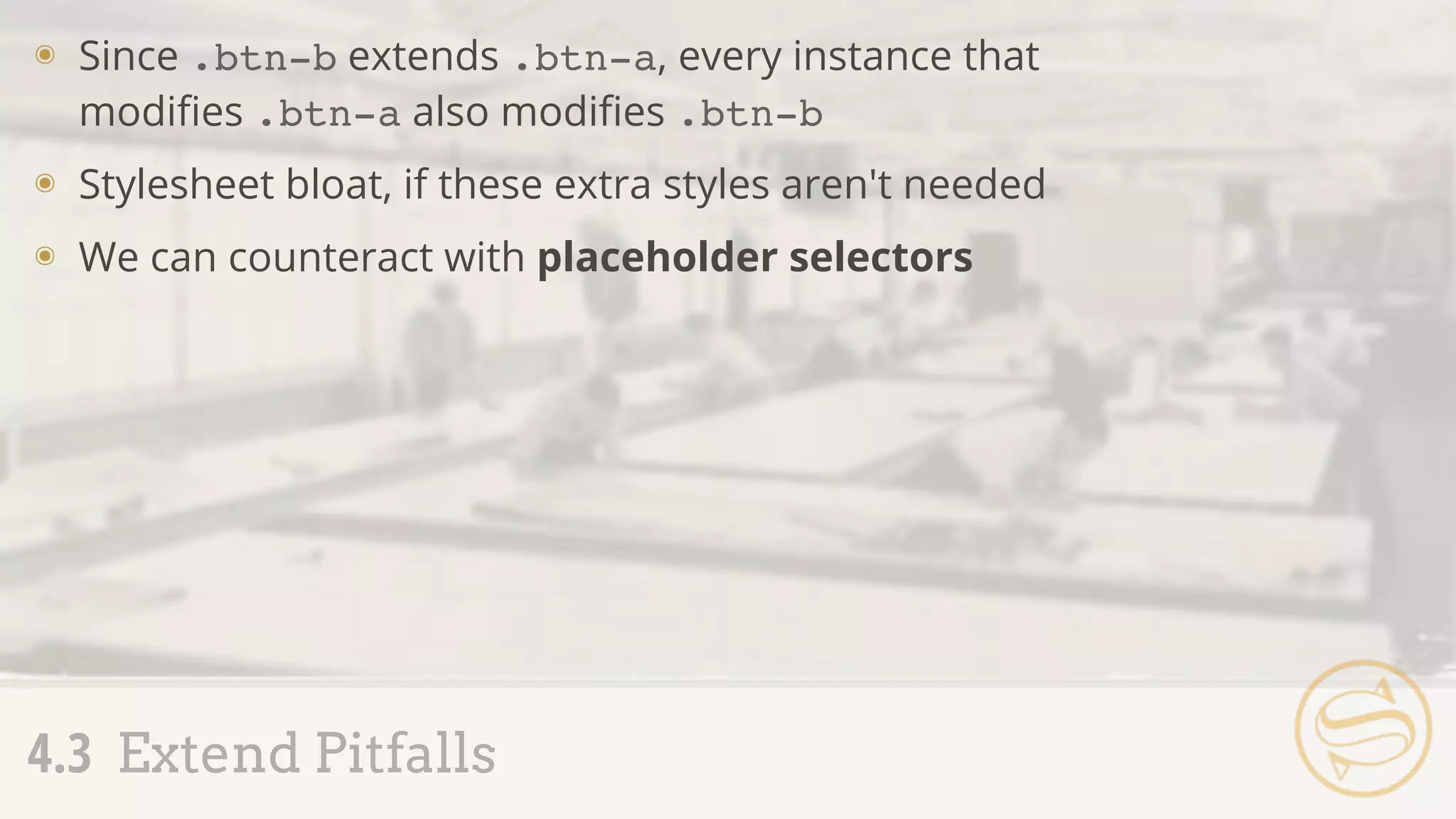
๏ Since .btn-b extends .btn-a, every instance that
modifies .btn-a also modifies .btn-b
๏ Stylesheet bloat, if these extra styles aren't needed
๏ We can counteract with placeholder selectors
4.3 Extend Pitfalls
Assembly Tip
Always, always check the CSS
output of your Sass before
using it on a live site.
๏ Placeholder selectors are denoted with a %
๏ Can be extended, but never become a selector of
their own
4.4 Placeholder Selectors
background: #777;
border: 1px solid #ccc;
font-size: 1em;
text-transform: uppercase;
}
_buttons.scss
.btn-a,
.btn-b {
background: #777;
border: 1px solid #ccc;
font-size: 1em;
text-transform: uppercase;
}
.btn-b {
background: #ff0;
}
.sidebar .btn-a,
.sidebar .btn-b {
text-transform: lowercase;
}
application.css
4.4 Placeholder Selectors
.sidebar .btn-a {
text-transform: lowercase;
}
.btn-b {
background: #ff0;
}
.btn-a {
@extend .btn-a;
_buttons.scss
.btn-a,
.btn-b {
background: #777;
border: 1px solid #ccc;
font-size: 1em;
text-transform: uppercase;
}
.btn-b {
background: #ff0;
}
application.css
4.4 Placeholder Selectors
background: #777;
border: 1px solid #ccc;
font-size: 1em;
text-transform: uppercase;
}
.sidebar .btn-a {
text-transform: lowercase;
}
.btn-a {
@extend %btn;
}
%btn {
.sidebar .btn-a {
text-transform: lowercase;
}
.btn-b {
background: #ff0;
}
@extend %btn;
A
S S E M B L Y
A P P R O V
E
D
%ir {
border: 0;
font: 0/0 a;
text-shadow: none;
color: transparent;
background-color: transparent;
}
.logo,
.social {
border: 0;
font: 0/0 a;
text-shadow: none;
color: transparent;
background-color: transparent;
}
application.scss application.css
Extend common blocks to avoid extra HTML classes:
4.4 Placeholder Selectors
.logo {
@extend %ir;
}
.social {
@extend %ir;
}
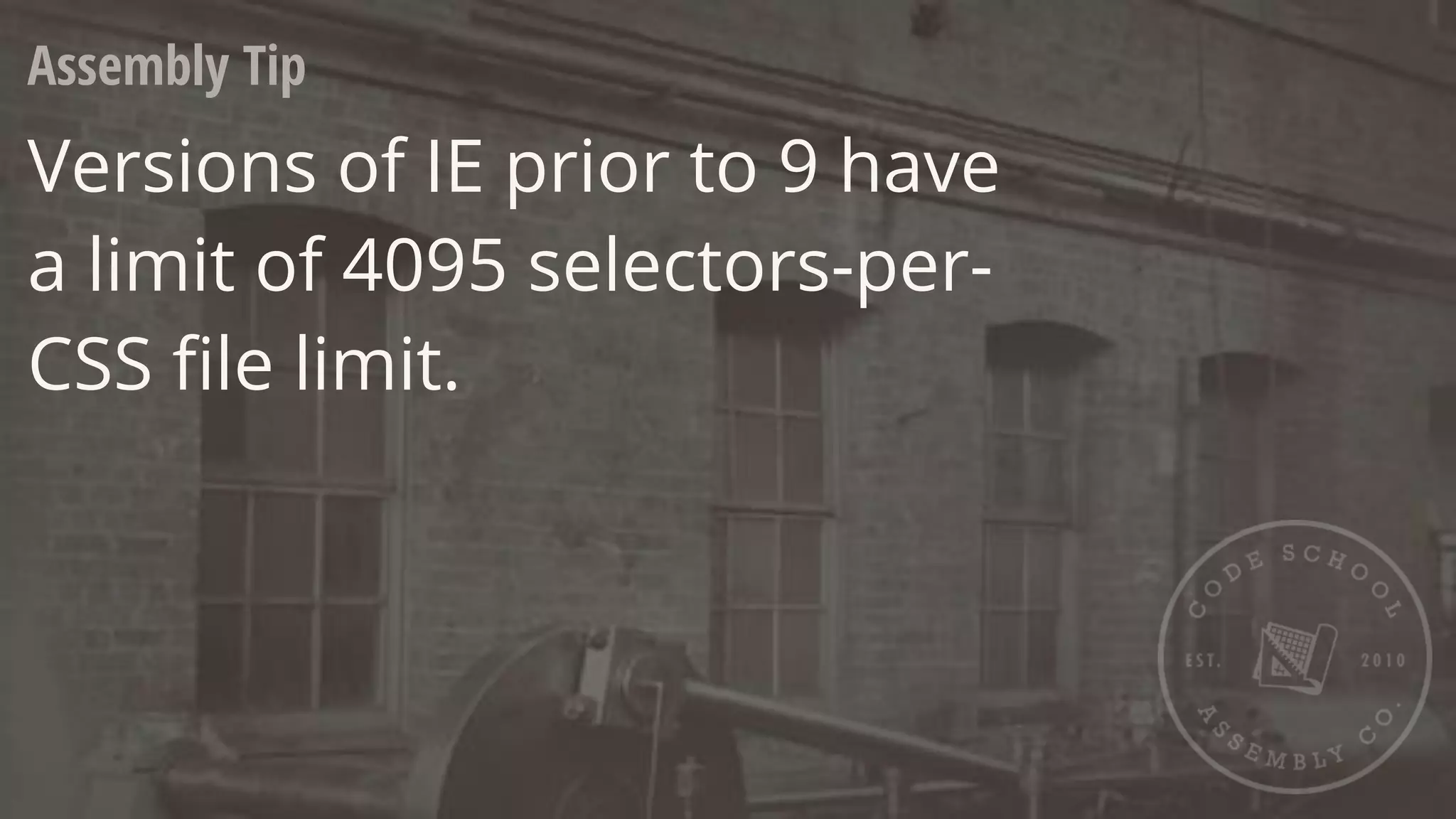
Assembly Tip
Versions of IE prior to 9 have
a limit of 4095 selectors-per-
CSS file limit.
___ DIRECTIVE
5.1 Functions
5.2 If
5.3 Each
5.4 For + While
5.5 Mixin' In
5.1 Functions
Responsive Refresher
๏ Straight from Journey Into Mobile:
๏ If the target size of our sidebar is 350px and the
context of its parent is 1000px:
350px / 1000px = 0.35
0.35 * 100 = 35%
target / context
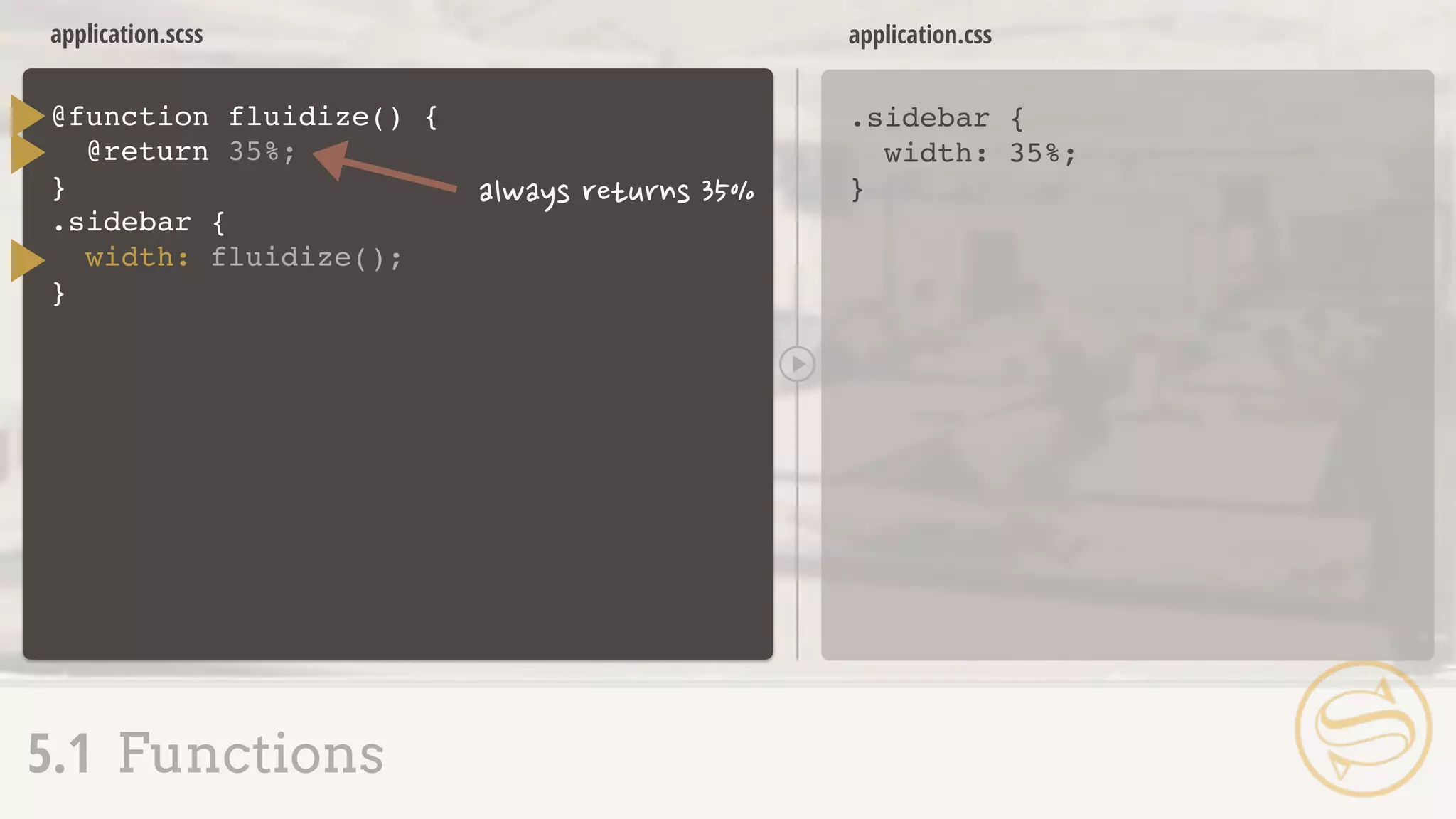
@function fluidize(
}
application.scss
.sidebar {
width: 35%;
}
application.css
5.1 Functions
) {
@return
.sidebar {
width: fluidize(
}
);
35%;
application.scss
.sidebar {
width: 35%;
}
application.css
5.1 Functions
@function fluidize(
}
) {
@return
.sidebar {
width: fluidize(
}
);350px, 1000px
($target / $context) * 100%;
$target, $context
5.1 Functions
๏ More on responsive design + Sass later, including a
built-in fluidize replacement
๏ Function arguments = same rules as mixin arguments
$theme: dark;
header {
header {
background: #000;
}
application.scss application.css
Using @if, we can conditionally output code:
5.2 If
@if $theme == dark {
background: #000;
}
}
Comparisons
๏ == equal to
๏ != not equal to
๏ > greater than *
๏ >= greater than or equal to *
๏ < less than *
๏ <= less than or equal to *
5.2 If
* numbers only
$theme: light;
header {
application.scss
5.2 If
@if $theme == dark {
background: #000;
}
}
application.scss
header {
background: #fff;
}
application.css
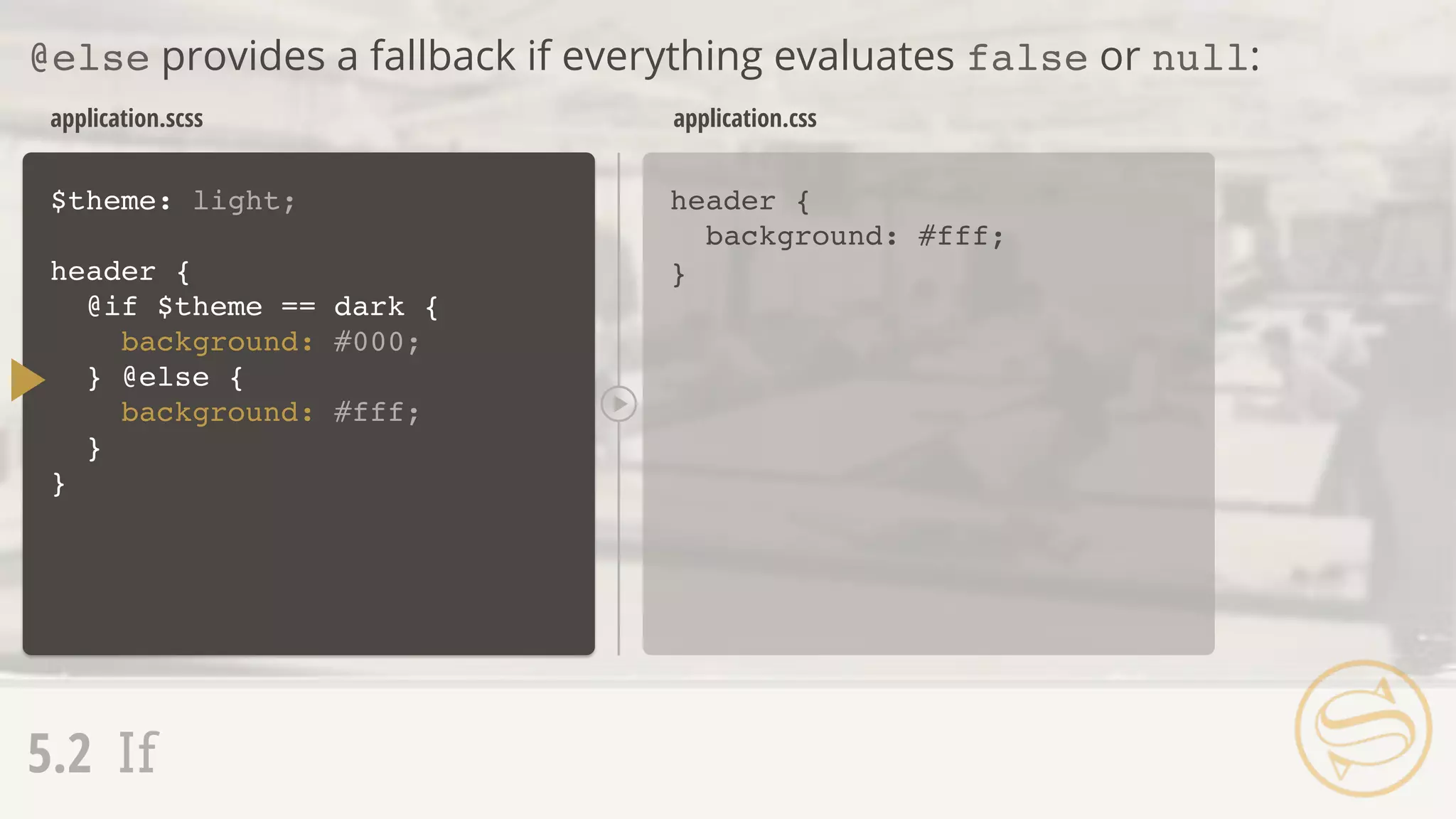
@else provides a fallback if everything evaluates false or null:
5.2 If
$theme: light;
header {
@if $theme == dark {
background: #000;
}
}
} @else {
background: #fff;
application.scss
header {
background: pink;
}
application.css
@else if allows for multiple comparisons:
5.2 If
$theme: pink;
header {
@if $theme == dark {
background: #000;
}
}
} @else {
background: #fff;
} @else if $theme == pink {
background: pink;
5.1 Functions
5.2 If
5.3 Each
5.4 For + While
5.5 Mixin' In
5.3 Each
Interating Over a List
๏ The @each directive allows us to loop through each
list item:
$authors: nick aimee dan drew;
@each $author in $authors {
}
application.scss
.author-nick {
background: url(author-nick.jpg);
}
.author-aimee {
background: url(author-aimee.jpg);
}
.author-dan {
background: url(author-dan.jpg);
}
.author-drew {
background: url(author-drew.jpg);
}
application.css
5.3 Each
1: nick
2: aimee
3: dan
4: drew
$author
background: url(author-
#{$author}.jpg);
.author-#{$author} {
}
.item {
position: absolute;
right: 0;
@for $i from 1 through 3 {
}
}
application.scss
.item {
position: absolute;
right: 0;
}
.item.item-1 {
top: 30px;
}
.item.item-2 {
top: 60px;
}
.item.item-3 {
top: 90px;
}
application.css
5.4 For + While
1: 1
2: 2
3: 3
$i
top: $i * 30px;
&.item-#{$i} {
}
5.4 For + While
๏ @for and @while = @each with more control
๏ @while requires manually updating the index
$i: 1;
application.scss
.item {
position: absolute;
right: 0;
}
.item.item-1 {
top: 30px;
}
.item.item-2 {
top: 60px;
}
.item.item-3 {
top: 90px;
}
application.css
5.4 For + While
1: 1
2: 2
3: 3
4: 4
$i
.item {
position: absolute;
right: 0;
}
@while $i < 4 {
}
&.item-#{$i} {
top: $i * 30px;
}
$i: $i + 1;
application.scss
.item {
position: absolute;
right: 0;
}
.item.item-2 {
top: 60px;
}
.item.item-4 {
top: 120px;
}
.item.item-6 {
top: 180px;
}
application.css
5.4 For + While
$i: 2;
.item {
position: absolute;
right: 0;
}
@while $i <= 6 {
}
&.item-#{$i} {
top: $i * 30px;
}
$i: $i + 2; 1: 2
2: 4
3: 6
4: 8
$i
5.1 Functions
5.2 If
5.3 Each
5.4 For + While
5.5 Mixin' In
Mixins Extend Functions
๏ Similar sets of
properties used
multiple times with
small variations
๏ Sets of properties
that match exactly
๏ Commonly-used
operations to
determine values
5.5 Mixin' In
@mixin button($color, $rounded:
color: $color;
}
_buttons.scss
.btn-a {
color: black;
}
application.css
5.5 Mixin' In
.btn-a {
@include button(#000, false);
}
.btn-b {
@include button(#333);
}
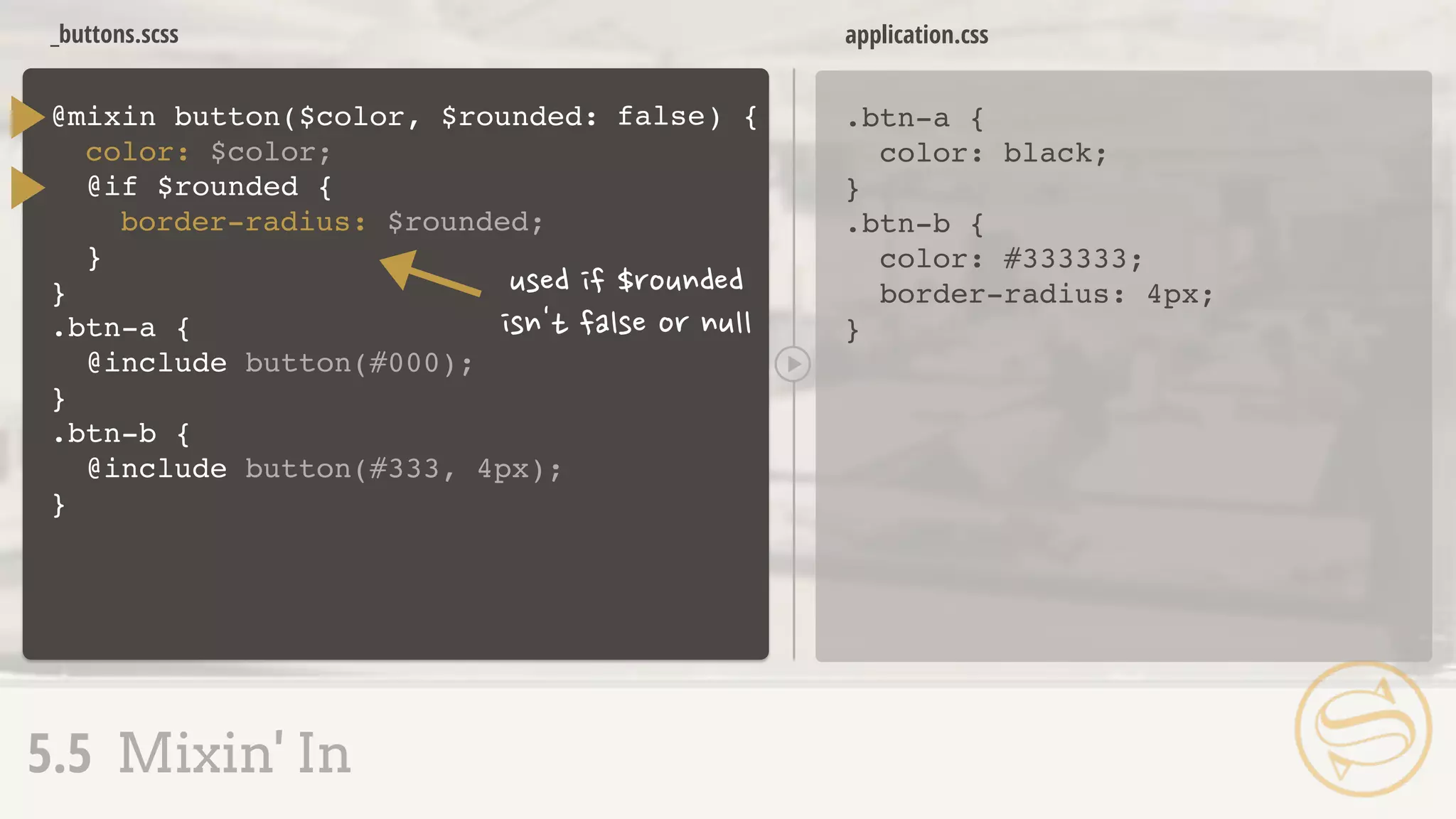
) {true
@if $rounded
}
{== true
border-radius: 4px; .btn-b {
color: #333333;
border-radius: 4px;
}
_buttons.scss
.btn-a {
color: black;
}
application.css
5.5 Mixin' In
@mixin button($color, $rounded:
color: $color;
}
.btn-a {
@include button(#000);
}
.btn-b {
@include button(#333, 4px);
}
) {false
@if $rounded
}
{
border-radius: $rounded; .btn-b {
color: #333333;
border-radius: 4px;
}
___ MATH + COLOR
6.1 Basic Arithmetic
6.2 Differing Units
6.3 Math Functions
6.4 Math + Color
6.5 Color Shortcuts
6.6 Color Functions
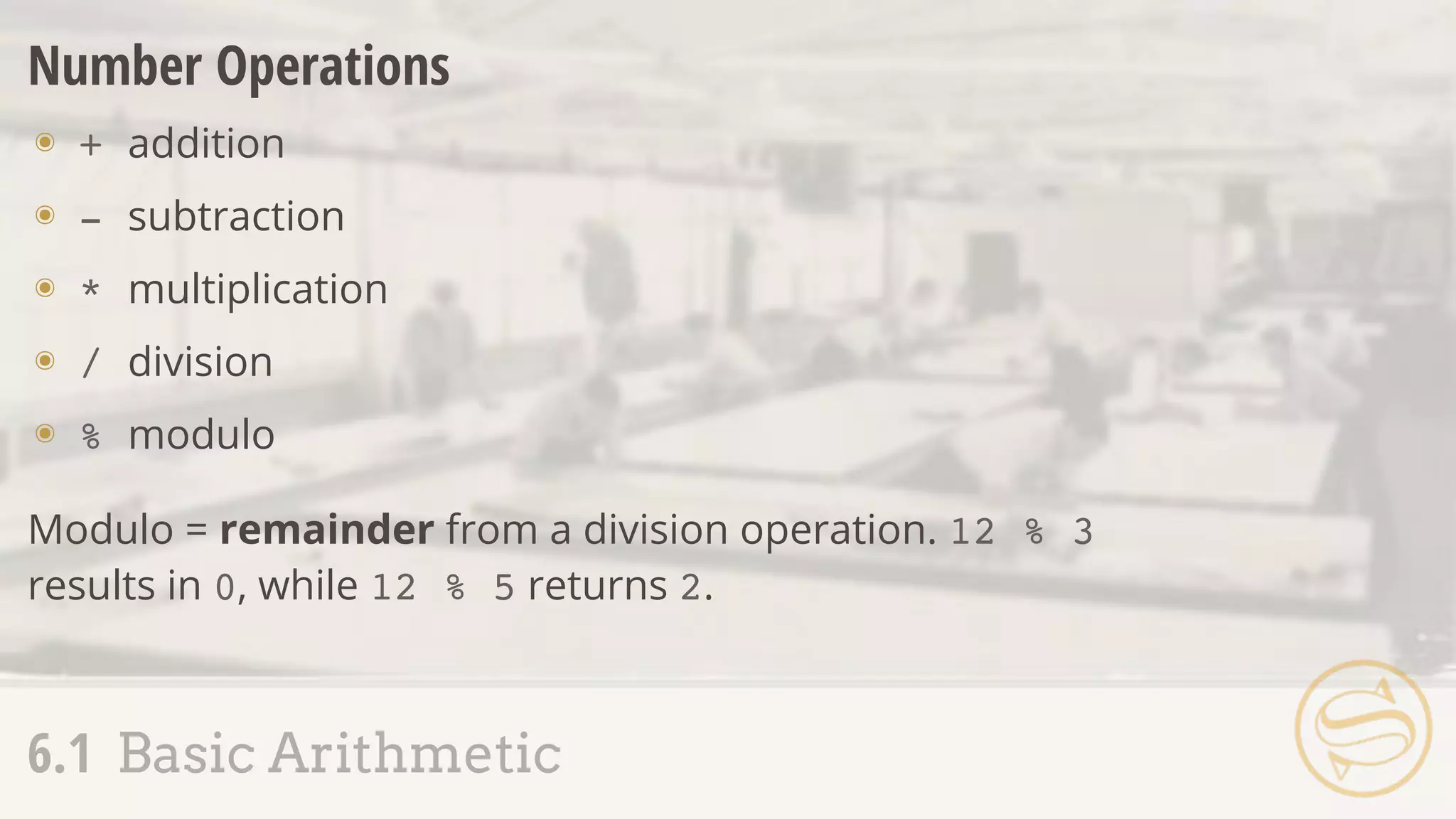
Number Operations
๏ + addition
๏ - subtraction
๏ * multiplication
๏ / division
๏ % modulo
6.1 Basic Arithmetic
Modulo = remainder from a division operation. 12 % 3
results in 0, while 12 % 5 returns 2.
Assembly Tip
Sass defaults to returning
(up to) five digits after a
decimal point.
Division
๏ The trickiest of the number operations, due to font:
font: normal 2em/1.5 Helvetica, sans-serif;
6.1 Basic Arithmetic
Triggering Division
๏ Variable involved - $size / 10
๏ Parenthesis - (100px / 20)
๏ Another arithmetic operation - 20px * 5 / 2
6.1 Basic Arithmetic
$family: "Helvetica " + "Neue"; // "Helvetica Neue"
String Addition
Addition on strings concatenates them:
6.1 Basic Arithmetic
$family: 'sans-' + serif // 'sans-serif'
$family: sans- + 'serif' // sans-serif
Initial left-side string determines post-concatenation quotes:
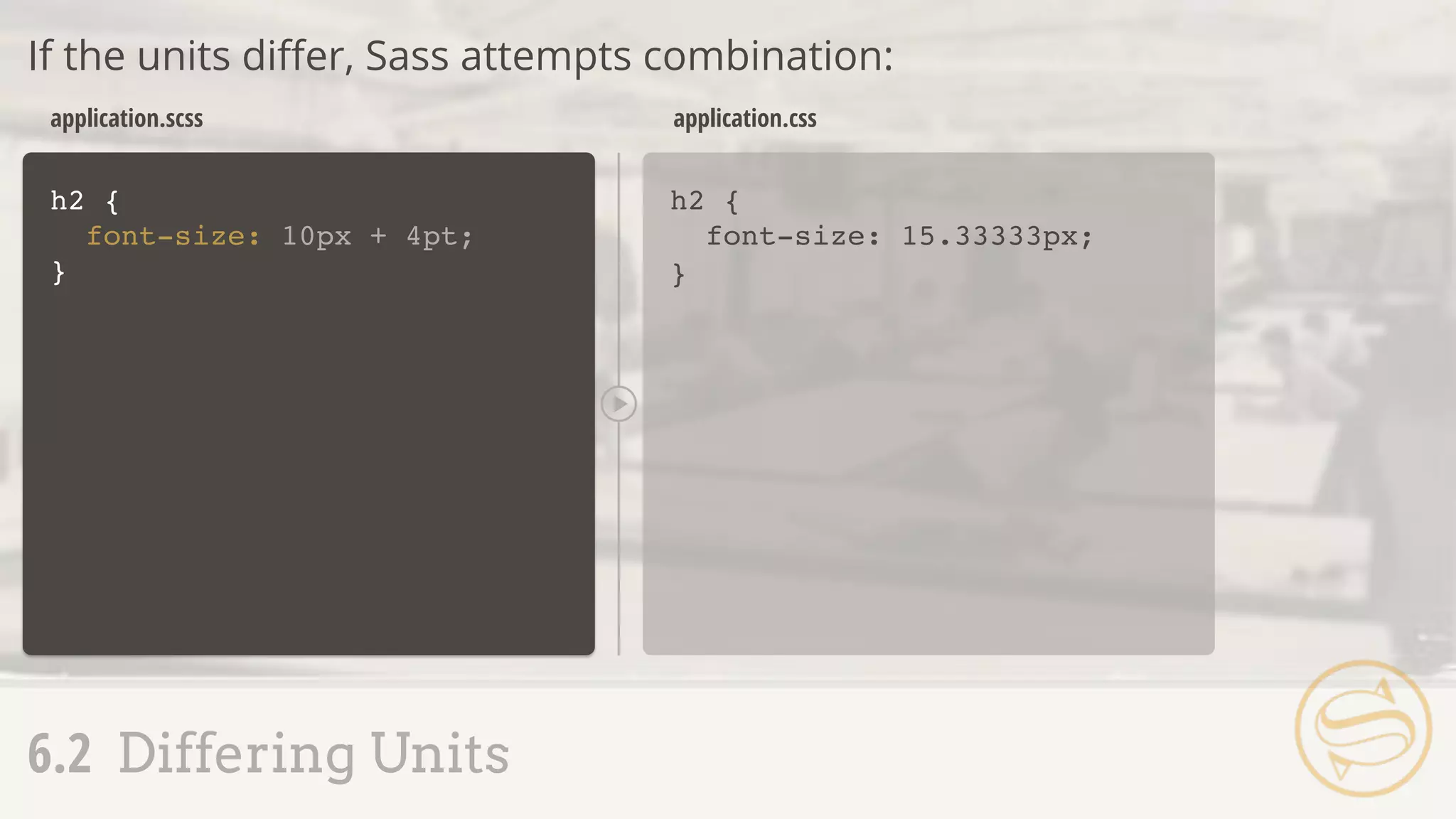
h2 {
font-size: 10px + 4pt;
}
h2 {
font-size: 15.33333px;
}
application.scss application.css
If the units differ, Sass attempts combination:
6.2 Differing Units
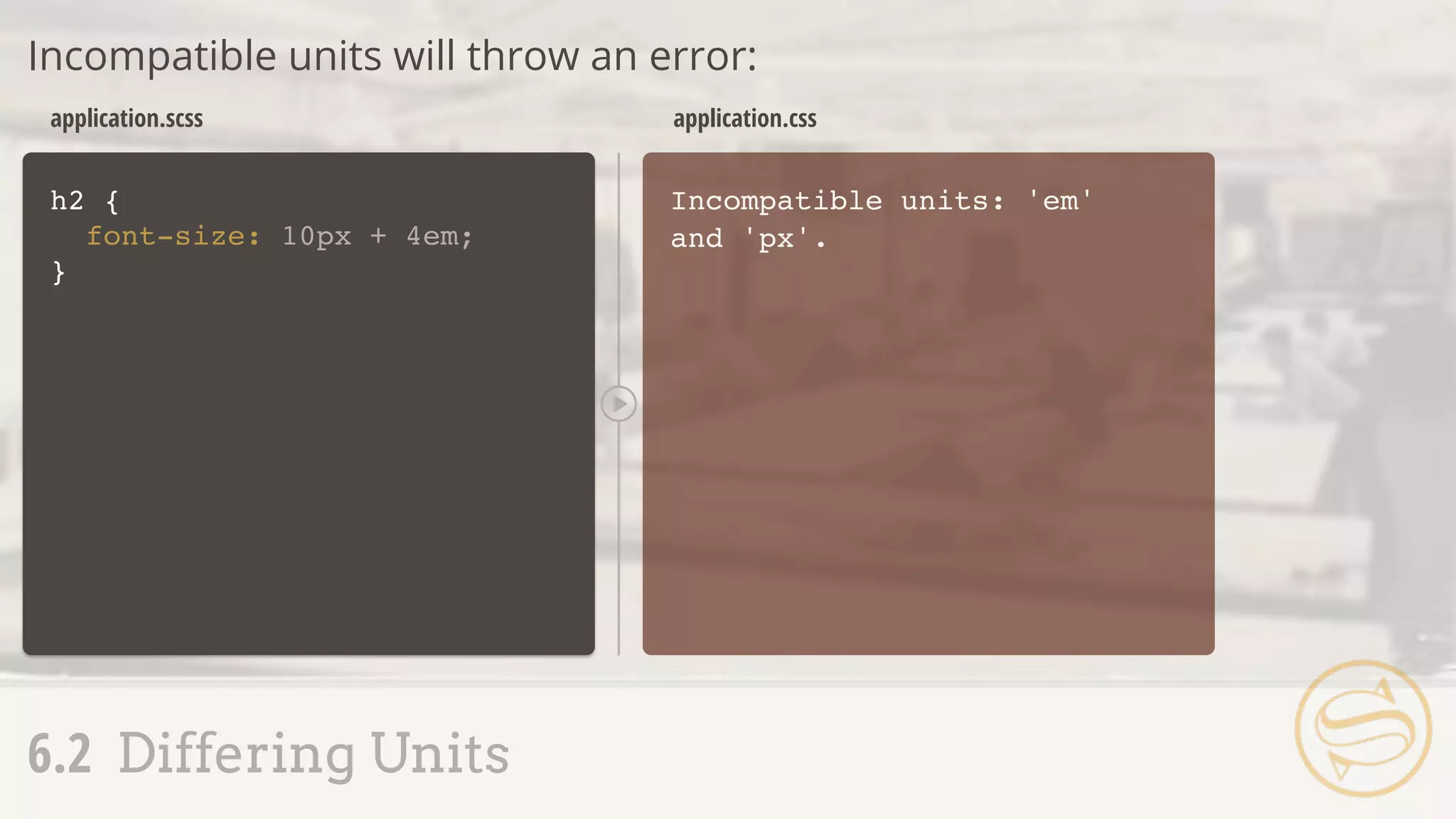
h2 {
font-size: 10px + 4em;
}
Incompatible units: 'em'
and 'px'.
application.scss application.css
Incompatible units will throw an error:
6.2 Differing Units
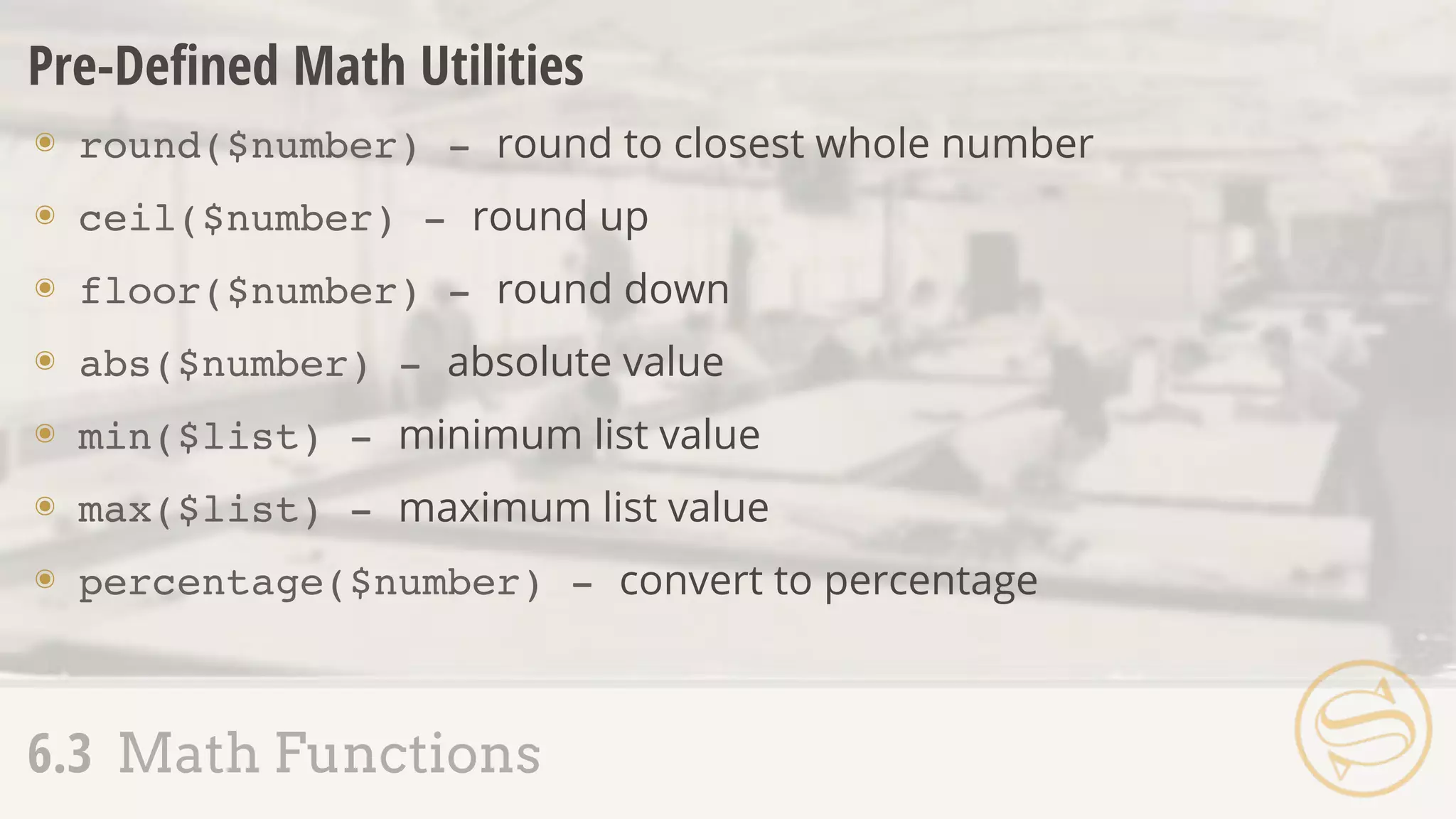
Pre-Defined Math Utilities
๏ round($number) - round to closest whole number
๏ ceil($number) - round up
๏ floor($number) - round down
๏ abs($number) - absolute value
๏ min($list) - minimum list value
๏ max($list) - maximum list value
๏ percentage($number) - convert to percentage
6.3 Math Functions
h2 {
line-height: ceil(1.2);
}
h2 {
line-height: 2;
}
application.scss application.css
Called the same way as custom functions:
6.3 Math Functions
.sidebar {
width: percentage(350px/1000px);
}
.sidebar {
width: 35%;
}
application.scss application.css
percentage() replaces our custom fluidize():
6.3 Math Functions
$context: 1000px;
.sidebar {
width: percentage(450px/$context);
}
.sidebar {
width: 45%;
}
application.scss application.css
percentage() replaces our custom fluidize():
6.3 Math Functions
6.1 Basic Arithmetic
6.2 Differing Units
6.3 Math Functions
6.4 Math + Color
6.5 Color Shortcuts
6.6 Color Functions
Color Juggling
๏ Easier recall through variables
๏ Simplified alteration via color utility functions
๏ Faster representation using shorthand
6.4 Math + Color
$color-base: #333333;
.addition {
background: $color-base + #112233;
}
application.scss
.addition {
background: #445566;
}
application.css
6.4 Math + Color
.subtraction {
background: $color-base - #112233;
}
.multiplication {
background: $color-base * 2;
}
.division {
background: $color-base / 2;
}
.subtraction {
background: #221100;
}
.multiplication {
background: #666666;
}
.division {
background: #191919;
}
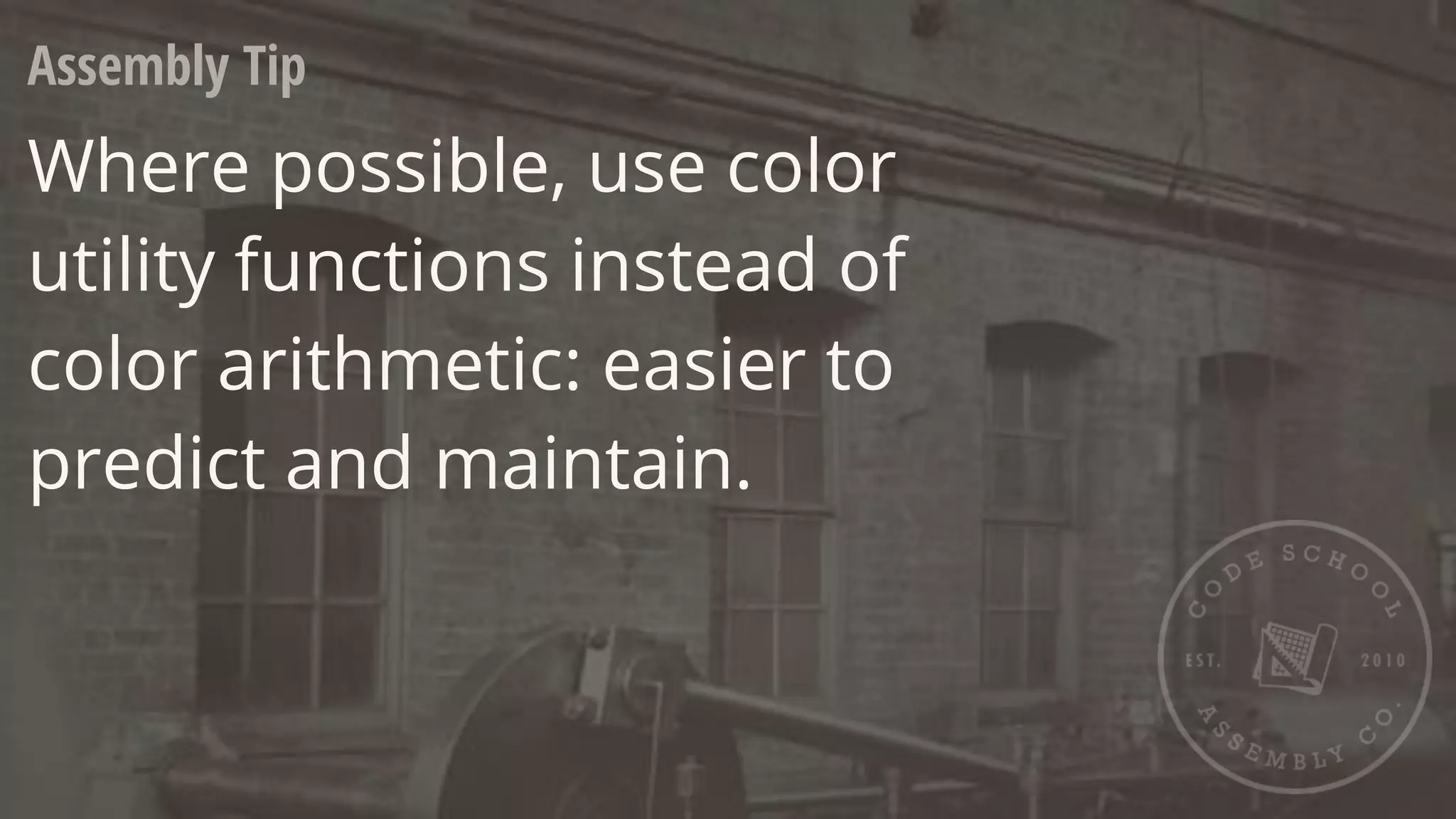
Assembly Tip
Where possible, use color
utility functions instead of
color arithmetic: easier to
predict and maintain.
$color: #333333;
.alpha {
background: rgba(51,51,51,0.8);
}
application.scss
.alpha {
background: rgba(51,51,51,0.8);
}
application.css
6.5 Color Shortcuts
A S S E M B L Y
R
E J E C T E D
$color: #333333;
.alpha {
}
application.scss
.alpha {
background: rgba(51,51,51,0.8);
}
application.css
6.5 Color Shortcuts
background: rgba($color,0.8);
.beta {
background: rgba(#000,0.8);
}
.beta {
background: rgba(0,0,0,0.8);
}
A
S S E M B L Y
A P P R O V
E
D
6.1 Basic Arithmetic
6.2 Differing Units
6.3 Math Functions
6.4 Math + Color
6.5 Color Shortcuts
6.6 Color Functions
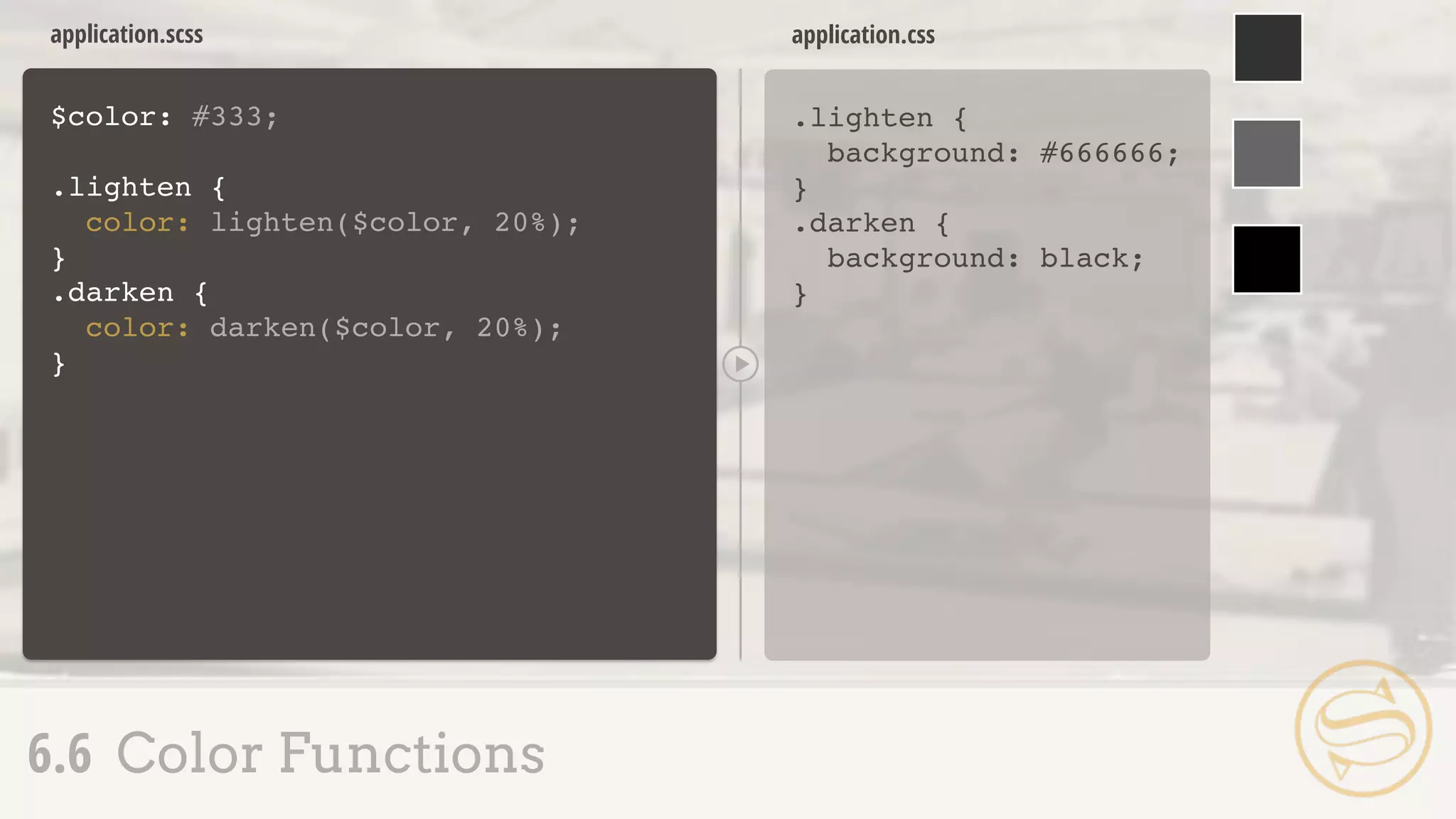
6.6 Color Functions
Color utility functions:
workflow-altering convenience
$color: #333;
.lighten {
color: lighten($color, 20%);
}
application.scss
.lighten {
background: #666666;
}
application.css
6.6 Color Functions
.darken {
color: darken($color, 20%);
}
.darken {
background: black;
}
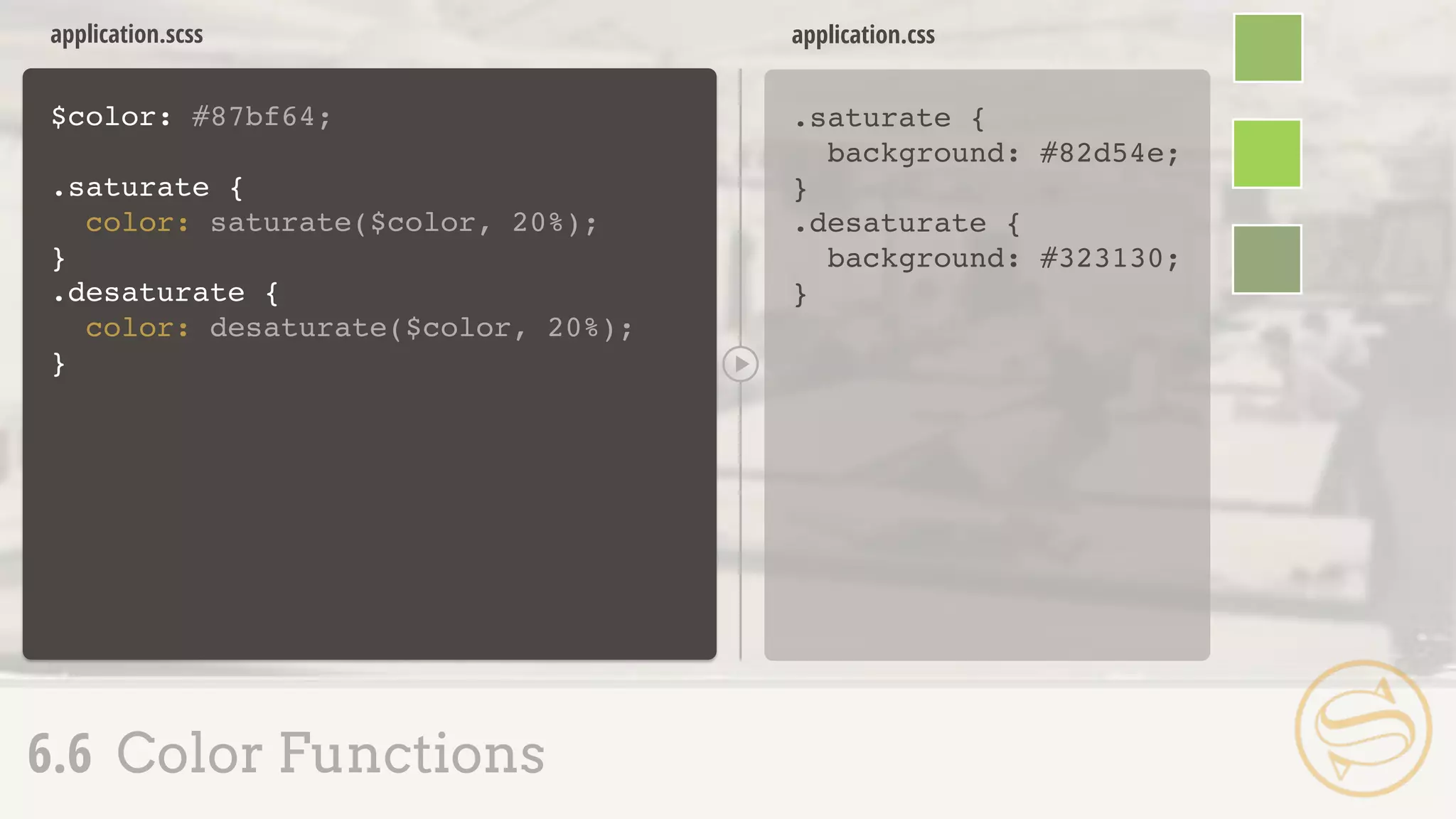
$color: #87bf64;
.saturate {
color: saturate($color, 20%);
}
application.scss
.saturate {
background: #82d54e;
}
application.css
6.6 Color Functions
.desaturate {
color: desaturate($color, 20%);
}
.desaturate {
background: #323130;
}
.mix-a {
color: mix(#ffff00, #107fc9);
}
application.scss
.mix-a {
background: #87bf64;
}
application.css
6.6 Color Functions
+
.mix-b {
color: mix(#ffff00, #107fc9, 30%);
}
.mix-b {
background: #57a58c;
}
$color: #87bf64;
.grayscale {
color: grayscale($color);
}
application.scss
.grayscale {
color: #929292;
}
application.css
6.6 Color Functions
.invert {
color: invert($color);
}
.complement {
color: complement($color);
}
.invert {
color: #78409b;
}
.complement {
color: #9c64bf;
}
Assembly Tip
But wait, there's more!
http://sass-lang.com/docs/yardoc/Sass/Script/Functions.html
___ RESPONSIVE
7.1 The Movement
7.2 Nested Media Queries
7.3 Respond-To
7.4 Responsive Pitfalls
7.1 The Movement
Responsive design rapidly
progressed beyond good idea
and into common practice
Media Queries
๏ Easier fluid calculation and media query handling
๏ Journey Into Mobile
7.1 The Movement
.sidebar {
border: 1px solid #ccc;
}
@media (min-width: 700px) {
.sidebar {
float: right;
width: 30%;
}
}
application.css
Media Queries
Basic construction:
7.1 The Movement
.sidebar {
border: 1px solid #ccc;
}
@media (min-width: 700px) {
.sidebar {
float: right;
width: 30%;
}
}
application.css
7.2 Nested Media Queries
.sidebar {
border: 1px solid #ccc;
}
@media (min-width: 700px) {
.sidebar {
float: right;
width: 30%;
}
}
application.css
.sidebar {
border: 1px solid #ccc;
}
application.scss
7.2 Nested Media Queries
@media (min-width: 700px) {
float: right;
width: 30%;
}
A
S S E M B L Y
A P P R O V
E
D
7.1 The Movement
7.2 Nested Media Queries
7.3 Respond-To
7.4 Responsive Pitfalls
7.3 Respond-To
๏ @content - pass a block of
properties to a mixin
.sidebar {
border: 1px solid #ccc;
application.scss
.sidebar {
border: 1px solid #ccc;
}
@media (min-width: 700px) {
.sidebar {
float: right;
width: 30%;
}
}
application.css
7.3 Respond-To
}
}
float: right;
width: 30%;
@media (min-width: 700px) {
@mixin respond-to
application.scss
.sidebar {
border: 1px solid #ccc;
}
@media (min-width: 700px) {
.sidebar {
float: right;
width: 30%;
}
}
application.css
7.3 Respond-To
A S S E M B L Y
R
E J E C T E D
.sidebar {
border: 1px solid #ccc;
}
}
float: right;
width: 30%;
@include respond-to {
{
@media (min-width: 700px) {
@content
}
}
@mixin respond-to
application.scss
.sidebar {
border: 1px solid #ccc;
}
@media (min-width: 700px) {
.sidebar {
float: right;
width: 30%;
}
}
application.css
7.3 Respond-To
.sidebar {
border: 1px solid #ccc;
}
}
float: right;
width: 30%;
@include respond-to {
{
@media (min-width: 700px) {
@content
}
}
application.scss
.sidebar {
border: 1px solid #ccc;
}
@media (min-width: 700px) {
.sidebar {
float: right;
width: 30%;
}
}
application.css
7.3 Respond-To
@mixin respond-to
.sidebar {
border: 1px solid #ccc;
}
}
float: right;
width: 30%;
@include respond-to {
@if $media == tablet {
}
{
@media (min-width: 700px) {
@content
}
}
(tablet)
($media)
application.scss
.sidebar {
border: 1px solid #ccc;
}
@media (min-width: 900px) {
.sidebar {
float: right;
width: 30%;
}
}
application.css
7.3 Respond-To
@mixin respond-to
.sidebar {
border: 1px solid #ccc;
}
}
float: right;
width: 30%;
@include respond-to {
{
@media (min-width: $query) {
@content
}
}
(900px)
($query)
application.scss
.sidebar {
border: 1px solid #ccc;
}
@media (max-width: 600px) {
.sidebar {
float: right;
width: 30%;
}
}
application.css
7.3 Respond-To
@mixin respond-to
float: right;
width: 30%;
.sidebar {
border: 1px solid #ccc;
}
}
@include respond-to
{
{
@media ($val: $query) {
@content
}
}
(max-width,
600px)
($val, $query)
A
S S E M B L Y
A P P R O V
E
D
7.1 The Movement
7.2 Nested Media Queries
7.3 Respond-To
7.4 Responsive Pitfalls
.sidebar {
border: 1px solid #ccc;
}
.callout {
@media (min-width: 700px) {
@extend .sidebar;
width: 35%;
}
}
application.scss
Declarations outside @media cannot be extended inside:
7.4 Responsive Pitfalls
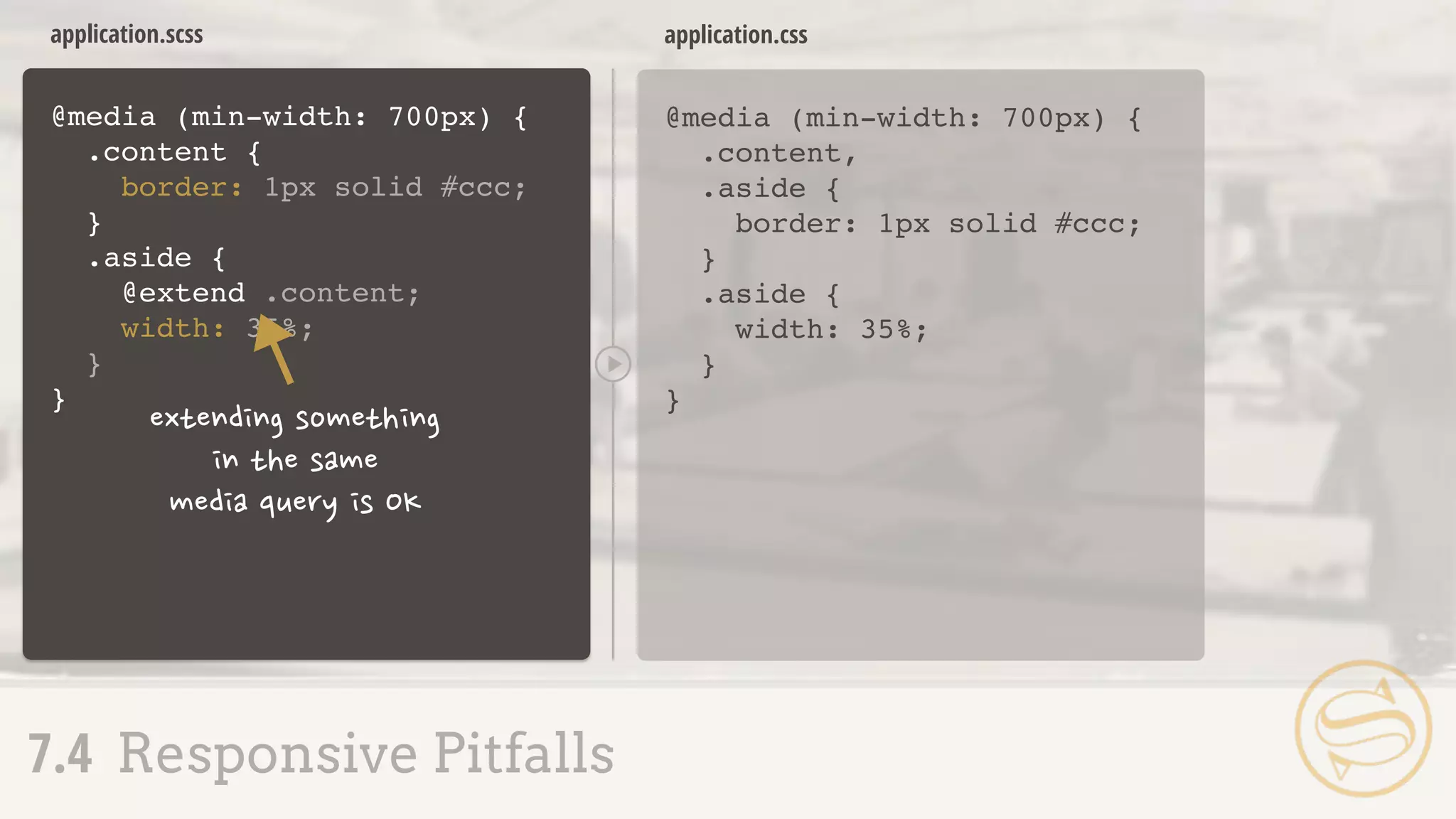
@media (min-width: 700px) {
.content {
border: 1px solid #ccc;
}
.aside {
@extend .content;
width: 35%;
}
}
application.scss
@media (min-width: 700px) {
.content,
.aside {
border: 1px solid #ccc;
}
.aside {
width: 35%;
}
}
application.css
7.4 Responsive Pitfalls
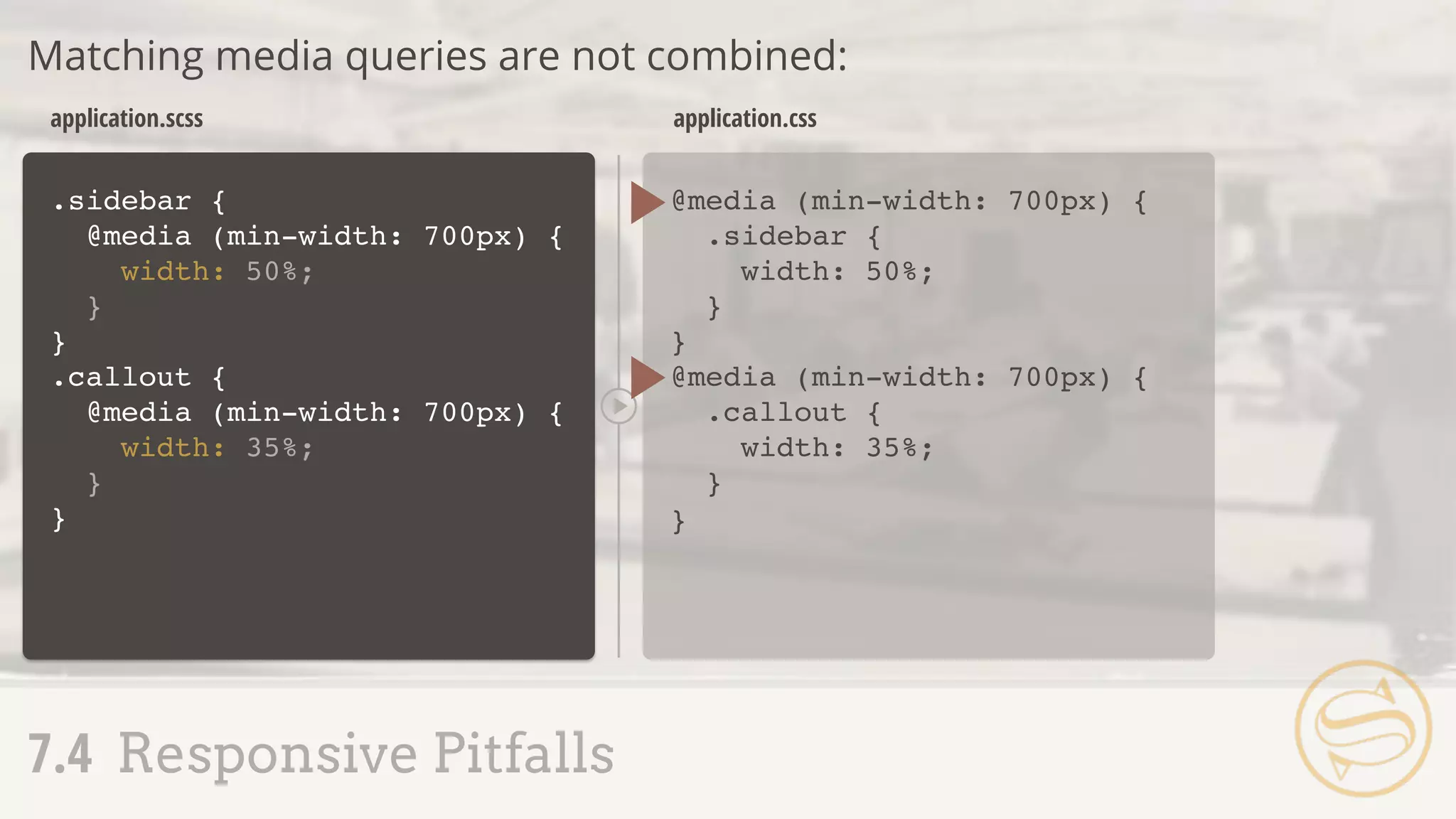
.sidebar {
@media (min-width: 700px) {
width: 50%;
}
}
.callout {
@media (min-width: 700px) {
width: 35%;
}
}
@media (min-width: 700px) {
.sidebar {
width: 50%;
}
}
@media (min-width: 700px) {
.callout {
width: 35%;
}
}
application.scss application.css
Matching media queries are not combined:
7.4 Responsive Pitfalls
Sometimes, manual combination is best:
7.4 Responsive Pitfalls
@media (min-width: 700px) {
.sidebar {
width: 50%;
}
.callout {
width: 35%;
}
}
application.css
Assembling Sass

Assembling Sass

  • 2.
  • 3.
    1.1 Sass,Not SASS 1.2SCSS: Sassy CSS 1.3 Commenting 1.4 Importing 1.5 Nesting Selectors 1.6 The Parent Selector 1.7 Nesting Pitfalls
  • 4.
    1.1 Sass,Not SASS CSSis crafted to be simple, but scaling simplicity is difficult.
  • 5.
    1.1 Sass,Not SASS AtScale ๏ Slight variations of colors, fonts, numbers, & other properties arise ๏ Effective curbing of repetition can decline ๏ Stylesheet size may become unmanageable
  • 6.
    1.1 Sass,Not SASS EnterSass ๏ Syntactically Awesome Stylesheets ๏ Looks like CSS, but adds features to combat shortcomings ๏ Preprocessor, like CoffeeScript & Haml: Sass File Sass Compiler CSS File
  • 7.
    ๏ Created byHampton Catlin ๏ Primary developers: Nathan Weizenbaum & Chris Eppstein ๏ Baked into Rails 1.1 Sass,Not SASS
  • 8.
  • 9.
    1.1 Sass,Not SASS 1.2SCSS: Sassy CSS 1.3 Commenting 1.4 Importing 1.5 Nesting Selectors 1.6 The Parent Selector 1.7 Nesting Pitfalls
  • 10.
    ๏ Sassy CSS(.scss) is the default file extension ๏ CSS is valid SCSS ๏ A second syntax (.sass) exists, but we'll focus on SCSS for the course 1.2 SCSS: Sassy CSS
  • 11.
    $main: #444; .btn { color:$main; display: block; } .btn-a { color: lighten($main, 30%); &:hover { color: lighten($main, 40%); } } .btn { color: #444444; display: block; } .btn-a { color: #919191; } .btn-a:hover { color: #aaaaaa; } application.scss application.css 1.2 SCSS: Sassy CSS
  • 12.
    Assembly Tip Since CSSdoubles as valid SCSS, try writing styles normally & slowly incorporate new techniques.
  • 13.
    ๏ Sass adds// for single line comments - not output after compile 1.3 Commenting
  • 14.
    // These commentswill // not be output to the // compiled CSS file /* This comment will */ /* This comment will */ application.scss application.css 1.3 Commenting
  • 15.
    A S SE M B L Y R E J E C T E D /* * Imports styles found in 'buttons.css' * when the browser requests application.css */ @import "buttons.css"; application.css 1.4 Importing
  • 16.
    ๏ The CSS@import rule has been avoided: prevents parallel downloading ๏ @import with .scss or .sass happens during compile rather than client-side ๏ File extension is optional 1.4 Importing
  • 17.
    // Imports stylesfound in 'buttons.scss' // when the compiler processes application.scss @import "buttons"; application.scss application.scss buttons.scss application.css buttons.css ? 1.4 Importing
  • 18.
    Partials Adding an underscorecreates a partial. Partials can be imported, but will not compile to .css application.scss _buttons.scss application.css 1.4 Importing
  • 19.
    // Will import_buttons.sass, buttons.sass, // _buttons.scss, or buttons.scss @import "buttons"; application.scss application.scss _buttons.scss application.css 1.4 Importing
  • 20.
    1.1 Sass,Not SASS 1.2SCSS: Sassy CSS 1.3 Commenting 1.4 Importing 1.5 Nesting Selectors 1.6 The Parent Selector 1.7 Nesting Pitfalls
  • 21.
    .content { border: 1pxsolid #ccc; padding: 20px; } .content h2 { font-size: 3em; margin: 20px 0; } .content p { font-size: 1.5em; margin: 15px 0; } application.css 1.5 Nesting Selectors A S S E M B L Y R E J E C T E D
  • 22.
    application.css .content { border: 1pxsolid #ccc; padding: 20px; } .content h2 { font-size: 3em; margin: 20px 0; } .content p { font-size: 1.5em; margin: 15px 0; } .content { border: 1px solid #ccc; padding: 20px; } .content h2 { font-size: 3em; margin: 20px 0; } .content p { font-size: 1.5em; margin: 15px 0; } application.scss 1.5 Nesting Selectors } .content .content
  • 23.
    application.css .content { border: 1pxsolid #ccc; padding: 20px; } .content h2 { font-size: 3em; margin: 20px 0; } .content p { font-size: 1.5em; margin: 15px 0; } .content { border: 1px solid #ccc; padding: 20px; application.scss 1.5 Nesting Selectors } .content.content h2 { font-size: 3em; margin: 20px 0; } p { font-size: 1.5em; margin: 15px 0; } A S S E M B L Y A P P R O V E D
  • 24.
    .btn { text: { decoration:underline; transform: lowercase; } } .btn { text-decoration: underline; text-transform: lowercase; } application.scss application.css Nesting Properties Certain properties with matching namespaces are nestable: 1.5 Nesting Selectors
  • 25.
    1.6 The ParentSelector While nesting, the & symbol references the parent selector: .content { border: 1px solid #ccc; padding: 20px; } .content { border: 1px solid #ccc; padding: 20px; } application.scss application.css .callout { border-color: red; } &.callout { border-color: green; } .content .callout { border-color: red; } .content.callout { border-color: green; }
  • 26.
    a { color: #999; &:hover{ color: #777; } &:active { color: #888; } } a { color: #999; } a:hover { color: #777; } a:active { color: #888; } application.scss application.css 1.6 The Parent Selector
  • 27.
    Parent Selector Nesting Selectorscan also be added before the & reference: .sidebar { float: right; width: 300px; } .users .sidebar { width: 400px; } application.css A S S E M B L Y R E J E C T E D 1.6 The Parent Selector
  • 28.
    .sidebar { float: right; width:300px; { width: 400px; } } .sidebar { float: right; width: 300px; } .users .sidebar { width: 400px; } application.scss application.css 1.6 The Parent Selector .users & A S S E M B L Y A P P R O V E D
  • 29.
    .sidebar { float: right; width:300px; h2 { color: #777; .users & { color: #444; } } } .sidebar { float: right; width: 300px; } .sidebar h2 { color: #777; } .users .sidebar h2 { color: #444; } application.scss application.css 1.6 The Parent Selector
  • 30.
    ๏ Nesting iseasy, but dangerous ๏ Do not nest unnecessarily 1.7 Nesting Pitfalls
  • 31.
    .content { background: #ccc; .cell{ h2 { a { &:hover { color: red; } } } } } .content { background: #ccc; } .content .cell h2 a:hover { color: red; } application.scss application.css A S S E M B L Y R E J E C T E D 1.7 Nesting Pitfalls
  • 32.
    Assembly Tip Try limitingyour nesting to 3 or 4 levels and consider refactoring anything deeper.
  • 33.
  • 34.
    2.1 Variable Declaration+ Use 2.2 Types 2.3 Scope 2.4 Interpolation
  • 35.
    ๏ Native CSSvariable support is still in its infancy, but Sass affords us a way to set reusable values ๏ Variable names begin with $, like $base 2.1 Variable Declaration + Use
  • 36.
    $base: #777777; .sidebar{ border: 1px solid #777777; } .sidebar p { color: #777777; } application.scss application.css 2.1 Variable Declaration + Use .sidebar { border: 1px solid $base; p { color: $base; } }
  • 37.
    $title: 'My Blog'; $title:'About Me' h2:before { content: $title; } h2:before { content: 'About Me'; } application.scss application.css The Default Flag Variable definitions can optionally take the !default flag: 2.1 Variable Declaration + Use ;
  • 38.
    h2:before { content: 'MyBlog'; } application.scss application.css 2.1 Variable Declaration + Use $title: 'My Blog'; $title: 'About Me' h2:before { content: $title; } !default;
  • 39.
    $rounded: 5px; @import "buttons"; application.scss 2.1Variable Declaration + Use $rounded: 3px !default; .btn-a { border-radius: $rounded; color: #777; } .btn-b { border-radius: $rounded; color: #222; } _buttons.scss
  • 40.
    $rounded: 5px; @import "buttons"; application.scss 2.1Variable Declaration + Use .btn-a { border-radius: 5px; color: #777; } .btn-b { border-radius: 5px; color: #222; } application.css
  • 41.
    $rounded: false; $shadow: true; 2.2Types Booleans $rounded: 4px; $line-height: 1.5; $font-size: 3rem; Numbers - can be set with or without units:
  • 42.
    $base: purple; $border: rgba(0,255, 0, 0.5); $shadow: #333; 2.2 Types Colors $header: 'Helvetica Neue'; $callout: Arial; $message: "Loading..."; Strings - can be set with or without quotes:
  • 43.
    $authors: nick, dan,aimee, drew; $margin: 40px 0 20px 100px; 2.2 Types Lists $shadow: null; Null
  • 44.
    2.1 Variable Declaration+ Use 2.2 Types 2.3 Scope 2.4 Interpolation
  • 45.
    p { $border: #ccc; border-top:1px solid $border; } h1 { border-top: 1px solid $border; } Syntax error: Undefined variable: "$border" application.scss application.css 2.3 Scope
  • 46.
    2.3 Scope Reassignment ina Declaration ๏ Variables set inside a declaration (within { }) aren't usable outside that block ๏ Setting new values to variables set outside a declaration changes future instances
  • 47.
    $color-base: #777777; .sidebar { $color-base:#222222; background: $color-base; } application.scss .sidebar { background: #222222; } application.css 2.3 Scope p { color: #222222; } p { color: $color-base; }
  • 48.
    $side: top; sup { position:relative; #{$side}: -0.5em; } sup { position: relative; top: -0.5em; } application.scss application.css 2.4 Interpolation Use the Ruby-esque #{$variable} to shim variables into selectors, property names, and strings: .callout-#{$side} { background: #777; } .callout-top { background: #777; }
  • 49.
    Assembly Tip Be considerateof variable naming. $color-base gets a lot more mileage than $color-blue.
  • 50.
  • 51.
    3.1 Mixin Setup+ Use 3.2 Adding Arguments 3.3 Multiple Arguments 3.4 Variable Arguments 3.5 Interpolation + Mixins
  • 52.
    .btn-a { background: #777; border:1px solid #ccc; font-size: 1em; text-transform: uppercase; } .btn-b { background: #ff0; border: 1px solid #ccc; font-size: 1em; text-transform: uppercase; } application.css 3.1 Mixin Setup + Use A S S E M B L Y R E J E C T E D ] ]
  • 53.
    @mixin button { } _buttons.scss Mixins Blocksof reusable code that take optional arguments: 3.1 Mixin Setup + Use border: 1px solid #ccc; font-size: 1em; text-transform: uppercase;
  • 54.
    _buttons.scss .btn-a { border: 1pxsolid #ccc; font-size: 1em; text-transform: uppercase; background: #777; } application.css 3.1 Mixin Setup + Use @mixin button { } border: 1px solid #ccc; font-size: 1em; text-transform: uppercase; .btn-a { @include button; background: #777; } .btn-b { @include button; background: #ff0; } .btn-b { border: 1px solid #ccc; font-size: 1em; text-transform: uppercase; background: #ff0; }
  • 55.
    Assembly Tip Make surethe @mixin block comes before the @include, especially when importing files containing mixins.
  • 56.
    Assembly Tip @include =use a mixin @import = import a file
  • 57.
    @mixin button { border:1px solid #ccc; font-size: 1em; text-transform: uppercase; } .btn-a { @include button; background: #777; } .btn-b { @include button; background: #ff0; } _buttons.scss .btn-a { border: 1px solid #ccc; font-size: 1em; text-transform: uppercase; background: #777; } .btn-b { border: 1px solid #ccc; font-size: 1em; text-transform: uppercase; background: #ff0; } application.css A S S E M B L Y R E J E C T E D 3.1 Mixin Setup + Use ] ]
  • 58.
    .btn-a, .btn-b { background: #777; border:1px solid #ccc; font-size: 1em; text-transform: uppercase; } .btn-b { background: #ff0; } application.css We're Just Repeating Properties It's more efficient to use CSS here (for now): 3.1 Mixin Setup + Use
  • 59.
    If that's thecase, what are mixins good for then? 3.1 Mixin Setup + Use
  • 60.
    .content { -webkit-box-sizing: border-box; -moz-box-sizing:border-box; box-sizing: border-box; border: 1px solid #ccc; padding: 20px; } application.css 3.2 Adding Arguments
  • 61.
    .content { -webkit-box-sizing: border-box; -moz-box-sizing:border-box; box-sizing: border-box; border: 1px solid #ccc; padding: 20px; } application.css @mixin box-sizing { -webkit-box-sizing: border-box; -moz-box-sizing: border-box; box-sizing: border-box; } application.scss A S S E M B L Y R E J E C T E D 3.2 Adding Arguments .content { @include box-sizing; border: 1px solid #ccc; padding: 20px; }
  • 62.
    @mixin box-sizing { -webkit-box-sizing: -moz-box-sizing: box-sizing: } application.scss Arguments Valuespassed into a mixin, potentially altering output: 3.2 Adding Arguments ($x) $x; $x; $x;
  • 63.
    application.scss .content { -webkit-box-sizing: border-box; -moz-box-sizing:border-box; box-sizing: border-box; border: 1px solid #ccc; padding: 20px; } application.css 3.2 Adding Arguments .content { @include box-sizing(border-box); border: 1px solid #ccc; padding: 20px; } @mixin box-sizing { -webkit-box-sizing: -moz-box-sizing: box-sizing: } ($x) $x; $x; $x; .callout { @include box-sizing(content-box); } .callout { -webkit-box-sizing: content-box; -moz-box-sizing: content-box; box-sizing: content-box; }
  • 64.
    @mixin box-sizing($x ){ -webkit-box-sizing: $x; -moz-box-sizing: $x; box-sizing: $x; } application.scss Default Values Optionally, what arguments will default to if not included: 3.2 Adding Arguments : border-box
  • 65.
    application.scss .content { -webkit-box-sizing: border-box; -moz-box-sizing:border-box; box-sizing: border-box; border: 1px solid #ccc; padding: 20px; } application.css 3.2 Adding Arguments .content { @include box-sizing; border: 1px solid #ccc; padding: 20px; } .callout { @include box-sizing(content-box); } @mixin box-sizing($x ) { -webkit-box-sizing: $x; -moz-box-sizing: $x; box-sizing: $x; } : border-box .callout { -webkit-box-sizing: content-box; -moz-box-sizing: content-box; box-sizing: content-box; } A S S E M B L Y A P P R O V E D
  • 66.
    3.1 Mixin Setup+ Use 3.2 Adding Arguments 3.3 Multiple Arguments 3.4 Variable Arguments 3.5 Interpolation + Mixins
  • 67.
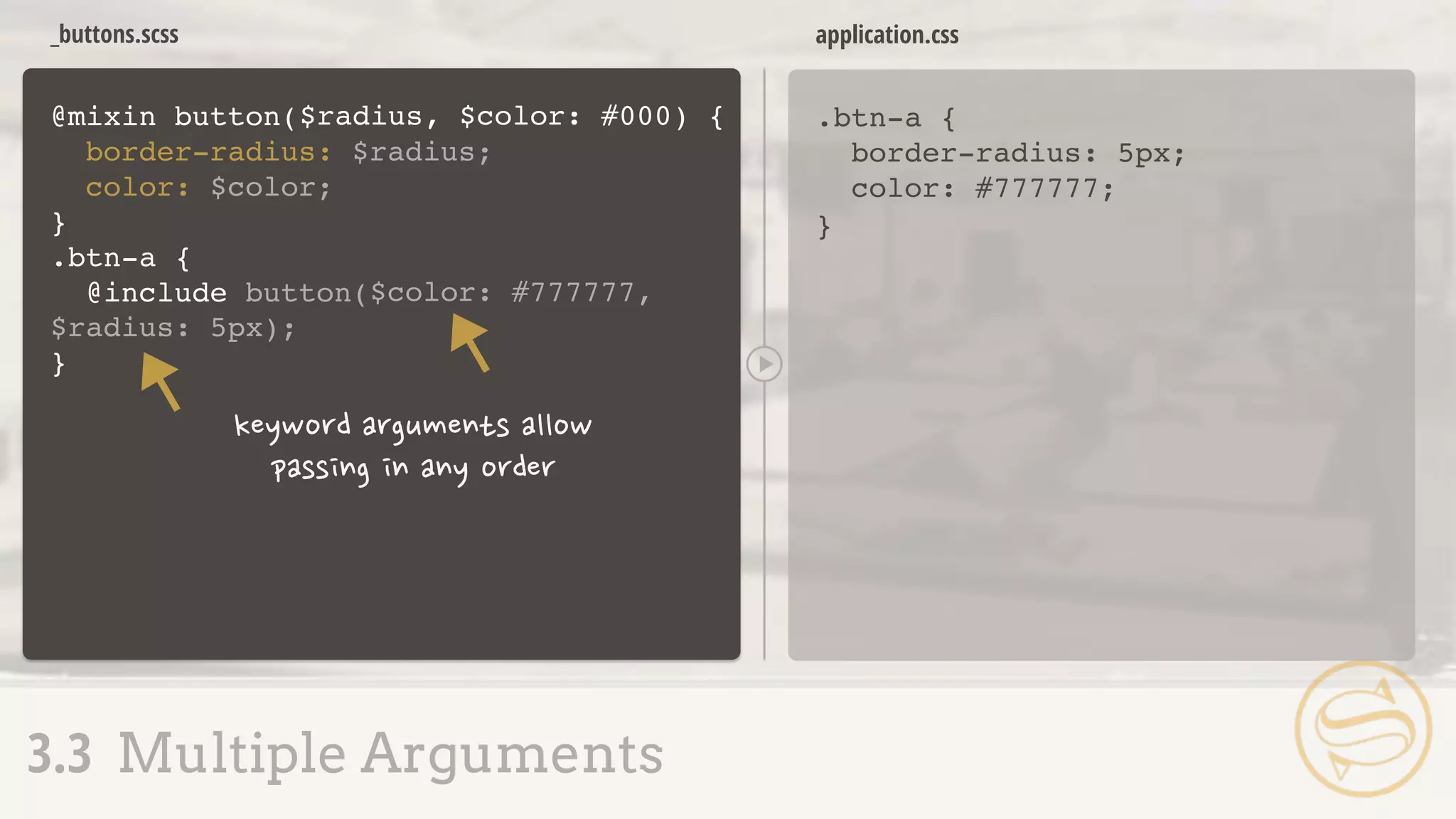
    @mixin button( border-radius: $radius; color:$color; } .btn-a { @include button( _buttons.scss .btn-a { border-radius: 4px; color: #000; } application.css 3.3 Multiple Arguments $radius, $color) { 4px, #000); }
  • 68.
    _buttons.scss Syntax error: Mixinbutton is missing argument $color. application.css 3.3 Multiple Arguments @mixin button( border-radius: $radius; color: $color; } .btn-a { @include button( $radius, $color) { 4px); }
  • 69.
    @mixin button( border-radius: $radius; color:$color; } .btn-a { @include button( _buttons.scss .btn-a { border-radius: 4px; color: #000; } application.css 3.3 Multiple Arguments $radius, $color ) { 4px); } : #000
  • 70.
    _buttons.scss Syntax error: Requiredargument $color must come before any optional arguments. application.css 3.3 Multiple Arguments @mixin button( border-radius: $radius; color: $color; } .btn-a { @include button( $color: #000, $radius) { 4px); }
  • 71.
    _buttons.scss .btn-a { border-radius: 5px; color:#777777; } application.css 3.3 Multiple Arguments @mixin button( border-radius: $radius; color: $color; } .btn-a { @include button( $radius, $color: #000) { $color: #777777, $radius: 5px); }
  • 72.
    .btn-a { -webkit-transition: color0.3s ease-in, background 0.5s ease-out; -moz-transition: color 0.3s ease-in, background 0.5s ease-out; transition: color 0.3s ease-in, background 0.5s ease-out; } application.css 3.4 Variable Arguments
  • 73.
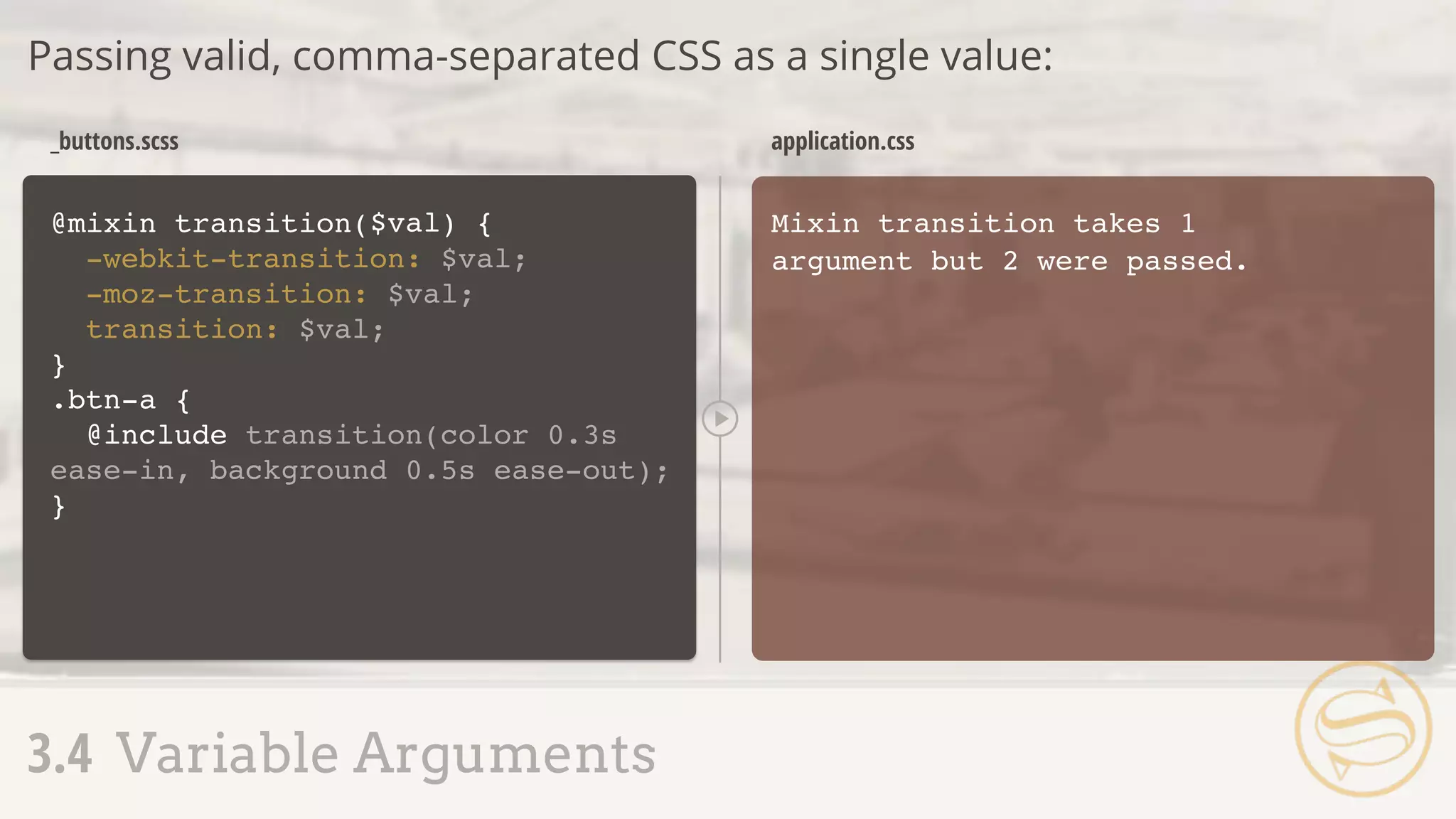
    @mixin transition( -webkit-transition: $val; -moz-transition:$val; transition: $val; } Mixin transition takes 1 argument but 2 were passed. _buttons.scss application.css Passing valid, comma-separated CSS as a single value: 3.4 Variable Arguments ) {$val .btn-a { @include transition(color 0.3s ease-in, background 0.5s ease-out); }
  • 74.
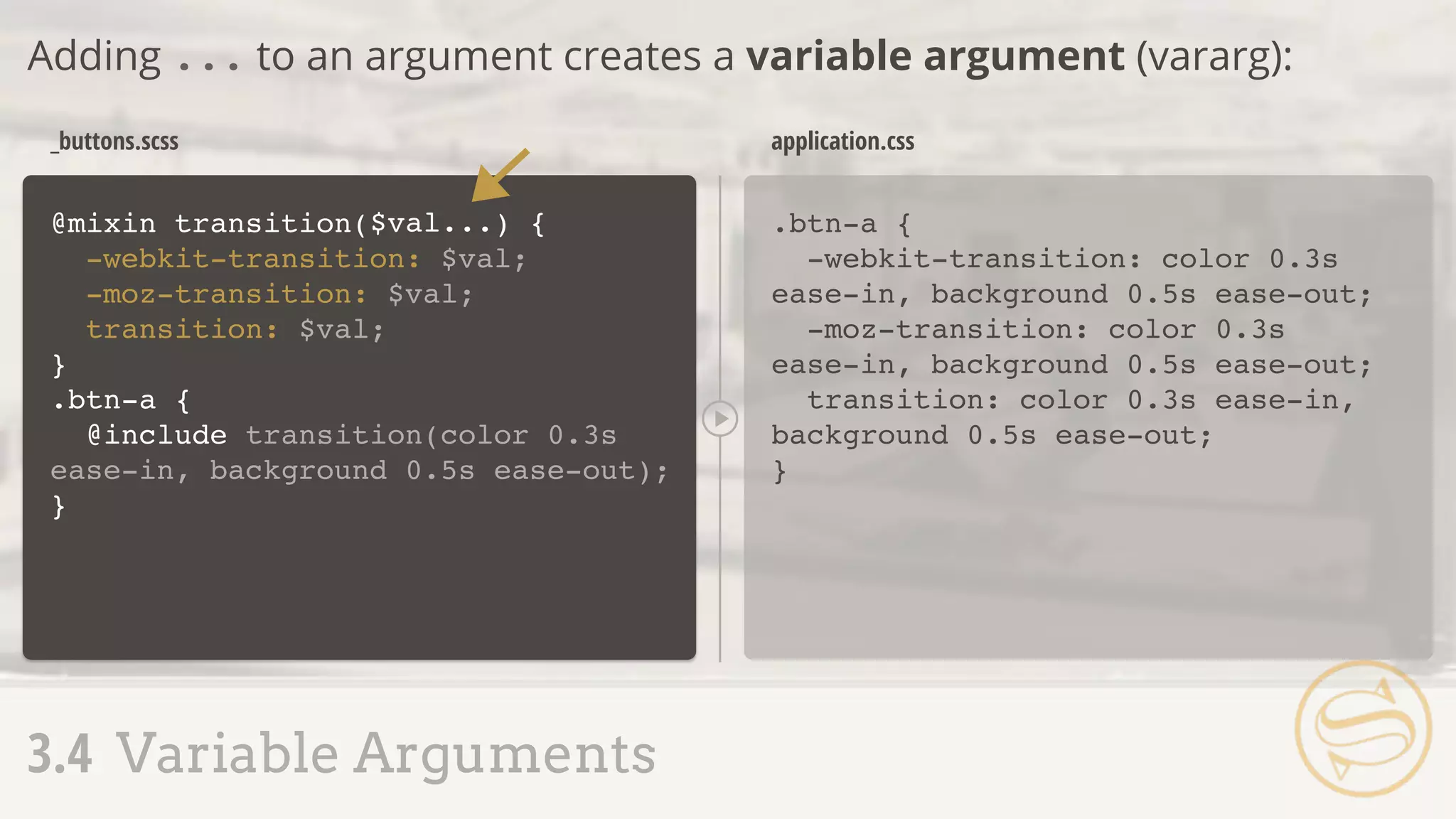
    .btn-a { -webkit-transition: color0.3s ease-in, background 0.5s ease-out; -moz-transition: color 0.3s ease-in, background 0.5s ease-out; transition: color 0.3s ease-in, background 0.5s ease-out; } _buttons.scss application.css Adding ... to an argument creates a variable argument (vararg): 3.4 Variable Arguments @mixin transition( -webkit-transition: $val; -moz-transition: $val; transition: $val; } ) {$val... .btn-a { @include transition(color 0.3s ease-in, background 0.5s ease-out); }
  • 75.
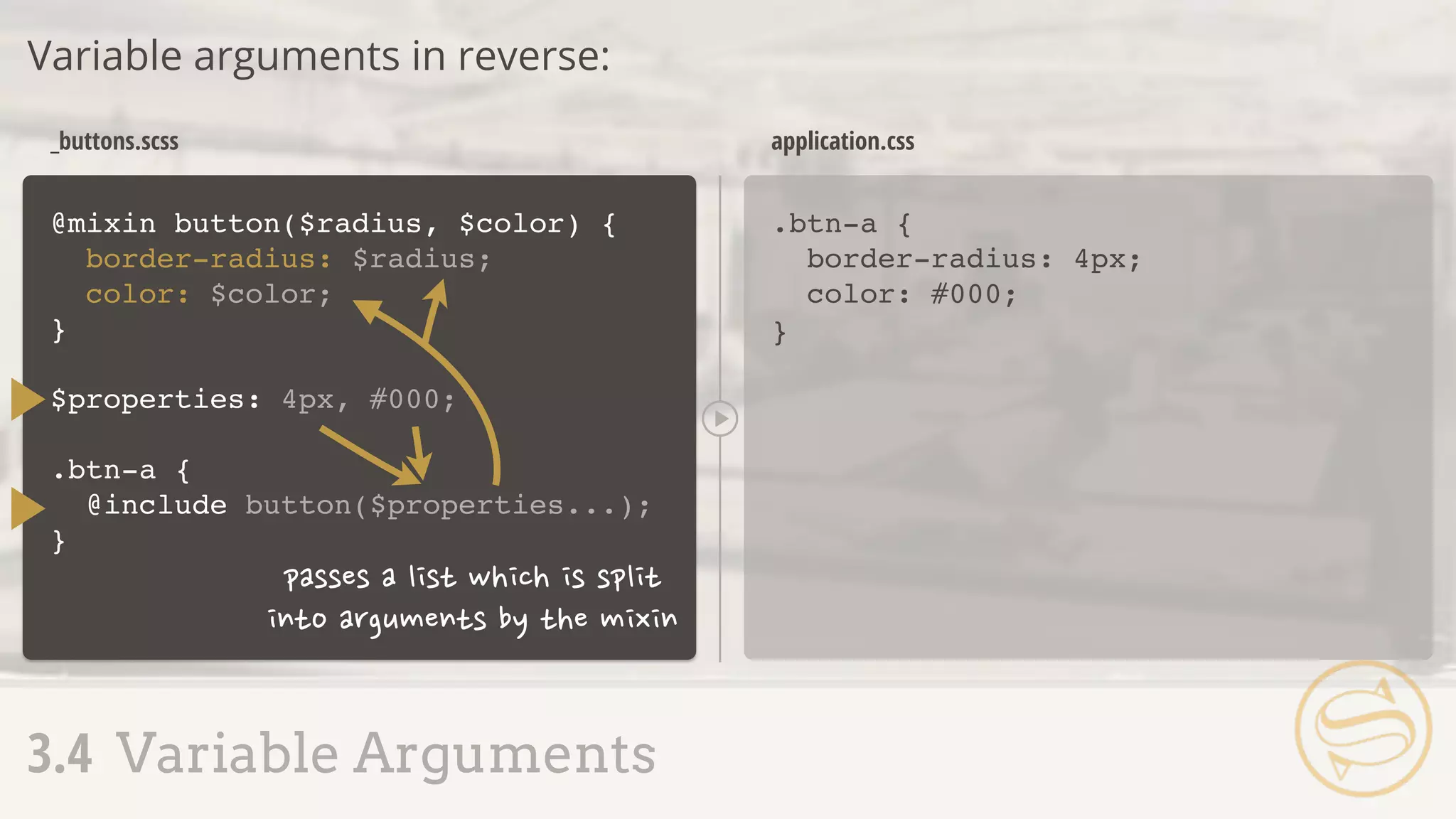
    @mixin button($radius, $color){ border-radius: $radius; color: $color; } .btn-a { border-radius: 4px; color: #000; } _buttons.scss application.css Variable arguments in reverse: 3.4 Variable Arguments $properties: 4px, #000; .btn-a { @include button($properties...); }
  • 76.
    @mixin } _buttons.scss .btn-a { border-right-color: #ff0; } application.css 3.5Interpolation + Mixins @mixin highlight-r($color) { border-right-color: $color; } @mixin highlight-b($color) { border-bottom-color: $color; } @mixin highlight-l($color) { border-left-color: $color; } .btn-a { @include highlight-r(#f00); } highlight-t($color) { border-top-color: $color;
  • 77.
    _buttons.scss .btn-a { border-right-color: #ff0; } application.css 3.5Interpolation + Mixins @mixin } highlight($color, $side) { .btn-a { @include highlight(#f00, right); } border-#{$side}-color: $color;
  • 78.
  • 79.
    4.1 Extend Setup+ Use 4.2 Nesting + Extend 4.3 Extend Pitfalls 4.4 Placeholder Selectors
  • 80.
    .btn-a { background: #777; border:1px solid #ccc; font-size: 1em; text-transform: uppercase; } .btn-b { background: #ff0; border: 1px solid #ccc; font-size: 1em; text-transform: uppercase; } application.css 4.1 Extend Setup + Use .btn-a, .btn-b { background: #777; border: 1px solid #ccc; font-size: 1em; text-transform: uppercase; } .btn-b { background: #ff0; } application.css
  • 81.
    application.css .btn-a { background: #777; border:1px solid #ccc; font-size: 1em; text-transform: uppercase; } _buttons.scss Extend Sass will track and automatically combine selectors for us: 4.1 Extend Setup + Use .btn-a, .btn-b { background: #777; border: 1px solid #ccc; font-size: 1em; text-transform: uppercase; } .btn-b { background: #ff0; } .btn-b { @extend .btn-a; background: #ff0; }
  • 82.
    4.1 Extend Setup+ Use .btn-a, .btn-b { } .btn-b { } ... ... .btn-b { @extend .btn-a; background: #ff0; }
  • 83.
    .content { border: 1pxsolid #ccc; padding: 20px; h2 { font-size: 3em; margin: 20px 0; } } application.scss .content, .callout { application.css 4.2 Nesting + Extend .callout { @extend .content; background: #ddd; } border: 1px solid #ccc; padding: 20px; } .content h2, .callout h2 { font-size: 3em; margin: 20px 0; } .callout { background: #ddd; }
  • 84.
    .callout { @extend .content; background:#ddd; } 4.2 Nesting + Extend .content, .callout { ... } .content h2, .callout h2 { ... } .callout { ... }
  • 85.
    4.1 Extend Setup+ Use 4.2 Nesting + Extend 4.3 Extend Pitfalls 4.4 Placeholder Selectors
  • 86.
    .btn-a { background: #777; border:1px solid #ccc; font-size: 1em; text-transform: uppercase; } .btn-b { @extend .btn-a; background: #ff0; } _buttons.scss .btn-a, .btn-b { background: #777; border: 1px solid #ccc; font-size: 1em; text-transform: uppercase; } .btn-b { background: #ff0; } .sidebar .btn-a, .sidebar .btn-b { text-transform: lowercase; } application.css 4.3 Extend Pitfalls A S S E M B L Y R E J E C T E D .sidebar .btn-a { text-transform: lowercase; }
  • 87.
    ๏ Since .btn-bextends .btn-a, every instance that modifies .btn-a also modifies .btn-b ๏ Stylesheet bloat, if these extra styles aren't needed ๏ We can counteract with placeholder selectors 4.3 Extend Pitfalls
  • 88.
    Assembly Tip Always, alwayscheck the CSS output of your Sass before using it on a live site.
  • 89.
    ๏ Placeholder selectorsare denoted with a % ๏ Can be extended, but never become a selector of their own 4.4 Placeholder Selectors
  • 90.
    background: #777; border: 1pxsolid #ccc; font-size: 1em; text-transform: uppercase; } _buttons.scss .btn-a, .btn-b { background: #777; border: 1px solid #ccc; font-size: 1em; text-transform: uppercase; } .btn-b { background: #ff0; } .sidebar .btn-a, .sidebar .btn-b { text-transform: lowercase; } application.css 4.4 Placeholder Selectors .sidebar .btn-a { text-transform: lowercase; } .btn-b { background: #ff0; } .btn-a { @extend .btn-a;
  • 91.
    _buttons.scss .btn-a, .btn-b { background: #777; border:1px solid #ccc; font-size: 1em; text-transform: uppercase; } .btn-b { background: #ff0; } application.css 4.4 Placeholder Selectors background: #777; border: 1px solid #ccc; font-size: 1em; text-transform: uppercase; } .sidebar .btn-a { text-transform: lowercase; } .btn-a { @extend %btn; } %btn { .sidebar .btn-a { text-transform: lowercase; } .btn-b { background: #ff0; } @extend %btn; A S S E M B L Y A P P R O V E D
  • 92.
    %ir { border: 0; font:0/0 a; text-shadow: none; color: transparent; background-color: transparent; } .logo, .social { border: 0; font: 0/0 a; text-shadow: none; color: transparent; background-color: transparent; } application.scss application.css Extend common blocks to avoid extra HTML classes: 4.4 Placeholder Selectors .logo { @extend %ir; } .social { @extend %ir; }
  • 93.
    Assembly Tip Versions ofIE prior to 9 have a limit of 4095 selectors-per- CSS file limit.
  • 94.
  • 95.
    5.1 Functions 5.2 If 5.3Each 5.4 For + While 5.5 Mixin' In
  • 96.
    5.1 Functions Responsive Refresher ๏Straight from Journey Into Mobile: ๏ If the target size of our sidebar is 350px and the context of its parent is 1000px: 350px / 1000px = 0.35 0.35 * 100 = 35% target / context
  • 97.
    @function fluidize( } application.scss .sidebar { width:35%; } application.css 5.1 Functions ) { @return .sidebar { width: fluidize( } ); 35%;
  • 98.
    application.scss .sidebar { width: 35%; } application.css 5.1Functions @function fluidize( } ) { @return .sidebar { width: fluidize( } );350px, 1000px ($target / $context) * 100%; $target, $context
  • 99.
    5.1 Functions ๏ Moreon responsive design + Sass later, including a built-in fluidize replacement ๏ Function arguments = same rules as mixin arguments
  • 100.
    $theme: dark; header { header{ background: #000; } application.scss application.css Using @if, we can conditionally output code: 5.2 If @if $theme == dark { background: #000; } }
  • 101.
    Comparisons ๏ == equalto ๏ != not equal to ๏ > greater than * ๏ >= greater than or equal to * ๏ < less than * ๏ <= less than or equal to * 5.2 If * numbers only
  • 102.
    $theme: light; header { application.scss 5.2If @if $theme == dark { background: #000; } }
  • 103.
    application.scss header { background: #fff; } application.css @elseprovides a fallback if everything evaluates false or null: 5.2 If $theme: light; header { @if $theme == dark { background: #000; } } } @else { background: #fff;
  • 104.
    application.scss header { background: pink; } application.css @elseif allows for multiple comparisons: 5.2 If $theme: pink; header { @if $theme == dark { background: #000; } } } @else { background: #fff; } @else if $theme == pink { background: pink;
  • 105.
    5.1 Functions 5.2 If 5.3Each 5.4 For + While 5.5 Mixin' In
  • 106.
    5.3 Each Interating Overa List ๏ The @each directive allows us to loop through each list item: $authors: nick aimee dan drew;
  • 107.
    $authors: nick aimeedan drew; @each $author in $authors { } application.scss .author-nick { background: url(author-nick.jpg); } .author-aimee { background: url(author-aimee.jpg); } .author-dan { background: url(author-dan.jpg); } .author-drew { background: url(author-drew.jpg); } application.css 5.3 Each 1: nick 2: aimee 3: dan 4: drew $author background: url(author- #{$author}.jpg); .author-#{$author} { }
  • 108.
    .item { position: absolute; right:0; @for $i from 1 through 3 { } } application.scss .item { position: absolute; right: 0; } .item.item-1 { top: 30px; } .item.item-2 { top: 60px; } .item.item-3 { top: 90px; } application.css 5.4 For + While 1: 1 2: 2 3: 3 $i top: $i * 30px; &.item-#{$i} { }
  • 109.
    5.4 For +While ๏ @for and @while = @each with more control ๏ @while requires manually updating the index
  • 110.
    $i: 1; application.scss .item { position:absolute; right: 0; } .item.item-1 { top: 30px; } .item.item-2 { top: 60px; } .item.item-3 { top: 90px; } application.css 5.4 For + While 1: 1 2: 2 3: 3 4: 4 $i .item { position: absolute; right: 0; } @while $i < 4 { } &.item-#{$i} { top: $i * 30px; } $i: $i + 1;
  • 111.
    application.scss .item { position: absolute; right:0; } .item.item-2 { top: 60px; } .item.item-4 { top: 120px; } .item.item-6 { top: 180px; } application.css 5.4 For + While $i: 2; .item { position: absolute; right: 0; } @while $i <= 6 { } &.item-#{$i} { top: $i * 30px; } $i: $i + 2; 1: 2 2: 4 3: 6 4: 8 $i
  • 112.
    5.1 Functions 5.2 If 5.3Each 5.4 For + While 5.5 Mixin' In
  • 113.
    Mixins Extend Functions ๏Similar sets of properties used multiple times with small variations ๏ Sets of properties that match exactly ๏ Commonly-used operations to determine values 5.5 Mixin' In
  • 114.
    @mixin button($color, $rounded: color:$color; } _buttons.scss .btn-a { color: black; } application.css 5.5 Mixin' In .btn-a { @include button(#000, false); } .btn-b { @include button(#333); } ) {true @if $rounded } {== true border-radius: 4px; .btn-b { color: #333333; border-radius: 4px; }
  • 115.
    _buttons.scss .btn-a { color: black; } application.css 5.5Mixin' In @mixin button($color, $rounded: color: $color; } .btn-a { @include button(#000); } .btn-b { @include button(#333, 4px); } ) {false @if $rounded } { border-radius: $rounded; .btn-b { color: #333333; border-radius: 4px; }
  • 116.
  • 117.
    6.1 Basic Arithmetic 6.2Differing Units 6.3 Math Functions 6.4 Math + Color 6.5 Color Shortcuts 6.6 Color Functions
  • 118.
    Number Operations ๏ +addition ๏ - subtraction ๏ * multiplication ๏ / division ๏ % modulo 6.1 Basic Arithmetic Modulo = remainder from a division operation. 12 % 3 results in 0, while 12 % 5 returns 2.
  • 119.
    Assembly Tip Sass defaultsto returning (up to) five digits after a decimal point.
  • 120.
    Division ๏ The trickiestof the number operations, due to font: font: normal 2em/1.5 Helvetica, sans-serif; 6.1 Basic Arithmetic
  • 121.
    Triggering Division ๏ Variableinvolved - $size / 10 ๏ Parenthesis - (100px / 20) ๏ Another arithmetic operation - 20px * 5 / 2 6.1 Basic Arithmetic
  • 122.
    $family: "Helvetica "+ "Neue"; // "Helvetica Neue" String Addition Addition on strings concatenates them: 6.1 Basic Arithmetic $family: 'sans-' + serif // 'sans-serif' $family: sans- + 'serif' // sans-serif Initial left-side string determines post-concatenation quotes:
  • 123.
    h2 { font-size: 10px+ 4pt; } h2 { font-size: 15.33333px; } application.scss application.css If the units differ, Sass attempts combination: 6.2 Differing Units
  • 124.
    h2 { font-size: 10px+ 4em; } Incompatible units: 'em' and 'px'. application.scss application.css Incompatible units will throw an error: 6.2 Differing Units
  • 125.
    Pre-Defined Math Utilities ๏round($number) - round to closest whole number ๏ ceil($number) - round up ๏ floor($number) - round down ๏ abs($number) - absolute value ๏ min($list) - minimum list value ๏ max($list) - maximum list value ๏ percentage($number) - convert to percentage 6.3 Math Functions
  • 126.
    h2 { line-height: ceil(1.2); } h2{ line-height: 2; } application.scss application.css Called the same way as custom functions: 6.3 Math Functions
  • 127.
    .sidebar { width: percentage(350px/1000px); } .sidebar{ width: 35%; } application.scss application.css percentage() replaces our custom fluidize(): 6.3 Math Functions
  • 128.
    $context: 1000px; .sidebar { width:percentage(450px/$context); } .sidebar { width: 45%; } application.scss application.css percentage() replaces our custom fluidize(): 6.3 Math Functions
  • 129.
    6.1 Basic Arithmetic 6.2Differing Units 6.3 Math Functions 6.4 Math + Color 6.5 Color Shortcuts 6.6 Color Functions
  • 130.
    Color Juggling ๏ Easierrecall through variables ๏ Simplified alteration via color utility functions ๏ Faster representation using shorthand 6.4 Math + Color
  • 131.
    $color-base: #333333; .addition { background:$color-base + #112233; } application.scss .addition { background: #445566; } application.css 6.4 Math + Color .subtraction { background: $color-base - #112233; } .multiplication { background: $color-base * 2; } .division { background: $color-base / 2; } .subtraction { background: #221100; } .multiplication { background: #666666; } .division { background: #191919; }
  • 132.
    Assembly Tip Where possible,use color utility functions instead of color arithmetic: easier to predict and maintain.
  • 133.
    $color: #333333; .alpha { background:rgba(51,51,51,0.8); } application.scss .alpha { background: rgba(51,51,51,0.8); } application.css 6.5 Color Shortcuts A S S E M B L Y R E J E C T E D
  • 134.
    $color: #333333; .alpha { } application.scss .alpha{ background: rgba(51,51,51,0.8); } application.css 6.5 Color Shortcuts background: rgba($color,0.8); .beta { background: rgba(#000,0.8); } .beta { background: rgba(0,0,0,0.8); } A S S E M B L Y A P P R O V E D
  • 135.
    6.1 Basic Arithmetic 6.2Differing Units 6.3 Math Functions 6.4 Math + Color 6.5 Color Shortcuts 6.6 Color Functions
  • 136.
    6.6 Color Functions Colorutility functions: workflow-altering convenience
  • 137.
    $color: #333; .lighten { color:lighten($color, 20%); } application.scss .lighten { background: #666666; } application.css 6.6 Color Functions .darken { color: darken($color, 20%); } .darken { background: black; }
  • 138.
    $color: #87bf64; .saturate { color:saturate($color, 20%); } application.scss .saturate { background: #82d54e; } application.css 6.6 Color Functions .desaturate { color: desaturate($color, 20%); } .desaturate { background: #323130; }
  • 139.
    .mix-a { color: mix(#ffff00,#107fc9); } application.scss .mix-a { background: #87bf64; } application.css 6.6 Color Functions + .mix-b { color: mix(#ffff00, #107fc9, 30%); } .mix-b { background: #57a58c; }
  • 140.
    $color: #87bf64; .grayscale { color:grayscale($color); } application.scss .grayscale { color: #929292; } application.css 6.6 Color Functions .invert { color: invert($color); } .complement { color: complement($color); } .invert { color: #78409b; } .complement { color: #9c64bf; }
  • 141.
    Assembly Tip But wait,there's more! http://sass-lang.com/docs/yardoc/Sass/Script/Functions.html
  • 142.
  • 143.
    7.1 The Movement 7.2Nested Media Queries 7.3 Respond-To 7.4 Responsive Pitfalls
  • 144.
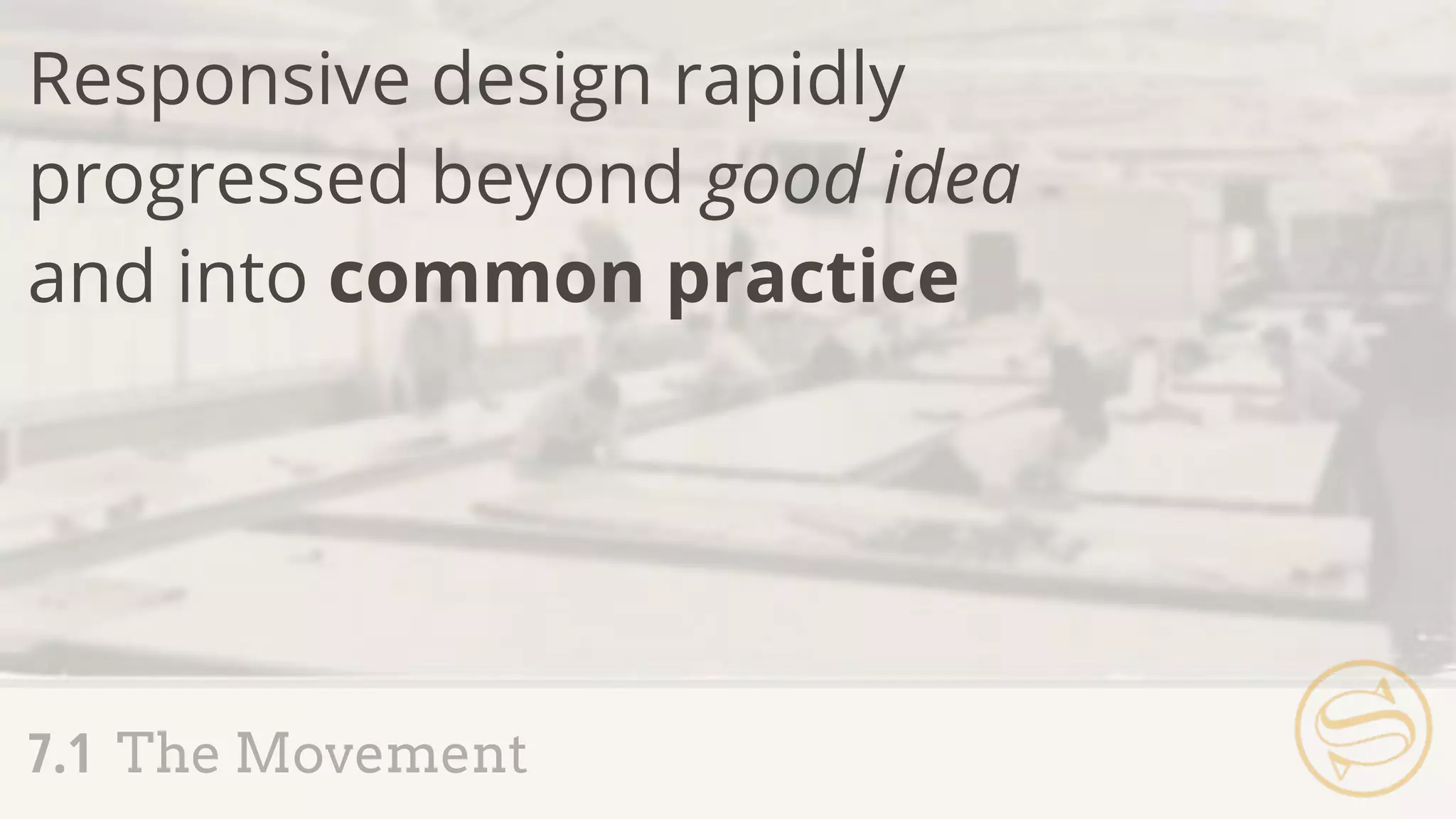
    7.1 The Movement Responsivedesign rapidly progressed beyond good idea and into common practice
  • 145.
    Media Queries ๏ Easierfluid calculation and media query handling ๏ Journey Into Mobile 7.1 The Movement
  • 146.
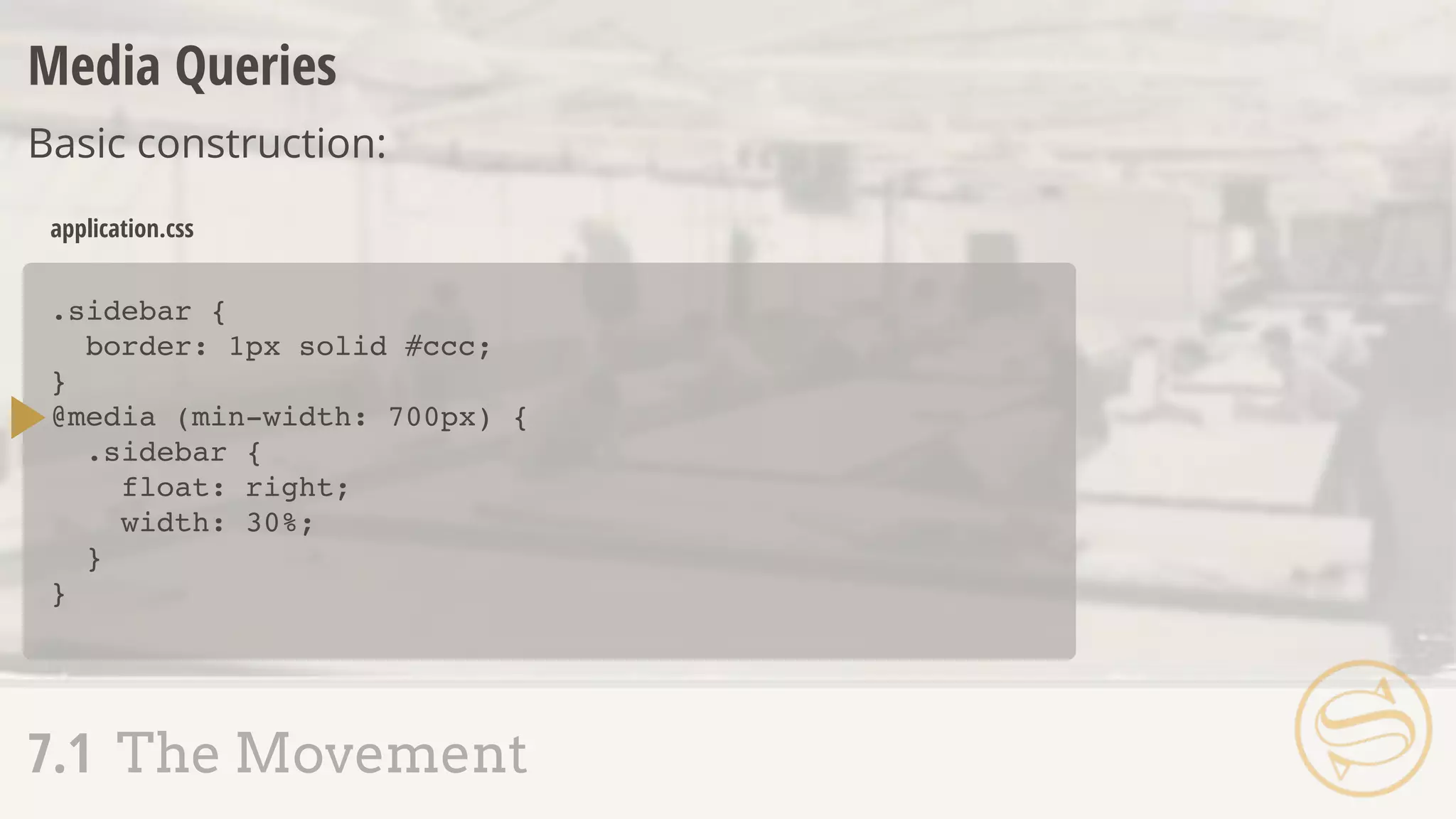
    .sidebar { border: 1pxsolid #ccc; } @media (min-width: 700px) { .sidebar { float: right; width: 30%; } } application.css Media Queries Basic construction: 7.1 The Movement
  • 147.
    .sidebar { border: 1pxsolid #ccc; } @media (min-width: 700px) { .sidebar { float: right; width: 30%; } } application.css 7.2 Nested Media Queries
  • 148.
    .sidebar { border: 1pxsolid #ccc; } @media (min-width: 700px) { .sidebar { float: right; width: 30%; } } application.css .sidebar { border: 1px solid #ccc; } application.scss 7.2 Nested Media Queries @media (min-width: 700px) { float: right; width: 30%; } A S S E M B L Y A P P R O V E D
  • 149.
    7.1 The Movement 7.2Nested Media Queries 7.3 Respond-To 7.4 Responsive Pitfalls
  • 150.
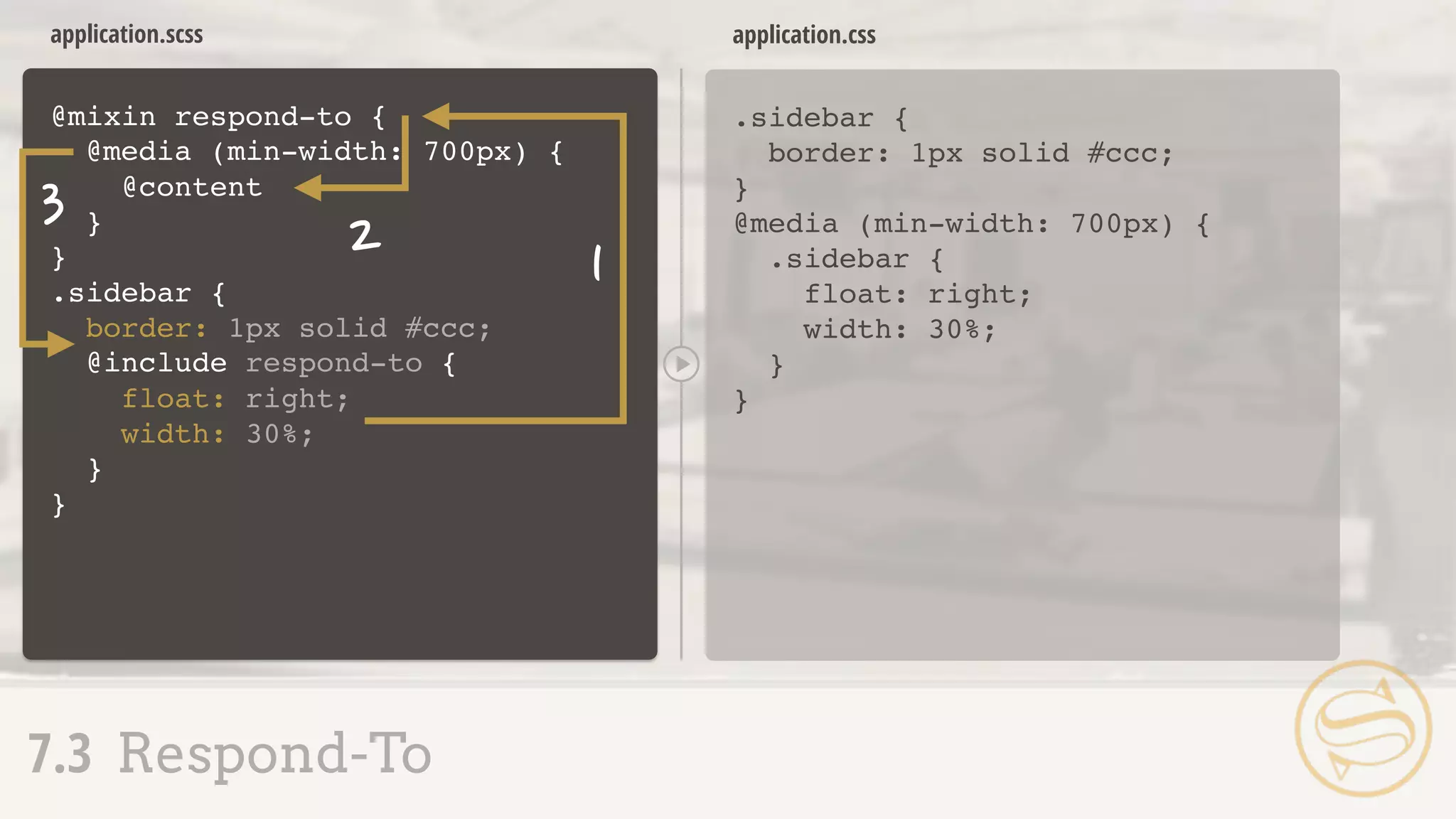
    7.3 Respond-To ๏ @content- pass a block of properties to a mixin
  • 151.
    .sidebar { border: 1pxsolid #ccc; application.scss .sidebar { border: 1px solid #ccc; } @media (min-width: 700px) { .sidebar { float: right; width: 30%; } } application.css 7.3 Respond-To } } float: right; width: 30%; @media (min-width: 700px) {
  • 152.
    @mixin respond-to application.scss .sidebar { border:1px solid #ccc; } @media (min-width: 700px) { .sidebar { float: right; width: 30%; } } application.css 7.3 Respond-To A S S E M B L Y R E J E C T E D .sidebar { border: 1px solid #ccc; } } float: right; width: 30%; @include respond-to { { @media (min-width: 700px) { @content } }
  • 153.
    @mixin respond-to application.scss .sidebar { border:1px solid #ccc; } @media (min-width: 700px) { .sidebar { float: right; width: 30%; } } application.css 7.3 Respond-To .sidebar { border: 1px solid #ccc; } } float: right; width: 30%; @include respond-to { { @media (min-width: 700px) { @content } }
  • 154.
    application.scss .sidebar { border: 1pxsolid #ccc; } @media (min-width: 700px) { .sidebar { float: right; width: 30%; } } application.css 7.3 Respond-To @mixin respond-to .sidebar { border: 1px solid #ccc; } } float: right; width: 30%; @include respond-to { @if $media == tablet { } { @media (min-width: 700px) { @content } } (tablet) ($media)
  • 155.
    application.scss .sidebar { border: 1pxsolid #ccc; } @media (min-width: 900px) { .sidebar { float: right; width: 30%; } } application.css 7.3 Respond-To @mixin respond-to .sidebar { border: 1px solid #ccc; } } float: right; width: 30%; @include respond-to { { @media (min-width: $query) { @content } } (900px) ($query)
  • 156.
    application.scss .sidebar { border: 1pxsolid #ccc; } @media (max-width: 600px) { .sidebar { float: right; width: 30%; } } application.css 7.3 Respond-To @mixin respond-to float: right; width: 30%; .sidebar { border: 1px solid #ccc; } } @include respond-to { { @media ($val: $query) { @content } } (max-width, 600px) ($val, $query) A S S E M B L Y A P P R O V E D
  • 157.
    7.1 The Movement 7.2Nested Media Queries 7.3 Respond-To 7.4 Responsive Pitfalls
  • 158.
    .sidebar { border: 1pxsolid #ccc; } .callout { @media (min-width: 700px) { @extend .sidebar; width: 35%; } } application.scss Declarations outside @media cannot be extended inside: 7.4 Responsive Pitfalls
  • 159.
    @media (min-width: 700px){ .content { border: 1px solid #ccc; } .aside { @extend .content; width: 35%; } } application.scss @media (min-width: 700px) { .content, .aside { border: 1px solid #ccc; } .aside { width: 35%; } } application.css 7.4 Responsive Pitfalls
  • 160.
    .sidebar { @media (min-width:700px) { width: 50%; } } .callout { @media (min-width: 700px) { width: 35%; } } @media (min-width: 700px) { .sidebar { width: 50%; } } @media (min-width: 700px) { .callout { width: 35%; } } application.scss application.css Matching media queries are not combined: 7.4 Responsive Pitfalls
  • 161.
    Sometimes, manual combinationis best: 7.4 Responsive Pitfalls @media (min-width: 700px) { .sidebar { width: 50%; } .callout { width: 35%; } } application.css