Raastech, Inc.
2201 Cooperative Way, Suite 600
Herndon, VA 20171
+1-703-884-2223
info@raastech.com
Learn Oracle WebLogic Server 12c Administration
For Middleware Administrators
Tuesday, March 15, 2016
Session 4: 2:30 - 3:30 pm
Center Lounge
© Raastech, Inc. 2016 | All rights reserved. Slide 2 of 81@Raastech
Agenda
1. Introduction
2. Why This Presentation
3. Oracle Fusion Middleware Overview
4. WebLogic Server Terminology
5. Configuration & Changes
6. Configuration Wizard
7. Administration Console
8. WebLogic Scripting Tool (WLST)
9. Verification
10. Targeting
11. Server/ServiceAuto-Migration
12. Live Walkthrough
13. Recap
© Raastech, Inc. 2016 | All rights reserved. Slide 3 of 81@Raastech
© Raastech, Inc. 2016 | All rights reserved. Slide 4 of 81@Raastech
About Me
 Ahmed Aboulnaga @Ahmed_Aboulnaga
 18+ years Oracle experience
 Author of “Oracle SOA Suite 11g Administrator’s Handbook”
 Author of “Oracle SOA Suite 12c Administrator’s Guide”
 Technical editor of “Oracle WebLogic 11g Administration Handbook”
 OCE (SOA Foundation Practitioner)
 OCA (Oracle Application Server)
 Oracle ACE
© Raastech, Inc. 2016 | All rights reserved. Slide 5 of 81@Raastech
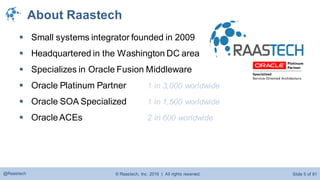
About Raastech
 Small systems integrator founded in 2009
 Headquartered in the Washington DC area
 Specializes in Oracle Fusion Middleware
 Oracle Platinum Partner 1 in 3,000 worldwide
 Oracle SOA Specialized 1 in 1,500 worldwide
 OracleACEs 2 in 600 worldwide
© Raastech, Inc. 2016 | All rights reserved. Slide 6 of 81@Raastech
© Raastech, Inc. 2016 | All rights reserved. Slide 7 of 81@Raastech
Oracle WebLogic Server
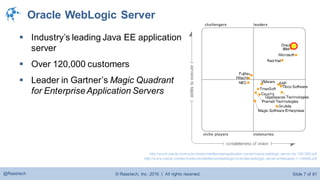
 Industry’s leading Java EE application
server
 Over 120,000 customers
 Leader in Gartner’s Magic Quadrant
for EnterpriseApplication Servers
http://www.oracle.com/us/products/middleware/application-server/oracle-weblogic-server-ds-1391360.pdf
http://www.oracle.com/technetwork/middleware/weblogic/overview/weblogic-server-whitepaper-1-134488.pdf
© Raastech, Inc. 2016 | All rights reserved. Slide 8 of 81@Raastech
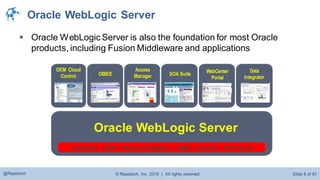
 Oracle WebLogic Server is also the foundation for most Oracle
products, including Fusion Middleware and applications
OEM Cloud
Control OBIEE
Access
Manager SOA Suite
WebCenter
Portal
Data
Integrator
Oracle WebLogic Server
Clustering – JNDI – Resource Adapters – JDBC – Security – Self Tuning
Oracle WebLogic Server
© Raastech, Inc. 2016 | All rights reserved. Slide 9 of 81@Raastech
© Raastech, Inc. 2016 | All rights reserved. Slide 10 of 81@Raastech
Understanding Oracle Fusion Middleware
 “Oracle Fusion Middleware” is a misleading term
 Used to describe middleware products such as:
 Business Intelligence (e.g., OBIEE, Discoverer)
 Integration (e.g., SOA Suite, OSB)
 Web Center (Web Center Content and Portal)
 Identity Management (e.g., Oracle Access Manager)
 Monitoring (e.g., OEM Grid Control)
 But usually used to describe a single product:
 WebLogic Server
© Raastech, Inc. 2016 | All rights reserved. Slide 11 of 81@Raastech
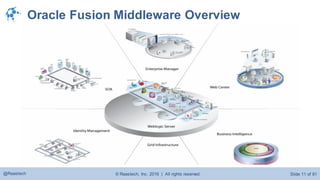
Oracle Fusion Middleware Overview
© Raastech, Inc. 2016 | All rights reserved. Slide 12 of 81@Raastech
Oracle WebLogic Server
 Java Enterprise Edition (Java EE) application server
 Acquired from BEA in 2008
 Replaced old school OracleApplication Server
 Required for almost all Oracle Fusion Middleware products
 Supports the deployment of many distributed applications
 Provides a standard set of APIs for creating distributed Java
applications that can access a wide variety of services such as
 JMS, JDBC, RMI, Web Services, XML, EJB etc.
© Raastech, Inc. 2016 | All rights reserved. Slide 13 of 81@Raastech
Current Releases and Installers
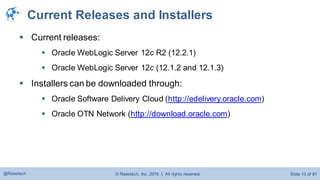
 Current releases:
 Oracle WebLogic Server 12c R2 (12.2.1)
 Oracle WebLogic Server 12c (12.1.2 and 12.1.3)
 Installers can be downloaded through:
 Oracle Software Delivery Cloud (http://edelivery.oracle.com)
 Oracle OTN Network (http://download.oracle.com)
© Raastech, Inc. 2016 | All rights reserved. Slide 14 of 81@Raastech
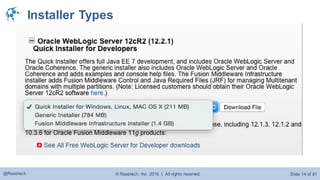
Installer Types
© Raastech, Inc. 2016 | All rights reserved. Slide 15 of 81@Raastech
© Raastech, Inc. 2016 | All rights reserved. Slide 16 of 81@Raastech
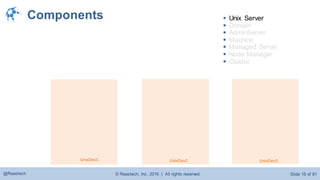
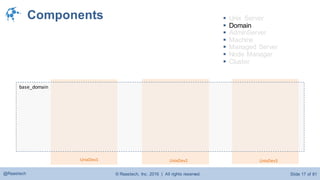
Components
UnixDev1 UnixDev3UnixDev2
 Unix Server
 Domain
 AdminServer
 Machine
 Managed Server
 Node Manager
 Cluster
© Raastech, Inc. 2016 | All rights reserved. Slide 17 of 81@Raastech
base_domain
Components
UnixDev1 UnixDev3UnixDev2
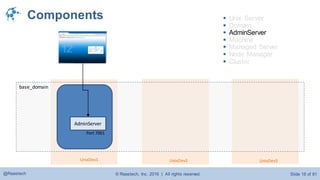
 Unix Server
 Domain
 AdminServer
 Machine
 Managed Server
 Node Manager
 Cluster
© Raastech, Inc. 2016 | All rights reserved. Slide 18 of 81@Raastech
base_domain
Components
AdminServer
Port 7001
UnixDev1 UnixDev3UnixDev2
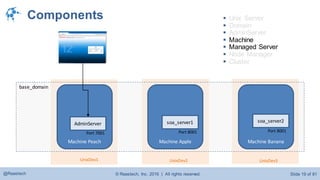
 Unix Server
 Domain
 AdminServer
 Machine
 Managed Server
 Node Manager
 Cluster
© Raastech, Inc. 2016 | All rights reserved. Slide 19 of 81@Raastech
base_domain
Components
Machine BananaMachine Peach
soa_server2
AdminServer
Port 7001 Port 8001
UnixDev1 UnixDev3
Machine Apple
soa_server1
Port 8001
UnixDev2
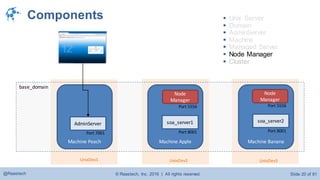
 Unix Server
 Domain
 AdminServer
 Machine
 Managed Server
 Node Manager
 Cluster
© Raastech, Inc. 2016 | All rights reserved. Slide 20 of 81@Raastech
base_domain
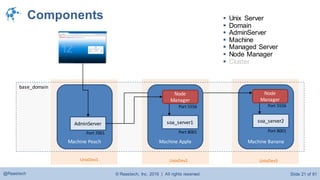
Components
Machine BananaMachine Peach
soa_server2
AdminServer
Port 7001 Port 8001
Port 5556
UnixDev1 UnixDev3
Machine Apple
Node
Manager
Port 5556
soa_server1
Port 8001
UnixDev2
Node
Manager
 Unix Server
 Domain
 AdminServer
 Machine
 Managed Server
 Node Manager
 Cluster
© Raastech, Inc. 2016 | All rights reserved. Slide 21 of 81@Raastech
base_domain
Components
Machine BananaMachine Peach
soa_server2
AdminServer
Port 7001 Port 8001
Port 5556
UnixDev1 UnixDev3
Machine Apple
Node
Manager
Port 5556
soa_server1
Port 8001
UnixDev2
Node
Manager
 Unix Server
 Domain
 AdminServer
 Machine
 Managed Server
 Node Manager
 Cluster
© Raastech, Inc. 2016 | All rights reserved. Slide 22 of 81@Raastech
base_domain
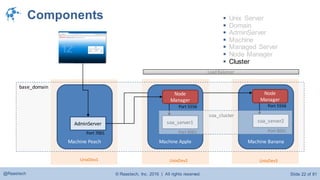
Components
Machine BananaMachine Peach
soa_server2
AdminServer
Port 7001 Port 8001
Port 5556
UnixDev1 UnixDev3
Machine Apple
Node
Manager
Port 5556
soa_server1
Port 8001
UnixDev2
Node
Manager
 Unix Server
 Domain
 AdminServer
 Machine
 Managed Server
 Node Manager
 Cluster
soa_cluster
Load Balancer
© Raastech, Inc. 2016 | All rights reserved. Slide 23 of 81@Raastech
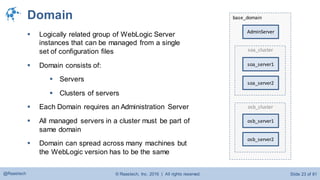
base_domainDomain
 Logically related group of WebLogic Server
instances that can be managed from a single
set of configuration files
 Domain consists of:
 Servers
 Clusters of servers
 Each Domain requires an Administration Server
 All managed servers in a cluster must be part of
same domain
 Domain can spread across many machines but
the WebLogic version has to be the same
AdminServer
soa_cluster
soa_server1
soa_server2
osb_cluster
osb_server1
osb_server2
© Raastech, Inc. 2016 | All rights reserved. Slide 24 of 81@Raastech
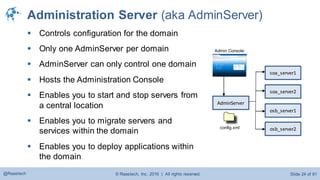
Administration Server (aka AdminServer)
 Controls configuration for the domain
 Only one AdminServer per domain
 AdminServer can only control one domain
 Hosts the Administration Console
 Enables you to start and stop servers from
a central location
 Enables you to migrate servers and
services within the domain
 Enables you to deploy applications within
the domain
soa_server1
osb_server1
AdminServer
config.xml
Admin Console
soa_server2
osb_server2
© Raastech, Inc. 2016 | All rights reserved. Slide 25 of 81@Raastech
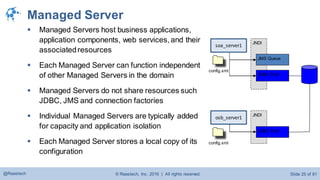
Managed Server
 Managed Servers host business applications,
application components, web services, and their
associatedresources
 Each Managed Server can function independent
of other Managed Servers in the domain
 Managed Servers do not share resources such
JDBC, JMS and connection factories
 Individual Managed Servers are typically added
for capacity and application isolation
 Each Managed Server stores a local copy of its
configuration
JNDI
JMS Queue
JDBC Pool
soa_server1
JNDI
JDBC Pool
osb_server1
config.xml
config.xml
© Raastech, Inc. 2016 | All rights reserved. Slide 26 of 81@Raastech
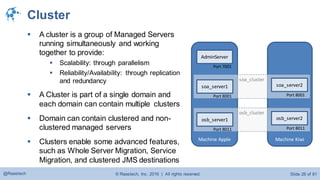
Cluster
 A cluster is a group of Managed Servers
running simultaneously and working
together to provide:
 Scalability: through parallelism
 Reliability/Availability: through replication
and redundancy
 A Cluster is part of a single domain and
each domain can contain multiple clusters
 Domain can contain clustered and non-
clustered managed servers
 Clusters enable some advanced features,
such as Whole Server Migration, Service
Migration, and clustered JMS destinations
Machine KiwiMachine Apple
osb_cluster
soa_cluster
osb_server1
Port 8011
osb_server2
Port 8011
soa_server2
Port 8001
soa_server1
Port 8001
AdminServer
Port 7001
© Raastech, Inc. 2016 | All rights reserved. Slide 27 of 81@Raastech
Load Balancing in a Cluster
 JSPs and Servlets  load balancing is external
 Web server proxy plug-in (round robin)
 HTTP proxy servlet (i.e., using WLS as a load balancer)
 3rd party hardware or software load balancer (F5 Big IP LTM or Cisco CSM)
 EJBs and RMI Objects  load balancing is done at connection
 Objects are cluster-aware
 Load balancing algorithm is stored in the clustered object’s stub
 Objects are available on all cluster members; remote objects connect/use according
the LB algorithm in the stub
 Load balancing algorithms: Round robin, weighted, random, server affinity
© Raastech, Inc. 2016 | All rights reserved. Slide 28 of 81@Raastech
Failover in a Cluster
 Servlets and JSPs:
 HTTP session state is replicated to a secondary server in the cluster
or to a database
 EJBs and RMI Objects:
 Replicas available throughout the cluster
 Exceptions caught and retried on another instance
 For Stateful Session Beans, state is replicated on a secondary server
© Raastech, Inc. 2016 | All rights reserved. Slide 29 of 81@Raastech
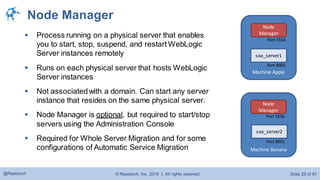
Node Manager
 Process running on a physical server that enables
you to start, stop, suspend, and restart WebLogic
Server instances remotely
 Runs on each physical server that hosts WebLogic
Server instances
 Not associatedwith a domain. Can start any server
instance that resides on the same physical server.
 Node Manager is optional, but required to start/stop
servers using the Administration Console
 Required for Whole Server Migration and for some
configurations of Automatic Service Migration Machine Banana
soa_server2
Port 8001
Port 5556
Machine Apple
Node
Manager
Port 5556
soa_server1
Port 8001
Node
Manager
© Raastech, Inc. 2016 | All rights reserved. Slide 30 of 81@Raastech
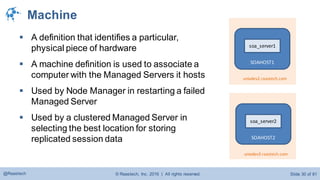
Machine
 A definition that identifies a particular,
physical piece of hardware
 A machine definition is used to associate a
computer with the Managed Servers it hosts
 Used by Node Manager in restarting a failed
Managed Server
 Used by a clustered Managed Server in
selecting the best location for storing
replicated session data SOAHOST2
soa_server2
unixdev3.raastech.com
SOAHOST1
soa_server1
unixdev2.raastech.com
© Raastech, Inc. 2016 | All rights reserved. Slide 31 of 81@Raastech
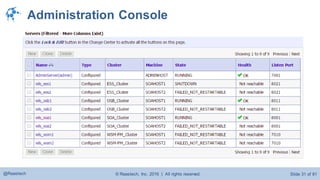
Administration Console
© Raastech, Inc. 2016 | All rights reserved. Slide 32 of 81@Raastech
© Raastech, Inc. 2016 | All rights reserved. Slide 33 of 81@Raastech
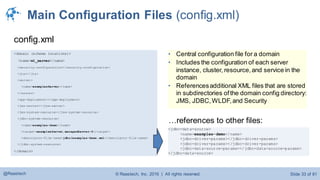
Main Configuration Files (config.xml)
<domain (schema locations)>
<name>wl_server</name>
<security-configuration></security-configuration>
<jta></jta>
<server>
<name>examplesServer</name>
</server>
<app-deployment></app-deployment>
<jms-server></jms-server>
<jms-system-resource></jms-system-resource>
<jdbc-system-resource>
<name>examples-demo</name>
<target>examplesServer,managedServer-0</target>
<descriptor-file-name>jdbc/examples-demo.xml</descriptor-file-name>
</jdbc-system-resource>
</domain>
config.xml
<jdbc-data-source>
<name>examples-demo</name>
<jdbc-driver-params></jdbc-driver-params>
<jdbc-data-source-params></jdbc-data-source-params>
</jdbc-data-source>
…references to other files:
• Central configuration file for a domain
• Includes the configuration of each server
instance, cluster, resource,and service in the
domain
• Referencesadditional XML files that are stored
in subdirectories ofthe domain config directory:
JMS, JDBC,WLDF,and Security
© Raastech, Inc. 2016 | All rights reserved. Slide 34 of 81@Raastech 34
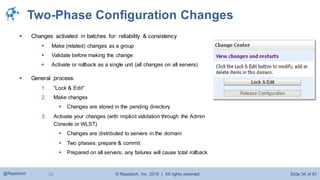
Two-Phase Configuration Changes
 Changes activated in batches for: reliability & consistency
 Make (related) changes as a group
 Validate before making the change
 Activate or rollback as a single unit (all changes on all servers)
 General process:
1. “Lock & Edit”
2. Make changes
 Changes are stored in the pending directory
3. Activate your changes (with implicit validation through the Admin
Console or WLST)
 Changes are distributed to servers in the domain
 Two phases: prepare & commit
 Prepared on all servers; any failures will cause total rollback
© Raastech, Inc. 2016 | All rights reserved. Slide 35 of 81@Raastech
© Raastech, Inc. 2016 | All rights reserved. Slide 36 of 81@Raastech
Configuration Wizard
1. Install software:
/u01/app/oracle/fmw12c
2. Create domain using “configuration wizard”:
/u01/app/oracle/fmw12c/user_projects/domains/devdomain
3. (optional) Create another domain using configuration wizard:
/u01/app/oracle/fmw12c/user_projects/domains/testdomain
© Raastech, Inc. 2016 | All rights reserved. Slide 37 of 81@Raastech
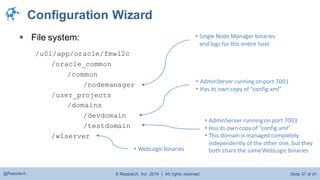
Configuration Wizard
 File system:
/u01/app/oracle/fmw12c
/oracle_common
/common
/nodemanager
/user_projects
/domains
/devdomain
/testdomain
/wlserver
• AdminServer running on port 7001
• Has its own copy of “config.xml”
• Single Node Manager binaries
and logs for this entire host
• AdminServer running on port 7003
• Has its own copy of “config.xml”
• This domain is managed completely
independently of the other one, but they
both sharethe sameWebLogic binaries• WebLogic binaries
© Raastech, Inc. 2016 | All rights reserved. Slide 38 of 81@Raastech 38
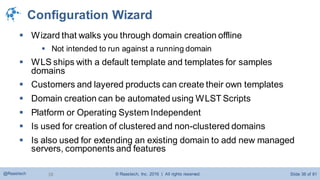
Configuration Wizard
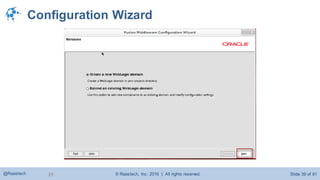
 Wizard that walks you through domain creation offline
 Not intended to run against a running domain
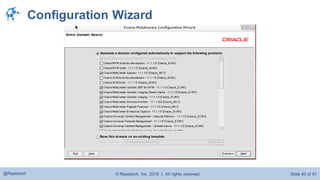
 WLS ships with a default template and templates for samples
domains
 Customers and layered products can create their own templates
 Domain creation can be automated using WLST Scripts
 Platform or Operating System Independent
 Is used for creation of clustered and non-clustered domains
 Is also used for extending an existing domain to add new managed
servers, components and features
© Raastech, Inc. 2016 | All rights reserved. Slide 39 of 81@Raastech 39
Configuration Wizard
© Raastech, Inc. 2016 | All rights reserved. Slide 40 of 81@Raastech
Configuration Wizard
© Raastech, Inc. 2016 | All rights reserved. Slide 41 of 81@Raastech
© Raastech, Inc. 2016 | All rights reserved. Slide 42 of 81@Raastech
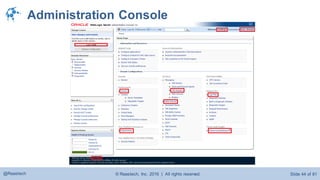
Administration Console
 Administration console can be accessed through:
http://hostname:7001/console
 Administration Console is used for:
 Configure, start, and stop Managed Server instances
 Configure WebLogic Server clusters
 Configure WebLogic Server services, such as database
connectivity (JDBC) and messaging (JMS)
 Configure security parameters, including managing users,
groups, and roles
© Raastech, Inc. 2016 | All rights reserved. Slide 43 of 81@Raastech
Administration Console
 Configure and deploy your applications
 Monitor server and application performance
 View server and domain log files
 View application deployment descriptors
 Edit selected run-time application deployment descriptor elements
 Control (start, stop, and restart) managed Coherence servers
 Create and configure Coherence clusters
© Raastech, Inc. 2016 | All rights reserved. Slide 44 of 81@Raastech
Administration Console
© Raastech, Inc. 2016 | All rights reserved. Slide 45 of 81@Raastech
© Raastech, Inc. 2016 | All rights reserved. Slide 46 of 81@Raastech
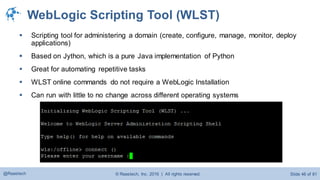
WebLogic Scripting Tool (WLST)
 Scripting tool for administering a domain (create, configure, manage, monitor, deploy
applications)
 Based on Jython, which is a pure Java implementation of Python
 Great for automating repetitive tasks
 WLST online commands do not require a WebLogic Installation
 Can run with little to no change across different operating systems
© Raastech, Inc. 2016 | All rights reserved. Slide 47 of 81@Raastech
WebLogic Scripting Tool (WLST)
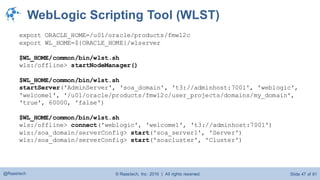
export ORACLE_HOME=/u01/oracle/products/fmw12c
export WL_HOME=${ORACLE_HOME}/wlserver
$WL_HOME/common/bin/wlst.sh
wls:/offline> startNodeManager()
$WL_HOME/common/bin/wlst.sh
startServer('AdminServer', 'soa_domain', 't3://adminhost:7001', 'weblogic',
'welcome1', '/u01/oracle/products/fmw12c/user_projects/domains/my_domain',
'true', 60000, 'false')
$WL_HOME/common/bin/wlst.sh
wls:/offline> connect('weblogic', 'welcome1', 't3://adminhost:7001')
wls:/soa_domain/serverConfig> start('soa_server1', 'Server')
wls:/soa_domain/serverConfig> start('soacluster', 'Cluster')
© Raastech, Inc. 2016 | All rights reserved. Slide 48 of 81@Raastech
© Raastech, Inc. 2016 | All rights reserved. Slide 49 of 81@Raastech
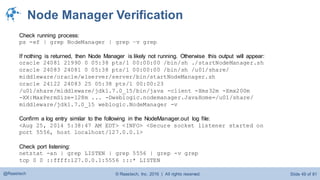
Node Manager Verification
Check running process:
ps -ef | grep NodeManager | grep –v grep
If nothing is returned, then Node Manager is likely not running. Otherwise this output will appear:
oracle 24081 21990 0 05:38 pts/1 00:00:00 /bin/sh ./startNodeManager.sh
oracle 24083 24081 0 05:38 pts/1 00:00:00 /bin/sh /u01/share/
middleware/oracle/wlserver/server/bin/startNodeManager.sh
oracle 24122 24083 25 05:38 pts/1 00:00:23
/u01/share/middleware/jdk1.7.0_15/bin/java -client -Xms32m -Xmx200m
-XX:MaxPermSize=128m ... -Dweblogic.nodemanager.JavaHome=/u01/share/
middleware/jdk1.7.0_15 weblogic.NodeManager -v
Confirm a log entry similar to the following in the NodeManager.out log file:
<Aug 25, 2014 5:38:47 AM EDT> <INFO> <Secure socket listener started on
port 5556, host localhost/127.0.0.1>
Check port listening:
netstat -an | grep LISTEN | grep 5556 | grep -v grep
tcp 0 0 ::ffff:127.0.0.1:5556 :::* LISTEN
© Raastech, Inc. 2016 | All rights reserved. Slide 50 of 81@Raastech
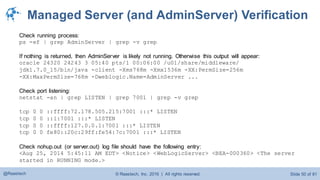
Managed Server (and AdminServer) Verification
Check running process:
ps -ef | grep AdminServer | grep -v grep
If nothing is returned, then AdminServer is likely not running. Otherwise this output will appear:
oracle 24320 24243 3 05:40 pts/1 00:06:00 /u01/share/middleware/
jdk1.7.0_15/bin/java -client -Xms768m -Xmx1536m -XX:PermSize=256m
-XX:MaxPermSize=768m -Dweblogic.Name=AdminServer ...
Check port listening:
netstat -an | grep LISTEN | grep 7001 | grep -v grep
tcp 0 0 ::ffff:72.178.505.215:7001 :::* LISTEN
tcp 0 0 ::1:7001 :::* LISTEN
tcp 0 0 ::ffff:127.0.0.1:7001 :::* LISTEN
tcp 0 0 fe80::20c:29ff:fe54:7c:7001 :::* LISTEN
Check nohup.out (or server.out) log file should have the following entry:
<Aug 25, 2014 5:45:11 AM EDT> <Notice> <WebLogicServer> <BEA-000360> <The server
started in RUNNING mode.>
© Raastech, Inc. 2016 | All rights reserved. Slide 51 of 81@Raastech
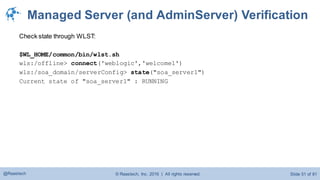
Managed Server (and AdminServer) Verification
Check state through WLST:
$WL_HOME/common/bin/wlst.sh
wls:/offline> connect('weblogic','welcome1')
wls:/soa_domain/serverConfig> state("soa_server1")
Current state of "soa_server1" : RUNNING
© Raastech, Inc. 2016 | All rights reserved. Slide 52 of 81@Raastech
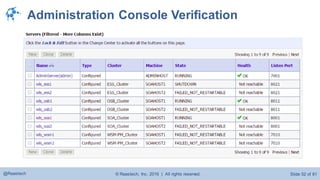
Administration Console Verification
© Raastech, Inc. 2016 | All rights reserved. Slide 53 of 81@Raastech
© Raastech, Inc. 2016 | All rights reserved. Slide 54 of 81@Raastech
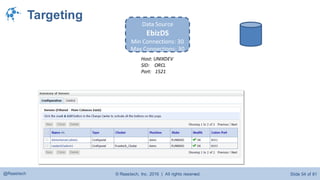
Targeting
Data Source
EbizDS
Min Connections: 30
Max Connections: 30
Host: UNIXDEV
SID: ORCL
Port: 1521
© Raastech, Inc. 2016 | All rights reserved. Slide 55 of 81@Raastech
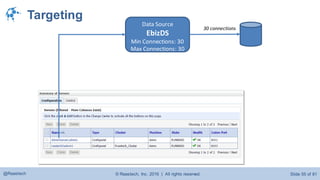
Targeting
Data Source
EbizDS
Min Connections: 30
Max Connections: 30
30 connections
© Raastech, Inc. 2016 | All rights reserved. Slide 56 of 81@Raastech
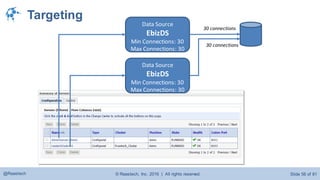
Targeting
Data Source
EbizDS
Min Connections: 30
Max Connections: 30
Data Source
EbizDS
Min Connections: 30
Max Connections: 30
30 connections
30 connections
© Raastech, Inc. 2016 | All rights reserved. Slide 57 of 81@Raastech
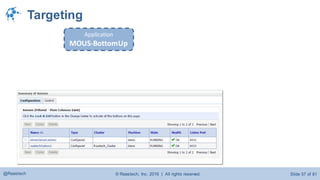
Targeting
Application
MOUS-BottomUp
© Raastech, Inc. 2016 | All rights reserved. Slide 58 of 81@Raastech
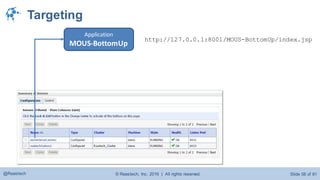
Targeting
Application
MOUS-BottomUp
http://127.0.0.1:8001/MOUS-BottomUp/index.jsp
© Raastech, Inc. 2016 | All rights reserved. Slide 59 of 81@Raastech
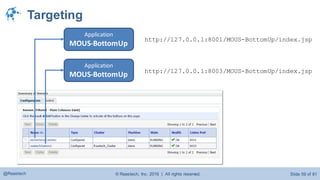
Targeting
Application
MOUS-BottomUp
http://127.0.0.1:8001/MOUS-BottomUp/index.jsp
Application
MOUS-BottomUp http://127.0.0.1:8003/MOUS-BottomUp/index.jsp
© Raastech, Inc. 2016 | All rights reserved. Slide 60 of 81@Raastech
© Raastech, Inc. 2016 | All rights reserved. Slide 61 of 81@Raastech
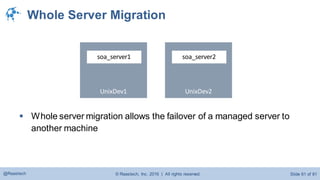
Whole Server Migration
UnixDev1
soa_server1
UnixDev2
soa_server2
 Whole server migration allows the failover of a managed server to
another machine
© Raastech, Inc. 2016 | All rights reserved. Slide 62 of 81@Raastech
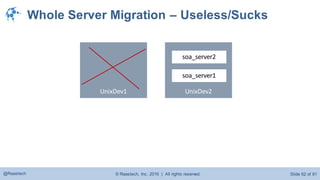
Whole Server Migration – Useless/Sucks
UnixDev1 UnixDev2
soa_server2
soa_server1
© Raastech, Inc. 2016 | All rights reserved. Slide 63 of 81@Raastech
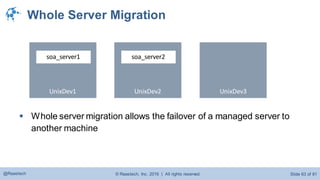
Whole Server Migration
UnixDev1
soa_server1
UnixDev2
soa_server2
 Whole server migration allows the failover of a managed server to
another machine
UnixDev3
© Raastech, Inc. 2016 | All rights reserved. Slide 64 of 81@Raastech
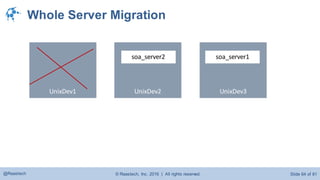
Whole Server Migration
UnixDev1 UnixDev2
soa_server2
UnixDev3
soa_server1
© Raastech, Inc. 2016 | All rights reserved. Slide 65 of 81@Raastech
Whole Server Migration
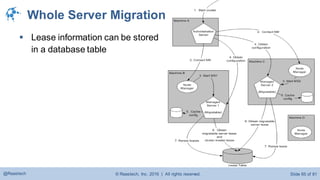
 Lease information can be stored
in a database table
© Raastech, Inc. 2016 | All rights reserved. Slide 66 of 81@Raastech
Whole Server Migration
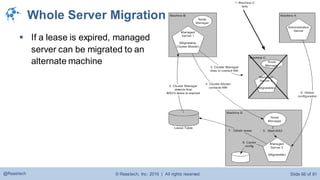
 If a lease is expired, managed
server can be migrated to an
alternate machine
© Raastech, Inc. 2016 | All rights reserved. Slide 67 of 81@Raastech
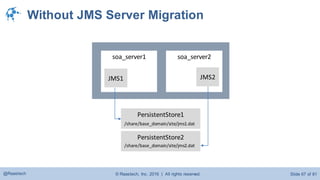
Without JMS Server Migration
soa_server1 soa_server2
JMS2
PersistentStore1
/share/base_domain/site/jms1.dat
PersistentStore2
/share/base_domain/site/jms2.dat
JMS1
© Raastech, Inc. 2016 | All rights reserved. Slide 68 of 81@Raastech
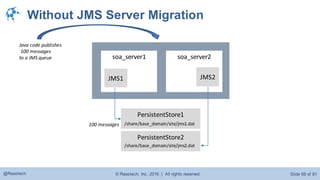
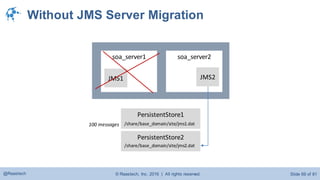
Without JMS Server Migration
soa_server1 soa_server2
JMS2
PersistentStore1
/share/base_domain/site/jms1.dat
PersistentStore2
/share/base_domain/site/jms2.dat
JMS1
100 messages
Java code publishes
100 messages
to a JMS queue
© Raastech, Inc. 2016 | All rights reserved. Slide 69 of 81@Raastech
Without JMS Server Migration
soa_server1 soa_server2
JMS2
PersistentStore1
/share/base_domain/site/jms1.dat
PersistentStore2
/share/base_domain/site/jms2.dat
JMS1
100 messages
© Raastech, Inc. 2016 | All rights reserved. Slide 70 of 81@Raastech
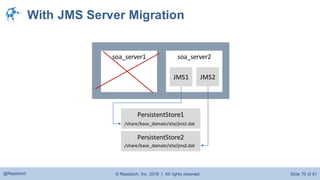
With JMS Server Migration
soa_server1 soa_server2
JMS2
PersistentStore1
/share/base_domain/site/jms1.dat
PersistentStore2
/share/base_domain/site/jms2.dat
JMS1
© Raastech, Inc. 2016 | All rights reserved. Slide 71 of 81@Raastech
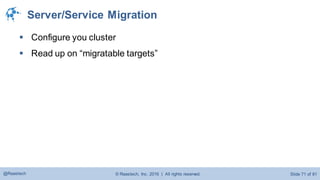
Server/Service Migration
 Configure you cluster
 Read up on “migratable targets”
© Raastech, Inc. 2016 | All rights reserved. Slide 72 of 81@Raastech
© Raastech, Inc. 2016 | All rights reserved. Slide 73 of 81@Raastech
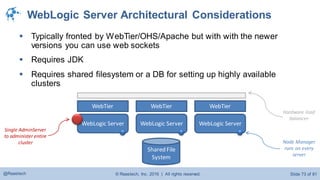
WebLogic Server Architectural Considerations
 Typically fronted by WebTier/OHS/Apache but with with the newer
versions you can use web sockets
 Requires JDK
 Requires shared filesystem or a DB for setting up highly available
clusters
WebLogic Server WebLogic Server WebLogic Server
Shared File
System
WebTier WebTier WebTier
Single AdminServer
to administer entire
cluster Node Manager
runs on every
server
Hardware load
balancer
© Raastech, Inc. 2016 | All rights reserved. Slide 74 of 81@Raastech
Key Things to Consider
 Plan your environment based on the key business factors
 Functionality
 Availability
 Throughput
 Future Growth / Easy Scaling
 Implement the best practices starting with lower environments
 Automate every task that can be automated
 Secure environments to avoid non-functional and human breaches
 All environments need to have a backup and recovery plan
© Raastech, Inc. 2016 | All rights reserved. Slide 75 of 81@Raastech
Oracle WebLogic Server 12c R2 New Features
 New with Oracle WebLogic Server 12c (12.2.1)
 Partitions, to support multi-tenancy
© Raastech, Inc. 2016 | All rights reserved. Slide 76 of 81@Raastech
© Raastech, Inc. 2016 | All rights reserved. Slide 77 of 81@Raastech
© Raastech, Inc. 2016 | All rights reserved. Slide 78 of 81@Raastech
Recap Questions
 What is the latest version of WebLogic Server?
 What is a managed server?
 What are some of the disadvantages of Whole Server Migration?
 What is the main configuration file called?
 What does WLST stand for?
 What is a benefit of using WLST?
 Can you start up a managed server without Node Manager?
 Why would you want to configure JMS server migration?
 Does a domain have to have an AdminServer?
 What problems will happen if AdminServer is down?
 Must the AdminServer reside on its own separate physical box?
 What is Oracle Fusion Middleware?
 Does each managed server maintain it’s own copy of “config.xml”?
© Raastech, Inc. 2016 | All rights reserved. Slide 79 of 81@Raastech
References and Useful Resources
 https://docs.oracle.com/cd/E24329_01/web.1211/e24446/intro.htm#INTRO123
 https://docs.oracle.com/middleware/1213/wls/INTRO/adminconsole.htm#INTRO146
 https://www.packtpub.com/application-development/oracle-soa-suite-12c-
administrators-guide
 http://blog.raastech.com/
 http://middlewaremagic.com/weblogic/
© Raastech, Inc. 2016 | All rights reserved. Slide 80 of 81@Raastech
Contact Information
 Ahmed Aboulnaga
 Technical Director
 @Ahmed_Aboulnaga
 ahmed.aboulnaga@raastech.com
© Raastech, Inc. 2016 | All rights reserved. Slide 81 of 81@Raastech
Q&A

Learn Oracle WebLogic Server 12c Administration

  • 1.
    Raastech, Inc. 2201 CooperativeWay, Suite 600 Herndon, VA 20171 +1-703-884-2223 info@raastech.com Learn Oracle WebLogic Server 12c Administration For Middleware Administrators Tuesday, March 15, 2016 Session 4: 2:30 - 3:30 pm Center Lounge
  • 2.
    © Raastech, Inc.2016 | All rights reserved. Slide 2 of 81@Raastech Agenda 1. Introduction 2. Why This Presentation 3. Oracle Fusion Middleware Overview 4. WebLogic Server Terminology 5. Configuration & Changes 6. Configuration Wizard 7. Administration Console 8. WebLogic Scripting Tool (WLST) 9. Verification 10. Targeting 11. Server/ServiceAuto-Migration 12. Live Walkthrough 13. Recap
  • 3.
    © Raastech, Inc.2016 | All rights reserved. Slide 3 of 81@Raastech
  • 4.
    © Raastech, Inc.2016 | All rights reserved. Slide 4 of 81@Raastech About Me  Ahmed Aboulnaga @Ahmed_Aboulnaga  18+ years Oracle experience  Author of “Oracle SOA Suite 11g Administrator’s Handbook”  Author of “Oracle SOA Suite 12c Administrator’s Guide”  Technical editor of “Oracle WebLogic 11g Administration Handbook”  OCE (SOA Foundation Practitioner)  OCA (Oracle Application Server)  Oracle ACE
  • 5.
    © Raastech, Inc.2016 | All rights reserved. Slide 5 of 81@Raastech About Raastech  Small systems integrator founded in 2009  Headquartered in the Washington DC area  Specializes in Oracle Fusion Middleware  Oracle Platinum Partner 1 in 3,000 worldwide  Oracle SOA Specialized 1 in 1,500 worldwide  OracleACEs 2 in 600 worldwide
  • 6.
    © Raastech, Inc.2016 | All rights reserved. Slide 6 of 81@Raastech
  • 7.
    © Raastech, Inc.2016 | All rights reserved. Slide 7 of 81@Raastech Oracle WebLogic Server  Industry’s leading Java EE application server  Over 120,000 customers  Leader in Gartner’s Magic Quadrant for EnterpriseApplication Servers http://www.oracle.com/us/products/middleware/application-server/oracle-weblogic-server-ds-1391360.pdf http://www.oracle.com/technetwork/middleware/weblogic/overview/weblogic-server-whitepaper-1-134488.pdf
  • 8.
    © Raastech, Inc.2016 | All rights reserved. Slide 8 of 81@Raastech  Oracle WebLogic Server is also the foundation for most Oracle products, including Fusion Middleware and applications OEM Cloud Control OBIEE Access Manager SOA Suite WebCenter Portal Data Integrator Oracle WebLogic Server Clustering – JNDI – Resource Adapters – JDBC – Security – Self Tuning Oracle WebLogic Server
  • 9.
    © Raastech, Inc.2016 | All rights reserved. Slide 9 of 81@Raastech
  • 10.
    © Raastech, Inc.2016 | All rights reserved. Slide 10 of 81@Raastech Understanding Oracle Fusion Middleware  “Oracle Fusion Middleware” is a misleading term  Used to describe middleware products such as:  Business Intelligence (e.g., OBIEE, Discoverer)  Integration (e.g., SOA Suite, OSB)  Web Center (Web Center Content and Portal)  Identity Management (e.g., Oracle Access Manager)  Monitoring (e.g., OEM Grid Control)  But usually used to describe a single product:  WebLogic Server
  • 11.
    © Raastech, Inc.2016 | All rights reserved. Slide 11 of 81@Raastech Oracle Fusion Middleware Overview
  • 12.
    © Raastech, Inc.2016 | All rights reserved. Slide 12 of 81@Raastech Oracle WebLogic Server  Java Enterprise Edition (Java EE) application server  Acquired from BEA in 2008  Replaced old school OracleApplication Server  Required for almost all Oracle Fusion Middleware products  Supports the deployment of many distributed applications  Provides a standard set of APIs for creating distributed Java applications that can access a wide variety of services such as  JMS, JDBC, RMI, Web Services, XML, EJB etc.
  • 13.
    © Raastech, Inc.2016 | All rights reserved. Slide 13 of 81@Raastech Current Releases and Installers  Current releases:  Oracle WebLogic Server 12c R2 (12.2.1)  Oracle WebLogic Server 12c (12.1.2 and 12.1.3)  Installers can be downloaded through:  Oracle Software Delivery Cloud (http://edelivery.oracle.com)  Oracle OTN Network (http://download.oracle.com)
  • 14.
    © Raastech, Inc.2016 | All rights reserved. Slide 14 of 81@Raastech Installer Types
  • 15.
    © Raastech, Inc.2016 | All rights reserved. Slide 15 of 81@Raastech
  • 16.
    © Raastech, Inc.2016 | All rights reserved. Slide 16 of 81@Raastech Components UnixDev1 UnixDev3UnixDev2  Unix Server  Domain  AdminServer  Machine  Managed Server  Node Manager  Cluster
  • 17.
    © Raastech, Inc.2016 | All rights reserved. Slide 17 of 81@Raastech base_domain Components UnixDev1 UnixDev3UnixDev2  Unix Server  Domain  AdminServer  Machine  Managed Server  Node Manager  Cluster
  • 18.
    © Raastech, Inc.2016 | All rights reserved. Slide 18 of 81@Raastech base_domain Components AdminServer Port 7001 UnixDev1 UnixDev3UnixDev2  Unix Server  Domain  AdminServer  Machine  Managed Server  Node Manager  Cluster
  • 19.
    © Raastech, Inc.2016 | All rights reserved. Slide 19 of 81@Raastech base_domain Components Machine BananaMachine Peach soa_server2 AdminServer Port 7001 Port 8001 UnixDev1 UnixDev3 Machine Apple soa_server1 Port 8001 UnixDev2  Unix Server  Domain  AdminServer  Machine  Managed Server  Node Manager  Cluster
  • 20.
    © Raastech, Inc.2016 | All rights reserved. Slide 20 of 81@Raastech base_domain Components Machine BananaMachine Peach soa_server2 AdminServer Port 7001 Port 8001 Port 5556 UnixDev1 UnixDev3 Machine Apple Node Manager Port 5556 soa_server1 Port 8001 UnixDev2 Node Manager  Unix Server  Domain  AdminServer  Machine  Managed Server  Node Manager  Cluster
  • 21.
    © Raastech, Inc.2016 | All rights reserved. Slide 21 of 81@Raastech base_domain Components Machine BananaMachine Peach soa_server2 AdminServer Port 7001 Port 8001 Port 5556 UnixDev1 UnixDev3 Machine Apple Node Manager Port 5556 soa_server1 Port 8001 UnixDev2 Node Manager  Unix Server  Domain  AdminServer  Machine  Managed Server  Node Manager  Cluster
  • 22.
    © Raastech, Inc.2016 | All rights reserved. Slide 22 of 81@Raastech base_domain Components Machine BananaMachine Peach soa_server2 AdminServer Port 7001 Port 8001 Port 5556 UnixDev1 UnixDev3 Machine Apple Node Manager Port 5556 soa_server1 Port 8001 UnixDev2 Node Manager  Unix Server  Domain  AdminServer  Machine  Managed Server  Node Manager  Cluster soa_cluster Load Balancer
  • 23.
    © Raastech, Inc.2016 | All rights reserved. Slide 23 of 81@Raastech base_domainDomain  Logically related group of WebLogic Server instances that can be managed from a single set of configuration files  Domain consists of:  Servers  Clusters of servers  Each Domain requires an Administration Server  All managed servers in a cluster must be part of same domain  Domain can spread across many machines but the WebLogic version has to be the same AdminServer soa_cluster soa_server1 soa_server2 osb_cluster osb_server1 osb_server2
  • 24.
    © Raastech, Inc.2016 | All rights reserved. Slide 24 of 81@Raastech Administration Server (aka AdminServer)  Controls configuration for the domain  Only one AdminServer per domain  AdminServer can only control one domain  Hosts the Administration Console  Enables you to start and stop servers from a central location  Enables you to migrate servers and services within the domain  Enables you to deploy applications within the domain soa_server1 osb_server1 AdminServer config.xml Admin Console soa_server2 osb_server2
  • 25.
    © Raastech, Inc.2016 | All rights reserved. Slide 25 of 81@Raastech Managed Server  Managed Servers host business applications, application components, web services, and their associatedresources  Each Managed Server can function independent of other Managed Servers in the domain  Managed Servers do not share resources such JDBC, JMS and connection factories  Individual Managed Servers are typically added for capacity and application isolation  Each Managed Server stores a local copy of its configuration JNDI JMS Queue JDBC Pool soa_server1 JNDI JDBC Pool osb_server1 config.xml config.xml
  • 26.
    © Raastech, Inc.2016 | All rights reserved. Slide 26 of 81@Raastech Cluster  A cluster is a group of Managed Servers running simultaneously and working together to provide:  Scalability: through parallelism  Reliability/Availability: through replication and redundancy  A Cluster is part of a single domain and each domain can contain multiple clusters  Domain can contain clustered and non- clustered managed servers  Clusters enable some advanced features, such as Whole Server Migration, Service Migration, and clustered JMS destinations Machine KiwiMachine Apple osb_cluster soa_cluster osb_server1 Port 8011 osb_server2 Port 8011 soa_server2 Port 8001 soa_server1 Port 8001 AdminServer Port 7001
  • 27.
    © Raastech, Inc.2016 | All rights reserved. Slide 27 of 81@Raastech Load Balancing in a Cluster  JSPs and Servlets  load balancing is external  Web server proxy plug-in (round robin)  HTTP proxy servlet (i.e., using WLS as a load balancer)  3rd party hardware or software load balancer (F5 Big IP LTM or Cisco CSM)  EJBs and RMI Objects  load balancing is done at connection  Objects are cluster-aware  Load balancing algorithm is stored in the clustered object’s stub  Objects are available on all cluster members; remote objects connect/use according the LB algorithm in the stub  Load balancing algorithms: Round robin, weighted, random, server affinity
  • 28.
    © Raastech, Inc.2016 | All rights reserved. Slide 28 of 81@Raastech Failover in a Cluster  Servlets and JSPs:  HTTP session state is replicated to a secondary server in the cluster or to a database  EJBs and RMI Objects:  Replicas available throughout the cluster  Exceptions caught and retried on another instance  For Stateful Session Beans, state is replicated on a secondary server
  • 29.
    © Raastech, Inc.2016 | All rights reserved. Slide 29 of 81@Raastech Node Manager  Process running on a physical server that enables you to start, stop, suspend, and restart WebLogic Server instances remotely  Runs on each physical server that hosts WebLogic Server instances  Not associatedwith a domain. Can start any server instance that resides on the same physical server.  Node Manager is optional, but required to start/stop servers using the Administration Console  Required for Whole Server Migration and for some configurations of Automatic Service Migration Machine Banana soa_server2 Port 8001 Port 5556 Machine Apple Node Manager Port 5556 soa_server1 Port 8001 Node Manager
  • 30.
    © Raastech, Inc.2016 | All rights reserved. Slide 30 of 81@Raastech Machine  A definition that identifies a particular, physical piece of hardware  A machine definition is used to associate a computer with the Managed Servers it hosts  Used by Node Manager in restarting a failed Managed Server  Used by a clustered Managed Server in selecting the best location for storing replicated session data SOAHOST2 soa_server2 unixdev3.raastech.com SOAHOST1 soa_server1 unixdev2.raastech.com
  • 31.
    © Raastech, Inc.2016 | All rights reserved. Slide 31 of 81@Raastech Administration Console
  • 32.
    © Raastech, Inc.2016 | All rights reserved. Slide 32 of 81@Raastech
  • 33.
    © Raastech, Inc.2016 | All rights reserved. Slide 33 of 81@Raastech Main Configuration Files (config.xml) <domain (schema locations)> <name>wl_server</name> <security-configuration></security-configuration> <jta></jta> <server> <name>examplesServer</name> </server> <app-deployment></app-deployment> <jms-server></jms-server> <jms-system-resource></jms-system-resource> <jdbc-system-resource> <name>examples-demo</name> <target>examplesServer,managedServer-0</target> <descriptor-file-name>jdbc/examples-demo.xml</descriptor-file-name> </jdbc-system-resource> </domain> config.xml <jdbc-data-source> <name>examples-demo</name> <jdbc-driver-params></jdbc-driver-params> <jdbc-driver-params></jdbc-driver-params> <jdbc-data-source-params></jdbc-data-source-params> </jdbc-data-source> …references to other files: • Central configuration file for a domain • Includes the configuration of each server instance, cluster, resource,and service in the domain • Referencesadditional XML files that are stored in subdirectories ofthe domain config directory: JMS, JDBC,WLDF,and Security
  • 34.
    © Raastech, Inc.2016 | All rights reserved. Slide 34 of 81@Raastech 34 Two-Phase Configuration Changes  Changes activated in batches for: reliability & consistency  Make (related) changes as a group  Validate before making the change  Activate or rollback as a single unit (all changes on all servers)  General process: 1. “Lock & Edit” 2. Make changes  Changes are stored in the pending directory 3. Activate your changes (with implicit validation through the Admin Console or WLST)  Changes are distributed to servers in the domain  Two phases: prepare & commit  Prepared on all servers; any failures will cause total rollback
  • 35.
    © Raastech, Inc.2016 | All rights reserved. Slide 35 of 81@Raastech
  • 36.
    © Raastech, Inc.2016 | All rights reserved. Slide 36 of 81@Raastech Configuration Wizard 1. Install software: /u01/app/oracle/fmw12c 2. Create domain using “configuration wizard”: /u01/app/oracle/fmw12c/user_projects/domains/devdomain 3. (optional) Create another domain using configuration wizard: /u01/app/oracle/fmw12c/user_projects/domains/testdomain
  • 37.
    © Raastech, Inc.2016 | All rights reserved. Slide 37 of 81@Raastech Configuration Wizard  File system: /u01/app/oracle/fmw12c /oracle_common /common /nodemanager /user_projects /domains /devdomain /testdomain /wlserver • AdminServer running on port 7001 • Has its own copy of “config.xml” • Single Node Manager binaries and logs for this entire host • AdminServer running on port 7003 • Has its own copy of “config.xml” • This domain is managed completely independently of the other one, but they both sharethe sameWebLogic binaries• WebLogic binaries
  • 38.
    © Raastech, Inc.2016 | All rights reserved. Slide 38 of 81@Raastech 38 Configuration Wizard  Wizard that walks you through domain creation offline  Not intended to run against a running domain  WLS ships with a default template and templates for samples domains  Customers and layered products can create their own templates  Domain creation can be automated using WLST Scripts  Platform or Operating System Independent  Is used for creation of clustered and non-clustered domains  Is also used for extending an existing domain to add new managed servers, components and features
  • 39.
    © Raastech, Inc.2016 | All rights reserved. Slide 39 of 81@Raastech 39 Configuration Wizard
  • 40.
    © Raastech, Inc.2016 | All rights reserved. Slide 40 of 81@Raastech Configuration Wizard
  • 41.
    © Raastech, Inc.2016 | All rights reserved. Slide 41 of 81@Raastech
  • 42.
    © Raastech, Inc.2016 | All rights reserved. Slide 42 of 81@Raastech Administration Console  Administration console can be accessed through: http://hostname:7001/console  Administration Console is used for:  Configure, start, and stop Managed Server instances  Configure WebLogic Server clusters  Configure WebLogic Server services, such as database connectivity (JDBC) and messaging (JMS)  Configure security parameters, including managing users, groups, and roles
  • 43.
    © Raastech, Inc.2016 | All rights reserved. Slide 43 of 81@Raastech Administration Console  Configure and deploy your applications  Monitor server and application performance  View server and domain log files  View application deployment descriptors  Edit selected run-time application deployment descriptor elements  Control (start, stop, and restart) managed Coherence servers  Create and configure Coherence clusters
  • 44.
    © Raastech, Inc.2016 | All rights reserved. Slide 44 of 81@Raastech Administration Console
  • 45.
    © Raastech, Inc.2016 | All rights reserved. Slide 45 of 81@Raastech
  • 46.
    © Raastech, Inc.2016 | All rights reserved. Slide 46 of 81@Raastech WebLogic Scripting Tool (WLST)  Scripting tool for administering a domain (create, configure, manage, monitor, deploy applications)  Based on Jython, which is a pure Java implementation of Python  Great for automating repetitive tasks  WLST online commands do not require a WebLogic Installation  Can run with little to no change across different operating systems
  • 47.
    © Raastech, Inc.2016 | All rights reserved. Slide 47 of 81@Raastech WebLogic Scripting Tool (WLST) export ORACLE_HOME=/u01/oracle/products/fmw12c export WL_HOME=${ORACLE_HOME}/wlserver $WL_HOME/common/bin/wlst.sh wls:/offline> startNodeManager() $WL_HOME/common/bin/wlst.sh startServer('AdminServer', 'soa_domain', 't3://adminhost:7001', 'weblogic', 'welcome1', '/u01/oracle/products/fmw12c/user_projects/domains/my_domain', 'true', 60000, 'false') $WL_HOME/common/bin/wlst.sh wls:/offline> connect('weblogic', 'welcome1', 't3://adminhost:7001') wls:/soa_domain/serverConfig> start('soa_server1', 'Server') wls:/soa_domain/serverConfig> start('soacluster', 'Cluster')
  • 48.
    © Raastech, Inc.2016 | All rights reserved. Slide 48 of 81@Raastech
  • 49.
    © Raastech, Inc.2016 | All rights reserved. Slide 49 of 81@Raastech Node Manager Verification Check running process: ps -ef | grep NodeManager | grep –v grep If nothing is returned, then Node Manager is likely not running. Otherwise this output will appear: oracle 24081 21990 0 05:38 pts/1 00:00:00 /bin/sh ./startNodeManager.sh oracle 24083 24081 0 05:38 pts/1 00:00:00 /bin/sh /u01/share/ middleware/oracle/wlserver/server/bin/startNodeManager.sh oracle 24122 24083 25 05:38 pts/1 00:00:23 /u01/share/middleware/jdk1.7.0_15/bin/java -client -Xms32m -Xmx200m -XX:MaxPermSize=128m ... -Dweblogic.nodemanager.JavaHome=/u01/share/ middleware/jdk1.7.0_15 weblogic.NodeManager -v Confirm a log entry similar to the following in the NodeManager.out log file: <Aug 25, 2014 5:38:47 AM EDT> <INFO> <Secure socket listener started on port 5556, host localhost/127.0.0.1> Check port listening: netstat -an | grep LISTEN | grep 5556 | grep -v grep tcp 0 0 ::ffff:127.0.0.1:5556 :::* LISTEN
  • 50.
    © Raastech, Inc.2016 | All rights reserved. Slide 50 of 81@Raastech Managed Server (and AdminServer) Verification Check running process: ps -ef | grep AdminServer | grep -v grep If nothing is returned, then AdminServer is likely not running. Otherwise this output will appear: oracle 24320 24243 3 05:40 pts/1 00:06:00 /u01/share/middleware/ jdk1.7.0_15/bin/java -client -Xms768m -Xmx1536m -XX:PermSize=256m -XX:MaxPermSize=768m -Dweblogic.Name=AdminServer ... Check port listening: netstat -an | grep LISTEN | grep 7001 | grep -v grep tcp 0 0 ::ffff:72.178.505.215:7001 :::* LISTEN tcp 0 0 ::1:7001 :::* LISTEN tcp 0 0 ::ffff:127.0.0.1:7001 :::* LISTEN tcp 0 0 fe80::20c:29ff:fe54:7c:7001 :::* LISTEN Check nohup.out (or server.out) log file should have the following entry: <Aug 25, 2014 5:45:11 AM EDT> <Notice> <WebLogicServer> <BEA-000360> <The server started in RUNNING mode.>
  • 51.
    © Raastech, Inc.2016 | All rights reserved. Slide 51 of 81@Raastech Managed Server (and AdminServer) Verification Check state through WLST: $WL_HOME/common/bin/wlst.sh wls:/offline> connect('weblogic','welcome1') wls:/soa_domain/serverConfig> state("soa_server1") Current state of "soa_server1" : RUNNING
  • 52.
    © Raastech, Inc.2016 | All rights reserved. Slide 52 of 81@Raastech Administration Console Verification
  • 53.
    © Raastech, Inc.2016 | All rights reserved. Slide 53 of 81@Raastech
  • 54.
    © Raastech, Inc.2016 | All rights reserved. Slide 54 of 81@Raastech Targeting Data Source EbizDS Min Connections: 30 Max Connections: 30 Host: UNIXDEV SID: ORCL Port: 1521
  • 55.
    © Raastech, Inc.2016 | All rights reserved. Slide 55 of 81@Raastech Targeting Data Source EbizDS Min Connections: 30 Max Connections: 30 30 connections
  • 56.
    © Raastech, Inc.2016 | All rights reserved. Slide 56 of 81@Raastech Targeting Data Source EbizDS Min Connections: 30 Max Connections: 30 Data Source EbizDS Min Connections: 30 Max Connections: 30 30 connections 30 connections
  • 57.
    © Raastech, Inc.2016 | All rights reserved. Slide 57 of 81@Raastech Targeting Application MOUS-BottomUp
  • 58.
    © Raastech, Inc.2016 | All rights reserved. Slide 58 of 81@Raastech Targeting Application MOUS-BottomUp http://127.0.0.1:8001/MOUS-BottomUp/index.jsp
  • 59.
    © Raastech, Inc.2016 | All rights reserved. Slide 59 of 81@Raastech Targeting Application MOUS-BottomUp http://127.0.0.1:8001/MOUS-BottomUp/index.jsp Application MOUS-BottomUp http://127.0.0.1:8003/MOUS-BottomUp/index.jsp
  • 60.
    © Raastech, Inc.2016 | All rights reserved. Slide 60 of 81@Raastech
  • 61.
    © Raastech, Inc.2016 | All rights reserved. Slide 61 of 81@Raastech Whole Server Migration UnixDev1 soa_server1 UnixDev2 soa_server2  Whole server migration allows the failover of a managed server to another machine
  • 62.
    © Raastech, Inc.2016 | All rights reserved. Slide 62 of 81@Raastech Whole Server Migration – Useless/Sucks UnixDev1 UnixDev2 soa_server2 soa_server1
  • 63.
    © Raastech, Inc.2016 | All rights reserved. Slide 63 of 81@Raastech Whole Server Migration UnixDev1 soa_server1 UnixDev2 soa_server2  Whole server migration allows the failover of a managed server to another machine UnixDev3
  • 64.
    © Raastech, Inc.2016 | All rights reserved. Slide 64 of 81@Raastech Whole Server Migration UnixDev1 UnixDev2 soa_server2 UnixDev3 soa_server1
  • 65.
    © Raastech, Inc.2016 | All rights reserved. Slide 65 of 81@Raastech Whole Server Migration  Lease information can be stored in a database table
  • 66.
    © Raastech, Inc.2016 | All rights reserved. Slide 66 of 81@Raastech Whole Server Migration  If a lease is expired, managed server can be migrated to an alternate machine
  • 67.
    © Raastech, Inc.2016 | All rights reserved. Slide 67 of 81@Raastech Without JMS Server Migration soa_server1 soa_server2 JMS2 PersistentStore1 /share/base_domain/site/jms1.dat PersistentStore2 /share/base_domain/site/jms2.dat JMS1
  • 68.
    © Raastech, Inc.2016 | All rights reserved. Slide 68 of 81@Raastech Without JMS Server Migration soa_server1 soa_server2 JMS2 PersistentStore1 /share/base_domain/site/jms1.dat PersistentStore2 /share/base_domain/site/jms2.dat JMS1 100 messages Java code publishes 100 messages to a JMS queue
  • 69.
    © Raastech, Inc.2016 | All rights reserved. Slide 69 of 81@Raastech Without JMS Server Migration soa_server1 soa_server2 JMS2 PersistentStore1 /share/base_domain/site/jms1.dat PersistentStore2 /share/base_domain/site/jms2.dat JMS1 100 messages
  • 70.
    © Raastech, Inc.2016 | All rights reserved. Slide 70 of 81@Raastech With JMS Server Migration soa_server1 soa_server2 JMS2 PersistentStore1 /share/base_domain/site/jms1.dat PersistentStore2 /share/base_domain/site/jms2.dat JMS1
  • 71.
    © Raastech, Inc.2016 | All rights reserved. Slide 71 of 81@Raastech Server/Service Migration  Configure you cluster  Read up on “migratable targets”
  • 72.
    © Raastech, Inc.2016 | All rights reserved. Slide 72 of 81@Raastech
  • 73.
    © Raastech, Inc.2016 | All rights reserved. Slide 73 of 81@Raastech WebLogic Server Architectural Considerations  Typically fronted by WebTier/OHS/Apache but with with the newer versions you can use web sockets  Requires JDK  Requires shared filesystem or a DB for setting up highly available clusters WebLogic Server WebLogic Server WebLogic Server Shared File System WebTier WebTier WebTier Single AdminServer to administer entire cluster Node Manager runs on every server Hardware load balancer
  • 74.
    © Raastech, Inc.2016 | All rights reserved. Slide 74 of 81@Raastech Key Things to Consider  Plan your environment based on the key business factors  Functionality  Availability  Throughput  Future Growth / Easy Scaling  Implement the best practices starting with lower environments  Automate every task that can be automated  Secure environments to avoid non-functional and human breaches  All environments need to have a backup and recovery plan
  • 75.
    © Raastech, Inc.2016 | All rights reserved. Slide 75 of 81@Raastech Oracle WebLogic Server 12c R2 New Features  New with Oracle WebLogic Server 12c (12.2.1)  Partitions, to support multi-tenancy
  • 76.
    © Raastech, Inc.2016 | All rights reserved. Slide 76 of 81@Raastech
  • 77.
    © Raastech, Inc.2016 | All rights reserved. Slide 77 of 81@Raastech
  • 78.
    © Raastech, Inc.2016 | All rights reserved. Slide 78 of 81@Raastech Recap Questions  What is the latest version of WebLogic Server?  What is a managed server?  What are some of the disadvantages of Whole Server Migration?  What is the main configuration file called?  What does WLST stand for?  What is a benefit of using WLST?  Can you start up a managed server without Node Manager?  Why would you want to configure JMS server migration?  Does a domain have to have an AdminServer?  What problems will happen if AdminServer is down?  Must the AdminServer reside on its own separate physical box?  What is Oracle Fusion Middleware?  Does each managed server maintain it’s own copy of “config.xml”?
  • 79.
    © Raastech, Inc.2016 | All rights reserved. Slide 79 of 81@Raastech References and Useful Resources  https://docs.oracle.com/cd/E24329_01/web.1211/e24446/intro.htm#INTRO123  https://docs.oracle.com/middleware/1213/wls/INTRO/adminconsole.htm#INTRO146  https://www.packtpub.com/application-development/oracle-soa-suite-12c- administrators-guide  http://blog.raastech.com/  http://middlewaremagic.com/weblogic/
  • 80.
    © Raastech, Inc.2016 | All rights reserved. Slide 80 of 81@Raastech Contact Information  Ahmed Aboulnaga  Technical Director  @Ahmed_Aboulnaga  ahmed.aboulnaga@raastech.com
  • 81.
    © Raastech, Inc.2016 | All rights reserved. Slide 81 of 81@Raastech Q&A