Weblogic Domain
Understanding Domains
What is Weblogic domain
AnOracleWebLogicServer administrationdomain isalogically relatedgroupof
OracleWebLogicServer resources. Domainsincludeaspecial OracleWebLogicServer
instancecalledtheAdministration Server, whichisthecentral pointfromwhichyou
configureandmanageall resourcesinthedomain. Usually, youconfigureadomainto
includeadditional OracleWebLogicServer instancescalledManaged Servers. You
deploy Webapplications, EJBs, Webservices, andother resourcesontotheManaged
ServersandusetheAdministrationServer for configurationandmanagementpurposes
only.
Understanding Domains
Organizing Domain
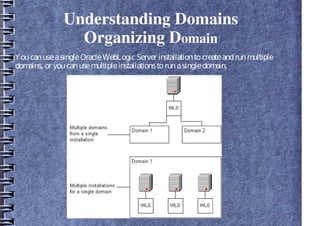
YoucanuseasingleOracleWebLogicServer installationtocreateandrunmultiple
domains, or youcanusemultipleinstallationstorunasingledomain.
Understanding Domains
Contents of Domain
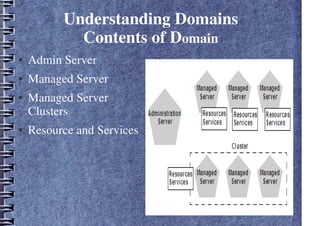
● Admin Server
● Managed Server
● Managed Server
Clusters
● Resource and Services
●
Understanding Domains
Restrictions on Domain
● EachdomainrequiresitsownAdministrationServer for performingmanagement
activities. WhenyouusetheAdministrationConsoletoperformmanagementand
monitoringtasks, youcanswitchback andforthbetweendomains, butindoingso,
youareconnectingtodifferentAdministrationServers.
● All ManagedServersinacluster mustresideinthesamedomain; youcannotsplita
cluster over multipledomains.
● All ManagedServersinadomainmustrunthesameversionof theOracle
WebLogicServer software. TheAdministrationServer may runeither thesame
versionastheManagedServersinthedomain, or alater patchset.
● Eachdomainmustreferenceitsowndatabaseschema. Youcannotsharea
configuredresourceor subsystembetweendomains
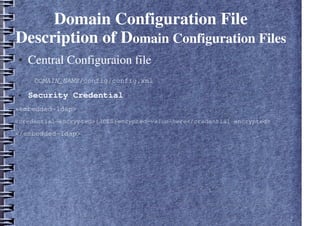
Domain Configuration File
Description of Domain Configuration Files
● Central Configuraion file
DOMAIN_NAME/config/config.xml
● Security Credential
<embedded-ldap>
<credential-encrypted>{3DES}encypted-value-here</credential-encrypted>
</embedded-ldap>
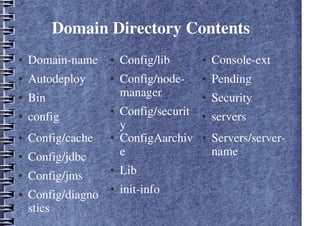
Domain Directory Contents
● Domain-name
● Autodeploy
● Bin
● config
● Config/lib
● Config/node-
manager
● Config/securit
y
● Console-ext
● Pending
● Security
● servers
● Servers/server-
name
● ConfigAarchiv
e
● Lib
● init-info
● Config/cache
● Config/jdbc
● Config/jms
● Config/diagno
stics
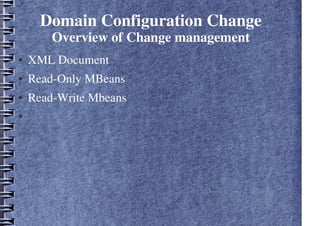
Domain Configuration Change
Overview of Change management
● XML Document
● Read-Only MBeans
● Read-Write Mbeans
●
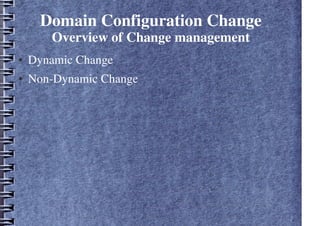
Domain Configuration Change
Overview of Change management
● Dynamic Change
● Non-Dynamic Change
Domain Configuration Change
Overview of Change management
● Administration Console
● Weblogic Scripting Tools
● JMX APIs
Domain Configuration Change
Change Management in Administrative
Console
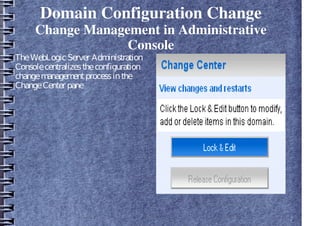
TheWebLogicServer Administration
Consolecentralizestheconfiguration
changemanagementprocessinthe
ChangeCenter pane
Domain Configuration Change
Configuration Change Management
Process
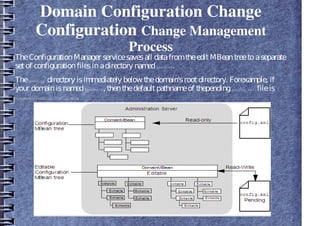
1. WhentheAdministrationServer starts, itreadsthedomain'sconfigurationfiles,
includingconfig.xml fileandany subsidiary configurationfilesreferredtoby the
config.xml fileandusesthedatatoinstantiatethefollowingMBeantreesin
Memory:
● A read-only treeof ConfigurationMBeansthatcontainsthecurrentconfigurationof
resourcesthatareontheAdministrationServer.
● Aneditabletreeof all ConfigurationMBeansfor all serversinthedomain.
Domain Configuration Change
Configuration Change Management
Process
2. Toinitiateaconfigurationchange, youdothefollowing:
a. Obtainalock onthecurrentconfiguration.
b. Makeany changesyoudesire, usingthetool of your choice(theAdministration
Console, WLST, the JMX APIs, and such).
c. Saveyour changestoapendingversionof theconfig.xml file, usingthe
Save buttonintheAdministrationConsole; usingtheWLST save command;
or usingthesave operationontheConfigurationManagerMBean.
Domain Configuration Change
Configuration Change Management
Process
TheConfigurationManager servicesavesall datafromtheeditMBeantreetoaseparate
setof configurationfilesinadirectory namedpending.
Thepending directory isimmediately below thedomain'srootdirectory. Forexample, if
your domainisnamedmydomain, thenthedefaultpathnameof thependingconfig.xml fileis
mydomain/pending/config.xml.
Domain Configuration Change
Configuration Change Management
Process
4.Makeadditional changesor undochangesthatyouhavealready made.
5. Whenyouareready, activateyour changesinthedomain, usingtheActivate
Changes buttonintheAdministrationConsole'sChangeCenter; usingtheWLST
activate command; or usingtheactivate operationonthe
ConfigurationManagerMBean.
Weblogic Cluster Domain

Weblogic Cluster Domain

  • 1.
  • 2.
    Understanding Domains What isWeblogic domain AnOracleWebLogicServer administrationdomain isalogically relatedgroupof OracleWebLogicServer resources. Domainsincludeaspecial OracleWebLogicServer instancecalledtheAdministration Server, whichisthecentral pointfromwhichyou configureandmanageall resourcesinthedomain. Usually, youconfigureadomainto includeadditional OracleWebLogicServer instancescalledManaged Servers. You deploy Webapplications, EJBs, Webservices, andother resourcesontotheManaged ServersandusetheAdministrationServer for configurationandmanagementpurposes only.
  • 3.
    Understanding Domains Organizing Domain YoucanuseasingleOracleWebLogicServerinstallationtocreateandrunmultiple domains, or youcanusemultipleinstallationstorunasingledomain.
  • 4.
    Understanding Domains Contents ofDomain ● Admin Server ● Managed Server ● Managed Server Clusters ● Resource and Services ●
  • 5.
    Understanding Domains Restrictions onDomain ● EachdomainrequiresitsownAdministrationServer for performingmanagement activities. WhenyouusetheAdministrationConsoletoperformmanagementand monitoringtasks, youcanswitchback andforthbetweendomains, butindoingso, youareconnectingtodifferentAdministrationServers. ● All ManagedServersinacluster mustresideinthesamedomain; youcannotsplita cluster over multipledomains. ● All ManagedServersinadomainmustrunthesameversionof theOracle WebLogicServer software. TheAdministrationServer may runeither thesame versionastheManagedServersinthedomain, or alater patchset. ● Eachdomainmustreferenceitsowndatabaseschema. Youcannotsharea configuredresourceor subsystembetweendomains
  • 6.
    Domain Configuration File Descriptionof Domain Configuration Files ● Central Configuraion file DOMAIN_NAME/config/config.xml ● Security Credential <embedded-ldap> <credential-encrypted>{3DES}encypted-value-here</credential-encrypted> </embedded-ldap>
  • 7.
    Domain Directory Contents ●Domain-name ● Autodeploy ● Bin ● config ● Config/lib ● Config/node- manager ● Config/securit y ● Console-ext ● Pending ● Security ● servers ● Servers/server- name ● ConfigAarchiv e ● Lib ● init-info ● Config/cache ● Config/jdbc ● Config/jms ● Config/diagno stics
  • 8.
    Domain Configuration Change Overviewof Change management ● XML Document ● Read-Only MBeans ● Read-Write Mbeans ●
  • 9.
    Domain Configuration Change Overviewof Change management ● Dynamic Change ● Non-Dynamic Change
  • 10.
    Domain Configuration Change Overviewof Change management ● Administration Console ● Weblogic Scripting Tools ● JMX APIs
  • 11.
    Domain Configuration Change ChangeManagement in Administrative Console TheWebLogicServer Administration Consolecentralizestheconfiguration changemanagementprocessinthe ChangeCenter pane
  • 12.
    Domain Configuration Change ConfigurationChange Management Process 1. WhentheAdministrationServer starts, itreadsthedomain'sconfigurationfiles, includingconfig.xml fileandany subsidiary configurationfilesreferredtoby the config.xml fileandusesthedatatoinstantiatethefollowingMBeantreesin Memory: ● A read-only treeof ConfigurationMBeansthatcontainsthecurrentconfigurationof resourcesthatareontheAdministrationServer. ● Aneditabletreeof all ConfigurationMBeansfor all serversinthedomain.
  • 13.
    Domain Configuration Change ConfigurationChange Management Process 2. Toinitiateaconfigurationchange, youdothefollowing: a. Obtainalock onthecurrentconfiguration. b. Makeany changesyoudesire, usingthetool of your choice(theAdministration Console, WLST, the JMX APIs, and such). c. Saveyour changestoapendingversionof theconfig.xml file, usingthe Save buttonintheAdministrationConsole; usingtheWLST save command; or usingthesave operationontheConfigurationManagerMBean.
  • 14.
    Domain Configuration Change ConfigurationChange Management Process TheConfigurationManager servicesavesall datafromtheeditMBeantreetoaseparate setof configurationfilesinadirectory namedpending. Thepending directory isimmediately below thedomain'srootdirectory. Forexample, if your domainisnamedmydomain, thenthedefaultpathnameof thependingconfig.xml fileis mydomain/pending/config.xml.
  • 15.
    Domain Configuration Change ConfigurationChange Management Process 4.Makeadditional changesor undochangesthatyouhavealready made. 5. Whenyouareready, activateyour changesinthedomain, usingtheActivate Changes buttonintheAdministrationConsole'sChangeCenter; usingtheWLST activate command; or usingtheactivate operationonthe ConfigurationManagerMBean.