latrobe.edu.au CRICOS Provider 00115M
LAW1PPL: Finding Journal Articles
Kate Freedman
Library, Senior Learning Advisor (Law)
August 2015
Overview
 Start with the Law LibGuide
 Finding Journal Articles
Use:
̶ Library Databases
̶ Library Search
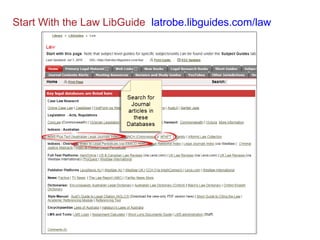
Start With the Law LibGuide latrobe.libguides.com/law
(Informit Law Collection = AGIS Plus Text + CINCH + APAFT + Family)
4
Image area
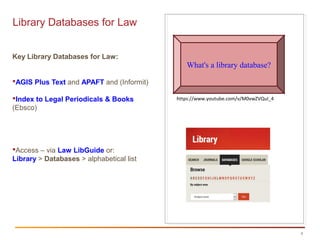
Library Databases for Law
Key Library Databases for Law:
AGIS Plus Text and APAFT and (Informit)
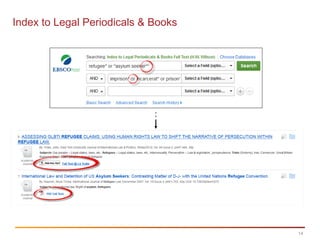
Index to Legal Periodicals & Books
(Ebsco)
Access – via Law LibGuide or:
Library > Databases > alphabetical list
What's a library database?
https://www.youtube.com/v/M0vwZVQuI_4
5
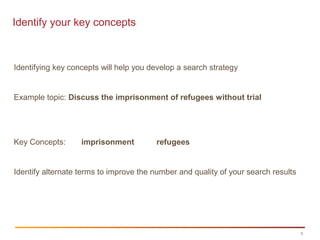
Identify your key concepts
Identifying key concepts will help you develop a search strategy
Example topic: Discuss the imprisonment of refugees without trial
Key Concepts: imprisonment refugees
Identify alternate terms to improve the number and quality of your search results
6
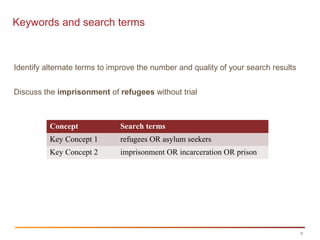
Keywords and search terms
Identify alternate terms to improve the number and quality of your search results
Discuss the imprisonment of refugees without trial
Concept Search terms
Key Concept 1 refugees OR asylum seekers
Key Concept 2 imprisonment OR incarceration OR prison
7
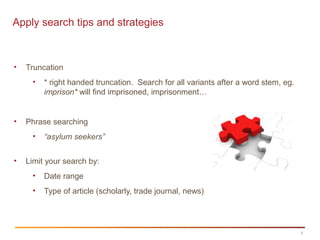
Apply search tips and strategies
• Truncation
• * right handed truncation. Search for all variants after a word stem, eg.
imprison* will find imprisoned, imprisonment…
• Phrase searching
• “asylum seekers”
• Limit your search by:
• Date range
• Type of article (scholarly, trade journal, news)
8
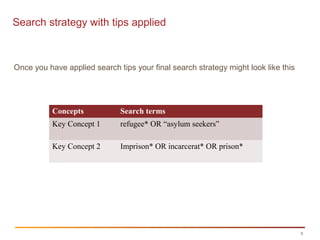
Search strategy with tips applied
Once you have applied search tips your final search strategy might look like this
Concepts Search terms
Key Concept 1 refugee* OR “asylum seekers”
Key Concept 2 Imprison* OR incarcerat* OR prison*
9
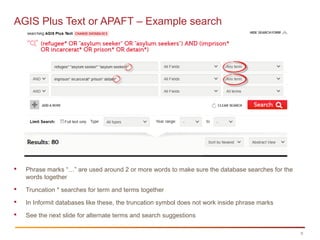
AGIS Plus Text or APAFT – Example search
 Phrase marks “…” are used around 2 or more words to make sure the database searches for the
words together
 Truncation * searches for term and terms together
 In Informit databases like these, the truncation symbol does not work inside phrase marks
 See the next slide for alternate terms and search suggestions
10
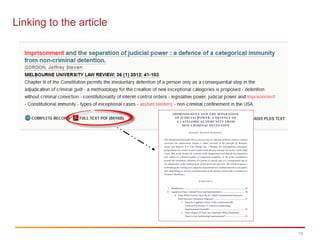
Linking to the article
11Contract Law
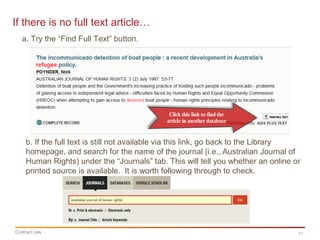
If there is no full text article…
b. If the full text is still not available via this link, go back to the Library
homepage, and search for the name of the journal (i.e., Australian Journal of
Human Rights) under the “Journals” tab. This will tell you whether an online or
printed source is available. It is worth following through to check.
a. Try the “Find Full Text” button.
12
AGIS Plus Text or APAFT
Other Terms:
To get more results, think of more synonyms (e.g., arrested).
Try adding the following terms to narrow your search results. [This also works in
other databases.]
• trial* or evidence
• australia*
• A specific type of refugee – child*; Afghanistan*
Use the ‘All fields’ drop down menu to change to Legal Cases (Case)
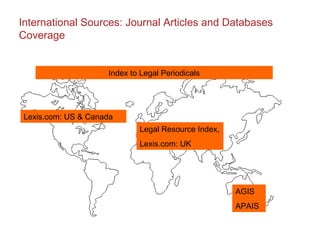
International Sources: Journal Articles and Databases
Coverage
AGIS
APAIS
Lexis.com: US & Canada
Legal Resource Index,
Lexis.com: UK
Index to Legal Periodicals
14
Index to Legal Periodicals & Books
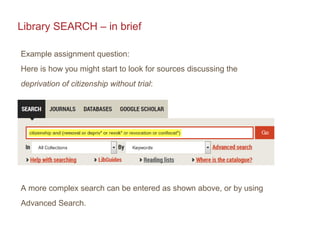
Library SEARCH – in brief
Example assignment question:
Here is how you might start to look for sources discussing the
deprivation of citizenship without trial:
A more complex search can be entered as shown above, or by using
Advanced Search.
16
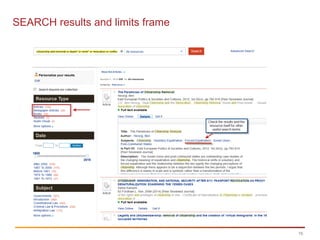
SEARCH results and limits frame
Library SEARCH
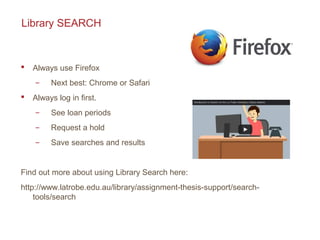
 Always use Firefox
̶ Next best: Chrome or Safari
 Always log in first.
̶ See loan periods
̶ Request a hold
̶ Save searches and results
Find out more about using Library Search here:
http://www.latrobe.edu.au/library/assignment-thesis-support/search-
tools/search
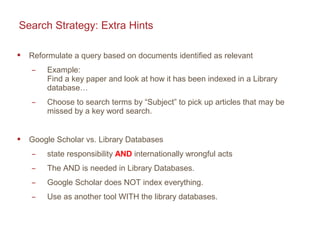
Search Strategy: Extra Hints
 Reformulate a query based on documents identified as relevant
̶ Example:
Find a key paper and look at how it has been indexed in a Library
database…
̶ Choose to search terms by “Subject” to pick up articles that may be
missed by a key word search.
 Google Scholar vs. Library Databases
̶ state responsibility AND internationally wrongful acts
̶ The AND is needed in Library Databases.
̶ Google Scholar does NOT index everything.
̶ Use as another tool WITH the library databases.
Thank you
For help:
The Law Libguide: http://latrobe.libguides.com/law
ASSC Drop In Sessions: See your LMS for times and Dates.
Library Chat Service: 11am – 2 pm, Monday to Friday.
http://www.lib.latrobe.edu.au/chat/
In person: Library Help Desk at your campus library
Phone Ask La Trobe: 1300 La Trobe (1300 52 87623)
FAQs: latrobe.libanswers.com/

Law1 ppl journal articles

  • 1.
    latrobe.edu.au CRICOS Provider00115M LAW1PPL: Finding Journal Articles Kate Freedman Library, Senior Learning Advisor (Law) August 2015
  • 2.
    Overview  Start withthe Law LibGuide  Finding Journal Articles Use: ̶ Library Databases ̶ Library Search
  • 3.
    Start With theLaw LibGuide latrobe.libguides.com/law (Informit Law Collection = AGIS Plus Text + CINCH + APAFT + Family)
  • 4.
    4 Image area Library Databasesfor Law Key Library Databases for Law: AGIS Plus Text and APAFT and (Informit) Index to Legal Periodicals & Books (Ebsco) Access – via Law LibGuide or: Library > Databases > alphabetical list What's a library database? https://www.youtube.com/v/M0vwZVQuI_4
  • 5.
    5 Identify your keyconcepts Identifying key concepts will help you develop a search strategy Example topic: Discuss the imprisonment of refugees without trial Key Concepts: imprisonment refugees Identify alternate terms to improve the number and quality of your search results
  • 6.
    6 Keywords and searchterms Identify alternate terms to improve the number and quality of your search results Discuss the imprisonment of refugees without trial Concept Search terms Key Concept 1 refugees OR asylum seekers Key Concept 2 imprisonment OR incarceration OR prison
  • 7.
    7 Apply search tipsand strategies • Truncation • * right handed truncation. Search for all variants after a word stem, eg. imprison* will find imprisoned, imprisonment… • Phrase searching • “asylum seekers” • Limit your search by: • Date range • Type of article (scholarly, trade journal, news)
  • 8.
    8 Search strategy withtips applied Once you have applied search tips your final search strategy might look like this Concepts Search terms Key Concept 1 refugee* OR “asylum seekers” Key Concept 2 Imprison* OR incarcerat* OR prison*
  • 9.
    9 AGIS Plus Textor APAFT – Example search  Phrase marks “…” are used around 2 or more words to make sure the database searches for the words together  Truncation * searches for term and terms together  In Informit databases like these, the truncation symbol does not work inside phrase marks  See the next slide for alternate terms and search suggestions
  • 10.
  • 11.
    11Contract Law If thereis no full text article… b. If the full text is still not available via this link, go back to the Library homepage, and search for the name of the journal (i.e., Australian Journal of Human Rights) under the “Journals” tab. This will tell you whether an online or printed source is available. It is worth following through to check. a. Try the “Find Full Text” button.
  • 12.
    12 AGIS Plus Textor APAFT Other Terms: To get more results, think of more synonyms (e.g., arrested). Try adding the following terms to narrow your search results. [This also works in other databases.] • trial* or evidence • australia* • A specific type of refugee – child*; Afghanistan* Use the ‘All fields’ drop down menu to change to Legal Cases (Case)
  • 13.
    International Sources: JournalArticles and Databases Coverage AGIS APAIS Lexis.com: US & Canada Legal Resource Index, Lexis.com: UK Index to Legal Periodicals
  • 14.
    14 Index to LegalPeriodicals & Books
  • 15.
    Library SEARCH –in brief Example assignment question: Here is how you might start to look for sources discussing the deprivation of citizenship without trial: A more complex search can be entered as shown above, or by using Advanced Search.
  • 16.
  • 17.
    Library SEARCH  Alwaysuse Firefox ̶ Next best: Chrome or Safari  Always log in first. ̶ See loan periods ̶ Request a hold ̶ Save searches and results Find out more about using Library Search here: http://www.latrobe.edu.au/library/assignment-thesis-support/search- tools/search
  • 18.
    Search Strategy: ExtraHints  Reformulate a query based on documents identified as relevant ̶ Example: Find a key paper and look at how it has been indexed in a Library database… ̶ Choose to search terms by “Subject” to pick up articles that may be missed by a key word search.  Google Scholar vs. Library Databases ̶ state responsibility AND internationally wrongful acts ̶ The AND is needed in Library Databases. ̶ Google Scholar does NOT index everything. ̶ Use as another tool WITH the library databases.
  • 19.
    Thank you For help: TheLaw Libguide: http://latrobe.libguides.com/law ASSC Drop In Sessions: See your LMS for times and Dates. Library Chat Service: 11am – 2 pm, Monday to Friday. http://www.lib.latrobe.edu.au/chat/ In person: Library Help Desk at your campus library Phone Ask La Trobe: 1300 La Trobe (1300 52 87623) FAQs: latrobe.libanswers.com/