NUMPY
Numerical Computing in Python
By
Kirti Verma
AP, CSE
LNCTE
1
What is Numpy?
• Numpy, Scipy, and Matplotlib provide MATLAB-like functionality in python.
• Numpy Features:
• Typed multidimentional arrays (matrices)
• Fast numerical computations (matrix math)
• High-level math functions
2
Why do we need NumPy
• Python does numerical computations slowly.
• 1000 x 1000 matrix multiply
• Python triple loop takes > 10 min.
• Numpy takes ~0.03 seconds
import numpy as np
print(np.__version__)
arr=np.array([1,2,3,4,5]) #list as array
print(arr)
print(type(arr))
arr=np.array([1,2,3,4,5])
arr=np.array((1,2,3,4,5)) # tuple as array
3
NumPy Overview
1. Arrays
2. Shaping and transposition
3. Mathematical Operations
4. Indexing and slicing
5. Broadcasting
4
Arrays
Structured lists of numbers.
• Vectors : 1D array
• Matrices: nD matrices
• Images: 3D arrays
• Tensors: Generalised multi dimensional arrays
5
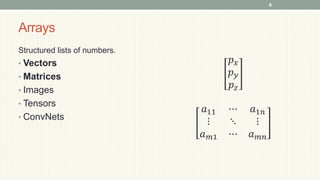
Arrays
Structured lists of numbers.
• Vectors
• Matrices
• Images
• Tensors
• ConvNets
𝑝𝑥
𝑝𝑦
𝑝𝑧
𝑎11 ⋯ 𝑎1𝑛
⋮ ⋱ ⋮
𝑎𝑚1 ⋯ 𝑎𝑚𝑛
6
Arrays
Structured lists of numbers.
• Vectors
• Matrices
• Images
• Tensors
• ConvNets
7
Arrays
Structured lists of numbers.
• Vectors
• Matrices
• Images
• Tensors
• ConvNets
8
Arrays, Basic Properties
import numpy as np
a = np.array([[1,2,3],[4,5,6]],dtype=np.float32)
print a.ndim, a.shape, a.dtype
1. Arrays can have any number of dimensions, including zero (a scalar).
2. Arrays are typed: np.uint8, np.int64, np.float32, np.float64
3. Arrays are dense. Each element of the array exists and has the same type.
9
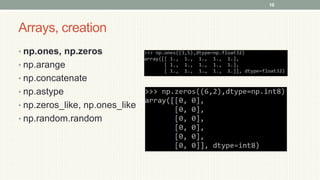
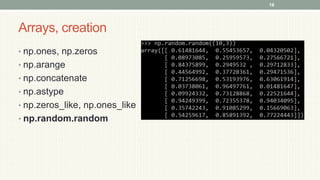
Arrays, creation
• np.ones, np.zeros
• np.arange
• np.concatenate
• np.astype
• np.zeros_like, np.ones_like
• np.random.random
10
Arrays, creation
• np.ones, np.zeros
• np.arange
• np.concatenate
• np.astype
• np.zeros_like, np.ones_like
• np.random.random
11
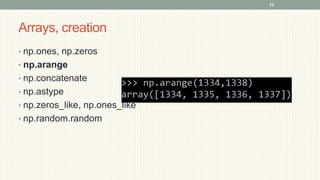
Arrays, creation
• np.ones, np.zeros
• np.arange
• np.concatenate
• np.astype
• np.zeros_like, np.ones_like
• np.random.random
12
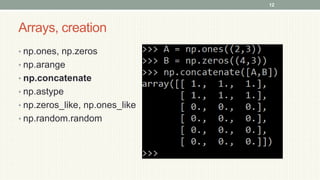
Arrays, creation
• np.ones, np.zeros
• np.arange
• np.concatenate
• np.astype
• np.zeros_like, np.ones_like
• np.random.random
13
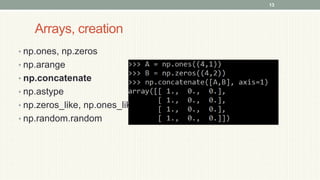
Arrays, creation
• np.ones, np.zeros
• np.arange
• np.concatenate
• np.astype
• np.zeros_like, np.ones_like
• np.random.random
14
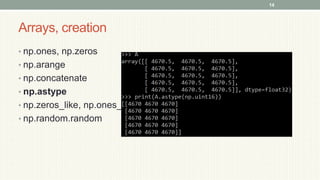
Arrays, creation
• np.ones, np.zeros
• np.arange
• np.concatenate
• np.astype
• np.zeros_like, np.ones_like
• np.random.random
15
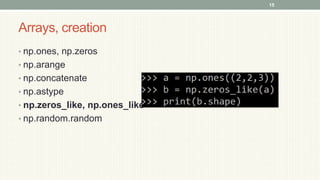
Arrays, creation
• np.ones, np.zeros
• np.arange
• np.concatenate
• np.astype
• np.zeros_like, np.ones_like
• np.random.random
16
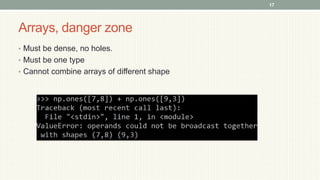
Arrays, danger zone
• Must be dense, no holes.
• Must be one type
• Cannot combine arrays of different shape
17
Shaping
a = np.array([1,2,3,4,5,6])
a = a.reshape(3,2)
a = a.reshape(2,-1)
a = a.ravel()
1. Total number of elements cannot change.
2. Use -1 to infer (when axis shape is not known to as, first option
is mandatory and rest axis are adjusted ) axis shape
3. Row-major by default (MATLAB is column-major)
18
Return values
• Numpy functions return either views or copies.
• Views share data with the original array, like references in Java/C++. Altering
entries of a view, changes the same entries in the original.
• The numpy documentation says which functions return views or copies
• np.copy, np.view make explicit copies and views.
19
Transposition
a = np.arange(10).reshape(5,2)
a = a.T
a = a.transpose((1,0))
np.transpose permutes axes.
a.T transposes the first two axes.
20
Saving and loading arrays
np.savez(‘data.npz’, a=a)
data = np.load(‘data.npz’)
a = data[‘a’]
1. NPZ files can hold multiple arrays
2. np.savez_compressed similar.
21
Image arrays
Images are 3D arrays: width, height, and channels
Common image formats:
height x width x RGB (band-interleaved)
height x width (band-sequential)
Gotchas(commonly done errors in proramming):
Channels may also be BGR (OpenCV does this)
May be [width x height], not [height x width]
22
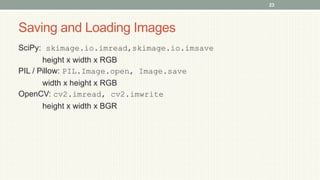
Saving and Loading Images
SciPy: skimage.io.imread,skimage.io.imsave
height x width x RGB
PIL / Pillow: PIL.Image.open, Image.save
width x height x RGB
OpenCV: cv2.imread, cv2.imwrite
height x width x BGR
23
Mathematical operators
• Arithmetic operations are element-wise
• Logical operator return a bool array
• In place operations modify the array
24
Mathematical operators
• Arithmetic operations are element-wise
• Logical operator return a bool array
• In place operations modify the array
25
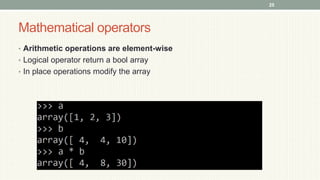
Mathematical operators
• Arithmetic operations are element-wise
• Logical operator return a bool array
• In place operations modify the array
26
Mathematical operators
• Arithmetic operations are element-wise
• Logical operator return a bool array
• In place operations modify the array
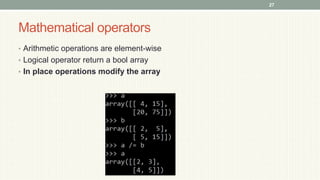
27
Math, upcasting
Just as in Python and Java, the result of a math operator is cast to the more
general or precise datatype.
uint64 + uint16 => uint64
float32 / int32 => float32
Warning: upcasting does not prevent overflow/underflow. You must manually
cast first.
Use case: images often stored as uint8. You should convert to float32 or float64
before doing math.
28
Math, universal functions
Also called ufuncs
Element-wise
Examples:
• np.exp
• np.sqrt
• np.sin
• np.cos
• np.isnan
29
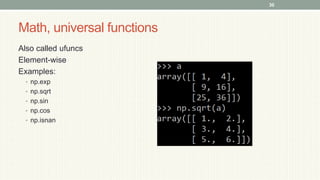
Math, universal functions
Also called ufuncs
Element-wise
Examples:
• np.exp
• np.sqrt
• np.sin
• np.cos
• np.isnan
30
Indexing
x[0,0] # top-left element
x[0,-1] # first row, last column
x[0,:] # first row (many entries)
x[:,0] # first column (many entries)
Notes:
• Zero-indexing
• Multi-dimensional indices are comma-separated (i.e., a tuple)
31
Indexing, slices and arrays
I[1:-1,1:-1] # select all but one-pixel
border
I = I[:,:,::-1] # swap channel order
I[I<10] = 0 # set dark pixels to black
I[[1,3], :] # select 2nd and 4th row
1. Slices are views. Writing to a slice overwrites the original array.
2. Can also index by a list or boolean array.
32
Python Slicing
Syntax: start:stop:step
a = list(range(10))
a[:3] # indices 0, 1, 2
a[-3:] # indices 7, 8, 9
a[3:8:2] # indices 3, 5, 7
a[4:1:-1] # indices 4, 3, 2 (this one is tricky)
33
Axes
a.sum() # sum all entries
a.sum(axis=0) # sum over rows
a.sum(axis=1) # sum over columns
a.sum(axis=1, keepdims=True)
1. Use the axis parameter to control which axis NumPy operates on
2. Typically, the axis specified will disappear, keepdims keeps all dimensions
34
35

L 5 Numpy final learning and Coding

  • 1.
    NUMPY Numerical Computing inPython By Kirti Verma AP, CSE LNCTE 1
  • 2.
    What is Numpy? •Numpy, Scipy, and Matplotlib provide MATLAB-like functionality in python. • Numpy Features: • Typed multidimentional arrays (matrices) • Fast numerical computations (matrix math) • High-level math functions 2
  • 3.
    Why do weneed NumPy • Python does numerical computations slowly. • 1000 x 1000 matrix multiply • Python triple loop takes > 10 min. • Numpy takes ~0.03 seconds import numpy as np print(np.__version__) arr=np.array([1,2,3,4,5]) #list as array print(arr) print(type(arr)) arr=np.array([1,2,3,4,5]) arr=np.array((1,2,3,4,5)) # tuple as array 3
  • 4.
    NumPy Overview 1. Arrays 2.Shaping and transposition 3. Mathematical Operations 4. Indexing and slicing 5. Broadcasting 4
  • 5.
    Arrays Structured lists ofnumbers. • Vectors : 1D array • Matrices: nD matrices • Images: 3D arrays • Tensors: Generalised multi dimensional arrays 5
  • 6.
    Arrays Structured lists ofnumbers. • Vectors • Matrices • Images • Tensors • ConvNets 𝑝𝑥 𝑝𝑦 𝑝𝑧 𝑎11 ⋯ 𝑎1𝑛 ⋮ ⋱ ⋮ 𝑎𝑚1 ⋯ 𝑎𝑚𝑛 6
  • 7.
    Arrays Structured lists ofnumbers. • Vectors • Matrices • Images • Tensors • ConvNets 7
  • 8.
    Arrays Structured lists ofnumbers. • Vectors • Matrices • Images • Tensors • ConvNets 8
  • 9.
    Arrays, Basic Properties importnumpy as np a = np.array([[1,2,3],[4,5,6]],dtype=np.float32) print a.ndim, a.shape, a.dtype 1. Arrays can have any number of dimensions, including zero (a scalar). 2. Arrays are typed: np.uint8, np.int64, np.float32, np.float64 3. Arrays are dense. Each element of the array exists and has the same type. 9
  • 10.
    Arrays, creation • np.ones,np.zeros • np.arange • np.concatenate • np.astype • np.zeros_like, np.ones_like • np.random.random 10
  • 11.
    Arrays, creation • np.ones,np.zeros • np.arange • np.concatenate • np.astype • np.zeros_like, np.ones_like • np.random.random 11
  • 12.
    Arrays, creation • np.ones,np.zeros • np.arange • np.concatenate • np.astype • np.zeros_like, np.ones_like • np.random.random 12
  • 13.
    Arrays, creation • np.ones,np.zeros • np.arange • np.concatenate • np.astype • np.zeros_like, np.ones_like • np.random.random 13
  • 14.
    Arrays, creation • np.ones,np.zeros • np.arange • np.concatenate • np.astype • np.zeros_like, np.ones_like • np.random.random 14
  • 15.
    Arrays, creation • np.ones,np.zeros • np.arange • np.concatenate • np.astype • np.zeros_like, np.ones_like • np.random.random 15
  • 16.
    Arrays, creation • np.ones,np.zeros • np.arange • np.concatenate • np.astype • np.zeros_like, np.ones_like • np.random.random 16
  • 17.
    Arrays, danger zone •Must be dense, no holes. • Must be one type • Cannot combine arrays of different shape 17
  • 18.
    Shaping a = np.array([1,2,3,4,5,6]) a= a.reshape(3,2) a = a.reshape(2,-1) a = a.ravel() 1. Total number of elements cannot change. 2. Use -1 to infer (when axis shape is not known to as, first option is mandatory and rest axis are adjusted ) axis shape 3. Row-major by default (MATLAB is column-major) 18
  • 19.
    Return values • Numpyfunctions return either views or copies. • Views share data with the original array, like references in Java/C++. Altering entries of a view, changes the same entries in the original. • The numpy documentation says which functions return views or copies • np.copy, np.view make explicit copies and views. 19
  • 20.
    Transposition a = np.arange(10).reshape(5,2) a= a.T a = a.transpose((1,0)) np.transpose permutes axes. a.T transposes the first two axes. 20
  • 21.
    Saving and loadingarrays np.savez(‘data.npz’, a=a) data = np.load(‘data.npz’) a = data[‘a’] 1. NPZ files can hold multiple arrays 2. np.savez_compressed similar. 21
  • 22.
    Image arrays Images are3D arrays: width, height, and channels Common image formats: height x width x RGB (band-interleaved) height x width (band-sequential) Gotchas(commonly done errors in proramming): Channels may also be BGR (OpenCV does this) May be [width x height], not [height x width] 22
  • 23.
    Saving and LoadingImages SciPy: skimage.io.imread,skimage.io.imsave height x width x RGB PIL / Pillow: PIL.Image.open, Image.save width x height x RGB OpenCV: cv2.imread, cv2.imwrite height x width x BGR 23
  • 24.
    Mathematical operators • Arithmeticoperations are element-wise • Logical operator return a bool array • In place operations modify the array 24
  • 25.
    Mathematical operators • Arithmeticoperations are element-wise • Logical operator return a bool array • In place operations modify the array 25
  • 26.
    Mathematical operators • Arithmeticoperations are element-wise • Logical operator return a bool array • In place operations modify the array 26
  • 27.
    Mathematical operators • Arithmeticoperations are element-wise • Logical operator return a bool array • In place operations modify the array 27
  • 28.
    Math, upcasting Just asin Python and Java, the result of a math operator is cast to the more general or precise datatype. uint64 + uint16 => uint64 float32 / int32 => float32 Warning: upcasting does not prevent overflow/underflow. You must manually cast first. Use case: images often stored as uint8. You should convert to float32 or float64 before doing math. 28
  • 29.
    Math, universal functions Alsocalled ufuncs Element-wise Examples: • np.exp • np.sqrt • np.sin • np.cos • np.isnan 29
  • 30.
    Math, universal functions Alsocalled ufuncs Element-wise Examples: • np.exp • np.sqrt • np.sin • np.cos • np.isnan 30
  • 31.
    Indexing x[0,0] # top-leftelement x[0,-1] # first row, last column x[0,:] # first row (many entries) x[:,0] # first column (many entries) Notes: • Zero-indexing • Multi-dimensional indices are comma-separated (i.e., a tuple) 31
  • 32.
    Indexing, slices andarrays I[1:-1,1:-1] # select all but one-pixel border I = I[:,:,::-1] # swap channel order I[I<10] = 0 # set dark pixels to black I[[1,3], :] # select 2nd and 4th row 1. Slices are views. Writing to a slice overwrites the original array. 2. Can also index by a list or boolean array. 32
  • 33.
    Python Slicing Syntax: start:stop:step a= list(range(10)) a[:3] # indices 0, 1, 2 a[-3:] # indices 7, 8, 9 a[3:8:2] # indices 3, 5, 7 a[4:1:-1] # indices 4, 3, 2 (this one is tricky) 33
  • 34.
    Axes a.sum() # sumall entries a.sum(axis=0) # sum over rows a.sum(axis=1) # sum over columns a.sum(axis=1, keepdims=True) 1. Use the axis parameter to control which axis NumPy operates on 2. Typically, the axis specified will disappear, keepdims keeps all dimensions 34
  • 35.