COST CENTER ACCOUNTING
                            COST CENTER ACCOUNTING
                         END USER TRAINING DOCUMENTS

KP26 -

Functionality

Indirect Activity will be applied to allocate planned employees cost (total payroll of
R&T/STC) to research projects/orders based on the productive and non-productive
research hours worked for each project.

To accomplish this, the total annual activity for productive (3RTP01) and non productive
hours (3RTN01) must be planned on the sender cost center.

Scenario

The document shows how to plan the activity output on a sender cost center.

Prerequisites

Cost center and activity type master data must have been created.


        Menu Path                 Accounting → Controlling → Cost Center Accounting →
                                  Planning → Activity Output/Prices → KP26 - Change
        Transaction Code          KP26


1.   Double Click on KP26 - Change


SAPTOPJOBS                                                                Page 1 of 7
COST CENTER ACCOUNTING
                           COST CENTER ACCOUNTING
                        END USER TRAINING DOCUMENTS


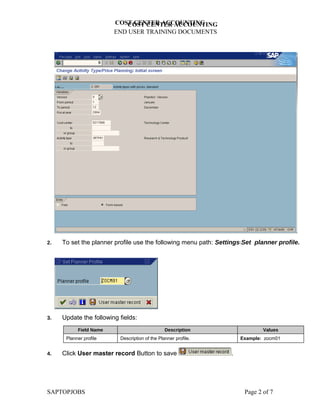
2.   To set the planner profile use the following menu path: SettingsSet planner profile.


3.   Update the following fields:
           Field Name                           Description                  Values
      Planner profile     Description of the Planner profile.        Example: zocm01


4.   Click User master record Button to save                     .


SAPTOPJOBS                                                            Page 2 of 7
COST CENTER ACCOUNTING
                             COST CENTER ACCOUNTING
                          END USER TRAINING DOCUMENTS


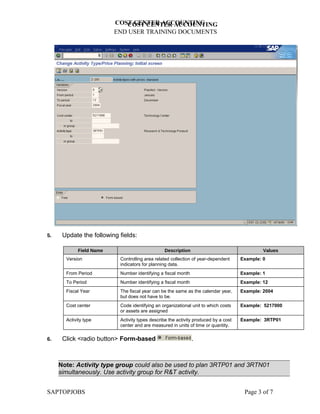
5.    Update the following fields:

             Field Name                         Description                                   Values
       Version             Controlling area related collection of year-dependent     Example: 0
                           indicators for planning data.
       From Period         Number identifying a fiscal month                         Example: 1
       To Period           Number identifying a fiscal month                         Example: 12
       Fiscal Year         The fiscal year can be the same as the calendar year,     Example: 2004
                           but does not have to be.
       Cost center         Code identifying an organizational unit to which costs    Example: 5217000
                           or assets are assigned
       Activity type       Activity types describe the activity produced by a cost   Example: 3RTP01
                           center and are measured in units of time or quantity.

6.    Click <radio button> Form-based                          .


     Note: Activity type group could also be used to plan 3RTP01 and 3RTN01
     simultaneously. Use activity group for R&T activity.


SAPTOPJOBS                                                                            Page 3 of 7
COST CENTER ACCOUNTING
                             COST CENTER ACCOUNTING
                          END USER TRAINING DOCUMENTS


      Note: If you activate the "Form-based planning" indicator, all objects with valid
      master data are displayed, regardless of whether the objects have been already
      planned or not. The same structure of characteristic values is displayed in each
      planning session.


7.     Click Enter    .

 8.    Click Overview Button     .


SAPTOPJOBS                                                                Page 4 of 7
COST CENTER ACCOUNTING
                               COST CENTER ACCOUNTING
                            END USER TRAINING DOCUMENTS


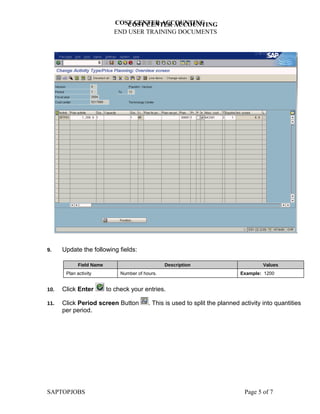
9.    Update the following fields:

             Field Name                           Description                           Values
       Plan activity           Number of hours.                                Example: 1200


10.   Click Enter         to check your entries.

11.   Click Period screen Button           . This is used to split the planned activity into quantities
      per period.


SAPTOPJOBS                                                                      Page 5 of 7
COST CENTER ACCOUNTING
                             COST CENTER ACCOUNTING
                          END USER TRAINING DOCUMENTS


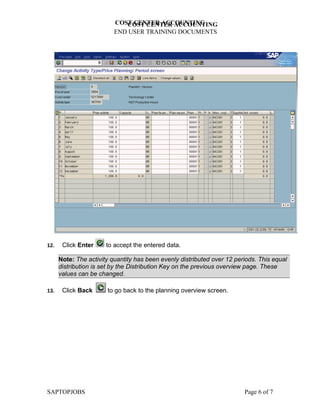
12.    Click Enter     to accept the entered data.

      Note: The activity quantity has been evenly distributed over 12 periods. This equal
      distribution is set by the Distribution Key on the previous overview page. These
      values can be changed.

13.    Click Back      to go back to the planning overview screen.


SAPTOPJOBS                                                               Page 6 of 7
COST CENTER ACCOUNTING
                          COST CENTER ACCOUNTING
                       END USER TRAINING DOCUMENTS


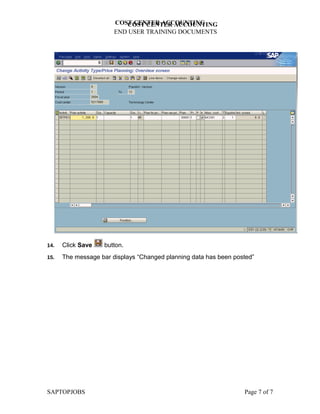
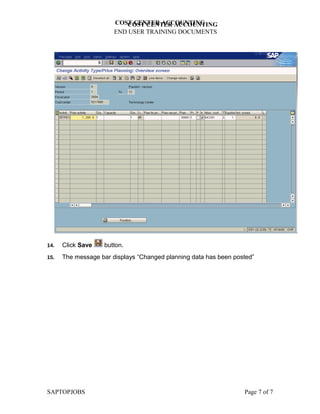
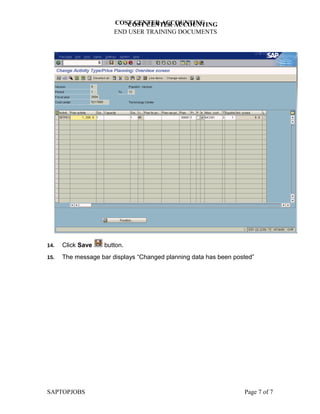
14.   Click Save    button.
15.   The message bar displays “Changed planning data has been posted”


SAPTOPJOBS                                                        Page 7 of 7
COST CENTER ACCOUNTING
                          COST CENTER ACCOUNTING
                       END USER TRAINING DOCUMENTS


14.   Click Save    button.
15.   The message bar displays “Changed planning data has been posted”


SAPTOPJOBS                                                        Page 7 of 7
COST CENTER ACCOUNTING
                          COST CENTER ACCOUNTING
                       END USER TRAINING DOCUMENTS


14.   Click Save    button.
15.   The message bar displays “Changed planning data has been posted”


SAPTOPJOBS                                                        Page 7 of 7

Kp26 plan activity output on cost center

  • 1.
    COST CENTER ACCOUNTING COST CENTER ACCOUNTING END USER TRAINING DOCUMENTS KP26 - Functionality Indirect Activity will be applied to allocate planned employees cost (total payroll of R&T/STC) to research projects/orders based on the productive and non-productive research hours worked for each project. To accomplish this, the total annual activity for productive (3RTP01) and non productive hours (3RTN01) must be planned on the sender cost center. Scenario The document shows how to plan the activity output on a sender cost center. Prerequisites Cost center and activity type master data must have been created. Menu Path Accounting → Controlling → Cost Center Accounting → Planning → Activity Output/Prices → KP26 - Change Transaction Code KP26 1. Double Click on KP26 - Change SAPTOPJOBS Page 1 of 7
  • 2.
    COST CENTER ACCOUNTING COST CENTER ACCOUNTING END USER TRAINING DOCUMENTS 2. To set the planner profile use the following menu path: SettingsSet planner profile. 3. Update the following fields: Field Name Description Values Planner profile Description of the Planner profile. Example: zocm01 4. Click User master record Button to save . SAPTOPJOBS Page 2 of 7
  • 3.
    COST CENTER ACCOUNTING COST CENTER ACCOUNTING END USER TRAINING DOCUMENTS 5. Update the following fields: Field Name Description Values Version Controlling area related collection of year-dependent Example: 0 indicators for planning data. From Period Number identifying a fiscal month Example: 1 To Period Number identifying a fiscal month Example: 12 Fiscal Year The fiscal year can be the same as the calendar year, Example: 2004 but does not have to be. Cost center Code identifying an organizational unit to which costs Example: 5217000 or assets are assigned Activity type Activity types describe the activity produced by a cost Example: 3RTP01 center and are measured in units of time or quantity. 6. Click <radio button> Form-based . Note: Activity type group could also be used to plan 3RTP01 and 3RTN01 simultaneously. Use activity group for R&T activity. SAPTOPJOBS Page 3 of 7
  • 4.
    COST CENTER ACCOUNTING COST CENTER ACCOUNTING END USER TRAINING DOCUMENTS Note: If you activate the "Form-based planning" indicator, all objects with valid master data are displayed, regardless of whether the objects have been already planned or not. The same structure of characteristic values is displayed in each planning session. 7. Click Enter . 8. Click Overview Button . SAPTOPJOBS Page 4 of 7
  • 5.
    COST CENTER ACCOUNTING COST CENTER ACCOUNTING END USER TRAINING DOCUMENTS 9. Update the following fields: Field Name Description Values Plan activity Number of hours. Example: 1200 10. Click Enter to check your entries. 11. Click Period screen Button . This is used to split the planned activity into quantities per period. SAPTOPJOBS Page 5 of 7
  • 6.
    COST CENTER ACCOUNTING COST CENTER ACCOUNTING END USER TRAINING DOCUMENTS 12. Click Enter to accept the entered data. Note: The activity quantity has been evenly distributed over 12 periods. This equal distribution is set by the Distribution Key on the previous overview page. These values can be changed. 13. Click Back to go back to the planning overview screen. SAPTOPJOBS Page 6 of 7
  • 7.
    COST CENTER ACCOUNTING COST CENTER ACCOUNTING END USER TRAINING DOCUMENTS 14. Click Save button. 15. The message bar displays “Changed planning data has been posted” SAPTOPJOBS Page 7 of 7
  • 8.
    COST CENTER ACCOUNTING COST CENTER ACCOUNTING END USER TRAINING DOCUMENTS 14. Click Save button. 15. The message bar displays “Changed planning data has been posted” SAPTOPJOBS Page 7 of 7
  • 9.
    COST CENTER ACCOUNTING COST CENTER ACCOUNTING END USER TRAINING DOCUMENTS 14. Click Save button. 15. The message bar displays “Changed planning data has been posted” SAPTOPJOBS Page 7 of 7