+

Knock Knock:
Leveraging LinkedIn
+

Getting started
Upload

your résumé



Correct any errors



Add links to videos, images, documents, presentations

Upload

Show

off your education

Create
 Admit

an appropriate photo

a catchy headline

you’re looking for a job – tell them what work
you’re seeking
+

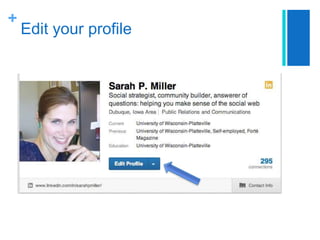
Edit your profile
+

Add contact information


Edit contact info

 At

minimum: add your email and phone number
 Option to add address, website, Twitter handles,
instant messaging services – but only if you
present yourself professionally
+

Write a summary
The best of your cover letter – clear and
confident about your qualifications and goals



 Be

Fill

human, be real

out “Specialties”

 Include


keywords, even if it seems repetitive

Ex: Singing, being green, porcine relations, etc.
+

Add additional sections


Skills and Expertise
 Think

about what you’re good at

 Search

for skill or area of expertise
 Choose correct or suggested skill from drop-down
menu and “add”
 Remember, repetition is okay


Projects



Volunteer experience and causes



Honors and awards
+

Customize your profile


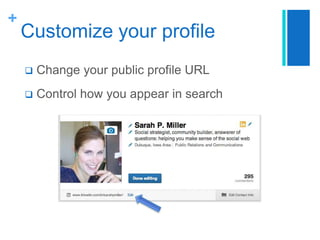
Change your public profile URL



Control how you appear in search
+

Customize your profile
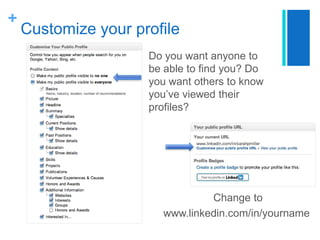
Do you want anyone to
be able to find you? Do
you want others to know
you’ve viewed their
profiles?

Change to
www.linkedin.com/in/yourname
+

Finalizing your profile
Proofread, proofread, proofread – this is
your online résumé





Use another set of eyes
+

Connections
 Connections



= friends, connecting = friending

Connect with people you know and trust
 Family

and friends
 Current and former classmates
 Fellow group members
 New contacts


It’s okay to archive (ignore) requests from
others
 Quality

of your network >>> quantity
+

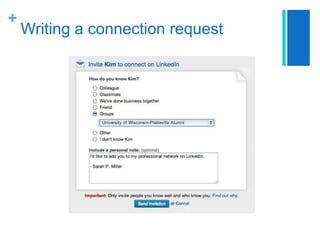
Writing a connection request
+

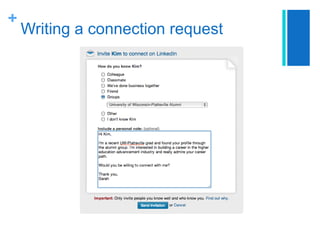
Writing a connection request
+

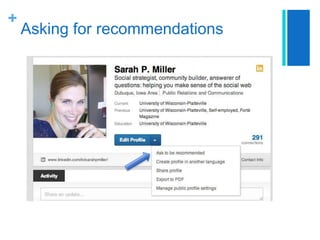
Asking for recommendations
+

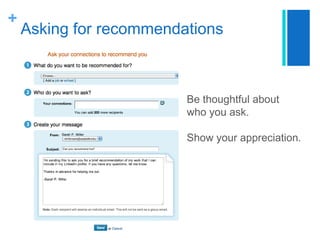
Asking for recommendations

Be thoughtful about
who you ask.

Show your appreciation.
+

15

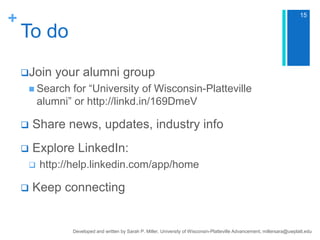
To do
Join

your alumni group

 Search

for “University of Wisconsin-Platteville
alumni” or http://linkd.in/169DmeV



Share news, updates, industry info



Explore LinkedIn:





http://help.linkedin.com/app/home

Keep connecting

Developed and written by Sarah P. Miller, University of Wisconsin-Platteville Advancement, millersara@uwplatt.edu
+

Need help? Contact me!

Sarah P. Miller
millersara@uwplatt.edu

Knock Knock: Leveraging LinkedIn

  • 1.
  • 2.
    + Getting started Upload your résumé  Correctany errors  Add links to videos, images, documents, presentations Upload Show off your education Create  Admit an appropriate photo a catchy headline you’re looking for a job – tell them what work you’re seeking
  • 3.
  • 4.
    + Add contact information  Editcontact info  At minimum: add your email and phone number  Option to add address, website, Twitter handles, instant messaging services – but only if you present yourself professionally
  • 5.
    + Write a summary Thebest of your cover letter – clear and confident about your qualifications and goals   Be Fill human, be real out “Specialties”  Include  keywords, even if it seems repetitive Ex: Singing, being green, porcine relations, etc.
  • 6.
    + Add additional sections  Skillsand Expertise  Think about what you’re good at  Search for skill or area of expertise  Choose correct or suggested skill from drop-down menu and “add”  Remember, repetition is okay  Projects  Volunteer experience and causes  Honors and awards
  • 7.
    + Customize your profile  Changeyour public profile URL  Control how you appear in search
  • 8.
    + Customize your profile Doyou want anyone to be able to find you? Do you want others to know you’ve viewed their profiles? Change to www.linkedin.com/in/yourname
  • 9.
    + Finalizing your profile Proofread,proofread, proofread – this is your online résumé   Use another set of eyes
  • 10.
    + Connections  Connections  = friends,connecting = friending Connect with people you know and trust  Family and friends  Current and former classmates  Fellow group members  New contacts  It’s okay to archive (ignore) requests from others  Quality of your network >>> quantity
  • 11.
  • 12.
  • 13.
  • 14.
    + Asking for recommendations Bethoughtful about who you ask. Show your appreciation.
  • 15.
    + 15 To do Join your alumnigroup  Search for “University of Wisconsin-Platteville alumni” or http://linkd.in/169DmeV  Share news, updates, industry info  Explore LinkedIn:   http://help.linkedin.com/app/home Keep connecting Developed and written by Sarah P. Miller, University of Wisconsin-Platteville Advancement, millersara@uwplatt.edu
  • 16.
    + Need help? Contactme! Sarah P. Miller millersara@uwplatt.edu

Editor's Notes

  • #6 The best of your cover letter – clear and confident about your qualifications and goalsWhat should a potential employer know about you? What sets you apart? What strengths would you bring to the workplace?
  • #9 Do you want to be visible to everyone, or no one? When you look at someone’s profile, do you want them to know who you are, or not?Choose “Customize your public profile URL”