How to optimize your
LinkedIn profile
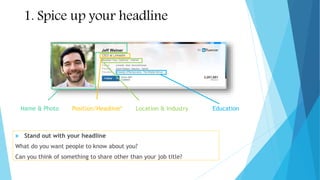
Name & Photo Position/Headline* Location & Industry Education
1. Spice up your headline
 Stand out with your headline
What do you want people to know about you?
Can you think of something to share other than your job title?
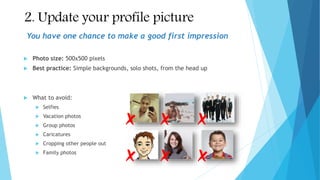
2. Update your profile picture
 Photo size: 500x500 pixels
 Best practice: Simple backgrounds, solo shots, from the head up
 What to avoid:
 Selfies
 Vacation photos
 Group photos
 Caricatures
 Cropping other people out
 Family photos
You have one chance to make a good first impression
3. Optimize your background info
 Summary
 Brief description of work experience, skills, and interests
 Show your personality here, it shouldn’t repeat what you already have in the experience section
 Experience
 Include current and past employers that are relevant to your personal brand
 Provide a brief description of the work you did, similar to a resume
 Education
 Make sure to include your College and any graduate school
Looking for a job? Make sure to include any terms or phrases commonly
used in the job descriptions you are interested in.
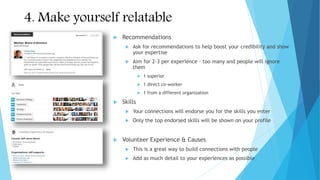
4. Make yourself relatable
 Recommendations
 Ask for recommendations to help boost your credibility and show
your expertise
 Aim for 2-3 per experience – too many and people will ignore
them
 1 superior
 1 direct co-worker
 1 from a different organization
 Skills
 Your connections will endorse you for the skills you enter
 Only the top endorsed skills will be shown on your profile
 Volunteer Experience & Causes
 This is a great way to build connections with people
 Add as much detail to your experiences as possible
Extra Credit: Turn your profile into your
portfolio
 Projects
 Add any special projects that you were part of
 This adds depth to your profile and shows off your skills
 Add media
 Make your profile more dynamic with videos, presentations, and blogs
 This is an easy way to show your work and turn your profile into a portfolio
 Show your publications
 Have you published any papers or books? Call it out!
LinkedIn Profile Optimization Checklist
Must Do
 Profile Picture
 Summary
 Experience
 Education
Extra Credit
 Projects
 Publications
7
Nice To Have
 Recommendations
 Skills
 Volunteer Experience

How to optimize your LinkedIn profile

  • 1.
    How to optimizeyour LinkedIn profile
  • 2.
    Name & PhotoPosition/Headline* Location & Industry Education 1. Spice up your headline  Stand out with your headline What do you want people to know about you? Can you think of something to share other than your job title?
  • 3.
    2. Update yourprofile picture  Photo size: 500x500 pixels  Best practice: Simple backgrounds, solo shots, from the head up  What to avoid:  Selfies  Vacation photos  Group photos  Caricatures  Cropping other people out  Family photos You have one chance to make a good first impression
  • 4.
    3. Optimize yourbackground info  Summary  Brief description of work experience, skills, and interests  Show your personality here, it shouldn’t repeat what you already have in the experience section  Experience  Include current and past employers that are relevant to your personal brand  Provide a brief description of the work you did, similar to a resume  Education  Make sure to include your College and any graduate school Looking for a job? Make sure to include any terms or phrases commonly used in the job descriptions you are interested in.
  • 5.
    4. Make yourselfrelatable  Recommendations  Ask for recommendations to help boost your credibility and show your expertise  Aim for 2-3 per experience – too many and people will ignore them  1 superior  1 direct co-worker  1 from a different organization  Skills  Your connections will endorse you for the skills you enter  Only the top endorsed skills will be shown on your profile  Volunteer Experience & Causes  This is a great way to build connections with people  Add as much detail to your experiences as possible
  • 6.
    Extra Credit: Turnyour profile into your portfolio  Projects  Add any special projects that you were part of  This adds depth to your profile and shows off your skills  Add media  Make your profile more dynamic with videos, presentations, and blogs  This is an easy way to show your work and turn your profile into a portfolio  Show your publications  Have you published any papers or books? Call it out!
  • 7.
    LinkedIn Profile OptimizationChecklist Must Do  Profile Picture  Summary  Experience  Education Extra Credit  Projects  Publications 7 Nice To Have  Recommendations  Skills  Volunteer Experience