VISUAL GRAMMAR The language of TV and video
VISUAL GRAMMAR The language of TV and video Shot sizes Framing Shooting for impact Sequences
Shot sizes  WIDE SHOT (WS) Camera zoomed far out Captures most things in scene Gives viewer an idea of layout of scene “Establishing shot” If you're filming a person, we can see all of their body. Always get a wide shot.
Shot sizes  MEDIUM SHOT (MS) If shooting a person, reveals their head and their hips. Use sparingly (they're boring)
Shot sizes  MEDIUM CLOSE UP (MCU) The classic shot for interviews. We can see their head and shoulders Close enough to read expression on their face But not in their face. This should be your standard framing for interviews.
Shot sizes  CLOSE UP (CU) More intimate. Re-frame for emotional, dramatic, or important moments in interview. Shoot lots and lots of close ups of everything! Close ups get you out of editing jams. If your piece will be on the web, shoot in close up more often. Always use a tripod.
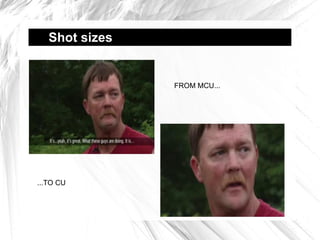
Shot sizes  FROM MCU... ...TO CU
Shot sizes  EXTREME CLOSE UP (ECU) Use for a particular effect: zooming in close on subjects eyes, hands. Look for telling details. Always use a tripod.
Shot sizes  WIDE SHOT (WS) MEDIUM SHOT (MS) MEDIUM CLOSE UP (MCU) CLOSE UP (CU) EXTREME CLOSE UP (ECU)
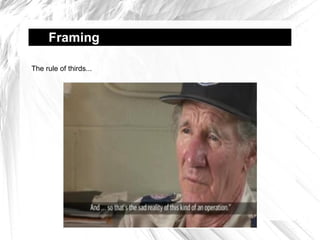
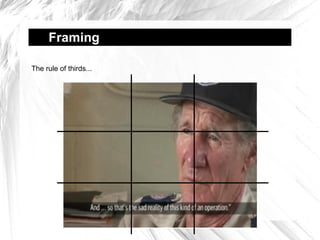
Framing  The rule of thirds...
Framing  Looking room... Give your subject LOOKING ROOM
Sequences  If there's one thing you learn, make sure it's this: SHOOT IN SEQUENCES!!
Sequences  What is a sequence? “A sequence is a  series of shots  that break down what's happening into its constituent parts and gives the impression of  continuous action. ” Vin Ray “Television News Handbook” “ A sequence is a visual paragraph, a group of shots recording an event...a shot to a sequence is like a sentence to a paragraph.” Harris Watts “Directing on Camera”
Sequences  Or... We see an action happening on screen, over the course of 2 or more different shots. Someone getting into a car... Someone making a cup of coffee... Someone turning on a computer...
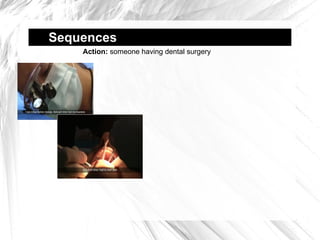
Sequences  Action:  someone having dental surgery
Sequences  Why have sequences? “ Sequences are at the  heart of good television ...sequences heighten the viewers'  sense of involvment  and show the event much as they would see it if they were there.” Vin Ray “Television News Handbook”
Sequences  2 ways to shoot  sequences #1: Fake them You tell your subject to recreate an action. You get them to do it at least twice... ...and film it from different angles. #2: Capture them live You can't interrupt the action So you  watch for sequences ... ...and capture them quickly. > shoot lots of close ups > look for repeated actions > change shots quickly

Kingston University Journalism: visual grammar

  • 1.
    VISUAL GRAMMAR Thelanguage of TV and video
  • 2.
    VISUAL GRAMMAR Thelanguage of TV and video Shot sizes Framing Shooting for impact Sequences
  • 3.
    Shot sizes WIDE SHOT (WS) Camera zoomed far out Captures most things in scene Gives viewer an idea of layout of scene “Establishing shot” If you're filming a person, we can see all of their body. Always get a wide shot.
  • 4.
    Shot sizes MEDIUM SHOT (MS) If shooting a person, reveals their head and their hips. Use sparingly (they're boring)
  • 5.
    Shot sizes MEDIUM CLOSE UP (MCU) The classic shot for interviews. We can see their head and shoulders Close enough to read expression on their face But not in their face. This should be your standard framing for interviews.
  • 6.
    Shot sizes CLOSE UP (CU) More intimate. Re-frame for emotional, dramatic, or important moments in interview. Shoot lots and lots of close ups of everything! Close ups get you out of editing jams. If your piece will be on the web, shoot in close up more often. Always use a tripod.
  • 7.
    Shot sizes FROM MCU... ...TO CU
  • 8.
    Shot sizes EXTREME CLOSE UP (ECU) Use for a particular effect: zooming in close on subjects eyes, hands. Look for telling details. Always use a tripod.
  • 9.
    Shot sizes WIDE SHOT (WS) MEDIUM SHOT (MS) MEDIUM CLOSE UP (MCU) CLOSE UP (CU) EXTREME CLOSE UP (ECU)
  • 10.
    Framing Therule of thirds...
  • 11.
    Framing Therule of thirds...
  • 12.
    Framing Therule of thirds...
  • 13.
    Framing Lookingroom... Give your subject LOOKING ROOM
  • 14.
    Sequences Ifthere's one thing you learn, make sure it's this: SHOOT IN SEQUENCES!!
  • 15.
    Sequences Whatis a sequence? “A sequence is a series of shots that break down what's happening into its constituent parts and gives the impression of continuous action. ” Vin Ray “Television News Handbook” “ A sequence is a visual paragraph, a group of shots recording an event...a shot to a sequence is like a sentence to a paragraph.” Harris Watts “Directing on Camera”
  • 16.
    Sequences Or...We see an action happening on screen, over the course of 2 or more different shots. Someone getting into a car... Someone making a cup of coffee... Someone turning on a computer...
  • 17.
    Sequences Action: someone having dental surgery
  • 18.
    Sequences Action: someone having dental surgery
  • 19.
    Sequences Action: someone having dental surgery
  • 20.
    Sequences Action: someone having dental surgery
  • 21.
    Sequences Whyhave sequences? “ Sequences are at the heart of good television ...sequences heighten the viewers' sense of involvment and show the event much as they would see it if they were there.” Vin Ray “Television News Handbook”
  • 22.
    Sequences 2ways to shoot sequences #1: Fake them You tell your subject to recreate an action. You get them to do it at least twice... ...and film it from different angles. #2: Capture them live You can't interrupt the action So you watch for sequences ... ...and capture them quickly. > shoot lots of close ups > look for repeated actions > change shots quickly