Management
Information Systems
Managing the Digital Firm
THIRTEENTH EDITION
/IRRIXL'0EYHSRˆ.ERI40EYHSR
GLOBAL
EDITION
Management
Information
Systems
MANAGING THE DIGITAL FIRM
THIRTEENTH EDITION
GLOBAL EDITION
Kenneth C. Laudon
New York University
Jane P. Laudon
Azimuth Information Systems
Boston Columbus Indianapolis New York San Francisco Upper Saddle River
Amsterdam Cape Town Dubai London Madrid Milan Munich Paris Montreal Toronto
Delhi Mexico City Sao Paulo Sydney Hong Kong Seoul Singapore Taipei Tokyo
Pearson Education Limited
Edinburgh Gate
Harlow
Essex CM20 2JE
England
and Associated Companies throughout the world
Visit us on the World Wide Web at:
www.pearson.com/uk
© Pearson Education Limited 2014
The rights of Kenneth C. Laudon and Jane P. Laudon to be identified as authors of this work have been asserted by them in accordance with the
Copyright, Designs and Patents Act 1988.
Authorised adaptation from the United States edition, entitled Management Information Systems: Managing the Digital Firm, 13th Edition,
ISBN: 978-0-13-305069-1 by Kenneth C. Laudon and Jane. P. Laudon, published by Pearson Education © 2014.
All rights reserved. No part of this publication may be reproduced, stored in a retrieval system, or transmitted in any form or by any means, electronic,
mechanical, photocopying, recording or otherwise, without either the prior written permission of the publisher or a licence permitting restricted copy-
ing in the United Kingdom issued by the Copyright Licensing Agency Ltd, Saffron House, 6–10 Kirby Street, London EC1N 8TS.
All trademarks used herein are the property of their respective owners. The use of any trademark in this text does not vest in the author or publisher
any trademark ownership rights in such trademarks, nor does the use of such trademarks imply any affiliation with or endorsement of this book by
such owners.
Microsoft and/or its respective suppliers make no representations about the suitability of the information contained in the documents and related
graphics published as part of the services for any purpose. All such documents and related graphics are provided as is without warranty of any kind.
Microsoft and/or its respective suppliers hereby disclaim all warranties and conditions with regard to this information, including all warranties and
conditions of merchantability, whether express, implied or statutory, fitness for a particular purpose, title and non-infringement. In no event shall
Microsoft and/or its respective suppliers be liable for any special, indirect or consequential damages or any damages whatsoever resulting from loss of
use, data or profits, whether in an action of contract, negligence or other tortious action, arising out of or in connection with the use or performance of
information available from the services.
The documents and related graphics contained herein could include technical inaccuracies or typographical errors. Changes are periodically added to
the information herein. Microsoft and/or its respective suppliers may make improvements and/or changes in the product(s) and/or the program(s)
described herein at any time. Partial screen shots may be viewed in full within the software version specified.
Microsoft® and Windows® are registered trademarks of the Microsoft Corporation in the U.S.A. and other countries. This book is not sponsored or
endorsed by or affiliated with the Microsoft Corporation..
Credits and acknowledgments borrowed from other sources and reproduced, with permission, in this textbook appear on the appropriate page within
the text.
ISBN 13: 978-0-273-78997-0
ISBN 10: 0-273-78997-X
British Library Cataloguing-in-Publication Data
A catalogue record for this book is available from the British Library
10 9 8 7 6 5 4 3 2 1
17 16 15 14 13
Typeset in 10.5/13 ITC Veljovic Std Book by Azimuth Interactive, Inc.
Printed and bound by Courier/Kendallville in The United States of America
The publisher's policy is to use paper manufactured from sustainable forests.
Editor in Chief: Stephanie Wall
Executive Editor: Bob Horan
Editorial Assistant: Ashlee Bradbury
International Publisher: Laura Dent
International Programme Editor: Leandra Paoli
Director of Marketing: Maggie Moylan
Executive Marketing Manager: Anne Fahlgren
International Marketing Manager: Dean Erasmus
Senior Managing Editor: Judy Leale
Senior Production Project Manager: Karalyn Holland
Senior Manufacturing Controller, Production, International: Trudy Kimber
Creative Director: Blair Brown
Senior Art Director: Janet Slowik
Cover Designer: Jodi Notowitz
Cover Image: Marco Rosario Venturini Autieri/Getty
Media Editor: Denise Vaughn
Media Project Manager: Lisa Rinaldi
Full-Service Project Management: Azimuth Interactive, Inc.
3
About th e Au th o rs
Kenneth C. Laudon is a Professor of Information Systems at New York University’s Stern
School of Business. He holds a B.A. in Economics from Stanford and a Ph.D. from Columbia
University. He has authored twelve books dealing with electronic commerce, information
systems, organizations, and society. Professor Laudon has also written over forty articles
concerned with the social, organizational, and management impacts of information systems,
privacy, ethics, and multimedia technology.
Professor Laudon’s current research is on the planning and management of large-scale
information systems and multimedia information technology. He has received grants from
the National Science Foundation to study the evolution of national information systems at
the Social Security Administration, the IRS, and the FBI. Ken’s research focuses on enter-
prise system implementation, computer-related organizational and occupational changes in
large organizations, changes in management ideology, changes in public policy, and under-
standing productivity change in the knowledge sector.
Ken Laudon has testified as an expert before the United States Congress. He has been a
researcher and consultant to the Office of Technology Assessment (United States Congress),
Department of Homeland Security, and to the Office of the President, several executive
branch agencies, and Congressional Committees. Professor Laudon also acts as an in-house
educator for several consulting firms and as a consultant on systems planning and strategy
to several Fortune 500 firms.
At NYU’s Stern School of Business, Ken Laudon teaches courses on Managing the Digital
Firm, Information Technology and Corporate Strategy, Professional Responsibility (Ethics),
and Electronic Commerce and Digital Markets. Ken Laudon’s hobby is sailing.
Jane Price Laudon is a management consultant in the information systems area and the
author of seven books. Her special interests include systems analysis, data management,
MIS auditing, software evaluation, and teaching business professionals how to design and
use information systems.
Jane received her Ph.D. from Columbia University, her M.A. from Harvard University,
and her B.A. from Barnard College. She has taught at Columbia University and the New
York University Graduate School of Business. She maintains a lifelong interest in Oriental
languages and civilizations.
The Laudons have two daughters, Erica and Elisabeth, to whom this book is dedicated.
4
Brief Contents
Part One Organizations, Management, and the Networked
Enterprise 31
Chapter 1 Information Systems in Global Business Today 32
Chapter 2 Global E-Business and Collaboration 70
Chapter 3 Information Systems, Organizations, and Strategy 108
Chapter 4 Ethical and Social Issues in Information Systems 150
Part Two Information Technology Infrastructure 191
Chapter 5 IT Infrastructure and Emerging Technologies 192
Chapter 6 Foundations of Business Intelligence: Databases and Information
Management 238
Chapter 7 Telecommunications, the Internet, and Wireless Technology 276
Chapter 8 Securing Information Systems 322
Part Three Key System Applications for the Digital Age 365
Chapter 9 Achieving Operational Excellence and Customer Intimacy: Enterprise
Applications 366
Chapter 10 E-Commerce: Digital Markets, Digital Goods 400
Chapter 11 Managing Knowledge 446
Chapter 12 Enhancing Decision Making 482
Part Four Building and Managing Systems 515
Chapter 13 Building Information Systems 516
Chapter 14 Managing Projects 556
Chapter 15 Managing Global Systems 590
(available on the Web at www.pearsonglobaleditions.com/laudon)
References 591
Glossary 607
Indexes 621
5
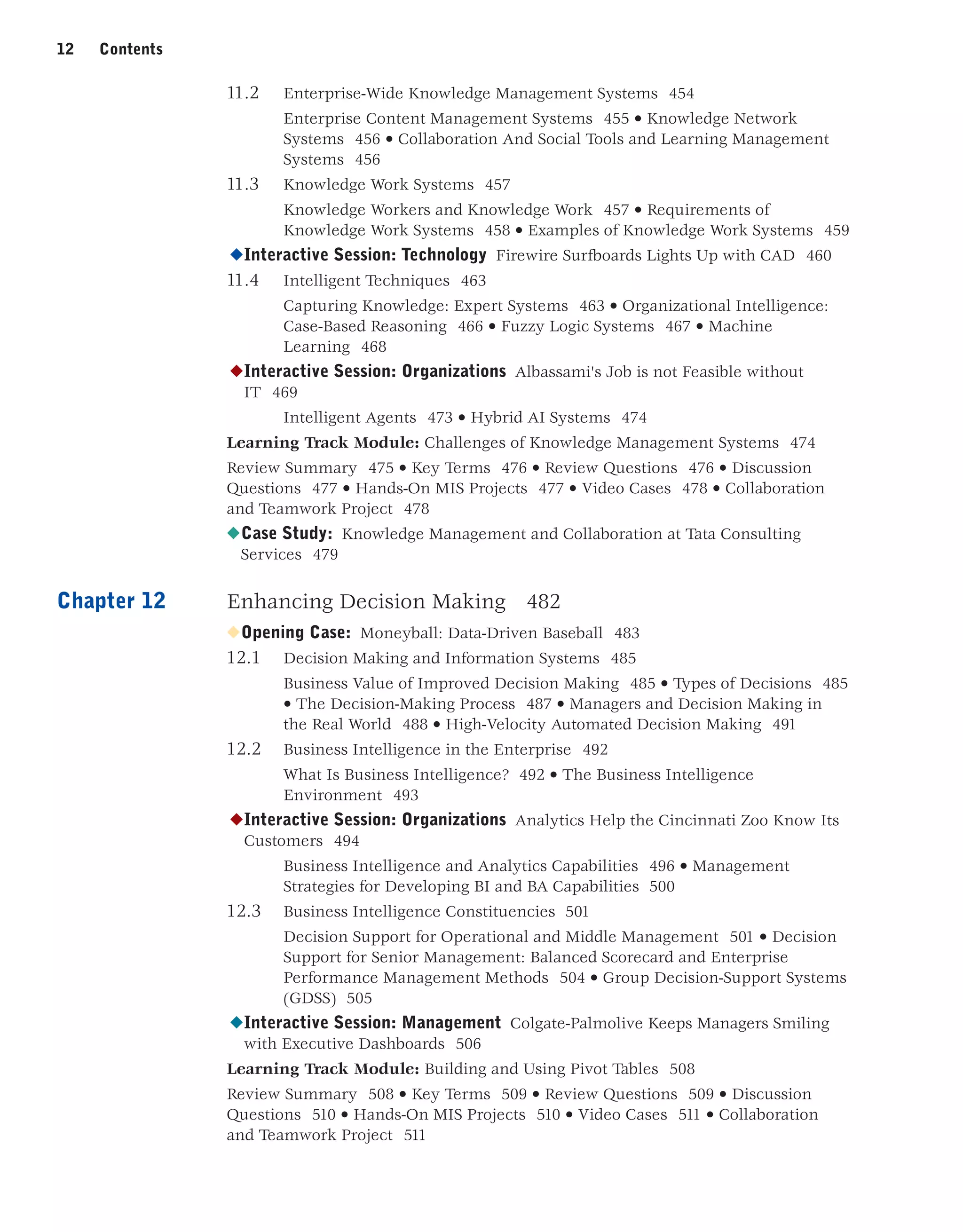
Complete Cont ent s
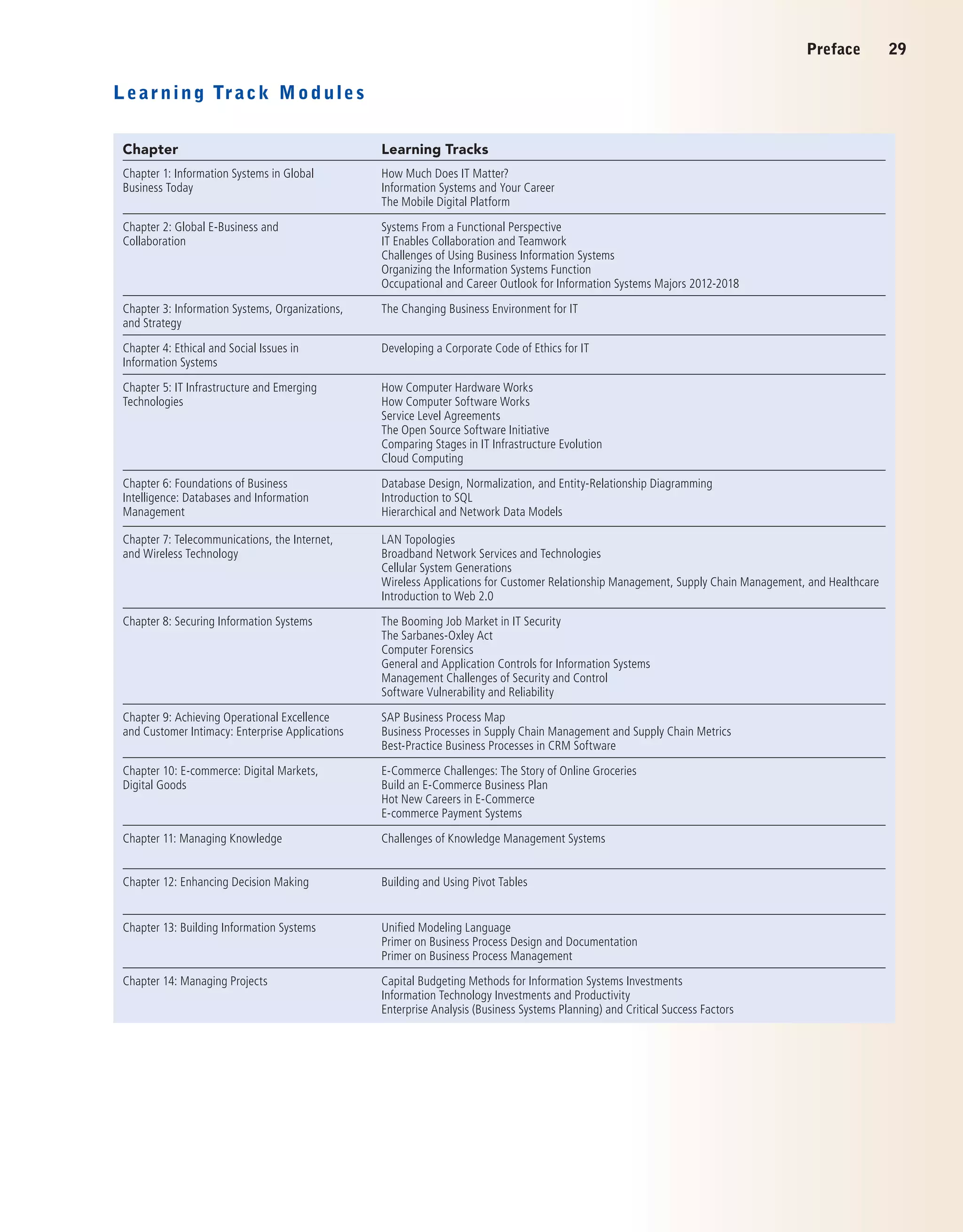
Part One Organizations, Management, and the Networked
Enterprise 31
Chapter 1 Information Systems in Global Business Today 32
◆Opening Case: Efficiency in Wood Harvesting with Information Systems 33
1.1 The Role of Information Systems in Business Today 35
How Information Systems are Transforming Business 35 • What’s New
in Management Information Systems? 36 • Globalization Challenges and
Opportunities: A Flattened World 38
◆Interactive Session: Management Running the Business from the Palm of Your
Hand 39
The Emerging Digital Firm 41 • Strategic Business Objectives of
Information Systems 42
1.2 Perspectives on Information Systems 45
What Is an Information System? 45 • Dimensions of Information
Systems 48 • It Isn’t Just Technology: A Business Perspective on
Information Systems 52
◆Interactive Session: Technology UPS Competes Globally with Information
Technology 53
Complementary Assets: Organizational Capital and the Right Business
Model 56
1.3 Contemporary Approaches to Information Systems 58
Technical Approach 58 • Behavioral Approach 58 • Approach of This Text:
Sociotechnical Systems 59
Learning Track Modules: How Much Does IT Matter?, Information Systems and
Your Career, The Mobile Digital Platform 61
Review Summary 62 • Key Terms 63 • Review Questions 63 • Discussion
Questions 64 • Hands-On MIS Projects 64 • Video Cases 65 • Collaboration and
Teamwork Project 65
◆Case Study: Mashaweer 66
Chapter 2 Global E-business and Collaboration 70
◆Opening Case: Telus Embraces Social Learning 71
2.1 Business Processes and Information Systems 73
Business Processes 73 • How Information Technology Improves Business
Processes 75
2.2 Types of Information Systems 75
Systems for Different Management Groups 76
◆Interactive Session: Technology Schiphol International Hub 78
6 Contents
Systems for Linking the Enterprise 83
◆Interactive Session: Management Piloting Procter  Gamble from Decision
Cockpits 84
E-Business, E-Commerce, and E-Government 87
2.3 Systems for Collaboration and Social Business 88
What is Collaboration? 88 • What Is Social Business? 89 • Business
Benefits of Collaboration and Social Business 90 • Building a Collaborative
Culture and Business Processes 91 • Tools and Technologies for
Collaboration and Social Business 92
2.4 The Information Systems Function in Business 98
The Information Systems Department 99 • Organizing the Information
Systems Function 100
Learning Track Modules: Systems from a Functional Perspective, IT Enables
Collaboration and Teamwork, Challenges of Using Business Information Systems,
Organizing the Information Systems Function, Occupational and Career Outlook
for Information Systems Majors 2012–2018 100
Review Summary 101 • Key Terms 102 • Review Questions 102 • Discussion
Questions 103 • Hands-On MIS Projects 103 • Video Cases 104 • Collaboration
and Teamwork Project 104
◆Case Study: Modernization of NTUC Income 105
Chapter 3 Information Systems, Organizations, and Strategy 108
◆Opening Case: Will Sears’s Technology Strategy Work This Time? 109
3.1 Organizations and Information Systems 111
What Is an Organization? 112 • Features of Organizations 114
3.2 How Information Systems Impact Organizations and Business Firms 119
Economic Impacts 119 • Organizational and Behavioral Impacts 120 •
The Internet and Organizations 123 • Implications for the Design and
Understanding of Information Systems 123
3.3 Using Information Systems to Achieve Competitive Advantage 123
Porter’s Competitive Forces Model 124 • Information System Strategies
for Dealing with Competitive Forces 125 • The Internet’s Impact on
Competitive Advantage 128
◆Interactive Session: Organizations Technology Helps Starbucks Find New Ways
to Compete 129
The Business Value Chain Model 131
◆Interactive Session: Technology Automakers Become Software Companies 134
Synergies, Core Competencies, and Network-Based Strategies 136
3.4 Using Systems for Competitive Advantage: Management Issues 140
Sustaining Competitive Advantage 140 • Aligning IT with Business
Objectives 141 • Managing Strategic Transitions 142
Learning Track Module: The Changing Business Environment for Information
Technology 142
Review Summary 142 •Key Terms 143 • Review Questions 143 • Discussion
Questions 144 • Hands-On MIS Projects 144 • Video Cases 146 • Collaboration
and Teamwork Project 146
Contents 7
◆Case Study: Can This Bookstore Be Saved? 147
Chapter 4 Ethical and Social Issues in Information Systems 150
◆Opening Case: Ethical Issues Facing the Use of Technologies for the Aged
Community 151
4.1 Understanding Ethical and Social Issues Related to Systems 153
A Model for Thinking About Ethical, Social, and Political Issues 155 • Five
Moral Dimensions of the Information Age 155 • Key Technology Trends
That Raise Ethical Issues 156
4.2 Ethics in an Information Society 159
Basic Concepts: Responsibility, Accountability, and Liability 159 • Ethical
Analysis 160 • Candidate Ethical Principles 161 • Professional Codes of
Conduct 161 • Some Real-World Ethical Dilemmas 162
4.3 The Moral Dimensions of Information Systems 162
Information Rights: Privacy and Freedom in the Internet Age 162 •
Property Rights: Intellectual Property 169
◆Interactive Session: Technology Life on the Grid: iPhone Becomes iTrack 170
Accountability, Liability, and Control 174 • System Quality: Data
Quality and System Errors 176 • Quality of Life: Equity, Access, and
Boundaries 176
◆Interactive Session: Organizations Monitoring in the Workplace 179
Learning Track Module: Developing a Corporate Code of Ethics for Information
Systems 183
Review Summary 184 • Key Terms 184 • Review Questions 185 • Discussion
Questions 185 • Hands-On MIS Projects 185 • Video Cases 187 • Collaboration
and Teamwork Project 187
◆Case Study: Facebook: It’s About the Money 188
Part Two Information Technology Infrastructure 191
Chapter 5 IT Infrastructure and Emerging Technologies 192
◆Opening Case: Reforming the Regulatory System for Construction Permits 193
5.1 IT Infrastructure 195
Defining IT Infrastructure 195 • Evolution of IT Infrastructure 197 •
Technology Drivers of Infrastructure Evolution 201
5.2 Infrastructure Components 206
Computer Hardware Platforms 207 • Operating System Platforms 207 •
Enterprise Software Applications 208 • Data Management and Storage 208
• Networking/Telecommunications Platforms 208 • Internet Platforms 209
• Consulting and System Integration Services 209
5.3 Contemporary Hardware Platform Trends 210
8 Contents
The Mobile Digital Platform 210 • Consumerization of IT and BYOD 210 •
Grid Computing 211 • Virtualization 211
◆Interactive Session: Management Should You Use Your iPhone for Work? 212
Cloud Computing 213 • Green Computing 216 • High-Performance and
Power-Saving Processors 216
◆Interactive Session: Organizations Nordea Goes Green with IT 217
Autonomic Computing 218
5.4 Contemporary Software Platform Trends 219
Linux and Open Source Software 219 • Software for the Web: Java, HTML,
and HTML5 219 • Web Services and Service-Oriented Architecture 221 •
Software Outsourcing and Cloud Services 223
5.5 Management Issues 225
Dealing with Platform and Infrastructure Change 225 • Management and
Governance 226 • Making Wise Infrastructure Investments 226
Learning Track Modules: How Computer Hardware and Software Work, Service
Level Agreements, The Open Source Software Initiative, Comparing Stages in IT
Infrastructure Evolution, Cloud Computing 229
Review Summary 230 • Key Terms 231 • Review Questions 231 • Discussion
Questions 232 • Hands-On MIS Projects 232 • Video Cases 233 • Collaboration
and Teamwork Project 233
◆Case Study: Should Businesses Move to the Cloud? 234
Chapter 6 Foundations of Business Intelligence: Databases and
Information Management 238
◆Opening Case: BAE Systems 239
6.1 Organizing Data in a Traditional File Environment 241
File Organization Terms and Concepts 241 • Problems with the Traditional
File Environment 242
6.2 The Database Approach to Data Management 244
Database Management Systems 244 • Capabilities of Database Management
Systems 249 • Designing Databases 251
6.3 Using Databases to Improve Business Performance and Decision
Making 254
The Challenge of Big Data 254 • Business Intelligence Infrastructure 254 •
Analytical Tools: Relationships, Patterns, Trends 257
◆Interactive Session: Technology Big Data, Big Rewards 261
Databases and the Web 262
◆Interactive Session: Organizations Controversy Whirls Around the Consumer
Product Safety Database 264
6.4 Managing Data Resources 265
Establishing an Information Policy 265 • Ensuring Data Quality 266
Learning Track Modules: Database Design, Normalization, and Entity-
Relationship Diagramming, Introduction to SQL, Hierarchical and Network Data
Models 267
Contents 9
Review Summary 268 • Key Terms 269 • Review Questions 269 • Discussion
Questions 270 • Hands-On MIS Projects 270 • Video Cases 272 • Collaboration
and Teamwork Project 272
◆Case Study: Lego: Embracing Change by Combining BI with a Flexible
Information System 273
Chapter 7 Telecommunications, the Internet, and Wireless
Technology 276
◆Opening Case: RFID and Wireless Technology Speed Up Production at
Continental Tires 277
7.1 Telecommunications and Networking in Today’s Business World 279
Networking and Communication Trends 279 • What Is a Computer
Network? 280 • Key Digital Networking Technologies 282
7.2 Communications Networks 285
Signals: Digital vs. Analog 285 • Types of Networks 286 • Transmission
Media and Transmission Speed 287
7.3 The Global Internet 288
What Is the Internet? 288 • Internet Addressing and Architecture 288
◆Interactive Session: Organizations The Battle over Net Neutrality 292
Internet Services and Communication Tools 293
◆Interactive Session: Management Monitoring Employees on Networks:
Unethical or Good Business? 296
The Web 298
7.4 The Wireless Revolution 307
Cellular Systems 307 • Wireless Computer Networks and Internet
Access 308 • RFID and Wireless Sensor Networks 310
Learning Track Modules: LAN Topologies, Broadband Network Services and
Technologies, Cellular System Generations, Wireless Applications for Customer
Relationship Management, Supply Chain Management, and Healthcare, Web
2.0 313
Review Summary 314 • Key Terms 315 • Review Questions 315 • Discussion
Questions 316 • Hands-On MIS Projects 316 • Video Cases 317 • Collaboration
and Teamwork Project 317
◆Case Study: Apple, Google, and Microsoft Battle for Your Internet
Experience 318
Chapter 8 Securing Information Systems 322
◆Opening Case: You’re on LinkedIn? Watch Out! 323
8.1 System Vulnerability and Abuse 325
Why Systems Are Vulnerable 325 • Malicious Software: Viruses, Worms,
Trojan Horses, and Spyware 328 • Hackers and Computer Crime 330 •
Internal Threats: Employees 335 • Software Vulnerability 335
◆Interactive Session: Organizations Stuxnet and the Changing Face of
Cyberwarfare 336
8.2 Business Value of Security and Control 338
10 Contents
Legal and Regulatory Requirements for Electronic Records
Management 338 • Electronic Evidence and Computer Forensics 339
8.3 Establishing a Framework for Security and Control 340
Information Systems Controls 340 • Risk Assessment 341 • Security
Policy 342 • Disaster Recovery Planning and Business Continuity
Planning 343 • The Role of Auditing 344
8.4 Technologies and Tools for Protecting Information Resources 345
Identity Management and Authentication 345 • Firewalls, Intrusion
Detection Systems, and Antivirus Software 347 • Securing Wireless
Networks 349 • Encryption and Public Key Infrastructure 349 • Ensuring
System Availability 350 • Security Issues for Cloud Computing and the
Mobile Digital Platform 352 • Ensuring Software Quality 353
◆Interactive Session: Technology MWEB Business: Hacked 354
Learning Track Modules: The Booming Job Market in IT Security, The Sarbanes-
Oxley Act, Computer Forensics, General and Application Controls for Information
Systems, Management Challenges of Security and Control, Software Vulnerability
and Reliability 356
Review Summary 357 • Key Terms 358 • Review Questions 358 • Discussion
Questions 359 • Hands-On MIS Projects 360 • Video Cases 361 • Collaboration
and Teamwork Project 361
◆Case Study: Information Security Threats and Policies in Europe 362
Part Three Key System Applications for the Digital Age 365
Chapter 9 Achieving Operational Excellence and Customer Intimacy:
Enterprise Applications 366
◆Opening Case: Technology Helps Nvidia Anticipate the Future 367
9.1 Enterprise Systems 369
What Are Enterprise Systems? 369 • Enterprise Software 370 • Business
Value of Enterprise Systems 371
9.2 Supply Chain Management Systems 372
The Supply Chain 372 • Information Systems and Supply Chain
Management 374 • Supply Chain Management Software 376 • Global
Supply Chains and the Internet 376
◆Interactive Session: Organizations DP World Takes Port Management to the
Next Level with RFID 377
Business Value of Supply Chain Management Systems 379
9.3 Customer Relationship Management Systems 381
What Is Customer Relationship Management? 381 • Customer Relationship
Management Software 382 • Operational and Analytical CRM 386 •
Business Value of Customer Relationship Management Systems 386
9.4 Enterprise Applications: New Opportunities and Challenges 387
Enterprise Application Challenges 387 • Next-Generation Enterprise
Applications 388
Contents 11
◆Interactive Session: Technology Customer Relationship Management Heads to
the Cloud 390
Learning Track Modules: SAP Business Process Map, Business Processes in
Supply Chain Management and Supply Chain Metrics Best-Practice Business
Processes in CRM Software, 391
Review Summary 392 • Key Terms 393 • Review Questions 393 • Discussion
Questions 393 • Hands-On MIS Projects 394 • Video Cases 395 • Collaboration
and Teamwork Project 395
◆Case Study: Summit Electric Lights Up with a New ERP System 396
Chapter 10 E-commerce: Digital Markets, Digital Goods 400
◆Opening Case: Groupon’s Business Model: Social and Local 401
10.1 E-commerce and the Internet 403
E-Commerce Today 403 • Why E-commerce Is Different 405 • Key
Concepts in E-commerce: Digital Markets and Digital Goods in a Global
Marketplace 409
10.2 E-commerce: Business and Technology 412
Types of E-Commerce 413 • E-Commerce Business Models 413 •
E-Commerce Revenue Models 416
◆Interactive Session: Organizations Location-Based Marketing and
Advertising 417
Social Networking and The Wisdom of Crowds 420 • E-Commerce
Marketing 421 • B2B E-commerce: New Efficiencies and Relationships 426
◆Interactive Session: Management Social Commerce Creates New Customer
Relationships 427
10.3 The Mobile Digital Platform and Mobile E-commerce 431
Location-based Services and Applications 432 • Other Mobile Commerce
Services 433
10.4 Building an E-commerce Presence 434
Pieces of the Site-Building Puzzle 435 • Business Objectives, System
Functionality, and Information Requirements 435 • Building the Web Site:
In-house Versus Outsourcing 436
Learning Track Modules: E-commerce Challenges: The Story of Online Groceries,
Build an E-commerce Business Plan, Hot New Careers in E-commerce, E-commerce
Payment Systems 439
Review Summary 439 • Key Terms 440 • Review Questions 440 • Discussion
Questions 441 • Hands-On MIS Projects 441 • Video Cases 442 • Collaboration
and Teamwork Project 442
◆Case Study: To Pay or Not to Pay: Zagat’s Dilemma 443
Chapter 11 Managing Knowledge 446
◆Opening Case: Designing Drugs Virtually 447
11.1 The Knowledge Management Landscape 449
Important Dimensions of Knowledge 449 • The Knowledge Management
Value Chain 451 • Types of Knowledge Management Systems 453
12 Contents
11.2 Enterprise-Wide Knowledge Management Systems 454
Enterprise Content Management Systems 455 • Knowledge Network
Systems 456 • Collaboration And Social Tools and Learning Management
Systems 456
11.3 Knowledge Work Systems 457
Knowledge Workers and Knowledge Work 457 • Requirements of
Knowledge Work Systems 458 • Examples of Knowledge Work Systems 459
◆Interactive Session: Technology Firewire Surfboards Lights Up with CAD 460
11.4 Intelligent Techniques 463
Capturing Knowledge: Expert Systems 463 • Organizational Intelligence:
Case-Based Reasoning 466 • Fuzzy Logic Systems 467 • Machine
Learning 468
◆Interactive Session: Organizations Albassami's Job is not Feasible without
IT 469
Intelligent Agents 473 • Hybrid AI Systems 474
Learning Track Module: Challenges of Knowledge Management Systems 474
Review Summary 475 • Key Terms 476 • Review Questions 476 • Discussion
Questions 477 • Hands-On MIS Projects 477 • Video Cases 478 • Collaboration
and Teamwork Project 478
◆Case Study: Knowledge Management and Collaboration at Tata Consulting
Services 479
Chapter 12 Enhancing Decision Making 482
◆Opening Case: Moneyball: Data-Driven Baseball 483
12.1 Decision Making and Information Systems 485
Business Value of Improved Decision Making 485 • Types of Decisions 485
• The Decision-Making Process 487 • Managers and Decision Making in
the Real World 488 • High-Velocity Automated Decision Making 491
12.2 Business Intelligence in the Enterprise 492
What Is Business Intelligence? 492 • The Business Intelligence
Environment 493
◆Interactive Session: Organizations Analytics Help the Cincinnati Zoo Know Its
Customers 494
Business Intelligence and Analytics Capabilities 496 • Management
Strategies for Developing BI and BA Capabilities 500
12.3 Business Intelligence Constituencies 501
Decision Support for Operational and Middle Management 501 • Decision
Support for Senior Management: Balanced Scorecard and Enterprise
Performance Management Methods 504 • Group Decision-Support Systems
(GDSS) 505
◆Interactive Session: Management Colgate-Palmolive Keeps Managers Smiling
with Executive Dashboards 506
Learning Track Module: Building and Using Pivot Tables 508
Review Summary 508 • Key Terms 509 • Review Questions 509 • Discussion
Questions 510 • Hands-On MIS Projects 510 • Video Cases 511 • Collaboration
and Teamwork Project 511
Contents 13
◆Case Study: Zynga Wins with Business Intelligence 512
Part Four Building and Managing Systems 515
Chapter 13 Building Information Systems 516
◆Opening Case: New Systems and Business Processes Put MoneyGram “On the
Money” 517
13.1 Systems as Planned Organizational Change 520
Systems Development and Organizational Change 520 • Business Process
Redesign 522
13.2 Overview of Systems Development 525
◆Interactive Session: Organizations Burton Snowboards Speeds Ahead with
Nimble Business Processes 526
Systems Analysis 528 • Systems Design 528 • Completing the Systems
Development Process 529 • Modeling and Designing Systems: Structured
and Object-Oriented Methodologies 532
13.3 Alternative Systems-Building Approaches 537
Traditional Systems Life Cycle 537 • Prototyping 538 • End-User
Development 539 • Application Software Packages and Outsourcing 541
13.4 Application Development for the Digital Firm 544
Rapid Application Development (RAD) 544 • Component-
Based Development and Web Services 544 • Mobile Application
Development 545
Learning Track Modules: Unified Modeling Language (UML), A Primer on
Business Process Design and Documentation, A Primer on Business Process
Management 546
◆Interactive Session: Technology What Does It Take to Go Mobile? 547
Review Summary 548 • Key Terms 550 • Review Questions 550 • Discussion
Questions 551 • Hands-On MIS Projects 551 • Video Cases 553 • Collaboration
and Teamwork Project 553
◆Case Study: Honam Petrochemical’s Quest for Better Management Reports 554
Chapter 14 Managing Projects 556
◆Opening Case: Nu Skin’s New Human Resources System Project Puts People
First 557
14.1 The Importance of Project Management 559
Runaway Projects and System Failure 559 • Project Management
Objectives 560
◆Interactive Session: Management Austin Energy’s Billing System Can’t Light
Up 561
14.2 Selecting Projects 563
Management Structure for Information Systems Projects 563 • Linking
Systems Projects to the Business Plan 564 • Information Requirements
and Key Performance Indicators 566 • Portfolio Analysis 566 • Scoring
Models 567
14.3 Establishing the Business Value of Information Systems 567
Information System Costs and Benefits 568 • Real Options Pricing
Models 570 • Limitations of Financial Models 571
14.4 Managing Project Risk 571
Dimensions of Project Risk 571 • Change Management and the Concept of
Implementation 572 • Controlling Risk Factors 574
◆Interactive Session: Organizations Westinghouse Electric Takes on the Risks of
a “Big Bang” Project 578
Designing for the Organization 579 • Project Management Software
Tools 580
Learning Track Modules: Capital Budgeting Methods for Information System
Investments, Information Technology Investments and Productivity, Enterprise
Analysis (Business Systems Planning) and Critical Success Factors 581
Review Summary 582 • Key Terms 582 • Review Questions 583 • Discussion
Questions 583 • Hands-On MIS Projects 583 • Video Cases 585 • Collaboration
and Teamwork Project 585
◆Case Study: NYCAPS and CityTime: A Tale of Two New York City IS
Projects 586
Chapter 15 Managing Global Systems 590
(available on the Web at www.pearsonglobaleditions.com/laudon,
Instructor Resources)
◆Opening Case: L’Oréal’s Global Makeover 15-1
15.1 The Growth of International Information Systems 15-3
Developing an International Information Systems Architecture 15-4 • The
Global Environment: Business Drivers and Challenges 15-5 • State of the
Art 15-8
15.2 Organizing International Information Systems 15-9
Global Strategies and Business Organization 15-9 • Global Systems to Fit
the Strategy 15-10 • Reorganizing the Business 15-11
15.3 Managing Global Systems 15-12
A Typical Scenario: Disorganization on a Global Scale 15-12 •
Global Systems Strategy 15-13 • The Management Solution:
Implementation 15-15
◆Interactive Session: Organizations Hasbro Develops a Global Systems
Strategy 15-17
15.4 Technology Issues and Opportunities for Global Value Chains 15-19
Computing Platforms and Systems Integration 15-19 • Connectivity 15-20
• Software Localization 15-21
◆Interactive Session: Management CombineNet ASAP Helps Primark Manage Its
Global Supply Chain 15-23
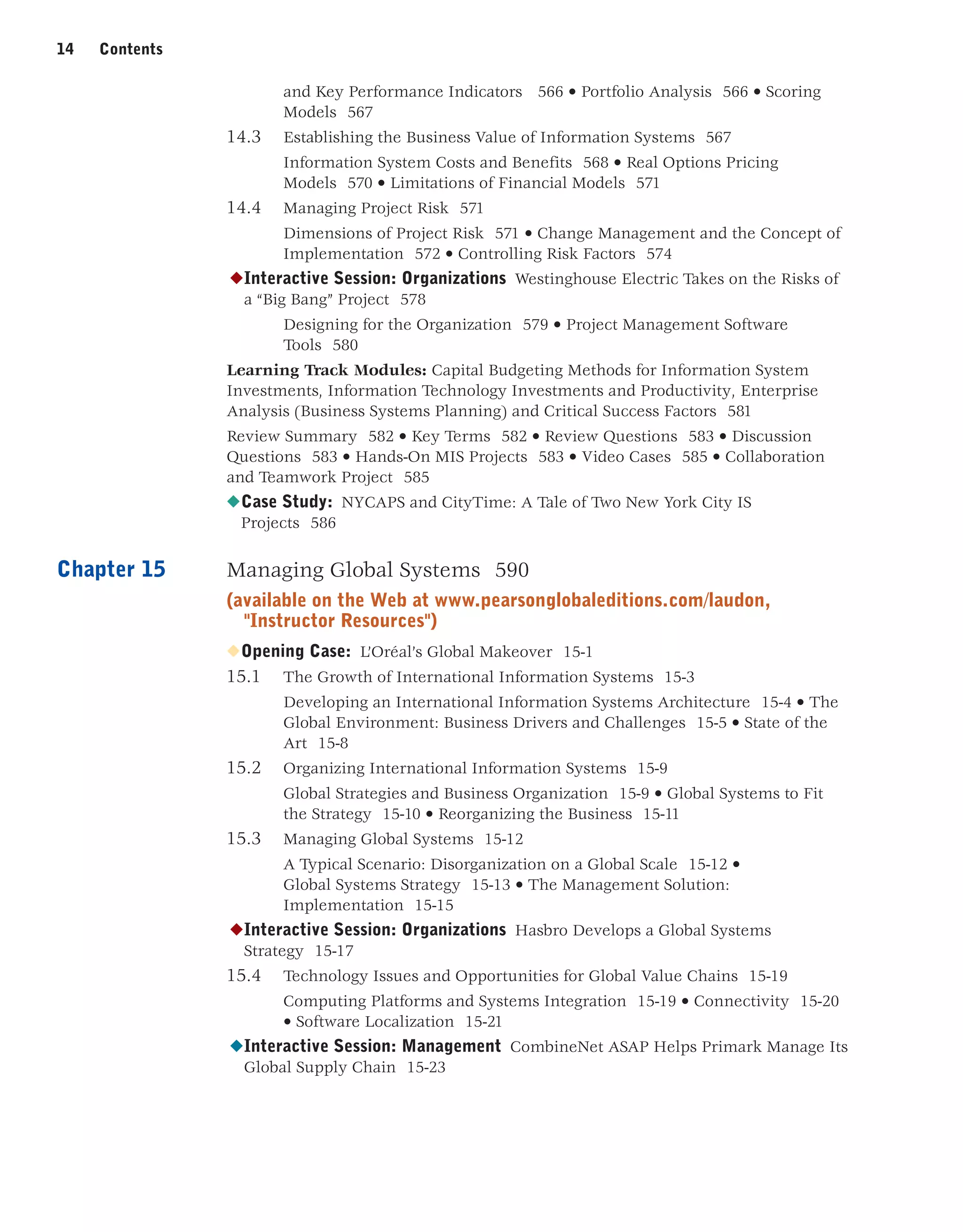
14 Contents
Contents 15
Review Summary 15-25 • Key Terms 15-25 • Review Questions 15-26 •
Discussion Questions 15-26 • Hands-On MIS Projects 15-26 • Video Cases 15-28 •
Collaboration and Teamwork Project 15-28
◆Case Study: Sherwin-Williams Paints the World 15-29
References 591
Glossary 607
Indexes 621
BUSINESS CASES AND INTERACTIVE SESSIONS
Here are some of the business firms you will find described in the cases and Interactive Sessions of this
book:
Chapter 1: Information Systems in Global Business Today
Efficiency in Wood Harvesting with Information Systems
Running the Business from the Palm of Your Hand
UPS Competes Globally with Information Technology
Mashaweer
Chapter 2: Global E-Business and Collaboration
Telus Embraces Social Learning
Schiphol International Hub
Piloting Procter  Gamble from Decision Cockpits
Modernization of NTUC Income
Chapter 3: Information Systems, Organizations, and Strategy
Will Sears’s Technology Strategy Work This Time?
Technology Helps Starbucks Find New Ways to Compete
Automakers Become Software Companies
Can This Bookstore Be Saved?
Chapter 4: Ethical and Social Issues in Information Systems
Ethical Issues Facing the use of Technologies for the Aged Community
Life on the Grid: iPhone Becomes iTrack
Monitoring in the Workplace
Facebook: It’s About the Money
Chapter 5: IT Infrastructure and Emerging Technologies
Reforming the Regulatory System for Construction Permits
Should You Use Your iPhone for Work?
Nordea Goes Green with IT
Should Businesses Move to the Cloud?
Chapter 6: Foundations of Business Intelligence: Databases and Information Management
BAE Systems
Big Data, Big Rewards
Controversy Whirls Around the Consumer Product Safety Database
Lego: Embracing Change by Combining BI with a Flexible Information System
Chapter 7: Telecommunications, the Internet and Wireless Technology
RFID and Wireless Technology Speed Up Production at Continental Tires
The Battle Over Net Neutrality
Monitoring Employees on Networks: Unethical or Good Business?
Apple, Google, and Microsoft Battle for your Internet Experience
Chapter 8: Securing Information Systems
You’re on LinkedIn? Watch Out!
Stuxnet and the Changing Face of Cyberwarfare
MWEB Business: Hacked
Information Security Threats and Policies in Europe
Chapter 9: Achieving Operational Excellence and Customer Intimacy: Enterprise Applications
Technology Helps Nvidia Anticipate the Future
DP World Takes Port Management to the Next Level with RFID
Customer Relationship Management Heads to the Cloud
Summit Electric Lights Up with a New ERP System
Chapter 10: E-Commerce: Digital Markets, Digital Goods
Groupon’s Business Model: Social and Local
Location-Based Marketing and Advertising
Social Commerce Creates New Customer Relationships
To Pay or Not to Pay: Zagat’s Dilemma
Chapter 11: Managing Knowledge
Designing Drugs Virtually
Albassami's Job is not Feasible without IT
Firewire Surfboards Lights Up with CAD
Knowledge Management and Collaboration at Tata Consulting Services
Chapter 12: Enhancing Decision Making
Moneyball: Data-Driven Baseball
Analytics Help the Cincinnati Zoo Know Its Customers
Colgate-Palmolive Keeps Managers Smiling with Executive Dashboards
Zynga Wins with Business Intelligence
Chapter 13: Building Information Systems
New Systems and Business Processes Put MoneyGram “On the Money”
Burton Snowboards Speeds Ahead with Nimble Business Processes
What Does It Take to Go Mobile?
Honam Petrochemical’s Quest for Better Management Reports
Chapter 14: Managing Projects
Nu Skin’s New Human Resources System Project Puts People First
Austin Energy’s Billing System Can’t Light Up
Westinghouse Electric Takes on the Risks of a “Big Bang” Project
NYCAPS and CityTime: A Tale of Two New York City IS Projects
Chapter 15: Managing Global Systems
L’Oréal’s Global Makeover
Hasbro Develops a Global Systems Strategy
CombineNet ASAP Helps Primark Manage Its Global Supply Chain
Sherwin-Williams Paints the World
19
19
Preface
We wrote this book for business school students who wanted an in-depth
look at how today's business firms use information technologies and systems to
achieve corporate objectives. Information systems are one of the major tools
available to business managers for achieving operational excellence, developing
new products and services, improving decision making, and achieving competi-
tive advantage. Students will find here the most up-to-date and comprehensive
overview of information systems used by business firms today.
When interviewing potential employees, business firms often look for new
hires who know how to use information systems and technologies for achiev-
ing bottom-line business results. Regardless of whether you are an accounting,
finance, management, operations management, marketing, or information sys-
tems major, the knowledge and information you find in this book will be valu-
able throughout your business career.
WHAT’S NEW IN THIS EDITION
CURRENCY
The 13th edition features many new opening, closing, and Interactive Session
cases. The text, figures, tables, and cases have been updated through November
2012 with the latest sources from industry and MIS research.
NEW FEATURES
• Chapter-opening cases have been expanded and new case study questions
have been added.
• More online cases: MIS Classic Cases, consisting of five outstanding cases
from previous editions on companies such as Kmart or Blockbuster/Netflix,
will be available on the book’s Web site. In addition, some of the chapter-
ending cases from the previous edition (MIS12e) will be available online.
• New Video Cases collection: 30 video cases (2 per chapter) and additional
instructional videos covering key concepts and experiences in the MIS
world.
• Learning Tracks: over 40 Learning Tracks are for additional coverage of
selected topics.
NEW TOPICS
• Social Business: Extensive coverage of social business, introduced in
Chapter 2 and discussed in throughout the text. Detailed discussions of
enterprise (internal corporate) social networking as well as social network-
ing in e-commerce.
• Big Data: Chapter 6 on Databases and Information Management rewrit-
ten to provide in-depth coverage of Big Data and new data management
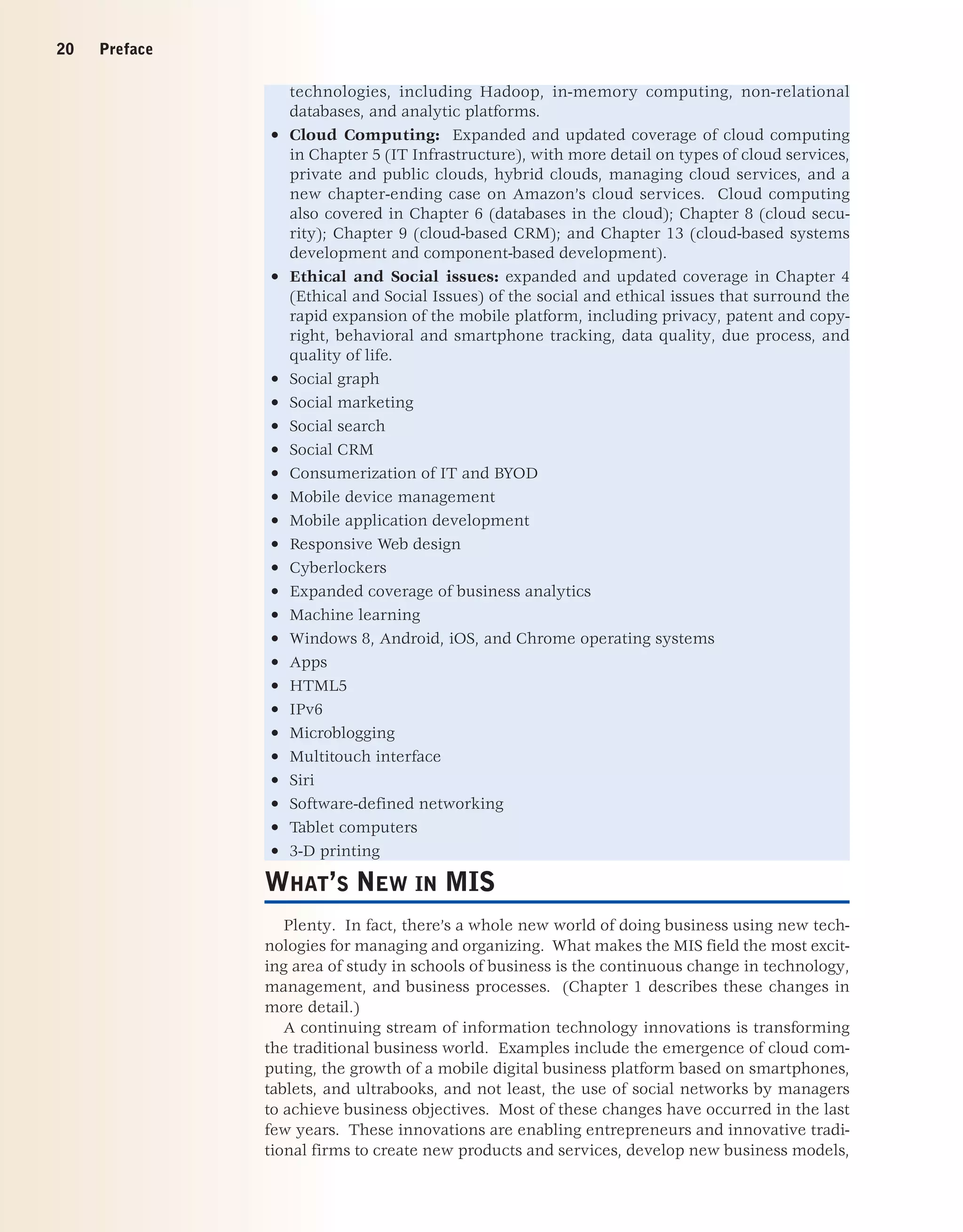
20 Preface
technologies, including Hadoop, in-memory computing, non-relational
databases, and analytic platforms.
• Cloud Computing: Expanded and updated coverage of cloud computing
in Chapter 5 (IT Infrastructure), with more detail on types of cloud services,
private and public clouds, hybrid clouds, managing cloud services, and a
new chapter-ending case on Amazon’s cloud services. Cloud computing
also covered in Chapter 6 (databases in the cloud); Chapter 8 (cloud secu-
rity); Chapter 9 (cloud-based CRM); and Chapter 13 (cloud-based systems
development and component-based development).
• Ethical and Social issues: expanded and updated coverage in Chapter 4
(Ethical and Social Issues) of the social and ethical issues that surround the
rapid expansion of the mobile platform, including privacy, patent and copy-
right, behavioral and smartphone tracking, data quality, due process, and
quality of life.
• Social graph
• Social marketing
• Social search
• Social CRM
• Consumerization of IT and BYOD
• Mobile device management
• Mobile application development
• Responsive Web design
• Cyberlockers
• Expanded coverage of business analytics
• Machine learning
• Windows 8, Android, iOS, and Chrome operating systems
• Apps
• HTML5
• IPv6
• Microblogging
• Multitouch interface
• Siri
• Software-defined networking
• Tablet computers
• 3-D printing
WHAT’S NEW IN MIS
Plenty. In fact, there’s a whole new world of doing business using new tech-
nologies for managing and organizing. What makes the MIS field the most excit-
ing area of study in schools of business is the continuous change in technology,
management, and business processes. (Chapter 1 describes these changes in
more detail.)
A continuing stream of information technology innovations is transforming
the traditional business world. Examples include the emergence of cloud com-
puting, the growth of a mobile digital business platform based on smartphones,
tablets, and ultrabooks, and not least, the use of social networks by managers
to achieve business objectives. Most of these changes have occurred in the last
few years. These innovations are enabling entrepreneurs and innovative tradi-
tional firms to create new products and services, develop new business models,
Preface 21
and transform the day-to-day conduct of business. In the process, some old
businesses, even industries, are being destroyed while new businesses are
springing up.
For instance, the rapid growth of online content stores such as iTunes and
Amazon, based on cloud storage services—driven by millions of consumers
who prefer smartphones and tablet computers as the center of their media
world—has forever changed the older business models of distributing music,
television, and movies on physical discs, such as CDs and DVDs. Cloud-based
content delivered on the Internet is beginning to challenge the dominance of
cable television networks for the delivery of television shows.
E-commerce is growing rapidly again following a deep recession, generating
over $362 billion in revenues in 2012, and is estimated to grow to over $542 bil-
lion in 2016. With nearly 122 million Americans accessing the Internet with
their smartphones, mobile commerce in 2012 has grown to $30 billion in a few
years, and is growing by double digits each year. Amazon's revenues grew 41
percent in 2011, despite the recession, while offline retail grew by 5 percent.
E-commerce is changing how firms design, produce and deliver their products
and services. E-commerce has reinvented itself again, disrupting the tradi-
tional marketing and advertising industry and putting major media and content
firms in jeopardy. Facebook and other social networking sites such as YouTube,
Twitter, and Tumblr, and new graphical social sites such as Pinterest, exemplify
the new face of e-commerce in the 21st Century. They sell services. When
we think of e-commerce we tend to think of an online store selling physical
products. While this iconic vision of e-commerce is still very powerful and the
fastest growing form of retail sales in the U.S., growing up alongside is a whole
new value stream based on selling services, not goods. It’s a services model of
e-commerce. Information systems and technologies are the foundation of this
new services-based e-commerce.
Likewise, the management of business firms has changed: With new mobile
smartphones, high-speed wireless Wi-Fi networks, and wireless laptop and
tablet computers, remote salespeople on the road are only seconds away from
their managers’ questions and oversight. Managers on the move are in direct,
continuous contact with their employees. The growth of enterprise-wide infor-
mation systems with extraordinarily rich data means that managers no longer
operate in a fog of confusion, but instead have online, nearly instant, access to
the really important information they need for accurate and timely decisions.
In addition to their public uses on the Web, private social networks, wikis and
blogs are becoming important corporate tools for communication, collabora-
tion, and information sharing.
THE 13TH EDITION:THE COMPREHENSIVE SOLUTION
FOR THE MIS CURRICULUM
Since its inception, this text has helped to define the MIS course around the
globe. This edition continues to be authoritative, but is also more customizable,
flexible, and geared to meeting the needs of different colleges, universities, and
individual instructors. This book is now part of a complete learning package
that includes the core text and an extensive offering of supplemental materials
on the Web.
The core text consists of 15 chapters with hands-on projects covering essen-
tial topics in MIS. An important part of the core text is the Video Case Study
22 Preface
and Instructional Video package: 30 video case studies (2 per chapter) plus
many instructional videos that illustrate business uses of information systems,
explain new technologies, and explore concepts. Video cases are keyed to the
topics of each chapter.
In addition, for students and instructors who want to go deeper into selected
topics, there are over 40 online Learning Tracks that cover a variety of MIS top-
ics in greater depth.
MyMISLab provides more in-depth coverage of chapter topics, career
resources, additional case studies, supplementary chapter material, and data
files for hands-on projects.
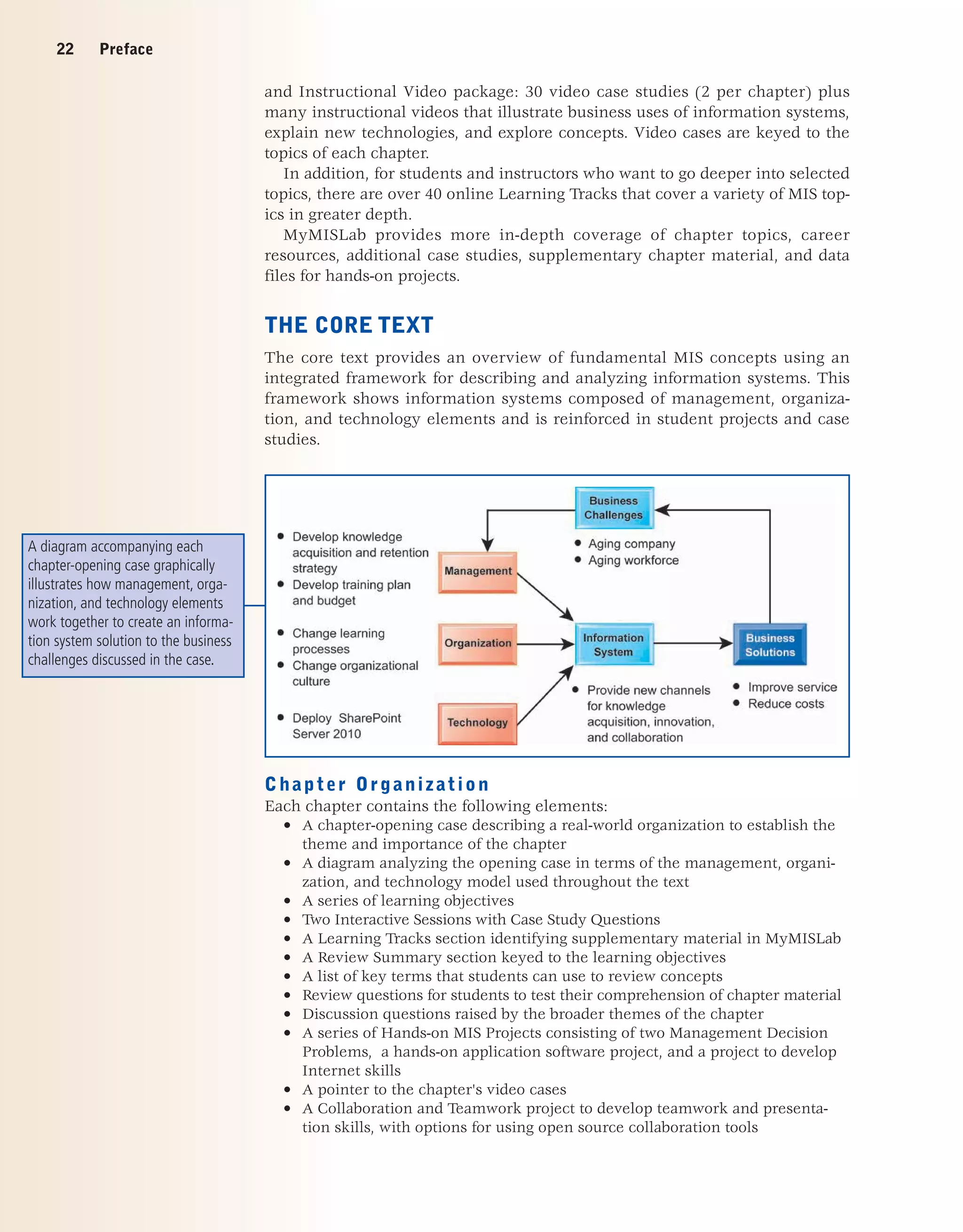
THE CORE TEXT
The core text provides an overview of fundamental MIS concepts using an
integrated framework for describing and analyzing information systems. This
framework shows information systems composed of management, organiza-
tion, and technology elements and is reinforced in student projects and case
studies.
Chapter Organization
Each chapter contains the following elements:
• A chapter-opening case describing a real-world organization to establish the
theme and importance of the chapter
• A diagram analyzing the opening case in terms of the management, organi-
zation, and technology model used throughout the text
• A series of learning objectives
• Two Interactive Sessions with Case Study Questions
• A Learning Tracks section identifying supplementary material in MyMISLab
• A Review Summary section keyed to the learning objectives
• A list of key terms that students can use to review concepts
• Review questions for students to test their comprehension of chapter material
• Discussion questions raised by the broader themes of the chapter
• A series of Hands-on MIS Projects consisting of two Management Decision
Problems, a hands-on application software project, and a project to develop
Internet skills
• A pointer to the chapter's video cases
• A Collaboration and Teamwork project to develop teamwork and presenta-
tion skills, with options for using open source collaboration tools
A diagram accompanying each
chapter-opening case graphically
illustrates how management, orga-
nization, and technology elements
work together to create an informa-
tion system solution to the business
challenges discussed in the case.
Preface 23
• A chapter-ending case study for students to learn about how real business
firms use information systems, and to apply chapter concepts
KEY FEATURES
We have enhanced the text to make it more interactive, leading-edge, and
appealing to both students and instructors. The features and learning tools are
described in the following sections.
Business-Driven with Real-World Business Cases and
Examples
The text helps students see the direct connection between information sys-
tems and business performance. It describes the main business objectives driv-
ing the use of information systems and technologies in corporations all over
the world: operational excellence; new products and services; customer and
supplier intimacy; improved decision making; competitive advantage; and sur-
vival. In-text examples and case studies show students how specific companies
use information systems to achieve these objectives.
We use current examples from business and public organizations throughout
the text to illustrate the important concepts in each chapter. The case stud-
ies describe companies or organizations that are familiar to students, such as
Starbucks, Google, Groupon, Facebook, Amazon, L'Oréal, and Procter  Gamble.
Interactivity
There's no better way to learn about MIS than by doing MIS. We provide differ-
ent kinds of hands-on projects where students can work with real-world busi-
ness scenarios and data, and learn first hand what MIS is all about. These proj-
ects heighten student involvement in this exciting subject.
• Online Video Case Package. Students can watch short videos online,
either in-class or at home or work, and then apply the concepts of the book
to the analysis of the video. Every chapter contains at least two business
video cases (30 videos in all) that explain how business firms and managers
are using information systems, describe new management practices, and
explore concepts discussed in the chapter. Each video case consists of a
video about a real-world company, a background text case, and case study
questions. These video cases enhance students’ understanding of MIS topics
and the relevance of MIS to the business world. In addition, there are many
Instructional Videos that describe developments and concepts in MIS keyed
to respective chapters.
24 Preface
• Hands-on MIS Projects. Every chapter concludes with a Hands-on MIS
Projects section containing three types of projects: two Management
Decision Problems, a hands-on application software exercise using Microsoft
Excel, Access, or Web page and blog creation tools, and a project that devel-
ops Internet business skills. A Dirt Bikes USA running case in MyMISLab
provides additional hands-on projects for each chapter.
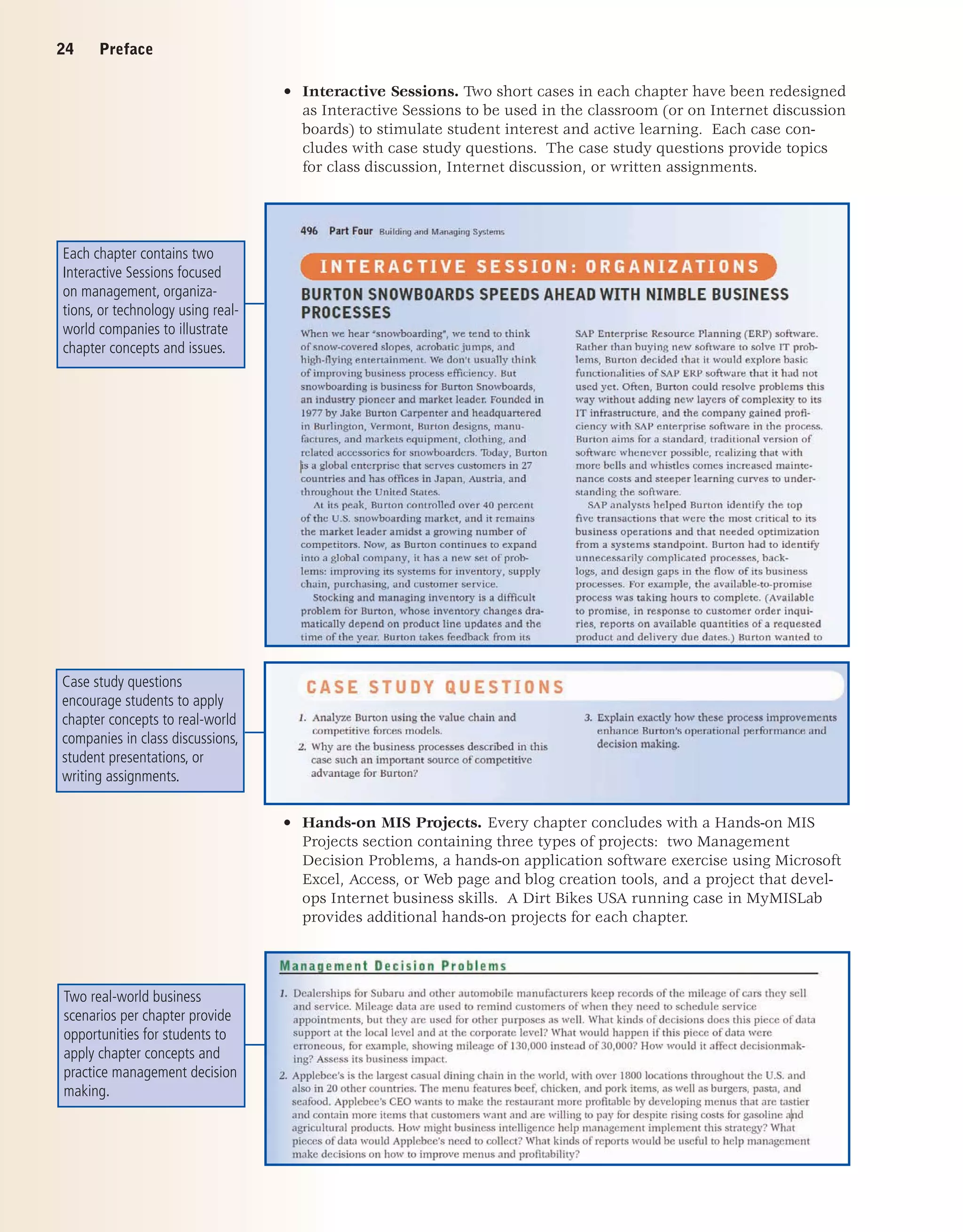
• Interactive Sessions. Two short cases in each chapter have been redesigned
as Interactive Sessions to be used in the classroom (or on Internet discussion
boards) to stimulate student interest and active learning. Each case con-
cludes with case study questions. The case study questions provide topics
for class discussion, Internet discussion, or written assignments.
Case study questions
encourage students to apply
chapter concepts to real-world
companies in class discussions,
student presentations, or
writing assignments.
Two real-world business
scenarios per chapter provide
opportunities for students to
apply chapter concepts and
practice management decision
making.
Each chapter contains two
Interactive Sessions focused
on management, organiza-
tions, or technology using real-
world companies to illustrate
chapter concepts and issues.
Preface 25
Each chapter features a
project to develop Internet
skills for accessing informa-
tion, conducting research, and
performing online calculations
and analysis.
• Collaboration and Teamwork Projects. Each chapter features a collabora-
tive project that encourages students working in teams to use Google Sites,
Google Docs, and other open-source collaboration tools. The first team proj-
ect in Chapter 1 asks students to build a collaborative Google site.
Assessment and AACSB Assessment Guidelines
The Association to Advance Collegiate Schools of Business (AACSB) is a not-for-
profit corporation of educational institutions, corporations and other organiza-
tions that seeks to improve business education primarily by accrediting univer-
sity business programs. As a part of its accreditation activities, the AACSB has
developed an Assurance of Learning Program designed to ensure that schools
do in fact teach students what they promise. Schools are required to state a
clear mission, develop a coherent business program, identify student learning
objectives, and then prove that students do in fact achieve the objectives.
We have attempted in this book to support AACSB efforts to encourage
assessment-based education. On the Laudon Web site is a more inclusive and
detailed assessment matrix that identifies the learning objectives of each chap-
ter and points to all the available assessment tools for ensuring students in fact
do achieve the learning objectives. Because each school is different and may
have different missions and learning objectives, no single document can satisfy
all situations. The authors will provide custom advice on how to use this text
in their colleges with different missions and assessment needs. Please e-mail
the authors or contact your local Pearson Education representative for contact
information.
Students practice using
software in real-world settings
for achieving operational
excellence and enhancing
decision making.
26 Preface
For more information on the AACSB Assurance of Learning Program, and
how this text supports assessment-based learning, please visit the Web site for
this book.
Customization and Flexibility: New Learning Track
Modules
Our Learning Tracks feature gives instructors the flexibility to provide in-depth
coverage of the topics they choose. There are over 40 Learning Tracks avail-
able to instructors and students. A Learning Tracks section at the end of each
chapter directs students to short essays or additional chapters in MyMISLab.
This supplementary content takes students deeper into MIS topics, concepts
and debates; reviews basic technology concepts in hardware, software, database
design, telecommunications, and other areas; and provide additional hands-
on software instruction. The 13th Edition includes new Learning Tracks on
E-Commerce Payment Systems, LAN Topologies, and the Occupational and
Career Outlook for Information Systems Majors 2012–2018.
AUTHOR-CERTIFIED TEST BANK AND SUPPLEMENTS
• Author-Certified Test Bank. The authors have worked closely with skilled
test item writers to ensure that higher level cognitive skills are tested. The
test bank includes multiple-choice questions on content, but also includes
many questions that require analysis, synthesis, and evaluation skills.
• New Annotated Interactive PowerPoint Lecture Slides. The authors have
prepared a comprehensive collection of over five hundred PowerPoint slides
to be used in lectures. Ken Laudon uses many of these slides in his MIS
classes and executive education presentations. Each of the slides is anno-
tated with teaching suggestions for asking students questions, developing
in-class lists that illustrate key concepts, and recommending other firms as
examples in addition to those provided in the text. The annotations are like
an Instructor's Manual built into the slides and make it easier to teach the
course effectively.
STUDENT LEARNING-FOCUSED
Student learning objectives are organized around a set of study questions to
focus student attention. Each chapter concludes with a review summary and
review questions organized around these study questions.
MYMISLAB
MyMISLab is a Web-based assessment and tutorial tool that provides practice
and testing while personalizing course content and providing student and class
assessment and reporting. Your course is not the same as the course taught
down the hall. Now, all the resources that instructors and students need for
course success are in one place—flexible and easily organized and adapted
for an individual course experience. Visit www.pearsonglobaleditions.com/
mymislab to see how you can teach, learn, and experience MIS.
CAREER RESOURCES
The Instructor’s Resource section of the Laudon Web site also provides exten-
sive Career Resources, including job-hunting guides and instructions on how to
Preface 27
build a Digital Portfolio demonstrating the business knowledge, application
software proficiency, and Internet skills acquired from using the text. The
portfolio can be included in a resume or job application or used as a learning
assessment tool for instructors.
INSTRUCTIONAL SUPPORT MATERIALS
Instructor Resource Center
Most of the support materials described in the following sections are conve-
niently available for adopters on the online Instructor Resource Center (IRC).
The IRC includes the Image Library (a very helpful lecture tool), Instructor's
Manual, Lecture Notes, Test Item File and TestGen, and PowerPoint slides.
Image Library
The Image Library is an impressive resource to help instructors create vibrant
lecture presentations. Almost every figure and photo in the text is provided and
organized by chapter for convenience. These images and lecture notes can be
imported easily into PowerPoint to create new presentations or to add to exist-
ing ones.
Instructor’s Manual
The Instructor's Manual features not only answers to review, discussion, case
study, and group project questions, but also in-depth lecture outlines, teaching
objectives, key terms, teaching suggestions, and Internet resources.
Test Item File
The Test Item File is a comprehensive collection of true-false, multiple-choice,
fill-in-the-blank, and essay questions. The questions are rated by difficulty level
and the answers are referenced by section. The Test Item File also contains
questions tagged to the AACSB learning standards. An electronic version of the
Test Item File is also available in TestGen.
PowerPoint Slides
Electronic color slides created by the authors are available in PowerPoint. The
slides illuminate and build on key concepts in the text.
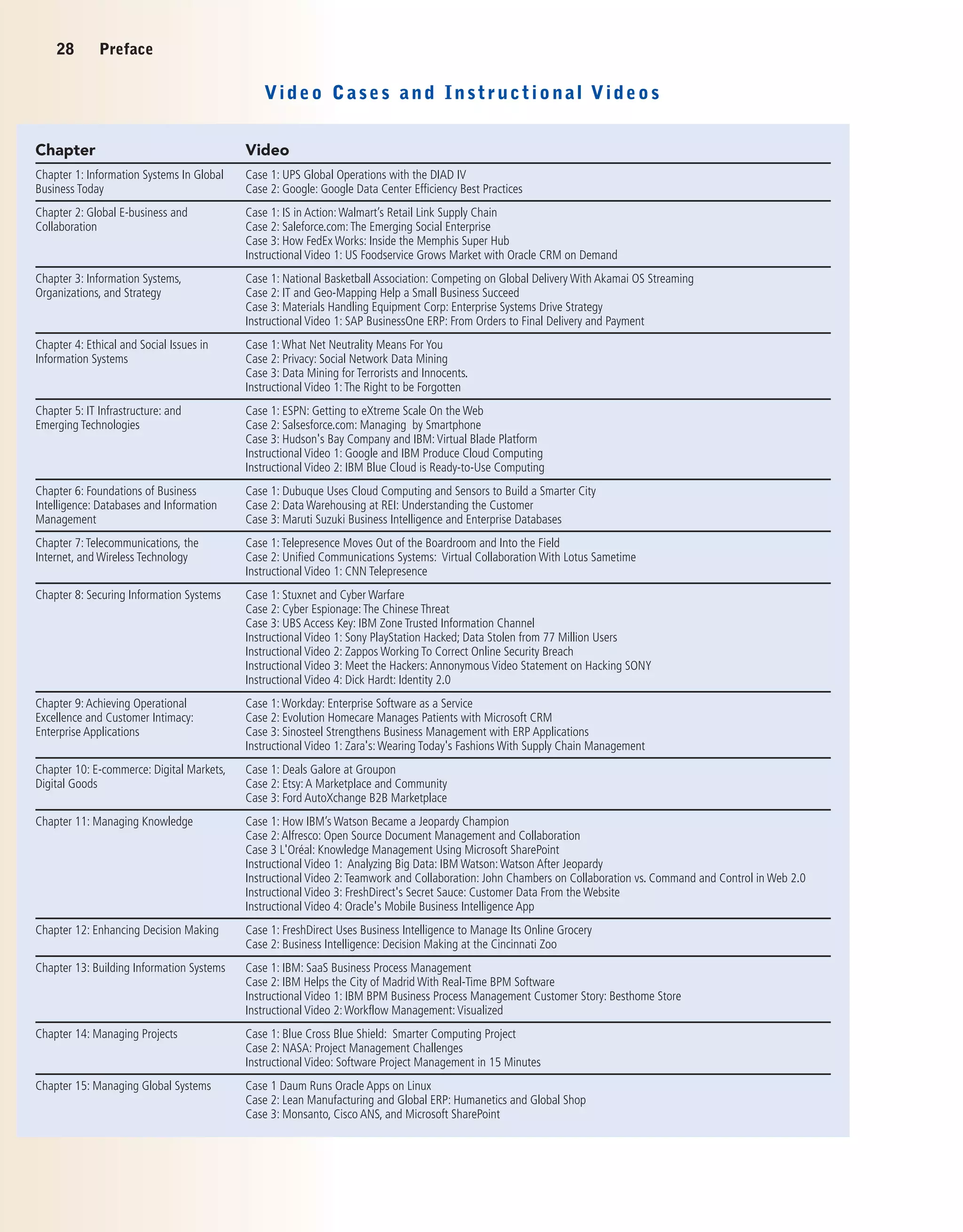
Video Cases and Instructional Videos
Instructors can download the video cases from MyMISLab at
www.pearsonglobaleditions.com/mymislab. See page 28 for a list of video cases
and instructional videos available at the time of publication.
Learning Track Modules
Over 40 Learning Tracks provide additional coverage topics for students and
instructors. See page 29 for a list of the Learning Tracks available for this
edition.
28 Preface
Video Cases and Instructional Videos
Chapter Video
Chapter 1: Information Systems In Global
Business Today
Case 1: UPS Global Operations with the DIAD IV
Case 2: Google: Google Data Center Efficiency Best Practices
Chapter 2: Global E-business and
Collaboration
Case 1: IS in Action:Walmart’s Retail Link Supply Chain
Case 2: Saleforce.com:The Emerging Social Enterprise
Case 3: How FedEx Works: Inside the Memphis Super Hub
Instructional Video 1: US Foodservice Grows Market with Oracle CRM on Demand
Chapter 3: Information Systems,
Organizations, and Strategy
Case 1: National Basketball Association: Competing on Global Delivery With Akamai OS Streaming
Case 2: IT and Geo-Mapping Help a Small Business Succeed
Case 3: Materials Handling Equipment Corp: Enterprise Systems Drive Strategy
Instructional Video 1: SAP BusinessOne ERP: From Orders to Final Delivery and Payment
Chapter 4: Ethical and Social Issues in
Information Systems
Case 1:What Net Neutrality Means For You
Case 2: Privacy: Social Network Data Mining
Case 3: Data Mining for Terrorists and Innocents.
Instructional Video 1:The Right to be Forgotten
Chapter 5: IT Infrastructure: and
Emerging Technologies
Case 1: ESPN: Getting to eXtreme Scale On the Web
Case 2: Salsesforce.com: Managing by Smartphone
Case 3: Hudson's Bay Company and IBM:Virtual Blade Platform
Instructional Video 1: Google and IBM Produce Cloud Computing
Instructional Video 2: IBM Blue Cloud is Ready-to-Use Computing
Chapter 6: Foundations of Business
Intelligence: Databases and Information
Management
Case 1: Dubuque Uses Cloud Computing and Sensors to Build a Smarter City
Case 2: Data Warehousing at REI: Understanding the Customer
Case 3: Maruti Suzuki Business Intelligence and Enterprise Databases
Chapter 7:Telecommunications, the
Internet, and Wireless Technology
Case 1:Telepresence Moves Out of the Boardroom and Into the Field
Case 2: Unified Communications Systems: Virtual Collaboration With Lotus Sametime
Instructional Video 1: CNN Telepresence
Chapter 8: Securing Information Systems Case 1: Stuxnet and Cyber Warfare
Case 2: Cyber Espionage:The Chinese Threat
Case 3: UBS Access Key: IBM Zone Trusted Information Channel
Instructional Video 1: Sony PlayStation Hacked; Data Stolen from 77 Million Users
Instructional Video 2: Zappos Working To Correct Online Security Breach
Instructional Video 3: Meet the Hackers:Annonymous Video Statement on Hacking SONY
Instructional Video 4: Dick Hardt: Identity 2.0
Chapter 9:Achieving Operational
Excellence and Customer Intimacy:
Enterprise Applications
Case 1:Workday: Enterprise Software as a Service
Case 2: Evolution Homecare Manages Patients with Microsoft CRM
Case 3: Sinosteel Strengthens Business Management with ERP Applications
Instructional Video 1: Zara's:Wearing Today's Fashions With Supply Chain Management
Chapter 10: E-commerce: Digital Markets,
Digital Goods
Case 1: Deals Galore at Groupon
Case 2: Etsy:A Marketplace and Community
Case 3: Ford AutoXchange B2B Marketplace
Chapter 11: Managing Knowledge Case 1: How IBM’s Watson Became a Jeopardy Champion
Case 2:Alfresco: Open Source Document Management and Collaboration
Case 3 L'Oréal: Knowledge Management Using Microsoft SharePoint
Instructional Video 1: Analyzing Big Data: IBM Watson:Watson After Jeopardy
Instructional Video 2:Teamwork and Collaboration: John Chambers on Collaboration vs. Command and Control in Web 2.0
Instructional Video 3: FreshDirect's Secret Sauce: Customer Data From the Website
Instructional Video 4: Oracle's Mobile Business Intelligence App
Chapter 12: Enhancing Decision Making Case 1: FreshDirect Uses Business Intelligence to Manage Its Online Grocery
Case 2: Business Intelligence: Decision Making at the Cincinnati Zoo
Chapter 13: Building Information Systems Case 1: IBM: SaaS Business Process Management
Case 2: IBM Helps the City of Madrid With Real-Time BPM Software
Instructional Video 1: IBM BPM Business Process Management Customer Story: Besthome Store
Instructional Video 2:Workflow Management:Visualized
Chapter 14: Managing Projects Case 1: Blue Cross Blue Shield: Smarter Computing Project
Case 2: NASA: Project Management Challenges
Instructional Video: Software Project Management in 15 Minutes
Chapter 15: Managing Global Systems Case 1 Daum Runs Oracle Apps on Linux
Case 2: Lean Manufacturing and Global ERP: Humanetics and Global Shop
Case 3: Monsanto, Cisco ANS, and Microsoft SharePoint
Preface 29
Learning Track Modules
Chapter Learning Tracks
Chapter 1: Information Systems in Global
Business Today
How Much Does IT Matter?
Information Systems and Your Career
The Mobile Digital Platform
Chapter 2: Global E-Business and
Collaboration
Systems From a Functional Perspective
IT Enables Collaboration and Teamwork
Challenges of Using Business Information Systems
Organizing the Information Systems Function
Occupational and Career Outlook for Information Systems Majors 2012-2018
Chapter 3: Information Systems, Organizations,
and Strategy
The Changing Business Environment for IT
Chapter 4: Ethical and Social Issues in
Information Systems
Developing a Corporate Code of Ethics for IT
Chapter 5: IT Infrastructure and Emerging
Technologies
How Computer Hardware Works
How Computer Software Works
Service Level Agreements
The Open Source Software Initiative
Comparing Stages in IT Infrastructure Evolution
Cloud Computing
Chapter 6: Foundations of Business
Intelligence: Databases and Information
Management
Database Design, Normalization, and Entity-Relationship Diagramming
Introduction to SQL
Hierarchical and Network Data Models
Chapter 7: Telecommunications, the Internet,
and Wireless Technology
LAN Topologies
Broadband Network Services and Technologies
Cellular System Generations
Wireless Applications for Customer Relationship Management, Supply Chain Management, and Healthcare
Introduction to Web 2.0
Chapter 8: Securing Information Systems The Booming Job Market in IT Security
The Sarbanes-Oxley Act
Computer Forensics
General and Application Controls for Information Systems
Management Challenges of Security and Control
Software Vulnerability and Reliability
Chapter 9: Achieving Operational Excellence
and Customer Intimacy: Enterprise Applications
SAP Business Process Map
Business Processes in Supply Chain Management and Supply Chain Metrics
Best-Practice Business Processes in CRM Software
Chapter 10: E-commerce: Digital Markets,
Digital Goods
E-Commerce Challenges: The Story of Online Groceries
Build an E-Commerce Business Plan
Hot New Careers in E-Commerce
E-commerce Payment Systems
Chapter 11: Managing Knowledge Challenges of Knowledge Management Systems
Chapter 12: Enhancing Decision Making Building and Using Pivot Tables
Chapter 13: Building Information Systems Unified Modeling Language
Primer on Business Process Design and Documentation
Primer on Business Process Management
Chapter 14: Managing Projects Capital Budgeting Methods for Information Systems Investments
Information Technology Investments and Productivity
Enterprise Analysis (Business Systems Planning) and Critical Success Factors
30 Preface
ACKNOWLEDGEMENTS
The production of any book involves valued contributions from a number of persons. We would like to
thank all of our editors for encouragement, insight, and strong support for many years. We thank Bob
Horan for guiding the development of this edition and Karalyn Holland for her role in managing the project.
Our special thanks go to our supplement authors for their work. We are indebted to William Anderson for
his assistance in the writing and production of the text and to Megan Miller for her help during production.
We thank Diana R. Craig for her assistance with database and software topics.
Special thanks to my colleagues at the Stern School of Business at New York University; to Professor
Lawrence Andrew of Western Illinois University; to Professor Detlef Schoder of the University of Cologne;
to Professor Walter Brenner of the University of St. Gallen; to Professor Lutz Kolbe of the University of
Gottingen; to Professor Donald Marchand of the International Institute for Management Development; and
to Professor Daniel Botha of Stellenbosch University who provided additional suggestions for improvement.
Thank you to Professor Ken Kraemer, University of California at Irvine, and Professor John King, University
of Michigan, for more than a decade’s long discussion of information systems and organizations. And a
special remembrance and dedication to Professor Rob Kling, University of Indiana, for being my friend and
colleague over so many years.
We also want to especially thank all our reviewers whose suggestions helped improve our texts. Reviewers
for this edition include the following:
Brad Allen, Plymouth State University
Anne Formalarie, Plymouth State University
Bin Gu, University of Texas – Austin
Essia Hamouda, University of California – Riverside
Kimberly L. Merritt, Oklahoma Christian University
James W. Miller, Dominican University
Fiona Nah, University of Nebraska – Lincoln
Thomas Schambach, Illinois State University
Ahmed Elragal, German University in Cairo
Niveen Ezzat, Cairo University
Bee Hua Goh, National University of Singapore
Jonas Hedman, Copenhagen Business School
Ari Heiskanen, University of Oulu
Stefan Henningsson, Copenhagen Business School
Andy Jones, Staffordshire University
Faouzi Kamoun, Zayed University
Patricia Lago, VU University Amsterdam
Lesley Land, University of New South Wales
Daniel Ortiz-Arroyo, Aalborg University
Neerja Sethi, Nanyang Technological University
Vijay Sethi Nanyang, Technological University
Upasana Singh, University of KwaZulu-Natal
Damian A. Tamburri, VU University Amsterdam
Robert Manderson, University of Roehampton
James Collins, Aalto University School of Business
Navonil Mustafee, Swansea University
Karsten Boye Rasmussen, University of Southern Denmark
Abdul Razak bin Rahmat, Universiti Utara Malaysia
Bernd Schenk, University of Liechtenstein
Pearson gratefully acknowledges and thanks the following people for their work on the Global Edition:
Global Edition Contributors
Global Edition Reviewers
K.C.L.
J.P.L.
P A R T O N E
Organizations,
Management, and the
Networked Enterprise
Chapter 1
Information Systems in Global
Business Today
Chapter 2
Global E-business and Collaboration
Chapter 3
Information Systems,
Organizations, and Strategy
Chapter 4
Ethical and Social Issues in
Information Systems
Part One introduces the major themes of this book, raising a series of important ques-
tions: What is an information system and what are its management, organization,
and technology dimensions? Why are information systems so essential in businesses
today? Why are systems for collaboration and social business so important? How can
information systems help businesses become more competitive? What broader ethi-
cal and social issues are raised by widespread use of information systems?
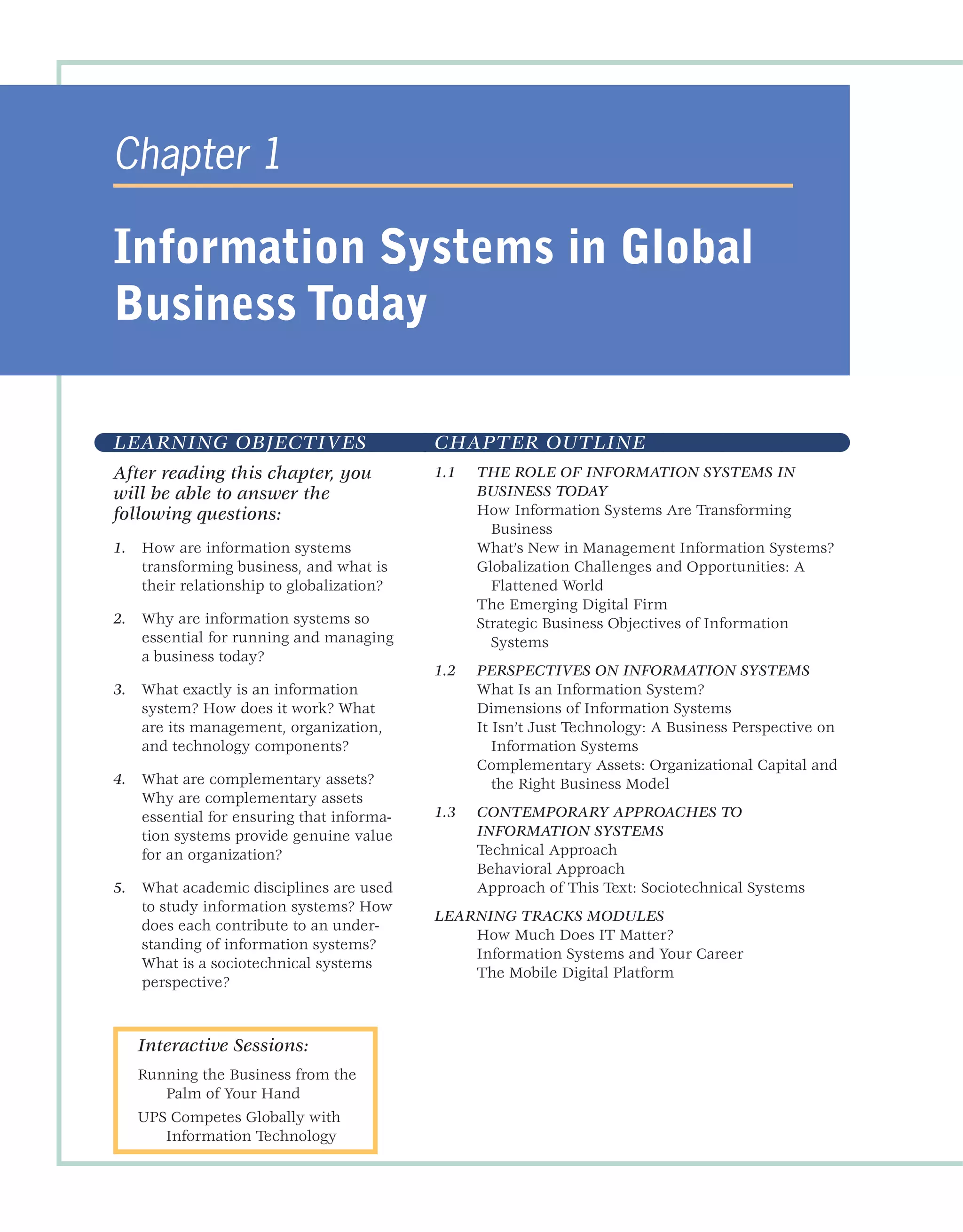
LEARNING OBJECTIVES
After reading this chapter, you
will be able to answer the
following questions:
1. How are information systems
transforming business, and what is
their relationship to globalization?
2. Why are information systems so
essential for running and managing
a business today?
3. What exactly is an information
system? How does it work? What
are its management, organization,
and technology components?
4. What are complementary assets?
Why are complementary assets
essential for ensuring that informa-
tion systems provide genuine value
for an organization?
5. What academic disciplines are used
to study information systems? How
does each contribute to an under-
standing of information systems?
What is a sociotechnical systems
perspective?
CHAPTER OUTLINE
1.1 THE ROLE OF INFORMATION SYSTEMS IN
BUSINESS TODAY
How Information Systems Are Transforming
Business
What’s New in Management Information Systems?
Globalization Challenges and Opportunities: A
Flattened World
The Emerging Digital Firm
Strategic Business Objectives of Information
Systems
1.2 PERSPECTIVES ON INFORMATION SYSTEMS
What Is an Information System?
Dimensions of Information Systems
It Isn’t Just Technology: A Business Perspective on
Information Systems
Complementary Assets: Organizational Capital and
the Right Business Model
1.3 CONTEMPORARY APPROACHES TO
INFORMATION SYSTEMS
Technical Approach
Behavioral Approach
Approach of This Text: Sociotechnical Systems
LEARNING TRACKS MODULES
How Much Does IT Matter?
Information Systems and Your Career
The Mobile Digital Platform
Chapter 1
Information Systems in Global
Business Today
Interactive Sessions:
Running the Business from the
Palm of Your Hand
UPS Competes Globally with
Information Technology
33
F
inland is a leader in the timber machine industry. The Finnish company Ponsse is one
of the largest manufacturers of rubber-wheel cut-to-length forest machines. The timber
industry uses two cutting methods: the cut-to-length method and the tree-length method.
With the cut-to-length method, tree trunks are cut in the forest into various sized logs for
different uses, such as saw logs or pulpwood. With the tree-length method, trunks are cut in the
forest and transported to the mill whole or almost whole. At the mill, trunk pieces are separated
according to use. Approximately 45 percent of the world’s harvest is harvested with cut-to-length
machines, like those produced by Ponsse, and 35 percent of this yield is harvested using the cut-
to-length method.
Ponsse’s main products are harvesters, harvester cutting heads, forwarders, and cranes. A har-
vester is a tractor-like machine used for cutting logs. It has a crane with a cutting head, which
grasps the tree at the stem and uses its saw to make the first cut. Then the head moves the
cut tree trunk in its “jaws” and finds the next cutting points. During the movement, the cutting
head removes the branches of the tree. A forwarder is a special forest tractor with a crane that is
designed for efficient trunk collection and transportation.
Ponsse also offers its clients an integrated set of sophisticated information systems. “Ponsse
wants to know the business of its clients, because it sells forest machines and information sys-
tems to all partners in the logistic chain,” says Information Systems Product Manager Hanna
Vilkman. These information systems support the entire wood procurement chain. The first step
in this chain is to estimate the demand for different types and sizes of timber. Typically, this is
done in the field office of a wood purchasing organization. With the help of information systems,
a cutting plan is created that will optimize the cutting yield for a particular logging area. Data on
similar areas that were logged previously are used in order to optimize the cutting plan. A map
of the logging area is also produced, as well
as working instructions for the harvester
driver. The map describes the borders of
the logging area as well as areas to be pro-
tected. Should a single tree need to be left
uncut, it is marked manually with a plastic
stripe.
The harvester driver gets the map and
working instructions via a dedicated e-mail
system that transfers data between the har-
vester’s information system and the wood
purchase organization. Instructions and
maps are presented on a display located
in the harvester cabin. A special feature in
the harvester’s information system enables
it to optimize the cutting of a log into pieces
during the cutting process. This means
that the system is able to calculate the opti-
mal cutting places when the log is moving
through the cutting head, after being first
cut from the stem. After the trees have
been cut according to the instructions, the
driver sends the harvest information to
the field office via a dedicated e-mail sys-
tem. The assortment typically contains 10
different types of cut logs of five different
EFFICIENCY IN WOOD HARVESTING WITH INFORMATION
SYSTEMS
© Ponsse
lengths. The harvester marks each type with a different color spot in order to help
the forwarder to sort each log into its correct pile.
Forwarders (special forest tractors) use a map application and GPS position-
ing to transport the cut logs from the forest to the roadside. This facilitates work
and improves safety, because the system warns the operator when the machine
is approaching dangerous hazards, such as power lines. Piles of cut logs are then
transported from the roadside to factories by trucks that also use information sys-
tems, for example, to find optimal routes.
Drivers of harvesters and foresters can learn the skills required to operate their
machines by using 3D simulators that simulate real-world conditions. A driver can
sit in a simulated machine and control the machine using the levers, just like they
would in the field. The forest landscape is reflected as a 3D image on a canvas, and
the operator can move freely within the harvesting area and view the forest from
different angles.
Sources: Quotes and other information from interview with Simo Tauriainen, 2010, Software
Chief Designer, Ponsse, www.ponsse.com.
Case contributed by Ari Heiskanen, University of Oulu
Ponsse has well-functioning, cooperative information systems that link
together the various parties of the wood production and procurement
chain, such as the forest owner, the wood-purchasing organization, the forest
machine owner and operator, and the manufacturing plant that uses the wood
cut from the forest. The systems benefit all parties. Some of the information sys-
tems provided by Ponsse are integral parts of forest machinery, like those embed-
ded in harvesters and forwarders; others are products that can be purchased.
Information flows between these parties automatically. The availability of these
kinds of information systems boosts the selling of Ponsse’s main products, the
forest machines. The harvester information system guides the machine and gath-
ers exact information on how the machine is being operated and the details of
the yield. The company that owns the forest machine can monitor the machine’s
utilization and the distribution of working hours and sequences, for example.
The harvester driver can adjust the harvester operating settings according to
his or her own preferences. The forest field office gets information from several
sources, such as harvester operations in the forest, the trucks, or the factory. All
of this makes the management of the various phases of the wood procurement
chain more efficient. Harvester and forwarder information systems also enhance
the ecological treatment of forests by highlighting areas to be avoided.
Management
Organization
Business
Challenges
Technology
Information
System
Business
Solutions
Q Develop new production
processes
Q
Develop new management
techniques
Q Increase use of data by
managers
Q Build new business
production processes
Q Build new channels of
information flow
Q
Train employees in use of
the systems
Q Develop GPS systems for
field use
Q Create email links with
operators
Q Develop data base to receive
information
Q
Increase forest production efficiency
Q Integrate the production process
Q Build supply chain system
Q Display and report GPS
location data
Q
Reports on production
Q Provide online coordination
Q Optimize utilization
of forests
Q
Increase production
efficiency
Q Coordinate production
processes
34 Part One Organizations, Management, and the Networked Enterprise
1.1 THE ROLE OF INFORMATION SYSTEMS IN
BUSINESS TODAY
I
t’s not business as usual in America anymore, or the rest of the global
economy. In 2012, American businesses will spend over $540 billion on
information systems hardware, software, and telecommunications equip-
ment. In addition, they will spend another $650 billion on business and
management consulting and services—much of which involves redesign-
ing firms’ business operations to take advantage of these new technologies.
Figure 1.1 shows that between 1980 and 2011, private business investment in
information technology consisting of hardware, software, and communications
equipment grew from 32 percent to 52 percent of all invested capital.
As managers, most of you will work for firms that are intensively using
information systems and making large investments in information technol-
ogy. You will certainly want to know how to invest this money wisely. If
you make wise choices, your firm can outperform competitors. If you make
poor choices, you will be wasting valuable capital. This book is dedicated to
helping you make wise decisions about information technology and informa-
tion systems.
HOW INFORMATION SYSTEMS ARE TRANSFORMING
BUSINESS
You can see the results of this massive spending around you every day by
observing how people conduct business. More wireless cell phone accounts
were opened in 2012 than telephone landlines installed. Smartphones, texting,
e-mail, and online conferencing have all become essential tools of business.
One hundred twenty-two million people in the United States access the Internet
using mobile devices in 2012, which is half of the total Internet user population
FIGURE 1.1 INFORMATION TECHNOLOGY CAPITAL INVESTMENT
Information technology capital investment, defined as hardware, software, and communications
equipment, grew from 32 percent to 52 percent of all invested capital between 1980 and 2011.
Source: Based on data in U.S. Department of Commerce, Bureau of Economic Analysis, National Income and ProductAccounts, 2012.
Chapter 1 Information Systems in Global Business Today 35
(eMarketer, 2010). There are 242 million cell phone subscribers in the United
States, and nearly 5 billion worldwide (ITU, 2011).
By June 2012, more than 104 million businesses worldwide had dot-com
Internet sites registered (Whois, 2012). Today, 184 million Americans shop
online, and 150 million have purchased online. Every day about 67 million
Americans go online to research a product or service.
In 2012, FedEx moved over 9 million packages daily worldwide (6 million
in the United States), mostly overnight, and the United Parcel Service (UPS)
moved over 15 million packages daily worldwide. Businesses sought to sense
and respond to rapidly changing customer demand, reduce inventories to the
lowest possible levels, and achieve higher levels of operational efficiency.
Supply chains have become more fast-paced, with companies of all sizes
depending on just-in-time inventory to reduce their overhead costs and get to
market faster.
As newspaper readership continues to decline, more than 150 million people
read a newspaper online, and millions more read other news sites. About 67
million people watch a video online every day, 76 million read a blog, and 26
million post to blogs, creating an explosion of new writers and new forms of
customer feedback that did not exist five years ago (Pew, 2012). Social network-
ing site Facebook attracted 162 million monthly visitors in 2012 in the United
States, and over 900 million worldwide. Google+ has attracted over 100 million
users in the United States. Businesses are starting to use social networking tools
to connect their employees, customers, and managers worldwide. Many Fortune
500 companies now have Facebook pages, Twitter accounts, and Tumblr sites.
Despite the economic slowdown, e-commerce and Internet advertising con-
tinue to expand. Google’s online ad revenues surpassed $36 billion in 2011, and
Internet advertising continues to grow at more than 10 percent a year, reaching
more than $39.5 billion in revenues in 2012.
New federal security and accounting laws, requiring many businesses to
keep e-mail messages for five years, coupled with existing occupational and
health laws requiring firms to store employee chemical exposure data for up to
60 years, are spurring the annual growth of digital information at the estimated
rate of 5 exabytes annually, equivalent to 37,000 new Libraries of Congress.
WHAT’S NEW IN MANAGEMENT INFORMATION
SYSTEMS?
Lots! What makes management information systems the most exciting topic in
business is the continual change in technology, management use of the tech-
nology, and the impact on business success. New businesses and industries
appear, old ones decline, and successful firms are those that learn how to use
the new technologies. Table 1.1 summarizes the major new themes in business
uses of information systems. These themes will appear throughout the book in
all the chapters, so it might be a good idea to take some time now and discuss
these with your professor and other students.
There are three interrelated changes in the technology area: (1) the
emerging mobile digital platform, (2) the growing business use of big data,
and (3) the growth in “cloud computing,” where more and more business
software runs over the Internet.
IPhones, iPads, BlackBerrys, and Android tablets and smartphones are not
just gadgets or entertainment outlets. They represent new emerging comput-
ing platforms based on an array of new hardware and software technologies.
36 Part One Organizations, Management, and the Networked Enterprise
TABLE 1.1 WHAT’S NEW IN MIS
CHANGE BUSINESS IMPACT
TECHNOLOGY
Cloud computing platform emerges as a major business area of
innovation
A flexible collection of computers on the Internet begins to perform
tasks traditionally performed on corporate computers. Major business
applications are delivered online as an Internet service (Software as a
Service, or SaaS).
Big data Businesses look for insights from huge volumes of data from Web traffic,
e-mail messages, social media content, and machines (sensors) that
require new data management tools to capture, store, and analyze.
A mobile digital platform emerges to compete with the PC as a
business system
The Apple iPhone and Android mobile devices are able to download
hundreds of thousands of applications to support collaboration,
location-based services, and communication with colleagues. Small
tablet computers, including the iPad, Google Nexus, and Kindle Fire,
challenge conventional laptops as platforms for consumer and
corporate computing.
MANAGEMENT
Managers adopt online collaboration and social networking software
to improve coordination, collaboration, and knowledge sharing
Google Apps, Google Sites, Microsoft Windows SharePoint Services,
and IBM Lotus Connections are used by over 100 million business
professionals worldwide to support blogs, project management, online
meetings, personal profiles, social bookmarks, and online communities.
Business intelligence applications accelerate More powerful data analytics and interactive dashboards provide real-
time performance information to managers to enhance decision
making.
Virtual meetings proliferate Managers adopt telepresence videoconferencing and Web conferencing
technologies to reduce travel time, and cost, while improving
collaboration and decision making.
ORGANIZATIONS
Social business Businesses use social networking platforms, including Facebook,
Twitter, and internal corporate social tools, to deepen interactions with
employees, customers, and suppliers. Employees use blogs, wikis,
e-mail texting, and messaging to interact in online communities.
Telework gains momentum in the workplace The Internet, wireless laptops, smartphones, and tablet computers
make it possible for growing numbers of people to work away from the
traditional office. Fifty-five percent of U.S. businesses have some form
of remote work program.
Co-creation of business value Sources of business value shift from products to solutions and
experiences, and from internal sources to networks of suppliers and
collaboration with customers. Supply chains and product development
become more global and collaborative; customer interactions help
firms define new products and services.
More and more business computing is moving from PCs and desktop machines
to these mobile devices. Managers are increasingly using these devices to
coordinate work, communicate with employees, and provide information for
decision making. We call these developments the “emerging mobile digital
platform.”
Chapter 1 Information Systems in Global Business Today 37
Managers routinely use online collaboration and social technologies in
order to make better, faster decisions. As management behavior changes, how
work gets organized, coordinated, and measured also changes. By connect-
ing employees working on teams and projects, the social network is where
works gets done, where plans are executed, and where managers manage.
Collaboration spaces are where employees meet one another—even when
they are separated by continents and time zones.
The strength of cloud computing and the growth of the mobile digital platform
allow organizations to rely more on telework, remote work, and distributed
decision making. This same platform means firms can outsource more work,
and rely on markets (rather than employees) to build value. It also means that
firms can collaborate with suppliers and customers to create new products, or
make existing products more efficiently.
You can see some of these trends at work in the Interactive Session on
Management. Millions of managers rely heavily on the mobile digital platform
to coordinate suppliers and shipments, satisfy customers, and manage their
employees. A business day without these mobile devices or Internet access
would be unthinkable. As you read this case, note how the emerging mobile
platform greatly enhances the accuracy, speed, and richness of decision
making.
GLOBALIZATION CHALLENGES AND OPPORTUNITIES:A
FLATTENED WORLD
In 1492, Columbus reaffirmed what astronomers were long saying: the world
was round and the seas could be safely sailed. As it turned out, the world was
populated by peoples and languages living in isolation from one another, with
great disparities in economic and scientific development. The world trade that
ensued after Columbus’s voyages has brought these peoples and cultures closer.
The “industrial revolution” was really a world-wide phenomenon energized by
expansion of trade among nations.
In 2005, journalist Thomas Friedman wrote an influential book declaring the
world was now “flat,” by which he meant that the Internet and global commu-
nications had greatly reduced the economic and cultural advantages of devel-
oped countries. Friedman argued that the U.S. and European countries were
in a fight for their economic lives, competing for jobs, markets, resources, and
even ideas with highly educated, motivated populations in low-wage areas in
the less developed world (Friedman, 2007). This “globalization” presents both
challenges and opportunities for business firms
A growing percentage of the economy of the United States and other
advanced industrial countries in Europe and Asia depends on imports and
exports. In 2012, more than 33 percent of the U.S. economy resulted from
foreign trade, both imports and exports. In Europe and Asia, the number
exceeded 50 percent. Many Fortune 500 U.S. firms derive half their revenues
from foreign operations. For instance, 85 percent of Intel’s revenues in 2011
came from overseas sales of its microprocessors. Eighty percent of the toys
sold in the United States are manufactured in China, while about 90 percent
of the PCs manufactured in China use American-made Intel or Advanced
Micro Design (AMD) chips.
It’s not just goods that move across borders. So too do jobs, some of them
high-level jobs that pay well and require a college degree. In the past decade,
the United States lost several million manufacturing jobs to offshore, low-wage
38 Part One Organizations, Management, and the Networked Enterprise
Can you run your company from the palm of your
hand? Perhaps not entirely, but there are many
functions today that can be performed using an
iPhone, iPad, BlackBerry, or other mobile handheld
device.
The BlackBerry used to be the favorite mobile
handheld for business because it was optimized
for e-mail and messaging, with strong security
and tools for accessing internal corporate sys-
tems. Now that’s changing. Companies large
and small are starting to deploy Apple’s iPhone
and iPad as well as Android mobile devices to
conduct more of their work. They are enhanc-
ing their security systems so that mobile users
can remotely accessing proprietary corporate
resources with confidence.
For some, these handhelds have become indis-
pensible. Eric Jackson is a champion kayaker who
spends half of each year following competitions
and events throughout North America. He’s also
president of Jackson Kayak, the leading whitewater
kayak manufacturer. It’s essential that he partici-
pate in athletic events, monitor industry trends in
the field, and meet directly with dealers and cus-
tomers. Jackson’s strong customer focus has helped
the company expand successfully worldwide, with
distributors on six continents. With the iPhone and
iPad, Jackson claims he can run the entire 120-per-
son company from afar.
Jackson’s Wi-Fi-equipped RV connects wirelessly
to the company headquarters in Sparta, Tennessee.
When Jackson’s not on Wi-Fi, he uses his iPad 3G cel-
lular connection. The iPad gives him instant access
to his entire operation, so he can analyze customer
data, refresh Web site content, or approve new
designs. Jackson’s iPad includes calendars, e-mail,
contact management, and the ability to create and
edit documents, spreadsheets, and presentations—all
the tools this executive needs to communicate with
the home office, dealers, and customers.
Back at the shop, Jackson Kayak’s managers and
employees find iPad and iPhone equally invaluable.
In the factory, Chief Operations Officer John Ratliff
can compare Jackson Kayak’s manufacturing equip-
ment side-by-side with images of replacement parts
on the iPad to make sure he’s getting the correct
pieces. The iPhone and iPad have become so indis-
pensable that the company outfitted its entire work-
force, from customer service, to design, to quality
control, with iPhones. Many have iPads as well.
Using handhelds to run the business is not lim-
ited to small companies. General Electric (GE) is
one of the world’s largest companies, producing
aircraft engines, locomotives and other transporta-
tion equipment, kitchen and laundry appliances,
lighting, electric distribution and control equip-
ment, generators and turbines, and medical imag-
ing equipment. GE is also a leading provider of
financial services, aviation, clean energy, media,
and health care technology. This giant multina-
tional was an early adopter of mobile technology.
GE employees use their iPads to access e-mail,
contacts, documents, and electronic presentations.
GE’s Mobile Center of Excellence has developed
dozens of iPhone and iPad applications, including
industry-specific diagnostic and monitoring tools
and business intelligence tools that help decision
makers find patterns and trends in large volumes
of data. The company’s Transformer Monitoring
app helps manage gas turbine inventory and
electronic transformers throughout the world,
with the ability to zoom in from a global map to a
specific transformer and read all of the key perfor-
mance indicators. A PDS Movement Planner lets
service personnel monitor railway tracks and obtain
diagnostic information on locomotives.
With operations in 60 countries, Dow Corning
offers more than 7,000 products and services
for consumer and industrial applications, from
adhesives to lubricants, delivered as fluids, solids,
gels, and powders. The Roambi Visualizer app
lets Dow Corning executives use their iPhones
to quickly view and analyze real-time data from
their core corporate system, including sales fig-
ures, trends, and projections. It presents managers
with simple, intuitive dashboards of complex data.
According to Executive Vice President and Chief
Financial Officer Don Sheets, in 15 seconds he can
get a sense of whether there’s a financial perfor-
mance issue he needs to get involved with.
Dow Corning’s Analytics App for the iPhone
monitors Web site traffic and online sales for the
company’s XIAMETER brand of standard silicone
products. Analytics App interfaces with Google
Analytics. When Dow Corning rolls out XIAMETER
Web sites across the globe, executives can monitor
INTERACTIVE SESSION: MANAGEMENT
RUNNING THE BUSINESS FROM THE PALM OF YOUR HAND
Chapter 1 Information Systems in Global Business Today 39
1. What kinds of applications are described here?
What business functions do they support?
How do they improve operational efficiency and
decision making?
2. Identify the problems that businesses in this case
study solved by using mobile digital devices.
3. What kinds of businesses are most likely to
benefit from equipping their employees with
mobile digital devices such as iPhones and iPads?
what content is and isn’t being used whether they
are home, traveling, or at the office.
Sunbelt Rentals, based in Fort Mill, South
Carolina, is one of the largest equipment rental
companies in the United States, with a $2 billion
inventory of rental equipment. More than 1,200
company employees, including sales staff, field
personnel, and executives, are equipped with
iPhones to interact with contacts and stay abreast
of calendar events. In addition to using iPhones
for e-mail, scheduling, and contact management,
Sunbelt deployed a custom application called
Mobile SalesPro, which ties multiple systems and
databases into a single package for the sales team.
4. One company deploying iPhones has said: The
iPhone is not a game changer, it’s an industry
changer. It changes the way that you can interact
with your customers and with your suppliers.
Discuss the implications of this statement.
This application connects the corporate point-of-
sale system, inventory control and management
system, and enterprise system, which integrates
data from many different business functions. Users
are able to share sales quotes based on the most
up-to-date information on rental rates and equip-
ment availability. With this application, Sunbelt’s
sales team can respond immediately to customer
requests while they are at a job site.
Sources: “Apple IPhone in Business” and “Apple iPad in Business,
www.apple.com, accessed September 6, 2012; Erik Eckel, “What
the IPhone5 Will Offer Business Users,” TechRepublic, September
5, 2012; and Doug Henschen, “Mobilizing Enterprise Apps:
The Next Big Leap,” Information Week, February 12, 2011.
CASE STUDY QUESTIONS
Whether it’s attending an
online meeting, checking
orders, working with files
and documents, or obtaining
business intelligence, Apple’s
iPhone and iPad offer
unlimited possibilities for
business users. Both devices
have a stunning multitouch
display, full Internet
browsing, digital camera,
and capabilities for messag-
ing, voice transmission, and
document management.
These features make each an
all-purpose platform for
mobile computing.
iPhone and iPad
Business Applications:
1. Salesforce Mobile
2. Cisco WebEx
3. iSchedule
4. iWork
5. Documents To Go
6. PDF Reader Pro
7. BizXpenseTracker
8. Dropbox
© STANCA SANDA / Alamy
40 Part One Organizations, Management, and the Networked Enterprise
producers. But manufacturing is now a very small part of U.S. employment
(less than 12 percent and declining). In a normal year, about 300,000 service
jobs move offshore to lower wage countries. Many of the jobs are in less-skilled
information system occupations, but some are “tradable service” jobs in
architecture, financial services, customer call centers, consulting, engineering,
and even radiology.
On the plus side, the U.S. economy creates over 3.5 million new jobs in
a normal, non-recessionary year. However, only 1.1 million private sector
jobs were created due to slow recovery in 2011. Employment in information
systems and the other service occupations is expanding, and wages are stable.
Outsourcing has actually accelerated the development of new systems in the
United States and worldwide.
The challenge for you as a business student is to develop high-level skills
through education and on-the-job experience that cannot be outsourced. The
challenge for your business is to avoid markets for goods and services that can
be produced offshore much less expensively. The opportunities are equally
immense. Throughout this book, you will find examples of companies and
individuals who either failed or succeeded in using information systems to
adapt to this new global environment.
What does globalization have to do with management information systems?
That’s simple: everything. The emergence of the Internet into a full-blown
international communications system has drastically reduced the costs
of operating and transacting on a global scale. Communication between
a factory floor in Shanghai and a distribution center in Rapid Falls, South
Dakota, is now instant and virtually free. Customers can now shop in a world-
wide marketplace, obtaining price and quality information reliably 24 hours a
day. Firms producing goods and services on a global scale achieve extraordi-
nary cost reductions by finding low-cost suppliers and managing production
facilities in other countries. Internet service firms, such as Google and eBay,
are able to replicate their business models and services in multiple countries
without having to redesign their expensive fixed-cost information systems
infrastructure. Half of the revenue of eBay (as well as General Motors) in 2011
will originate outside the United States. Briefly, information systems enable
globalization.
THE EMERGING DIGITAL FIRM
All of the changes we have just described, coupled with equally significant
organizational redesign, have created the conditions for a fully digital firm. A
digital firm can be defined along several dimensions. A digital firm is one
in which nearly all of the organization’s significant business relationships with
customers, suppliers, and employees are digitally enabled and mediated. Core
business processes are accomplished through digital networks spanning the
entire organization or linking multiple organizations.
Business processes refer to the set of logically related tasks and behaviors
that organizations develop over time to produce specific business results and
the unique manner in which these activities are organized and coordinated.
Developing a new product, generating and fulfilling an order, creating a
marketing plan, and hiring an employee are examples of business processes,
and the ways organizations accomplish their business processes can be a source
of competitive strength. (A detailed discussion of business processes can be
found in Chapter 2.)
Chapter 1 Information Systems in Global Business Today 41
Key corporate assets—intellectual property, core competencies, and financial
and human assets—are managed through digital means. In a digital firm, any
piece of information required to support key business decisions is available at
any time and anywhere in the firm.
Digital firms sense and respond to their environments far more rapidly than
traditional firms, giving them more flexibility to survive in turbulent times.
Digital firms offer extraordinary opportunities for more flexible global organiza-
tion and management. In digital firms, both time shifting and space shifting are
the norm. Time shifting refers to business being conducted continuously, 24/7,
rather than in narrow “work day” time bands of 9 a.m. to 5 p.m. Space shifting
means that work takes place in a global workshop, as well as within national
boundaries. Work is accomplished physically wherever in the world it is best
accomplished.
Many firms, such as Cisco Systems, 3M, and IBM, are close to becoming
digital firms, using the Internet to drive every aspect of their business. Most
other companies are not fully digital, but they are moving toward close digital
integration with suppliers, customers, and employees. Many firms, for example,
are replacing traditional face-to-face meetings with “virtual” meetings using
videoconferencing and Web conferencing technology. (See Chapter 2.)
STRATEGIC BUSINESS OBJECTIVES OF INFORMATION
SYSTEMS
What makes information systems so essential today? Why are businesses
investing so much in information systems and technologies? In the United
States, more than 21 million managers and 154 million workers in the labor
force rely on information systems to conduct business. Information systems
are essential for conducting day-to-day business in the United States and most
other advanced countries, as well as achieving strategic business objectives.
Entire sectors of the economy are nearly inconceivable without substantial
investments in information systems. E-commerce firms such as Amazon, eBay,
Google, and E*Trade simply would not exist. Today’s service industries—
finance, insurance, and real estate, as well as personal services such as travel,
medicine, and education—could not operate without information systems.
Similarly, retail firms such as Walmart and Sears and manufacturing firms such
as General Motors and General Electric require information systems to survive
and prosper. Just as offices, telephones, filing cabinets, and efficient tall build-
ings with elevators were once the foundations of business in the twentieth
century, information technology is a foundation for business in the twenty-first
century.
There is a growing interdependence between a firm’s ability to use informa-
tion technology and its ability to implement corporate strategies and achieve
corporate goals (see Figure 1.2). What a business would like to do in five years
often depends on what its systems will be able to do. Increasing market share,
becoming the high-quality or low-cost producer, developing new products, and
increasing employee productivity depend more and more on the kinds and
quality of information systems in the organization. The more you understand
about this relationship, the more valuable you will be as a manager.
Specifically, business firms invest heavily in information systems to achieve
six strategic business objectives: operational excellence; new products, services,
and business models; customer and supplier intimacy; improved decision
making; competitive advantage; and survival.
42 Part One Organizations, Management, and the Networked Enterprise
Operational Excellence
Businesses continuously seek to improve the efficiency of their operations in
order to achieve higher profitability. Information systems and technologies are
some of the most important tools available to managers for achieving higher
levels of efficiency and productivity in business operations, especially when
coupled with changes in business practices and management behavior.
Walmart, the largest retailer on earth, exemplifies the power of infor-
mation systems coupled with brilliant business practices and supportive
management to achieve world-class operational efficiency. In fiscal year
2012, Walmart achieved $460 billion in sales—nearly one-tenth of retail sales
in the United States—in large part because of its Retail Link system, which
digitally links its suppliers to every one of Walmart’s stores. As soon as a
customer purchases an item, the supplier monitoring the item knows to ship
a replacement to the shelf. Walmart is the most efficient retail store in the
industry, achieving sales of more than $28 per square foot, compared to its
closest competitor, Target, at $23 a square foot. Other retail firms producing
less than $12 a square foot.
New Products, Services, and Business Models
Information systems and technologies are a major enabling tool for firms to
create new products and services, as well as entirely new business models.
A business model describes how a company produces, delivers, and sells a
product or service to create wealth.
Today’s music industry is vastly different from the industry a decade ago.
Apple Inc. transformed an old business model of music distribution based on
vinyl records, tapes, and CDs into an online, legal distribution model based on its
own iPod technology platform. Apple has prospered from a continuing stream of
iPod innovations, including the iTunes music service, the iPad, and the iPhone.
FIGURE 1.2 THE INTERDEPENDENCE BETWEEN ORGANIZATIONS AND
INFORMATION SYSTEMS
In contemporary systems, there is a growing interdependence between a firm’s information systems
and its business capabilities. Changes in strategy, rules, and business processes increasingly require
changes in hardware, software, databases, and telecommunications. Often, what the organization
would like to do depends on what its systems will permit it to do.
Chapter 1 Information Systems in Global Business Today 43
Customer and Supplier Intimacy
When a business really knows its customers, and serves them well, the custom-
ers generally respond by returning and purchasing more. This raises revenues
and profits. Likewise with suppliers: the more a business engages its suppli-
ers, the better the suppliers can provide vital inputs. This lowers costs. How to
really know your customers, or suppliers, is a central problem for businesses
with millions of offline and online customers.
The Mandarin Oriental in Manhattan and other high-end hotels exemplify the
use of information systems and technologies to achieve customer intimacy. These
hotels use computers to keep track of guests’ preferences, such as their preferred
room temperature, check-in time, frequently dialed telephone numbers, and tele-
vision programs, and store these data in a large data repository. Individual rooms
in the hotels are networked to a central network server computer so that they can
be remotely monitored or controlled. When a customer arrives at one of these
hotels, the system automatically changes the room conditions, such as dimming
the lights, setting the room temperature, or selecting appropriate music, based
on the customer’s digital profile. The hotels also analyze their customer data to
identify their best customers and to develop individualized marketing campaigns
based on customers’ preferences.
JCPenney exemplifies the benefits of information systems-enabled supplier
intimacy. Every time a dress shirt is bought at a JCPenney store in the United
States, the record of the sale appears immediately on computers in Hong Kong at
the TAL Apparel Ltd. supplier, a contract manufacturer that produces one in eight
dress shirts sold in the United States. TAL runs the numbers through a computer
model it developed and then decides how many replacement shirts to make, and
in what styles, colors, and sizes. TAL then sends the shirts to each JCPenney store,
bypassing completely the retailer’s warehouses. In other words, JCPenney’s shirt
inventory is near zero, as is the cost of storing it.
Improved Decision Making
Many business managers operate in an information fog bank, never really
having the right information at the right time to make an informed decision.
Instead, managers rely on forecasts, best guesses, and luck. The result is over-
or underproduction of goods and services, misallocation of resources, and poor
response times. These poor outcomes raise costs and lose customers. In the
past decade, information systems and technologies have made it possible for
managers to use real-time data from the marketplace when making decisions.
For instance, Verizon Corporation, one of the largest telecommunication
companies in the United States, uses a Web-based digital dashboard to provide
managers with precise real-time information on customer complaints, network
performance for each locality served, and line outages or storm-damaged lines.
Using this information, managers can immediately allocate repair resources
to affected areas, inform consumers of repair efforts, and restore service fast.
Competitive Advantage
When firms achieve one or more of these business objectives—operational
excellence; new products, services, and business models; customer/supplier
intimacy; and improved decision making—chances are they have already
achieved a competitive advantage. Doing things better than your competitors,
charging less for superior products, and responding to customers and suppliers
in real time all add up to higher sales and higher profits that your competitors
cannot match. Apple Inc., Walmart, and UPS, described later in this chapter, are
44 Part One Organizations, Management, and the Networked Enterprise
industry leaders because they know how to use information systems for this
purpose.
Survival
Business firms also invest in information systems and technologies because
they are necessities of doing business. Sometimes these “necessities” are driven
by industry-level changes. For instance, after Citibank introduced the first
automated teller machines (ATMs) in the New York region in 1977 to attract
customers through higher service levels, its competitors rushed to provide ATMs
to their customers to keep up with Citibank. Today, virtually all banks in the
United States have regional ATMs and link to national and international ATM
networks, such as CIRRUS. Providing ATM services to retail banking customers
is simply a requirement of being in and surviving in the retail banking business.
There are many federal and state statutes and regulations that create a legal
duty for companies and their employees to retain records, including digital
records. For instance, the Toxic Substances Control Act (1976), which regulates
the exposure of U.S. workers to more than 75,000 toxic chemicals, requires
firms to retain records on employee exposure for 30 years. The Sarbanes-Oxley
Act (2002), which was intended to improve the accountability of public firms
and their auditors, requires certified public accounting firms that audit public
companies to retain audit working papers and records, including all e-mails,
for five years. Many other pieces of federal and state legislation in health
care, financial services, education, and privacy protection impose significant
information retention and reporting requirements on U.S. businesses. Firms
turn to information systems and technologies to provide the capability to
respond to these challenges.
1.2 PERSPECTIVES ON INFORMATION SYSTEMS
So far we’ve used information systems and technologies informally without
defining the terms. Information technology (IT) consists of all the hard-
ware and software that a firm needs to use in order to achieve its business
objectives. This includes not only computer machines, storage devices, and
handheld mobile devices, but also software, such as the Windows or Linux
operating systems, the Microsoft Office desktop productivity suite, and the
many thousands of computer programs that can be found in a typical large
firm. “Information systems” are more complex and can be best be understood
by looking at them from both a technology and a business perspective.
WHAT IS AN INFORMATION SYSTEM?
An information system can be defined technically as a set of interrelated
components that collect (or retrieve), process, store, and distribute information
to support decision making and control in an organization. In addition to sup-
porting decision making, coordination, and control, information systems may
also help managers and workers analyze problems, visualize complex subjects,
and create new products.
Information systems contain information about significant people, places,
and things within the organization or in the environment surrounding it.
By information we mean data that have been shaped into a form that is
meaningful and useful to human beings. Data, in contrast, are streams of raw
Chapter 1 Information Systems in Global Business Today 45
facts representing events occurring in organizations or the physical environ-
ment before they have been organized and arranged into a form that people can
understand and use.
A brief example contrasting information and data may prove useful.
Supermarket checkout counters scan millions of pieces of data from bar
codes, which describe each product. Such pieces of data can be totaled and
analyzed to provide meaningful information, such as the total number of
bottles of dish detergent sold at a particular store, which brands of dish deter-
gent were selling the most rapidly at that store or sales territory, or the total
amount spent on that brand of dish detergent at that store or sales region
(see Figure 1.3).
Three activities in an information system produce the information that
organizations need to make decisions, control operations, analyze problems,
and create new products or services. These activities are input, processing,
and output (see Figure 1.4). Input captures or collects raw data from within
the organization or from its external environment. Processing converts this
raw input into a meaningful form. Output transfers the processed informa-
tion to the people who will use it or to the activities for which it will be used.
Information systems also require feedback, which is output that is returned to
appropriate members of the organization to help them evaluate or correct the
input stage.
For example, in Disney World’s systems for controlling crowds, the raw input
consists of data from airline bookings and hotel reservations, satellite weather
data, historic attendance data for the date being analyzed, and images of crowds
from video cameras stationed at key locations throughout the park. Computers
store these data and process them to calculate projected total attendance for
a specific date as well as attendance figures and wait times for each ride and
restaurant at various times during the day. The systems indicate which rides or
attractions are too overcrowded, which have spare capacity, and which can add
capacity. The system provides meaningful information such as the number of
FIGURE 1.3 DATA AND INFORMATION
Raw data from a supermarket checkout counter can be processed and organized to produce meaningful information, such
as the total unit sales of dish detergent or the total sales revenue from dish detergent for a specific store or sales territory.
46 Part One Organizations, Management, and the Networked Enterprise
guests attending on a particular day or time period, the average wait time per
ride, the average number of restaurant and shop visits, the average number of
rides guests squeezed into a single day’s visit, and the average amount spent
per customer during a specific time period. Such information helps Disney
management gauge the theme park’s overall efficiency and profitability.
Although computer-based information systems use computer technology
to process raw data into meaningful information, there is a sharp distinc-
tion between a computer and a computer program on the one hand, and an
information system on the other. Electronic computers and related software
programs are the technical foundation, the tools and materials, of modern
information systems. Computers provide the equipment for storing and
processing information. Computer programs, or software, are sets of operat-
ing instructions that direct and control computer processing. Knowing how
computers and computer programs work is important in designing solutions
to organizational problems, but computers are only part of an information
system.
A house is an appropriate analogy. Houses are built with hammers, nails, and
wood, but these do not make a house. The architecture, design, setting, land-
scaping, and all of the decisions that lead to the creation of these features are
part of the house and are crucial for solving the problem of putting a roof over
one’s head. Computers and programs are the hammers, nails, and lumber of
computer-based information systems, but alone they cannot produce the infor-
mation a particular organization needs. To understand information systems,
FIGURE 1.4 FUNCTIONS OF AN INFORMATION SYSTEM
An information system contains information about an organization and its surrounding environment.
Three basic activities—input, processing, and output—produce the information organizations need.
Feedback is output returned to appropriate people or activities in the organization to evaluate and
refine the input. Environmental actors, such as customers, suppliers, competitors, stockholders, and
regulatory agencies, interact with the organization and its information systems.
Chapter 1 Information Systems in Global Business Today 47
you must understand the problems they are designed to solve, their architec-
tural and design elements, and the organizational processes that lead to these
solutions.
DIMENSIONS OF INFORMATION SYSTEMS
To fully understand information systems, you must understand the broader
organization, management, and information technology dimensions
of systems (see Figure 1.5) and their power to provide solutions to chal-
lenges and problems in the business environment. We refer to this broader
understanding of information systems, which encompasses an understand-
ing of the management and organizational dimensions of systems as well
as the technical dimensions of systems, as information systems liter-
acy. Computer literacy, in contrast, focuses primarily on knowledge of
information technology.
The field of management information systems (MIS) tries to achieve this
broader information systems literacy. MIS deals with behavioral issues as well
as technical issues surrounding the development, use, and impact of informa-
tion systems used by managers and employees in the firm.
Let’s examine each of the dimensions of information systems—organizations,
management, and information technology.
Organizations
Information systems are an integral part of organizations. Indeed, for some
companies, such as credit reporting firms, there would be no business without
an information system. The key elements of an organization are its people,
structure, business processes, politics, and culture. We introduce these compo-
nents of organizations here and describe them in greater detail in Chapters 2
and 3.
FIGURE 1.5 INFORMATION SYSTEMS ARE MORE THAN COMPUTERS
Using information systems effectively requires an understanding of the organization, management,
and information technology shaping the systems.An information system creates value for the firm as
an organizational and management solution to challenges posed by the environment.
48 Part One Organizations, Management, and the Networked Enterprise
Organizations have a structure that is composed of different levels and
specialties. Their structures reveal a clear-cut division of labor. Authority and
responsibility in a business firm are organized as a hierarchy, or a pyramid
structure. The upper levels of the hierarchy consist of managerial, professional,
and technical employees, whereas the lower levels consist of operational
personnel.
Senior management makes long-range strategic decisions about products
and services as well as ensures financial performance of the firm. Middle
management carries out the programs and plans of senior management,
and operational management is responsible for monitoring the daily activi-
ties of the business. Knowledge workers, such as engineers, scientists, or
architects, design products or services and create new knowledge for the firm,
whereas data workers, such as secretaries or clerks, assist with scheduling
and communications at all levels of the firm. Production or service workers
actually produce the product and deliver the service (see Figure 1.6).
Experts are employed and trained for different business functions. The major
business functions, or specialized tasks performed by business organizations,
consist of sales and marketing, manufacturing and production, finance and
accounting, and human resources (see Table 1.2). Chapter 2 provides more
detail on these business functions and the ways in which they are supported by
information systems.
An organization coordinates work through its hierarchy and through its
business processes, which are logically related tasks and behaviors for accom-
plishing work. Developing a new product, fulfilling an order, and hiring a new
employee are examples of business processes.
Most organizations’ business processes include formal rules that have been
developed over a long time for accomplishing tasks. These rules guide employ-
ees in a variety of procedures, from writing an invoice to responding to customer
complaints. Some of these business processes have been written down, but others
FIGURE 1.6 LEVELS IN A FIRM
Business organizations are hierarchies consisting of three principal levels: senior management, middle
management, and operational management. Information systems serve each of these levels. Scientists
and knowledge workers often work with middle management.
Chapter 1 Information Systems in Global Business Today 49
are informal work practices, such as a requirement to return telephone calls from
coworkers or customers, that are not formally documented. Information systems
automate many business processes. For instance, how a customer receives credit
or how a customer is billed is often determined by an information system that
incorporates a set of formal business processes.
Each organization has a unique culture, or fundamental set of assumptions,
values, and ways of doing things, that has been accepted by most of its members.
You can see organizational culture at work by looking around your university or
college. Some bedrock assumptions of university life are that professors know
more than students, the reasons students attend college is to learn, and that
classes follow a regular schedule.
Parts of an organization’s culture can always be found embedded in its
information systems. For instance, UPS’s first priority is customer service, which
is an aspect of its organizational culture that can be found in the company’s
package tracking systems, which we describe later in this section.
Different levels and specialties in an organization create different interests
and points of view. These views often conflict over how the company should
be run and how resources and rewards should be distributed. Conflict is the
basis for organizational politics. Information systems come out of this cauldron
of differing perspectives, conflicts, compromises, and agreements that are a
natural part of all organizations. In Chapter 3, we examine these features of
organizations and their role in the development of information systems in
greater detail.
Management
Management’s job is to make sense out of the many situations faced by
organizations, make decisions, and formulate action plans to solve organiza-
tional problems. Managers perceive business challenges in the environment;
they set the organizational strategy for responding to those challenges; and
they allocate the human and financial resources to coordinate the work and
achieve success. Throughout, they must exercise responsible leadership. The
business information systems described in this book reflect the hopes, dreams,
and realities of real-world managers.
But managers must do more than manage what already exists. They must
also create new products and services and even re-create the organization from
time to time. A substantial part of management responsibility is creative work
driven by new knowledge and information. Information technology can play a
powerful role in helping managers design and deliver new products and services
and redirecting and redesigning their organizations. Chapter 12 treats manage-
ment decision making in detail.
TABLE 1.2 MAJOR BUSINESS FUNCTIONS
FUNCTION PURPOSE
Sales and marketing Selling the organization’s products and services
Manufacturing and production Producing and delivering products and services
Finance and accounting Managing the organization’s financial assets and maintaining the
organization’s financial records
Human resources Attracting, developing, and maintaining the organization’s labor
force; maintaining employee records
50 Part One Organizations, Management, and the Networked Enterprise
Information Technology
Information technology is one of many tools managers use to cope with change.
Computer hardware is the physical equipment used for input, processing, and
output activities in an information system. It consists of the following: comput-
ers of various sizes and shapes (including mobile handheld devices); various
input, output, and storage devices; and telecommunications devices that link
computers together.
Computer software consists of the detailed, preprogrammed instructions
that control and coordinate the computer hardware components in an informa-
tion system. Chapter 5 describes the contemporary software and hardware
platforms used by firms today in greater detail.
Data management technology consists of the software governing the
organization of data on physical storage media. More detail on data organization
and access methods can be found in Chapter 6.
Networking and telecommunications technology, consisting of both
physical devices and software, links the various pieces of hardware and transfers
data from one physical location to another. Computers and communications
equipment can be connected in networks for sharing voice, data, images, sound,
and video. A network links two or more computers to share data or resources,
such as a printer.
The world’s largest and most widely used network is the Internet. The
Internet is a global “network of networks” that uses universal standards
(described in Chapter 7) to connect millions of different networks with nearly
2.3 billion users in over 230 countries around the world.
The Internet has created a new “universal” technology platform on which to
build new products, services, strategies, and business models. This same
technology platform has internal uses, providing the connectivity to link differ-
ent systems and networks within the firm. Internal corporate networks based
on Internet technology are called intranets. Private intranets extended to
authorized users outside the organization are called extranets, and firms use
such networks to coordinate their activities with other firms for making
purchases, collaborating on design, and other interorganizational work. For
most business firms today, using Internet technology is both a business
necessity and a competitive advantage.
The World Wide Web is a service provided by the Internet that uses univer-
sally accepted standards for storing, retrieving, formatting, and displaying infor-
mation in a page format on the Internet. Web pages contain text, graphics, ani-
mations, sound, and video and are linked to other Web pages. By clicking on
highlighted words or buttons on a Web page, you can link to related pages to find
additional information and links to other locations on the Web. The Web can
serve as the foundation for new kinds of information systems such as UPS’s Web-
based package tracking system described in the following Interactive Session.
All of these technologies, along with the people required to run and man-
age them, represent resources that can be shared throughout the organiza-
tion and constitute the firm’s information technology (IT) infrastruc-
ture. The IT infrastructure provides the foundation, or platform, on which
the firm can build its specific information systems. Each organization must
carefully design and manage its IT infrastructure so that it has the set of
technology services it needs for the work it wants to accomplish with infor-
mation systems. Chapters 5 through 8 of this book examine each major tech-
nology component of information technology infrastructure and show how
they all work together to create the technology platform for the organization.
Chapter 1 Information Systems in Global Business Today 51
The Interactive Session on Technology describes some of the typical tech-
nologies used in computer-based information systems today. UPS invests heav-
ily in information systems technology to make its business more efficient and
customer oriented. It uses an array of information technologies, including bar
code scanning systems, wireless networks, large mainframe computers, hand-
held computers, the Internet, and many different pieces of software for track-
ing packages, calculating fees, maintaining customer accounts, and managing
logistics.
Let’s identify the organization, management, and technology elements in
the UPS package tracking system we have just described. The organization
element anchors the package tracking system in UPS’s sales and production
functions (the main product of UPS is a service—package delivery). It speci-
fies the required procedures for identifying packages with both sender and
recipient information, taking inventory, tracking the packages en route, and
providing package status reports for UPS customers and customer service
representatives.
The system must also provide information to satisfy the needs of managers
and workers. UPS drivers need to be trained in both package pickup and deliv-
ery procedures and in how to use the package tracking system so that they can
work efficiently and effectively. UPS customers may need some training to use
UPS in-house package tracking software or the UPS Web site.
UPS’s management is responsible for monitoring service levels and costs
and for promoting the company’s strategy of combining low cost and superior
service. Management decided to use computer systems to increase the ease
of sending a package using UPS and of checking its delivery status, thereby
reducing delivery costs and increasing sales revenues.
The technology supporting this system consists of handheld computers, bar
code scanners, desktop computers, wired and wireless communications networks,
UPS’s data center, storage technology for the package delivery data, UPS in-house
package tracking software, and software to access the World Wide Web. The result
is an information system solution to the business challenge of providing a high
level of service with low prices in the face of mounting competition.
IT ISN’T JUST TECHNOLOGY:A BUSINESS
PERSPECTIVE ON INFORMATION SYSTEMS
Managers and business firms invest in information technology and systems
because they provide real economic value to the business. The decision to build
or maintain an information system assumes that the returns on this invest-
ment will be superior to other investments in buildings, machines, or other
assets. These superior returns will be expressed as increases in productivity,
as increases in revenues (which will increase the firm’s stock market value),
or perhaps as superior long-term strategic positioning of the firm in certain
markets (which produce superior revenues in the future).
We can see that from a business perspective, an information system is an
important instrument for creating value for the firm. Information systems
enable the firm to increase its revenue or decrease its costs by providing
information that helps managers make better decisions or that improves the
execution of business processes. For example, the information system for
analyzing supermarket checkout data illustrated in Figure 1.3 on page 46 can
increase firm profitability by helping managers make better decisions as to
which products to stock and promote in retail supermarkets.
52 Part One Organizations, Management, and the Networked Enterprise
United Parcel Service (UPS) started out in 1907 in a
closet-sized basement office. Jim Casey and Claude
Ryan—two teenagers from Seattle with two bicycles
and one phone—promised the “best service and
lowest rates.” UPS has used this formula success-
fully for more than a century to become the world’s
largest ground and air package-delivery company.
It’s a global enterprise with over 400,000 employees,
93,000 vehicles, and the world’s ninth largest airline.
UPS delivers 15.6 million packages and documents
each day in the United States and more than 220
other countries and territories. The firm has been
able to maintain leadership in small-package delivery
services despite stiff competition from FedEx and
Airborne Express by investing heavily in advanced
information technology. UPS spends more than $1
billion each year to maintain a high level of customer
service while keeping costs low and streamlining its
overall operations.
It all starts with the scannable bar-coded label
attached to a package, which contains detailed
information about the sender, the destination, and
when the package should arrive. Customers can
download and print their own labels using special
software provided by UPS or by accessing the UPS
Web site. Before the package is even picked up, infor-
mation from the “smart” label is transmitted to one
of UPS’s computer centers in Mahwah, New Jersey,
or Alpharetta, Georgia, and sent to the distribution
center nearest its final destination.
Dispatchers at this center download the label data
and use special software to create the most efficient
delivery route for each driver that considers traffic,
weather conditions, and the location of each stop.
UPS estimates its delivery trucks save 28 million
miles and burn 3 million fewer gallons of fuel each
year as a result of using this technology. To further
increase cost savings and safety, drivers are trained
to use “340 Methods” developed by industrial engi-
neers to optimize the performance of every task from
lifting and loading boxes to selecting a package from
a shelf in the truck.
The first thing a UPS driver picks up each day is
a handheld computer called a Delivery Information
Acquisition Device (DIAD), which can access a wire-
less cell phone network. As soon as the driver logs
on, his or her day’s route is downloaded onto the
handheld. The DIAD also automatically captures
INTERACTIVE SESSION: TECHNOLOGY
UPS COMPETES GLOBALLY WITH INFORMATION TECHNOLOGY
customers’ signatures along with pickup and delivery
information. Package tracking information is then
transmitted to UPS’s computer network for storage
and processing. From there, the information can
be accessed worldwide to provide proof of delivery
to customers or to respond to customer queries. It
usually takes less than 60 seconds from the time a
driver presses “complete” on the DIAD for the new
information to be available on the Web.
Through its automated package tracking system,
UPS can monitor and even re-route packages
throughout the delivery process. At various points
along the route from sender to receiver, bar
code devices scan shipping information on the
package label and feed data about the progress of
the package into the central computer. Customer
service representatives are able to check the status
of any package from desktop computers linked to
the central computers and respond immediately to
inquiries from customers. UPS customers can also
access this information from the company’s Web
site using their own computers or mobile phones.
UPS now has mobile apps and a mobile Web site for
iPhone, BlackBerry, and Android smartphone users.
Anyone with a package to ship can access the UPS
Web site to track packages, check delivery routes,
calculate shipping rates, determine time in transit,
print labels, and schedule a pickup. The data col-
lected at the UPS Web site are transmitted to the UPS
central computer and then back to the customer
after processing. UPS also provides tools that enable
customers, such Cisco Systems, to embed UPS func-
tions, such as tracking and cost calculations, into
their own Web sites so that they can track shipments
without visiting the UPS site.
A Web-based Post Sales Order Management System
(OMS) manages global service orders and inventory
for critical parts fulfillment. The system enables high-
tech electronics, aerospace, medical equipment, and
other companies anywhere in the world that ship crit-
ical parts to quickly assess their critical parts inven-
tory, determine the most optimal routing strategy to
meet customer needs, place orders online, and track
parts from the warehouse to the end user. An auto-
mated e-mail or fax feature keeps customers informed
of each shipping milestone and can provide notifica-
tion of any changes to flight schedules for commercial
airlines carrying their parts.
Chapter 1 Information Systems in Global Business Today 53
CASE STUDY QUESTIONS
1. What are the inputs, processing, and outputs of
UPS’s package tracking system?
2. What technologies are used by UPS? How are these
technologies related to UPS’s business strategy?
UPS is now leveraging its decades of expertise
managing its own global delivery network to manage
logistics and supply chain activities for other compa-
nies. It created a UPS Supply Chain Solutions division
that provides a complete bundle of standardized ser-
vices to subscribing companies at a fraction of what it
would cost to build their own systems and infrastruc-
ture. These services include supply chain design and
management, freight forwarding, customs brokerage,
mail services, multimodal transportation, and finan-
cial services, in addition to logistics services.
In 2006, UPS started running the supply chains of
medical device and pharmaceutical companies. For
example, at UPS headquarters in Louisville, Kentucky,
company pharmacists fill 4,000 orders a day for
insulin pumps and other supplies from customers
of Medtronic Inc., the Minneapolis-based medical-
device company. UPS pharmacists in Louisville log
into Medtronic's system, fill the orders with devices
stocked on site, and arrange for UPS to ship them
to patients. UPS's service has allowed Medtronic to
close its own distribution warehouse and significantly
reduce the costs of processing each order. UPS and
other parcel delivery companies are investing in giant
warehouses that service multiple pharmaceutical
companies at once, with freezers for medicines and
high-security vaults for controlled substances.
UPS has partnered with Pratt  Whitney, a world
leader in the design, manufacture, and service
of aircraft engines, space propulsion systems,
and industrial gas turbines, to run its Georgia
Distribution Center, which processes 98 percent
of the parts used to overhaul Pratt  Whitney jet
engines for shipment around the world. UPS and
Pratt  Whitney employees together keep track of
about 25,000 different kinds of parts and fulfill up to
1,400 complex orders each day—ranging from a few
nuts and bolts to kits comprising all the parts needed
to build an entire engine. On the receiving side of
the 250,000-square-foot building, UPS quality inspec-
tors check newly arrived parts against blueprints.
Sources: Jennifer Levitz and Timothy W. Martin, “UPS, Other Big
Shippers, Carve Health Care Niches,” The Wall Street Journal, June
27, 2012; “Logistics in action: At Pratt  Whitney Facility, Silence
Is Golden,” UPS Compass, August 2012; Bob DuBois, “UPS Mobile
Goes Global,” UPS Compass, January 27, 2011; Jennifer Levitz, “UPS
Thinks Out of the Box on Driver Training,” The Wall Street Journal,
April 6, 2010; Agam Shah, “UPS Invests $1 Billion in Technology to
Cut Costs,” Bloomberg Businessweek, March 25, 2010.
3. What strategic business objectives do UPS’s
information systems address?
4. What would happen if UPS’s information systems
were not available?
Using a handheld computer
called a Delivery Information
Acquisition Device (DIAD), UPS
drivers automatically capture
customers’ signatures along with
pickup, delivery, and time card
information. UPS information
systems use these data to track
packages while they are being
transported.
© Bill Aron/PhotoEdit
54 Part One Organizations, Management, and the Networked Enterprise
Every business has an information value chain, illustrated in Figure 1.7, in
which raw information is systematically acquired and then transformed through
various stages that add value to that information. The value of an information
system to a business, as well as the decision to invest in any new information
system, is, in large part, determined by the extent to which the system will lead
to better management decisions, more efficient business processes, and higher
firm profitability. Although there are other reasons why systems are built, their
primary purpose is to contribute to corporate value.
From a business perspective, information systems are part of a series of
value-adding activities for acquiring, transforming, and distributing informa-
tion that managers can use to improve decision making, enhance organiza-
tional performance, and, ultimately, increase firm profitability.
The business perspective calls attention to the organizational and managerial
nature of information systems. An information system represents an organiza-
tional and management solution, based on information technology, to a chal-
lenge or problem posed by the environment. Every chapter in this book begins
with a short case study that illustrates this concept. A diagram at the beginning
of each chapter illustrates the relationship between a business challenge and
resulting management and organizational decisions to use IT as a solution to
challenges generated by the business environment. You can use this diagram
as a starting point for analyzing any information system or information system
problem you encounter.
Review the diagram at the beginning of this chapter. The diagram shows how
the Ponsse wood production firm systems solved the business problem pre-
sented by the need to integrate its production and manufacturing processes.
FIGURE 1.7 THE BUSINESS INFORMATION VALUE CHAIN
From a business perspective, information systems are part of a series of value-adding activities for acquiring,
transforming, and distributing information that managers can use to improve decision making, enhance organizational
performance, and, ultimately, increase firm profitability.
Chapter 1 Information Systems in Global Business Today 55
These systems provide a solution that takes advantage of new interactive digital
technology and opportunities created by a host of technologies such as GPS.
The firm developed new ways to coordinate production, manufacturing, and
sales. The diagram also illustrates how management, technology, and organiza-
tional elements work together to create system solutions.
COMPLEMENTARY ASSETS: ORGANIZATIONAL
CAPITAL AND THE RIGHT BUSINESS MODEL
Awareness of the organizational and managerial dimensions of information sys-
tems can help us understand why some firms achieve better results from their
information systems than others. Studies of returns from information technol-
ogy investments show that there is considerable variation in the returns firms
receive (see Figure 1.8). Some firms invest a great deal and receive a great deal
(quadrant 2); others invest an equal amount and receive few returns (quadrant
4). Still other firms invest little and receive much (quadrant 1), whereas others
invest little and receive little (quadrant 3). This suggests that investing in infor-
mation technology does not by itself guarantee good returns. What accounts for
this variation among firms?
The answer lies in the concept of complementary assets. Information
technology investments alone cannot make organizations and managers more
effective unless they are accompanied by supportive values, structures, and
behavior patterns in the organization and other complementary assets. Business
firms need to change how they do business before they can really reap the
advantages of new information technologies.
Some firms fail to adopt the right business model that suits the new
technology, or seek to preserve an old business model that is doomed by new
technology. For instance, recording label companies refused to change their
FIGURE 1.8 VARIATION IN RETURNS ON INFORMATION TECHNOLOGY
INVESTMENT
Although, on average, investments in information technology produce returns far above those returned
by other investments, there is considerable variation across firms.
Source: Based on Brynjolfsson and Hitt (2000).
56 Part One Organizations, Management, and the Networked Enterprise
old business model, which was based on physical music stores for distribu-
tion rather than adopt a new online distribution model. As a result, online
legal music sales are dominated not by record companies but by a technology
company called Apple Computer.
Complementary assets are those assets required to derive value from
a primary investment (Teece, 1988). For instance, to realize value from
automobiles requires substantial complementary investments in highways,
roads, gasoline stations, repair facilities, and a legal regulatory structure to set
standards and control drivers.
Research indicates that firms that support their technology investments
with investments in complementary assets, such as new business models,
new business processes, management behavior, organizational culture, or
training, receive superior returns, whereas those firms failing to make these
complementary investments receive less or no returns on their information
technology investments (Brynjolfsson, 2003; Brynjolfsson and Hitt, 2000;
Davern and Kauffman, 2000; Laudon, 1974). These investments in organiza-
tion and management are also known as organizational and management
capital.
Table 1.3 lists the major complementary investments that firms need to
make to realize value from their information technology investments. Some
of this investment involves tangible assets, such as buildings, machinery,
and tools. However, the value of investments in information technology
depends to a large extent on complementary investments in management
and organization.
Key organizational complementary investments are a supportive business
culture that values efficiency and effectiveness, an appropriate business model,
efficient business processes, decentralization of authority, highly distributed
decision rights, and a strong information system (IS) development team.
TABLE 1.3 COMPLEMENTARY SOCIAL, MANAGERIAL,AND ORGANIZATIONAL
ASSETS REQUIRED TO OPTIMIZE RETURNS FROM INFORMATION
TECHNOLOGY INVESTMENTS
Organizational assets Supportive organizational culture that values efficiency and effectiveness
Appropriate business model
Efficient business processes
Decentralized authority
Distributed decision-making rights
Strong IS development team
Managerial assets Strong senior management support for technology investment and change
Incentives for management innovation
Teamwork and collaborative work environments
Training programs to enhance management decision skills
Management culture that values flexibility and knowledge-based decision
making.
Social assets The Internet and telecommunications infrastructure
IT-enriched educational programs raising labor force computer literacy
Standards (both government and private sector)
Laws and regulations creating fair, stable market environments
Technology and service firms in adjacent markets to assist implementation
Chapter 1 Information Systems in Global Business Today 57
Important managerial complementary assets are strong senior management
support for change, incentive systems that monitor and reward individual
innovation, an emphasis on teamwork and collaboration, training programs,
and a management culture that values flexibility and knowledge.
Important social investments (not made by the firm but by the society at
large, other firms, governments, and other key market actors) are the Internet
and the supporting Internet culture, educational systems, network and comput-
ing standards, regulations and laws, and the presence of technology and service
firms.
Throughout the book we emphasize a framework of analysis that considers
technology, management, and organizational assets and their interactions.
Perhaps the single most important theme in the book, reflected in case studies
and exercises, is that managers need to consider the broader organization and
management dimensions of information systems to understand current
problems as well as to derive substantial above-average returns from their infor-
mation technology investments. As you will see throughout the text, firms that
can address these related dimensions of the IT investment are, on average,
richly rewarded.
1.3 CONTEMPORARY APPROACHES TO INFORMATION
SYSTEMS
The study of information systems is a multidisciplinary field. No single theory
or perspective dominates. Figure 1.9 illustrates the major disciplines that con-
tribute problems, issues, and solutions in the study of information systems.
In general, the field can be divided into technical and behavioral approaches.
Information systems are sociotechnical systems. Though they are composed
of machines, devices, and “hard” physical technology, they require substan-
tial social, organizational, and intellectual investments to make them work
properly.
TECHNICAL APPROACH
The technical approach to information systems emphasizes mathematically
based models to study information systems, as well as the physical technology
and formal capabilities of these systems. The disciplines that contribute to the
technical approach are computer science, management science, and operations
research.
Computer science is concerned with establishing theories of computabil-
ity, methods of computation, and methods of efficient data storage and access.
Management science emphasizes the development of models for decision-mak-
ing and management practices. Operations research focuses on mathematical
techniques for optimizing selected parameters of organizations, such as trans-
portation, inventory control, and transaction costs.
BEHAVIORAL APPROACH
An important part of the information systems field is concerned with behavioral
issues that arise in the development and long-term maintenance of information
systems. Issues such as strategic business integration, design, implementation,
utilization, and management cannot be explored usefully with the models used
58 Part One Organizations, Management, and the Networked Enterprise
in the technical approach. Other behavioral disciplines contribute important
concepts and methods.
For instance, sociologists study information systems with an eye toward
how groups and organizations shape the development of systems and also
how systems affect individuals, groups, and organizations. Psychologists study
information systems with an interest in how human decision makers perceive
and use formal information. Economists study information systems with an
interest in understanding the production of digital goods, the dynamics of
digital markets, and how new information systems change the control and cost
structures within the firm.
The behavioral approach does not ignore technology. Indeed, information
systems technology is often the stimulus for a behavioral problem or issue. But
the focus of this approach is generally not on technical solutions. Instead, it
concentrates on changes in attitudes, management and organizational policy,
and behavior.
APPROACH OF THIS TEXT: SOCIOTECHNICAL SYSTEMS
Throughout this book you will find a rich story with four main actors: suppliers of
hardware and software (the technologists); business firms making investments
and seeking to obtain value from the technology; managers and employees
seeking to achieve business value (and other goals); and the contemporary
legal, social, and cultural context (the firm’s environment). Together these
actors produce what we call management information systems.
The study of management information systems (MIS) arose to focus on
the use of computer-based information systems in business firms and gov-
ernment agencies. MIS combines the work of computer science, manage-
ment science, and operations research with a practical orientation toward
FIGURE 1.9 CONTEMPORARY APPROACHES TO INFORMATION SYSTEMS
The study of information systems deals with issues and insights contributed from technical and
behavioral disciplines.
Chapter 1 Information Systems in Global Business Today 59
developing system solutions to real-world problems and managing informa-
tion technology resources. It is also concerned with behavioral issues sur-
rounding the development, use, and impact of information systems, which
are typically discussed in the fields of sociology, economics, and psychology.
Our experience as academics and practitioners leads us to believe that no
single approach effectively captures the reality of information systems. The
successes and failures of information are rarely all technical or all behavioral.
Our best advice to students is to understand the perspectives of many disci-
plines. Indeed, the challenge and excitement of the information systems field
is that it requires an appreciation and tolerance of many different approaches.
The view we adopt in this book is best characterized as the sociotech-
nical view of systems. In this view, optimal organizational performance is
achieved by jointly optimizing both the social and technical systems used in
production.
Adopting a sociotechnical systems perspective helps to avoid a purely tech-
nological approach to information systems. For instance, the fact that infor-
mation technology is rapidly declining in cost and growing in power does not
necessarily or easily translate into productivity enhancement or bottom-line
profits. The fact that a firm has recently installed an enterprise-wide finan-
cial reporting system does not necessarily mean that it will be used, or used
effectively. Likewise, the fact that a firm has recently introduced new business
procedures and processes does not necessarily mean employees will be more
productive in the absence of investments in new information systems to enable
those processes.
In this book, we stress the need to optimize the firm’s performance as a
whole. Both the technical and behavioral components need attention. This
means that technology must be changed and designed in such a way as to
fit organizational and individual needs. Sometimes, the technology may
have to be “de-optimized” to accomplish this fit. For instance, mobile phone
users adapt this technology to their personal needs, and as a result manufac-
turers quickly seek to adjust the technology to conform with user expecta-
tions. Organizations and individuals must also be changed through training,
FIGURE 1.10 A SOCIOTECHNICAL PERSPECTIVE ON INFORMATION
SYSTEMS
In a sociotechnical perspective, the performance of a system is optimized when both the technology
and the organization mutually adjust to one another until a satisfactory fit is obtained.
60 Part One Organizations, Management, and the Networked Enterprise
learning, and planned organizational change to allow the technology to
operate and prosper. Figure 1.10 illustrates this process of mutual adjustment
in a sociotechnical system.
LEARNING TRACK MODULES
The following Learning Tracks provide content relevant to topics covered in
this chapter:
1. How Much Does IT Matter?
2. Information Systems and Your Career
3. The Mobile Digital Platform
Chapter 1 Information Systems in Global Business Today 61
Review Summary
1. How are information systems transforming business, and what is their relationship to globalization?
E-mail, online conferencing, smartphones, and tablet computers have become essential tools for
conducting business. Information systems are the foundation of fast-paced supply chains. The Internet
allows many businesses to buy, sell, advertise, and solicit customer feedback online. Organizations are
trying to become more competitive and efficient by digitally enabling their core business processes
and evolving into digital firms. The Internet has stimulated globalization by dramatically reducing the
costs of producing, buying, and selling goods on a global scale. New information system trends include
the emerging mobile digital platform, online software as a service, and cloud computing.
2. Why are information systems so essential for running and managing a business today?
Information systems are a foundation for conducting business today. In many industries, survival
and the ability to achieve strategic business goals are difficult without extensive use of information
technology. Businesses today use information systems to achieve six major objectives: operational
excellence; new products, services, and business models; customer/supplier intimacy; improved
decision making; competitive advantage; and day-to-day survival.
3. What exactly is an information system? How does it work? What are its management, organization,
and technology components?
From a technical perspective, an information system collects, stores, and disseminates information
from an organization’s environment and internal operations to support organizational functions and
decision making, communication, coordination, control, analysis, and visualization. Information
systems transform raw data into useful information through three basic activities: input, processing,
and output.
From a business perspective, an information system provides a solution to a problem or challenge
facing a firm and represents a combination of management, organization, and technology elements.
The management dimension of information systems involves issues such as leadership, strategy, and
management behavior. The technology dimension consists of computer hardware, software, data
management technology, and networking/telecommunications technology (including the Internet).
The organization dimension of information systems involves issues such as the organization’s
hierarchy, functional specialties, business processes, culture, and political interest groups.
4. What are complementary assets? Why are complementary assets essential for ensuring that information
systems provide genuine value for an organization?
In order to obtain meaningful value from information systems, organizations must support their
technology investments with appropriate complementary investments in organizations and manage-
ment. These complementary assets include new business models and business processes, supportive
organizational culture and management behavior, appropriate technology standards, regulations, and
laws. New information technology investments are unlikely to produce high returns unless businesses
make the appropriate managerial and organizational changes to support the technology.
5. What academic disciplines are used to study information systems? How does each contribute to an
understanding of information systems? What is a sociotechnical systems perspective?
The study of information systems deals with issues and insights contributed from technical and
behavioral disciplines. The disciplines that contribute to the technical approach focusing on formal
models and capabilities of systems are computer science, management science, and operations
research. The disciplines contributing to the behavioral approach focusing on the design, implementa-
tion, management, and business impact of systems are psychology, sociology, and economics. A
sociotechnical view of systems considers both technical and social features of systems and solutions
that represent the best fit between them.
62 Part One Organizations, Management, and the Networked Enterprise
Review Questions
1. How are information systems transforming
business, and what is their relationship to
globalization?
• Describe how information systems have
changed the way businesses operate and their
products and services.
• Identify three major new information system
trends.
• Describe the characteristics of a digital firm.
• Describe the challenges and opportunities of
globalization in a “flattened” world.
2. Why are information systems so essential for
running and managing a business today?
• List and describe six reasons why information
systems are so important for business today.
3. What exactly is an information system? How
does it work? What are its management, organi-
zation, and technology components?
• Define an information system and describe
the activities it performs.
• List and describe the organizational, manage-
ment, and technology dimensions of informa-
tion systems.
• Distinguish between data and information and
between information systems literacy and
computer literacy.
• Explain how the Internet and the World Wide
Web are related to the other technology
components of information systems.
4. What are complementary assets? Why are
complementary assets essential for ensuring that
information systems provide genuine value for
an organization?
• Define complementary assets and describe
their relationship to information technology.
• Describe the complementary social, manage-
rial, and organizational assets required to
optimize returns from information technology
investments.
5. What academic disciplines are used to study
information systems? How does each contrib-
ute to an understanding of information
systems? What is a sociotechnical systems
perspective?
• List and describe each discipline that contrib-
utes to a technical approach to information
systems.
• List and describe each discipline that contrib-
utes to a behavioral approach to information
systems.
• Describe the sociotechnical perspective on
information systems.
Key Terms
Business functions, 49
Business model, 43
Business processes, 41
Complementary assets, 57
Computer hardware, 51
Computer literacy, 48
Computer software, 51
Culture, 50
Data, 45
Data management technology, 51
Data workers, 49
Digital firm, 41
Extranets, 51
Feedback, 46
Information, 45
Information system, 45
Information systems literacy, 48
Information technology (IT), 45
Information technology (IT) infrastructure, 51
Input, 46
Internet, 51
Intranets, 51
Knowledge workers, 49
Management information systems (MIS), 48
Middle management, 49
Network, 51
Networking and telecommunications technology, 51
Operational management, 49
Organizational and management capital, 57
Output, 46
Processing, 46
Production or service workers, 49
Senior management, 49
Sociotechnical view, 60
World Wide Web, 51
Chapter 1 Information Systems in Global Business Today 63
Discussion Questions
1. Information systems are too important to be left
to computer specialists. Do you agree? Why or
why not?
2. If you were setting up the Web site for Disney
World visitors, what management, organization,
and technology issues might you encounter?
3. What are some of the organizational, managerial,
and social complementary assets that help make
UPS’s information systems so successful?
Hands-On MIS Projects
The projects in this section give you hands-on experience in analyzing financial reporting and inventory
management problems, using data management software to improve management decision making about
increasing sales, and using Internet software for researching job requirements.
Management Decision Problems
1. Snyders of Hanover, which sells about 80 million bags of pretzels, snack chips, and organic snack items each
year, had its financial department use spreadsheets and manual processes for much of its data gathering and
reporting. Hanover’s financial analyst would spend the entire final week of every month collecting
spreadsheets from the heads of more than 50 departments worldwide. She would then consolidate and
re-enter all the data into another spreadsheet, which would serve as the company’s monthly profit-and-loss
statement. If a department needed to update its data after submitting the spreadsheet to the main office, the
analyst had to return the original spreadsheet, then wait for the department to re-submit its data before
finally submitting the updated data in the consolidated document. Assess the impact of this situation on
business performance and management decision making.
2. Dollar General Corporation operates deep-discount stores offering housewares, cleaning supplies, clothing,
health and beauty aids, and packaged food, with most items selling for $1. Its business model calls for
keeping costs as low as possible. The company has no automated method for keeping track of inventory at
each store. Managers know approximately how many cases of a particular product the store is supposed to
receive when a delivery truck arrives, but the stores lack technology for scanning the cases or verifying the
item count inside the cases. Merchandise losses from theft or other mishaps have been rising and now
represent over 3 percent of total sales. What decisions have to be made before investing in an information
system solution?
Improving Decision Making: Using Databases to Analyze Sales Trends
Software skills: Database querying and reporting
Business skills: Sales trend analysis
In this project, you will start out with raw transactional sales data and use Microsoft Access database
software to develop queries and reports that help managers make better decisions about product pricing,
sales promotions, and inventory replenishment. In MyMISLab, you can find a Store and Regional
Sales Database developed in Microsoft Access. The database contains raw data on weekly store sales
of computer equipment in various sales regions. The database includes fields for store identification
number, sales region, item number, item description, unit price, units sold, and the weekly sales period
when the sales were made. Use Access to develop some reports and queries to make this information
more useful for running the business. Sales and production managers want answers to the following
questions:
• Which products should be restocked?
• Which stores and sales regions would benefit from a promotional campaign and additional marketing?
• When (what time of year) should products be offered at full price, and when should discounts be used?
64 Part One Organizations, Management, and the Networked Enterprise
Collaboration and Teamwork Project
In MyMISLab, you will find a Collaboration and Teamwork Project dealing with the concepts in this chapter.
You will be able to use Google Sites, Google Docs, and other open-source collaboration tools to complete the
assignment.
You can easily modify the database table to find and report your answers. Print your reports and results
of queries.
Improving Decision Making: Using the Internet to Locate Jobs Requiring
Information Systems Knowledge
Software skills: Internet-based software
Business skills: Job searching
Visit a job-posting Web site such as Monster.com. Spend some time at the site examining jobs for accounting,
finance, sales, marketing, and human resources. Find two or three descriptions of jobs that require some
information systems knowledge. What information systems knowledge do these jobs require? What do
you need to do to prepare for these jobs? Write a one- to two-page report summarizing your findings.
Video Cases
Video Cases and Instructional Videos illustrating some of the concepts in this chapter are available. Contact your
instructor to access these videos.
Chapter 1 Information Systems in Global Business Today 65
Mashaweer
CASE STUDY
M
ashaweer is the first personal service
company in Egypt. It’s purely dedicated
to saving its clients’ time and effort
acting as a personal assistant 24 hours
a day. The personal assistant is a rider with a motor-
cycle who runs any errands for individual clients or
corporations at any given time. The most common
service they provide is buying groceries or other
goods from stores, paying bills, and acting as a courier.
Mashaweer’s success relies heavily on their flexibility,
and they have often received unusual requests that
they have fulfilled in order to gain customer loyalty –
including: going to the gym to tell someone to turn on
the phone as someone is trying to reach them, deliv-
ering presents to a client’s fiancée every 15 minutes,
and carrying a client’s shopping bags from the car to
the house.
Mashaweer is an essential service for the Egyptians
because traffic is a problem that everyone in Egypt
faces, making it difficult for an individual to get a
couple of errands done on the same day. Mashaweer’s
service has achieved such success in Alexandria and
Cairo, where traffic is an issue, saving people one of
the most valuable commodities out there; time. The
service is able to give people more quality time to
spend with family or friends, instead of taking care
of the daily errands that usually take up half of one’s
day. They also act as a security or safety measure as
they perform people’s errands in unsafe times, such
as the period after the revolution or simply late at
night. Most individuals cannot afford having a full
time assistant to perform their errands whenever
needed. Mashaweer’s agents act as full time assistants
for every individual at a part time cost.
Since starting the company in Alexandria in 2010,
Mashaweer has since expanded to Cairo and oper-
ates around 600 orders per day. They plan to expand
even further geographically within Egypt and to other
countries in the region as well as enhancing and
increasing the services they provide.
The idea of Mashaweer was created by Mohamed
Wahid (24 years old) and then co-founded with his
partners, Ahmed El Kordy (25 years old) and Aly El
Shazly (27 years old). They were all born and raised
in Alexandria. Ahmed El Kordy and Mohamed Wahid
met when they both transferred from different schools
to IGCSE Academy (AAST) for high school. Ahmed El
Kordy finished high school in 2 years and went on to
achieve his bachelor’s degree in industrial engineering
from The Arab Academy of Science and Technology
(AAST), graduating in 2008. Part of his undergradu-
ate degree was spent doing a year abroad in Carleton
University in Ottawa, Canada. During the summers
of his undergraduate years, Ahmed completed sev-
eral internships in the United Kingdom and Ireland.
Mohamed Wahid also went to AAST graduating in
2009 with a bachelor’s degree in construction engi-
neering. Aly El Shazly attended St. Marks School for
his entire school career, he then went on to Alexandria
University where he studied business and graduated
in 2007. After college, Ahmed El Kordy went on to
work at his father’s import/export business. Mohamed
Wahid went on to establish a company called X-trade
for trade and contracting, followed by a marketing and
advertising company called Green Media. Currently,
he’s a main shareholder in both, in addition to being
the vice-chairman of Green Towers, a real estate com-
pany with a net worth of about $16 million.
Wahid thought of the idea of establishing
Mashaweer while he was preparing for his wedding.
His bride-to-be was overwhelmed with errands that
she had to get done within a few days and he started
wondering what she would have done if she couldn’t
afford having a full time driver who did all of her
errands for her. While on his honeymoon, he kept
thinking about this idea and how much time people
could save and what a valuable service it could be, so
he decided to call his friends to start transforming the
idea into an actual business plan. After developing
a business plan, the three entrepreneurs decided to
go into the implementation phase and actually build
this business. They started small and grew organically
as the demand for the service increased. Each of the
three entrepreneurs invested $5,000 into the project
to total a starting capital of $15,000. They started with
only 3 motorcycles, 6 riders, and a hotline.
As the three friends realized they had actually suc-
ceeded in Alexandria, they decided they wanted to
move to the next phase by establishing Mashaweer
in Cairo. When they decided to expand to Cairo, they
decided to adopt a completely different strategy.
They wanted to be able to cover all of Greater Cairo,
as a whole, and not just specific areas, from the very
beginning. During the Revolution in January 2011
they started gathering market research to expand in
Cairo and started investing heavily. Since business
66 Part One Organizations, Management, and the Networked Enterprise
all over the country had come to a standstill, they
made several large purchases such as motorcycles and
advertising space for fractions of the price. When oth-
ers saw it as a time to slow down, the entrepreneurs
saw it as an opportunity to start marketing for their
business. By March they realized that they needed to
increase the original investment so that they can grow
large enough to capture the market in Cairo. To do
so, they brought in other investors, mainly from their
friends and family, to raise the capital investment up
to $1.67 million. They planned to enter Cairo with full
force so that there would be a high barrier of entry for
any competitor they decided that their competitive
advantage would have to be in investing in technol-
ogy. They wanted to get an ERP (Enterprise Resource
Planning) system but found quotations to be too high.
To fix this they started their own information technol-
ogy company, Innov8 (innovate), where they created
a customized ERP system, which they then connected
to their customized PDAs (Personal Digital Assistants)
through a cloud computing system that was made by
LinkDotNet and Mobinil. Each rider receives tasks
one at a time on the PDA, which also includes a GPS
to provide detailed directions. The GPS monitors the
rider’s location.
To reduce cost and ensure quality, Mashaweer
does not rely on outsourcing in any of its stages
as long as it can do the work with the same or bet-
ter quality. This explains why Mashaweer founded
Innov8 in order to build its system and manage its
technical work. Now, Mashaweer only owns part of
this company and is one of its numerous clients. One
further example of Mashaweer’s in house capabili-
ties is its call center. The company preferred to have
an internal call center after rejecting a number of
offers for an outsourced one. The reason for this was
to be able to monitor the performance of the agents
and always work on improving the quality of their
customer service. Investing in an innovative contact
center and using CISCO, which supports up to 300IP
phones, a reporting module and a recording sys-
tem made it much easier for Mashaweer to track its
received calls and work on any problems that might
face its customer service agents.
Software components developed by Innov8 include
the Mashaweer Server, Mashaweer API (Application
Programmers’ Interface), and Mashaweer PDA client.
The Mashaweer Server is a centralized application
that manages the following elements:
• Orders (placement, editing, pricing, review,
tracking and reports)
• Routes management and optimization
• Clients (management, reports, discounts)
• Packages tracking
• Contracts
• Call center
• Satellite offices
• Representatives
• Cash transactions and expenses tracking for
representatives and satellite offices
• Asset tracking of vehicles, PDAs and mobile
printers
• Management reports
The API is a method of integrating Mashaweer
ordering system with third parties. This allows third
parties to automate their delivery system and inte-
grate Mashaweer into their existing CRM/dispatching
systems, opening a wide opportunity for business
expansion.
The Mashaweer PDA application is installed on
each representative PDA and manages the following
elements:
• Order items progress tracking
• Collection of order fees and other costs,
against a printed invoice
• Package handling (barcode scanning and
destinations)
• Messaging
• Cash and expenses tracking
• Synchronizing data periodically and at the
beginning of each shift
When Mashaweer was first introduced in Egypt,
it captured 100 percent of market share for such a
service, because it was the first and only company
of its nature. However, the market was not aware or
used to such a service, so it started growing slowly
in Alexandria until people grasped the idea and got
accustomed to the fact that there is a company that
can take over your errands. In contrast, when the
company started operating in Cairo, it grew at surpris-
ingly fast pace. There are several factors are expected
to affect the target market and make it easier for
Mashaweer to penetrate it aggressively.
At the beginning, people’s assumption is that using
Mashaweer is too luxurious and costly. When they use
it for the first couple of times, this perception changes
and they begin to rely on this convenient service.
As more and more people get accustomed with the
service, it creates a cultural change that significantly
affects the demand on the service.
Another factor that is expected to facilitate work-
ing conditions and reduce costs is the technological
advances that occur every day. Mashaweer heavily
depends on technological tools, and would benefit
from the advancements and price reductions that
continuously take place. As a result, Mashaweer’s total
Chapter 1 Information Systems in Global Business Today 67
costs will decrease, enabling it to decrease its prices
and further improve its quality to become even more
convenient for a larger number of people.
Mashaweer is the only company of its kind in
Egypt that operates on this scale. However, there is a
company called Wassaly that was established in Cairo
after Mashaweer’s success in Alexandria. This com-
pany operates on a much smaller scale. Their indirect
competitors include other courier services (e.g. DHL,
UPS, TNT, and FedEx). However, they have posi-
tioned themselves as the flexible courier in contrast
to the couriers available in the market today; they
offer same day delivery rather than next day delivery.
Mashaweer has several other advantages that make it
very hard for others to compete:
• Database of thousands of loyal clients.
• Self-investment is manageable.
• Highly qualified and carefully selected riders due
to the high salaries compared to the delivery sec-
tor in the Egypt.
• Various revenue streams.
• Being the owner of the IT company Innov8 fos-
ters technology integration in Mashaweer.
Mashaweer has several unique selling propositions.
The main two aspects are being the first in the mar-
ket, and the only of its kind. Also the most important
differentiator is the flexibility of their service, which
addresses all of their customer’s needs and requests.
Unlike new entrants or copycats in the market,
Mashaweer have invested highly in the systems they
use. They invested in PDAs to enable the opera-
tions process to be monitored accurately since it
provides data like GPS tracking to track each order
and the location or stage the messenger is located.
Through this technology, Mashaweer decreases the
amount of errors due to the fact that the messenger
is tied to an automated process where he receives
his tasks through the PDA handheld. Meanwhile, a
SCADA (Supervisory Control and Data Acquisition)
system presented on a big screen will be available at
Mashaweer headquarters to monitor all live orders
and measure the traffic in case of rush hours, thus
enabling the operation team to react and try a preven-
tive and corrective action.
Mashaweer’s infrastructures includes the following.
Equipment: 130 motorcycles units and 10 cars.
Software: A logistics management solution system
was developed specifically for Mashaweer, and served
from a cloud-hosted server. The solution consists of a
web-based portal where call center agents, logistics,
and managers can add, edit, track, and view reports.
PDA: A PDA client was developed to connect to the
server in order to allow Mashaweer representatives to view
and update their assigned orders via an XML-based web
service. Except for the PDA client, the solution is based
on open source technologies (PHP, CodeIgniter, MySQL,
jQuery, Ubuntu Linux). The PDA devices will be a main
factor in integrating the operational team with the fleet of
riders.
Hardware: Windows Mobile PDAs were used for view-
ing and updating orders on the move. Each PDA is paired
to a Bluetooth mobile printer for printing receipts. The
printer is also equipped with a swipe card reader module
so that it can be used in the future for credit card payment
collection, and for promotion cards. Mashaweer server is a
Linux VM hosted on a cloud solution provided by Innov8,
the sister company that developed the entire information
technology system.
Head Quarters: The decision was made to buy a new
headquarters instead of renting an existing one.
Mashaweer’s future strategy is as follows:
Mashaweer Market: Mashaweer Market is an online
supermarket that will enable people to do their grocery
shopping through Mashaweer’s website and get it deliv-
ered by its representatives within 30 minutes of placing
the order. This will be made possible by having access
to a large number of supermarkets around Cairo and
Alexandria, so that representatives can pick the order from
the closest outlet and deliver it to the customer as quickly
as possible. All products will be displayed on the website.
Mashaweer is hoping to reach an average of 4000 orders
daily in return for a delivery charge of 5 Egyptian pounds
per order.
Call center: Mashaweer’s call center is expected to
make up an important revenue stream for the company
in the near future, as the company starts introducing mar-
keting campaigns. In addition, Mashaweer is planning to
expand its call center to include other companies other
than Mashaweer.
Geographical Expansion: Using the technology they
have invested in building their infrastructure, Mashaweer
now has the potential to easily enter and penetrate other
markets in different regions at a very low initiation cost.
They plan to expand to other regions within Egypt, in
addition to expanding to other countries within the Middle
East. In October 2013 they will open their first franchise in
Beirut, Lebanon. They are also looking to expand to sev-
eral countries in the Gulf.
Sources: Mashaweer web site, http://www.mashaweeronline.com/,
accessed Novemeber 2012; interviews with Mashaweer owners, con-
ducted November 2012.
68 Part One Organizations, Management, and the Networked Enterprise
CASE STUDY QUESTIONS
1. What kinds of applications are described in this
case? What business functions do they support?
2. What are the benefits from equipping their riders
with PDAs?
3. Was it a good decision to expand the business to
Cairo? What are the implications of information
systems?
4. Do you think that Mashaweer will be able to
accomplish their future strategy and sustain its
market share?
5. Do you think in near future, the competition
between Mashaweer and Wassaly will be aggres-
sive? Why?
Case contributed by Niveen Ezzat, Cairo University
Chapter 1 Information Systems in Global Business Today 69
Interactive Sessions:
Schiphol International Hub
Piloting Procter  Gamble
from Decision Cockpits
LEARNING OBJECTIVES
After reading this chapter, you
will be able to answer the
following questions:
1. What are business processes?
How are they related to informa-
tion systems?
2. How do systems serve the different
management groups in a business?
3. How do systems that link the
enterprise improve organizational
performance?
4. Why are systems for collaboration
and social business so important
and what technologies do they use?
5. What is the role of the information
systems function in a business?
AMERICA’S CUP 2010: USA
WINS WITH INFORMATION
TECHNOLOGY
CHAPTER OUTLINE
2.1 BUSINESS PROCESSES AND INFORMATION
SYSTEMS
Business Processes
How Information Technology Improves Business
Processes
2.2 TYPES OF INFORMATION SYSTEMS
Systems for Different Management Groups
Systems for Linking the Enterprise
E-business, E-commerce, and E-government
2.3 SYSTEMS FOR COLLABORATION AND SOCIAL
BUSINESS
What is Collaboration?
What is Social Business?
Business Benefits of Collaboration and Social
Business
Building a Collaborative Culture and Business
Processes
Tools and Technologies for Collaboration and Social
Business
2.4 THE INFORMATION SYSTEMS FUNCTION IN
BUSINESS
The Information Systems Department
Organizing the Information Systems Function
LEARNING TRACK MODULES
Systems from a Functional Perspective
IT Enables Collaboration and Teamwork
Challenges of Using Business Information Systems
Organizing the Information Systems Function
Occupational and Career Outlook for Information
Systems Majors 2012–2018
Chapter 2
Global E-business and
Collaboration
71
TELUS EMBRACES SOCIAL LEARNING
T
ELUS is a Canadian telecommunications company that has been around for a
century, and it wants to ensure that every Canadian is connected to the rest of the
world, whether that connection is through wireless devices, the Internet, television,
or traditional telephone lines. The company has 12.7 million customer accounts.
Providing superior service is an important corporate goal. Management believes that good
teamwork and employee learning are vital for achieving this goal. Until recently, most employee
learning at TELUS took place in formal classroom settings outside the company. Much of what
employees learned depended on knowledge presented by instructors, and this learning method
was expensive. Employees would be better off learning from each other’s expertise, manage-
ment concluded. Moreover, 40 percent of the TELUS workforce was expected to retire within
the next 10 years, making it essential for the company to find multiple ways of sharing and
preserving employee experience and knowledge.
The company decided to focus on making team member education more “continuous,
collaborative, and connected” through informal and social learning, using mentoring, coaching,
job rotations, videos, blogs, and wikis. TELUS set a 2010 learning budget of $21 million, 40 per-
cent of which was for informal and social learning and 60 percent for formal learning. (The year
before, formal learning had accounted for 90 percent of the firm’s $28.5 million learning budget.)
To support the new learning initiative, TELUS harnessed the capabilities of Microsoft
SharePoint Server 2010, which provides team members with a single point of entry to shared
knowledge within the company and the ability to search all the company’s learning assets simul-
taneously. TELUS used the SharePoint MySites feature to enable team members to create their
own Web pages that describe their areas of expertise and special skills. Team members are able to
see their positions and those of others in the organizational hierarchy, connect with colleagues,
and establish informal groups with other people with similar skills. An Expert Search capability
provides ranked search results identifying TELUS employees with expertise in specific areas.
MySites also offers blogging tools for team members to build their own blogs and contribute to
those of others. Through these blogs, a team member can locate an expert, discuss his or her
experiences, share advice, and find the answers to questions without having to take a class or
interrupt a colleague.
TELUS used SharePoint to develop team sites called My Communities, where project teams,
departments, and other groups can work together and share documents and other content. They
are able to create categories for
classifying and tagging user-
generated content. TELUS Tube
allows team members to post
and view user-generated video
of their accomplishments on
the job or questions to ask col-
leagues. Over 1,000 videos have
been posted. A new learning
management system working
closely with SharePoint Server
2010 enables team members
to track and display the formal
learning courses they have
taken as well as the courses
other team members have
taken.
© iQoncept/Shutterstock
TELUS recognized that moving from formal learning to acquiring knowledge
through employee collaboration and participation required a shift in company
culture. “This is not a scenario in which we can flip a switch and have everyone
change their work habits overnight,” observed Dan Pontefract, Senior Director
of Learning for TELUS. To encourage acceptance of and participation in the new
social learning processes, the company set up an internal site showing tangible
examples of the new collaboration tools and launched a wiki to facilitate employee
discussion. Pontefract includes information about the new learning initiative on
his blog to help prepare team members for the shift.
The new SharePoint system gives TELUS team members much faster access to
the specific skills and knowledge areas where they need help—they don’t need to
wait for the next formal learning class. Instead, team members can immediately
reach out to colleagues who have expertise in a specific area, or they can read
wikis and blogs, watch videos, and participate in discussions to find answers.
Implementing SharePoint reduced the TELUS learning budget to $21 million
in 2010. The company was able to trim this budget by 20 percent the following
year as it continued its shift to informal and social learning. Further cost savings
will occur as the new learning solutions take hold. In the TELUS three-year plan,
formal learning will comprise just 50 percent of the total learning budget.
Sources: Sharon Gaudin, “Telus Links Social, Traditional Training,” Computerworld, March
27, 2012; “TELUS Telecom Company Embraces Social Computing, Streamlines Formal
Learning,” www.microsoft.com, accessed April 5, 2012; Barb Mosher, “Sharepoint 2010 Case
Study: Informal and Social Learning at TELUS,” CMSWire, June 30, 2010, and www.telus.
com, accessed April 6, 2012.
The experience of TELUS illustrates how much organizations today rely
on information systems to improve their performance and remain
competitive. It also shows how much systems supporting collaboration and
teamwork make a difference in an organization’s ability to execute, provide
superior customer service, and grow profits.
The chapter-opening diagram calls attention to important points raised by
this case and this chapter. TELUS is an “old” company that wanted to continue
changing with the times and remain customer-focused. It also needed to find a
way to capture and preserve employee knowledge and expertise as 40 percent
of its workforce neared retirement age.
TELUS management decided that the best solution was to deploy new
technology to move from a formal learning environment to one in which team
members contributed to and obtained knowledge from colleagues. The company
implemented Microsoft SharePoint Server 2010 as a company-wide platform
for collaboration, knowledge acquisition, and knowledge transfer, and it took
advantage of the software’s new “social” tools to facilitate employee collabora-
tion and engagement. TELUS now relies on its internal enterprise social network
for much of employee learning and problem-solving, and SharePoint integrates
all of the ways employees learn and share knowledge—formal training classes,
podcasts, blogs, wikis, videos, and corporate social networking. The company
more effectively shares institutional knowledge and has reduced its costs.
New technology alone would not have solved TELUS’s problem. To make the
solution effective, TELUS had to change its organizational culture and business
processes for knowledge dissemination and employee learning.
Here are some questions to think about: How are collaboration and employee
learning keeping TELUS competitive? What are the benefits of each of the
collaboration and social tools discussed in this case?
72 Part One Organizations, Management, and the Networked Enterprise
2.1 BUSINESS PROCESSES AND INFORMATION
SYSTEMS
I
n order to operate, businesses must deal with many different pieces
of information about suppliers, customers, employees, invoices, and
payments, and of course their products and services. They must organize
work activities that use this information to operate efficiently and enhance
the overall performance of the firm. Information systems make it possible for
firms to manage all their information, make better decisions, and improve the
execution of their business processes.
BUSINESS PROCESSES
Business processes, which we introduced in Chapter 1, refer to the manner
in which work is organized, coordinated, and focused to produce a valuable
product or service. Business processes are the collection of activities required
to produce a product or service. These activities are supported by flows of
material, information, and knowledge among the participants in business
processes. Business processes also refer to the unique ways in which organi-
zations coordinate work, information, and knowledge, and the ways in which
management chooses to coordinate work.
To a large extent, the performance of a business firm depends on how well its
business processes are designed and coordinated. A company’s business processes
can be a source of competitive strength if they enable the company to innovate
or to execute better than its rivals. Business processes can also be liabilities if they
are based on outdated ways of working that impede organizational responsiveness
and efficiency. The chapter-opening case describing TELUS's improvements in
employee learning processes clearly illustrates these points, as do many of the
other cases in this text.
Every business can be seen as a collection of business processes, some
of which are part of larger encompassing processes. For instance, uses
of mentoring, wikis, blogs, and videos are all part of the overall knowledge
management process. Many business processes are tied to a specific functional
area. For example, the sales and marketing function is responsible for
identifying customers, and the human resources function is responsible for
hiring employees. Table 2.1 describes some typical business processes for each
of the functional areas of business.
Chapter 2 Global E-business and Collaboration 73
Other business processes cross many different functional areas and require
coordination across departments. For instance, consider the seemingly simple
business process of fulfilling a customer order (see Figure 2.1). Initially, the
sales department receives a sales order. The order passes first to accounting to
ensure the customer can pay for the order either by a credit verification or
request for immediate payment prior to shipping. Once the customer credit is
established, the production department pulls the product from inventory or
produces the product. Then the product is shipped (and this may require work-
ing with a logistics firm, such as UPS or FedEx). A bill or invoice is generated by
the accounting department, and a notice is sent to the customer indicating that
the product has shipped. The sales department is notified of the shipment and
prepares to support the customer by answering calls or fulfilling warranty
claims.
FIGURE 2.1 THE ORDER FULFILLMENT PROCESS
Fulfilling a customer order involves a complex set of steps that requires the close coordination of the
sales, accounting, and manufacturing functions.
TABLE 2.1 EXAMPLES OF FUNCTIONAL BUSINESS PROCESSES
FUNCTIONAL AREA BUSINESS PROCESS
Manufacturing and production Assembling the product
Checking for quality
Producing bills of materials
Sales and marketing Identifying customers
Making customers aware of the product
Selling the product
Finance and accounting Paying creditors
Creating financial statements
Managing cash accounts
Human resources Hiring employees
Evaluating employees’ job performance
Enrolling employees in benefits plans
74 Part One Organizations, Management, and the Networked Enterprise
What at first appears to be a simple process, fulfilling an order, turns out to
be a very complicated series of business processes that require the close coor-
dination of major functional groups in a firm. Moreover, to efficiently perform
all these steps in the order fulfillment process requires a great deal of informa-
tion. The required information must flow rapidly both within the firm from one
decision maker to another; with business partners, such as delivery firms; and
with the customer. Computer-based information systems make this possible.
HOW INFORMATION TECHNOLOGY IMPROVES
BUSINESS PROCESSES
Exactly how do information systems improve business processes? Information
systems automate many steps in business processes that were formerly
performed manually, such as checking a client’s credit, or generating an invoice
and shipping order. But today, information technology can do much more. New
technology can actually change the flow of information, making it possible for
many more people to access and share information, replacing sequential steps
with tasks that can be performed simultaneously, and eliminating delays in
decision making. New information technology frequently changes the way a
business works and supports entirely new business models. Downloading a
Kindle e-book from Amazon, buying a computer online at Best Buy, and down-
loading a music track from iTunes are entirely new business processes based on
new business models that would be inconceivable without today’s information
technology.
That’s why it’s so important to pay close attention to business processes, both
in your information systems course and in your future career. By analyzing
business processes, you can achieve a very clear understanding of how a
business actually works. Moreover, by conducting a business process analysis,
you will also begin to understand how to change the business by improving
its processes to make it more efficient or effective. Throughout this book, we
examine business processes with a view to understanding how they might
be improved by using information technology to achieve greater efficiency,
innovation, and customer service.
2.2 TYPES OF INFORMATION SYSTEMS
Now that you understand business processes, it is time to look more closely
at how information systems support the business processes of a firm. Because
there are different interests, specialties, and levels in an organization, there are
different kinds of systems. No single system can provide all the information an
organization needs.
A typical business organization has systems supporting processes for each of
the major business functions—sales and marketing, manufacturing and produc-
tion, finance and accounting, and human resources. You can find examples of
systems for each of these business functions in the Learning Tracks for this
chapter. Functional systems that operate independently of each other are
becoming a thing of the past because they cannot easily share information to
support cross-functional business processes. Many have been replaced with
large-scale cross-functional systems that integrate the activities of related
business processes and organizational units. We describe these integrated
cross-functional applications later in this section.
Chapter 2 Global E-business and Collaboration 75
A typical firm also has different systems supporting the decision-making
needs of each of the main management groups we described in Chapter 1.
Operational management, middle management, and senior management each
use systems to support the decisions they must make to run the company. Let’s
look at these systems and the types of decisions they support.
SYSTEMS FOR DIFFERENT MANAGEMENT GROUPS
A business firm has systems to support different groups or levels of management.
These systems include transaction processing systems and systems for business
intelligence.
Transaction Processing Systems
Operational managers need systems that keep track of the elementary activities
and transactions of the organization, such as sales, receipts, cash deposits,
payroll, credit decisions, and the flow of materials in a factory. Transaction
processing systems (TPS) provide this kind of information. A transaction
processing system is a computerized system that performs and records the
daily routine transactions necessary to conduct business, such as sales order
entry, hotel reservations, payroll, employee record keeping, and shipping.
The principal purpose of systems at this level is to answer routine questions
and to track the flow of transactions through the organization. How many parts
are in inventory? What happened to Mr. Smith’s payment? To answer these
kinds of questions, information generally must be easily available, current, and
accurate.
At the operational level, tasks, resources, and goals are predefined and highly
structured. The decision to grant credit to a customer, for instance, is made by
a lower-level supervisor according to predefined criteria. All that must be
determined is whether the customer meets the criteria.
Figure 2.2 illustrates a TPS for payroll processing. A payroll system keeps
track of money paid to employees. An employee time sheet with the employ-
ee’s name, social security number, and number of hours worked per week
represents a single transaction for this system. Once this transaction is input
into the system, it updates the system’s master file (or database—see Chapter 6)
that permanently maintains employee information for the organization. The
data in the system are combined in different ways to create reports of interest
to management and government agencies and to send paychecks to employees.
Managers need TPS to monitor the status of internal operations and the
firm’s relations with the external environment. TPS are also major producers of
information for the other systems and business functions. For example, the
payroll system illustrated in Figure 2.2, along with other accounting TPS,
supplies data to the company’s general ledger system, which is responsible for
maintaining records of the firm’s income and expenses and for producing
reports such as income statements and balance sheets. It also supplies employee
payment history data for insurance, pension, and other benefits calculations to
the firm’s human resources function, and employee payment data to govern-
ment agencies such as the U.S. Internal Revenue Service and Social Security
Administration.
Transaction processing systems are often so central to a business that TPS
failure for a few hours can lead to a firm’s demise and perhaps that of other
firms linked to it. Imagine what would happen to UPS if its package tracking
system were not working! What would the airlines do without their computer-
ized reservation systems?
76 Part One Organizations, Management, and the Networked Enterprise
The Interactive Session on Technology describes the impact on airline travel
when automated baggage handling systems are not working properly. As you
read this case, try to identify the transactions being processed and how the data
generated from these systems impact business performance.
Systems for Business Intelligence
Firms also have business intelligence systems that focus on delivering
information to support management decision making. Business intelligence
is a contemporary term for data and software tools for organizing, analyzing,
and providing access to data to help managers and other enterprise users make
more informed decisions. Business intelligence addresses the decision-making
needs of all levels of management. This section provides a brief introduction to
business intelligence. You’ll learn more about this topic in Chapters 6 and 12.
Business intelligence systems for middle management help with monitoring,
controlling, decision-making, and administrative activities. In Chapter 1, we
defined management information systems as the study of information systems
in business and management. The term management information systems
(MIS) also designates a specific category of information systems serving
middle management. MIS provide middle managers with reports on the organi-
zation’s current performance. This information is used to monitor and control
the business and predict future performance.
MIS summarize and report on the company’s basic operations using data
supplied by transaction processing systems. The basic transaction data from TPS
are compressed and usually presented in reports that are produced on a regular
FIGURE 2.2 A PAYROLL TPS
A TPS for payroll processing captures employee payment transaction data (such as a time card).
System outputs include online and hard-copy reports for management and employee paychecks.
Chapter 2 Global E-business and Collaboration 77
Theoretically, baggage-handling is quite simple.
Baggage input is connected to merely two events: an
airplane lands or a person checks in. However, it’s
risky business. Baggage handling is the second most
important factor in having a pleasant trip, according to
a 2009 IATA CATS survey. Moreover, mishandled bag-
gage is a $2.5 billion problem for industry every year.
Just think that this problem may annually affect about
51 million passengers travelling through Schiphol air-
port alone.
In 2004, IBM Corporation,Vanderlande Industries
and later Grenzebach Automation Systems, jointly
took up the challenge of renewing the Baggage
Control System for one of the biggest airport hubs in
Europe, and one of the busiest in the world: Schiphol
International Airport, in Amsterdam, the Netherlands.
With an investment of around $1 billion over a period
of about 10 years, Schiphol’s goal was threefold: (a)
realize a monumental 1% maximum loss of transfer
baggage (against the initial 22 million lost baggage);
(b) increase capacity from 40 to 70 million bags; (c)
reduce cost per bag without increasing wait-times.
Most of the job involved Schiphol’s gigantic baggage
conveyor network: 21 kilometers of transport tracks, 6
robotic units, and 9,000 storage capacitors, all behav-
ing as one system. Also, extending the system with
more surfaces is not possible, given the land condi-
tions surrounding the airport. The baggage conveyor
network has a simple goal: the right bag must be at
the right place at the right time. To pursue this goal
the network must perform several key roles: move
bags from the check-in area to the departure gate,
move bags from gate to gate, move bags from the
arrival gate to the baggage claim, and plan and control
peripheral hardware and software. In addition, these
roles involve a wide variety of sensors, actuators,
mechanical devices, and computers. The network
uses over 3 million lines of source code. Some of
the advanced technology used in baggage- handling
systems includes destination-coded vehicles (DCVs),
automatic bar code scanners, radio-frequency identifi-
cation (RFID) tags, and high- tech conveyors equipped
with sorting machines. Baggage should move from its
current location to its destination before travellers do.
To add further complications, all of this must be avail-
able and robust, i.e. operate 99.99% of times while
being able to minimize loss or damage in that 0.01%
of time it doesn’t!
The following simple scenario summarizes the
operations of the Schiphol baggage conveyors net-
work. You arrive at check-in desk, and your bags
are tagged. The tags contain your flight information
and a bar-code/RFID that all of the computers in the
baggage-handling system can read. When computers
in the system scan the bar code/detect the RFID, they
process the information it contains and determine
where to send your bag. After being scanned (at least)
once, the system always knows where your bag is
at any point, and is able to redirect it based on three
parameters: (a) time of its flight; (b) priority; (c) size.
Bags for immediate embarkation are considered “hot”.
These are sent immediately to aircraft stands while
“cold” baggage (i.e. low priority, distant flight time)
are quickly rerouted away from the main “highway”
tracks, directed towards various storage points in the
network. DCVs are unmanned carts that can load
and unload bags without stopping movement. These
carts move on tracks like miniature roller coasters
along the main “highway” tracks that span the airport.
Buffers and hot/cold storage areas are used to avoid
overcrowding. Computers throughout the system keep
track of the location of each bag, its destination, and
the time it is needed at that destination. The system
can optimize the routes taken by the carts to get the
bags needed most urgently to their destinations fast-
est. Because DCVs move at high speed and do not
come to a full stop to receive baggage, the conveyors
must be extremely precise, depositing bags where
they are needed at just the right time for maximum
efficiency. Once bags reach the gate, they enter a sort-
ing station where airline employees use computer
terminals to send bags to the correct plane. To make
sure that baggage is not lost, the system “reconciles”
baggage with its owner, i.e. it checks if the baggage
and the owner are actually on the same plane!
However beautiful and harmonious this process
may seem, there are still many things that can go
wrong. For example, what if baggage is mis-tagged?
What if the tag is unreadable? What about schedule
changes?
Baggage handling systems can be extremely expen-
sive, but if implemented successfully, they pay for
INTERACTIVE SESSION: TECHNOLOGY
SCHIPHOL INTERNATIONAL HUB
78 Part One Organizations, Management, and the Networked Enterprise
CASE STUDY QUES TI ONS
1. How many levels of complexity can you identify
in Schiphol’s baggage conveyor network?
2. What are the management, organization, and
technology components of Schiphol’s baggage
conveyor network?
themselves — imagine saving around 0.1% of $2.5 bil-
lion. It’s a lot of money!
The new baggage system at Schiphol is not flaw-
less. In November 2012, a special warrant by local
Police was issued that required stopping the tracks
at Schiphol as part of a drug-smuggling investiga-
3. What is the problem that Schiphol is trying to
solve? Discuss the business impact of this
problem.
4. Think of the data that the network uses. What
kinds of management reports can be generated
from that data?
Case contributed by Damian A. Tamburri and
Patricia Lago, VU University Amsterdam
tion. Some of the 140,000 passengers that were being
served by the international Hub at the time suffered
baggage loss.
Sources: Based on data available online. Partly acquired from
Amsterdam Airport Schiphol Case Study Video, available online.
schedule. Today, many of these reports are delivered online. Figure 2.3 shows
how a typical MIS transforms transaction-level data from inventory, production,
and accounting into MIS files that are used to provide managers with reports.
Figure 2.4 shows a sample report from this system.
MIS typically provide answers to routine questions that have been specified
in advance and have a predefined procedure for answering them. For instance,
MIS reports might list the total pounds of lettuce used this quarter by a fast-food
chain or, as illustrated in Figure 2.4, compare total annual sales figures for
specific products to planned targets. These systems generally are not flexible
and have little analytical capability. Most MIS use simple routines, such as
summaries and comparisons, as opposed to sophisticated mathematical models
or statistical techniques.
Other types of business intelligence systems support more non-routine
decision making. Decision-support systems (DSS) focus on problems that
are unique and rapidly changing, for which the procedure for arriving at a
solution may not be fully predefined in advance. They try to answer questions
such as these: What would be the impact on production schedules if we were to
Chapter 2 Global E-business and Collaboration 79
double sales in the month of December? What would happen to our return on
investment if a factory schedule were delayed for six months?
Although DSS use internal information from TPS and MIS, they often bring
in information from external sources, such as current stock prices or product
prices of competitors. These systems are employed by “super-user” managers
and business analysts who want to use sophisticated analytics and models to
analyze data.
FIGURE 2.4 SAMPLE MIS REPORT
This report, showing summarized annual sales data, was produced by the MIS in Figure 2.3.
FIGURE 2.3 HOW MANAGEMENT INFORMATION SYSTEMS OBTAIN THEIR DATA FROM
THE ORGANIZATION’S TPS
In the system illustrated by this diagram, three TPS supply summarized transaction data to the MIS reporting system
at the end of the time period. Managers gain access to the organizational data through the MIS, which provides them
with the appropriate reports.
80 Part One Organizations, Management, and the Networked Enterprise
An interesting, small, but powerful DSS is the voyage-estimating system of
a large global shipping company that transports bulk cargoes of coal, oil, ores,
and finished products. The firm owns some vessels, charters others, and bids
for shipping contracts in the open market to carry general cargo. A voyage-
estimating system calculates financial and technical voyage details. Financial
calculations include ship/time costs (fuel, labor, capital), freight rates for
various types of cargo, and port expenses. Technical details include a myriad
of factors, such as ship cargo capacity, speed, port distances, fuel and water
consumption, and loading patterns (location of cargo for different ports).
The system can answer questions such as the following: Given a customer
delivery schedule and an offered freight rate, which vessel should be assigned
at what rate to maximize profits? What is the optimal speed at which a particu-
lar vessel can optimize its profit and still meet its delivery schedule? What is the
optimal loading pattern for a ship bound for the U.S. West Coast from Malaysia?
Figure 2.5 illustrates the DSS built for this company. The system operates on a
powerful desktop personal computer, providing a system of menus that makes
it easy for users to enter data or obtain information.
The voyage-estimating DSS we have just described draws heavily on models.
Other business intelligence systems are more data-driven, focusing instead
on extracting useful information from massive quantities of data. For exam-
ple, Intrawest—the largest ski operator in North America—collects and stores
large amounts of customer data from its Web site, call center, lodging reserva-
tions, ski schools, and ski equipment rental stores. It uses special software to
analyze these data to determine the value, revenue potential, and loyalty of
each customer so managers can make better decisions on how to target their
marketing programs. The system segments customers into seven categories
based on needs, attitudes, and behaviors, ranging from “passionate experts” to
“value-minded family vacationers.” The company then e-mails video clips that
would appeal to each segment to encourage more visits to its resorts.
FIGURE 2.5 VOYAGE-ESTIMATING DECISION-SUPPORT SYSTEM
This DSS operates on a powerful PC. It is used daily by managers who must develop bids on shipping
contracts.
Chapter 2 Global E-business and Collaboration 81
Business intelligence systems also address the decision-making needs of
senior management. Senior managers need systems that focus on strategic
issues and long-term trends, both in the firm and in the external environment.
They are concerned with questions such as: What will employment levels be in
five years? What are the long-term industry cost trends? What products should
we be making in five years?
Executive support systems (ESS) help senior management make these
decisions. They address non-routine decisions requiring judgment, evaluation,
and insight because there is no agreed-on procedure for arriving at a solution.
ESS present graphs and data from many sources through an interface that is
easy for senior managers to use. Often the information is delivered to senior
executives through a portal, which uses a Web interface to present integrated
personalized business content.
ESS are designed to incorporate data about external events, such as new tax
laws or competitors, but they also draw summarized information from internal
MIS and DSS. They filter, compress, and track critical data, displaying the data
of greatest importance to senior managers. Increasingly, such systems include
business intelligence analytics for analyzing trends, forecasting, and “drilling
down” to data at greater levels of detail.
For example, the CEO of Leiner Health Products, the largest manufacturer
of private-label vitamins and supplements in the United States, has an ESS
that provides on his desktop a minute-to-minute view of the firm’s financial
performance as measured by working capital, accounts receivable, accounts
payable, cash flow, and inventory. The information is presented in the form of
a digital dashboard, which displays on a single screen graphs and charts of
key performance indicators for managing a company. Digital dashboards are
becoming an increasingly popular tool for management decision makers.
A digital dashboard delivers
comprehensive and accurate
information for decision
making often using a single
screen. The graphical over-
view of key performance
indicators helps managers
quickly spot areas that need
attention.
82 Part One Organizations, Management, and the Networked Enterprise
Contemporary business intelligence and analytics technology have
promoted data-driven management, where decision makers rely heavily on
analytical tools and data at their fingertips to guide their work. Data captured
at the factory or sales floor level are immediately available for high-level
or detailed views in executive dashboards and reports. It's real-time
management. The Interactive Session on Management illustrates informa-
tion-driven management at work in Procter  Gamble (PG), a world-class
corporation.
SYSTEMS FOR LINKING THE ENTERPRISE
Reviewing all the different types of systems we have just described, you might
wonder how a business can manage all the information in these different
systems. You might also wonder how costly it is to maintain so many different
systems. And you might wonder how all these different systems can share
information and how managers and employees are able to coordinate their
work. In fact, these are all important questions for businesses today.
Enterprise Applications
Getting all the different kinds of systems in a company to work together has
proven a major challenge. Typically, corporations are put together both through
normal “organic” growth and through acquisition of smaller firms. Over a
period of time, corporations end up with a collection of systems, most of them
older, and face the challenge of getting them all to “talk” with one another
and work together as one corporate system. There are several solutions to this
problem.
One solution is to implement enterprise applications, which are systems
that span functional areas, focus on executing business processes across the
business firm, and include all levels of management. Enterprise applications
help businesses become more flexible and productive by coordinating their
business processes more closely and integrating groups of processes so they
focus on efficient management of resources and customer service.
There are four major enterprise applications: enterprise systems, supply
chain management systems, customer relationship management systems,
and knowledge management systems. Each of these enterprise applications
integrates a related set of functions and business processes to enhance the
performance of the organization as a whole. Figure 2.6 on page 86 shows that the
architecture for these enterprise applications encompasses processes spanning
the entire organization and, in some cases, extending beyond the organization
to customers, suppliers, and other key business partners.
Enterprise Systems Firms use enterprise systems, also known as
enterprise resource planning (ERP) systems, to integrate business processes
in manufacturing and production, finance and accounting, sales and
marketing, and human resources into a single software system. Information
that was previously fragmented in many different systems is stored in a single
comprehensive data repository where it can be used by many different parts
of the business.
For example, when a customer places an order, the order data flow
automatically to other parts of the company that are affected by them. The
order transaction triggers the warehouse to pick the ordered products and
schedule shipment. The warehouse informs the factory to replenish what-
ever has been depleted. The accounting department is notified to send the
Chapter 2 Global E-business and Collaboration 83
Procter  Gamble (PG) is one of the biggest
consumer goods companies in the world, with
127,000 employees across 180 countries, 300 brands,
and $82 billion in revenues in 2011. PG is regu-
larly ranked near the top of lists of “most admired
companies” for its ability to create, market, and sell
major consumer product brands. A major reason
for PG’s success has been its robust information
technology and willingness to pursue new IT inno-
vations to maintain a competitive advantage in its
industry.
To that end, PG has made it its goal to digitize
its processes from end to end and to fundamentally
change the way it gathers, reports, and interprets
data. While PG is trimming costs from other areas
of the business, its Global Business Services division
is building analytics expertise and undertaking new
analytical solutions such as Business Sufficiency,
Business Sphere, and Decision Cockpits.
These solutions eliminate time spent debating
different data sets, and instead use a system that
allows leaders to focus on immediate business
decisions using the most accurate data available at
that precise moment.
The solutions are based on a transformation in
the way PG uses data for decision making across
the company, from executives, to brand managers,
to lower-level employees. PG’s old decision-making
model was to figure out what reports people wanted,
capture the data, and then deliver them to the key
decision makers days or weeks later. The new
model is more instantaneous, with people huddling
together in person or via video and pulling in the
right experts to fix a problem the moment it arises.
More real-time data and analytics expertise are
required.
The Business Sufficiency program, launched in
2010, furnishes executives with predictions about
PG market share and other key performance met-
rics six months to one year into the future. It is based
on a series of analytic models showing what’s occur-
ring in the business right now (shipments, sales,
market share), why it’s happening, and what actions
PG can take. The “why” models highlight sales data
at the country, territory, product line, and store lev-
els, along with drivers such as advertising and con-
sumer consumption, factoring in specific economic
data at the regional and country levels. The “actions”
INTERACTIVE SESSION: MANAGEMENT
PILOTING PROCTER  GAMBLE FROM DECISION COCKPITS
show ways that PG can adjust pricing, advertising,
and product mix to respond to the predictions.
For example, when CEO Bob McDonald meets
with his executive committee each Monday, they
examine the top categories of products and coun-
try markets (such as Italy and hair care) that are
responsible for 60 percent of sales. Data visualiza-
tions show changes in sales and market share.
Executives may want more detailed data: Is the
sales dip in detergent in Germany because of one
large retailer? Is that retailer buying less only in
Germany or across Europe? Did a rival take away
market share because PG raised prices or cut
promotions, or is the product category overall losing
sales?
PG’s Business Sphere is an interactive system
designed to reveal insights, trends, and opportu-
nities for PG’s leaders and prompt them to ask
focused business questions that can be addressed
with data on the spot. Two giant 32-foot by 8-foot
concave display screens physically surround these
managers with the data on sales, market share, and
ad spending required to make actionable decisions.
Thousands of algorithms and analytical models
aggregate data, organizing it by country, territory,
product line, store level, and other categories, and
monitor trends like response to advertising and
consumer consumption within individual regions
and countries. Everyone in the meeting sees the
same information.
The program analyzes 200 terabytes of PG data,
equivalent to 200,000 copies of the Encyclopedia
Britannica, and displays information quickly and
clearly. The Business Sphere allows top executives to
answer their own specific business questions, and to
visualize data in a more intuitive way than a simple
report allows. The Business Sphere was envisioned
as a kind of command center, where top managers
gather either in person or via high-quality videocon-
ferencing technology like Cisco TelePresence, and
immediately determine the biggest problems facing
the business and who can fix those problems as soon
as they arise. PG now has more than 50 Business
Spheres around the world.
PG can now obtain the same data about point of
sale, inventory, ad spending, and shipment data that
it did years ago—it just obtains that data much faster
and at more frequent time intervals. The improved
84 Part One Organizations, Management, and the Networked Enterprise
CASE STUDY QUES TI ONS
1. What management, organization, and technology
issues had to be addressed when implementing
Business Sufficiency, Business Sphere, and
Decision Cockpits?
2. How did these decision-making tools change the
way the company ran its business? How effective
are they? Why?
analytics tools at the company’s disposal means
that the same information is presented with more
granularity and specificity than ever before.
The Business Sphere is mostly used by upper-level
PG managers and executives, but the company was
determined to extend the same principles deeper
within the business. That’s where the Decision
Cockpits come in. PG has started to give more of its
employees access to the same common data sources–
over 58,000 employees now use the technology.
These cockpits are dashboards displaying easy-to-
read charts illustrating business status and trends.
The cockpits feature automated alerts when impor-
tant events occur, control charts, statistical analyses
in real time, and the ability to “drill down” to more
detailed levels of data.
One of the major goals of the Decision Cockpits
was to eliminate time spent by PG employees debat-
ing the validity of competing versions of data found
in e-mails, spreadsheets, letters, and reports. By
providing a one-stop source of accurate and detailed
real-time business data, all PG employees are able
to focus instead on decisions for improving the busi-
ness. Both the Business Sphere and Decision Cockpits
encourage PG employees and managers to “manage
by exception.” This means that by looking at the data
3. How are these systems related to PG’s business
strategy?
and taking note of the exceptions, such as regions that
are losing market share the fastest, or areas that are
booming and require more resources, PG can devote
time and energy where it is most needed.
Managers and employees are now able to make
faster and better decisions than were previously
possible. Other benefits of the project have been the
reduced complexity involved in generating a statisti-
cal report, as well as cost reductions from maintain-
ing one standardized set of data across the enterprise
instead of duplicated, redundant data. PG has seen
the number of e-mails generated by employees drop
sharply, as more workers can answer their own
questions and obtain their own information using
Decision Cockpits. Better messaging and video will
help employees pull in anyone needed to make a
decision. The company is also able to better antici-
pate future events affecting the business and more
quickly respond to market stimuli.
Sources: Shirish Netke and Ravi Kalakota, “Procter  Gamble —
A Case Study in Business Analytics,” SmartAnalytics, March 5,
2012; Chris Murphy, “Hard Calls, Big Risks, and Heated Debate,”
Information Week, August 13, 2012; Brian P. Watson, “Data Wrangling:
How Procter and Gamble Maximizes Business Analytics,” CIO
Insight, January 30, 2012; Chris Murphy, “Procter  Gamble
CIO Filippo Passerini: 2010 Chief Of The Year,” InformationWeek,
December 4, 2010.
customer an invoice. Customer service representatives track the progress of the
order through every step to inform customers about the status of their orders.
Managers are able to use firmwide information to make more precise and
timely decisions about daily operations and longer-term planning.
Supply Chain Management Systems Firms use supply chain management
(SCM) systems to help manage relationships with their suppliers. These
systems help suppliers, purchasing firms, distributors, and logistics companies
share information about orders, production, inventory levels, and delivery of
products and services so they can source, produce, and deliver goods and
services efficiently. The ultimate objective is to get the right amount of their
products from their source to their point of consumption in the least amount of
time and at the lowest cost. These systems increase firm profitability by
Chapter 2 Global E-business and Collaboration 85
lowering the costs of moving and making products and by enabling managers to
make better decisions about how to organize and schedule sourcing, produc-
tion, and distribution.
Supply chain management systems are one type of interorganizational
system because they automate the flow of information across organizational
boundaries. You will find examples of other types of interorganizational
information systems throughout this text because such systems make it possible
for firms to link electronically to customers and to outsource their work to other
companies.
Customer Relationship Management Systems Firms use customer
relationship management (CRM) systems to help manage their relation-
ships with their customers. CRM systems provide information to coordinate all
of the business processes that deal with customers in sales, marketing, and
service to optimize revenue, customer satisfaction, and customer retention.
This information helps firms identify, attract, and retain the most profitable
customers; provide better service to existing customers; and increase sales.
Knowledge Management Systems Some firms perform better than others
because they have better knowledge about how to create, produce, and deliver
products and services. This firm knowledge is unique, difficult to imitate, and
can be leveraged into long-term strategic benefits. Knowledge management
systems (KMS) enable organizations to better manage processes for capturing
and applying knowledge and expertise. These systems collect all relevant
knowledge and experience in the firm, and make it available wherever and
FIGURE 2.6 ENTERPRISE APPLICATION ARCHITECTURE
Enterprise applications automate processes that span multiple business functions and organizational
levels and may extend outside the organization.
86 Part One Organizations, Management, and the Networked Enterprise
whenever it is needed to improve business processes and management
decisions. They also link the firm to external sources of knowledge.
We examine enterprise systems and systems for supply chain management
and customer relationship management in greater detail in Chapter 9. We discuss
collaboration systems that support knowledge management in this chapter and
cover other types of knowledge management applications in Chapter 11.
Intranets and Extranets
Enterprise applications create deep-seated changes in the way the firm conducts
its business, offering many opportunities to integrate important business data
into a single system. They are often costly and difficult to implement. Intranets
and extranets deserve mention here as alternative tools for increasing integra-
tion and expediting the flow of information within the firm, and with customers
ad suppliers.
Intranets are simply internal company Web sites that are accessible only by
employees. The term “intranet” refers to an internal network, in contrast to the
Internet, which is a public network linking organizations and other external
networks. Intranets use the same technologies and techniques as the larger
Internet, and they often are simply a private access area in a larger company
Web site. Likewise with extranets. Extranets are company Web sites that are
accessible to authorized vendors and suppliers, and are often used to coordinate
the movement of supplies to the firm’s production apparatus.
For example, Six Flags, which operates 19 theme parks throughout North
America, maintains an intranet for its 2,500 full-time employees that provides
company-related news and information on each park’s day-to-day operations,
including weather forecasts, performance schedules, and details about groups
and celebrities visiting the parks. The company also uses an extranet to
broadcast information about schedule changes and park events to its 30,000
seasonal employees. We describe the technology for intranets and extranets in
more detail in Chapter 7.
E-BUSINESS, E-COMMERCE,AND E-GOVERNMENT
The systems and technologies we have just described are transforming firms’
relationships with customers, employees, suppliers, and logistic partners into
digital relationships using networks and the Internet. So much business is now
enabled by or based upon digital networks that we use the terms “electronic
business” and “electronic commerce” frequently throughout this text.
Electronic business, or e-business, refers to the use of digital technology
and the Internet to execute the major business processes in the enterprise.
E-business includes activities for the internal management of the firm and
for coordination with suppliers and other business partners. It also includes
electronic commerce, or e-commerce.
E-commerce is the part of e-business that deals with the buying and selling of
goods and services over the Internet. It also encompasses activities supporting
those market transactions, such as advertising, marketing, customer support,
security, delivery, and payment.
The technologies associated with e-business have also brought about similar
changes in the public sector. Governments on all levels are using Internet tech-
nology to deliver information and services to citizens, employees, and businesses
with which they work. E-government refers to the application of the Internet
and networking technologies to digitally enable government and public sector
agencies’ relationships with citizens, businesses, and other arms of government.
Chapter 2 Global E-business and Collaboration 87
In addition to improving delivery of government services, e-government
makes government operations more efficient and also empowers citizens by
giving them easier access to information and the ability to network electroni-
cally with other citizens. For example, citizens in some states can renew their
driver’s licenses or apply for unemployment benefits online, and the Internet
has become a powerful tool for instantly mobilizing interest groups for political
action and fund-raising.
2.3 SYSTEMS FOR COLLABORATION AND SOCIAL
BUSINESS
With all these systems and information, you might wonder how is it possible to
make sense of them? How do people working in firms pull it all together, work
towards common goals, and coordinate plans and actions? Information systems
can’t make decisions, hire or fire people, sign contracts, agree on deals, or
adjust the price of goods to the marketplace. In addition to the types of systems
we have just described, businesses need special systems to support collabora-
tion and teamwork.
WHAT IS COLLABORATION?
Collaboration is working with others to achieve shared and explicit goals.
Collaboration focuses on task or mission accomplishment and usually takes
place in a business, or other organization, and between businesses. You
collaborate with a colleague in Tokyo having expertise on a topic about which
you know nothing. You collaborate with many colleagues in publishing a
company blog. If you’re in a law firm, you collaborate with accountants in an
accounting firm in servicing the needs of a client with tax problems.
Collaboration can be short-lived, lasting a few minutes, or longer term,
depending on the nature of the task and the relationship among participants.
Collaboration can be one-to-one or many-to-many.
Employees may collaborate in informal groups that are not a formal part
of the business firm’s organizational structure or they may be organized into
formal teams. Teams have a specific mission that someone in the business
assigned to them. Team members need to collaborate on the accomplishment
of specific tasks and collectively achieve the team mission. The team mission
might be to “win the game,” or “increase online sales by 10 percent.” Teams are
often short-lived, depending on the problems they tackle and the length of time
needed to find a solution and accomplish the mission.
Collaboration and teamwork are more important today than ever for a variety
of reasons.
• Changing nature of work. The nature of work has changed from factory
manufacturing and pre-computer office work where each stage in the
production process occurred independently of one another, and was
coordinated by supervisors. Work was organized into silos. Within a silo,
work passed from one machine tool station to another, from one desktop to
another, until the finished product was completed. Today, jobs require much
closer coordination and interaction among the parties involved in producing
the service or product. A recent report from the consulting firm McKinsey 
Company argued that 41 percent of the U.S. labor force is now composed of
jobs where interaction (talking, e-mailing, presenting, and persuading) is the
88 Part One Organizations, Management, and the Networked Enterprise
primary value-adding activity. Even in factories, workers today often work in
production groups, or pods.
• Growth of professional work. “Interaction” jobs tend to be professional
jobs in the service sector that require close coordination and collabora-
tion. Professional jobs require substantial education, and the sharing of
information and opinions to get work done. Each actor on the job brings
specialized expertise to the problem, and all the actors need to take one
another into account in order to accomplish the job.
• Changing organization of the firm. For most of the industrial age, managers
organized work in a hierarchical fashion. Orders came down the hierarchy,
and responses moved back up the hierarchy. Today, work is organized into
groups and teams, and the members are expected to develop their own
methods for accomplishing the task. Senior managers observe and measure
results, but are much less likely to issue detailed orders or operating
procedures. In part, this is because expertise and decision-making power
have been pushed down in organizations.
• Changing scope of the firm. The work of the firm has changed from a single
location to multiple locations—offices or factories throughout a region, a
nation, or even around the globe. For instance, Henry Ford developed the first
mass-production automobile plant at a single Dearborn, Michigan factory. In
2012, Ford employed over 166,000 people at around 90 plants and facilities
worldwide. With this kind of global presence, the need for close coordination of
design, production,marketing, distribution, and service obviously takes on new
importance and scale. Large global companies need to have teams working on
a global basis.
• Emphasis on innovation. Although we tend to attribute innovations in
business and science to great individuals, these great individuals are most
likely working with a team of brilliant colleagues. Think of Bill Gates and
Steve Jobs (founders of Microsoft and Apple), both of whom are highly
regarded innovators, and both of whom built strong collaborative teams
to nurture and support innovation in their firms. Their initial innovations
derived from close collaboration with colleagues and partners. Innovation, in
other words, is a group and social process, and most innovations derive from
collaboration among individuals in a lab, a business, or government agencies.
Strong collaborative practices and technologies are believed to increase the
rate and quality of innovation.
• Changing culture of work and business. Most research on collaboration
supports the notion that diverse teams produce better outputs, faster,
than individuals working on their own. Popular notions of the crowd
(“crowdsourcing,” and the “wisdom of crowds”) also provide cultural support
for collaboration and teamwork.
WHAT IS SOCIAL BUSINESS?
Many firms today enhance collaboration by embracing social business—the
use of social networking platforms, including Facebook, Twitter, and internal
corporate social tools—to engage their employees, customers, and suppliers.
These tools enable workers to set up profiles, form groups, and “follow” each
other’s status updates. The goal of social business is to deepen interactions
with groups inside and outside the firm to expedite and enhance information-
sharing, innovation, and decision making.
A key word in social business is “conversations.” Customers, suppliers,
employees, managers, and even oversight agencies continually have
conversations about firms, often without the knowledge of the firm or its key
actors (employees and managers).
Chapter 2 Global E-business and Collaboration 89
Supporters of social business argue that, if firms could tune into these
conversations, they would strengthen their bonds with consumers, suppliers,
and employees, increasing their emotional involvement in the firm.
All of this requires a great deal of information transparency. People need to
share opinions and facts with others quite directly, without intervention from
executives or others. Employees get to know directly what customers and other
employees think; suppliers will learn very directly the opinions of supply chain
partners; and even managers presumably will learn more directly from their
employees how well they are doing. Nearly everyone involved in the creation
of value will know much more about everyone else.
If such an environment could be created, it is likely to drive operational
efficiencies, spur innovation, and accelerate decision making. If product
designers can learn directly about how their products are doing in the market in
real time, based on consumer feedback, they can speed up the redesign process.
If employees can use social connections inside and outside the company to
capture new knowledge and insights, they will be able to work more efficiently
and solve more business problems.
Table 2.2 describes important applications of social business inside and
outside the firm. This chapter focuses on enterprise social business—its internal
corporate uses. Chapters 7 and 10 describe social business applications relating
to customers and suppliers outside the company.
BUSINESS BENEFITS OF COLLABORATION AND SOCIAL
BUSINESS
Although many articles and books have been written about collaboration, nearly
all of the research on this topic is anecdotal. Nevertheless, there is a general
belief among both business and academic communities that the more a busi-
ness firm is “collaborative,” the more successful it will be, and that collabora-
tion within and among firms is more essential than in the past. A recent global
survey of business and information systems managers found that investments in
collaboration technology produced organizational improvements that returned
over four times the amount of the investment, with the greatest benefits for sales,
marketing, and research and development functions (Frost and White, 2009).
TABLE 2.2 APPLICATIONS OF SOCIAL BUSINESS
SOCIAL BUSINESS APPLICATION DESCRIPTION
Social networks Connect through personal and business profiles
Crowdsourcing
Harness collective knowledge to generate new ideas and
solutions
Shared workspaces Coordinate projects and tasks; co-create content
Blogs and wikis
Publish and rapidly access knowledge; discuss opinions and
experiences
Social commerce
Share opinions about purchasing or purchase on social
platforms
File sharing
Upload, share, and comment on photos, videos, audio, text
documents
Social marketing
Use social media to interact with customers; derive
customer insights
Communities Discuss topics in open forums; share expertise
90 Part One Organizations, Management, and the Networked Enterprise
Another study of the value of collaboration also found that the overall economic
benefit of collaboration was significant: for every word seen by an employee in
e-mails from others, $70 of additional revenue was generated (Aral, Brynjolfsson,
and Van Alstyne, 2007). McKinsey  Company consultants predict that social
technologies used within and across enterprises could potentially raise the
productivity of interaction workers by 20 to 25 percent (McKinsey, 2012).
Table 2.3 summarizes some of the benefits of collaboration and social business
that have been identified. Figure 2.7 graphically illustrates how collaboration is
believed to impact business performance.
BUILDING A COLLABORATIVE CULTURE AND BUSINESS
PROCESSES
Collaboration won’t take place spontaneously in a business firm, especially if
there is no supportive culture or business processes. Business firms, especially
large firms, had a reputation in the past for being “command and control”
organizations where the top leaders thought up all the really important matters,
and then ordered lower-level employees to execute senior management plans.
The job of middle management supposedly was to pass messages back and
forth, up and down the hierarchy.
Command and control firms required lower-level employees to carry out
orders without asking too many questions, with no responsibility to improve
processes, and with no rewards for teamwork or team performance. If your
work group needed help from another work group, that was something for the
bosses to figure out. You never communicated horizontally, always vertically, so
management could control the process. Together, the expectations of manage-
ment and employees formed a culture, a set of assumptions about common goals
and how people should behave. Many business firms still operate this way.
A collaborative business culture and business processes are very different.
Senior managers are responsible for achieving results, but rely on teams of
employees to achieve and implement the results. Policies, products, designs,
TABLE 2.3 BUSINESS BENEFITS OF COLLABORATION AND SOCIAL
BUSINESS
BENEFIT RATIONALE
Productivity
People interacting and working together can capture expert knowledge and
solve problems more rapidly than the same number of people working in
isolation from one another.There will be fewer errors.
Quality
People working collaboratively can communicate errors, and corrective
actions faster than if they work in isolation. Collaborative and take social
technologies help reduce time delays in design and production.
Innovation
People working collaboratively can come up with more innovative ideas for
products, services, and administration than the same number working in
isolation from one another.Advantages to diversity and the “wisdom of
crowds.”
Customer service
People working together using collaboration and social tools can solve
customer complaints and issues faster and more effectively than if they
were working in isolation from one another.
Financial performance
(profitability, sales, and
sales growth)
As a result of all of the above, collaborative firms have superior sales, sales
growth, and financial performance.
Chapter 2 Global E-business and Collaboration 91
processes, and systems are much more dependent on teams at all levels of the
organization to devise, to create, and to build. Teams are rewarded for their
performance, and individuals are rewarded for their performance in a team.
The function of middle managers is to build the teams, coordinate their work,
and monitor their performance. The business culture and business processes
are more “social.” In a collaborative culture, senior management establishes
collaboration and teamwork as vital to the organization, and it actually
implements collaboration for the senior ranks of the business as well.
TOOLS AND TECHNOLOGIES FOR COLLABORATION AND
SOCIAL BUSINESS
A collaborative, team-oriented culture won’t produce benefits without informa-
tion systems in place to enable collaboration and social business. Hundreds
of tools are designed to deal with the fact that, in order to succeed in our jobs,
we must depend on one another—our fellow employees, customers, suppliers,
and managers. Some high-end tools like IBM Lotus Notes are expensive, but
powerful enough for global firms. Others are available online for free (or with
premium versions for a modest fee) and are suitable for small businesses. Let’s
look more closely at some of these tools.
E-mail and Instant Messaging (IM)
E-mail and instant messaging (including text messaging) have been major
communication and collaboration tools for interaction jobs. Their software
operates on computers, cell phones, and other wireless handheld devices and
includes features for sharing files as well as transmitting messages. Many
FIGURE 2.7 REQUIREMENTS FOR COLLABORATION
Successful collaboration requires an appropriate organizational structure and culture, along with
appropriate collaboration technology.
92 Part One Organizations, Management, and the Networked Enterprise
instant messaging systems allow users to engage in real-time conversations
with multiple participants simultaneously. In recent years, e-mail use has
declined, with messaging and social media becoming preferred channels of
communication.
Wikis
Wikis are a type of Web site that makes it easy for users to contribute and edit
text content and graphics without any knowledge of Web page development or
programming techniques. The most well-known wiki is Wikipedia, the largest
collaboratively edited reference project in the world. It relies on volunteers,
makes no money, and accepts no advertising.
Wikis are very useful tools for storing and sharing corporate knowledge and
insights. Enterprise software vendor SAP AG has a wiki that acts as a base of
information for people outside the company, such as customers and software
developers who build programs that interact with SAP software. In the past,
those people asked and sometimes answered questions in an informal way on
SAP online forums, but that was an inefficient system, with people asking and
answering the same questions over and over.
Virtual Worlds
Virtual worlds, such as Second Life, are online 3-D environments populated
by “residents” who have built graphical representations of themselves known
as avatars. Organizations such as IBM and Insead, an international business
school with campuses in France and Singapore, are using this virtual world
to house online meetings, training sessions, and “lounges.” Real-world people
represented by avatars meet, interact, and exchange ideas at these virtual
locations using gestures, chat box conversations, and voice communication
(which requires microphones).
Collaboration and Social Business Platforms
There are now suites of software products providing multi-function platforms for
collaboration and social business among teams of employees who work together
from many different locations. The most widely used are Internet-based audio
conferencing and videoconferencing systems, online software services such as
Google Apps/Google Sites, cyberlockers, corporate collaboration systems such
as Lotus Notes and Microsoft SharePoint, and enterprise social networking tools
such as Salesforce Chatter, Microsoft Yammer, Jive, and IBM Connections and
SmartCloud for Business.
Virtual Meeting Systems In an effort to reduce travel expenses, many
companies, both large and small, are adopting videoconferencing and Web
conferencing technologies. Companies such as Heinz, General Electric, Pepsico,
and Wachovia are using virtual meeting systems for product briefings, training
courses, strategy sessions, and even inspirational chats.
A videoconference allows individuals at two or more locations to communi-
cate simultaneously through two-way video and audio transmissions. High-end
videoconferencing systems feature telepresence technology, an integrated
audio and visual environment that allows a person to give the appearance of
being present at a location other than his or her true physical location. Free
or low-cost Internet-based systems such as Skype group videoconferencing,
Zoom.us, and ooVoo are of lower quality, but still useful for smaller companies.
Apple’s FaceTime and Google video chat tools are useful tools for one-to-one
videoconferencing.
Chapter 2 Global E-business and Collaboration 93
Companies of all sizes are finding Web-based online meeting tools such as
Cisco WebEx, Microsoft Live Meeting, and Adobe Connect especially helpful for
training and sales presentations. These products enable participants to share
documents and presentations in conjunction with audio conferencing and live
video via Webcam.
Google Apps/Google Sites and Cloud Collaboration Services One of the
most widely used “free” online services for collaboration is Google Apps/Google
Sites. Google Sites allows users to quickly create online group-editable Web
sites. Google Sites is one part of the larger Google Apps suite of tools. Google
Sites users can design and populate Web sites in minutes and can, without any
advanced technical skills, post a variety of files including calendars, text,
spreadsheets, and videos for private, group, or public viewing and editing.
Google Apps work with Google Sites and include the typical desktop produc-
tivity office software tools (word processing, spreadsheet, presentation, contact
management, messaging, and mail). A Premier edition charging businesses $50
per year for each user offers 25 gigabytes of mail storage, a 99.9 percent uptime
guarantee for e-mail, tools to integrate with the firm’s existing infrastructure,
and 24/7 phone support. Table 2.4 describes some of the capabilities of Google
Apps/GoogleSites.
Google Drive is an example of a cloud-based cyberlocker. Cyberlockers are
online file-sharing services that allow users to upload files to secure online
storage sites from which the files can be shared with others. Google Drive
offers 5 free gigabytes of online storage, with additional monthly charges for
more storage up to 16 terabytes. This service works on multiple operating sys-
tems, browsers, and mobile devices. Users can create and edit some types of
documents online, synchronize these files with all of their devices, and share
them with other people. Google Docs is built into Google Drive, enabling users
to work in real-time on documents, spreadsheets, and presentations and receive
notifications when there are comments.
Other cyberlocker services used for collaboration include Dropbox and
Microsoft SkyDrive, with both free and paid services, depending on the amount
of storage space required. Users are able to synchronize their files stored online
TABLE 2.4 GOOGLE APPS/GOOGLE SITES COLLABORATION FEATURES
GOOGLE APPS/GOOGLE SITES CAPABILITY DESCRIPTION
Google Calendar Private and shared calendars; multiple calendars.
Google Gmail
Google's free online e-mail service, with mobile access
capabilities
Google Talk Instant messaging; text, voice, and voice chat
Google Docs
Online word processing, electronic presentation software,
spreadsheets; drawings; online editing, sharing, publishing
Google Sites
Team collaboration sites for sharing of documents,
schedules, calendars, searching documents; creation of
group wikis
Google Drive
Offers 5 free gigabytes of online storage for 30 types of
documents as well as images and HD video; users can
create and edit some types of documents online and
synchronize these files with all of their devices; ability to
view, comment, or edit files based on different usage rights
and to keep the files private
94 Part One Organizations, Management, and the Networked Enterprise
with their local PCs and many other kinds of devices, with options for making
the files private or public and sharing them with designated contacts. Microsoft
SkyDrive offers 7 gigabytes of free online storage for Office documents and
other files and works with Microsoft’s Web versions of Word, Excel, PowerPoint,
and OneNote called Office Web Apps. Dropbox (offering 2 gigabytes of free
storage) itself does not include tools for document creation and editing.
Microsoft SharePoint Microsoft SharePoint is a browser-based collaboration
and document management platform, combined with a powerful search engine
that is installed on corporate servers. SharePoint has a Web-based interface and
close integration with everyday tools such as Microsoft Office desktop software
products. SharePoint software makes it possible for employees to share their doc-
uments and collaborate on projects using Office documents as the foundation.
SharePoint can be used to host internal Web sites that organize and store
information in one central workspace to enable teams to coordinate work activ-
ities, collaborate on and publish documents, maintain task lists, implement
workflows, and share information via wikis and blogs. Users are able to control
versions of documents and document security. Because SharePoint stores and
organizes information in one place, users can find relevant information quickly
and efficiently while working together closely on tasks, projects, and docu-
ments. Enterprise search tools help locate people, expertise, and content. As
noted in the chapter-opening case, SharePoint has recently added social tools.
ICA is a large Mexican construction company specializing in infrastructure
projects, with operations in North, South, and Central America and Europe.
The company implemented Microsoft SharePoint Server 2010 to organize the
500,000 documents used by its 3,000 employees daily. ICA employees can now
immediately locate the documents and internal expertise they need to finish
projects on time and within budget. Project documentation is far more secure,
and ICA has created online communities where it can capture the knowledge of
internal experts (Microsoft, 2011).
Lotus Notes Lotus Notes was an early example of groupware, a collaborative
software system with capabilities for sharing calendars, collective writing and
editing, shared database access, and electronic meetings, with each participant
able to see and display information from others and other activities. Notes soft-
ware installed on desktop or laptop computers obtains applications stored on an
IBM Lotus Domino server. Lotus Notes is now Web-enabled with a scripting and
application development environment so that users can build custom applica-
tions to suit their unique needs.
Notes software installed on the user’s client computer allows the machine
to be used as a platform for e-mail, instant messaging (working with Lotus
Sametime), Web browsing, and calendar/resource reservation work, as well as
for interacting with collaborative applications. Today, Notes also has capabili-
ties for blogs, microblogs, wikis, RSS aggregators, help desk systems, voice and
videoconferencing, and online meetings.
Large firms adopt IBM Lotus Notes because Notes promises high levels of
security and reliability, and the ability to retain control over sensitive corporate
information. For example, the Magnum AS Group, which specializes in whole-
sale and retail sales of pharmaceuticals and medical supplies throughout the
Baltic States, uses Lotus Notes to manage more than 500,000 documents and
meet strict regulatory requirements. The software provides a central document
repository with full version control for all company documentation, which
includes written documents, spreadsheets, images, PDF files, and e-mails.
Users are able to find the latest version of a document with a single search.
Documents can only be edited by authorized users, enhancing security and
Chapter 2 Global E-business and Collaboration 95
simplifying compliance with the stringent regulations and audit requirements
of the international pharmaceuticals industry (IBM, 2010).
Two related IBM Lotus products provide more specialized teamwork and
social networking tools and are able to access information from Lotus Notes.
IBM Lotus Quickr helps teams of people share documents and information using
team spaces, content libraries, discussion forums, and wikis. IBM Connections
supports internal corporate social networking with capabilities for searchable
profiles, communities, blogs, activities, wikis, and forums.
Roland Corporation, a Japanese manufacturer of electric musical instruments,
musical amplifiers, professional video and audio, and computer music equipment,
uses Lotus Quickr and IBM Connections to foster creativity and collaboration
among its 3,100 employees worldwide. It now has an “electronic public square”
that facilitates sharing of concepts and ideas as they develop. Lotus Quickr helps
the company manage and track projects, such as a new product launch where 90
percent of the 200 employees involved worked overseas. The software gathered
and stored all the product launch information and made it much easier to set
up Web sites for the accompanying sales activities. Connections increased the
visibility of the specialists and expertise within the company and helped employ-
ees informally share information and ideas (IBM, 2011).
Enterprise Social Networking Tools The tools we have just described
include capabilities for supporting social business, but there are also more
specialized social tools for this purpose, such as Salesforce Chatter, Microsoft’s
Yammer, Jive, and IBM Connections. Enterprise social networking tools create
business value by connecting the members of an organization through profiles,
updates, and notifications, similar to Facebook features, but tailored to internal
corporate uses. IBM recently introduced a set of social business tools running
on a cloud platform called SmartCloud for Social Business, featuring user pro-
files, communities, e-mail, instant messaging, Web meetings, calendars, per-
sonal dashboards, and file sharing.
Table 2.5 provides more detail about these internal social capabilities.
TABLE 2.5 ENTERPRISE SOCIAL NETWORKING SOFTWARE CAPABILITIES
SOCIAL SOFTWARE CAPABILITY DESCRIPTION
Profiles Ability to set up member profiles describing who individuals are,
educational background, interests. Includes work-related associations
and expertise (skills, projects, teams).
Content sharing Share, store, and manage content including documents, presentations,
images, and videos.
Feeds and notifications Real-time information streams, status updates, and announcements
from designated individuals and groups.
Groups and team workspaces Establish groups to share information, collaborate on documents, and
work on projects, with the ability to set up private and public groups
and to archive conversations to preserve team knowledge.
Tagging and social bookmarking Indicate preferences for specific pieces of content, similar to the
Facebook Like button.Tagging lets people add keywords to identify
content they like.
Permissions and privacy Ability to make sure private information stays within the right circles,
as determined by the nature of relationships. In enterprise social
networks,there is a need to establish who in the company has
permission to see what information.
96 Part One Organizations, Management, and the Networked Enterprise
FIGURE 2.8 THE TIME/SPACE COLLABORATION AND SOCIAL TOOL MATRIX
Collaboration and social technologies can be classified in terms of whether they support interactions
at the same or different time or place, and whether these interactions are remote or colocated.
Dallas-based 7-Eleven Inc. has about 2,000 employees who have used
Yammer since May 2011. The convenience store chain deployed the applica-
tion to help field consultants, who work with local franchise owners, share their
knowledge and learn best practices from one another. For example, someone
might post a picture of a display that worked particularly well in one franchise
location for others to see and try in their locations. The social software creates
a “virtual water cooler environment where people are able to talk about what's
going on in an informal way yet have formal documentation to keep track of
best practices.
Although 7-Eleven and other companies have benefited from enterprise
social networking, internal social networking has not caught on as quickly
as consumer uses of Facebook, Twitter, and other public social networking
products.
Checklist for Managers: Evaluating and Selecting
Collaboration and Social Software Tools
With so many collaboration and social business tools and services avail-
able, how do you choose the right collaboration technology for your firm?
To answer this question, you need a framework for understanding just what
problems these tools are designed to solve. One framework that has been
helpful for us to talk about collaboration tools is the time/space collabora-
tion matrix developed in the early 1990s by a number of collaborative work
scholars (Figure 2.8).
The time/space matrix focuses on two dimensions of the collaboration
problem: time and space. For instance, you need to collaborate with people in
different time zones and you cannot all meet at the same time. Midnight in
New York is noon in Bombay, so this makes it difficult to have a videoconfer-
ence (the people in New York are too tired). Time is clearly an obstacle to
collaboration on a global scale.
Chapter 2 Global E-business and Collaboration 97
Place (location) also inhibits collaboration in large global or even national
and regional firms. Assembling people for a physical meeting is made difficult
by the physical dispersion of distributed firms (firms with more than one
location), the cost of travel, and the time limitations of managers.
The collaboration and social technologies we have just described are ways of
overcoming the limitations of time and space. Using this time/space frame-
work will help you to choose the most appropriate collaboration and teamwork
tools for your firm. Note that some tools are applicable in more than one time/
place scenario. For example, Internet collaboration suites such as Lotus Notes
have capabilities for both synchronous (instant messaging, electronic meeting
tools) and asynchronous (e-mail, wikis, document editing) interactions.
Here’s a “to-do” list to get started. If you follow these six steps, you should be
led to investing in the correct collaboration software for your firm at a price you
can afford, and within your risk tolerance.
1. What are the collaboration challenges facing the firm in terms of time and
space? Locate your firm in the time/space matrix. Your firm can occupy more
than one cell in the matrix. Different collaboration tools will be needed for each
situation.
2. Within each cell of the matrix where your firm faces challenges, exactly what
kinds of solutions are available? Make a list of vendor products.
3. Analyze each of the products in terms of their cost and benefits to your firm.
Be sure to include the costs of training in your cost estimates, and the costs of
involving the information systems department, if needed.
4. Identify the risks to security and vulnerability involved with each of the prod-
ucts. Is your firm willing to put proprietary information into the hands of exter-
nal service providers over the Internet? Is your firm willing to risk its important
operations to systems controlled by other firms? What are the financial risks
facing your vendors? Will they be here in three to five years? What would be
the cost of making a switch to another vendor in the event the vendor firm
fails?
5. Seek the help of potential users to identify implementation and training issues.
Some of these tools are easier to use than others.
6. Make your selection of candidate tools, and invite the vendors to make
presentations.
2.4 THE INFORMATION SYSTEMS FUNCTION IN
BUSINESS
We’ve seen that businesses need information systems to operate today and
that they use many different kinds of systems. But who is responsible for
running these systems? Who is responsible for making sure the hardware,
software, and other technologies used by these systems are running properly
and are up to date? End users manage their systems from a business stand-
point, but managing the technology requires a special information systems
function.
In all but the smallest of firms, the information systems department is the
formal organizational unit responsible for information technology services. The
information systems department is responsible for maintaining the hardware,
software, data storage, and networks that comprise the firm’s IT infrastructure.
We describe IT infrastructure in detail in Chapter 5.
98 Part One Organizations, Management, and the Networked Enterprise
THE INFORMATION SYSTEMS DEPARTMENT
The information systems department consists of specialists, such as program-
mers, systems analysts, project leaders, and information systems managers.
Programmers are highly trained technical specialists who write the software
instructions for computers. Systems analysts constitute the principal liaisons
between the information systems groups and the rest of the organization. It
is the systems analyst’s job to translate business problems and requirements
into information requirements and systems. Information systems managers
are leaders of teams of programmers and analysts, project managers, physical
facility managers, telecommunications managers, or database specialists. They
are also managers of computer operations and data entry staff. Also, external
specialists, such as hardware vendors and manufacturers, software firms, and
consultants, frequently participate in the day-to-day operations and long-term
planning of information systems.
In many companies, the information systems department is headed by a chief
information officer (CIO). The CIO is a senior manager who oversees the use
of information technology in the firm. Today’s CIOs are expected to have a strong
business background as well as information systems expertise and to play a lead-
ership role in integrating technology into the firm’s business strategy. Large firms
today also have positions for a chief security officer, chief knowledge officer, and
chief privacy officer, all of whom work closely with the CIO.
The chief security officer (CSO) is in charge of information systems
security for the firm and is responsible for enforcing the firm’s information
security policy (see Chapter 8). (Sometimes this position is called the chief
information security officer [CISO] where information systems security is
separated from physical security.) The CSO is responsible for educating and
training users and information systems specialists about security, keeping
management aware of security threats and breakdowns, and maintaining the
tools and policies chosen to implement security.
Information systems security and the need to safeguard personal data have
become so important that corporations collecting vast quantities of personal
data have established positions for a chief privacy officer (CPO). The CPO is
responsible for ensuring that the company complies with existing data privacy
laws.
The chief knowledge officer (CKO) is responsible for the firm’s knowledge
management program. The CKO helps design programs and systems to find
new sources of knowledge or to make better use of existing knowledge in orga-
nizational and management processes.
End users are representatives of departments outside of the information
systems group for whom applications are developed. These users are playing an
increasingly large role in the design and development of information systems.
In the early years of computing, the information systems group was composed
mostly of programmers who performed highly specialized but limited technical
functions. Today, a growing proportion of staff members are systems analysts
and network specialists, with the information systems department acting as a
powerful change agent in the organization. The information systems depart-
ment suggests new business strategies and new information-based products
and services, and coordinates both the development of the technology and the
planned changes in the organization.
In the next five years, employment growth in IS/MIS jobs will be about
50 percent greater than the average job growth in other fields. Out of 114
Chapter 2 Global E-business and Collaboration 99
occupations, MIS is ranked 15th in terms of salaries. While all IS occupations
show above-average growth, the fastest growing occupations are computer
support specialists (30%), systems analysts (21%), software engineers and
programmers (20%), and information systems managers (17%) (Bureau of
Labor Statistics, 2012). With businesses and government agencies increasingly
relying on the Internet for computing and communication resources, system
and network security management positions are especially in demand. See
the Learning Track for this chapter titled “Occupational and Career Outlook
for Information Systems Majors 2012–2018” for more details on IS job
opportunities.
ORGANIZING THE INFORMATION SYSTEMS FUNCTION
There are many types of business firms, and there are many ways in which
the IT function is organized within the firm. A very small company will not
have a formal information systems group. It might have one employee who
is responsible for keeping its networks and applications running, or it might
use consultants for these services. Larger companies will have a separate
information systems department, which may be organized along several
different lines, depending on the nature and interests of the firm. Our Learning
Track describes alternative ways of organizing the information systems function
within the business.
The question of how the information systems department should be organized
is part of the larger issue of IT governance. IT governance includes the strat-
egy and policies for using information technology within an organization. It
specifies the decision rights and framework for accountability to ensure that
the use of information technology supports the organization’s strategies and
objectives. How much should the information systems function be centralized?
What decisions must be made to ensure effective management and use of infor-
mation technology, including the return on IT investments? Who should make
these decisions? How will these decisions be made and monitored? Firms with
superior IT governance will have clearly thought out the answers (Weill and
Ross, 2004).
LEARNING TRACK MODULES
The following Learning Tracks provide content relevant to topics covered in
this chapter:
1. Systems from a Functional Perspective
2. IT Enables Collaboration and Teamwork
3. Challenges of Using Business Information Systems
4. Organizing the Information Systems Function
5. Occupational and Career Outlook for Information Systems Majors 2012–2018
100 Part One Organizations, Management, and the Networked Enterprise
Review Summary
1. What are business processes? How are they related to information systems?
A business process is a logically related set of activities that defines how specific business tasks are
performed, and it represents a unique way in which an organization coordinates work, information,
and knowledge. Managers need to pay attention to business processes because they determine how
well the organization can execute its business, and they may be a source of strategic advantage. There
are business processes specific to each of the major business functions, but many business processes
are cross-functional. Information systems automate parts of business processes, and they can help
organizations redesign and streamline these processes.
2. How do systems serve the different management groups in a business?
Systems serving operational management are transaction processing systems (TPS), such as payroll
or order processing, that track the flow of the daily routine transactions necessary to conduct business.
Management information systems (MIS) produce reports serving middle management by condensing
information from TPS, and these are not highly analytical. Decision-support systems (DSS) support
management decisions that are unique and rapidly changing using advanced analytical models. All of
these types of systems provide business intelligence that helps managers and enterprise employees
make more informed decisions. These systems for business intelligence serve multiple levels of
management, and include executive support systems (ESS) for senior management that provide data
in the form of graphs, charts, and dashboards delivered via portals using many sources of internal and
external information.
3. How do systems that link the enterprise improve organizational performance?
Enterprise applications are designed to coordinate multiple functions and business processes.
Enterprise systems integrate the key internal business processes of a firm into a single software system
to improve coordination and decision making. Supply chain management systems help the firm
manage its relationship with suppliers to optimize the planning, sourcing, manufacturing, and delivery
of products and services. Customer relationship management (CRM) systems coordinate the business
processes surrounding the firm’s customers. Knowledge management systems enable firms to optimize
the creation, sharing, and distribution of knowledge. Intranets and extranets are private corporate
networks based on Internet technology that assemble information from disparate systems. Extranets
make portions of private corporate intranets available to outsiders.
4. Why are systems for collaboration and social business so important and what technologies do they use?
Collaboration is working with others to achieve shared and explicit goals. Social business is the use
of internal and external social networking platforms to engage employees, customers, and suppliers,
and it can enhance collaborative work. Collaboration and social business have become increasingly
important in business because of globalization, the decentralization of decision making, and growth in
jobs where interaction is the primary value-adding activity. Collaboration and social business enhance
innovation, productivity, quality, and customer service. Tools for collaboration and social business
include e-mail and instant messaging, wikis, virtual meeting systems, virtual worlds, cyberlockers,
collaboration platforms such as Google Sites/Google Apps, Microsoft SharePoint, and Lotus Notes, and
enterprise social networking tools such as Chatter, Yammer, Jive, and IBM Connections.
5. What is the role of the information systems function in a business?
The information systems department is the formal organizational unit responsible for information
technology services. It is responsible for maintaining the hardware, software, data storage, and
networks that comprise the firm’s IT infrastructure. The department consists of specialists, such as
programmers, systems analysts, project leaders, and information systems managers, and is often
headed by a CIO.
Chapter 2 Global E-business and Collaboration 101
Key Terms
Business intelligence, 77
Chief information officer (CIO), 99
Chief knowledge officer (CKO), 99
Chief privacy officer (CPO), 99
Chief security officer (CSO), 99
Collaboration, 88
Customer relationship management (CRM)
systems, 86
Cyberlockers, 94
Decision-support systems (DSS), 79
Digital dashboard, 82
Electronic business (e-business), 87
Electronic commerce (e-commerce), 87
E-government, 87
End users, 99
Enterprise applications, 83
Enterprise systems, 83
Executive support systems (ESS), 82
Information systems department, 98
Information systems managers, 99
Interorganizational system, 86
IT governance, 100
Knowledge management systems (KMS), 86
Management information systems (MIS), 77
Portal, 82
Programmers, 99
Social business, 89
Supply chain management (SCM) systems, 85
Systems analysts, 99
Teams, 88
Telepresence, 93
Transaction processing systems (TPS), 76
Review Questions
1. What are business processes? How are they related
to information systems?
• Define business processes and describe the
role they play in organizations.
• Describe the relationship between informa-
tion systems and business processes.
2. How do systems serve the different management
groups in a business?
• Describe the characteristics of transaction
processing systems (TPS) and the roles they
play in a business.
• Describe the characteristics of management
information systems (MIS) and explain how
MIS differ from TPS and from DSS.
• Describe the characteristics of decision-
support systems (DSS) and how they benefit
businesses.
• Describe the characteristics of executive
support systems (ESS) and explain how these
systems differ from DSS.
3. How do systems that link the enterprise improve
organizational performance?
• Explain how enterprise applications improve
organizational performance.
• Define enterprise systems, supply chain
management systems, customer relationship
management systems, and knowledge man-
agement systems and describe their business
benefits.
• Explain how intranets and extranets help
firms integrate information and business
processes.
4. Why are systems for collaboration and social
business so important and what technologies do
they use?
• Define collaboration and social business, and
explain why they have become so important
in business today.
• List and describe the business benefits of
collaboration and social business.
• Describe a supportive organizational culture
and business processes for collaboration.
• List and describe the various types of
collaboration and social business tools.
5. What is the role of the information systems
function in a business?
• Describe how the information systems
function supports a business.
• Compare the roles played by programmers,
systems analysts, information systems manag-
ers, the chief information officer (CIO), chief
security officer (CSO), and chief knowledge
officer (CKO).
102 Part One Organizations, Management, and the Networked Enterprise
Discussion Questions
1. How could information systems be used to
support the order fulfillment process illustrated
in Figure 2.1? What are the most important pieces
of information these systems should capture?
Explain your answer.
2. Identify the steps that are performed in the
process of selecting and checking out a book
from your college library and the information
that flows among these activities. Diagram the
process. Are there any ways this process could be
improved to improve the performance of your
library or your school? Diagram the improved
process.
3. Use the Time/Space Collaboration and Social
Tool Matrix to classify the collaboration and
social technologies used by TELUS.
Hands-On MIS Projects
The projects in this section give you hands-on experience analyzing opportunities to improve business
processes with new information system applications, using a spreadsheet to improve decision making about
suppliers, and using Internet software to plan efficient transportation routes.
Management Decision Problems
1. Don’s Lumber Company on the Hudson River features a large selection of materials for flooring, decks,
moldings,windows, siding, and roofing. The prices of lumber and other building materials are constantly
changing. When a customer inquires about the price on pre-finished wood flooring, sales representatives
consult a manual price sheet and then call the supplier for the most recent price. The supplier in turn uses a
manual price sheet, which has been updated each day. Often, the supplier must call back Don’s sales reps
because the company does not have the newest pricing information immediately on hand. Assess the
business impact of this situation, describe how this process could be improved with information technology,
and identify the decisions that would have to be made to implement a solution.
2. Henry’s Hardware is a small family business in Sacramento, California. The owners, Henry and Kathleen, must
use every square foot of store space as profitably as possible. They have never kept detailed inventory or sales
records. As soon as a shipment of goods arrives, the items are immediately placed on store shelves. Invoices
from suppliers are only kept for tax purposes. When an item is sold, the item number and price are rung up at
the cash register. The owners use their own judgment in identifying items that need to be reordered.What is the
business impact of this situation? How could information systems help Henry and Kathleen run their business?
What data should these systems capture? What decisions could the systems improve?
Improving Decision Making: Using a Spreadsheet to Select Suppliers
Software skills: Spreadsheet date functions, data filtering, DAVERAGE function
Business skills: Analyzing supplier performance and pricing
In this exercise, you will learn how to use spreadsheet software to improve management decisions about
selecting suppliers. You will filter transactional data on suppliers based on several different criteria to select
the best suppliers for your company.
You run a company that manufactures aircraft components. You have many competitors who are
trying to offer lower prices and better service to customers, and you are trying to determine whether
you can benefit from better supply chain management. In MyMISLab, you will find a spreadsheet file
that contains a list of all of the items that your firm has ordered from its suppliers during the past
three months. The fields in the spreadsheet file include vendor name, vendor identification number,
purchaser’s order number, item identification number and item description (for each item ordered
from the vendor), cost per item, number of units of the item ordered (quantity), total cost of each order,
vendor’s accounts payable terms, order date, and actual arrival date for each order.
Chapter 2 Global E-business and Collaboration 103
Collaboration and Teamwork Project
In MyMISLab, you will find a Collaboration and Teamwork Project dealing with the concepts in this chapter.
You will be able to use Google Sites, Google Docs, and other open-source collaboration tools to complete the
assignment.
Video Cases
Video Cases and Instructional Videos illustrating some of the concepts in this chapter are available. Contact your
instructor to access these videos.
Prepare a recommendation of how you can use the data in this spreadsheet database to improve
your decisions about selecting suppliers. Some criteria to consider for identifying preferred suppliers
include the supplier’s track record for on-time deliveries, suppliers offering the best accounts payable
terms, and suppliers offering lower pricing when the same item can be provided by multiple suppliers.
Use your spreadsheet software to prepare reports to support your recommendations.
Achieving Operational Excellence: Using Internet Software to Plan
Efficient Transportation Routes
Software skills: Internet-based software
Business skills: Transportation planning
In this exercise, you will use MapQuest software to map out transportation routes for a business and
select the most efficient route.
You have just started working as a dispatcher for Cross-Country Transport, a new trucking and delivery
service based in Cleveland, Ohio. Your first assignment is to plan a delivery of office equipment and fur-
niture from Elkhart, Indiana (at the corner of E. Indiana Ave. and Prairie Street) to Hagerstown, Maryland
(corner of Eastern Blvd. N. and Potomac Ave.).To guide your trucker, you need to know the most efficient
route between the two cities. Use MapQuest to find the route that is the shortest distance between the two
cities. Use MapQuest again to find the route that takes the least time. Compare the results. Which route
should Cross-Country use?
104 Part One Organizations, Management, and the Networked Enterprise
Modernization of NTUC Income
CASE STUDY
N
TUC Income (“Income”), one of
Singapore’s largest insurers, has over 1.8
million policy holders with total assets of
S$21.3 billion. The insurer employs about
3,400 insurance advisors and 1,200 office staff, with
the majority located across an eight-branch network.
On June 1, 2003, Income succeeded in the migra-
tion of its legacy insurance systems to a digital web-
based system. The Herculean task required not only
the upgrading of hardware and applications, it also
required Income to streamline its decade-old busi-
ness processes and IT practices.
Until a few years ago, Income’s insurance pro-
cesses were very tedious and paper-based. The entire
insurance process started with customers meeting
an agent, filling in forms and submitting documents.
The agent would then submit the forms at branches,
from where they were sent by couriers to the Office
Services department. The collection schedule could
introduce delays of two to three days. Office Services
would log documents, sort them, and then send
them to departments for underwriting. Proposals
were allocated to underwriting staff, mostly at
random. Accepted proposals were sent for print-
ing at the Computer Services department and then
redistributed. For storage, all original documents
were packed and sent to warehouses where, over
two to three days, a total of seven staff would log and
store the documents. In all, paper policies compris-
ing 45 million documents were stored in over 16,000
cartons at three warehouses. Whenever a document
needed to be retrieved, it would take about two days
to locate and ship it by courier. Refiling would again
take about two days.
In 2002, despite periodic investments to upgrade
the HP 3000 mainframe that hosted the core insur-
ance applications as well as the accounting and
management information systems, it still frequently
broke down. When a system breakdown did occur,
work had to be stopped while data was restored.
Additionally, the HP 3000 backup system could only
restore the data to the version from the previous day.
This meant that backups had to be performed at the
end of every day in a costly and tedious process, or
the company would risk losing important data. In
one of the hardware crashes, it took several months
to recover the lost data. In all, the HP 3000 system
experienced a total of three major hardware failures,
resulting in a total of six days of complete downtime.
That was not enough. The COBOL programs that
were developed in the early 1980s and maintained by
Income’s in-house IT team also broke multiple times,
halted the systems, and caused temporary interrup-
tions. In addition, the IT team found developing new
products in COBOL to be quite cumbersome and the
time taken to launch new products ranged from a
few weeks to months.
At the same time, transaction processing for
policy underwriting was still a batch process and
information was not available to agents and advisors
in real-time. As a result, when staff processed a new
customer application for motor insurance, they did
not know if the applicant was an existing customer
of Income, which led to the loss of opportunities for
cross-product sales, as staff had to pass physical doc-
uments between each other and there was no means
of viewing an up-to-date report on a customer’s his-
tory on demand. Furthermore, compatibility issues
between the HP 3000 and employees’ notebooks
caused ongoing problems, especially with a rise in
telecommuting.
All this changed in June 2003, when Income
switched to the Java based eBao LifeSystem from
eBao Technology. The software comprised three sub-
systems - Policy Administration, Sales Management
and Supplementary Resources — and fulfilled many
of the company’s requirements, from customer-
orientated design to barcode technology capabili-
ties, and the ability to support changes in business
processes.
Implementation work started in September 2002
and the project was completed in nine months. By
May 2003, all the customization, data migration of
Income’s individual and group life insurance busi-
nesses and training were completed.
The new system was immediately operational
on a high-availability platform. All applications
resided on two or more servers, each connected by
two or more communication lines, all of which were
“load balanced.” This robust architecture minimized
downtime occurrence due to hardware or operating
system failures.
As part of eBao implementation, Income decided
to replace its entire IT infrastructure with a more
Chapter 2 Global E-business and Collaboration 105
robust, scalable architecture. For example, all servic-
ing branches were equipped with scanners; moni-
tors were changed to 20 inches; PC RAM size was
upgraded to 128 MB; and new hardware and soft-
ware for application servers, database servers, web
servers, and disk storage systems were installed.
Furthermore, the LAN cables were replaced with
faster cables, a fiber-optic backbone, and wireless
capability.
In addition, Income also revamped its business
continuity and disaster-recovery plans. A real-time
hot backup disaster-recovery center was imple-
mented, where the machines were always running
and fully operational. Data was transmitted immedi-
ately on the fly from the primary datacenter to the
backup machines’ data storage. In the event of the
datacenter site becoming unavailable, the operations
could be switched quickly to the disasterrecovery
site without the need to rely on restoration of previ-
ous day data.
Moving to a paperless environment, however,
was not easy. Income had to throw away all paper
records, including legal paper documents. Under the
new system, all documents were scanned and stored
on “trusted” storage devices - secured, reliable digital
vaults that enabled strict compliance with stringent
statutory requirements. Income had to train employ-
ees who had been accustomed to working with paper
to use the eBao system and change the way they
worked.
As a result of adopting eBao Life System, about
500 office staff and 3,400 insurance advisors could
access the system anytime, anywhere. Staff members
who would telecommute enjoyed faster access to
information, almost as fast as those who accessed the
information in the office.
This allowed Income to view a summary of each
customer over different products and business areas.
As a result, cross-selling became easier, and cus-
tomer service could be improved. Simplified work-
flows cut policy processing time and cost by half,
and greatly reduced the time required to design and
launch new products from months to days.
Additionally, the systems allowed for online sup-
port of customers, agents and brokers.
Sources: Melanie Liew, Computerworld, July 2004; “NTUC
Income of Singapore Successfully Implemented eBaoTech
Lifesystem,” ebaotech.com, accessed November 2008; Neerja
Sethi  D G Allampallai, “NTUC Income of Singapore (A):
Re-architecting Legacy Systems,” asiacase.com, October 2005.
CASE STUDY QUESTIONS
1. What were the problems faced by Income in this
case? How were the problems resolved by the new
digital system?
2. What types of information systems and business
processes were used by Income before migrating
to the fully digital system?
3. Describe the Information systems and IT infra-
structure at Income after migrating to the fully
digital system?
4. What benefits did Income reap from the new sys-
tem?
5. How well is Income prepared for the future? Are
the problems described in the case likely to be
repeated?
Case contributed by Neerja Sethi and Vijay Sethi,
Nanyang Technological University.
106 Part One Organizations, Management, and the Networked Enterprise
Interactive Sessions:
Technology Helps Starbucks
Find New Ways to
Compete
Automakers Become Software
Companies
LEARNING OBJECTIVESS
After reading this chapter, you
will be able to answer the
following questions:
1. Which features of organizations do
managers need to know about to
build and use information systems
successfully? What is the impact of
information systems on organiza-
tions?
2. How does Porter’s competitive
forces model help companies
develop competitive strategies
using information systems?
3. How do the value chain and value
web models help businesses
identify opportunities for strategic
information system applications?
4. How do information systems help
businesses use synergies, core
competencies, and network-based
strategies to achieve competitive
advantage?
5. What are the challenges posed by
strategic information systems and
how should they be addressed?
CHAPTER OUTLINE
3.1 ORGANIZATIONS AND INFORMATION SYSTEMS
What Is an Organization?
Features of Organizations
3.2 HOW INFORMATION SYSTEMS IMPACT
ORGANIZATIONS AND BUSINESS FIRMS
Economic Impacts
Organizational and Behavioral Impacts
The Internet and Organizations
Implications for the Design and Understanding of
Information Systems
3.3 USING INFORMATION SYSTEMS TO ACHIEVE
COMPETITIVE ADVANTAGE
Porter’s Competitive Forces Model
Information System Strategies for Dealing with
Competitive Forces
The Internet’s Impact on Competitive Advantage
The Business Value Chain Model
Synergies, Core Competencies, and Network-Based
Strategies
3.4 USING SYSTEMS FOR COMPETITIVE
ADVANTAGE: MANAGEMENT ISSUES
Sustaining Competitive Advantage
Aligning IT with Business Objectives
Managing Strategic Transitions
LEARNING TRACK MODULE
The Changing Business Environment for
Information Technology
Chapter 3
Information Systems,
Organizations, and Strategy
109
WILL SEARS’S TECHNOLOGY STRATEGY WORK THIS
TIME?
S
ears, Roebuck used to be the largest retailer in the United States, with sales represent-
ing 1 to 2 percent of the U.S. gross national product for almost 40 years after World War
II. Since then, Sears has steadily lost ground to discounters such as Walmart and Target
and to competitively priced specialty retailers such as Home Depot and Lowe’s. Even
the merger with Kmart in 2005 to create Sears Holding Company failed to stop the downward
spiral in sales and market share.
Over the years, Sears had invested heavily in information technology. At one time it spent
more on information technology and networking than all other non-computer firms in the
United states except the Boeing Corporation. Sears used its huge customer databases of 60
million past and present Sears credit card holders to target groups such as tool buyers, appliance
buyers, and gardening enthusiasts with special promotions. These efforts did not translate into
competitive advantage because Sears’s cost structure was one of the highest in its industry.
The company has been slow to reduce operating costs, keep pace with current merchan-
dising trends, and remodel its 2,172 stores, many of which are run-down and in undesirable
locations. It is still struggling to find a viable business strategy that will pull it out of its rut.
The Sears company tried to use new technology strategies to revive flagging sales: online
shopping, mobile apps, and an Amazon.com-like marketplace with other vendors for 18 million
products, along with heavy in-store promotions. So far, these efforts have not paid off, and
sales have declined since the 2005 merger. The company posted a loss of $3.1 billion in 2011.
Sears Holdings CEO Lou D’Ambrosio, thinks he has an answer—even more intensive use
of technology and mining of customer data. The expectation is that deeper knowledge of
customer preferences and buying patterns will make promotions, merchandising, and selling
much more effective. Customers will flock to Sears stores because they will be carrying exactly
what they want.
A customer loyalty program called Shop Your Way Rewards promises customers generous
free deals for repeat purchases if they agree to share their personal shopping data with the
company. Sears would not disclose how many customers have signed up for Shop Your Way
Rewards, but loyalty-marketing firm Colloquy estimates around 50 million people are members.
Shoppers who use their smartphones to “check in” to some Sears stores will be greeted
by Sears employees, who find them using the global-positioning systems on their mobile
devices and then direct them
to the flat-panel televisions and
French Connection ankle jeans
they searched for earlier online.
“It’s the equivalent of walking
into a coffee shop and not hav-
ing to say anything as someone
prepares your coffee with just
the right amount of cream and
sugar,” notes Michael Archer of
Kurt Salmon management con-
sultants, who had helped design
Citibank’s American Airlines
loyalty cards.
The data Sears is collecting
are changing how its sales floors
are arranged and how promo-
tions are designed to attract
© OleksiyMaksymenko/Alamy
shoppers. For example, work wear has been moved closer to where tools are
sold. After data analysis showed that many jewelry customers were men who
bought tools, the company created a special Valentine’s Day offer for Shop
Your Way Rewards members that offered $100 credit for $400 spent on jewelry.
According to D’Ambrosio, what people are spending using their loyalty points
“has exceeded our expectations.”
Sears spent several hundred million dollars improving its stores in 2011,
including technological enhancements. Woodfield Mall Sears, one of several
hundred that was recently remodeled, reflects the new approach. Outdoor
clothing from Lands, End dominates the area near the main mall entrance,
while pastel-colored women’s tops from Covington line the main hall. (Sears
owns both of these brands.) Workers use iPads and iPod Touches to access online
reviews for customers and check whether items are in stock. Ron Boire, who
oversees Sears merchandising and store formats believes that with a little more
time and customer information, he can make the store experience much better.
But retail industry experts are skeptical. The Sears Shop Your Way Rewards
program is not very different from what Target, Macy’s, and other retail chains
already offer, and these programs alone cannot turn a company around. Jim
Sullivan, a partner at loyalty marketing firm Colloquy, observes that a good
loyalty program can be a strategic advantage if the program gives a company
better intelligence about what its customers really want. But “even the best
loyalty programs can’t fix a fundamentally broken brand.”
Sources: Miguel Bustillo, “The Plan to Rescue Sears,” The Wall Street Journal, March 12, 2012;
Miguel Bustillo and Dana Mattioli, “In Retreat, Sears Set to Unload Stores,” The Wall Street
Journal, February 24, 2012, and Stephanie Clifford, “A Tough Sell at Sears,” The New York Times,
December 21, 2010.
The story of Sears illustrates some of the ways that information systems help
businesses compete, and it reveals the challenges of sustaining a competitive
advantage. Retailing today is extremely crowded, with many large and powerful
players and competition from the Internet as well as other physical stores. At one
time, Sears was the top retailer in the United States, but the company is struggling
with all of these competitive pressures and is searching for a competitive strategy
to regain its footing.
The chapter-opening diagram calls attention to important points raised by this
case and this chapter. By all accounts, Sears is a fading brand saddled with too
many nonperforming physical stores in undesirable locations. Over the years, it
has tried many different competitive strategies-mergers, promotional campaigns,
and store renovations, and various technology initiatives. None have been able
to stem the tide of red ink. Sears's most recent initiative uses a blend of technol-
ogy and loyalty-rewards programs in the hope that more aggressive mining of
customer data will enable stores to offer the stock customers want and deliver
buying superior experiences. The case study shows how clearly difficult this will
be to achieve. Both regaining competitive momentum and sustaining a competi-
tive advantage may not be possible for Sears, given its history of missteps and its
damaged brand image. Technology alone won’t be able to solve Sears's problems
until it repairs its tarnished brand image and creates a more robust business model.
Here are some questions to think about: 1. How do the competitive forces
and value chain models apply to Sears? 2. Visit a nearby Sears store and observe
sales activity. Do you think Sears’s new strategy has been implemented there?
How effective is it?
110 Part One Organizations, Management, and the Networked Enterprise
3.1 ORGANIZATIONS AND INFORMATION SYSTEMS
I
nformation systems and organizations influence one another. Information
systems are built by managers to serve the interests of the business firm.
At the same time, the organization must be aware of and open to the
influences of information systems to benefit from new technologies.
The interaction between information technology and organizations is
complex and is influenced by many mediating factors, including the organiza-
tion’s structure, business processes, politics, culture, surrounding environment,
and management decisions (see Figure 3.1). You will need to understand how
information systems can change social and work life in your firm. You will
not be able to design new systems successfully or understand existing systems
without understanding your own business organization.
FIGURE 3.1 THE TWO-WAY RELATIONSHIP BETWEEN ORGANIZATIONS
AND INFORMATION TECHNOLOGY
This complex two-way relationship is mediated by many factors, not the least of which are the
decisions made—or not made—by managers. Other factors mediating the relationship include the
organizational culture, structure, politics, business processes, and environment.
Chapter 3 Information Systems, Organizations, and Strategy 111
As a manager, you will be the one to decide which systems will be built,
what they will do, and how they will be implemented. You may not be able to
anticipate all of the consequences of these decisions. Some of the changes that
occur in business firms because of new information technology (IT) invest-
ments cannot be foreseen and have results that may or may not meet your
expectations. Who would have imagined fifteen years ago, for instance, that
e-mail and instant messaging would become a dominant form of business
communication and that many managers would be inundated with more than
200 e-mail messages each day?
WHAT IS AN ORGANIZATION?
An organization is a stable, formal social structure that takes resources
from the environment and processes them to produce outputs. This techni-
cal definition focuses on three elements of an organization. Capital and labor
are primary production factors provided by the environment. The organization
(the firm) transforms these inputs into products and services in a production
function. The products and services are consumed by environments in return
for supply inputs (see Figure 3.2).
An organization is more stable than an informal group (such as a group of
friends that meets every Friday for lunch) in terms of longevity and routine-
ness. Organizations are formal legal entities with internal rules and proce-
dures that must abide by laws. Organizations are also social structures because
they are a collection of social elements, much as a machine has a structure—a
particular arrangement of valves, cams, shafts, and other parts.
This definition of organizations is powerful and simple, but it is not very
descriptive or even predictive of real-world organizations. A more realistic
behavioral definition of an organization is a collection of rights, privileges, obli-
gations, and responsibilities delicately balanced over a period of time through
conflict and conflict resolution (see Figure 3.3).
In this behavioral view of the firm, people who work in organizations develop
customary ways of working; they gain attachments to existing relationships;
and they make arrangements with subordinates and superiors about how work
will be done, the amount of work that will be done, and under what conditions
FIGURE 3.2 THE TECHNICAL MICROECONOMIC DEFINITION OF THE
ORGANIZATION
In the microeconomic definition of organizations, capital and labor (the primary production factors
provided by the environment) are transformed by the firm through the production process into
products and services (outputs to the environment).The products and services are consumed by the
environment, which supplies additional capital and labor as inputs in the feedback loop.
112 Part One Organizations, Management, and the Networked Enterprise
work will be done. Most of these arrangements and feelings are not discussed
in any formal rulebook.
How do these definitions of organizations relate to information systems
technology? A technical view of organizations encourages us to focus on
how inputs are combined to create outputs when technology changes are
introduced into the company. The firm is seen as infinitely malleable, with
capital and labor substituting for each other quite easily. But the more real-
istic behavioral definition of an organization suggests that building new
information systems, or rebuilding old ones, involves much more than a
technical rearrangement of machines or workers—that some information
systems change the organizational balance of rights, privileges, obligations,
responsibilities, and feelings that have been established over a long period
of time.
Changing these elements can take a long time, be very disruptive, and
requires more resources to support training and learning. For instance,
the length of time required to implement a new information system effec-
tively is much longer than usually anticipated simply because there is a
lag between implementing a technical system and teaching employees and
managers how to use the system.
Technological change requires changes in who owns and controls
information, who has the right to access and update that information, and
who makes decisions about whom, when, and how. This more complex view
forces us to look at the way work is designed and the procedures used to
achieve outputs.
The technical and behavioral definitions of organizations are not con-
tradictory. Indeed, they complement each other: The technical definition
tells us how thousands of firms in competitive markets combine capital,
labor, and information technology, whereas the behavioral model takes us
inside the individual firm to see how that technology affects the organiza-
tion’s inner workings. Section 3.2 describes how each of these definitions
of organizations can help explain the relationships between information
systems and organizations.
FIGURE 3.3 THE BEHAVIORAL VIEW OF ORGANIZATIONS
The behavioral view of organizations emphasizes group relationships, values, and structures.
Chapter 3 Information Systems, Organizations, and Strategy 113
FEATURES OF ORGANIZATIONS
All modern organizations share certain characteristics. They are bureaucra-
cies with clear-cut divisions of labor and specialization. Organizations arrange
specialists in a hierarchy of authority in which everyone is accountable to
someone and authority is limited to specific actions governed by abstract rules
or procedures. These rules create a system of impartial and universal decision
making. Organizations try to hire and promote employees on the basis of
technical qualifications and professionalism (not personal connections). The
organization is devoted to the principle of efficiency: maximizing output using
limited inputs. Other features of organizations include their business processes,
organizational culture, organizational politics, surrounding environments,
structure, goals, constituencies, and leadership styles. All of these features
affect the kinds of information systems used by organizations.
Routines and Business Processes
All organizations, including business firms, become very efficient over time
because individuals in the firm develop routines for producing goods and ser-
vices. Routines—sometimes called standard operating procedures—are precise
rules, procedures, and practices that have been developed to cope with virtually
all expected situations. As employees learn these routines, they become highly
productive and efficient, and the firm is able to reduce its costs over time as
efficiency increases. For instance, when you visit a doctor’s office, receptionists
have a well-developed set of routines for gathering basic information from you;
nurses have a different set of routines for preparing you for an interview with a
doctor; and the doctor has a well-developed set of routines for diagnosing you.
Business processes, which we introduced in Chapters 1 and 2, are collections of
such routines. A business firm, in turn, is a collection of business processes
(Figure 3.4).
Organizational Politics
People in organizations occupy different positions with different specialties,
concerns, and perspectives. As a result, they naturally have divergent viewpoints
about how resources, rewards, and punishments should be distributed. These
differences matter to both managers and employees, and they result in political
struggle for resources, competition, and conflict within every organization.
Political resistance is one of the great difficulties of bringing about organizational
change—especially the development of new information systems. Virtually all
large information systems investments by a firm that bring about significant
changes in strategy, business objectives, business processes, and procedures
become politically charged events. Managers who know how to work with the
politics of an organization will be more successful than less-skilled managers in
implementing new information systems. Throughout this book, you will find
many examples where internal politics defeated the best-laid plans for an infor-
mation system.
Organizational Culture
All organizations have bedrock, unassailable, unquestioned (by the mem-
bers) assumptions that define their goals and products. Organizational cul-
ture encompasses this set of assumptions about what products the organi-
zation should produce, how it should produce them, where, and for whom.
Generally, these cultural assumptions are taken totally for granted and are
114 Part One Organizations, Management, and the Networked Enterprise
rarely publicly announced or discussed. Business processes—the actual way
business firms produce value—are usually ensconced in the organization’s
culture.
You can see organizational culture at work by looking around your univer-
sity or college. Some bedrock assumptions of university life are that profes-
sors know more than students, the reason students attend college is to learn,
and classes follow a regular schedule. Organizational culture is a powerful
unifying force that restrains political conflict and promotes common under-
standing, agreement on procedures, and common practices. If we all share the
same basic cultural assumptions, agreement on other matters is more likely.
At the same time, organizational culture is a powerful restraint on change,
especially technological change. Most organizations will do almost anything
to avoid making changes in basic assumptions. Any technological change that
threatens commonly held cultural assumptions usually meets a great deal of
resistance. However, there are times when the only sensible way for a firm to
move forward is to employ a new technology that directly opposes an existing
organizational culture. When this occurs, the technology is often stalled while
the culture slowly adjusts.
FIGURE 3.4 ROUTINES, BUSINESS PROCESSES,AND FIRMS
All organizations are composed of individual routines and behaviors, a collection of which make up
a business process.A collection of business processes make up the business firm. New information
system applications require that individual routines and business processes change to achieve high
levels of organizational performance.
Chapter 3 Information Systems, Organizations, and Strategy 115
Organizational Environments
Organizations reside in environments from which they draw resources and
to which they supply goods and services. Organizations and environments
have a reciprocal relationship. On the one hand, organizations are open to,
and dependent on, the social and physical environment that surrounds them.
Without financial and human resources—people willing to work reliably
and consistently for a set wage or revenue from customers—organizations
could not exist. Organizations must respond to legislative and other require-
ments imposed by government, as well as the actions of customers and com-
petitors. On the other hand, organizations can influence their environments.
For example, business firms form alliances with other businesses to influence
the political process; they advertise to influence customer acceptance of their
products.
Figure 3.5 illustrates the role of information systems in helping organizations
perceive changes in their environments and also in helping organizations act
on their environments. Information systems are key instruments for environ-
mental scanning, helping managers identify external changes that might require
an organizational response.
Environments generally change much faster than organizations. New tech-
nologies, new products, and changing public tastes and values (many of which
result in new government regulations) put strains on any organization’s cul-
ture, politics, and people. Most organizations are unable to adapt to a rapidly
changing environment. Inertia built into an organization’s standard operating
procedures, the political conflict raised by changes to the existing order, and the
threat to closely held cultural values inhibit organizations from making signifi-
cant changes. Young firms typically lack resources to sustain even short periods
of troubled times. It is not surprising that only 10 percent of the Fortune 500
companies in 1919 still exist today.
FIGURE 3.5 ENVIRONMENTS AND ORGANIZATIONS HAVE A RECIPROCAL
RELATIONSHIP
Environments shape what organizations can do, but organizations can influence their environments
and decide to change environments altogether. Information technology plays a critical role in helping
organizations perceive environmental change and in helping organizations act on their environment.
116 Part One Organizations, Management, and the Networked Enterprise
Disruptive Technologies: Riding the Wave. Sometimes a technology and
resulting business innovation comes along to radically change the business
landscape and environment. These innovations are loosely called “disruptive.”
(Christensen, 2003). What makes a technology disruptive? In some cases,
disruptive technologies are substitute products that perform as well as or bet-
ter (often much better) than anything currently produced. The car substituted
for the horse-drawn carriage; the word processor for typewriters; the Apple
iPod for portable CD players; digital photography for process film photography.
In these cases, entire industries were put out of business. In other cases,
disruptive technologies simply extend the market, usually with less function-
ality and much less cost, than existing products. Eventually they turn into
low-cost competitors for whatever was sold before. Disk drives are an example:
Small hard disk drives used in PCs extended the market for disk drives by
offering cheap digital storage for small files. Eventually, small PC hard disk
drives became the largest segment of the disk drive marketplace.
Some firms are able to create these technologies and ride the wave to profits;
others learn quickly and adapt their business; still others are obliterated because
their products, services, and business models become obsolete. They may be
very efficient at doing what no longer needs to be done! There are also cases
where no firms benefit, and all the gains go to consumers (firms fail to capture
any profits). Table 3.1 describes just a few disruptive technologies from the past.
Disruptive technologies are tricky. Firms that invent disruptive technologies
as “first movers” do not always benefit if they lack the resources to exploit the
technology or fail to see the opportunity. The MITS Altair 8800 is widely
regarded as the first PC, but its inventors did not take advantage of their first
mover status. Second movers, so-called “fast followers” such as IBM and
TABLE 3.1 DISRUPTIVE TECHNOLOGIES:WINNERS AND LOSERS
TECHNOLOGY DESCRIPTION WINNERS AND LOSERS
Microprocessor chips
(1971)
Thousands and eventually millions of
transistors on a silicon chip
Microprocessor firms win (Intel,Texas Instruments)
while transistor firms (GE) decline.
Personal computers
(1975)
Small, inexpensive, but fully functional
desktop computers
PC manufacturers (HP,Apple, IBM), and chip
manufacturers prosper (Intel), while mainframe (IBM)
and minicomputer (DEC) firms lose.
Digital photography
(1975)
Using CCD (charge-coupled device) image
sensor chips to record images
CCD manufacturers and traditional camera companies
win, manufacturers of film products lose.
World Wide Web
(1989)
A global database of digital files and
“pages” instantly available
Owners of online content, news benefit while traditional
publishers (newspapers, magazines, and broadcast
television) lose.
Internet music, video,
TV services
(1998)
Repositories of downloadable music, video,
TV broadcasts on the Web
Owners of Internet platforms, telecommunications
providers owning Internet backbone (ATT,Verizon), local
Internet service providers win, while content owners
and physical retailers lose (Tower Records, Blockbuster).
PageRank
algorithm
A method for ranking Web pages in terms of
their popularity to supplement Web search
by key terms
Google is the winner (they own the patent), while
traditional key word search engines (Alta Vista) lose.
Software as
Web service
Using the Internet to provide remote access
to online software
Online software services companies (Salesforce.com)
win, while traditional “boxed” software companies
(Microsoft, SAP, Oracle) lose.
Chapter 3 Information Systems, Organizations, and Strategy 117
Microsoft, reaped the rewards. Citibank’s ATMs revolutionized retail banking,
but they were copied by other banks. Now all banks use ATMs, with the benefits
going mostly to the consumers.
Organizational Structure
All organizations have a structure or shape. Mintzberg’s classification, described
in Table 3.2, identifies five basic kinds of organizational structure (Mintzberg,
1979).
The kind of information systems you find in a business firm—and the nature
of problems with these systems—often reflects the type of organizational
structure. For instance, in a professional bureaucracy such as a hospital, it is
not unusual to find parallel patient record systems operated by the administra-
tion, another by doctors, and another by other professional staff such as nurses
and social workers. In small entrepreneurial firms, you will often find poorly
designed systems developed in a rush that often quickly outgrow their useful-
ness. In huge multidivisional firms operating in hundreds of locations, you will
often find there is not a single integrating information system, but instead each
locale or each division has its set of information systems.
Other Organizational Features
Organizations have goals and use different means to achieve them. Some
organizations have coercive goals (e.g., prisons); others have utilitarian goals
(e.g., businesses). Still others have normative goals (universities, religious
groups). Organizations also serve different groups or have different constitu-
encies, some primarily benefiting their members, others benefiting clients,
stockholders, or the public. The nature of leadership differs greatly from one
organization to another—some organizations may be more democratic or
authoritarian than others. Another way organizations differ is by the tasks they
perform and the technology they use. Some organizations perform primarily
TABLE 3.2 ORGANIZATIONAL STRUCTURES
ORGANIZATIONAL TYPE DESCRIPTION EXAMPLES
Entrepreneurial structure Young, small firm in a fast-changing environment. It has a simple
structure and is managed by an entrepreneur serving as its single
chief executive officer.
Small start-up business
Machine bureaucracy Large bureaucracy existing in a slowly changing environment,
producing standard products. It is dominated by a centralized
management team and centralized decision making.
Midsize manufacturing firm
Divisionalized bureaucracy Combination of multiple machine bureaucracies, each producing a
different product or service, all topped by one central headquarters.
Fortune 500 firms, such as General
Motors
Professional bureaucracy Knowledge-based organization where goods and services depend
on the expertise and knowledge of professionals. Dominated by
department heads with weak centralized authority.
Law firms, school systems, hospitals
Adhocracy Task force organization that must respond to rapidly changing
environments. Consists of large groups of specialists organized into
short-lived multidisciplinary teams and has weak central
management.
Consulting firms, such as the Rand
Corporation
118 Part One Organizations, Management, and the Networked Enterprise
routine tasks that can be reduced to formal rules that require little judgment
(such as manufacturing auto parts), whereas others (such as consulting firms)
work primarily with nonroutine tasks.
3.2 HOW INFORMATION SYSTEMS IMPACT
ORGANIZATIONS AND BUSINESS FIRMS
Information systems have become integral, online, interactive tools deeply
involved in the minute-to-minute operations and decision making of large
organizations. Over the last decade, information systems have fundamentally
altered the economics of organizations and greatly increased the possibilities
for organizing work. Theories and concepts from economics and sociology help
us understand the changes brought about by IT.
ECONOMIC IMPACTS
From the point of view of economics, IT changes both the relative costs of
capital and the costs of information. Information systems technology can be
viewed as a factor of production that can be substituted for traditional capital
and labor. As the cost of information technology decreases, it is substituted for
labor, which historically has been a rising cost. Hence, information technology
should result in a decline in the number of middle managers and clerical work-
ers as information technology substitutes for their labor.
As the cost of information technology decreases, it also substitutes for other
forms of capital such as buildings and machinery, which remain relatively
expensive. Hence, over time we should expect managers to increase their invest-
ments in IT because of its declining cost relative to other capital investments.
IT also affects the cost and quality of information and changes the econom-
ics of information. Information technology helps firms contract in size because
it can reduce transaction costs—the costs incurred when a firm buys on the
marketplace what it cannot make itself. According to transaction cost theory,
firms and individuals seek to economize on transaction costs, much as they do
on production costs. Using markets is expensive because of costs such as locat-
ing and communicating with distant suppliers, monitoring contract compli-
ance, buying insurance, obtaining information on products, and so forth (Coase,
1937; Williamson, 1985). Traditionally, firms have tried to reduce transaction
costs through vertical integration, by getting bigger, hiring more employees,
and buying their own suppliers and distributors, as both General Motors and
Ford used to do.
Information technology, especially the use of networks, can help firms lower
the cost of market participation (transaction costs), making it worthwhile for
firms to contract with external suppliers instead of using internal sources. As
a result, firms can shrink in size (numbers of employees) because it is far less
expensive to outsource work to a competitive marketplace rather than hire
employees.
For instance, by using computer links to external suppliers, the Chrysler
Corporation can achieve economies by obtaining more than 70 percent of
its parts from the outside. Information systems make it possible for compa-
nies such as Cisco Systems and Dell Inc. to outsource their production to
contract manufacturers such as Flextronics instead of making their products
themselves.
Chapter 3 Information Systems, Organizations, and Strategy 119
As transaction costs decrease, firm size (the number of employees) should
shrink because it becomes easier and cheaper for the firm to contract for the
purchase of goods and services in the marketplace rather than to make the
product or offer the service itself. Firm size can stay constant or contract even
as the company increases its revenues. For example, when Eastman Chemical
Company split off from Kodak in 1994, it had $3.3 billion in revenue and 24,000
full-time employees. In 2011, it generated over $7.2 billion in revenue with only
10,000 employees.
Information technology also can reduce internal management costs.
According to agency theory, the firm is viewed as a “nexus of contracts”
among self-interested individuals rather than as a unified, profit-maximizing
entity (Jensen and Meckling, 1976). A principal (owner) employs “agents”
(employees) to perform work on his or her behalf. However, agents need con-
stant supervision and management; otherwise, they will tend to pursue their
own interests rather than those of the owners. As firms grow in size and scope,
agency costs or coordination costs rise because owners must expend more and
more effort supervising and managing employees.
Information technology, by reducing the costs of acquiring and analyzing
information, permits organizations to reduce agency costs because it becomes
easier for managers to oversee a greater number of employees. By reducing
overall management costs, information technology enables firms to increase
revenues while shrinking the number of middle managers and clerical workers.
We have seen examples in earlier chapters where information technology
expanded the power and scope of small organizations by enabling them to
perform coordinating activities such as processing orders or keeping track of
inventory with very few clerks and managers.
Because IT reduces both agency and transaction costs for firms, we should
expect firm size to shrink over time as more capital is invested in IT. Firms
should have fewer managers, and we expect to see revenue per employee
increase over time.
ORGANIZATIONAL AND BEHAVIORAL IMPACTS
Theories based in the sociology of complex organizations also provide some
understanding about how and why firms change with the implementation of
new IT applications.
IT Flattens Organizations
Large, bureaucratic organizations, which primarily developed before the computer
age, are often inefficient, slow to change, and less competitive than newly created
organizations. Some of these large organizations have downsized, reducing the
number of employees and the number of levels in their organizational hierarchies.
Behavioral researchers have theorized that information technology facili-
tates flattening of hierarchies by broadening the distribution of information
to empower lower-level employees and increase management efficiency (see
Figure 3.6). IT pushes decision-making rights lower in the organization because
lower-level employees receive the information they need to make decisions
without supervision. (This empowerment is also possible because of higher
educational levels among the workforce, which give employees the capabilities
to make intelligent decisions.) Because managers now receive so much more
accurate information on time, they become much faster at making decisions,
so fewer managers are required. Management costs decline as a percentage of
revenues, and the hierarchy becomes much more efficient.
120 Part One Organizations, Management, and the Networked Enterprise
These changes mean that the management span of control has also been
broadened, enabling high-level managers to manage and control more workers
spread over greater distances. Many companies have eliminated thousands of
middle managers as a result of these changes.
Postindustrial Organizations
Postindustrial theories based more on history and sociology than economics
also support the notion that IT should flatten hierarchies. In postindustrial
societies, authority increasingly relies on knowledge and competence, and not
merely on formal positions. Hence, the shape of organizations flattens because
professional workers tend to be self-managing, and decision making should
become more decentralized as knowledge and information become more
widespread throughout the firm (Drucker, 1988).
Information technology may encourage task force-networked organizations
in which groups of professionals come together—face to face or electronically—
for short periods of time to accomplish a specific task (e.g., designing a new
automobile); once the task is accomplished, the individuals join other task
forces. The global consulting service Accenture is an example. Many of its
246,000 employees move from location to location to work on projects at client
locations in more than 120 different countries.
Who makes sure that self-managed teams do not head off in the wrong
direction? Who decides which person works on which team and for how
long? How can managers evaluate the performance of someone who is
constantly rotating from team to team? How do people know where their
careers are headed? New approaches for evaluating, organizing, and
FIGURE 3.6 FLATTENING ORGANIZATIONS
Information systems can reduce the number of levels in an organization by providing managers
with information to supervise larger numbers of workers and by giving lower-level employees more
decision-making authority.
Chapter 3 Information Systems, Organizations, and Strategy 121
informing workers are required, and not all companies can make virtual
work effective.
Understanding Organizational Resistance to Change
Information systems inevitably become bound up in organizational politics
because they influence access to a key resource—namely, information.
Information systems can affect who does what to whom, when, where, and
how in an organization. Many new information systems require changes in
personal, individual routines that can be painful for those involved and require
retraining and additional effort that may or may not be compensated. Because
information systems potentially change an organization’s structure, culture,
business processes, and strategy, there is often considerable resistance to them
when they are introduced.
There are several ways to visualize organizational resistance. Research on
organizational resistance to innovation suggests that four factors are paramount:
the nature of the IT innovation, the organization’s structure, the culture of peo-
ple in the organization, and the tasks impacted by the innovation (see Figure
3.7). Here, changes in technology are absorbed, interpreted, deflected, and
defeated by organizational task arrangements, structures, and people. In this
model, the only way to bring about change is to change the technology, tasks,
structure, and people simultaneously. Other authors have spoken about the
need to “unfreeze” organizations before introducing an innovation, quickly
implementing it, and “refreezing” or institutionalizing the change (Kolb, 1970).
Because organizational resistance to change is so powerful, many informa-
tion technology investments flounder and do not increase productivity. Indeed,
research on project implementation failures demonstrates that the most
common reason for failure of large projects to reach their objectives is not the
failure of the technology, but organizational and political resistance to change.
Chapter 14 treats this issue in detail. Therefore, as a manger involved in future
IT investments, your ability to work with people and organizations is just as
important as your technical awareness and knowledge.
FIGURE 3.7 ORGANIZATIONAL RESISTANCE TO INFORMATION SYSTEM
INNOVATIONS
Implementing information systems has consequences for task arrangements, structures, and people.
According to this model, to implement change, all four components must be changed simultaneously.
122 Part One Organizations, Management, and the Networked Enterprise
THE INTERNET AND ORGANIZATIONS
The Internet, especially the World Wide Web, has an important impact on
the relationships between many firms and external entities, and even on
the organization of business processes inside a firm. The Internet increases
the accessibility, storage, and distribution of information and knowledge for
organizations. In essence, the Internet is capable of dramatically lowering
the transaction and agency costs facing most organizations. For instance,
brokerage firms and banks in New York can now deliver their internal operating
procedures manuals to their employees at distant locations by posting them
on the corporate Web site, saving millions of dollars in distribution costs.
A global sales force can receive nearly instant product price information
updates using the Web or instructions from management sent by e-mail.
Vendors of some large retailers can access retailers’ internal Web sites directly
to find up-to-the-minute sales information and to initiate replenishment orders
instantly.
Businesses are rapidly rebuilding some of their key business processes based
on Internet technology and making this technology a key component of their IT
infrastructures. If prior networking is any guide, one result will be simpler business
processes, fewer employees, and much flatter organizations than in the past.
IMPLICATIONS FOR THE DESIGN AND
UNDERSTANDING OF INFORMATION SYSTEMS
To deliver genuine benefits, information systems must be built with a clear
understanding of the organization in which they will be used. In our experience,
the central organizational factors to consider when planning a new system are
the following:
• The environment in which the organization must function
• The structure of the organization: hierarchy, specialization, routines, and
business processes
• The organization’s culture and politics
• The type of organization and its style of leadership
• The principal interest groups affected by the system and the attitudes of
workers who will be using the system
• The kinds of tasks, decisions, and business processes that the information
system is designed to assist
3.3 USING INFORMATION SYSTEMS TO ACHIEVE
COMPETITIVE ADVANTAGE
In almost every industry you examine, you will find some firms do better
than most others. There’s almost always a stand-out firm. In the automotive
industry, Toyota is considered a superior performer. In pure online retail,
Amazon is the leader; in off-line retail, Walmart, the largest retailer on earth,
is the leader. In online music, Apple’s iTunes is considered the leader with
more than 70 percent of digital music sold worldwide, and in the related
industry of digital music players, the iPod is the leader. In Web search, Google
is considered the leader.
Chapter 3 Information Systems, Organizations, and Strategy 123
Firms that “do better” than others are said to have a competitive advan-
tage over others: They either have access to special resources that others do
not, or they are able to use commonly available resources more efficiently—
usually because of superior knowledge and information assets. In any event,
they do better in terms of revenue growth, profitability, or productivity growth
(efficiency), all of which ultimately in the long run translate into higher stock
market valuations than their competitors.
But why do some firms do better than others and how do they achieve
competitive advantage? How can you analyze a business and identify its
strategic advantages? How can you develop a strategic advantage for your own
business? And how do information systems contribute to strategic advantages?
One answer to that question is Michael Porter’s competitive forces model.
PORTER’S COMPETITIVE FORCES MODEL
Arguably, the most widely used model for understanding competitive advantage
is Michael Porter’s competitive forces model (see Figure 3.8). This model
provides a general view of the firm, its competitors, and the firm’s environment.
Earlier in this chapter, we described the importance of a firm’s environment
and the dependence of firms on environments. Porter’s model is all about the
firm’s general business environment. In this model, five competitive forces
shape the fate of the firm.
Traditional Competitors
All firms share market space with other competitors who are continuously
devising new, more efficient ways to produce by introducing new products and
services, and attempting to attract customers by developing their brands and
imposing switching costs on their customers.
New Market Entrants
In a free economy with mobile labor and financial resources, new compa-
nies are always entering the marketplace. In some industries, there are very
low barriers to entry, whereas in other industries, entry is very difficult. For
FIGURE 3.8 PORTER’S COMPETITIVE FORCES MODEL
In Porter’s competitive forces model, the strategic position of the firm and its strategies are determined
not only by competition with its traditional direct competitors but also by four other forces in the
industry’s environment: new market entrants, substitute products, customers, and suppliers.
124 Part One Organizations, Management, and the Networked Enterprise
instance, it is fairly easy to start a pizza business or just about any small retail
business, but it is much more expensive and difficult to enter the computer
chip business, which has very high capital costs and requires significant exper-
tise and knowledge that is hard to obtain. New companies have several possible
advantages: They are not locked into old plants and equipment, they often hire
younger workers who are less expensive and perhaps more innovative, they
are not encumbered by old worn-out brand names, and they are “more hungry”
(more highly motivated) than traditional occupants of an industry. These
advantages are also their weakness: They depend on outside financing for new
plants and equipment, which can be expensive; they have a less-experienced
workforce; and they have little brand recognition.
Substitute Products and Services
In just about every industry, there are substitutes that your customers might
use if your prices become too high. New technologies create new substitutes all
the time. Even oil has substitutes: Ethanol can substitute for gasoline in cars;
vegetable oil for diesel fuel in trucks; and wind, solar, coal, and hydro power for
industrial electricity generation. Likewise, the Internet telephone service can
substitute for traditional telephone service, and fiber-optic telephone lines to
the home can substitute for cable TV lines. And, of course, an Internet music
service that allows you to download music tracks to an iPod is a substitute for
CD-based music stores. The more substitute products and services in your
industry, the less you can control pricing and the lower your profit margins.
Customers
A profitable company depends in large measure on its ability to attract and
retain customers (while denying them to competitors), and charge high prices.
The power of customers grows if they can easily switch to a competitor’s prod-
ucts and services, or if they can force a business and its competitors to compete
on price alone in a transparent marketplace where there is little product dif-
ferentiation, and all prices are known instantly (such as on the Internet). For
instance, in the used college textbook market on the Internet, students (cus-
tomers) can find multiple suppliers of just about any current college textbook.
In this case, online customers have extraordinary power over used-book firms.
Suppliers
The market power of suppliers can have a significant impact on firm profits,
especially when the firm cannot raise prices as fast as can suppliers. The more
different suppliers a firm has, the greater control it can exercise over suppliers
in terms of price, quality, and delivery schedules. For instance, manufacturers
of laptop PCs almost always have multiple competing suppliers of key compo-
nents, such as keyboards, hard drives, and display screens.
INFORMATION SYSTEM STRATEGIES FOR DEALING
WITH COMPETITIVE FORCES
What is a firm to do when it is faced with all these competitive forces? And how
can the firm use information systems to counteract some of these forces? How
do you prevent substitutes and inhibit new market entrants? There are four
generic strategies, each of which often is enabled by using information technol-
ogy and systems: low-cost leadership, product differentiation, focus on market
niche, and strengthening customer and supplier intimacy.
Chapter 3 Information Systems, Organizations, and Strategy 125
Low-Cost Leadership
Use information systems to achieve the lowest operational costs and the lowest
prices. The classic example is Walmart. By keeping prices low and shelves well
stocked using a legendary inventory replenishment system, Walmart became
the leading retail business in the United States. Walmart’s continuous replenish-
ment system sends orders for new merchandise directly to suppliers as soon as
consumers pay for their purchases at the cash register. Point-of-sale terminals
record the bar code of each item passing the checkout counter and send a
purchase transaction directly to a central computer at Walmart headquarters.
The computer collects the orders from all Walmart stores and transmits them to
suppliers. Suppliers can also access Walmart’s sales and inventory data using
Web technology.
Because the system replenishes inventory with lightning speed, Walmart
does not need to spend much money on maintaining large inventories of
goods in its own warehouses. The system also enables Walmart to adjust
purchases of store items to meet customer demands. Competitors, such as
Sears, have been spending 24.9 percent of sales on overhead. But by using
systems to keep operating costs low, Walmart pays only 16.6 percent of sales
revenue for overhead. (Operating costs average 20.7 percent of sales in the
retail industry.)
Walmart’s continuous replenishment system is also an example of an
efficient customer response system. An efficient customer response system
directly links consumer behavior to distribution and production and supply
chains. Walmart’s continuous replenishment system provides such an efficient
customer response.
Product Differentiation
Use information systems to enable new products and services, or greatly
change the customer convenience in using your existing products and services.
For instance, Google continuously introduces new and unique search services
Supermarkets and
large retail stores
such as Walmart use
sales data captured at
the checkout counter
to determine which
items have sold and
need to be reordered.
Walmart’s continuous
replenishment system
transmits orders to
restock directly to its
suppliers. The system
enables Walmart to
keep costs low while
fine-tuning its
merchandise to meet
customer demands.
© Bonnie Kamin/Photoedit
126 Part One Organizations, Management, and the Networked Enterprise
on its Web site, such as Google Maps. By purchasing PayPal, an electronic pay-
ment system, in 2003, eBay made it much easier for customers to pay sellers
and expanded use of its auction marketplace. Apple created the iPod, a unique
portable digital music player, plus a unique online Web music service where
songs can be purchased for $.69 to $1.29 each. Apple has continued to innovate
with its multimedia iPhone, iPad tablet computer, and iPod video player.
Manufacturers and retailers are using information systems to create products
and services that are customized and personalized to fit the precise specifications
of individual customers. For example, Nike sells customized sneakers through its
NIKEiD program on its Web site. Customers are able to select the type of shoe,
colors, material, outsoles, and even a logo of up to eight characters. Nike trans-
mits the orders via computers to specially equipped plants in China and Korea.
The sneakers cost only $10 extra and take about three weeks to reach the cus-
tomer. This ability to offer individually tailored products or services using the
same production resources as mass production is called mass customization.
Table 3.3 lists a number of companies that have developed IT-based products
and services that other firms have found difficult to copy, or at least a long time
to copy.
Focus on Market Niche
Use information systems to enable a specific market focus, and serve this
narrow target market better than competitors. Information systems support
this strategy by producing and analyzing data for finely tuned sales and
marketing techniques. Information systems enable companies to analyze
customer buying patterns, tastes, and preferences closely so that they
efficiently pitch advertising and marketing campaigns to smaller and smaller
target markets.
The data come from a range of sources—credit card transactions, demo-
graphic data, purchase data from checkout counter scanners at supermarkets
and retail stores, and data collected when people access and interact with Web
sites. Sophisticated software tools find patterns in these large pools of data and
infer rules from them to guide decision making. Analysis of such data drives
one-to-one marketing that creates personal messages based on individual-
ized preferences. For example, Hilton Hotels’ OnQ system analyzes detailed
data collected on active guests in all of its properties to determine the prefer-
ences of each guest and each guest’s profitability. Hilton uses this informa-
tion to give its most profitable customers additional privileges, such as late
TABLE 3.3 IT-ENABLED NEW PRODUCTS AND SERVICES PROVIDING
COMPETITIVE ADVANTAGE
Amazon: One-click shopping Amazon holds a patent on one-click shopping that it licenses to
other online retailers.
Online music:Apple iPod and
iTunes
The iPod is an integrated handheld player backed up with an online
library of over 13 million songs.
Golf club customization: Ping Customers can select from more than 1 million different golf club
options; a build-to-order system ships their customized clubs within
48 hours.
Online person-to-person payment:
PayPal
PayPal enables the transfer of money between individual bank
accounts and between bank accounts and credit card accounts.
Chapter 3 Information Systems, Organizations, and Strategy 127
checkouts. Contemporary customer relationship management (CRM) systems
feature analytical capabilities for this type of intensive data analysis (see
Chapters 2 and 9).
Credit card companies are able to use this strategy to predict their most
profitable cardholders. The companies gather vast quantities of data about
consumer purchases and other behaviors and mine these data to construct
detailed profiles that identify cardholders who might be good or bad credit
risks. We discuss the tools and technologies for data analysis in Chapters 6
and 12.
Strengthen Customer and Supplier Intimacy
Use information systems to tighten linkages with suppliers and develop intimacy
with customers. Chrysler Corporation uses information systems to facilitate
direct access by suppliers to production schedules, and even permits suppliers
to decide how and when to ship supplies to Chrysler factories. This allows
suppliers more lead time in producing goods. On the customer side, Amazon
keeps track of user preferences for book and CD purchases, and can recommend
titles purchased by others to its customers. Strong linkages to customers and
suppliers increase switching costs (the cost of switching from one product to a
competing product), and loyalty to your firm.
Table 3.4 summarizes the competitive strategies we have just described.
Some companies focus on one of these strategies, but you will often see
companies pursuing several of them simultaneously. Starbucks, discussed in
the Interactive Session on Organizations, is an example.
THE INTERNET’S IMPACT ON COMPETITIVE
ADVANTAGE
Because of the Internet, the traditional competitive forces are still at work, but
competitive rivalry has become much more intense (Porter, 2001). Internet
technology is based on universal standards that any company can use, making
it easy for rivals to compete on price alone and for new competitors to enter the
market. Because information is available to everyone, the Internet raises the
bargaining power of customers, who can quickly find the lowest-cost provider
TABLE 3.4 FOUR BASIC COMPETITIVE STRATEGIES
STRATEGY DESCRIPTION EXAMPLE
Low-cost leadership Use information systems to produce products and services at a
lower price than competitors while enhancing quality and level of
service
Walmart
Product differentiation Use information systems to differentiate products, and enable new
services and products
Google, eBay,Apple, Lands’ End
Focus on market niche Use information systems to enable a focused strategy on a single
market niche; specialize
Hilton Hotels, Harrah’s
Customer and supplier
intimacy
Use information systems to develop strong ties and loyalty with
customers and suppliers
Chrysler Corporation,Amazon
128 Part One Organizations, Management, and the Networked Enterprise
Starbucks is the world’s largest specialty coffee
retailer, with over 1,700 coffee shops in 55
countries. For years, Starbucks grew throughout
the United States and internationally, opening
franchises at an impressive rate. From 2002 to 2007
alone, the company tripled the number of stores it
operated worldwide. Starbucks offers a unique expe-
rience: high-end specialty coffees and beverages,
friendly and knowledgeable servers, and customer-
friendly coffee shops. This was a winning formula
for many years and enabled Starbucks to charge
premium prices.
During the economic downturn beginning in 2008,
profits plunged. Customers complained that the com-
pany had lost its hip, local feel and had become more
like a fast-food chain. Many coffee drinkers went in
search of cheaper alternatives from McDonald’s and
Dunkin’ Donuts for their coffee fixes. Starbucks stock
lost over 50 percent of its value by the end of 2008.
Major changes were in order.
Starbucks seized the opportunity to overhaul
its business by using several different strategies
simultaneously. First, the company has revamped
its in-store technology and sought to integrate its
business processes with wireless technology and the
mobile digital platform. Also, rather than copy the
practices of competitors, Starbucks pursued a more
aggressive product differentiation strategy, intended
to emphasize the high quality of their drinks and
efficient and helpful customer service. At the same
time, however, Starbucks also focused on becoming
‘lean’, like many of their competitors, eliminating
inefficiency wherever possible.
When Starbucks set out to improve its customer
experience, it found that more than a third of its
customers are active users of smartphones. The
company set out to implement several features and
improvements that would appeal to this segment
of its customer base. First, Starbucks implemented
a technology that allows customers to pay using
a smartphone app. The app is integrated with the
Starbucks Card system, which allows regular cus-
tomers to pay with a pre-paid and rechargeable
card at any Starbucks branch. When customers
make a purchase using the app, a cashier scans a
bar code displayed on the phone, and the resulting
sale is charged to the customer’s Starbucks Card
account. Customers report that paying using this
app, available for all major smartphone operat-
ing systems, is much faster than traditional forms
of payment. In its first 15 months of use, the
Starbucks mobile payment system processed 42
million transactions.
Many of Starbucks’ most loyal customers regu-
larly spend time using the free Wi-Fi wireless
network offered in each store. A majority of these
customers also use mobile devices to connect to the
in-store Wi-Fi networks. Recognizing this, Starbucks
launched what it calls the “Starbucks Digital
Network,” a portal designed specifically for mobile
devices as opposed to traditional Web browsers. The
site is optimized for all major smartphone operat-
ing systems (iOS, Android, and BlackBerry), and
responds to the multi-touch capability of devices
like the iPad.
The Starbucks Digital Network site was devel-
oped in partnership with Yahoo and functions as a
content portal. Starbucks customers using the site
will receive free Wall Street Journal access, select
free iTunes downloads, and a wide variety of other
content. The site will integrate with Foursquare,
a location-based social networking site for mobile
devices. This arrangement will allow users to
check in and receive award points using Starbucks’
site. Because Starbucks has the most Foursquare
check-ins of any company to date, this feature has
been popular with customers.
Rather than serve ads on the site, Starbucks has
opted to offer the site free of advertising, hoping
that striking deals with content providers will make
it a profitable venture. Even if the Starbucks Digital
Network is not highly profitable, analysts sug-
gest that the site is an effective way for Starbucks
to improve its relationship with its most valuable
customers and a creative use of the mobile digital
platform to enhance customer satisfaction.
In addition to revamping their business to better
serve the needs of their mobile users, Starbucks
has made a concerted effort to become more
efficient, reduce waste, and use the time saved
to provide better customer service. Starbucks set
out to streamline the business processes used in
each of its stores so that baristas do not need to
bend down to scoop coffee, cutting down on idle
INTERACTIVE SESSION: ORGANIZATIONS
TECHNOLOGY HELPS STARBUCKS FIND NEW WAYS TO COMPETE
Chapter 3 Information Systems, Organizations, and Strategy 129
1. Analyze Starbucks using the competitive forces
and value chain models.
2. What is Starbucks’ business strategy? Assess the
role played by technology in this business
strategy.
time while waiting for coffee to drain, and finding
ways to reduce the amount of time each employee
spends making a drink. Starbucks created a 10
person “lean team” whose job is to travel the coun-
try visiting franchises and coaching them in lean
techniques made famous by automaker Toyota’s
production system.
Store labor costs Starbucks about $2.5 billion,
amounting to 24 percent of its annual revenue. If
Starbucks is able to reduce the time each employee
spends making a drink, the company can make
more drinks with the same number of workers or
with fewer workers. Alternatively, Starbucks could
use this time savings to give baristas more time to
interact with customers and hopefully improve the
Starbucks experience.
Wireless technology enhanced Starbucks’ busi-
ness process simplification effort. Starbucks district
managers use the in-store wireless networks to run
store operations and to connect to the company’s
private corporate network and systems. Starbucks
district managers were equipped with Wi-Fi enabled
laptops for this purpose. Before the in-store wireless
networks were implemented, a district manager
who oversaw around 10 stores had to visit each
store, review its operations, develop a list of items
on which to follow up, and then drive to a Starbucks
regional office to file reports and send e-mail.
Instead of running the business from cubicles in
regional headquarters, Starbucks district managers
can do most of their work sitting at a table in one of
the stores they oversee. The time saved from going
back and forth to regional offices can be used to
observe how employees are serving customers and
3. How much has technology helped Starbucks
compete? Explain your answer.
improve their training. Implementing Wi-Fi tech-
nology enabled Starbucks to increase the in-store
presence of district managers by 25 percent without
adding any extra managers.
In 2008 and 2009, the weakened economy forced
Starbucks to close 900 stores, renegotiate some
rents, cut prices on some of their big ticket items,
and begin offering price-reduced specials, such as
a breakfast sandwich and a drink for $3.95. Cost
reductions from procedural changes made it pos-
sible for Starbucks to offer these lower prices.
Major fast food chains already used these
techniques. While some baristas have resisted
the changes, and analysts were skeptical that the
changes would take hold, Starbucks attributes much
of its recent uptick in profits to its efforts to go lean.
Starbucks CEO Howard Schultz said that “the major-
ity of cost reductions we’ve achieved come from a
new way of operating and serving our customers,”
and also added that the time and money saved was
also allowing the company to improve its customer
engagement. By 2011, Starbucks had returned to
profitability and continuing growth, with plans to
open 500 new stores, in large part because of the
success of each these changes.
Sources: “Starbucks Corporation,” The New York Times, January
26, 2012; Mark Raby, “Starbucks Mobile Payments Hit 42
Million,” Mark Raby, “Starbucks Mobile Payments Hit 42 Million,”
SlashGear, April 9, 2012; Trefis Team, “Starbucks Brews Up
Smartphone Payment Platform,” Forbes, February 7, 2011; http://
blogs.forbes.com/greatspeculations/2011/02/17/starbucks-brews-
up-smartphone-payment-platform/; Ryan Kim, “Starbucks’ New
Portal Designed with Mobile in Mind,” Businessweek, September
2, 2010; Starbucks Form 10-K for Fiscal Year ended October 2,
2011; Julie Jargon, “Latest Starbucks Buzzword: ‘Lean’ Japanese
Techniques,” The Wall Street Journal, August 4, 2009.
CASE STUDY QUESTIONS
on the Web. Profits have been dampened. Table 3.5 summarizes some of the
potentially negative impacts of the Internet on business firms identified by Porter.
The Internet has nearly destroyed some industries and has severely
threatened more. For instance, the printed encyclopedia industry and the travel
agency industry have been nearly decimated by the availability of substitutes
130 Part One Organizations, Management, and the Networked Enterprise
TABLE 3.5 IMPACT OF THE INTERNET ON COMPETITIVE FORCES AND INDUSTRY STRUCTURE
COMPETITIVE FORCE IMPACT OF THE INTERNET
Substitute products or services Enables new substitutes to emerge with new approaches to meeting needs and performing functions
Customers’ bargaining power Availability of global price and product information shifts bargaining power to customers
Suppliers’ bargaining power Procurement over the Internet tends to raise bargaining power over suppliers; suppliers can also benefit
from reduced barriers to entry and from the elimination of distributors and other intermediaries standing
between them and their users
Threat of new entrants Internet reduces barriers to entry, such as the need for a sales force, access to channels, and physical
assets; it provides a technology for driving business processes that makes other things easier to do
Positioning and rivalry among
existing competitors
Widens the geographic market, increasing the number of competitors, and reducing differences among
competitors; makes it more difficult to sustain operational advantages; puts pressure to compete on price
over the Internet. Likewise, the Internet has had a significant impact on
the retail, music, book, retail brokerage, software, telecommunications, and
newspaper industries.
However, the Internet has also created entirely new markets, formed the basis
for thousands of new products, services, and business models, and provided
new opportunities for building brands with very large and loyal customer
bases. Amazon, eBay, iTunes, YouTube, Facebook, Travelocity, and Google are
examples. In this sense, the Internet is “transforming” entire industries, forcing
firms to change how they do business.
For most forms of media, the Internet has posed a threat to business models
and profitability. Growth in book sales other than textbooks and professional
publications has been sluggish, as new forms of entertainment continue to
compete for consumers’ time. Newspapers and magazines have been hit even
harder, as their readerships diminish, their advertisers shrink, and more people
get their news for free online. The television and film industries have been
forced to deal with pirates who are robbing them of some of their profits. The
chapter-ending case explores the impact of the Internet on retail bookstores
and book publishers.
THE BUSINESS VALUE CHAIN MODEL
Although the Porter model is very helpful for identifying competitive forces
and suggesting generic strategies, it is not very specific about what exactly to
do, and it does not provide a methodology to follow for achieving competi-
tive advantages. If your goal is to achieve operational excellence, where do you
start? Here’s where the business value chain model is helpful.
The value chain model highlights specific activities in the business
where competitive strategies can best be applied (Porter, 1985) and where
information systems are most likely to have a strategic impact. This model
identifies specific, critical leverage points where a firm can use information
technology most effectively to enhance its competitive position. The value
chain model views the firm as a series or chain of basic activities that add
a margin of value to a firm’s products or services. These activities can be
categorized as either primary activities or support activities (see Figure 3.9
on p. 132).
Chapter 3 Information Systems, Organizations, and Strategy 131
Primary activities are most directly related to the production and
distribution of the firm’s products and services, which create value for the
customer. Primary activities include inbound logistics, operations, outbound
logistics, sales and marketing, and service. Inbound logistics includes receiving
and storing materials for distribution to production. Operations transforms
inputs into finished products. Outbound logistics entails storing and distribut-
ing finished products. Sales and marketing includes promoting and selling the
firm’s products. The service activity includes maintenance and repair of the
firm’s goods and services.
Support activities make the delivery of the primary activities possible
and consist of organization infrastructure (administration and management),
human resources (employee recruiting, hiring, and training), technology
(improving products and the production process), and procurement (purchas-
ing input).
Now you can ask at each stage of the value chain, “How can we use information
systems to improve operational efficiency, and improve customer and sup-
plier intimacy?” This will force you to critically examine how you perform
value-adding activities at each stage and how the business processes might be
improved. You can also begin to ask how information systems can be used to
improve the relationship with customers and with suppliers who lie outside the
firm’s value chain but belong to the firm’s extended value chain where they
FIGURE 3.9 THE VALUE CHAIN MODEL
This figure provides examples of systems for both primary and support activities of a firm and of its
value partners that can add a margin of value to a firm’s products or services.
132 Part One Organizations, Management, and the Networked Enterprise
are absolutely critical to your success. Here, supply chain management systems
that coordinate the flow of resources into your firm, and customer relationship
management systems that coordinate your sales and support employees with
customers, are two of the most common system applications that result from a
business value chain analysis. We discuss these enterprise applications in detail
later in Chapter 9.
Using the business value chain model will also cause you to consider
benchmarking your business processes against your competitors or others in
related industries, and identifying industry best practices. Benchmarking
involves comparing the efficiency and effectiveness of your business processes
against strict standards and then measuring performance against those
standards. Industry best practices are usually identified by consulting compa-
nies, research organizations, government agencies, and industry associations as
the most successful solutions or problem-solving methods for consistently and
effectively achieving a business objective.
Once you have analyzed the various stages in the value chain at your
business, you can come up with candidate applications of information systems.
Then, once you have a list of candidate applications, you can decide which
to develop first. By making improvements in your own business value chain
that your competitors might miss, you can achieve competitive advantage by
attaining operational excellence, lowering costs, improving profit margins, and
forging a closer relationship with customers and suppliers. If your competitors
are making similar improvements, then at least you will not be at a competitive
disadvantage—the worst of all cases!
In the Interactive Session on Technology, we can see how value chain
analysis might have helped automakers refine their competitive strategies.
Ford, GM, and other leading automakers are adding more value to their products
by offering software interfaces and applications for improving vehicle perfor-
mance, providing entertainment, and integrating with other systems for main-
tenance and future traffic control.
Extending the Value Chain: The Value Web
Figure 3.9 shows that a firm’s value chain is linked to the value chains of its
suppliers, distributors, and customers. After all, the performance of most firms
depends not only on what goes on inside a firm but also on how well the firm
coordinates with direct and indirect suppliers, delivery firms (logistics partners,
such as FedEx or UPS), and, of course, customers.
How can information systems be used to achieve strategic advantage at
the industry level? By working with other firms, industry participants can
use information technology to develop industry-wide standards for exchang-
ing information or business transactions electronically, which force all market
participants to subscribe to similar standards. Such efforts increase efficiency,
making product substitution less likely and perhaps raising entry costs—thus
discouraging new entrants. Also, industry members can build industry-wide,
IT-supported consortia, symposia, and communications networks to coordinate
activities concerning government agencies, foreign competition, and compet-
ing industries.
Looking at the industry value chain encourages you to think about how
to use information systems to link up more efficiently with your suppliers,
strategic partners, and customers. Strategic advantage derives from your abil-
ity to relate your value chain to the value chains of other partners in the pro-
cess. For instance, if you are Amazon.com, you want to build systems that:
Chapter 3 Information Systems, Organizations, and Strategy 133
As the smartphone market continues to expand
and initiatives like smart electric grids continue to
pick up steam, another industry has begun getting
“smarter” with software and apps: the automo-
bile industry. Ford, BMW, and other automobile
companies are enhancing their vehicles with on-
board software that improves the customer experi-
ence, and the auto industry is working on technology
that will allow cars to be managed via the cloud.
Automakers are finding that software is a way of
adding more “value” and freshness to their prod-
ucts without having to invest so heavily in new
vehicle production. It takes Ford Motor Company,
for example, about two and one-half years to plan,
design, and build a new car. Design and production,
including metal stamping equipment and assembly
line setup, must be finalized long before the car
rolls off the line. But the auto makers can create
a new software interface for a car within months
and update it again and again over the life of the
car without much lead time. This enables Ford and
other automakers to significantly improve the pas-
senger experience and add new features to cars
years after they are built.
Ford is perhaps the automaker doing the most
to innovate with software and apps. Its MyFord
Touch interface is an in-dash touch screen avail-
able for select vehicles with controls for navigation,
music, phone integration, and temperature. Ford
has upgraded this interface and the Sync software
behind the interface, adding tablet and smartphone
integration and better voice response. In 2010, Ford
added support for the online music streaming ser-
vice Pandora, which is very popular among young
potential buyers. This update enables drivers to
connect their tablets and smartphones to the Sync
system to access music and other apps using voice
commands.
Chairman Bill Ford Jr. has championed the
use of software to alleviate urban congestion
by investing in technology that responds to the
problems created by traffic in the biggest cities.
Theoretically, technology might help cars to avoid
traffic jams, to reserve parking spaces in advance,
and possibly to even drive themselves.
To manage vehicles in this way, cars need to be
connected to some kind of central system, which
would coordinate with public transit and other
transportation methods, and to do this, cars need
to be equipped with software that can monitor and
enhance vehicle function at the most basic levels.
The eventual system would require that cars feed
increasing amounts of information to systems
whose purpose would be to minimize highway con-
gestion. The system would also require an industry
standard, which does not exist as of yet. Ford has
doubled its investment in vehicle-to-vehicle com-
munication technologies and BMW is also continu-
ing to develop ways for vehicles to communicate
with one another on the road to avoid collisions.
With the inclusion of software in their cars,
automakers are entering uncharted territory. They
must now devote resources to updating and testing
their software, as well as establishing ways to
provide the updated software to their customers.
Car companies need to coordinate their car devel-
opment cycles more closely with their software
development cycles. Also, many of the technolo-
gies included in automobile software packages raise
the same privacy concerns surrounding location
tracking that have often plagued smartphone man-
ufacturers and app developers.
Ford is grappling with the best way to roll out
software upgrades to its customers. The company
has been mailing USB sticks to 250,000 customers
whose cars have an advanced touch screen
control panel running the MyFord Touch interface.
The stick contains a software upgrade that will
improve navigation controls, the music and phone
features, as well as the ability to control car tem-
perature. The upgrade also contains code that will
upgrade system speed and improve the interface
based on common criticisms from Ford owners.
Although Ford says it plans to continue issuing
software upgrades this way, the company hopes
that customers will get into the habit of check-
ing the Ford Web site for software upgrades on
their own. Though most car owners are used to
the technology in their cars remaining constant
throughout the life of the car, newer cars are poised
to change all of that.
Ford has hired “human-machine interface engi-
neers,” whose job is to analyze how their customers
interact with the software in their cars. Often, these
engineers use customer feedback to make changes
to the software. Customers complained that too
INTERACTIVE SESSION: TECHNOLOGY
AUTOMAKERS BECOME SOFTWARE COMPANIES
134 Part One Organizations, Management, and the Networked Enterprise
1. How is software adding value to automakers’
products?
2. How are the automakers benefiting from
software-enhanced cars? How are customers
benefiting?
much information was available on each screen of
the interface, so Ford moved the most commonly
used features to more prominent
positions on screen and increased their font size,
relegating the rest to submenus. Feedback has been
positive. Ford has also asked dealers to dedicate
more time and personnel to hands-on technology
training to help customers master its interface.
GM, Daimler, and other companies are all
developing new features for their cars that operate
online in the cloud. Users will be able to remotely
track their cars (you’ll never forget where you
parked again) and diagnose problems with the car,
like low tire pressure or the need for an oil change.
Corporations will be able to track employee use
of company cars by interpreting car sensors and
engine readouts. Manufacturers will be able to
aggregate and analyze the data from customers’
cars to identify quality problems and, if neces-
sary, quickly issue recalls. Just as with apps, the
possibilities are limited only by the imagination of
automakers.
GM will allow its app developers to access
its computer systems to improve app function,
which raises a familiar set of privacy concerns.
Auto analysts believe that automakers will make
mistakes as they learn how to properly handle
3. What value chain activities are involved in
enhancing cars with software?
4. How much of a competitive advantage is software
providing for automakers? Explain your answer.
sensitive customer data and to provide robust
privacy options. On the other hand, automak-
ers are hoping that younger customers who have
grown up using Facebook are less likely to care
about privacy, and features that collect highly
targeted information about a car’s location and
driving habits.
BMW is also investing a whopping $100 million
in mobile apps, hoping to market them to their
customers as “premium services.” Some analysts
are skeptical of the decision to invest that much
money, but BMW believes that mobile apps will
become an increasingly attractive selling point for
customers of its BMWi electric and hybrid cars.
Although the future of cars sharing information
with other nearby cars is still years away, automak-
ers are excited by the possibilities afforded by smart
software and apps.
Sources: Ian Sherr, “Cars Pump Up IQ To Get Edge,” The Wall
Street Journal, January 13, 2012; Chris Murphy, “4 Ways Ford Is
Exploring Next-Gen Car Tech,” Information Week, July 27, 2012;
Mike Ramsey, “Avoiding Gridlock with Smart Autos,” The Wall
Street Journal, February 27, 2012; Joseph B. White, “New Driver’s
Ed: Tutors to Decode High-Tech Dashboards,” The Wall Street
Journal, May 8, 2012; Chris Murphy, “Ford is Now a Software
Company,” Information Week, November 28, 2011 and “Why BMW
Suddenly Loves Mobile Apps,” Information Week, March 2, 2011;
and Chuck Squatriglia, “Ford Brings SmartPhone Apps to Your
Dashboard,” Wired, April 20, 2010.
CASE STUDY QUES TI ONS
• Make it easy for suppliers to display goods and open stores on the Amazon
site
• Make it easy for customers to pay for goods
• Develop systems that coordinate the shipment of goods to customers
• Develop shipment tracking systems for customers
Internet technology has made it possible to create highly synchronized
industry value chains called value webs. A value web is a collection of
independent firms that use information technology to coordinate their value
chains to produce a product or service for a market collectively. It is more
customer driven and operates in a less linear fashion than the traditional
value chain.
Chapter 3 Information Systems, Organizations, and Strategy 135
Figure 3.10 shows that this value web synchronizes the business processes
of customers, suppliers, and trading partners among different companies in an
industry or in related industries. These value webs are flexible and adaptive to
changes in supply and demand. Relationships can be bundled or unbundled in
response to changing market conditions. Firms will accelerate time to market
and to customers by optimizing their value web relationships to make quick
decisions on who can deliver the required products or services at the right price
and location.
SYNERGIES, CORE COMPETENCIES,AND NETWORK-
BASED STRATEGIES
A large corporation is typically a collection of businesses. Often, the firm is
organized financially as a collection of strategic business units and the returns
to the firm are directly tied to the performance of all the strategic business
units. Information systems can improve the overall performance of these busi-
ness units by promoting synergies and core competencies.
Synergies
The idea of synergies is that when the output of some units can be used as
inputs to other units, or two organizations pool markets and expertise, these
relationships lower costs and generate profits. Recent bank and financial firm
mergers, such as the merger of JPMorgan Chase and Bank of New York as well
as Bank of America and Countrywide Financial Corporation occurred precisely
for this purpose.
FIGURE 3.10 THE VALUE WEB
The value web is a networked system that can synchronize the value chains of business partners
within an industry to respond rapidly to changes in supply and demand.
136 Part One Organizations, Management, and the Networked Enterprise
One use of information technology in these synergy situations is to tie
together the operations of disparate business units so that they can act as a
whole. For example, acquiring Countrywide Financial enabled Bank of America
to extend its mortgage lending business and to tap into a large pool of new
customers who might be interested in its credit card, consumer banking, and
other financial products. Information systems would help the merged compa-
nies consolidate operations, lower retailing costs, and increase cross-marketing
of financial products.
Enhancing Core Competencies
Yet another way to use information systems for competitive advantage is
to think about ways that systems can enhance core competencies. The
argument is that the performance of all business units will increase insofar
as these business units develop, or create, a central core of competencies. A
core competency is an activity for which a firm is a world-class leader. Core
competencies may involve being the world’s best miniature parts designer,
the best package delivery service, or the best thin-film manufacturer. In gen-
eral, a core competency relies on knowledge that is gained over many years
of practical field experience with a technology. This practical knowledge
is typically supplemented with a long-term research effort and committed
employees.
Any information system that encourages the sharing of knowledge across
business units enhances competency. Such systems might encourage or
enhance existing competencies and help employees become aware of new
external knowledge; such systems might also help a business leverage existing
competencies to related markets.
For example, Procter  Gamble, a world leader in brand management and
consumer product innovation, uses a series of systems to enhance its core
competencies. An intranet called InnovationNet helps people working on similar
problems share ideas and expertise. InnovationNet connects those working in
research and development (RD), engineering, purchasing, marketing, legal
affairs, and business information systems around the world, using a portal to
provide browser-based access to documents, reports, charts, videos, and other
data from various sources. It includes a directory of subject matter experts who
can be tapped to give advice or collaborate on problem solving and product
development, and links to outside research scientists and entrepreneurs who
are searching for new, innovative products worldwide.
Network-Based Strategies
The availability of Internet and networking technology have inspired strategies
that take advantage of firms’ abilities to create networks or network with each
other. Network-based strategies include the use of network economics, a virtual
company model, and business ecosystems.
Network Economics. Business models based on a network may help firms
strategically by taking advantage of network economics. In traditional
economics—the economics of factories and agriculture—production experiences
diminishing returns. The more any given resource is applied to production, the
lower the marginal gain in output, until a point is reached where the additional
inputs produce no additional outputs. This is the law of diminishing returns,
and it is the foundation for most of modern economics.
In some situations, the law of diminishing returns does not work. For
instance, in a network, the marginal costs of adding another participant are
about zero, whereas the marginal gain is much larger. The larger the number
Chapter 3 Information Systems, Organizations, and Strategy 137
of subscribers in a telephone system or the Internet, the greater the value
to all participants because each user can interact with more people. It is not
much more expensive to operate a television station with 1,000 subscribers
than with 10 million subscribers. The value of a community of people grows
with size, whereas the cost of adding new members is inconsequential.
From this network economics perspective, information technology can be
strategically useful. Internet sites can be used by firms to build communities
of users—like-minded customers who want to share their experiences. This
builds customer loyalty and enjoyment, and builds unique ties to customers.
EBay, the giant online auction site, and iVillage, an online community for
women, are examples. Both businesses are based on networks of millions of
users, and both companies have used the Web and Internet communication
tools to build communities. The more people offering products on eBay, the
more valuable the eBay site is to everyone because more products are listed,
and more competition among suppliers lowers prices. Network economics also
provides strategic benefits to commercial software vendors. The value of their
software and complementary software products increases as more people use
them, and there is a larger installed base to justify continued use of the product
and vendor support.
Virtual Company Model. Another network-based strategy uses the model of
a virtual company to create a competitive business. A virtual company, also
known as a virtual organization, uses networks to link people, assets, and
ideas, enabling it to ally with other companies to create and distribute prod-
ucts and services without being limited by traditional organizational boundar-
ies or physical locations. One company can use the capabilities of another
company without being physically tied to that company. The virtual company
model is useful when a company finds it cheaper to acquire products, services,
or capabilities from an external vendor or when it needs to move quickly to
exploit new market opportunities and lacks the time and resources to respond
on its own.
Fashion companies, such as GUESS, Ann Taylor, Levi Strauss, and Reebok,
enlist Hong Kong-based Li  Fung to manage production and shipment of their
garments. Li  Fung handles product development, raw material sourcing,
production planning, quality assurance, and shipping. Li  Fung does not own
any fabric, factories, or machines, outsourcing all of its work to a network of
more than 15,000 suppliers in 40 countries all over the world. Customers place
orders to Li  Fung over its private extranet. Li  Fung then sends instruc-
tions to appropriate raw material suppliers and factories where the clothing is
produced. The Li  Fung extranet tracks the entire production process for each
order. Working as a virtual company keeps Li  Fung flexible and adaptable so
that it can design and produce the products ordered by its clients in short order
to keep pace with rapidly changing fashion trends.
Business Ecosystems: Keystone and Niche Firms. The Internet and the
emergence of digital firms call for some modification of the industry competi-
tive forces model. The traditional Porter model assumes a relatively static
industry environment; relatively clear-cut industry boundaries; and a relatively
stable set of suppliers, substitutes, and customers, with the focus on industry
players in a market environment. Instead of participating in a single industry,
some of today’s firms are much more aware that they participate in industry
sets—collections of industries that provide related services and products
(see Figure 3.11). Business ecosystem is another term for these loosely
coupled but interdependent networks of suppliers, distributors, outsourcing
138 Part One Organizations, Management, and the Networked Enterprise
firms, transportation service firms, and technology manufacturers (Iansiti and
Levien, 2004).
The concept of a business ecosystem builds on the idea of the value web
described earlier, the main difference being that cooperation takes place across
many industries rather than many firms. For instance, both Microsoft and
Walmart provide platforms composed of information systems, technolo-
gies, and services that thousands of other firms in different industries use
to enhance their own capabilities. Microsoft has estimated that more than
40,000 firms use its Windows platform to deliver their own products, support
Microsoft products, and extend the value of Microsoft’s own firm. Walmart’s
order entry and inventory management system is a platform used by
thousands of suppliers to obtain real-time access to customer demand, track
shipments, and control inventories.
Business ecosystems can be characterized as having one or a few keystone
firms that dominate the ecosystem and create the platforms used by other niche
firms. Keystone firms in the Microsoft ecosystem include Microsoft and technol-
ogy producers such as Intel and IBM. Niche firms include thousands of software
application firms, software developers, service firms, networking firms, and
consulting firms that both support and rely on the Microsoft products.
Information technology plays a powerful role in establishing business
ecosystems. Obviously, many firms use information systems to develop into
keystone firms by building IT-based platforms that other firms can use. In the
digital firm era, we can expect greater emphasis on the use of IT to build indus-
try ecosystems because the costs of participating in such ecosystems will fall
and the benefits to all firms will increase rapidly as the platform grows.
Individual firms should consider how their information systems will enable
them to become profitable niche players in larger ecosystems created by
keystone firms. For instance, in making decisions about which products to
build or which services to offer, a firm should consider the existing business
FIGURE 3.11 AN ECOSYSTEM STRATEGIC MODEL
The digital firm era requires a more dynamic view of the boundaries among industries, firms, custom-
ers, and suppliers, with competition occurring among industry sets in a business ecosystem. In the
ecosystem model, multiple industries work together to deliver value to the customer. IT plays an
important role in enabling a dense network of interactions among the participating firms.
Chapter 3 Information Systems, Organizations, and Strategy 139
ecosystems related to these products and how it might use IT to enable partici-
pation in these larger ecosystems.
A powerful, current example of a rapidly expanding ecosystem is the mobile
Internet platform. In this ecosystem there are four industries: device makers
(Apple iPhone, RIM BlackBerry, Motorola, LG, and others), wireless telecom-
munication firms (ATT, Verizon, T-Mobile, Sprint, and others), independent
software applications providers (generally small firms selling games, applica-
tions, and ring tones), and Internet service providers (who participate as
providers of Internet service to the mobile platform).
Each of these industries has its own history, interests, and driving forces. But
these elements come together in a sometimes cooperative, and sometimes
competitive, new industry we refer to as the mobile digital platform ecosystem.
More than other firms, Apple has managed to combine these industries into a
system. It is Apple’s mission to sell physical devices (iPhones) that are nearly
as powerful as today’s personal computers. These devices work only with a
high-speed broadband network supplied by the wireless phone carriers. In
order to attract a large customer base, the iPhone had to be more than just a cell
phone. Apple differentiated this product by making it a “smart phone,” one
capable of running 700,000 different, useful applications. Apple could not
develop all these applications itself. Instead it relies on generally small, inde-
pendent software developers to provide these applications, which can be pur-
chased at the iTunes store. In the background is the Internet service provider
industry, which makes money whenever iPhone users connect to the Internet.
3.4 USING SYSTEMS FOR COMPETITIVE
ADVANTAGE: MANAGEMENT ISSUES
Strategic information systems often change the organization as well as its
products, services, and operating procedures, driving the organization into
new behavioral patterns. Successfully using information systems to achieve
a competitive advantage is challenging and requires precise coordination of
technology, organizations, and management.
SUSTAINING COMPETITIVE ADVANTAGE
The competitive advantages that strategic systems confer do not necessarily last
long enough to ensure long-term profitability. Because competitors can retaliate
and copy strategic systems, competitive advantage is not always sustainable.
Markets, customer expectations, and technology change; globalization has
made these changes even more rapid and unpredictable. The Internet can make
competitive advantage disappear very quickly because virtually all companies
can use this technology. Classic strategic systems, such as American Airlines’s
SABRE computerized reservation system, Citibank’s ATM system, and FedEx’s
package tracking system, benefited by being the first in their industries. Then
rival systems emerged. Amazon was an e-commerce leader but now faces
competition from eBay, Yahoo, and Google. Information systems alone cannot
provide an enduring business advantage. Systems originally intended to be
strategic frequently become tools for survival, required by every firm to stay in
business, or they may inhibit organizations from making the strategic changes
essential for future success.
140 Part One Organizations, Management, and the Networked Enterprise
ALIGNING IT WITH BUSINESS OBJECTIVES
The research on IT and business performance has found that (a) the more
successfully a firm can align information technology with its business goals, the
more profitable it will be, and (b) only one-quarter of firms achieve alignment
of IT with the business. About half of a business firm’s profits can be explained
by alignment of IT with business (Luftman, 2003).
Most businesses get it wrong: Information technology takes on a life of its own
and does not serve management and shareholder interests very well. Instead of
business people taking an active role in shaping IT to the enterprise, they ignore
it, claim not to understand IT, and tolerate failure in the IT area as just a nuisance
to work around. Such firms pay a hefty price in poor performance. Successful
firms and managers understand what IT can do and how it works, take an active
role in shaping its use, and measure its impact on revenues and profits.
Management Checklist: Performing a Strategic
Systems Analysis
To align IT with the business and use information systems effectively for
competitive advantage, managers need to perform a strategic systems analysis.
To identify the types of systems that provide a strategic advantage to their firms,
managers should ask the following questions:
1. What is the structure of the industry in which the firm is located?
• What are some of the competitive forces at work in the industry? Are there
new entrants to the industry? What is the relative power of suppliers,
customers, and substitute products and services over prices?
• Is the basis of competition quality, price, or brand?
• What are the direction and nature of change within the industry?
From where are the momentum and change coming?
• How is the industry currently using information technology? Is the orga-
nization behind or ahead of the industry in its application of information
systems?
2. What are the business, firm, and industry value chains for this particular firm?
• How is the company creating value for the customer—through lower prices
and transaction costs or higher quality? Are there any places in the value
chain where the business could create more value for the customer and
additional profit for the company?
• Does the firm understand and manage its business processes using the
best practices available? Is it taking maximum advantage of supply chain
management, customer relationship management, and enterprise systems?
• Does the firm leverage its core competencies?
• Is the industry supply chain and customer base changing in ways that
benefit or harm the firm?
• Can the firm benefit from strategic partnerships and value webs?
• Where in the value chain will information systems provide the greatest value
to the firm?
3. Have we aligned IT with our business strategy and goals?
• Have we correctly articulated our business strategy and goals?
• Is IT improving the right business processes and activities to promote this
strategy?
• Are we using the right metrics to measure progress toward those goals?
Chapter 3 Information Systems, Organizations, and Strategy 141
MANAGING STRATEGIC TRANSITIONS
Adopting the kinds of strategic systems described in this chapter generally
requires changes in business goals, relationships with customers and suppliers,
and business processes. These sociotechnical changes, affecting both social
and technical elements of the organization, can be considered strategic transi-
tions—a movement between levels of sociotechnical systems.
Such changes often entail blurring of organizational boundaries, both external
and internal. Suppliers and customers must become intimately linked and may
share each other’s responsibilities. Managers will need to devise new business
processes for coordinating their firms’ activities with those of customers, suppli-
ers, and other organizations. The organizational change requirements surround-
ing new information systems are so important that they merit attention through-
out this text. Chapter 14 examines organizational change issues in more detail.
LEARNING TRACK MODULE
The following Learning Track provides content relevant to topics covered in
this chapter.
1. The Changing Business Environment for Information Technology
Review Summary
1. Which features of organizations do managers need to know about to build and use information systems
successfully? What is the impact of information systems on organizations?
All modern organizations are hierarchical, specialized, and impartial, using explicit routines to
maximize efficiency. All organizations have their own cultures and politics arising from differences
in interest groups, and they are affected by their surrounding environment. Organizations differ in
goals, groups served, social roles, leadership styles, incentives, types of tasks performed, and type of
structure. These features help explain differences in organizations’ use of information systems.
Information systems and the organizations in which they are used interact with and influence each
other. The introduction of a new information system will affect organizational structure, goals, work
design, values, competition between interest groups, decision making, and day-to-day behavior. At the
same time, information systems must be designed to serve the needs of important organizational
groups and will be shaped by the organization’s structure, business processes, goals, culture, politics,
and management. Information technology can reduce transaction and agency costs, and such changes
have been accentuated in organizations using the Internet. New systems disrupt established patterns
of work and power relationships, so there is often considerable resistance to them when they are
introduced.
2. How does Porter’s competitive forces model help companies develop competitive strategies using
information systems?
In Porter’s competitive forces model, the strategic position of the firm, and its strategies, are
determined by competition with its traditional direct competitors, but they are also greatly affected by
new market entrants, substitute products and services, suppliers, and customers. Information systems
help companies compete by maintaining low costs, differentiating products or services, focusing on
market niche, strengthening ties with customers and suppliers, and increasing barriers to market
entry with high levels of operational excellence.
142 Part One Organizations, Management, and the Networked Enterprise
3. How do the value chain and value web models help businesses identify opportunities for strategic
information system applications?
The value chain model highlights specific activities in the business where competitive strategies
and information systems will have the greatest impact. The model views the firm as a series of primary
and support activities that add value to a firm’s products or services. Primary activities are directly
related to production and distribution, whereas support activities make the delivery of primary
activities possible. A firm’s value chain can be linked to the value chains of its suppliers, distributors,
and customers. A value web consists of information systems that enhance competitiveness at the
industry level by promoting the use of standards and industry-wide consortia, and by enabling
businesses to work more efficiently with their value partners.
4. How do information systems help businesses use synergies, core competencies, and network-based
strategies to achieve competitive advantage?
Because firms consist of multiple business units, information systems achieve additional efficiencies
or enhance services by tying together the operations of disparate business units. Information systems
help businesses leverage their core competencies by promoting the sharing of knowledge across
business units. Information systems facilitate business models based on large networks of users or
subscribers that take advantage of network economics. A virtual company strategy uses networks to
link to other firms so that a company can use the capabilities of other companies to build, market, and
distribute products and services. In business ecosystems, multiple industries work together to deliver
value to the customer. Information systems support a dense network of interactions among the
participating firms.
5. What are the challenges posed by strategic information systems and how should they be addressed?
Implementing strategic systems often requires extensive organizational change and a transition
from one sociotechnical level to another. Such changes are called strategic transitions and are often
difficult and painful to achieve. Moreover, not all strategic systems are profitable, and they can be
expensive to build. Many strategic information systems are easily copied by other firms so that strategic
advantage is not always sustainable.
Key Terms
Agency theory, 120
Benchmarking, 133
Best practices, 133
Business ecosystem, 138
Competitive forces model, 124
Core competency, 137
Disruptive technologies, 117
Efficient customer response system, 126
Mass customization, 127
Network economics, 137
Organization, 112
Primary activities, 132
Product differentiation, 125
Routines, 114
Strategic transitions, 142
Support activities, 132
Switching costs, 128
Transaction cost theory, 119
Value chain model, 131
Value web, 135
Virtual company, 138
Review Questions
1. Which features of organizations do managers
need to know about to build and use information
systems successfully? What is the impact of
information systems on organizations?
• Define an organization and compare the
technical definition of organizations with the
behavioral definition.
• Identify and describe the features of
organizations that help explain differences in
organizations’ use of information systems.
• Describe the major economic theories that
help explain how information systems affect
organizations.
Chapter 3 Information Systems, Organizations, and Strategy 143
Hands-On MIS Projects
The projects in this section give you hands-on experience identifying information systems to support
a business strategy and to solve a customer retention problem, using a database to improve decision
making about business strategy, and using Web tools to configure and price an automobile.
• Describe the major behavioral theories that
help explain how information systems affect
organizations.
• Explain why there is considerable organiza-
tional resistance to the introduction of infor-
mation systems.
• Describe the impact of the Internet and
disruptive technologies on organizations.
2. How does Porter’s competitive forces model help
companies develop competitive strategies using
information systems?
• Define Porter’s competitive forces model and
explain how it works.
• Describe what the competitive forces model
explains about competitive advantage.
• List and describe four competitive strategies
enabled by information systems that firms
can pursue.
• Describe how information systems can
support each of these competitive strategies
and give examples.
• Explain why aligning IT with business objec-
tives is essential for strategic use of systems.
3. How do the value chain and value web models
help businesses identify opportunities for strate-
gic information system applications?
• Define and describe the value chain model.
• Explain how the value chain model can be
used to identify opportunities for information
systems.
• Define the value web and show how it is
related to the value chain.
• Explain how the value web helps businesses
identify opportunities for strategic informa-
tion systems.
• Describe how the Internet has changed
competitive forces and competitive advantage.
4. How do information systems help businesses
use synergies, core competences, and network-
based strategies to achieve competitive advan-
tage?
• Explain how information systems promote
synergies and core competencies.
• Describe how promoting synergies and core
competencies enhances competitive
advantage.
• Explain how businesses benefit by using
network economics.
• Define and describe a virtual company and
the benefits of pursuing a virtual company
strategy.
5. What are the challenges posed by strategic
information systems and how should they be
addressed?
• List and describe the management challenges
posed by strategic information systems.
• Explain how to perform a strategic systems
analysis.
Discussion Questions
1. It has been said that there is no such thing as a
sustainable strategic advantage. Do you agree?
Why or why not?
2. It has been said that the advantage that leading-
edge retailers such as Dell and Walmart have
over their competition isn’t technology; it’s their
management. Do you agree? Why or why not?
3. What are some of the issues to consider in
determining whether the Internet would provide
your business with a competitive advantage?
144 Part One Organizations, Management, and the Networked Enterprise
Management Decision Problems
1. Macy’s, Inc., through its subsidiaries, operates approximately 800 department stores in the United
States. Its retail stores sell a range of merchandise, including apparel, home furnishings, and house-
wares. Senior management has decided that Macy’s needs to tailor merchandise more to local tastes,
and that the colors, sizes, brands, and styles of clothing and other merchandise should be based on the
sales patterns in each individual Macy’s store. How could information systems help Macy’s manage-
ment implement this new strategy? What pieces of data should these systems collect to help manage-
ment make merchandising decisions that support this strategy?
2. Despite aggressive campaigns to attract customers with lower mobile phone prices, T-Mobile has been
losing large numbers of its most lucrative two-year contract subscribers. Management wants to know
why so many customers are leaving T-Mobile and what can be done to entice them back. Are customers
deserting because of poor customer service, uneven network coverage, wireless service charges, or com-
petition from carriers with Apple iPhone service? How can the company use information systems to
help find the answer? What management decisions could be made using information from these
systems?
Improving Decision Making: Using a Database to Clarify Business Strategy
Software skills: Database querying and reporting; database design
Business skills: Reservation systems; customer analysis
In this exercise, you will use database software to analyze the reservation transactions for a hotel and
use that information to fine-tune the hotel’s business strategy and marketing activities.
In MyMISLab, you will find a database for hotel reservation transactions developed in Microsoft Access
with information about The President’s Inn in Cape May, New Jersey. At the Inn, 10 rooms overlook
side streets, 10 rooms have bay windows that offer limited views of the ocean, and the remaining 10
rooms in the front of the hotel face the ocean. Room rates are based on room choice, length of stay,
and number of guests per room. Room rates are the same for one to four guests. Fifth and sixth guests
must pay an additional $20 charge each per person per day. Guests staying for seven days or more
receive a 10 percent discount on their daily room rates.
The owners currently use a manual reservation and bookkeeping system, which has caused many
problems. Use the database to develop reports on average length of stay, average visitors per room, base
revenue per room (i.e., length of visit multiplied by the daily rate), and strongest customer base. After
answering these questions write a brief report about the Inn’s current business situation and suggest
future strategies.
Improving Decision Making: Using Web Tools to Configure and Price an
Automobile
Software skills: Internet-based software
Business skills: Researching product information and pricing
In this exercise, you will use software at car Web sites to find product information about a car of your choice
and use that information to make an important purchase decision. You will also evaluate two of these sites
as selling tools.
You are interested in purchasing a new Ford Escape (or some other car of your choice). Go to the Web
site of CarsDirect (www.carsdirect.com) and begin your investigation. Locate the Ford Escape. Research the
various Escape models, choose one you prefer in terms of price, features, and safety ratings. Locate and
read at least two reviews. Surf the Web site of the manufacturer, in this case Ford (www.ford.com). Compare
the information available on Ford’s Web site with that of CarsDirect for the Ford Escape. Try to locate the
lowest price for the car you want in a local dealer’s inventory. Suggest improvements for CarsDirect.com
and Ford.com.
Chapter 3 Information Systems, Organizations, and Strategy 145
Collaboration and Teamwork Project
In MyMISLab, you will find a Collaboration and Teamwork Project dealing with the concepts in this chapter.
You will be able to use Google Sites, Google Docs, and other open-source collaboration tools to complete the
assignment.
Video Cases
Video Cases and Instructional Videos illustrating some of the concepts in this chapter are available. Contact your
instructor to access these videos.
146 Part One Organizations, Management, and the Networked Enterprise
Can This Bookstore Be Saved?
CASE STUDY
B
arnes  Noble (BN) has been portrayed in
the past as a big bully that drove small inde-
pendent bookstores out of business with
aggressive pricing tactics and an unbeatable
inventory of books. Today, BN finds its role reversed
as the company fights a fierce battle to survive in the
inevitable era of e-books. Booksellers were one of the
many industries disrupted by the Internet and, more
specifically, the rise of e-books and e-readers. BN
hopes to change its business model to adapt to this
new environment before it suffers a similar fate as
many of its competitors, like Borders, B. Dalton, and
Crown Books, or their peers in other industries, like
Blockbuster, Circuit City, and Eastman Kodak.
More than ever, consumers are reading books on
electronic gadgets—e-readers, iPods, tablets, and
PCs—instead of physical books. Although BN still
depends on its physical, brick-and-mortar stores to
drive its business (BN operates 691 bookstores in
50 states, as well as 641 college bookstores), the com-
pany has thrown its energies behind development
and marketing of the Nook series of e-readers and
tablets. Once simply a bookseller, BN now styles
itself as a seller of e-books, devices to read them on,
and apps that enhance the reading experience. The
company has had success gaining market share,
but at a steep cost, and to stay afloat, it will need to
contend with increased competition from Amazon,
Apple, and Google—not exactly feeble opposi-
tion. BN has a market capitalization of $1 billion.
Amazon, BN’s current top competitor, has a market
capitalization of $98 billion. How can BN compete
against these tech titans?
The answer remains to be seen. BN was likely
the only bookseller big enough to complete the con-
siderable task of developing an e-reader, marketing
it, and setting up manufacturing and retail opera-
tions for the device. Even if its competitors had been
faster to react to consumer demand for e-books, it’s
unlikely they would have made the inroads that BN
has achieved into the e-book space. Reaction to the
Nook has been positive, as BN has grabbed a sig-
nificant market share from Amazon and Apple in the
e-book marketplace. In 2011, analysts estimated that
BN controlled approximately 27 percent of the digi-
tal book market (Amazon held 60 percent).
BN’s progress with e-books has come at a steep
cost, however. The company incurred a loss of $73.9
million in 2011, compared to a $36.7 million profit
the previous year. The investment required to launch
and promote the Nook was the primary reason
for the shortfall, and expenditures are expected
to continue to climb. In response, BN canceled
its stock dividend. The key questions for BN are
whether the Nook will eventually bring in revenues
that justify its steep development and marketing
costs, as well as whether the Nook can help drive
traffic to BN’s brick-and-mortar stores.
The economics of e-book sales are very different
from traditional book sales. Customers who visit
BN’s Web site buy three digital books for every
one physical book, but booksellers still make more
money on print books than e-books. Still, BN’s
Nook business has been growing rapidly, and
traditional bookstores are not. Total e-book sales were
nearly $970 million in 2011, more than double from
the previous year, and the percentage of e-books
within the total number of books sold is still on the
rise, measuring 14 percent that same year. Ironically,
one of the first companies to realize the potential of
e-books was BN itself. As early as 1998, the com-
pany had partnered with software companies like
NuvoMedia to develop prototype e-reader called the
Rocket, but in 2003 it nixed the project because there
didn’t appear to be any money in it. At the time,
BN was right, but technology has come a long way
since 2003, and so too have e-books.
BN clearly took notice of the fate of Borders, its
chief rival. Borders stubbornly refused to adapt to
the Internet, first handing over its entire Internet
operations to Amazon, and waiting to relaunch its
own Web site until 2008, at which point the company
was already on the road to bankruptcy. Borders had
a devoted following, but it wasn’t enough to com-
bat the company’s $350 million debt and dwindling
profitability. BN is the only national bookstore
chain remaining in the United States, and while the
company saw a bump in store traffic in the immedi-
ate aftermath of the Borders collapse, it also knew it
would need to shake things up to avoid a similar fate.
Other companies also have a stake in BN’s
transformation. Publishing companies have been
forced to adjust their allocations of printed books
and new titles for stores, and books are beginning
to be released as apps in addition to physical books.
Apps for books are adding more features all the
Chapter 3 Information Systems, Organizations, and Strategy 147
time, including the ability to manipulate and enlarge
images, flip through photo albums, watch videos,
read instant messages, and listen to the music of
characters within the book. These books, called
“enhanced e-books,” are considered to be the next
step in the growth of digital books, but thus far, the
performance of enhanced e-books has been mixed.
Publishers and e-reader manufacturers both are
teaming up on enhanced e-book projects. Penguin
will release 50 enhanced e-books over the course
of 2012. Apple is working with publishers to create
interactive digital versions of textbooks. But do
readers really need these features? Some publishers
believe that these apps cost more money than they
are worth, and worry that there is not a big enough
market for enhanced e-books to justify the expendi-
ture of time and money. However, this is the same
line of thought that was used about e-books them-
selves in the early 2000s, and e-book skeptics turned
out to be dead wrong.
Publishers are doing anything they can to support
BN’s efforts to stay afloat, because the survival of
physical book retailers is important to effectively
market and sell books. Bookstores spur publisher
sales with the “browsing effect.” Surveys have shown
that only one-third of the people who visit a book-
store and walk out with a book actually arrived with
the specific desire to purchase one. According to
Madeline McIntosh, Random House president of
sales, operations, and digital, a bookstore’s display
space is “one of the most valuable places that exists
in this country for communicating to the consumer
that a book is a big deal.” Brick-and-mortar retail
stores are not only essential for selling physical
books, but also stimulate sales of e-books and audio
books. The more visibility a book has, the more
likely readers will want to purchase it. With the
demise of B. Dalton, Crown Books, and Borders, BN
is the only retailer offering an extensive inventory
of physical books. Book publishers need a physical
presence.
Without BN, the likely candidate to fill the void
is Amazon, and publishers are not eager for that to
happen. Amazon’s goal for e-books is to cut out the
publishers and publish books directly, selling books
at an extremely steep discount to drive sales of its
Kindle devices. Editors, publicists, and other entities
within the publishing business view Amazon as an
enemy. Selling books at Amazon’s prices is not a ten-
able business model for publishers in the long-term.
Publishers received even worse news in April
2012, as the U.S. Department of Justice (DOJ) sued
Apple and five of the country’s largest publishing
houses for colluding to fix e-book prices. In response
to Amazon’s aggressive pricing strategy, publishers
and Apple had agreed to an “agency pricing” model,
in which publishers set the price and retailers take a
commission. (Under the wholesale arrangement with
Amazon, the publishers received half of the list price,
but this gave them no control over the pricing of
their product.) Many books would be sold by Apple
for about $13, with Apple taking a 30 percent cut.
By increasing the price of e-books by a dollar or two,
publishers stood to gain an extra $100 million. Even
Amazon was under investigation for striking deals
with publishers that forbade them from offering the
same level of discounts provided by other e-reader
manufacturers. The bottom line is that the DOJ
action is bad news for publishers, who need BN
now more than ever.
Because the Nook was booming and brick-
and-mortar stores had been stagnating, BN has
been considering spinning off its digital business
from its fading bookstore business. On April 30,
2012, Microsoft announced that it would invest
$300 million for a 17.6 percent stake in a new
company consisting of BN’s Nook tablet and
e-reader business and its College division. As part
of the deal, a Nook application would be included
in Microsoft’s Windows 8 operating system. This
arrangement will provide BN with additional
points of distribution from hundreds of millions of
Windows users around the world, and both compa-
nies will share revenues from sales of e-books and
other content. BN might eventually spin off this
new company.
The deal also furthers Microsoft’s strategy of
investing in new businesses to move beyond its
Windows and Office software franchises. A Nook
e-reading app could also enhance Microsoft efforts to
establish a digital storefront to market e-books, apps,
and other content for Windows 8, which is critical to
plans for entering the tablet market.
BN has also experimented with ways to drive
traffic to their physical stores using apps on the
Nook. Although this is a seemingly impossible
task, they are at least coming up with some inven-
tive ideas. For example, if you connect to a Wi-Fi
network in a BN store with your Nook, you can
get free extras in many apps and games like Angry
Birds, where you can unlock a bonus character that
normally costs a dollar. Other companies are using
similar techniques to promote board games, toys,
movies, and of course, physical books. BN has also
expanded its store space for toys and games and
added new display space for its Nook devices. There
148 Part One Organizations, Management, and the Networked Enterprise
are also plans to experiment with slightly smaller
stores.
These promotional campaigns probably won’t be
enough to stop BN’s dwindling in-store sales. What
will the future hold? Will BN be able to succeed as
a digital company, and is there a future for its brick-
and-mortar stores? Is there a way for e-books to help
sell print books, just as print books have stimulated
demand for their digital versions? Although BN has
made a spirited effort to revamp its business and go
toe-to-toe with several tech titans, it’s possible that it
might be too tall an order for the storied bookseller.
Sources: Michael J. De La Merced and Julie Bosman, “Microsoft
Deal Adds to Battle over E-Books,” The New York Times, May 1,
2012; Shira Ovide and Jeffrey A. Trachtenberg, “Microsoft Hooks
Onto Nook,” The Wall Street Journal, May 1, 2012; Julie Bosnan,
“The Bookstore’s Last Stand,” The New York Times, January 29,
2012; Paul Vigna, “E-Books, Apple, Amazon: The Deadly Hallows
for Publishers,” The New York Times, April 11, 2012; Brian X. Chen,
“Barnes  Noble Uses Apps to Lure Customers Into Stores,”
The New York Times, January 27, 2012; Alter, Alexandra,
“Blowing Up the Book,” The Wall Street Journal, January 20, 2012;
Rick Newman, “4 Lessons from the Demise of Borders,” U.S. News
and World Report, July 20, 2011; Chunka Mui, “Borders and Kodak
are Facing Doomsday: Who’s Next?” Forbes, July 22, 2011; and
Jeffrey A. Trachtenberg and Martin Peers, “Barnes and Noble:
The Next Chapter,” The Wall Street Journal, January 6, 2011.
CASE STUDY QUESTIONS
1. Use the value chain and competitive forces
models to evaluate the impact of the Internet on
book publishers and book retail stores such as
BN.
2. How are BN and the book publishers changing
their business models to deal with the Internet
and e-book technology?
3. Will BN’s new strategy be successful? Explain
your answer.
4. Is there anything else BN and the book
publishers should be doing to stimulate more
business?
Chapter 3 Information Systems, Organizations, and Strategy 149
LEARNING OBJECTIVES
After reading this chapter, you
will be able to answer the
following questions:
1. What ethical, social, and political
issues are raised by information
systems?
2. What specific principles for conduct
can be used to guide ethical
decisions?
3. Why do contemporary information
systems technology and the
Internet pose challenges to the
protection of individual privacy and
intellectual property?
4. How have information systems
affected everyday life?
Chapter 4
Ethical and Social Issues in
Information Systems
CHAPTER OUTLINE
4.1 UNDERSTANDING ETHICAL AND SOCIAL ISSUES
RELATED TO SYSTEMS
A Model for Thinking About Ethical, Social, and
Political Issues
Five Moral Dimensions of the Information Age
Key Technology Trends that Raise Ethical Issues
4.2 ETHICS IN AN INFORMATION SOCIETY
Basic Concepts; Responsibility, Accountability,
Liability
Ethical Analysis
Candidate Ethical Principles
Professional Codes of Conduct
Some Real-World Ethical Dilemmas
4.3 THE MORAL DIMENSIONS OF INFORMATION
SYSTEMS
Information Rights: Privacy and Freedom in the
Internet Age
Property Rights: Intellectual Property
Accountability, Liability, and Control
System Quality: Data Quality and System Errors
Quality of Life; Equity, Access, and Boundaries
LEARNING TRACK MODULE
Developing a Corporate Code of Ethics for
Information Systems
Interactive Sessions:
Life on the Grid: iPhone
Becomes iTrack
Monitoring in the Workplace
151
T
he Australian government takes a strong interest in the use of IT for the direct and
indirect care of the aged community. Indirect care includes the administrative
aspects of aged care in nursing and aged care communities. No doubt, IT has the
potential to improve the quality of lifestyle for the aged. For example, access to the
Internet makes the aged feel more in touch with the rest of the world and, in many cases, can
assist with day-to-day living such as online grocery purchases, online bill payment and check-
ing bank statements. However, this is conditional upon various factors such as their feeling
comfortable with computers, having the computer knowledge and skill and, of course, a trust
in online transactions.
Increasingly, new ideas are generated through research and development in an effort to
enhanceet chronic illnesses like heart conditions, and diabetes. It is particularly the use of
these technologies that poses a plethora of ethical issues of concern to healthcare providers
and consumers. The ‘Smart House’ is a Sydney initiative, designed to allow future generations
to remain in their own homes while ageing. It uses a range of ‘telecare’ sensor technology.
“This Smart House technology includes passive infrared detectors and a door-entry sys-
tem, which will allow the resident to see who is at the door, via their TV, and open the door
remotely. The technology also features emergency pendants and pull cords to trigger an emer-
gency monitoring system, along with bed and chair sensors. Future incorporations into the
Smart House will include central locking systems, electric windows and doors, electric curtain
and blind openers and other devices.” (BCS, 2006).
A recurring ethical issue in the use of such technology is invasion of the aged consumers’
privacy. Many may not feel comfortable about being monitored in their own homes, 24-hours
a day, even though they may see the benefits of such systems. There is also the question of
awareness, consent, ownership, and access of any data collected from these aged consum-
ers. Health-related data is particu-
larly very sensitive and, thus, should
not be given public access without
prior privacy, security, and safety
considerations. Socially and cultur-
ally, these systems may also not be
acceptable as a replacement for tra-
ditional human carers (most often
close family members) who can
produce a much more personalised
level of care. In Australia, a number
of aged care providers focus on dif-
ferent minority groups (for example
Chinese and Koreans) and there is
increasing awareness that the tech-
nology adopted for them must be
socially acceptable and culturally
competent, with the facility to adapt
to the social and cultural needs of
these minority groups (for example,
use of appropriate language - voice
or textual - interface, or exhibiting
understanding of the living habits
and preferences in the design of the
technology).
ETHICAL ISSUES FACING THE USE OF TECHNOLOGIES
FOR THE AGED COMMUNITY
© Ocean/Corbis
Sources: BCS (2006). Smart House holds key to future aged care needs, Baptist Community
Services NSW  ACT, Media Release, 1st May 2006, http://www.bcs.org.au/resource/
R0058Corp.pdf.
Case contributed by Dr. Lesley Land, University of New South Wales
The opening case highlights a number of ethical issues that are specific to
healthcare for the ageing population. However, some of these are recur-
ring issues in other healthcare domains, or in organizations in general (such as
privacy and security). For example, the data collected from the monitoring and
tracking of consumers can be both beneficial from a business viewpoint (in the
opening case, it can improve the quality of life, and/or the clinical care of the
aged), but at the same time, it also creates opportunities for ethical abuse by
invading the privacy of consumers. Such ethical dilemmas arise in the building
of new information systems that potentially promise increased efficiency and
effectiveness in business processes. In this chapter, we wish to highlight the
need to be aware of the negative impact of information systems, alongside the
positive benefits. In many cases, management needs to create an acceptable
trade-off through the creation of appropriate policies and standards, as agreed
upon by all stakeholders, prior to system implementation.
The following part of the case is contributed by Robert Manderson, University
of Roehampton
The chapter-opening diagram highlights critical points raised by this case
and this chapter. Sydney’s ‘Smart House’ initiative demonstrates some of the po-
tential for sensor-driven ‘telecare’ technology in its indirect, administrative, and
direct, in-home, IT forms. Both administrators and consumers experienced the
limitations of the current technology in the form of administration burden due
to unintegrated systems, and lack of IT skills in both cases. In order to achieve
increased efficiency in the delivery of ‘telecare’ technology and, at the same
time, improve the consumer’s in-home quality of care, further development of
the health care technologies is required. However, as sensor technology, and
information systems which make use of the data from these, evolve and become
more integrated using the Internet and the developments in cloud computing,
it has become increasingly apparent that major ethical considerations need to
be taken into account which address the concerns of consumers, particularly in
relation to privacy, security, safety, and increasingly cultural aspects.
The traditional approach to caring for the aged community within the health-
care system has been to increasingly support individuals through the use of
health care professionals in dedicated health care facilities. Whilst this is ex-
pected to be a continuing practice into the foreseeable future, Sydney’s ‘telec-
are’ initiative is an example of how technologies can support aged individuals in
their own home for longer than has been possible hitherto, enabling an increase
in the health care provider’s quality of care and a reduction in the administra-
tion burden. As ‘telecare’ technologies continue to be developed, and increas-
ingly used, major ethical and social issues need to be addressed to satisfy the
concerns of the individuals in the aged community who will be offered these
technologies to live normally at home. The Sydney ‘Smart House’ ‘telecare’ ini-
tiative has identified a number of processes that should be included in future
information systems developments to address the ethical issues, including user-
152 Part One Organizations, Management, and the Networked Enterprise
4.1 UNDERSTANDING ETHICAL AND SOCIAL ISSUES
RELATED TO SYSTEMS
I
n the past 10 years, we have witnessed, arguably, one of the most ethically
challenging periods for U.S. and global business. Table 4.1 provides a small
sample of recent cases demonstrating failed ethical judgment by senior
and middle managers. These lapses in ethical and business judgment
occurred across a broad spectrum of industries.
In today’s new legal environment, managers who violate the law and
are convicted will most likely spend time in prison. U.S. federal sentencing
guidelines adopted in 1987 mandate that federal judges impose stiff sentences
involvement in the design of the information systems to incorporate features
with the ethical concerns in-mind, redesign business processes which take ac-
count of the ethical concerns, allocate sufficient resources to include in the
design the ethics informed features, and deploy new technologies to meet user
needs.
Here are some questions to think about: What ‘Smart Home’ ‘telecare’ tech-
nologies were used as part of the Sydney initiative and how were they deployed
to support the aged community at home? What were the ethical concerns as-
sociated with each ‘telecare’ technology and how were these being addressed?
Chapter 4 Ethical and Social Issues in Information Systems 153
on business executives based on the monetary value of the crime, the presence
of a conspiracy to prevent discovery of the crime, the use of structured financial
transactions to hide the crime, and failure to cooperate with prosecutors (U.S.
Sentencing Commission, 2004).
Although business firms would, in the past, often pay for the legal defense of
their employees enmeshed in civil charges and criminal investigations, firms
are now encouraged to cooperate with prosecutors to reduce charges against
the entire firm for obstructing investigations. These developments mean that,
more than ever, as a manager or an employee, you will have to decide for
yourself what constitutes proper legal and ethical conduct.
Although these major instances of failed ethical and legal judgment were
not masterminded by information systems departments, information systems
were instrumental in many of these frauds. In many cases, the perpetrators of
these crimes artfully used financial reporting information systems to bury their
decisions from public scrutiny in the vain hope they would never be caught.
We deal with the issue of control in information systems in Chapter 8. In this
chapter, we talk about the ethical dimensions of these and other actions based
on the use of information systems.
TABLE 4.1 RECENT EXAMPLES OF FAILED ETHICAL JUDGMENT BY SENIOR MANAGERS
Barclays Bank PLC (2012) One of the world’s largest banks admitted to manipulating its submissions for the LIBOR benchmark interest
rates in order to benefit its trading positions and the media’s perception of the bank’s financial health. Fined
$160 million.
GlaxoSmithKline LLC
(2012)
The global health care giant admitted to unlawful and criminal promotion of certain prescription drugs, its
failure to report certain safety data, and its civil liability for alleged false price reporting practices. Fined $3
billion, the largest health care fraud settlement in U.S. history and the largest payment ever by a drug
company.
Walmart Inc. (2012) Walmart executives in Mexico accused of paying millions in bribes to Mexican officials in order to receive
building permits. Under investigation by the Department of Justice.
Minerals Management
Service (U.S. Department
of the Interior) (2010)
Government managers accused of accepting gifts and other favors from oil companies, letting oil company
rig employees write up inspection reports, and failing to enforce existing regulations on offshore Gulf
drilling rigs. Employees systematically falsified information record systems.
Pfizer, Eli Lilly, and
AstraZeneca (2009)
Major pharmaceutical firms paid billions of dollars to settle U.S. federal charges that executives fixed clinical
trials for antipsychotic and pain killer drugs, marketed them inappropriately to children, and claimed
unsubstantiated benefits while covering up negative outcomes. Firms falsified information in reports and
systems.
Galleon Group (2011) Founder of the Galleon Group sentenced to 11 years in prison for trading on insider information. Found
guilty of paying $250 million to Wall Street banks, and in return received market information that other
investors did not get.
Siemens (2009) The world’s largest engineering firm paid over $4 billion to German and U.S. authorities for a decades-long,
worldwide bribery scheme approved by corporate executives to influence potential customers and
governments. Payments concealed from normal reporting accounting systems.
IBM (2011) IBM settled SEC charges that it paid off South Korean and Chinese government officials with bags of cash
over a 10-year period.
McKinsey  Company
(2011)
CEO Rajat Gupta heard on tapes leaking insider information.The former CEO of prestigious management
consulting firm McKinsey  Company was found guilty in 2012 and sentenced to two years in prison.
Tyson Foods (2011) World’s largest producer of poultry, beef, and pork agreed to pay $5 million in fines for bribing Mexican
officials to ignore health violations.
154 Part One Organizations, Management, and the Networked Enterprise
Ethics refers to the principles of right and wrong that individuals, acting as
free moral agents, use to make choices to guide their behaviors. Information
systems raise new ethical questions for both individuals and societies because
they create opportunities for intense social change, and thus threaten existing
distributions of power, money, rights, and obligations. Like other technolo-
gies, such as steam engines, electricity, the telephone, and the radio, informa-
tion technology can be used to achieve social progress, but it can also be used
to commit crimes and threaten cherished social values. The development of
information technology will produce benefits for many and costs for others.
Ethical issues in information systems have been given new urgency by the rise
of the Internet and electronic commerce. Internet and digital firm technologies
make it easier than ever to assemble, integrate, and distribute information,
unleashing new concerns about the appropriate use of customer information, the
protection of personal privacy, and the protection of intellectual property.
Other pressing ethical issues raised by information systems include estab-
lishing accountability for the consequences of information systems, setting
standards to safeguard system quality that protects the safety of the individual
and society, and preserving values and institutions considered essential to the
quality of life in an information society. When using information systems, it is
essential to ask, “What is the ethical and socially responsible course of action?”
A MODEL FOR THINKING ABOUT ETHICAL, SOCIAL,AND
POLITICAL ISSUES
Ethical, social, and political issues are closely linked. The ethical dilemma you
may face as a manager of information systems typically is reflected in social
and political debate. One way to think about these relationships is shown in
Figure 4.1. Imagine society as a more or less calm pond on a summer day, a
delicate ecosystem in partial equilibrium with individuals and with social and
political institutions. Individuals know how to act in this pond because social
institutions (family, education, organizations) have developed well-honed
rules of behavior, and these are supported by laws developed in the political
sector that prescribe behavior and promise sanctions for violations. Now toss
a rock into the center of the pond. What happens? Ripples, of course.
Imagine instead that the disturbing force is a powerful shock of new informa-
tion technology and systems hitting a society more or less at rest. Suddenly,
individual actors are confronted with new situations often not covered by the
old rules. Social institutions cannot respond overnight to these ripples—it may
take years to develop etiquette, expectations, social responsibility, politically
correct attitudes, or approved rules. Political institutions also require time
before developing new laws and often require the demonstration of real harm
before they act. In the meantime, you may have to act. You may be forced to act
in a legal gray area.
We can use this model to illustrate the dynamics that connect ethical, social,
and political issues. This model is also useful for identifying the main moral
dimensions of the information society, which cut across various levels of
action—individual, social, and political.
FIVE MORAL DIMENSIONS OF THE INFORMATION AGE
The major ethical, social, and political issues raised by information systems
include the following moral dimensions:
Chapter 4 Ethical and Social Issues in Information Systems 155
• Information rights and obligations. What information rights do individuals and
organizations possess with respect to themselves? What can they protect?
• Property rights and obligations. How will traditional intellectual property
rights be protected in a digital society in which tracing and accounting for
ownership are difficult and ignoring such property rights is so easy?
• Accountability and control. Who can and will be held accountable and liable for
the harm done to individual and collective information and property rights?
• System quality. What standards of data and system quality should we demand
to protect individual rights and the safety of society?
• Quality of life. What values should be preserved in an information- and
knowledge-based society? Which institutions should we protect from
violation? Which cultural values and practices are supported by the new
information technology?
We explore these moral dimensions in detail in Section 4.3.
KEY TECHNOLOGY TRENDS THAT RAISE ETHICAL
ISSUES
Ethical issues long preceded information technology. Nevertheless,
information technology has heightened ethical concerns, taxed existing social
arrangements, and made some laws obsolete or severely crippled. There are
FIGURE 4.1 THE RELATIONSHIP BETWEEN ETHICAL, SOCIAL,AND
POLITICAL ISSUES IN AN INFORMATION SOCIETY
The introduction of new information technology has a ripple effect, raising new ethical, social, and
political issues that must be dealt with on the individual, social, and political levels.These issues have
five moral dimensions: information rights and obligations, property rights and obligations, system
quality, quality of life, and accountability and control.
156 Part One Organizations, Management, and the Networked Enterprise
four key technological trends responsible for these ethical stresses and they are
summarized in Table 4.2.
The doubling of computing power every 18 months has made it possible
for most organizations to use information systems for their core production
processes. As a result, our dependence on systems and our vulnerability to
system errors and poor data quality have increased. Social rules and laws have
not yet adjusted to this dependence. Standards for ensuring the accuracy and
reliability of information systems (see Chapter 8) are not universally accepted
or enforced.
Advances in data storage techniques and rapidly declining storage costs
have been responsible for the multiplying databases on individuals—employ-
ees, customers, and potential customers—maintained by private and public
organizations. These advances in data storage have made the routine violation
of individual privacy both cheap and effective. Very large data storage systems
capable of working with terabytes of data are inexpensive enough for large
firms to use in identifying customers.
Advances in data analysis techniques for large pools of data are another
technological trend that heightens ethical concerns because companies and
government agencies are able to find out highly detailed personal information
about individuals. With contemporary data management tools (see Chapter 6),
companies can assemble and combine the myriad pieces of information about
you stored on computers much more easily than in the past.
Think of all the ways you generate computer information about yourself—
credit card purchases, telephone calls, magazine subscriptions, video rentals,
mail-order purchases, banking records, local, state, and federal government
records (including court and police records), and visits to Web sites. Put
together and mined properly, this information could reveal not only your credit
information but also your driving habits, your tastes, your associations, what
you read and watch, and your political interests.
Companies with products to sell purchase relevant information from these
sources to help them more finely target their marketing campaigns. Chapters 5
and 10 describe how companies can analyze large pools of data from multiple
sources to rapidly identify buying patterns of customers and suggest individ-
ual responses. The use of computers to combine data from multiple sources
and create electronic dossiers of detailed information on individuals is called
profiling.
For example, several thousand of the most popular Web sites allow
DoubleClick (owned by Google), an Internet advertising broker, to track the
TABLE 4.2 TECHNOLOGY TRENDS THAT RAISE ETHICAL ISSUES
TREND IMPACT
Computing power doubles every 18 months More organizations depend on computer systems for critical operations.
Data storage costs rapidly decline Organizations can easily maintain detailed databases on individuals.
Data analysis advances Companies can analyze vast quantities of data gathered on individuals to develop detailed
profiles of individual behavior.
Networking advances Copying data from one location to another and accessing personal data from remote locations
are much easier.
Mobile device growth Impact Individual cell phones may be tracked without user consent or knowledge.
Chapter 4 Ethical and Social Issues in Information Systems 157
activities of their visitors in exchange for revenue from advertisements based
on visitor information DoubleClick gathers. DoubleClick uses this information
to create a profile of each online visitor, adding more detail to the profile as
the visitor accesses an associated DoubleClick site. Over time, DoubleClick can
create a detailed dossier of a person’s spending and computing habits on the
Web that is sold to companies to help them target their Web ads more precisely.
ChoicePoint gathers data from police, criminal, and motor vehicle records,
credit and employment histories, current and previous addresses, professional
licenses, and insurance claims to assemble and maintain electronic dossiers
on almost every adult in the United States. The company sells this personal
information to businesses and government agencies. Demand for personal data
is so enormous that data broker businesses such as ChoicePoint are flourishing.
In 2011, the two largest credit card networks, Visa Inc. and MasterCard Inc.,
were planning to link credit card purchase information with consumer social
network and other information to create customer profiles that could be sold to
advertising firms. In 2012, Visa will process more than 45 billion transactions a
year and MasterCard will process more than 23 billion transactions. Currently,
this transactional information is not linked with consumer Internet activities.
A new data analysis technology called nonobvious relationship aware-
ness (NORA) has given both the government and the private sector even
more powerful profiling capabilities. NORA can take information about people
from many disparate sources, such as employment applications, telephone
records, customer listings, and “wanted” lists, and correlate relationships
to find obscure hidden connections that might help identify criminals or
terrorists (see Figure 4.2).
NORA technology scans data and extracts information as the data are being
generated so that it could, for example, instantly discover a man at an airline
ticket counter who shares a phone number with a known terrorist before that
person boards an airplane. The technology is considered a valuable tool for
homeland security but does have privacy implications because it can provide
such a detailed picture of the activities and associations of a single individual.
Credit card purchases can
make personal information
available to market
researchers, telemarketers,
and direct mail companies.
Advances in information
technology facilitate the
invasion of privacy.
© Corbis/Alamy
158 Part One Organizations, Management, and the Networked Enterprise
Finally, advances in networking, including the Internet, promise to greatly
reduce the costs of moving and accessing large quantities of data and open the
possibility of mining large pools of data remotely using small desktop machines,
permitting an invasion of privacy on a scale and with a precision heretofore
unimaginable.
4.2 ETHICS IN AN INFORMATION SOCIETY
Ethics is a concern of humans who have freedom of choice. Ethics is about
individual choice: When faced with alternative courses of action, what is the
correct moral choice? What are the main features of ethical choice?
BASIC CONCEPTS: RESPONSIBILITY,ACCOUNTABILITY,
AND LIABILITY
Ethical choices are decisions made by individuals who are responsible for the
consequences of their actions. Responsibility is a key element of ethical action.
Responsibility means that you accept the potential costs, duties, and obligations for
FIGURE 4.2 NONOBVIOUS RELATIONSHIP AWARENESS (NORA)
NORA technology can take information about people from disparate sources and find obscure,
nonobvious relationships. It might discover, for example, that an applicant for a job at a casino shares
a telephone number with a known criminal and issue an alert to the hiring manager.
Chapter 4 Ethical and Social Issues in Information Systems 159
the decisions you make. Accountability is a feature of systems and social institu-
tions: It means that mechanisms are in place to determine who took responsible
action, and who is responsible. Systems and institutions in which it is impossible
to find out who took what action are inherently incapable of ethical analysis or
ethical action. Liability extends the concept of responsibility further to the area
of laws. Liability is a feature of political systems in which a body of laws is in place
that permits individuals to recover the damages done to them by other actors,
systems, or organizations. Due process is a related feature of law-governed soci-
eties and is a process in which laws are known and understood, and there is an
ability to appeal to higher authorities to ensure that the laws are applied correctly.
These basic concepts form the underpinning of an ethical analysis of infor-
mation systems and those who manage them. First, information technologies
are filtered through social institutions, organizations, and individuals. Systems
do not have impacts by themselves. Whatever information system impacts exist
are products of institutional, organizational, and individual actions and behav-
iors. Second, responsibility for the consequences of technology falls clearly on
the institutions, organizations, and individual managers who choose to use the
technology. Using information technology in a socially responsible manner
means that you can and will be held accountable for the consequences of your
actions. Third, in an ethical, political society, individuals and others can recover
damages done to them through a set of laws characterized by due process.
ETHICAL ANALYSIS
When confronted with a situation that seems to present ethical issues, how
should you analyze it? The following five-step process should help:
1. Identify and describe the facts clearly. Find out who did what to whom, and
where, when, and how. In many instances, you will be surprised at the errors
in the initially reported facts, and often you will find that simply getting the
facts straight helps define the solution. It also helps to get the opposing parties
involved in an ethical dilemma to agree on the facts.
2. Define the conflict or dilemma and identify the higher-order values involved. Ethical,
social, and political issues always reference higher values. The parties to a
dispute all claim to be pursuing higher values (e.g., freedom, privacy, protection
of property, and the free enterprise system). Typically, an ethical issue involves
a dilemma: two diametrically opposed courses of action that support
worthwhile values. For example, the chapter-ending case study illustrates two
competing values: the need to improve health care record keeping and the need
to protect individual privacy.
3. Identify the stakeholders. Every ethical, social, and political issue has stakehold-
ers: players in the game who have an interest in the outcome, who have
invested in the situation, and usually who have vocal opinions. Find out the
identity of these groups and what they want. This will be useful later when
designing a solution.
4. Identify the options that you can reasonably take. You may find that none of the
options satisfy all the interests involved, but that some options do a better job
than others. Sometimes arriving at a good or ethical solution may not always be
a balancing of consequences to stakeholders.
5. Identify the potential consequences of your options. Some options may be ethically
correct but disastrous from other points of view. Other options may work in one
instance but not in other similar instances. Always ask yourself, “What if I
choose this option consistently over time?”
160 Part One Organizations, Management, and the Networked Enterprise
CANDIDATE ETHICAL PRINCIPLES
Once your analysis is complete, what ethical principles or rules should you use
to make a decision? What higher-order values should inform your judgment?
Although you are the only one who can decide which among many ethical prin-
ciples you will follow, and how you will prioritize them, it is helpful to consider
some ethical principles with deep roots in many cultures that have survived
throughout recorded history:
1. Do unto others as you would have them do unto you (the Golden Rule).
Putting yourself into the place of others, and thinking of yourself as the object
of the decision, can help you think about fairness in decision making.
2. If an action is not right for everyone to take, it is not right for anyone
(Immanuel Kant’s Categorical Imperative). Ask yourself, “If everyone did
this, could the organization, or society, survive?”
3. If an action cannot be taken repeatedly, it is not right to take at all
(Descartes’ rule of change). This is the slippery-slope rule: An action
may bring about a small change now that is acceptable, but if it is repeated, it
would bring unacceptable changes in the long run. In the vernacular, it
might be stated as “once started down a slippery path, you may not be able to
stop.”
4. Take the action that achieves the higher or greater value (Utilitarian
Principle). This rule assumes you can prioritize values in a rank order and
understand the consequences of various courses of action.
5. Take the action that produces the least harm or the least potential cost (Risk
Aversion Principle). Some actions have extremely high failure costs of very
low probability (e.g., building a nuclear generating facility in an urban area) or
extremely high failure costs of moderate probability (speeding and automobile
accidents). Avoid these high-failure-cost actions, paying greater attention to
high-failure-cost potential of moderate to high probability.
6. Assume that virtually all tangible and intangible objects are owned by someone
else unless there is a specific declaration otherwise. (This is the ethical “no free
lunch” rule.) If something someone else has created is useful to you, it has
value, and you should assume the creator wants compensation for this work.
Actions that do not easily pass these rules deserve close attention and a great
deal of caution. The appearance of unethical behavior may do as much harm to
you and your company as actual unethical behavior.
PROFESSIONAL CODES OF CONDUCT
When groups of people claim to be professionals, they take on special rights and
obligations because of their special claims to knowledge, wisdom, and respect.
Professional codes of conduct are promulgated by associations of professionals,
such as the American Medical Association (AMA), the American Bar Association
(ABA), the Association of Information Technology Professionals (AITP), and
the Association for Computing Machinery (ACM). These professional groups
take responsibility for the partial regulation of their professions by determining
entrance qualifications and competence. Codes of ethics are promises by
professions to regulate themselves in the general interest of society. For exam-
ple, avoiding harm to others, honoring property rights (including intellectual
property), and respecting privacy are among the General Moral Imperatives of
the ACM’s Code of Ethics and Professional Conduct.
Chapter 4 Ethical and Social Issues in Information Systems 161
SOME REAL-WORLD ETHICAL DILEMMAS
Information systems have created new ethical dilemmas in which one set of
interests is pitted against another. For example, many of the large telephone
companies in the United States are using information technology to reduce
the sizes of their workforces. Voice recognition software reduces the need for
human operators by enabling computers to recognize a customer’s responses
to a series of computerized questions. Many companies monitor what their
employees are doing on the Internet to prevent them from wasting company
resources on non-business activities. Facebook monitors its subscribers and
then sells the information to advertisers and app developers (see the chapter-
ending case study).
In each instance, you can find competing values at work, with groups lined
up on either side of a debate. A company may argue, for example, that it has a
right to use information systems to increase productivity and reduce the size
of its workforce to lower costs and stay in business. Employees displaced by
information systems may argue that employers have some responsibility for
their welfare. Business owners might feel obligated to monitor employee e-mail
and Internet use to minimize drains on productivity. Employees might believe
they should be able to use the Internet for short personal tasks in place of the
telephone. A close analysis of the facts can sometimes produce compromised
solutions that give each side “half a loaf.” Try to apply some of the principles of
ethical analysis described to each of these cases. What is the right thing to do?
4.3 THE MORAL DIMENSIONS OF INFORMATION
SYSTEMS
In this section, we take a closer look at the five moral dimensions of informa-
tion systems first described in Figure 4.1. In each dimension, we identify the
ethical, social, and political levels of analysis and use real-world examples to
illustrate the values involved, the stakeholders, and the options chosen.
INFORMATION RIGHTS: PRIVACY AND FREEDOM IN
THE INTERNET AGE
Privacy is the claim of individuals to be left alone, free from surveillance or
interference from other individuals or organizations, including the state. Claims
to privacy are also involved at the workplace: Millions of employees are subject
to electronic and other forms of high-tech surveillance. Information technology
and systems threaten individual claims to privacy by making the invasion of
privacy cheap, profitable, and effective.
The claim to privacy is protected in the U.S., Canadian, and German
constitutions in a variety of different ways and in other countries through
various statutes. In the United States, the claim to privacy is protected primar-
ily by the First Amendment guarantees of freedom of speech and association,
the Fourth Amendment protections against unreasonable search and seizure of
one’s personal documents or home, and the guarantee of due process.
Table 4.3 describes the major U.S. federal statutes that set forth the
conditions for handling information about individuals in such areas as credit
reporting, education, financial records, newspaper records, and electronic
communications. The Privacy Act of 1974 has been the most important of
162 Part One Organizations, Management, and the Networked Enterprise
these laws, regulating the federal government’s collection, use, and disclosure
of information. At present, most U.S. federal privacy laws apply only to the
federal government and regulate very few areas of the private sector.
Most American and European privacy law is based on a regime called Fair
Information Practices (FIP) first set forth in a report written in 1973 by a
federal government advisory committee and updated most recently in 2010 to
take into account new privacy-invading technology (FTC, 2010; U.S. Department
of Health, Education, and Welfare, 1973). FIP is a set of principles governing the
collection and use of information about individuals. FIP principles are based
on the notion of a mutuality of interest between the record holder and the
individual. The individual has an interest in engaging in a transaction, and
the record keeper—usually a business or government agency—requires infor-
mation about the individual to support the transaction. Once information is
gathered, the individual maintains an interest in the record, and the record
may not be used to support other activities without the individual’s consent.
In 1998, the FTC restated and extended the original FIP to provide guidelines
for protecting online privacy. Table 4.4 describes the FTC’s Fair Information
Practice principles.
TABLE 4.3 FEDERAL PRIVACY LAWS IN THE UNITED STATES
GENERAL FEDERAL PRIVACY LAWS PRIVACY LAWS AFFECTING PRIVATE INSTITUTIONS
Freedom of Information Act of 1966 as Amended (5 USC 552) Fair Credit Reporting Act of 1970
Privacy Act of 1974 as Amended (5 USC 552a) Family Educational Rights and Privacy Act of 1974
Electronic Communications Privacy Act of 1986 Right to Financial Privacy Act of 1978
Computer Matching and Privacy Protection Act of 1988 Privacy Protection Act of 1980
Computer Security Act of 1987 Cable Communications Policy Act of 1984
Federal Managers Financial Integrity Act of 1982 Electronic Communications Privacy Act of 1986
Driver’s Privacy Protection Act of 1994 Video Privacy Protection Act of 1988
E-Government Act of 2002 The Health Insurance Portability and Accountability Act of 1996
(HIPAA)
Children’s Online Privacy Protection Act (COPPA) of 1998
Financial Modernization Act (Gramm-Leach-Bliley Act) of 1999
TABLE 4.4 FEDERAL TRADE COMMISSION FAIR INFORMATION PRACTICE PRINCIPLES
1. Notice/awareness (core principle).Web sites must disclose their information practices before collecting data. Includes identification of
collector; uses of data; other recipients of data; nature of collection (active/inactive); voluntary or required status; consequences of refusal;
and steps taken to protect confidentiality, integrity, and quality of the data.
2. Choice/consent (core principle).There must be a choice regime in place allowing consumers to choose how their information will be used
for secondary purposes other than supporting the transaction, including internal use and transfer to third parties.
3. Access/participation. Consumers should be able to review and contest the accuracy and completeness of data collected about them in a
timely, inexpensive process.
4. Security. Data collectors must take responsible steps to assure that consumer information is accurate and secure from unauthorized use.
5. Enforcement.There must be in place a mechanism to enforce FIP principles.This can involve self-regulation, legislation giving consumers
legal remedies for violations, or federal statutes and regulations.
Chapter 4 Ethical and Social Issues in Information Systems 163
The FTC’s FIP principles are being used as guidelines to drive changes in
privacy legislation. In July 1998, the U.S. Congress passed the Children’s Online
Privacy Protection Act (COPPA), requiring Web sites to obtain parental permis-
sion before collecting information on children under the age of 13. The FTC
has recommended additional legislation to protect online consumer privacy in
advertising networks that collect records of consumer Web activity to develop
detailed profiles, which are then used by other companies to target online ads.
In 2010, the FTC added three practices to its framework for privacy. Firms
should adopt “privacy by design,” building products and services that protect
privacy. Firms should increase the transparency of their data practices. And
firms should require consumer consent and provide clear options to opt out of
data collection schemes (FTC, 2010). Other proposed Internet privacy legisla-
tion focuses on protecting the online use of personal identification numbers,
such as social security numbers; protecting personal information collected on
the Internet that deals with individuals not covered by COPPA; and limiting the
use of data mining for homeland security.
Beginning in 2009 and continuing through 2012, the FTC extended its FIP
doctrine to address the issue of behavioral targeting. The FTC held hearings to
discuss its program for voluntary industry principles for regulating behavioral
targeting. The online advertising trade group Network Advertising Initiative
(discussed later in this section), published its own self-regulatory principles
that largely agreed with the FTC. Nevertheless, the government, privacy
groups, and the online ad industry are still at loggerheads over two issues.
Privacy advocates want both an opt-in policy at all sites and a national Do Not
Track list. The industry opposes these moves and continues to insist on an
opt-out capability being the only way to avoid tracking. In May 2011, Senator
Jay D. Rockefeller (D-WV), Chairman of the Senate Commerce Subcommittee
on Consumer Protection, Product Safety, and Insurance, held hearings to
discuss consumer privacy concerns and to explore the possible role of the
federal government in protecting consumers in the mobile marketplace.
Rockefeller supports the Do-Not-Track Online Act of 2011, which requires
firms to notify consumers they are being tracked and allows consumers to
opt out of the tracking (U.S. Senate, 2011). Nevertheless, there is an emerg-
ing consensus among all parties that greater transparency and user control
(especially making opt-out of tracking the default option) is required to deal
with behavioral tracking.
Privacy protections have also been added to recent laws deregulating
financial services and safeguarding the maintenance and transmission of
health information about individuals. The Gramm-Leach-Bliley Act of 1999,
which repeals earlier restrictions on affiliations among banks, securities firms,
and insurance companies, includes some privacy protection for consumers of
financial services. All financial institutions are required to disclose their policies
and practices for protecting the privacy of nonpublic personal information
and to allow customers to opt out of information-sharing arrangements with
nonaffiliated third parties.
The Health Insurance Portability and Accountability Act (HIPAA) of 1996,
which took effect on April 14, 2003, includes privacy protection for medical
records. The law gives patients access to their personal medical records
maintained by health care providers, hospitals, and health insurers, and the
right to authorize how protected information about themselves can be used or
disclosed. Doctors, hospitals, and other health care providers must limit the
disclosure of personal information about patients to the minimum amount
necessary to achieve a given purpose.
164 Part One Organizations, Management, and the Networked Enterprise
The European Directive on Data Protection
In Europe, privacy protection is much more stringent than in the United States.
Unlike the United States, European countries do not allow businesses to use per-
sonally identifiable information without consumers’ prior consent. On October
25, 1998, the European Commission’s Directive on Data Protection went into
effect, broadening privacy protection in the European Union (EU) nations. The
directive requires companies to inform people when they collect information
about them and disclose how it will be stored and used. Customers must pro-
vide their informed consent before any company can legally use data about
them, and they have the right to access that information, correct it, and request
that no further data be collected. Informed consent can be defined as con-
sent given with knowledge of all the facts needed to make a rational decision.
EU member nations must translate these principles into their own laws and
cannot transfer personal data to countries, such as the United States, that do not
have similar privacy protection regulations. In 2009, the European Parliament
passed new rules governing the use of third-party cookies for behavioral track-
ing purposes. These new rules were implemented in May 2011 and require that
Web site visitors must give explicit consent to be tracked by cookies. Web sites
will be required to have highly visible warnings on their pages if third-party
cookies are being used (European Parliament, 2009).
In January 2012, the E.U. issued significant proposed changes to its data
protection rules, the first overhaul since 1995 (European Commission, 2012).
The new rules would apply to all companies providing services in Europe, and
require Internet companies like Amazon, Facebook, Apple, Google, and others
to obtain explicit consent from consumers about the use of their personal data,
delete information at the user’s request (based on the “right to be forgotten”),
and retain information only as long as absolutely necessary. The proposed rules
provide for fines up to 2% of the annual gross revenue of offending firms. In
the case of Google, for instance, with annual revenue of $38 billion, a maximum
fine would amount to $760 million. The requirement for user consent includes
the use of cookies and super cookies used for tracking purposes across the Web
(third-party cookies), and not for cookies used on a Web site. Like the FTC’s
proposed framework, the EU’s new proposed rules have a strong emphasis on
regulating tracking, enforcing transparency, limiting data retention periods,
and obtaining user consent.
Working with the European Commission, the U.S. Department of Commerce
developed a safe harbor framework for U.S. firms. A safe harbor is a private,
self-regulating policy and enforcement mechanism that meets the objectives of
government regulators and legislation but does not involve government regu-
lation or enforcement. U.S. businesses would be allowed to use personal data
from EU countries if they develop privacy protection policies that meet EU
standards. Enforcement would occur in the United States using self-policing,
regulation, and government enforcement of fair trade statutes.
Internet Challenges to Privacy
Internet technology has posed new challenges for the protection of individual
privacy. Information sent over this vast network of networks may pass through
many different computer systems before it reaches its final destination. Each of
these systems is capable of monitoring, capturing, and storing communications
that pass through it.
Web sites track searches that have been conducted, the Web sites and Web
pages visited, the online content a person has accessed, and what items that
person has inspected or purchased over the Web. This monitoring and tracking
Chapter 4 Ethical and Social Issues in Information Systems 165
of Web site visitors occurs in the background without the visitor’s knowledge. It
is conducted not just by individual Web sites but by advertising networks such
as Microsoft Advertising, Yahoo, and DoubleClick that are capable of tracking
personal browsing behavior across thousands of Web sites. Both Web site
publishers and the advertising industry defend tracking of individuals across
the Web because doing so allows more relevant ads to be targeted to users,
and it pays for the cost of publishing Web sites. In this sense, it’s like broadcast
television: advertiser-supported content that is free to the user. The commercial
demand for this personal information is virtually insatiable.
Cookies are small text files deposited on a computer hard drive when a user
visits Web sites. Cookies identify the visitor’s Web browser software and track
visits to the Web site. When the visitor returns to a site that has stored a cookie,
the Web site software will search the visitor’s computer, find the cookie, and
know what that person has done in the past. It may also update the cookie,
depending on the activity during the visit. In this way, the site can customize
its content for each visitor’s interests. For example, if you purchase a book on
Amazon.com and return later from the same browser, the site will welcome you
by name and recommend other books of interest based on your past purchases.
DoubleClick, described earlier in this chapter, uses cookies to build its dossiers
with details of online purchases and to examine the behavior of Web site visi-
tors. Figure 4.3 illustrates how cookies work.
Web sites using cookie technology cannot directly obtain visitors’ names and
addresses. However, if a person has registered at a site, that information can
be combined with cookie data to identify the visitor. Web site owners can also
combine the data they have gathered from cookies and other Web site monitor-
ing tools with personal data from other sources, such as offline data collected
from surveys or paper catalog purchases, to develop very detailed profiles of
their visitors.
There are now even more subtle and surreptitious tools for surveillance
of Internet users. So-called “super cookies” or Flash cookies cannot be easily
FIGURE 4.3 HOW COOKIES IDENTIFY WEB VISITORS
Cookies are written by a Web site on a visitor’s hard drive.When the visitor returns to that Web site,
the Web server requests the ID number from the cookie and uses it to access the data stored by that
server on that visitor.The Web site can then use these data to display personalized information.
166 Part One Organizations, Management, and the Networked Enterprise
deleted and can be installed whenever a person clicks on a Flash video. These
so-called “Local Shared Object” files are used by Flash to play videos and are put
on the user’s computer without their consent. Marketers use Web beacons as
another tool to monitor online behavior. Web beacons, also called Web bugs (or
simply “tracking files”), are tiny software programs that keep a record of users’
online clickstream and report this data back to whomever owns the tracking
file invisibly embedded in e-mail messages and Web pages that are designed to
monitor the behavior of the user visiting a Web site or sending e-mail. Web bea-
cons are placed on popular Web sites by third-party firms who pay the Web sites
a fee for access to their audience. So how common is Web tracking? In a path-
breaking series of articles in the Wall Street Journal in 2010 and 2011, research-
ers examined the tracking files on 50 of the most popular U.S Web sites. What
they found revealed a very widespread surveillance system. On the 50 sites,
they discovered 3,180 tracking files installed on visitor computers. Only one
site, Wikipedia, had no tracking files. Some popular sites such as Dictionary.
com, MSN, and Comcast, installed more than 100 tracking files! Two-thirds of
the tracking files came from 131 companies whose primary business is identify-
ing and tracking Internet users to create consumer profiles that can be sold to
advertising firms looking for specific types of customers. The biggest trackers
were Google, Microsoft, and Quantcast, all of whom are in the business of sell-
ing ads to advertising firms and marketers. A follow-up study in 2012 found the
situation had worsened: tracking on the 50 most popular sites had risen nearly
five fold! The cause: growth of online ad auctions where advertisers buy the
data about users’ Web browsing behavior.
Other spyware can secretly install itself on an Internet user’s computer by
piggybacking on larger applications. Once installed, the spyware calls out to
Web sites to send banner ads and other unsolicited material to the user, and
it can report the user’s movements on the Internet to other computers. More
information is available about intrusive software in Chapter 8.
About 75 percent of global Internet users use Google Search and other
Google services, making Google the world’s largest collector of online user data.
Whatever Google does with its data has an enormous impact on online privacy.
Most experts believe that Google possesses the largest collection of personal
information in the world—more data on more people than any government
agency. The nearest competitor is Facebook.
After Google acquired the advertising network DoubleClick in 2007, Google
has been using behavioral targeting to help it display more relevant ads based
on users’ search activities and to target individuals as they move from one
site to another in order to show them display or banner ads. Google allows
tracking software on its search pages, and using DoubleClick, it is able to track
users across the Internet. One of its programs enables advertisers to target ads
based on the search histories of Google users, along with any other informa-
tion the user submits to Google such as age, demographics, region, and other
Web activities (such as blogging). Google’s AdSense program enables Google to
help advertisers select keywords and design ads for various market segments
based on search histories, such as helping a clothing Web site create and test
ads targeted at teenage females. A recent study found that 88 percent of 400,000
Web sites had at least one Google tracking bug.
Google has also been scanning the contents of messages received by users
of its free Web-based e-mail service called Gmail. Ads that users see when they
read their e-mail are related to the subjects of these messages. Profiles are
developed on individual users based on the content in their e-mail. Google now
Chapter 4 Ethical and Social Issues in Information Systems 167
displays targeted ads on YouTube and on Google mobile applications, and its
DoubleClick ad network serves up targeted banner ads.
The United States has allowed businesses to gather transaction information
generated in the marketplace and then use that information for other market-
ing purposes without obtaining the informed consent of the individual whose
information is being used. An opt-out model of informed consent permits the
collection of personal information until the consumer specifically requests
that the data not be collected. Privacy advocates would like to see wider use of
an opt-in model of informed consent in which a business is prohibited from
collecting any personal information unless the consumer specifically takes
action to approve information collection and use. Here, the default option is no
collection of user information.
The online industry has preferred self-regulation to privacy legislation for
protecting consumers. The online advertising industry formed the Online
Privacy Alliance to encourage self-regulation to develop a set of privacy guide-
lines for its members. The group promotes the use of online seals, such as
that of TRUSTe, certifying Web sites adhering to certain privacy principles.
Members of the advertising network industry, including Google’s DoubleClick,
have created an additional industry association called the Network Advertising
Initiative (NAI) to develop its own privacy policies to help consumers opt out
of advertising network programs and provide consumers redress from abuses.
Individual firms like Microsoft, Mozilla Foundation, Yahoo, and Google have
recently adopted policies on their own in an effort to address public concern
about tracking people online. Microsoft has promised to ship its new Internet
Explorer 10 Web browser with the opt-out option as the default in 2012. AOL
established an opt-out policy that allows users of its site to not be tracked. Yahoo
follows NAI guidelines and also allows opt-out for tracking and Web beacons
(Web bugs). Google has reduced retention time for tracking data.
In general, most Internet businesses do little to protect the privacy of
their customers, and consumers do not do as much as they should to protect
themselves. For commercial Web sites that depend on advertising to support
themselves, most revenue derives from selling customer information. Of the
companies that do post privacy polices on their Web sites, about half do not
monitor their sites to ensure they adhere to these policies. The vast majority
of online customers claim they are concerned about online privacy, but less
than half read the privacy statements on Web sites. In general, Web site privacy
policies require a law degree to understand and are ambiguous about key terms
(Laudon and Traver, 2013).
In one of the more insightful studies of consumer attitudes towards Internet
privacy, a group of Berkeley students conducted surveys of online users, and
of complaints filed with the FTC involving privacy issues. Here are some of
their results: people feel they have no control over the information collected
about them, and they don’t know who to complain to. Web sites collect all
this information, but do not let users have access, the Web site policies are
unclear, and they share data with “affiliates” but never identify who the affili-
ates are and how many there are. Web bug trackers are ubiquitous and users
are not informed of trackers on the pages users visit. The results of this study
and others suggest that consumers are not saying “Take my privacy, I don’t
care, send me the service for free.” They are saying “We want access to the
information, we want some controls on what can be collected, what is done
with the information, the ability to opt out of the entire tracking enterprise,
and some clarity on what the policies really are, and we don’t want those
168 Part One Organizations, Management, and the Networked Enterprise
policies changed without our participation and permission.” (The full report
is available at knowprivacy.org.)
Technical Solutions
In addition to legislation, there are a few technologies that can protect user
privacy during interactions with Web sites. Many of these tools are used for
encrypting e-mail, for making e-mail or surfing activities appear anonymous,
for preventing client computers from accepting cookies, or for detecting and
eliminating spyware. For the most part, technical solutions have failed to
protect users from being tracked as they move from one site to another.
Because of growing public criticism of behavioral tracking and targeting of
ads, and the failure of industry to self-regulate, attention has shifted to brows-
ers. Many browsers have Do Not Track options. For users who have selected
the Do Not Track browser option, their browser will send a request to Web
sites requesting the user’s behavior not be tracked. Both Internet Explorer 9
and Mozilla’s Firefox browsers implement this opt-out option. However, these
browsers are shipped with tracking turned on as the default. And most consum-
ers never visit the Options Privacy tab in their browser. The online advertising
industry has bitterly opposed Microsoft’s plans and warns that Web sites are not
obligated to follow users’ requests to Do Not Track. There is no online advertis-
ing industry agreement on how to respond to Do Not Track requests, and cur-
rently no legislation requiring Web sites to stop tracking.
The Interactive Session on Technology, Life on the Grid: iPhone Becomes iTrack,
describes how mobile phones are used to track the location of individuals.
PROPERTY RIGHTS: INTELLECTUAL PROPERTY
Contemporary information systems have severely challenged existing laws
and social practices that protect private intellectual property. Intellectual
property is considered to be intangible property created by individu-
als or corporations. Information technology has made it difficult to protect
intellectual property because computerized information can be so easily
copied or distributed on networks. Intellectual property is subject to a variety
of protections under three different legal traditions: trade secrets, copyright,
and patent law.
Trade Secrets
Any intellectual work product—a formula, device, pattern, or compilation of
data—used for a business purpose can be classified as a trade secret, pro-
vided it is not based on information in the public domain. Protections for
trade secrets vary from state to state. In general, trade secret laws grant a
monopoly on the ideas behind a work product, but it can be a very tenuous
monopoly.
Software that contains novel or unique elements, procedures, or compilations
can be included as a trade secret. Trade secret law protects the actual ideas in
a work product, not only their manifestation. To make this claim, the creator
or owner must take care to bind employees and customers with nondisclosure
agreements and to prevent the secret from falling into the public domain.
The limitation of trade secret protection is that, although virtually all software
programs of any complexity contain unique elements of some sort, it is difficult
to prevent the ideas in the work from falling into the public domain when the
software is widely distributed.
Chapter 4 Ethical and Social Issues in Information Systems 169
Do you like your smartphone? Living on the grid has
its advantages. You can access the Internet, visit your
Facebook page, get Twitter feeds, watch video, and
listen to music all with the same “communication
and media device.” Less well known is that living
on the grid means near continuous tracking of your
whereabouts, locations, habits, and friends. At first,
the Web made it possible for you to search for and
find products, and some friends. Now the mobile
Web grid tracks you and your friends to sell you
products and services.
New technologies found on smartphones can iden-
tify where you are located within a few yards. And
there’s a great deal of money to be made knowing
where you are. Performing routine actions using your
smartphone makes it possible to locate you through-
out the day, to report this information to corporate
databases, retain and analyze the information, and
then sell it to advertisers. A number of firms have
adopted business models based on the ability of smart-
phones to report on your whereabouts, whether or not
you choose to do so. Most of the popular apps report
your location. Law enforcement agencies certainly
have an interest in knowing the whereabouts of crimi-
nals and suspects. There are, of course, many times
when you would like to report your location either
automatically or on your command. If you were
injured, for instance, you might like your cell phone
to be able to automatically report your location to
authorities, or, if you were in a restaurant, you might
want to notify your friends where you are and what
you are doing. But what about occasions when you
don’t want anyone to know where you are, least of all
advertisers and marketers?
Location data gathered from cell phones has
extraordinary commercial value because advertising
companies can send you highly targeted advertise-
ments, coupons, and flash bargains, based on where
you are located. This technology is the foundation for
many location-based services, which include smart-
phone maps and charts, shopping apps, and social
apps that you can use to let your friends know where
you are and what you are doing. Revenues from the
global location-based services market are projected to
reach $3.8 billion by the end of 2012, and will rise to
$10.3 billion in 2015, according to Gartner.
But where does the location data come from,
who collects it, and who uses it? In April 2011,
the Wall Street Journal published the results of its
research on smartphone tracking technology and
individual private location data. They discovered
that both Apple’s iPhone and Google’s Android
phones were collecting personal, private location
data, for a variety of reasons. Both firms are
building massive databases that can pinpoint your
location, and although Google is already a leader in
search across most platforms, Apple is also trying
to establish itself in the mobile advertising market-
place. Advertising firms will pay Apple and Google
for that information and for distributing their
mobile ads.
Apple transmits your location data back to
central servers once every 12 hours, and it also
stores a copy of your locations on the iPhone.
Android phones transmit your location data
continuously. Apple’s files on the iPhone device
can be stored for many months. Both Apple and
Google have denied that they share this informa-
tion with third parties, as well as that the infor-
mation can identify individuals (as opposed to
cell phones), and claim the information is being
used only to identify the location of cell phones
for Wi-Fi–connected phones, and to improve the
customer experience of location-based services.
Apple’s technology reads the signal strength of
nearby Wi-Fi transmitters, identifies and maps
their location, and then calculates the location of
the iPhone device. The result is a very large data-
base of Wi-Fi hotspots in the United States, and a
method for locating iPhones that is not dependent
on global positioning system (GPS) signals. Both
companies say the location information is needed
for them to improve their services. And location
tracking is itself improving: newer tracking tech-
nologies can automatically detect the places you
visit, know when you arrive or leave, track how
many times you’ve been to that location, and
even know whether you’ve been sitting, walking,
or driving. Several companies, including Alohar
Mobile, Skyhook, Wifarer, and Broadcom, are
developing this type of next-generation tracking
technology, which will add even more value to the
data you generate by using your smartphone.
Smartphone apps that provide location-based
services are also sources of personal, private loca-
tion information based on the smartphone GPS
INTERACTIVE SESSION: TECHNOLOGY
LIFE ON THE GRID: IPHONE BECOMES ITRACK
170 Part One Organizations, Management, and the Networked Enterprise
1. Why do mobile phone manufacturers (Apple,
Google, and BlackBerry) want to track where their
customers go?
2. Do you think mobile phone customers should be
able to turn tracking off? Should customers be
capability. Foursquare is a popular mobile social
application that allows users to “check in” to a
restaurant or other location, and the app automati-
cally lets friends on Facebook and other programs
learn where you are. If you’re in a new town,
the app transmits your location and sends you
popular spots close by, with reviews from other
Foursquare users. After starting up Foursquare
on a smartphone, you’ll see a list of local bars
and restaurants based on your cell phone’s GPS
position, select a location, and “check in,” which
sends a message to your friends. Foursquare has
a widely accepted loyalty program. Each check-
in awards users points and badges, which can
be used later for discounts at various venues.
Visitors to places compete to become “Mayors” of
the venue based on how many times they have
checked in over a month’s time. Mayors receive
special offers.
As the popularity of location-based services like
Foursquare has grown, so too have concerns about
the privacy of individual subscribers, and their
friends on Facebook and Twitter who may not be
members. Many observers fear these services will
operate automatically, without user permission
or awareness. The revelation in 2011 that Apple
and Google were surreptitiously and continuously
collecting personal, private, and location data
spurred privacy groups and Congress to launch
investigations. Most cell phone users are unaware
that their locations and travels are readily avail-
able to law enforcement agencies through a simple
e-mail request, and without judicial review, and
at the expense of the carriers. In June 2012, a U.S.
District Judge in California ruled that Apple must
defend against a lawsuit accusing it of secretly
tracking location data on millions of its iPhone and
iPad users, and the Supreme Court ruled that law
enforcement may not use GPS devices planted on a
car to track suspects without a warrant.
To date, wireless location-based services
remain largely unregulated. In 2011, the Federal
informed when they are being tracked? Why or
why not?
3. Do you think mobile phone tracking is a violation
of a person’s privacy? Why or why not?
Communications Commission in cooperation with
the Federal Trade Commission sponsored a forum to
discuss with industry and privacy groups the social
impact of location-based services, both positive and
negative. Industry representatives from Facebook,
Google, and Foursquare argued that existing apps
as well as corporate policies were adequate to
protect personal privacy because they rely on user
permissions to share location data (opt-in services).
The industry argued as well that consumers get
real benefits from sharing location data, otherwise
they would not voluntarily share this data. Privacy
experts asked if consumers knew they were shar-
ing their location information and what kind of
“informed consent” was obtained. Privacy advocates
pointed out that 22 of the top 30 paid apps have no
privacy policy, that most of the popular apps trans-
mit location data to their developers after which the
information is not well controlled, and that these
services are creating a situation where government
agencies, marketers, creditors, and telecommunica-
tions firms will end up knowing nearly everything
about citizens including their whereabouts. The
biggest danger they described are services that
locate people automatically and persistently without
users having a chance to go off the grid, and without
being able to turn off the location features of their
phones.
Sources: “Apple Fails to Fend Off Mobile Tracking Lawsuit,” Reuters,
June 14, 2012; Christina DesMarais, “Location Tracking of Mobile
Devices Gets Really Nosy,” PC World, June 2, 2012; “This Smart
Phone Tracking Tech Will Give You the Creeps,” PC World, May 22,
2012; Andy Greenberg, “Reminder to Congress: Cops’ Cell Phone
Tracking Can Be Even More Precise than GPS,” Forbes.com, May
17, 2012; Noam Cohen, “It’s Tracking Your Every Move and You May
Not Even Know,” The New York Times, March 26, 2011; Robert Hotz,
“The Really Smart Phone,” The Wall Street Journal, April 23, 2011;
Peter Swire, “Wrap Up on Privacy and Location Based Services”
and Matt Blaze, “Technology and Privacy,” FCC Forum: “Helping
Consumers Harness the Potential of Location Based Services,” June
28, 2011; Julia Angwin and Jennifer Valentino-Devries, “Apple,
Google Collect User Data,” The Wall Street Journal, April 22, 2011;
“When a Cell Phone Is More Than a Phone: Protecting Your Privacy
in the Age of the Smartphone,” Privacy Rights Clearinghouse,
http://www.privacyrights.org.
CASE STUDY QUES TI ONS
Chapter 4 Ethical and Social Issues in Information Systems 171
Copyright
Copyright is a statutory grant that protects creators of intellectual property
from having their work copied by others for any purpose during the life of
the author plus an additional 70 years after the author’s death. For corpo-
rate-owned works, copyright protection lasts for 95 years after their initial
creation. Congress has extended copyright protection to books, periodicals,
lectures, dramas, musical compositions, maps, drawings, artwork of any kind,
and motion pictures. The intent behind copyright laws has been to encourage
creativity and authorship by ensuring that creative people receive the finan-
cial and other benefits of their work. Most industrial nations have their own
copyright laws, and there are several international conventions and bilateral
agreements through which nations coordinate and enforce their laws.
In the mid-1960s, the Copyright Office began registering software programs,
and in 1980, Congress passed the Computer Software Copyright Act, which
clearly provides protection for software program code and for copies of the
original sold in commerce, and sets forth the rights of the purchaser to use the
software while the creator retains legal title.
Copyright protects against copying of entire programs or their parts. Damages
and relief are readily obtained for infringement. The drawback to copyright
protection is that the underlying ideas behind a work are not protected, only
their manifestation in a work. A competitor can use your software, understand
how it works, and build new software that follows the same concepts without
infringing on a copyright.
“Look and feel” copyright infringement lawsuits are precisely about the
distinction between an idea and its expression. For instance, in the early
1990s, Apple Computer sued Microsoft Corporation and Hewlett-Packard for
infringement of the expression of Apple’s Macintosh interface, claiming that
the defendants copied the expression of overlapping windows. The defendants
countered that the idea of overlapping windows can be expressed only in a
single way and, therefore, was not protectable under the merger doctrine of
copyright law. When ideas and their expression merge, the expression cannot
be copyrighted.
In general, courts appear to be following the reasoning of a 1989 case—Brown
Bag Software v. Symantec Corp—in which the court dissected the elements of
software alleged to be infringing. The court found that similar concept, function,
general functional features (e.g., drop-down menus), and colors are not protect-
able by copyright law (Brown Bag Software v. Symantec Corp., 1992).
Patents
A patent grants the owner an exclusive monopoly on the ideas behind an inven-
tion for 20 years. The congressional intent behind patent law was to ensure
that inventors of new machines, devices, or methods receive the full financial
and other rewards of their labor and yet make widespread use of the invention
possible by providing detailed diagrams for those wishing to use the idea under
license from the patent’s owner. The granting of a patent is determined by the
United States Patent and Trademark Office and relies on court rulings.
The key concepts in patent law are originality, novelty, and invention. The
Patent Office did not accept applications for software patents routinely until a
1981 Supreme Court decision that held that computer programs could be a part
of a patentable process. Since that time, hundreds of patents have been granted
and thousands await consideration.
The strength of patent protection is that it grants a monopoly on the underly-
ing concepts and ideas of software. The difficulty is passing stringent criteria of
172 Part One Organizations, Management, and the Networked Enterprise
nonobviousness (e.g., the work must reflect some special understanding and con-
tribution), originality, and novelty, as well as years of waiting to receive protection.
In what some call the patent trial of the century, in 2011, Apple sued Samsung
for violating its patents for iPhones, iPads, and iPods. On August 24, 2012, a
California jury in federal district court delivered a decisive victory to Apple and
a stunning defeat to Samsung. The jury awarded Apple $1 billion in damages.
The decision established criteria for determining just how close a competi-
tor can come to an industry-leading and standard-setting product like Apple’s
iPhone before it violates the design and utility patents of the leading firm. The
same court ruled that Samsung could not sell its new tablet computer (Galaxy
10.1) in the United States. This was not just a loss for Samsung but a warning
shot across the bow for Google, which developed the Android operating system,
and all other makers of Android phones, including Google’s newly purchased
Motorola Mobile Devices, makers of Motorola Mobility phones.
Challenges to Intellectual Property Rights
Contemporary information technologies, especially software, pose severe
challenges to existing intellectual property regimes and, therefore, create
significant ethical, social, and political issues. Digital media differ from books,
periodicals, and other media in terms of ease of replication; ease of transmis-
sion; ease of alteration; difficulty in classifying a software work as a program,
book, or even music; compactness—making theft easy; and difficulties in estab-
lishing uniqueness.
The proliferation of electronic networks, including the Internet, has made it
even more difficult to protect intellectual property. Before widespread use of
networks, copies of software, books, magazine articles, or films had to be stored
on physical media, such as paper, computer disks, or videotape, creating some
hurdles to distribution. Using networks, information can be more widely repro-
duced and distributed. The Ninth Annual Global Software Piracy Study conducted
by International Data Corporation and the Business Software Alliance reported
that the rate of global software piracy climbed to 42 percent in 2011, represent-
ing $63 billion in global losses from software piracy. Worldwide, for every $100
worth of legitimate software sold that year, an additional $75 worth was obtained
illegally (Business Software Alliance, 2012).
The Internet was designed to transmit information freely around the world,
including copyrighted information. With the World Wide Web in particular, you
can easily copy and distribute virtually anything to thousands and even millions
of people around the world, even if they are using different types of computer
systems. Information can be illicitly copied from one place and distributed
through other systems and networks even though these parties do not willingly
participate in the infringement.
Individuals have been illegally copying and distributing digitized MP3 music
files on the Internet for a number of years. File-sharing services such as Napster,
and later Grokster, Kazaa, and Morpheus, sprung up to help users locate and
swap digital music files, including those protected by copyright. Illegal file shar-
ing became so widespread that it threatened the viability of the music recording
industry and, at one point, consumed 20 percent of Internet bandwidth. The
recording industry won the legal battles for shutting these services down, but it
has not been able to halt illegal file sharing entirely.
While illegal file sharing still goes on, it has actually declined since the open-
ing of the iTunes Store in 2001. As legitimate online music stores expanded, and
more recently as Internet radio services like Pandora expanded, illegal file shar-
ing has declined. Technology has radically altered the prospects for intellectual
Chapter 4 Ethical and Social Issues in Information Systems 173
property protection from theft, at least for music, videos, and television shows
(less so for software). The Apple iTunes Store legitimated paying for music and
entertainment, and created a closed environment where music and videos could
not be easily copied and widely distributed unless played on Apple devices.
Amazon’s Kindle also protects the rights of publishers and writers because its
books cannot be copied to the Internet and distributed. Streaming of Internet
radio, on services such as Pandora and Spotify, and Hollywood movies (at sites
such as Hulu and Netflix) also inhibits piracy because the streams cannot be
easily recorded on separate devices. Moreover, the large Web distributors like
Apple, Google, and Amazon do not want to encourage piracy in music or videos
simply because they need these properties to earn revenue.
The Digital Millennium Copyright Act (DMCA) of 1998 also provides
some copyright protection. The DMCA implemented a World Intellectual
Property Organization Treaty that makes it illegal to circumvent technology-
based protections of copyrighted materials. Internet service providers (ISPs)
are required to take down sites of copyright infringers they are hosting once the
ISPs are notified of the problem. Microsoft and other major software and infor-
mation content firms are represented by the Software and Information Industry
Association (SIIA), which lobbies for new laws and enforcement of existing laws
to protect intellectual property around the world. The SIIA runs an antipiracy
hotline for individuals to report piracy activities, offers educational programs
to help organizations combat software piracy, and has published guidelines for
employee use of software.
ACCOUNTABILITY, LIABILITY,AND CONTROL
Along with privacy and property laws, new information technologies are
challenging existing liability laws and social practices for holding individuals
and institutions accountable. If a person is injured by a machine controlled, in
part, by software, who should be held accountable and, therefore, held liable?
Should a public bulletin board or an electronic service, such as America Online,
permit the transmission of pornographic or offensive material (as broadcast-
ers), or should they be held harmless against any liability for what users trans-
mit (as is true of common carriers, such as the telephone system)? What about
the Internet? If you outsource your information processing, can you hold the
external vendor liable for injuries done to your customers? Some real-world
examples may shed light on these questions.
Computer-Related Liability Problems
For a week in October 2011, millions of BlackBerry users around the world began
experiencing disruption to their e-mail service, the most vital service provided
by the smartphone maker Research in Motion (RIM). The three-day blackout of
e-mail involved users in Asia, Europe, the Middle East, and the Americas, a sub-
stantial part of BlackBerry’s installed base of 70 million users. The BlackBerry,
until recently, had the dominant position in the corporate smartphone market
because it provided excellent e-mail security, and integrated well with corporate
mail servers. The iPhone and Android smartphones championed by employees
now account for more than half of all new corporate mobile devices. The outage
is expected to encourage more corporations to abandon the BlackBerry. On the
positive side, police departments around the world reported a significant drop
in urban car accidents during the outage because drivers could no longer text or
telephone using their BlackBerry (Austen, 2011).
174 Part One Organizations, Management, and the Networked Enterprise
After the outage, Research in Motion CTO for Software David Yach said a back-
log of messages to Europe created a cascading outage effect around the world.
The company determined the root cause of the initial European BlackBerry
e-mail service and said there was no evidence that a hack or security breach was
involved.
RIM customers in Europe had been suffering from major outages for days, but
it wasn’t until the Americas caught the bug that BlackBerry customers started
complaining on Twitter of mail delays and lack of access to their BlackBerry
devices. Yach described the initial outage as a failure of one of RIM’s core
switches. However, the real trouble began when RIM’s redundant systems failed
as well. “The failover did not function as expected,” Yach said, “despite the fact
that we regularly test failover systems.” This led to a significant backup of mail.
Who is liable for any economic harm caused to individuals or businesses that
could not access their e-mail during this three-day period? If consumers pay for
cell phone service, come to rely on it, and then are denied service for a signifi-
cant period of time, is the cell phone provider liable for damages?
This case reveals the difficulties faced by information systems executives who
ultimately are responsible for any harm done by systems they have selected
and installed. Beyond IT managers, insofar as computer software is part of a
machine, and the machine injures someone physically or economically, the pro-
ducer of the software and the operator can be held liable for damages. Insofar
as the software acts like a book, storing and displaying information, courts have
been reluctant to hold authors, publishers, and booksellers liable for contents
(the exception being instances of fraud or defamation), and hence courts have
been wary of holding software authors liable for software.
In general, it is very difficult (if not impossible) to hold software producers
liable for their software products that are considered to be like books, regard-
less of the physical or economic harm that results. Historically, print publishers,
books, and periodicals have not been held liable because of fears that liability
claims would interfere with First Amendment rights guaranteeing freedom of
expression.
What about software as a service? ATM machines are a service provided to
bank customers. Should this service fail, customers will be inconvenienced and
perhaps harmed economically if they cannot access their funds in a timely
manner. Should liability protections be extended to software publishers and
operators of defective financial, accounting, simulation, or marketing systems?
Software is very different from books. Software users may develop expecta-
tions of infallibility about software; software is less easily inspected than a book,
and it is more difficult to compare with other software products for quality;
software claims actually to perform a task rather than describe a task, as a book
does; and people come to depend on services essentially based on software.
Given the centrality of software to everyday life, the chances are excellent that
liability law will extend its reach to include software even when the software
merely provides an information service.
Telephone systems have not been held liable for the messages transmitted
because they are regulated common carriers. In return for their right to pro-
vide telephone service, they must provide access to all, at reasonable rates, and
achieve acceptable reliability. But broadcasters and cable television stations are
subject to a wide variety of federal and local constraints on content and facilities.
In the United States, with few exceptions, Web sites are not held liable for con-
tent posted on their sites regardless if it was placed their by the Web site owners
or users.
Chapter 4 Ethical and Social Issues in Information Systems 175
SYSTEM QUALITY: DATA QUALITY AND SYSTEM
ERRORS
The debate over liability and accountability for unintentional consequences
of system use raises a related but independent moral dimension: What is an
acceptable, technologically feasible level of system quality? At what point
should system managers say, “Stop testing, we’ve done all we can to perfect
this software. Ship it!” Individuals and organizations may be held respon-
sible for avoidable and foreseeable consequences, which they have a duty
to perceive and correct. And the gray area is that some system errors are
foreseeable and correctable only at very great expense, an expense so great
that pursuing this level of perfection is not feasible economically—no one
could afford the product.
For example, although software companies try to debug their products
before releasing them to the marketplace, they knowingly ship buggy prod-
ucts because the time and cost of fixing all minor errors would prevent these
products from ever being released. What if the product was not offered on the
marketplace, would social welfare as a whole not advance and perhaps even
decline? Carrying this further, just what is the responsibility of a producer of
computer services—should it withdraw the product that can never be perfect,
warn the user, or forget about the risk (let the buyer beware)?
Three principal sources of poor system performance are (1) software bugs
and errors, (2) hardware or facility failures caused by natural or other causes,
and (3) poor input data quality. A Chapter 8 Learning Track discusses why zero
defects in software code of any complexity cannot be achieved and why the
seriousness of remaining bugs cannot be estimated. Hence, there is a techno-
logical barrier to perfect software, and users must be aware of the potential
for catastrophic failure. The software industry has not yet arrived at testing
standards for producing software of acceptable but imperfect performance.
Although software bugs and facility catastrophes are likely to be widely
reported in the press, by far the most common source of business system failure
is data quality. Few companies routinely measure the quality of their data, but
individual organizations report data error rates ranging from 0.5 to 30 percent.
QUALITY OF LIFE: EQUITY,ACCESS,AND BOUNDARIES
The negative social costs of introducing information technologies and systems
are beginning to mount along with the power of the technology. Many of these
negative social consequences are not violations of individual rights or property
crimes. Nevertheless, these negative consequences can be extremely harm-
ful to individuals, societies, and political institutions. Computers and informa-
tion technologies potentially can destroy valuable elements of our culture and
society even while they bring us benefits. If there is a balance of good and bad
consequences of using information systems, who do we hold responsible for the
bad consequences? Next, we briefly examine some of the negative social con-
sequences of systems, considering individual, social, and political responses.
Balancing Power: Center Versus Periphery
An early fear of the computer age was that huge, centralized mainframe
computers would centralize power in the nation’s capital, resulting in a Big
Brother society, as was suggested in George Orwell’s novel 1984. The shift
toward highly decentralized computing, coupled with an ideology of empower-
ment of thousands of workers, and the decentralization of decision making to
176 Part One Organizations, Management, and the Networked Enterprise
lower organizational levels, have reduced the fears of power centralization in
government institutions. Yet much of the empowerment described in popular
business magazines is trivial. Lower-level employees may be empowered to
make minor decisions, but the key policy decisions may be as centralized as in
the past. At the same time, corporate Internet behemoths like Google, Apple,
Yahoo, Amazon, and Microsoft have come to dominate the collection and anal-
ysis of personal private information of all citizens. In this sense, power has
become more centralized into the hands of a few private oligopolies.
Rapidity of Change: Reduced Response Time to
Competition
Information systems have helped to create much more efficient national and
international markets. Today’s more efficient global marketplace has reduced the
normal social buffers that permitted businesses many years to adjust to competi-
tion. Time-based competition has an ugly side: The business you work for may
not have enough time to respond to global competitors and may be wiped out in
a year, along with your job. We stand the risk of developing a “just-in-time society”
with “just-in-time jobs” and “just-in-time” workplaces, families, and vacations.
Maintaining Boundaries: Family, Work, and Leisure
Parts of this book were produced on trains and planes, as well as on vacations
and during what otherwise might have been “family” time. The danger to ubiq-
uitous computing, telecommuting, nomad computing, mobile computing,
and the “do anything anywhere” computing environment is that it is actually
coming true. The traditional boundaries that separate work from family and
just plain leisure have been weakened.
Although authors have traditionally worked just about anywhere (typewriters
have been portable for nearly a century), the advent of information systems, cou-
pled with the growth of knowledge-work occupations, means that more and more
people are working when traditionally they would have been playing or commu-
nicating with family and friends. The work umbrella now extends far beyond the
eight-hour day into commuting time, vacation time, and leisure time.
Even leisure time spent on the computer threatens these close social
relationships. Extensive Internet use, even for entertainment or recreational
purposes, takes people away from their family and friends. Among middle
school and teenage children, it can lead to harmful anti-social behavior, such as
the recent upsurge in cyberbullying.
Weakening these institutions poses clear-cut risks. Family and friends his-
torically have provided powerful support mechanisms for individuals, and they
act as balance points in a society by preserving private life, providing a place
for people to collect their thoughts, allowing people to think in ways contrary to
their employer, and dream.
Dependence and Vulnerability
Today, our businesses, governments, schools, and private associations, such
as churches, are incredibly dependent on information systems and are, there-
fore, highly vulnerable if these systems fail. Secondary schools, for instance,
increasingly use and rely on educational software. Test results are often stored
off campus. If these systems were to shut down, there is no backup educational
structure or content that can make up for the loss of the system. With systems
now as ubiquitous as the telephone system, it is startling to remember that
there are no regulatory or standard-setting forces in place that are similar to
Chapter 4 Ethical and Social Issues in Information Systems 177
telephone, electrical, radio, television, or other public utility technologies. The
absence of standards and the criticality of some system applications will proba-
bly call forth demands for national standards and perhaps regulatory oversight.
Computer Crime and Abuse
New technologies, including computers, create new opportunities for committing
crime by creating new valuable items to steal, new ways to steal them, and new
ways to harm others. Computer crime is the commission of illegal acts through
the use of a computer or against a computer system. Computers or computer
systems can be the object of the crime (destroying a company’s computer center
or a company’s computer files), as well as the instrument of a crime (stealing
computer lists by illegally gaining access to a computer system using a home
computer). Simply accessing a computer system without authorization or with
intent to do harm, even by accident, is now a federal crime. How common is
computer crime? One source of information is the Internet Crime Complaint
Center (“IC3”), a partnership between the National White Collar Crime Center and
the Federal Bureau of Investigation. The IC3 data is useful for gauging the types
of e-commerce crimes most likely to be reported by consumers. In 2011, the IC3
processed almost 315,000 Internet crime complaints, the second-highest number
in its 11-year history. Over half the complainants reported a financial loss, with
the total reported amount at almost $500 million. The average amount of loss for
those who reported a financial loss was more than $4,100. The most common
complaints were for scams involving the FBI, identity theft, and advance fee fraud
(National White Collar Crime Center and the Federal Bureau of Investigation,
2012). The Computer Security Institute’s annual Computer Crime and Security
Survey is another source of information. In 2011, the survey was based on the
responses of 351 security practitioners in U.S. corporations, government agencies,
financial institutions, medical institutions, and universities. The survey reported
that 46 percent of responding organizations experienced a computer security inci-
dent within the past year. The most common type of attack experienced was a
malware infection (67%), followed by phishing fraud (39%), laptop and mobile
hardware theft (34%), attacks by botnets (29%), and insider abuse (25%). The true
cost of all computer crime is estimated to be in the billions of dollars.
Although some people enjoy
the convenience of working
at home, the “do anything
anywhere” computing
environment can blur the
traditional boundaries
between work and family
time.
© MBI/Alamy
178 Part One Organizations, Management, and the Networked Enterprise
There may be only 11 players on the pitch during a
match, but the Blackburn Rovers Football Club in the
UK employs more than 800 people. As with any mod-
ern organization, computers are at the heart of run-
ning an efficient business. Most of the club’s comput-
ers are housed with the administration department at
the Ewood Park office, but others can be found at the
club’s training center and soccer academy.
The club decided to install a software product called
Spector 360, which it obtained from the Manchester-
based company Snapguard. According to Snapguard’s
sales literature, the product enables company-wide
monitoring of employee PC and Internet usage.
Previously, the club had tried to introduce an accept-
able use policy (AUP), but initial discussions with
employees stalled, and the policy was never imple-
mented. Early trials of Spector 360 showed that some
employees were abusing the easygoing nature of the
workplace to spend most of their day surfing the Web,
using social networking sites, and taking up a huge
amount of bandwidth for downloads.
Before officially implementing the monitoring soft-
ware, the AUP was resurrected. It was sent out as an
e-mail attachment and added to the staff handbook.
The policy was also made part of the terms and condi-
tions of employment. Understandably, some employ-
ees were annoyed at the concept of being watched,
but the software was installed anyway. According to
Ben Hayler, senior systems administrator at Blackburn
Rovers, Spector 360 has definitely restored order,
increasing productivity and reducing activity on non-
business apps.
Reports provided by Spector 360 can show manag-
ers the following: excessive use of Facebook, Twitter,
and other social networking sites; visits to adult sites
or shopping sites; use of chat services; the printing or
saving of confidential information; and staff login and
logout times. Managers can also use the software to
drill-down to look at patterns of usage, generate screen
snapshots, or even log individual keystrokes.
The software can also be used to benefit employ-
ees. For example, because it can log exactly what an
employee is doing, the system can help in staff train-
ing and troubleshooting, because it is easy to track
exactly what caused a particular problem to occur.
Another important benefit of the software is that
it helps the club to stay compliant with the Payment
Card Industry (PCI) Data Security Standard. PCI stan-
dards require access to credit card information. As
Spector 360 tracks and records all data to do with credit
card transactions, the information can be easily recov-
ered.
However, what is the wider view of the monitor-
ing of employees in the workplace? According to the
Citizens Advice Bureau (a free information and advice
service for UK residents), the following are some of the
ways that employers monitor their employees in the
workplace: recording the workplace on CCTV cameras;
opening mail or e-mail; using automated software to
check e-mail; checking telephone logs or recording
telephone calls; checking logs of Web sites visited; vid-
eoing outside the workplace; getting information from
credit reference agencies; and collecting information
from point-of-sale terminals.
Although this list may look formidable, there is no
argument that the employer has a right to ensure that
his or her employees are behaving in a manner that is
not illegal or harmful to the company. However, under
UK data protection law the employer must ensure
that the monitoring is justified and take into account
any negative effects the monitoring may have on staff.
Monitoring for the sake of it is not allowed. Secret
monitoring without employees’ knowledge is usually
illegal.
In a case that went before the European Court
of Human Rights in 2007 (Copeland v the United
Kingdom), Ms. Copeland, who was an employee of
Carmarthenshire College, claimed that her privacy
had been violated. She was a personal assistant to the
principal and also worked closely with the deputy
principal, who instigated monitoring and analysis
of her telephone bills, Web sites visited, and e-mail
communication. The deputy principal wanted to
determine whether Copeland was making excessive
use of the college’s services. The European Court
ruled in her favor, stating that her personal Internet
usage was deemed to be under the definitions of the
Convention for the Protection of Rights, covered as
“private life.” Note that although this case came to
the court in 2007, the monitoring took place in 1999,
prior to the introduction into English and Welsh law of
the Regulation of Investigatory Powers Act 2000 and
the Telecommunications (Lawful Business Practice)
Regulations 2001, which seek to clarify regulations
about the interception of communications.
INTERACTIVE SESSION: ORGANIZATIONS
MONITORING IN THE WORKPLACE
Chapter 4 Ethical and Social Issues in Information Systems 179
1. Do you consider the approach taken by Blackburn
Rovers to be too strict on employees, too lenient,
or just right?
2. Consider the five moral dimensions described in
the text. Which are involved in the case of
Copeland v. the United Kingdom?
3. Consider the following scenario. Your 14-year-old
son attends a soccer academy. While there, he
The major fault of Carmarthenshire College was
in not having a usage policy in place. Employers and
employees should have an agreed-upon policy as part
of the contract of employment that clarifies what is
and is not acceptable computer usage in the work-
place. The employer can then follow normal disciplin-
ary procedures if an employee is using workplace
equipment in a manner that is not permitted in the
contract of employment.
Whatever the legal situation, it is clear where poten-
tial problems can occur in the workplace regarding
information technology use. An e-mail, once sent,
becomes a legally published document that can be
produced as evidence in court cases involving issues
of libel, breach of contract, and so on. Most businesses
rely on their company data to keep ahead of the com-
petition. Therefore, the loss, theft, or sabotage of data
is potentially more dangerous than similar problems
with hardware. If a stick is lost in a bar parking lot,
replacing the hardware will cost a few dollars, but if it
contains the company’s confidential data, then its loss
could put the company out of business!
Many companies place great focus on employee
productivity. It is relatively easy to block access to
downloads unsuitable images, which he later sells
to his friends. He would not have been able to
download the images at home, because you have
installed parental control software. Who is to
blame for his indiscretion?
4. Why is the digital divide problem an ethical
dilemma?
certain sites (e.g., YouTube, Facebook, etc.), but a blan-
ket blocking of such sites could cause problems if an
employee has a legitimate need to access a site. In
addition, should sites be blocked during lunch hour? In
any case, blocking such sites on the desktop computer
is becoming less of a guarantee of increased produc-
tivity nowadays (if it ever was), as more and more
employees will just use their smartphones to access
these sites anyway.
Sources: Information Commissioners Office, “Employment
Practices Data Protection Code-Supplementary Guidance” (www.
ico.gov.uk/upload/documents/library/data_protection/practi-
cal_application/coi_html/english/supplementary_guidance/mon-
itoring_at_work_3.html, accessed October 25, 2010); “Spector 360
Helps Blackburn Rovers Show Red Card to PC and Internet Abuse,”
Snapguard (www.snapguard.co.uk/blackburn_fc.html, accessed
October 25, 2010); “Citizens Advice Bureau Advice Guide, Basic
Rights at Work,” Adviceguide (www.adviceguide.org.uk/index/
your_money/employment/basic_rights_at_work.htm, accessed
October 25, 2010); “Employee Monitoring in the Workplace: What
Constitutes ‘Personal Data’?” Crowell and Moring (www.crowell.
com/NewsEvents/ Newsletter.aspx?id=654, accessed October 25,
2010).
Case contribued by Andy Jones, Staffordshire University.
CA SE STUDY QUESTIONS
Computer abuse is the commission of acts involving a computer that may
not be illegal but that are considered unethical. The popularity of the Internet
and e-mail has turned one form of computer abuse—spamming—into a serious
problem for both individuals and businesses. Spam is junk e-mail sent by an orga-
nization or individual to a mass audience of Internet users who have expressed no
interest in the product or service being marketed. Spammers tend to market por-
nography, fraudulent deals and services, outright scams, and other products not
widely approved in most civilized societies. Some countries have passed laws to
outlaw spamming or to restrict its use. In the United States, it is still legal if it does
not involve fraud and the sender and subject of the e-mail are properly identified.
Spamming has mushroomed because it costs only a few cents to send thousands
of messages advertising wares to Internet users. The percentage of all e-mail that
is spam is estimated at around 72 percent in 2012 (Symantec, 2012). Most spam
originates from bot networks, which consist of thousands of captured PCs that
can initiate and relay spam messages. Spam volume has declined somewhat since
authorities took down the Rustock botnet in 2011. Spam is seasonally cyclical,
180 Part One Organizations, Management, and the Networked Enterprise
and varies monthly due to the impact of new technologies (both supportive and
discouraging of spammers), new prosecutions, and seasonal demand for products
and services. Spam costs for businesses are very high (estimated at over $50 bil-
lion per year) because of the computing and network resources consumed by
billions of unwanted e-mail messages and the time required to deal with them.
Internet service providers and individuals can combat spam by using spam
filtering software to block suspicious e-mail before it enters a recipient’s e-mail
inbox. However, spam filters may block legitimate messages. Spammers know
how to skirt around filters by continually changing their e-mail accounts, by
incorporating spam messages in images, by embedding spam in e-mail attach-
ments and electronic greeting cards, and by using other people’s computers
that have been hijacked by botnets (see Chapter 8). Many spam messages are
sent from one country while another country hosts the spam Web site.
Spamming is more tightly regulated in Europe than in the United States. On
May 30, 2002, the European Parliament passed a ban on unsolicited commer-
cial messaging. Electronic marketing can be targeted only to people who have
given prior consent.
The U.S. CAN-SPAM Act of 2003, which went into effect on January 1, 2004,
does not outlaw spamming but does ban deceptive e-mail practices by requir-
ing commercial e-mail messages to display accurate subject lines, identify the
true senders, and offer recipients an easy way to remove their names from
e-mail lists. It also prohibits the use of fake return addresses. A few people have
been prosecuted under the law, but it has had a negligible impact on spam-
ming in large part because of the Internet’s exceptionally poor security and
the use of offshore servers and botnets. In 2008, Robert Soloway, the so-called
Seattle “Spam King,” was sentenced to 47 months in prison for sending over 90
million spam messages in just three months off two servers. In 2011, the so-
called Facebook “Spam King,” Sanford Wallace, was indicted for sending over
27 million spam messages to Facebook users. He is facing a 40-year sentence
because of prior spamming convictions.
Another negative impact of computer technology is the growing use of infor-
mation technology to conduct surveillance of employees and ordinary citizens
not engaged in any illegal behavior but nevertheless considered worth watch-
ing. The Interactive Session on Organizations explores this topic.
Employment: Trickle-Down Technology and
Reengineering Job Loss
Reengineering work is typically hailed in the information systems community as
a major benefit of new information technology. It is much less frequently noted
that redesigning business processes has caused millions of mid-level managers
and clerical workers to lose their jobs. One economist has raised the possibility
that we will create a society run by a small “high tech elite of corporate profes-
sionals . . . in a nation of the permanently unemployed” (Rifkin, 1993). In 2011,
some economists have sounded new alarms about information and computer
technology threatening middle-class, white-collar jobs (in addition to blue-collar
factory jobs). Erik Brynjolfsson and Andrew P. McAfee argue that the pace of
automation has picked up in recent years because of a combination of technolo-
gies including robotics, numerically controlled machines, computerized inven-
tory control, pattern recognition, voice recognition, and online commerce. One
result is that machines can now do a great many jobs heretofore reserved for
humans including tech support, call center work, X-ray examiners, and even
legal document review (Brynjolfsson and McAfee, 2011).
Other economists are much more sanguine about the potential job losses.
They believe relieving bright, educated workers from reengineered jobs will
Chapter 4 Ethical and Social Issues in Information Systems 181
result in these workers moving to better jobs in fast-growth industries. Missing
from this equation are unskilled, blue-collar workers and older, less well-edu-
cated middle managers. It is not clear that these groups can be retrained easily
for high-quality (high-paying) jobs. Careful planning and sensitivity to employee
needs can help companies redesign work to minimize job losses.
Equity and Access: Increasing Racial and Social Class
Cleavages
Does everyone have an equal opportunity to participate in the digital age? Will the
social, economic, and cultural gaps that exist in the United States and other societies
be reduced by information systems technology? Or will the cleavages be increased,
permitting the better off to become even more better off relative to others?
These questions have not yet been fully answered because the impact of systems
technology on various groups in society has not been thoroughly studied. What is
known is that information, knowledge, computers, and access to these resources
through educational institutions and public libraries are inequitably distributed
along ethnic and social class lines, as are many other information resources.
Several studies have found that poor and minority groups in the United States
are less likely to have computers or online Internet access even though computer
ownership and Internet access have soared in the past five years. Although the
gap is narrowing, higher-income families in each ethnic group are still more likely
to have home computers and Internet access than lower-income families in the
same group.
A similar digital divide exists in U.S. schools, with schools in high-poverty areas
less likely to have computers, high-quality educational technology programs, or
Internet access availability for their students. Left uncorrected, the digital divide
could lead to a society of information haves, computer literate and skilled, versus
a large group of information have-nots, computer illiterate and unskilled. Public
interest groups want to narrow this digital divide by making digital information
services—including the Internet—available to virtually everyone, just as basic
telephone service is now.
In recent years, ownership of computers and digital devices has broadened, but
the digital divide still exists. Today’s digital divide is not only based on access to
digital technology but also on how that technology is being used.
Health Risks: RSI, CVS, and Technostress
The most common occupational disease today is repetitive stress injury (RSI).
RSI occurs when muscle groups are forced through repetitive actions often with
high-impact loads (such as tennis) or tens of thousands of repetitions under low-
impact loads (such as working at a computer keyboard).
The single largest source of RSI is computer keyboards. The most common kind
of computer-related RSI is carpal tunnel syndrome (CTS), in which pressure
on the median nerve through the wrist’s bony structure, called a carpal tunnel,
produces pain. The pressure is caused by constant repetition of keystrokes: in a
single shift, a word processor may perform 23,000 keystrokes. Symptoms of carpal
tunnel syndrome include numbness, shooting pain, inability to grasp objects, and
tingling. Millions of workers have been diagnosed with carpal tunnel syndrome.
RSI is avoidable. Designing workstations for a neutral wrist position (using a
wrist rest to support the wrist), proper monitor stands, and footrests all contribute
to proper posture and reduced RSI. Ergonomically correct keyboards are also an
option. These measures should be supported by frequent rest breaks and rotation
of employees to different jobs.
182 Part One Organizations, Management, and the Networked Enterprise
RSI is not the only occupational illness computers cause. Back and neck pain,
leg stress, and foot pain also result from poor ergonomic designs of workstations.
Computer vision syndrome (CVS) refers to any eyestrain condition related to
display screen use in desktop computers, laptops, e-readers, smartphones, and
handheld video games. CVS affects about 90 percent of people who spend three
hours or more per day at a computer (Beck, 2010). Its symptoms, which are usu-
ally temporary, include headaches, blurred vision, and dry and irritated eyes.
The newest computer-related malady is technostress, which is stress
induced by computer use. Its symptoms include aggravation, hostility toward
humans, impatience, and fatigue. According to experts, humans working
continuously with computers come to expect other humans and human insti-
tutions to behave like computers, providing instant responses, attentiveness,
and an absence of emotion. Technostress is thought to be related to high levels
of job turnover in the computer industry, high levels of early retirement from
computer-intense occupations, and elevated levels of drug and alcohol abuse.
The incidence of technostress is not known but is thought to be in the mil-
lions and growing in the United States. Computer-related jobs now top the
list of stressful occupations based on health statistics in several industrialized
countries.
In addition to these maladies, computer technology may be harming our
cognitive functions or at least changing how we think and solve problems.
Although the Internet has made it much easier for people to access, create, and
use information, some experts believe that it is also preventing people from
focusing and thinking clearly.
The computer has become a part of our lives—personally as well as socially,
culturally, and politically. It is unlikely that the issues and our choices will
become easier as information technology continues to transform our world.
The growth of the Internet and the information economy suggests that all the
ethical and social issues we have described will be heightened further as we
move into the first digital century.
LEARNING TRACK MODULE
The following Learning Track provides content relevant to topics covered in
this chapter.
1. Developing a Corporate Code of Ethics for Information Systems
Repetitive stress injury
(RSI) is the leading
occupational disease today.
The single largest cause of
RSI is computer keyboard
work.
© Stephen Barnes/Alamy
Chapter 4 Ethical and Social Issues in Information Systems 183
Review Summary
1. What ethical, social, and political issues are raised by information systems?
Information technology is introducing changes for which laws and rules of acceptable conduct have
not yet been developed. Increasing computing power, storage, and networking capabilities—including
the Internet—expand the reach of individual and organizational actions and magnify their impacts.
The ease and anonymity with which information is now communicated, copied, and manipulated in
online environments pose new challenges to the protection of privacy and intellectual property. The
main ethical, social, and political issues raised by information systems center around information
rights and obligations, property rights and obligations, accountability and control, system quality, and
quality of life.
2. What specific principles for conduct can be used to guide ethical decisions?
Six ethical principles for judging conduct include the Golden Rule, Immanuel Kant’s Categorical
Imperative, Descartes’ rule of change, the Utilitarian Principle, the Risk Aversion Principle, and the
ethical “no free lunch” rule. These principles should be used in conjunction with an ethical analysis.
3. Why do contemporary information systems technology and the Internet pose challenges to the
protection of individual privacy and intellectual property?
Contemporary data storage and data analysis technology enables companies to easily gather
personal data about individuals from many different sources and analyze these data to create detailed
electronic profiles about individuals and their behaviors. Data flowing over the Internet can be
monitored at many points. Cookies and other Web monitoring tools closely track the activities of Web
site visitors. Not all Web sites have strong privacy protection policies, and they do not always allow for
informed consent regarding the use of personal information. Traditional copyright laws are insuffi-
cient to protect against software piracy because digital material can be copied so easily and transmit-
ted to many different locations simultaneously over the Internet.
4. How have information systems affected everyday life?
Although computer systems have been sources of efficiency and wealth, they have some negative
impacts. Computer errors can cause serious harm to individuals and organizations. Poor data quality is
also responsible for disruptions and losses for businesses. Jobs can be lost when computers replace
workers or tasks become unnecessary in reengineered business processes. The ability to own and use a
computer may be exacerbating socioeconomic disparities among different racial groups and social
classes. Widespread use of computers increases opportunities for computer crime and computer abuse.
Computers can also create health problems, such as RSI, computer vision syndrome, and technostress.
Key Terms
Accountability, 160
Carpal tunnel syndrome (CTS), 182
Computer abuse, 180
Computer crime, 178
Computer vision syndrome (CVS), 183
Cookies, 166
Copyright, 172
Descartes’ rule of change, 161
Digital divide, 181
Digital Millennium Copyright Act (DMCA), 174
Due process, 160
Ethical “no free lunch” rule, 161
Ethics, 155
Fair Information Practices (FIP), 163
Golden Rule, 161
Immanuel Kant’s Categorical Imperative, 161
Information rights, 156
Informed consent, 165
Intellectual property, 169
Liability, 160
Nonobvious relationship awareness (NORA), 158
Opt-in, 168
Opt-out, 168
Patent, 172
Privacy, 162
Profiling, 157
Repetitive stress injury (RSI), 182
Responsibility, 159
Risk Aversion Principle, 161
Safe harbor, 165
Spam, 178
Spyware, 167
Technostress, 182
Trade secret, 169
Utilitarian Principle, 161
Web beacons, 167
184 Part One Organizations, Management, and the Networked Enterprise
Hands-On MIS Projects
The projects in this section give you hands-on experience in analyzing the privacy implications of using
online data brokers, developing a corporate policy for employee Web usage, using blog creation tools to
create a simple blog, and using Internet newsgroups for market research.
Management Decision Problems
1. USAData’s Web site is linked to massive databases that consolidate personal data on millions of people.
Anyone with a credit card can purchase marketing lists of consumers broken down by location, age, income
level, and interests. If you click on Consumer Lists to order a consumer mailing list, you can find the names,
addresses, and sometimes phone numbers of potential sales leads residing in a specific location and
purchase the list of those names. One could use this capability to obtain a list, for example, of everyone in
Peekskill, New York, making $150,000 or more per year. Do data brokers such as USAData raise privacy
issues? Why or why not? If your name and other personal information were in this database, what
limitations on access would you want in order to preserve your privacy? Consider the following data users:
government agencies, your employer, private business firms, other individuals.
Review Questions
1. What ethical, social, and political issues are
raised by information systems?
• Explain how ethical, social, and political
issues are connected and give some examples.
• List and describe the key technological trends
that heighten ethical concerns.
• Differentiate between responsibility, account-
ability, and liability.
2. What specific principles for conduct can be used
to guide ethical decisions?
• List and describe the five steps in an ethical
analysis.
• Identify and describe six ethical principles.
3. Why do contemporary information systems
technology and the Internet pose challenges to
the protection of individual privacy and
intellectual property?
• Define privacy and fair information practices.
• Explain how the Internet challenges the
protection of individual privacy and
intellectual property.
• Explain how informed consent, legislation,
industry self-regulation, and technology tools
help protect the individual privacy of Internet
users.
• List and define the three different regimes
that protect intellectual property rights.
4. How have information systems affected
everyday life?
• Explain why it is so difficult to hold software
services liable for failure or injury.
• List and describe the principal causes of
system quality problems.
• Name and describe four quality-of-life impacts
of computers and information systems.
• Define and describe technostress and RSI and
explain their relationship to information
technology.
Discussion Questions
1. Should producers of software-based services,
such as ATMs, be held liable for economic injuries
suffered when their systems fail?
2. Should companies be responsible for unemploy-
ment caused by their information systems? Why
or why not?
3. Discuss the pros and cons of allowing companies
to amass personal data for behavioral targeting.
Chapter 4 Ethical and Social Issues in Information Systems 185
2. As the head of a small insurance company with six employees, you are concerned about how effectively
your company is using its networking and human resources. Budgets are tight, and you are struggling to
meet payrolls because employees are reporting many overtime hours. You do not believe that the employees
have a sufficiently heavy work load to warrant working longer hours and are looking into the amount of time
they spend on the Internet.
Each employee uses a computer with Internet access on the job. Review a sample of your company’s
weekly report of employee Web usage, which can be found in MyMISLab.
• Calculate the total amount of time each employee spent on the Web for the week and the total amount of
time that company computers were used for this purpose. Rank the employees in the order of the amount
of time each spent online.
• Do your findings and the contents of the report indicate any ethical problems employees are creating? Is
the company creating an ethical problem by monitoring its employees’ use of the Internet?
• Use the guidelines for ethical analysis presented in this chapter to develop a solution to the problems you
have identified.
Achieving Operational Excellence: Creating a Simple Blog
Software skills: Blog creation
Business skills: Blog and Web page design
In this project, you’ll learn how to build a simple blog of your own design using the online blog creation
software available at Blogger.com. Pick a sport, hobby, or topic of interest as the theme for your blog.
Name the blog, give it a title, and choose a template for the blog. Post at least four entries to the blog,
adding a label for each posting. Edit your posts, if necessary. Upload an image, such as a photo from your
hard drive or the Web to your blog. Add capabilities for other registered users, such as team members,
to comment on your blog. Briefly describe how your blog could be useful to a company selling products
or services related to the theme of your blog. List the tools available to Blogger that would make your
blog more useful for business and describe the business uses of each. Save your blog and show it to your
instructor.
Improving Decision Making: Using Internet Newsgroups for Online Market
Research
Software Skills: Web browser software and Internet newsgroups
Business Skills: Using Internet newsgroups to identify potential customers
This project will help develop your Internet skills in using newsgroups for marketing. It will also ask you to
think about the ethical implications of using information in online discussion groups for business purposes.
You are producing hiking boots that you sell through a few stores at this time. You would like to use
Internet discussion groups interested in hiking, climbing, and camping both to sell your boots and to make
them well known. Visit groups.google.com, which stores discussion postings from many thousands of
newsgroups. Through this site you can locate all relevant newsgroups and search them by keyword, author’s
name, forum, date, and subject. Choose a message and examine it carefully, noting all the information you
can obtain, including information about the author.
• How could you use these newsgroups to market your boots?
• What ethical principles might you be violating if you use these messages to sell your boots? Do you think
there are ethical problems in using newsgroups this way? Explain your answer.
• Next use Google or Yahoo to search the hiking boots industry and locate sites that will help you develop
other new ideas for contacting potential customers.
• Given what you have learned in this and previous chapters, prepare a plan to use newsgroups and other
alternative methods to begin attracting visitors to your site.
186 Part One Organizations, Management, and the Networked Enterprise
Collaboration and Teamwork Project
In MyMISLab, you will find a Collaboration and Teamwork Project dealing with the concepts in this chapter.
You will be able to use Google Sites, Google Docs, and other open source collaboration tools to complete the
assignment.
Video Cases
Video Cases and Instructional Videos illustrating some of the concepts in this chapter are available. Contact your
instructor to access these videos.
Chapter 4 Ethical and Social Issues in Information Systems 187
Facebook: It’s About the Money
CASE STUDY
O
ver the course of less than a decade,
Facebook has morphed from a small,
niche networking site for mostly Ivy
League college students into a publicly
traded company estimated to be worth at least $50 bil-
lion. Facebook boasts that it is free to join and always
will be, so where’s the money coming from to service
1 billion subscribers? Just like its fellow tech titan
and rival Google, Facebook’s revenue comes almost
entirely from advertising. Facebook does not have a
diverse array of hot new gadgets, a countrywide net-
work of brick-and-mortar retail outlets, or a full inven-
tory of software for sale; instead, it has your personal
information, and the information of hundreds of mil-
lions of others with Facebook accounts.
Advertisers have long understood the value of
Facebook’s unprecedented trove of personal informa-
tion. They can serve ads using highly specific details,
like relationship status, location, employment status,
favorite books, movies, or TV shows, and a host of
other categories. For example, an Atlanta woman
who posts that she has become engaged might be
offered an ad for a wedding photographer on her
Facebook page. When advertisements are served to
finely targeted subsets of users, the response is much
more successful than traditional types of advertis-
ing. A growing number of companies both big and
small have taken notice: in 2011, Facebook made $3.2
billion in advertising revenue, which constituted 85
percent of its total revenue. The rest comes from the
sale of virtual goods and services, principally Zynga
games.
That was good news for Facebook, which launched
its IPO (initial public stock offering) in May 2012 and
is expected to continue to increase its revenue in com-
ing years. But is it good news for you, the Facebook
user? More than ever, companies like Facebook and
Google, which made approximately $36.5 billion in
advertising revenue in 2011, are using your online
activity to develop a frighteningly accurate picture of
your life. Facebook’s goal is to serve advertisements
that are more relevant to you than anywhere else on
the Web, but the personal information they gather
about you both with and without your consent can
also be used against you in other ways.
Facebook has a diverse array of compelling and
useful features. Facebook’s partnership with the
Department of Labor helps to connect job seekers
and employers; Facebook has helped families find
lost pets after natural disasters, such as when torna-
does hit the Midwest in 2012; Facebook allows active-
duty soldiers to stay in touch with their families; it
gives smaller companies a chance to further their
e-commerce efforts and larger companies a chance
to solidify their brands; and, perhaps most obviously,
Facebook allows you to more easily keep in touch
with your friends. These are the reasons why so
many people are on Facebook.
However, Facebook’s goal is to get its users to
share as much data as possible, because the more
Facebook knows about you, the more accurately it
can serve relevant advertisements to you. Facebook
CEO Mark Zuckerberg often says that people want
the world to be more open and connected. It’s
unclear whether that is truly the case, but it is cer-
tainly true that Facebook wants the world to be more
open and connected, because it stands to make more
money in that world. Critics of Facebook are con-
cerned that the existence of a repository of personal
data of the size that Facebook has amassed requires
protections and privacy controls that extend far
beyond those that Facebook currently offers.
Facebook wanting to make more money is not
a bad thing, but the company has a checkered past
of privacy violations and missteps that raise doubts
about whether it should be responsible for the per-
sonal data of hundreds of millions of people. There
are no laws in the United States that give consumers
the right to know what data companies like Facebook
have compiled. You can challenge information in
credit reports, but you can’t even see what data
Facebook has gathered about you, let alone try to
change it. It’s different in Europe: you can request
Facebook to turn over a report of all the information
it has about you. More than ever, your every move,
every click, on social networks is being used by out-
side entities to assess your interests, and behavior,
and then pitch you an ad based on this knowledge.
Law enforcement agencies use social networks to
gather evidence on tax evaders, and other criminals;
employers use social networks to make decisions
about prospective candidates for jobs; and data
aggregators are gathering as much information about
you as they can sell to the highest bidder.
In a recent study, Consumer Reports found that
of 150 million Americans on Facebook, at least 4.8
188 Part One Organizations, Management, and the Networked Enterprise
million are willingly sharing information that could
be used against them in some way. That includes
plans to travel on a particular day, which burglars
could use to time robberies, or Liking a page about
a particular health condition or treatment, which
insurers could use to deny coverage. 13 million users
have never adjusted Facebook’s privacy controls,
which allow friends using Facebook applications to
unwittingly transfer your data to a third party with-
out your knowledge. Credit card companies and
other similar organizations have begun engaging
in “weblining”, taken from the phrase redlining, by
altering their treatment of you based on the actions
of other people with profiles similar to yours.
Ninety-three percent of people polled believe
that Internet companies should be forced to ask
for permission before using your personal informa-
tion, and 72 percent want the ability to opt out of
online tracking. Why, then, do so many people share
sensitive details of their life on Facebook? Often it’s
because users do not realize that their data are being
collected and transmitted in this way. A Facebook
user’s friends are not notified if information about
them is collected by that user’s applications. Many
of Facebook’s features and services are enabled by
default when they are launched without notify-
ing users. And a study by Siegel+Gale found that
Facebook’s privacy policy is more difficult to compre-
hend than government notices or typical bank credit
card agreements, which are notoriously dense. Next
time you visit Facebook, click on Privacy Settings,
and see if you can understand your options.
Facebook’s value and growth potential is deter-
mined by how effectively it can leverage the per-
sonal data is aggregated about its users to attract
advertisers. Facebook also stands to gain from man-
aging and avoiding the privacy concerns raised by its
users and government regulators. For Facebook users
that value the privacy of their personal data, this
situation appears grim. But there are some signs that
Facebook might become more responsible with its
data collection processes, whether by its own volition
or because it is forced to do so. As a publicly traded
company, Facebook now invites more scrutiny from
investors and regulators because, unlike in the past,
their balance sheets, assets, and financial reporting
documents are readily available.
In August 2012, Facebook settled a lawsuit with
the FTC in which they were barred from misrepre-
senting the privacy or security of users’ personal
information. Facebook was charged with deceiving
its users by telling them they could keep their infor-
mation on Facebook private, but then repeatedly
allowing it to be shared and made public. Facebook
agreed to obtain user consent before making any
change to that user’s privacy preferences, and to sub-
mit to bi-annual privacy audits by an independent
firm for the next 20 years. Privacy advocate groups
like the Electronic Privacy Information Center
(EPIC) want Facebook to restore its more robust pri-
vacy settings from 2009, as well as to offer complete
access to all data it keeps about its users. Facebook
has also come under fire from EPIC for collecting
information about users who are not even logged
into Facebook or may not even have accounts on
Facebook. Facebook keeps track of activity on other
sites that have Like buttons or “recommendations”
widgets, and records the time of your visit and your
IP address when you visit a site with those features,
regardless of whether or not you click on them.
While U.S. Facebook users have little recourse to
access data that Facebook has collected on them,
users from other countries have made inroads in this
regard. An Austrian law student was able to get a full
copy of his personal information from Facebook’s
Dublin office, due to the more stringent consumer
privacy protections in Ireland. The full document
was 1,222 pages long and covered three years of
activity on the site, including deleted Wall posts and
messages with sensitive personal information and
deleted e-mail addresses.
It isn’t just text-based data that Facebook is stock-
piling, either. Facebook is also compiling a biometric
database of unprecedented size. The company stores
more than 60 billion photos on its servers and that
number grows by 250 million each day. A recent
feature launched by Facebook called Tag Suggest
scans photographs using facial recognition technol-
ogy. When Tag Suggest was launched, it was enabled
for many users without opting in. This database
has value to law enforcement and other organiza-
tions looking to compile profiles of users for use in
advertising. EPIC also has demanded that Facebook
stop creating facial recognition profiles without user
consent.
In 2012, as part of the settlement of another
class-action lawsuit, Facebook agreed to allow users
to opt in to its Sponsored Stories service, which
serves advertisements that highlight products and
businesses that your Facebook friends are using.
Now, users can control and see which of their
actions on Facebook generate advertisements that
their friends will see. Sponsored Stories are one of
the most effective forms of advertising on Facebook
because they don’t seem like advertisements at all
to most users. Facebook had previously argued that
Chapter 4 Ethical and Social Issues in Information Systems 189
users were giving “implied consent” every time
they clicked a Like button on a page. Users are
now confronted with an opt-in notice that analysts
speculate may cost Facebook up to $103 million in
advertising revenue.
Additionally, in response to the increased scrutiny
brought about by its IPO, Facebook has improved its
archive feature to include more categories of infor-
mation that the company makes available to users
that request copies of their personal data. In Europe,
40,000 Facebook users have already requested their
data, and European law requires that Facebook
respond to these requests within 40 days. Still, even
after Facebook’s improvements, they will offer users
access to 39 data categories, while the company sup-
posedly maintains at least 84 categories about each
user. And, despite the increased emphasis on pri-
vacy and data disclosure, European lawmakers are
unlikely to hamper Facebook’s ability to offer highly
customized advertisements, which is the backbone of
Facebook’s business model.
Perhaps sensing that privacy concerns represent
a long-term threat to its profitability, Facebook is
working to develop revenue streams beyond dis-
play advertising. Facebook is now a strong second
to Google in the United States in display advertis-
ing, with 28 percent of all display ads served on
Facebook, but the company hopes to become more
of an online marketplace, facilitating the sell-
ing of goods and services, potentially challenging
Amazon and eBay. Still, it’s likely that the personal
data of hundreds of millions of users will always be
Facebook’s most valuable asset. How responsibly it
manages that asset will guide its path into the future.
Sources: “Selling You on Facebook,” Julia Angwin and Jeremy
Singer-Vine, The Wall Street Journal, April 7, 2012; Consumer
Reports, “Facebook and Your Privacy,” May 3, 2012; “Facebook
Is Using You,” Lori Andrews, The New York Times, Feb. 4, 2012;
“Personal Data’s Value? Facebook Set to Find Out,” Somini
Sengupta and Evelyn M. Rusli, The New York Times, Jan. 31, 2012;
“Facebook, Eye on Privacy Laws, Offers More Disclosure to Users,”
Kevin J O’Brien, The New York Times, April 13, 2012; “To Settle
Lawsuit, Facebook Alters Policy for Its ‘Like’ Button,” Somini
Sengupta, The New York Times, June 21, 2012.
CASE STUDY QUESTIONS
1. Perform an ethical analysis of Facebook. What is
the ethical dilemma presented by this case?
2. What is the relationship of privacy to Facebook’s
business model?
3. Describe the weaknesses of Facebook’s privacy
policies and features. What management,
organization, and technology factors have
contributed to those weaknesss?
4. Will Facebook be able to have a successful
business model without invading privacy? Explain
your answer. Are there any measures Facebook
could take to make this possible?
190 Part One Organizations, Management, and the Networked Enterprise
P A R T T W O
Information Technology
Infrastructure
Chapter 5
IT Infrastructure and Emerging
Technologies
Chapter 6
Foundations of Business Intelligence:
Databases and Information
Management
Chapter 7
Telecommunications, the Internet,
and Wireless Technology
Chapter 8
Securing Information Systems
Part Two provides the technical foundation for understanding information systems
by examining hardware, software, database, and networking technologies along with
tools and techniques for security and control. This part answers questions such as:
What technologies do businesses today need to accomplish their work? What do I
need to know about these technologies to make sure they enhance the performance
of the firm? How are these technologies likely to change in the future? What tech-
nologies and procedures are required to ensure that systems are reliable and secure?
Interactive Sessions:
Should You Use Your iPhone
for Work?
Nordea Goes Green with IT
LEARNING OBJECTIVES
After reading this chapter, you
will be able to answer the
following questions:
1. What is IT infrastructure and what
are its components?
2. What are the stages and technology
drivers of IT infrastructure evolu-
tion?
3. What are the current trends in com-
puter hardware platforms?
4. What are the current trends in soft-
ware platforms?
5. What are the challenges of manag-
ing IT infrastructure and manage-
ment solutions?
CHAPTER OUTLINE
5.1 IT INFRASTRUCTURE
Defining IT Infrastructure
Evolution of IT Infrastructure
Technology Drivers of Infrastructure Evolution
5.2 INFRASTRUCTURE COMPONENTS
Computer Hardware Platforms
Operating System Platforms
Enterprise Software Applications
Data Management and Storage
Networking/Telecommunications Platforms
Internet Platforms
Consulting and System Integration Services
5.3 CONTEMPORARY HARDWARE PLATFORM TRENDS
The Emerging Mobile Digital Platform
Consumerization of IT and BYOD
Grid Computing
Virtualization
Cloud Computing
Green Computing
High-Performance and Power-Saving Processors
Autonomic Computing
5.4 CONTEMPORARY SOFTWARE PLATFORM TRENDS
Linux and Open Source Software
Software for the Web: Java, HTML, and HTML5
Web Services and Service-Oriented Architecture
Software Outsourcing and Cloud Services
5.5 MANAGEMENT ISSUES
Dealing with Platform and Infrastructure Change
Management and Governance
Making Wise Infrastructure Investments
LEARNING TRACK MODULES
How Computer Hardware and Software Work
Service Level Agreements
The Open Source Software Initiative
Comparing Stages in IT Infrastructure Evolution
Cloud Computing
Chapter 5
IT Infrastructure and Emerging
Technologies
193
T
he Singapore Government envisions a need to transform the building and construc-
tion industry through the Construction 21 Blueprint and a strategic vision to become
a “World Class Builder in the Knowledge Age”. The increased use of IT is critical for
this government to realize its vision, primarily because of the symbiotic relationship
between technology and knowledge. Clearly, in a knowledge-based industry, organizations must
leverage technologies as a means to improve productivity, reduce costs and enhance the qual-
ity of products and services. Government efforts have to focus on developing a set of IT infra-
structure projects to provide businesses and other organizations with the means to streamline
business processes and workflow, and maximize the use of information to gain and sustain their
competitive advantage.
The CORENET project (COnstruction and Real Estate NETwork) has come a long way, since
its launch in 1995, to become a major IT initiative. Led by the Ministry of National Development
and driven by the Building and Construction Authority with the purpose of re-engineering the
business processes of the building and construction industry to achieve great improvements
in turnaround time, productivity and quality. CORENET revolves around developing IT sys-
tems and key infrastructure to integrate the four major processes of a building project life cycle,
namely, design, procurement, build, and maintenance. One of the goals of CORENET is to imple-
ment an appropriate IT infrastructure to facilitate participants of building projects, including
the planning authorities, to exchange information seamlessly and speedily. In essence, putting
in place a government-to-business (G2B) infrastructure enables businesses to make electronic
building plan submissions for obtaining approvals and permits from the 16 government authori-
ties across eight ministries that regulate activities of the industry. The internet-based system can
handle project-related documents for the whole project life cycle, from processing of building
plans and documents related to the issuance of development planning approvals, building plans
approval, structural plans approvals, temporary occupation permits, fire safety certificates and
certificates of statutory completion.
Traditionally, the whole construction process comprises four distinct sequential stages. They
are design, tender documentation and selection, construction, and handover and maintenance.
In the first stage, the key activities of design consist of developing concept and schematic designs,
and obtaining planning approvals. As planning approvals are granted by the various regulatory
bodies, the building owner
needs to submit the building
plans through the appointed
design consultant (or the
Qualified Person) to these
bodies separately to apply
for the approvals. The com-
plex process of submitting the
application, checking against
planning requirements, eval-
uating the proposal, re-sub-
mission for non-compliance
and issuing approval involves
many parties and uses differ-
ent channels of communica-
tion. In the traditional (or old)
process, the ‘Qualified Person’
has to make multiple submis-
sions of plans, documents and
REFORMING THE REGULATORY SYSTEM FOR
CONSTRUCTION PERMITS
© leungchopan/Shutterstock
applications to different authorities, resulting in voluminous paper documents generated,
inefficient manual processing of submissions by the regulatory agencies, insufficient storage
space for all the paper documents and disorganized exchange of project information among
project team members.
How can an IT infrastructure help to improve the submissions process in this situation?
CORENET’s e-submission system provides a virtual one-stop 24/7 counter to facilitate elec-
tronic submission of building plans and documents to multiple regulatory agencies, online
enquiry of submission status, integrated application with fee collection, quicker process-
ing and turnaround time of an application, and elimination of (hardcopy) printing of plans,
documents and application forms. In other words, by allowing industry players to submit
their applications over the Internet, they do not need to make hardcopy prints of the plans
and documents nor travel physically to the premises of the government agencies to submit
them. The element of transparency is also enhanced as all parties involved are able to moni-
tor online the status and progress of the planning applications made.
The Singapore Government ascertains the amount of cost savings derived from the use of
the e-submission system as an estimated S$450 (equivalent to about US$368) for each sub-
mission. The amount is estimated from the reduction in hardcopy prints of plans and docu-
ments, as well as elimination of manual dispatching of documents to the various authorities
concerned. Further results from an industry-wide survey of 754 companies show that the
majority of them (77.1 percent) have found it to be beneficial to their work. This high per-
centage obtained helps to register a relatively firm adoption of the new system, as well as
good success of its implementation.
Sources: Building and Construction Authority, “Construction and Real Estate Network (CORENET)”. Website
visited on November 1, 2012, athttp://www.corenet.gov.sg. Goh, B.H., “e-Government for Construction: The
Case of Singapore’s CORENET Project”. In proceedings of the IFIP TC 8 WG 8.9 International Conference
on Research and Practical Issues of Enterprise Information Systems, Beijing, China, October 14, 2007. Lim,
B.H., “The CORENET Project in Singapore”. Article retrieved on November 1, 2012, from http://www.build-
ingsmartsingapore.org/news/news-docs/20060228_CORENET_case_study.pdf
This case is contributed by Bee Hua Goh, National University of Singapore
The CORENET project illustrates a government’s strategic plan and initiatives to trans-
form the building and construction industry from one that is traditional into another
that is more knowledge-based. An IT infrastructure is implemented to allow businesses and
other organizations to collaborate with one another in order to share and exchange common
building project information.
More specifically, it illustrates how the setting up of a G2B (internet-based) infrastructure
can help the industry as a whole to rationalize its practice and processes for building plans
submissions. Significant improvement in turnaround time for each application is evident
which translates into measurable cost savings. In other words, without the IT infrastructure,
the various private and public organizations would have to work in isolation, resulting in
duplication of work, wastage of time and other resources, as well as a lack of integration and
transparency of the application process.
The benefits, in terms of tangible and intangible, are obvious to everyone who participates
in the process of obtaining and granting planning approvals and permits for construction
work. But there is an added advantage for organizations in the construction industry. The
accumulation of project information (or knowledge) that is stored digitally can be easily
retrieved for subsequent use. Knowledge reuse is most valuable in construction projects as
each project contains the relevant best practices that can be repeated in other projects to
ensure better success in them.
Here are some questions to think about: How did CORENET’s e-submission system facili-
tate businesses and other organizations in streamlining their business processes and work-
flow? How are the businesses and other organizations benefiting from CORENET’s G2B
infrastructure for building plans submission?
194 Part Two Information Technology Infrastructure
Management
Organization
Business
Challenges
Technology
Information
System
Business
Solutions
Q Identify the need to re-engineer
the business process of
construction
Q Lead sixteen government
authorities to cooperate
Q Create a single authority
to build the CORENET
to integrate processes
Q
Internet-based government
to business infrastructure
Q Voluminous paper documents
Q Inefficient processing
Q No central repository
Q Ineffective collaboration
Q Build a document
management system
Q Create a single network
to coordinate the flow of
plans and approvals for
construction projects
Q Enable electronic
document submission
Q Provide online query
and tracking
Q Combine application and
fee accounting
Q Eliminate printing of plans
5.1 IT INFRASTRUCTURE
I
n Chapter 1, we defined information technology (IT) infrastructure as the
shared technology resources that provide the platform for the firm’s
specific information system applications. An IT infrastructure includes
investment in hardware, software, and services—such as consulting,
education, and training—that are shared across the entire firm or across entire
business units in the firm. A firm’s IT infrastructure provides the foundation for
serving customers, working with vendors, and managing internal firm business
processes (see Figure 5.1).
Supplying firms worldwide with IT infrastructure (hardware and software)
in 2012 is estimated to be a $3.6 trillion industry when telecommunications,
networking equipment, and telecommunications services (Internet, telephone,
and data transmission) are included. This does not include IT and related business
process consulting services, which add another $400 billion. Investments in
infrastructure account for between 25 and 50 percent of information technology
expenditures in large firms, led by financial services firms where IT investment
is well over half of all capital investment.
DEFINING IT INFRASTRUCTURE
An IT infrastructure consists of a set of physical devices and software applica-
tions that are required to operate the entire enterprise. But an IT infrastructure
is also a set of firmwide services budgeted by management and comprising
both human and technical capabilities. These services include the following:
• Computing platforms used to provide computing services that connect
employees, customers, and suppliers into a coherent digital environment,
including large mainframes, midrange computers, desktop and laptop
computers, and mobile handheld and remote cloud computing services.
• Telecommunications services that provide data, voice, and video connectivity
to employees, customers, and suppliers
Chapter 5 IT Infrastructure and Emerging Technologies 195
• Data management services that store and manage corporate data and provide
capabilities for analyzing the data
• Application software services, including online software services, that
provide enterprise-wide capabilities such as enterprise resource planning,
customer relationship management, supply chain management, and
knowledge management systems that are shared by all business units
• Physical facilities management services that develop and manage the
physical installations required for computing, telecommunications, and data
management services
• IT management services that plan and develop the infrastructure, coordi-
nate with the business units for IT services, manage accounting for the IT
expenditure, and provide project management services
• IT standards services that provide the firm and its business units with
policies that determine which information technology will be used, when,
and how
• IT education services that provide training in system use to employees and
offer managers training in how to plan for and manage IT investments
• IT research and development services that provide the firm with research
on potential future IT projects and investments that could help the firm
differentiate itself in the marketplace
This “service platform” perspective makes it easier to understand the
business value provided by infrastructure investments. For instance, the
real business value of a fully loaded personal computer operating at 3 giga-
hertz that costs about $1,000 and a high-speed Internet connection is hard to
understand without knowing who will use it and how it will be used. When
we look at the services provided by these tools, however, their value becomes
FIGURE 5.1 CONNECTION BETWEEN THE FIRM, IT INFRASTRUCTURE,AND
BUSINESS CAPABILITIES
The services a firm is capable of providing to its customers, suppliers, and employees are a direct
function of its IT infrastructure. Ideally, this infrastructure should support the firm’s business and
information systems strategy. New information technologies have a powerful impact on business and
IT strategies, as well as the services that can be provided to customers.
196 Part Two Information Technology Infrastructure
more apparent: The new PC makes it possible for a high-cost employee making
$100,000 a year to connect to all the company’s major systems and the public
Internet. The high-speed Internet service saves this employee about one hour
per day in reduced wait time for Internet information. Without this PC and
Internet connection, the value of this one employee to the firm might be cut
in half.
EVOLUTION OF IT INFRASTRUCTURE
The IT infrastructure in organizations today is an outgrowth of over 50 years
of evolution in computing platforms. There have been five stages in this
evolution, each representing a different configuration of computing power
and infrastructure elements (see Figure 5.2). The five eras are general-pur-
pose mainframe and minicomputer computing, personal computers, client/
server networks, enterprise computing, and cloud and mobile computing.
Technologies that characterize one era may also be used in another time
period for other purposes. For example, some companies still run traditional
mainframe systems or use mainframe computers as massive servers supporting
large Web sites and corporate enterprise applications.
General-Purpose Mainframe and Minicomputer Era:
(1959 to Present)
The introduction of the IBM 1401 and 7090 transistorized machines in 1959
marked the beginning of widespread commercial use of mainframe computers.
In 1965, the mainframe computer truly came into its own with the introduction
of the IBM 360 series. The 360 was the first commercial computer with a power-
ful operating system that could provide time sharing, multitasking, and virtual
memory in more advanced models. IBM has dominated mainframe computing
from this point on. Mainframe computers became powerful enough to support
thousands of online remote terminals connected to the centralized mainframe
using proprietary communication protocols and proprietary data lines.
The mainframe era was a period of highly centralized computing under the
control of professional programmers and systems operators (usually in a cor-
porate data center), with most elements of infrastructure provided by a single
vendor, the manufacturer of the hardware and the software.
This pattern began to change with the introduction of minicomputers pro-
duced by Digital Equipment Corporation (DEC) in 1965. DEC minicomputers
(PDP-11 and later the VAX machines) offered powerful machines at far lower
prices than IBM mainframes, making possible decentralized computing, custom-
ized to the specific needs of individual departments or business units rather than
time sharing on a single huge mainframe. In recent years, the minicomputer has
evolved into a midrange computer or midrange server and is part of a network.
Personal Computer Era: (1981 to Present)
Although the first truly personal computers (PCs) appeared in the 1970s (the
Xerox Alto, the MITS Altair 8800, and the Apple I and II, to name a few), these
machines had only limited distribution to computer enthusiasts. The appearance
of the IBM PC in 1981 is usually considered the beginning of the PC era because
this machine was the first to be widely adopted by American businesses. At first
using the DOS operating system, a text-based command language, and later the
Microsoft Windows operating system, the Wintel PC computer (Windows oper-
ating system software on a computer with an Intel microprocessor) became the
standard desktop personal computer. In 2012, there are an estimated 1.2 billion
Chapter 5 IT Infrastructure and Emerging Technologies 197
FIGURE 5.2 ERAS IN IT INFRASTRUCTURE EVOLUTION
Illustrated here are the typical computing configurations characterizing each of the five eras of IT
infrastructure evolution.
198 Part Two Information Technology Infrastructure
PCs in the world, and 300 million new PCs are sold each year. 90% are thought
to run a version of Windows, and 10% run a Macintosh OS. The Wintel domi-
nance as a computing platform is receding as iPhone and Android device sales
increase. Nearly one billion people worldwide own smartphones, and most of
these users access the Internet with their mobile devices.
Proliferation of PCs in the 1980s and early 1990s launched a spate of personal
desktop productivity software tools—word processors, spreadsheets, electronic
presentation software, and small data management programs—that were very
valuable to both home and corporate users. These PCs were stand-alone systems
until PC operating system software in the 1990s made it possible to link them
into networks.
Client/Server Era (1983 to Present)
In client/server computing, desktop or laptop computers called clients are
networked to powerful server computers that provide the client computers
with a variety of services and capabilities. Computer processing work is split
between these two types of machines. The client is the user point of entry,
whereas the server typically processes and stores shared data, serves up Web
pages, or manages network activities. The term “server” refers to both the soft-
ware application and the physical computer on which the network software
runs. The server could be a mainframe, but today, server computers typically
are more powerful versions of personal computers, based on inexpensive chips
and often using multiple processors in a single computer box., or in server
racks.
The simplest client/server network consists of a client computer
networked to a server computer, with processing split between the two types
of machines. This is called a two-tiered client/server architecture. Whereas
simple client/server networks can be found in small businesses, most cor-
porations have more complex, multitiered (often called N-tier) client/
server architectures in which the work of the entire network is balanced
over several different levels of servers, depending on the kind of service being
requested (see Figure 5.3).
For instance, at the first level, a Web server will serve a Web page to a
client in response to a request for service. Web server software is responsible
FIGURE 5.3 A MULTITIERED CLIENT/SERVER NETWORK (N-TIER)
In a multitiered client/server network, client requests for service are handled by different levels of
servers.
Chapter 5 IT Infrastructure and Emerging Technologies 199
for locating and managing stored Web pages. If the client requests access to a
corporate system (a product list or price information, for instance), the request
is passed along to an application server. Application server software han-
dles all application operations between a user and an organization’s back-end
business systems. The application server may reside on the same computer
as the Web server or on its own dedicated computer. Chapters 6 and 7 provide
more detail on other pieces of software that are used in multitiered client/
server architectures for e-commerce and e-business.
Client/server computing enables businesses to distribute computing work
across a series of smaller, inexpensive machines that cost much less than cen-
tralized mainframe systems. The result is an explosion in computing power and
applications throughout the firm.
Novell NetWare was the leading technology for client/server networking at
the beginning of the client/server era. Today, Microsoft is the market leader
with its Windows operating systems (Windows Server, Windows 8, Windows 7,
and Windows Vista).
Enterprise Computing Era (1992 to Present)
In the early 1990s, firms turned to networking standards and software tools that
could integrate disparate networks and applications throughout the firm into an
enterprise-wide infrastructure. As the Internet developed into a trusted com-
munications environment after 1995, business firms began seriously using the
Transmission Control Protocol/Internet Protocol (TCP/IP) networking standard to
tie their disparate networks together. We discuss TCP/IP in detail in Chapter 7.
The resulting IT infrastructure links different pieces of computer hardware
and smaller networks into an enterprise-wide network so that informa-
tion can flow freely across the organization and between the firm and other
organizations. It can link different types of computer hardware, including
mainframes, servers, PCs, and mobile devices, and it includes public infrastruc-
tures such as the telephone system, the Internet, and public network services.
The enterprise infrastructure also requires software to link disparate applica-
tions and enable data to flow freely among different parts of the business, such
as enterprise applications (see Chapters 2 and 9) and Web services (discussed
in Section 5.4).
Cloud and Mobile Computing Era (2000 to Present)
The growing bandwidth power of the Internet has pushed the client/server
model one step further, towards what is called the “Cloud Computing Model.”
Cloud computing refers to a model of computing that provides access to a
shared pool of computing resources (computers, storage, applications, and
services) over a network, often the Internet. These “clouds” of computing
resources can be accessed on an as-needed basis from any connected device
and location. Currently, cloud computing is the fastest growing form of com-
puting, with companies spending about $109 billion on public cloud services in
2012, and an estimated $207 billion by the end of 2016 (Gartner, 2012).
Thousands or even hundreds of thousands computers are located in cloud data
centers, where they can be accessed by desktop computers, laptop computers,
tablets, entertainment centers, smartphones, and other client machines linked to
the Internet, with both personal and corporate computing increasingly moving
to mobile platforms. IBM, HP, Dell, and Amazon operate huge, scalable cloud
computing centers that provide computing power, data storage, and high-speed
Internet connections to firms that want to maintain their IT infrastructures
200 Part Two Information Technology Infrastructure
remotely. Software firms such as Google, Microsoft, SAP, Oracle, and Salesforce.
com sell software applications as services delivered over the Internet.
We discuss cloud and mobile computing in more detail in Section 5.3. The
Learning Tracks include a table titled Comparing Stages in IT Infrastructure
Evolution, which compares each era on the infrastructure dimensions introduced.
TECHNOLOGY DRIVERS OF INFRASTRUCTURE
EVOLUTION
The changes in IT infrastructure we have just described have resulted from
developments in computer processing, memory chips, storage devices,
telecommunications and networking hardware and software, and software
design that have exponentially increased computing power while exponentially
reducing costs. Let’s look at the most important developments.
Moore’s Law and Microprocessing Power
In 1965, Gordon Moore, the director of Fairchild Semiconductor’s Research and
Development Laboratories, an early manufacturer of integrated circuits, wrote
in Electronics magazine that since the first microprocessor chip was introduced
in 1959, the number of components on a chip with the smallest manufacturing
costs per component (generally transistors) had doubled each year. This asser-
tion became the foundation of Moore’s Law. Moore later reduced the rate of
growth to a doubling every two years.
This law would later be interpreted in multiple ways. There are at least three
variations of Moore’s Law, none of which Moore ever stated: (1) the power of
microprocessors doubles every 18 months; (2) computing power doubles every
18 months; and (3) the price of computing falls by half every 18 months.
FIGURE 5.4 MOORE’S LAW AND MICROPROCESSOR PERFORMANCE
Packing over 2 billion transistors into a tiny microprocessor has exponentially increased processing
power. Processing power has increased to over 128,000 MIPS (2.6 billion instructions per second).
Source:Authors’ estimate.
Chapter 5 IT Infrastructure and Emerging Technologies 201
Figure 5.4 illustrates the relationship between number of transistors on a
microprocessor and millions of instructions per second (MIPS), a common
measure of processor power. Figure 5.5 shows the exponential decline in the
cost of transistors and rise in computing power. For instance, in 2012, you can
buy an Intel i7 quad-core processor on Amazon for about $355, and you will be
purchasing a chip with 2.5 billion transistors, which works out to about one ten-
millionth of a dollar per transistor.
Exponential growth in the number of transistors and the power of processors
coupled with an exponential decline in computing costs is likely to continue. Chip
manufacturers continue to miniaturize components. Today’s transistors should no
longer be compared to the size of a human hair but rather to the size of a virus.
By using nanotechnology, chip manufacturers can even shrink the size of
transistors down to the width of several atoms. Nanotechnology uses individ-
ual atoms and molecules to create computer chips and other devices that are
thousands of times smaller than current technologies permit. Chip manufactur-
ers are trying to develop a manufacturing process that could produce nanotube
processors economically (Figure 5.6). IBM has just started making microproces-
sors in a production setting using this technology.
The Law of Mass Digital Storage
A second technology driver of IT infrastructure change is the Law of Mass
Digital Storage. The amount of digital information is roughly doubling every
year (Gantz and Reinsel, 2011; Lyman and Varian, 2003). Fortunately, the cost
of storing digital information is falling at an exponential rate of 100 percent a
year. Figure 5.7 shows that the number of megabytes that can be stored on mag-
netic media for $1 from 1950 to the present roughly doubled every 15 months.
In 2012, a 500 gigabyte hard disk drive sells at retail for about $60.
FIGURE 5.5 FALLING COST OF CHIPS
Packing more transistors into less space has driven down transistor costs dramatically as well as the
cost of the products in which they are used.
Source:Authors’ estimate.
202 Part Two Information Technology Infrastructure
FIGURE 5.6 EXAMPLE OF NANOTUBES
Nanotubes are tiny tubes about 10,000 times thinner than a human hair.They consist of rolled-up
sheets of carbon hexagons and have the potential uses as minuscule wires or in ultrasmall electronic
devices and are very powerful conductors of electrical current. © Tyler Boyes/Shutterstock.
FIGURE 5.7 THE AMOUNT OF STORAGE PER DOLLAR RISES
EXPONENTIALLY, 1950–2012
1950
1955
1958
1959
1960
1970
1975
1980
1990
2000
2005
2010
2012
Amount of Storage Per Dollar (gigabytes)
0
2
4
6
8
10
12
Since the first magnetic storage device was used in 1955, the amount of storage a dollar buys has
risen exponentially, doubling the amount of digital storage for each dollar expended every 15 months
on average.
Source:Authors’ estimates.
Chapter 5 IT Infrastructure and Emerging Technologies 203
Metcalfe’s Law and Network Economics
Moore’s Law and the Law of Mass Storage help us understand why computing
resources are now so readily available. But why do people want more com-
puting and storage power? The economics of networks and the growth of the
Internet provide some answers.
Robert Metcalfe—inventor of Ethernet local area network technology—
claimed in 1970 that the value or power of a network grows exponentially
as a function of the number of network members. Metcalfe and others point
to the increasing returns to scale that network members receive as more and
more people join the network. As the number of members in a network grows
linearly, the value of the entire system grows exponentially and continues to
grow forever as members increase. Demand for information technology has
been driven by the social and business value of digital networks, which rapidly
multiply the number of actual and potential links among network members.
Declining Communications Costs and the Internet
A fourth technology driver transforming IT infrastructure is the rapid decline
in the costs of communication and the exponential growth in the size of the
Internet. An estimated 2.3 billion people worldwide now have Internet access
(Internet World Stats, 2012). Figure 5.8 illustrates the exponentially declining
cost of communication both over the Internet and over telephone networks
(which increasingly are based on the Internet). As communication costs fall
toward a very small number and approach 0, utilization of communication and
computing facilities explode.
To take advantage of the business value associated with the Internet, firms
must greatly expand their Internet connections, including wireless connectiv-
ity, and greatly expand the power of their client/server networks, desktop cli-
ents, and mobile computing devices. There is every reason to believe these
trends will continue.
FIGURE 5.8 EXPONENTIAL DECLINES IN INTERNET COMMUNICATIONS
COSTS
One reason for the growth in the Internet population is the rapid decline in Internet connection and
overall communication costs.The cost per kilobit of Internet access has fallen exponentially since
1995. Digital subscriber line (DSL) and cable modems now deliver a kilobit of communication for a
retail price of around 2 cents.
Source:Authors.
204 Part Two Information Technology Infrastructure
TABLE 5.1 SOME IMPORTANT STANDARDS IN COMPUTING
STANDARD SIGNIFICANCE
American Standard Code for Information
Interchange (ASCII) (1958)
Made it possible for computer machines from different manufacturers to exchange data;
later used as the universal language linking input and output devices such as keyboards
and mice to computers.Adopted by the American National Standards Institute in 1963.
Common Business Oriented Language
(COBOL) (1959)
An easy-to-use software language that greatly expanded the ability of programmers to
write business-related programs and reduced the cost of software. Sponsored by the
Defense Department in 1959.
Unix (1969–1975) A powerful multitasking, multiuser, portable operating system initially developed at Bell
Labs (1969) and later released for use by others (1975). It operates on a wide variety of
computers from different manufacturers.Adopted by Sun, IBM, HP, and others in the 1980s,
it became the most widely used enterprise-level operating system.
Transmission Control Protocol/Internet
Protocol (TCP/IP) (1974)
Suite of communications protocols and a common addressing scheme that enables millions
of computers to connect together in one giant global network (the Internet). Later, it was
used as the default networking protocol suite for local area networks and intranets.
Developed in the early 1970s for the U.S. Department of Defense.
Ethernet (1973) A network standard for connecting desktop computers into local area networks that
enabled the widespread adoption of client/server computing and local area networks, and
further stimulated the adoption of personal computers.
IBM/Microsoft/Intel Personal Computer
(1981)
The standard Wintel design for personal desktop computing based on standard Intel
processors and other standard devices, Microsoft DOS, and later Windows software.The
emergence of this standard, low-cost product laid the foundation for a 25-year period of
explosive growth in computing throughout all organizations around the globe.Today, more
than 1 billion PCs power business and government activities every day.
World Wide Web (1989–1993) Standards for storing, retrieving, formatting, and displaying information as a worldwide
web of electronic pages incorporating text, graphics, audio, and video enables creation of a
global repository of billions of Web pages.
Standards and Network Effects
Today’s enterprise infrastructure and Internet computing would be impossi-
ble—both now and in the future—without agreements among manufacturers
and widespread consumer acceptance of technology standards. Technology
standards are specifications that establish the compatibility of products and the
ability to communicate in a network (Stango, 2004).
Technology standards unleash powerful economies of scale and result in
price declines as manufacturers focus on the products built to a single standard.
Without these economies of scale, computing of any sort would be far more
expensive than is currently the case. Table 5.1 describes important standards
that have shaped IT infrastructure.
Beginning in the 1990s, corporations started moving toward standard comput-
ing and communications platforms. The Wintel PC with the Windows operating
system and Microsoft Office desktop productivity applications became the standard
desktop and mobile client computing platform. (It now shares the spotlight with
other standards, such as Apple's iOS and Macintosh operating systems and the
Android operating system.) Widespread adoption of Unix-Linux as the enterprise
server operating system of choice made possible the replacement of proprietary
and expensive mainframe infrastructures. In telecommunications, the Ethernet
standard enabled PCs to connect together in small local area networks (LANs; see
Chapter 7), and the TCP/IP standard enabled these LANs to be connected into
firmwide networks, and ultimately, to the Internet.
Chapter 5 IT Infrastructure and Emerging Technologies 205
5.2 INFRASTRUCTURE COMPONENTS
IT infrastructure today is composed of seven major components. Figure 5.9
illustrates these infrastructure components and the major vendors within each
component category. These components constitute investments that must be
coordinated with one another to provide the firm with a coherent infrastructure.
In the past, technology vendors supplying these components were often in
competition with one another, offering purchasing firms a mixture of incom-
patible, proprietary, partial solutions. But increasingly the vendor firms have
been forced by large customers to cooperate in strategic partnerships with one
another. For instance, a hardware and services provider such as IBM cooper-
ates with all the major enterprise software providers, has strategic relation-
ships with system integrators, and promises to work with whichever database
products its client firms wish to use (even though it sells its own database
management software called DB2).
FIGURE 5.9 THE IT INFRASTRUCTURE ECOSYSTEM
There are seven major components that must be coordinated to provide the firm with a coherent IT infrastructure. Listed here are
major technologies and suppliers for each component.
206 Part Two Information Technology Infrastructure
COMPUTER HARDWARE PLATFORMS
Firms worldwide are expected to spend $448 billion on computer hardware
in 2013, including servers and client devices. The server market uses mostly
Intel or AMD processors in the form of blade servers in racks, but also includes
Sun SPARC microprocessors and IBM chips specially designed for server use.
Blade servers, which we discussed in the chapter-opening case, are computers
consisting of a circuit board with processors, memory, and network connec-
tions that are stored in racks. They take up less space than traditional box-based
servers. Secondary storage may be provided by a hard drive in each blade server
or by external mass-storage drives.
The marketplace for computer hardware has increasingly become concen-
trated in top firms such as IBM, HP, Dell, and Sun Microsystems (acquired
by Oracle), and three chip producers: Intel, AMD, and IBM. The industry has
collectively settled on Intel as the standard processor for business comput-
ing, with major exceptions in the server market for Unix and Linux machines,
which might use Sun or IBM processors.
Mainframes have not disappeared. Mainframes continue to be used to
reliably and securely handle huge volumes of transactions, for analyzing very
large quantities of data, and for handling large workloads in cloud computing
centers. The mainframe is still the digital workhorse for banking and telecom-
munications networks. However, the number of providers has dwindled to one:
IBM. IBM has also repurposed its mainframe systems so they can be used as
giant servers for massive enterprise networks and corporate Web sites. A single
IBM mainframe can run up to 17,000 instances of Linux or Windows Server
software and is capable of replacing thousands of smaller blade servers (see the
discussion of virtualization in Section 5.3).
OPERATING SYSTEM PLATFORMS
Microsoft Windows Server comprises about 35 percent of the server operating
system market, with 65 percent of corporate servers using some form of the
Unix operating system or Linux, an inexpensive and robust open source
relative of Unix. Microsoft Windows Server is capable of providing enterprise-
wide operating system and network services, and appeals to organizations
seeking Windows-based IT infrastructures.
Unix and Linux are scalable, reliable, and much less expensive than
mainframe operating systems. They can also run on many different types of
processors. The major providers of Unix operating systems are IBM, HP, and
Sun, each with slightly different and partially incompatible versions.
At the client level, 90 percent of PCs use some form of the Microsoft Windows
operating system (such as Windows 8, Windows 7, or Windows Vista) to manage
the resources and activities of the computer. However, there is now a much
greater variety of operating systems than in the past, with new operating systems
for computing on handheld mobile digital devices or cloud-connected computers.
Google’s Chrome OS provides a lightweight operating system for cloud
computing using netbooks. Programs are not stored on the user’s PC but are
used over the Internet and accessed through the Chrome Web browser. User
data reside on servers across the Internet. Android is an open source operating
system for mobile devices such as smartphones and tablet computers devel-
oped by the Open Handset Alliance led by Google. It has become the most
popular smartphone platform worldwide, competing with iOS, Apple's mobile
operating system for the iPhone, iPad, and iPod Touch.
Chapter 5 IT Infrastructure and Emerging Technologies 207
Conventional client operating system software is designed around the mouse
and keyboard, but increasingly becoming more natural and intuitive by using
touch technology. iOS, the operating system for the phenomenally popular
Apple iPad, iPhone, and iPod Touch, features a multitouch interface, where
users employ one or more fingers to manipulate objects on a screen without a
mouse or keyboard. Microsoft's Windows 8, which runs on tablets as well as
PCs, has a user interface optimized for touch, but also works with a mouse and
keyboard.
ENTERPRISE SOFTWARE APPLICATIONS
Firms worldwide are expected to spend about $301 billion in 2013 on software
for enterprise applications that are treated as components of IT infrastructure.
We introduced the various types of enterprise applications in Chapter 2, and
Chapter 9 provides a more detailed discussion of each.
The largest providers of enterprise application software are SAP and Oracle
(which acquired PeopleSoft). Also included in this category is middleware soft-
ware supplied by vendors such as IBM and Oracle for achieving firmwide inte-
gration by linking the firm’s existing application systems. Microsoft is attempting
to move into the lower ends of this market by focusing on small and medium-
sized businesses that have not yet implemented enterprise applications.
DATA MANAGEMENT AND STORAGE
Enterprise database management software is responsible for organizing and
managing the firm’s data so that they can be efficiently accessed and used.
Chapter 6 describes this software in detail. The leading database software
providers are IBM (DB2), Oracle, Microsoft (SQL Server), and Sybase (Adaptive
Server Enterprise), which supply more than 90 percent of the U.S. database
software marketplace. MySQL is a Linux open source relational database
product now owned by Oracle Corporation, and Apache Hadoop is an open
source software framework for managing massive data sets (see Chapter 6).
The physical data storage market is dominated by EMC Corporation for
large-scale systems, and a small number of PC hard disk manufacturers led by
Seagate and Western Digital.
Digital information is doubling every two years, with a staggering 1.8
zettabytes created in 2011 alone (IDC, 2011). All the tweets, blogs, videos,
e-mails, and Facebook postings, as well as traditional corporate data, add up to
thousands of Libraries of Congress.
With the amount of new digital information in the world growing so rapidly,
the market for digital data storage devices has been growing at more than 15
percent annually over the last five years. In addition to traditional disk arrays
and tape libraries, large firms are turning to network-based storage technologies.
Storage area networks (SANs) connect multiple storage devices on a separate
high-speed network dedicated to storage. The SAN creates a large central pool of
storage that can be rapidly accessed and shared by multiple servers.
NETWORKING/TELECOMMUNICATIONS PLATFORMS
Companies worldwide are expected to spend $408 billion for telecommuni-
cations equipment in 2013 and another $1.7 billion on telecommunications
services (Gartner, 2012). Chapter 7 is devoted to an in-depth description of the
208 Part Two Information Technology Infrastructure
enterprise networking environment, including the Internet. Windows Server
is predominantly used as a local area network operating system, followed by
Linux and Unix. Large, enterprise wide area networks use some variant of
Unix. Most local area networks, as well as wide area enterprise networks, use
the TCP/IP protocol suite as a standard (see Chapter 7).
The leading networking hardware providers are Cisco, Alcatel-Lucent, Nortel,
and Juniper Networks. Telecommunications platforms are typically provided
by telecommunications/telephone services companies that offer voice and
data connectivity, wide area networking, wireless services, and Internet access.
Leading telecommunications service vendors include ATT and Verizon.
This market is exploding with new providers of cellular wireless, high-speed
Internet, and Internet telephone services.
INTERNET PLATFORMS
Internet platforms overlap with, and must relate to, the firm’s general
networking infrastructure and hardware and software platforms. They include
hardware, software, and management services to support a firm’s Web site,
including Web hosting services, routers, and cabling or wireless equipment.
A Web hosting service maintains a large Web server, or series of servers, and
provides fee-paying subscribers with space to maintain their Web sites.
The Internet revolution created a veritable explosion in server computers,
with many firms collecting thousands of small servers to run their Internet
operations. Since then there has been a steady push toward server consolida-
tion, reducing the number of server computers by increasing the size and power
of each and by using software tools that make it possible to run more appli-
cations on a single server. The Internet hardware server market has become
increasingly concentrated in the hands of IBM, Dell, and Sun (Oracle), and HP,
as prices have fallen dramatically.
The major Web software application development tools and suites are sup-
plied by Microsoft (Microsoft Expression Studio and the Microsoft .NET family
of development tools), Oracle-Sun (Sun’s Java is the most widely used tool for
developing interactive Web applications on both the server and client sides),
and a host of independent software developers, including Adobe (Creative
Suite) and Real Networks (media software). Chapter 7 describes the compo-
nents of the firm’s Internet platform in greater detail.
CONSULTING AND SYSTEM INTEGRATION SERVICES
Today, even a large firm does not have the staff, the skills, the budget, or
the necessary experience to deploy and maintain its entire IT infrastruc-
ture. Implementing a new infrastructure requires (as noted in Chapters 3
and 14) significant changes in business processes and procedures, training
and education, and software integration. Leading consulting firms providing
this expertise include Accenture, IBM Global Services, HP, Infosys, and Wipro
Technologies.
Software integration means ensuring the new infrastructure works with
the firm’s older, so-called legacy systems and ensuring the new elements
of the infrastructure work with one another. Legacy systems are gener-
ally older transaction processing systems created for mainframe computers
that continue to be used to avoid the high cost of replacing or redesigning them.
Replacing these systems is cost prohibitive and generally not necessary if these
older systems can be integrated into a contemporary infrastructure.
Chapter 5 IT Infrastructure and Emerging Technologies 209
5.3 CONTEMPORARY HARDWARE PLATFORM TRENDS
The exploding power of computer hardware and networking technology has
dramatically changed how businesses organize their computing power, putting
more of this power on networks and mobile handheld devices. We look at eight
hardware trends: the mobile digital platform, consumerization of IT, grid com-
puting, virtualization, cloud computing, green computing, high-performance/
power-saving processors, and autonomic computing.
THE MOBILE DIGITAL PLATFORM
Chapter 1 pointed out that new mobile digital computing platforms have
emerged as alternatives to PCs and larger computers. Smartphones such as the
iPhone, Android, and BlackBerry smartphones have taken on many functions
of PCs, including transmission of data, surfing the Web, transmitting e-mail
and instant messages, displaying digital content, and exchanging data with
internal corporate systems. The new mobile platform also includes small,
lightweight netbooks optimized for wireless communication and Internet
access, tablet computers such as the iPad, and digital e-book readers such as
Amazon’s Kindle with Web access capabilities.
Smartphones and tablet computers are becoming an important means
of accessing the Internet. These devices are increasingly used for business
computing as well as for consumer applications. For example, senior execu-
tives at General Motors are using smartphone applications that drill down
into vehicle sales information, financial performance, manufacturing metrics,
and project management status.
CONSUMERIZATION OF IT AND BYOD
The popularity, ease of use, and rich array of useful applications for
smartphones and tablet computers have created a groundswell of interest in
allowing employees to use their personal mobile devices in the workplace,
a phenomenon popularly called “bring your own device” (BYOD). BYOD is one
aspect of the consumerization of IT, in which new information technology
that first emerges in the consumer market spreads into business organizations.
Consumerization of IT includes not only mobile personal devices but also
business uses of software services such as Google and Yahoo search, Gmail,
Google Apps, Dropbox (see Chapter 2), and even Facebook and Twitter that
originated in the consumer marketplace as well.
Consumerization of IT is forcing businesses, especially large enterprises, to
rethink the way they obtain and manage information technology equipment
and services. Historically, at least in large firms, the central IT department
was responsible for selecting and managing the information technology and
applications used by the firm and its employees. It furnished employees with
desktops or laptops that were able to access corporate systems securely. The
IT department maintained control over the firm’s hardware and software to
ensure that the business was being protected and that information systems
served the purposes of the firm and its management. Today, employees and
business departments are playing a much larger role in technology selection,
in many cases demanding that employees be able to use their own personal
computers, smartphones, and tablets to access the corporate network. It is
more difficult for the firm to manage and control these consumer technologies,
210 Part Two Information Technology Infrastructure
and make sure they serve the needs of the business. The Interactive Session on
Management explores some of these management challenges created by BYOD
and IT consumerization.
GRID COMPUTING
Grid computing involves connecting geographically remote computers into
a single network to create a virtual supercomputer by combining the compu-
tational power of all computers on the grid. Grid computing takes advantage
of the fact that most computers in the United States use their central pro-
cessing units on average only 25 percent of the time for the work they have
been assigned, leaving these idle resources available for other processing
tasks. Grid computing was impossible until high-speed Internet connections
enabled firms to connect remote machines economically and move enormous
quantities of data. Grid computing requires software programs to control and
allocate resources on the grid.
The business case for using grid computing involves cost savings, speed of
computation, and agility. For example, Royal Dutch/Shell Group is using a scal-
able grid computing platform that improves the accuracy and speed of its scien-
tific modeling applications to find the best oil reservoirs. This platform, which
links 1,024 IBM servers running Linux, in effect creates one of the largest com-
mercial Linux supercomputers in the world. The grid adjusts to accommodate
the fluctuating data volumes that are typical in this seasonal business. Royal
Dutch/Shell Group claims the grid has enabled the company to cut processing
time for seismic data, while improving output quality and helping its scientists
pinpoint problems in finding new oil supplies.
VIRTUALIZATION
Virtualization is the process of presenting a set of computing resources
(such as computing power or data storage) so that they can all be accessed in
ways that are not restricted by physical configuration or geographic location.
Virtualization enables a single physical resource (such as a server or a stor-
age device) to appear to the user as multiple logical resources. For example, a
server or mainframe can be configured to run many instances of an operating
system so that it acts like many different machines. Virtualization also enables
multiple physical resources (such as storage devices or servers) to appear as
a single logical resource, as would be the case with storage area networks or
grid computing. Virtualization makes it possible for a company to handle its
computer processing and storage using computing resources housed in remote
locations. VMware is the leading virtualization software vendor for Windows
and Linux servers.
By providing the ability to host multiple systems on a single physical
machine, virtualization helps organizations increase equipment utilization
rates, conserving data center space and energy usage. Most servers run at just
15–20 percent of capacity, and virtualization can boost server utilization rates
to 70 percent or higher. Higher utilization rates translate into fewer comput-
ers required to process the same amount of work. Virtualization also facilitates
centralization and consolidation of hardware administration. It is now possible
for companies and individuals to perform all of their computing work using a
virtualized IT infrastructure, as is the case with cloud computing.
Chapter 5 IT Infrastructure and Emerging Technologies 211
INTERACTIVE SESSION: MANAGEMENT
SHOULD YOU USE YOUR IPHONE FOR WORK?
Look around. On the street, at restaurants, sports
events, and stores, you’ll find many people using
their smartphones. And many people are starting to
use these devices on the job as well. According to a
Juniper Research report, the number of employees
who use personal devices at work will increase to
350 million by 2014. About 150 million people use
their own mobile phones and tablets at the workplace
today.
If almost everyone has a personal smartphone, why
not use it for work? Employees using their own smart-
phones would allow companies to enjoy all of the
same benefits of a mobile workforce without spending
their own money on these devices, but IT depart-
ments need to overcome several logistical hurdles
to make that vision a reality. Using personal devices
for business poses difficult problems for companies,
including security, inventory management, support,
integrating mobile devices into pre-existing IT func-
tions and systems, and measuring return on invest-
ment. In other words, it’s not that simple.
A significant portion of corporate IT resources is
dedicated to managing and maintaining a large num-
ber of devices within an organization. In the past,
companies tried to limit business smartphone use to
a single platform. This made it easier to keep track of
each mobile device and to roll out software upgrades
or fixes, because all employees were using the same
devices, or at the very least, the same operating sys-
tem. The most popular employer-issued smartphone
used to be Research in Motion’s BlackBerry, because
it was considered the “most secure” mobile platform
available. (BlackBerry mobile devices access corpo-
rate e-mail and data using a proprietary software and
networking platform that is company-controlled and
protected from outsiders.) Today, the mobile digital
landscape is much more complicated, with a variety
of devices and operating systems on the market that
do not have well-developed tools for administration
and security.
If employees are allowed to work with more than
one type of mobile device and operating system, com-
panies need an effective way to keep track of all the
devices employees are using. To access company infor-
mation, the company’s networks must be configured to
receive connections from that device. When employ-
ees make changes to their personal phone, such as
switching cellular carriers, changing their phone num-
ber, or buying a new mobile device altogether, compa-
nies will need to quickly and flexibly ensure that their
employees are still able to remain productive. Firms
need an efficient inventory management system that
keeps track of which devices employees are using,
where the device is located, whether it is being used,
and what software it is equipped with. For unprepared
companies, keeping track of who gets access to what
data could be a nightmare.
With the variety of phones and operating systems
available, providing adequate technical support for
every employee could be difficult. When employees
are not able to access critical data or encounter other
problems with their mobile devices, they will need
assistance from the information systems department.
Companies that rely on desktop computers tend to
have many of the same computers with the same
specs and operating systems, making tech support
that much easier. Mobility introduces a new layer of
variety and complexity to tech support that compa-
nies need to be prepared to handle.
A firm’s software development teams can benefit
from having one person specifically focused on ensur-
ing that new applications will be easily usable and
useful on smartphones. Many companies are integrat-
ing these “mobility experts” into core IT functions
and software development. Unless applications and
software can be used on mobile devices to connect
to the firm’s existing IT platform and company-wide
customer relationship management (CRM), supply
chain management (SCM), and enterprise resource
planning (ERP) systems, a business smartphone is just
a phone, and mobility experts can help a company
leverage mobility more effectively.
There are significant concerns with securing
company information accessed with mobile devices.
If a device is stolen or compromised, companies
need ways to ensure that sensitive or confidential
information isn’t freely available to anyone. Mobility
puts assets and data at greater risk than if they were
only located within company walls and on company
machines. Companies often use technologies that
allow them to wipe data from devices remotely, or
encrypt data so that if it is stolen, it cannot be used.
You’ll find a detailed discussion of mobile security
issues in Chapter 8.
A number of software products have emerged to
help companies manage diverse mobile platforms.
212 Part Two Information Technology Infrastructure
CASE STUDY QUES TI ONS
1. What are the advantages and disadvantages of
allowing employees to use their personal
smartphones for work?
2. What management, organization, and technology
factors should be addressed when deciding whether
to allow employees to use their personal
smartphones for work?
Sybase Afaria, Trellia, Microsoft Systems Center
Device Manager, and Odyssey Software Athena have
capabilities for configuring devices remotely, enforcing
different sets of policies for different users and devices,
and managing applications running on all of them.
Novo Nordisk, headquartered in Denmark, manu-
factures and markets pharmaceutical products and
services throughout the world. Its 2,000-member sales
force operates in 25 different countries, and uses a
diverse assortment of mobile phones, smartphones,
and mobile handhelds. To manage all of these devices
centrally, Novo Nordisk implemented Sybase Afaria.
Using Afaria, the company’s internal IT department
can deploy new applications to mobile devices quickly
and without extensive end-user interaction. A new
mobile phone user just needs to answer “yes” to Novo
Nordisk’s configuration process and the installation
happens automatically. Afaria also has features for
enabling individual countries or regions to provide
their own local support, a necessity since each Novo
Nordisk market has it own data connections, policies,
and requirements.
Another approach to mobile device management
is virtualization. Companies can install software such
as Citrix Systems XenDesktop that runs Windows
desktops and individual applications on any device,
regardless of the operating system. Employees then
use that software to access their entire desktop on
their smartphones and mobile handhelds, and are
thus able to use the same programs on the road that
they use in the office. The virtualization software has
built-in security features that allow corporations to
3. Allowing employees to use their own smartphones
for work will save the company money. Do you
agree? Why or why not?
prohibit saving data on local devices, to encrypt all
corporate data without touching employees’ personal
applications and data, and to remotely erase the data
in the event of a security breach. India’s Anthem
Group, a leading provider of pharmaceuticals and bio-
technology services, implemented Citrix XenDesktop
to enable employees to remotely access data because
this virtualization solution runs on all devices with
minimal bandwidth consumption.
In order to successfully deploy mobile devices,
companies need to carefully examine their business
processes and determine whether or not mobility
makes sense for them. Not every firm will benefit
from mobility to the same degree. Without a clear idea
of how exactly mobile devices fit into the long-term
plans for the firm, companies will end up wasting
their money on unnecessary devices and programs.
One of the biggest worries that managers have about
mobility is the difficulty of measuring return on
investment. Many workers swear by their mobile
devices, and the benefits are too significant to ignore,
but quantifying how much money is earned or saved
by going mobile can be difficult.
Sources: Boonsri Dickinson, “Security Headaches: BYOD Users
Expected to Double by 2014,” Information Week, August 8, 2012;
“Anthem Group Enables Secure Remove Access with Citrix
XenDesktop and XenServer,” expresscomputeronline.com, July 20,
2012; “So You Want to Use Your iPhone for Work: Uh-Oh,” The Wall
Street Journal, April 25, 2011. Samuel Greengard, “Managing Mobility
in the Enterprise,” Baseline, January 28, 2011; Dell Computer,
“Management Madness: How to Manage Mobile Devices,” mkting.
cio.com, accessed July 18, 2011; and Dell Computer, “Is Your
Infrastructure Mobile-Ready?” www.cio.com, accessed May 21,
2011.
CLOUD COMPUTING
Cloud computing is a model of computing in which computer processing,
storage, software, and other services are provided as a pool of virtualized
resources over a network, primarily the Internet. These “clouds” of computing
resources can be accessed on an as-needed basis from any connected device
and location. Figure 5.10 illustrates the cloud computing concept.
Chapter 5 IT Infrastructure and Emerging Technologies 213
The U.S. National Institute of Standards and Technology (NIST) defines cloud
computing as having the following essential characteristics (Mell and Grance,
2009):
• On-demand self-service: Consumers can obtain computing capabilities
such as server time or network storage as needed automatically on their
own.
• Ubiquitous network access: Cloud resources can be accessed using
standard network and Internet devices, including mobile platforms.
• Location-independent resource pooling: Computing resources are pooled
to serve multiple users, with different virtual resources dynamically assigned
according to user demand. The user generally does not know where the
computing resources are located.
• Rapid elasticity: Computing resources can be rapidly provisioned,
increased, or decreased to meet changing user demand.
• Measured service: Charges for cloud resources are based on amount of
resources actually used.
Cloud computing consists of three different types of services:
• Cloud infrastructure as a service: Customers use processing, storage,
networking, and other computing resources from cloud service providers to
run their information systems. For example, Amazon uses the spare capacity
FIGURE 5.10 CLOUD COMPUTING PLATFORM
In cloud computing, hardware and software capabilities are a pool of virtualized resources provided
over a network, often the Internet. Businesses and employees have access to applications and IT
infrastructure anywhere, at any time, and on any device.
214 Part Two Information Technology Infrastructure
of its IT infrastructure to provide a broadly based cloud environment sell-
ing IT infrastructure services. These include its Simple Storage Service (S3)
for storing customers’ data and its Elastic Compute Cloud (EC2) service for
running their applications. Users pay only for the amount of computing and
storage capacity they actually use. (See the chapter-ending case study.)
• Cloud platform as a service: Customers use infrastructure and programming
tools supported by the cloud service provider to develop their own applica-
tions. For example, IBM offers a Smart Business Application Development 
Test service for software development and testing on the IBM Cloud. Another
example is Salesforce.com’s Force.com, which allows developers to build
applications that are hosted on its servers as a service.
• Cloud software as a service: Customers use software hosted by the vendor
on the vendor’s cloud infrastructure and delivered over a network. Leading
examples are Google Apps, which provides common business applications
online and Salesforce.com, which also leases customer relationship manage-
ment and related software services over the Internet. Both charge users an
annual subscription fee, although Google Apps also has a pared-down free
version. Users access these applications from a Web browser, and the data
and software are maintained on the providers’ remote servers.
A cloud can be private or public. A public cloud is owned and maintained by
a cloud service provider, such as Amazon Web Services, and made available to the
general public or industry group. A private cloud is operated solely for an orga-
nization. It may be managed by the organization or a third party and may exist
on premise or off premise. Like public clouds, private clouds are able to allocate
storage, computing power, or other resources seamlessly to provide computing
resources on an as-needed basis. Companies that want flexible IT resources and
a cloud service model while retaining control over their own IT infrastructure
are gravitating toward these private clouds. (See the chapter-ending case study.)
Since organizations using public clouds do not own the infrastructure,
they do not have to make large investments in their own hardware and soft-
ware. Instead, they purchase their computing services from remote providers
and pay only for the amount of computing power they actually use (utility
computing) or are billed on a monthly or annual subscription basis. The
term on-demand computing has also been used to describe such services.
Cloud computing has some drawbacks. Unless users make provisions for
storing their data locally, the responsibility for data storage and control is in
the hands of the provider. Some companies worry about the security risks
related to entrusting their critical data and systems to an outside vendor
that also works with other companies. Companies expect their systems to
be available 24/7 and do not want to suffer any loss of business capability
if cloud infrastructures malfunction. Another limitation of cloud computing
is that users become dependent on the cloud computing provider, and this
may not necessarily be desirable, as discussed in the chapter-ending case.
Nevertheless, the trend is for companies to shift more of their computer
processing and storage to some form of cloud infrastructure.
Cloud computing is more immediately appealing to small and medium-
sized businesses that lack resources to purchase and own their own hardware
and software. However, large corporations have huge investments in complex
proprietary systems supporting unique business processes, some of which give
them strategic advantages. The cost savings from switching to cloud services
are not always easy to determine for large companies that already have their
own IT infrastructures in place. Corporate data centers typically work with an
IT budget that accounts for a mix of operational and capital expenses. Pricing
Chapter 5 IT Infrastructure and Emerging Technologies 215
for cloud services is usually based on a per-hour or other per-use charge. Even
if a company can approximate the hardware and software costs to run a specific
computing task on premises, it still needs to figure in how much of the firm’s
network management, storage management, system administration, electric-
ity, and real estate costs should be allocated to a single on-premises IT service.
An information systems department may not have the right information to ana-
lyze those factors on a service-by-service basis.
Large firms are most likely to adopt a hybrid cloud computing model where
they use their own infrastructure for their most essential core activities and
adopt public cloud computing for less-critical systems or for additional process-
ing capacity during peak business periods. Cloud computing will gradually shift
firms from having a fixed infrastructure capacity toward a more flexible infra-
structure, some of it owned by the firm, and some of it rented from giant com-
puter centers owned by computer hardware vendors. You can find out more
about cloud computing in the Learning Tracks for this chapter.
GREEN COMPUTING
By curbing hardware proliferation and power consumption, virtualization
has become one of the principal technologies for promoting green comput-
ing. Green computing or green IT, refers to practices and technologies for
designing, manufacturing, using, and disposing of computers, servers, and
associated devices such as monitors, printers, storage devices, and networking
and communications systems to minimize the impact on the environment.
Reducing computer power consumption has been a very high “green”
priority. Information technology is responsible for about 2 percent of total
U.S. power demand and is believed to contribute about 2 percent of the
world’s greenhouse gases. Cutting power consumption in data centers has
become both a serious business and environmental challenge. The Interactive
Session on Organizations examines this problem.
HIGH-PERFORMANCE AND POWER-SAVING
PROCESSORS
Another way to reduce power requirements and hardware sprawl is to use
more efficient and power-saving processors. Contemporary microproces-
sors now feature multiple processor cores (which perform the reading and
execution of computer instructions) on a single chip. A multicore proces-
sor is an integrated circuit to which two or more processor cores have been
attached for enhanced performance, reduced power consumption, and more
efficient simultaneous processing of multiple tasks. This technology enables
two or more processing engines with reduced power requirements and heat
dissipation to perform tasks faster than a resource-hungry chip with a single
processing core. Today you’ll find PCs with dual-core, quad-core, six-core, and
eight core processors.
Intel and other chip manufacturers have developed microprocessors that
minimize power consumption, which is essential for prolonging battery life
in small mobile digital devices. Highly power-efficient microprocessors, such
as ARM, Apple’s A4 and A5 processors, and Intel’s Atom are in netbooks, digi-
tal media players, and smartphones. The dual-core A5 processor used in the
iPhone 4S and the iPad2 has about 1/50 to 1/30 the power consumption of a
laptop dual-core processor.
216 Part Two Information Technology Infrastructure
One early morning in the fall of 2007, Dennis
Jönsson was reading the latest reports on global
warming and thought that someone ought to do
something about it. Then he realized that he and
his fellow coworkers at Nordea, all with airline gold
cards and access to the airport lounges, were part
of the problem—especially since Nordea employ-
ees occupied many of the seats on the 7:10 flight
between Copenhagen and Helsinki every morning.
Nordea is the largest bank group in the Nordic coun-
tries and the Baltic region. It has around 10 million
customers, 1,400 branch offices, and a leading online
banking position with 6.1 million e-customers. The
bank has about 34,000 employees in 23 countries.
Since its foundation in 1820, the organization that
is now Nordea has incorporated some 250 banks,
including Danish Unibank, Finish Merita, Swedish
Nordbanken, and Norwegian Christiania Kreditkasse.
The history of mergers has resulted in a geographi-
cally distributed organization that requires extensive
travel between national branches.
Carbon dioxide emissions caused by one person
traveling by airplane between two of the Nordic capi-
tals is in the order of 200 kg—twice the amount a car
with four passengers emits over the same distance.
In total, short- and long-haul air travel makes up
about a third of Nordea’s total carbon dioxide emis-
sions. Reducing travel is not only desirable from an
environmental perspective, but from a cost-saving
perspective, too. Every year a substantial amount of
money is spent on air travel. In addition, for many
Nordea employees who must travel frequently a
reduction in travel days would mean more time
home with friends and family.
In early 2008, Dennis Jönsson was himself one of
the Nordea employees on the 7:10 flight to Helsinki.
He had been called by the IT management group to
give a presentation on “Nordea and Global Warming,”
focusing on what actions Nordea could take. The
underlying question in the presentation was whether
Nordea could use technology more efficiently to save
costs and reduce its environmental impact at the
same time. The presentation focused on two areas
that the IT department was accountable for. The first
was air travel between different Nordic branches.
The second area was computer power consumption,
which accounts for a substantial part of the total
power consumption at IT-intensive organizations
such as banks. In the spring of 2008, Jönsson was
appointed the green IT manager at Nordea.
The initiative to use technology to reduce air travel
consisted of two parts. First, meeting rooms at
Nordea branches were equipped with special-pur-
pose, high-quality videoconferencing equipment.
Second, desktop and laptop computers with Web
cameras, headsets, and software were provided to
enable two-party video calls. It was hoped that vid-
eoconferencing and video calls would reduce travel
needs as well as improve the quality of collaborative
work at Nordea.
In the area of computer power consumption,
Nordea works on both limiting the power needed
to run the computer park and on innovative ways
of cooling down computers in use. After launching
a new component in its property management sys-
tem that could document power use in the Nordea
offices, Nordea discovered that power usage was
surprisingly high at night. The reason was simple:
many computers were never turned off. The Power-
Off project resulted in power management software
being installed on 23,100 computers at Nordea, forc-
ing shutdown at night if the computers were not in
use. Settings for turning off monitors and putting
computers into sleep or standby mode were also
fine-tuned. This saved 3.5 million kKh annually,
which is equivalent to 647 tons of carbon dioxide.
On the server side, the IT department worked with
server virtualization to reduce the number of physi-
cal machines consuming power.
For an IT-intensive organization such as Nordea,
the cooling of computers is a significant cost. The
organization must pay to cool down its computer
rooms at the same time it spends money heating
other areas. The solution was to locate its computer
halls in places where the excess heat could be used
for heating purposes or to use a cooling method
with a reduced environmental impact. Today, one of
Nordea’s major computer halls is located next to the
sea. Cold, Nordic seawater is used to cool the hall. By
lowering the power consumption for cooling, Nordea
saves money and reduces its environmental impact.
Nordea has noted that cutting costs and reducing
its environmental impact often go hand in hand,
because lowering the firm’s environmental impact
frequently means consuming fewer resources, and
resources cost money. In other words, it is difficult to
INTERACTIVE SESSION: ORGANIZATIONS
NORDEA GOES GREEN WITH IT
Chapter 5 IT Infrastructure and Emerging Technologies 217
CASE STUDY QUESTIONS
1. What business, personal, and social costs are
involved when traveling by airplane between
Copenhagen and Helsinki?
2. How can IT be both the culprit and the solution to
environmental problems?
find the downside in the business case for green IT.
The biggest obstacle to green IT is changing people’s
behavior and well-established practices.
Corporate social responsibility, of which low
environmental impact is a part, is now an integrated
part in Nordea’s strategy to attract and retain both
customers and skilled personnel. Guided by the
European Union directive on energy use, Nordea has
set out to reduce energy consumption by 15 percent,
travel by 30 percent, and paper consumption by 50
3. What are the arguments against corporate social
responsibility?
4. Why should firms be engaged in making the world
more sustainable?
Case contributed by Jonas Hedman and Stefan
Henningsson, Copenhagen Business School
percent. The directive suggests that 2020 would be
a feasible deadline for achieving these goals, but
Nordea has set itself a deadline of 2016. If the orga-
nization is to be successful in this, then IT in its vari-
ous forms will definitively play a key role—both as
part of the problem and as part of the solution.
Sources: Based on 15 personal interviews with representatives of
Nordea during 2010; http://www.nordea.com.
AUTONOMIC COMPUTING
With large systems encompassing many thousands of networked devices,
computer systems have become so complex today that some experts believe
they may not be manageable in the future. One approach to this problem is
autonomic computing. Autonomic computing is an industry-wide effort to
develop systems that can configure themselves, optimize and tune themselves,
heal themselves when broken, and protect themselves from outside intruders
and self-destruction.
You can glimpse a few of these capabilities in desktop systems. For
instance, virus and firewall protection software are able to detect viruses on
PCs, automatically defeat the viruses, and alert operators. These programs
can be updated automatically as the need arises by connecting to an online
virus protection service such as McAfee. IBM and other vendors are starting
to build autonomic features into products for large systems.
218 Part Two Information Technology Infrastructure
5.4 CONTEMPORARY SOFTWARE PLATFORM TRENDS
There are four major themes in contemporary software platform evolution:
• Linux and open source software
• Java, HTML, and HTML5
• Web services and service-oriented architecture
• Software outsourcing and cloud services
LINUX AND OPEN SOURCE SOFTWARE
Open source software is software produced by a community of several
hundred thousand programmers around the world. According to the leading
open source professional association, OpenSource.org, open source software
is free and can be modified by users. Works derived from the original code
must also be free, and the software can be redistributed by the user without
additional licensing. Open source software is by definition not restricted to any
specific operating system or hardware technology, although most open source
software is currently based on a Linux or Unix operating system.
The open source movement has been evolving for more than 30 years and
has demonstrated that it can produce commercially acceptable, high-qual-
ity software. Popular open source software tools include the Linux operat-
ing system, the Apache HTTP Web server, the Mozilla Firefox Web browser,
and the Apache OpenOffice desktop productivity suite. Open source tools
are being used on netbooks as inexpensive alternatives to Microsoft Office.
Major hardware and software vendors, including IBM, HP, Dell, Oracle, and
SAP, now offer Linux-compatible versions of their products. You can find
out more out more about the Open Source Definition from the Open Source
Initiative and the history of open source software at the Learning Tracks for
this chapter.
Linux
Perhaps the most well-known open source software is Linux, an operating
system related to Unix. Linux was created by the Finnish programmer Linus
Torvalds and first posted on the Internet in August 1991. Linux applications are
embedded in cell phones, smartphones, netbooks, and consumer electronics.
Linux is available in free versions downloadable from the Internet or in low-
cost commercial versions that include tools and support from vendors such as
Red Hat.
Although Linux is not used in many desktop systems, it is a major force in
local area networks, Web servers, and high-performance computing work. IBM,
HP, Intel, Dell, and Oracle have made Linux a central part of their offerings to
corporations.
The rise of open source software, particularly Linux and the applications
it supports, has profound implications for corporate software platforms: cost
reduction, reliability and resilience, and integration, because Linux works on
all the major hardware platforms from mainframes to servers to clients.
SOFTWARE FOR THE WEB: JAVA, HTML,AND HTML5
Java is an operating system-independent, processor-independent, object-ori-
ented programming language that has become the leading interactive environ-
ment for the Web. Java was created by James Gosling and the Green Team at
Chapter 5 IT Infrastructure and Emerging Technologies 219
Sun Microsystems in 1992. In November 13, 2006, Sun released much of Java
as open source software under the terms of the GNU General Public License
(GPL), completing the process on May 8, 2007.
The Java platform has migrated into cell phones, smartphones,
automobiles, music players, game machines, and finally, into set-top cable
television systems serving interactive content and pay-per-view services. Java
software is designed to run on any computer or computing device, regardless
of the specific microprocessor or operating system the device uses. Oracle
Corporation estimates that 3 billion devices are running Java, and it is the
most popular development platform for mobile devices running the Android
operating system (Taft, 2012). For each of the computing environments in
which Java is used, Sun created a Java Virtual Machine that interprets Java
programming code for that machine. In this manner, the code is written
once and can be used on any machine for which there exists a Java Virtual
Machine.
Java developers can create small applet programs that can be embedded
in Web pages and downloaded to run on a Web browser. A Web browser is
an easy-to-use software tool with a graphical user interface for displaying Web
pages and for accessing the Web and other Internet resources. Microsoft’s
Internet Explorer, Mozilla Firefox, and Google Chrome browser are examples.
At the enterprise level, Java is being used for more complex e-commerce and
e-business applications that require communication with an organization’s
back-end transaction processing systems.
HTML and HTML5
HTML (Hypertext Markup Language) is a page description language for
specifying how text, graphics, video, and sound are placed on a Web page and
for creating dynamic links to other Web pages and objects. Using these links,
a user need only point at a highlighted keyword or graphic, click on it, and
immediately be transported to another document.
HTML was originally designed to create and link static documents
composed largely of text. Today, however, the Web is much more social and
interactive, and many Web pages have multimedia elements—images, audio,
and video. Third-party plug-in applications like Flash, Silverlight, and Java
have been required to integrate these rich media with Web pages. However,
these add-ons require additional programming and put strains on computer
processing. This is one reason Apple dropped support for Flash on its mobile
devices. The next evolution of HTML, called HTML5, solves this problem
by making it possible to embed images, audio, video, and other elements
directly into a document without processor-intensive add-ons. HTML5
will also make it easier for Web pages to function across different display
devices, including mobile devices as well as desktops, and it will support
the storage of data offline for apps that run over the Web. Web pages will
execute more quickly, and look like smartphone apps. Although HTML5 is
still under development, elements are already being used in a number of
Internet tools, including Apple’s Safari browsers, Google Chrome, and recent
versions of the Firefox Web browser. Google’s Gmail and Google Reader have
adopted parts of the HTML5 standard as well. Web sites listed as “iPad ready”
are making extensive use of HTML5 including CNN, The New York Times,
and CBS.
220 Part Two Information Technology Infrastructure
WEB SERVICES AND SERVICE-ORIENTED
ARCHITECTURE
Web services refer to a set of loosely coupled software components that
exchange information with each other using universal Web communication
standards and languages. They can exchange information between two differ-
ent systems regardless of the operating systems or programming languages
on which the systems are based. They can be used to build open standard
Web-based applications linking systems of two different organizations, and they
can also be used to create applications that link disparate systems within a single
company. Web services are not tied to any one operating system or program-
ming language, and different applications can use them to communicate with
each other in a standard way without time-consuming custom coding.
ThefoundationtechnologyforWebservicesisXML,whichstandsforExtensible
Markup Language. This language was developed in 1996 by the World Wide Web
Consortium (W3C, the international body that oversees the development of the
Web) as a more powerful and flexible markup language than hypertext markup
language (HTML) for Web pages. Whereas HTML is limited to describing how data
should be presented in the form of Web pages, XML can perform presentation,
communication, and storage of data. In XML, a number is not simply a number;
the XML tag specifies whether the number represents a price, a date, or a ZIP
code. Table 5.2 illustrates some sample XML statements.
By tagging selected elements of the content of documents for their mean-
ings, XML makes it possible for computers to manipulate and interpret their
data automatically and perform operations on the data without human inter-
vention. Web browsers and computer programs, such as order processing or
enterprise resource planning (ERP) software, can follow programmed rules
for applying and displaying the data. XML provides a standard format for data
exchange, enabling Web services to pass data from one process to another.
Web services communicate through XML messages over standard Web
protocols. Companies discover and locate Web services through a direc-
tory much as they would locate services in the Yellow Pages of a telephone
book. Using Web protocols, a software application can connect freely to other
applications without custom programming for each different application
with which it wants to communicate. Everyone shares the same standards.
The collection of Web services that are used to build a firm’s software sys-
tems constitutes what is known as a service-oriented architecture. A service-
oriented architecture (SOA) is set of self-contained services that commu-
nicate with each other to create a working software application. Business
tasks are accomplished by executing a series of these services. Software
TABLE 5.2 EXAMPLES OF XML
PLAIN ENGLISH XML
Subcompact AUTOMOBILETYPE=”Subcompact”
4 passenger PASSENGERUNIT=”PASS”4/PASSENGER
$16,800 PRICE CURRENCY=”USD”$16,800/PRICE
Chapter 5 IT Infrastructure and Emerging Technologies 221
developers reuse these services in other combinations to assemble other
applications as needed.
Virtually all major software vendors provide tools and entire platforms for
building and integrating software applications using Web services. IBM includes
Web service tools in its WebSphere e-business software platform, and Microsoft
has incorporated Web services tools in its Microsoft .NET platform.
Dollar Rent A Car’s systems use Web services for its online booking system
with Southwest Airlines’ Web site. Although both companies’ systems are based
on different technology platforms, a person booking a flight on Southwest.com
can reserve a car from Dollar without leaving the airline’s Web site. Instead
of struggling to get Dollar’s reservation system to share data with Southwest’s
information systems, Dollar used Microsoft .NET Web services technology as
an intermediary. Reservations from Southwest are translated into Web services
protocols, which are then translated into formats that can be understood by
Dollar’s computers.
Other car rental companies have linked their information systems to air-
line companies’ Web sites before. But without Web services, these connections
had to be built one at a time. Web services provide a standard way for Dollar’s
computers to “talk” to other companies’ information systems without having to
build special links to each one. Dollar is now expanding its use of Web services
to link directly to the systems of a small tour operator and a large travel reserva-
tion system as well as a wireless Web site for cell phones and smartphones. It
does not have to write new software code for each new partner’s information
systems or each new wireless device (see Figure 5.11).
FIGURE 5.11 HOW DOLLAR RENT A CAR USES WEB SERVICES
Dollar Rent A Car uses Web services to provide a standard intermediate layer of software to “talk” to
other companies’ information systems. Dollar Rent A Car can use this set of Web services to link to
other companies’ information systems without having to build a separate link to each firm’s systems.
222 Part Two Information Technology Infrastructure
SOFTWARE OUTSOURCING AND CLOUD SERVICES
Today, many business firms continue to operate legacy systems that continue
to meet a business need and that would be extremely costly to replace. But they
will purchase or rent most of their new software applications from external
sources. Figure 5.12 illustrates the rapid growth in external sources of software
for U.S. firms.
There are three external sources for software: software packages from a
commercial software vendor, outsourcing custom application development
to an external vendor, (which may or may not be offshore), and cloud-based
software services and tools.
Software Packages and Enterprise Software
We have already described software packages for enterprise applications as one
of the major types of software components in contemporary IT infrastructures.
A software package is a prewritten commercially available set of software
programs that eliminates the need for a firm to write its own software programs
for certain functions, such as payroll processing or order handling.
Enterprise application software vendors such as SAP and Oracle-PeopleSoft
have developed powerful software packages that can support the primary
business processes of a firm worldwide from warehousing, customer
relationship management, and supply chain management, to finance and
human resources. These large-scale enterprise software systems provide a
single, integrated, worldwide software system for firms at a cost much less
than they would pay if they developed it themselves. Chapter 9 discusses
enterprise systems in detail.
FIGURE 5.12 CHANGING SOURCES OF FIRM SOFTWARE
In 2012, U.S. firms will spend over $279 billion on software.About 35 percent of that ($98 billion)
will originate outside the firm, either from enterprise software vendors selling firmwide applications
or individual application service providers leasing or selling software modules.Another 4 percent ($11
billion) will be provided by SaaS vendors as an online cloud-based service.
Sources: BEA National Income and Product Accounts, 2012; authors’ estimates.
Chapter 5 IT Infrastructure and Emerging Technologies 223
Software Outsourcing
Software outsourcing enables a firm to contract custom software develop-
ment or maintenance of existing legacy programs to outside firms, which
often operate offshore in low-wage areas of the world. According to the indus-
try analysts, spending on offshore IT outsourcing services was approximately
$251 billion in 2012 (Gartner, 2012). The largest outsourcing expenditures are
to domestic U.S. firms providing middleware, integration services, and other
software support that are often required to operate larger enterprise systems.
For example, Cemex, Mexico's largest cement manufacturer, signed a 10-year
$1 billion outsourcing deal with IBM in July 2012. Under the deal, IBM respon-
sibilities include application development and maintenance as well as IT infra-
structure management at Cemex company headquarters in Monterrey, Mexico,
and around the globe. IBM will take over and run Cemex's finance, accounting,
and human resources systems (McDougall, 2012).
Offshore software outsourcing firms have primarily provided lower-level
maintenance, data entry, and call center operations, although more sophisti-
cated and experienced offshore firms, particularly in India, have been hired
for new-program development. However, as wages offshore rise, and the costs
of managing offshore projects are factored in (see Chapter 13), some work that
would have been sent offshore is returning to domestic companies.
Cloud-Based Software Services and Tools
In the past, software such as Microsoft Word or Adobe Illustrator came in a box
and was designed to operate on a single machine. Today, you’re more likely to
download the software from the vendor’s Web site, or to use the software as a
cloud service delivered over the Internet.
Cloud-based software and the data it uses are hosted on powerful servers in
massive data centers, and can be accessed with an Internet connection and stan-
dard Web browser. In addition to free or low-cost tools for individuals and small
businesses provided by Google or Yahoo, enterprise software and other complex
business functions are available as services from the major commercial software
vendors. Instead of buying and installing software programs, subscribing compa-
nies rent the same functions from these services, with users paying either on a
subscription or per-transaction basis. Services for delivering and providing access
to software remotely as a Web-based service are now referred to as software as a
service (SaaS). A leading example is Salesforce.com, which provides on-demand
software services for customer relationship management.
In order to manage their relationship with an outsourcer or technology
service provider, firms need a contract that includes a service level agreement
(SLA). The SLA is a formal contract between customers and their service
providers that defines the specific responsibilities of the service provider
and the level of service expected by the customer. SLAs typically specify the
nature and level of services provided, criteria for performance measurement,
support options, provisions for security and disaster recovery, hardware and
software ownership and upgrades, customer support, billing, and conditions for
terminating the agreement. We provide a Learning Track on this topic.
Mashups and Apps
The software you use for both personal and business tasks may consist of large
self-contained programs, or it may be composed of interchangeable compo-
nents that integrate freely with other applications on the Internet. Individual
users and entire companies mix and match these software components to
create their own customized applications and to share information with others.
224 Part Two Information Technology Infrastructure
The resulting software applications are called mashups. The idea is to take
different sources and produce a new work that is “greater than” the sum of its
parts. You have performed a mashup if you’ve ever personalized your Facebook
profile or your blog with a capability to display videos or slide shows.
Web mashups combine the capabilities of two or more online applications
to create a kind of hybrid that provides more customer value than the original
sources alone. For instance, ZipRealty uses Google Maps and data provided by
online real estate database Zillow.com to display a complete list of multiple
listing service (MLS) real estate listings for any zip code specified by the user.
Amazon uses mashup technologies to aggregate product descriptions with
partner sites and user profiles.
Apps are small pieces of software that run on the Internet, on your computer,
or on your mobile phone or tablet and are generally delivered over the Internet.
Google refers to its online services as apps, including the Google Apps suite of
desktop productivity tools. But when we talk about apps today, most of the
attention goes to the apps that have been developed for the mobile digital
platform. It is these apps that turn smartphones and other mobile handheld
devices into general-purpose computing tools.
An estimated 1 billion people used apps in 2012 worldwide, with about 200
million in the United States (eMarketer, 2012). By 2012, over 32 billion apps had
been downloaded. Many are free or purchased for a small charge, much less
than conventional software. There are already over 700,000 apps for the Apple
iPhone and iPad platform and a similar number that run on devices using
Google’s Android operating system. The success of these mobile platforms
depends in large part on the quantity and quality of the apps they provide.
Apps tie the customer to a specific hardware platform: As the user adds more
and more apps to his or her mobile phone, the cost of switching to a competing
mobile platform rises.
Some downloaded apps do not access the Web but many do, providing faster
access to Web content than traditional Web browsers. At the moment, the most
commonly downloaded apps are games, news and weather, maps/navigation,
social networking, music, and video/movies. But there are also serious apps for
business users that make it possible to create and edit documents, connect to
corporate systems, schedule and participate in meetings, track shipments, and
dictate voice messages (see the Chapter 1 Interactive Session on Management).
There are also a huge number of e-commerce apps for researching and buying
goods and services online.
5.5 MANAGEMENT ISSUES
Creating and managing a coherent IT infrastructure raises multiple challenges:
dealing with platform and technology change (including cloud and mobile
computing), management and governance, and making wise infrastructure
investments.
DEALING WITH PLATFORM AND INFRASTRUCTURE
CHANGE
As firms grow, they often quickly outgrow their infrastructure. As firms
shrink, they can get stuck with excessive infrastructure purchased in better
times. How can a firm remain flexible when most of the investments in IT
Chapter 5 IT Infrastructure and Emerging Technologies 225
infrastructure are fixed-cost purchases and licenses? How well does the infra-
structure scale? Scalability refers to the ability of a computer, product, or
system to expand to serve a large number of users without breaking down.
New applications, mergers and acquisitions, and changes in business volume
all impact computer workload and must be considered when planning hard-
ware capacity.
Firms using mobile computing and cloud computing platforms will require
new policies and procedures for managing these platforms. They will need
to inventory all of their mobile devices in business use and develop policies
and tools for tracking, updating, and securing them and for controlling the
data and applications that run on them. Firms using cloud computing and
SaaS will need to fashion new contractual arrangements with remote ven-
dors to make sure that the hardware and software for critical applications
are always available when needed and that they meet corporate standards
for information security. It is up to business management to determine
acceptable levels of computer response time and availability for the firm’s
mission-critical systems to maintain the level of business performance they
expect.
MANAGEMENT AND GOVERNANCE
A long-standing issue among information system managers and CEOs has
been the question of who will control and manage the firm’s IT infrastruc-
ture. Chapter 2 introduced the concept of IT governance and described some
issues it addresses. Other important questions about IT governance are: Should
departments and divisions have the responsibility of making their own infor-
mation technology decisions or should IT infrastructure be centrally controlled
and managed? What is the relationship between central information systems
management and business unit information systems management? How will
infrastructure costs be allocated among business units? Each organization will
need to arrive at answers based on its own needs.
MAKING WISE INFRASTRUCTURE INVESTMENTS
IT infrastructure is a major investment for the firm. If too much is spent on
infrastructure, it lies idle and constitutes a drag on the firm’s financial perfor-
mance. If too little is spent, important business services cannot be delivered
and the firm’s competitors (who spent just the right amount) will outperform
the under-investing firm. How much should the firm spend on infrastructure?
This question is not easy to answer.
A related question is whether a firm should purchase and maintain its own
IT infrastructure components or rent them from external suppliers, including
those offering cloud services. The decision either to purchase your own IT
assets or rent them from external providers is typically called the rent-versus-
buy decision.
Cloud computing may be a low-cost way to increase scalability and flexibil-
ity, but firms should evaluate this option carefully in light of security require-
ments and impact on business processes and workflows. In some instances,
the cost of renting software adds up to more than purchasing and maintaining
an application in-house. Yet there may be benefits to using cloud services, if
this allows the company to focus on core business issues instead of technology
challenges.
226 Part Two Information Technology Infrastructure
Total Cost of Ownership of Technology Assets
The actual cost of owning technology resources includes the original cost of
acquiring and installing hardware and software, as well as ongoing adminis-
tration costs for hardware and software upgrades, maintenance, technical
support, training, and even utility and real estate costs for running and hous-
ing the technology. The total cost of ownership (TCO) model can be used to
analyze these direct and indirect costs to help firms determine the actual cost
of specific technology implementations. Table 5.3 describes the most important
TCO components to consider in a TCO analysis.
When all these cost components are considered, the TCO for a PC might
run up to three times the original purchase price of the equipment. Although
the purchase price of a wireless handheld for a corporate employee may run
several hundred dollars, the TCO for each device is much higher, ranging from
$1,000 to $3,000, according to various consultant estimates. Gains in productiv-
ity and efficiency from equipping employees with mobile computing devices
must be balanced against increased costs from integrating these devices into
the firm’s IT infrastructure and from providing technical support. Other cost
components include fees for wireless airtime, end-user training, help desk
support, and software for special applications. Costs are higher if the mobile
devices run many different applications or need to be integrated into back-end
systems such as enterprise applications.
Hardware and software acquisition costs account for only about 20 percent
of TCO, so managers must pay close attention to administration costs to under-
stand the full cost of the firm’s hardware and software. It is possible to reduce
some of these administration costs through better management. Many large
firms are saddled with redundant, incompatible hardware and software because
their departments and divisions have been allowed to make their own technol-
ogy purchases.
In addition to switching to cloud services, these firms could reduce their TCO
through greater centralization and standardization of their hardware and soft-
ware resources. Companies could reduce the size of the information systems
staff required to support their infrastructure if the firm minimizes the number
of different computer models and pieces of software that employees are allowed
TABLE 5.3 TOTAL COST OF OWNERSHIP (TCO) COST COMPONENTS
INFRASTRUCTURE COMPONENT COST COMPONENTS
Hardware acquisition Purchase price of computer hardware equipment, including computers, terminals, storage, and printers
Software acquisition Purchase or license of software for each user
Installation Cost to install computers and software
Training Cost to provide training for information systems specialists and end users
Support Cost to provide ongoing technical support, help desks, and so forth
Maintenance Cost to upgrade the hardware and software
Infrastructure Cost to acquire, maintain, and support related infrastructure, such as networks and specialized equipment
(including storage backup units)
Downtime Cost of lost productivity if hardware or software failures cause the system to be unavailable for processing
and user tasks
Space and energy Real estate and utility costs for housing and providing power for the technology
Chapter 5 IT Infrastructure and Emerging Technologies 227
to use. In a centralized infrastructure, systems can be administered from a
central location and troubleshooting can be performed from that location.
Competitive Forces Model for IT Infrastructure
Investment
Figure 5.13 illustrates a competitive forces model you can use to address the
question of how much your firm should spend on IT infrastructure.
Market demand for your firm’s services. Make an inventory of the services
you currently provide to customers, suppliers, and employees. Survey each
group, or hold focus groups to find out if the services you currently offer are
meeting the needs of each group. For example, are customers complaining of
slow responses to their queries about price and availability? Are employees
complaining about the difficulty of finding the right information for their jobs?
Are suppliers complaining about the difficulties of discovering your production
requirements?
Your firm’s business strategy. Analyze your firm’s five-year business strategy
and try to assess what new services and capabilities will be required to achieve
strategic goals.
Your firm’s IT strategy, infrastructure, and cost. Examine your firm’s infor-
mation technology plans for the next five years and assess its alignment with
the firm’s business plans. Determine the total IT infrastructure costs. You will
want to perform a TCO analysis. If your firm has no IT strategy, you will need
to devise one that takes into account the firm’s five-year strategic plan.
FIGURE 5.13 COMPETITIVE FORCES MODEL FOR IT INFRASTRUCTURE
There are six factors you can use to answer the question, “How much should our firm spend on IT infrastructure?”
228 Part Two Information Technology Infrastructure
Information technology assessment. Is your firm behind the technology
curve or at the bleeding edge of information technology? Both situations are to
be avoided. It is usually not desirable to spend resources on advanced technolo-
gies that are still experimental, often expensive, and sometimes unreliable. You
want to spend on technologies for which standards have been established and
IT vendors are competing on cost, not design, and where there are multiple
suppliers. However, you do not want to put off investment in new technologies
or allow competitors to develop new business models and capabilities based on
the new technologies.
Competitor firm services. Try to assess what technology services competitors
offer to customers, suppliers, and employees. Establish quantitative and qualita-
tive measures to compare them to those of your firm. If your firm’s service
levels fall short, your company is at a competitive disadvantage. Look for ways
your firm can excel at service levels.
Competitor firm IT infrastructure investments. Benchmark your expendi-
tures for IT infrastructure against your competitors. Many companies are quite
public about their innovative expenditures on IT. If competing firms try to keep
IT expenditures secret, you may be able to find IT investment information in
public companies’ SEC Form 10-K annual reports to the federal government
when those expenditures impact a firm’s financial results.
Your firm does not necessarily need to spend as much as, or more than, your
competitors. Perhaps it has discovered much less-expensive ways of providing
services, and this can lead to a cost advantage. Alternatively, your firm may
be spending far less than competitors and experiencing commensurate poor
performance and losing market share.
LEARNING TRACK MODULES
The following Learning Tracks provide content relevant to topics covered in
this chapter:
1. How Computer Hardware and Software Work
2. Service Level Agreements
3. The Open Source Software Initiative
4. Comparing Stages in IT Infrastructure Evolution
5. Cloud Computing
Chapter 5 IT Infrastructure and Emerging Technologies 229
Review Summary
1. What is IT infrastructure and what are its components?
IT infrastructure is the shared technology resources that provide the platform for the firm’s specific
information system applications. IT infrastructure includes hardware, software, and services that are
shared across the entire firm. Major IT infrastructure components include computer hardware
platforms, operating system platforms, enterprise software platforms, networking and telecommuni-
cations platforms, database management software, Internet platforms, and consulting services and
systems integrators.
2. What are the stages and technology drivers of IT infrastructure evolution?
The five stages of IT infrastructure evolution are: the mainframe era, the personal computer era,
the client/server era, the enterprise computing era, and the cloud and mobile computing era. Moore’s
Law deals with the exponential increase in processing power and decline in the cost of computer
technology, stating that every 18 months the power of microprocessors doubles and the price of
computing falls in half. The Law of Mass Digital Storage deals with the exponential decrease in the
cost of storing data, stating that the number of kilobytes of data that can be stored on magnetic media
for $1 roughly doubles every 15 months. Metcalfe’s Law states that a network’s value to participants
grows exponentially as the network takes on more members. The rapid decline in costs of communi-
cation and growing agreement in the technology industry to use computing and communications
standards is also driving an explosion of computer use.
3. What are the current trends in computer hardware platforms?
Increasingly, computing is taking place on a mobile digital platform. Grid computing involves
connecting geographically remote computers into a single network to create a computational grid
that combines the computing power of all the computers on the network. Virtualization organizes
computing resources so that their use is not restricted by physical configuration or geographic
location. In cloud computing, firms and individuals obtain computing power and software as services
over a network, including the Internet, rather than purchasing and installing the hardware and
software on their own computers. A multicore processor is a microprocessor to which two or more
processing cores have been attached for enhanced performance. Green computing includes practices
and technologies for producing, using, and disposing of information technology hardware to minimize
negative impact on the environment. In autonomic computing, computer systems have capabilities
for automatically configuring and repairing themselves. Power-saving processors dramatically reduce
power consumption in mobile digital devices.
4. What are the current trends in software platforms?
Open source software is produced and maintained by a global community of programmers and is
often downloadable for free. Linux is a powerful, resilient open source operating system that can run
on multiple hardware platforms and is used widely to run Web servers. Java is an operating-system–
and hardware-independent programming language that is the leading interactive programming
environment for the Web. HTML5 makes it possible to embed images, audio, and video directly into
a Web document without add-on programs. Web services are loosely coupled software components
based on open Web standards that work with any application software and operating system. They
can be used as components of Web-based applications linking the systems of two different organiza-
tions or to link disparate systems of a single company. Companies are purchasing their new software
applications from outside sources, including software packages, by outsourcing custom application
development to an external vendor (that may be offshore), or by renting online software services
(SaaS). Mashups combine two different software services to create new software applications and
services. Apps are small pieces of software that run on the Internet, on a computer, or on a mobile
phone and are generally delivered over the Internet.
5. What are the challenges of managing IT infrastructure and management solutions?
Major challenges include dealing with platform and infrastructure change, infrastructure
management and governance, and making wise infrastructure investments. Solution guidelines
include using a competitive forces model to determine how much to spend on IT infrastructure and
230 Part Two Information Technology Infrastructure
Key Terms
Android, 207
Application server, 200
Apps, 225
Autonomic computing, 218
Blade servers, 207
Chrome OS, 207
Clients, 199
Client/server computing, 199
Cloud computing, 200
Consumerization of IT, 210
Extensible Markup Language (XML), 221
Green computing, 216
Grid computing, 211
HTML (Hypertext Markup Language), 220
HTML5, 220
Hybrid cloud, 216
iOS, 208
Java, 219
Legacy systems, 209
Linux, 207
Mainframe, 197
Mashup, 225
Minicomputers, 197
Moore’s Law, 201
Multicore processor, 216
Multitiered (N-tier) client/server architecture, 199
Multitouch, 208
Nanotechnology, 202
On-demand computing, 215
Open source software, 219
Operating system, 207
Outsourcing, 224
Private cloud, 215
Public cloud, 215
SaaS (Software as a Service), 224
Scalability, 226
Service level agreement (SLA),224
Server, 199
Service-oriented architecture (SOA), 221
Software package, 223
Storage area network (SAN), 208
Tablet computers, 210
Technology standards, 205
Total cost of ownership (TCO), 227
Unix, 207
Utility computing, 215
Virtualization, 211
Web browser, 220
Web hosting service, 209
Web server, 199
Web services, 221
Windows, 200
Windows 8, 208
Wintel PC, 197
Review Questions
1. What is IT infrastructure and what are its compo-
nents?
• Define IT infrastructure from both a technol-
ogy and a services perspective.
• List and describe the components of
IT infrastructure that firms need to manage.
2. What are the stages and technology drivers of IT
infrastructure evolution?
• List each of the eras in IT infrastructure evolu-
tion and describe its distinguishing character-
istics.
• Define and describe the following: Web server,
application server, multitiered client/server
architecture.
• Describe Moore’s Law and the Law of Mass
Digital Storage.
• Describe how network economics, declining
communications costs, and technology
standards affect IT infrastructure.
3. What are the current trends in computer
hardware platforms?
• Describe the evolving mobile platform, grid
computing, and cloud computing.
• Explain how businesses can benefit from
autonomic computing, virtualization, green
computing, and multicore processors.
4. What are the current trends in software
platforms?
where to make strategic infrastructure investments, and establishing the total cost of ownership (TCO) of
information technology assets. The total cost of owning technology resources includes not only the original
cost of computer hardware and software but also costs for hardware and software upgrades, maintenance,
technical support, and training.
Chapter 5 IT Infrastructure and Emerging Technologies 231
• Define and describe open source software and
Linux and explain their business benefits.
• Define Java and HTML5 and explain why they
are important.
• Define and describe Web services and the role
played by XML.
• Name and describe the three external sources
for software.
• Define and describe software mashups and
apps.
5. What are the challenges of managing IT
infrastructure and management solutions?
• Name and describe the management
challenges posed by IT infrastructure.
• Explain how using a competitive forces model
and calculating the TCO of technology assets
help firms make good infrastructure
investments.
Hands-On MIS Projects
The projects in this section give you hands-on experience in developing solutions for managing IT
infrastructures and IT outsourcing, using spreadsheet software to evaluate alternative desktop systems, and
using Web research to budget for a sales conference.
Management Decision Problems
1. The University of Pittsburgh Medical Center (UPMC) relies on information systems to operate 19 hospitals, a
network of other care sites, and international and commercial ventures. Demand for additional servers and
storage technology was growing by 20 percent each year. UPMC was setting up a separate server for every
application, and its servers and other computers were running a number of different operating systems,
including several versions of Unix and Windows. UPMC had to manage technologies from many different
vendors, including Hewlett-Packard (HP), Sun Microsystems, Microsoft, and IBM. Assess the impact of this
situation on business performance. What factors and management decisions must be considered when
developing a solution to this problem?
2. Qantas Airways, Australia’s leading airline, faces cost pressures from high fuel prices and lower levels of
global airline traffic. To remain competitive, the airline must find ways to keep costs low while providing a
high level of customer service. Qantas had a 30-year-old data center. Management had to decide whether to
replace its IT infrastructure with newer technology or outsource it. What factors should be considered by
Qantas management when deciding whether to outsource? If Qantas decides to outsource, list and describe
points that should be addressed in a service level agreement.
Improving Decision Making: Using a Spreadsheet to Evaluate Hardware
and Software Options
Software skills: Spreadsheet formulas
Business skills: Technology pricing
In this exercise, you will use spreadsheet software to calculate the cost of desktop systems, printers, and
software.
Discussion Questions
1. Why is selecting computer hardware and software
for the organization an important management
decision? What management, organization, and
technology issues should be considered when
selecting computer hardware and software?
2. Should organizations use software service provid-
ers for all their software needs? Why or why not?
What management, organization, and technology
factors should be considered when making this
decision?
3. What are the advantages and disadvantages of
cloud computing?
232 Part Two Information Technology Infrastructure
Use the Internet to obtain pricing information on hardware and software for an office of 30 people. You
will need to price 30 PC desktop systems (monitors, computers, and keyboards) manufactured by Lenovo,
Dell, and HP. (For the purposes of this exercise, ignore the fact that desktop systems usually come with
preloaded software packages.) Also obtain pricing on 15 desktop printers manufactured by HP, Canon,
and Dell. Each desktop system must satisfy the minimum specifications shown in tables which you can
find in MyMISLab.
Also obtain pricing on 30 copies of the most recent versions of Microsoft Office, Lotus SmartSuite, and
Apache OpenOffice (formerly Oracle Open Office), and on 30 copies of Microsoft Windows 7 Professional
or Windows 8 Pro. Each desktop productivity package should contain programs for word processing, spread-
sheets, database, and presentations. Prepare a spreadsheet showing your research results for the software
and the desktop system, printer, and software combination offering the best performance and pricing per
worker. Because every two workers share one printer (15 printers/30 systems), your calculations should
assume only half a printer cost per worker.
Improving Decision Making: Using Web Research to Budget for a Sales
Conference
Software skills: Internet-based software
Business skills: Researching transportation and lodging costs
The Foremost Composite Materials Company is planning a two-day sales conference for October 19–20,
starting with a reception on the evening of October 18. The conference consists of all-day meetings that
the entire sales force, numbering 120 sales representatives and their 16 managers, must attend. Each sales
representative requires his or her own room, and the company needs two common meeting rooms, one
large enough to hold the entire sales force plus a few visitors (200) and the other able to hold half the force.
Management has set a budget of $150,000 for the representatives’ room rentals. The company would like to
hold the conference in either Miami or Marco Island, Florida, at a Hilton- or Marriott-owned hotel.
Use the Hilton and Marriott Web sites to select a hotel in whichever of these cities that would enable
the company to hold its sales conference within its budget and meet its sales conference requirements.
Then locate flights arriving the afternoon prior to the conference. Your attendees will be coming from Los
Angeles (54), San Francisco (32), Seattle (22), Chicago (19), and Pittsburgh (14). Determine costs of each
airline ticket from these cities. When you are finished, create a budget for the conference. The budget will
include the cost of each airline ticket, the room cost, and $70 per attendee per day for food.
Video Cases
Video Cases and Instructional Videos illustrating some of the concepts in this chapter are available. Contact your
instructor to access these videos.
Collaboration and Teamwork Project
In MyMISLab, you will find a Collaboration and Teamwork Project dealing with the concepts in this chapter.
You will be able to use Google Sites, Google Docs, and other open source collaboration tools to complete the
assignment.
Chapter 5 IT Infrastructure and Emerging Technologies 233
Should Businesses Move to the Cloud?
CASE STUDY
C
loud computing has just begun to take off
in the business world. The biggest player
in the cloud computing marketplace is one
you might not expect: Amazon. Under its
Web Services division (AWS), Amazon has streamlined
cloud computing and made it an affordable and sensi-
ble option for companies ranging from tiny Internet-
start-ups to established companies like FedEx.
AWS provides subscribing companies with flexible
computing power and data storage, as well as data
management, messaging, payment, and other
services that can be used together or individually
as the business requires. Anyone with an Internet
connection and a little bit of money can harness
the same computing systems that Amazon itself
uses to run its now $48 billion a year retail business.
To make the process of harnessing the cloud
simpler, Amazon added an automated service called
CloudFormation that helps customers get the right
amount of computing resources. Customers provide
the amount of server space, bandwidth, storage,
and any other services they require, and AWS can
automatically allocate those resources.
Since its launch in March 2006, AWS has contin-
ued to grow in popularity, with $1 billion in business
in 2011 and hundreds of thousands of customers
across the globe. In fact, Amazon believes that AWS
will someday become more valuable than its vaunted
retail operation. Amazon’s sales pitch is that you
don’t pay a monthly or yearly fee to use their com-
puting resources—instead, you pay for exactly what
you use. For many businesses, this is an appealing
proposition because it allows Amazon to handle all
of the maintenance and upkeep of IT infrastructures,
leaving businesses to spend more time on higher-
value work.
The difference between cloud computing today
and the cloud computing of the past is the scale
of today’s clouds and the amount of digital data
requiring storage. This number has increased
exponentially in the past few years. Web companies
used to build dozens of data centers, often up to a
half a billion dollars in cost per center. Leading cloud
companies such as Amazon, Google, and Microsoft
have built software that uses automated methods to
spread data across the globe and control thousands
of servers, and they have refined data center designs
with the goal of increasing efficiency. Now, more
than ever, companies are turning to cloud computing
providers like these for their computing resources.
Zynga is a good example of a company using cloud
computing to improve its business in a new way.
Zynga is the developer of wildly popular Facebook
applications like FarmVille, Mafia Wars, and many
others. With over 290 million monthly active users,
Zynga’s computing demands are already signifi-
cant. When Zynga releases a new game, however, it
has no way of knowing what amount of computing
resources to dedicate to the game. The game might
be a mild success, or a smash hit that adds millions
of new users. The ability to design applications that
can scale up in the number of users quickly is one of
Zynga’s competitive advantages.
Because of the uncertainty surrounding resource
usage for new game launches, Zynga uses Amazon’s
cloud computing platform to launch new offerings.
That way, it can pay only for the resources it ends up
using, and once game traffic stabilizes and reaches a
steady number of users, Zynga moves the game onto
its private zCloud, which is structurally similar to
Amazon’s cloud, but operates under Zynga’s control
in data centers on the East and West coasts. Zynga’s
own servers handle 80 percent of its games. (Zynga
recently started selling extra capacity on zCloud
to other game-makers.) To streamline the process
of moving application data from Amazon to the
zCloud, Zynga has automated many computing tasks,
selected hardware and chip configurations that are
very similar to Amazon’s, and makes significant use
of virtualization.
There are a few reasons why Zynga is well- suited
to use this combination of public and private clouds.
The first is its business model, which involves games
that have a tendency to be boom or bust. Rather
than spending on computing resources of its own
before the launch of each game, it’s much more
cost-effective to use Amazon’s cloud services until
Zynga can more accurately predict the computing
power it needs. As a recent start-up, Zynga lacks
the accumulated legacy systems and infrastruc-
ture typically found in older companies. The more
systems a company has, the tougher it is to integrate
its applications and data with cloud systems.
Although the consequences for server downtime
are not as catastrophic for Zynga as they would
be for a financial services firm, Zynga still needs
234 Part Two Information Technology Infrastructure
99.9 percent uptime. On its own financial reports,
Zynga recognized that a significant majority of
its game traffic had been hosted by a single ven-
dor and any failure or significant interruption in
its network could negatively impact operations.
Amazon Web Services had an outage for several
hours in April 2011 that made it impossible for
users to log into some of Zynga’s games.
However, owning data centers also comes with
risks. If the demand for Zynga’s games were to
drop dramatically, Zynga would have too much IT
infrastructure on its hands and losses could result.
The most likely scenario has Zynga owning part of
its data centers and relying on external services such
as Amazon for the rest.
Not all companies use cloud computing in the
same way that Zynga does, but many do. Outback
Steakhouse wasn’t sure how popular an upcoming
coupon promotion would be, so the company used
Microsoft’s Azure cloud to launch the promotion.
Outback ended up selling an unexpectedly large
670,000 coupons. Using the cloud, it was able to
avoid taxing in-house systems unnecessarily.
InterContinental Hotels has revamped its
infrastructure to include both private and public
cloud usage. To improve response time for custom-
ers, InterContinental moved its core room reserva-
tion transaction system onto a private cloud within
its own data center, but it moved room availability
and pricing Web site applications onto public cloud
data centers on the East and West coasts. In fact,
InterContinental hopes to put all of its publicly
accessible information in these public clouds so
that customers receive faster results to site queries.
Customers receive data faster if the data are located
on a server that is physically close to them, and
cloud computing helps InterContinental to take
advantage of this.
Start-up companies and smaller companies are
finding that they no longer need to build a data
center. With cloud infrastructures like Amazon’s
readily available, they have access to technical
capability that was formerly only available to much
larger businesses. For example, online crafts market-
place Etsy uses Amazon computers to analyze data
from the 1 billion monthly views of its Web site. Etsy
can then use its findings to create product recom-
mendation systems that allow customers to rank
which products they like best and to generate a list of
100 products they might enjoy. Etsy’s engineers and
managers are excited about their ability to handle
these types of issues on someone else’s computer
systems.
IBM, Cisco, and other traditional data center
giants realize that cloud computing is a threat
to their technology infrastructure business. As a
solution to rising computing costs, they have been
steering their customers toward virtualization
software, which allows them to run many more
applications on each individual server that they buy.
There are also many companies that simply have too
much legacy technology to use the cloud effectively.
For example, Credit Suisse has 7,000 software
applications running on its systems that have been
developed over the past 20 years. Ensuring that all of
these applications would work the same way in the
cloud would be more trouble than it’s worth.
Many other companies share Zynga’s con-
cern about cloud reliability and security, and this
remains a major barrier to widespread cloud adop-
tion. Amazon’s cloud experienced significant out-
ages in April and August 2011 and again on June
14 and 29, 2012. Normally, cloud networks are
very reliable, often more so than private networks
operated by individual companies. But when a cloud
of significant size like Amazon’s goes down, it sends
ripples across the entire Web.
According to Amazon, a simple network
configuration error caused a major multiday service
outage in Amazon’s East Coast region from April
21–24, 2011. Amazingly, the error was most likely
a simple error made by a human being during a
routine network adjustment. Sites affected included
Reddit, Foursquare, Engine Yard, HootSuite, Quora,
Zynga, and many more. On June 14 and June 29,
2012, AWS suffered outages due to power failures in
its primary East Coast data center in North Virginia.
Many popular Web sites, including Netflix, Heroku,
Quora, and Pinterest, as well as Web sites of smaller
companies, were knocked offline for hours.
The outages were proof that the vision of a cloud
with 100 percent uptime is still far from reality.
Experts have conflicting opinions of how serious
this is. A June 2012 report issued by the Paris-based
International Working Group on Cloud Computing
Resiliency estimated that the major cloud comput-
ing services were down about 10 hours per year or
more, with average availability at 99.9 percent or less.
Even this small amount of downtime can lead to large
revenue losses for firms that need 24/7 availability.
Nevertheless, some large cloud users such as Netflix
believe that overall cloud service availability has
steadily improved. Neil Hunt, Netflix’s chief product
officer, believes the cloud is becoming more reliable,
and that AWS gives Netflix much larger scale and
technical expertise than it would have otherwise. A
Chapter 5 IT Infrastructure and Emerging Technologies 235
number of experts recommend that companies for
whom an outage would be a major risk consider using
another computing service as a backup.
Still, cloud computing has finally gone
mainstream, and the major cloud providers have
the sales numbers to prove it. Amazon, Microsoft,
Google, and other cloud providers will have to
continue to work to avoid outages, while other
companies must decide whether the cloud is right
for them, and if so, how to most effectively use the
cloud to enhance their businesses.
Sources: Charles Babcock, “How Game-Maker Zynga Became a
Cloud Vendor,” Information Week, May 14, 2012; Charles Babcock,
“Cloud’s Thorniest Question: Does It Pay Off?” Information Week,
June 4, 2012; Zack Whittaker, “Amazon Explains Latest Cloud Outage:
Blame the Power,” ZDNet, June 18, 2012; Stuart J. Johnston, “Cloud
Outage of 13 Providers Reveals Downtime Costs,” searchcloud-
computing.com, June 22, 2012; Charles Babcock, “4 Companies
Getting Real Results from Cloud Computing,” Information
Week, January 15, 2011; Charles Babcock, “Amazon Launches
CloudFormation to Simplify App Development,” Information Week,
February 28, 2011; Ashlee Vance, “The Cloud: Battle of the Tech
Titans.” Bloomberg Businessweek (March 3, 2011); Peter Svensson;
Steve Lohr, “Amazon’s Trouble Raises Cloud Computing Doubts,”
The New York Times, April 22, 2011; Charles Babcock. “Post Mortem:
When Amazon’s Cloud Turned on Itself,” Information Week, April
29, 2011; Patrick Thibodeau, “Amazon Cloud Outage Was Triggered
by Configuration Error, “Computerworld, April 29, 2011; and Charles
Babcock, “Zynga’s Unusual Cloud Strategy is Key To Success,”
Information Week, July 1, 2011.
CASE STUDY QUESTIONS
1. What business benefits do cloud computing
services provide? What problems do they solve?
2. What are the disadvantages of cloud computing?
3. How do the concepts of capacity planning,
scalability, and TCO apply to this case? Apply
these concepts both to Amazon and to subscribers
of its services.
4. What kinds of businesses are most likely to benefit
from using cloud computing? Why?
236 Part Two Information Technology Infrastructure
Interactive Sessions:
Big Data, Big Rewards
Controversy Whirls Around
the Consumer Product
Safety Database
LEARNING OBJECTIVES
After reading this chapter, you
will be able to answer the
following questions:
1. What are the problems of managing
data resources in a traditional file
environment and how are they
solved by a database management
system?
2. What are the major capabilities of
database management systems
(DBMS) and why is a relational
DBMS so powerful?
3. What are some important principles
of database design?
4. What are the principal tools and
technologies for accessing informa-
tion from databases to improve
business performance and decision
making?
5. Why are information policy, data
administration, and data quality
assurance essential for managing
the firm’s data resources?
CHAPTER OUTLINE
6.1 ORGANIZING DATA IN A TRADITIONAL FILE
ENVIRONMENT
File Organization Terms and Concepts
Problems with the Traditional File Environment
6.2 THE DATABASE APPROACH TO DATA
MANAGEMENT
Database Management Systems
Capabilities of Database Management Systems
Designing Databases
6.3 USING DATABASES TO IMPROVE BUSINESS
PERFORMANCE AND DECISION MAKING
The Challenge of Big Data
Business Intelligence Infrastructure
Analytical Tools: Relationships, Patterns, Trends
Databases and the Web
6.4 MANAGING DATA RESOURCES
Establishing an Information Policy
Ensuring Data Quality
LEARNING TRACK MODULES
Database Design, Normalization, and
Entity-Relationship Diagramming
Introduction to SQL
Hierarchical and Network Data Models
Chapter 6
Foundations of Business
Intelligence: Databases and
Information Management
239
B
AE Systems (BAE) is the United Kingdom’s largest manufacturing company and one
of the largest commercial aerospace and defence organisations in Europe. Its high-
technology, information-driven products and services range from one of the world’s
most capable multi-role combat fighters, the Eurofighter Typhoon, to the Jetstream
family of commercial aircraft, to the provision of information technology and information
systems for e-business to develop and implement logistics, IT and e-capability services. With
sales, manufacturing and support sites throughout the world, including the U.K., Europe, the
United States, and Australia, BAE employs 88,000 people and generates more than U.S. $ 30
billion in annual revenue.
Although BAE has consolidated its competitive position in established markets, and contin-
ues to expand into new markets in the Middle East and Asia, its performance in the aircraft
part of the business was being impeded by legacy information systems which support the
computer-aided design (CAD) and computer-aided manufacturing (CAM) of its aircraft. The
distributed nature of BAE’s design and manufacturing sites meant that storing and analysing
accurate sets of operational data describing the complex components of the various aircraft
types to produce aircraft assembly reports for the production lines became increasingly chal-
lenging and resource-consuming. Data describing the same aircraft component parts might
need resolution, such as in the case of various part naming conventions and codes.
Accessing the data from the many systems was a complex task involving many technical
challenges. As the aircraft business of BAE grew so did the likelihood for delays in producing
the aircraft assembly reports and other operations data sets necessary for aircraft production
management decision making. In the worst case, the production of aircraft on the assembly
line would stop until accurate information was available, with consequent schedule and cost
implications. BAE’s CAD/CAM staff were storing and analysing data sets sourced from 5 major
aircraft design and manufacturing sites spread throughout the U.K., each host to thousands
of staff involved in the design and manufacturing process, so that assembly reports and other
operations data could be produced. Although the data that the legacy systems processed were
held principally in computer files, there were numerous occasions when paper drawings with
annotations containing com-
ponent design and manufac-
turing information were used
to reconcile ambiguities and
inconsistencies in the assem-
bly reports. When these data
ambiguities and inconsisten-
cies occurred, this gave rise to
a sense of uncertainty in the
assembly reports produced.
What BAE needed was a sin-
gle repository for CAD/CAM
data that would also facilitate
the integration of data held in
its legacy systems. The com-
pany decided to replace its
legacy systems with an enter-
prise-wide knowledge man-
agement system which would
bring the design and manu-
BAE SYSTEMS
© Kristoffer Tripplaar/Alamy
facturing data into a single database that could be concurrently accessed by the design and
manufacturing engineers. BAE implemented Siemens’ Teamcenter product lifecycle manage-
ment software and Dassault Systemes’ CATIA CAD/CAM software. Teamcenter can also be
configured to take advantage of recent developments in cloud computing using Microsoft’s
Azure, IBM’s SmartCloud Enterprise+, and Amazon Web Services.
Bringing together Siemens’ Teamcenter and Dassault Systemes’ CATIA has given BAE
Systems powerful integrated data management tools. The Teamcenter database includes tools
for component markup and rollup capabilities allowing users to visualise the effect of compo-
nent design changes and configuration selections in real-time.
The new solution has produced significant cost savings at BAE in terms of its design and
manufacturing data management and storage, while boosting performance. With fewer legacy
systems and data files to manage, BAE has been able to meet quality, time and cost require-
ments by being able to produce complete and accurate aircraft component definitions and
configurations. BAE’s new design and manufacturing database technology has improved
speed-to-market by synchronising upstream CAD and downstream CAM component defini-
tions, thereby enabling better cross-discipline coordination. With these savings, the company
has been able to spend more resources on improving data management across the entire
enterprise.
Sources: “BAE Systems Half-Yearly Report and Presentation 2012” www.baesystems.com, accessed November
8, 2012; “Teamcenter supports aircraft through 50-year cycle: BAE Systems Military Air Solutions” www.
plm.automation.siemens.com, accessed November 8, 2012; “CATIA V5 Fact Sheet” www.3ds.com, accessed
November 8, 2012.
Case contributed by Robert Manderson, University of Roehampton
The experience of BAE Systems illustrates the importance of data management. Business
performance depends on the accuracy and reliability of its data. The company has
grown its business, but, both operational CAD/CAM efficiency and production management
decision making were impeded by data stored in legacy systems that were difficult to access.
How businesses store, organise, and manage their data has a huge impact on organisational
effectiveness.
The chapter-opening diagram calls attention to important points raised by this case and this
chapter. BAE Systems management decided that the firm needed to improve the management
of its data. Pieces of data about design components, manufactured components, and their
final assembly had been stored in many large legacy systems that made it extremely difficult
for the data to be retrieved, correctly unified so that it could be used in the production line
assembly of aircraft components. The data were often redundant and inconsistent, limiting
their usefulness. Management was unable to obtain an enterprise-view of the company.
In the past, BAE Systems had used manual paper processes to reconcile its inconsistent and
redundant data and to assemble data for management reporting. This solution was extremely
time-consuming and costly and prevented the company’s information technology department
from performing higher-value work. A more appropriate solution was to install new hardware
and software to create an enterprise-wide repository for business information that would sup-
port a more streamlined set of business applications. The new software included enterprise
software that was integrated with an up-to-date database management system that could sup-
ply data for enterprise-wide reporting. The company had to reorganise its data into a standard
company-wide format, eliminate redundancies, and establish rules, responsibilities, and pro-
cedures for updating and using the data.
A state-of-the-art database management system suite of software helps BAE Systems boost
efficiency by making it easier to locate and assemble data for management reporting and for
processing day-to-day CAD/CAM transactions for final aircraft component assembly. The data
are more accurate and reliable, and costs for managing and storing the data have been consid-
erably reduced.
Here are some questions to think about: What kinds of data management problems did BAE
Systems experience in its legacy database environment? What work had to be done before the
company could effectively take advantage of the new data management technology?
240 Part Two Information Technology Infrastructure
6.1 ORGANIZING DATA IN A TRADITIONAL FILE
ENVIRONMENT
A
n effective information system provides users with accurate, timely,
and relevant information. Accurate information is free of errors.
Information is timely when it is available to decision makers when it
is needed. Information is relevant when it is useful and appropriate
for the types of work and decisions that require it.
You might be surprised to learn that many businesses don’t have timely,
accurate, or relevant information because the data in their information systems
have been poorly organized and maintained. That’s why data management is
so essential. To understand the problem, let’s look at how information systems
arrange data in computer files and traditional methods of file management.
FILE ORGANIZATION TERMS AND CONCEPTS
A computer system organizes data in a hierarchy that starts with bits and
bytes and progresses to fields, records, files, and databases (see Figure 6.1).
A bit represents the smallest unit of data a computer can handle. A group
of bits, called a byte, represents a single character, which can be a letter, a
number, or another symbol. A grouping of characters into a word, a group
of words, or a complete number (such as a person’s name or age) is called a
field. A group of related fields, such as the student’s name, the course taken,
the date, and the grade, comprises a record; a group of records of the same
type is called a file.
For example, the records in Figure 6.1 could constitute a student course file.
A group of related files makes up a database. The student course file illustrated
in Figure 6.1 could be grouped with files on students’ personal histories and
financial backgrounds to create a student database.
A record describes an entity. An entity is a person, place, thing, or event on
which we store and maintain information. Each characteristic or quality describ-
ing a particular entity is called an attribute. For example, Student_ID, Course,
Date, and Grade are attributes of the entity COURSE. The specific values that
these attributes can have are found in the fields of the record describing the
entity COURSE.
Chapter 6 Foundations of Business Intelligence: Databases and Information Management 241
PROBLEMS WITH THE TRADITIONAL FILE
ENVIRONMENT
In most organizations, systems tended to grow independently without a
company-wide plan. Accounting, finance, manufacturing, human resources,
and sales and marketing all developed their own systems and data files.
Figure 6.2 illustrates the traditional approach to information processing.
Each application, of course, required its own files and its own computer
program to operate. For example, the human resources functional area might
have a personnel master file, a payroll file, a medical insurance file, a pension
file, a mailing list file, and so forth until tens, perhaps hundreds, of files and
programs existed. In the company as a whole, this process led to multiple
master files created, maintained, and operated by separate divisions or depart-
ments. As this process goes on for 5 or 10 years, the organization is saddled
with hundreds of programs and applications that are very difficult to maintain
and manage. The resulting problems are data redundancy and inconsistency,
FIGURE 6.1 THE DATA HIERARCHY
A computer system organizes data in a hierarchy that starts with the bit, which represents either a 0
or a 1. Bits can be grouped to form a byte to represent one character, number, or symbol. Bytes can be
grouped to form a field, and related fields can be grouped to form a record. Related records can be
collected to form a file, and related files can be organized into a database.
242 Part Two Information Technology Infrastructure
program-data dependence, inflexibility, poor data security, and an inability to
share data among applications.
Data Redundancy and Inconsistency
Data redundancy is the presence of duplicate data in multiple data files so
that the same data are stored in more than one place or location. Data redun-
dancy occurs when different groups in an organization independently collect
the same piece of data and store it independently of each other. Data redun-
dancy wastes storage resources and also leads to data inconsistency, where
the same attribute may have different values. For example, in instances of
the entity COURSE illustrated in Figure 6.1, the Date may be updated in
some systems but not in others. The same attribute, Student_ID, may also
have different names in different systems throughout the organization. Some
systems might use Student_ID and others might use ID, for example.
Additional confusion might result from using different coding systems
to represent values for an attribute. For instance, the sales, inventory, and
manufacturing systems of a clothing retailer might use different codes to
represent clothing size. One system might represent clothing size as “extra
large,” whereas another might use the code “XL” for the same purpose. The
resulting confusion would make it difficult for companies to create customer
relationship management, supply chain management, or enterprise systems
that integrate data from different sources.
FIGURE 6.2 TRADITIONAL FILE PROCESSING
The use of a traditional approach to file processing encourages each functional area in a corporation
to develop specialized applications. Each application requires a unique data file that is likely to be a
subset of the master file.These subsets of the master file lead to data redundancy and inconsistency,
processing inflexibility, and wasted storage resources.
Chapter 6 Foundations of Business Intelligence: Databases and Information Management 243
Program-Data Dependence
Program-data dependence refers to the coupling of data stored in files and the
specific programs required to update and maintain those files such that changes
in programs require changes to the data. Every traditional computer program
has to describe the location and nature of the data with which it works. In a
traditional file environment, any change in a software program could require a
change in the data accessed by that program. One program might be modified
from a five-digit to a nine-digit zip code. If the original data file were changed
from five-digit to nine-digit zip codes, then other programs that required the
five-digit zip code would no longer work properly. Such changes could cost
millions of dollars to implement properly.
Lack of Flexibility
A traditional file system can deliver routine scheduled reports after extensive
programming efforts, but it cannot deliver ad hoc reports or respond to unantic-
ipated information requirements in a timely fashion. The information required
by ad hoc requests is somewhere in the system but may be too expensive to
retrieve. Several programmers might have to work for weeks to put together the
required data items in a new file.
Poor Security
Because there is little control or management of data, access to and dissemina-
tion of information may be out of control. Management may have no way of
knowing who is accessing or even making changes to the organization’s data.
Lack of Data Sharing and Availability
Because pieces of information in different files and different parts of the
organization cannot be related to one another, it is virtually impossible for
information to be shared or accessed in a timely manner. Information cannot
flow freely across different functional areas or different parts of the organi-
zation. If users find different values of the same piece of information in two
different systems, they may not want to use these systems because they cannot
trust the accuracy of their data.
6.2 THE DATABASE APPROACH TO DATA
MANAGEMENT
Database technology cuts through many of the problems of traditional file
organization. A more rigorous definition of a database is a collection of data
organized to serve many applications efficiently by centralizing the data and
controlling redundant data. Rather than storing data in separate files for each
application, data appears to users as being stored in only one location. A single
database services multiple applications. For example, instead of a corporation
storing employee data in separate information systems and separate files for
personnel, payroll, and benefits, the corporation could create a single common
human resources database.
DATABASE MANAGEMENT SYSTEMS
A database management system (DBMS) is software that permits an
organization to centralize data, manage them efficiently, and provide access
244 Part Two Information Technology Infrastructure
to the stored data by application programs. The DBMS acts as an interface
between application programs and the physical data files. When the applica-
tion program calls for a data item, such as gross pay, the DBMS finds this item
in the database and presents it to the application program. Using traditional
data files, the programmer would have to specify the size and format of each
data element used in the program and then tell the computer where they
were located.
The DBMS relieves the programmer or end user from the task of under-
standing where and how the data are actually stored by separating the logical
and physical views of the data. The logical view presents data as they would be
perceived by end users or business specialists, whereas the physical view shows
how data are actually organized and structured on physical storage media.
The database management software makes the physical database available
for different logical views required by users. For example, for the human
resources database illustrated in Figure 6.3, a benefits specialist might require
a view consisting of the employee’s name, social security number, and health
insurance coverage. A payroll department member might need data such as the
employee’s name, social security number, gross pay, and net pay. The data for
all these views are stored in a single database, where they can be more easily
managed by the organization.
How a DBMS Solves the Problems of the Traditional
File Environment
A DBMS reduces data redundancy and inconsistency by minimizing isolated
files in which the same data are repeated. The DBMS may not enable the
organization to eliminate data redundancy entirely, but it can help control
redundancy. Even if the organization maintains some redundant data, using
a DBMS eliminates data inconsistency because the DBMS can help the
organization ensure that every occurrence of redundant data has the same
values. The DBMS uncouples programs and data, enabling data to stand
FIGURE 6.3 HUMAN RESOURCES DATABASE WITH MULTIPLE VIEWS
A single human resources database provides many different views of data, depending on the
information requirements of the user. Illustrated here are two possible views, one of interest to a
benefits specialist and one of interest to a member of the company’s payroll department.
Chapter 6 Foundations of Business Intelligence: Databases and Information Management 245
on their own. Access and availability of information will be increased and
program development and maintenance costs reduced because users and
programmers can perform ad hoc queries of data in the database. The DBMS
enables the organization to centrally manage data, their use, and security.
Relational DBMS
Contemporary DBMS use different database models to keep track of entities,
attributes, and relationships. The most popular type of DBMS today for PCs
as well as for larger computers and mainframes is the relational DBMS.
Relational databases represent data as two-dimensional tables (called relations).
Tables may be referred to as files. Each table contains data on an entity and its
attributes. Microsoft Access is a relational DBMS for desktop systems, whereas
DB2, Oracle Database, and Microsoft SQL Server are relational DBMS for large
mainframes and midrange computers. MySQL is a popular open source DBMS,
and Oracle Database Lite is a DBMS for mobile computing devices.
Let’s look at how a relational database organizes data about suppliers and
parts (see Figure 6.4). The database has a separate table for the entity SUPPLIER
and a table for the entity PART. Each table consists of a grid of columns and
FIGURE 6.4 RELATIONAL DATABASE TABLES
A relational database organizes data in the form of two-dimensional tables. Illustrated here are tables for the entities SUPPLIER and PART
showing how they represent each entity and its attributes. Supplier_Number is a primary key for the SUPPLIER table and a foreign key for
the PART table.
246 Part Two Information Technology Infrastructure
rows of data. Each individual element of data for each entity is stored as a
separate field, and each field represents an attribute for that entity. Fields in
a relational database are also called columns. For the entity SUPPLIER, the
supplier identification number, name, street, city, state, and zip code are stored
as separate fields within the SUPPLIER table and each field represents an
attribute for the entity SUPPLIER.
The actual information about a single supplier that resides in a table is called
a row. Rows are commonly referred to as records, or in very technical terms, as
tuples. Data for the entity PART have their own separate table.
The field for Supplier_Number in the SUPPLIER table uniquely identifies
each record so that the record can be retrieved, updated, or sorted. It is called a
key field. Each table in a relational database has one field that is designated as
its primary key. This key field is the unique identifier for all the information
in any row of the table and this primary key cannot be duplicated. Supplier_
Number is the primary key for the SUPPLIER table and Part_Number is the
primary key for the PART table. Note that Supplier_Number appears in both
the SUPPLIER and PART tables. In the SUPPLIER table, Supplier_Number is the
primary key. When the field Supplier_Number appears in the PART table, it is
called a foreign key and is essentially a lookup field to look up data about the
supplier of a specific part.
Operations of a Relational DBMS
Relational database tables can be combined easily to deliver data required by
users, provided that any two tables share a common data element. Suppose we
wanted to find in this database the names of suppliers who could provide us
with part number 137 or part number 150. We would need information from
two tables: the SUPPLIER table and the PART table. Note that these two files
have a shared data element: Supplier_Number.
In a relational database, three basic operations, as shown in Figure 6.5, are
used to develop useful sets of data: select, join, and project. The select operation
creates a subset consisting of all records in the file that meet stated criteria.
Select creates, in other words, a subset of rows that meet certain criteria. In
our example, we want to select records (rows) from the PART table where the
Part_Number equals 137 or 150. The join operation combines relational tables
to provide the user with more information than is available in individual tables.
In our example, we want to join the now-shortened PART table (only parts 137
or 150 will be presented) and the SUPPLIER table into a single new table.
The project operation creates a subset consisting of columns in a table, permit-
ting the user to create new tables that contain only the information required. In
our example, we want to extract from the new table only the following columns:
Part_Number, Part_Name, Supplier_Number, and Supplier_Name.
Non-Relational Databases and Databases in the Cloud
For over 30 years, relational database technology has been the gold standard.
Cloud computing, unprecedented data volumes, massive workloads for Web
services, and the need to store new types of data require database alterna-
tives to the traditional relational model of organizing data in the form of tables,
columns, and rows. Companies are turning to “NoSQL” non-relational database
technologies for this purpose. Non-relational database management systems
use a more flexible data model and are designed for managing large data sets
across many distributed machines and for easily scaling up or down. They are
useful for accelerating simple queries against large volumes of structured and
Chapter 6 Foundations of Business Intelligence: Databases and Information Management 247
FIGURE
6.5
THE
THREE
BASIC
OPERATIONS
OF
A
RELATIONAL
DBMS
The
select,
join,
and
project
operations
enable
data
from
two
different
tables
to
be
combined
and
only
selected
attributes
to
be
displayed.
248 Part Two Information Technology Infrastructure
unstructured data, including Web, social media, graphics, and other forms of
data that are difficult to analyze with traditional SQL-based tools.
There are several different kinds of NoSQL databases, each with its own
technical features and behavior. Oracle NoSQL Database is one example,
as is Amazon’s SimpleDB, one of the Amazon Web Services that run in the
cloud. SimpleDB provides a simple Web services interface to create and store
multiple data sets, query data easily, and return the results. There is no need
to pre-define a formal database structure or change that definition if new data
are added later.
Amazon and other cloud computing vendors provide relational database
services as well. Amazon Relational Database Service (Amazon RDS) offers
MySQL, SQL Server, or Oracle Database as database engines. Pricing is based
on usage. Oracle has its own Database Cloud Service using its relational Oracle
Database 11g, and Microsoft SQL Azure Database is a cloud-based relational
database service based on Microsoft’s SQL Server DBMS. Cloud-based data
management services have special appeal for Web-focused start-ups or small
to medium-sized businesses seeking database capabilities at a lower price than
in-house database products.
TicketDirect, which sells tickets to concerts, sporting events, theater
performances, and movies in Australia and New Zealand, adopted the SQL Azure
Database cloud platform in order to improve management of peak system loads
during major ticket sales. It migrated its data to the SQL Azure database. By
moving to a cloud solution, TicketDirect is able to scale its computing resources
in response to real-time demand while keeping costs low.
In addition to public cloud-based data management services, companies
now have the option of using databases in private clouds. For example,
Sabre Holdings, the world’s largest software as a service (SaaS) provider for
the aviation industry, has a private database cloud that supports more than
100 projects and 700 users. A consolidated database spanning a pool of stan-
dardized servers running Oracle Database 11g provides database services
for multiple applications. Workload management tools ensure sufficient
resources are available to meet application needs even when the workload
changes. The shared hardware and software platform reduces the number of
servers, DBMS, and storage devices needed for these projects, which consist
of custom airline travel applications along with rail, hotel, and other travel
industry applications (Baum, 2011).
Private clouds consolidate servers, storage, operating systems, databases, and
mixed workloads onto a shared hardware and software infrastructure. Deploying
databases on a consolidated private cloud enables IT departments to improve
quality of service levels and reduce capital and operating costs. The higher the
consolidation density achieved, the greater the return on investment.
CAPABILITIES OF DATABASE MANAGEMENT SYSTEMS
A DBMS includes capabilities and tools for organizing, managing, and accessing
the data in the database. The most important are its data definition language,
data dictionary, and data manipulation language.
DBMS have a data definition capability to specify the structure of the
content of the database. It would be used to create database tables and to
define the characteristics of the fields in each table. This information about
the database would be documented in a data dictionary. A data dictionary is
an automated or manual file that stores definitions of data elements and their
characteristics.
Chapter 6 Foundations of Business Intelligence: Databases and Information Management 249
FIGURE 6.6 ACCESS DATA DICTIONARY FEATURES
Microsoft Access has a rudimentary data dictionary capability that displays information
about the size, format, and other characteristics of each field in a database. Displayed
here is the information maintained in the SUPPLIER table. The small key icon to the left
of Supplier_Number indicates that it is a key field.
Microsoft Access has a rudimentary data dictionary capability that displays
information about the name, description, size, type, format, and other properties
of each field in a table (see Figure 6.6). Data dictionaries for large corporate
databases may capture additional information, such as usage, ownership (who
in the organization is responsible for maintaining the data), authorization,
security, and the individuals, business functions, programs, and reports that
use each data element.
Querying and Reporting
DBMS includes tools for accessing and manipulating information in databases.
Most DBMS have a specialized language called a data manipulation language
that is used to add, change, delete, and retrieve the data in the database.
This language contains commands that permit end users and programming
specialists to extract data from the database to satisfy information requests and
develop applications. The most prominent data manipulation language today
is Structured Query Language, or SQL. Figure 6.7 illustrates the SQL query
that would produce the new resultant table in Figure 6.5. You can find out more
about how to perform SQL queries in our Learning Tracks for this chapter.
Users of DBMS for large and midrange computers, such as DB2, Oracle, or
SQL Server, would employ SQL to retrieve information they needed from the
database. Microsoft Access also uses SQL, but it provides its own set of user-
friendly tools for querying databases and for organizing data from databases
into more polished reports.
In Microsoft Access, you will find features that enable users to create queries
by identifying the tables and fields they want and the results, and then select-
ing the rows from the database that meet particular criteria. These actions in
turn are translated into SQL commands. Figure 6.8 illustrates how the same
query as the SQL query to select parts and suppliers would be constructed
using the Microsoft query-building tools.
250 Part Two Information Technology Infrastructure
Microsoft Access and other DBMS include capabilities for report generation
so that the data of interest can be displayed in a more structured and polished
format than would be possible just by querying. Crystal Reports is a popular
report generator for large corporate DBMS, although it can also be used with
Access. Access also has capabilities for developing desktop system applications.
These include tools for creating data entry screens, reports, and developing the
logic for processing transactions.
DESIGNING DATABASES
To create a database, you must understand the relationships among the data,
the type of data that will be maintained in the database, how the data will be
used, and how the organization will need to change to manage data from a
company-wide perspective. The database requires both a conceptual design
and a physical design. The conceptual, or logical, design of a database is
an abstract model of the database from a business perspective, whereas the
physical design shows how the database is actually arranged on direct-access
storage devices.
FIGURE 6.8 AN ACCESS QUERY
Illustrated here is how the query in Figure 6.7 would be constructed using Microsoft Access
query-building tools. It shows the tables, fields, and selection criteria used for the query.
FIGURE 6.7 EXAMPLE OF AN SQL QUERY
Illustrated here are the SQL statements for a query to select suppliers for parts 137 or 150.
They produce a list with the same results as Figure 6.5.
Chapter 6 Foundations of Business Intelligence: Databases and Information Management 251
Normalization and Entity-Relationship Diagrams
The conceptual database design describes how the data elements in the
database are to be grouped. The design process identifies relationships among
data elements and the most efficient way of grouping data elements together
to meet business information requirements. The process also identifies
redundant data elements and the groupings of data elements required for
specific application programs. Groups of data are organized, refined, and
streamlined until an overall logical view of the relationships among all the
data in the database emerges.
To use a relational database model effectively, complex groupings of data
must be streamlined to minimize redundant data elements and awkward
many-to-many relationships. The process of creating small, stable, yet
flexible and adaptive data structures from complex groups of data is called
normalization. Figures 6.9 and 6.10 illustrate this process.
In the particular business modeled here, an order can have more than one
part but each part is provided by only one supplier. If we build a relation called
ORDER with all the fields included here, we would have to repeat the name
and address of the supplier for every part on the order, even though the order
is for parts from a single supplier. This relationship contains what are called
repeating data groups because there can be many parts on a single order to
a given supplier. A more efficient way to arrange the data is to break down
ORDER into smaller relations, each of which describes a single entity. If we
go step by step and normalize the relation ORDER, we emerge with the rela-
tions illustrated in Figure 6.10. You can find out more about normalization,
FIGURE 6.10 NORMALIZED TABLES CREATED FROM ORDER
After normalization, the original relation ORDER has been broken down into four smaller relations.The relation ORDER is left with only two
attributes and the relation LINE_ITEM has a combined, or concatenated, key consisting of Order_Number and Part_Number.
FIGURE 6.9 AN UNNORMALIZED RELATION FOR ORDER
An unnormalized relation contains repeating groups. For example, there can be many parts and suppliers for each order.There is
only a one-to-one correspondence between Order_Number and Order_Date.
252 Part Two Information Technology Infrastructure
entity-relationship diagramming, and database design in the Learning Tracks
for this chapter.
Relational database systems try to enforce referential integrity rules to
ensure that relationships between coupled tables remain consistent. When
one table has a foreign key that points to another table, you may not add a
record to the table with the foreign key unless there is a corresponding record
in the linked table. In the database we examined earlier in this chapter, the
foreign key Supplier_Number links the PART table to the SUPPLIER table.
We may not add a new record to the PART table for a part with Supplier_
Number 8266 unless there is a corresponding record in the SUPPLIER table
for Supplier_Number 8266. We must also delete the corresponding record in
the PART table if we delete the record in the SUPPLIER table for Supplier_
Number 8266. In other words, we shouldn’t have parts from nonexistent
suppliers!
Database designers document their data model with an entity-relationship
diagram, illustrated in Figure 6.11. This diagram illustrates the relationship
between the entities SUPPLIER, PART, LINE_ITEM, and ORDER. The boxes
represent entities. The lines connecting the boxes represent relationships. A
line connecting two entities that ends in two short marks designates a one-to-
one relationship. A line connecting two entities that ends with a crow’s foot
topped by a short mark indicates a one-to-many relationship. Figure 6.11 shows
that one ORDER can contain many LINE_ITEMs. (A PART can be ordered
many times and appear many times as a line item in a single order.) Each PART
can have only one SUPPLIER, but many PARTs can be provided by the same
SUPPLIER.
It can’t be emphasized enough: If the business doesn’t get its data model right,
the system won’t be able to serve the business well. The company’s systems
will not be as effective as they could be because they’ll have to work with data
that may be inaccurate, incomplete, or difficult to retrieve. Understanding the
organization’s data and how they should be represented in a database is perhaps
the most important lesson you can learn from this course.
For example, Famous Footwear, a shoe store chain with more than 800
locations in 49 states, could not achieve its goal of having “the right style of
shoe in the right store for sale at the right price” because its database was not
properly designed for rapidly adjusting store inventory. The company had an
Oracle relational database running on a midrange computer, but the database
was designed primarily for producing standard reports for management rather
than for reacting to marketplace changes. Management could not obtain
precise data on specific items in inventory in each of its stores. The company
had to work around this problem by building a new database where the sales
and inventory data could be better organized for analysis and inventory
management.
FIGURE 6.11 AN ENTITY-RELATIONSHIP DIAGRAM
This diagram shows the relationships between the entities SUPPLIER, PART, LINE_ITEM, and ORDER that might be used to model the
database in Figure 6.10.
Chapter 6 Foundations of Business Intelligence: Databases and Information Management 253
6.3 USING DATABASES TO IMPROVE BUSINESS
PERFORMANCE AND DECISION MAKING
Businesses use their databases to keep track of basic transactions, such as paying
suppliers, processing orders, keeping track of customers, and paying employees.
But they also need databases to provide information that will help the company
run the business more efficiently, and help managers and employees make
better decisions. If a company wants to know which product is the most popular
or who is its most profitable customer, the answer lies in the data.
THE CHALLENGE OF BIG DATA
Up until about five years ago, most data collected by organizations consisted
of transaction data that could easily fit into rows and columns of relational
database management systems. Since then, there has been an explosion of
data from Web traffic, e-mail messages, and social media content (tweets,
status messages), as well as machine-generated data from sensors (used in
smart meters, manufacturing sensors, and electrical meters) or from electronic
trading systems. These data may be unstructured or semi-structured and thus
not suitable for relational database products that organize data in the form of
columns and rows. We now use the term big data to describe these datasets
with volumes so huge that they are beyond the ability of typical DBMS to
capture, store, and analyze.
Big data doesn’t refer to any specific quantity, but usually refers to data in
the petabyte and exabyte range—in other words, billions to trillions of records,
all from different sources. Big data are produced in much larger quantities and
much more rapidly than traditional data. For example, a single jet engine is
capable of generating 10 terabytes of data in just 30 minutes, and there are
more than 25,000 airline flights each day. Even though “tweets” are limited to
140 characters each, Twitter generates over 8 terabytes of data daily. According
to the International Data Center (IDC) technology research firm, data are more
than doubling every two years, so the amount of data available to organizations
is skyrocketing.
Businesses are interested in big data because they can reveal more patterns
and interesting anomalies than smaller data sets, with the potential to provide
new insights into customer behavior, weather patterns, financial market
activity, or other phenomena. However, to derive business value from these
data, organizations need new technologies and tools capable of managing and
analyzing non-traditional data along with their traditional enterprise data.
BUSINESS INTELLIGENCE INFRASTRUCTURE
Suppose you wanted concise, reliable information about current operations,
trends, and changes across the entire company. If you worked in a large
company, the data you need might have to be pieced together from separate
systems, such as sales, manufacturing, and accounting, and even from external
sources, such as demographic or competitor data. Increasingly, you might need
to use big data. A contemporary infrastructure for business intelligence has
an array of tools for obtaining useful information from all the different types
of data used by businesses today, including semi-structured and unstructured
big data in vast quantities. These capabilities include data warehouses and data
marts, Hadoop, in-memory computing, and analytical platforms.
254 Part Two Information Technology Infrastructure
Data Warehouses and Data Marts
The traditional tool for analyzing corporate data for the past two decades has
been the data warehouse. A data warehouse is a database that stores current
and historical data of potential interest to decision makers throughout the
company. The data originate in many core operational transaction systems,
such as systems for sales, customer accounts, and manufacturing, and may
include data from Web site transactions. The data warehouse extracts current
and historical data from multiple operational systems inside the organization.
These data are combined with data from external sources and transformed
by correcting inaccurate and incomplete data and restructuring the data
for management reporting and analysis before being loaded into the data
warehouse.
The data warehouse makes the data available for anyone to access as needed,
but it cannot be altered. A data warehouse system also provides a range of
ad hoc and standardized query tools, analytical tools, and graphical reporting
facilities .
Companies often build enterprise-wide data warehouses, where a central
data warehouse serves the entire organization, or they create smaller, decentral-
ized warehouses called data marts. A data mart is a subset of a data warehouse
in which a summarized or highly focused portion of the organization’s data is
placed in a separate database for a specific population of users. For example,
a company might develop marketing and sales data marts to deal with cus-
tomer information. Bookseller Barnes  Noble used to maintain a series of data
marts—one for point-of-sale data in retail stores, another for college bookstore
sales, and a third for online sales.
Hadoop
Relational DBMS and data warehouse products are not well-suited for organiz-
ing and analyzing big data or data that do not easily fit into columns and rows
used in their data models. For handling unstructured and semi-structured data
in vast quantities, as well as structured data, organizations are using Hadoop.
Hadoop is an open source software framework managed by the Apache
Software Foundation that enables distributed parallel processing of huge
amounts of data across inexpensive computers. It breaks a big data problem
down into sub-problems, distributes them among up to thousands of inexpen-
sive computer processing nodes, and then combines the result into a smaller
data set that is easier to analyze. You’ve probably used Hadoop to find the best
airfare on the Internet, get directions to a restaurant, do a search on Google, or
connect with a friend on Facebook.
Hadoop consists of several key services: the Hadoop Distributed File System
(HDFS) for data storage and MapReduce for high-performance parallel data
processing. HDFS links together the file systems on the numerous nodes in a
Hadoop cluster to turn them into one big file system. Hadoop’s MapReduce was
inspired by Google’s MapReduce system for breaking down processing of huge
datasets and assigning work to the various nodes in a cluster. HBase, Hadoop’s
non-relational database, provides rapid access to the data stored on HDFS and a
transactional platform for running high-scale real-time applications.
Hadoop can process large quantities of any kind of data, including structured
transactional data, loosely structured data such as Facebook and Twitter feeds,
complex data such as Web server log files, and unstructured audio and video
data. Hadoop runs on a cluster of inexpensive servers, and processors can be
added or removed as needed. Companies use Hadoop for analyzing very large
Chapter 6 Foundations of Business Intelligence: Databases and Information Management 255
volumes of data as well as for a staging area for unstructured and semi-struc-
tured data before they are loaded into a data warehouse. Facebook stores much of
its data on its massive Hadoop cluster, which holds an estimated 100 petabytes,
about 10,000 times more information than the Library of Congress. Yahoo uses
Hadoop to track user behavior so it can modify its home page to fit their interests.
Life sciences research firm NextBio uses Hadoop and HBase to process data for
pharmaceutical companies conducting genomic research. Top database vendors
such as IBM, Hewlett-Packard, Oracle, and Microsoft have their own Hadoop
software distributions. Other vendors offer tools for moving data into and out of
Hadoop or for analyzing data within Hadoop.
In-Memory Computing
Another way of facilitating big data analysis is to use in-memory computing,
which relies primarily on a computer’s main memory (RAM) for data storage.
(Conventional DBMS use disk storage systems.) Users access data stored in
system primary memory, thereby eliminating bottlenecks from retrieving and
reading data in a traditional, disk-based database and dramatically shortening
query response times. In-memory processing makes it possible for very large
sets of data, amounting to the size of a data mart or small data warehouse, to
reside entirely in memory. Complex business calculations that used to take
hours or days are able to be completed within seconds, and this can even be
accomplished on handheld devices.
The previous chapter describes some of the advances in contemporary
computer hardware technology that make in-memory processing possible, such
as powerful high-speed processors, multicore processing, and falling computer
memory prices. These technologies help companies optimize the use of memory
and accelerate processing performance while lowering costs.
Leading commercial products for in-memory computing include SAP’s High
Performance Analytics Appliance (HANA) and Oracle Exalytics. Each provides
a set of integrated software components, including in-memory database software
and specialized analytics software, that run on hardware optimized for in-memory
computing work.
Centrica, a gas and electric utility, uses HANA to quickly capture and analyze
the vast amounts of data generated by smart meters. The company is able to
analyze usage every 15 minutes, giving it a much clearer picture of usage by
neighborhood, home size, type of business served, or building type. HANA also
helps Centrica show its customers their energy usage patterns in real-time using
online and mobile tools.
Analytic Platforms
Commercial database vendors have developed specialized high-speed analytic
platforms using both relational and non-relational technology that are
optimized for analyzing large datasets. These analytic platforms, such as IBM
Netezza and Oracle Exadata, feature preconfigured hardware-software systems
that are specifically designed for query processing and analytics. For example,
IBM Netezza features tightly integrated database, server, and storage compo-
nents that handle complex analytic queries 10 to 100 times faster than tradi-
tional systems. Analytic platforms also include in-memory systems and NoSQL
non-relational database management systems.
Figure 6.12 illustrates a contemporary business intelligence infrastructure
using the technologies we have just described. Current and historical data are
extracted from multiple operational systems along with Web data, machine-
generated data, unstructured audio/visual data, and data from external sources
256 Part Two Information Technology Infrastructure
that’s been restructured and reorganized for reporting and analysis. Hadoop
clusters pre-process big data for use in the data warehouse, data marts, or an
analytic platform, or for direct querying by power users. Outputs include reports
and dashboards as well as query results. Chapter 12 discusses the various types of
BI users and BI reporting in greater detail.
ANALYTICAL TOOLS: RELATIONSHIPS, PATTERNS,
TRENDS
Once data have been captured and organized using the business intelligence
technologies we have just described, they are available for further analysis using
software for database querying and reporting, multidimensional data analysis
(OLAP), and data mining. This section will introduce you to these tools, with
more detail about business intelligence analytics and applications in Chapter 12.
Online Analytical Processing (OLAP)
Suppose your company sells four different products—nuts, bolts, washers, and
screws—in the East, West, and Central regions. If you wanted to ask a fairly
straightforward question, such as how many washers sold during the past
quarter, you could easily find the answer by querying your sales database.
But what if you wanted to know how many washers sold in each of your sales
regions and compare actual results with projected sales?
To obtain the answer, you would need online analytical processing (OLAP).
OLAP supports multidimensional data analysis, enabling users to view the same
FIGURE 6.12 COMPONENTS OF A DATA WAREHOUSE
A contemporary business intelligence infrastructure features capabilities and tools to manage and
analyze large quantities and different types of data from multiple sources. Easy-to-use query and
reporting tools for casual business users and more sophisticated analytical toolsets for power users
are included.
Chapter 6 Foundations of Business Intelligence: Databases and Information Management 257
data in different ways using multiple dimensions. Each aspect of information—
product, pricing, cost, region, or time period—represents a different dimension.
So, a product manager could use a multidimensional data analysis tool to learn
how many washers were sold in the East in June, how that compares with the
previous month and the previous June, and how it compares with the sales
forecast. OLAP enables users to obtain online answers to ad hoc questions such
as these in a fairly rapid amount of time, even when the data are stored in very
large databases, such as sales figures for multiple years.
Figure 6.13 shows a multidimensional model that could be created to represent
products, regions, actual sales, and projected sales. A matrix of actual sales can
be stacked on top of a matrix of projected sales to form a cube with six faces.
If you rotate the cube 90 degrees one way, the face showing will be product
versus actual and projected sales. If you rotate the cube 90 degrees again, you
will see region versus actual and projected sales. If you rotate 180 degrees from
the original view, you will see projected sales and product versus region. Cubes
can be nested within cubes to build complex views of data. A company would use
either a specialized multidimensional database or a tool that creates multidimen-
sional views of data in relational databases.
Data Mining
Traditional database queries answer such questions as, “How many units
of product number 403 were shipped in February 2013?” OLAP, or multidi-
mensional analysis, supports much more complex requests for information,
such as, “Compare sales of product 403 relative to plan by quarter and sales
region for the past two years.” With OLAP and query-oriented data analysis,
users need to have a good idea about the information for which they are
looking.
Data mining is more discovery-driven. Data mining provides insights into
corporate data that cannot be obtained with OLAP by finding hidden patterns and
relationships in large databases and inferring rules from them to predict future
behavior. The patterns and rules are used to guide decision making and forecast
FIGURE 6.13 MULTIDIMENSIONAL DATA MODEL
This view shows product versus region. If you rotate the cube 90 degrees, the face that will
show is product versus actual and projected sales. If you rotate the cube 90 degrees again, you will
see region versus actual and projected sales. Other views are possible.
258 Part Two Information Technology Infrastructure
the effect of those decisions. The types of information obtainable from data
mining include associations, sequences, classifications, clusters, and forecasts.
• Associations are occurrences linked to a single event. For instance, a study
of supermarket purchasing patterns might reveal that, when corn chips
are purchased, a cola drink is purchased 65 percent of the time, but when
there is a promotion, cola is purchased 85 percent of the time. This informa-
tion helps managers make better decisions because they have learned the
profitability of a promotion.
• In sequences, events are linked over time. We might find, for example, that if
a house is purchased, a new refrigerator will be purchased within two weeks
65 percent of the time, and an oven will be bought within one month of the
home purchase 45 percent of the time.
• Classification recognizes patterns that describe the group to which an
item belongs by examining existing items that have been classified and
by inferring a set of rules. For example, businesses such as credit card or
telephone companies worry about the loss of steady customers. Classification
helps discover the characteristics of customers who are likely to leave and
can provide a model to help managers predict who those customers are so
that the managers can devise special campaigns to retain such customers.
• Clustering works in a manner similar to classification when no groups have
yet been defined. A data mining tool can discover different groupings within
data, such as finding affinity groups for bank cards or partitioning a database
into groups of customers based on demographics and types of personal
investments.
• Although these applications involve predictions, forecasting uses predictions
in a different way. It uses a series of existing values to forecast what other
values will be. For example, forecasting might find patterns in data to help
managers estimate the future value of continuous variables, such as sales
figures.
These systems perform high-level analyses of patterns or trends, but they
can also drill down to provide more detail when needed. There are data mining
applications for all the functional areas of business, and for government and
scientific work. One popular use for data mining is to provide detailed analyses
of patterns in customer data for one-to-one marketing campaigns or for
identifying profitable customers.
Caesars Entertainment, formerly known as Harrah’s Entertainment, is the
largest gaming company in the world. It continually analyzes data about its
customers gathered when people play its slot machines or use its casinos and
hotels. The corporate marketing department uses this information to build a
detailed gambling profile, based on a particular customer’s ongoing value to
the company. For instance, data mining lets Caesars know the favorite gaming
experience of a regular customer at one of its riverboat casinos, along with that
person’s preferences for room accommodations, restaurants, and entertain-
ment. This information guides management decisions about how to cultivate
the most profitable customers, encourage those customers to spend more, and
attract more customers with high revenue-generating potential. Business intel-
ligence improved Caesars’s profits so much that it became the centerpiece of
the firm’s business strategy.
Text Mining and Web Mining
However, unstructured data, most in the form of text files, is believed to
account for over 80 percent of useful organizational information and is one
Chapter 6 Foundations of Business Intelligence: Databases and Information Management 259
of the major sources of big data that firms want to analyze. E-mail, memos,
call center transcripts, survey responses, legal cases, patent descriptions,
and service reports are all valuable for finding patterns and trends that will
help employees make better business decisions. Text mining tools are now
available to help businesses analyze these data. These tools are able to extract
key elements from unstructured big data sets, discover patterns and relation-
ships, and summarize the information.
Businesses might turn to text mining to analyze transcripts of calls to
customer service centers to identify major service and repair issues or to
measure customer sentiment about their company. Sentiment analysis
software is able to mine text comments in an e-mail message, blog, social media
conversation, or survey form to detect favorable and unfavorable opinions
about specific subjects.
For example, the discount broker Charles Schwab uses Attensity Analyze
software to analyze hundreds of thousands of its customer interactions each
month. The software analyzes Schwab’s customer service notes, e-mails,
survey responses, and online discussions to discover signs of dissatisfac-
tion that might cause a customer to stop using the company’s services.
Attensity is able to automatically identify the various “voices” customers
use to express their feedback (such as a positive, negative, or conditional
voice) to pinpoint a person’s intent to buy, intent to leave, or reaction to a
specific product or marketing message. Schwab uses this information to take
corrective actions such as stepping up direct broker communication with
the customer and trying to quickly resolve the problems that are making the
customer unhappy.
The Web is another rich source of unstructured big data for revealing
patterns, trends, and insights into customer behavior. The discovery and
analysis of useful patterns and information from the World Wide Web is
called Web mining. Businesses might turn to Web mining to help them
understand customer behavior, evaluate the effectiveness of a particular
Web site, or quantify the success of a marketing campaign. For instance,
marketers use the Google Trends and Google Insights for Search services,
which track the popularity of various words and phrases used in Google
search queries, to learn what people are interested in and what they are
interested in buying.
Web mining looks for patterns in data through content mining, structure
mining, and usage mining. Web content mining is the process of extracting
knowledge from the content of Web pages, which may include text, image,
audio, and video data. Web structure mining examines data related to the
structure of a particular Web site. For example, links pointing to a document
indicate the popularity of the document, while links coming out of a docu-
ment indicate the richness or perhaps the variety of topics covered in the
document. Web usage mining examines user interaction data recorded by a
Web server whenever requests for a Web site’s resources are received. The
usage data records the user’s behavior when the user browses or makes trans-
actions on the Web site and collects the data in a server log. Analyzing such
data can help companies determine the value of particular customers, cross
marketing strategies across products, and the effectiveness of promotional
campaigns.
The Interactive Session on Technology describes organizations’ experiences
as they use the analytical tools and business intelligence technologies we have
described to grapple with “big data” challenges.
260 Part Two Information Technology Infrastructure
INTERACTIVE SESSION: TECHNOLOGY
BIG DATA, BIG REWARDS
Today’s companies are dealing with an avalanche of
data from social media, search, and sensors as well as
from traditional sources. In 2012, the amount of digital
information generated is expected to reach 988 exa-
bytes, which is the equivalent to a stack of books from
the sun to the planet Pluto and back. Making sense of
“big data” has become one of the primary challenges
for corporations of all shapes and sizes, but it also rep-
resents new opportunities. How are companies cur-
rently taking advantage of big data opportunities?
The British Library had to adapt to handle big data.
Every year visitors to the British Library Web site
perform over 6 billion searches, and the library is also
responsible for preserving British Web sites that no
longer exist but need to be preserved for historical
purposes, such as the Web sites for past politicians.
Traditional data management methods proved inade-
quate to archive millions of these Web pages, and leg-
acy analytics tools couldn’t extract useful knowledge
from such quantities of data. So the British Library
partnered with IBM to implement a big data solution
to these challenges. IBM BigSheets is an insight
engine that helps extract, annotate, and visually ana-
lyze vast amounts of unstructured Web data, deliver-
ing the results via a Web browser. For example, users
can see search results in a pie chart. IBM BigSheets
is built atop the Hadoop framework, so it can process
large amounts of data quickly and efficiently.
State and federal law enforcement agencies are
analyzing big data to discover hidden patterns in
criminal activity such as correlations between time,
opportunity, and organizations, or non-obvious
relationships (see Chapter 4) between individuals
and criminal organizations that would be difficult to
uncover in smaller data sets. Criminals and criminal
organizations are increasingly using the Internet to
coordinate and perpetrate their crimes. New tools
allow agencies to analyze data from a wide array of
sources and apply analytics to predict future crime
patterns. This means that law enforcement can
become more proactive in its efforts to fight crime
and stop it before it occurs.
In New York City, the Real Time Crime Center
data warehouse contains millions of data points on
city crime and criminals. IBM and the New York City
Police Department (NYPD) worked together to create
the warehouse, which contains data on over 120 mil-
lion criminal complaints, 31 million national crime
records, and 33 billion public records. The system’s
search capabilities allow the NYPD to quickly obtain
data from any of these data sources. Information on
criminals, such as a suspect’s photo with details of
past offenses or addresses with maps, can be visual-
ized in seconds on a video wall or instantly relayed
to officers at a crime scene.
Other organizations are using the data to go
green, or, in the case of Vestas, to go even greener.
Headquartered in Denmark,Vestas is the world’s
largest wind energy company, with over 43,000
wind turbines across 66 countries. Location data are
important to Vestas so that it can accurately place its
turbines for optimal wind power generation. Areas
without enough wind will not generate the necessary
power, but areas with too much wind may damage
the turbines. Vestas relies on location-based data to
determine the best spots to install their turbines.
To gather data on prospective turbine locations,
Vestas’s wind library combines data from global
weather systems along with data from existing
turbines. The company’s previous wind library
provided information in a grid pattern, with each
grid measuring 27 x 27 kilometers (17 x 17 miles).
Vestas engineers were able to bring the resolution
down to about 10 x 10 meters (32 x 32 feet) to estab-
lish the exact wind flow pattern at a particular loca-
tion. To further increase the accuracy of its turbine
placement models, Vestas needed to shrink the grid
area even more, and this required 10 times as much
data as the previous system and a more powerful
data management platform.
The company implemented a solution consisting
of IBM InfoSphere BigInsights software running on
a high-performance IBM System x iDataPlex server.
(InfoSphere BigInsights is a set of software tools for
big data analysis and visualization, and is powered by
Apache Hadoop.) Using these technologies, Vestas in
creased the size of its wind library and is able manage
and analyze location and weather data with models
that are much more powerful and precise.
Vestas’s wind library currently stores 2.8 petabytes
of data and includes approximately 178 parameters,
such as barometric pressure, humidity, wind direc-
tion, temperature, wind velocity, and other company
historical data. Vestas plans to add global deforesta-
tion metrics, satellite images, geospatial data, and
data on phases of the moon and tides.
Chapter 6 Foundations of Business Intelligence: Databases and Information Management 261
1. Describe the kinds of big data collected by the
organizations described in this case.
2. List and describe the business intelligence
technologies described in this case.
3. Why did the companies described in this case
need to maintain and analyze big data? What
business benefits did they obtain?
The company can now reduce the resolution of its
wind data grids by nearly 90 percent, down to a 3 x 3
kilometer area (about 1.8 x 1.8 miles). This capability
enables Vestas to forecast optimal turbine placement
in 15 minutes instead of three weeks, saving a month
of development time for a turbine site and enabling
Vestas customers to achieve a return on investment
much more quickly.
Companies are also using big data solutions to
analyze consumer sentiment. For example, car-rental
giant Hertz gathers data from Web surveys, e-mails,
text messages, Web site traffic patterns, and data
generated at all of Hertz’s 8,300 locations in 146
countries. The company now stores all of that data
centrally instead of within each branch, reducing
time spent processing data and improving company
response time to customer feedback and changes
in sentiment. For example, by analyzing data
generated from multiple sources, Hertz was able to
determine that delays were occurring for returns in
Philadelphia during specific times of the day. After
4. Identify three decisions that were improved by
using big data.
5. What kinds of organizations are most likely to
need big data management and analytical tools?
Why?
investigating this anomaly, the company was able to
quickly adjust staffing levels at its Philadelphia office
during those peak times, ensuring a manager was
present to resolve any issues. This enhanced Hertz’s
performance and increased customer satisfaction.
There are limits to using big data. Swimming in
numbers doesn’t necessarily mean that the right
information is being collected or that people will
make smarter decisions. Last year, a McKinsey
Global Institute report cautioned there is a shortage
of specialists who can make sense of all the
information being generated. Nevertheless, the trend
towards big data shows no sign of slowing down; in
fact, it’s much more likely that big data is only going
to get bigger.
Sources: Samuel Greengard,” Big Data Unlocks Business Value,”
Baseline, January 2012; Paul S. Barth, “Managing Big Data: What
Every CIO Needs to Know,” CIO Insight, January 12, 2012; IBM
Corporation, “Vestas: Turning Climate into Capital with Big Data,”
2011; IBM Corporation, “Extending and enhancing law enforce-
ment capabilities,” “How Big Data Is Giving Hertz a Big Advantage,”
and “British Library and J Start Team Up to Archive the Web,” 2010.
CASE STUDY QUESTIONS
DATABASES AND THE WEB
Have you ever tried to use the Web to place an order or view a product catalog?
If so, you were probably using a Web site linked to an internal corporate
database. Many companies now use the Web to make some of the informa-
tion in their internal databases available to customers and business partners.
Suppose, for example, a customer with a Web browser wants to search an
online retailer’s database for pricing information. Figure 6.14 illustrates how
that customer might access the retailer’s internal database over the Web. The
user accesses the retailer’s Web site over the Internet using Web browser
software on his or her client PC. The user’s Web browser software requests
data from the organization’s database, using HTML commands to communi-
cate with the Web server.
Because many back-end databases cannot interpret commands written
in HTML, the Web server passes these requests for data to software that
translates HTML commands into SQL so the commands can be processed by
the DBMS working with the database. In a client/server environment, the
262 Part Two Information Technology Infrastructure
DBMS resides on a dedicated computer called a database server. The DBMS
receives the SQL requests and provides the required data. Middleware trans-
fers information from the organization’s internal database back to the Web
server for delivery in the form of a Web page to the user.
Figure 6.14 shows that the middleware working between the Web server and
the DBMS is an application server running on its own dedicated computer (see
Chapter 5). The application server software handles all application operations,
including transaction processing and data access, between browser-based
computers and a company’s back-end business applications or databases. The
application server takes requests from the Web server, runs the business logic
to process transactions based on those requests, and provides connectivity to
the organization’s back-end systems or databases. Alternatively, the software
for handling these operations could be a custom program or a CGI script. A
CGI script is a compact program using the Common Gateway Interface (CGI)
specification for processing data on a Web server.
There are a number of advantages to using the Web to access an organiza-
tion’s internal databases. First, Web browser software is much easier to use than
proprietary query tools. Second, the Web interface requires few or no changes
to the internal database. It costs much less to add a Web interface in front of a
legacy system than to redesign and rebuild the system to improve user access.
Accessing corporate databases through the Web is creating new efficiencies,
opportunities, and business models. ThomasNet.com provides an up-to-date
online directory of more than 650,000 suppliers of industrial products, such as
chemicals, metals, plastics, rubber, and automotive equipment. Formerly
called Thomas Register, the company used to send out huge paper catalogs
with this information. Now it provides this information to users online via its
Web site and has become a smaller, leaner company.
Other companies have created entirely new businesses based on access to
large databases through the Web. One is the social networking service
Facebook, which helps users stay connected with each other and meet new
people. Facebook features “profiles” with information on more than 950
million active users with information about themselves, including interests,
friends, photos, and groups with which they are affiliated. Facebook maintains
a massive database to house and manage all of this content.
There are also many Web-enabled databases in the public sector to help
consumers and citizens access helpful information. The Interactive Session on
Organizations describes one of these databases, which has generated controversy
over its methods for providing consumer product safety data.
FIGURE 6.14 LINKING INTERNAL DATABASES TO THE WEB
Users access an organization’s internal database through the Web using their desktop PCs and Web
browser software.
Chapter 6 Foundations of Business Intelligence: Databases and Information Management 263
Michele Witte was one of dozens of parents who
lost their children because of the defective design
of drop-side cribs. In 1997, Witte’s 10-month-old son
Tyler perished when the drop-side rail on his crib
came loose, partially detached, and then trapped his
neck between the rail and the headboard. The cribs
are now banned. Witte wishes that a public informa-
tion resource for consumer complaints had been
available prior to the death of her child. Reading
other parents’ horror stories might have dissuaded
her from purchasing a drop-side crib.
In March 2011, the U.S. Consumer Product Safety
Commission (CPSC) stood poised to meet the needs
of parents like Witte by launching an online data-
base, located at www.saferproducts.gov. The database
will provide the public with access to the full reposi-
tory of product safety complaints that it has received.
Users can submit these complaints online directly
into the database. Visitors to the database will be
able to search for products, read other complaints,
and view safety warnings issued by the CPSC.
Complaints in the database will include a description
of product, the harm or risk from the product, the
name of the manufacturer, contact information, and
an affirmation that the submitter is telling the truth.
The submitter’s name will not appear in the database
but could be provided to manufacturers if the sub-
mitter agreed.
Consumer advocates such as the Consumer
Federation of America are praising the database as a
revolutionary resource that will drastically improve
the way consumers buy products. However,
manufacturing companies and many members of
Congress are in opposition. They argue that
because any user can submit a complaint, the data-
base will be filled with inaccurate and misleading
information—“fictitious slams” against products. It
will also be open to abuse from customers with an
axe to grind, or trial lawyers seeking to tarnish a
product or manufacturer’s reputation for personal
gain.
The database represents an increase in visibility
and authority for the CPSC, which was formed in
1972 by the Consumer Product Safety Act. The role
of the CPSC is to regulate thousands of different
types of products, with special focus on those that
are not regulated by other areas of the government
already, like food, firearms, and automobiles. (The
CPSC database does not include safety problems with
these products.)
The CPSC collects reports on defective prod-
ucts from consumers, health care providers, death
certificates, media accounts, and other sources. It
uses that information to make decisions on product
recalls and bans, but until recently, very little of that
information was accessible to the public. Federal
law formerly required the approval of manufactur-
ers to publicize that information, and manufactur-
ers weren’t eager to release information about their
faulty products. Not only that, but the CPSC had to
negotiate directly with manufacturers to determine
the terms of product recalls. Because this process
usually takes a year or more, consumers continue
to buy shoddy and perhaps dangerous products like
drop-side cribs in the interim.
Under the new system, complaints filed by con-
sumers will be posted online and be available to the
public within 15 days. Companies will be notified
within 5 days when complaints are made about their
products, and the CPSC will give them 10 days to
respond publicly and have their comments published
alongside the complaints in the database. Users will
have the option for their comments to remain confi-
dential if they prefer. Manufacturers will be able to
appeal to the CPSC to eliminate false or misleading
complaints, and complaints will be limited to defects
that can cause injury, not reliability or product qual-
ity.
At a time when the federal budget is under
increased scrutiny, programs like the CPSC database
have become targets for cost-cutting, and manufac-
turers have seized an opportunity to stop the data-
base in its tracks. The law gave CPSC new authority
to regulate unsafe products but businesses say it is
overly burdensome. A House Energy and Commerce
subcommittee is considering draft legislation to
restrict who can submit reports to the database, to
improve how products are identified, and to resolve
claims that reports are inaccurate.
Despite strong opposition from manufacturers and
others, in March 2011, the site was launched to gener-
ally positive reviews. The CPSC provided additional
features, like the ability to attach images to com-
ments. Commenters must provide their name, mail-
ing address, telephone number, and e-mail address,
which is expected to curtail the types of anonymous
INTERACTIVE SESSION: ORGANIZATIONS
CONTROVERSY WHIRLS AROUND THE CONSUMER PRODUCT SAFETY DATABASE
264 Part Two Information Technology Infrastructure
1. What is the value of the CPSC database to
consumers, businesses, and the U.S. government?
2. What problems are raised by this database? Why
is it so controversial? Why is data quality an
issue?
comments that manufacturers fear. Even so, keep-
ing the database free of inaccurate reports is likely to
require more time and hours than the CPSC staff will
be able to provide.
Since the database went live, there have been hun-
dreds of thousands of visits to the site and millions of
product searches conducted by visitors, according to
the Consumer Product Safety commission. Despite
its growing popularity, it may not survive congressio-
nal attempts to take away its funding, in response to
pressures to reduce the federal budget as well as crit-
3. Name two entities in the CPSC database and
describe some of their attributes.
4. When buying a crib, or other consumer product
for your family, would you use this database? Why
or why not?
icism from the business community. Time will tell
whether saferproducts.gov becomes an indispensable
consumer resource.
Sources: www.SaferProducts.gov, accessed May 22, 2012; Josh
Cable, “Democrats Defend Consumer Product Safety Database,”
Industry Week, July 7, 2011; Don Mays, “My Experience With
the CPSC Database,” blogs.consumerreports.com, March 16,
2011; Andrew Martin, “Child-Product Makers Seek to Soften New
Rules,” The New York Times, February 21, 2011; Lyndsey Layton,
“Consumer Product Safety Commission to Launch Public Database
of Complaints,” Washington Post, January 10, 2011; Jayne O’Donnell,
“Product-Safety Database Under Multiple Attacks,” USA Today,
April 12, 2011.
CASE STUDY QUES TI ONS
6.4 MANAGING DATA RESOURCES
Setting up a database is only a start. In order to make sure that the data for
your business remain accurate, reliable, and readily available to those who
need it, your business will need special policies and procedures for data
management.
ESTABLISHING AN INFORMATION POLICY
Every business, large and small, needs an information policy. Your firm’s data
are an important resource, and you don’t want people doing whatever they
want with them. You need to have rules on how the data are to be organized and
maintained, and who is allowed to view the data or change them.
An information policy specifies the organization’s rules for sharing,
disseminating, acquiring, standardizing, classifying, and inventorying
information. Information policy lays out specific procedures and account-
abilities, identifying which users and organizational units can share
information, where information can be distributed, and who is responsi-
ble for updating and maintaining the information. For example, a typical
information policy would specify that only selected members of the payroll
and human resources department would have the right to change and view
sensitive employee data, such as an employee’s salary or social security
number, and that these departments are responsible for making sure that
such employee data are accurate.
If you are in a small business, the information policy would be established
and implemented by the owners or managers. In a large organization,
managing and planning for information as a corporate resource often requires
a formal data administration function. Data administration is responsible for
Chapter 6 Foundations of Business Intelligence: Databases and Information Management 265
the specific policies and procedures through which data can be managed as an
organizational resource. These responsibilities include developing information
policy, planning for data, overseeing logical database design and data dictionary
development, and monitoring how information systems specialists and end-user
groups use data.
You may hear the term data governance used to describe many of these
activities. Promoted by IBM, data governance deals with the policies and
processes for managing the availability, usability, integrity, and security of the
data employed in an enterprise, with special emphasis on promoting privacy,
security, data quality, and compliance with government regulations.
A large organization will also have a database design and management
group within the corporate information systems division that is responsible
for defining and organizing the structure and content of the database, and
maintaining the database. In close cooperation with users, the design group
establishes the physical database, the logical relations among elements, and
the access rules and security procedures. The functions it performs are called
database administration.
ENSURING DATA QUALITY
A well-designed database and information policy will go a long way toward
ensuring that the business has the information it needs. However, additional
steps must be taken to ensure that the data in organizational databases are
accurate and remain reliable.
What would happen if a customer’s telephone number or account balance were
incorrect? What would be the impact if the database had the wrong price for the
product you sold or your sales system and inventory system showed different
prices for the same product? Data that are inaccurate, untimely, or inconsistent
with other sources of information lead to incorrect decisions, product recalls,
and financial losses. Gartner Inc. reported that more than 25 percent of the
critical data in large Fortune 1000 companies’ databases is inaccurate or incom-
plete, including bad product codes and product descriptions, faulty inventory
descriptions, erroneous financial data, incorrect supplier information, and
incorrect employee data. A Sirius Decisions study on “The Impact of Bad Data
on Demand Creation” found that 10 to 25 percent of customer and prospect
records contain critical data errors. Correcting these errors at their source and
following best practices for promoting data quality increased the productivity of
the sales process and generated a 66 percent increase in revenue.
Some of these data quality problems are caused by redundant and inconsistent
data produced by multiple systems feeding a data warehouse. For example,
the sales ordering system and the inventory management system might both
maintain data on the organization’s products. However, the sales ordering
system might use the term Item Number and the inventory system might call
the same attribute Product Number. The sales, inventory, or manufacturing sys-
tems of a clothing retailer might use different codes to represent values for an
attribute. One system might represent clothing size as “extra large,” whereas
the other system might use the code “XL” for the same purpose. During the
design process for the warehouse database, data describing entities, such as a
customer, product, or order, should be named and defined consistently for all
business areas using the database.
Think of all the times you’ve received several pieces of the same direct mail
advertising on the same day. This is very likely the result of having your name
266 Part Two Information Technology Infrastructure
maintained multiple times in a database. Your name may have been misspelled
or you used your middle initial on one occasion and not on another or the
information was initially entered onto a paper form and not scanned properly
into the system. Because of these inconsistencies, the database would treat
you as different people! We often receive redundant mail addressed to Laudon,
Lavdon, Lauden, or Landon.
If a database is properly designed and enterprise-wide data standards estab-
lished, duplicate or inconsistent data elements should be minimal. Most data
quality problems, however, such as misspelled names, transposed numbers, or
incorrect or missing codes, stem from errors during data input. The incidence
of such errors is rising as companies move their businesses to the Web and
allow customers and suppliers to enter data into their Web sites that directly
update internal systems.
Before a new database is in place, organizations need to identify and correct
their faulty data and establish better routines for editing data once their data-
base is in operation. Analysis of data quality often begins with a data quality
audit, which is a structured survey of the accuracy and level of completeness
of the data in an information system. Data quality audits can be performed by
surveying entire data files, surveying samples from data files, or surveying end
users for their perceptions of data quality.
Data cleansing, also known as data scrubbing, consists of activities for
detecting and correcting data in a database that are incorrect, incomplete,
improperly formatted, or redundant. Data cleansing not only corrects errors
but also enforces consistency among different sets of data that originated in
separate information systems. Specialized data-cleansing software is available
to automatically survey data files, correct errors in the data, and integrate the
data in a consistent company-wide format.
Data quality problems are not just business problems. They also pose
serious problems for individuals, affecting their financial condition and even
their jobs. For example, inaccurate or outdated data about consumers’ credit
histories maintained by credit bureaus can prevent creditworthy individuals
from obtaining loans or lower their chances of finding or keeping a job.
LEARNING TRACK MODULESS
The following Learning Tracks provide content relevant to topics covered in
this chapter:
1. Database Design, Normalization, and Entity-Relationship Diagramming
2. Introduction to SQL
3. Hierarchical and Network Data Models
Chapter 6 Foundations of Business Intelligence: Databases and Information Management 267
Review Summary
1. What are the problems of managing data resources in a traditional file environment and how are they
solved by a database management system?
Traditional file management techniques make it difficult for organizations to keep track of all of
the pieces of data they use in a systematic way and to organize these data so that they can be easily
accessed. Different functional areas and groups were allowed to develop their own files indepen-
dently. Over time, this traditional file management environment creates problems such as data
redundancy and inconsistency, program-data dependence, inflexibility, poor security, and lack of
data sharing and availability. A database management system (DBMS) solves these problems with
software that permits centralization of data and data management so that businesses have a single
consistent source for all their data needs. Using a DBMS minimizes redundant and inconsistent
files.
2. What are the major capabilities of DBMS and why is a relational DBMS so powerful?
The principal capabilities of a DBMS includes a data definition capability, a data dictionary capabil-
ity, and a data manipulation language. The data definition capability specifies the structure and
content of the database. The data dictionary is an automated or manual file that stores information
about the data in the database, including names, definitions, formats, and descriptions of data elements.
The data manipulation language, such as SQL, is a specialized language for accessing and manipulat-
ing the data in the database.
The relational database has been the primary method for organizing and maintaining data in
information systems because it is so flexible and accessible. It organizes data in two-dimensional tables
called relations with rows and columns. Each table contains data about an entity and its attributes.
Each row represents a record and each column represents an attribute or field. Each table also contains
a key field to uniquely identify each record for retrieval or manipulation. Relational database tables
can be combined easily to deliver data required by users, provided that any two tables share a common
data element. Non-relational databases are becoming popular for managing types of data that can't be
handled easily by the relational data model. Both relational and non-relational database products are
available as cloud computing services.
3. What are some important database design principles?
Designing a database requires both a logical design and a physical design. The logical design
models the database from a business perspective. The organization’s data model should reflect its
key business processes and decision-making requirements. The process of creating small, stable,
flexible, and adaptive data structures from complex groups of data when designing a relational
database is termed normalization. A well-designed relational database will not have many-to-many
relationships, and all attributes for a specific entity will only apply to that entity. It will try to
enforce referential integrity rules to ensure that relationships between coupled tables remain
consistent. An entity-relationship diagram graphically depicts the relationship between entities
(tables) in a relational database.
4. What are the principal tools and technologies for accessing information from databases to improve
business performance and decision making?
Contemporary data management technology has an array of tools for obtaining useful information
from all the different types of data used by businesses today, including semi-structured and unstruc-
tured big data in vast quantities. These capabilities include data warehouses and data marts, Hadoop,
in-memory computing, and analytical platforms. OLAP represents relationships among data as a
multidimensional structure, which can be visualized as cubes of data and cubes within cubes of data,
enabling more sophisticated data analysis. Data mining analyzes large pools of data, including the
contents of data warehouses, to find patterns and rules that can be used to predict future behavior and
guide decision making. Text mining tools help businesses analyze large unstructured data sets consist-
ing of text. Web mining tools focus on analysis of useful patterns and information from the World Wide
Web, examining the structure of Web sites and activities of Web site users as well as the contents of
Web pages. Conventional databases can be linked via middleware to the Web or a Web interface to
facilitate user access to an organization’s internal data.
268 Part Two Information Technology Infrastructure
5. Why are information policy, data administration, and data quality assurance essential for managing the
firm’s data resources?
Developing a database environment requires policies and procedures for managing organizational data as
well as a good data model and database technology. A formal information policy governs the maintenance,
distribution, and use of information in the organization. In large corporations, a formal data administration
function is responsible for information policy, as well as for data planning, data dictionary development, and
monitoring data usage in the firm.
Data that are inaccurate, incomplete, or inconsistent create serious operational and financial problems for
businesses because they may create inaccuracies in product pricing, customer accounts, and inventory data,
and lead to inaccurate decisions about the actions that should be taken by the firm. Firms must take special
steps to make sure they have a high level of data quality. These include using enterprise-wide data standards,
databases designed to minimize inconsistent and redundant data, data quality audits, and data cleansing soft-
ware.
Key Terms
Analytic platform, 256
Attribute, 241
Big data, 254
Bit, 241
Byte, 241
Data administration, 265
Data cleansing, 267
Data definition, 249
Data dictionary, 249
Data governance, 266
Data inconsistency, 243
Data manipulation language, 250
Data mart, 255
Data mining, 258
Data quality audit, 267
Data redundancy, 243
Data warehouse, 255
Database, 244
Database administration, 266
Database management system (DBMS), 244
Database server, 263
Entity, 241
Entity-relationship diagram, 253
Field, 241
File, 241
Foreign key, 247
Hadoop, 255
In-memory computing, 256
Information policy, 265
Key field, 247
Non-relational database management systems, 247
Normalization, 252
Online analytical processing (OLAP), 257
Primary key, 247
Program-data dependence, 244
Record, 241
Referential integrity, 253
Relational DBMS, 246
Sentiment analysis, 260
Structured Query Language (SQL), 250
Text mining, 260
Tuple, 247
Web mining, 260
Review Questions
1. What are the problems of managing data resources
in a traditional file environment and how are they
solved by a database management system?
• List and describe each of the components in
the data hierarchy.
• Define and explain the significance of entities,
attributes, and key fields.
• List and describe the problems of the
traditional file environment.
• Define a database and a database management
system and describe how it solves the
problems of a traditional file environment.
2. What are the major capabilities of DBMS and why
is a relational DBMS so powerful?
• Name and briefly describe the capabilities of a
DBMS.
• Define a relational DBMS and explain how it
organizes data.
Chapter 6 Foundations of Business Intelligence: Databases and Information Management 269
• List and describe the three operations of a
relational DBMS.
• Explain why non-relational databases are
useful.
3. What are some important database design
principles?
• Define and describe normalization and referen-
tial integrity and explain how they contribute to
a well-designed relational database.
• Define and describe an entity-relationship dia-
gram and explain its role in database design.
4. What are the principal tools and technologies
for accessing information from databases to
improve business performance and decision
making?
• Define big data and describe the technologies
for managing and analyzing it.
• List and describe the components of a
contemporary business intelligence
infrastructure.
• Describe the capabilities of online analytical
processing (OLAP).
• Define data mining, describing how it differs
from OLAP and the types of information it
provides.
• Explain how text mining and Web mining
differ from conventional data mining.
• Describe how users can access information
from a company’s internal databases through
the Web.
5. Why are information policy, data administration,
and data quality assurance essential for managing
the firm’s data resources?
• Describe the roles of information policy and
data administration in information
management.
• Explain why data quality audits and data
cleansing are essential.
Discussion Questions
1. It has been said there is no bad data, just bad
management. Discuss the implications of this
statement.
2. To what extent should end users be involved in
the selection of a database management system
and database design?
3. What are the consequences of an organization
not having an information policy?
Hands-On MIS Projects
The projects in this section give you hands-on experience in analyzing data quality problems, establish-
ing company-wide data standards, creating a database for inventory management, and using the Web to
search online databases for overseas business resources.
Management Decision Problems
1. Emerson Process Management, a global supplier of measurement, analytical, and monitoring instru-
ments and services based in Austin, Texas, had a new data warehouse designed for analyzing customer
activity to improve service and marketing. However, the data warehouse was full of inaccurate and
redundant data. The data in the warehouse came from numerous transaction processing systems in
Europe, Asia, and other locations around the world. The team that designed the warehouse had
assumed that sales groups in all these areas would enter customer names and addresses the same way.
In fact, companies in different countries were using multiple ways of entering quote, billing, shipping,
270 Part Two Information Technology Infrastructure
and other data. Assess the potential business impact of these data quality problems. What decisions
have to be made and steps taken to reach a solution?
2. Your industrial supply company wants to create a data warehouse where management can obtain a
single corporate-wide view of critical sales information to identify bestselling products, key customers,
and sales trends. Your sales and product information are stored in several different systems: a divisional
sales system running on a Unix server and a corporate sales system running on an IBM mainframe. You
would like to create a single standard format that consolidates these data from both systems. In
MyMISLab, you can review the proposed format, along with sample files from the two systems that
would supply the data for the data warehouse. Then answer the following questions:
• What business problems are created by not having these data in a single standard format?
• How easy would it be to create a database with a single standard format that could store the data from both
systems? Identify the problems that would have to be addressed.
• Should the problems be solved by database specialists or general business managers? Explain.
• Who should have the authority to finalize a single company-wide format for this information in the data
warehouse?
Achieving Operational Excellence: Building a Relational Database for Inventory
Management
Software skills: Database design, querying, and reporting
Business skills: Inventory management
In this exercise, you will use database software to design a database for managing inventory for a small
business. Sylvester’s Bike Shop, located in San Francisco, California, sells road, mountain, hybrid, leisure,
and children’s bicycles. Currently, Sylvester’s purchases bikes from three suppliers, but plans to add new
suppliers in the near future. Using the information found in the tables in MyMISLab, build a simple rela-
tional database to manage information about Sylvester’s suppliers and products. Once you have built the
database, perform the following activities.
• Prepare a report that identifies the five most expensive bicycles. The report should list the bicycles in
descending order from most expensive to least expensive, the quantity on hand for each, and the markup
percentage for each.
• Prepare a report that lists each supplier, its products, the quantities on hand, and associated reorder levels.
The report should be sorted alphabetically by supplier. For each supplier, the products should be sorted
alphabetically.
• Prepare a report listing only the bicycles that are low in stock and need to be reordered. The report should
provide supplier information for the items identified.
• Write a brief description of how the database could be enhanced to further improve management of the
business. What tables or fields should be added? What additional reports would be useful?
Improving Decision Making: Searching Online Databases for Overseas
Business Resources
Software skills: Online databases
Business skills: Researching services for overseas operations
This project develops skills in searching Web-enabled databases with information about products and
services in faraway locations.
Your company is located in Greensboro, North Carolina, and manufactures office furniture of various
types. You are considering opening a facility to manufacture and sell your products in Australia. You would
like to contact organizations that offer many services necessary for you to open your Australian office and
manufacturing facility, including lawyers, accountants, import-export experts, and telecommunications
equipment and support firm. Access the following online databases to locate companies that you would
like to meet with during your upcoming trip: Australian Business Register (abr.gov.au), AustraliaTrade Now
Chapter 6 Foundations of Business Intelligence: Databases and Information Management 271
Collaboration and Teamwork Project
In MyMISLab, you will find a Collaboration and Teamwork Project dealing with the concepts in this chapter.
You will be able to use Google Sites, Google Docs, and other open source collaboration tools to complete the
assignment.
(australiatradenow.com), and the Nationwide Business Directory of Australia (www.nationwide.com.au). If
necessary, use search engines such as Yahoo and Google.
• List the companies you would contact on your trip to determine whether they can help you with these
and any other functions you think are vital to establishing your office.
• Rate the databases you used for accuracy of name, completeness, ease of use, and general helpfulness.
Video Cases
Video Cases and Instructional Videos illustrating some of the concepts in this chapter are available. Contact your
instructor to access these videos.
272 Part Two Information Technology Infrastructure
Lego: Embracing Change by Combining BI with a Flexible
Information System
CASE STUDY
T
he Lego Group, which is headquartered in
Billund, Denmark, is one of the largest toy
manufacturers in the world. Lego’s main
products have been the bricks and figures
that children have played with for generations. The
Danish company has experienced sustained growth
since its founding in 1932, and for most of its history
its major manufacturing facilities were located in
Denmark.
In 2003, Lego was facing tough competition from
imitators and manufacturers of electronic toys. In an
effort to reduce costs, the group decided to initiate a
gradual restructuring process that continues today.
In 2006, the company announced that a large part
of its production would be outsourced to the elec-
tronics manufacturing service company Flextronics,
which has plants in Mexico, Hungary, and the Czech
Republic. The decision to outsource production came
as a direct consequence of an analysis of Lego’s total
supply chain. To reduce labor costs, manually inten-
sive processes were outsourced, keeping only the
highly skilled workers in Billund. Lego’s workforce
was gradually reduced from 8,300 employees in 2003
to approximately 4,200 in 2010. Additionally, produc-
tion had to be relocated to places closer to its natu-
ral markets. As a consequence of all these changes,
Lego transformed itself from a manufacturing firm to
a market-oriented company that is capable of reacting
fast to changing global demand.
Lego’s restructuring process, coupled with double-
digit sales growth in the past few years, has led to the
company’s expansion abroad and made its workforce
more international. These changes presented supply
chain and human resources challenges to the com-
pany. The supply chain had to be reengineered to sim-
plify production without reducing quality. Improved
logistics planning allowed Lego to work more closely
with retailers, suppliers, and the new outsourcing
companies. At the same time, the human resources
(HR) department needed to play a more strategic
role inside the company. HR was now responsible for
implementing effective policies aimed at retaining
and recruiting the most qualified employees from a
diversity of cultural backgrounds.
Adapting company operations to these changes
required a flexible and robust IT infrastructure
with business intelligence capabilities that could
help management perform better forecasting and
planning. As part of the solution, Lego chose to move
to SAP business suite software. SAP AG, a German
company that specializes in enterprise software solu-
tions, is one of the leading software companies in the
world. SAP’s software products include a variety of
applications designed to efficiently support all of a
company’s essential functions and operations. Lego
chose to implement SAP’s Supply Chain Management
(SCM), Product Lifecycle Management (PLM), and
Enterprise Resources Planning (ERP) modules.
The SCM module includes essential features such
as supply chain monitoring and analysis as well as
forecasting, planning, and inventory optimization.
The PLM module enables managers to optimize devel-
opment processes and systems. The ERP module
includes, among other applications, the Human
Capital Management (HCM) application for person-
nel administration and development.
SAP’s business suite is based on a flexible three-tier
client-server architecture that can easily be adapted
to the new Service-Oriented Architecture (SOA) avail-
able in the latest versions of the software. In the first
tier, a client interface—a browser-type graphical user
interface (GUI) running on either a laptop, desktop,
or mobile device—submits users’ requests to the
application servers. The applications servers—the
second tier in the system—receive and process cli-
ents’ requests. In turn, these application servers send
the processed requests to the database system—the
third tier—which consists of one or more relational
databases. SAP’s business suite supports databases
from different vendors, including those offered by
Oracle, Microsoft, MySQL, and others. The relational
databases contain the tables that store data on Lego’s
products, daily operations, the supply chain, and
thousands of employees. Managers can easily use
the SAP query tool to obtain reports from the data-
bases, because it does not require any technical skill.
Additionally, the distributed architecture enables
authorized personnel to have direct access to the data-
base system from the company’s various locations,
including those in Europe, North America, and Asia.
SAP’s ERP-HCM module includes advanced fea-
tures such as “Talent Manager” as well those for han-
dling employee administration, reporting, and travel
and time management. These features allow Lego’s
HR personnel to select the best candidates, schedule
their training, and create a stimulus plan to retain
Chapter 6 Foundations of Business Intelligence: Databases and Information Management 273
them. It is also possible to include performance mea-
surements and get real-time insight into HR trends.
Using these advanced features, together with tools
from other software vendors, Lego’s managers are
able to track employees’ leadership potential, develop
their careers, and forecast the recruiting of new
employees with certain skills. n.
Sources: ”Business 2010: Embracing the Challenge of Change,”
The Economist Intelligence Unit, February 2005 (http://graph-
ics.eiu.com/files/ad_pdfs/Business%202010_Global_ FINAL.
pdf, accessed November 16, 2010); “Lego Creates Model Business
Success with SAP and IBM,” IBM Global Financing, May 19,
2010 (www-01.ibm.com/software/success/cssdb.nsf/CS/STRD-
85KGS6?OpenDocument, October 20, 2010); “Human Resources
as an Exponent of Good Governance” (in Danish) (www.sat.com,
October 20, 2010); “Lego, The Toy of the Century Had to Reinvent
the Supply-Chain to Save the Company,” Supply Chain Digest,
September 25, 2007 (www.scdigest.com/assets/on_target/07-09-25-
7.php?cid=1237, accessed November 16, 2010); G. W. Anderson, T.
Rhodes, J. Davis, and J. Dobbins, SAMS Teach Yourself SAP in 24
hours (Indianapolis, IN: SAMS, 2008).
CASE STUDY QUESTIONS
1. Explain the role of the database in SAP’s three-tier
system.
2. Explain why distributed architectures are flexible.
3. Identify some of the business intelligence features
included in SAP’s business software suite.
4. What are the main advantages and disadvantages
of having multiple databases in a distributed archi-
tecture? Explain.
Case contributed by Daniel Ortiz Arroyo, Aalborg
University
274 Part Two Information Technology Infrastructure
Interactive Sessions:
The Battle Over Net Neutrality
Monitoring Employees on
Networks: Unethical or
Good Business?
LEARNING OBJECTIVES
After reading this chapter, you
will be able to answer the
following questions:
1. What are the principal components
of telecommunications networks
and key networking technologies?
2. What are the different types of
networks?
3. How do the Internet and Internet
technology work and how do they
support communication and
e-business?
4. What are the principal technologies
and standards for wireless
networking, communication, and
Internet access?
5. Why are radio frequency identifica-
tion (RFID) and wireless sensor
networks valuable for business?
CHAPTER OUTLINE
7.1 TELECOMMUNICATIONS AND NETWORKING IN
TODAY’S BUSINESS WORLD
Networking and Communication Trends
What Is a Computer Network?
Key Digital Networking Technologies
7.2 COMMUNICATIONS NETWORKS
Signals: Digital vs. Analog
Types of Networks
Transmission Media and Transmission Speed
7.3 THE GLOBAL INTERNET
What Is the Internet?
Internet Addressing and Architecture
Internet Services and Communications Tools
The Web
7.4 THE WIRELESS REVOLUTION
Cellular Systems
Wireless Computer Networks and Internet Access
RFID and Wireless Sensor Networks
LEARNING TRACK MODULES
LAN Topologies
Broadband Network Services and Technologies
Cellular System Generations
Wireless Applications for Customer Relationship
Management, Supply Chain Management, and
Healthcare
Web 2.0
Chapter 7
Telecommunications, the Internet,
and Wireless Technology
277
C
ontinental AG, headquartered in Hanover, Germany, is a global auto and truck parts
manufacturing company, with 164,000 employees in 46 countries. It is also the
world’s fourth largest tire manufacturer and one of the top five automotive suppliers
in the world.
One of the factories for Continental’s Tire Division is located in Sarreguemines, France.
This facility produces 1,000 different kinds of tires and encompasses nearly 1.5 million
square feet. The production process requires large wheeled carts loaded with sheets of
rubber or other components to be transported from storage to workstations as tires are
being built. Until recently, if a carrier was not in its expected location, a worker had to look
for it manually. Manual tracking was time-consuming and inaccurate, and the plant often
lost track of tire components altogether.
Missing materials created bottlenecks and production delays at a time when business
was growing and the company needed to increase production capacity. Continental found a
solution in a new real-time location system based on a Wi-Fi wireless network using radio
frequency identification (RFID) tags, AeroScout MobileView software, mobile computers,
and Global Data Sciences’ material inventory tracking system software.
The Sarreguemines plant mounted AeroScout T2-EB Industrial RFID tags on the sides
of 1,100 of its carriers. As the carriers move from one manufacturing or storage station to
another, location information about the cart is transmitted to nearby nodes of a Cisco Wi-Fi
wireless network. AeroScout’s MobileView software picks up the location and represents
the carrier as an icon on a map of the facility displayed on computer screens. Fifteen
Honeywell Dolphin 6500 and Motorola Solutions MC9190 handheld computers are used
to confirm that a carrier has been loaded with components or has arrived at a specific
workstation.
Seven of the plant’s tuggers, which are small trucks for hauling the carriers around the
plant, are equipped with DLOG mobile vehicle-mounted computers. When a tugger driver
is looking for a specific component, he or she can use the mobile device to access the
MobileView system, pull up a map of the facility, and see an icon indicating where that
component’s carrier is located. The location tracking system provides a real-time snapshot
of all the components used in the factory.
A bar code label is attached to each component and carrier, and the system starts tracking
that component as soon as it is
placed in a carrier. Plant work-
ers use one of the Motorola or
Honeywell handhelds and the
MobileView software to scan
the bar code labels on both
the component and its car-
rier, which is associated with
the ID number transmitted by
an RFID tag mounted on the
carrier. The scanned bar code
data are stored in a material
inventory tracking system.
The MobileView software
tracks the carrier’s location as
RFID AND WIRELESS TECHNOLOGY SPEED UP
PRODUCTION AT CONTINENTAL TIRES
© Caro / Alamy
it is being transported to a storage area, and also the location where it is
placed in storage.
When components are needed for manufacturing, a tugger driver uses the
DLOG mobile computer to identify the location of the carrier with those spe-
cific components, and then goes to that location. After the carrier has been
retrieved and taken to a workstation, its bar code is scanned by an employee
at that station using one of the handheld computers. This updates the system
to show that the required components have been received.
By enabling tugger drivers to quickly locate components, the new system
has increased productivity and ensures that materials are not overlooked
or misplaced. Fewer materials are thrown away because they expired and
were not used when they were needed. The system is able to send alerts of
materials that have been sitting too long in one spot.
When AeroScout and the new material inventory tracking system were
implemented in September 2011, Continental made sure all production
employees, including truckers, tire builders, and management, received
training in the new system functions. The company also provided workers
with instruction cards with detailed descriptions of system functions that
they could use for reference.
Thanks to the new system, the Sarreguemines tire factory has increased
production from 33,000 to 38,000 tires per day. Wastage of tire components
has been reduced by 20 percent.
Sources: Claire Swedberg, “Continental Tire Plant Increases Productivity, Reduces Waste,”
RFID Journal, April 25, 2012 and www.conti-online.com, accessed May 2, 2012.
Continental Tires’s experience illustrates some of the powerful capabilities
and opportunities provided by contemporary networking technology.
The company uses wireless networking, radio frequency identification (RFID)
technology, mobile computers, and materials inventory management software
to automate tracking of components as they move through the production
process.
The chapter-opening diagram calls attention to important points raised by
this case and this chapter. Continental Tires’ production environment extends
over a very large area, and requires intensive oversight and coordination to
make sure that components are available when and where they are needed
in the production process. Tracking components manually was very slow and
cumbersome, increasing the possibility that components would be overlooked
or lost.
Management decided that wireless technology and RFID tagging provided
a solution and arranged for the deployment of a wireless RFID network
throughout the entire Sarreguemines production facility. The network
made it much easier to track components and to optimize tugger truck
movements. Continental Tires had to redesign its production and other
work processes and train employees in the new system to take advantage of
the new technology.
Here are some questions to think about: How did Continental’s real-time
location system transform operations? Why was training so important?
278 Part Two Information Technology Infrastructure
7.1 TELECOMMUNICATIONS AND NETWORKING IN
TODAY’S BUSINESS WORLD
I
f you run or work in a business, you can’t do without networks. You need
to communicate rapidly with your customers, suppliers, and employees.
Until about 1990, businesses used the postal system or telephone system
with voice or fax for communication. Today, however, you and your
employees use computers, e-mail and messaging, the Internet, cell phones, and
mobile computers connected to wireless networks for this purpose. Networking
and the Internet are now nearly synonymous with doing business.
NETWORKING AND COMMUNICATION TRENDS
Firms in the past used two fundamentally different types of networks:
telephone networks and computer networks. Telephone networks historically
handled voice communication, and computer networks handled data traffic.
Telephone networks were built by telephone companies throughout the twenti-
eth century using voice transmission technologies (hardware and software), and
these companies almost always operated as regulated monopolies throughout
the world. Computer networks were originally built by computer companies
seeking to transmit data between computers in different locations.
Thanks to continuing telecommunications deregulation and informa-
tion technology innovation, telephone and computer networks are converg-
ing into a single digital network using shared Internet-based standards and
equipment. Telecommunications providers today, such as ATT and Verizon,
offer data transmission, Internet access, cellular telephone service, and
television programming as well as voice service. Cable companies, such as
Cablevision and Comcast, offer voice service and Internet access. Computer
networks have expanded to include Internet telephone and video services.
Increasingly, all of these voice, video, and data communications are based on
Internet technology.
Both voice and data communication networks have also become more powerful
(faster), more portable (smaller and mobile), and less expensive. For instance, the
Chapter 7 Telecommunications, the Internet, and Wireless Technology 279
FIGURE 7.1 COMPONENTS OF A SIMPLE COMPUTER NETWORK
Illustrated here is a very simple computer network, consisting of computers, a network operating system (NOS) residing on a dedicated
server computer, cable (wiring) connecting the devices, switches, and a router.
typical Internet connection speed in 2000 was 56 kilobits per second, but today
more than 68 percent of the 239 million U.S. Internet users have high-speed
broadband connections provided by telephone and cable TV companies running
at 1 to 15 million bits per second. The cost for this service has fallen exponen-
tially, from 25 cents per kilobit in 2000 to a tiny fraction of a cent today.
Increasingly, voice and data communication, as well as Internet access, are
taking place over broadband wireless platforms, such as cell phones, mobile
handheld devices, and PCs in wireless networks. In a few years, more than half
the Internet users in the United States will use smartphones and mobile netbooks
to access the Internet. In 2012, 122 million Americans (50% of all Internet users)
accessed the Internet through mobile devices, and this number is expected to
grow to 135 million by 2015 (eMarketer, 2012).
WHAT IS A COMPUTER NETWORK?
If you had to connect the computers for two or more employees together
in the same office, you would need a computer network. Exactly what is a
network? In its simplest form, a network consists of two or more connected
computers. Figure 7.1 illustrates the major hardware, software, and transmis-
sion components used in a simple network: a client computer and a dedicated
server computer, network interfaces, a connection medium, network operating
system software, and either a hub or a switch.
Each computer on the network contains a network interface device to link
the computer to the network. The connection medium for linking network
components can be a telephone wire, coaxial cable, or radio signal in the case of
cell phone and wireless local area networks (Wi-Fi networks).
280 Part Two Information Technology Infrastructure
The network operating system (NOS) routes and manages communi-
cations on the network and coordinates network resources. It can reside on
every computer in the network, or it can reside primarily on a dedicated
server computer for all the applications on the network. A server computer is
a computer on a network that performs important network functions for client
computers, such as serving up Web pages, storing data, and storing the network
operating system (and hence controlling the network). Server software such as
Microsoft Windows Server, Linux, and Novell Open Enterprise Server are the
most widely used network operating systems.
Most networks also contain a switch or a hub acting as a connection point
between the computers. Hubs are very simple devices that connect network
components, sending a packet of data to all other connected devices. A switch
has more intelligence than a hub and can filter and forward data to a specified
destination on the network.
What if you want to communicate with another network, such as the
Internet? You would need a router. A router is a communications processor
used to route packets of data through different networks, ensuring that the data
sent gets to the correct address.
Network switches and routers have proprietary software built into their
hardware for directing the movement of data on the network. This can create
network bottlenecks and makes the process of configuring a network more
complicated and time-consuming. Software-defined networking (SDN) is a
new networking approach in which many of these control functions are man-
aged by one central program, which can run on inexpensive commodity servers
that are separate from the network devices themselves. This is especially help-
ful in a cloud computing environment with many different pieces of hardware
because it allows a network administrator to manage traffic loads in a flexible and
more efficient manner.
Networks in Large Companies
The network we’ve just described might be suitable for a small business. But what
about large companies with many different locations and thousands of employ-
ees? As a firm grows, and collects hundreds of small local area networks, these
networks can be tied together into a corporate-wide networking infrastructure.
The network infrastructure for a large corporation consists of a large number
of these small local area networks linked to other local area networks and to
firmwide corporate networks. A number of powerful servers support a corporate
Web site, a corporate intranet, and perhaps an extranet. Some of these servers
link to other large computers supporting back-end systems.
Figure 7.2 provides an illustration of these more complex, larger scale
corporate-wide networks. Here you can see that the corporate network infra-
structure supports a mobile sales force using cell phones and smartphones,
mobile employees linking to the company Web site, internal company networks
using mobile wireless local area networks (Wi-Fi networks), and a videoconfer-
encing system to support managers across the world. In addition to these com-
puter networks, the firm’s infrastructure usually includes a separate telephone
network that handles most voice data. Many firms are dispensing with their
traditional telephone networks and using Internet telephones that run on their
existing data networks (described later).
As you can see from this figure, a large corporate network infrastructure uses
a wide variety of technologies—everything from ordinary telephone service and
corporate data networks to Internet service, wireless Internet, and cell phones.
One of the major problems facing corporations today is how to integrate all
Chapter 7 Telecommunications, the Internet, and Wireless Technology 281
the different communication networks and channels into a coherent system
that enables information to flow from one part of the corporation to another,
and from one system to another. As more and more communication networks
become digital, and based on Internet technologies, it will become easier to
integrate them.
KEY DIGITAL NETWORKING TECHNOLOGIES
Contemporary digital networks and the Internet are based on three key
technologies: client/server computing, the use of packet switching, and the
development of widely used communications standards (the most important
of which is Transmission Control Protocol/Internet Protocol, or TCP/IP) for
linking disparate networks and computers.
Client/Server Computing
Client/server computing, introduced in Chapter 5, is a distributed comput-
ing model in which some of the processing power is located within small,
inexpensive client computers, and resides literally on desktops, laptops, or in
handheld devices. These powerful clients are linked to one another through
a network that is controlled by a network server computer. The server sets
the rules of communication for the network and provides every client with an
address so others can find it on the network.
FIGURE 7.2 CORPORATE NETWORK INFRASTRUCTURE
Today’s corporate network infrastructure is a collection of many different networks from the public
switched telephone network, to the Internet, to corporate local area networks linking workgroups,
departments, or office floors.
282 Part Two Information Technology Infrastructure
Client/server computing has largely replaced centralized mainframe
computing in which nearly all of the processing takes place on a central large
mainframe computer. Client/server computing has extended computing to
departments, workgroups, factory floors, and other parts of the business that
could not be served by a centralized architecture. The Internet is the largest
implementation of client/server computing.
Packet Switching
Packet switching is a method of slicing digital messages into parcels called
packets, sending the packets along different communication paths as they
become available, and then reassembling the packets once they arrive
at their destinations (see Figure 7.3). Prior to the development of packet
switching, computer networks used leased, dedicated telephone circuits to
communicate with other computers in remote locations. In circuit-switched
networks, such as the telephone system, a complete point-to-point circuit is
assembled, and then communication can proceed. These dedicated circuit-
switching techniques were expensive and wasted available communications
capacity—the circuit was maintained regardless of whether any data were
being sent.
Packet switching makes much more efficient use of the communica-
tions capacity of a network. In packet-switched networks, messages are first
broken down into small fixed bundles of data called packets. The packets
include information for directing the packet to the right address and for
checking transmission errors along with the data. The packets are transmit-
ted over various communications channels using routers, each packet traveling
independently. Packets of data originating at one source will be routed through
many different paths and networks before being reassembled into the original
message when they reach their destinations.
FIGURE 7.3 PACKED-SWITCHED NETWORKS AND PACKET
COMMUNICATIONS
Data are grouped into small packets, which are transmitted independently over various communica-
tions channels and reassembled at their final destination.
Chapter 7 Telecommunications, the Internet, and Wireless Technology 283
FIGURE 7.4 THE TRANSMISSION CONTROL PROTOCOL/INTERNET
PROTOCOL (TCP/IP) REFERENCE MODEL
This figure illustrates the four layers of the TCP/IP reference model for communications.
TCP/IP and Connectivity
In a typical telecommunications network, diverse hardware and software
components need to work together to transmit information. Different
components in a network communicate with each other only by adhering to
a common set of rules called protocols. A protocol is a set of rules and proce-
dures governing transmission of information between two points in a network.
In the past, many diverse proprietary and incompatible protocols often forced
business firms to purchase computing and communications equipment from
a single vendor. But today, corporate networks are increasingly using a single,
common, worldwide standard called Transmission Control Protocol/Internet
Protocol (TCP/IP). TCP/IP was developed during the early 1970s to support
U.S. Department of Defense Advanced Research Projects Agency (DARPA)
efforts to help scientists transmit data among different types of computers over
long distances.
TCP/IP uses a suite of protocols, the main ones being TCP and IP. TCP refers
to the Transmission Control Protocol, which handles the movement of data
between computers. TCP establishes a connection between the computers,
sequences the transfer of packets, and acknowledges the packets sent. IP refers
to the Internet Protocol (IP), which is responsible for the delivery of packets and
includes the disassembling and reassembling of packets during transmission.
Figure 7.4 illustrates the four-layered Department of Defense reference model
for TCP/IP, and the layers are described as follows:
1. Application layer. The Application layer enables client application programs to
access the other layers and defines the protocols that applications use to
exchange data. One of these application protocols is the Hypertext Transfer
Protocol (HTTP), which is used to transfer Web page files.
2. Transport layer. The Transport layer is responsible for providing the Application
layer with communication and packet services. This layer includes TCP and
other protocols.
3. Internet layer. The Internet layer is responsible for addressing, routing, and
packaging data packets called IP datagrams. The Internet Protocol is one of the
protocols used in this layer.
284 Part Two Information Technology Infrastructure
4. Network Interface layer. At the bottom of the reference model, the Network
Interface layer is responsible for placing packets on and receiving them from
the network medium, which could be any networking technology.
Two computers using TCP/IP are able to communicate even if they are
based on different hardware and software platforms. Data sent from one
computer to the other passes downward through all four layers, starting with
the sending computer’s Application layer and passing through the Network
Interface layer. After the data reach the recipient host computer, they travel
up the layers and are reassembled into a format the receiving computer can
use. If the receiving computer finds a damaged packet, it asks the sending
computer to retransmit it. This process is reversed when the receiving
computer responds.
7.2 COMMUNICATIONS NETWORKS
Let’s look more closely at alternative networking technologies available to
businesses.
SIGNALS: DIGITAL VS.ANALOG
There are two ways to communicate a message in a network: either using an
analog signal or a digital signal. An analog signal is represented by a continuous
waveform that passes through a communications medium and has been used
for voice communication. The most common analog devices are the telephone
handset, the speaker on your computer, or your iPod earphone, all of which
create analog waveforms that your ear can hear.
A digital signal is a discrete, binary waveform, rather than a continuous
waveform. Digital signals communicate information as strings of two discrete
states: one bit and zero bits, which are represented as on-off electrical pulses.
Computers use digital signals and require a modem to convert these digital signals
into analog signals that can be sent over (or received from) telephone lines, cable
lines, or wireless media that use analog signals (see Figure 7.5). Modem stands for
modulator-demodulator. Cable modems connect your computer to the Internet
using a cable network. DSL modems connect your computer to the Internet using a
telephone company’s landline network. Wireless modems perform the same func-
tion as traditional modems, connecting your computer to a wireless network that
could be a cell phone network, or a Wi-Fi network. Without modems, computers
could not communicate with one another using analog networks (which include
the telephone system and cable networks).
FIGURE 7.5 FUNCTIONS OF THE MODEM
A modem is a device that translates digital signals into analog form (and vice versa) so that computers
can transmit data over analog networks such as telephone and cable networks.
Chapter 7 Telecommunications, the Internet, and Wireless Technology 285
TYPES OF NETWORKS
There are many different kinds of networks and ways of classifying them. One
way of looking at networks is in terms of their geographic scope (see Table 7.1).
Local Area Networks
If you work in a business that uses networking, you are probably connecting to
other employees and groups via a local area network. A local area network
(LAN) is designed to connect personal computers and other digital devices
within a half-mile or 500-meter radius. LANs typically connect a few comput-
ers in a small office, all the computers in one building, or all the computers in
several buildings in close proximity. LANs also are used to link to long-distance
wide area networks (WANs, described later in this section) and other networks
around the world using the Internet.
Review Figure 7.1, which could serve as a model for a small LAN that
might be used in an office. One computer is a dedicated network file server,
providing users with access to shared computing resources in the network,
including software programs and data files.
The server determines who gets access to what and in which sequence.
The router connects the LAN to other networks, which could be the Internet
or another corporate network, so that the LAN can exchange information
with networks external to it. The most common LAN operating systems
are Windows, Linux, and Novell. Each of these network operating systems
supports TCP/IP as their default networking protocol.
Ethernet is the dominant LAN standard at the physical network level,
specifying the physical medium to carry signals between computers, access
control rules, and a standardized set of bits used to carry data over the system.
Originally, Ethernet supported a data transfer rate of 10 megabits per second
(Mbps). Newer versions, such as Gigabit Ethernet, support a data transfer
rate of 1 gigabit per second (Gbps), respectively, and are used in network
backbones.
The LAN illustrated in Figure 7.1 uses a client/server architecture where
the network operating system resides primarily on a single file server, and
the server provides much of the control and resources for the network.
Alternatively, LANs may use a peer-to-peer architecture. A peer-to-peer
network treats all processors equally and is used primarily in small networks
with 10 or fewer users. The various computers on the network can exchange
data by direct access and can share peripheral devices without going through
a separate server.
In LANs using the Windows Server family of operating systems, the peer-to-
peer architecture is called the workgroup network model, in which a small group
of computers can share resources, such as files, folders, and printers, over the
TABLE 7.1 TYPES OF NETWORKS
TYPE AREA
Local area network (LAN) Up to 500 meters (half a mile); an office or floor of a building
Campus area network (CAN) Up to 1,000 meters (a mile); a college campus or corporate facility
Metropolitan area network (MAN) A city or metropolitan area
Wide area network (WAN) A transcontinental or global area
286 Part Two Information Technology Infrastructure
network without a dedicated server. The Windows domain network model, in
contrast, uses a dedicated server to manage the computers in the network.
Larger LANs have many clients and multiple servers, with separate servers
for specific services, such as storing and managing files and databases (file
servers or database servers), managing printers (print servers), storing and
managing e-mail (mail servers), or storing and managing Web pages (Web
servers).
Metropolitan and Wide Area Networks
Wide area networks (WANs) span broad geographical distances—entire
regions, states, continents, or the entire globe. The most universal and powerful
WAN is the Internet. Computers connect to a WAN through public networks,
such as the telephone system or private cable systems, or through leased lines
or satellites. A metropolitan area network (MAN) is a network that spans a
metropolitan area, usually a city and its major suburbs. Its geographic scope
falls between a WAN and a LAN.
TRANSMISSION MEDIA AND TRANSMISSION SPEED
Networks use different kinds of physical transmission media, including twisted
pair wire, coaxial cable, fiber optics, and media for wireless transmission. Each
has advantages and limitations. A wide range of speeds is possible for any given
medium depending on the software and hardware configuration. Table 7.2
compares these media.
Bandwidth: Transmission Speed
The total amount of digital information that can be transmitted through
any telecommunications medium is measured in bits per second (bps). One
signal change, or cycle, is required to transmit one or several bits; therefore,
the transmission capacity of each type of telecommunications medium is a
function of its frequency. The number of cycles per second that can be sent
through that medium is measured in hertz—one hertz is equal to one cycle
of the medium.
TABLE 7.2 PHYSICAL TRANSMISSION MEDIA
TRANSMISSION MEDIUM DESCRIPTION SPEED
Twisted pair wire
(CAT 5)
Strands of copper wire twisted in pairs for voice and data communications. CAT
5 is the most common 10 Mbps LAN cable. Maximum recommended run of 100
meters.
10 Mbps to 1
Gbps
Coaxial cable Thickly insulated copper wire, which is capable of high-speed data transmission
and less subject to interference than twisted wire. Currently used for cable TV
and for networks with longer runs (more than 100 meters).
Up to 1 Gbps
Fiber optic cable Strands of clear glass fiber, transmitting data as pulses of light generated by
lasers. Useful for high-speed transmission of large quantities of data. More
expensive than other physical transmission media and harder to install; often
used for network backbone.
500 Kbps to
6+Tbps
Wireless transmission
media
Based on radio signals of various frequencies and includes both terrestrial and
satellite microwave systems and cellular networks. Used for long-distance,
wireless communication and Internet access.
Up to 600+
Mbps
Chapter 7 Telecommunications, the Internet, and Wireless Technology 287
The range of frequencies that can be accommodated on a particular telecom-
munications channel is called its bandwidth. The bandwidth is the difference
between the highest and lowest frequencies that can be accommodated on a
single channel. The greater the range of frequencies, the greater the bandwidth
and the greater the channel’s transmission capacity.
7.3 THE GLOBAL INTERNET
We all use the Internet, and many of us can’t do without it. It’s become an
indispensable personal and business tool. But what exactly is the Internet? How
does it work, and what does Internet technology have to offer for business?
Let’s look at the most important Internet features.
WHAT IS THE INTERNET?
The Internet has become the world’s most extensive, public communication
system that now rivals the global telephone system in reach and range. It’s also
the world’s largest implementation of client/server computing and internet-
working, linking millions of individual networks all over the world. This global
network of networks began in the early 1970s as a U.S. Department of Defense
network to link scientists and university professors around the world.
Most homes and small businesses connect to the Internet by subscribing to an
Internet service provider. An Internet service provider (ISP) is a commercial
organization with a permanent connection to the Internet that sells temporary
connections to retail subscribers. EarthLink, NetZero, ATT, and Time Warner
are ISPs. Individuals also connect to the Internet through their business firms,
universities, or research centers that have designated Internet domains.
There are a variety of services for ISP Internet connections. Connecting via
a traditional telephone line and modem, at a speed of 56.6 kilobits per second
(Kbps) used to be the most common form of connection worldwide, but it has
been largely replaced by broadband connections. Digital subscriber line, cable,
satellite Internet connections, and T lines provide these broadband services.
Digital subscriber line (DSL) technologies operate over existing telephone
lines to carry voice, data, and video at transmission rates ranging from 385 Kbps
all the way up to 40 Mbps, depending on usage patterns and distance. Cable
Internet connections provided by cable television vendors use digital cable
coaxial lines to deliver high-speed Internet access to homes and businesses. They
can provide high-speed access to the Internet of up to 50 Mbps, although most
providers offer service ranging from 1 Mbps to 6 Mbps. In areas where DSL and
cable services are unavailable, it is possible to access the Internet via satellite,
although some satellite Internet connections have slower upload speeds than
other broadband services.
T1 and T3 are international telephone standards for digital communication.
They are leased, dedicated lines suitable for businesses or government agencies
requiring high-speed guaranteed service levels. T1 lines offer guaranteed
delivery at 1.54 Mbps, and T3 lines offer delivery at 45 Mbps. The Internet does
not provide similar guaranteed service levels, but simply “best effort.”
INTERNET ADDRESSING AND ARCHITECTURE
The Internet is based on the TCP/IP networking protocol suite described earlier
in this chapter. Every computer on the Internet is assigned a unique Internet
288 Part Two Information Technology Infrastructure
Protocol (IP) address, which currently is a 32-bit number represented by four
strings of numbers ranging from 0 to 255 separated by periods. For instance, the
IP address of www.microsoft.com is 207.46.250.119.
When a user sends a message to another user on the Internet, the message is
first decomposed into packets using the TCP protocol. Each packet contains its
destination address. The packets are then sent from the client to the network
server and from there on to as many other servers as necessary to arrive at a
specific computer with a known address. At the destination address, the pack-
ets are reassembled into the original message.
The Domain Name System
Because it would be incredibly difficult for Internet users to remember strings
of 12 numbers, the Domain Name System (DNS) converts domain names
to IP addresses. The domain name is the English-like name that corresponds
to the unique 32-bit numeric IP address for each computer connected to the
Internet. DNS servers maintain a database containing IP addresses mapped
to their corresponding domain names. To access a computer on the Internet,
users need only specify its domain name.
DNS has a hierarchical structure (see Figure 7.6). At the top of the DNS
hierarchy is the root domain. The child domain of the root is called a top-level
domain, and the child domain of a top-level domain is called is a second-
level domain. Top-level domains are two- and three-character names you are
familiar with from surfing the Web, for example, .com, .edu, .gov, and the
various country codes such as .ca for Canada or .it for Italy. Second-level
domains have two parts, designating a top-level name and a second-level
name—such as buy.com, nyu.edu, or amazon.ca. A host name at the bottom
of the hierarchy designates a specific computer on either the Internet or a
private network.
FIGURE 7.6 THE DOMAIN NAME SYSTEM
Domain Name System is a hierarchical system with a root domain, top-level domains, second-level
domains, and host computers at the third level.
Chapter 7 Telecommunications, the Internet, and Wireless Technology 289
The most common domain extensions currently available and officially
approved are shown in the following list. Countries also have domain names
such as .uk, .au, and .fr (United Kingdom, Australia, and France, respectively),
and there is a new class of “internationalized” top-level domains that use non-
English characters (ICANN, 2010). In the future, this list will expand to include
many more types of organizations and industries.
.com Commercial organizations/businesses
.edu Educational institutions
.gov U.S. government agencies
.mil U.S. military
.net Network computers
.org Nonprofit organizations and foundations
.biz Business firms
.info Information providers
Internet Architecture and Governance
Internet data traffic is carried over transcontinental high-speed backbone
networks that generally operate in the range of 45 Mbps to 2.5 Gbps (see
Figure 7.7). These trunk lines are typically owned by long-distance telephone
companies (called network service providers) or by national governments.
FIGURE 7.7 INTERNET NETWORK ARCHITECTURE
The Internet backbone connects to regional networks, which in turn provide access to Internet service
providers, large firms, and government institutions. Network access points (NAPs) and metropolitan
area exchanges (MAEs) are hubs where the backbone intersects regional and local networks and
where backbone owners connect with one another.
290 Part Two Information Technology Infrastructure
Local connection lines are owned by regional telephone and cable television
companies in the United States that connect retail users in homes and busi-
nesses to the Internet. The regional networks lease access to ISPs, private com-
panies, and government institutions.
Each organization pays for its own networks and its own local Internet
connection services, a part of which is paid to the long-distance trunk line
owners. Individual Internet users pay ISPs for using their service, and they
generally pay a flat subscription fee, no matter how much or how little they
use the Internet. A debate is now raging on whether this arrangement should
continue or whether heavy Internet users who download large video and music
files should pay more for the bandwidth they consume. The Interactive Session
on Organizations explores this topic, by examining the pros and cons of network
neutrality.
No one “owns” the Internet, and it has no formal management. However,
worldwide Internet policies are established by a number of professional orga-
nizations and government bodies, including the Internet Architecture Board
(IAB), which helps define the overall structure of the Internet; the Internet
Corporation for Assigned Names and Numbers (ICANN), which assigns IP
addresses; and the World Wide Web Consortium (W3C), which sets Hypertext
Markup Language and other programming standards for the Web.
These organizations influence government agencies, network owners,
ISPs, and software developers with the goal of keeping the Internet operat-
ing as efficiently as possible. The Internet must also conform to the laws
of the sovereign nation-states in which it operates, as well as the techni-
cal infrastructures that exist within the nation-states. Although in the early
years of the Internet and the Web there was very little legislative or executive
interference, this situation is changing as the Internet plays a growing role in
the distribution of information and knowledge, including content that some
find objectionable.
The Future Internet: IPv6 and Internet2
The Internet was not originally designed to handle the transmission of
massive quantities of data and billions of users. Because many corporations
and governments have been given large blocks of millions of IP addresses to
accommodate current and future workforces, and because of sheer Internet
population growth, the world is about to run out of available IP addresses using
the old addressing convention. The old addressing system is being replaced
by a new version of the IP addressing schema called IPv6 (Internet Protocol
version 6), which contains 128-bit addresses (2 to the power of 128), or more
than a quadrillion possible unique addresses. IPv6 is not compatible with the
existing Internet addressing system, so the transition to the new standard will
take years.
Internet2 is an advanced networking consortium representing over
350 U.S. universities, private businesses, and government agencies work-
ing with 66,000 institutions across the United States and international net-
working partners from more than 50 countries. To connect these commu-
nities, Internet2 developed a high-capacity 100 Gbps network that serves
as a testbed for leading-edge technologies that may eventually migrate to
the public Internet, including telemedicine, distance learning, and other
advanced applications not possible with consumer-grade Internet services.
The fourth generation of this network is being rolled out to provide 8.8
terabits of capacity.
Chapter 7 Telecommunications, the Internet, and Wireless Technology 291
What kind of Internet user are you? Do you
primarily use the Net to do a little e-mail and look
up phone numbers? Or are you online all day,
watching YouTube videos, downloading music files,
or playing online games? If you have a smartphone,
do you use it to make calls and check the Web every
so often, or do you stream TV shows and movies
on a regular basis? If you’re a power Internet or
smartphone user, you are consuming a great deal of
bandwidth, and hundreds of millions of people like
you might start to slow the Internet down. YouTube
consumed as much bandwidth in 2007 as the entire
Internet did in 2000, and ATT’s mobile network
will carry more data in the first two months of 2015
than in all of 2010.
If user demand for the Internet overwhelms
network capacity, the Internet might not come to a
screeching halt, but users would be faced with very
sluggish download speeds and slow performance
of Netflix, Spotify, YouTube, and other data-heavy
services. Heavy use of iPhones in urban areas such
as New York and San Francisco has already degraded
service on the ATT wireless network. ATT reports
that 3 percent of its subscriber base accounts for 40
percent of its data traffic.
Some analysts believe that as digital traffic on
the Internet grows, even at a rate of 50 percent per
year, the technology for handling all this traffic is
advancing at an equally rapid pace. But regardless
of what happens with Internet infrastructure, costs
for Internet providers will continue to increase, and
prominent media companies are searching for new
revenue streams to meet those costs. One solution is
to make Internet users pay for the amount of band-
width they use. But metering Internet use is not
universally accepted, because of an ongoing debate
about network neutrality.
Network neutrality is the idea that Internet
service providers must allow customers equal access
to content and applications, regardless of the source
or nature of the content. Presently, the Internet is
indeed neutral: all Internet traffic is treated equally
on a first-come, first-served basis by Internet back-
bone owners. However, this arrangement prevents
telecommunications and cable companies from
charging differentiated prices based on the amount
of bandwidth consumed by content being delivered
over the Internet. These companies believe that dif-
ferentiated pricing is “the fairest way” to finance nec-
essary investments in their network infrastructures.
Internet service providers point to the upsurge in
piracy of copyrighted materials over the Internet.
Comcast, the second largest U.S. Internet service pro-
vider, reported that illegal file sharing of copyrighted
material was consuming 50 percent of its network
capacity. In 2008, the company slowed down trans-
mission of BitTorrent files used extensively for piracy
and illegal sharing of copyrighted materials, includ-
ing video. The Federal Communications Commission
(FCC) ruled that Comcast had to stop slowing peer-
to-peer traffic in the name of network management.
Comcast then filed a lawsuit challenging the FCC’s
authority to enforce network neutrality. In April 2010,
a federal appeals court ruled in favor of Comcast that
the FCC did not have the authority to regulate how an
Internet provider manages its network. This was a con-
siderable blow to net neutrality. In late 2010, Comcast
reportedly began charging Level 3 Communications,
which helps stream Netflix’s movies, an additional fee
for continued normal service. Level 3 asked the FCC to
investigate the action.
Groups favoring net neutrality are pushing Congress
to find ways to regulate the industry to prevent net-
work providers from adopting Comcast-like prac-
tices. The strange alliance of net neutrality advocates
includes MoveOn.org, the Christian Coalition, the
American Library Association, every major consumer
group, and a host of bloggers and small businesses, as
well as streaming-video services like Netflix.
Net neutrality advocates argue that the risk
of censorship increases when network opera-
tors can selectively block or slow access to certain
content such as Netflix video streams or access
to competing low-cost services such as Skype.
Proponents of net neutrality also argue that a neutral
Internet encourages everyone to innovate without
permission from the phone and cable companies
or other authorities, and this level playing field has
spawned countless new businesses. Allowing unre-
stricted information flow becomes essential to free
markets and democracy as commerce and society
increasingly move online.
Network owners believe regulation to enforce
net neutrality will impede U.S. competitiveness by
stifling innovation, discouraging capital expendi-
tures for new networks, and curbing their networks’
INTERACTIVE SESSION: ORGANIZATIONS
THE BATTLE OVER NET NEUTRALITY
292 Part Two Information Technology Infrastructure
CASE STUDY QUES TI ONS
1. What is network neutrality? Why has the Internet
operated under net neutrality up to this point in
time?
2. Who’s in favor of net neutrality? Who’s opposed?
Why?
ability to cope with the exploding demand for
Internet and wireless traffic. U.S. Internet service
lags behind many other nations in overall speed,
cost, and quality of service, adding credibility to this
argument.
And with enough options for Internet access,
regulation would not be essential for promoting net
neutrality. Dissatisfied consumers could simply switch
to providers who enforce net neutrality and allow
unlimited Internet use.
In December 2010, the FCC approved measures
that would allow the federal government to regu-
late Internet traffic. Broadband providers would be
required to provide information regarding Internet
speeds and service to their subscribers, and they could
not block access to sites or products that compete
against their own products. However, the regulations
did not officially safeguard net neutrality, and wireless
providers may block applications that use too much
bandwidth.
Wireless providers have already moved to develop
tiered plans that charge heavy bandwidth users
larger service fees, and online content providers have
struck exclusive deals with distributors that leave
their competitors at a disadvantage. For example,
in 2012, Comcast struck a deal with Microsoft to
provide streaming video via its Xfinity TV service
3. What would be the impact on individual users,
businesses, and government if Internet providers
switched to a tiered service model?
4. Are you in favor of legislation enforcing network
neutrality? Why or why not?
through the Xbox 360 that does not count against its
broadband data cap of 250 gigabytes per month. This
gives Comcast’s television programming an edge over
rival streaming shows, which will consume subscrib-
ers’ data allotment. Netflix and other competitors
are incensed, arguing that this flies in the face of the
concept of net neutrality and represents an anti-com-
petitive practice.
In 2011, nearly every broadband provider
instituted a cap on data, charging additional fees to
users that go over that limit. Many analysts have
long argued in favor of these caps, but deals like
those between Comcast and Microsoft are likely to
draw the ire of the FCC going forward. Currently,
the net neutrality laws on the books are riddled with
loopholes. For example, they allow broadband provid-
ers to allocate portions of their networks for special
“managed” services. Still, public sentiment in favor of
net neutrality is still strong.
Sources: Eduardo Porter, “Keeping the Internet Neutral,” The New
York Times, May 8, 2012; Matt Peckham, “Netflix CEO Takes Swing
at Comcast Xfinity over Net Neutrality,” Time Techland, April 16,
2012; Greg Bensinger, “ATT Ends All-You-Can-Eat,” The Wall Street
Journal, March 1, 2012; John Eggerton, “Net Neutrality Rules Signed
Off On By OMB,” Broadcasting  Cable, September 13, 2011; “FCC
Approves Net Neutrality But With Concessions,” eWeek, December
22, 2010; and Brian Stelter, “Comcast Fee Ignites Fight Over Videos
on Internet,” The New York Times, November 30, 2010.
INTERNET SERVICES AND COMMUNICATION TOOLS
The Internet is based on client/server technology. Individuals using the
Internet control what they do through client applications on their computers,
such as Web browser software. The data, including e-mail messages and Web
pages, are stored on servers. A client uses the Internet to request information
from a particular Web server on a distant computer, and the server sends the
requested information back to the client over the Internet. Chapters 5 and 6
describe how Web servers work with application servers and database servers
to access information from an organization’s internal information systems
applications and their associated databases. Client platforms today include
not only PCs and other computers but also cell phones, small handheld digital
devices, and other information appliances.
Chapter 7 Telecommunications, the Internet, and Wireless Technology 293
Internet Services
A client computer connecting to the Internet has access to a variety of
services. These services include e-mail, chatting and instant messaging, elec-
tronic discussion groups, Telnet, File Transfer Protocol (FTP), and the
Web. Table 7.3 provides a brief description of these services.
Each Internet service is implemented by one or more software programs. All
of the services may run on a single server computer, or different services may
be allocated to different machines. Figure 7.8 illustrates one way that these
services can be arranged in a multitiered client/server architecture.
E-mail enables messages to be exchanged from computer to computer, with
capabilities for routing messages to multiple recipients, forwarding messages,
and attaching text documents or multimedia files to messages. Most e-mail
today is sent through the Internet. The cost of e-mail is far lower than equiv-
alent voice, postal, or overnight delivery costs, making the Internet a very
inexpensive and rapid communications medium. Most e-mail messages arrive
anywhere in the world in a matter of seconds.
Nearly 90 percent of U.S. workplaces have employees communicating
interactively using chat or instant messaging tools. Chatting enables two or
more people who are simultaneously connected to the Internet to hold live,
interactive conversations. Chat systems now support voice and video chat as
well as written conversations. Many online retail businesses offer chat services
on their Web sites to attract visitors, to encourage repeat purchases, and to
improve customer service.
Instant messaging is a type of chat service that enables participants to
create their own private chat channels. The instant messaging system alerts
the user whenever someone on his or her private list is online so that the user
can initiate a chat session with other individuals. Instant messaging systems for
consumers include Yahoo! Messenger, Google Talk, and Windows Messenger.
Companies concerned with security use proprietary communications and
messaging systems such as IBM Sametime.
Newsgroups are worldwide discussion groups posted on Internet electronic
bulletin boards on which people share information and ideas on a defined topic,
such as radiology or rock bands. Anyone can post messages on these bulletin
boards for others to read. Many thousands of groups exist that discuss almost all
conceivable topics.
Employee use of e-mail, instant messaging, and the Internet is supposed
to increase worker productivity, but the accompanying Interactive Session on
TABLE 7.3 MAJOR INTERNET SERVICES
CAPABILITY FUNCTIONS SUPPORTED
E-mail Person-to-person messaging; document sharing
Chatting and instant messaging Interactive conversations
Newsgroups Discussion groups on electronic bulletin boards
Telnet Logging on to one computer system and doing work on another
File Transfer Protocol (FTP) Transferring files from computer to computer
World Wide Web Retrieving, formatting, and displaying information (including text,
audio, graphics, and video) using hypertext links
294 Part Two Information Technology Infrastructure
Management shows that this may not always be the case. Many company man-
agers now believe they need to monitor and even regulate their employees’
online activity. But is this ethical? Although there are some strong business
reasons why companies may need to monitor their employees’ e-mail and Web
activities, what does this mean for employee privacy?
Voice over IP
The Internet has also become a popular platform for voice transmission
and corporate networking. Voice over IP (VoIP) technology delivers voice
information in digital form using packet switching, avoiding the tolls charged
by local and long-distance telephone networks (see Figure 7.9). Calls that
FIGURE 7.8 CLIENT/SERVER COMPUTING ON THE INTERNET
Client computers running Web browser and other software can access an array of services on servers over the Internet.These services may
all run on a single server or on multiple specialized servers.
FIGURE 7.9 HOW VOICE OVER IP WORKS
A VoIP phone call digitizes and breaks up a voice message into data packets that may travel along different routes before
being reassembled at the final destination.A processor nearest the call’s destination, called a gateway, arranges the packets
in the proper order and directs them to the telephone number of the receiver or the IP address of the receiving computer.
Chapter 7 Telecommunications, the Internet, and Wireless Technology 295
INTERACTIVE SESSION: MANAGEMENT
MONITORING EMPLOYEES ON NETWORKS: UNETHICAL OR GOOD
BUSINESS?
When you were at work, how many minutes (or
hours) did you spend on Facebook today? Did you
send personal e-mail or visit some sports Web sites?
If so, you’re not alone. According to a Nucleus
Research study, 77 percent of workers with Facebook
accounts use them during work hours. A Ponemon
Institute study reported that the average employee
wastes approximately 30 percent of the workday on
non-work-related Web browsing, while other studies
report as many as 90 percent of employees receive
or send personal e-mail at work.
This behavior creates serious business problems.
Checking e-mail, responding to instant messages, or
sneaking in a brief YouTube video creates a series of
nonstop interruptions that divert employee attention
from the job tasks they are supposed to be perform-
ing. According to Basex, a New York City business
research company, these distractions result in $650
billion in lost productivity each year!
Many companies have begun monitoring
employee use of e-mail and the Internet, some-
times without their knowledge. A 2010 study from
Proofpoint Plus found that more than one in three
large U.S corporations assign staff to read or ana-
lyze employee e-mail. Another recent survey from
the American Management Association (AMA) and
the ePolicy Institute found that two out of three of
the small, medium, and large companies surveyed
monitored Web use. Instant messaging and text
message monitoring are also increasing. Although
U.S. companies have the legal right to monitor
employee Internet and e-mail activity while they are
at work, is such monitoring unethical, or is it simply
good business?
Managers worry about the loss of time and
employee productivity when employees are focus-
ing on personal rather than company business. Too
much time on personal business translates into lost
revenue. Some employees may even be billing time
they spend pursuing personal interests online to cli-
ents, thus overcharging them.
If personal traffic on company networks is too
high, it can also clog the company’s network so
that legitimate business work cannot be performed.
Procter  Gamble (PG) found that on an average
day, employees were listening to 4,000 hours of
music on Pandora and viewing 50,000 five-minute
YouTube videos. These activities involved streaming
huge quantities of data, which slowed down PG's
Internet connection.
When employees use e-mail or the Web (includ-
ing social networks) at employer facilities or with
employer equipment, anything they do, including
anything illegal, carries the company’s name.
Therefore, the employer can be traced and held
liable. Management in many firms fear that rac-
ist, sexually explicit, or other potentially offensive
material accessed or traded by their employees
could result in adverse publicity and even lawsuits
for the firm. Even if the company is found not to
be liable, responding to lawsuits could run up huge
legal bills. Symantec's 2011 Social Media Protection
Flash Poll found that the average litigation cost for
companies with social media incidents ran over
$650,000.
Companies also fear leakage of confidential
information and trade secrets through e-mail or
social networks. Another survey conducted by the
American Management Association and the ePolicy
Institute found that 14 percent of the employees
polled admitted they had sent confidential or poten-
tially embarrassing company e-mails to outsiders.
U.S. companies have the legal right to monitor
what employees are doing with company equipment
during business hours. The question is whether
electronic surveillance is an appropriate tool for
maintaining an efficient and positive workplace.
Some companies try to ban all personal activities on
corporate networks—zero tolerance. Others block
employee access to specific Web sites or social sites,
closely monitor e-mail messages, or limit personal
time on the Web.
For example, PG blocks Netflix and has asked
employees to limit their use of Pandora. It still allows
some YouTube viewing, and is not blocking access
to social networking sites because staff use them for
digital marketing campaigns. Ajax Boiler in Santa
Ana, California, uses software from SpectorSoft
Corporation that records all the Web sites employees
visit, time spent at each site, and all e-mails sent.
Financial services and investment firm Wedbush
Securities monitors the daily e-mails, instant messag-
ing, and social networking activity of its 1,000-plus
employees. The firm’s e-mail monitoring software
296 Part Two Information Technology Infrastructure
CASE STUDY QUES TI ONS
1. Should managers monitor employee e-mail and
Internet usage? Why or why not?
2. Describe an effective e-mail and Web use policy
for a company.
flags certain types of messages and keywords within
messages for further investigation.
A number of firms have fired employees who
have stepped out of bounds. A Proofpoint survey
found that one in five large U.S. companies fired an
employee for violating e-mail policies in the past
year. Among managers who fired employees for
Internet misuse, the majority did so because the
employees’ e-mail contained sensitive, confidential,
or embarrassing information.
No solution is problem free, but many consultants
believe companies should write corporate policies
on employee e-mail, social media, and Web use. The
policies should include explicit ground rules that
state, by position or level, under what circumstances
employees can use company facilities for e-mail,
blogging, or Web surfing. The policies should also
inform employees whether these activities are
monitored and explain why.
IBM now has “social computing guidelines” that
cover employee activity on sites such as Facebook
3. Should managers inform employees that their Web
behavior is being monitored? Or should managers
monitor secretly? Why or why not?
and Twitter. The guidelines urge employees not to
conceal their identities, to remember that they are
personally responsible for what they publish, and to
refrain from discussing controversial topics that are
not related to their IBM role.
The rules should be tailored to specific business
needs and organizational cultures. For example,
investment firms will need to allow many of their
employees access to other investment sites. A
company dependent on widespread information
sharing, innovation, and independence could very
well find that monitoring creates more problems
than it solves.
Sources: Emily Glazer, “PG Curbs Employees' Internet Use,”
The Wall Street Journal, April 4, 2012; David L. Barron, “Social
Media: Frontier for Employee Disputes,” Baseline, January 19,
2012; Jennifer Lawinski, “Social Media Costs Companies Bigtime,”
Baseline, August 29, 2011; Don Reisinger, “March Madness: The
Great Productivity Killer,” CIO Insight, March 18, 2011; “Seven
Employee Monitoring Tips for Small Business,” IT BusinessEdge,
May 29, 2011; Catey Hill, “Things Your Boss Won’t Tell You,” Smart
Money, January 12, 2011.
would ordinarily be transmitted over public telephone networks travel over the
corporate network based on the Internet Protocol, or the public Internet. Voice
calls can be made and received with a computer equipped with a microphone
and speakers or with a VoIP-enabled telephone.
Cable firms such as Time Warner and Cablevision provide VoIP service
bundled with their high-speed Internet and cable offerings. Skype offers free
VoIP worldwide using a peer-to-peer network, and Google has its own free VoIP
service.
Although there are up-front investments required for an IP phone system,
VoIP can reduce communication and network management costs by 20 to 30
percent. For example, VoIP saves Virgin Entertainment Group $700,000 per
year in long-distance bills. In addition to lowering long-distance costs and
eliminating monthly fees for private lines, an IP network provides a single
voice-data infrastructure for both telecommunications and computing services.
Companies no longer have to maintain separate networks or provide support
services and personnel for each different type of network.
Another advantage of VoIP is its flexibility. Unlike the traditional
telephone network, phones can be added or moved to different offices
without rewiring or reconfiguring the network. With VoIP, a conference call
Chapter 7 Telecommunications, the Internet, and Wireless Technology 297
is arranged by a simple click-and-drag operation on the computer screen to
select the names of the conferees. Voice mail and e-mail can be combined
into a single directory.
Unified Communications
In the past, each of the firm’s networks for wired and wireless data, voice
communications, and videoconferencing operated independently of each other
and had to be managed separately by the information systems department.
Now, however, firms are able to merge disparate communications modes into a
single universally accessible service using unified communications technology.
Unified communications integrates disparate channels for voice communica-
tions, data communications, instant messaging, e-mail, and electronic confer-
encing into a single experience where users can seamlessly switch back and
forth between different communication modes. Presence technology shows
whether a person is available to receive a call. Companies will need to examine
how work flows and business processes will be altered by this technology in
order to gauge its value.
CenterPoint Properties, a major Chicago area industrial real estate company,
used unified communications technology to create collaborative Web sites for
each of its real estate deals. Each Web site provides a single point for accessing
structured and unstructured data. Integrated presence technology lets team
members e-mail, instant message, call, or videoconference with one click.
Virtual Private Networks
What if you had a marketing group charged with developing new products
and services for your firm with members spread across the United States? You
would want to be able to e-mail each other and communicate with the home
office without any chance that outsiders could intercept the communications.
In the past, one answer to this problem was to work with large private network-
ing firms who offered secure, private, dedicated networks to customers. But this
was an expensive solution. A much less-expensive solution is to create a virtual
private network within the public Internet.
A virtual private network (VPN) is a secure, encrypted, private network
that has been configured within a public network to take advantage of the
economies of scale and management facilities of large networks, such as the
Internet (see Figure 7.10). A VPN provides your firm with secure, encrypted
communications at a much lower cost than the same capabilities offered by
traditional non-Internet providers who use their private networks to secure
communications. VPNs also provide a network infrastructure for combining
voice and data networks.
Several competing protocols are used to protect data transmitted over the
public Internet, including Point-to-Point Tunneling Protocol (PPTP). In a process
called tunneling, packets of data are encrypted and wrapped inside IP pack-
ets. By adding this wrapper around a network message to hide its content,
business firms create a private connection that travels through the public
Internet.
THE WEB
About 239 million people of all ages use the Web in the U.S.—three-quarters of the
population. The Web is the most popular Internet service. It’s a system with uni-
versally accepted standards for storing, retrieving, formatting, and displaying
information using a client/server architecture. Web pages are formatted using
298 Part Two Information Technology Infrastructure
hypertext with embedded links that connect documents to one another and
that also link pages to other objects, such as sound, video, or animation files.
When you click a graphic and a video clip plays, you have clicked a hyperlink.
A typical Web site is a collection of Web pages linked to a home page.
Hypertext
Web pages are based on a standard Hypertext Markup Language (HTML),
which formats documents and incorporates dynamic links to other documents
and pictures stored in the same or remote computers (see Chapter 5). Web
pages are accessible through the Internet because Web browser software
operating your computer can request Web pages stored on an Internet
host server using the Hypertext Transfer Protocol (HTTP). HTTP is the
communications standard used to transfer pages on the Web. For example,
when you type a Web address in your browser, such as http://www.sec.gov,
your browser sends an HTTP request to the sec.gov server requesting the
home page of sec.gov.
HTTP is the first set of letters at the start of every Web address, followed
by the domain name, which specifies the organization’s server computer
that is storing the document. Most companies have a domain name that is
the same as or closely related to their official corporate name. The directory
path and document name are two more pieces of information within the
Web address that help the browser track down the requested page. Together,
the address is called a uniform resource locator (URL). When typed into
a browser, a URL tells the browser software exactly where to look for the
information. For example, in the URL http://www.megacorp.com/content/
features/082610.html, http names the protocol used to display Web pages,
www.megacorp.com is the domain name, content/features is the directory
path that identifies where on the domain Web server the page is stored, and
082610.html is the document name and the name of the format it is in (it is
an HTML page).
FIGURE 7.10 A VIRTUAL PRIVATE NETWORK USING THE INTERNET
This VPN is a private network of computers linked using a secure “tunnel” connection over the
Internet. It protects data transmitted over the public Internet by encoding the data and “wrapping”
them within the Internet Protocol (IP). By adding a wrapper around a network message to hide its
content, organizations can create a private connection that travels through the public Internet.
Chapter 7 Telecommunications, the Internet, and Wireless Technology 299
Web Servers
A Web server is software for locating and managing stored Web pages. It locates
the Web pages requested by a user on the computer where they are stored and
delivers the Web pages to the user’s computer. Server applications usually run
on dedicated computers, although they can all reside on a single computer in
small organizations.
The most common Web server in use today is Apache HTTP Server, which
controls 65 percent of the market. Apache is an open source product that is free
of charge and can be downloaded from the Web. Microsoft Internet Information
Services (IIS) is the second most commonly used Web server, with 15 percent
market share.
Searching for Information on the Web
No one knows for sure how many Web pages there really are. The surface
Web is the part of the Web that search engines visit and about which informa-
tion is recorded. For instance, Google visited about 400 billion pages in 2012,
and this reflects a large portion of the publicly accessible Web page popula-
tion. But there is a “deep Web” that contains an estimated 1 trillion additional
pages, many of them proprietary (such as the pages of the Wall Street Journal
Online, which cannot be visited without a subscription or access code) or that
are stored in protected corporate databases.
Search Engines Obviously, with so many Web pages, finding specific Web
pages that can help you or your business, nearly instantly, is an important
problem. The question is, how can you find the one or two pages you really
want and need out of billions of indexed Web pages? Search engines attempt to
solve the problem of finding useful information on the Web nearly instantly,
and, arguably, they are the “killer app” of the Internet era. Today’s search
engines can sift through HTML files, files of Microsoft Office applications, PDF
files, as well as audio, video, and image files. There are hundreds of different
search engines in the world, but the vast majority of search results are supplied
by Google, Yahoo!, Baidu, and Microsoft’s Bing search engine (see Figure 7.11).
Web search engines started out in the early 1990s as relatively simple
software programs that roamed the nascent Web, visiting pages and gathering
FIGURE 7.11 TOP WEB SEARCH ENGINES
Google is the most popular search engine, handling 78 percent of Web searches.
Sources: Based on data from comScore Inc., September 2012.
300 Part Two Information Technology Infrastructure
information about the content of each page. The first search engines were
simple keyword indexes of all the pages they visited, leaving the user with lists
of pages that may not have been truly relevant to their search.
In 1994, Stanford University computer science students David Filo and Jerry
Yang created a hand-selected list of their favorite Web pages and called it “Yet
Another Hierarchical Officious Oracle,” or Yahoo. Yahoo was not initially a search
engine but rather an edited selection of Web sites organized by categories the edi-
tors found useful, but currently relies on Microsoft for search results.
In 1998, Larry Page and Sergey Brin, two other Stanford computer science
students, released their first version of Google. This search engine was different:
Not only did it index each Web page’s words but it also ranked search results
based on the relevance of each page. Page patented the idea of a page ranking
system (called PageRank System), which essentially measures the popularity of
a Web page by calculating the number of sites that link to that page as well as the
number of pages which it links to. The premise is that really popular Web pages
are more “relevant” to users. Brin contributed a unique Web crawler program that
indexed not only keywords on a page but also combinations of words (such as
authors and the titles of their articles). These two ideas became the foundation
for the Google search engine. Figure 7.12 illustrates how Google works.
Search engine Web sites are so popular that many people use them as their
home page, the page where they start surfing the Web (see Chapter 10). Search
engines are also the foundation for the fastest growing form of marketing and
advertising, search engine marketing.
FIGURE 7.12 HOW GOOGLE WORKS
The Google search engine is continuously crawling the Web, indexing the content of each page, calculating its popularity, and storing the
pages so that it can respond quickly to user requests to see a page.The entire process takes about one-half second.
Chapter 7 Telecommunications, the Internet, and Wireless Technology 301
Mobile Search With the growth of mobile smartphones and tablet computers,
and with about 122 million Americans accessing the Internet via mobile
devices, the nature of e-commerce and search is changing. Mobile search now
makes up about 20 percent of all searches in 2012, and according to Google will
expand rapidly in the next few years. Both Google and Yahoo have developed
new search interfaces to make searching and shopping from smartphones more
convenient. Amazon, for instance, sold over $1 billion in goods in 2012 through
mobile searches of its store (Marin Software, 2012; Miller, 2012; eMarketer,
2011).
Search Engine Marketing Search engines have become major advertising
platforms and shopping tools by offering what is now called search engine
marketing. When users enter a search term at Google, Bing, Yahoo, or any of
the other sites serviced by these search engines, they receive two types of
listings: sponsored links, for which advertisers have paid to be listed (usually at
the top of the search results page), and unsponsored “organic” search results. In
addition, advertisers can purchase small text boxes on the side of search results
pages. The paid, sponsored advertisements are the fastest growing form of
Internet advertising and are powerful new marketing tools that precisely match
consumer interests with advertising messages at the right moment. Search
engine marketing monetizes the value of the search process. In 2012, search
engine marketing generated $19.5 billion in revenue, over half of all online
advertising ($37.3 billion). Google will account for over 40% of all online
advertising in 2012. About 97% of Google’s revenue of $39 billion in 2011 comes
from online advertising, and 95% of the ad revenue comes from search engine
marketing (Google,2012; eMarketer, 2012).
Because search engine marketing is so effective (it has the highest click-
through rate and the highest return on ad investment), companies seek to opti-
mize their Web sites for search engine recognition. The better optimized the
page is, the higher a ranking it will achieve in search engine result listings.
Search engine optimization (SEO) is the process of improving the quality
and volume of Web traffic to a Web site by employing a series of techniques
that help a Web site achieve a higher ranking with the major search engines
when certain keywords and phrases are put in the search field. One technique
is to make sure that the keywords used in the Web site description match the
keywords likely to be used as search terms by prospective customers. For
example, your Web site is more likely to be among the first ranked by search
engines if it uses the keyword “lighting” rather than “lamps” if most prospec-
tive customers are searching for “lighting.” It is also advantageous to link your
Web site to as many other Web sites as possible because search engines evalu-
ate such links to determine the popularity of a Web page and how it is linked
to other content on the Web. Search engines can be gamed by scammers who
create thousands of phony Web site pages and link them altogether, or link
them to a single retailer’s site in an attempt to fool Google’s search engine.
Firms can also pay so-called “link farms” to link to their site. Google changed its
search algorithm in 2012. Code named “Penguin,” the new algorithm examines
the quality of links more carefully. The assumption is that the more links there
are to a Web site, the more useful the Web site must be.
In general, search engines have been very helpful to small businesses that
cannot afford large marketing campaigns. Because shoppers are looking for
a specific product or service when they use search engines, they are what
marketers call “hot prospects”—people who are looking for information and
often intending to buy. Moreover, search engines charge only for click-throughs
302 Part Two Information Technology Infrastructure
to a site. Merchants do not have to pay for ads that don’t work, only for ads that
receive a click. Consumers benefit from search engine marketing because ads
for merchants appear only when consumers are looking for a specific product.
There are no pop-ups, Flash animations, videos, interstitials, e-mails, or other
irrelevant communications to deal with. Thus, search engine marketing saves
consumers cognitive energy and reduces search costs (including the cost of
transportation needed to physically search for products). In a recent study, the
global value of search to both merchants and consumers was estimated to be
more than $800 billion, with about 65 percent of the benefit going to consumers
in the form of lower search costs and lower prices (McKinsey, 2011).
Social Search One problem with Google and mechanical search engines is
that they are so thorough: enter a search for “ultra computers” and in .2 seconds
you will receive over 300 million reponses! Search engines are not very
discriminating. Social search is an effort to provide fewer, more relevant, and
trustworthy search results based on a person’s network of social contacts. In
contrast to the top search engines that use a mathematical algorithm to find
pages that satisfy your query, a social search Web site would review your
friends’ recommendations (and their friends’), their past Web visits, and their
use of “Like” buttons.
For instance, Google has developed Google +1 as a social layer on top of its
existing search engine. Users can place a +1 next to the Web sites they found
helpful, and their friends will be notified automatically. Subsequent searches
by their friends would list the +1 sites recommended by friends higher up on
the page. Facebook’s Like button is a similar social search tool. So far, neither
Facebook nor Google has fully implemented a social search engine (Efrati,
2011). One problem with social search is that your close friends may not have
intimate knowledge of topics you are exploring, or they may have tastes you
don’t appreciate. It’s also possible your close friends don’t have any knowledge
about what you are searching for.
Semantic Search Another way for search engines to become more discrimi-
nating and helpful is to make search engines that could understand what it is
we are really looking for. Called “semantic search” the goal is to build a search
engine that could really understand human language and behavior. For
instance, in 2012 Google’s search engine began delivering more than millions
of links. It started to give users more facts and direct answers, and to provide
more relevant links to sites based on the search engines estimation of what the
user intended, and even on the user’s past search behavior. Google’s search
engine is trying to understand what people are most likely thinking about when
they search for something. Google hopes to use its massive database of objects
(people, places, things), and smart software, to provide users a better resulting
than just millions of hits. For instance, do a search on “Lake Tahoe” and the
search engine will return basic facts about Tahoe (altitude, average tempera-
ture, and local fish), a map, and hotel accommodations. (Efrati, 2012).
Although search engines were originally designed to search text documents,
the explosion of photos and videos on the Internet created a demand for search-
ing and classifying these visual objects. Facial recognition software can create a
digital version of a human face. In 2012 Facebook introduced its facial recognition
software and combined it with tagging, to create a new feature called Tag Suggest.
The software creates a digital facial print, similar to a finger print. Users can put
their own tagged photo on their timeline, and their friend’s timelines. Once a
person’s photo is tagged, Facebook can pick that person out of a group photo,
Chapter 7 Telecommunications, the Internet, and Wireless Technology 303
and identify for others who is in the photo. You can also search for people on
Facebook using their digital image to find and identify them.
Intelligent Agent Shopping Bots Chapter 11 describes the capabilities of
software agents with built-in intelligence that can gather or filter information
and perform other tasks to assist users. Shopping bots use intelligent agent
software for searching the Internet for shopping information. Shopping bots
such as MySimon or Google Product Search can help people interested in
making a purchase filter and retrieve information about products of interest,
evaluate competing products according to criteria the users have established,
and negotiate with vendors for price and delivery terms. Many of these shopping
agents search the Web for pricing and availability of products specified by the
user and return a list of sites that sell the item along with pricing information
and a purchase link.
Web 2.0
Today’s Web sites don’t just contain static content—they enable people to
collaborate, share information, and create new services and content online.
These second-generation interactive Internet-based services are referred to as
Web 2.0. If you have shared photos over the Internet at Flickr or another photo
site, pinned a photo on Pinterest, posted a video to YouTube, created a blog,
or added an app to your Facebook page, you’ve used some of these Web 2.0
services.
Web 2.0 has four defining features: interactivity, real-time user control,
social participation (sharing), and user-generated content. The technolo-
gies and services behind these features include cloud computing, software
mashups and apps, blogs, RSS, wikis, and social networks.
Mashups, which we introduced in Chapter 5, are software services that
enable users and system developers to mix and match content or software
components to create something entirely new. For example, Yahoo’s photo
storage and sharing site Flickr combines photos with other information
about the images provided by users and tools to make it usable within other
programming environments. Web 2.0 tools and services have fueled the
creation of social networks and other online communities where people can
interact with one another in the manner of their choosing.
A blog, the popular term for a Weblog, is a personal Web site that typically con-
tains a series of chronological entries (newest to oldest) by its author, and links to
related Web pages. The blog may include a blogroll (a collection of links to other
blogs) and trackbacks (a list of entries in other blogs that refer to a post on the first
blog). Most blogs allow readers to post comments on the blog entries as well. The
act of creating a blog is often referred to as “blogging.” Blogs can be hosted by a
third-party service such as Blogger.com, TypePad.com, and Xanga.com, and blog-
ging features have been incorporated into social networks such as Facebook and
collaboration platforms such as Lotus Notes. WordPress is a leading open source
blogging tool and content management system. Microblogging, used in Twitter,
is a type of blogging that features short posts of 140 characters or less.
Blog pages are usually variations on templates provided by the blogging
service or software. Therefore, millions of people without HTML skills of any
kind can post their own Web pages and share content with others. The totality
of blog-related Web sites is often referred to as the blogosphere. Although blogs
have become popular personal publishing tools, they also have business uses
(see Chapters 2 and 10).
If you’re an avid blog reader, you might use RSS to keep up with your favor-
ite blogs without constantly checking them for updates. RSS, which stands for
304 Part Two Information Technology Infrastructure
Really Simple Syndication or Rich Site Summary, pulls specified content from
Web sites and feeds it automatically to users’ computers. RSS reader software
gathers material from the Web sites or blogs that you tell it to scan and brings
new information from those sites to you. RSS readers are available through Web
sites such as Google and Yahoo, and they have been incorporated into the major
Web browsers and e-mail programs.
Blogs allow visitors to add comments to the original content, but they do not
allow visitors to change the original posted material. Wikis, in contrast, are
collaborative Web sites where visitors can add, delete, or modify content on the
site, including the work of previous authors. Wiki comes from the Hawaiian
word for “quick.”
Wiki software typically provides a template that defines layout and elements
common to all pages, displays user-editable software program code, and then
renders the content into an HTML-based page for display in a Web browser.
Some wiki software allows only basic text formatting, whereas other tools allow
the use of tables, images, or even interactive elements, such as polls or games.
Most wikis provide capabilities for monitoring the work of other users and
correcting mistakes.
Because wikis make information sharing so easy, they have many business
uses. The U.S. Department of Homeland Security’s National Cyber Security
Center (NCSC) deployed a wiki to facilitate collaboration among federal agen-
cies on cybersecurity. NCSC and other agencies use the wiki for real-time infor-
mation sharing on threats, attacks, and responses and as a repository for tech-
nical and standards information. Pixar Wiki is a collaborative community wiki
for publicizing the work of Pixar Animation Studios. The wiki format allows
anyone to create or edit an article about a Pixar film.
Social networking sites enable users to build communities of friends and
professional colleagues. Members typically create a “profile,” a Web page for
posting photos, videos, MP3 files, and text, and then share these profiles with
others on the service identified as their “friends” or contacts. Social networking
sites are highly interactive, offer real-time user control, rely on user-generated
content, and are broadly based on social participation and sharing of content
and opinions. Leading social networking sites include Facebook, Twitter (with
1 billion and 140 million active users respectively in 2012), and LinkedIn (for
professional contacts).
For many, social networking sites are the defining Web 2.0 application, and
one that has radically changed how people spend their time online; how people
communicate and with whom; how business people stay in touch with cus-
tomers, suppliers, and employees; how providers of goods and services learn
about their customers; and how advertisers reach potential customers. The
large social networking sites are also morphing into application development
platforms where members can create and sell software applications to other
members of the community. Facebook alone has over 1 million developers who
created over 550,000 applications for gaming, video sharing, and communicat-
ing with friends and family. We talk more about business applications of social
networking in Chapters 2 and 10, and you can find social networking discus-
sions in many other chapters of this book. You can also find a more detailed
discussion of Web 2.0 in our Learning Tracks.
Web 3.0: The Future Web
Every day, about 120 million Americans enter 600 million queries into search
engines (about 17 billion per month). How many of these 600 million queries
produce a meaningful result (a useful answer in the first three listings)?
Chapter 7 Telecommunications, the Internet, and Wireless Technology 305
Arguably, fewer than half. Google, Yahoo, Microsoft, and Amazon are all trying
to increase the odds of people finding meaningful answers to search engine
queries. But with over 400 billion Web pages indexed, the means available for
finding the information you really want are quite primitive, based on the words
used on the pages, and the relative popularity of the page among people who
use those same search terms. In other words, it’s hit or miss.
To a large extent, the future of the Web involves developing techniques
to make searching the 400 billion public Web pages more productive and
meaningful for ordinary people. Web 1.0 solved the problem of obtaining access
to information. Web 2.0 solved the problem of sharing that information with
others and building new Web experiences. Web 3.0 is the promise of a future
Web where all this digital information, all these contacts, can be woven together
into a single meaningful experience.
Sometimes this is referred to as the Semantic Web. “Semantic” refers to
meaning. Most of the Web’s content today is designed for humans to read and
for computers to display, not for computer programs to analyze and manipu-
late. Semantic Search, described above, is a subset of a larger effort to make
the Web more intelligent, more human like (W3C, 2012). Search engines can
discover when a particular term or keyword appears in a Web document, but
they do not really understand its meaning or how it relates to other informa-
tion on the Web. You can check this out on Google by entering two searches.
First, enter “Paris Hilton”. Next, enter “Hilton in Paris”. Because Google does
not understand ordinary English, it has no idea that you are interested in the
Hilton Hotel in Paris in the second search. Because it cannot understand the
meaning of pages it has indexed, Google’s search engine returns the most pop-
ular pages for those queries where “Hilton” and “Paris” appear on the pages.
First described in a 2001 Scientific American article, the Semantic Web is a
collaborative effort led by the World Wide Web Consortium to add a layer of
meaning atop the existing Web to reduce the amount of human involvement
in searching for and processing Web information (Berners-Lee et al., 2001).
For instance, in 2011 the New York Times lanched a semantic application
called Longitude which provides a graphical interface to access the Times
content. For instance, you can ask for stories about Germany in the last 24
hours, or a city in the United States, to retrieve all recent stories in the Times.
(Donaldson, 2012).
Views on the future of the Web vary, but they generally focus on ways to make
the Web more “intelligent,” with machine-facilitated understanding of informa-
tion promoting a more intuitive and effective user experience. For instance,
let’s say you want to set up a party with your tennis buddies at a local restau-
rant Friday night after work. One problem is that you are already scheduled
to go to a movie with another friend. In a Semantic Web 3.0 environment, you
would be able to coordinate this change in plans with the schedules of your
tennis buddies and the schedule of your movie friend, and make a reservation
at the restaurant all with a single set of commands issued as text or voice to
your handheld smartphone. Right now, this capability is beyond our grasp.
Work proceeds slowly on making the Web a more intelligent experience, in
large part because it is difficult to make machines, including software programs,
that are truly intelligent like humans. But there are other views of the future Web.
Some see a 3-D Web where you can walk through pages in a 3-D environment.
Others point to the idea of a pervasive Web that controls everything from the
lights in your living room to your car’s rear view mirror, not to mention manag-
ing your calendar and appointments. This is referred to as the “Web of things.”
306 Part Two Information Technology Infrastructure
Other complementary trends leading toward a future Web 3.0 include more
widespread use of cloud computing and software as a service (SaaS) business
models, ubiquitous connectivity among mobile platforms and Internet access
devices, and the transformation of the Web from a network of separate siloed
applications and content into a more seamless and interoperable whole. These
more modest visions of the future Web 3.0 are more likely to be realized in the
near term.
7.4 THE WIRELESS REVOLUTION
Welcome to the wireless revolution! Cell phones, smartphones, tablets, and wire-
less-enabled personal computers have morphed into portable media and com-
puting platforms that let you perform many of the computing tasks you used to
do at your desk, and a whole lot more. We introduced smartphones in our dis-
cussions of the mobile digital platform in Chapters 1 and 5. Smartphones such
as the iPhone, Android phones, and BlackBerry combine the functionality of
a cell phone with that of a mobile laptop computer with Wi-Fi capability. This
makes it possible to combine music, video, Internet access, and telephone ser-
vice in one device. Smartphones are the fastest growing wireless devices with
respect to Internet access. A large part of the Internet is becoming a mobile,
access-anywhere, broadband service for the delivery of video, music, and Web
search.
CELLULAR SYSTEMS
In 2012, an estimated 1.5 billion cell phones will be sold worldwide. In the
United States, there are 358 million cell phone subscriptions, and 115 million
people have smartphones. About 120 million people access the Web using their
phone (eMarketer, 2012). In a few years, smartphones will be the predominant
source of searches, not the desktop PC. Digital cellular service uses several
competing standards. In Europe and much of the rest of the world outside the
United Sates, the standard is Global System for Mobile Communications (GSM).
GSM’s strength is its international roaming capability. There are GSM cell
phone systems in the United States, including T-Mobile and ATT.
A competing standard in the United States is Code Division Multiple
Access (CDMA), which is the system used by Verizon and Sprint. CDMA was
developed by the military during World War II. It transmits over several fre-
quencies, occupies the entire spectrum, and randomly assigns users to a range
of frequencies over time, making it more efficient than GSM.
Earlier generations of cellular systems were designed primarily for voice
and limited data transmission in the form of short text messages. Today
wireless carriers offer 3G and 4G networks. 3G networks, with transmission
speeds ranging from 144 Kbps for mobile users in, say, a car, to more than 2
Mbps for stationary users, offer fair transmission speeds for e-mail, browsing
the Web, and online shopping, but are too slow for videos. 4G networks, also
called Long Term Evolution (LTE) networks, have much higher speeds: 100
megabits/second download, and 50 megabits upload speed. Equivalent to a
home Wi-Fi connection, LTE provides more than enough capacity for watch-
ing high definition video on your smartphone. A less well developed high
speed network standard is WiMax which uses Wi-Fi standards but with an
extended range of nearly 30 miles, enough to cover a metropolitan area, and
potentially entire small countries.
Chapter 7 Telecommunications, the Internet, and Wireless Technology 307
WIRELESS COMPUTER NETWORKS AND INTERNET
ACCESS
If you have a laptop computer, you might be able to use it to access the Internet
as you move from room to room in your home or dorm, or table to table in your
university library. An array of technologies provide high-speed wireless access
to the Internet for PCs and other wireless handheld devices as well as for cell
phones. These new high-speed services have extended Internet access to numer-
ous locations that could not be covered by traditional wired Internet services.
Bluetooth
Bluetooth is the popular name for the 802.15 wireless networking standard,
which is useful for creating small personal area networks (PANs). It links
up to eight devices within a 10-meter area using low-power, radio-based
communication and can transmit up to 722 Kbps in the 2.4-GHz band.
Wireless phones, pagers, computers, printers, and computing devices using
Bluetooth communicate with each other and even operate each other without
direct user intervention (see Figure 7.13). For example, a person could direct a
notebook computer to send a document file wirelessly to a printer. Bluetooth
connects wireless keyboards and mice to PCs or cell phones to earpieces
without wires. Bluetooth has low-power requirements, making it appropriate
for battery-powered handheld computers or cell phones.
Although Bluetooth lends itself to personal networking, it has uses in
large corporations. For example, FedEx drivers use Bluetooth to trans-
mit the delivery data captured by their handheld PowerPad computers to
cellular transmitters, which forward the data to corporate comput-
ers. Drivers no longer need to spend time docking their handheld units
FIGURE 7.13 A BLUETOOTH NETWORK (PAN)
Bluetooth enables a variety of devices, including cell phones, smartphones, wireless keyboards and
mice, PCs, and printers, to interact wirelessly with each other within a small 30-foot (10-meter) area.
In addition to the links shown, Bluetooth can be used to network similar devices to send data from
one PC to another, for example.
308 Part Two Information Technology Infrastructure
physically in the transmitters, and Bluetooth has saved FedEx $20 million
per year.
Wi-Fi and Wireless Internet Access
The 802.11 set of standards for wireless LANs and wireless Internet access is
also known as Wi-Fi. The first of these standards to be widely adopted was
802.11b, which can transmit up to 11 Mbps in the unlicensed 2.4-GHz band and
has an effective distance of 30 to 50 meters. The 802.11g standard can transmit
up to 54 Mbps in the 2.4-GHz range. 802.11n is capable of transmitting over
100 Mbps. Today’s PCs and netbooks have built-in support for Wi-Fi, as do the
iPhone, iPad, and other smartphones.
In most Wi-Fi communication, wireless devices communicate with a wired
LAN using access points. An access point is a box consisting of a radio receiver/
transmitter and antennas that links to a wired network, router, or hub. Mobile
access points such as Verizon's Mobile Hotspots use the existing cellular net-
work to create Wi-Fi connections.
Figure 7.14 illustrates an 802.11 wireless LAN that connects a small number
of mobile devices to a larger wired LAN and to the Internet. Most wireless
devices are client machines. The servers that the mobile client stations need to
use are on the wired LAN. The access point controls the wireless stations and
acts as a bridge between the main wired LAN and the wireless LAN. (A bridge
connects two LANs based on different technologies.) The access point also con-
trols the wireless stations.
FIGURE 7.14 AN 802.11 WIRELESS LAN
Mobile laptop computers equipped with network interface cards link to the wired LAN by
communicating with the access point.The access point uses radio waves to transmit network signals
from the wired network to the client adapters, which convert them into data that the mobile device
can understand.The client adapter then transmits the data from the mobile device back to the access
point, which forwards the data to the wired network.
Chapter 7 Telecommunications, the Internet, and Wireless Technology 309
The most popular use for Wi-Fi today is for high-speed wireless Internet
service. In this instance, the access point plugs into an Internet connection,
which could come from a cable service or DSL telephone service. Computers
within range of the access point use it to link wirelessly to the Internet.
Hotspots typically consist of one or more access points providing wireless
Internet access in a public place. Some hotspots are free or do not require any
additional software to use; others may require activation and the establishment
of a user account by providing a credit card number over the Web.
Businesses of all sizes are using Wi-Fi networks to provide low-cost wireless
LANs and Internet access. Wi-Fi hotspots can be found in hotels, airport lounges,
libraries, cafes, and college campuses to provide mobile access to the Internet.
Dartmouth College is one of many campuses where students now use Wi-Fi for
research, course work, and entertainment.
Wi-Fi technology poses several challenges, however. One is Wi-Fi’s security
features, which make these wireless networks vulnerable to intruders. We
provide more detail about Wi-Fi security issues in Chapter 8.
Another drawback of Wi-Fi networks is susceptibility to interference from
nearby systems operating in the same spectrum, such as wireless phones, micro-
wave ovens, or other wireless LANs. However, wireless networks based on the
802.11n standard are able to solve this problem by using multiple wireless anten-
nas in tandem to transmit and receive data and technology called MIMO (mul-
tiple input multiple output) to coordinate multiple simultaneous radio signals.
WiMax
A surprisingly large number of areas in the United States and throughout the
world do not have access to Wi-Fi or fixed broadband connectivity. The range of
Wi-Fi systems is no more than 300 feet from the base station, making it difficult
for rural groups that don’t have cable or DSL service to find wireless access to
the Internet.
The IEEE developed a new family of standards known as WiMax to deal
with these problems. WiMax, which stands for Worldwide Interoperability
for Microwave Access, is the popular term for IEEE Standard 802.16. It has a
wireless access range of up to 31 miles and transmission speed of up to 75 Mbps.
WiMax antennas are powerful enough to beam high-speed Internet connec-
tions to rooftop antennas of homes and businesses that are miles away. Cellular
handsets and laptops with WiMax capabilities are appearing in the marketplace.
Mobile WiMax is one of the 4G network technologies we discussed earlier in
this chapter.
RFID AND WIRELESS SENSOR NETWORKS
Mobile technologies are creating new efficiencies and ways of working through-
out the enterprise. In addition to the wireless systems we have just described,
radio frequency identification systems and wireless sensor networks are having
a major impact.
Radio Frequency Identification (RFID)
Radio frequency identification (RFID) systems provide a powerful technol-
ogy for tracking the movement of goods throughout the supply chain. RFID
systems use tiny tags with embedded microchips containing data about an item
and its location to transmit radio signals over a short distance to RFID read-
ers. The RFID readers then pass the data over a network to a computer for
310 Part Two Information Technology Infrastructure
processing. Unlike bar codes, RFID tags do not need line-of-sight contact to be
read.
The RFID tag is electronically programmed with information that can
uniquely identify an item plus other information about the item, such as
its location, where and when it was made, or its status during production.
Embedded in the tag is a microchip for storing the data. The rest of the tag is an
antenna that transmits data to the reader.
The reader unit consists of an antenna and radio transmitter with a decoding
capability attached to a stationary or handheld device. The reader emits radio
waves in ranges anywhere from 1 inch to 100 feet, depending on its power
output, the radio frequency employed, and surrounding environmental
conditions. When an RFID tag comes within the range of the reader, the tag
is activated and starts sending data. The reader captures these data, decodes
them, and sends them back over a wired or wireless network to a host computer
for further processing (see Figure 7.15). Both RFID tags and antennas come in
a variety of shapes and sizes.
Active RFID tags are powered by an internal battery and typically enable
data to be rewritten and modified. Active tags can transmit for hundreds of feet
but may cost several dollars per tag. Automated toll-collection systems such as
New York’s E-ZPass use active RFID tags.
Passive RFID tags do not have their own power source and obtain their
operating power from the radio frequency energy transmitted by the RFID
reader. They are smaller, lighter, and less expensive than active tags, but only
have a range of several feet.
In inventory control and supply chain management, RFID systems capture
and manage more detailed information about items in warehouses or in
production than bar coding systems. If a large number of items are shipped
together, RFID systems track each pallet, lot, or even unit item in the shipment.
This technology may help companies such as Walmart improve receiving and
storage operations by improving their ability to “see” exactly what stock is
stored in warehouses or on retail store shelves. Continental Tires, described
FIGURE 7.15 HOW RFID WORKS
RFID uses low-powered radio transmitters to read data stored in a tag at distances ranging from 1 inch to 100 feet.
The reader captures the data from the tag and sends them over a network to a host computer for processing.
Chapter 7 Telecommunications, the Internet, and Wireless Technology 311
in the chapter-opening case, used RFID technology to precisely track the loca-
tion of tire components as they moved through the production process.
Walmart has installed RFID readers at store receiving docks to record
the arrival of pallets and cases of goods shipped with RFID tags. The RFID
reader reads the tags a second time just as the cases are brought onto the
sales floor from backroom storage areas. Software combines sales data from
Walmart’s point-of-sale systems and the RFID data regarding the number of
cases brought out to the sales floor. The program determines which items will
soon be depleted and automatically generates a list of items to pick in the
warehouse to replenish store shelves before they run out. This information
helps Walmart reduce out-of-stock items, increase sales, and further shrink
its costs.
The cost of RFID tags used to be too high for widespread use, but now it starts
at around 7 cents per passive tag in the United States. As the price decreases,
RFID is starting to become cost-effective for many applications.
In addition to installing RFID readers and tagging systems, companies may
need to upgrade their hardware and software to process the massive amounts
of data produced by RFID systems—transactions that could add up to tens or
hundreds of terabytes.
Software is used to filter, aggregate, and prevent RFID data from overload-
ing business networks and system applications. Applications often need to be
redesigned to accept large volumes of frequently generated RFID data and to
share those data with other applications. Major enterprise software vendors,
including SAP and Oracle PeopleSoft, now offer RFID-ready versions of their
supply chain management applications.
FIGURE 7.16 A WIRELESS SENSOR NETWORK
The small circles represent lower-level nodes and the larger circles represent high-end nodes.
Lower-level nodes forward data to each other or to higher-level nodes, which transmit data more
rapidly and speed up network performance.
312 Part Two Information Technology Infrastructure
Wireless Sensor Networks
If your company wanted state-of-the art technology to monitor building security
or detect hazardous substances in the air, it might deploy a wireless sensor
network. Wireless sensor networks (WSNs) are networks of interconnected
wireless devices that are embedded into the physical environment to provide
measurements of many points over large spaces. These devices have built-in
processing, storage, and radio frequency sensors and antennas. They are linked
into an interconnected network that routes the data they capture to a computer
for analysis.
These networks range from hundreds to thousands of nodes. Because wireless
sensor devices are placed in the field for years at a time without any mainte-
nance or human intervention, they must have very low power requirements
and batteries capable of lasting for years.
Figure 7.16 illustrates one type of wireless sensor network, with data from
individual nodes flowing across the network to a server with greater processing
power. The server acts as a gateway to a network based on Internet technology.
Wireless sensor networks are valuable in areas such as monitoring
environmental changes, monitoring traffic or military activity, protect-
ing property, efficiently operating and managing machinery and vehicles,
establishing security perimeters, monitoring supply chain management, or
detecting chemical, biological, or radiological material.
LEARNING TRACK MODULES
The following Learning Tracks provide content relevant to topics covered in
this chapter:
1. LAN Topologies
2. Broadband Network Services and Technologies
3. Cellular System Generations
4. Wireless Applications for Customer Relationship Management, Supply Chain
Management, and Healthcare
5. Web 2.0
Chapter 7 Telecommunications, the Internet, and Wireless Technology 313
Review Summary
1. What are the principal components of telecommunications networks and key networking technologies?
A simple network consists of two or more connected computers. Basic network components include
computers, network interfaces, a connection medium, network operating system software, and either a
hub or a switch. The networking infrastructure for a large company includes the traditional telephone
system, mobile cellular communication, wireless local area networks, videoconferencing systems, a cor-
porate Web site, intranets, extranets, and an array of local and wide area networks, including the Internet.
Contemporary networks have been shaped by the rise of client/server computing, the use of packet
switching, and the adoption of Transmission Control Protocol/Internet Protocol (TCP/IP) as a universal
communications standard for linking disparate networks and computers, including the Internet.
Protocols provide a common set of rules that enable communication among diverse components in a
telecommunications network.
2. What are the different types of networks?
The principal physical transmission media are twisted copper telephone wire, coaxial copper cable,
fiber-optic cable, and wireless transmission.
Local area networks (LANs) connect PCs and other digital devices together within a 500-meter radius
and are used today for many corporate computing tasks. Wide area networks (WANs) span broad
geographical distances, ranging from several miles to continents, and are private networks that are
independently managed. Metropolitan area networks (MANs) span a single urban area.
Digital subscriber line (DSL) technologies, cable Internet connections, and T1 lines are often used
for high-capacity Internet connections.
3. How do the Internet and Internet technology work, and how do they support communication and
e-business?
The Internet is a worldwide network of networks that uses the client/server model of computing
and the TCP/IP network reference model. Every computer on the Internet is assigned a unique
numeric IP address. The Domain Name System (DNS) converts IP addresses to more user-friendly
domain names. Worldwide Internet policies are established by organizations and government bodies,
such as the Internet Architecture Board (IAB) and the World Wide Web Consortium (W3C).
Major Internet services include e-mail, newsgroups, chatting, instant messaging, Telnet, FTP, and
the Web. Web pages are based on Hypertext Markup Language (HTML) and can display text, graphics,
video, and audio. Web site directories, search engines, and RSS technology help users locate the
information they need on the Web. RSS, blogs, social networking, and wikis are features of Web 2.0.
Firms are also starting to realize economies by using VoIP technology for voice transmission and by
using virtual private networks (VPNs) as low-cost alternatives to private WANs.
4. What are the principal technologies and standards for wireless networking, communication, and
Internet access?
Cellular networks are evolving toward high-speed, high-bandwidth, digital packet-switched
transmission. Broadband 3G networks are capable of transmitting data at speeds ranging from 144 Kbps
to more than 2 Mbps. 4G networks capable of transmission speeds that could reach 1 Gbps are starting
to be rolled out.
Major cellular standards include Code Division Multiple Access (CDMA), which is used primarily in
the United States, and Global System for Mobile Communications (GSM), which is the standard in
Europe and much of the rest of the world.
Standards for wireless computer networks include Bluetooth (802.15) for small personal area net-
works (PANs), Wi-Fi (802.11) for local area networks (LANs), and WiMax (802.16) for metropolitan area
networks (MANs).
5. Why are radio frequency identification (RFID) and wireless sensor networks valuable for business?
Radio frequency identification (RFID) systems provide a powerful technology for tracking the
movement of goods by using tiny tags with embedded data about an item and its location. RFID readers
read the radio signals transmitted by these tags and pass the data over a network to a computer for
processing. Wireless sensor networks (WSNs) are networks of interconnected wireless sensing and
transmitting devices that are embedded into the physical environment to provide measurements of
many points over large spaces.
314 Part Two Information Technology Infrastructure
Review Questions
1. What are the principal components of telecom-
munications networks and key networking
technologies?
• Describe the features of a simple network and
the network infrastructure for a large
company.
• Name and describe the principal technologies
and trends that have shaped contemporary
telecommunications systems.
2. What are the main telecommunications
transmission media and types of networks?
• Name the different types of physical
transmission media and compare them in
terms of speed and cost.
Key Terms
3G Networks, 307
4G networks, 307
Bandwidth, 288
Blog, 304
Blogosphere, 304
Bluetooth, 308
Broadband, 280
Cable Internet connections, 288
Chat, 294
Digital subscriber line (DSL), 288
Domain name, 289
Domain Name System (DNS), 289
E-mail, 294
File Transfer Protocol (FTP), 294
Hertz, 287
Hotspots, 310
Hubs, 281
Hypertext Transfer Protocol (HTTP), 299
Instant messaging, 294
Internet Protocol (IP) address, 288
Internet service provider (ISP), 288
Internet2, 291
IPv6, 291
Local area network (LAN), 286
Metropolitan area network (MAN), 287
Microblogging, 304
Modem, 285
Network operating system (NOS), 281
Packet switching, 283
Peer-to-peer, 286
Personal area networks (PANs), 308
Protocol, 284
Radio frequency identification (RFID), 310
Router, 281
RSS, 304
Search engines, 300
Search engine marketing, 302
Search engine optimization (SEO), 302
Semantic Web, 306
Shopping bots, 304
Smartphones, 307
Social networking, 305
Social search, 303
Software-defined networking, 281
Switch, 281
T1 lines, 288
Telnet, 294
Transmission Control Protocol/Internet Protocol (TCP/IP),
284
Unified communications, 298
Uniform resource locator (URL), 299
Virtual private network (VPN), 298
Voice over IP (VoIP), 295
Web 2.0, 304
Web 3.0, 306
Web site, 299
Wide area networks (WANs), 287
Wi-Fi, 309
Wiki, 305
WiMax, 310
Wireless sensor networks (WSNs), 313
• Define a LAN, and describe its components
and the functions of each component.
• Name and describe the principal network
topologies.
3. How do the Internet and Internet technology
work, and how do they support communication
and e-business?
• Define the Internet, describe how it works,
and explain how it provides business value.
• Explain how the Domain Name System (DNS)
and IP addressing system work.
• List and describe the principal Internet
services.
Chapter 7 Telecommunications, the Internet, and Wireless Technology 315
• Define and describe VoIP and virtual private
networks, and explain how they provide value
to businesses.
• List and describe alternative ways of locating
information on the Web.
• Compare Web 2.0 and Web 3.0.
4. What are the principal technologies and standards
for wireless networking, communications, and
Internet access?
• Define Bluetooth, Wi-Fi, WiMax, and 3G and
4G networks.
• Describe the capabilities of each and for which
types of applications each is best suited.
5. Why are RFID and wireless sensor networks
(WSNs) valuable for business?
• Define RFID, explain how it works,
and describe how it provides value to
businesses.
• Define WSNs, explain how they work, and
describe the kinds of applications that use
them.
Discussion Questions
1. It has been said that within the next few years,
smartphones will become the single most
important digital device we own. Discuss the
implications of this statement.
2. Should all major retailing and manufacturing
companies switch to RFID? Why or why not?
3. Compare Wi-Fi and high-speed cellular systems
for accessing the Internet. What are the
advantages and disadvantages of each?
Hands-On MIS Projects
The projects in this section give you hands-on experience evaluating and selecting communications technology,
using spreadsheet software to improve selection of telecommunications services, and using Web search engines
for business research.
Management Decision Problems
1. Your company supplies ceramic floor tiles to Home Depot, Lowe’s, and other home improvement stores.
You have been asked to start using radio frequency identification tags on each case of tiles you ship to help
your customers improve the management of your products and those of other suppliers in their warehouses.
Use the Web to identify the cost of hardware, software, and networking components for an RFID system for
your company. What factors should be considered? What are the key decisions that have to be made in
determining whether your firm should adopt this technology?
2. BestMed Medical Supplies Corporation sells medical and surgical products and equipment from over 700
different manufacturers to hospitals, health clinics, and medical offices. The company employs 500 people at
seven different locations in western and midwestern states, including account managers, customer service
and support representatives, and warehouse staff. Employees communicate via traditional telephone voice
services, e-mail, instant messaging, and cell phones. Management is inquiring about whether the company
should adopt a system for unified communications. What factors should be considered? What are the key
decisions that have to be made in determining whether to adopt this technology? Use the Web, if necessary,
to find out more about unified communications and its costs.
316 Part Two Information Technology Infrastructure
Improving Decision Making: Using Spreadsheet Software to Evaluate
Wireless Services
Software skills: Spreadsheet formulas, formatting
Business skills: Analyzing telecommunications services and costs
In this project, you’ll use the Web to research alternative wireless services and use spreadsheet software to
calculate wireless service costs for a sales force.
You would like to equip your sales force of 35, based in Cincinnati, Ohio, with mobile phones that have
capabilities for voice transmission, text messaging, and taking and sending photos. Use the Web to select
a wireless service provider that provides nationwide service as well as good service in your home area.
Examine the features of the mobile handsets offered by each of these vendors. Assume that each of the
35 salespeople will need to spend three hours per weekday between 8 a.m. and 6 p.m. on mobile voice
communication, send 30 text messages per weekday, and send five photos per week. Use your spreadsheet
software to determine the wireless service and handset that will offer the best pricing per user over a
two-year period. For the purposes of this exercise, you do not need to consider corporate discounts.
Achieving Operational Excellence: Using Web Search Engines for Business
Research
Software skills: Web search tools
Business skills: Researching new technologies
This project will help develop your Internet skills in using Web search engines for business research.
Use Google and Bing to obtain information about ethanol as an alternative fuel for motor vehicles. If you
wish, try some other search engines as well. Compare the volume and quality of information you find with
each search tool. Which tool is the easiest to use? Which produced the best results for your research? Why?
Video Cases
Video Cases and Instructional Videos illustrating some of the concepts in this chapter are available. Contact your
instructor to access these videos.
Collaboration and Teamwork Project
In MyMISLab, you will find a Collaboration and Teamwork Project dealing with the concepts in this chapter.
You will be able to use Google Sites, Google Docs, and other open source collaboration tools to complete the
assignment.
Chapter 7 Telecommunications, the Internet, and Wireless Technology 317
Apple, Google, and Microsoft Battle for your Internet Experience
CASE STUDY
T
he three Internet titans—Google, Microsoft,
and Apple—are in an epic struggle to
dominate your Internet experience. They
are competing on several fronts: digital con-
tent, from music to videos and books for sale in their
online stores; physical devices, from Apple’s iPhone
to Google’s Android phones, to Microsoft’s Windows
8 phones. And let’s not forget they all offer tablets as
well. The prize is a projected $400 billion e-commerce
marketplace by 2015 where the major access device
will be a smartphone or tablet computer. Each firm
generates extraordinary amounts of cash based on
different business models and is using that cash in
hopes of being the top dog on the Internet.
In this triangular fight, at one point or another,
each firm has allied with one of their two major
foes to team up on the third. Two of the firms—
Google and Apple—are determined to prevent
Microsoft from expanding its dominance beyond
the PC desktop and onto the new mobile plat-
form. So Google and Apple are friends. But when
it comes to mobile phones and apps, Google and
Apple are enemies: both want to dominate the
mobile market. Apple and Microsoft are deter-
mined to prevent Google from extending beyond
its dominance in search and advertising. So Apple
and Microsoft are friends. But when it comes to the
mobile marketplace for devices and apps, Apple
and Microsoft are enemies. Google and Microsoft
are just plain enemies in a variety of battles. Google
is trying to weaken Microsoft’s PC software domi-
nance, and Microsoft is trying to break into the
search advertising market with Bing.
The Internet, along with hardware devices and
software applications, is going through a major
expansion. Mobile devices with advanced functional-
ity and ubiquitous Internet access are rapidly gaining
on traditional desktop computing as the most popu-
lar form of computing, changing the basis for compe-
tition throughout the industry. Some analysts predict
that by 2015, mobile devices will account for the
majority of Internet traffic. Today, mobile devices
account for approximately 30 percent of the traffic
on the Web. These mobile Internet devices are made
possible by a growing cloud of computing capacity
available to anyone with a smartphone and Internet
connectivity. Who needs a desktop PC anymore
when you can listen to music and watch videos any-
time, anywhere on mobile devices? It’s no surprise,
then, that today’s tech titans are so aggressively bat-
tling for control of this brave new mobile world.
Apple, Google, and Microsoft already compete
in an assortment of fields. Google has a huge edge
in advertising, thanks to its dominance in Internet
search. Microsoft’s offering, Bing, has about 5 percent
of the search market, and about 80 percent belongs
to Google. Apple is the leader in mobile software
applications, thanks to the popularity of the App
Store for its iPhones. Google and Microsoft have less
popular app offerings on the Web. Microsoft is still
the leader in PC operating systems, but has struggled
with many of its other efforts, including smart-
phone hardware and software, mobile computing,
cloud-based software apps, and its Internet portal.
Even though Microsoft’s Xbox consoles and games
are popular, they contribute less than 5 percent of
Microsoft’s revenue (the rest of its revenue comes
from Windows, Office, and network software). While
Windows XP, Windows 7, and Windows Vista are still
the operating systems for approximately 90 percent
of the world’s PCs, Google’s Android OS and Apple’s
iOS are the dominant players in the mobile comput-
ing market, and all three of these companies now
realize that this market will only increase in size and
scope going forward.
Apple has several advantages that will serve it
well in the battle for mobile supremacy. It’s no
coincidence that since the Internet exploded in
size and popularity, so too did Apple’s revenue,
which totaled well over $108 billion in 2011, up
from $65 billion the previous year despite an
ongoing economic downturn. The iMac, iPod,
and iPhone have all contributed to the company’s
enormous success in the Internet era, and the iPad
has followed the trend of profitability set by these
previous products. Apple has a loyal user base that
has steadily grown and is very likely to buy future
product and offerings.
Part of the reason for the popularity of the iPhone,
and for the optimism surrounding Internet-equipped
smartphones in general, has been the success of
the App Store. A vibrant selection of applications
distinguishes Apple’s offerings from its competi-
tors’, and gives Apple a measurable head start in this
318 Part Two Information Technology Infrastructure
marketplace. Apple already offers approximately
700,000 applications for their devices, and Apple
takes a 30 percent cut of all app sales. Applications
greatly enrich the experience of using a mobile
device, and without them, the predictions for the
future of mobile Internet would not be nearly as
bright. Whoever creates the most appealing set of
devices and applications will derive a significant
competitive advantage over rival companies. Right
now, that company is Apple.
But the development of smartphones and mobile
Internet is still in its infancy. Google has acted
swiftly to enter the battle for mobile supremacy
while they can still “win.” More and more people are
likely to switch to mobile computing as their primary
method of using the Internet, so it’s no surprise that
Google is aggressively following the eyeballs. Google
is as strong as the size of its advertising network.
With the impending shift towards mobile computing
looming, it’s not certain that they’ll be able to main-
tain their dominant position in search. That’s why
the dominant online search company began develop-
ing its Android operating system, which is used on
almost 60 percent of smartphones worldwide. Google
offers Android for free to manufacturers of handsets
that run the operating system. Via Android, Google
hopes to control its own destiny in an increasingly
mobile world.
Because Google provides Android at no cost
to smartphone manufacturers, competitors have
sought to weigh it down with patent claims and
other lawsuits. That’s part of the reason why Google
made its biggest acquisition yet in August 2011, buy-
ing Motorola Mobility Holdings for $12.5 billion.
The deal gives Google 17,000 patents and another
7,000 more in the pipeline that will help the com-
pany defend Android from these patent lawsuits.
But buying Motorola’s phone business does more
than just give Google patents. It also gives Google
the ability to make its own cell phones and tablet
devices, which would be its most aggressive move
against Apple yet.
Analysts were skeptical regarding whether or not
Google would even try to enter this marketplace,
let alone whether it could succeed in doing so.
But in June 2012, Google released its Nexus 7 tab-
let, developed by Asus, to rave reviews. The sleek
7-inch tablet is priced between $199 and $249, and
effectively competes with the iPad and Kindle Fire.
Google is entering completely new territory. It has
never sold devices before, the profit margins will
be much tighter than they are for their search busi-
ness, and it places Motorola in an awkward position
among the smartphone manufacturers that Google
works with. And Google’s previous attempts to sell
hardware have been unsuccessful: their Nexus One
smartphone, released in 2010, was widely consid-
ered to be a failure despite impressive technical
capabilities.
Google has been particularly aggressive with
moves such as the acquisition of Motorola’s phone
business because it is concerned about Apple’s
preference for “closed,” proprietary standards on its
phones. Apple retains the final say over whether
or not its users can access various services on the
Web, and that includes services provided by Google.
Google doesn’t want Apple to be able to block it
from providing its services on iPhones, or any other
smartphone. Apple is reliant on sales of its devices to
remain profitable. It has had no problems with this
so far, but Google only needs to spread its advertis-
ing networks onto these devices to make a profit. In
fact, some analysts speculate that Google envisions
a future where mobile phones cost a fraction of what
they do today, or are even free, requiring only the
advertising revenue generated by the devices to turn
a profit. Apple would struggle to remain competi-
tive in this environment. Apple has kept the garden
closed for a simple reason: you need an Apple device
to play there.
Apple’s $1.05 billion victory in a patent lawsuit
against Samsung on August 24, 2012, could be a blow
to Google. Samsung smartphones and tablets were
found to have violated a series of Apple patents pro-
tecting a number of designs and functions, including
the pinch-to-zoom gesture in the user interface. The
verdict discourages other handset companies from
making devices that use Google’s Android operating
system, and Android may be forced to make design
changes.
In 2012, Apple announced a mapping applica-
tion to rival Google Maps. Approximately half of
Google Maps traffic comes from Apple devices, and
that traffic generates valuable location data that
helps to improve the service, holding great value for
marketers and advertisers. Apple has made several
smaller acquisitions in the past two years that have
prepared it to compete with Google in this field, and
Apple now has its sights set on the valuable loca-
tion data generated by Google Maps. Apple does
not want Google gathering useful data about Apple
users on their own devices.
Microsoft hasn’t given up trying to establish a cloud
and mobile presence. Its Office 2013 productivity suite
operates in the cloud as well as on the desktop, giving
users the option of saving documents to Microsoft’s
Chapter 7 Telecommunications, the Internet, and Wireless Technology 319
SkyDrive cloud storage service. Microsoft launched its
Surface tablet computers around the same time as the
launch of the Windows 8 operating system.
The struggle between Apple, Google, and
Microsoft wouldn’t matter much if there wasn’t
so much potential money at stake. Billions of dol-
lars hang in the balance, and the majority of that
money will come from advertising. App sales are
another important component, especially for Apple.
Apple has the edge in selection and quality of apps,
but while sales have been brisk, developers have
complained that making money is too difficult.
Roughly a quarter of the apps available in the App
Store are free, which makes no money for developers
or for Apple, but it does bring consumers to the
Apple marketplace where they can be sold other
apps or entertainment services.
The three-way struggle between Microsoft,
Apple, and Google really has no precedent in the
history of computing platforms. In early contests,
it was typically a single firm that rode the crest
of a new technology to become the dominant
player. Examples include IBM’s dominance of the
mainframe market, Digital Equipment’s domi-
nance of minicomputers, Microsoft’s dominance of
operating systems and PC productivity applications,
and Cisco’s dominance of the Internet router market.
In the current struggle, three firms are trying to
dominate the customer experience on the Internet.
Each firm brings certain strengths and weaknesses
to the fray. It’s too early to tell if a single firm will
“win,” or if all three can survive the contest for the
consumer Internet experience.
Sources: Nick Wingfield, “Apple Case Muddies the Future of
Innovations,” The New York Times, August 27, 2012; Michael Vizard,
“The Path of Least Mobile Computing Resistance”, Channel Insider.
com, June 6, 2012; Reuters, “Apple Versus Google War Heats
Up,” June 9, 2012; “Microsoft Counting on Office 2013 to Retain
Enterprise App Dominance,” CIO Insight, July 18, 2012; John
Letzing and Amir Efrati, “Google’s New Role as Gadget Maker,”
The Wall Street Journal, June 28, 2012; Nick Wingfield, “With Tablet,
Microsoft Takes Aim at Hardware Missteps,” The New York Times,
June 24, 2012; Jessica Vascellaro, “Apple and Google Expand Their
Battle to Mobile Maps,” The Wall Street Journal, June 4, 2012; Amir
Efrati and Spencer E. Ante, “Google’s $12.5 Billion Gamble,”
The Wall Street Journal, August 16, 2011; Evelyn M. Rusli, “Google’s
Big Bet on the Mobile Future,” The New York Times, August 15,
2011; Claire Cain Miller, “Google, a Giant in Mobile Search, Seeks
New Ways to Make It Pay,” The New York Times, April 24, 2011;
Brad Stone and Miguel Helft, “Apple’s Spat with Google Is Getting
Personal,” The New York Times, March 12, 2010; and Peter Burrows,
“Apple vs. Google,” BusinessWeek, January 14, 2010.
CASE STUDY QUESTIONS
1. Compare the business models and areas of
strength of Apple, Google, and Microsoft.
2. Why is mobile computing so important to these
three firms? Evaluate the mobile platform
offerings of each firm.
3. What is the significance of mobile applications,
app stores, and closed vs. open app standards to
the success or failure of mobile computing?
4. Which company and business model do you think
will prevail in this epic struggle? Explain your
answer.
5. What difference would it make to a business or to
an individual consumer if Apple, Google, or
Microsoft dominated the Internet experience?
Explain your answer.
320 Part Two Information Technology Infrastructure
Interactive Sessions:
Stuxnet and the Changing
Face of Cyberwarfare
MWEB Business: Hacked
LEARNING OBJECTIVES
After reading this chapter, you
will be able to answer the
following questions:
1. Why are information systems
vulnerable to destruction, error,
and abuse?
2. What is the business value of
security and control?
3. What are the components of an
organizational framework for
security and control?
4. What are the most important tools
and technologies for safeguarding
information resources?
CHAPTER OUTLINE
8.1 SYSTEM VULNERABILITY AND ABUSE
Why Systems Are Vulnerable
Malicious Software: Viruses, Worms, Trojan Horses,
and Spyware
Hackers and Computer Crime
Internal Threats: Employees
Software Vulnerability
8.2 BUSINESS VALUE OF SECURITY AND CONTROL
Legal and Regulatory Requirements for Electronic
Records Management
Electronic Evidence and Computer Forensics
8.3 ESTABLISHING A FRAMEWORK FOR SECURITY
AND CONTROL
Information Systems Controls
Risk Assessment
Security Policy
Disaster Recovery Planning and Business Continuity
Planning
The Role of Auditing
8.4 TECHNOLOGIES AND TOOLS FOR PROTECTING
INFORMATION RESOURCES
Identity Management and Authentication
Firewalls, Intrusion Detection Systems, and Antivirus
Software
Securing Wireless Networks
Encryption and Public Key Infrastructure
Ensuring System Availability
Security Issues for Cloud Computing and the Mobile
Digital Platform
Ensuring Software Quality
LEARNING TRACK MODULES
The Booming Job Market in IT Security
The Sarbanes-Oxley Act
Computer Forensics
General and Application Controls for Information
Systems
Management Challenges of Security and Control
Software Vulnerability and Reliability
Chapter 8
Securing Information Systems
323
L
inkedIn is one of the most prominent social networking sites on the Web. LinkedIn
has over 160 million members, mostly career minded white-collar workers more inter-
ested in networking than being social. Users maintain online resumes, establish links
with their colleagues and business contacts, and search for experts with answers to
their daily business problems. People looking for jobs or to advance their careers take this ser-
vice very seriously. By any measure, LinkedIn has been one of the top tech success stories in
the last decade. The company is now valued at over $12 billion.
In June 2012, however, the company suffered a staggering data breach that exposed the
passwords of millions of LinkedIn users. Hackers breached LinkedIn’s security and stole 6.5
million user passwords, then posted the passwords publicly on a Russian hacking forum. In the
aftermath of the breach, LinkedIn users and security experts alike were stunned that a company
whose primary function is to collect and manage customer data had done so little to safeguard
it. LinkedIn had woefully inadequate computer security, especially for a highly successful tech
company with healthy cash reserves, a strong bottom line, and talented employees.
Security experts criticized LinkedIn for not having a chief security officer whose primary
job is to guard against security breaches. But even more surprisingly, LinkedIn was found to
have minimal password protection via encryption and did not employ several standard encryp-
tion techniques used to protect passwords. Most companies will use a technique known as
“salting,” which adds a series of random digits to the end of hashed passwords to make them
more difficult to crack. Salting can be performed at little to no cost with just a few additional
lines of code. Most companies use complicated cryptographic functions to salt passwords, but,
incredibly LinkedIn had not salted its users’ passwords at all, the security equivalent of leaving
one’s valuables unattended in a crowded area.
Most companies store hashed passwords on separate, secure Web servers to make it more
difficult for hackers to break in. The total cost for a company like LinkedIn to set up robust pass-
word, Web server, and application security would be in the low six figures, but the average data
breach costs companies $5.5 million, according to a Symantec-sponsored study by the Ponemon
Institute. LinkedIn's losses might end up being even higher than that, which makes their near
total disregard for data security even more surprising.
Some security experts believe that the lack of liability for companies like LinkedIn is a major
reason for their lax security
policies. Unlike other indus-
tries, where basic consumer
protections are overseen and
protected, computer security
and social network data secu-
rity are not regulated and are
poorly protected by many
companies. Additionally,
with social networks, people
tend not to leave a service
because of a data breach. For
example, in the wake of the
breach, many users wanted
to leave LinkedIn, but opted
not to because it is the most
prominent social network for
business networking.
YOU’RE ON LINKEDIN? WATCH OUT!
© Rafal Olechowski/Shutterstock
Immediately after the password theft, LinkedIn quickly assured its customers that
their data were secure. The company disabled the 6.5 million published passwords
and announced that it had begun an initiative to salt passwords to increase security.
Nevertheless, LinkedIn now faces a $5 million class-action lawsuit that asserts that
LinkedIn failed to follow even the minimal industry-standard practices for data
protection, specifically more recent forms of salting hashed passwords.
Security experts noted that LinkedIn’s security procedures would have been state
of the art several years ago, but that they had done little to keep up with and protect
themselves from the surge in data breaches in the last year or two. LinkedIn must
not only update their security to today’s standards, but must also adopt the mindset
that protecting consumer data is an ongoing effort, not a one-time fix.
Sources: LinkedIn Faces $5 Million Lawsuit After Password Breach,” CIO Insight, June 22, 2012;
“LinkedIn Defends Reaction in Wake of Password Theft,” The Wall Street Journal, June 10, 2012;
“Lax Security at LinkedIn Is Laid Bare,” The New York Times, June 10, 2012; “Why ID Thieves Love
Social Media,” Marketwatch, March 25, 2012.
The problems created by the theft of 6.5 million passwords at LinkedIn illustrate
some of the reasons why businesses need to pay special attention to informa-
tion system security. LinkedIn provides important benefits to both individuals and
businesses. But from a security standpoint, LinkedIn did not sufficiently protect its
Web site from hackers, who were able to steal sensitive user information.
The chapter-opening diagram calls attention to important points raised by this case
and this chapter. Although LinkedIn’s management has some security technology and
procedures in place, it has not done enough to protect its user data. It failed to use
standardpasswordencryptiontechniques,including“salting,”toprotectuserpasswords.
The “social” nature of this site and large number of users make it unusually attractive
for criminals and hackers intent on stealing valuable personal and financial informa-
tion and propagating malicious software. Given LinkedIn’s large user base and the
social nature of the site, management did not do enough to protect LinkedIn’s data.
LinkedIn’s loyal user base prevented the fallout from the breach from being much
greater, and most people decided they needed to stay with the site because it was
so valuable for their careers. Nevertheless, the company faces a multimillion-dollar
class action suit as well as reputational damage. For all companies the lesson is clear:
difficulties of eradicating malicious software or repairing damage caused by identity
theft add to operational costs and make both individuals and businesses less effective.
Here are some questions to think about: What management, organization, and
technology factors contributed to the LinkedIn data breach? What was the business
impact of the data breach?
324 Part Two Information Technology Infrastructure
8.1 SYSTEM VULNERABILITY AND ABUSE
C
an you imagine what would happen if you tried to link to the Internet
without a firewall or antivirus software? Your computer would be
disabled in a few seconds, and it might take you many days to recover.
If you used the computer to run your business, you might not be
able to sell to your customers or place orders with your suppliers while it was
down. And you might find that your computer system had been penetrated by
outsiders, who perhaps stole or destroyed valuable data, including confiden-
tial payment data from your customers. If too much data were destroyed or
divulged, your business might never be able to operate!
In short, if you operate a business today, you need to make security
and control a top priority. Security refers to the policies, procedures, and
technical measures used to prevent unauthorized access, alteration, theft,
or physical damage to information systems. Controls are methods, policies,
and organizational procedures that ensure the safety of the organization’s
assets, the accuracy and reliability of its records, and operational adherence to
management standards.
WHY SYSTEMS ARE VULNERABLE
When large amounts of data are stored in electronic form, they are vulnerable
to many more kinds of threats than when they existed in manual form. Through
communications networks, information systems in different locations are inter-
connected. The potential for unauthorized access, abuse, or fraud is not limited
to a single location but can occur at any access point in the network. Figure
8.1 illustrates the most common threats against contemporary information
systems. They can stem from technical, organizational, and environmental
factors compounded by poor management decisions. In the multi-tier client/
server computing environment illustrated here, vulnerabilities exist at each
layer and in the communications between the layers. Users at the client
FIGURE 8.1 CONTEMPORARY SECURITY CHALLENGES AND
VULNERABILITIES
The architecture of a Web-based application typically includes a Web client, a server, and corporate
information systems linked to databases. Each of these components presents security challenges and
vulnerabilities. Floods, fires, power failures, and other electrical problems can cause disruptions at any
point in the network.
Chapter 8 Securing Information Systems 325
layer can cause harm by introducing errors or by accessing systems without
authorization. It is possible to access data flowing over networks, steal valuable
data during transmission, or alter messages without authorization. Radiation
may disrupt a network at various points as well. Intruders can launch denial-
of-service attacks or malicious software to disrupt the operation of Web sites.
Those capable of penetrating corporate systems can destroy or alter corporate
data stored in databases or files.
Systems malfunction if computer hardware breaks down, is not configured
properly, or is damaged by improper use or criminal acts. Errors in program-
ming, improper installation, or unauthorized changes cause computer software
to fail. Power failures, floods, fires, or other natural disasters can also disrupt
computer systems.
Domestic or offshore partnering with another company adds to system
vulnerability if valuable information resides on networks and computers
outside the organization’s control. Without strong safeguards, valuable data
could be lost, destroyed, or could fall into the wrong hands, revealing important
trade secrets or information that violates personal privacy.
The popularity of handheld mobile devices for business computing adds to
these woes. Portability makes cell phones, smartphones, and tablet computers
easy to lose or steal. Smartphones share the same security weaknesses as other
Internet devices, and are vulnerable to malicious software and penetration
from outsiders. Smartphones used by corporate employees often contain sen-
sitive data such as sales figures, customer names, phone numbers, and e-mail
addresses. Intruders may be able to access internal corporate systems through
these devices.
Internet Vulnerabilities
Large public networks, such as the Internet, are more vulnerable than internal
networks because they are virtually open to anyone. The Internet is so huge
that when abuses do occur, they can have an enormously widespread impact.
When the Internet becomes part of the corporate network, the organization’s
information systems are even more vulnerable to actions from outsiders.
Computers that are constantly connected to the Internet by cable modems
or digital subscriber line (DSL) lines are more open to penetration by outsid-
ers because they use fixed Internet addresses where they can be easily identi-
fied. (With dial-up service, a temporary Internet address is assigned for each
session.) A fixed Internet address creates a fixed target for hackers.
Telephone service based on Internet technology (see Chapter 7) is more
vulnerable than the switched voice network if it does not run over a secure
private network. Most Voice over IP (VoIP) traffic over the public Internet is not
encrypted, so anyone with a network can listen in on conversations. Hackers
can intercept conversations or shut down voice service by flooding servers
supporting VoIP with bogus traffic.
Vulnerability has also increased from widespread use of e-mail, instant
messaging (IM), and peer-to-peer file-sharing programs. E-mail may contain
attachments that serve as springboards for malicious software or unauthor-
ized access to internal corporate systems. Employees may use e-mail messages
to transmit valuable trade secrets, financial data, or confidential customer
information to unauthorized recipients. Popular IM applications for consumers
do not use a secure layer for text messages, so they can be intercepted and read
by outsiders during transmission over the public Internet. Instant messaging
activity over the Internet can in some cases be used as a back door to an oth-
erwise secure network. Sharing files over peer-to-peer (P2P) networks, such as
326 Part Two Information Technology Infrastructure
those for illegal music sharing, may also transmit malicious software or expose
information on either individual or corporate computers to outsiders.
Wireless Security Challenges
Is it safe to log onto a wireless network at an airport, library, or other public
location? It depends on how vigilant you are. Even the wireless network in
your home is vulnerable because radio frequency bands are easy to scan. Both
Bluetooth and Wi-Fi networks are susceptible to hacking by eavesdroppers. Local
area networks (LANs) using the 802.11 standard can be easily penetrated by out-
siders armed with laptops, wireless cards, external antennae, and hacking soft-
ware. Hackers use these tools to detect unprotected networks, monitor network
traffic, and, in some cases, gain access to the Internet or to corporate networks.
Wi-Fi transmission technology was designed to make it easy for stations to
find and hear one another. The service set identifiers (SSIDs) that identify the
access points in a Wi-Fi network are broadcast multiple times and can be
picked up fairly easily by intruders’ sniffer programs (see Figure 8.2). Wireless
networks in many locations do not have basic protections against war driving,
in which eavesdroppers drive by buildings or park outside and try to intercept
wireless network traffic.
An intruder that has associated with an access point by using the correct
SSID is capable of accessing other resources on the network. For example, the
intruder could use the Windows operating system to determine which other
users are connected to the network, access their computer hard drives, and
open or copy their files.
FIGURE 8.2 WI-FI SECURITY CHALLENGES
Many Wi-Fi networks can be penetrated easily by intruders using sniffer programs to obtain an
address to access the resources of a network without authorization.
Chapter 8 Securing Information Systems 327
Intruders also use the information they have gleaned to set up rogue access
points on a different radio channel in physical locations close to users to force
a user’s radio network interface controller (NIC) to associate with the rogue
access point. Once this association occurs, hackers using the rogue access point
can capture the names and passwords of unsuspecting users.
MALICIOUS SOFTWARE:VIRUSES,WORMS,TROJAN
HORSES,AND SPYWARE
Malicious software programs are referred to as malware and include a
variety of threats, such as computer viruses, worms, and Trojan horses. A
computer virus is a rogue software program that attaches itself to other
software programs or data files in order to be executed, usually without user
knowledge or permission. Most computer viruses deliver a “payload.” The
payload may be relatively benign, such as instructions to display a message or
image, or it may be highly destructive—destroying programs or data, clogging
computer memory, reformatting a computer’s hard drive, or causing programs
to run improperly. Viruses typically spread from computer to computer when
humans take an action, such as sending an e-mail attachment or copying an
infected file.
Most recent attacks have come from worms, which are independent
computer programs that copy themselves from one computer to other
computers over a network. Unlike viruses, worms can operate on their own
without attaching to other computer program files and rely less on human
behavior in order to spread from computer to computer. This explains why
computer worms spread much more rapidly than computer viruses. Worms
destroy data and programs as well as disrupt or even halt the operation of
computer networks.
Worms and viruses are often spread over the Internet from files of
downloaded software, from files attached to e-mail transmissions, or from
compromised e-mail messages, online ads, or instant messaging. Viruses
have also invaded computerized information systems from “infected” disks
or infected machines. Especially prevalent today are drive-by down-
loads, consisting of malware that comes with a downloaded file that a user
intentionally or unintentionally requests.
Hackers can do to a smartphone just about anything they can do to any
Internet device: request malicious files without user intervention, delete
files, transmit files, install programs running in the background to monitor
user actions, and potentially convert the smartphone into a robot in a botnet
to send e-mail and text messages to anyone. With smartphones starting to
outsell PCs, and smartphones increasingly used as payment devices, they are
becoming a major avenue for malware.
Malware targeting mobile devices is not yet as extensive as that targeting
larger computers, but nonetheless is spreading using e-mail, text messages,
Bluetooth, and file downloads from the Web via Wi-Fi or cellular networks.
The security firm McAfee found nearly 13,000 different kinds of malware
targeting mobile devices in 2012 compared to less than 2,000 in 2011, with
almost all attacks targeting devices using Google’s Android operating system.
(Graziano, 2012). Mobile device viruses pose serious threats to enterprise
computing because so many wireless devices are now linked to corporate
information systems.
328 Part Two Information Technology Infrastructure
Blogs, wikis, and social networking sites such as Facebook have emerged
as new conduits for malware or spyware. These applications allow users to
post software code as part of the permissible content, and such code can be
launched automatically as soon as a Web page is viewed. On July 4, 2011, hack-
ers broke into the “Fox News Politics” Twitter account, sending fake messages
about President Barack Obama. The hackers changed the account's password,
preventing Fox from correcting the messages for hours (Sherr, 2011).
Internet security firm Symantec reported in 2012 that it had detected 403
million new and unique threats from malicious software in 2011, up from 286
million in 2010. Symantec observed that the amount of harmful software in
the world passed the amount of beneficial software in 2007, and as many as
one of every 10 downloads from the Web includes harmful programs (Drew
and Kopytoff, 2011). According to Symantec, 36 percent of malware today
is being targeted at small businesses, because it is more difficult for such
companies to protect themselves against so many different types of attacks
(Symantec, 2012). Table 8.1 describes the characteristics of some of the most
harmful worms and viruses that have appeared to date.
A Trojan horse is a software program that appears to be benign but then does
something other than expected. The Trojan horse is not itself a virus because it
does not replicate, but it is often a way for viruses or other malicious code to be
introduced into a computer system. The term Trojan horse is based on the huge
TABLE 8.1 EXAMPLES OF MALICIOUS CODE
NAME TYPE DESCRIPTION
Conficker (aka
Downadup,
Downup)
Worm First detected in November 2008 and still prevalent. Uses flaws in Windows software to take
over machines and link them into a virtual computer that can be commanded remotely. Had
more than 5 million computers worldwide under its control. Difficult to eradicate.
Storm Worm/
Trojan horse
First identified in January 2007. Spreads via e-mail spam with a fake attachment. Infected up to
10 million computers, causing them to join its zombie network of computers engaged in
criminal activity.
Sasser.ftp Worm First appeared in May 2004. Spread over the Internet by attacking random IP addresses. Causes
computers to continually crash and reboot, and infected computers to search for more victims.
Affected millions of computers worldwide, disrupting British Airways flight check-ins, operations
of British coast guard stations, Hong Kong hospitals,Taiwan post office branches, and Australia’s
Westpac Bank. Sasser and its variants caused an estimated $14.8 billion to $18.6 billion in
damages worldwide.
MyDoom.A Worm First appeared on January 26, 2004. Spreads as an e-mail attachment. Sends e-mail to addresses
harvested from infected machines, forging the sender’s address.At its peak, this worm lowered
global Internet performance by 10 percent and Web page loading times by as much as 50
percent.Was programmed to stop spreading after February 12, 2004.
Sobig.F Worm First detected on August 19, 2003. Spreads via e-mail attachments and sends massive amounts
of mail with forged sender information. Deactivated itself on September 10, 2003, after
infecting more than 1 million PCs and doing $5 to $10 billion in damage.
ILOVEYOU Virus First detected on May 3, 2000. Script virus written in Visual Basic script and transmitted as an
attachment to e-mail with the subject line ILOVEYOU. Overwrites music, image, and other files
with a copy of itself and did an estimated $10 billion to $15 billion in damage.
Melissa Macro virus/
worm
First appeared in March 1999.Word macro script mailing infected Word file to first 50 entries in
user’s Microsoft Outlook address book. Infected 15 to 29 percent of all business PCs, causing
$300 million to $600 million in damage.
Chapter 8 Securing Information Systems 329
wooden horse used by the Greeks to trick the Trojans into opening the gates
to their fortified city during the Trojan War. Once inside the city walls, Greek
soldiers hidden in the horse revealed themselves and captured the city.
An example of a modern-day Trojan horse is the MMarketPay.A Trojan for
Android phones. This Trojan is hidden in several apps that appear to be legiti-
mate, including travel and weather apps. It places orders for applications and
movies automatically without the user’s permission, potentially causing users
to be hit with unexpectedly high phone bills. MMarketPay.A has been detected
in multiple app stores and has spread to more than 100,000 devices.
SQL injection attacks have become a major malware threat. SQL injection
attacks take advantage of vulnerabilities in poorly coded Web application
software to introduce malicious program code into a company’s systems and
networks. These vulnerabilities occur when a Web application fails to properly
validate or filter data entered by a user on a Web page, which might occur when
ordering something online. An attacker uses this input validation error to send
a rogue SQL query to the underlying database to access the database, plant
malicious code, or access other systems on the network. Large Web applica-
tions have hundreds of places for inputting user data, each of which creates an
opportunity for an SQL injection attack.
A large number of Web-facing applications are believed to have SQL injection
vulnerabilities, and tools are available for hackers to check Web applications for
these vulnerabilities. Such tools are able to locate a data entry field on a Web
page form, enter data into it, and check the response to see if shows vulnerabil-
ity to a SQL injection.
Some types of spyware also act as malicious software. These small programs
install themselves surreptitiously on computers to monitor user Web surfing
activity and serve up advertising. Thousands of forms of spyware have been
documented.
Many users find such spyware annoying, and some critics worry about
its infringement on computer users’ privacy. Some forms of spyware are
especially nefarious. Keyloggers record every keystroke made on a computer
to steal serial numbers for software, to launch Internet attacks, to gain access
to e-mail accounts, to obtain passwords to protected computer systems, or to
pick up personal information such as credit card numbers. For example, the
Zeus Trojan stole financial and personal data from online banking and social
networking sites by surreptitiously tracking users' keystrokes as they entered
data into their computers. Other spyware programs reset Web browser home
pages, redirect search requests, or slow performance by taking up too much
memory.
HACKERS AND COMPUTER CRIME
A hacker is an individual who intends to gain unauthorized access to a
computer system. Within the hacking community, the term cracker is typically
used to denote a hacker with criminal intent, although in the public press,
the terms hacker and cracker are used interchangeably. Hackers and crackers
gain unauthorized access by finding weaknesses in the security protections
employed by Web sites and computer systems, often taking advantage of various
features of the Internet that make it an open system and easy to use.
Hacker activities have broadened beyond mere system intrusion to include
theft of goods and information, as well as system damage and cybervandal-
ism, the intentional disruption, defacement, or even destruction of a Web site
or corporate information system. For example, cybervandals have turned many
330 Part Two Information Technology Infrastructure
of the MySpace “group” sites, which are dedicated to interests such as home
beer brewing or animal welfare, into cyber-graffiti walls, filled with offensive
comments and photographs.
Spoofing and Sniffing
Hackers attempting to hide their true identities often spoof, or misrepresent,
themselves by using fake e-mail addresses or masquerading as someone else.
Spoofing also may involve redirecting a Web link to an address different from
the intended one, with the site masquerading as the intended destination. For
example, if hackers redirect customers to a fake Web site that looks almost exactly
like the true site, they can then collect and process orders, effectively stealing
business as well as sensitive customer information from the true site. We provide
more detail on other forms of spoofing in our discussion of computer crime.
A sniffer is a type of eavesdropping program that monitors informa-
tion traveling over a network. When used legitimately, sniffers help identify
potential network trouble spots or criminal activity on networks, but when
used for criminal purposes, they can be damaging and very difficult to detect.
Sniffers enable hackers to steal proprietary information from anywhere on a
network, including e-mail messages, company files, and confidential reports.
Denial-of-Service Attacks
In a denial-of-service (DoS) attack, hackers flood a network server or Web
server with many thousands of false communications or requests for services
to crash the network. The network receives so many queries that it cannot
keep up with them and is thus unavailable to service legitimate requests. A
distributed denial-of-service (DDoS) attack uses numerous computers to
inundate and overwhelm the network from numerous launch points.
For example, hours after the U.S. Department of Justice shut down file-sharing
site Megaupload on January 19 2012, the Anonymous hacker collective
launched extensive retaliatory DDoS attacks against federal and entertainment
industry Web sites. Web sites belonging to the FBI, U.S. Department of Justice,
U.S. Copyright Office, Universal Music, the Recording Industry Association of
America, and the Motion Picture Association of America, were knocked offline
for a large part of the day.
Although DoS attacks do not destroy information or access restricted areas
of a company’s information systems, they often cause a Web site to shut down,
making it impossible for legitimate users to access the site. For busy e-commerce
sites, these attacks are costly; while the site is shut down, customers cannot
make purchases. Especially vulnerable are small and midsize businesses whose
networks tend to be less protected than those of large corporations.
Perpetrators of DDoS attacks often use thousands of “zombie” PCs infected
with malicious software without their owners’ knowledge and organized into
a botnet. Hackers create these botnets by infecting other people’s computers
with bot malware that opens a back door through which an attacker can give
instructions. The infected computer then becomes a slave, or zombie, serving
a master computer belonging to someone else. Once hackers infect enough
computers, they can use the amassed resources of the botnet to launch DDos
attacks, phishing campaigns, or unsolicited “spam” e-mail.
Ninety percent of the world's spam and 80 percent of the world's malware are
delivered via botnets. For example, the Grum botnet, once the world's third-largest
botnet, was reportedly responsible for 18% of worldwide spam traffic (amounting
to 18 billion spam messages per day) when it was shut down on July 19, 2012. At
one point Grum had infected and controlled 560,000–840,000 computers.
Chapter 8 Securing Information Systems 331
Computer Crime
Most hacker activities are criminal offenses, and the vulnerabilities of systems
we have just described make them targets for other types of computer crime
as well. In November, 2010, New York resident George Castro was charged
with grand larceny for allegedly stealing nearly $4.5 million from Columbia
University over the course of two months. Castro had added a TD Bank account
belonging to him as a payee in the Columbia University Medical Center's
accounts payable system (El-Ghobashy, 2010). Computer crime is defined by
the U.S. Department of Justice as “any violations of criminal law that involve
a knowledge of computer technology for their perpetration, investigation, or
prosecution.” Table 8.2 provides examples of the computer as both a target and
an instrument of crime.
No one knows the magnitude of the computer crime problem—how many
systems are invaded, how many people engage in the practice, or the total
economic damage. According to the Ponemon Institute’s Second Annual Cost of
Cyber Crime Study sponsored by ArcSight, the median annualized cost of cyber-
crime for the organizations in the study was $5.9 million per year (Ponemon
Institute, 2011). Many companies are reluctant to report computer crimes
because the crimes may involve employees, or the company fears that publiciz-
ing its vulnerability will hurt its reputation. The most economically damaging
kinds of computer crime are DoS attacks, introducing viruses, theft of services,
and disruption of computer systems.
Identity Theft
With the growth of the Internet and electronic commerce, identity theft has
become especially troubling. Identity theft is a crime in which an imposter
obtains key pieces of personal information, such as social security identification
numbers, driver’s license numbers, or credit card numbers, to impersonate some-
one else. The information may be used to obtain credit, merchandise, or services
in the name of the victim or to provide the thief with false credentials.
TABLE 8.2 EXAMPLES OF COMPUTER CRIME
COMPUTERS AS TARGETS OF CRIME
Breaching the confidentiality of protected computerized data
Accessing a computer system without authority
Knowingly accessing a protected computer to commit fraud
Intentionally accessing a protected computer and causing damage, negligently or deliberately
Knowingly transmitting a program, program code, or command that intentionally causes damage to a
protected computer
Threatening to cause damage to a protected computer
COMPUTERS AS INSTRUMENTS OF CRIME
Theft of trade secrets
Unauthorized copying of software or copyrighted intellectual property, such as articles, books, music, and
video
Schemes to defraud
Using e-mail for threats or harassment
Intentionally attempting to intercept electronic communication
Illegally accessing stored electronic communications, including e-mail and voice mail
Transmitting or possessing child pornography using a computer
332 Part Two Information Technology Infrastructure
Identify theft has flourished on the Internet, with credit card files a major
target of Web site hackers. According to the Identity Fraud Report by Javelin
Strategy  Research, identity theft increased by 13 percent in 2011, with the total
number of victims increasing to 11.6 million adults. However, the total dollar
losses from identity theft have remained steady at about $18 billion (Javelin,
2012). Moreover, e-commerce sites are wonderful sources of customer personal
information—name, address, and phone number. Armed with this information,
criminals are able to assume new identities and establish new credit for their
own purposes.
One increasingly popular tactic is a form of spoofing called phishing.
Phishing involves setting up fake Web sites or sending e-mail messages that
look like those of legitimate businesses to ask users for confidential personal
data. The e-mail message instructs recipients to update or confirm records
by providing social security numbers, bank and credit card information, and
other confidential data either by responding to the e-mail message, by entering
the information at a bogus Web site, or by calling a telephone number. EBay,
PayPal, Amazon.com, Walmart, and a variety of banks are among the top
spoofed companies. In a more targeted form of phishing called spear phishing,
messages appear to come from a trusted source, such as an individual within
the recipient's own company or a friend.
Phishing techniques called evil twins and pharming are harder to detect. Evil
twins are wireless networks that pretend to offer trustworthy Wi-Fi connections
to the Internet, such as those in airport lounges, hotels, or coffee shops. The
bogus network looks identical to a legitimate public network. Fraudsters try to
capture passwords or credit card numbers of unwitting users who log on to the
network.
Pharming redirects users to a bogus Web page, even when the individual
types the correct Web page address into his or her browser. This is possible if
pharming perpetrators gain access to the Internet address information stored
by Internet service providers to speed up Web browsing and the ISP companies
have flawed software on their servers that allows the fraudsters to hack in and
change those addresses.
According to the Ponemon Institute’s seventh annual U.S. Cost of a Data
Breach Study, data breach incidents cost U.S. companies $194 per compromised
customer record in 2011. The average total per-incident cost in 2011 was $5.5
million (Strom, 2012). Additionally, brand damage can be significant, albeit
hard to quantify. Table 8.3 describes the most expensive data breaches that
have occurred to date.
The U.S. Congress addressed the threat of computer crime in 1986 with the
Computer Fraud and Abuse Act, which makes it illegal to access a computer
system without authorization. Most states have similar laws, and nations in
Europe have comparable legislation. Congress passed the National Information
Infrastructure Protection Act in 1996 to make malware distribution and hacker
attacks to disable Web sites federal crimes.
U.S. legislation, such as the Wiretap Act, Wire Fraud Act, Economic Espionage
Act, Electronic Communications Privacy Act, E-Mail Threats and Harassment
Act, and Child Pornography Act, covers computer crimes involving intercept-
ing electronic communication, using electronic communication to defraud,
stealing trade secrets, illegally accessing stored electronic communications,
using e-mail for threats or harassment, and transmitting or possessing child
pornography. A proposed federal Data Security and Breach Notification Act
would mandate organizations that possess personal information to put in place
Chapter 8 Securing Information Systems 333
“reasonable” security procedures to keep the data secure and to notify anyone
affected by a data breach, but it has not been enacted.
Click Fraud
When you click on an ad displayed by a search engine, the advertiser typically
pays a fee for each click, which is supposed to direct potential buyers to its
products. Click fraud occurs when an individual or computer program fraudu-
lently clicks on an online ad without any intention of learning more about the
advertiser or making a purchase. Click fraud has become a serious problem at
Google and other Web sites that feature pay-per-click online advertising.
Some companies hire third parties (typically from low-wage countries) to
fraudulently click on a competitor’s ads to weaken them by driving up their
marketing costs. Click fraud can also be perpetrated with software programs
doing the clicking, and botnets are often used for this purpose. Search engines
such as Google attempt to monitor click fraud but have been reluctant to
publicize their efforts to deal with the problem.
Global Threats: Cyberterrorism and Cyberwarfare
The cyber criminal activities we have described—launching malware, denial-of-
service attacks, and phishing probes—are borderless. China, the United States,
South Korea, Russia, and Taiwan are currently the sources of most of the world’s
malware (King, 2012). The global nature of the Internet makes it possible for
cybercriminals to operate—and to do harm—anywhere in the world.
Internet vulnerabilities have also turned individuals and even entire nation
states into easy targets for politically-motivated hacking to conduct sabotage
and espionage. Cyberwarfare is a state-sponsored activity designed to cripple
and defeat another state or nation by penetrating its computers or networks for
the purposes of causing damage and disruption.
TABLE 8.3 THE FIVE MOST EXPENSIVE DATA BREACHES
DATA BREACH DESCRIPTION
U.S.Veterans Affairs Department In 2006, the names, birth dates, and social security numbers of 17.5 million military veterans and
personnel were stolen from a laptop that a Department of Veterans Affairs employee had taken home.
The VA spent at least $25 million to run call centers, send out mailings, and pay for a year of a credit-
monitoring service for victims.
Heartland Payment Systems In 2008, criminals led by Miami hacker Albert Gonzales installed spying software on the computer network
of Heartland Payment Systems, a payment processor based in Princeton, NJ, and stole the numbers of as
many as 100 million credit and debit cards. Gonzales was sentenced in 2010 to 20 years in federal prison,
and Heartland paid about $140 million in fines and settlements.
TJX A 2007 data breach at TJX, the retailer that owns national chains including TJ Maxx and Marshalls, cost at
least $250 million. Cyber criminals took more than 45 million credit and debit card numbers, some of
which were used later to buy millions of dollars in electronics from Walmart and elsewhere.Albert
Gonzales, who played a major role in the Heartland hack, was linked to this cyberattack as well.
Epsilon In March 2011, hackers stole millions of names and e-mail addresses from the Epsilon e-mail marketing
firm, which handles e-mail lists for major retailers and banks like Best Buy, JPMorgan,TiVo, and Walgreens.
Costs could range from $100 million to $4 billion, depending on what happens to the stolen data, with
most of the costs from losing customers due to a damaged reputation.
Sony In April 2011, hackers obtained personal information, including credit, debit, and bank account numbers,
from over 100 million PlayStation Network users and Sony Online Entertainment users.The breach could
cost Sony and credit card issuers up to a total of $2 billion.
334 Part Two Information Technology Infrastructure
In general, cyberwarfare attacks have become much more widespread,
sophisticated, and potentially devastating. There are 250,000 probes trying to
find their way into the U.S. Department of Defense networks every hour, and
cyberattacks on U.S. federal agencies have increased 150 percent since 2008.
Over the years, hackers have stolen plans for missile tracking systems, satellite
navigation devices, surveillance drones, and leading-edge jet fighters.
Cyberwarfare poses a serious threat to the infrastructure of modern societ-
ies, since their major financial, health, government, and industrial institutions
rely on the Internet for daily operations. Cyberwarfare also involves defend-
ing against these types of attacks. The Interactive Session on Organizations
describes some recent cyberwarfare attacks and their growing sophistication
and severity.
INTERNAL THREATS: EMPLOYEES
We tend to think the security threats to a business originate outside the
organization. In fact, company insiders pose serious security problems.
Employees have access to privileged information, and in the presence of
sloppy internal security procedures, they are often able to roam throughout an
organization’s systems without leaving a trace.
Studies have found that user lack of knowledge is the single greatest cause
of network security breaches. Many employees forget their passwords to access
computer systems or allow co-workers to use them, which compromises the
system. Malicious intruders seeking system access sometimes trick employees
into revealing their passwords by pretending to be legitimate members of the
company in need of information. This practice is called social engineering.
Both end users and information systems specialists are also a major source
of errors introduced into information systems. End users introduce errors by
entering faulty data or by not following the proper instructions for process-
ing data and using computer equipment. Information systems specialists may
create software errors as they design and develop new software or maintain
existing programs.
SOFTWARE VULNERABILITY
Software errors pose a constant threat to information systems, causing untold
losses in productivity. Growing complexity and size of software programs,
coupled with demands for timely delivery to markets, have contributed to an
increase in software flaws or vulnerabilities. For example, a software error in
an iPad app for paying bills caused Citibank to double the charge for customer
payments between July and December 2011. Some customers using their iPads
to settle their cable bill or mortgage payment, for example, actually paid twice
(Protess, 2012).
A major problem with software is the presence of hidden bugs or program
code defects. Studies have shown that it is virtually impossible to eliminate all
bugs from large programs. The main source of bugs is the complexity of
decision-making code. A relatively small program of several hundred lines will
contain tens of decisions leading to hundreds or even thousands of different
paths. Important programs within most corporations are usually much larger,
containing tens of thousands or even millions of lines of code, each with many
times the choices and paths of the smaller programs.
Zero defects cannot be achieved in larger programs. Complete testing simply
is not possible. Fully testing programs that contain thousands of choices and
Chapter 8 Securing Information Systems 335
In July 2010, reports surfaced about a Stuxnet worm
that had been targeting Iran’s nuclear facilities. In
November of that year, Iran’s President Mahmoud
Ahmadinejad publicly acknowledged that malicious
software had infected the Iranian nuclear facilities
and disrupted the nuclear program by disabling the
facilities' centrifuges. Stuxnet had earned its place
in history as the first visible example of industrial
cyberwarfare.
To date, Stuxnet is the most sophisticated
cyberweapon ever deployed. Stuxnet’s mission was
to activate only computers that ran Supervisory
Control and Data Acquisition (SCADA) software
used in Siemens centrifuges to enrich uranium. The
Windows-based worm had a “dual warhead.” One
part was designed to lay dormant for long periods,
then speed up Iran’s nuclear centrifuges so that they
spun wildly out of control. Another secretly recorded
what normal operations at the nuclear plant looked
like and then played those recordings back to plant
operators so it would appear that the centrifuges
were operating normally when they were actually
tearing themselves apart.
The worm’s sophistication indicated the work
of highly skilled professionals. Michael Assante,
president and CEO at the National Board of
Information Security Examiners, views Stuxnet as a
weapons delivery system like the B-2 Bomber. The
software program code was highly modular, so that it
could be easily changed to attack different systems.
Stuxnet only became active when it encountered a
specific configuration of controllers, running a set of
processes limited to centrifuge plants.
Over 60 percent of Stuxet-infected computers are
in Iran, and digital security company Kaspersky Labs
speculates that the worm was launched with nation-
state support (probably from Israel and the United
States) with the intention of disabling some or all of
Iran’s uranium enrichment program. Stuxnet wiped
out about one-fifth of Iran’s nuclear centrifuges.
The damage was irreparable and is believed to have
delayed Iran’s ability to make nuclear arms by as
much as five years. And no one is certain that the
Stuxnet attacks are over. Some experts who exam-
ined the Stuxnet software code believe it contains the
seeds for more versions and attacks.
According to a Tofino Security report, Stuxnet is
capable of infecting even well-secured computer sys-
tems that follow industry best practices. Companies’
need for interonnectivity between control systems
make it nearly impossible to defend against a well-
constructed, multi-pronged attack such as Stuxnet.
And Stuxnet is not the only cyberweapon cur-
rently at work. The Flame virus, released about
five years ago, has been infecting computers in
Iran, Lebanon, Sudan, Saudi Arabia, Egypt, Syria,
and Israel. While researchers are still analyzing the
program, the attack's main goal is stealing informa-
tion and espionage. Flame is able to grab images of
users’ computer screens, record their instant messag-
ing chats, collect passwords, remotely turn on their
microphones to record audio conversations, scan
disks for specific files, and monitor their keystrokes
and network traffic. The software also records Skype
conversations and can turn infected computers
into Bluetooth beacons which attempt to down-
load contact information from nearby Bluetooth-
enabled devices These data, along with locally stored
documents, can be sent to one of several command
and control servers that are scattered around the
world. The program then awaits further instructions
from these servers.
The Duqu worm, discovered in September 2011,
also aims to steal information by scanning systems.
Duqu infects a very small number of very specific
systems around the world, but may use completely
different modules for infiltrating those separate
systems. One of Duqu's actions is to steal digital
certificates used for authentication from attacked
computers to help future viruses appear as secure
software. It is going largely undetected. Security
researchers believe Duqu was created by the same
group of programmers behind Stuxnet.
The real worry for security experts and govern-
ment officials is an act of cyberwarfare against a
critical resource, such as the electric grid, financial
systems, or communications systems. (In April
2009, cyberspies infiltrated the U.S. electrical grid,
using weak points where computers on the grid are
connected to the Internet, and left behind software
programs whose purpose is unclear, but which
presumably could be used to disrupt the system.)
The U.S. has no clear strategy about how the coun-
try would respond to that level of cyberattack, and the
effects of such an attack would likely be devastating.
Mike McConnell, the former director of national intel-
INTERACTIVE SESSION: ORGANIZATIONS
STUXNET AND THE CHANGING FACE OF CYBERWARFARE
336 Part Two Information Technology Infrastructure
4. What solutions for have been proposed for this
problem? Do you think they will be effective?
Why or why not?
CASE STUDY QUES TI ONS
1. Is cyberwarfare a serious problem? Why or why
not?
2. Assess the management, organization, and
technology factors that have created this problem.
3. What makes Stuxnet different from other
cyberwarfare attacks? How serious a threat is this
technology?
ligence, stated that if even a single large American
bank were successfully attacked, it would have an
order-of-magnitude greater impact on the global
economy than the World Trade Center attacks, and
that the ability to threaten the U.S. money supply is
the financial equivalent of a nuclear weapon.
Many security experts believe that U.S. cybersecu-
rity is not well-organized. Several different agencies,
including the Pentagon and the National Security
Agency (NSA), have their sights on being the leading
agency in the ongoing efforts to combat cyberwar-
fare. The first headquarters designed to coordinate
government cybersecurity efforts, called Cybercom,
was activated in May 2010 in the hope of resolving
this organizational tangle. In May 2011 President
Barack Obama signed executive orders weaving
cyber capabilities into U.S. military strategy, but
these capabilities are still evolving. Will the United
States and other nations be ready when the next
Stuxnet appears?
Sources: Brian Royer, “Stuxnet, The Nation’s Power Grid, And The
Law Of Unintended Consequences, Dark Reading, March 12, 2012;
Thomas Erdbrink, “Iran Confirms Attack by Virus That Collects
Information,” The New York Times, May 29, 2012; Nicole Perlroth,
“Virus Infects Computers Across Middle East,” The New York Times,
May 28, 2012; Thom Shanker and Elisabeth Bumiller, “After Suffering
Damaging Cyberattack, the Pentagon Takes Defensive Action,” The
New York Times, July 15, 2011; Robert Leos, “Secure Best Practices
No Proof Against Stuxnet,” CSO, March 3, 2011; Lolita C. Baldor,
“Pentagon Gets Cyberwar Guidelines,” Associated Press, June 22,
2011; William J. Broad, John Markoff, and David E. Sanger, “Israel
Tests on Worm Called Crucial in Iran Nuclear Delay,” The New York
Times, January 15, 2011; George V. Hulme, “SCADA Insecurity” and
Michael S. Mimoso, “Cyberspace Has Gone Offensive,” Information
Security’s Essential Guide to Threat Management (June 14, 2011); and
Sibhan Gorman and Julian A. Barnes, “Cyber Combat: Act of War,”
The Wall Street Journal, May 31, 2011.
millions of paths would require thousands of years. Even with rigorous testing,
you would not know for sure that a piece of software was dependable until the
product proved itself after much operational use.
Flaws in commercial software not only impede performance but also create
security vulnerabilities that open networks to intruders. Each year security
firms identify thousands of software vulnerabilities in Internet and PC software.
For instance, in 2011, Symantec identified 351 browser vulnerabilities: 70 in
Chrome, about 50 in Safari and Firefox, and 50 in Internet Explorer. Some of
these vulnerabilities were critical (Symantec, 2012).
To correct software flaws once they are identified, the software vendor
creates small pieces of software called patches to repair the flaws without
disturbing the proper operation of the software. An example is Microsoft’s
Windows 7 Service Pack 1, which features security, performance, and stability
updates for Windows 7. It is up to users of the software to track these vulnera-
bilities, test, and apply all patches. This process is called patch management.
Because a company’s IT infrastructure is typically laden with multiple business
applications, operating system installations, and other system services, maintain-
ing patches on all devices and services used by a company is often time-consum-
ing and costly. Malware is being created so rapidly that companies have very
Chapter 8 Securing Information Systems 337
little time to respond between the time a vulnerability and a patch are announced
and the time malicious software appears to exploit the vulnerability.
8.2 BUSINESS VALUE OF SECURITY AND CONTROL
Many firms are reluctant to spend heavily on security because it is not directly
related to sales revenue. However, protecting information systems is so critical
to the operation of the business that it deserves a second look.
Companies have very valuable information assets to protect. Systems
often house confidential information about individuals’ taxes, financial
assets, medical records, and job performance reviews. They also can contain
information on corporate operations, including trade secrets, new product
development plans, and marketing strategies. Government systems may
store information on weapons systems, intelligence operations, and military
targets. These information assets have tremendous value, and the repercus-
sions can be devastating if they are lost, destroyed, or placed in the wrong
hands. Systems that are unable to function because of security breaches,
disasters, or malfunctioning technology can permanently impact a company’s
financial health. Some experts believe that 40 percent of all businesses will
not recover from application or data losses that are not repaired within three
days (Focus Research, 2010).
Inadequate security and control may result in serious legal liability.
Businesses must protect not only their own information assets but also those
of customers, employees, and business partners. Failure to do so may open the
firm to costly litigation for data exposure or theft. An organization can be held
liable for needless risk and harm created if the organization fails to take appro-
priate protective action to prevent loss of confidential information, data corrup-
tion, or breach of privacy. For example, BJ’s Wholesale Club was sued by the
U.S. Federal Trade Commission for allowing hackers to access its systems and
steal credit and debit card data for fraudulent purchases. Banks that issued the
cards with the stolen data sought $13 million from BJ’s to compensate them for
reimbursing card holders for the fraudulent purchases. A sound security and
control framework that protects business information assets can thus produce a
high return on investment. Strong security and control also increase employee
productivity and lower operational costs.
LEGAL AND REGULATORY REQUIREMENTS FOR
ELECTRONIC RECORDS MANAGEMENT
Recent U.S. government regulations are forcing companies to take security
and control more seriously by mandating the protection of data from abuse,
exposure, and unauthorized access. Firms face new legal obligations for the
retention and storage of electronic records as well as for privacy protection.
If you work in the health care industry, your firm will need to comply with the
Health Insurance Portability and Accountability Act (HIPAA) of 1996. HIPAA
outlines medical security and privacy rules and procedures for simplifying the
administration of health care billing and automating the transfer of health care
data between health care providers, payers, and plans. It requires members of
the health care industry to retain patient information for six years and ensure
the confidentiality of those records. It specifies privacy, security, and electronic
transaction standards for health care providers handling patient information,
338 Part Two Information Technology Infrastructure
providing penalties for breaches of medical privacy, disclosure of patient
records by e-mail, or unauthorized network access.
If you work in a firm providing financial services, your firm will need to
comply with the Financial Services Modernization Act of 1999, better known as
the Gramm-Leach-Bliley Act after its congressional sponsors. This act requires
financial institutions to ensure the security and confidentiality of customer
data. Data must be stored on a secure medium, and special security measures
must be enforced to protect such data on storage media and during transmittal.
If you work in a publicly traded company, your company will need to comply
with the Public Company Accounting Reform and Investor Protection Act of
2002, better known as the Sarbanes-Oxley Act after its sponsors Senator Paul
Sarbanes of Maryland and Representative Michael Oxley of Ohio. This Act was
designed to protect investors after the financial scandals at Enron, WorldCom,
and other public companies. It imposes responsibility on companies and their
management to safeguard the accuracy and integrity of financial information
that is used internally and released externally. One of the Learning Tracks for
this chapter discusses Sarbanes-Oxley in detail.
Sarbanes-Oxley is fundamentally about ensuring that internal controls are
in place to govern the creation and documentation of information in financial
statements. Because information systems are used to generate, store, and trans-
port such data, the legislation requires firms to consider information systems
security and other controls required to ensure the integrity, confidentiality, and
accuracy of their data. Each system application that deals with critical financial
reporting data requires controls to make sure the data are accurate. Controls
to secure the corporate network, prevent unauthorized access to systems and
data, and ensure data integrity and availability in the event of disaster or other
disruption of service are essential as well.
ELECTRONIC EVIDENCE AND COMPUTER FORENSICS
Security, control, and electronic records management have become essential
for responding to legal actions. Much of the evidence today for stock fraud,
embezzlement, theft of company trade secrets, computer crime, and many civil
cases is in digital form. In addition to information from printed or typewritten
pages, legal cases today increasingly rely on evidence represented as digital
data stored on portable storage devices, CDs, and computer hard disk drives,
as well as in e-mail, instant messages, and e-commerce transactions over the
Internet. E-mail is currently the most common type of electronic evidence.
In a legal action, a firm is obligated to respond to a discovery request for
access to information that may be used as evidence, and the company is
required by law to produce those data. The cost of responding to a discovery
request can be enormous if the company has trouble assembling the required
data or the data have been corrupted or destroyed. Courts now impose severe
financial and even criminal penalties for improper destruction of electronic
documents.
An effective electronic document retention policy ensures that electronic
documents, e-mail, and other records are well organized, accessible, and neither
retained too long nor discarded too soon. It also reflects an awareness of how to
preserve potential evidence for computer forensics. Computer forensics is the
scientific collection, examination, authentication, preservation, and analysis of
data held on or retrieved from computer storage media in such a way that the
information can be used as evidence in a court of law. It deals with the follow-
ing problems:
Chapter 8 Securing Information Systems 339
• Recovering data from computers while preserving evidential integrity
• Securely storing and handling recovered electronic data
• Finding significant information in a large volume of electronic data
• Presenting the information to a court of law
Electronic evidence may reside on computer storage media in the form of
computer files and as ambient data, which are not visible to the average user.
An example might be a file that has been deleted on a PC hard drive. Data that a
computer user may have deleted on computer storage media can be recovered
through various techniques. Computer forensics experts try to recover such
hidden data for presentation as evidence.
An awareness of computer forensics should be incorporated into a firm’s
contingency planning process. The CIO, security specialists, information
systems staff, and corporate legal counsel should all work together to have a
plan in place that can be executed if a legal need arises. You can find out more
about computer forensics in the Learning Tracks for this chapter.
8.3 ESTABLISHING A FRAMEWORK FOR SECURITY
AND CONTROL
Even with the best security tools, your information systems won’t be reliable
and secure unless you know how and where to deploy them. You’ll need to
know where your company is at risk and what controls you must have in place
to protect your information systems. You’ll also need to develop a security
policy and plans for keeping your business running if your information systems
aren’t operational.
INFORMATION SYSTEMS CONTROLS
Information systems controls are both manual and automated and consist of
general and application controls. General controls govern the design, security,
and use of computer programs and the security of data files in general through-
out the organization’s information technology infrastructure. On the whole,
general controls apply to all computerized applications and consist of a com-
bination of hardware, software, and manual procedures that create an overall
control environment.
General controls include software controls, physical hardware controls,
computer operations controls, data security controls, controls over implemen-
tation of system processes, and administrative controls. Table 8.4 describes the
functions of each of these controls.
Application controls are specific controls unique to each computer-
ized application, such as payroll or order processing. They include both
automated and manual procedures that ensure that only authorized data
are completely and accurately processed by that application. Application
controls can be classified as (1) input controls, (2) processing controls, and
(3) output controls.
Input controls check data for accuracy and completeness when they enter
the system. There are specific input controls for input authorization, data
conversion, data editing, and error handling. Processing controls establish that
data are complete and accurate during updating. Output controls ensure that the
results of computer processing are accurate, complete, and properly distributed.
340 Part Two Information Technology Infrastructure
You can find more detail about application and general controls in our Learning
Tracks.
RISK ASSESSMENT
Before your company commits resources to security and information systems
controls, it must know which assets require protection and the extent to which
these assets are vulnerable. A risk assessment helps answer these questions
and determine the most cost-effective set of controls for protecting assets.
A risk assessment determines the level of risk to the firm if a specific
activity or process is not properly controlled. Not all risks can be anticipated
and measured, but most businesses will be able to acquire some understand-
ing of the risks they face. Business managers working with information
systems specialists should try to determine the value of information assets,
points of vulnerability, the likely frequency of a problem, and the potential
for damage. For example, if an event is likely to occur no more than once a
year, with a maximum of a $1,000 loss to the organization, it is not wise to
spend $20,000 on the design and maintenance of a control to protect against
that event. However, if that same event could occur at least once a day, with a
potential loss of more than $300,000 a year, $100,000 spent on a control might
be entirely appropriate.
Table 8.5 illustrates sample results of a risk assessment for an online order
processing system that processes 30,000 orders per day. The likelihood of each
exposure occurring over a one-year period is expressed as a percentage. The
next column shows the highest and lowest possible loss that could be expected
each time the exposure occurred and an average loss calculated by adding the
highest and lowest figures together and dividing by two. The expected annual
loss for each exposure can be determined by multiplying the average loss by its
probability of occurrence.
This risk assessment shows that the probability of a power failure occurring in
a one-year period is 30 percent. Loss of order transactions while power is down
could range from $5,000 to $200,000 (averaging $102,500) for each occurrence,
TABLE 8.4 GENERAL CONTROLS
TYPE OF GENERAL CONTROL DESCRIPTION
Software controls Monitor the use of system software and prevent unauthorized access of software programs, system
software, and computer programs.
Hardware controls Ensure that computer hardware is physically secure, and check for equipment malfunction. Organizations
that are critically dependent on their computers also must make provisions for backup or continued
operation to maintain constant service.
Computer operations controls Oversee the work of the computer department to ensure that programmed procedures are consistently
and correctly applied to the storage and processing of data.They include controls over the setup of
computer processing jobs and backup and recovery procedures for processing that ends abnormally.
Data security controls Ensure that valuable business data files on either disk or tape are not subject to unauthorized access,
change, or destruction while they are in use or in storage.
Implementation controls Audit the systems development process at various points to ensure that the process is properly controlled
and managed.
Administrative controls Formalize standards, rules, procedures, and control disciplines to ensure that the organization’s general
and application controls are properly executed and enforced.
Chapter 8 Securing Information Systems 341
depending on how long processing is halted. The probability of embezzlement
occurring over a yearly period is about 5 percent, with potential losses ranging
from $1,000 to $50,000 (and averaging $25,500) for each occurrence. User errors
have a 98 percent chance of occurring over a yearly period, with losses ranging
from $200 to $40,000 (and averaging $20,100) for each occurrence.
Once the risks have been assessed, system builders will concentrate on the
control points with the greatest vulnerability and potential for loss. In this case,
controls should focus on ways to minimize the risk of power failures and user
errors because anticipated annual losses are highest for these areas.
SECURITY POLICY
Once you’ve identified the main risks to your systems, your company will need
to develop a security policy for protecting the company’s assets. A security
policy consists of statements ranking information risks, identifying acceptable
security goals, and identifying the mechanisms for achieving these goals. What
are the firm’s most important information assets? Who generates and controls
this information in the firm? What existing security policies are in place to
protect the information? What level of risk is management willing to accept for
each of these assets? Is it willing, for instance, to lose customer credit data once
every 10 years? Or will it build a security system for credit card data that can
withstand the once-in-a-hundred-year disaster? Management must estimate
how much it will cost to achieve this level of acceptable risk.
The security policy drives other policies determining acceptable use of the
firm’s information resources and which members of the company have access
to its information assets. An acceptable use policy (AUP) defines acceptable
uses of the firm’s information resources and computing equipment, including
desktop and laptop computers, wireless devices, telephones, and the Internet.
The policy should clarify company policy regarding privacy, user responsibil-
ity, and personal use of company equipment and networks. A good AUP defines
unacceptable and acceptable actions for every user and specifies consequences
for noncompliance. For example, security policy at Unilever, the giant multina-
tional consumer goods company, requires every employee to use a company-
specified device and employ a password or other method of identification when
logging onto the corporate network.
Security policy also includes provisions for identity management. Identity
management consists of business processes and software tools for identifying
the valid users of a system and controlling their access to system resources. It
includes policies for identifying and authorizing different categories of system
users, specifying what systems or portions of systems each user is allowed
to access, and the processes and technologies for authenticating users and
protecting their identities.
TABLE 8.5 ONLINE ORDER PROCESSING RISK ASSESSMENT
EXPOSURE
PROBABILITY OF
OCCURRENCE (%) LOSS RANGE/ AVERAGE ($)
EXPECTED
ANNUAL LOSS ($)
Power failure 30% $5,000–$200,000 ($102,500) $30,750
Embezzlement 5% $1,000–$50,000 ($25,500) $1,275
User error 98% $200–$40,000 ($20,100) $19,698
342 Part Two Information Technology Infrastructure
Figure 8.3 is one example of how an identity management system might
capture the access rules for different levels of users in the human resources
function. It specifies what portions of a human resource database each user is
permitted to access, based on the information required to perform that person’s
job. The database contains sensitive personal information such as employees’
salaries, benefits, and medical histories.
The access rules illustrated here are for two sets of users. One set of users
consists of all employees who perform clerical functions, such as inputting
employee data into the system. All individuals with this type of profile can
update the system but can neither read nor update sensitive fields, such as
salary, medical history, or earnings data. Another profile applies to a divi-
sional manager, who cannot update the system but who can read all employee
data fields for his or her division, including medical history and salary. We
provide more detail on the technologies for user authentication later on in
this chapter.
DISASTER RECOVERY PLANNING AND BUSINESS
CONTINUITY PLANNING
If you run a business, you need to plan for events, such as power outages,
floods, earthquakes, or terrorist attacks that will prevent your information
systems and your business from operating. Disaster recovery planning
FIGURE 8.3 ACCESS RULES FOR A PERSONNEL SYSTEM
These two examples represent two security profiles or data security patterns that might be found in a
personnel system. Depending on the security profile, a user would have certain restrictions on access
to various systems, locations, or data in an organization.
Chapter 8 Securing Information Systems 343
devises plans for the restoration of computing and communications services
after they have been disrupted. Disaster recovery plans focus primarily on
the technical issues involved in keeping systems up and running, such as
which files to back up and the maintenance of backup computer systems or
disaster recovery services.
For example, MasterCard maintains a duplicate computer center in Kansas
City, Missouri, to serve as an emergency backup to its primary computer center
in St. Louis. Rather than build their own backup facilities, many firms contract
with disaster recovery firms, such as Comdisco Disaster Recovery Services in
Rosemont, Illinois, and SunGard Availability Services, headquartered in Wayne,
Pennsylvania. These disaster recovery firms provide hot sites housing spare
computers at locations around the country where subscribing firms can run their
critical applications in an emergency. For example, Champion Technologies,
which supplies chemicals used in oil and gas operations, is able to switch its
enterprise systems from Houston to a SunGard hot site in Scottsdale, Arizona,
in two hours.
Business continuity planning focuses on how the company can restore
business operations after a disaster strikes. The business continuity plan
identifies critical business processes and determines action plans for handling
mission-critical functions if systems go down. For example, Deutsche Bank,
which provides investment banking and asset management services in 74
different countries, has a well-developed business continuity plan that it
continually updates and refines. It maintains full-time teams in Singapore,
Hong Kong, Japan, India, and Australia to coordinate plans addressing loss of
facilities, personnel, or critical systems so that the company can continue to
operate when a catastrophic event occurs. Deutsche Bank’s plan distinguishes
between processes critical for business survival and those critical to crisis
support and is coordinated with the company’s disaster recovery planning for
its computer centers.
Business managers and information technology specialists need to work
together on both types of plans to determine which systems and business
processes are most critical to the company. They must conduct a business
impact analysis to identify the firm’s most critical systems and the impact a
systems outage would have on the business. Management must determine the
maximum amount of time the business can survive with its systems down and
which parts of the business must be restored first.
THE ROLE OF AUDITING
How does management know that information systems security and controls
are effective? To answer this question, organizations must conduct comprehen-
sive and systematic audits. An MIS audit examines the firm’s overall security
environment as well as controls governing individual information systems. The
auditor should trace the flow of sample transactions through the system and
perform tests, using, if appropriate, automated audit software. The MIS audit
may also examine data quality.
Security audits review technologies, procedures, documentation, training,
and personnel. A thorough audit will even simulate an attack or disaster to
test the response of the technology, information systems staff, and business
employees.
The audit lists and ranks all control weaknesses and estimates the probabil-
ity of their occurrence. It then assesses the financial and organizational impact
344 Part Two Information Technology Infrastructure
of each threat. Figure 8.4 is a sample auditor’s listing of control weaknesses
for a loan system. It includes a section for notifying management of such
weaknesses and for management’s response. Management is expected to devise
a plan for countering significant weaknesses in controls.
8.4 TECHNOLOGIES AND TOOLS FOR PROTECTING
INFORMATION RESOURCES
Businesses have an array of technologies for protecting their informa-
tion resources. They include tools for managing user identities, preventing
unauthorized access to systems and data, ensuring system availability, and
ensuring software quality.
IDENTITY MANAGEMENT AND AUTHENTICATION
Midsize and large companies have complex IT infrastructures and many
different systems, each with its own set of users. Identity management
software automates the process of keeping track of all these users and their
system privileges, assigning each user a unique digital identity for accessing
each system. It also includes tools for authenticating users, protecting user
identities, and controlling access to system resources.
FIGURE 8.4 SAMPLE AUDITOR’S LIST OF CONTROL WEAKNESSES
This chart is a sample page from a list of control weaknesses that an auditor might find in a loan
system in a local commercial bank.This form helps auditors record and evaluate control weaknesses
and shows the results of discussing those weaknesses with management, as well as any corrective
actions taken by management.
Chapter 8 Securing Information Systems 345
To gain access to a system, a user must be authorized and authenticated.
Authentication refers to the ability to know that a person is who he or she
claims to be. Authentication is often established by using passwords known
only to authorized users. An end user uses a password to log on to a computer
system and may also use passwords for accessing specific systems and files.
However, users often forget passwords, share them, or choose poor passwords
that are easy to guess, which compromises security. Password systems that
are too rigorous hinder employee productivity. When employees must change
complex passwords frequently, they often take shortcuts, such as choosing
passwords that are easy to guess or keeping their passwords at their worksta-
tions in plain view. Passwords can also be “sniffed” if transmitted over a network
or stolen through social engineering.
New authentication technologies, such as tokens, smart cards, and biomet-
ric authentication, overcome some of these problems. A token is a physical
device, similar to an identification card, that is designed to prove the identity
of a single user. Tokens are small gadgets that typically fit on key rings and
display passcodes that change frequently. A smart card is a device about the
size of a credit card that contains a chip formatted with access permission and
other data. (Smart cards are also used in electronic payment systems.) A reader
device interprets the data on the smart card and allows or denies access.
Biometric authentication uses systems that read and interpret individual
human traits, such as fingerprints, irises, and voices, in order to grant or deny
access. Biometric authentication is based on the measurement of a physical
or behavioral trait that makes each individual unique. It compares a person’s
unique characteristics, such as the fingerprints, face, or retinal image, against
a stored profile of these characteristics to determine whether there are any
differences between these characteristics and the stored profile. If the two
profiles match, access is granted. Fingerprint and facial recognition technol-
ogies are just beginning to be used for security applications, with many PC
laptops equipped with fingerprint identification devices and several models
with built-in webcams and face recognition software.
This PC has a biometric
fingerprint reader for fast
yet secure access to files and
networks. New models of
PCs are starting to use
biometric identification to
authenticate users.
© Jochen Tack/Alamy
346 Part Two Information Technology Infrastructure
FIREWALLS, INTRUSION DETECTION SYSTEMS,AND
ANTIVIRUS SOFTWARE
Without protection against malware and intruders, connecting to the Internet
would be very dangerous. Firewalls, intrusion detection systems, and antivirus
software have become essential business tools.
Firewalls
Firewalls prevent unauthorized users from accessing private networks. A
firewall is a combination of hardware and software that controls the flow of
incoming and outgoing network traffic. It is generally placed between the
organization’s private internal networks and distrusted external networks, such
as the Internet, although firewalls can also be used to protect one part of a
company’s network from the rest of the network (see Figure 8.5).
The firewall acts like a gatekeeper who examines each user’s credentials
before access is granted to a network. The firewall identifies names, IP
addresses, applications, and other characteristics of incoming traffic. It checks
this information against the access rules that have been programmed into
the system by the network administrator. The firewall prevents unauthorized
communication into and out of the network.
In large organizations, the firewall often resides on a specially designated
computer separate from the rest of the network, so no incoming request directly
accesses private network resources. There are a number of firewall screening
technologies, including static packet filtering, stateful inspection, Network
FIGURE 8.5 A CORPORATE FIREWALL
The firewall is placed between the firm’s private network and the public Internet or another distrusted network to protect against
unauthorized traffic.
Chapter 8 Securing Information Systems 347
Address Translation, and application proxy filtering. They are frequently used
in combination to provide firewall protection.
Packet filtering examines selected fields in the headers of data packets flow-
ing back and forth between the trusted network and the Internet, examining
individual packets in isolation. This filtering technology can miss many types of
attacks. Stateful inspection provides additional security by determining whether
packets are part of an ongoing dialogue between a sender and a receiver. It sets
up state tables to track information over multiple packets. Packets are accepted
or rejected based on whether they are part of an approved conversation or
whether they are attempting to establish a legitimate connection.
Network Address Translation (NAT) can provide another layer of protection
when static packet filtering and stateful inspection are employed. NAT con-
ceals the IP addresses of the organization’s internal host computer(s) to prevent
sniffer programs outside the firewall from ascertaining them and using that
information to penetrate internal systems.
Application proxy filtering examines the application content of packets. A
proxy server stops data packets originating outside the organization, inspects
them, and passes a proxy to the other side of the firewall. If a user outside
the company wants to communicate with a user inside the organization, the
outside user first “talks” to the proxy application and the proxy application
communicates with the firm’s internal computer. Likewise, a computer user
inside the organization goes through the proxy to talk with computers on the
outside.
To create a good firewall, an administrator must maintain detailed inter-
nal rules identifying the people, applications, or addresses that are allowed or
rejected. Firewalls can deter, but not completely prevent, network penetration
by outsiders and should be viewed as one element in an overall security plan.
Intrusion Detection Systems
In addition to firewalls, commercial security vendors now provide intrusion
detection tools and services to protect against suspicious network traffic and
attempts to access files and databases. Intrusion detection systems feature
full-time monitoring tools placed at the most vulnerable points or “hot spots” of
corporate networks to detect and deter intruders continually. The system gen-
erates an alarm if it finds a suspicious or anomalous event. Scanning software
looks for patterns indicative of known methods of computer attacks, such as
bad passwords, checks to see if important files have been removed or modified,
and sends warnings of vandalism or system administration errors. Monitoring
software examines events as they are happening to discover security attacks in
progress. The intrusion detection tool can also be customized to shut down a
particularly sensitive part of a network if it receives unauthorized traffic.
Antivirus and Antispyware Software
Defensive technology plans for both individuals and businesses must include
anti-malware protection for every computer. Antivirus software prevents,
detects, and removes malware, including computer viruses, computer worms,
Trojan horses, spyware, and adware. However, most antivirus software is
effective only against malware already known when the software was written.
To remain effective, the antivirus software must be continually updated.
Unified Threat Management Systems
To help businesses reduce costs and improve manageability, security vendors
have combined into a single appliance various security tools, including firewalls,
348 Part Two Information Technology Infrastructure
virtual private networks, intrusion detection systems, and Web content filtering
and antispam software. These comprehensive security management products
are called unified threat management (UTM) systems. Although initially
aimed at small and medium-sized businesses, UTM products are available for
all sizes of networks. Leading UTM vendors include Crossbeam, Fortinent,
and Check Point, and networking vendors such as Cisco Systems and Juniper
Networks provide some UTM capabilities in their equipment.
SECURING WIRELESS NETWORKS
The initial security standard developed for Wi-Fi, called Wired Equivalent
Privacy (WEP), is not very effective because its encryption keys are relatively
easy to crack. WEP provides some margin of security, however, if users remem-
ber to enable it. Corporations can further improve Wi-Fi security by using it
in conjunction with virtual private network (VPN) technology when accessing
internal corporate data.
In June 2004, the Wi-Fi Alliance industry trade group finalized the 802.11i
specification (also referred to as Wi-Fi Protected Access 2 or WPA2) that
replaces WEP with stronger security standards. Instead of the static encryption
keys used in WEP, the new standard uses much longer keys that continually
change, making them harder to crack. It also employs an encrypted authentica-
tion system with a central authentication server to ensure that only authorized
users access the network.
ENCRYPTION AND PUBLIC KEY INFRASTRUCTURE
Many businesses use encryption to protect digital information that they store,
physically transfer, or send over the Internet. Encryption is the process of
transforming plain text or data into cipher text that cannot be read by anyone
other than the sender and the intended receiver. Data are encrypted by using a
secret numerical code, called an encryption key, that transforms plain data into
cipher text. The message must be decrypted by the receiver.
Two methods for encrypting network traffic on the Web are SSL and S-HTTP.
Secure Sockets Layer (SSL) and its successor Transport Layer Security (TLS)
enable client and server computers to manage encryption and decryption
activities as they communicate with each other during a secure Web session.
Secure Hypertext Transfer Protocol (S-HTTP) is another protocol used
for encrypting data flowing over the Internet, but it is limited to individual
messages, whereas SSL and TLS are designed to establish a secure connection
between two computers.
The capability to generate secure sessions is built into Internet client browser
software and servers. The client and the server negotiate what key and what
level of security to use. Once a secure session is established between the client
and the server, all messages in that session are encrypted.
There are two alternative methods of encryption: symmetric key encryp-
tion and public key encryption. In symmetric key encryption, the sender and
receiver establish a secure Internet session by creating a single encryption key
and sending it to the receiver so both the sender and receiver share the same
key. The strength of the encryption key is measured by its bit length. Today, a
typical key will be 128 bits long (a string of 128 binary digits).
The problem with all symmetric encryption schemes is that the key itself
must be shared somehow among the senders and receivers, which exposes
the key to outsiders who might just be able to intercept and decrypt the key.
Chapter 8 Securing Information Systems 349
A more secure form of encryption called public key encryption uses two
keys: one shared (or public) and one totally private as shown in Figure 8.6.
The keys are mathematically related so that data encrypted with one key
can be decrypted using only the other key. To send and receive messages,
communicators first create separate pairs of private and public keys. The public
key is kept in a directory and the private key must be kept secret. The sender
encrypts a message with the recipient’s public key. On receiving the message,
the recipient uses his or her private key to decrypt it.
Digital certificates are data files used to establish the identity of users and
electronic assets for protection of online transactions (see Figure 8.7). A digital
certificate system uses a trusted third party, known as a certificate authority
(CA, or certification authority), to validate a user’s identity. There are many
CAs in the United States and around the world, including Symantec, GoDaddy,
and Comodo.
The CA verifies a digital certificate user’s identity offline. This information is
put into a CA server, which generates an encrypted digital certificate containing
owner identification information and a copy of the owner’s public key. The
certificate authenticates that the public key belongs to the designated owner.
The CA makes its own public key available either in print or perhaps on the
Internet. The recipient of an encrypted message uses the CA’s public key to
decode the digital certificate attached to the message, verifies it was issued by
the CA, and then obtains the sender’s public key and identification information
contained in the certificate. Using this information, the recipient can send an
encrypted reply. The digital certificate system would enable, for example, a
credit card user and a merchant to validate that their digital certificates were
issued by an authorized and trusted third party before they exchange data.
Public key infrastructure (PKI), the use of public key cryptography working
with a CA, is now widely used in e-commerce.
ENSURING SYSTEM AVAILABILITY
As companies increasingly rely on digital networks for revenue and operations,
they need to take additional steps to ensure that their systems and applications
are always available. Firms such as those in the airline and financial services
industries with critical applications requiring online transaction processing have
traditionally used fault-tolerant computer systems for many years to ensure 100
FIGURE 8.6 PUBLIC KEY ENCRYPTION
A public key encryption system can be viewed as a series of public and private keys that lock data when they are transmitted and unlock
the data when they are received.The sender locates the recipient’s public key in a directory and uses it to encrypt a message.The message
is sent in encrypted form over the Internet or a private network.When the encrypted message arrives, the recipient uses his or her private
key to decrypt the data and read the message.
350 Part Two Information Technology Infrastructure
percent availability. In online transaction processing, transactions entered
online are immediately processed by the computer. Multitudinous changes to
databases, reporting, and requests for information occur each instant.
Fault-tolerant computer systems contain redundant hardware, software,
and power supply components that create an environment that provides
continuous, uninterrupted service. Fault-tolerant computers use special soft-
ware routines or self-checking logic built into their circuitry to detect hardware
failures and automatically switch to a backup device. Parts from these comput-
ers can be removed and repaired without disruption to the computer system.
Fault tolerance should be distinguished from high-availability comput-
ing. Both fault tolerance and high-availability computing try to minimize
downtime. Downtime refers to periods of time in which a system is not opera-
tional. However, high-availability computing helps firms recover quickly from a
system crash, whereas fault tolerance promises continuous availability and the
elimination of recovery time altogether.
High-availability computing environments are a minimum requirement for
firms with heavy e-commerce processing or for firms that depend on digital
networks for their internal operations. High-availability computing requires
backup servers, distribution of processing across multiple servers, high-capacity
storage, and good disaster recovery and business continuity plans. The firm’s
computing platform must be extremely robust with scalable processing power,
storage, and bandwidth.
Researchers are exploring ways to make computing systems recover even
more rapidly when mishaps occur, an approach called recovery-oriented
computing. This work includes designing systems that recover quickly, and
implementing capabilities and tools to help operators pinpoint the sources of
faults in multi-component systems and easily correct their mistakes.
FIGURE 8.7 DIGITAL CERTIFICATES
Digital certificates help establish the identity of people or electronic assets.They protect online
transactions by providing secure, encrypted, online communication.
Chapter 8 Securing Information Systems 351
Controlling Network Traffic: Deep Packet Inspection
Have you ever tried to use your campus network and found it was very slow? It
may be because your fellow students are using the network to download music
or watch YouTube. Bandwith-consuming applications such as file-sharing pro-
grams, Internet phone service, and online video are able to clog and slow down
corporate networks, degrading performance. For example, Ball State University
in Muncie, Indiana, found its network had slowed because a small minority of
students were using P2P file-sharing programs to download movies and music.
A technology called deep packet inspection (DPI) helps solve this problem.
DPI examines data files and sorts out low-priority online material while assign-
ing higher priority to business-critical files. Based on the priorities established
by a network’s operators, it decides whether a specific data packet can continue
to its destination or should be blocked or delayed while more important traffic
proceeds. Using a DPI system from Allot Communications, Ball State was able
to cap the amount of file-sharing traffic and assign it a much lower priority. Ball
State’s preferred network traffic speeded up.
Security Outsourcing
Many companies, especially small businesses, lack the resources or expertise to
provide a secure high-availability computing environment on their own. They
can outsource many security functions to managed security service provid-
ers (MSSPs) that monitor network activity and perform vulnerability testing
and intrusion detection. SecureWorks, BT Managed Security Solutions Group,
and Symantec are leading providers of MSSP services.
SECURITY ISSUES FOR CLOUD COMPUTING AND THE
MOBILE DIGITAL PLATFORM
Although cloud computing and the emerging mobile digital platform have the
potential to deliver powerful benefits, they pose new challenges to system
security and reliability. We now describe some of these challenges and how
they should be addressed.
Security in the Cloud
When processing takes place in the cloud, accountability and responsibility
for protection of sensitive data still reside with the company owning that data.
Understanding how the cloud computing provider organizes its services and
manages the data is critical. The Interactive Session on Technology describes
how even sophisticated Web-based firms can experience security breakdowns.
Cloud computing is highly distributed. Cloud applications reside in large
remote data centers and server farms that supply business services and data
management for multiple corporate clients. To save money and keep costs low,
cloud computing providers often distribute work to data centers around the
globe where work can be accomplished most efficiently. When you use the
cloud, you may not know precisely where your data are being hosted.
The dispersed nature of cloud computing makes it difficult to track unau-
thorized activity. Virtually all cloud providers use encryption, such as Secure
Sockets Layer, to secure the data they handle while the data are being transmit-
ted. But if the data are stored on devices that also store other companies’ data,
it’s important to ensure these stored data are encrypted as well.
Companies expect their systems to be running 24/7, but cloud providers
haven’t always been able to provide this level of service. On several occasions
352 Part Two Information Technology Infrastructure
over the past few years, the cloud services of Amazon.com and Salesforce.com
experienced outages that disrupted business operations for millions of users
(see the Chapter 5 ending case study).
Cloud users need to confirm that regardless of where their data are stored,
they are protected at a level that meets their corporate requirements. They
should stipulate that the cloud provider store and process data in specific
jurisdictions according to the privacy rules of those jurisdictions. Cloud clients
should find how the cloud provider segregates their corporate data from those
of other companies and ask for proof that encryption mechanisms are sound.
It’s also important to know how the cloud provider will respond if a disaster
strikes, whether the provider will be able to completely restore your data, and
how long this should take. Cloud users should also ask whether cloud providers
will submit to external audits and security certifications. These kinds of controls
can be written into the service level agreement (SLA) before sign
Kenneth_C.Laudon,Jane_P_.Laudon_-Management Information System_Pearson_2014.pdf

Kenneth_C.Laudon,Jane_P_.Laudon_-Management Information System_Pearson_2014.pdf

  • 1.
    Management Information Systems Managing theDigital Firm THIRTEENTH EDITION /IRRIXL'0EYHSRˆ.ERI40EYHSR GLOBAL EDITION
  • 2.
    Management Information Systems MANAGING THE DIGITALFIRM THIRTEENTH EDITION GLOBAL EDITION Kenneth C. Laudon New York University Jane P. Laudon Azimuth Information Systems Boston Columbus Indianapolis New York San Francisco Upper Saddle River Amsterdam Cape Town Dubai London Madrid Milan Munich Paris Montreal Toronto Delhi Mexico City Sao Paulo Sydney Hong Kong Seoul Singapore Taipei Tokyo
  • 3.
    Pearson Education Limited EdinburghGate Harlow Essex CM20 2JE England and Associated Companies throughout the world Visit us on the World Wide Web at: www.pearson.com/uk © Pearson Education Limited 2014 The rights of Kenneth C. Laudon and Jane P. Laudon to be identified as authors of this work have been asserted by them in accordance with the Copyright, Designs and Patents Act 1988. Authorised adaptation from the United States edition, entitled Management Information Systems: Managing the Digital Firm, 13th Edition, ISBN: 978-0-13-305069-1 by Kenneth C. Laudon and Jane. P. Laudon, published by Pearson Education © 2014. All rights reserved. No part of this publication may be reproduced, stored in a retrieval system, or transmitted in any form or by any means, electronic, mechanical, photocopying, recording or otherwise, without either the prior written permission of the publisher or a licence permitting restricted copy- ing in the United Kingdom issued by the Copyright Licensing Agency Ltd, Saffron House, 6–10 Kirby Street, London EC1N 8TS. All trademarks used herein are the property of their respective owners. The use of any trademark in this text does not vest in the author or publisher any trademark ownership rights in such trademarks, nor does the use of such trademarks imply any affiliation with or endorsement of this book by such owners. Microsoft and/or its respective suppliers make no representations about the suitability of the information contained in the documents and related graphics published as part of the services for any purpose. All such documents and related graphics are provided as is without warranty of any kind. Microsoft and/or its respective suppliers hereby disclaim all warranties and conditions with regard to this information, including all warranties and conditions of merchantability, whether express, implied or statutory, fitness for a particular purpose, title and non-infringement. In no event shall Microsoft and/or its respective suppliers be liable for any special, indirect or consequential damages or any damages whatsoever resulting from loss of use, data or profits, whether in an action of contract, negligence or other tortious action, arising out of or in connection with the use or performance of information available from the services. The documents and related graphics contained herein could include technical inaccuracies or typographical errors. Changes are periodically added to the information herein. Microsoft and/or its respective suppliers may make improvements and/or changes in the product(s) and/or the program(s) described herein at any time. Partial screen shots may be viewed in full within the software version specified. Microsoft® and Windows® are registered trademarks of the Microsoft Corporation in the U.S.A. and other countries. This book is not sponsored or endorsed by or affiliated with the Microsoft Corporation.. Credits and acknowledgments borrowed from other sources and reproduced, with permission, in this textbook appear on the appropriate page within the text. ISBN 13: 978-0-273-78997-0 ISBN 10: 0-273-78997-X British Library Cataloguing-in-Publication Data A catalogue record for this book is available from the British Library 10 9 8 7 6 5 4 3 2 1 17 16 15 14 13 Typeset in 10.5/13 ITC Veljovic Std Book by Azimuth Interactive, Inc. Printed and bound by Courier/Kendallville in The United States of America The publisher's policy is to use paper manufactured from sustainable forests. Editor in Chief: Stephanie Wall Executive Editor: Bob Horan Editorial Assistant: Ashlee Bradbury International Publisher: Laura Dent International Programme Editor: Leandra Paoli Director of Marketing: Maggie Moylan Executive Marketing Manager: Anne Fahlgren International Marketing Manager: Dean Erasmus Senior Managing Editor: Judy Leale Senior Production Project Manager: Karalyn Holland Senior Manufacturing Controller, Production, International: Trudy Kimber Creative Director: Blair Brown Senior Art Director: Janet Slowik Cover Designer: Jodi Notowitz Cover Image: Marco Rosario Venturini Autieri/Getty Media Editor: Denise Vaughn Media Project Manager: Lisa Rinaldi Full-Service Project Management: Azimuth Interactive, Inc.
  • 4.
    3 About th eAu th o rs Kenneth C. Laudon is a Professor of Information Systems at New York University’s Stern School of Business. He holds a B.A. in Economics from Stanford and a Ph.D. from Columbia University. He has authored twelve books dealing with electronic commerce, information systems, organizations, and society. Professor Laudon has also written over forty articles concerned with the social, organizational, and management impacts of information systems, privacy, ethics, and multimedia technology. Professor Laudon’s current research is on the planning and management of large-scale information systems and multimedia information technology. He has received grants from the National Science Foundation to study the evolution of national information systems at the Social Security Administration, the IRS, and the FBI. Ken’s research focuses on enter- prise system implementation, computer-related organizational and occupational changes in large organizations, changes in management ideology, changes in public policy, and under- standing productivity change in the knowledge sector. Ken Laudon has testified as an expert before the United States Congress. He has been a researcher and consultant to the Office of Technology Assessment (United States Congress), Department of Homeland Security, and to the Office of the President, several executive branch agencies, and Congressional Committees. Professor Laudon also acts as an in-house educator for several consulting firms and as a consultant on systems planning and strategy to several Fortune 500 firms. At NYU’s Stern School of Business, Ken Laudon teaches courses on Managing the Digital Firm, Information Technology and Corporate Strategy, Professional Responsibility (Ethics), and Electronic Commerce and Digital Markets. Ken Laudon’s hobby is sailing. Jane Price Laudon is a management consultant in the information systems area and the author of seven books. Her special interests include systems analysis, data management, MIS auditing, software evaluation, and teaching business professionals how to design and use information systems. Jane received her Ph.D. from Columbia University, her M.A. from Harvard University, and her B.A. from Barnard College. She has taught at Columbia University and the New York University Graduate School of Business. She maintains a lifelong interest in Oriental languages and civilizations. The Laudons have two daughters, Erica and Elisabeth, to whom this book is dedicated.
  • 5.
    4 Brief Contents Part OneOrganizations, Management, and the Networked Enterprise 31 Chapter 1 Information Systems in Global Business Today 32 Chapter 2 Global E-Business and Collaboration 70 Chapter 3 Information Systems, Organizations, and Strategy 108 Chapter 4 Ethical and Social Issues in Information Systems 150 Part Two Information Technology Infrastructure 191 Chapter 5 IT Infrastructure and Emerging Technologies 192 Chapter 6 Foundations of Business Intelligence: Databases and Information Management 238 Chapter 7 Telecommunications, the Internet, and Wireless Technology 276 Chapter 8 Securing Information Systems 322 Part Three Key System Applications for the Digital Age 365 Chapter 9 Achieving Operational Excellence and Customer Intimacy: Enterprise Applications 366 Chapter 10 E-Commerce: Digital Markets, Digital Goods 400 Chapter 11 Managing Knowledge 446 Chapter 12 Enhancing Decision Making 482 Part Four Building and Managing Systems 515 Chapter 13 Building Information Systems 516 Chapter 14 Managing Projects 556 Chapter 15 Managing Global Systems 590 (available on the Web at www.pearsonglobaleditions.com/laudon) References 591 Glossary 607 Indexes 621
  • 6.
    5 Complete Cont ents Part One Organizations, Management, and the Networked Enterprise 31 Chapter 1 Information Systems in Global Business Today 32 ◆Opening Case: Efficiency in Wood Harvesting with Information Systems 33 1.1 The Role of Information Systems in Business Today 35 How Information Systems are Transforming Business 35 • What’s New in Management Information Systems? 36 • Globalization Challenges and Opportunities: A Flattened World 38 ◆Interactive Session: Management Running the Business from the Palm of Your Hand 39 The Emerging Digital Firm 41 • Strategic Business Objectives of Information Systems 42 1.2 Perspectives on Information Systems 45 What Is an Information System? 45 • Dimensions of Information Systems 48 • It Isn’t Just Technology: A Business Perspective on Information Systems 52 ◆Interactive Session: Technology UPS Competes Globally with Information Technology 53 Complementary Assets: Organizational Capital and the Right Business Model 56 1.3 Contemporary Approaches to Information Systems 58 Technical Approach 58 • Behavioral Approach 58 • Approach of This Text: Sociotechnical Systems 59 Learning Track Modules: How Much Does IT Matter?, Information Systems and Your Career, The Mobile Digital Platform 61 Review Summary 62 • Key Terms 63 • Review Questions 63 • Discussion Questions 64 • Hands-On MIS Projects 64 • Video Cases 65 • Collaboration and Teamwork Project 65 ◆Case Study: Mashaweer 66 Chapter 2 Global E-business and Collaboration 70 ◆Opening Case: Telus Embraces Social Learning 71 2.1 Business Processes and Information Systems 73 Business Processes 73 • How Information Technology Improves Business Processes 75 2.2 Types of Information Systems 75 Systems for Different Management Groups 76 ◆Interactive Session: Technology Schiphol International Hub 78
  • 7.
    6 Contents Systems forLinking the Enterprise 83 ◆Interactive Session: Management Piloting Procter Gamble from Decision Cockpits 84 E-Business, E-Commerce, and E-Government 87 2.3 Systems for Collaboration and Social Business 88 What is Collaboration? 88 • What Is Social Business? 89 • Business Benefits of Collaboration and Social Business 90 • Building a Collaborative Culture and Business Processes 91 • Tools and Technologies for Collaboration and Social Business 92 2.4 The Information Systems Function in Business 98 The Information Systems Department 99 • Organizing the Information Systems Function 100 Learning Track Modules: Systems from a Functional Perspective, IT Enables Collaboration and Teamwork, Challenges of Using Business Information Systems, Organizing the Information Systems Function, Occupational and Career Outlook for Information Systems Majors 2012–2018 100 Review Summary 101 • Key Terms 102 • Review Questions 102 • Discussion Questions 103 • Hands-On MIS Projects 103 • Video Cases 104 • Collaboration and Teamwork Project 104 ◆Case Study: Modernization of NTUC Income 105 Chapter 3 Information Systems, Organizations, and Strategy 108 ◆Opening Case: Will Sears’s Technology Strategy Work This Time? 109 3.1 Organizations and Information Systems 111 What Is an Organization? 112 • Features of Organizations 114 3.2 How Information Systems Impact Organizations and Business Firms 119 Economic Impacts 119 • Organizational and Behavioral Impacts 120 • The Internet and Organizations 123 • Implications for the Design and Understanding of Information Systems 123 3.3 Using Information Systems to Achieve Competitive Advantage 123 Porter’s Competitive Forces Model 124 • Information System Strategies for Dealing with Competitive Forces 125 • The Internet’s Impact on Competitive Advantage 128 ◆Interactive Session: Organizations Technology Helps Starbucks Find New Ways to Compete 129 The Business Value Chain Model 131 ◆Interactive Session: Technology Automakers Become Software Companies 134 Synergies, Core Competencies, and Network-Based Strategies 136 3.4 Using Systems for Competitive Advantage: Management Issues 140 Sustaining Competitive Advantage 140 • Aligning IT with Business Objectives 141 • Managing Strategic Transitions 142 Learning Track Module: The Changing Business Environment for Information Technology 142 Review Summary 142 •Key Terms 143 • Review Questions 143 • Discussion Questions 144 • Hands-On MIS Projects 144 • Video Cases 146 • Collaboration and Teamwork Project 146
  • 8.
    Contents 7 ◆Case Study:Can This Bookstore Be Saved? 147 Chapter 4 Ethical and Social Issues in Information Systems 150 ◆Opening Case: Ethical Issues Facing the Use of Technologies for the Aged Community 151 4.1 Understanding Ethical and Social Issues Related to Systems 153 A Model for Thinking About Ethical, Social, and Political Issues 155 • Five Moral Dimensions of the Information Age 155 • Key Technology Trends That Raise Ethical Issues 156 4.2 Ethics in an Information Society 159 Basic Concepts: Responsibility, Accountability, and Liability 159 • Ethical Analysis 160 • Candidate Ethical Principles 161 • Professional Codes of Conduct 161 • Some Real-World Ethical Dilemmas 162 4.3 The Moral Dimensions of Information Systems 162 Information Rights: Privacy and Freedom in the Internet Age 162 • Property Rights: Intellectual Property 169 ◆Interactive Session: Technology Life on the Grid: iPhone Becomes iTrack 170 Accountability, Liability, and Control 174 • System Quality: Data Quality and System Errors 176 • Quality of Life: Equity, Access, and Boundaries 176 ◆Interactive Session: Organizations Monitoring in the Workplace 179 Learning Track Module: Developing a Corporate Code of Ethics for Information Systems 183 Review Summary 184 • Key Terms 184 • Review Questions 185 • Discussion Questions 185 • Hands-On MIS Projects 185 • Video Cases 187 • Collaboration and Teamwork Project 187 ◆Case Study: Facebook: It’s About the Money 188 Part Two Information Technology Infrastructure 191 Chapter 5 IT Infrastructure and Emerging Technologies 192 ◆Opening Case: Reforming the Regulatory System for Construction Permits 193 5.1 IT Infrastructure 195 Defining IT Infrastructure 195 • Evolution of IT Infrastructure 197 • Technology Drivers of Infrastructure Evolution 201 5.2 Infrastructure Components 206 Computer Hardware Platforms 207 • Operating System Platforms 207 • Enterprise Software Applications 208 • Data Management and Storage 208 • Networking/Telecommunications Platforms 208 • Internet Platforms 209 • Consulting and System Integration Services 209 5.3 Contemporary Hardware Platform Trends 210
  • 9.
    8 Contents The MobileDigital Platform 210 • Consumerization of IT and BYOD 210 • Grid Computing 211 • Virtualization 211 ◆Interactive Session: Management Should You Use Your iPhone for Work? 212 Cloud Computing 213 • Green Computing 216 • High-Performance and Power-Saving Processors 216 ◆Interactive Session: Organizations Nordea Goes Green with IT 217 Autonomic Computing 218 5.4 Contemporary Software Platform Trends 219 Linux and Open Source Software 219 • Software for the Web: Java, HTML, and HTML5 219 • Web Services and Service-Oriented Architecture 221 • Software Outsourcing and Cloud Services 223 5.5 Management Issues 225 Dealing with Platform and Infrastructure Change 225 • Management and Governance 226 • Making Wise Infrastructure Investments 226 Learning Track Modules: How Computer Hardware and Software Work, Service Level Agreements, The Open Source Software Initiative, Comparing Stages in IT Infrastructure Evolution, Cloud Computing 229 Review Summary 230 • Key Terms 231 • Review Questions 231 • Discussion Questions 232 • Hands-On MIS Projects 232 • Video Cases 233 • Collaboration and Teamwork Project 233 ◆Case Study: Should Businesses Move to the Cloud? 234 Chapter 6 Foundations of Business Intelligence: Databases and Information Management 238 ◆Opening Case: BAE Systems 239 6.1 Organizing Data in a Traditional File Environment 241 File Organization Terms and Concepts 241 • Problems with the Traditional File Environment 242 6.2 The Database Approach to Data Management 244 Database Management Systems 244 • Capabilities of Database Management Systems 249 • Designing Databases 251 6.3 Using Databases to Improve Business Performance and Decision Making 254 The Challenge of Big Data 254 • Business Intelligence Infrastructure 254 • Analytical Tools: Relationships, Patterns, Trends 257 ◆Interactive Session: Technology Big Data, Big Rewards 261 Databases and the Web 262 ◆Interactive Session: Organizations Controversy Whirls Around the Consumer Product Safety Database 264 6.4 Managing Data Resources 265 Establishing an Information Policy 265 • Ensuring Data Quality 266 Learning Track Modules: Database Design, Normalization, and Entity- Relationship Diagramming, Introduction to SQL, Hierarchical and Network Data Models 267
  • 10.
    Contents 9 Review Summary268 • Key Terms 269 • Review Questions 269 • Discussion Questions 270 • Hands-On MIS Projects 270 • Video Cases 272 • Collaboration and Teamwork Project 272 ◆Case Study: Lego: Embracing Change by Combining BI with a Flexible Information System 273 Chapter 7 Telecommunications, the Internet, and Wireless Technology 276 ◆Opening Case: RFID and Wireless Technology Speed Up Production at Continental Tires 277 7.1 Telecommunications and Networking in Today’s Business World 279 Networking and Communication Trends 279 • What Is a Computer Network? 280 • Key Digital Networking Technologies 282 7.2 Communications Networks 285 Signals: Digital vs. Analog 285 • Types of Networks 286 • Transmission Media and Transmission Speed 287 7.3 The Global Internet 288 What Is the Internet? 288 • Internet Addressing and Architecture 288 ◆Interactive Session: Organizations The Battle over Net Neutrality 292 Internet Services and Communication Tools 293 ◆Interactive Session: Management Monitoring Employees on Networks: Unethical or Good Business? 296 The Web 298 7.4 The Wireless Revolution 307 Cellular Systems 307 • Wireless Computer Networks and Internet Access 308 • RFID and Wireless Sensor Networks 310 Learning Track Modules: LAN Topologies, Broadband Network Services and Technologies, Cellular System Generations, Wireless Applications for Customer Relationship Management, Supply Chain Management, and Healthcare, Web 2.0 313 Review Summary 314 • Key Terms 315 • Review Questions 315 • Discussion Questions 316 • Hands-On MIS Projects 316 • Video Cases 317 • Collaboration and Teamwork Project 317 ◆Case Study: Apple, Google, and Microsoft Battle for Your Internet Experience 318 Chapter 8 Securing Information Systems 322 ◆Opening Case: You’re on LinkedIn? Watch Out! 323 8.1 System Vulnerability and Abuse 325 Why Systems Are Vulnerable 325 • Malicious Software: Viruses, Worms, Trojan Horses, and Spyware 328 • Hackers and Computer Crime 330 • Internal Threats: Employees 335 • Software Vulnerability 335 ◆Interactive Session: Organizations Stuxnet and the Changing Face of Cyberwarfare 336 8.2 Business Value of Security and Control 338
  • 11.
    10 Contents Legal andRegulatory Requirements for Electronic Records Management 338 • Electronic Evidence and Computer Forensics 339 8.3 Establishing a Framework for Security and Control 340 Information Systems Controls 340 • Risk Assessment 341 • Security Policy 342 • Disaster Recovery Planning and Business Continuity Planning 343 • The Role of Auditing 344 8.4 Technologies and Tools for Protecting Information Resources 345 Identity Management and Authentication 345 • Firewalls, Intrusion Detection Systems, and Antivirus Software 347 • Securing Wireless Networks 349 • Encryption and Public Key Infrastructure 349 • Ensuring System Availability 350 • Security Issues for Cloud Computing and the Mobile Digital Platform 352 • Ensuring Software Quality 353 ◆Interactive Session: Technology MWEB Business: Hacked 354 Learning Track Modules: The Booming Job Market in IT Security, The Sarbanes- Oxley Act, Computer Forensics, General and Application Controls for Information Systems, Management Challenges of Security and Control, Software Vulnerability and Reliability 356 Review Summary 357 • Key Terms 358 • Review Questions 358 • Discussion Questions 359 • Hands-On MIS Projects 360 • Video Cases 361 • Collaboration and Teamwork Project 361 ◆Case Study: Information Security Threats and Policies in Europe 362 Part Three Key System Applications for the Digital Age 365 Chapter 9 Achieving Operational Excellence and Customer Intimacy: Enterprise Applications 366 ◆Opening Case: Technology Helps Nvidia Anticipate the Future 367 9.1 Enterprise Systems 369 What Are Enterprise Systems? 369 • Enterprise Software 370 • Business Value of Enterprise Systems 371 9.2 Supply Chain Management Systems 372 The Supply Chain 372 • Information Systems and Supply Chain Management 374 • Supply Chain Management Software 376 • Global Supply Chains and the Internet 376 ◆Interactive Session: Organizations DP World Takes Port Management to the Next Level with RFID 377 Business Value of Supply Chain Management Systems 379 9.3 Customer Relationship Management Systems 381 What Is Customer Relationship Management? 381 • Customer Relationship Management Software 382 • Operational and Analytical CRM 386 • Business Value of Customer Relationship Management Systems 386 9.4 Enterprise Applications: New Opportunities and Challenges 387 Enterprise Application Challenges 387 • Next-Generation Enterprise Applications 388
  • 12.
    Contents 11 ◆Interactive Session:Technology Customer Relationship Management Heads to the Cloud 390 Learning Track Modules: SAP Business Process Map, Business Processes in Supply Chain Management and Supply Chain Metrics Best-Practice Business Processes in CRM Software, 391 Review Summary 392 • Key Terms 393 • Review Questions 393 • Discussion Questions 393 • Hands-On MIS Projects 394 • Video Cases 395 • Collaboration and Teamwork Project 395 ◆Case Study: Summit Electric Lights Up with a New ERP System 396 Chapter 10 E-commerce: Digital Markets, Digital Goods 400 ◆Opening Case: Groupon’s Business Model: Social and Local 401 10.1 E-commerce and the Internet 403 E-Commerce Today 403 • Why E-commerce Is Different 405 • Key Concepts in E-commerce: Digital Markets and Digital Goods in a Global Marketplace 409 10.2 E-commerce: Business and Technology 412 Types of E-Commerce 413 • E-Commerce Business Models 413 • E-Commerce Revenue Models 416 ◆Interactive Session: Organizations Location-Based Marketing and Advertising 417 Social Networking and The Wisdom of Crowds 420 • E-Commerce Marketing 421 • B2B E-commerce: New Efficiencies and Relationships 426 ◆Interactive Session: Management Social Commerce Creates New Customer Relationships 427 10.3 The Mobile Digital Platform and Mobile E-commerce 431 Location-based Services and Applications 432 • Other Mobile Commerce Services 433 10.4 Building an E-commerce Presence 434 Pieces of the Site-Building Puzzle 435 • Business Objectives, System Functionality, and Information Requirements 435 • Building the Web Site: In-house Versus Outsourcing 436 Learning Track Modules: E-commerce Challenges: The Story of Online Groceries, Build an E-commerce Business Plan, Hot New Careers in E-commerce, E-commerce Payment Systems 439 Review Summary 439 • Key Terms 440 • Review Questions 440 • Discussion Questions 441 • Hands-On MIS Projects 441 • Video Cases 442 • Collaboration and Teamwork Project 442 ◆Case Study: To Pay or Not to Pay: Zagat’s Dilemma 443 Chapter 11 Managing Knowledge 446 ◆Opening Case: Designing Drugs Virtually 447 11.1 The Knowledge Management Landscape 449 Important Dimensions of Knowledge 449 • The Knowledge Management Value Chain 451 • Types of Knowledge Management Systems 453
  • 13.
    12 Contents 11.2 Enterprise-WideKnowledge Management Systems 454 Enterprise Content Management Systems 455 • Knowledge Network Systems 456 • Collaboration And Social Tools and Learning Management Systems 456 11.3 Knowledge Work Systems 457 Knowledge Workers and Knowledge Work 457 • Requirements of Knowledge Work Systems 458 • Examples of Knowledge Work Systems 459 ◆Interactive Session: Technology Firewire Surfboards Lights Up with CAD 460 11.4 Intelligent Techniques 463 Capturing Knowledge: Expert Systems 463 • Organizational Intelligence: Case-Based Reasoning 466 • Fuzzy Logic Systems 467 • Machine Learning 468 ◆Interactive Session: Organizations Albassami's Job is not Feasible without IT 469 Intelligent Agents 473 • Hybrid AI Systems 474 Learning Track Module: Challenges of Knowledge Management Systems 474 Review Summary 475 • Key Terms 476 • Review Questions 476 • Discussion Questions 477 • Hands-On MIS Projects 477 • Video Cases 478 • Collaboration and Teamwork Project 478 ◆Case Study: Knowledge Management and Collaboration at Tata Consulting Services 479 Chapter 12 Enhancing Decision Making 482 ◆Opening Case: Moneyball: Data-Driven Baseball 483 12.1 Decision Making and Information Systems 485 Business Value of Improved Decision Making 485 • Types of Decisions 485 • The Decision-Making Process 487 • Managers and Decision Making in the Real World 488 • High-Velocity Automated Decision Making 491 12.2 Business Intelligence in the Enterprise 492 What Is Business Intelligence? 492 • The Business Intelligence Environment 493 ◆Interactive Session: Organizations Analytics Help the Cincinnati Zoo Know Its Customers 494 Business Intelligence and Analytics Capabilities 496 • Management Strategies for Developing BI and BA Capabilities 500 12.3 Business Intelligence Constituencies 501 Decision Support for Operational and Middle Management 501 • Decision Support for Senior Management: Balanced Scorecard and Enterprise Performance Management Methods 504 • Group Decision-Support Systems (GDSS) 505 ◆Interactive Session: Management Colgate-Palmolive Keeps Managers Smiling with Executive Dashboards 506 Learning Track Module: Building and Using Pivot Tables 508 Review Summary 508 • Key Terms 509 • Review Questions 509 • Discussion Questions 510 • Hands-On MIS Projects 510 • Video Cases 511 • Collaboration and Teamwork Project 511
  • 14.
    Contents 13 ◆Case Study:Zynga Wins with Business Intelligence 512 Part Four Building and Managing Systems 515 Chapter 13 Building Information Systems 516 ◆Opening Case: New Systems and Business Processes Put MoneyGram “On the Money” 517 13.1 Systems as Planned Organizational Change 520 Systems Development and Organizational Change 520 • Business Process Redesign 522 13.2 Overview of Systems Development 525 ◆Interactive Session: Organizations Burton Snowboards Speeds Ahead with Nimble Business Processes 526 Systems Analysis 528 • Systems Design 528 • Completing the Systems Development Process 529 • Modeling and Designing Systems: Structured and Object-Oriented Methodologies 532 13.3 Alternative Systems-Building Approaches 537 Traditional Systems Life Cycle 537 • Prototyping 538 • End-User Development 539 • Application Software Packages and Outsourcing 541 13.4 Application Development for the Digital Firm 544 Rapid Application Development (RAD) 544 • Component- Based Development and Web Services 544 • Mobile Application Development 545 Learning Track Modules: Unified Modeling Language (UML), A Primer on Business Process Design and Documentation, A Primer on Business Process Management 546 ◆Interactive Session: Technology What Does It Take to Go Mobile? 547 Review Summary 548 • Key Terms 550 • Review Questions 550 • Discussion Questions 551 • Hands-On MIS Projects 551 • Video Cases 553 • Collaboration and Teamwork Project 553 ◆Case Study: Honam Petrochemical’s Quest for Better Management Reports 554 Chapter 14 Managing Projects 556 ◆Opening Case: Nu Skin’s New Human Resources System Project Puts People First 557 14.1 The Importance of Project Management 559 Runaway Projects and System Failure 559 • Project Management Objectives 560 ◆Interactive Session: Management Austin Energy’s Billing System Can’t Light Up 561 14.2 Selecting Projects 563 Management Structure for Information Systems Projects 563 • Linking Systems Projects to the Business Plan 564 • Information Requirements
  • 15.
    and Key PerformanceIndicators 566 • Portfolio Analysis 566 • Scoring Models 567 14.3 Establishing the Business Value of Information Systems 567 Information System Costs and Benefits 568 • Real Options Pricing Models 570 • Limitations of Financial Models 571 14.4 Managing Project Risk 571 Dimensions of Project Risk 571 • Change Management and the Concept of Implementation 572 • Controlling Risk Factors 574 ◆Interactive Session: Organizations Westinghouse Electric Takes on the Risks of a “Big Bang” Project 578 Designing for the Organization 579 • Project Management Software Tools 580 Learning Track Modules: Capital Budgeting Methods for Information System Investments, Information Technology Investments and Productivity, Enterprise Analysis (Business Systems Planning) and Critical Success Factors 581 Review Summary 582 • Key Terms 582 • Review Questions 583 • Discussion Questions 583 • Hands-On MIS Projects 583 • Video Cases 585 • Collaboration and Teamwork Project 585 ◆Case Study: NYCAPS and CityTime: A Tale of Two New York City IS Projects 586 Chapter 15 Managing Global Systems 590 (available on the Web at www.pearsonglobaleditions.com/laudon, Instructor Resources) ◆Opening Case: L’Oréal’s Global Makeover 15-1 15.1 The Growth of International Information Systems 15-3 Developing an International Information Systems Architecture 15-4 • The Global Environment: Business Drivers and Challenges 15-5 • State of the Art 15-8 15.2 Organizing International Information Systems 15-9 Global Strategies and Business Organization 15-9 • Global Systems to Fit the Strategy 15-10 • Reorganizing the Business 15-11 15.3 Managing Global Systems 15-12 A Typical Scenario: Disorganization on a Global Scale 15-12 • Global Systems Strategy 15-13 • The Management Solution: Implementation 15-15 ◆Interactive Session: Organizations Hasbro Develops a Global Systems Strategy 15-17 15.4 Technology Issues and Opportunities for Global Value Chains 15-19 Computing Platforms and Systems Integration 15-19 • Connectivity 15-20 • Software Localization 15-21 ◆Interactive Session: Management CombineNet ASAP Helps Primark Manage Its Global Supply Chain 15-23 14 Contents
  • 16.
    Contents 15 Review Summary15-25 • Key Terms 15-25 • Review Questions 15-26 • Discussion Questions 15-26 • Hands-On MIS Projects 15-26 • Video Cases 15-28 • Collaboration and Teamwork Project 15-28 ◆Case Study: Sherwin-Williams Paints the World 15-29 References 591 Glossary 607 Indexes 621
  • 17.
    BUSINESS CASES ANDINTERACTIVE SESSIONS Here are some of the business firms you will find described in the cases and Interactive Sessions of this book: Chapter 1: Information Systems in Global Business Today Efficiency in Wood Harvesting with Information Systems Running the Business from the Palm of Your Hand UPS Competes Globally with Information Technology Mashaweer Chapter 2: Global E-Business and Collaboration Telus Embraces Social Learning Schiphol International Hub Piloting Procter Gamble from Decision Cockpits Modernization of NTUC Income Chapter 3: Information Systems, Organizations, and Strategy Will Sears’s Technology Strategy Work This Time? Technology Helps Starbucks Find New Ways to Compete Automakers Become Software Companies Can This Bookstore Be Saved? Chapter 4: Ethical and Social Issues in Information Systems Ethical Issues Facing the use of Technologies for the Aged Community Life on the Grid: iPhone Becomes iTrack Monitoring in the Workplace Facebook: It’s About the Money Chapter 5: IT Infrastructure and Emerging Technologies Reforming the Regulatory System for Construction Permits Should You Use Your iPhone for Work? Nordea Goes Green with IT Should Businesses Move to the Cloud? Chapter 6: Foundations of Business Intelligence: Databases and Information Management BAE Systems Big Data, Big Rewards Controversy Whirls Around the Consumer Product Safety Database Lego: Embracing Change by Combining BI with a Flexible Information System Chapter 7: Telecommunications, the Internet and Wireless Technology RFID and Wireless Technology Speed Up Production at Continental Tires The Battle Over Net Neutrality Monitoring Employees on Networks: Unethical or Good Business? Apple, Google, and Microsoft Battle for your Internet Experience
  • 18.
    Chapter 8: SecuringInformation Systems You’re on LinkedIn? Watch Out! Stuxnet and the Changing Face of Cyberwarfare MWEB Business: Hacked Information Security Threats and Policies in Europe Chapter 9: Achieving Operational Excellence and Customer Intimacy: Enterprise Applications Technology Helps Nvidia Anticipate the Future DP World Takes Port Management to the Next Level with RFID Customer Relationship Management Heads to the Cloud Summit Electric Lights Up with a New ERP System Chapter 10: E-Commerce: Digital Markets, Digital Goods Groupon’s Business Model: Social and Local Location-Based Marketing and Advertising Social Commerce Creates New Customer Relationships To Pay or Not to Pay: Zagat’s Dilemma Chapter 11: Managing Knowledge Designing Drugs Virtually Albassami's Job is not Feasible without IT Firewire Surfboards Lights Up with CAD Knowledge Management and Collaboration at Tata Consulting Services Chapter 12: Enhancing Decision Making Moneyball: Data-Driven Baseball Analytics Help the Cincinnati Zoo Know Its Customers Colgate-Palmolive Keeps Managers Smiling with Executive Dashboards Zynga Wins with Business Intelligence Chapter 13: Building Information Systems New Systems and Business Processes Put MoneyGram “On the Money” Burton Snowboards Speeds Ahead with Nimble Business Processes What Does It Take to Go Mobile? Honam Petrochemical’s Quest for Better Management Reports Chapter 14: Managing Projects Nu Skin’s New Human Resources System Project Puts People First Austin Energy’s Billing System Can’t Light Up Westinghouse Electric Takes on the Risks of a “Big Bang” Project NYCAPS and CityTime: A Tale of Two New York City IS Projects Chapter 15: Managing Global Systems L’Oréal’s Global Makeover Hasbro Develops a Global Systems Strategy CombineNet ASAP Helps Primark Manage Its Global Supply Chain Sherwin-Williams Paints the World
  • 20.
    19 19 Preface We wrote thisbook for business school students who wanted an in-depth look at how today's business firms use information technologies and systems to achieve corporate objectives. Information systems are one of the major tools available to business managers for achieving operational excellence, developing new products and services, improving decision making, and achieving competi- tive advantage. Students will find here the most up-to-date and comprehensive overview of information systems used by business firms today. When interviewing potential employees, business firms often look for new hires who know how to use information systems and technologies for achiev- ing bottom-line business results. Regardless of whether you are an accounting, finance, management, operations management, marketing, or information sys- tems major, the knowledge and information you find in this book will be valu- able throughout your business career. WHAT’S NEW IN THIS EDITION CURRENCY The 13th edition features many new opening, closing, and Interactive Session cases. The text, figures, tables, and cases have been updated through November 2012 with the latest sources from industry and MIS research. NEW FEATURES • Chapter-opening cases have been expanded and new case study questions have been added. • More online cases: MIS Classic Cases, consisting of five outstanding cases from previous editions on companies such as Kmart or Blockbuster/Netflix, will be available on the book’s Web site. In addition, some of the chapter- ending cases from the previous edition (MIS12e) will be available online. • New Video Cases collection: 30 video cases (2 per chapter) and additional instructional videos covering key concepts and experiences in the MIS world. • Learning Tracks: over 40 Learning Tracks are for additional coverage of selected topics. NEW TOPICS • Social Business: Extensive coverage of social business, introduced in Chapter 2 and discussed in throughout the text. Detailed discussions of enterprise (internal corporate) social networking as well as social network- ing in e-commerce. • Big Data: Chapter 6 on Databases and Information Management rewrit- ten to provide in-depth coverage of Big Data and new data management
  • 21.
    20 Preface technologies, includingHadoop, in-memory computing, non-relational databases, and analytic platforms. • Cloud Computing: Expanded and updated coverage of cloud computing in Chapter 5 (IT Infrastructure), with more detail on types of cloud services, private and public clouds, hybrid clouds, managing cloud services, and a new chapter-ending case on Amazon’s cloud services. Cloud computing also covered in Chapter 6 (databases in the cloud); Chapter 8 (cloud secu- rity); Chapter 9 (cloud-based CRM); and Chapter 13 (cloud-based systems development and component-based development). • Ethical and Social issues: expanded and updated coverage in Chapter 4 (Ethical and Social Issues) of the social and ethical issues that surround the rapid expansion of the mobile platform, including privacy, patent and copy- right, behavioral and smartphone tracking, data quality, due process, and quality of life. • Social graph • Social marketing • Social search • Social CRM • Consumerization of IT and BYOD • Mobile device management • Mobile application development • Responsive Web design • Cyberlockers • Expanded coverage of business analytics • Machine learning • Windows 8, Android, iOS, and Chrome operating systems • Apps • HTML5 • IPv6 • Microblogging • Multitouch interface • Siri • Software-defined networking • Tablet computers • 3-D printing WHAT’S NEW IN MIS Plenty. In fact, there’s a whole new world of doing business using new tech- nologies for managing and organizing. What makes the MIS field the most excit- ing area of study in schools of business is the continuous change in technology, management, and business processes. (Chapter 1 describes these changes in more detail.) A continuing stream of information technology innovations is transforming the traditional business world. Examples include the emergence of cloud com- puting, the growth of a mobile digital business platform based on smartphones, tablets, and ultrabooks, and not least, the use of social networks by managers to achieve business objectives. Most of these changes have occurred in the last few years. These innovations are enabling entrepreneurs and innovative tradi- tional firms to create new products and services, develop new business models,
  • 22.
    Preface 21 and transformthe day-to-day conduct of business. In the process, some old businesses, even industries, are being destroyed while new businesses are springing up. For instance, the rapid growth of online content stores such as iTunes and Amazon, based on cloud storage services—driven by millions of consumers who prefer smartphones and tablet computers as the center of their media world—has forever changed the older business models of distributing music, television, and movies on physical discs, such as CDs and DVDs. Cloud-based content delivered on the Internet is beginning to challenge the dominance of cable television networks for the delivery of television shows. E-commerce is growing rapidly again following a deep recession, generating over $362 billion in revenues in 2012, and is estimated to grow to over $542 bil- lion in 2016. With nearly 122 million Americans accessing the Internet with their smartphones, mobile commerce in 2012 has grown to $30 billion in a few years, and is growing by double digits each year. Amazon's revenues grew 41 percent in 2011, despite the recession, while offline retail grew by 5 percent. E-commerce is changing how firms design, produce and deliver their products and services. E-commerce has reinvented itself again, disrupting the tradi- tional marketing and advertising industry and putting major media and content firms in jeopardy. Facebook and other social networking sites such as YouTube, Twitter, and Tumblr, and new graphical social sites such as Pinterest, exemplify the new face of e-commerce in the 21st Century. They sell services. When we think of e-commerce we tend to think of an online store selling physical products. While this iconic vision of e-commerce is still very powerful and the fastest growing form of retail sales in the U.S., growing up alongside is a whole new value stream based on selling services, not goods. It’s a services model of e-commerce. Information systems and technologies are the foundation of this new services-based e-commerce. Likewise, the management of business firms has changed: With new mobile smartphones, high-speed wireless Wi-Fi networks, and wireless laptop and tablet computers, remote salespeople on the road are only seconds away from their managers’ questions and oversight. Managers on the move are in direct, continuous contact with their employees. The growth of enterprise-wide infor- mation systems with extraordinarily rich data means that managers no longer operate in a fog of confusion, but instead have online, nearly instant, access to the really important information they need for accurate and timely decisions. In addition to their public uses on the Web, private social networks, wikis and blogs are becoming important corporate tools for communication, collabora- tion, and information sharing. THE 13TH EDITION:THE COMPREHENSIVE SOLUTION FOR THE MIS CURRICULUM Since its inception, this text has helped to define the MIS course around the globe. This edition continues to be authoritative, but is also more customizable, flexible, and geared to meeting the needs of different colleges, universities, and individual instructors. This book is now part of a complete learning package that includes the core text and an extensive offering of supplemental materials on the Web. The core text consists of 15 chapters with hands-on projects covering essen- tial topics in MIS. An important part of the core text is the Video Case Study
  • 23.
    22 Preface and InstructionalVideo package: 30 video case studies (2 per chapter) plus many instructional videos that illustrate business uses of information systems, explain new technologies, and explore concepts. Video cases are keyed to the topics of each chapter. In addition, for students and instructors who want to go deeper into selected topics, there are over 40 online Learning Tracks that cover a variety of MIS top- ics in greater depth. MyMISLab provides more in-depth coverage of chapter topics, career resources, additional case studies, supplementary chapter material, and data files for hands-on projects. THE CORE TEXT The core text provides an overview of fundamental MIS concepts using an integrated framework for describing and analyzing information systems. This framework shows information systems composed of management, organiza- tion, and technology elements and is reinforced in student projects and case studies. Chapter Organization Each chapter contains the following elements: • A chapter-opening case describing a real-world organization to establish the theme and importance of the chapter • A diagram analyzing the opening case in terms of the management, organi- zation, and technology model used throughout the text • A series of learning objectives • Two Interactive Sessions with Case Study Questions • A Learning Tracks section identifying supplementary material in MyMISLab • A Review Summary section keyed to the learning objectives • A list of key terms that students can use to review concepts • Review questions for students to test their comprehension of chapter material • Discussion questions raised by the broader themes of the chapter • A series of Hands-on MIS Projects consisting of two Management Decision Problems, a hands-on application software project, and a project to develop Internet skills • A pointer to the chapter's video cases • A Collaboration and Teamwork project to develop teamwork and presenta- tion skills, with options for using open source collaboration tools A diagram accompanying each chapter-opening case graphically illustrates how management, orga- nization, and technology elements work together to create an informa- tion system solution to the business challenges discussed in the case.
  • 24.
    Preface 23 • Achapter-ending case study for students to learn about how real business firms use information systems, and to apply chapter concepts KEY FEATURES We have enhanced the text to make it more interactive, leading-edge, and appealing to both students and instructors. The features and learning tools are described in the following sections. Business-Driven with Real-World Business Cases and Examples The text helps students see the direct connection between information sys- tems and business performance. It describes the main business objectives driv- ing the use of information systems and technologies in corporations all over the world: operational excellence; new products and services; customer and supplier intimacy; improved decision making; competitive advantage; and sur- vival. In-text examples and case studies show students how specific companies use information systems to achieve these objectives. We use current examples from business and public organizations throughout the text to illustrate the important concepts in each chapter. The case stud- ies describe companies or organizations that are familiar to students, such as Starbucks, Google, Groupon, Facebook, Amazon, L'Oréal, and Procter Gamble. Interactivity There's no better way to learn about MIS than by doing MIS. We provide differ- ent kinds of hands-on projects where students can work with real-world busi- ness scenarios and data, and learn first hand what MIS is all about. These proj- ects heighten student involvement in this exciting subject. • Online Video Case Package. Students can watch short videos online, either in-class or at home or work, and then apply the concepts of the book to the analysis of the video. Every chapter contains at least two business video cases (30 videos in all) that explain how business firms and managers are using information systems, describe new management practices, and explore concepts discussed in the chapter. Each video case consists of a video about a real-world company, a background text case, and case study questions. These video cases enhance students’ understanding of MIS topics and the relevance of MIS to the business world. In addition, there are many Instructional Videos that describe developments and concepts in MIS keyed to respective chapters.
  • 25.
    24 Preface • Hands-onMIS Projects. Every chapter concludes with a Hands-on MIS Projects section containing three types of projects: two Management Decision Problems, a hands-on application software exercise using Microsoft Excel, Access, or Web page and blog creation tools, and a project that devel- ops Internet business skills. A Dirt Bikes USA running case in MyMISLab provides additional hands-on projects for each chapter. • Interactive Sessions. Two short cases in each chapter have been redesigned as Interactive Sessions to be used in the classroom (or on Internet discussion boards) to stimulate student interest and active learning. Each case con- cludes with case study questions. The case study questions provide topics for class discussion, Internet discussion, or written assignments. Case study questions encourage students to apply chapter concepts to real-world companies in class discussions, student presentations, or writing assignments. Two real-world business scenarios per chapter provide opportunities for students to apply chapter concepts and practice management decision making. Each chapter contains two Interactive Sessions focused on management, organiza- tions, or technology using real- world companies to illustrate chapter concepts and issues.
  • 26.
    Preface 25 Each chapterfeatures a project to develop Internet skills for accessing informa- tion, conducting research, and performing online calculations and analysis. • Collaboration and Teamwork Projects. Each chapter features a collabora- tive project that encourages students working in teams to use Google Sites, Google Docs, and other open-source collaboration tools. The first team proj- ect in Chapter 1 asks students to build a collaborative Google site. Assessment and AACSB Assessment Guidelines The Association to Advance Collegiate Schools of Business (AACSB) is a not-for- profit corporation of educational institutions, corporations and other organiza- tions that seeks to improve business education primarily by accrediting univer- sity business programs. As a part of its accreditation activities, the AACSB has developed an Assurance of Learning Program designed to ensure that schools do in fact teach students what they promise. Schools are required to state a clear mission, develop a coherent business program, identify student learning objectives, and then prove that students do in fact achieve the objectives. We have attempted in this book to support AACSB efforts to encourage assessment-based education. On the Laudon Web site is a more inclusive and detailed assessment matrix that identifies the learning objectives of each chap- ter and points to all the available assessment tools for ensuring students in fact do achieve the learning objectives. Because each school is different and may have different missions and learning objectives, no single document can satisfy all situations. The authors will provide custom advice on how to use this text in their colleges with different missions and assessment needs. Please e-mail the authors or contact your local Pearson Education representative for contact information. Students practice using software in real-world settings for achieving operational excellence and enhancing decision making.
  • 27.
    26 Preface For moreinformation on the AACSB Assurance of Learning Program, and how this text supports assessment-based learning, please visit the Web site for this book. Customization and Flexibility: New Learning Track Modules Our Learning Tracks feature gives instructors the flexibility to provide in-depth coverage of the topics they choose. There are over 40 Learning Tracks avail- able to instructors and students. A Learning Tracks section at the end of each chapter directs students to short essays or additional chapters in MyMISLab. This supplementary content takes students deeper into MIS topics, concepts and debates; reviews basic technology concepts in hardware, software, database design, telecommunications, and other areas; and provide additional hands- on software instruction. The 13th Edition includes new Learning Tracks on E-Commerce Payment Systems, LAN Topologies, and the Occupational and Career Outlook for Information Systems Majors 2012–2018. AUTHOR-CERTIFIED TEST BANK AND SUPPLEMENTS • Author-Certified Test Bank. The authors have worked closely with skilled test item writers to ensure that higher level cognitive skills are tested. The test bank includes multiple-choice questions on content, but also includes many questions that require analysis, synthesis, and evaluation skills. • New Annotated Interactive PowerPoint Lecture Slides. The authors have prepared a comprehensive collection of over five hundred PowerPoint slides to be used in lectures. Ken Laudon uses many of these slides in his MIS classes and executive education presentations. Each of the slides is anno- tated with teaching suggestions for asking students questions, developing in-class lists that illustrate key concepts, and recommending other firms as examples in addition to those provided in the text. The annotations are like an Instructor's Manual built into the slides and make it easier to teach the course effectively. STUDENT LEARNING-FOCUSED Student learning objectives are organized around a set of study questions to focus student attention. Each chapter concludes with a review summary and review questions organized around these study questions. MYMISLAB MyMISLab is a Web-based assessment and tutorial tool that provides practice and testing while personalizing course content and providing student and class assessment and reporting. Your course is not the same as the course taught down the hall. Now, all the resources that instructors and students need for course success are in one place—flexible and easily organized and adapted for an individual course experience. Visit www.pearsonglobaleditions.com/ mymislab to see how you can teach, learn, and experience MIS. CAREER RESOURCES The Instructor’s Resource section of the Laudon Web site also provides exten- sive Career Resources, including job-hunting guides and instructions on how to
  • 28.
    Preface 27 build aDigital Portfolio demonstrating the business knowledge, application software proficiency, and Internet skills acquired from using the text. The portfolio can be included in a resume or job application or used as a learning assessment tool for instructors. INSTRUCTIONAL SUPPORT MATERIALS Instructor Resource Center Most of the support materials described in the following sections are conve- niently available for adopters on the online Instructor Resource Center (IRC). The IRC includes the Image Library (a very helpful lecture tool), Instructor's Manual, Lecture Notes, Test Item File and TestGen, and PowerPoint slides. Image Library The Image Library is an impressive resource to help instructors create vibrant lecture presentations. Almost every figure and photo in the text is provided and organized by chapter for convenience. These images and lecture notes can be imported easily into PowerPoint to create new presentations or to add to exist- ing ones. Instructor’s Manual The Instructor's Manual features not only answers to review, discussion, case study, and group project questions, but also in-depth lecture outlines, teaching objectives, key terms, teaching suggestions, and Internet resources. Test Item File The Test Item File is a comprehensive collection of true-false, multiple-choice, fill-in-the-blank, and essay questions. The questions are rated by difficulty level and the answers are referenced by section. The Test Item File also contains questions tagged to the AACSB learning standards. An electronic version of the Test Item File is also available in TestGen. PowerPoint Slides Electronic color slides created by the authors are available in PowerPoint. The slides illuminate and build on key concepts in the text. Video Cases and Instructional Videos Instructors can download the video cases from MyMISLab at www.pearsonglobaleditions.com/mymislab. See page 28 for a list of video cases and instructional videos available at the time of publication. Learning Track Modules Over 40 Learning Tracks provide additional coverage topics for students and instructors. See page 29 for a list of the Learning Tracks available for this edition.
  • 29.
    28 Preface Video Casesand Instructional Videos Chapter Video Chapter 1: Information Systems In Global Business Today Case 1: UPS Global Operations with the DIAD IV Case 2: Google: Google Data Center Efficiency Best Practices Chapter 2: Global E-business and Collaboration Case 1: IS in Action:Walmart’s Retail Link Supply Chain Case 2: Saleforce.com:The Emerging Social Enterprise Case 3: How FedEx Works: Inside the Memphis Super Hub Instructional Video 1: US Foodservice Grows Market with Oracle CRM on Demand Chapter 3: Information Systems, Organizations, and Strategy Case 1: National Basketball Association: Competing on Global Delivery With Akamai OS Streaming Case 2: IT and Geo-Mapping Help a Small Business Succeed Case 3: Materials Handling Equipment Corp: Enterprise Systems Drive Strategy Instructional Video 1: SAP BusinessOne ERP: From Orders to Final Delivery and Payment Chapter 4: Ethical and Social Issues in Information Systems Case 1:What Net Neutrality Means For You Case 2: Privacy: Social Network Data Mining Case 3: Data Mining for Terrorists and Innocents. Instructional Video 1:The Right to be Forgotten Chapter 5: IT Infrastructure: and Emerging Technologies Case 1: ESPN: Getting to eXtreme Scale On the Web Case 2: Salsesforce.com: Managing by Smartphone Case 3: Hudson's Bay Company and IBM:Virtual Blade Platform Instructional Video 1: Google and IBM Produce Cloud Computing Instructional Video 2: IBM Blue Cloud is Ready-to-Use Computing Chapter 6: Foundations of Business Intelligence: Databases and Information Management Case 1: Dubuque Uses Cloud Computing and Sensors to Build a Smarter City Case 2: Data Warehousing at REI: Understanding the Customer Case 3: Maruti Suzuki Business Intelligence and Enterprise Databases Chapter 7:Telecommunications, the Internet, and Wireless Technology Case 1:Telepresence Moves Out of the Boardroom and Into the Field Case 2: Unified Communications Systems: Virtual Collaboration With Lotus Sametime Instructional Video 1: CNN Telepresence Chapter 8: Securing Information Systems Case 1: Stuxnet and Cyber Warfare Case 2: Cyber Espionage:The Chinese Threat Case 3: UBS Access Key: IBM Zone Trusted Information Channel Instructional Video 1: Sony PlayStation Hacked; Data Stolen from 77 Million Users Instructional Video 2: Zappos Working To Correct Online Security Breach Instructional Video 3: Meet the Hackers:Annonymous Video Statement on Hacking SONY Instructional Video 4: Dick Hardt: Identity 2.0 Chapter 9:Achieving Operational Excellence and Customer Intimacy: Enterprise Applications Case 1:Workday: Enterprise Software as a Service Case 2: Evolution Homecare Manages Patients with Microsoft CRM Case 3: Sinosteel Strengthens Business Management with ERP Applications Instructional Video 1: Zara's:Wearing Today's Fashions With Supply Chain Management Chapter 10: E-commerce: Digital Markets, Digital Goods Case 1: Deals Galore at Groupon Case 2: Etsy:A Marketplace and Community Case 3: Ford AutoXchange B2B Marketplace Chapter 11: Managing Knowledge Case 1: How IBM’s Watson Became a Jeopardy Champion Case 2:Alfresco: Open Source Document Management and Collaboration Case 3 L'Oréal: Knowledge Management Using Microsoft SharePoint Instructional Video 1: Analyzing Big Data: IBM Watson:Watson After Jeopardy Instructional Video 2:Teamwork and Collaboration: John Chambers on Collaboration vs. Command and Control in Web 2.0 Instructional Video 3: FreshDirect's Secret Sauce: Customer Data From the Website Instructional Video 4: Oracle's Mobile Business Intelligence App Chapter 12: Enhancing Decision Making Case 1: FreshDirect Uses Business Intelligence to Manage Its Online Grocery Case 2: Business Intelligence: Decision Making at the Cincinnati Zoo Chapter 13: Building Information Systems Case 1: IBM: SaaS Business Process Management Case 2: IBM Helps the City of Madrid With Real-Time BPM Software Instructional Video 1: IBM BPM Business Process Management Customer Story: Besthome Store Instructional Video 2:Workflow Management:Visualized Chapter 14: Managing Projects Case 1: Blue Cross Blue Shield: Smarter Computing Project Case 2: NASA: Project Management Challenges Instructional Video: Software Project Management in 15 Minutes Chapter 15: Managing Global Systems Case 1 Daum Runs Oracle Apps on Linux Case 2: Lean Manufacturing and Global ERP: Humanetics and Global Shop Case 3: Monsanto, Cisco ANS, and Microsoft SharePoint
  • 30.
    Preface 29 Learning TrackModules Chapter Learning Tracks Chapter 1: Information Systems in Global Business Today How Much Does IT Matter? Information Systems and Your Career The Mobile Digital Platform Chapter 2: Global E-Business and Collaboration Systems From a Functional Perspective IT Enables Collaboration and Teamwork Challenges of Using Business Information Systems Organizing the Information Systems Function Occupational and Career Outlook for Information Systems Majors 2012-2018 Chapter 3: Information Systems, Organizations, and Strategy The Changing Business Environment for IT Chapter 4: Ethical and Social Issues in Information Systems Developing a Corporate Code of Ethics for IT Chapter 5: IT Infrastructure and Emerging Technologies How Computer Hardware Works How Computer Software Works Service Level Agreements The Open Source Software Initiative Comparing Stages in IT Infrastructure Evolution Cloud Computing Chapter 6: Foundations of Business Intelligence: Databases and Information Management Database Design, Normalization, and Entity-Relationship Diagramming Introduction to SQL Hierarchical and Network Data Models Chapter 7: Telecommunications, the Internet, and Wireless Technology LAN Topologies Broadband Network Services and Technologies Cellular System Generations Wireless Applications for Customer Relationship Management, Supply Chain Management, and Healthcare Introduction to Web 2.0 Chapter 8: Securing Information Systems The Booming Job Market in IT Security The Sarbanes-Oxley Act Computer Forensics General and Application Controls for Information Systems Management Challenges of Security and Control Software Vulnerability and Reliability Chapter 9: Achieving Operational Excellence and Customer Intimacy: Enterprise Applications SAP Business Process Map Business Processes in Supply Chain Management and Supply Chain Metrics Best-Practice Business Processes in CRM Software Chapter 10: E-commerce: Digital Markets, Digital Goods E-Commerce Challenges: The Story of Online Groceries Build an E-Commerce Business Plan Hot New Careers in E-Commerce E-commerce Payment Systems Chapter 11: Managing Knowledge Challenges of Knowledge Management Systems Chapter 12: Enhancing Decision Making Building and Using Pivot Tables Chapter 13: Building Information Systems Unified Modeling Language Primer on Business Process Design and Documentation Primer on Business Process Management Chapter 14: Managing Projects Capital Budgeting Methods for Information Systems Investments Information Technology Investments and Productivity Enterprise Analysis (Business Systems Planning) and Critical Success Factors
  • 31.
    30 Preface ACKNOWLEDGEMENTS The productionof any book involves valued contributions from a number of persons. We would like to thank all of our editors for encouragement, insight, and strong support for many years. We thank Bob Horan for guiding the development of this edition and Karalyn Holland for her role in managing the project. Our special thanks go to our supplement authors for their work. We are indebted to William Anderson for his assistance in the writing and production of the text and to Megan Miller for her help during production. We thank Diana R. Craig for her assistance with database and software topics. Special thanks to my colleagues at the Stern School of Business at New York University; to Professor Lawrence Andrew of Western Illinois University; to Professor Detlef Schoder of the University of Cologne; to Professor Walter Brenner of the University of St. Gallen; to Professor Lutz Kolbe of the University of Gottingen; to Professor Donald Marchand of the International Institute for Management Development; and to Professor Daniel Botha of Stellenbosch University who provided additional suggestions for improvement. Thank you to Professor Ken Kraemer, University of California at Irvine, and Professor John King, University of Michigan, for more than a decade’s long discussion of information systems and organizations. And a special remembrance and dedication to Professor Rob Kling, University of Indiana, for being my friend and colleague over so many years. We also want to especially thank all our reviewers whose suggestions helped improve our texts. Reviewers for this edition include the following: Brad Allen, Plymouth State University Anne Formalarie, Plymouth State University Bin Gu, University of Texas – Austin Essia Hamouda, University of California – Riverside Kimberly L. Merritt, Oklahoma Christian University James W. Miller, Dominican University Fiona Nah, University of Nebraska – Lincoln Thomas Schambach, Illinois State University Ahmed Elragal, German University in Cairo Niveen Ezzat, Cairo University Bee Hua Goh, National University of Singapore Jonas Hedman, Copenhagen Business School Ari Heiskanen, University of Oulu Stefan Henningsson, Copenhagen Business School Andy Jones, Staffordshire University Faouzi Kamoun, Zayed University Patricia Lago, VU University Amsterdam Lesley Land, University of New South Wales Daniel Ortiz-Arroyo, Aalborg University Neerja Sethi, Nanyang Technological University Vijay Sethi Nanyang, Technological University Upasana Singh, University of KwaZulu-Natal Damian A. Tamburri, VU University Amsterdam Robert Manderson, University of Roehampton James Collins, Aalto University School of Business Navonil Mustafee, Swansea University Karsten Boye Rasmussen, University of Southern Denmark Abdul Razak bin Rahmat, Universiti Utara Malaysia Bernd Schenk, University of Liechtenstein Pearson gratefully acknowledges and thanks the following people for their work on the Global Edition: Global Edition Contributors Global Edition Reviewers K.C.L. J.P.L.
  • 32.
    P A RT O N E Organizations, Management, and the Networked Enterprise Chapter 1 Information Systems in Global Business Today Chapter 2 Global E-business and Collaboration Chapter 3 Information Systems, Organizations, and Strategy Chapter 4 Ethical and Social Issues in Information Systems Part One introduces the major themes of this book, raising a series of important ques- tions: What is an information system and what are its management, organization, and technology dimensions? Why are information systems so essential in businesses today? Why are systems for collaboration and social business so important? How can information systems help businesses become more competitive? What broader ethi- cal and social issues are raised by widespread use of information systems?
  • 33.
    LEARNING OBJECTIVES After readingthis chapter, you will be able to answer the following questions: 1. How are information systems transforming business, and what is their relationship to globalization? 2. Why are information systems so essential for running and managing a business today? 3. What exactly is an information system? How does it work? What are its management, organization, and technology components? 4. What are complementary assets? Why are complementary assets essential for ensuring that informa- tion systems provide genuine value for an organization? 5. What academic disciplines are used to study information systems? How does each contribute to an under- standing of information systems? What is a sociotechnical systems perspective? CHAPTER OUTLINE 1.1 THE ROLE OF INFORMATION SYSTEMS IN BUSINESS TODAY How Information Systems Are Transforming Business What’s New in Management Information Systems? Globalization Challenges and Opportunities: A Flattened World The Emerging Digital Firm Strategic Business Objectives of Information Systems 1.2 PERSPECTIVES ON INFORMATION SYSTEMS What Is an Information System? Dimensions of Information Systems It Isn’t Just Technology: A Business Perspective on Information Systems Complementary Assets: Organizational Capital and the Right Business Model 1.3 CONTEMPORARY APPROACHES TO INFORMATION SYSTEMS Technical Approach Behavioral Approach Approach of This Text: Sociotechnical Systems LEARNING TRACKS MODULES How Much Does IT Matter? Information Systems and Your Career The Mobile Digital Platform Chapter 1 Information Systems in Global Business Today Interactive Sessions: Running the Business from the Palm of Your Hand UPS Competes Globally with Information Technology
  • 34.
    33 F inland is aleader in the timber machine industry. The Finnish company Ponsse is one of the largest manufacturers of rubber-wheel cut-to-length forest machines. The timber industry uses two cutting methods: the cut-to-length method and the tree-length method. With the cut-to-length method, tree trunks are cut in the forest into various sized logs for different uses, such as saw logs or pulpwood. With the tree-length method, trunks are cut in the forest and transported to the mill whole or almost whole. At the mill, trunk pieces are separated according to use. Approximately 45 percent of the world’s harvest is harvested with cut-to-length machines, like those produced by Ponsse, and 35 percent of this yield is harvested using the cut- to-length method. Ponsse’s main products are harvesters, harvester cutting heads, forwarders, and cranes. A har- vester is a tractor-like machine used for cutting logs. It has a crane with a cutting head, which grasps the tree at the stem and uses its saw to make the first cut. Then the head moves the cut tree trunk in its “jaws” and finds the next cutting points. During the movement, the cutting head removes the branches of the tree. A forwarder is a special forest tractor with a crane that is designed for efficient trunk collection and transportation. Ponsse also offers its clients an integrated set of sophisticated information systems. “Ponsse wants to know the business of its clients, because it sells forest machines and information sys- tems to all partners in the logistic chain,” says Information Systems Product Manager Hanna Vilkman. These information systems support the entire wood procurement chain. The first step in this chain is to estimate the demand for different types and sizes of timber. Typically, this is done in the field office of a wood purchasing organization. With the help of information systems, a cutting plan is created that will optimize the cutting yield for a particular logging area. Data on similar areas that were logged previously are used in order to optimize the cutting plan. A map of the logging area is also produced, as well as working instructions for the harvester driver. The map describes the borders of the logging area as well as areas to be pro- tected. Should a single tree need to be left uncut, it is marked manually with a plastic stripe. The harvester driver gets the map and working instructions via a dedicated e-mail system that transfers data between the har- vester’s information system and the wood purchase organization. Instructions and maps are presented on a display located in the harvester cabin. A special feature in the harvester’s information system enables it to optimize the cutting of a log into pieces during the cutting process. This means that the system is able to calculate the opti- mal cutting places when the log is moving through the cutting head, after being first cut from the stem. After the trees have been cut according to the instructions, the driver sends the harvest information to the field office via a dedicated e-mail sys- tem. The assortment typically contains 10 different types of cut logs of five different EFFICIENCY IN WOOD HARVESTING WITH INFORMATION SYSTEMS © Ponsse
  • 35.
    lengths. The harvestermarks each type with a different color spot in order to help the forwarder to sort each log into its correct pile. Forwarders (special forest tractors) use a map application and GPS position- ing to transport the cut logs from the forest to the roadside. This facilitates work and improves safety, because the system warns the operator when the machine is approaching dangerous hazards, such as power lines. Piles of cut logs are then transported from the roadside to factories by trucks that also use information sys- tems, for example, to find optimal routes. Drivers of harvesters and foresters can learn the skills required to operate their machines by using 3D simulators that simulate real-world conditions. A driver can sit in a simulated machine and control the machine using the levers, just like they would in the field. The forest landscape is reflected as a 3D image on a canvas, and the operator can move freely within the harvesting area and view the forest from different angles. Sources: Quotes and other information from interview with Simo Tauriainen, 2010, Software Chief Designer, Ponsse, www.ponsse.com. Case contributed by Ari Heiskanen, University of Oulu Ponsse has well-functioning, cooperative information systems that link together the various parties of the wood production and procurement chain, such as the forest owner, the wood-purchasing organization, the forest machine owner and operator, and the manufacturing plant that uses the wood cut from the forest. The systems benefit all parties. Some of the information sys- tems provided by Ponsse are integral parts of forest machinery, like those embed- ded in harvesters and forwarders; others are products that can be purchased. Information flows between these parties automatically. The availability of these kinds of information systems boosts the selling of Ponsse’s main products, the forest machines. The harvester information system guides the machine and gath- ers exact information on how the machine is being operated and the details of the yield. The company that owns the forest machine can monitor the machine’s utilization and the distribution of working hours and sequences, for example. The harvester driver can adjust the harvester operating settings according to his or her own preferences. The forest field office gets information from several sources, such as harvester operations in the forest, the trucks, or the factory. All of this makes the management of the various phases of the wood procurement chain more efficient. Harvester and forwarder information systems also enhance the ecological treatment of forests by highlighting areas to be avoided. Management Organization Business Challenges Technology Information System Business Solutions Q Develop new production processes Q Develop new management techniques Q Increase use of data by managers Q Build new business production processes Q Build new channels of information flow Q Train employees in use of the systems Q Develop GPS systems for field use Q Create email links with operators Q Develop data base to receive information Q Increase forest production efficiency Q Integrate the production process Q Build supply chain system Q Display and report GPS location data Q Reports on production Q Provide online coordination Q Optimize utilization of forests Q Increase production efficiency Q Coordinate production processes 34 Part One Organizations, Management, and the Networked Enterprise
  • 36.
    1.1 THE ROLEOF INFORMATION SYSTEMS IN BUSINESS TODAY I t’s not business as usual in America anymore, or the rest of the global economy. In 2012, American businesses will spend over $540 billion on information systems hardware, software, and telecommunications equip- ment. In addition, they will spend another $650 billion on business and management consulting and services—much of which involves redesign- ing firms’ business operations to take advantage of these new technologies. Figure 1.1 shows that between 1980 and 2011, private business investment in information technology consisting of hardware, software, and communications equipment grew from 32 percent to 52 percent of all invested capital. As managers, most of you will work for firms that are intensively using information systems and making large investments in information technol- ogy. You will certainly want to know how to invest this money wisely. If you make wise choices, your firm can outperform competitors. If you make poor choices, you will be wasting valuable capital. This book is dedicated to helping you make wise decisions about information technology and informa- tion systems. HOW INFORMATION SYSTEMS ARE TRANSFORMING BUSINESS You can see the results of this massive spending around you every day by observing how people conduct business. More wireless cell phone accounts were opened in 2012 than telephone landlines installed. Smartphones, texting, e-mail, and online conferencing have all become essential tools of business. One hundred twenty-two million people in the United States access the Internet using mobile devices in 2012, which is half of the total Internet user population FIGURE 1.1 INFORMATION TECHNOLOGY CAPITAL INVESTMENT Information technology capital investment, defined as hardware, software, and communications equipment, grew from 32 percent to 52 percent of all invested capital between 1980 and 2011. Source: Based on data in U.S. Department of Commerce, Bureau of Economic Analysis, National Income and ProductAccounts, 2012. Chapter 1 Information Systems in Global Business Today 35
  • 37.
    (eMarketer, 2010). Thereare 242 million cell phone subscribers in the United States, and nearly 5 billion worldwide (ITU, 2011). By June 2012, more than 104 million businesses worldwide had dot-com Internet sites registered (Whois, 2012). Today, 184 million Americans shop online, and 150 million have purchased online. Every day about 67 million Americans go online to research a product or service. In 2012, FedEx moved over 9 million packages daily worldwide (6 million in the United States), mostly overnight, and the United Parcel Service (UPS) moved over 15 million packages daily worldwide. Businesses sought to sense and respond to rapidly changing customer demand, reduce inventories to the lowest possible levels, and achieve higher levels of operational efficiency. Supply chains have become more fast-paced, with companies of all sizes depending on just-in-time inventory to reduce their overhead costs and get to market faster. As newspaper readership continues to decline, more than 150 million people read a newspaper online, and millions more read other news sites. About 67 million people watch a video online every day, 76 million read a blog, and 26 million post to blogs, creating an explosion of new writers and new forms of customer feedback that did not exist five years ago (Pew, 2012). Social network- ing site Facebook attracted 162 million monthly visitors in 2012 in the United States, and over 900 million worldwide. Google+ has attracted over 100 million users in the United States. Businesses are starting to use social networking tools to connect their employees, customers, and managers worldwide. Many Fortune 500 companies now have Facebook pages, Twitter accounts, and Tumblr sites. Despite the economic slowdown, e-commerce and Internet advertising con- tinue to expand. Google’s online ad revenues surpassed $36 billion in 2011, and Internet advertising continues to grow at more than 10 percent a year, reaching more than $39.5 billion in revenues in 2012. New federal security and accounting laws, requiring many businesses to keep e-mail messages for five years, coupled with existing occupational and health laws requiring firms to store employee chemical exposure data for up to 60 years, are spurring the annual growth of digital information at the estimated rate of 5 exabytes annually, equivalent to 37,000 new Libraries of Congress. WHAT’S NEW IN MANAGEMENT INFORMATION SYSTEMS? Lots! What makes management information systems the most exciting topic in business is the continual change in technology, management use of the tech- nology, and the impact on business success. New businesses and industries appear, old ones decline, and successful firms are those that learn how to use the new technologies. Table 1.1 summarizes the major new themes in business uses of information systems. These themes will appear throughout the book in all the chapters, so it might be a good idea to take some time now and discuss these with your professor and other students. There are three interrelated changes in the technology area: (1) the emerging mobile digital platform, (2) the growing business use of big data, and (3) the growth in “cloud computing,” where more and more business software runs over the Internet. IPhones, iPads, BlackBerrys, and Android tablets and smartphones are not just gadgets or entertainment outlets. They represent new emerging comput- ing platforms based on an array of new hardware and software technologies. 36 Part One Organizations, Management, and the Networked Enterprise
  • 38.
    TABLE 1.1 WHAT’SNEW IN MIS CHANGE BUSINESS IMPACT TECHNOLOGY Cloud computing platform emerges as a major business area of innovation A flexible collection of computers on the Internet begins to perform tasks traditionally performed on corporate computers. Major business applications are delivered online as an Internet service (Software as a Service, or SaaS). Big data Businesses look for insights from huge volumes of data from Web traffic, e-mail messages, social media content, and machines (sensors) that require new data management tools to capture, store, and analyze. A mobile digital platform emerges to compete with the PC as a business system The Apple iPhone and Android mobile devices are able to download hundreds of thousands of applications to support collaboration, location-based services, and communication with colleagues. Small tablet computers, including the iPad, Google Nexus, and Kindle Fire, challenge conventional laptops as platforms for consumer and corporate computing. MANAGEMENT Managers adopt online collaboration and social networking software to improve coordination, collaboration, and knowledge sharing Google Apps, Google Sites, Microsoft Windows SharePoint Services, and IBM Lotus Connections are used by over 100 million business professionals worldwide to support blogs, project management, online meetings, personal profiles, social bookmarks, and online communities. Business intelligence applications accelerate More powerful data analytics and interactive dashboards provide real- time performance information to managers to enhance decision making. Virtual meetings proliferate Managers adopt telepresence videoconferencing and Web conferencing technologies to reduce travel time, and cost, while improving collaboration and decision making. ORGANIZATIONS Social business Businesses use social networking platforms, including Facebook, Twitter, and internal corporate social tools, to deepen interactions with employees, customers, and suppliers. Employees use blogs, wikis, e-mail texting, and messaging to interact in online communities. Telework gains momentum in the workplace The Internet, wireless laptops, smartphones, and tablet computers make it possible for growing numbers of people to work away from the traditional office. Fifty-five percent of U.S. businesses have some form of remote work program. Co-creation of business value Sources of business value shift from products to solutions and experiences, and from internal sources to networks of suppliers and collaboration with customers. Supply chains and product development become more global and collaborative; customer interactions help firms define new products and services. More and more business computing is moving from PCs and desktop machines to these mobile devices. Managers are increasingly using these devices to coordinate work, communicate with employees, and provide information for decision making. We call these developments the “emerging mobile digital platform.” Chapter 1 Information Systems in Global Business Today 37
  • 39.
    Managers routinely useonline collaboration and social technologies in order to make better, faster decisions. As management behavior changes, how work gets organized, coordinated, and measured also changes. By connect- ing employees working on teams and projects, the social network is where works gets done, where plans are executed, and where managers manage. Collaboration spaces are where employees meet one another—even when they are separated by continents and time zones. The strength of cloud computing and the growth of the mobile digital platform allow organizations to rely more on telework, remote work, and distributed decision making. This same platform means firms can outsource more work, and rely on markets (rather than employees) to build value. It also means that firms can collaborate with suppliers and customers to create new products, or make existing products more efficiently. You can see some of these trends at work in the Interactive Session on Management. Millions of managers rely heavily on the mobile digital platform to coordinate suppliers and shipments, satisfy customers, and manage their employees. A business day without these mobile devices or Internet access would be unthinkable. As you read this case, note how the emerging mobile platform greatly enhances the accuracy, speed, and richness of decision making. GLOBALIZATION CHALLENGES AND OPPORTUNITIES:A FLATTENED WORLD In 1492, Columbus reaffirmed what astronomers were long saying: the world was round and the seas could be safely sailed. As it turned out, the world was populated by peoples and languages living in isolation from one another, with great disparities in economic and scientific development. The world trade that ensued after Columbus’s voyages has brought these peoples and cultures closer. The “industrial revolution” was really a world-wide phenomenon energized by expansion of trade among nations. In 2005, journalist Thomas Friedman wrote an influential book declaring the world was now “flat,” by which he meant that the Internet and global commu- nications had greatly reduced the economic and cultural advantages of devel- oped countries. Friedman argued that the U.S. and European countries were in a fight for their economic lives, competing for jobs, markets, resources, and even ideas with highly educated, motivated populations in low-wage areas in the less developed world (Friedman, 2007). This “globalization” presents both challenges and opportunities for business firms A growing percentage of the economy of the United States and other advanced industrial countries in Europe and Asia depends on imports and exports. In 2012, more than 33 percent of the U.S. economy resulted from foreign trade, both imports and exports. In Europe and Asia, the number exceeded 50 percent. Many Fortune 500 U.S. firms derive half their revenues from foreign operations. For instance, 85 percent of Intel’s revenues in 2011 came from overseas sales of its microprocessors. Eighty percent of the toys sold in the United States are manufactured in China, while about 90 percent of the PCs manufactured in China use American-made Intel or Advanced Micro Design (AMD) chips. It’s not just goods that move across borders. So too do jobs, some of them high-level jobs that pay well and require a college degree. In the past decade, the United States lost several million manufacturing jobs to offshore, low-wage 38 Part One Organizations, Management, and the Networked Enterprise
  • 40.
    Can you runyour company from the palm of your hand? Perhaps not entirely, but there are many functions today that can be performed using an iPhone, iPad, BlackBerry, or other mobile handheld device. The BlackBerry used to be the favorite mobile handheld for business because it was optimized for e-mail and messaging, with strong security and tools for accessing internal corporate sys- tems. Now that’s changing. Companies large and small are starting to deploy Apple’s iPhone and iPad as well as Android mobile devices to conduct more of their work. They are enhanc- ing their security systems so that mobile users can remotely accessing proprietary corporate resources with confidence. For some, these handhelds have become indis- pensible. Eric Jackson is a champion kayaker who spends half of each year following competitions and events throughout North America. He’s also president of Jackson Kayak, the leading whitewater kayak manufacturer. It’s essential that he partici- pate in athletic events, monitor industry trends in the field, and meet directly with dealers and cus- tomers. Jackson’s strong customer focus has helped the company expand successfully worldwide, with distributors on six continents. With the iPhone and iPad, Jackson claims he can run the entire 120-per- son company from afar. Jackson’s Wi-Fi-equipped RV connects wirelessly to the company headquarters in Sparta, Tennessee. When Jackson’s not on Wi-Fi, he uses his iPad 3G cel- lular connection. The iPad gives him instant access to his entire operation, so he can analyze customer data, refresh Web site content, or approve new designs. Jackson’s iPad includes calendars, e-mail, contact management, and the ability to create and edit documents, spreadsheets, and presentations—all the tools this executive needs to communicate with the home office, dealers, and customers. Back at the shop, Jackson Kayak’s managers and employees find iPad and iPhone equally invaluable. In the factory, Chief Operations Officer John Ratliff can compare Jackson Kayak’s manufacturing equip- ment side-by-side with images of replacement parts on the iPad to make sure he’s getting the correct pieces. The iPhone and iPad have become so indis- pensable that the company outfitted its entire work- force, from customer service, to design, to quality control, with iPhones. Many have iPads as well. Using handhelds to run the business is not lim- ited to small companies. General Electric (GE) is one of the world’s largest companies, producing aircraft engines, locomotives and other transporta- tion equipment, kitchen and laundry appliances, lighting, electric distribution and control equip- ment, generators and turbines, and medical imag- ing equipment. GE is also a leading provider of financial services, aviation, clean energy, media, and health care technology. This giant multina- tional was an early adopter of mobile technology. GE employees use their iPads to access e-mail, contacts, documents, and electronic presentations. GE’s Mobile Center of Excellence has developed dozens of iPhone and iPad applications, including industry-specific diagnostic and monitoring tools and business intelligence tools that help decision makers find patterns and trends in large volumes of data. The company’s Transformer Monitoring app helps manage gas turbine inventory and electronic transformers throughout the world, with the ability to zoom in from a global map to a specific transformer and read all of the key perfor- mance indicators. A PDS Movement Planner lets service personnel monitor railway tracks and obtain diagnostic information on locomotives. With operations in 60 countries, Dow Corning offers more than 7,000 products and services for consumer and industrial applications, from adhesives to lubricants, delivered as fluids, solids, gels, and powders. The Roambi Visualizer app lets Dow Corning executives use their iPhones to quickly view and analyze real-time data from their core corporate system, including sales fig- ures, trends, and projections. It presents managers with simple, intuitive dashboards of complex data. According to Executive Vice President and Chief Financial Officer Don Sheets, in 15 seconds he can get a sense of whether there’s a financial perfor- mance issue he needs to get involved with. Dow Corning’s Analytics App for the iPhone monitors Web site traffic and online sales for the company’s XIAMETER brand of standard silicone products. Analytics App interfaces with Google Analytics. When Dow Corning rolls out XIAMETER Web sites across the globe, executives can monitor INTERACTIVE SESSION: MANAGEMENT RUNNING THE BUSINESS FROM THE PALM OF YOUR HAND Chapter 1 Information Systems in Global Business Today 39
  • 41.
    1. What kindsof applications are described here? What business functions do they support? How do they improve operational efficiency and decision making? 2. Identify the problems that businesses in this case study solved by using mobile digital devices. 3. What kinds of businesses are most likely to benefit from equipping their employees with mobile digital devices such as iPhones and iPads? what content is and isn’t being used whether they are home, traveling, or at the office. Sunbelt Rentals, based in Fort Mill, South Carolina, is one of the largest equipment rental companies in the United States, with a $2 billion inventory of rental equipment. More than 1,200 company employees, including sales staff, field personnel, and executives, are equipped with iPhones to interact with contacts and stay abreast of calendar events. In addition to using iPhones for e-mail, scheduling, and contact management, Sunbelt deployed a custom application called Mobile SalesPro, which ties multiple systems and databases into a single package for the sales team. 4. One company deploying iPhones has said: The iPhone is not a game changer, it’s an industry changer. It changes the way that you can interact with your customers and with your suppliers. Discuss the implications of this statement. This application connects the corporate point-of- sale system, inventory control and management system, and enterprise system, which integrates data from many different business functions. Users are able to share sales quotes based on the most up-to-date information on rental rates and equip- ment availability. With this application, Sunbelt’s sales team can respond immediately to customer requests while they are at a job site. Sources: “Apple IPhone in Business” and “Apple iPad in Business, www.apple.com, accessed September 6, 2012; Erik Eckel, “What the IPhone5 Will Offer Business Users,” TechRepublic, September 5, 2012; and Doug Henschen, “Mobilizing Enterprise Apps: The Next Big Leap,” Information Week, February 12, 2011. CASE STUDY QUESTIONS Whether it’s attending an online meeting, checking orders, working with files and documents, or obtaining business intelligence, Apple’s iPhone and iPad offer unlimited possibilities for business users. Both devices have a stunning multitouch display, full Internet browsing, digital camera, and capabilities for messag- ing, voice transmission, and document management. These features make each an all-purpose platform for mobile computing. iPhone and iPad Business Applications: 1. Salesforce Mobile 2. Cisco WebEx 3. iSchedule 4. iWork 5. Documents To Go 6. PDF Reader Pro 7. BizXpenseTracker 8. Dropbox © STANCA SANDA / Alamy 40 Part One Organizations, Management, and the Networked Enterprise
  • 42.
    producers. But manufacturingis now a very small part of U.S. employment (less than 12 percent and declining). In a normal year, about 300,000 service jobs move offshore to lower wage countries. Many of the jobs are in less-skilled information system occupations, but some are “tradable service” jobs in architecture, financial services, customer call centers, consulting, engineering, and even radiology. On the plus side, the U.S. economy creates over 3.5 million new jobs in a normal, non-recessionary year. However, only 1.1 million private sector jobs were created due to slow recovery in 2011. Employment in information systems and the other service occupations is expanding, and wages are stable. Outsourcing has actually accelerated the development of new systems in the United States and worldwide. The challenge for you as a business student is to develop high-level skills through education and on-the-job experience that cannot be outsourced. The challenge for your business is to avoid markets for goods and services that can be produced offshore much less expensively. The opportunities are equally immense. Throughout this book, you will find examples of companies and individuals who either failed or succeeded in using information systems to adapt to this new global environment. What does globalization have to do with management information systems? That’s simple: everything. The emergence of the Internet into a full-blown international communications system has drastically reduced the costs of operating and transacting on a global scale. Communication between a factory floor in Shanghai and a distribution center in Rapid Falls, South Dakota, is now instant and virtually free. Customers can now shop in a world- wide marketplace, obtaining price and quality information reliably 24 hours a day. Firms producing goods and services on a global scale achieve extraordi- nary cost reductions by finding low-cost suppliers and managing production facilities in other countries. Internet service firms, such as Google and eBay, are able to replicate their business models and services in multiple countries without having to redesign their expensive fixed-cost information systems infrastructure. Half of the revenue of eBay (as well as General Motors) in 2011 will originate outside the United States. Briefly, information systems enable globalization. THE EMERGING DIGITAL FIRM All of the changes we have just described, coupled with equally significant organizational redesign, have created the conditions for a fully digital firm. A digital firm can be defined along several dimensions. A digital firm is one in which nearly all of the organization’s significant business relationships with customers, suppliers, and employees are digitally enabled and mediated. Core business processes are accomplished through digital networks spanning the entire organization or linking multiple organizations. Business processes refer to the set of logically related tasks and behaviors that organizations develop over time to produce specific business results and the unique manner in which these activities are organized and coordinated. Developing a new product, generating and fulfilling an order, creating a marketing plan, and hiring an employee are examples of business processes, and the ways organizations accomplish their business processes can be a source of competitive strength. (A detailed discussion of business processes can be found in Chapter 2.) Chapter 1 Information Systems in Global Business Today 41
  • 43.
    Key corporate assets—intellectualproperty, core competencies, and financial and human assets—are managed through digital means. In a digital firm, any piece of information required to support key business decisions is available at any time and anywhere in the firm. Digital firms sense and respond to their environments far more rapidly than traditional firms, giving them more flexibility to survive in turbulent times. Digital firms offer extraordinary opportunities for more flexible global organiza- tion and management. In digital firms, both time shifting and space shifting are the norm. Time shifting refers to business being conducted continuously, 24/7, rather than in narrow “work day” time bands of 9 a.m. to 5 p.m. Space shifting means that work takes place in a global workshop, as well as within national boundaries. Work is accomplished physically wherever in the world it is best accomplished. Many firms, such as Cisco Systems, 3M, and IBM, are close to becoming digital firms, using the Internet to drive every aspect of their business. Most other companies are not fully digital, but they are moving toward close digital integration with suppliers, customers, and employees. Many firms, for example, are replacing traditional face-to-face meetings with “virtual” meetings using videoconferencing and Web conferencing technology. (See Chapter 2.) STRATEGIC BUSINESS OBJECTIVES OF INFORMATION SYSTEMS What makes information systems so essential today? Why are businesses investing so much in information systems and technologies? In the United States, more than 21 million managers and 154 million workers in the labor force rely on information systems to conduct business. Information systems are essential for conducting day-to-day business in the United States and most other advanced countries, as well as achieving strategic business objectives. Entire sectors of the economy are nearly inconceivable without substantial investments in information systems. E-commerce firms such as Amazon, eBay, Google, and E*Trade simply would not exist. Today’s service industries— finance, insurance, and real estate, as well as personal services such as travel, medicine, and education—could not operate without information systems. Similarly, retail firms such as Walmart and Sears and manufacturing firms such as General Motors and General Electric require information systems to survive and prosper. Just as offices, telephones, filing cabinets, and efficient tall build- ings with elevators were once the foundations of business in the twentieth century, information technology is a foundation for business in the twenty-first century. There is a growing interdependence between a firm’s ability to use informa- tion technology and its ability to implement corporate strategies and achieve corporate goals (see Figure 1.2). What a business would like to do in five years often depends on what its systems will be able to do. Increasing market share, becoming the high-quality or low-cost producer, developing new products, and increasing employee productivity depend more and more on the kinds and quality of information systems in the organization. The more you understand about this relationship, the more valuable you will be as a manager. Specifically, business firms invest heavily in information systems to achieve six strategic business objectives: operational excellence; new products, services, and business models; customer and supplier intimacy; improved decision making; competitive advantage; and survival. 42 Part One Organizations, Management, and the Networked Enterprise
  • 44.
    Operational Excellence Businesses continuouslyseek to improve the efficiency of their operations in order to achieve higher profitability. Information systems and technologies are some of the most important tools available to managers for achieving higher levels of efficiency and productivity in business operations, especially when coupled with changes in business practices and management behavior. Walmart, the largest retailer on earth, exemplifies the power of infor- mation systems coupled with brilliant business practices and supportive management to achieve world-class operational efficiency. In fiscal year 2012, Walmart achieved $460 billion in sales—nearly one-tenth of retail sales in the United States—in large part because of its Retail Link system, which digitally links its suppliers to every one of Walmart’s stores. As soon as a customer purchases an item, the supplier monitoring the item knows to ship a replacement to the shelf. Walmart is the most efficient retail store in the industry, achieving sales of more than $28 per square foot, compared to its closest competitor, Target, at $23 a square foot. Other retail firms producing less than $12 a square foot. New Products, Services, and Business Models Information systems and technologies are a major enabling tool for firms to create new products and services, as well as entirely new business models. A business model describes how a company produces, delivers, and sells a product or service to create wealth. Today’s music industry is vastly different from the industry a decade ago. Apple Inc. transformed an old business model of music distribution based on vinyl records, tapes, and CDs into an online, legal distribution model based on its own iPod technology platform. Apple has prospered from a continuing stream of iPod innovations, including the iTunes music service, the iPad, and the iPhone. FIGURE 1.2 THE INTERDEPENDENCE BETWEEN ORGANIZATIONS AND INFORMATION SYSTEMS In contemporary systems, there is a growing interdependence between a firm’s information systems and its business capabilities. Changes in strategy, rules, and business processes increasingly require changes in hardware, software, databases, and telecommunications. Often, what the organization would like to do depends on what its systems will permit it to do. Chapter 1 Information Systems in Global Business Today 43
  • 45.
    Customer and SupplierIntimacy When a business really knows its customers, and serves them well, the custom- ers generally respond by returning and purchasing more. This raises revenues and profits. Likewise with suppliers: the more a business engages its suppli- ers, the better the suppliers can provide vital inputs. This lowers costs. How to really know your customers, or suppliers, is a central problem for businesses with millions of offline and online customers. The Mandarin Oriental in Manhattan and other high-end hotels exemplify the use of information systems and technologies to achieve customer intimacy. These hotels use computers to keep track of guests’ preferences, such as their preferred room temperature, check-in time, frequently dialed telephone numbers, and tele- vision programs, and store these data in a large data repository. Individual rooms in the hotels are networked to a central network server computer so that they can be remotely monitored or controlled. When a customer arrives at one of these hotels, the system automatically changes the room conditions, such as dimming the lights, setting the room temperature, or selecting appropriate music, based on the customer’s digital profile. The hotels also analyze their customer data to identify their best customers and to develop individualized marketing campaigns based on customers’ preferences. JCPenney exemplifies the benefits of information systems-enabled supplier intimacy. Every time a dress shirt is bought at a JCPenney store in the United States, the record of the sale appears immediately on computers in Hong Kong at the TAL Apparel Ltd. supplier, a contract manufacturer that produces one in eight dress shirts sold in the United States. TAL runs the numbers through a computer model it developed and then decides how many replacement shirts to make, and in what styles, colors, and sizes. TAL then sends the shirts to each JCPenney store, bypassing completely the retailer’s warehouses. In other words, JCPenney’s shirt inventory is near zero, as is the cost of storing it. Improved Decision Making Many business managers operate in an information fog bank, never really having the right information at the right time to make an informed decision. Instead, managers rely on forecasts, best guesses, and luck. The result is over- or underproduction of goods and services, misallocation of resources, and poor response times. These poor outcomes raise costs and lose customers. In the past decade, information systems and technologies have made it possible for managers to use real-time data from the marketplace when making decisions. For instance, Verizon Corporation, one of the largest telecommunication companies in the United States, uses a Web-based digital dashboard to provide managers with precise real-time information on customer complaints, network performance for each locality served, and line outages or storm-damaged lines. Using this information, managers can immediately allocate repair resources to affected areas, inform consumers of repair efforts, and restore service fast. Competitive Advantage When firms achieve one or more of these business objectives—operational excellence; new products, services, and business models; customer/supplier intimacy; and improved decision making—chances are they have already achieved a competitive advantage. Doing things better than your competitors, charging less for superior products, and responding to customers and suppliers in real time all add up to higher sales and higher profits that your competitors cannot match. Apple Inc., Walmart, and UPS, described later in this chapter, are 44 Part One Organizations, Management, and the Networked Enterprise
  • 46.
    industry leaders becausethey know how to use information systems for this purpose. Survival Business firms also invest in information systems and technologies because they are necessities of doing business. Sometimes these “necessities” are driven by industry-level changes. For instance, after Citibank introduced the first automated teller machines (ATMs) in the New York region in 1977 to attract customers through higher service levels, its competitors rushed to provide ATMs to their customers to keep up with Citibank. Today, virtually all banks in the United States have regional ATMs and link to national and international ATM networks, such as CIRRUS. Providing ATM services to retail banking customers is simply a requirement of being in and surviving in the retail banking business. There are many federal and state statutes and regulations that create a legal duty for companies and their employees to retain records, including digital records. For instance, the Toxic Substances Control Act (1976), which regulates the exposure of U.S. workers to more than 75,000 toxic chemicals, requires firms to retain records on employee exposure for 30 years. The Sarbanes-Oxley Act (2002), which was intended to improve the accountability of public firms and their auditors, requires certified public accounting firms that audit public companies to retain audit working papers and records, including all e-mails, for five years. Many other pieces of federal and state legislation in health care, financial services, education, and privacy protection impose significant information retention and reporting requirements on U.S. businesses. Firms turn to information systems and technologies to provide the capability to respond to these challenges. 1.2 PERSPECTIVES ON INFORMATION SYSTEMS So far we’ve used information systems and technologies informally without defining the terms. Information technology (IT) consists of all the hard- ware and software that a firm needs to use in order to achieve its business objectives. This includes not only computer machines, storage devices, and handheld mobile devices, but also software, such as the Windows or Linux operating systems, the Microsoft Office desktop productivity suite, and the many thousands of computer programs that can be found in a typical large firm. “Information systems” are more complex and can be best be understood by looking at them from both a technology and a business perspective. WHAT IS AN INFORMATION SYSTEM? An information system can be defined technically as a set of interrelated components that collect (or retrieve), process, store, and distribute information to support decision making and control in an organization. In addition to sup- porting decision making, coordination, and control, information systems may also help managers and workers analyze problems, visualize complex subjects, and create new products. Information systems contain information about significant people, places, and things within the organization or in the environment surrounding it. By information we mean data that have been shaped into a form that is meaningful and useful to human beings. Data, in contrast, are streams of raw Chapter 1 Information Systems in Global Business Today 45
  • 47.
    facts representing eventsoccurring in organizations or the physical environ- ment before they have been organized and arranged into a form that people can understand and use. A brief example contrasting information and data may prove useful. Supermarket checkout counters scan millions of pieces of data from bar codes, which describe each product. Such pieces of data can be totaled and analyzed to provide meaningful information, such as the total number of bottles of dish detergent sold at a particular store, which brands of dish deter- gent were selling the most rapidly at that store or sales territory, or the total amount spent on that brand of dish detergent at that store or sales region (see Figure 1.3). Three activities in an information system produce the information that organizations need to make decisions, control operations, analyze problems, and create new products or services. These activities are input, processing, and output (see Figure 1.4). Input captures or collects raw data from within the organization or from its external environment. Processing converts this raw input into a meaningful form. Output transfers the processed informa- tion to the people who will use it or to the activities for which it will be used. Information systems also require feedback, which is output that is returned to appropriate members of the organization to help them evaluate or correct the input stage. For example, in Disney World’s systems for controlling crowds, the raw input consists of data from airline bookings and hotel reservations, satellite weather data, historic attendance data for the date being analyzed, and images of crowds from video cameras stationed at key locations throughout the park. Computers store these data and process them to calculate projected total attendance for a specific date as well as attendance figures and wait times for each ride and restaurant at various times during the day. The systems indicate which rides or attractions are too overcrowded, which have spare capacity, and which can add capacity. The system provides meaningful information such as the number of FIGURE 1.3 DATA AND INFORMATION Raw data from a supermarket checkout counter can be processed and organized to produce meaningful information, such as the total unit sales of dish detergent or the total sales revenue from dish detergent for a specific store or sales territory. 46 Part One Organizations, Management, and the Networked Enterprise
  • 48.
    guests attending ona particular day or time period, the average wait time per ride, the average number of restaurant and shop visits, the average number of rides guests squeezed into a single day’s visit, and the average amount spent per customer during a specific time period. Such information helps Disney management gauge the theme park’s overall efficiency and profitability. Although computer-based information systems use computer technology to process raw data into meaningful information, there is a sharp distinc- tion between a computer and a computer program on the one hand, and an information system on the other. Electronic computers and related software programs are the technical foundation, the tools and materials, of modern information systems. Computers provide the equipment for storing and processing information. Computer programs, or software, are sets of operat- ing instructions that direct and control computer processing. Knowing how computers and computer programs work is important in designing solutions to organizational problems, but computers are only part of an information system. A house is an appropriate analogy. Houses are built with hammers, nails, and wood, but these do not make a house. The architecture, design, setting, land- scaping, and all of the decisions that lead to the creation of these features are part of the house and are crucial for solving the problem of putting a roof over one’s head. Computers and programs are the hammers, nails, and lumber of computer-based information systems, but alone they cannot produce the infor- mation a particular organization needs. To understand information systems, FIGURE 1.4 FUNCTIONS OF AN INFORMATION SYSTEM An information system contains information about an organization and its surrounding environment. Three basic activities—input, processing, and output—produce the information organizations need. Feedback is output returned to appropriate people or activities in the organization to evaluate and refine the input. Environmental actors, such as customers, suppliers, competitors, stockholders, and regulatory agencies, interact with the organization and its information systems. Chapter 1 Information Systems in Global Business Today 47
  • 49.
    you must understandthe problems they are designed to solve, their architec- tural and design elements, and the organizational processes that lead to these solutions. DIMENSIONS OF INFORMATION SYSTEMS To fully understand information systems, you must understand the broader organization, management, and information technology dimensions of systems (see Figure 1.5) and their power to provide solutions to chal- lenges and problems in the business environment. We refer to this broader understanding of information systems, which encompasses an understand- ing of the management and organizational dimensions of systems as well as the technical dimensions of systems, as information systems liter- acy. Computer literacy, in contrast, focuses primarily on knowledge of information technology. The field of management information systems (MIS) tries to achieve this broader information systems literacy. MIS deals with behavioral issues as well as technical issues surrounding the development, use, and impact of informa- tion systems used by managers and employees in the firm. Let’s examine each of the dimensions of information systems—organizations, management, and information technology. Organizations Information systems are an integral part of organizations. Indeed, for some companies, such as credit reporting firms, there would be no business without an information system. The key elements of an organization are its people, structure, business processes, politics, and culture. We introduce these compo- nents of organizations here and describe them in greater detail in Chapters 2 and 3. FIGURE 1.5 INFORMATION SYSTEMS ARE MORE THAN COMPUTERS Using information systems effectively requires an understanding of the organization, management, and information technology shaping the systems.An information system creates value for the firm as an organizational and management solution to challenges posed by the environment. 48 Part One Organizations, Management, and the Networked Enterprise
  • 50.
    Organizations have astructure that is composed of different levels and specialties. Their structures reveal a clear-cut division of labor. Authority and responsibility in a business firm are organized as a hierarchy, or a pyramid structure. The upper levels of the hierarchy consist of managerial, professional, and technical employees, whereas the lower levels consist of operational personnel. Senior management makes long-range strategic decisions about products and services as well as ensures financial performance of the firm. Middle management carries out the programs and plans of senior management, and operational management is responsible for monitoring the daily activi- ties of the business. Knowledge workers, such as engineers, scientists, or architects, design products or services and create new knowledge for the firm, whereas data workers, such as secretaries or clerks, assist with scheduling and communications at all levels of the firm. Production or service workers actually produce the product and deliver the service (see Figure 1.6). Experts are employed and trained for different business functions. The major business functions, or specialized tasks performed by business organizations, consist of sales and marketing, manufacturing and production, finance and accounting, and human resources (see Table 1.2). Chapter 2 provides more detail on these business functions and the ways in which they are supported by information systems. An organization coordinates work through its hierarchy and through its business processes, which are logically related tasks and behaviors for accom- plishing work. Developing a new product, fulfilling an order, and hiring a new employee are examples of business processes. Most organizations’ business processes include formal rules that have been developed over a long time for accomplishing tasks. These rules guide employ- ees in a variety of procedures, from writing an invoice to responding to customer complaints. Some of these business processes have been written down, but others FIGURE 1.6 LEVELS IN A FIRM Business organizations are hierarchies consisting of three principal levels: senior management, middle management, and operational management. Information systems serve each of these levels. Scientists and knowledge workers often work with middle management. Chapter 1 Information Systems in Global Business Today 49
  • 51.
    are informal workpractices, such as a requirement to return telephone calls from coworkers or customers, that are not formally documented. Information systems automate many business processes. For instance, how a customer receives credit or how a customer is billed is often determined by an information system that incorporates a set of formal business processes. Each organization has a unique culture, or fundamental set of assumptions, values, and ways of doing things, that has been accepted by most of its members. You can see organizational culture at work by looking around your university or college. Some bedrock assumptions of university life are that professors know more than students, the reasons students attend college is to learn, and that classes follow a regular schedule. Parts of an organization’s culture can always be found embedded in its information systems. For instance, UPS’s first priority is customer service, which is an aspect of its organizational culture that can be found in the company’s package tracking systems, which we describe later in this section. Different levels and specialties in an organization create different interests and points of view. These views often conflict over how the company should be run and how resources and rewards should be distributed. Conflict is the basis for organizational politics. Information systems come out of this cauldron of differing perspectives, conflicts, compromises, and agreements that are a natural part of all organizations. In Chapter 3, we examine these features of organizations and their role in the development of information systems in greater detail. Management Management’s job is to make sense out of the many situations faced by organizations, make decisions, and formulate action plans to solve organiza- tional problems. Managers perceive business challenges in the environment; they set the organizational strategy for responding to those challenges; and they allocate the human and financial resources to coordinate the work and achieve success. Throughout, they must exercise responsible leadership. The business information systems described in this book reflect the hopes, dreams, and realities of real-world managers. But managers must do more than manage what already exists. They must also create new products and services and even re-create the organization from time to time. A substantial part of management responsibility is creative work driven by new knowledge and information. Information technology can play a powerful role in helping managers design and deliver new products and services and redirecting and redesigning their organizations. Chapter 12 treats manage- ment decision making in detail. TABLE 1.2 MAJOR BUSINESS FUNCTIONS FUNCTION PURPOSE Sales and marketing Selling the organization’s products and services Manufacturing and production Producing and delivering products and services Finance and accounting Managing the organization’s financial assets and maintaining the organization’s financial records Human resources Attracting, developing, and maintaining the organization’s labor force; maintaining employee records 50 Part One Organizations, Management, and the Networked Enterprise
  • 52.
    Information Technology Information technologyis one of many tools managers use to cope with change. Computer hardware is the physical equipment used for input, processing, and output activities in an information system. It consists of the following: comput- ers of various sizes and shapes (including mobile handheld devices); various input, output, and storage devices; and telecommunications devices that link computers together. Computer software consists of the detailed, preprogrammed instructions that control and coordinate the computer hardware components in an informa- tion system. Chapter 5 describes the contemporary software and hardware platforms used by firms today in greater detail. Data management technology consists of the software governing the organization of data on physical storage media. More detail on data organization and access methods can be found in Chapter 6. Networking and telecommunications technology, consisting of both physical devices and software, links the various pieces of hardware and transfers data from one physical location to another. Computers and communications equipment can be connected in networks for sharing voice, data, images, sound, and video. A network links two or more computers to share data or resources, such as a printer. The world’s largest and most widely used network is the Internet. The Internet is a global “network of networks” that uses universal standards (described in Chapter 7) to connect millions of different networks with nearly 2.3 billion users in over 230 countries around the world. The Internet has created a new “universal” technology platform on which to build new products, services, strategies, and business models. This same technology platform has internal uses, providing the connectivity to link differ- ent systems and networks within the firm. Internal corporate networks based on Internet technology are called intranets. Private intranets extended to authorized users outside the organization are called extranets, and firms use such networks to coordinate their activities with other firms for making purchases, collaborating on design, and other interorganizational work. For most business firms today, using Internet technology is both a business necessity and a competitive advantage. The World Wide Web is a service provided by the Internet that uses univer- sally accepted standards for storing, retrieving, formatting, and displaying infor- mation in a page format on the Internet. Web pages contain text, graphics, ani- mations, sound, and video and are linked to other Web pages. By clicking on highlighted words or buttons on a Web page, you can link to related pages to find additional information and links to other locations on the Web. The Web can serve as the foundation for new kinds of information systems such as UPS’s Web- based package tracking system described in the following Interactive Session. All of these technologies, along with the people required to run and man- age them, represent resources that can be shared throughout the organiza- tion and constitute the firm’s information technology (IT) infrastruc- ture. The IT infrastructure provides the foundation, or platform, on which the firm can build its specific information systems. Each organization must carefully design and manage its IT infrastructure so that it has the set of technology services it needs for the work it wants to accomplish with infor- mation systems. Chapters 5 through 8 of this book examine each major tech- nology component of information technology infrastructure and show how they all work together to create the technology platform for the organization. Chapter 1 Information Systems in Global Business Today 51
  • 53.
    The Interactive Sessionon Technology describes some of the typical tech- nologies used in computer-based information systems today. UPS invests heav- ily in information systems technology to make its business more efficient and customer oriented. It uses an array of information technologies, including bar code scanning systems, wireless networks, large mainframe computers, hand- held computers, the Internet, and many different pieces of software for track- ing packages, calculating fees, maintaining customer accounts, and managing logistics. Let’s identify the organization, management, and technology elements in the UPS package tracking system we have just described. The organization element anchors the package tracking system in UPS’s sales and production functions (the main product of UPS is a service—package delivery). It speci- fies the required procedures for identifying packages with both sender and recipient information, taking inventory, tracking the packages en route, and providing package status reports for UPS customers and customer service representatives. The system must also provide information to satisfy the needs of managers and workers. UPS drivers need to be trained in both package pickup and deliv- ery procedures and in how to use the package tracking system so that they can work efficiently and effectively. UPS customers may need some training to use UPS in-house package tracking software or the UPS Web site. UPS’s management is responsible for monitoring service levels and costs and for promoting the company’s strategy of combining low cost and superior service. Management decided to use computer systems to increase the ease of sending a package using UPS and of checking its delivery status, thereby reducing delivery costs and increasing sales revenues. The technology supporting this system consists of handheld computers, bar code scanners, desktop computers, wired and wireless communications networks, UPS’s data center, storage technology for the package delivery data, UPS in-house package tracking software, and software to access the World Wide Web. The result is an information system solution to the business challenge of providing a high level of service with low prices in the face of mounting competition. IT ISN’T JUST TECHNOLOGY:A BUSINESS PERSPECTIVE ON INFORMATION SYSTEMS Managers and business firms invest in information technology and systems because they provide real economic value to the business. The decision to build or maintain an information system assumes that the returns on this invest- ment will be superior to other investments in buildings, machines, or other assets. These superior returns will be expressed as increases in productivity, as increases in revenues (which will increase the firm’s stock market value), or perhaps as superior long-term strategic positioning of the firm in certain markets (which produce superior revenues in the future). We can see that from a business perspective, an information system is an important instrument for creating value for the firm. Information systems enable the firm to increase its revenue or decrease its costs by providing information that helps managers make better decisions or that improves the execution of business processes. For example, the information system for analyzing supermarket checkout data illustrated in Figure 1.3 on page 46 can increase firm profitability by helping managers make better decisions as to which products to stock and promote in retail supermarkets. 52 Part One Organizations, Management, and the Networked Enterprise
  • 54.
    United Parcel Service(UPS) started out in 1907 in a closet-sized basement office. Jim Casey and Claude Ryan—two teenagers from Seattle with two bicycles and one phone—promised the “best service and lowest rates.” UPS has used this formula success- fully for more than a century to become the world’s largest ground and air package-delivery company. It’s a global enterprise with over 400,000 employees, 93,000 vehicles, and the world’s ninth largest airline. UPS delivers 15.6 million packages and documents each day in the United States and more than 220 other countries and territories. The firm has been able to maintain leadership in small-package delivery services despite stiff competition from FedEx and Airborne Express by investing heavily in advanced information technology. UPS spends more than $1 billion each year to maintain a high level of customer service while keeping costs low and streamlining its overall operations. It all starts with the scannable bar-coded label attached to a package, which contains detailed information about the sender, the destination, and when the package should arrive. Customers can download and print their own labels using special software provided by UPS or by accessing the UPS Web site. Before the package is even picked up, infor- mation from the “smart” label is transmitted to one of UPS’s computer centers in Mahwah, New Jersey, or Alpharetta, Georgia, and sent to the distribution center nearest its final destination. Dispatchers at this center download the label data and use special software to create the most efficient delivery route for each driver that considers traffic, weather conditions, and the location of each stop. UPS estimates its delivery trucks save 28 million miles and burn 3 million fewer gallons of fuel each year as a result of using this technology. To further increase cost savings and safety, drivers are trained to use “340 Methods” developed by industrial engi- neers to optimize the performance of every task from lifting and loading boxes to selecting a package from a shelf in the truck. The first thing a UPS driver picks up each day is a handheld computer called a Delivery Information Acquisition Device (DIAD), which can access a wire- less cell phone network. As soon as the driver logs on, his or her day’s route is downloaded onto the handheld. The DIAD also automatically captures INTERACTIVE SESSION: TECHNOLOGY UPS COMPETES GLOBALLY WITH INFORMATION TECHNOLOGY customers’ signatures along with pickup and delivery information. Package tracking information is then transmitted to UPS’s computer network for storage and processing. From there, the information can be accessed worldwide to provide proof of delivery to customers or to respond to customer queries. It usually takes less than 60 seconds from the time a driver presses “complete” on the DIAD for the new information to be available on the Web. Through its automated package tracking system, UPS can monitor and even re-route packages throughout the delivery process. At various points along the route from sender to receiver, bar code devices scan shipping information on the package label and feed data about the progress of the package into the central computer. Customer service representatives are able to check the status of any package from desktop computers linked to the central computers and respond immediately to inquiries from customers. UPS customers can also access this information from the company’s Web site using their own computers or mobile phones. UPS now has mobile apps and a mobile Web site for iPhone, BlackBerry, and Android smartphone users. Anyone with a package to ship can access the UPS Web site to track packages, check delivery routes, calculate shipping rates, determine time in transit, print labels, and schedule a pickup. The data col- lected at the UPS Web site are transmitted to the UPS central computer and then back to the customer after processing. UPS also provides tools that enable customers, such Cisco Systems, to embed UPS func- tions, such as tracking and cost calculations, into their own Web sites so that they can track shipments without visiting the UPS site. A Web-based Post Sales Order Management System (OMS) manages global service orders and inventory for critical parts fulfillment. The system enables high- tech electronics, aerospace, medical equipment, and other companies anywhere in the world that ship crit- ical parts to quickly assess their critical parts inven- tory, determine the most optimal routing strategy to meet customer needs, place orders online, and track parts from the warehouse to the end user. An auto- mated e-mail or fax feature keeps customers informed of each shipping milestone and can provide notifica- tion of any changes to flight schedules for commercial airlines carrying their parts. Chapter 1 Information Systems in Global Business Today 53
  • 55.
    CASE STUDY QUESTIONS 1.What are the inputs, processing, and outputs of UPS’s package tracking system? 2. What technologies are used by UPS? How are these technologies related to UPS’s business strategy? UPS is now leveraging its decades of expertise managing its own global delivery network to manage logistics and supply chain activities for other compa- nies. It created a UPS Supply Chain Solutions division that provides a complete bundle of standardized ser- vices to subscribing companies at a fraction of what it would cost to build their own systems and infrastruc- ture. These services include supply chain design and management, freight forwarding, customs brokerage, mail services, multimodal transportation, and finan- cial services, in addition to logistics services. In 2006, UPS started running the supply chains of medical device and pharmaceutical companies. For example, at UPS headquarters in Louisville, Kentucky, company pharmacists fill 4,000 orders a day for insulin pumps and other supplies from customers of Medtronic Inc., the Minneapolis-based medical- device company. UPS pharmacists in Louisville log into Medtronic's system, fill the orders with devices stocked on site, and arrange for UPS to ship them to patients. UPS's service has allowed Medtronic to close its own distribution warehouse and significantly reduce the costs of processing each order. UPS and other parcel delivery companies are investing in giant warehouses that service multiple pharmaceutical companies at once, with freezers for medicines and high-security vaults for controlled substances. UPS has partnered with Pratt Whitney, a world leader in the design, manufacture, and service of aircraft engines, space propulsion systems, and industrial gas turbines, to run its Georgia Distribution Center, which processes 98 percent of the parts used to overhaul Pratt Whitney jet engines for shipment around the world. UPS and Pratt Whitney employees together keep track of about 25,000 different kinds of parts and fulfill up to 1,400 complex orders each day—ranging from a few nuts and bolts to kits comprising all the parts needed to build an entire engine. On the receiving side of the 250,000-square-foot building, UPS quality inspec- tors check newly arrived parts against blueprints. Sources: Jennifer Levitz and Timothy W. Martin, “UPS, Other Big Shippers, Carve Health Care Niches,” The Wall Street Journal, June 27, 2012; “Logistics in action: At Pratt Whitney Facility, Silence Is Golden,” UPS Compass, August 2012; Bob DuBois, “UPS Mobile Goes Global,” UPS Compass, January 27, 2011; Jennifer Levitz, “UPS Thinks Out of the Box on Driver Training,” The Wall Street Journal, April 6, 2010; Agam Shah, “UPS Invests $1 Billion in Technology to Cut Costs,” Bloomberg Businessweek, March 25, 2010. 3. What strategic business objectives do UPS’s information systems address? 4. What would happen if UPS’s information systems were not available? Using a handheld computer called a Delivery Information Acquisition Device (DIAD), UPS drivers automatically capture customers’ signatures along with pickup, delivery, and time card information. UPS information systems use these data to track packages while they are being transported. © Bill Aron/PhotoEdit 54 Part One Organizations, Management, and the Networked Enterprise
  • 56.
    Every business hasan information value chain, illustrated in Figure 1.7, in which raw information is systematically acquired and then transformed through various stages that add value to that information. The value of an information system to a business, as well as the decision to invest in any new information system, is, in large part, determined by the extent to which the system will lead to better management decisions, more efficient business processes, and higher firm profitability. Although there are other reasons why systems are built, their primary purpose is to contribute to corporate value. From a business perspective, information systems are part of a series of value-adding activities for acquiring, transforming, and distributing informa- tion that managers can use to improve decision making, enhance organiza- tional performance, and, ultimately, increase firm profitability. The business perspective calls attention to the organizational and managerial nature of information systems. An information system represents an organiza- tional and management solution, based on information technology, to a chal- lenge or problem posed by the environment. Every chapter in this book begins with a short case study that illustrates this concept. A diagram at the beginning of each chapter illustrates the relationship between a business challenge and resulting management and organizational decisions to use IT as a solution to challenges generated by the business environment. You can use this diagram as a starting point for analyzing any information system or information system problem you encounter. Review the diagram at the beginning of this chapter. The diagram shows how the Ponsse wood production firm systems solved the business problem pre- sented by the need to integrate its production and manufacturing processes. FIGURE 1.7 THE BUSINESS INFORMATION VALUE CHAIN From a business perspective, information systems are part of a series of value-adding activities for acquiring, transforming, and distributing information that managers can use to improve decision making, enhance organizational performance, and, ultimately, increase firm profitability. Chapter 1 Information Systems in Global Business Today 55
  • 57.
    These systems providea solution that takes advantage of new interactive digital technology and opportunities created by a host of technologies such as GPS. The firm developed new ways to coordinate production, manufacturing, and sales. The diagram also illustrates how management, technology, and organiza- tional elements work together to create system solutions. COMPLEMENTARY ASSETS: ORGANIZATIONAL CAPITAL AND THE RIGHT BUSINESS MODEL Awareness of the organizational and managerial dimensions of information sys- tems can help us understand why some firms achieve better results from their information systems than others. Studies of returns from information technol- ogy investments show that there is considerable variation in the returns firms receive (see Figure 1.8). Some firms invest a great deal and receive a great deal (quadrant 2); others invest an equal amount and receive few returns (quadrant 4). Still other firms invest little and receive much (quadrant 1), whereas others invest little and receive little (quadrant 3). This suggests that investing in infor- mation technology does not by itself guarantee good returns. What accounts for this variation among firms? The answer lies in the concept of complementary assets. Information technology investments alone cannot make organizations and managers more effective unless they are accompanied by supportive values, structures, and behavior patterns in the organization and other complementary assets. Business firms need to change how they do business before they can really reap the advantages of new information technologies. Some firms fail to adopt the right business model that suits the new technology, or seek to preserve an old business model that is doomed by new technology. For instance, recording label companies refused to change their FIGURE 1.8 VARIATION IN RETURNS ON INFORMATION TECHNOLOGY INVESTMENT Although, on average, investments in information technology produce returns far above those returned by other investments, there is considerable variation across firms. Source: Based on Brynjolfsson and Hitt (2000). 56 Part One Organizations, Management, and the Networked Enterprise
  • 58.
    old business model,which was based on physical music stores for distribu- tion rather than adopt a new online distribution model. As a result, online legal music sales are dominated not by record companies but by a technology company called Apple Computer. Complementary assets are those assets required to derive value from a primary investment (Teece, 1988). For instance, to realize value from automobiles requires substantial complementary investments in highways, roads, gasoline stations, repair facilities, and a legal regulatory structure to set standards and control drivers. Research indicates that firms that support their technology investments with investments in complementary assets, such as new business models, new business processes, management behavior, organizational culture, or training, receive superior returns, whereas those firms failing to make these complementary investments receive less or no returns on their information technology investments (Brynjolfsson, 2003; Brynjolfsson and Hitt, 2000; Davern and Kauffman, 2000; Laudon, 1974). These investments in organiza- tion and management are also known as organizational and management capital. Table 1.3 lists the major complementary investments that firms need to make to realize value from their information technology investments. Some of this investment involves tangible assets, such as buildings, machinery, and tools. However, the value of investments in information technology depends to a large extent on complementary investments in management and organization. Key organizational complementary investments are a supportive business culture that values efficiency and effectiveness, an appropriate business model, efficient business processes, decentralization of authority, highly distributed decision rights, and a strong information system (IS) development team. TABLE 1.3 COMPLEMENTARY SOCIAL, MANAGERIAL,AND ORGANIZATIONAL ASSETS REQUIRED TO OPTIMIZE RETURNS FROM INFORMATION TECHNOLOGY INVESTMENTS Organizational assets Supportive organizational culture that values efficiency and effectiveness Appropriate business model Efficient business processes Decentralized authority Distributed decision-making rights Strong IS development team Managerial assets Strong senior management support for technology investment and change Incentives for management innovation Teamwork and collaborative work environments Training programs to enhance management decision skills Management culture that values flexibility and knowledge-based decision making. Social assets The Internet and telecommunications infrastructure IT-enriched educational programs raising labor force computer literacy Standards (both government and private sector) Laws and regulations creating fair, stable market environments Technology and service firms in adjacent markets to assist implementation Chapter 1 Information Systems in Global Business Today 57
  • 59.
    Important managerial complementaryassets are strong senior management support for change, incentive systems that monitor and reward individual innovation, an emphasis on teamwork and collaboration, training programs, and a management culture that values flexibility and knowledge. Important social investments (not made by the firm but by the society at large, other firms, governments, and other key market actors) are the Internet and the supporting Internet culture, educational systems, network and comput- ing standards, regulations and laws, and the presence of technology and service firms. Throughout the book we emphasize a framework of analysis that considers technology, management, and organizational assets and their interactions. Perhaps the single most important theme in the book, reflected in case studies and exercises, is that managers need to consider the broader organization and management dimensions of information systems to understand current problems as well as to derive substantial above-average returns from their infor- mation technology investments. As you will see throughout the text, firms that can address these related dimensions of the IT investment are, on average, richly rewarded. 1.3 CONTEMPORARY APPROACHES TO INFORMATION SYSTEMS The study of information systems is a multidisciplinary field. No single theory or perspective dominates. Figure 1.9 illustrates the major disciplines that con- tribute problems, issues, and solutions in the study of information systems. In general, the field can be divided into technical and behavioral approaches. Information systems are sociotechnical systems. Though they are composed of machines, devices, and “hard” physical technology, they require substan- tial social, organizational, and intellectual investments to make them work properly. TECHNICAL APPROACH The technical approach to information systems emphasizes mathematically based models to study information systems, as well as the physical technology and formal capabilities of these systems. The disciplines that contribute to the technical approach are computer science, management science, and operations research. Computer science is concerned with establishing theories of computabil- ity, methods of computation, and methods of efficient data storage and access. Management science emphasizes the development of models for decision-mak- ing and management practices. Operations research focuses on mathematical techniques for optimizing selected parameters of organizations, such as trans- portation, inventory control, and transaction costs. BEHAVIORAL APPROACH An important part of the information systems field is concerned with behavioral issues that arise in the development and long-term maintenance of information systems. Issues such as strategic business integration, design, implementation, utilization, and management cannot be explored usefully with the models used 58 Part One Organizations, Management, and the Networked Enterprise
  • 60.
    in the technicalapproach. Other behavioral disciplines contribute important concepts and methods. For instance, sociologists study information systems with an eye toward how groups and organizations shape the development of systems and also how systems affect individuals, groups, and organizations. Psychologists study information systems with an interest in how human decision makers perceive and use formal information. Economists study information systems with an interest in understanding the production of digital goods, the dynamics of digital markets, and how new information systems change the control and cost structures within the firm. The behavioral approach does not ignore technology. Indeed, information systems technology is often the stimulus for a behavioral problem or issue. But the focus of this approach is generally not on technical solutions. Instead, it concentrates on changes in attitudes, management and organizational policy, and behavior. APPROACH OF THIS TEXT: SOCIOTECHNICAL SYSTEMS Throughout this book you will find a rich story with four main actors: suppliers of hardware and software (the technologists); business firms making investments and seeking to obtain value from the technology; managers and employees seeking to achieve business value (and other goals); and the contemporary legal, social, and cultural context (the firm’s environment). Together these actors produce what we call management information systems. The study of management information systems (MIS) arose to focus on the use of computer-based information systems in business firms and gov- ernment agencies. MIS combines the work of computer science, manage- ment science, and operations research with a practical orientation toward FIGURE 1.9 CONTEMPORARY APPROACHES TO INFORMATION SYSTEMS The study of information systems deals with issues and insights contributed from technical and behavioral disciplines. Chapter 1 Information Systems in Global Business Today 59
  • 61.
    developing system solutionsto real-world problems and managing informa- tion technology resources. It is also concerned with behavioral issues sur- rounding the development, use, and impact of information systems, which are typically discussed in the fields of sociology, economics, and psychology. Our experience as academics and practitioners leads us to believe that no single approach effectively captures the reality of information systems. The successes and failures of information are rarely all technical or all behavioral. Our best advice to students is to understand the perspectives of many disci- plines. Indeed, the challenge and excitement of the information systems field is that it requires an appreciation and tolerance of many different approaches. The view we adopt in this book is best characterized as the sociotech- nical view of systems. In this view, optimal organizational performance is achieved by jointly optimizing both the social and technical systems used in production. Adopting a sociotechnical systems perspective helps to avoid a purely tech- nological approach to information systems. For instance, the fact that infor- mation technology is rapidly declining in cost and growing in power does not necessarily or easily translate into productivity enhancement or bottom-line profits. The fact that a firm has recently installed an enterprise-wide finan- cial reporting system does not necessarily mean that it will be used, or used effectively. Likewise, the fact that a firm has recently introduced new business procedures and processes does not necessarily mean employees will be more productive in the absence of investments in new information systems to enable those processes. In this book, we stress the need to optimize the firm’s performance as a whole. Both the technical and behavioral components need attention. This means that technology must be changed and designed in such a way as to fit organizational and individual needs. Sometimes, the technology may have to be “de-optimized” to accomplish this fit. For instance, mobile phone users adapt this technology to their personal needs, and as a result manufac- turers quickly seek to adjust the technology to conform with user expecta- tions. Organizations and individuals must also be changed through training, FIGURE 1.10 A SOCIOTECHNICAL PERSPECTIVE ON INFORMATION SYSTEMS In a sociotechnical perspective, the performance of a system is optimized when both the technology and the organization mutually adjust to one another until a satisfactory fit is obtained. 60 Part One Organizations, Management, and the Networked Enterprise
  • 62.
    learning, and plannedorganizational change to allow the technology to operate and prosper. Figure 1.10 illustrates this process of mutual adjustment in a sociotechnical system. LEARNING TRACK MODULES The following Learning Tracks provide content relevant to topics covered in this chapter: 1. How Much Does IT Matter? 2. Information Systems and Your Career 3. The Mobile Digital Platform Chapter 1 Information Systems in Global Business Today 61
  • 63.
    Review Summary 1. Howare information systems transforming business, and what is their relationship to globalization? E-mail, online conferencing, smartphones, and tablet computers have become essential tools for conducting business. Information systems are the foundation of fast-paced supply chains. The Internet allows many businesses to buy, sell, advertise, and solicit customer feedback online. Organizations are trying to become more competitive and efficient by digitally enabling their core business processes and evolving into digital firms. The Internet has stimulated globalization by dramatically reducing the costs of producing, buying, and selling goods on a global scale. New information system trends include the emerging mobile digital platform, online software as a service, and cloud computing. 2. Why are information systems so essential for running and managing a business today? Information systems are a foundation for conducting business today. In many industries, survival and the ability to achieve strategic business goals are difficult without extensive use of information technology. Businesses today use information systems to achieve six major objectives: operational excellence; new products, services, and business models; customer/supplier intimacy; improved decision making; competitive advantage; and day-to-day survival. 3. What exactly is an information system? How does it work? What are its management, organization, and technology components? From a technical perspective, an information system collects, stores, and disseminates information from an organization’s environment and internal operations to support organizational functions and decision making, communication, coordination, control, analysis, and visualization. Information systems transform raw data into useful information through three basic activities: input, processing, and output. From a business perspective, an information system provides a solution to a problem or challenge facing a firm and represents a combination of management, organization, and technology elements. The management dimension of information systems involves issues such as leadership, strategy, and management behavior. The technology dimension consists of computer hardware, software, data management technology, and networking/telecommunications technology (including the Internet). The organization dimension of information systems involves issues such as the organization’s hierarchy, functional specialties, business processes, culture, and political interest groups. 4. What are complementary assets? Why are complementary assets essential for ensuring that information systems provide genuine value for an organization? In order to obtain meaningful value from information systems, organizations must support their technology investments with appropriate complementary investments in organizations and manage- ment. These complementary assets include new business models and business processes, supportive organizational culture and management behavior, appropriate technology standards, regulations, and laws. New information technology investments are unlikely to produce high returns unless businesses make the appropriate managerial and organizational changes to support the technology. 5. What academic disciplines are used to study information systems? How does each contribute to an understanding of information systems? What is a sociotechnical systems perspective? The study of information systems deals with issues and insights contributed from technical and behavioral disciplines. The disciplines that contribute to the technical approach focusing on formal models and capabilities of systems are computer science, management science, and operations research. The disciplines contributing to the behavioral approach focusing on the design, implementa- tion, management, and business impact of systems are psychology, sociology, and economics. A sociotechnical view of systems considers both technical and social features of systems and solutions that represent the best fit between them. 62 Part One Organizations, Management, and the Networked Enterprise
  • 64.
    Review Questions 1. Howare information systems transforming business, and what is their relationship to globalization? • Describe how information systems have changed the way businesses operate and their products and services. • Identify three major new information system trends. • Describe the characteristics of a digital firm. • Describe the challenges and opportunities of globalization in a “flattened” world. 2. Why are information systems so essential for running and managing a business today? • List and describe six reasons why information systems are so important for business today. 3. What exactly is an information system? How does it work? What are its management, organi- zation, and technology components? • Define an information system and describe the activities it performs. • List and describe the organizational, manage- ment, and technology dimensions of informa- tion systems. • Distinguish between data and information and between information systems literacy and computer literacy. • Explain how the Internet and the World Wide Web are related to the other technology components of information systems. 4. What are complementary assets? Why are complementary assets essential for ensuring that information systems provide genuine value for an organization? • Define complementary assets and describe their relationship to information technology. • Describe the complementary social, manage- rial, and organizational assets required to optimize returns from information technology investments. 5. What academic disciplines are used to study information systems? How does each contrib- ute to an understanding of information systems? What is a sociotechnical systems perspective? • List and describe each discipline that contrib- utes to a technical approach to information systems. • List and describe each discipline that contrib- utes to a behavioral approach to information systems. • Describe the sociotechnical perspective on information systems. Key Terms Business functions, 49 Business model, 43 Business processes, 41 Complementary assets, 57 Computer hardware, 51 Computer literacy, 48 Computer software, 51 Culture, 50 Data, 45 Data management technology, 51 Data workers, 49 Digital firm, 41 Extranets, 51 Feedback, 46 Information, 45 Information system, 45 Information systems literacy, 48 Information technology (IT), 45 Information technology (IT) infrastructure, 51 Input, 46 Internet, 51 Intranets, 51 Knowledge workers, 49 Management information systems (MIS), 48 Middle management, 49 Network, 51 Networking and telecommunications technology, 51 Operational management, 49 Organizational and management capital, 57 Output, 46 Processing, 46 Production or service workers, 49 Senior management, 49 Sociotechnical view, 60 World Wide Web, 51 Chapter 1 Information Systems in Global Business Today 63
  • 65.
    Discussion Questions 1. Informationsystems are too important to be left to computer specialists. Do you agree? Why or why not? 2. If you were setting up the Web site for Disney World visitors, what management, organization, and technology issues might you encounter? 3. What are some of the organizational, managerial, and social complementary assets that help make UPS’s information systems so successful? Hands-On MIS Projects The projects in this section give you hands-on experience in analyzing financial reporting and inventory management problems, using data management software to improve management decision making about increasing sales, and using Internet software for researching job requirements. Management Decision Problems 1. Snyders of Hanover, which sells about 80 million bags of pretzels, snack chips, and organic snack items each year, had its financial department use spreadsheets and manual processes for much of its data gathering and reporting. Hanover’s financial analyst would spend the entire final week of every month collecting spreadsheets from the heads of more than 50 departments worldwide. She would then consolidate and re-enter all the data into another spreadsheet, which would serve as the company’s monthly profit-and-loss statement. If a department needed to update its data after submitting the spreadsheet to the main office, the analyst had to return the original spreadsheet, then wait for the department to re-submit its data before finally submitting the updated data in the consolidated document. Assess the impact of this situation on business performance and management decision making. 2. Dollar General Corporation operates deep-discount stores offering housewares, cleaning supplies, clothing, health and beauty aids, and packaged food, with most items selling for $1. Its business model calls for keeping costs as low as possible. The company has no automated method for keeping track of inventory at each store. Managers know approximately how many cases of a particular product the store is supposed to receive when a delivery truck arrives, but the stores lack technology for scanning the cases or verifying the item count inside the cases. Merchandise losses from theft or other mishaps have been rising and now represent over 3 percent of total sales. What decisions have to be made before investing in an information system solution? Improving Decision Making: Using Databases to Analyze Sales Trends Software skills: Database querying and reporting Business skills: Sales trend analysis In this project, you will start out with raw transactional sales data and use Microsoft Access database software to develop queries and reports that help managers make better decisions about product pricing, sales promotions, and inventory replenishment. In MyMISLab, you can find a Store and Regional Sales Database developed in Microsoft Access. The database contains raw data on weekly store sales of computer equipment in various sales regions. The database includes fields for store identification number, sales region, item number, item description, unit price, units sold, and the weekly sales period when the sales were made. Use Access to develop some reports and queries to make this information more useful for running the business. Sales and production managers want answers to the following questions: • Which products should be restocked? • Which stores and sales regions would benefit from a promotional campaign and additional marketing? • When (what time of year) should products be offered at full price, and when should discounts be used? 64 Part One Organizations, Management, and the Networked Enterprise
  • 66.
    Collaboration and TeamworkProject In MyMISLab, you will find a Collaboration and Teamwork Project dealing with the concepts in this chapter. You will be able to use Google Sites, Google Docs, and other open-source collaboration tools to complete the assignment. You can easily modify the database table to find and report your answers. Print your reports and results of queries. Improving Decision Making: Using the Internet to Locate Jobs Requiring Information Systems Knowledge Software skills: Internet-based software Business skills: Job searching Visit a job-posting Web site such as Monster.com. Spend some time at the site examining jobs for accounting, finance, sales, marketing, and human resources. Find two or three descriptions of jobs that require some information systems knowledge. What information systems knowledge do these jobs require? What do you need to do to prepare for these jobs? Write a one- to two-page report summarizing your findings. Video Cases Video Cases and Instructional Videos illustrating some of the concepts in this chapter are available. Contact your instructor to access these videos. Chapter 1 Information Systems in Global Business Today 65
  • 67.
    Mashaweer CASE STUDY M ashaweer isthe first personal service company in Egypt. It’s purely dedicated to saving its clients’ time and effort acting as a personal assistant 24 hours a day. The personal assistant is a rider with a motor- cycle who runs any errands for individual clients or corporations at any given time. The most common service they provide is buying groceries or other goods from stores, paying bills, and acting as a courier. Mashaweer’s success relies heavily on their flexibility, and they have often received unusual requests that they have fulfilled in order to gain customer loyalty – including: going to the gym to tell someone to turn on the phone as someone is trying to reach them, deliv- ering presents to a client’s fiancée every 15 minutes, and carrying a client’s shopping bags from the car to the house. Mashaweer is an essential service for the Egyptians because traffic is a problem that everyone in Egypt faces, making it difficult for an individual to get a couple of errands done on the same day. Mashaweer’s service has achieved such success in Alexandria and Cairo, where traffic is an issue, saving people one of the most valuable commodities out there; time. The service is able to give people more quality time to spend with family or friends, instead of taking care of the daily errands that usually take up half of one’s day. They also act as a security or safety measure as they perform people’s errands in unsafe times, such as the period after the revolution or simply late at night. Most individuals cannot afford having a full time assistant to perform their errands whenever needed. Mashaweer’s agents act as full time assistants for every individual at a part time cost. Since starting the company in Alexandria in 2010, Mashaweer has since expanded to Cairo and oper- ates around 600 orders per day. They plan to expand even further geographically within Egypt and to other countries in the region as well as enhancing and increasing the services they provide. The idea of Mashaweer was created by Mohamed Wahid (24 years old) and then co-founded with his partners, Ahmed El Kordy (25 years old) and Aly El Shazly (27 years old). They were all born and raised in Alexandria. Ahmed El Kordy and Mohamed Wahid met when they both transferred from different schools to IGCSE Academy (AAST) for high school. Ahmed El Kordy finished high school in 2 years and went on to achieve his bachelor’s degree in industrial engineering from The Arab Academy of Science and Technology (AAST), graduating in 2008. Part of his undergradu- ate degree was spent doing a year abroad in Carleton University in Ottawa, Canada. During the summers of his undergraduate years, Ahmed completed sev- eral internships in the United Kingdom and Ireland. Mohamed Wahid also went to AAST graduating in 2009 with a bachelor’s degree in construction engi- neering. Aly El Shazly attended St. Marks School for his entire school career, he then went on to Alexandria University where he studied business and graduated in 2007. After college, Ahmed El Kordy went on to work at his father’s import/export business. Mohamed Wahid went on to establish a company called X-trade for trade and contracting, followed by a marketing and advertising company called Green Media. Currently, he’s a main shareholder in both, in addition to being the vice-chairman of Green Towers, a real estate com- pany with a net worth of about $16 million. Wahid thought of the idea of establishing Mashaweer while he was preparing for his wedding. His bride-to-be was overwhelmed with errands that she had to get done within a few days and he started wondering what she would have done if she couldn’t afford having a full time driver who did all of her errands for her. While on his honeymoon, he kept thinking about this idea and how much time people could save and what a valuable service it could be, so he decided to call his friends to start transforming the idea into an actual business plan. After developing a business plan, the three entrepreneurs decided to go into the implementation phase and actually build this business. They started small and grew organically as the demand for the service increased. Each of the three entrepreneurs invested $5,000 into the project to total a starting capital of $15,000. They started with only 3 motorcycles, 6 riders, and a hotline. As the three friends realized they had actually suc- ceeded in Alexandria, they decided they wanted to move to the next phase by establishing Mashaweer in Cairo. When they decided to expand to Cairo, they decided to adopt a completely different strategy. They wanted to be able to cover all of Greater Cairo, as a whole, and not just specific areas, from the very beginning. During the Revolution in January 2011 they started gathering market research to expand in Cairo and started investing heavily. Since business 66 Part One Organizations, Management, and the Networked Enterprise
  • 68.
    all over thecountry had come to a standstill, they made several large purchases such as motorcycles and advertising space for fractions of the price. When oth- ers saw it as a time to slow down, the entrepreneurs saw it as an opportunity to start marketing for their business. By March they realized that they needed to increase the original investment so that they can grow large enough to capture the market in Cairo. To do so, they brought in other investors, mainly from their friends and family, to raise the capital investment up to $1.67 million. They planned to enter Cairo with full force so that there would be a high barrier of entry for any competitor they decided that their competitive advantage would have to be in investing in technol- ogy. They wanted to get an ERP (Enterprise Resource Planning) system but found quotations to be too high. To fix this they started their own information technol- ogy company, Innov8 (innovate), where they created a customized ERP system, which they then connected to their customized PDAs (Personal Digital Assistants) through a cloud computing system that was made by LinkDotNet and Mobinil. Each rider receives tasks one at a time on the PDA, which also includes a GPS to provide detailed directions. The GPS monitors the rider’s location. To reduce cost and ensure quality, Mashaweer does not rely on outsourcing in any of its stages as long as it can do the work with the same or bet- ter quality. This explains why Mashaweer founded Innov8 in order to build its system and manage its technical work. Now, Mashaweer only owns part of this company and is one of its numerous clients. One further example of Mashaweer’s in house capabili- ties is its call center. The company preferred to have an internal call center after rejecting a number of offers for an outsourced one. The reason for this was to be able to monitor the performance of the agents and always work on improving the quality of their customer service. Investing in an innovative contact center and using CISCO, which supports up to 300IP phones, a reporting module and a recording sys- tem made it much easier for Mashaweer to track its received calls and work on any problems that might face its customer service agents. Software components developed by Innov8 include the Mashaweer Server, Mashaweer API (Application Programmers’ Interface), and Mashaweer PDA client. The Mashaweer Server is a centralized application that manages the following elements: • Orders (placement, editing, pricing, review, tracking and reports) • Routes management and optimization • Clients (management, reports, discounts) • Packages tracking • Contracts • Call center • Satellite offices • Representatives • Cash transactions and expenses tracking for representatives and satellite offices • Asset tracking of vehicles, PDAs and mobile printers • Management reports The API is a method of integrating Mashaweer ordering system with third parties. This allows third parties to automate their delivery system and inte- grate Mashaweer into their existing CRM/dispatching systems, opening a wide opportunity for business expansion. The Mashaweer PDA application is installed on each representative PDA and manages the following elements: • Order items progress tracking • Collection of order fees and other costs, against a printed invoice • Package handling (barcode scanning and destinations) • Messaging • Cash and expenses tracking • Synchronizing data periodically and at the beginning of each shift When Mashaweer was first introduced in Egypt, it captured 100 percent of market share for such a service, because it was the first and only company of its nature. However, the market was not aware or used to such a service, so it started growing slowly in Alexandria until people grasped the idea and got accustomed to the fact that there is a company that can take over your errands. In contrast, when the company started operating in Cairo, it grew at surpris- ingly fast pace. There are several factors are expected to affect the target market and make it easier for Mashaweer to penetrate it aggressively. At the beginning, people’s assumption is that using Mashaweer is too luxurious and costly. When they use it for the first couple of times, this perception changes and they begin to rely on this convenient service. As more and more people get accustomed with the service, it creates a cultural change that significantly affects the demand on the service. Another factor that is expected to facilitate work- ing conditions and reduce costs is the technological advances that occur every day. Mashaweer heavily depends on technological tools, and would benefit from the advancements and price reductions that continuously take place. As a result, Mashaweer’s total Chapter 1 Information Systems in Global Business Today 67
  • 69.
    costs will decrease,enabling it to decrease its prices and further improve its quality to become even more convenient for a larger number of people. Mashaweer is the only company of its kind in Egypt that operates on this scale. However, there is a company called Wassaly that was established in Cairo after Mashaweer’s success in Alexandria. This com- pany operates on a much smaller scale. Their indirect competitors include other courier services (e.g. DHL, UPS, TNT, and FedEx). However, they have posi- tioned themselves as the flexible courier in contrast to the couriers available in the market today; they offer same day delivery rather than next day delivery. Mashaweer has several other advantages that make it very hard for others to compete: • Database of thousands of loyal clients. • Self-investment is manageable. • Highly qualified and carefully selected riders due to the high salaries compared to the delivery sec- tor in the Egypt. • Various revenue streams. • Being the owner of the IT company Innov8 fos- ters technology integration in Mashaweer. Mashaweer has several unique selling propositions. The main two aspects are being the first in the mar- ket, and the only of its kind. Also the most important differentiator is the flexibility of their service, which addresses all of their customer’s needs and requests. Unlike new entrants or copycats in the market, Mashaweer have invested highly in the systems they use. They invested in PDAs to enable the opera- tions process to be monitored accurately since it provides data like GPS tracking to track each order and the location or stage the messenger is located. Through this technology, Mashaweer decreases the amount of errors due to the fact that the messenger is tied to an automated process where he receives his tasks through the PDA handheld. Meanwhile, a SCADA (Supervisory Control and Data Acquisition) system presented on a big screen will be available at Mashaweer headquarters to monitor all live orders and measure the traffic in case of rush hours, thus enabling the operation team to react and try a preven- tive and corrective action. Mashaweer’s infrastructures includes the following. Equipment: 130 motorcycles units and 10 cars. Software: A logistics management solution system was developed specifically for Mashaweer, and served from a cloud-hosted server. The solution consists of a web-based portal where call center agents, logistics, and managers can add, edit, track, and view reports. PDA: A PDA client was developed to connect to the server in order to allow Mashaweer representatives to view and update their assigned orders via an XML-based web service. Except for the PDA client, the solution is based on open source technologies (PHP, CodeIgniter, MySQL, jQuery, Ubuntu Linux). The PDA devices will be a main factor in integrating the operational team with the fleet of riders. Hardware: Windows Mobile PDAs were used for view- ing and updating orders on the move. Each PDA is paired to a Bluetooth mobile printer for printing receipts. The printer is also equipped with a swipe card reader module so that it can be used in the future for credit card payment collection, and for promotion cards. Mashaweer server is a Linux VM hosted on a cloud solution provided by Innov8, the sister company that developed the entire information technology system. Head Quarters: The decision was made to buy a new headquarters instead of renting an existing one. Mashaweer’s future strategy is as follows: Mashaweer Market: Mashaweer Market is an online supermarket that will enable people to do their grocery shopping through Mashaweer’s website and get it deliv- ered by its representatives within 30 minutes of placing the order. This will be made possible by having access to a large number of supermarkets around Cairo and Alexandria, so that representatives can pick the order from the closest outlet and deliver it to the customer as quickly as possible. All products will be displayed on the website. Mashaweer is hoping to reach an average of 4000 orders daily in return for a delivery charge of 5 Egyptian pounds per order. Call center: Mashaweer’s call center is expected to make up an important revenue stream for the company in the near future, as the company starts introducing mar- keting campaigns. In addition, Mashaweer is planning to expand its call center to include other companies other than Mashaweer. Geographical Expansion: Using the technology they have invested in building their infrastructure, Mashaweer now has the potential to easily enter and penetrate other markets in different regions at a very low initiation cost. They plan to expand to other regions within Egypt, in addition to expanding to other countries within the Middle East. In October 2013 they will open their first franchise in Beirut, Lebanon. They are also looking to expand to sev- eral countries in the Gulf. Sources: Mashaweer web site, http://www.mashaweeronline.com/, accessed Novemeber 2012; interviews with Mashaweer owners, con- ducted November 2012. 68 Part One Organizations, Management, and the Networked Enterprise
  • 70.
    CASE STUDY QUESTIONS 1.What kinds of applications are described in this case? What business functions do they support? 2. What are the benefits from equipping their riders with PDAs? 3. Was it a good decision to expand the business to Cairo? What are the implications of information systems? 4. Do you think that Mashaweer will be able to accomplish their future strategy and sustain its market share? 5. Do you think in near future, the competition between Mashaweer and Wassaly will be aggres- sive? Why? Case contributed by Niveen Ezzat, Cairo University Chapter 1 Information Systems in Global Business Today 69
  • 71.
    Interactive Sessions: Schiphol InternationalHub Piloting Procter Gamble from Decision Cockpits LEARNING OBJECTIVES After reading this chapter, you will be able to answer the following questions: 1. What are business processes? How are they related to informa- tion systems? 2. How do systems serve the different management groups in a business? 3. How do systems that link the enterprise improve organizational performance? 4. Why are systems for collaboration and social business so important and what technologies do they use? 5. What is the role of the information systems function in a business? AMERICA’S CUP 2010: USA WINS WITH INFORMATION TECHNOLOGY CHAPTER OUTLINE 2.1 BUSINESS PROCESSES AND INFORMATION SYSTEMS Business Processes How Information Technology Improves Business Processes 2.2 TYPES OF INFORMATION SYSTEMS Systems for Different Management Groups Systems for Linking the Enterprise E-business, E-commerce, and E-government 2.3 SYSTEMS FOR COLLABORATION AND SOCIAL BUSINESS What is Collaboration? What is Social Business? Business Benefits of Collaboration and Social Business Building a Collaborative Culture and Business Processes Tools and Technologies for Collaboration and Social Business 2.4 THE INFORMATION SYSTEMS FUNCTION IN BUSINESS The Information Systems Department Organizing the Information Systems Function LEARNING TRACK MODULES Systems from a Functional Perspective IT Enables Collaboration and Teamwork Challenges of Using Business Information Systems Organizing the Information Systems Function Occupational and Career Outlook for Information Systems Majors 2012–2018 Chapter 2 Global E-business and Collaboration
  • 72.
    71 TELUS EMBRACES SOCIALLEARNING T ELUS is a Canadian telecommunications company that has been around for a century, and it wants to ensure that every Canadian is connected to the rest of the world, whether that connection is through wireless devices, the Internet, television, or traditional telephone lines. The company has 12.7 million customer accounts. Providing superior service is an important corporate goal. Management believes that good teamwork and employee learning are vital for achieving this goal. Until recently, most employee learning at TELUS took place in formal classroom settings outside the company. Much of what employees learned depended on knowledge presented by instructors, and this learning method was expensive. Employees would be better off learning from each other’s expertise, manage- ment concluded. Moreover, 40 percent of the TELUS workforce was expected to retire within the next 10 years, making it essential for the company to find multiple ways of sharing and preserving employee experience and knowledge. The company decided to focus on making team member education more “continuous, collaborative, and connected” through informal and social learning, using mentoring, coaching, job rotations, videos, blogs, and wikis. TELUS set a 2010 learning budget of $21 million, 40 per- cent of which was for informal and social learning and 60 percent for formal learning. (The year before, formal learning had accounted for 90 percent of the firm’s $28.5 million learning budget.) To support the new learning initiative, TELUS harnessed the capabilities of Microsoft SharePoint Server 2010, which provides team members with a single point of entry to shared knowledge within the company and the ability to search all the company’s learning assets simul- taneously. TELUS used the SharePoint MySites feature to enable team members to create their own Web pages that describe their areas of expertise and special skills. Team members are able to see their positions and those of others in the organizational hierarchy, connect with colleagues, and establish informal groups with other people with similar skills. An Expert Search capability provides ranked search results identifying TELUS employees with expertise in specific areas. MySites also offers blogging tools for team members to build their own blogs and contribute to those of others. Through these blogs, a team member can locate an expert, discuss his or her experiences, share advice, and find the answers to questions without having to take a class or interrupt a colleague. TELUS used SharePoint to develop team sites called My Communities, where project teams, departments, and other groups can work together and share documents and other content. They are able to create categories for classifying and tagging user- generated content. TELUS Tube allows team members to post and view user-generated video of their accomplishments on the job or questions to ask col- leagues. Over 1,000 videos have been posted. A new learning management system working closely with SharePoint Server 2010 enables team members to track and display the formal learning courses they have taken as well as the courses other team members have taken. © iQoncept/Shutterstock
  • 73.
    TELUS recognized thatmoving from formal learning to acquiring knowledge through employee collaboration and participation required a shift in company culture. “This is not a scenario in which we can flip a switch and have everyone change their work habits overnight,” observed Dan Pontefract, Senior Director of Learning for TELUS. To encourage acceptance of and participation in the new social learning processes, the company set up an internal site showing tangible examples of the new collaboration tools and launched a wiki to facilitate employee discussion. Pontefract includes information about the new learning initiative on his blog to help prepare team members for the shift. The new SharePoint system gives TELUS team members much faster access to the specific skills and knowledge areas where they need help—they don’t need to wait for the next formal learning class. Instead, team members can immediately reach out to colleagues who have expertise in a specific area, or they can read wikis and blogs, watch videos, and participate in discussions to find answers. Implementing SharePoint reduced the TELUS learning budget to $21 million in 2010. The company was able to trim this budget by 20 percent the following year as it continued its shift to informal and social learning. Further cost savings will occur as the new learning solutions take hold. In the TELUS three-year plan, formal learning will comprise just 50 percent of the total learning budget. Sources: Sharon Gaudin, “Telus Links Social, Traditional Training,” Computerworld, March 27, 2012; “TELUS Telecom Company Embraces Social Computing, Streamlines Formal Learning,” www.microsoft.com, accessed April 5, 2012; Barb Mosher, “Sharepoint 2010 Case Study: Informal and Social Learning at TELUS,” CMSWire, June 30, 2010, and www.telus. com, accessed April 6, 2012. The experience of TELUS illustrates how much organizations today rely on information systems to improve their performance and remain competitive. It also shows how much systems supporting collaboration and teamwork make a difference in an organization’s ability to execute, provide superior customer service, and grow profits. The chapter-opening diagram calls attention to important points raised by this case and this chapter. TELUS is an “old” company that wanted to continue changing with the times and remain customer-focused. It also needed to find a way to capture and preserve employee knowledge and expertise as 40 percent of its workforce neared retirement age. TELUS management decided that the best solution was to deploy new technology to move from a formal learning environment to one in which team members contributed to and obtained knowledge from colleagues. The company implemented Microsoft SharePoint Server 2010 as a company-wide platform for collaboration, knowledge acquisition, and knowledge transfer, and it took advantage of the software’s new “social” tools to facilitate employee collabora- tion and engagement. TELUS now relies on its internal enterprise social network for much of employee learning and problem-solving, and SharePoint integrates all of the ways employees learn and share knowledge—formal training classes, podcasts, blogs, wikis, videos, and corporate social networking. The company more effectively shares institutional knowledge and has reduced its costs. New technology alone would not have solved TELUS’s problem. To make the solution effective, TELUS had to change its organizational culture and business processes for knowledge dissemination and employee learning. Here are some questions to think about: How are collaboration and employee learning keeping TELUS competitive? What are the benefits of each of the collaboration and social tools discussed in this case? 72 Part One Organizations, Management, and the Networked Enterprise
  • 74.
    2.1 BUSINESS PROCESSESAND INFORMATION SYSTEMS I n order to operate, businesses must deal with many different pieces of information about suppliers, customers, employees, invoices, and payments, and of course their products and services. They must organize work activities that use this information to operate efficiently and enhance the overall performance of the firm. Information systems make it possible for firms to manage all their information, make better decisions, and improve the execution of their business processes. BUSINESS PROCESSES Business processes, which we introduced in Chapter 1, refer to the manner in which work is organized, coordinated, and focused to produce a valuable product or service. Business processes are the collection of activities required to produce a product or service. These activities are supported by flows of material, information, and knowledge among the participants in business processes. Business processes also refer to the unique ways in which organi- zations coordinate work, information, and knowledge, and the ways in which management chooses to coordinate work. To a large extent, the performance of a business firm depends on how well its business processes are designed and coordinated. A company’s business processes can be a source of competitive strength if they enable the company to innovate or to execute better than its rivals. Business processes can also be liabilities if they are based on outdated ways of working that impede organizational responsiveness and efficiency. The chapter-opening case describing TELUS's improvements in employee learning processes clearly illustrates these points, as do many of the other cases in this text. Every business can be seen as a collection of business processes, some of which are part of larger encompassing processes. For instance, uses of mentoring, wikis, blogs, and videos are all part of the overall knowledge management process. Many business processes are tied to a specific functional area. For example, the sales and marketing function is responsible for identifying customers, and the human resources function is responsible for hiring employees. Table 2.1 describes some typical business processes for each of the functional areas of business. Chapter 2 Global E-business and Collaboration 73
  • 75.
    Other business processescross many different functional areas and require coordination across departments. For instance, consider the seemingly simple business process of fulfilling a customer order (see Figure 2.1). Initially, the sales department receives a sales order. The order passes first to accounting to ensure the customer can pay for the order either by a credit verification or request for immediate payment prior to shipping. Once the customer credit is established, the production department pulls the product from inventory or produces the product. Then the product is shipped (and this may require work- ing with a logistics firm, such as UPS or FedEx). A bill or invoice is generated by the accounting department, and a notice is sent to the customer indicating that the product has shipped. The sales department is notified of the shipment and prepares to support the customer by answering calls or fulfilling warranty claims. FIGURE 2.1 THE ORDER FULFILLMENT PROCESS Fulfilling a customer order involves a complex set of steps that requires the close coordination of the sales, accounting, and manufacturing functions. TABLE 2.1 EXAMPLES OF FUNCTIONAL BUSINESS PROCESSES FUNCTIONAL AREA BUSINESS PROCESS Manufacturing and production Assembling the product Checking for quality Producing bills of materials Sales and marketing Identifying customers Making customers aware of the product Selling the product Finance and accounting Paying creditors Creating financial statements Managing cash accounts Human resources Hiring employees Evaluating employees’ job performance Enrolling employees in benefits plans 74 Part One Organizations, Management, and the Networked Enterprise
  • 76.
    What at firstappears to be a simple process, fulfilling an order, turns out to be a very complicated series of business processes that require the close coor- dination of major functional groups in a firm. Moreover, to efficiently perform all these steps in the order fulfillment process requires a great deal of informa- tion. The required information must flow rapidly both within the firm from one decision maker to another; with business partners, such as delivery firms; and with the customer. Computer-based information systems make this possible. HOW INFORMATION TECHNOLOGY IMPROVES BUSINESS PROCESSES Exactly how do information systems improve business processes? Information systems automate many steps in business processes that were formerly performed manually, such as checking a client’s credit, or generating an invoice and shipping order. But today, information technology can do much more. New technology can actually change the flow of information, making it possible for many more people to access and share information, replacing sequential steps with tasks that can be performed simultaneously, and eliminating delays in decision making. New information technology frequently changes the way a business works and supports entirely new business models. Downloading a Kindle e-book from Amazon, buying a computer online at Best Buy, and down- loading a music track from iTunes are entirely new business processes based on new business models that would be inconceivable without today’s information technology. That’s why it’s so important to pay close attention to business processes, both in your information systems course and in your future career. By analyzing business processes, you can achieve a very clear understanding of how a business actually works. Moreover, by conducting a business process analysis, you will also begin to understand how to change the business by improving its processes to make it more efficient or effective. Throughout this book, we examine business processes with a view to understanding how they might be improved by using information technology to achieve greater efficiency, innovation, and customer service. 2.2 TYPES OF INFORMATION SYSTEMS Now that you understand business processes, it is time to look more closely at how information systems support the business processes of a firm. Because there are different interests, specialties, and levels in an organization, there are different kinds of systems. No single system can provide all the information an organization needs. A typical business organization has systems supporting processes for each of the major business functions—sales and marketing, manufacturing and produc- tion, finance and accounting, and human resources. You can find examples of systems for each of these business functions in the Learning Tracks for this chapter. Functional systems that operate independently of each other are becoming a thing of the past because they cannot easily share information to support cross-functional business processes. Many have been replaced with large-scale cross-functional systems that integrate the activities of related business processes and organizational units. We describe these integrated cross-functional applications later in this section. Chapter 2 Global E-business and Collaboration 75
  • 77.
    A typical firmalso has different systems supporting the decision-making needs of each of the main management groups we described in Chapter 1. Operational management, middle management, and senior management each use systems to support the decisions they must make to run the company. Let’s look at these systems and the types of decisions they support. SYSTEMS FOR DIFFERENT MANAGEMENT GROUPS A business firm has systems to support different groups or levels of management. These systems include transaction processing systems and systems for business intelligence. Transaction Processing Systems Operational managers need systems that keep track of the elementary activities and transactions of the organization, such as sales, receipts, cash deposits, payroll, credit decisions, and the flow of materials in a factory. Transaction processing systems (TPS) provide this kind of information. A transaction processing system is a computerized system that performs and records the daily routine transactions necessary to conduct business, such as sales order entry, hotel reservations, payroll, employee record keeping, and shipping. The principal purpose of systems at this level is to answer routine questions and to track the flow of transactions through the organization. How many parts are in inventory? What happened to Mr. Smith’s payment? To answer these kinds of questions, information generally must be easily available, current, and accurate. At the operational level, tasks, resources, and goals are predefined and highly structured. The decision to grant credit to a customer, for instance, is made by a lower-level supervisor according to predefined criteria. All that must be determined is whether the customer meets the criteria. Figure 2.2 illustrates a TPS for payroll processing. A payroll system keeps track of money paid to employees. An employee time sheet with the employ- ee’s name, social security number, and number of hours worked per week represents a single transaction for this system. Once this transaction is input into the system, it updates the system’s master file (or database—see Chapter 6) that permanently maintains employee information for the organization. The data in the system are combined in different ways to create reports of interest to management and government agencies and to send paychecks to employees. Managers need TPS to monitor the status of internal operations and the firm’s relations with the external environment. TPS are also major producers of information for the other systems and business functions. For example, the payroll system illustrated in Figure 2.2, along with other accounting TPS, supplies data to the company’s general ledger system, which is responsible for maintaining records of the firm’s income and expenses and for producing reports such as income statements and balance sheets. It also supplies employee payment history data for insurance, pension, and other benefits calculations to the firm’s human resources function, and employee payment data to govern- ment agencies such as the U.S. Internal Revenue Service and Social Security Administration. Transaction processing systems are often so central to a business that TPS failure for a few hours can lead to a firm’s demise and perhaps that of other firms linked to it. Imagine what would happen to UPS if its package tracking system were not working! What would the airlines do without their computer- ized reservation systems? 76 Part One Organizations, Management, and the Networked Enterprise
  • 78.
    The Interactive Sessionon Technology describes the impact on airline travel when automated baggage handling systems are not working properly. As you read this case, try to identify the transactions being processed and how the data generated from these systems impact business performance. Systems for Business Intelligence Firms also have business intelligence systems that focus on delivering information to support management decision making. Business intelligence is a contemporary term for data and software tools for organizing, analyzing, and providing access to data to help managers and other enterprise users make more informed decisions. Business intelligence addresses the decision-making needs of all levels of management. This section provides a brief introduction to business intelligence. You’ll learn more about this topic in Chapters 6 and 12. Business intelligence systems for middle management help with monitoring, controlling, decision-making, and administrative activities. In Chapter 1, we defined management information systems as the study of information systems in business and management. The term management information systems (MIS) also designates a specific category of information systems serving middle management. MIS provide middle managers with reports on the organi- zation’s current performance. This information is used to monitor and control the business and predict future performance. MIS summarize and report on the company’s basic operations using data supplied by transaction processing systems. The basic transaction data from TPS are compressed and usually presented in reports that are produced on a regular FIGURE 2.2 A PAYROLL TPS A TPS for payroll processing captures employee payment transaction data (such as a time card). System outputs include online and hard-copy reports for management and employee paychecks. Chapter 2 Global E-business and Collaboration 77
  • 79.
    Theoretically, baggage-handling isquite simple. Baggage input is connected to merely two events: an airplane lands or a person checks in. However, it’s risky business. Baggage handling is the second most important factor in having a pleasant trip, according to a 2009 IATA CATS survey. Moreover, mishandled bag- gage is a $2.5 billion problem for industry every year. Just think that this problem may annually affect about 51 million passengers travelling through Schiphol air- port alone. In 2004, IBM Corporation,Vanderlande Industries and later Grenzebach Automation Systems, jointly took up the challenge of renewing the Baggage Control System for one of the biggest airport hubs in Europe, and one of the busiest in the world: Schiphol International Airport, in Amsterdam, the Netherlands. With an investment of around $1 billion over a period of about 10 years, Schiphol’s goal was threefold: (a) realize a monumental 1% maximum loss of transfer baggage (against the initial 22 million lost baggage); (b) increase capacity from 40 to 70 million bags; (c) reduce cost per bag without increasing wait-times. Most of the job involved Schiphol’s gigantic baggage conveyor network: 21 kilometers of transport tracks, 6 robotic units, and 9,000 storage capacitors, all behav- ing as one system. Also, extending the system with more surfaces is not possible, given the land condi- tions surrounding the airport. The baggage conveyor network has a simple goal: the right bag must be at the right place at the right time. To pursue this goal the network must perform several key roles: move bags from the check-in area to the departure gate, move bags from gate to gate, move bags from the arrival gate to the baggage claim, and plan and control peripheral hardware and software. In addition, these roles involve a wide variety of sensors, actuators, mechanical devices, and computers. The network uses over 3 million lines of source code. Some of the advanced technology used in baggage- handling systems includes destination-coded vehicles (DCVs), automatic bar code scanners, radio-frequency identifi- cation (RFID) tags, and high- tech conveyors equipped with sorting machines. Baggage should move from its current location to its destination before travellers do. To add further complications, all of this must be avail- able and robust, i.e. operate 99.99% of times while being able to minimize loss or damage in that 0.01% of time it doesn’t! The following simple scenario summarizes the operations of the Schiphol baggage conveyors net- work. You arrive at check-in desk, and your bags are tagged. The tags contain your flight information and a bar-code/RFID that all of the computers in the baggage-handling system can read. When computers in the system scan the bar code/detect the RFID, they process the information it contains and determine where to send your bag. After being scanned (at least) once, the system always knows where your bag is at any point, and is able to redirect it based on three parameters: (a) time of its flight; (b) priority; (c) size. Bags for immediate embarkation are considered “hot”. These are sent immediately to aircraft stands while “cold” baggage (i.e. low priority, distant flight time) are quickly rerouted away from the main “highway” tracks, directed towards various storage points in the network. DCVs are unmanned carts that can load and unload bags without stopping movement. These carts move on tracks like miniature roller coasters along the main “highway” tracks that span the airport. Buffers and hot/cold storage areas are used to avoid overcrowding. Computers throughout the system keep track of the location of each bag, its destination, and the time it is needed at that destination. The system can optimize the routes taken by the carts to get the bags needed most urgently to their destinations fast- est. Because DCVs move at high speed and do not come to a full stop to receive baggage, the conveyors must be extremely precise, depositing bags where they are needed at just the right time for maximum efficiency. Once bags reach the gate, they enter a sort- ing station where airline employees use computer terminals to send bags to the correct plane. To make sure that baggage is not lost, the system “reconciles” baggage with its owner, i.e. it checks if the baggage and the owner are actually on the same plane! However beautiful and harmonious this process may seem, there are still many things that can go wrong. For example, what if baggage is mis-tagged? What if the tag is unreadable? What about schedule changes? Baggage handling systems can be extremely expen- sive, but if implemented successfully, they pay for INTERACTIVE SESSION: TECHNOLOGY SCHIPHOL INTERNATIONAL HUB 78 Part One Organizations, Management, and the Networked Enterprise
  • 80.
    CASE STUDY QUESTI ONS 1. How many levels of complexity can you identify in Schiphol’s baggage conveyor network? 2. What are the management, organization, and technology components of Schiphol’s baggage conveyor network? themselves — imagine saving around 0.1% of $2.5 bil- lion. It’s a lot of money! The new baggage system at Schiphol is not flaw- less. In November 2012, a special warrant by local Police was issued that required stopping the tracks at Schiphol as part of a drug-smuggling investiga- 3. What is the problem that Schiphol is trying to solve? Discuss the business impact of this problem. 4. Think of the data that the network uses. What kinds of management reports can be generated from that data? Case contributed by Damian A. Tamburri and Patricia Lago, VU University Amsterdam tion. Some of the 140,000 passengers that were being served by the international Hub at the time suffered baggage loss. Sources: Based on data available online. Partly acquired from Amsterdam Airport Schiphol Case Study Video, available online. schedule. Today, many of these reports are delivered online. Figure 2.3 shows how a typical MIS transforms transaction-level data from inventory, production, and accounting into MIS files that are used to provide managers with reports. Figure 2.4 shows a sample report from this system. MIS typically provide answers to routine questions that have been specified in advance and have a predefined procedure for answering them. For instance, MIS reports might list the total pounds of lettuce used this quarter by a fast-food chain or, as illustrated in Figure 2.4, compare total annual sales figures for specific products to planned targets. These systems generally are not flexible and have little analytical capability. Most MIS use simple routines, such as summaries and comparisons, as opposed to sophisticated mathematical models or statistical techniques. Other types of business intelligence systems support more non-routine decision making. Decision-support systems (DSS) focus on problems that are unique and rapidly changing, for which the procedure for arriving at a solution may not be fully predefined in advance. They try to answer questions such as these: What would be the impact on production schedules if we were to Chapter 2 Global E-business and Collaboration 79
  • 81.
    double sales inthe month of December? What would happen to our return on investment if a factory schedule were delayed for six months? Although DSS use internal information from TPS and MIS, they often bring in information from external sources, such as current stock prices or product prices of competitors. These systems are employed by “super-user” managers and business analysts who want to use sophisticated analytics and models to analyze data. FIGURE 2.4 SAMPLE MIS REPORT This report, showing summarized annual sales data, was produced by the MIS in Figure 2.3. FIGURE 2.3 HOW MANAGEMENT INFORMATION SYSTEMS OBTAIN THEIR DATA FROM THE ORGANIZATION’S TPS In the system illustrated by this diagram, three TPS supply summarized transaction data to the MIS reporting system at the end of the time period. Managers gain access to the organizational data through the MIS, which provides them with the appropriate reports. 80 Part One Organizations, Management, and the Networked Enterprise
  • 82.
    An interesting, small,but powerful DSS is the voyage-estimating system of a large global shipping company that transports bulk cargoes of coal, oil, ores, and finished products. The firm owns some vessels, charters others, and bids for shipping contracts in the open market to carry general cargo. A voyage- estimating system calculates financial and technical voyage details. Financial calculations include ship/time costs (fuel, labor, capital), freight rates for various types of cargo, and port expenses. Technical details include a myriad of factors, such as ship cargo capacity, speed, port distances, fuel and water consumption, and loading patterns (location of cargo for different ports). The system can answer questions such as the following: Given a customer delivery schedule and an offered freight rate, which vessel should be assigned at what rate to maximize profits? What is the optimal speed at which a particu- lar vessel can optimize its profit and still meet its delivery schedule? What is the optimal loading pattern for a ship bound for the U.S. West Coast from Malaysia? Figure 2.5 illustrates the DSS built for this company. The system operates on a powerful desktop personal computer, providing a system of menus that makes it easy for users to enter data or obtain information. The voyage-estimating DSS we have just described draws heavily on models. Other business intelligence systems are more data-driven, focusing instead on extracting useful information from massive quantities of data. For exam- ple, Intrawest—the largest ski operator in North America—collects and stores large amounts of customer data from its Web site, call center, lodging reserva- tions, ski schools, and ski equipment rental stores. It uses special software to analyze these data to determine the value, revenue potential, and loyalty of each customer so managers can make better decisions on how to target their marketing programs. The system segments customers into seven categories based on needs, attitudes, and behaviors, ranging from “passionate experts” to “value-minded family vacationers.” The company then e-mails video clips that would appeal to each segment to encourage more visits to its resorts. FIGURE 2.5 VOYAGE-ESTIMATING DECISION-SUPPORT SYSTEM This DSS operates on a powerful PC. It is used daily by managers who must develop bids on shipping contracts. Chapter 2 Global E-business and Collaboration 81
  • 83.
    Business intelligence systemsalso address the decision-making needs of senior management. Senior managers need systems that focus on strategic issues and long-term trends, both in the firm and in the external environment. They are concerned with questions such as: What will employment levels be in five years? What are the long-term industry cost trends? What products should we be making in five years? Executive support systems (ESS) help senior management make these decisions. They address non-routine decisions requiring judgment, evaluation, and insight because there is no agreed-on procedure for arriving at a solution. ESS present graphs and data from many sources through an interface that is easy for senior managers to use. Often the information is delivered to senior executives through a portal, which uses a Web interface to present integrated personalized business content. ESS are designed to incorporate data about external events, such as new tax laws or competitors, but they also draw summarized information from internal MIS and DSS. They filter, compress, and track critical data, displaying the data of greatest importance to senior managers. Increasingly, such systems include business intelligence analytics for analyzing trends, forecasting, and “drilling down” to data at greater levels of detail. For example, the CEO of Leiner Health Products, the largest manufacturer of private-label vitamins and supplements in the United States, has an ESS that provides on his desktop a minute-to-minute view of the firm’s financial performance as measured by working capital, accounts receivable, accounts payable, cash flow, and inventory. The information is presented in the form of a digital dashboard, which displays on a single screen graphs and charts of key performance indicators for managing a company. Digital dashboards are becoming an increasingly popular tool for management decision makers. A digital dashboard delivers comprehensive and accurate information for decision making often using a single screen. The graphical over- view of key performance indicators helps managers quickly spot areas that need attention. 82 Part One Organizations, Management, and the Networked Enterprise
  • 84.
    Contemporary business intelligenceand analytics technology have promoted data-driven management, where decision makers rely heavily on analytical tools and data at their fingertips to guide their work. Data captured at the factory or sales floor level are immediately available for high-level or detailed views in executive dashboards and reports. It's real-time management. The Interactive Session on Management illustrates informa- tion-driven management at work in Procter Gamble (PG), a world-class corporation. SYSTEMS FOR LINKING THE ENTERPRISE Reviewing all the different types of systems we have just described, you might wonder how a business can manage all the information in these different systems. You might also wonder how costly it is to maintain so many different systems. And you might wonder how all these different systems can share information and how managers and employees are able to coordinate their work. In fact, these are all important questions for businesses today. Enterprise Applications Getting all the different kinds of systems in a company to work together has proven a major challenge. Typically, corporations are put together both through normal “organic” growth and through acquisition of smaller firms. Over a period of time, corporations end up with a collection of systems, most of them older, and face the challenge of getting them all to “talk” with one another and work together as one corporate system. There are several solutions to this problem. One solution is to implement enterprise applications, which are systems that span functional areas, focus on executing business processes across the business firm, and include all levels of management. Enterprise applications help businesses become more flexible and productive by coordinating their business processes more closely and integrating groups of processes so they focus on efficient management of resources and customer service. There are four major enterprise applications: enterprise systems, supply chain management systems, customer relationship management systems, and knowledge management systems. Each of these enterprise applications integrates a related set of functions and business processes to enhance the performance of the organization as a whole. Figure 2.6 on page 86 shows that the architecture for these enterprise applications encompasses processes spanning the entire organization and, in some cases, extending beyond the organization to customers, suppliers, and other key business partners. Enterprise Systems Firms use enterprise systems, also known as enterprise resource planning (ERP) systems, to integrate business processes in manufacturing and production, finance and accounting, sales and marketing, and human resources into a single software system. Information that was previously fragmented in many different systems is stored in a single comprehensive data repository where it can be used by many different parts of the business. For example, when a customer places an order, the order data flow automatically to other parts of the company that are affected by them. The order transaction triggers the warehouse to pick the ordered products and schedule shipment. The warehouse informs the factory to replenish what- ever has been depleted. The accounting department is notified to send the Chapter 2 Global E-business and Collaboration 83
  • 85.
    Procter Gamble(PG) is one of the biggest consumer goods companies in the world, with 127,000 employees across 180 countries, 300 brands, and $82 billion in revenues in 2011. PG is regu- larly ranked near the top of lists of “most admired companies” for its ability to create, market, and sell major consumer product brands. A major reason for PG’s success has been its robust information technology and willingness to pursue new IT inno- vations to maintain a competitive advantage in its industry. To that end, PG has made it its goal to digitize its processes from end to end and to fundamentally change the way it gathers, reports, and interprets data. While PG is trimming costs from other areas of the business, its Global Business Services division is building analytics expertise and undertaking new analytical solutions such as Business Sufficiency, Business Sphere, and Decision Cockpits. These solutions eliminate time spent debating different data sets, and instead use a system that allows leaders to focus on immediate business decisions using the most accurate data available at that precise moment. The solutions are based on a transformation in the way PG uses data for decision making across the company, from executives, to brand managers, to lower-level employees. PG’s old decision-making model was to figure out what reports people wanted, capture the data, and then deliver them to the key decision makers days or weeks later. The new model is more instantaneous, with people huddling together in person or via video and pulling in the right experts to fix a problem the moment it arises. More real-time data and analytics expertise are required. The Business Sufficiency program, launched in 2010, furnishes executives with predictions about PG market share and other key performance met- rics six months to one year into the future. It is based on a series of analytic models showing what’s occur- ring in the business right now (shipments, sales, market share), why it’s happening, and what actions PG can take. The “why” models highlight sales data at the country, territory, product line, and store lev- els, along with drivers such as advertising and con- sumer consumption, factoring in specific economic data at the regional and country levels. The “actions” INTERACTIVE SESSION: MANAGEMENT PILOTING PROCTER GAMBLE FROM DECISION COCKPITS show ways that PG can adjust pricing, advertising, and product mix to respond to the predictions. For example, when CEO Bob McDonald meets with his executive committee each Monday, they examine the top categories of products and coun- try markets (such as Italy and hair care) that are responsible for 60 percent of sales. Data visualiza- tions show changes in sales and market share. Executives may want more detailed data: Is the sales dip in detergent in Germany because of one large retailer? Is that retailer buying less only in Germany or across Europe? Did a rival take away market share because PG raised prices or cut promotions, or is the product category overall losing sales? PG’s Business Sphere is an interactive system designed to reveal insights, trends, and opportu- nities for PG’s leaders and prompt them to ask focused business questions that can be addressed with data on the spot. Two giant 32-foot by 8-foot concave display screens physically surround these managers with the data on sales, market share, and ad spending required to make actionable decisions. Thousands of algorithms and analytical models aggregate data, organizing it by country, territory, product line, store level, and other categories, and monitor trends like response to advertising and consumer consumption within individual regions and countries. Everyone in the meeting sees the same information. The program analyzes 200 terabytes of PG data, equivalent to 200,000 copies of the Encyclopedia Britannica, and displays information quickly and clearly. The Business Sphere allows top executives to answer their own specific business questions, and to visualize data in a more intuitive way than a simple report allows. The Business Sphere was envisioned as a kind of command center, where top managers gather either in person or via high-quality videocon- ferencing technology like Cisco TelePresence, and immediately determine the biggest problems facing the business and who can fix those problems as soon as they arise. PG now has more than 50 Business Spheres around the world. PG can now obtain the same data about point of sale, inventory, ad spending, and shipment data that it did years ago—it just obtains that data much faster and at more frequent time intervals. The improved 84 Part One Organizations, Management, and the Networked Enterprise
  • 86.
    CASE STUDY QUESTI ONS 1. What management, organization, and technology issues had to be addressed when implementing Business Sufficiency, Business Sphere, and Decision Cockpits? 2. How did these decision-making tools change the way the company ran its business? How effective are they? Why? analytics tools at the company’s disposal means that the same information is presented with more granularity and specificity than ever before. The Business Sphere is mostly used by upper-level PG managers and executives, but the company was determined to extend the same principles deeper within the business. That’s where the Decision Cockpits come in. PG has started to give more of its employees access to the same common data sources– over 58,000 employees now use the technology. These cockpits are dashboards displaying easy-to- read charts illustrating business status and trends. The cockpits feature automated alerts when impor- tant events occur, control charts, statistical analyses in real time, and the ability to “drill down” to more detailed levels of data. One of the major goals of the Decision Cockpits was to eliminate time spent by PG employees debat- ing the validity of competing versions of data found in e-mails, spreadsheets, letters, and reports. By providing a one-stop source of accurate and detailed real-time business data, all PG employees are able to focus instead on decisions for improving the busi- ness. Both the Business Sphere and Decision Cockpits encourage PG employees and managers to “manage by exception.” This means that by looking at the data 3. How are these systems related to PG’s business strategy? and taking note of the exceptions, such as regions that are losing market share the fastest, or areas that are booming and require more resources, PG can devote time and energy where it is most needed. Managers and employees are now able to make faster and better decisions than were previously possible. Other benefits of the project have been the reduced complexity involved in generating a statisti- cal report, as well as cost reductions from maintain- ing one standardized set of data across the enterprise instead of duplicated, redundant data. PG has seen the number of e-mails generated by employees drop sharply, as more workers can answer their own questions and obtain their own information using Decision Cockpits. Better messaging and video will help employees pull in anyone needed to make a decision. The company is also able to better antici- pate future events affecting the business and more quickly respond to market stimuli. Sources: Shirish Netke and Ravi Kalakota, “Procter Gamble — A Case Study in Business Analytics,” SmartAnalytics, March 5, 2012; Chris Murphy, “Hard Calls, Big Risks, and Heated Debate,” Information Week, August 13, 2012; Brian P. Watson, “Data Wrangling: How Procter and Gamble Maximizes Business Analytics,” CIO Insight, January 30, 2012; Chris Murphy, “Procter Gamble CIO Filippo Passerini: 2010 Chief Of The Year,” InformationWeek, December 4, 2010. customer an invoice. Customer service representatives track the progress of the order through every step to inform customers about the status of their orders. Managers are able to use firmwide information to make more precise and timely decisions about daily operations and longer-term planning. Supply Chain Management Systems Firms use supply chain management (SCM) systems to help manage relationships with their suppliers. These systems help suppliers, purchasing firms, distributors, and logistics companies share information about orders, production, inventory levels, and delivery of products and services so they can source, produce, and deliver goods and services efficiently. The ultimate objective is to get the right amount of their products from their source to their point of consumption in the least amount of time and at the lowest cost. These systems increase firm profitability by Chapter 2 Global E-business and Collaboration 85
  • 87.
    lowering the costsof moving and making products and by enabling managers to make better decisions about how to organize and schedule sourcing, produc- tion, and distribution. Supply chain management systems are one type of interorganizational system because they automate the flow of information across organizational boundaries. You will find examples of other types of interorganizational information systems throughout this text because such systems make it possible for firms to link electronically to customers and to outsource their work to other companies. Customer Relationship Management Systems Firms use customer relationship management (CRM) systems to help manage their relation- ships with their customers. CRM systems provide information to coordinate all of the business processes that deal with customers in sales, marketing, and service to optimize revenue, customer satisfaction, and customer retention. This information helps firms identify, attract, and retain the most profitable customers; provide better service to existing customers; and increase sales. Knowledge Management Systems Some firms perform better than others because they have better knowledge about how to create, produce, and deliver products and services. This firm knowledge is unique, difficult to imitate, and can be leveraged into long-term strategic benefits. Knowledge management systems (KMS) enable organizations to better manage processes for capturing and applying knowledge and expertise. These systems collect all relevant knowledge and experience in the firm, and make it available wherever and FIGURE 2.6 ENTERPRISE APPLICATION ARCHITECTURE Enterprise applications automate processes that span multiple business functions and organizational levels and may extend outside the organization. 86 Part One Organizations, Management, and the Networked Enterprise
  • 88.
    whenever it isneeded to improve business processes and management decisions. They also link the firm to external sources of knowledge. We examine enterprise systems and systems for supply chain management and customer relationship management in greater detail in Chapter 9. We discuss collaboration systems that support knowledge management in this chapter and cover other types of knowledge management applications in Chapter 11. Intranets and Extranets Enterprise applications create deep-seated changes in the way the firm conducts its business, offering many opportunities to integrate important business data into a single system. They are often costly and difficult to implement. Intranets and extranets deserve mention here as alternative tools for increasing integra- tion and expediting the flow of information within the firm, and with customers ad suppliers. Intranets are simply internal company Web sites that are accessible only by employees. The term “intranet” refers to an internal network, in contrast to the Internet, which is a public network linking organizations and other external networks. Intranets use the same technologies and techniques as the larger Internet, and they often are simply a private access area in a larger company Web site. Likewise with extranets. Extranets are company Web sites that are accessible to authorized vendors and suppliers, and are often used to coordinate the movement of supplies to the firm’s production apparatus. For example, Six Flags, which operates 19 theme parks throughout North America, maintains an intranet for its 2,500 full-time employees that provides company-related news and information on each park’s day-to-day operations, including weather forecasts, performance schedules, and details about groups and celebrities visiting the parks. The company also uses an extranet to broadcast information about schedule changes and park events to its 30,000 seasonal employees. We describe the technology for intranets and extranets in more detail in Chapter 7. E-BUSINESS, E-COMMERCE,AND E-GOVERNMENT The systems and technologies we have just described are transforming firms’ relationships with customers, employees, suppliers, and logistic partners into digital relationships using networks and the Internet. So much business is now enabled by or based upon digital networks that we use the terms “electronic business” and “electronic commerce” frequently throughout this text. Electronic business, or e-business, refers to the use of digital technology and the Internet to execute the major business processes in the enterprise. E-business includes activities for the internal management of the firm and for coordination with suppliers and other business partners. It also includes electronic commerce, or e-commerce. E-commerce is the part of e-business that deals with the buying and selling of goods and services over the Internet. It also encompasses activities supporting those market transactions, such as advertising, marketing, customer support, security, delivery, and payment. The technologies associated with e-business have also brought about similar changes in the public sector. Governments on all levels are using Internet tech- nology to deliver information and services to citizens, employees, and businesses with which they work. E-government refers to the application of the Internet and networking technologies to digitally enable government and public sector agencies’ relationships with citizens, businesses, and other arms of government. Chapter 2 Global E-business and Collaboration 87
  • 89.
    In addition toimproving delivery of government services, e-government makes government operations more efficient and also empowers citizens by giving them easier access to information and the ability to network electroni- cally with other citizens. For example, citizens in some states can renew their driver’s licenses or apply for unemployment benefits online, and the Internet has become a powerful tool for instantly mobilizing interest groups for political action and fund-raising. 2.3 SYSTEMS FOR COLLABORATION AND SOCIAL BUSINESS With all these systems and information, you might wonder how is it possible to make sense of them? How do people working in firms pull it all together, work towards common goals, and coordinate plans and actions? Information systems can’t make decisions, hire or fire people, sign contracts, agree on deals, or adjust the price of goods to the marketplace. In addition to the types of systems we have just described, businesses need special systems to support collabora- tion and teamwork. WHAT IS COLLABORATION? Collaboration is working with others to achieve shared and explicit goals. Collaboration focuses on task or mission accomplishment and usually takes place in a business, or other organization, and between businesses. You collaborate with a colleague in Tokyo having expertise on a topic about which you know nothing. You collaborate with many colleagues in publishing a company blog. If you’re in a law firm, you collaborate with accountants in an accounting firm in servicing the needs of a client with tax problems. Collaboration can be short-lived, lasting a few minutes, or longer term, depending on the nature of the task and the relationship among participants. Collaboration can be one-to-one or many-to-many. Employees may collaborate in informal groups that are not a formal part of the business firm’s organizational structure or they may be organized into formal teams. Teams have a specific mission that someone in the business assigned to them. Team members need to collaborate on the accomplishment of specific tasks and collectively achieve the team mission. The team mission might be to “win the game,” or “increase online sales by 10 percent.” Teams are often short-lived, depending on the problems they tackle and the length of time needed to find a solution and accomplish the mission. Collaboration and teamwork are more important today than ever for a variety of reasons. • Changing nature of work. The nature of work has changed from factory manufacturing and pre-computer office work where each stage in the production process occurred independently of one another, and was coordinated by supervisors. Work was organized into silos. Within a silo, work passed from one machine tool station to another, from one desktop to another, until the finished product was completed. Today, jobs require much closer coordination and interaction among the parties involved in producing the service or product. A recent report from the consulting firm McKinsey Company argued that 41 percent of the U.S. labor force is now composed of jobs where interaction (talking, e-mailing, presenting, and persuading) is the 88 Part One Organizations, Management, and the Networked Enterprise
  • 90.
    primary value-adding activity.Even in factories, workers today often work in production groups, or pods. • Growth of professional work. “Interaction” jobs tend to be professional jobs in the service sector that require close coordination and collabora- tion. Professional jobs require substantial education, and the sharing of information and opinions to get work done. Each actor on the job brings specialized expertise to the problem, and all the actors need to take one another into account in order to accomplish the job. • Changing organization of the firm. For most of the industrial age, managers organized work in a hierarchical fashion. Orders came down the hierarchy, and responses moved back up the hierarchy. Today, work is organized into groups and teams, and the members are expected to develop their own methods for accomplishing the task. Senior managers observe and measure results, but are much less likely to issue detailed orders or operating procedures. In part, this is because expertise and decision-making power have been pushed down in organizations. • Changing scope of the firm. The work of the firm has changed from a single location to multiple locations—offices or factories throughout a region, a nation, or even around the globe. For instance, Henry Ford developed the first mass-production automobile plant at a single Dearborn, Michigan factory. In 2012, Ford employed over 166,000 people at around 90 plants and facilities worldwide. With this kind of global presence, the need for close coordination of design, production,marketing, distribution, and service obviously takes on new importance and scale. Large global companies need to have teams working on a global basis. • Emphasis on innovation. Although we tend to attribute innovations in business and science to great individuals, these great individuals are most likely working with a team of brilliant colleagues. Think of Bill Gates and Steve Jobs (founders of Microsoft and Apple), both of whom are highly regarded innovators, and both of whom built strong collaborative teams to nurture and support innovation in their firms. Their initial innovations derived from close collaboration with colleagues and partners. Innovation, in other words, is a group and social process, and most innovations derive from collaboration among individuals in a lab, a business, or government agencies. Strong collaborative practices and technologies are believed to increase the rate and quality of innovation. • Changing culture of work and business. Most research on collaboration supports the notion that diverse teams produce better outputs, faster, than individuals working on their own. Popular notions of the crowd (“crowdsourcing,” and the “wisdom of crowds”) also provide cultural support for collaboration and teamwork. WHAT IS SOCIAL BUSINESS? Many firms today enhance collaboration by embracing social business—the use of social networking platforms, including Facebook, Twitter, and internal corporate social tools—to engage their employees, customers, and suppliers. These tools enable workers to set up profiles, form groups, and “follow” each other’s status updates. The goal of social business is to deepen interactions with groups inside and outside the firm to expedite and enhance information- sharing, innovation, and decision making. A key word in social business is “conversations.” Customers, suppliers, employees, managers, and even oversight agencies continually have conversations about firms, often without the knowledge of the firm or its key actors (employees and managers). Chapter 2 Global E-business and Collaboration 89
  • 91.
    Supporters of socialbusiness argue that, if firms could tune into these conversations, they would strengthen their bonds with consumers, suppliers, and employees, increasing their emotional involvement in the firm. All of this requires a great deal of information transparency. People need to share opinions and facts with others quite directly, without intervention from executives or others. Employees get to know directly what customers and other employees think; suppliers will learn very directly the opinions of supply chain partners; and even managers presumably will learn more directly from their employees how well they are doing. Nearly everyone involved in the creation of value will know much more about everyone else. If such an environment could be created, it is likely to drive operational efficiencies, spur innovation, and accelerate decision making. If product designers can learn directly about how their products are doing in the market in real time, based on consumer feedback, they can speed up the redesign process. If employees can use social connections inside and outside the company to capture new knowledge and insights, they will be able to work more efficiently and solve more business problems. Table 2.2 describes important applications of social business inside and outside the firm. This chapter focuses on enterprise social business—its internal corporate uses. Chapters 7 and 10 describe social business applications relating to customers and suppliers outside the company. BUSINESS BENEFITS OF COLLABORATION AND SOCIAL BUSINESS Although many articles and books have been written about collaboration, nearly all of the research on this topic is anecdotal. Nevertheless, there is a general belief among both business and academic communities that the more a busi- ness firm is “collaborative,” the more successful it will be, and that collabora- tion within and among firms is more essential than in the past. A recent global survey of business and information systems managers found that investments in collaboration technology produced organizational improvements that returned over four times the amount of the investment, with the greatest benefits for sales, marketing, and research and development functions (Frost and White, 2009). TABLE 2.2 APPLICATIONS OF SOCIAL BUSINESS SOCIAL BUSINESS APPLICATION DESCRIPTION Social networks Connect through personal and business profiles Crowdsourcing Harness collective knowledge to generate new ideas and solutions Shared workspaces Coordinate projects and tasks; co-create content Blogs and wikis Publish and rapidly access knowledge; discuss opinions and experiences Social commerce Share opinions about purchasing or purchase on social platforms File sharing Upload, share, and comment on photos, videos, audio, text documents Social marketing Use social media to interact with customers; derive customer insights Communities Discuss topics in open forums; share expertise 90 Part One Organizations, Management, and the Networked Enterprise
  • 92.
    Another study ofthe value of collaboration also found that the overall economic benefit of collaboration was significant: for every word seen by an employee in e-mails from others, $70 of additional revenue was generated (Aral, Brynjolfsson, and Van Alstyne, 2007). McKinsey Company consultants predict that social technologies used within and across enterprises could potentially raise the productivity of interaction workers by 20 to 25 percent (McKinsey, 2012). Table 2.3 summarizes some of the benefits of collaboration and social business that have been identified. Figure 2.7 graphically illustrates how collaboration is believed to impact business performance. BUILDING A COLLABORATIVE CULTURE AND BUSINESS PROCESSES Collaboration won’t take place spontaneously in a business firm, especially if there is no supportive culture or business processes. Business firms, especially large firms, had a reputation in the past for being “command and control” organizations where the top leaders thought up all the really important matters, and then ordered lower-level employees to execute senior management plans. The job of middle management supposedly was to pass messages back and forth, up and down the hierarchy. Command and control firms required lower-level employees to carry out orders without asking too many questions, with no responsibility to improve processes, and with no rewards for teamwork or team performance. If your work group needed help from another work group, that was something for the bosses to figure out. You never communicated horizontally, always vertically, so management could control the process. Together, the expectations of manage- ment and employees formed a culture, a set of assumptions about common goals and how people should behave. Many business firms still operate this way. A collaborative business culture and business processes are very different. Senior managers are responsible for achieving results, but rely on teams of employees to achieve and implement the results. Policies, products, designs, TABLE 2.3 BUSINESS BENEFITS OF COLLABORATION AND SOCIAL BUSINESS BENEFIT RATIONALE Productivity People interacting and working together can capture expert knowledge and solve problems more rapidly than the same number of people working in isolation from one another.There will be fewer errors. Quality People working collaboratively can communicate errors, and corrective actions faster than if they work in isolation. Collaborative and take social technologies help reduce time delays in design and production. Innovation People working collaboratively can come up with more innovative ideas for products, services, and administration than the same number working in isolation from one another.Advantages to diversity and the “wisdom of crowds.” Customer service People working together using collaboration and social tools can solve customer complaints and issues faster and more effectively than if they were working in isolation from one another. Financial performance (profitability, sales, and sales growth) As a result of all of the above, collaborative firms have superior sales, sales growth, and financial performance. Chapter 2 Global E-business and Collaboration 91
  • 93.
    processes, and systemsare much more dependent on teams at all levels of the organization to devise, to create, and to build. Teams are rewarded for their performance, and individuals are rewarded for their performance in a team. The function of middle managers is to build the teams, coordinate their work, and monitor their performance. The business culture and business processes are more “social.” In a collaborative culture, senior management establishes collaboration and teamwork as vital to the organization, and it actually implements collaboration for the senior ranks of the business as well. TOOLS AND TECHNOLOGIES FOR COLLABORATION AND SOCIAL BUSINESS A collaborative, team-oriented culture won’t produce benefits without informa- tion systems in place to enable collaboration and social business. Hundreds of tools are designed to deal with the fact that, in order to succeed in our jobs, we must depend on one another—our fellow employees, customers, suppliers, and managers. Some high-end tools like IBM Lotus Notes are expensive, but powerful enough for global firms. Others are available online for free (or with premium versions for a modest fee) and are suitable for small businesses. Let’s look more closely at some of these tools. E-mail and Instant Messaging (IM) E-mail and instant messaging (including text messaging) have been major communication and collaboration tools for interaction jobs. Their software operates on computers, cell phones, and other wireless handheld devices and includes features for sharing files as well as transmitting messages. Many FIGURE 2.7 REQUIREMENTS FOR COLLABORATION Successful collaboration requires an appropriate organizational structure and culture, along with appropriate collaboration technology. 92 Part One Organizations, Management, and the Networked Enterprise
  • 94.
    instant messaging systemsallow users to engage in real-time conversations with multiple participants simultaneously. In recent years, e-mail use has declined, with messaging and social media becoming preferred channels of communication. Wikis Wikis are a type of Web site that makes it easy for users to contribute and edit text content and graphics without any knowledge of Web page development or programming techniques. The most well-known wiki is Wikipedia, the largest collaboratively edited reference project in the world. It relies on volunteers, makes no money, and accepts no advertising. Wikis are very useful tools for storing and sharing corporate knowledge and insights. Enterprise software vendor SAP AG has a wiki that acts as a base of information for people outside the company, such as customers and software developers who build programs that interact with SAP software. In the past, those people asked and sometimes answered questions in an informal way on SAP online forums, but that was an inefficient system, with people asking and answering the same questions over and over. Virtual Worlds Virtual worlds, such as Second Life, are online 3-D environments populated by “residents” who have built graphical representations of themselves known as avatars. Organizations such as IBM and Insead, an international business school with campuses in France and Singapore, are using this virtual world to house online meetings, training sessions, and “lounges.” Real-world people represented by avatars meet, interact, and exchange ideas at these virtual locations using gestures, chat box conversations, and voice communication (which requires microphones). Collaboration and Social Business Platforms There are now suites of software products providing multi-function platforms for collaboration and social business among teams of employees who work together from many different locations. The most widely used are Internet-based audio conferencing and videoconferencing systems, online software services such as Google Apps/Google Sites, cyberlockers, corporate collaboration systems such as Lotus Notes and Microsoft SharePoint, and enterprise social networking tools such as Salesforce Chatter, Microsoft Yammer, Jive, and IBM Connections and SmartCloud for Business. Virtual Meeting Systems In an effort to reduce travel expenses, many companies, both large and small, are adopting videoconferencing and Web conferencing technologies. Companies such as Heinz, General Electric, Pepsico, and Wachovia are using virtual meeting systems for product briefings, training courses, strategy sessions, and even inspirational chats. A videoconference allows individuals at two or more locations to communi- cate simultaneously through two-way video and audio transmissions. High-end videoconferencing systems feature telepresence technology, an integrated audio and visual environment that allows a person to give the appearance of being present at a location other than his or her true physical location. Free or low-cost Internet-based systems such as Skype group videoconferencing, Zoom.us, and ooVoo are of lower quality, but still useful for smaller companies. Apple’s FaceTime and Google video chat tools are useful tools for one-to-one videoconferencing. Chapter 2 Global E-business and Collaboration 93
  • 95.
    Companies of allsizes are finding Web-based online meeting tools such as Cisco WebEx, Microsoft Live Meeting, and Adobe Connect especially helpful for training and sales presentations. These products enable participants to share documents and presentations in conjunction with audio conferencing and live video via Webcam. Google Apps/Google Sites and Cloud Collaboration Services One of the most widely used “free” online services for collaboration is Google Apps/Google Sites. Google Sites allows users to quickly create online group-editable Web sites. Google Sites is one part of the larger Google Apps suite of tools. Google Sites users can design and populate Web sites in minutes and can, without any advanced technical skills, post a variety of files including calendars, text, spreadsheets, and videos for private, group, or public viewing and editing. Google Apps work with Google Sites and include the typical desktop produc- tivity office software tools (word processing, spreadsheet, presentation, contact management, messaging, and mail). A Premier edition charging businesses $50 per year for each user offers 25 gigabytes of mail storage, a 99.9 percent uptime guarantee for e-mail, tools to integrate with the firm’s existing infrastructure, and 24/7 phone support. Table 2.4 describes some of the capabilities of Google Apps/GoogleSites. Google Drive is an example of a cloud-based cyberlocker. Cyberlockers are online file-sharing services that allow users to upload files to secure online storage sites from which the files can be shared with others. Google Drive offers 5 free gigabytes of online storage, with additional monthly charges for more storage up to 16 terabytes. This service works on multiple operating sys- tems, browsers, and mobile devices. Users can create and edit some types of documents online, synchronize these files with all of their devices, and share them with other people. Google Docs is built into Google Drive, enabling users to work in real-time on documents, spreadsheets, and presentations and receive notifications when there are comments. Other cyberlocker services used for collaboration include Dropbox and Microsoft SkyDrive, with both free and paid services, depending on the amount of storage space required. Users are able to synchronize their files stored online TABLE 2.4 GOOGLE APPS/GOOGLE SITES COLLABORATION FEATURES GOOGLE APPS/GOOGLE SITES CAPABILITY DESCRIPTION Google Calendar Private and shared calendars; multiple calendars. Google Gmail Google's free online e-mail service, with mobile access capabilities Google Talk Instant messaging; text, voice, and voice chat Google Docs Online word processing, electronic presentation software, spreadsheets; drawings; online editing, sharing, publishing Google Sites Team collaboration sites for sharing of documents, schedules, calendars, searching documents; creation of group wikis Google Drive Offers 5 free gigabytes of online storage for 30 types of documents as well as images and HD video; users can create and edit some types of documents online and synchronize these files with all of their devices; ability to view, comment, or edit files based on different usage rights and to keep the files private 94 Part One Organizations, Management, and the Networked Enterprise
  • 96.
    with their localPCs and many other kinds of devices, with options for making the files private or public and sharing them with designated contacts. Microsoft SkyDrive offers 7 gigabytes of free online storage for Office documents and other files and works with Microsoft’s Web versions of Word, Excel, PowerPoint, and OneNote called Office Web Apps. Dropbox (offering 2 gigabytes of free storage) itself does not include tools for document creation and editing. Microsoft SharePoint Microsoft SharePoint is a browser-based collaboration and document management platform, combined with a powerful search engine that is installed on corporate servers. SharePoint has a Web-based interface and close integration with everyday tools such as Microsoft Office desktop software products. SharePoint software makes it possible for employees to share their doc- uments and collaborate on projects using Office documents as the foundation. SharePoint can be used to host internal Web sites that organize and store information in one central workspace to enable teams to coordinate work activ- ities, collaborate on and publish documents, maintain task lists, implement workflows, and share information via wikis and blogs. Users are able to control versions of documents and document security. Because SharePoint stores and organizes information in one place, users can find relevant information quickly and efficiently while working together closely on tasks, projects, and docu- ments. Enterprise search tools help locate people, expertise, and content. As noted in the chapter-opening case, SharePoint has recently added social tools. ICA is a large Mexican construction company specializing in infrastructure projects, with operations in North, South, and Central America and Europe. The company implemented Microsoft SharePoint Server 2010 to organize the 500,000 documents used by its 3,000 employees daily. ICA employees can now immediately locate the documents and internal expertise they need to finish projects on time and within budget. Project documentation is far more secure, and ICA has created online communities where it can capture the knowledge of internal experts (Microsoft, 2011). Lotus Notes Lotus Notes was an early example of groupware, a collaborative software system with capabilities for sharing calendars, collective writing and editing, shared database access, and electronic meetings, with each participant able to see and display information from others and other activities. Notes soft- ware installed on desktop or laptop computers obtains applications stored on an IBM Lotus Domino server. Lotus Notes is now Web-enabled with a scripting and application development environment so that users can build custom applica- tions to suit their unique needs. Notes software installed on the user’s client computer allows the machine to be used as a platform for e-mail, instant messaging (working with Lotus Sametime), Web browsing, and calendar/resource reservation work, as well as for interacting with collaborative applications. Today, Notes also has capabili- ties for blogs, microblogs, wikis, RSS aggregators, help desk systems, voice and videoconferencing, and online meetings. Large firms adopt IBM Lotus Notes because Notes promises high levels of security and reliability, and the ability to retain control over sensitive corporate information. For example, the Magnum AS Group, which specializes in whole- sale and retail sales of pharmaceuticals and medical supplies throughout the Baltic States, uses Lotus Notes to manage more than 500,000 documents and meet strict regulatory requirements. The software provides a central document repository with full version control for all company documentation, which includes written documents, spreadsheets, images, PDF files, and e-mails. Users are able to find the latest version of a document with a single search. Documents can only be edited by authorized users, enhancing security and Chapter 2 Global E-business and Collaboration 95
  • 97.
    simplifying compliance withthe stringent regulations and audit requirements of the international pharmaceuticals industry (IBM, 2010). Two related IBM Lotus products provide more specialized teamwork and social networking tools and are able to access information from Lotus Notes. IBM Lotus Quickr helps teams of people share documents and information using team spaces, content libraries, discussion forums, and wikis. IBM Connections supports internal corporate social networking with capabilities for searchable profiles, communities, blogs, activities, wikis, and forums. Roland Corporation, a Japanese manufacturer of electric musical instruments, musical amplifiers, professional video and audio, and computer music equipment, uses Lotus Quickr and IBM Connections to foster creativity and collaboration among its 3,100 employees worldwide. It now has an “electronic public square” that facilitates sharing of concepts and ideas as they develop. Lotus Quickr helps the company manage and track projects, such as a new product launch where 90 percent of the 200 employees involved worked overseas. The software gathered and stored all the product launch information and made it much easier to set up Web sites for the accompanying sales activities. Connections increased the visibility of the specialists and expertise within the company and helped employ- ees informally share information and ideas (IBM, 2011). Enterprise Social Networking Tools The tools we have just described include capabilities for supporting social business, but there are also more specialized social tools for this purpose, such as Salesforce Chatter, Microsoft’s Yammer, Jive, and IBM Connections. Enterprise social networking tools create business value by connecting the members of an organization through profiles, updates, and notifications, similar to Facebook features, but tailored to internal corporate uses. IBM recently introduced a set of social business tools running on a cloud platform called SmartCloud for Social Business, featuring user pro- files, communities, e-mail, instant messaging, Web meetings, calendars, per- sonal dashboards, and file sharing. Table 2.5 provides more detail about these internal social capabilities. TABLE 2.5 ENTERPRISE SOCIAL NETWORKING SOFTWARE CAPABILITIES SOCIAL SOFTWARE CAPABILITY DESCRIPTION Profiles Ability to set up member profiles describing who individuals are, educational background, interests. Includes work-related associations and expertise (skills, projects, teams). Content sharing Share, store, and manage content including documents, presentations, images, and videos. Feeds and notifications Real-time information streams, status updates, and announcements from designated individuals and groups. Groups and team workspaces Establish groups to share information, collaborate on documents, and work on projects, with the ability to set up private and public groups and to archive conversations to preserve team knowledge. Tagging and social bookmarking Indicate preferences for specific pieces of content, similar to the Facebook Like button.Tagging lets people add keywords to identify content they like. Permissions and privacy Ability to make sure private information stays within the right circles, as determined by the nature of relationships. In enterprise social networks,there is a need to establish who in the company has permission to see what information. 96 Part One Organizations, Management, and the Networked Enterprise
  • 98.
    FIGURE 2.8 THETIME/SPACE COLLABORATION AND SOCIAL TOOL MATRIX Collaboration and social technologies can be classified in terms of whether they support interactions at the same or different time or place, and whether these interactions are remote or colocated. Dallas-based 7-Eleven Inc. has about 2,000 employees who have used Yammer since May 2011. The convenience store chain deployed the applica- tion to help field consultants, who work with local franchise owners, share their knowledge and learn best practices from one another. For example, someone might post a picture of a display that worked particularly well in one franchise location for others to see and try in their locations. The social software creates a “virtual water cooler environment where people are able to talk about what's going on in an informal way yet have formal documentation to keep track of best practices. Although 7-Eleven and other companies have benefited from enterprise social networking, internal social networking has not caught on as quickly as consumer uses of Facebook, Twitter, and other public social networking products. Checklist for Managers: Evaluating and Selecting Collaboration and Social Software Tools With so many collaboration and social business tools and services avail- able, how do you choose the right collaboration technology for your firm? To answer this question, you need a framework for understanding just what problems these tools are designed to solve. One framework that has been helpful for us to talk about collaboration tools is the time/space collabora- tion matrix developed in the early 1990s by a number of collaborative work scholars (Figure 2.8). The time/space matrix focuses on two dimensions of the collaboration problem: time and space. For instance, you need to collaborate with people in different time zones and you cannot all meet at the same time. Midnight in New York is noon in Bombay, so this makes it difficult to have a videoconfer- ence (the people in New York are too tired). Time is clearly an obstacle to collaboration on a global scale. Chapter 2 Global E-business and Collaboration 97
  • 99.
    Place (location) alsoinhibits collaboration in large global or even national and regional firms. Assembling people for a physical meeting is made difficult by the physical dispersion of distributed firms (firms with more than one location), the cost of travel, and the time limitations of managers. The collaboration and social technologies we have just described are ways of overcoming the limitations of time and space. Using this time/space frame- work will help you to choose the most appropriate collaboration and teamwork tools for your firm. Note that some tools are applicable in more than one time/ place scenario. For example, Internet collaboration suites such as Lotus Notes have capabilities for both synchronous (instant messaging, electronic meeting tools) and asynchronous (e-mail, wikis, document editing) interactions. Here’s a “to-do” list to get started. If you follow these six steps, you should be led to investing in the correct collaboration software for your firm at a price you can afford, and within your risk tolerance. 1. What are the collaboration challenges facing the firm in terms of time and space? Locate your firm in the time/space matrix. Your firm can occupy more than one cell in the matrix. Different collaboration tools will be needed for each situation. 2. Within each cell of the matrix where your firm faces challenges, exactly what kinds of solutions are available? Make a list of vendor products. 3. Analyze each of the products in terms of their cost and benefits to your firm. Be sure to include the costs of training in your cost estimates, and the costs of involving the information systems department, if needed. 4. Identify the risks to security and vulnerability involved with each of the prod- ucts. Is your firm willing to put proprietary information into the hands of exter- nal service providers over the Internet? Is your firm willing to risk its important operations to systems controlled by other firms? What are the financial risks facing your vendors? Will they be here in three to five years? What would be the cost of making a switch to another vendor in the event the vendor firm fails? 5. Seek the help of potential users to identify implementation and training issues. Some of these tools are easier to use than others. 6. Make your selection of candidate tools, and invite the vendors to make presentations. 2.4 THE INFORMATION SYSTEMS FUNCTION IN BUSINESS We’ve seen that businesses need information systems to operate today and that they use many different kinds of systems. But who is responsible for running these systems? Who is responsible for making sure the hardware, software, and other technologies used by these systems are running properly and are up to date? End users manage their systems from a business stand- point, but managing the technology requires a special information systems function. In all but the smallest of firms, the information systems department is the formal organizational unit responsible for information technology services. The information systems department is responsible for maintaining the hardware, software, data storage, and networks that comprise the firm’s IT infrastructure. We describe IT infrastructure in detail in Chapter 5. 98 Part One Organizations, Management, and the Networked Enterprise
  • 100.
    THE INFORMATION SYSTEMSDEPARTMENT The information systems department consists of specialists, such as program- mers, systems analysts, project leaders, and information systems managers. Programmers are highly trained technical specialists who write the software instructions for computers. Systems analysts constitute the principal liaisons between the information systems groups and the rest of the organization. It is the systems analyst’s job to translate business problems and requirements into information requirements and systems. Information systems managers are leaders of teams of programmers and analysts, project managers, physical facility managers, telecommunications managers, or database specialists. They are also managers of computer operations and data entry staff. Also, external specialists, such as hardware vendors and manufacturers, software firms, and consultants, frequently participate in the day-to-day operations and long-term planning of information systems. In many companies, the information systems department is headed by a chief information officer (CIO). The CIO is a senior manager who oversees the use of information technology in the firm. Today’s CIOs are expected to have a strong business background as well as information systems expertise and to play a lead- ership role in integrating technology into the firm’s business strategy. Large firms today also have positions for a chief security officer, chief knowledge officer, and chief privacy officer, all of whom work closely with the CIO. The chief security officer (CSO) is in charge of information systems security for the firm and is responsible for enforcing the firm’s information security policy (see Chapter 8). (Sometimes this position is called the chief information security officer [CISO] where information systems security is separated from physical security.) The CSO is responsible for educating and training users and information systems specialists about security, keeping management aware of security threats and breakdowns, and maintaining the tools and policies chosen to implement security. Information systems security and the need to safeguard personal data have become so important that corporations collecting vast quantities of personal data have established positions for a chief privacy officer (CPO). The CPO is responsible for ensuring that the company complies with existing data privacy laws. The chief knowledge officer (CKO) is responsible for the firm’s knowledge management program. The CKO helps design programs and systems to find new sources of knowledge or to make better use of existing knowledge in orga- nizational and management processes. End users are representatives of departments outside of the information systems group for whom applications are developed. These users are playing an increasingly large role in the design and development of information systems. In the early years of computing, the information systems group was composed mostly of programmers who performed highly specialized but limited technical functions. Today, a growing proportion of staff members are systems analysts and network specialists, with the information systems department acting as a powerful change agent in the organization. The information systems depart- ment suggests new business strategies and new information-based products and services, and coordinates both the development of the technology and the planned changes in the organization. In the next five years, employment growth in IS/MIS jobs will be about 50 percent greater than the average job growth in other fields. Out of 114 Chapter 2 Global E-business and Collaboration 99
  • 101.
    occupations, MIS isranked 15th in terms of salaries. While all IS occupations show above-average growth, the fastest growing occupations are computer support specialists (30%), systems analysts (21%), software engineers and programmers (20%), and information systems managers (17%) (Bureau of Labor Statistics, 2012). With businesses and government agencies increasingly relying on the Internet for computing and communication resources, system and network security management positions are especially in demand. See the Learning Track for this chapter titled “Occupational and Career Outlook for Information Systems Majors 2012–2018” for more details on IS job opportunities. ORGANIZING THE INFORMATION SYSTEMS FUNCTION There are many types of business firms, and there are many ways in which the IT function is organized within the firm. A very small company will not have a formal information systems group. It might have one employee who is responsible for keeping its networks and applications running, or it might use consultants for these services. Larger companies will have a separate information systems department, which may be organized along several different lines, depending on the nature and interests of the firm. Our Learning Track describes alternative ways of organizing the information systems function within the business. The question of how the information systems department should be organized is part of the larger issue of IT governance. IT governance includes the strat- egy and policies for using information technology within an organization. It specifies the decision rights and framework for accountability to ensure that the use of information technology supports the organization’s strategies and objectives. How much should the information systems function be centralized? What decisions must be made to ensure effective management and use of infor- mation technology, including the return on IT investments? Who should make these decisions? How will these decisions be made and monitored? Firms with superior IT governance will have clearly thought out the answers (Weill and Ross, 2004). LEARNING TRACK MODULES The following Learning Tracks provide content relevant to topics covered in this chapter: 1. Systems from a Functional Perspective 2. IT Enables Collaboration and Teamwork 3. Challenges of Using Business Information Systems 4. Organizing the Information Systems Function 5. Occupational and Career Outlook for Information Systems Majors 2012–2018 100 Part One Organizations, Management, and the Networked Enterprise
  • 102.
    Review Summary 1. Whatare business processes? How are they related to information systems? A business process is a logically related set of activities that defines how specific business tasks are performed, and it represents a unique way in which an organization coordinates work, information, and knowledge. Managers need to pay attention to business processes because they determine how well the organization can execute its business, and they may be a source of strategic advantage. There are business processes specific to each of the major business functions, but many business processes are cross-functional. Information systems automate parts of business processes, and they can help organizations redesign and streamline these processes. 2. How do systems serve the different management groups in a business? Systems serving operational management are transaction processing systems (TPS), such as payroll or order processing, that track the flow of the daily routine transactions necessary to conduct business. Management information systems (MIS) produce reports serving middle management by condensing information from TPS, and these are not highly analytical. Decision-support systems (DSS) support management decisions that are unique and rapidly changing using advanced analytical models. All of these types of systems provide business intelligence that helps managers and enterprise employees make more informed decisions. These systems for business intelligence serve multiple levels of management, and include executive support systems (ESS) for senior management that provide data in the form of graphs, charts, and dashboards delivered via portals using many sources of internal and external information. 3. How do systems that link the enterprise improve organizational performance? Enterprise applications are designed to coordinate multiple functions and business processes. Enterprise systems integrate the key internal business processes of a firm into a single software system to improve coordination and decision making. Supply chain management systems help the firm manage its relationship with suppliers to optimize the planning, sourcing, manufacturing, and delivery of products and services. Customer relationship management (CRM) systems coordinate the business processes surrounding the firm’s customers. Knowledge management systems enable firms to optimize the creation, sharing, and distribution of knowledge. Intranets and extranets are private corporate networks based on Internet technology that assemble information from disparate systems. Extranets make portions of private corporate intranets available to outsiders. 4. Why are systems for collaboration and social business so important and what technologies do they use? Collaboration is working with others to achieve shared and explicit goals. Social business is the use of internal and external social networking platforms to engage employees, customers, and suppliers, and it can enhance collaborative work. Collaboration and social business have become increasingly important in business because of globalization, the decentralization of decision making, and growth in jobs where interaction is the primary value-adding activity. Collaboration and social business enhance innovation, productivity, quality, and customer service. Tools for collaboration and social business include e-mail and instant messaging, wikis, virtual meeting systems, virtual worlds, cyberlockers, collaboration platforms such as Google Sites/Google Apps, Microsoft SharePoint, and Lotus Notes, and enterprise social networking tools such as Chatter, Yammer, Jive, and IBM Connections. 5. What is the role of the information systems function in a business? The information systems department is the formal organizational unit responsible for information technology services. It is responsible for maintaining the hardware, software, data storage, and networks that comprise the firm’s IT infrastructure. The department consists of specialists, such as programmers, systems analysts, project leaders, and information systems managers, and is often headed by a CIO. Chapter 2 Global E-business and Collaboration 101
  • 103.
    Key Terms Business intelligence,77 Chief information officer (CIO), 99 Chief knowledge officer (CKO), 99 Chief privacy officer (CPO), 99 Chief security officer (CSO), 99 Collaboration, 88 Customer relationship management (CRM) systems, 86 Cyberlockers, 94 Decision-support systems (DSS), 79 Digital dashboard, 82 Electronic business (e-business), 87 Electronic commerce (e-commerce), 87 E-government, 87 End users, 99 Enterprise applications, 83 Enterprise systems, 83 Executive support systems (ESS), 82 Information systems department, 98 Information systems managers, 99 Interorganizational system, 86 IT governance, 100 Knowledge management systems (KMS), 86 Management information systems (MIS), 77 Portal, 82 Programmers, 99 Social business, 89 Supply chain management (SCM) systems, 85 Systems analysts, 99 Teams, 88 Telepresence, 93 Transaction processing systems (TPS), 76 Review Questions 1. What are business processes? How are they related to information systems? • Define business processes and describe the role they play in organizations. • Describe the relationship between informa- tion systems and business processes. 2. How do systems serve the different management groups in a business? • Describe the characteristics of transaction processing systems (TPS) and the roles they play in a business. • Describe the characteristics of management information systems (MIS) and explain how MIS differ from TPS and from DSS. • Describe the characteristics of decision- support systems (DSS) and how they benefit businesses. • Describe the characteristics of executive support systems (ESS) and explain how these systems differ from DSS. 3. How do systems that link the enterprise improve organizational performance? • Explain how enterprise applications improve organizational performance. • Define enterprise systems, supply chain management systems, customer relationship management systems, and knowledge man- agement systems and describe their business benefits. • Explain how intranets and extranets help firms integrate information and business processes. 4. Why are systems for collaboration and social business so important and what technologies do they use? • Define collaboration and social business, and explain why they have become so important in business today. • List and describe the business benefits of collaboration and social business. • Describe a supportive organizational culture and business processes for collaboration. • List and describe the various types of collaboration and social business tools. 5. What is the role of the information systems function in a business? • Describe how the information systems function supports a business. • Compare the roles played by programmers, systems analysts, information systems manag- ers, the chief information officer (CIO), chief security officer (CSO), and chief knowledge officer (CKO). 102 Part One Organizations, Management, and the Networked Enterprise
  • 104.
    Discussion Questions 1. Howcould information systems be used to support the order fulfillment process illustrated in Figure 2.1? What are the most important pieces of information these systems should capture? Explain your answer. 2. Identify the steps that are performed in the process of selecting and checking out a book from your college library and the information that flows among these activities. Diagram the process. Are there any ways this process could be improved to improve the performance of your library or your school? Diagram the improved process. 3. Use the Time/Space Collaboration and Social Tool Matrix to classify the collaboration and social technologies used by TELUS. Hands-On MIS Projects The projects in this section give you hands-on experience analyzing opportunities to improve business processes with new information system applications, using a spreadsheet to improve decision making about suppliers, and using Internet software to plan efficient transportation routes. Management Decision Problems 1. Don’s Lumber Company on the Hudson River features a large selection of materials for flooring, decks, moldings,windows, siding, and roofing. The prices of lumber and other building materials are constantly changing. When a customer inquires about the price on pre-finished wood flooring, sales representatives consult a manual price sheet and then call the supplier for the most recent price. The supplier in turn uses a manual price sheet, which has been updated each day. Often, the supplier must call back Don’s sales reps because the company does not have the newest pricing information immediately on hand. Assess the business impact of this situation, describe how this process could be improved with information technology, and identify the decisions that would have to be made to implement a solution. 2. Henry’s Hardware is a small family business in Sacramento, California. The owners, Henry and Kathleen, must use every square foot of store space as profitably as possible. They have never kept detailed inventory or sales records. As soon as a shipment of goods arrives, the items are immediately placed on store shelves. Invoices from suppliers are only kept for tax purposes. When an item is sold, the item number and price are rung up at the cash register. The owners use their own judgment in identifying items that need to be reordered.What is the business impact of this situation? How could information systems help Henry and Kathleen run their business? What data should these systems capture? What decisions could the systems improve? Improving Decision Making: Using a Spreadsheet to Select Suppliers Software skills: Spreadsheet date functions, data filtering, DAVERAGE function Business skills: Analyzing supplier performance and pricing In this exercise, you will learn how to use spreadsheet software to improve management decisions about selecting suppliers. You will filter transactional data on suppliers based on several different criteria to select the best suppliers for your company. You run a company that manufactures aircraft components. You have many competitors who are trying to offer lower prices and better service to customers, and you are trying to determine whether you can benefit from better supply chain management. In MyMISLab, you will find a spreadsheet file that contains a list of all of the items that your firm has ordered from its suppliers during the past three months. The fields in the spreadsheet file include vendor name, vendor identification number, purchaser’s order number, item identification number and item description (for each item ordered from the vendor), cost per item, number of units of the item ordered (quantity), total cost of each order, vendor’s accounts payable terms, order date, and actual arrival date for each order. Chapter 2 Global E-business and Collaboration 103
  • 105.
    Collaboration and TeamworkProject In MyMISLab, you will find a Collaboration and Teamwork Project dealing with the concepts in this chapter. You will be able to use Google Sites, Google Docs, and other open-source collaboration tools to complete the assignment. Video Cases Video Cases and Instructional Videos illustrating some of the concepts in this chapter are available. Contact your instructor to access these videos. Prepare a recommendation of how you can use the data in this spreadsheet database to improve your decisions about selecting suppliers. Some criteria to consider for identifying preferred suppliers include the supplier’s track record for on-time deliveries, suppliers offering the best accounts payable terms, and suppliers offering lower pricing when the same item can be provided by multiple suppliers. Use your spreadsheet software to prepare reports to support your recommendations. Achieving Operational Excellence: Using Internet Software to Plan Efficient Transportation Routes Software skills: Internet-based software Business skills: Transportation planning In this exercise, you will use MapQuest software to map out transportation routes for a business and select the most efficient route. You have just started working as a dispatcher for Cross-Country Transport, a new trucking and delivery service based in Cleveland, Ohio. Your first assignment is to plan a delivery of office equipment and fur- niture from Elkhart, Indiana (at the corner of E. Indiana Ave. and Prairie Street) to Hagerstown, Maryland (corner of Eastern Blvd. N. and Potomac Ave.).To guide your trucker, you need to know the most efficient route between the two cities. Use MapQuest to find the route that is the shortest distance between the two cities. Use MapQuest again to find the route that takes the least time. Compare the results. Which route should Cross-Country use? 104 Part One Organizations, Management, and the Networked Enterprise
  • 106.
    Modernization of NTUCIncome CASE STUDY N TUC Income (“Income”), one of Singapore’s largest insurers, has over 1.8 million policy holders with total assets of S$21.3 billion. The insurer employs about 3,400 insurance advisors and 1,200 office staff, with the majority located across an eight-branch network. On June 1, 2003, Income succeeded in the migra- tion of its legacy insurance systems to a digital web- based system. The Herculean task required not only the upgrading of hardware and applications, it also required Income to streamline its decade-old busi- ness processes and IT practices. Until a few years ago, Income’s insurance pro- cesses were very tedious and paper-based. The entire insurance process started with customers meeting an agent, filling in forms and submitting documents. The agent would then submit the forms at branches, from where they were sent by couriers to the Office Services department. The collection schedule could introduce delays of two to three days. Office Services would log documents, sort them, and then send them to departments for underwriting. Proposals were allocated to underwriting staff, mostly at random. Accepted proposals were sent for print- ing at the Computer Services department and then redistributed. For storage, all original documents were packed and sent to warehouses where, over two to three days, a total of seven staff would log and store the documents. In all, paper policies compris- ing 45 million documents were stored in over 16,000 cartons at three warehouses. Whenever a document needed to be retrieved, it would take about two days to locate and ship it by courier. Refiling would again take about two days. In 2002, despite periodic investments to upgrade the HP 3000 mainframe that hosted the core insur- ance applications as well as the accounting and management information systems, it still frequently broke down. When a system breakdown did occur, work had to be stopped while data was restored. Additionally, the HP 3000 backup system could only restore the data to the version from the previous day. This meant that backups had to be performed at the end of every day in a costly and tedious process, or the company would risk losing important data. In one of the hardware crashes, it took several months to recover the lost data. In all, the HP 3000 system experienced a total of three major hardware failures, resulting in a total of six days of complete downtime. That was not enough. The COBOL programs that were developed in the early 1980s and maintained by Income’s in-house IT team also broke multiple times, halted the systems, and caused temporary interrup- tions. In addition, the IT team found developing new products in COBOL to be quite cumbersome and the time taken to launch new products ranged from a few weeks to months. At the same time, transaction processing for policy underwriting was still a batch process and information was not available to agents and advisors in real-time. As a result, when staff processed a new customer application for motor insurance, they did not know if the applicant was an existing customer of Income, which led to the loss of opportunities for cross-product sales, as staff had to pass physical doc- uments between each other and there was no means of viewing an up-to-date report on a customer’s his- tory on demand. Furthermore, compatibility issues between the HP 3000 and employees’ notebooks caused ongoing problems, especially with a rise in telecommuting. All this changed in June 2003, when Income switched to the Java based eBao LifeSystem from eBao Technology. The software comprised three sub- systems - Policy Administration, Sales Management and Supplementary Resources — and fulfilled many of the company’s requirements, from customer- orientated design to barcode technology capabili- ties, and the ability to support changes in business processes. Implementation work started in September 2002 and the project was completed in nine months. By May 2003, all the customization, data migration of Income’s individual and group life insurance busi- nesses and training were completed. The new system was immediately operational on a high-availability platform. All applications resided on two or more servers, each connected by two or more communication lines, all of which were “load balanced.” This robust architecture minimized downtime occurrence due to hardware or operating system failures. As part of eBao implementation, Income decided to replace its entire IT infrastructure with a more Chapter 2 Global E-business and Collaboration 105
  • 107.
    robust, scalable architecture.For example, all servic- ing branches were equipped with scanners; moni- tors were changed to 20 inches; PC RAM size was upgraded to 128 MB; and new hardware and soft- ware for application servers, database servers, web servers, and disk storage systems were installed. Furthermore, the LAN cables were replaced with faster cables, a fiber-optic backbone, and wireless capability. In addition, Income also revamped its business continuity and disaster-recovery plans. A real-time hot backup disaster-recovery center was imple- mented, where the machines were always running and fully operational. Data was transmitted immedi- ately on the fly from the primary datacenter to the backup machines’ data storage. In the event of the datacenter site becoming unavailable, the operations could be switched quickly to the disasterrecovery site without the need to rely on restoration of previ- ous day data. Moving to a paperless environment, however, was not easy. Income had to throw away all paper records, including legal paper documents. Under the new system, all documents were scanned and stored on “trusted” storage devices - secured, reliable digital vaults that enabled strict compliance with stringent statutory requirements. Income had to train employ- ees who had been accustomed to working with paper to use the eBao system and change the way they worked. As a result of adopting eBao Life System, about 500 office staff and 3,400 insurance advisors could access the system anytime, anywhere. Staff members who would telecommute enjoyed faster access to information, almost as fast as those who accessed the information in the office. This allowed Income to view a summary of each customer over different products and business areas. As a result, cross-selling became easier, and cus- tomer service could be improved. Simplified work- flows cut policy processing time and cost by half, and greatly reduced the time required to design and launch new products from months to days. Additionally, the systems allowed for online sup- port of customers, agents and brokers. Sources: Melanie Liew, Computerworld, July 2004; “NTUC Income of Singapore Successfully Implemented eBaoTech Lifesystem,” ebaotech.com, accessed November 2008; Neerja Sethi D G Allampallai, “NTUC Income of Singapore (A): Re-architecting Legacy Systems,” asiacase.com, October 2005. CASE STUDY QUESTIONS 1. What were the problems faced by Income in this case? How were the problems resolved by the new digital system? 2. What types of information systems and business processes were used by Income before migrating to the fully digital system? 3. Describe the Information systems and IT infra- structure at Income after migrating to the fully digital system? 4. What benefits did Income reap from the new sys- tem? 5. How well is Income prepared for the future? Are the problems described in the case likely to be repeated? Case contributed by Neerja Sethi and Vijay Sethi, Nanyang Technological University. 106 Part One Organizations, Management, and the Networked Enterprise
  • 109.
    Interactive Sessions: Technology HelpsStarbucks Find New Ways to Compete Automakers Become Software Companies LEARNING OBJECTIVESS After reading this chapter, you will be able to answer the following questions: 1. Which features of organizations do managers need to know about to build and use information systems successfully? What is the impact of information systems on organiza- tions? 2. How does Porter’s competitive forces model help companies develop competitive strategies using information systems? 3. How do the value chain and value web models help businesses identify opportunities for strategic information system applications? 4. How do information systems help businesses use synergies, core competencies, and network-based strategies to achieve competitive advantage? 5. What are the challenges posed by strategic information systems and how should they be addressed? CHAPTER OUTLINE 3.1 ORGANIZATIONS AND INFORMATION SYSTEMS What Is an Organization? Features of Organizations 3.2 HOW INFORMATION SYSTEMS IMPACT ORGANIZATIONS AND BUSINESS FIRMS Economic Impacts Organizational and Behavioral Impacts The Internet and Organizations Implications for the Design and Understanding of Information Systems 3.3 USING INFORMATION SYSTEMS TO ACHIEVE COMPETITIVE ADVANTAGE Porter’s Competitive Forces Model Information System Strategies for Dealing with Competitive Forces The Internet’s Impact on Competitive Advantage The Business Value Chain Model Synergies, Core Competencies, and Network-Based Strategies 3.4 USING SYSTEMS FOR COMPETITIVE ADVANTAGE: MANAGEMENT ISSUES Sustaining Competitive Advantage Aligning IT with Business Objectives Managing Strategic Transitions LEARNING TRACK MODULE The Changing Business Environment for Information Technology Chapter 3 Information Systems, Organizations, and Strategy
  • 110.
    109 WILL SEARS’S TECHNOLOGYSTRATEGY WORK THIS TIME? S ears, Roebuck used to be the largest retailer in the United States, with sales represent- ing 1 to 2 percent of the U.S. gross national product for almost 40 years after World War II. Since then, Sears has steadily lost ground to discounters such as Walmart and Target and to competitively priced specialty retailers such as Home Depot and Lowe’s. Even the merger with Kmart in 2005 to create Sears Holding Company failed to stop the downward spiral in sales and market share. Over the years, Sears had invested heavily in information technology. At one time it spent more on information technology and networking than all other non-computer firms in the United states except the Boeing Corporation. Sears used its huge customer databases of 60 million past and present Sears credit card holders to target groups such as tool buyers, appliance buyers, and gardening enthusiasts with special promotions. These efforts did not translate into competitive advantage because Sears’s cost structure was one of the highest in its industry. The company has been slow to reduce operating costs, keep pace with current merchan- dising trends, and remodel its 2,172 stores, many of which are run-down and in undesirable locations. It is still struggling to find a viable business strategy that will pull it out of its rut. The Sears company tried to use new technology strategies to revive flagging sales: online shopping, mobile apps, and an Amazon.com-like marketplace with other vendors for 18 million products, along with heavy in-store promotions. So far, these efforts have not paid off, and sales have declined since the 2005 merger. The company posted a loss of $3.1 billion in 2011. Sears Holdings CEO Lou D’Ambrosio, thinks he has an answer—even more intensive use of technology and mining of customer data. The expectation is that deeper knowledge of customer preferences and buying patterns will make promotions, merchandising, and selling much more effective. Customers will flock to Sears stores because they will be carrying exactly what they want. A customer loyalty program called Shop Your Way Rewards promises customers generous free deals for repeat purchases if they agree to share their personal shopping data with the company. Sears would not disclose how many customers have signed up for Shop Your Way Rewards, but loyalty-marketing firm Colloquy estimates around 50 million people are members. Shoppers who use their smartphones to “check in” to some Sears stores will be greeted by Sears employees, who find them using the global-positioning systems on their mobile devices and then direct them to the flat-panel televisions and French Connection ankle jeans they searched for earlier online. “It’s the equivalent of walking into a coffee shop and not hav- ing to say anything as someone prepares your coffee with just the right amount of cream and sugar,” notes Michael Archer of Kurt Salmon management con- sultants, who had helped design Citibank’s American Airlines loyalty cards. The data Sears is collecting are changing how its sales floors are arranged and how promo- tions are designed to attract © OleksiyMaksymenko/Alamy
  • 111.
    shoppers. For example,work wear has been moved closer to where tools are sold. After data analysis showed that many jewelry customers were men who bought tools, the company created a special Valentine’s Day offer for Shop Your Way Rewards members that offered $100 credit for $400 spent on jewelry. According to D’Ambrosio, what people are spending using their loyalty points “has exceeded our expectations.” Sears spent several hundred million dollars improving its stores in 2011, including technological enhancements. Woodfield Mall Sears, one of several hundred that was recently remodeled, reflects the new approach. Outdoor clothing from Lands, End dominates the area near the main mall entrance, while pastel-colored women’s tops from Covington line the main hall. (Sears owns both of these brands.) Workers use iPads and iPod Touches to access online reviews for customers and check whether items are in stock. Ron Boire, who oversees Sears merchandising and store formats believes that with a little more time and customer information, he can make the store experience much better. But retail industry experts are skeptical. The Sears Shop Your Way Rewards program is not very different from what Target, Macy’s, and other retail chains already offer, and these programs alone cannot turn a company around. Jim Sullivan, a partner at loyalty marketing firm Colloquy, observes that a good loyalty program can be a strategic advantage if the program gives a company better intelligence about what its customers really want. But “even the best loyalty programs can’t fix a fundamentally broken brand.” Sources: Miguel Bustillo, “The Plan to Rescue Sears,” The Wall Street Journal, March 12, 2012; Miguel Bustillo and Dana Mattioli, “In Retreat, Sears Set to Unload Stores,” The Wall Street Journal, February 24, 2012, and Stephanie Clifford, “A Tough Sell at Sears,” The New York Times, December 21, 2010. The story of Sears illustrates some of the ways that information systems help businesses compete, and it reveals the challenges of sustaining a competitive advantage. Retailing today is extremely crowded, with many large and powerful players and competition from the Internet as well as other physical stores. At one time, Sears was the top retailer in the United States, but the company is struggling with all of these competitive pressures and is searching for a competitive strategy to regain its footing. The chapter-opening diagram calls attention to important points raised by this case and this chapter. By all accounts, Sears is a fading brand saddled with too many nonperforming physical stores in undesirable locations. Over the years, it has tried many different competitive strategies-mergers, promotional campaigns, and store renovations, and various technology initiatives. None have been able to stem the tide of red ink. Sears's most recent initiative uses a blend of technol- ogy and loyalty-rewards programs in the hope that more aggressive mining of customer data will enable stores to offer the stock customers want and deliver buying superior experiences. The case study shows how clearly difficult this will be to achieve. Both regaining competitive momentum and sustaining a competi- tive advantage may not be possible for Sears, given its history of missteps and its damaged brand image. Technology alone won’t be able to solve Sears's problems until it repairs its tarnished brand image and creates a more robust business model. Here are some questions to think about: 1. How do the competitive forces and value chain models apply to Sears? 2. Visit a nearby Sears store and observe sales activity. Do you think Sears’s new strategy has been implemented there? How effective is it? 110 Part One Organizations, Management, and the Networked Enterprise
  • 112.
    3.1 ORGANIZATIONS ANDINFORMATION SYSTEMS I nformation systems and organizations influence one another. Information systems are built by managers to serve the interests of the business firm. At the same time, the organization must be aware of and open to the influences of information systems to benefit from new technologies. The interaction between information technology and organizations is complex and is influenced by many mediating factors, including the organiza- tion’s structure, business processes, politics, culture, surrounding environment, and management decisions (see Figure 3.1). You will need to understand how information systems can change social and work life in your firm. You will not be able to design new systems successfully or understand existing systems without understanding your own business organization. FIGURE 3.1 THE TWO-WAY RELATIONSHIP BETWEEN ORGANIZATIONS AND INFORMATION TECHNOLOGY This complex two-way relationship is mediated by many factors, not the least of which are the decisions made—or not made—by managers. Other factors mediating the relationship include the organizational culture, structure, politics, business processes, and environment. Chapter 3 Information Systems, Organizations, and Strategy 111
  • 113.
    As a manager,you will be the one to decide which systems will be built, what they will do, and how they will be implemented. You may not be able to anticipate all of the consequences of these decisions. Some of the changes that occur in business firms because of new information technology (IT) invest- ments cannot be foreseen and have results that may or may not meet your expectations. Who would have imagined fifteen years ago, for instance, that e-mail and instant messaging would become a dominant form of business communication and that many managers would be inundated with more than 200 e-mail messages each day? WHAT IS AN ORGANIZATION? An organization is a stable, formal social structure that takes resources from the environment and processes them to produce outputs. This techni- cal definition focuses on three elements of an organization. Capital and labor are primary production factors provided by the environment. The organization (the firm) transforms these inputs into products and services in a production function. The products and services are consumed by environments in return for supply inputs (see Figure 3.2). An organization is more stable than an informal group (such as a group of friends that meets every Friday for lunch) in terms of longevity and routine- ness. Organizations are formal legal entities with internal rules and proce- dures that must abide by laws. Organizations are also social structures because they are a collection of social elements, much as a machine has a structure—a particular arrangement of valves, cams, shafts, and other parts. This definition of organizations is powerful and simple, but it is not very descriptive or even predictive of real-world organizations. A more realistic behavioral definition of an organization is a collection of rights, privileges, obli- gations, and responsibilities delicately balanced over a period of time through conflict and conflict resolution (see Figure 3.3). In this behavioral view of the firm, people who work in organizations develop customary ways of working; they gain attachments to existing relationships; and they make arrangements with subordinates and superiors about how work will be done, the amount of work that will be done, and under what conditions FIGURE 3.2 THE TECHNICAL MICROECONOMIC DEFINITION OF THE ORGANIZATION In the microeconomic definition of organizations, capital and labor (the primary production factors provided by the environment) are transformed by the firm through the production process into products and services (outputs to the environment).The products and services are consumed by the environment, which supplies additional capital and labor as inputs in the feedback loop. 112 Part One Organizations, Management, and the Networked Enterprise
  • 114.
    work will bedone. Most of these arrangements and feelings are not discussed in any formal rulebook. How do these definitions of organizations relate to information systems technology? A technical view of organizations encourages us to focus on how inputs are combined to create outputs when technology changes are introduced into the company. The firm is seen as infinitely malleable, with capital and labor substituting for each other quite easily. But the more real- istic behavioral definition of an organization suggests that building new information systems, or rebuilding old ones, involves much more than a technical rearrangement of machines or workers—that some information systems change the organizational balance of rights, privileges, obligations, responsibilities, and feelings that have been established over a long period of time. Changing these elements can take a long time, be very disruptive, and requires more resources to support training and learning. For instance, the length of time required to implement a new information system effec- tively is much longer than usually anticipated simply because there is a lag between implementing a technical system and teaching employees and managers how to use the system. Technological change requires changes in who owns and controls information, who has the right to access and update that information, and who makes decisions about whom, when, and how. This more complex view forces us to look at the way work is designed and the procedures used to achieve outputs. The technical and behavioral definitions of organizations are not con- tradictory. Indeed, they complement each other: The technical definition tells us how thousands of firms in competitive markets combine capital, labor, and information technology, whereas the behavioral model takes us inside the individual firm to see how that technology affects the organiza- tion’s inner workings. Section 3.2 describes how each of these definitions of organizations can help explain the relationships between information systems and organizations. FIGURE 3.3 THE BEHAVIORAL VIEW OF ORGANIZATIONS The behavioral view of organizations emphasizes group relationships, values, and structures. Chapter 3 Information Systems, Organizations, and Strategy 113
  • 115.
    FEATURES OF ORGANIZATIONS Allmodern organizations share certain characteristics. They are bureaucra- cies with clear-cut divisions of labor and specialization. Organizations arrange specialists in a hierarchy of authority in which everyone is accountable to someone and authority is limited to specific actions governed by abstract rules or procedures. These rules create a system of impartial and universal decision making. Organizations try to hire and promote employees on the basis of technical qualifications and professionalism (not personal connections). The organization is devoted to the principle of efficiency: maximizing output using limited inputs. Other features of organizations include their business processes, organizational culture, organizational politics, surrounding environments, structure, goals, constituencies, and leadership styles. All of these features affect the kinds of information systems used by organizations. Routines and Business Processes All organizations, including business firms, become very efficient over time because individuals in the firm develop routines for producing goods and ser- vices. Routines—sometimes called standard operating procedures—are precise rules, procedures, and practices that have been developed to cope with virtually all expected situations. As employees learn these routines, they become highly productive and efficient, and the firm is able to reduce its costs over time as efficiency increases. For instance, when you visit a doctor’s office, receptionists have a well-developed set of routines for gathering basic information from you; nurses have a different set of routines for preparing you for an interview with a doctor; and the doctor has a well-developed set of routines for diagnosing you. Business processes, which we introduced in Chapters 1 and 2, are collections of such routines. A business firm, in turn, is a collection of business processes (Figure 3.4). Organizational Politics People in organizations occupy different positions with different specialties, concerns, and perspectives. As a result, they naturally have divergent viewpoints about how resources, rewards, and punishments should be distributed. These differences matter to both managers and employees, and they result in political struggle for resources, competition, and conflict within every organization. Political resistance is one of the great difficulties of bringing about organizational change—especially the development of new information systems. Virtually all large information systems investments by a firm that bring about significant changes in strategy, business objectives, business processes, and procedures become politically charged events. Managers who know how to work with the politics of an organization will be more successful than less-skilled managers in implementing new information systems. Throughout this book, you will find many examples where internal politics defeated the best-laid plans for an infor- mation system. Organizational Culture All organizations have bedrock, unassailable, unquestioned (by the mem- bers) assumptions that define their goals and products. Organizational cul- ture encompasses this set of assumptions about what products the organi- zation should produce, how it should produce them, where, and for whom. Generally, these cultural assumptions are taken totally for granted and are 114 Part One Organizations, Management, and the Networked Enterprise
  • 116.
    rarely publicly announcedor discussed. Business processes—the actual way business firms produce value—are usually ensconced in the organization’s culture. You can see organizational culture at work by looking around your univer- sity or college. Some bedrock assumptions of university life are that profes- sors know more than students, the reason students attend college is to learn, and classes follow a regular schedule. Organizational culture is a powerful unifying force that restrains political conflict and promotes common under- standing, agreement on procedures, and common practices. If we all share the same basic cultural assumptions, agreement on other matters is more likely. At the same time, organizational culture is a powerful restraint on change, especially technological change. Most organizations will do almost anything to avoid making changes in basic assumptions. Any technological change that threatens commonly held cultural assumptions usually meets a great deal of resistance. However, there are times when the only sensible way for a firm to move forward is to employ a new technology that directly opposes an existing organizational culture. When this occurs, the technology is often stalled while the culture slowly adjusts. FIGURE 3.4 ROUTINES, BUSINESS PROCESSES,AND FIRMS All organizations are composed of individual routines and behaviors, a collection of which make up a business process.A collection of business processes make up the business firm. New information system applications require that individual routines and business processes change to achieve high levels of organizational performance. Chapter 3 Information Systems, Organizations, and Strategy 115
  • 117.
    Organizational Environments Organizations residein environments from which they draw resources and to which they supply goods and services. Organizations and environments have a reciprocal relationship. On the one hand, organizations are open to, and dependent on, the social and physical environment that surrounds them. Without financial and human resources—people willing to work reliably and consistently for a set wage or revenue from customers—organizations could not exist. Organizations must respond to legislative and other require- ments imposed by government, as well as the actions of customers and com- petitors. On the other hand, organizations can influence their environments. For example, business firms form alliances with other businesses to influence the political process; they advertise to influence customer acceptance of their products. Figure 3.5 illustrates the role of information systems in helping organizations perceive changes in their environments and also in helping organizations act on their environments. Information systems are key instruments for environ- mental scanning, helping managers identify external changes that might require an organizational response. Environments generally change much faster than organizations. New tech- nologies, new products, and changing public tastes and values (many of which result in new government regulations) put strains on any organization’s cul- ture, politics, and people. Most organizations are unable to adapt to a rapidly changing environment. Inertia built into an organization’s standard operating procedures, the political conflict raised by changes to the existing order, and the threat to closely held cultural values inhibit organizations from making signifi- cant changes. Young firms typically lack resources to sustain even short periods of troubled times. It is not surprising that only 10 percent of the Fortune 500 companies in 1919 still exist today. FIGURE 3.5 ENVIRONMENTS AND ORGANIZATIONS HAVE A RECIPROCAL RELATIONSHIP Environments shape what organizations can do, but organizations can influence their environments and decide to change environments altogether. Information technology plays a critical role in helping organizations perceive environmental change and in helping organizations act on their environment. 116 Part One Organizations, Management, and the Networked Enterprise
  • 118.
    Disruptive Technologies: Ridingthe Wave. Sometimes a technology and resulting business innovation comes along to radically change the business landscape and environment. These innovations are loosely called “disruptive.” (Christensen, 2003). What makes a technology disruptive? In some cases, disruptive technologies are substitute products that perform as well as or bet- ter (often much better) than anything currently produced. The car substituted for the horse-drawn carriage; the word processor for typewriters; the Apple iPod for portable CD players; digital photography for process film photography. In these cases, entire industries were put out of business. In other cases, disruptive technologies simply extend the market, usually with less function- ality and much less cost, than existing products. Eventually they turn into low-cost competitors for whatever was sold before. Disk drives are an example: Small hard disk drives used in PCs extended the market for disk drives by offering cheap digital storage for small files. Eventually, small PC hard disk drives became the largest segment of the disk drive marketplace. Some firms are able to create these technologies and ride the wave to profits; others learn quickly and adapt their business; still others are obliterated because their products, services, and business models become obsolete. They may be very efficient at doing what no longer needs to be done! There are also cases where no firms benefit, and all the gains go to consumers (firms fail to capture any profits). Table 3.1 describes just a few disruptive technologies from the past. Disruptive technologies are tricky. Firms that invent disruptive technologies as “first movers” do not always benefit if they lack the resources to exploit the technology or fail to see the opportunity. The MITS Altair 8800 is widely regarded as the first PC, but its inventors did not take advantage of their first mover status. Second movers, so-called “fast followers” such as IBM and TABLE 3.1 DISRUPTIVE TECHNOLOGIES:WINNERS AND LOSERS TECHNOLOGY DESCRIPTION WINNERS AND LOSERS Microprocessor chips (1971) Thousands and eventually millions of transistors on a silicon chip Microprocessor firms win (Intel,Texas Instruments) while transistor firms (GE) decline. Personal computers (1975) Small, inexpensive, but fully functional desktop computers PC manufacturers (HP,Apple, IBM), and chip manufacturers prosper (Intel), while mainframe (IBM) and minicomputer (DEC) firms lose. Digital photography (1975) Using CCD (charge-coupled device) image sensor chips to record images CCD manufacturers and traditional camera companies win, manufacturers of film products lose. World Wide Web (1989) A global database of digital files and “pages” instantly available Owners of online content, news benefit while traditional publishers (newspapers, magazines, and broadcast television) lose. Internet music, video, TV services (1998) Repositories of downloadable music, video, TV broadcasts on the Web Owners of Internet platforms, telecommunications providers owning Internet backbone (ATT,Verizon), local Internet service providers win, while content owners and physical retailers lose (Tower Records, Blockbuster). PageRank algorithm A method for ranking Web pages in terms of their popularity to supplement Web search by key terms Google is the winner (they own the patent), while traditional key word search engines (Alta Vista) lose. Software as Web service Using the Internet to provide remote access to online software Online software services companies (Salesforce.com) win, while traditional “boxed” software companies (Microsoft, SAP, Oracle) lose. Chapter 3 Information Systems, Organizations, and Strategy 117
  • 119.
    Microsoft, reaped therewards. Citibank’s ATMs revolutionized retail banking, but they were copied by other banks. Now all banks use ATMs, with the benefits going mostly to the consumers. Organizational Structure All organizations have a structure or shape. Mintzberg’s classification, described in Table 3.2, identifies five basic kinds of organizational structure (Mintzberg, 1979). The kind of information systems you find in a business firm—and the nature of problems with these systems—often reflects the type of organizational structure. For instance, in a professional bureaucracy such as a hospital, it is not unusual to find parallel patient record systems operated by the administra- tion, another by doctors, and another by other professional staff such as nurses and social workers. In small entrepreneurial firms, you will often find poorly designed systems developed in a rush that often quickly outgrow their useful- ness. In huge multidivisional firms operating in hundreds of locations, you will often find there is not a single integrating information system, but instead each locale or each division has its set of information systems. Other Organizational Features Organizations have goals and use different means to achieve them. Some organizations have coercive goals (e.g., prisons); others have utilitarian goals (e.g., businesses). Still others have normative goals (universities, religious groups). Organizations also serve different groups or have different constitu- encies, some primarily benefiting their members, others benefiting clients, stockholders, or the public. The nature of leadership differs greatly from one organization to another—some organizations may be more democratic or authoritarian than others. Another way organizations differ is by the tasks they perform and the technology they use. Some organizations perform primarily TABLE 3.2 ORGANIZATIONAL STRUCTURES ORGANIZATIONAL TYPE DESCRIPTION EXAMPLES Entrepreneurial structure Young, small firm in a fast-changing environment. It has a simple structure and is managed by an entrepreneur serving as its single chief executive officer. Small start-up business Machine bureaucracy Large bureaucracy existing in a slowly changing environment, producing standard products. It is dominated by a centralized management team and centralized decision making. Midsize manufacturing firm Divisionalized bureaucracy Combination of multiple machine bureaucracies, each producing a different product or service, all topped by one central headquarters. Fortune 500 firms, such as General Motors Professional bureaucracy Knowledge-based organization where goods and services depend on the expertise and knowledge of professionals. Dominated by department heads with weak centralized authority. Law firms, school systems, hospitals Adhocracy Task force organization that must respond to rapidly changing environments. Consists of large groups of specialists organized into short-lived multidisciplinary teams and has weak central management. Consulting firms, such as the Rand Corporation 118 Part One Organizations, Management, and the Networked Enterprise
  • 120.
    routine tasks thatcan be reduced to formal rules that require little judgment (such as manufacturing auto parts), whereas others (such as consulting firms) work primarily with nonroutine tasks. 3.2 HOW INFORMATION SYSTEMS IMPACT ORGANIZATIONS AND BUSINESS FIRMS Information systems have become integral, online, interactive tools deeply involved in the minute-to-minute operations and decision making of large organizations. Over the last decade, information systems have fundamentally altered the economics of organizations and greatly increased the possibilities for organizing work. Theories and concepts from economics and sociology help us understand the changes brought about by IT. ECONOMIC IMPACTS From the point of view of economics, IT changes both the relative costs of capital and the costs of information. Information systems technology can be viewed as a factor of production that can be substituted for traditional capital and labor. As the cost of information technology decreases, it is substituted for labor, which historically has been a rising cost. Hence, information technology should result in a decline in the number of middle managers and clerical work- ers as information technology substitutes for their labor. As the cost of information technology decreases, it also substitutes for other forms of capital such as buildings and machinery, which remain relatively expensive. Hence, over time we should expect managers to increase their invest- ments in IT because of its declining cost relative to other capital investments. IT also affects the cost and quality of information and changes the econom- ics of information. Information technology helps firms contract in size because it can reduce transaction costs—the costs incurred when a firm buys on the marketplace what it cannot make itself. According to transaction cost theory, firms and individuals seek to economize on transaction costs, much as they do on production costs. Using markets is expensive because of costs such as locat- ing and communicating with distant suppliers, monitoring contract compli- ance, buying insurance, obtaining information on products, and so forth (Coase, 1937; Williamson, 1985). Traditionally, firms have tried to reduce transaction costs through vertical integration, by getting bigger, hiring more employees, and buying their own suppliers and distributors, as both General Motors and Ford used to do. Information technology, especially the use of networks, can help firms lower the cost of market participation (transaction costs), making it worthwhile for firms to contract with external suppliers instead of using internal sources. As a result, firms can shrink in size (numbers of employees) because it is far less expensive to outsource work to a competitive marketplace rather than hire employees. For instance, by using computer links to external suppliers, the Chrysler Corporation can achieve economies by obtaining more than 70 percent of its parts from the outside. Information systems make it possible for compa- nies such as Cisco Systems and Dell Inc. to outsource their production to contract manufacturers such as Flextronics instead of making their products themselves. Chapter 3 Information Systems, Organizations, and Strategy 119
  • 121.
    As transaction costsdecrease, firm size (the number of employees) should shrink because it becomes easier and cheaper for the firm to contract for the purchase of goods and services in the marketplace rather than to make the product or offer the service itself. Firm size can stay constant or contract even as the company increases its revenues. For example, when Eastman Chemical Company split off from Kodak in 1994, it had $3.3 billion in revenue and 24,000 full-time employees. In 2011, it generated over $7.2 billion in revenue with only 10,000 employees. Information technology also can reduce internal management costs. According to agency theory, the firm is viewed as a “nexus of contracts” among self-interested individuals rather than as a unified, profit-maximizing entity (Jensen and Meckling, 1976). A principal (owner) employs “agents” (employees) to perform work on his or her behalf. However, agents need con- stant supervision and management; otherwise, they will tend to pursue their own interests rather than those of the owners. As firms grow in size and scope, agency costs or coordination costs rise because owners must expend more and more effort supervising and managing employees. Information technology, by reducing the costs of acquiring and analyzing information, permits organizations to reduce agency costs because it becomes easier for managers to oversee a greater number of employees. By reducing overall management costs, information technology enables firms to increase revenues while shrinking the number of middle managers and clerical workers. We have seen examples in earlier chapters where information technology expanded the power and scope of small organizations by enabling them to perform coordinating activities such as processing orders or keeping track of inventory with very few clerks and managers. Because IT reduces both agency and transaction costs for firms, we should expect firm size to shrink over time as more capital is invested in IT. Firms should have fewer managers, and we expect to see revenue per employee increase over time. ORGANIZATIONAL AND BEHAVIORAL IMPACTS Theories based in the sociology of complex organizations also provide some understanding about how and why firms change with the implementation of new IT applications. IT Flattens Organizations Large, bureaucratic organizations, which primarily developed before the computer age, are often inefficient, slow to change, and less competitive than newly created organizations. Some of these large organizations have downsized, reducing the number of employees and the number of levels in their organizational hierarchies. Behavioral researchers have theorized that information technology facili- tates flattening of hierarchies by broadening the distribution of information to empower lower-level employees and increase management efficiency (see Figure 3.6). IT pushes decision-making rights lower in the organization because lower-level employees receive the information they need to make decisions without supervision. (This empowerment is also possible because of higher educational levels among the workforce, which give employees the capabilities to make intelligent decisions.) Because managers now receive so much more accurate information on time, they become much faster at making decisions, so fewer managers are required. Management costs decline as a percentage of revenues, and the hierarchy becomes much more efficient. 120 Part One Organizations, Management, and the Networked Enterprise
  • 122.
    These changes meanthat the management span of control has also been broadened, enabling high-level managers to manage and control more workers spread over greater distances. Many companies have eliminated thousands of middle managers as a result of these changes. Postindustrial Organizations Postindustrial theories based more on history and sociology than economics also support the notion that IT should flatten hierarchies. In postindustrial societies, authority increasingly relies on knowledge and competence, and not merely on formal positions. Hence, the shape of organizations flattens because professional workers tend to be self-managing, and decision making should become more decentralized as knowledge and information become more widespread throughout the firm (Drucker, 1988). Information technology may encourage task force-networked organizations in which groups of professionals come together—face to face or electronically— for short periods of time to accomplish a specific task (e.g., designing a new automobile); once the task is accomplished, the individuals join other task forces. The global consulting service Accenture is an example. Many of its 246,000 employees move from location to location to work on projects at client locations in more than 120 different countries. Who makes sure that self-managed teams do not head off in the wrong direction? Who decides which person works on which team and for how long? How can managers evaluate the performance of someone who is constantly rotating from team to team? How do people know where their careers are headed? New approaches for evaluating, organizing, and FIGURE 3.6 FLATTENING ORGANIZATIONS Information systems can reduce the number of levels in an organization by providing managers with information to supervise larger numbers of workers and by giving lower-level employees more decision-making authority. Chapter 3 Information Systems, Organizations, and Strategy 121
  • 123.
    informing workers arerequired, and not all companies can make virtual work effective. Understanding Organizational Resistance to Change Information systems inevitably become bound up in organizational politics because they influence access to a key resource—namely, information. Information systems can affect who does what to whom, when, where, and how in an organization. Many new information systems require changes in personal, individual routines that can be painful for those involved and require retraining and additional effort that may or may not be compensated. Because information systems potentially change an organization’s structure, culture, business processes, and strategy, there is often considerable resistance to them when they are introduced. There are several ways to visualize organizational resistance. Research on organizational resistance to innovation suggests that four factors are paramount: the nature of the IT innovation, the organization’s structure, the culture of peo- ple in the organization, and the tasks impacted by the innovation (see Figure 3.7). Here, changes in technology are absorbed, interpreted, deflected, and defeated by organizational task arrangements, structures, and people. In this model, the only way to bring about change is to change the technology, tasks, structure, and people simultaneously. Other authors have spoken about the need to “unfreeze” organizations before introducing an innovation, quickly implementing it, and “refreezing” or institutionalizing the change (Kolb, 1970). Because organizational resistance to change is so powerful, many informa- tion technology investments flounder and do not increase productivity. Indeed, research on project implementation failures demonstrates that the most common reason for failure of large projects to reach their objectives is not the failure of the technology, but organizational and political resistance to change. Chapter 14 treats this issue in detail. Therefore, as a manger involved in future IT investments, your ability to work with people and organizations is just as important as your technical awareness and knowledge. FIGURE 3.7 ORGANIZATIONAL RESISTANCE TO INFORMATION SYSTEM INNOVATIONS Implementing information systems has consequences for task arrangements, structures, and people. According to this model, to implement change, all four components must be changed simultaneously. 122 Part One Organizations, Management, and the Networked Enterprise
  • 124.
    THE INTERNET ANDORGANIZATIONS The Internet, especially the World Wide Web, has an important impact on the relationships between many firms and external entities, and even on the organization of business processes inside a firm. The Internet increases the accessibility, storage, and distribution of information and knowledge for organizations. In essence, the Internet is capable of dramatically lowering the transaction and agency costs facing most organizations. For instance, brokerage firms and banks in New York can now deliver their internal operating procedures manuals to their employees at distant locations by posting them on the corporate Web site, saving millions of dollars in distribution costs. A global sales force can receive nearly instant product price information updates using the Web or instructions from management sent by e-mail. Vendors of some large retailers can access retailers’ internal Web sites directly to find up-to-the-minute sales information and to initiate replenishment orders instantly. Businesses are rapidly rebuilding some of their key business processes based on Internet technology and making this technology a key component of their IT infrastructures. If prior networking is any guide, one result will be simpler business processes, fewer employees, and much flatter organizations than in the past. IMPLICATIONS FOR THE DESIGN AND UNDERSTANDING OF INFORMATION SYSTEMS To deliver genuine benefits, information systems must be built with a clear understanding of the organization in which they will be used. In our experience, the central organizational factors to consider when planning a new system are the following: • The environment in which the organization must function • The structure of the organization: hierarchy, specialization, routines, and business processes • The organization’s culture and politics • The type of organization and its style of leadership • The principal interest groups affected by the system and the attitudes of workers who will be using the system • The kinds of tasks, decisions, and business processes that the information system is designed to assist 3.3 USING INFORMATION SYSTEMS TO ACHIEVE COMPETITIVE ADVANTAGE In almost every industry you examine, you will find some firms do better than most others. There’s almost always a stand-out firm. In the automotive industry, Toyota is considered a superior performer. In pure online retail, Amazon is the leader; in off-line retail, Walmart, the largest retailer on earth, is the leader. In online music, Apple’s iTunes is considered the leader with more than 70 percent of digital music sold worldwide, and in the related industry of digital music players, the iPod is the leader. In Web search, Google is considered the leader. Chapter 3 Information Systems, Organizations, and Strategy 123
  • 125.
    Firms that “dobetter” than others are said to have a competitive advan- tage over others: They either have access to special resources that others do not, or they are able to use commonly available resources more efficiently— usually because of superior knowledge and information assets. In any event, they do better in terms of revenue growth, profitability, or productivity growth (efficiency), all of which ultimately in the long run translate into higher stock market valuations than their competitors. But why do some firms do better than others and how do they achieve competitive advantage? How can you analyze a business and identify its strategic advantages? How can you develop a strategic advantage for your own business? And how do information systems contribute to strategic advantages? One answer to that question is Michael Porter’s competitive forces model. PORTER’S COMPETITIVE FORCES MODEL Arguably, the most widely used model for understanding competitive advantage is Michael Porter’s competitive forces model (see Figure 3.8). This model provides a general view of the firm, its competitors, and the firm’s environment. Earlier in this chapter, we described the importance of a firm’s environment and the dependence of firms on environments. Porter’s model is all about the firm’s general business environment. In this model, five competitive forces shape the fate of the firm. Traditional Competitors All firms share market space with other competitors who are continuously devising new, more efficient ways to produce by introducing new products and services, and attempting to attract customers by developing their brands and imposing switching costs on their customers. New Market Entrants In a free economy with mobile labor and financial resources, new compa- nies are always entering the marketplace. In some industries, there are very low barriers to entry, whereas in other industries, entry is very difficult. For FIGURE 3.8 PORTER’S COMPETITIVE FORCES MODEL In Porter’s competitive forces model, the strategic position of the firm and its strategies are determined not only by competition with its traditional direct competitors but also by four other forces in the industry’s environment: new market entrants, substitute products, customers, and suppliers. 124 Part One Organizations, Management, and the Networked Enterprise
  • 126.
    instance, it isfairly easy to start a pizza business or just about any small retail business, but it is much more expensive and difficult to enter the computer chip business, which has very high capital costs and requires significant exper- tise and knowledge that is hard to obtain. New companies have several possible advantages: They are not locked into old plants and equipment, they often hire younger workers who are less expensive and perhaps more innovative, they are not encumbered by old worn-out brand names, and they are “more hungry” (more highly motivated) than traditional occupants of an industry. These advantages are also their weakness: They depend on outside financing for new plants and equipment, which can be expensive; they have a less-experienced workforce; and they have little brand recognition. Substitute Products and Services In just about every industry, there are substitutes that your customers might use if your prices become too high. New technologies create new substitutes all the time. Even oil has substitutes: Ethanol can substitute for gasoline in cars; vegetable oil for diesel fuel in trucks; and wind, solar, coal, and hydro power for industrial electricity generation. Likewise, the Internet telephone service can substitute for traditional telephone service, and fiber-optic telephone lines to the home can substitute for cable TV lines. And, of course, an Internet music service that allows you to download music tracks to an iPod is a substitute for CD-based music stores. The more substitute products and services in your industry, the less you can control pricing and the lower your profit margins. Customers A profitable company depends in large measure on its ability to attract and retain customers (while denying them to competitors), and charge high prices. The power of customers grows if they can easily switch to a competitor’s prod- ucts and services, or if they can force a business and its competitors to compete on price alone in a transparent marketplace where there is little product dif- ferentiation, and all prices are known instantly (such as on the Internet). For instance, in the used college textbook market on the Internet, students (cus- tomers) can find multiple suppliers of just about any current college textbook. In this case, online customers have extraordinary power over used-book firms. Suppliers The market power of suppliers can have a significant impact on firm profits, especially when the firm cannot raise prices as fast as can suppliers. The more different suppliers a firm has, the greater control it can exercise over suppliers in terms of price, quality, and delivery schedules. For instance, manufacturers of laptop PCs almost always have multiple competing suppliers of key compo- nents, such as keyboards, hard drives, and display screens. INFORMATION SYSTEM STRATEGIES FOR DEALING WITH COMPETITIVE FORCES What is a firm to do when it is faced with all these competitive forces? And how can the firm use information systems to counteract some of these forces? How do you prevent substitutes and inhibit new market entrants? There are four generic strategies, each of which often is enabled by using information technol- ogy and systems: low-cost leadership, product differentiation, focus on market niche, and strengthening customer and supplier intimacy. Chapter 3 Information Systems, Organizations, and Strategy 125
  • 127.
    Low-Cost Leadership Use informationsystems to achieve the lowest operational costs and the lowest prices. The classic example is Walmart. By keeping prices low and shelves well stocked using a legendary inventory replenishment system, Walmart became the leading retail business in the United States. Walmart’s continuous replenish- ment system sends orders for new merchandise directly to suppliers as soon as consumers pay for their purchases at the cash register. Point-of-sale terminals record the bar code of each item passing the checkout counter and send a purchase transaction directly to a central computer at Walmart headquarters. The computer collects the orders from all Walmart stores and transmits them to suppliers. Suppliers can also access Walmart’s sales and inventory data using Web technology. Because the system replenishes inventory with lightning speed, Walmart does not need to spend much money on maintaining large inventories of goods in its own warehouses. The system also enables Walmart to adjust purchases of store items to meet customer demands. Competitors, such as Sears, have been spending 24.9 percent of sales on overhead. But by using systems to keep operating costs low, Walmart pays only 16.6 percent of sales revenue for overhead. (Operating costs average 20.7 percent of sales in the retail industry.) Walmart’s continuous replenishment system is also an example of an efficient customer response system. An efficient customer response system directly links consumer behavior to distribution and production and supply chains. Walmart’s continuous replenishment system provides such an efficient customer response. Product Differentiation Use information systems to enable new products and services, or greatly change the customer convenience in using your existing products and services. For instance, Google continuously introduces new and unique search services Supermarkets and large retail stores such as Walmart use sales data captured at the checkout counter to determine which items have sold and need to be reordered. Walmart’s continuous replenishment system transmits orders to restock directly to its suppliers. The system enables Walmart to keep costs low while fine-tuning its merchandise to meet customer demands. © Bonnie Kamin/Photoedit 126 Part One Organizations, Management, and the Networked Enterprise
  • 128.
    on its Website, such as Google Maps. By purchasing PayPal, an electronic pay- ment system, in 2003, eBay made it much easier for customers to pay sellers and expanded use of its auction marketplace. Apple created the iPod, a unique portable digital music player, plus a unique online Web music service where songs can be purchased for $.69 to $1.29 each. Apple has continued to innovate with its multimedia iPhone, iPad tablet computer, and iPod video player. Manufacturers and retailers are using information systems to create products and services that are customized and personalized to fit the precise specifications of individual customers. For example, Nike sells customized sneakers through its NIKEiD program on its Web site. Customers are able to select the type of shoe, colors, material, outsoles, and even a logo of up to eight characters. Nike trans- mits the orders via computers to specially equipped plants in China and Korea. The sneakers cost only $10 extra and take about three weeks to reach the cus- tomer. This ability to offer individually tailored products or services using the same production resources as mass production is called mass customization. Table 3.3 lists a number of companies that have developed IT-based products and services that other firms have found difficult to copy, or at least a long time to copy. Focus on Market Niche Use information systems to enable a specific market focus, and serve this narrow target market better than competitors. Information systems support this strategy by producing and analyzing data for finely tuned sales and marketing techniques. Information systems enable companies to analyze customer buying patterns, tastes, and preferences closely so that they efficiently pitch advertising and marketing campaigns to smaller and smaller target markets. The data come from a range of sources—credit card transactions, demo- graphic data, purchase data from checkout counter scanners at supermarkets and retail stores, and data collected when people access and interact with Web sites. Sophisticated software tools find patterns in these large pools of data and infer rules from them to guide decision making. Analysis of such data drives one-to-one marketing that creates personal messages based on individual- ized preferences. For example, Hilton Hotels’ OnQ system analyzes detailed data collected on active guests in all of its properties to determine the prefer- ences of each guest and each guest’s profitability. Hilton uses this informa- tion to give its most profitable customers additional privileges, such as late TABLE 3.3 IT-ENABLED NEW PRODUCTS AND SERVICES PROVIDING COMPETITIVE ADVANTAGE Amazon: One-click shopping Amazon holds a patent on one-click shopping that it licenses to other online retailers. Online music:Apple iPod and iTunes The iPod is an integrated handheld player backed up with an online library of over 13 million songs. Golf club customization: Ping Customers can select from more than 1 million different golf club options; a build-to-order system ships their customized clubs within 48 hours. Online person-to-person payment: PayPal PayPal enables the transfer of money between individual bank accounts and between bank accounts and credit card accounts. Chapter 3 Information Systems, Organizations, and Strategy 127
  • 129.
    checkouts. Contemporary customerrelationship management (CRM) systems feature analytical capabilities for this type of intensive data analysis (see Chapters 2 and 9). Credit card companies are able to use this strategy to predict their most profitable cardholders. The companies gather vast quantities of data about consumer purchases and other behaviors and mine these data to construct detailed profiles that identify cardholders who might be good or bad credit risks. We discuss the tools and technologies for data analysis in Chapters 6 and 12. Strengthen Customer and Supplier Intimacy Use information systems to tighten linkages with suppliers and develop intimacy with customers. Chrysler Corporation uses information systems to facilitate direct access by suppliers to production schedules, and even permits suppliers to decide how and when to ship supplies to Chrysler factories. This allows suppliers more lead time in producing goods. On the customer side, Amazon keeps track of user preferences for book and CD purchases, and can recommend titles purchased by others to its customers. Strong linkages to customers and suppliers increase switching costs (the cost of switching from one product to a competing product), and loyalty to your firm. Table 3.4 summarizes the competitive strategies we have just described. Some companies focus on one of these strategies, but you will often see companies pursuing several of them simultaneously. Starbucks, discussed in the Interactive Session on Organizations, is an example. THE INTERNET’S IMPACT ON COMPETITIVE ADVANTAGE Because of the Internet, the traditional competitive forces are still at work, but competitive rivalry has become much more intense (Porter, 2001). Internet technology is based on universal standards that any company can use, making it easy for rivals to compete on price alone and for new competitors to enter the market. Because information is available to everyone, the Internet raises the bargaining power of customers, who can quickly find the lowest-cost provider TABLE 3.4 FOUR BASIC COMPETITIVE STRATEGIES STRATEGY DESCRIPTION EXAMPLE Low-cost leadership Use information systems to produce products and services at a lower price than competitors while enhancing quality and level of service Walmart Product differentiation Use information systems to differentiate products, and enable new services and products Google, eBay,Apple, Lands’ End Focus on market niche Use information systems to enable a focused strategy on a single market niche; specialize Hilton Hotels, Harrah’s Customer and supplier intimacy Use information systems to develop strong ties and loyalty with customers and suppliers Chrysler Corporation,Amazon 128 Part One Organizations, Management, and the Networked Enterprise
  • 130.
    Starbucks is theworld’s largest specialty coffee retailer, with over 1,700 coffee shops in 55 countries. For years, Starbucks grew throughout the United States and internationally, opening franchises at an impressive rate. From 2002 to 2007 alone, the company tripled the number of stores it operated worldwide. Starbucks offers a unique expe- rience: high-end specialty coffees and beverages, friendly and knowledgeable servers, and customer- friendly coffee shops. This was a winning formula for many years and enabled Starbucks to charge premium prices. During the economic downturn beginning in 2008, profits plunged. Customers complained that the com- pany had lost its hip, local feel and had become more like a fast-food chain. Many coffee drinkers went in search of cheaper alternatives from McDonald’s and Dunkin’ Donuts for their coffee fixes. Starbucks stock lost over 50 percent of its value by the end of 2008. Major changes were in order. Starbucks seized the opportunity to overhaul its business by using several different strategies simultaneously. First, the company has revamped its in-store technology and sought to integrate its business processes with wireless technology and the mobile digital platform. Also, rather than copy the practices of competitors, Starbucks pursued a more aggressive product differentiation strategy, intended to emphasize the high quality of their drinks and efficient and helpful customer service. At the same time, however, Starbucks also focused on becoming ‘lean’, like many of their competitors, eliminating inefficiency wherever possible. When Starbucks set out to improve its customer experience, it found that more than a third of its customers are active users of smartphones. The company set out to implement several features and improvements that would appeal to this segment of its customer base. First, Starbucks implemented a technology that allows customers to pay using a smartphone app. The app is integrated with the Starbucks Card system, which allows regular cus- tomers to pay with a pre-paid and rechargeable card at any Starbucks branch. When customers make a purchase using the app, a cashier scans a bar code displayed on the phone, and the resulting sale is charged to the customer’s Starbucks Card account. Customers report that paying using this app, available for all major smartphone operat- ing systems, is much faster than traditional forms of payment. In its first 15 months of use, the Starbucks mobile payment system processed 42 million transactions. Many of Starbucks’ most loyal customers regu- larly spend time using the free Wi-Fi wireless network offered in each store. A majority of these customers also use mobile devices to connect to the in-store Wi-Fi networks. Recognizing this, Starbucks launched what it calls the “Starbucks Digital Network,” a portal designed specifically for mobile devices as opposed to traditional Web browsers. The site is optimized for all major smartphone operat- ing systems (iOS, Android, and BlackBerry), and responds to the multi-touch capability of devices like the iPad. The Starbucks Digital Network site was devel- oped in partnership with Yahoo and functions as a content portal. Starbucks customers using the site will receive free Wall Street Journal access, select free iTunes downloads, and a wide variety of other content. The site will integrate with Foursquare, a location-based social networking site for mobile devices. This arrangement will allow users to check in and receive award points using Starbucks’ site. Because Starbucks has the most Foursquare check-ins of any company to date, this feature has been popular with customers. Rather than serve ads on the site, Starbucks has opted to offer the site free of advertising, hoping that striking deals with content providers will make it a profitable venture. Even if the Starbucks Digital Network is not highly profitable, analysts sug- gest that the site is an effective way for Starbucks to improve its relationship with its most valuable customers and a creative use of the mobile digital platform to enhance customer satisfaction. In addition to revamping their business to better serve the needs of their mobile users, Starbucks has made a concerted effort to become more efficient, reduce waste, and use the time saved to provide better customer service. Starbucks set out to streamline the business processes used in each of its stores so that baristas do not need to bend down to scoop coffee, cutting down on idle INTERACTIVE SESSION: ORGANIZATIONS TECHNOLOGY HELPS STARBUCKS FIND NEW WAYS TO COMPETE Chapter 3 Information Systems, Organizations, and Strategy 129
  • 131.
    1. Analyze Starbucksusing the competitive forces and value chain models. 2. What is Starbucks’ business strategy? Assess the role played by technology in this business strategy. time while waiting for coffee to drain, and finding ways to reduce the amount of time each employee spends making a drink. Starbucks created a 10 person “lean team” whose job is to travel the coun- try visiting franchises and coaching them in lean techniques made famous by automaker Toyota’s production system. Store labor costs Starbucks about $2.5 billion, amounting to 24 percent of its annual revenue. If Starbucks is able to reduce the time each employee spends making a drink, the company can make more drinks with the same number of workers or with fewer workers. Alternatively, Starbucks could use this time savings to give baristas more time to interact with customers and hopefully improve the Starbucks experience. Wireless technology enhanced Starbucks’ busi- ness process simplification effort. Starbucks district managers use the in-store wireless networks to run store operations and to connect to the company’s private corporate network and systems. Starbucks district managers were equipped with Wi-Fi enabled laptops for this purpose. Before the in-store wireless networks were implemented, a district manager who oversaw around 10 stores had to visit each store, review its operations, develop a list of items on which to follow up, and then drive to a Starbucks regional office to file reports and send e-mail. Instead of running the business from cubicles in regional headquarters, Starbucks district managers can do most of their work sitting at a table in one of the stores they oversee. The time saved from going back and forth to regional offices can be used to observe how employees are serving customers and 3. How much has technology helped Starbucks compete? Explain your answer. improve their training. Implementing Wi-Fi tech- nology enabled Starbucks to increase the in-store presence of district managers by 25 percent without adding any extra managers. In 2008 and 2009, the weakened economy forced Starbucks to close 900 stores, renegotiate some rents, cut prices on some of their big ticket items, and begin offering price-reduced specials, such as a breakfast sandwich and a drink for $3.95. Cost reductions from procedural changes made it pos- sible for Starbucks to offer these lower prices. Major fast food chains already used these techniques. While some baristas have resisted the changes, and analysts were skeptical that the changes would take hold, Starbucks attributes much of its recent uptick in profits to its efforts to go lean. Starbucks CEO Howard Schultz said that “the major- ity of cost reductions we’ve achieved come from a new way of operating and serving our customers,” and also added that the time and money saved was also allowing the company to improve its customer engagement. By 2011, Starbucks had returned to profitability and continuing growth, with plans to open 500 new stores, in large part because of the success of each these changes. Sources: “Starbucks Corporation,” The New York Times, January 26, 2012; Mark Raby, “Starbucks Mobile Payments Hit 42 Million,” Mark Raby, “Starbucks Mobile Payments Hit 42 Million,” SlashGear, April 9, 2012; Trefis Team, “Starbucks Brews Up Smartphone Payment Platform,” Forbes, February 7, 2011; http:// blogs.forbes.com/greatspeculations/2011/02/17/starbucks-brews- up-smartphone-payment-platform/; Ryan Kim, “Starbucks’ New Portal Designed with Mobile in Mind,” Businessweek, September 2, 2010; Starbucks Form 10-K for Fiscal Year ended October 2, 2011; Julie Jargon, “Latest Starbucks Buzzword: ‘Lean’ Japanese Techniques,” The Wall Street Journal, August 4, 2009. CASE STUDY QUESTIONS on the Web. Profits have been dampened. Table 3.5 summarizes some of the potentially negative impacts of the Internet on business firms identified by Porter. The Internet has nearly destroyed some industries and has severely threatened more. For instance, the printed encyclopedia industry and the travel agency industry have been nearly decimated by the availability of substitutes 130 Part One Organizations, Management, and the Networked Enterprise
  • 132.
    TABLE 3.5 IMPACTOF THE INTERNET ON COMPETITIVE FORCES AND INDUSTRY STRUCTURE COMPETITIVE FORCE IMPACT OF THE INTERNET Substitute products or services Enables new substitutes to emerge with new approaches to meeting needs and performing functions Customers’ bargaining power Availability of global price and product information shifts bargaining power to customers Suppliers’ bargaining power Procurement over the Internet tends to raise bargaining power over suppliers; suppliers can also benefit from reduced barriers to entry and from the elimination of distributors and other intermediaries standing between them and their users Threat of new entrants Internet reduces barriers to entry, such as the need for a sales force, access to channels, and physical assets; it provides a technology for driving business processes that makes other things easier to do Positioning and rivalry among existing competitors Widens the geographic market, increasing the number of competitors, and reducing differences among competitors; makes it more difficult to sustain operational advantages; puts pressure to compete on price over the Internet. Likewise, the Internet has had a significant impact on the retail, music, book, retail brokerage, software, telecommunications, and newspaper industries. However, the Internet has also created entirely new markets, formed the basis for thousands of new products, services, and business models, and provided new opportunities for building brands with very large and loyal customer bases. Amazon, eBay, iTunes, YouTube, Facebook, Travelocity, and Google are examples. In this sense, the Internet is “transforming” entire industries, forcing firms to change how they do business. For most forms of media, the Internet has posed a threat to business models and profitability. Growth in book sales other than textbooks and professional publications has been sluggish, as new forms of entertainment continue to compete for consumers’ time. Newspapers and magazines have been hit even harder, as their readerships diminish, their advertisers shrink, and more people get their news for free online. The television and film industries have been forced to deal with pirates who are robbing them of some of their profits. The chapter-ending case explores the impact of the Internet on retail bookstores and book publishers. THE BUSINESS VALUE CHAIN MODEL Although the Porter model is very helpful for identifying competitive forces and suggesting generic strategies, it is not very specific about what exactly to do, and it does not provide a methodology to follow for achieving competi- tive advantages. If your goal is to achieve operational excellence, where do you start? Here’s where the business value chain model is helpful. The value chain model highlights specific activities in the business where competitive strategies can best be applied (Porter, 1985) and where information systems are most likely to have a strategic impact. This model identifies specific, critical leverage points where a firm can use information technology most effectively to enhance its competitive position. The value chain model views the firm as a series or chain of basic activities that add a margin of value to a firm’s products or services. These activities can be categorized as either primary activities or support activities (see Figure 3.9 on p. 132). Chapter 3 Information Systems, Organizations, and Strategy 131
  • 133.
    Primary activities aremost directly related to the production and distribution of the firm’s products and services, which create value for the customer. Primary activities include inbound logistics, operations, outbound logistics, sales and marketing, and service. Inbound logistics includes receiving and storing materials for distribution to production. Operations transforms inputs into finished products. Outbound logistics entails storing and distribut- ing finished products. Sales and marketing includes promoting and selling the firm’s products. The service activity includes maintenance and repair of the firm’s goods and services. Support activities make the delivery of the primary activities possible and consist of organization infrastructure (administration and management), human resources (employee recruiting, hiring, and training), technology (improving products and the production process), and procurement (purchas- ing input). Now you can ask at each stage of the value chain, “How can we use information systems to improve operational efficiency, and improve customer and sup- plier intimacy?” This will force you to critically examine how you perform value-adding activities at each stage and how the business processes might be improved. You can also begin to ask how information systems can be used to improve the relationship with customers and with suppliers who lie outside the firm’s value chain but belong to the firm’s extended value chain where they FIGURE 3.9 THE VALUE CHAIN MODEL This figure provides examples of systems for both primary and support activities of a firm and of its value partners that can add a margin of value to a firm’s products or services. 132 Part One Organizations, Management, and the Networked Enterprise
  • 134.
    are absolutely criticalto your success. Here, supply chain management systems that coordinate the flow of resources into your firm, and customer relationship management systems that coordinate your sales and support employees with customers, are two of the most common system applications that result from a business value chain analysis. We discuss these enterprise applications in detail later in Chapter 9. Using the business value chain model will also cause you to consider benchmarking your business processes against your competitors or others in related industries, and identifying industry best practices. Benchmarking involves comparing the efficiency and effectiveness of your business processes against strict standards and then measuring performance against those standards. Industry best practices are usually identified by consulting compa- nies, research organizations, government agencies, and industry associations as the most successful solutions or problem-solving methods for consistently and effectively achieving a business objective. Once you have analyzed the various stages in the value chain at your business, you can come up with candidate applications of information systems. Then, once you have a list of candidate applications, you can decide which to develop first. By making improvements in your own business value chain that your competitors might miss, you can achieve competitive advantage by attaining operational excellence, lowering costs, improving profit margins, and forging a closer relationship with customers and suppliers. If your competitors are making similar improvements, then at least you will not be at a competitive disadvantage—the worst of all cases! In the Interactive Session on Technology, we can see how value chain analysis might have helped automakers refine their competitive strategies. Ford, GM, and other leading automakers are adding more value to their products by offering software interfaces and applications for improving vehicle perfor- mance, providing entertainment, and integrating with other systems for main- tenance and future traffic control. Extending the Value Chain: The Value Web Figure 3.9 shows that a firm’s value chain is linked to the value chains of its suppliers, distributors, and customers. After all, the performance of most firms depends not only on what goes on inside a firm but also on how well the firm coordinates with direct and indirect suppliers, delivery firms (logistics partners, such as FedEx or UPS), and, of course, customers. How can information systems be used to achieve strategic advantage at the industry level? By working with other firms, industry participants can use information technology to develop industry-wide standards for exchang- ing information or business transactions electronically, which force all market participants to subscribe to similar standards. Such efforts increase efficiency, making product substitution less likely and perhaps raising entry costs—thus discouraging new entrants. Also, industry members can build industry-wide, IT-supported consortia, symposia, and communications networks to coordinate activities concerning government agencies, foreign competition, and compet- ing industries. Looking at the industry value chain encourages you to think about how to use information systems to link up more efficiently with your suppliers, strategic partners, and customers. Strategic advantage derives from your abil- ity to relate your value chain to the value chains of other partners in the pro- cess. For instance, if you are Amazon.com, you want to build systems that: Chapter 3 Information Systems, Organizations, and Strategy 133
  • 135.
    As the smartphonemarket continues to expand and initiatives like smart electric grids continue to pick up steam, another industry has begun getting “smarter” with software and apps: the automo- bile industry. Ford, BMW, and other automobile companies are enhancing their vehicles with on- board software that improves the customer experi- ence, and the auto industry is working on technology that will allow cars to be managed via the cloud. Automakers are finding that software is a way of adding more “value” and freshness to their prod- ucts without having to invest so heavily in new vehicle production. It takes Ford Motor Company, for example, about two and one-half years to plan, design, and build a new car. Design and production, including metal stamping equipment and assembly line setup, must be finalized long before the car rolls off the line. But the auto makers can create a new software interface for a car within months and update it again and again over the life of the car without much lead time. This enables Ford and other automakers to significantly improve the pas- senger experience and add new features to cars years after they are built. Ford is perhaps the automaker doing the most to innovate with software and apps. Its MyFord Touch interface is an in-dash touch screen avail- able for select vehicles with controls for navigation, music, phone integration, and temperature. Ford has upgraded this interface and the Sync software behind the interface, adding tablet and smartphone integration and better voice response. In 2010, Ford added support for the online music streaming ser- vice Pandora, which is very popular among young potential buyers. This update enables drivers to connect their tablets and smartphones to the Sync system to access music and other apps using voice commands. Chairman Bill Ford Jr. has championed the use of software to alleviate urban congestion by investing in technology that responds to the problems created by traffic in the biggest cities. Theoretically, technology might help cars to avoid traffic jams, to reserve parking spaces in advance, and possibly to even drive themselves. To manage vehicles in this way, cars need to be connected to some kind of central system, which would coordinate with public transit and other transportation methods, and to do this, cars need to be equipped with software that can monitor and enhance vehicle function at the most basic levels. The eventual system would require that cars feed increasing amounts of information to systems whose purpose would be to minimize highway con- gestion. The system would also require an industry standard, which does not exist as of yet. Ford has doubled its investment in vehicle-to-vehicle com- munication technologies and BMW is also continu- ing to develop ways for vehicles to communicate with one another on the road to avoid collisions. With the inclusion of software in their cars, automakers are entering uncharted territory. They must now devote resources to updating and testing their software, as well as establishing ways to provide the updated software to their customers. Car companies need to coordinate their car devel- opment cycles more closely with their software development cycles. Also, many of the technolo- gies included in automobile software packages raise the same privacy concerns surrounding location tracking that have often plagued smartphone man- ufacturers and app developers. Ford is grappling with the best way to roll out software upgrades to its customers. The company has been mailing USB sticks to 250,000 customers whose cars have an advanced touch screen control panel running the MyFord Touch interface. The stick contains a software upgrade that will improve navigation controls, the music and phone features, as well as the ability to control car tem- perature. The upgrade also contains code that will upgrade system speed and improve the interface based on common criticisms from Ford owners. Although Ford says it plans to continue issuing software upgrades this way, the company hopes that customers will get into the habit of check- ing the Ford Web site for software upgrades on their own. Though most car owners are used to the technology in their cars remaining constant throughout the life of the car, newer cars are poised to change all of that. Ford has hired “human-machine interface engi- neers,” whose job is to analyze how their customers interact with the software in their cars. Often, these engineers use customer feedback to make changes to the software. Customers complained that too INTERACTIVE SESSION: TECHNOLOGY AUTOMAKERS BECOME SOFTWARE COMPANIES 134 Part One Organizations, Management, and the Networked Enterprise
  • 136.
    1. How issoftware adding value to automakers’ products? 2. How are the automakers benefiting from software-enhanced cars? How are customers benefiting? much information was available on each screen of the interface, so Ford moved the most commonly used features to more prominent positions on screen and increased their font size, relegating the rest to submenus. Feedback has been positive. Ford has also asked dealers to dedicate more time and personnel to hands-on technology training to help customers master its interface. GM, Daimler, and other companies are all developing new features for their cars that operate online in the cloud. Users will be able to remotely track their cars (you’ll never forget where you parked again) and diagnose problems with the car, like low tire pressure or the need for an oil change. Corporations will be able to track employee use of company cars by interpreting car sensors and engine readouts. Manufacturers will be able to aggregate and analyze the data from customers’ cars to identify quality problems and, if neces- sary, quickly issue recalls. Just as with apps, the possibilities are limited only by the imagination of automakers. GM will allow its app developers to access its computer systems to improve app function, which raises a familiar set of privacy concerns. Auto analysts believe that automakers will make mistakes as they learn how to properly handle 3. What value chain activities are involved in enhancing cars with software? 4. How much of a competitive advantage is software providing for automakers? Explain your answer. sensitive customer data and to provide robust privacy options. On the other hand, automak- ers are hoping that younger customers who have grown up using Facebook are less likely to care about privacy, and features that collect highly targeted information about a car’s location and driving habits. BMW is also investing a whopping $100 million in mobile apps, hoping to market them to their customers as “premium services.” Some analysts are skeptical of the decision to invest that much money, but BMW believes that mobile apps will become an increasingly attractive selling point for customers of its BMWi electric and hybrid cars. Although the future of cars sharing information with other nearby cars is still years away, automak- ers are excited by the possibilities afforded by smart software and apps. Sources: Ian Sherr, “Cars Pump Up IQ To Get Edge,” The Wall Street Journal, January 13, 2012; Chris Murphy, “4 Ways Ford Is Exploring Next-Gen Car Tech,” Information Week, July 27, 2012; Mike Ramsey, “Avoiding Gridlock with Smart Autos,” The Wall Street Journal, February 27, 2012; Joseph B. White, “New Driver’s Ed: Tutors to Decode High-Tech Dashboards,” The Wall Street Journal, May 8, 2012; Chris Murphy, “Ford is Now a Software Company,” Information Week, November 28, 2011 and “Why BMW Suddenly Loves Mobile Apps,” Information Week, March 2, 2011; and Chuck Squatriglia, “Ford Brings SmartPhone Apps to Your Dashboard,” Wired, April 20, 2010. CASE STUDY QUES TI ONS • Make it easy for suppliers to display goods and open stores on the Amazon site • Make it easy for customers to pay for goods • Develop systems that coordinate the shipment of goods to customers • Develop shipment tracking systems for customers Internet technology has made it possible to create highly synchronized industry value chains called value webs. A value web is a collection of independent firms that use information technology to coordinate their value chains to produce a product or service for a market collectively. It is more customer driven and operates in a less linear fashion than the traditional value chain. Chapter 3 Information Systems, Organizations, and Strategy 135
  • 137.
    Figure 3.10 showsthat this value web synchronizes the business processes of customers, suppliers, and trading partners among different companies in an industry or in related industries. These value webs are flexible and adaptive to changes in supply and demand. Relationships can be bundled or unbundled in response to changing market conditions. Firms will accelerate time to market and to customers by optimizing their value web relationships to make quick decisions on who can deliver the required products or services at the right price and location. SYNERGIES, CORE COMPETENCIES,AND NETWORK- BASED STRATEGIES A large corporation is typically a collection of businesses. Often, the firm is organized financially as a collection of strategic business units and the returns to the firm are directly tied to the performance of all the strategic business units. Information systems can improve the overall performance of these busi- ness units by promoting synergies and core competencies. Synergies The idea of synergies is that when the output of some units can be used as inputs to other units, or two organizations pool markets and expertise, these relationships lower costs and generate profits. Recent bank and financial firm mergers, such as the merger of JPMorgan Chase and Bank of New York as well as Bank of America and Countrywide Financial Corporation occurred precisely for this purpose. FIGURE 3.10 THE VALUE WEB The value web is a networked system that can synchronize the value chains of business partners within an industry to respond rapidly to changes in supply and demand. 136 Part One Organizations, Management, and the Networked Enterprise
  • 138.
    One use ofinformation technology in these synergy situations is to tie together the operations of disparate business units so that they can act as a whole. For example, acquiring Countrywide Financial enabled Bank of America to extend its mortgage lending business and to tap into a large pool of new customers who might be interested in its credit card, consumer banking, and other financial products. Information systems would help the merged compa- nies consolidate operations, lower retailing costs, and increase cross-marketing of financial products. Enhancing Core Competencies Yet another way to use information systems for competitive advantage is to think about ways that systems can enhance core competencies. The argument is that the performance of all business units will increase insofar as these business units develop, or create, a central core of competencies. A core competency is an activity for which a firm is a world-class leader. Core competencies may involve being the world’s best miniature parts designer, the best package delivery service, or the best thin-film manufacturer. In gen- eral, a core competency relies on knowledge that is gained over many years of practical field experience with a technology. This practical knowledge is typically supplemented with a long-term research effort and committed employees. Any information system that encourages the sharing of knowledge across business units enhances competency. Such systems might encourage or enhance existing competencies and help employees become aware of new external knowledge; such systems might also help a business leverage existing competencies to related markets. For example, Procter Gamble, a world leader in brand management and consumer product innovation, uses a series of systems to enhance its core competencies. An intranet called InnovationNet helps people working on similar problems share ideas and expertise. InnovationNet connects those working in research and development (RD), engineering, purchasing, marketing, legal affairs, and business information systems around the world, using a portal to provide browser-based access to documents, reports, charts, videos, and other data from various sources. It includes a directory of subject matter experts who can be tapped to give advice or collaborate on problem solving and product development, and links to outside research scientists and entrepreneurs who are searching for new, innovative products worldwide. Network-Based Strategies The availability of Internet and networking technology have inspired strategies that take advantage of firms’ abilities to create networks or network with each other. Network-based strategies include the use of network economics, a virtual company model, and business ecosystems. Network Economics. Business models based on a network may help firms strategically by taking advantage of network economics. In traditional economics—the economics of factories and agriculture—production experiences diminishing returns. The more any given resource is applied to production, the lower the marginal gain in output, until a point is reached where the additional inputs produce no additional outputs. This is the law of diminishing returns, and it is the foundation for most of modern economics. In some situations, the law of diminishing returns does not work. For instance, in a network, the marginal costs of adding another participant are about zero, whereas the marginal gain is much larger. The larger the number Chapter 3 Information Systems, Organizations, and Strategy 137
  • 139.
    of subscribers ina telephone system or the Internet, the greater the value to all participants because each user can interact with more people. It is not much more expensive to operate a television station with 1,000 subscribers than with 10 million subscribers. The value of a community of people grows with size, whereas the cost of adding new members is inconsequential. From this network economics perspective, information technology can be strategically useful. Internet sites can be used by firms to build communities of users—like-minded customers who want to share their experiences. This builds customer loyalty and enjoyment, and builds unique ties to customers. EBay, the giant online auction site, and iVillage, an online community for women, are examples. Both businesses are based on networks of millions of users, and both companies have used the Web and Internet communication tools to build communities. The more people offering products on eBay, the more valuable the eBay site is to everyone because more products are listed, and more competition among suppliers lowers prices. Network economics also provides strategic benefits to commercial software vendors. The value of their software and complementary software products increases as more people use them, and there is a larger installed base to justify continued use of the product and vendor support. Virtual Company Model. Another network-based strategy uses the model of a virtual company to create a competitive business. A virtual company, also known as a virtual organization, uses networks to link people, assets, and ideas, enabling it to ally with other companies to create and distribute prod- ucts and services without being limited by traditional organizational boundar- ies or physical locations. One company can use the capabilities of another company without being physically tied to that company. The virtual company model is useful when a company finds it cheaper to acquire products, services, or capabilities from an external vendor or when it needs to move quickly to exploit new market opportunities and lacks the time and resources to respond on its own. Fashion companies, such as GUESS, Ann Taylor, Levi Strauss, and Reebok, enlist Hong Kong-based Li Fung to manage production and shipment of their garments. Li Fung handles product development, raw material sourcing, production planning, quality assurance, and shipping. Li Fung does not own any fabric, factories, or machines, outsourcing all of its work to a network of more than 15,000 suppliers in 40 countries all over the world. Customers place orders to Li Fung over its private extranet. Li Fung then sends instruc- tions to appropriate raw material suppliers and factories where the clothing is produced. The Li Fung extranet tracks the entire production process for each order. Working as a virtual company keeps Li Fung flexible and adaptable so that it can design and produce the products ordered by its clients in short order to keep pace with rapidly changing fashion trends. Business Ecosystems: Keystone and Niche Firms. The Internet and the emergence of digital firms call for some modification of the industry competi- tive forces model. The traditional Porter model assumes a relatively static industry environment; relatively clear-cut industry boundaries; and a relatively stable set of suppliers, substitutes, and customers, with the focus on industry players in a market environment. Instead of participating in a single industry, some of today’s firms are much more aware that they participate in industry sets—collections of industries that provide related services and products (see Figure 3.11). Business ecosystem is another term for these loosely coupled but interdependent networks of suppliers, distributors, outsourcing 138 Part One Organizations, Management, and the Networked Enterprise
  • 140.
    firms, transportation servicefirms, and technology manufacturers (Iansiti and Levien, 2004). The concept of a business ecosystem builds on the idea of the value web described earlier, the main difference being that cooperation takes place across many industries rather than many firms. For instance, both Microsoft and Walmart provide platforms composed of information systems, technolo- gies, and services that thousands of other firms in different industries use to enhance their own capabilities. Microsoft has estimated that more than 40,000 firms use its Windows platform to deliver their own products, support Microsoft products, and extend the value of Microsoft’s own firm. Walmart’s order entry and inventory management system is a platform used by thousands of suppliers to obtain real-time access to customer demand, track shipments, and control inventories. Business ecosystems can be characterized as having one or a few keystone firms that dominate the ecosystem and create the platforms used by other niche firms. Keystone firms in the Microsoft ecosystem include Microsoft and technol- ogy producers such as Intel and IBM. Niche firms include thousands of software application firms, software developers, service firms, networking firms, and consulting firms that both support and rely on the Microsoft products. Information technology plays a powerful role in establishing business ecosystems. Obviously, many firms use information systems to develop into keystone firms by building IT-based platforms that other firms can use. In the digital firm era, we can expect greater emphasis on the use of IT to build indus- try ecosystems because the costs of participating in such ecosystems will fall and the benefits to all firms will increase rapidly as the platform grows. Individual firms should consider how their information systems will enable them to become profitable niche players in larger ecosystems created by keystone firms. For instance, in making decisions about which products to build or which services to offer, a firm should consider the existing business FIGURE 3.11 AN ECOSYSTEM STRATEGIC MODEL The digital firm era requires a more dynamic view of the boundaries among industries, firms, custom- ers, and suppliers, with competition occurring among industry sets in a business ecosystem. In the ecosystem model, multiple industries work together to deliver value to the customer. IT plays an important role in enabling a dense network of interactions among the participating firms. Chapter 3 Information Systems, Organizations, and Strategy 139
  • 141.
    ecosystems related tothese products and how it might use IT to enable partici- pation in these larger ecosystems. A powerful, current example of a rapidly expanding ecosystem is the mobile Internet platform. In this ecosystem there are four industries: device makers (Apple iPhone, RIM BlackBerry, Motorola, LG, and others), wireless telecom- munication firms (ATT, Verizon, T-Mobile, Sprint, and others), independent software applications providers (generally small firms selling games, applica- tions, and ring tones), and Internet service providers (who participate as providers of Internet service to the mobile platform). Each of these industries has its own history, interests, and driving forces. But these elements come together in a sometimes cooperative, and sometimes competitive, new industry we refer to as the mobile digital platform ecosystem. More than other firms, Apple has managed to combine these industries into a system. It is Apple’s mission to sell physical devices (iPhones) that are nearly as powerful as today’s personal computers. These devices work only with a high-speed broadband network supplied by the wireless phone carriers. In order to attract a large customer base, the iPhone had to be more than just a cell phone. Apple differentiated this product by making it a “smart phone,” one capable of running 700,000 different, useful applications. Apple could not develop all these applications itself. Instead it relies on generally small, inde- pendent software developers to provide these applications, which can be pur- chased at the iTunes store. In the background is the Internet service provider industry, which makes money whenever iPhone users connect to the Internet. 3.4 USING SYSTEMS FOR COMPETITIVE ADVANTAGE: MANAGEMENT ISSUES Strategic information systems often change the organization as well as its products, services, and operating procedures, driving the organization into new behavioral patterns. Successfully using information systems to achieve a competitive advantage is challenging and requires precise coordination of technology, organizations, and management. SUSTAINING COMPETITIVE ADVANTAGE The competitive advantages that strategic systems confer do not necessarily last long enough to ensure long-term profitability. Because competitors can retaliate and copy strategic systems, competitive advantage is not always sustainable. Markets, customer expectations, and technology change; globalization has made these changes even more rapid and unpredictable. The Internet can make competitive advantage disappear very quickly because virtually all companies can use this technology. Classic strategic systems, such as American Airlines’s SABRE computerized reservation system, Citibank’s ATM system, and FedEx’s package tracking system, benefited by being the first in their industries. Then rival systems emerged. Amazon was an e-commerce leader but now faces competition from eBay, Yahoo, and Google. Information systems alone cannot provide an enduring business advantage. Systems originally intended to be strategic frequently become tools for survival, required by every firm to stay in business, or they may inhibit organizations from making the strategic changes essential for future success. 140 Part One Organizations, Management, and the Networked Enterprise
  • 142.
    ALIGNING IT WITHBUSINESS OBJECTIVES The research on IT and business performance has found that (a) the more successfully a firm can align information technology with its business goals, the more profitable it will be, and (b) only one-quarter of firms achieve alignment of IT with the business. About half of a business firm’s profits can be explained by alignment of IT with business (Luftman, 2003). Most businesses get it wrong: Information technology takes on a life of its own and does not serve management and shareholder interests very well. Instead of business people taking an active role in shaping IT to the enterprise, they ignore it, claim not to understand IT, and tolerate failure in the IT area as just a nuisance to work around. Such firms pay a hefty price in poor performance. Successful firms and managers understand what IT can do and how it works, take an active role in shaping its use, and measure its impact on revenues and profits. Management Checklist: Performing a Strategic Systems Analysis To align IT with the business and use information systems effectively for competitive advantage, managers need to perform a strategic systems analysis. To identify the types of systems that provide a strategic advantage to their firms, managers should ask the following questions: 1. What is the structure of the industry in which the firm is located? • What are some of the competitive forces at work in the industry? Are there new entrants to the industry? What is the relative power of suppliers, customers, and substitute products and services over prices? • Is the basis of competition quality, price, or brand? • What are the direction and nature of change within the industry? From where are the momentum and change coming? • How is the industry currently using information technology? Is the orga- nization behind or ahead of the industry in its application of information systems? 2. What are the business, firm, and industry value chains for this particular firm? • How is the company creating value for the customer—through lower prices and transaction costs or higher quality? Are there any places in the value chain where the business could create more value for the customer and additional profit for the company? • Does the firm understand and manage its business processes using the best practices available? Is it taking maximum advantage of supply chain management, customer relationship management, and enterprise systems? • Does the firm leverage its core competencies? • Is the industry supply chain and customer base changing in ways that benefit or harm the firm? • Can the firm benefit from strategic partnerships and value webs? • Where in the value chain will information systems provide the greatest value to the firm? 3. Have we aligned IT with our business strategy and goals? • Have we correctly articulated our business strategy and goals? • Is IT improving the right business processes and activities to promote this strategy? • Are we using the right metrics to measure progress toward those goals? Chapter 3 Information Systems, Organizations, and Strategy 141
  • 143.
    MANAGING STRATEGIC TRANSITIONS Adoptingthe kinds of strategic systems described in this chapter generally requires changes in business goals, relationships with customers and suppliers, and business processes. These sociotechnical changes, affecting both social and technical elements of the organization, can be considered strategic transi- tions—a movement between levels of sociotechnical systems. Such changes often entail blurring of organizational boundaries, both external and internal. Suppliers and customers must become intimately linked and may share each other’s responsibilities. Managers will need to devise new business processes for coordinating their firms’ activities with those of customers, suppli- ers, and other organizations. The organizational change requirements surround- ing new information systems are so important that they merit attention through- out this text. Chapter 14 examines organizational change issues in more detail. LEARNING TRACK MODULE The following Learning Track provides content relevant to topics covered in this chapter. 1. The Changing Business Environment for Information Technology Review Summary 1. Which features of organizations do managers need to know about to build and use information systems successfully? What is the impact of information systems on organizations? All modern organizations are hierarchical, specialized, and impartial, using explicit routines to maximize efficiency. All organizations have their own cultures and politics arising from differences in interest groups, and they are affected by their surrounding environment. Organizations differ in goals, groups served, social roles, leadership styles, incentives, types of tasks performed, and type of structure. These features help explain differences in organizations’ use of information systems. Information systems and the organizations in which they are used interact with and influence each other. The introduction of a new information system will affect organizational structure, goals, work design, values, competition between interest groups, decision making, and day-to-day behavior. At the same time, information systems must be designed to serve the needs of important organizational groups and will be shaped by the organization’s structure, business processes, goals, culture, politics, and management. Information technology can reduce transaction and agency costs, and such changes have been accentuated in organizations using the Internet. New systems disrupt established patterns of work and power relationships, so there is often considerable resistance to them when they are introduced. 2. How does Porter’s competitive forces model help companies develop competitive strategies using information systems? In Porter’s competitive forces model, the strategic position of the firm, and its strategies, are determined by competition with its traditional direct competitors, but they are also greatly affected by new market entrants, substitute products and services, suppliers, and customers. Information systems help companies compete by maintaining low costs, differentiating products or services, focusing on market niche, strengthening ties with customers and suppliers, and increasing barriers to market entry with high levels of operational excellence. 142 Part One Organizations, Management, and the Networked Enterprise
  • 144.
    3. How dothe value chain and value web models help businesses identify opportunities for strategic information system applications? The value chain model highlights specific activities in the business where competitive strategies and information systems will have the greatest impact. The model views the firm as a series of primary and support activities that add value to a firm’s products or services. Primary activities are directly related to production and distribution, whereas support activities make the delivery of primary activities possible. A firm’s value chain can be linked to the value chains of its suppliers, distributors, and customers. A value web consists of information systems that enhance competitiveness at the industry level by promoting the use of standards and industry-wide consortia, and by enabling businesses to work more efficiently with their value partners. 4. How do information systems help businesses use synergies, core competencies, and network-based strategies to achieve competitive advantage? Because firms consist of multiple business units, information systems achieve additional efficiencies or enhance services by tying together the operations of disparate business units. Information systems help businesses leverage their core competencies by promoting the sharing of knowledge across business units. Information systems facilitate business models based on large networks of users or subscribers that take advantage of network economics. A virtual company strategy uses networks to link to other firms so that a company can use the capabilities of other companies to build, market, and distribute products and services. In business ecosystems, multiple industries work together to deliver value to the customer. Information systems support a dense network of interactions among the participating firms. 5. What are the challenges posed by strategic information systems and how should they be addressed? Implementing strategic systems often requires extensive organizational change and a transition from one sociotechnical level to another. Such changes are called strategic transitions and are often difficult and painful to achieve. Moreover, not all strategic systems are profitable, and they can be expensive to build. Many strategic information systems are easily copied by other firms so that strategic advantage is not always sustainable. Key Terms Agency theory, 120 Benchmarking, 133 Best practices, 133 Business ecosystem, 138 Competitive forces model, 124 Core competency, 137 Disruptive technologies, 117 Efficient customer response system, 126 Mass customization, 127 Network economics, 137 Organization, 112 Primary activities, 132 Product differentiation, 125 Routines, 114 Strategic transitions, 142 Support activities, 132 Switching costs, 128 Transaction cost theory, 119 Value chain model, 131 Value web, 135 Virtual company, 138 Review Questions 1. Which features of organizations do managers need to know about to build and use information systems successfully? What is the impact of information systems on organizations? • Define an organization and compare the technical definition of organizations with the behavioral definition. • Identify and describe the features of organizations that help explain differences in organizations’ use of information systems. • Describe the major economic theories that help explain how information systems affect organizations. Chapter 3 Information Systems, Organizations, and Strategy 143
  • 145.
    Hands-On MIS Projects Theprojects in this section give you hands-on experience identifying information systems to support a business strategy and to solve a customer retention problem, using a database to improve decision making about business strategy, and using Web tools to configure and price an automobile. • Describe the major behavioral theories that help explain how information systems affect organizations. • Explain why there is considerable organiza- tional resistance to the introduction of infor- mation systems. • Describe the impact of the Internet and disruptive technologies on organizations. 2. How does Porter’s competitive forces model help companies develop competitive strategies using information systems? • Define Porter’s competitive forces model and explain how it works. • Describe what the competitive forces model explains about competitive advantage. • List and describe four competitive strategies enabled by information systems that firms can pursue. • Describe how information systems can support each of these competitive strategies and give examples. • Explain why aligning IT with business objec- tives is essential for strategic use of systems. 3. How do the value chain and value web models help businesses identify opportunities for strate- gic information system applications? • Define and describe the value chain model. • Explain how the value chain model can be used to identify opportunities for information systems. • Define the value web and show how it is related to the value chain. • Explain how the value web helps businesses identify opportunities for strategic informa- tion systems. • Describe how the Internet has changed competitive forces and competitive advantage. 4. How do information systems help businesses use synergies, core competences, and network- based strategies to achieve competitive advan- tage? • Explain how information systems promote synergies and core competencies. • Describe how promoting synergies and core competencies enhances competitive advantage. • Explain how businesses benefit by using network economics. • Define and describe a virtual company and the benefits of pursuing a virtual company strategy. 5. What are the challenges posed by strategic information systems and how should they be addressed? • List and describe the management challenges posed by strategic information systems. • Explain how to perform a strategic systems analysis. Discussion Questions 1. It has been said that there is no such thing as a sustainable strategic advantage. Do you agree? Why or why not? 2. It has been said that the advantage that leading- edge retailers such as Dell and Walmart have over their competition isn’t technology; it’s their management. Do you agree? Why or why not? 3. What are some of the issues to consider in determining whether the Internet would provide your business with a competitive advantage? 144 Part One Organizations, Management, and the Networked Enterprise
  • 146.
    Management Decision Problems 1.Macy’s, Inc., through its subsidiaries, operates approximately 800 department stores in the United States. Its retail stores sell a range of merchandise, including apparel, home furnishings, and house- wares. Senior management has decided that Macy’s needs to tailor merchandise more to local tastes, and that the colors, sizes, brands, and styles of clothing and other merchandise should be based on the sales patterns in each individual Macy’s store. How could information systems help Macy’s manage- ment implement this new strategy? What pieces of data should these systems collect to help manage- ment make merchandising decisions that support this strategy? 2. Despite aggressive campaigns to attract customers with lower mobile phone prices, T-Mobile has been losing large numbers of its most lucrative two-year contract subscribers. Management wants to know why so many customers are leaving T-Mobile and what can be done to entice them back. Are customers deserting because of poor customer service, uneven network coverage, wireless service charges, or com- petition from carriers with Apple iPhone service? How can the company use information systems to help find the answer? What management decisions could be made using information from these systems? Improving Decision Making: Using a Database to Clarify Business Strategy Software skills: Database querying and reporting; database design Business skills: Reservation systems; customer analysis In this exercise, you will use database software to analyze the reservation transactions for a hotel and use that information to fine-tune the hotel’s business strategy and marketing activities. In MyMISLab, you will find a database for hotel reservation transactions developed in Microsoft Access with information about The President’s Inn in Cape May, New Jersey. At the Inn, 10 rooms overlook side streets, 10 rooms have bay windows that offer limited views of the ocean, and the remaining 10 rooms in the front of the hotel face the ocean. Room rates are based on room choice, length of stay, and number of guests per room. Room rates are the same for one to four guests. Fifth and sixth guests must pay an additional $20 charge each per person per day. Guests staying for seven days or more receive a 10 percent discount on their daily room rates. The owners currently use a manual reservation and bookkeeping system, which has caused many problems. Use the database to develop reports on average length of stay, average visitors per room, base revenue per room (i.e., length of visit multiplied by the daily rate), and strongest customer base. After answering these questions write a brief report about the Inn’s current business situation and suggest future strategies. Improving Decision Making: Using Web Tools to Configure and Price an Automobile Software skills: Internet-based software Business skills: Researching product information and pricing In this exercise, you will use software at car Web sites to find product information about a car of your choice and use that information to make an important purchase decision. You will also evaluate two of these sites as selling tools. You are interested in purchasing a new Ford Escape (or some other car of your choice). Go to the Web site of CarsDirect (www.carsdirect.com) and begin your investigation. Locate the Ford Escape. Research the various Escape models, choose one you prefer in terms of price, features, and safety ratings. Locate and read at least two reviews. Surf the Web site of the manufacturer, in this case Ford (www.ford.com). Compare the information available on Ford’s Web site with that of CarsDirect for the Ford Escape. Try to locate the lowest price for the car you want in a local dealer’s inventory. Suggest improvements for CarsDirect.com and Ford.com. Chapter 3 Information Systems, Organizations, and Strategy 145
  • 147.
    Collaboration and TeamworkProject In MyMISLab, you will find a Collaboration and Teamwork Project dealing with the concepts in this chapter. You will be able to use Google Sites, Google Docs, and other open-source collaboration tools to complete the assignment. Video Cases Video Cases and Instructional Videos illustrating some of the concepts in this chapter are available. Contact your instructor to access these videos. 146 Part One Organizations, Management, and the Networked Enterprise
  • 148.
    Can This BookstoreBe Saved? CASE STUDY B arnes Noble (BN) has been portrayed in the past as a big bully that drove small inde- pendent bookstores out of business with aggressive pricing tactics and an unbeatable inventory of books. Today, BN finds its role reversed as the company fights a fierce battle to survive in the inevitable era of e-books. Booksellers were one of the many industries disrupted by the Internet and, more specifically, the rise of e-books and e-readers. BN hopes to change its business model to adapt to this new environment before it suffers a similar fate as many of its competitors, like Borders, B. Dalton, and Crown Books, or their peers in other industries, like Blockbuster, Circuit City, and Eastman Kodak. More than ever, consumers are reading books on electronic gadgets—e-readers, iPods, tablets, and PCs—instead of physical books. Although BN still depends on its physical, brick-and-mortar stores to drive its business (BN operates 691 bookstores in 50 states, as well as 641 college bookstores), the com- pany has thrown its energies behind development and marketing of the Nook series of e-readers and tablets. Once simply a bookseller, BN now styles itself as a seller of e-books, devices to read them on, and apps that enhance the reading experience. The company has had success gaining market share, but at a steep cost, and to stay afloat, it will need to contend with increased competition from Amazon, Apple, and Google—not exactly feeble opposi- tion. BN has a market capitalization of $1 billion. Amazon, BN’s current top competitor, has a market capitalization of $98 billion. How can BN compete against these tech titans? The answer remains to be seen. BN was likely the only bookseller big enough to complete the con- siderable task of developing an e-reader, marketing it, and setting up manufacturing and retail opera- tions for the device. Even if its competitors had been faster to react to consumer demand for e-books, it’s unlikely they would have made the inroads that BN has achieved into the e-book space. Reaction to the Nook has been positive, as BN has grabbed a sig- nificant market share from Amazon and Apple in the e-book marketplace. In 2011, analysts estimated that BN controlled approximately 27 percent of the digi- tal book market (Amazon held 60 percent). BN’s progress with e-books has come at a steep cost, however. The company incurred a loss of $73.9 million in 2011, compared to a $36.7 million profit the previous year. The investment required to launch and promote the Nook was the primary reason for the shortfall, and expenditures are expected to continue to climb. In response, BN canceled its stock dividend. The key questions for BN are whether the Nook will eventually bring in revenues that justify its steep development and marketing costs, as well as whether the Nook can help drive traffic to BN’s brick-and-mortar stores. The economics of e-book sales are very different from traditional book sales. Customers who visit BN’s Web site buy three digital books for every one physical book, but booksellers still make more money on print books than e-books. Still, BN’s Nook business has been growing rapidly, and traditional bookstores are not. Total e-book sales were nearly $970 million in 2011, more than double from the previous year, and the percentage of e-books within the total number of books sold is still on the rise, measuring 14 percent that same year. Ironically, one of the first companies to realize the potential of e-books was BN itself. As early as 1998, the com- pany had partnered with software companies like NuvoMedia to develop prototype e-reader called the Rocket, but in 2003 it nixed the project because there didn’t appear to be any money in it. At the time, BN was right, but technology has come a long way since 2003, and so too have e-books. BN clearly took notice of the fate of Borders, its chief rival. Borders stubbornly refused to adapt to the Internet, first handing over its entire Internet operations to Amazon, and waiting to relaunch its own Web site until 2008, at which point the company was already on the road to bankruptcy. Borders had a devoted following, but it wasn’t enough to com- bat the company’s $350 million debt and dwindling profitability. BN is the only national bookstore chain remaining in the United States, and while the company saw a bump in store traffic in the immedi- ate aftermath of the Borders collapse, it also knew it would need to shake things up to avoid a similar fate. Other companies also have a stake in BN’s transformation. Publishing companies have been forced to adjust their allocations of printed books and new titles for stores, and books are beginning to be released as apps in addition to physical books. Apps for books are adding more features all the Chapter 3 Information Systems, Organizations, and Strategy 147
  • 149.
    time, including theability to manipulate and enlarge images, flip through photo albums, watch videos, read instant messages, and listen to the music of characters within the book. These books, called “enhanced e-books,” are considered to be the next step in the growth of digital books, but thus far, the performance of enhanced e-books has been mixed. Publishers and e-reader manufacturers both are teaming up on enhanced e-book projects. Penguin will release 50 enhanced e-books over the course of 2012. Apple is working with publishers to create interactive digital versions of textbooks. But do readers really need these features? Some publishers believe that these apps cost more money than they are worth, and worry that there is not a big enough market for enhanced e-books to justify the expendi- ture of time and money. However, this is the same line of thought that was used about e-books them- selves in the early 2000s, and e-book skeptics turned out to be dead wrong. Publishers are doing anything they can to support BN’s efforts to stay afloat, because the survival of physical book retailers is important to effectively market and sell books. Bookstores spur publisher sales with the “browsing effect.” Surveys have shown that only one-third of the people who visit a book- store and walk out with a book actually arrived with the specific desire to purchase one. According to Madeline McIntosh, Random House president of sales, operations, and digital, a bookstore’s display space is “one of the most valuable places that exists in this country for communicating to the consumer that a book is a big deal.” Brick-and-mortar retail stores are not only essential for selling physical books, but also stimulate sales of e-books and audio books. The more visibility a book has, the more likely readers will want to purchase it. With the demise of B. Dalton, Crown Books, and Borders, BN is the only retailer offering an extensive inventory of physical books. Book publishers need a physical presence. Without BN, the likely candidate to fill the void is Amazon, and publishers are not eager for that to happen. Amazon’s goal for e-books is to cut out the publishers and publish books directly, selling books at an extremely steep discount to drive sales of its Kindle devices. Editors, publicists, and other entities within the publishing business view Amazon as an enemy. Selling books at Amazon’s prices is not a ten- able business model for publishers in the long-term. Publishers received even worse news in April 2012, as the U.S. Department of Justice (DOJ) sued Apple and five of the country’s largest publishing houses for colluding to fix e-book prices. In response to Amazon’s aggressive pricing strategy, publishers and Apple had agreed to an “agency pricing” model, in which publishers set the price and retailers take a commission. (Under the wholesale arrangement with Amazon, the publishers received half of the list price, but this gave them no control over the pricing of their product.) Many books would be sold by Apple for about $13, with Apple taking a 30 percent cut. By increasing the price of e-books by a dollar or two, publishers stood to gain an extra $100 million. Even Amazon was under investigation for striking deals with publishers that forbade them from offering the same level of discounts provided by other e-reader manufacturers. The bottom line is that the DOJ action is bad news for publishers, who need BN now more than ever. Because the Nook was booming and brick- and-mortar stores had been stagnating, BN has been considering spinning off its digital business from its fading bookstore business. On April 30, 2012, Microsoft announced that it would invest $300 million for a 17.6 percent stake in a new company consisting of BN’s Nook tablet and e-reader business and its College division. As part of the deal, a Nook application would be included in Microsoft’s Windows 8 operating system. This arrangement will provide BN with additional points of distribution from hundreds of millions of Windows users around the world, and both compa- nies will share revenues from sales of e-books and other content. BN might eventually spin off this new company. The deal also furthers Microsoft’s strategy of investing in new businesses to move beyond its Windows and Office software franchises. A Nook e-reading app could also enhance Microsoft efforts to establish a digital storefront to market e-books, apps, and other content for Windows 8, which is critical to plans for entering the tablet market. BN has also experimented with ways to drive traffic to their physical stores using apps on the Nook. Although this is a seemingly impossible task, they are at least coming up with some inven- tive ideas. For example, if you connect to a Wi-Fi network in a BN store with your Nook, you can get free extras in many apps and games like Angry Birds, where you can unlock a bonus character that normally costs a dollar. Other companies are using similar techniques to promote board games, toys, movies, and of course, physical books. BN has also expanded its store space for toys and games and added new display space for its Nook devices. There 148 Part One Organizations, Management, and the Networked Enterprise
  • 150.
    are also plansto experiment with slightly smaller stores. These promotional campaigns probably won’t be enough to stop BN’s dwindling in-store sales. What will the future hold? Will BN be able to succeed as a digital company, and is there a future for its brick- and-mortar stores? Is there a way for e-books to help sell print books, just as print books have stimulated demand for their digital versions? Although BN has made a spirited effort to revamp its business and go toe-to-toe with several tech titans, it’s possible that it might be too tall an order for the storied bookseller. Sources: Michael J. De La Merced and Julie Bosman, “Microsoft Deal Adds to Battle over E-Books,” The New York Times, May 1, 2012; Shira Ovide and Jeffrey A. Trachtenberg, “Microsoft Hooks Onto Nook,” The Wall Street Journal, May 1, 2012; Julie Bosnan, “The Bookstore’s Last Stand,” The New York Times, January 29, 2012; Paul Vigna, “E-Books, Apple, Amazon: The Deadly Hallows for Publishers,” The New York Times, April 11, 2012; Brian X. Chen, “Barnes Noble Uses Apps to Lure Customers Into Stores,” The New York Times, January 27, 2012; Alter, Alexandra, “Blowing Up the Book,” The Wall Street Journal, January 20, 2012; Rick Newman, “4 Lessons from the Demise of Borders,” U.S. News and World Report, July 20, 2011; Chunka Mui, “Borders and Kodak are Facing Doomsday: Who’s Next?” Forbes, July 22, 2011; and Jeffrey A. Trachtenberg and Martin Peers, “Barnes and Noble: The Next Chapter,” The Wall Street Journal, January 6, 2011. CASE STUDY QUESTIONS 1. Use the value chain and competitive forces models to evaluate the impact of the Internet on book publishers and book retail stores such as BN. 2. How are BN and the book publishers changing their business models to deal with the Internet and e-book technology? 3. Will BN’s new strategy be successful? Explain your answer. 4. Is there anything else BN and the book publishers should be doing to stimulate more business? Chapter 3 Information Systems, Organizations, and Strategy 149
  • 151.
    LEARNING OBJECTIVES After readingthis chapter, you will be able to answer the following questions: 1. What ethical, social, and political issues are raised by information systems? 2. What specific principles for conduct can be used to guide ethical decisions? 3. Why do contemporary information systems technology and the Internet pose challenges to the protection of individual privacy and intellectual property? 4. How have information systems affected everyday life? Chapter 4 Ethical and Social Issues in Information Systems CHAPTER OUTLINE 4.1 UNDERSTANDING ETHICAL AND SOCIAL ISSUES RELATED TO SYSTEMS A Model for Thinking About Ethical, Social, and Political Issues Five Moral Dimensions of the Information Age Key Technology Trends that Raise Ethical Issues 4.2 ETHICS IN AN INFORMATION SOCIETY Basic Concepts; Responsibility, Accountability, Liability Ethical Analysis Candidate Ethical Principles Professional Codes of Conduct Some Real-World Ethical Dilemmas 4.3 THE MORAL DIMENSIONS OF INFORMATION SYSTEMS Information Rights: Privacy and Freedom in the Internet Age Property Rights: Intellectual Property Accountability, Liability, and Control System Quality: Data Quality and System Errors Quality of Life; Equity, Access, and Boundaries LEARNING TRACK MODULE Developing a Corporate Code of Ethics for Information Systems Interactive Sessions: Life on the Grid: iPhone Becomes iTrack Monitoring in the Workplace
  • 152.
    151 T he Australian governmenttakes a strong interest in the use of IT for the direct and indirect care of the aged community. Indirect care includes the administrative aspects of aged care in nursing and aged care communities. No doubt, IT has the potential to improve the quality of lifestyle for the aged. For example, access to the Internet makes the aged feel more in touch with the rest of the world and, in many cases, can assist with day-to-day living such as online grocery purchases, online bill payment and check- ing bank statements. However, this is conditional upon various factors such as their feeling comfortable with computers, having the computer knowledge and skill and, of course, a trust in online transactions. Increasingly, new ideas are generated through research and development in an effort to enhanceet chronic illnesses like heart conditions, and diabetes. It is particularly the use of these technologies that poses a plethora of ethical issues of concern to healthcare providers and consumers. The ‘Smart House’ is a Sydney initiative, designed to allow future generations to remain in their own homes while ageing. It uses a range of ‘telecare’ sensor technology. “This Smart House technology includes passive infrared detectors and a door-entry sys- tem, which will allow the resident to see who is at the door, via their TV, and open the door remotely. The technology also features emergency pendants and pull cords to trigger an emer- gency monitoring system, along with bed and chair sensors. Future incorporations into the Smart House will include central locking systems, electric windows and doors, electric curtain and blind openers and other devices.” (BCS, 2006). A recurring ethical issue in the use of such technology is invasion of the aged consumers’ privacy. Many may not feel comfortable about being monitored in their own homes, 24-hours a day, even though they may see the benefits of such systems. There is also the question of awareness, consent, ownership, and access of any data collected from these aged consum- ers. Health-related data is particu- larly very sensitive and, thus, should not be given public access without prior privacy, security, and safety considerations. Socially and cultur- ally, these systems may also not be acceptable as a replacement for tra- ditional human carers (most often close family members) who can produce a much more personalised level of care. In Australia, a number of aged care providers focus on dif- ferent minority groups (for example Chinese and Koreans) and there is increasing awareness that the tech- nology adopted for them must be socially acceptable and culturally competent, with the facility to adapt to the social and cultural needs of these minority groups (for example, use of appropriate language - voice or textual - interface, or exhibiting understanding of the living habits and preferences in the design of the technology). ETHICAL ISSUES FACING THE USE OF TECHNOLOGIES FOR THE AGED COMMUNITY © Ocean/Corbis
  • 153.
    Sources: BCS (2006).Smart House holds key to future aged care needs, Baptist Community Services NSW ACT, Media Release, 1st May 2006, http://www.bcs.org.au/resource/ R0058Corp.pdf. Case contributed by Dr. Lesley Land, University of New South Wales The opening case highlights a number of ethical issues that are specific to healthcare for the ageing population. However, some of these are recur- ring issues in other healthcare domains, or in organizations in general (such as privacy and security). For example, the data collected from the monitoring and tracking of consumers can be both beneficial from a business viewpoint (in the opening case, it can improve the quality of life, and/or the clinical care of the aged), but at the same time, it also creates opportunities for ethical abuse by invading the privacy of consumers. Such ethical dilemmas arise in the building of new information systems that potentially promise increased efficiency and effectiveness in business processes. In this chapter, we wish to highlight the need to be aware of the negative impact of information systems, alongside the positive benefits. In many cases, management needs to create an acceptable trade-off through the creation of appropriate policies and standards, as agreed upon by all stakeholders, prior to system implementation. The following part of the case is contributed by Robert Manderson, University of Roehampton The chapter-opening diagram highlights critical points raised by this case and this chapter. Sydney’s ‘Smart House’ initiative demonstrates some of the po- tential for sensor-driven ‘telecare’ technology in its indirect, administrative, and direct, in-home, IT forms. Both administrators and consumers experienced the limitations of the current technology in the form of administration burden due to unintegrated systems, and lack of IT skills in both cases. In order to achieve increased efficiency in the delivery of ‘telecare’ technology and, at the same time, improve the consumer’s in-home quality of care, further development of the health care technologies is required. However, as sensor technology, and information systems which make use of the data from these, evolve and become more integrated using the Internet and the developments in cloud computing, it has become increasingly apparent that major ethical considerations need to be taken into account which address the concerns of consumers, particularly in relation to privacy, security, safety, and increasingly cultural aspects. The traditional approach to caring for the aged community within the health- care system has been to increasingly support individuals through the use of health care professionals in dedicated health care facilities. Whilst this is ex- pected to be a continuing practice into the foreseeable future, Sydney’s ‘telec- are’ initiative is an example of how technologies can support aged individuals in their own home for longer than has been possible hitherto, enabling an increase in the health care provider’s quality of care and a reduction in the administra- tion burden. As ‘telecare’ technologies continue to be developed, and increas- ingly used, major ethical and social issues need to be addressed to satisfy the concerns of the individuals in the aged community who will be offered these technologies to live normally at home. The Sydney ‘Smart House’ ‘telecare’ ini- tiative has identified a number of processes that should be included in future information systems developments to address the ethical issues, including user- 152 Part One Organizations, Management, and the Networked Enterprise
  • 154.
    4.1 UNDERSTANDING ETHICALAND SOCIAL ISSUES RELATED TO SYSTEMS I n the past 10 years, we have witnessed, arguably, one of the most ethically challenging periods for U.S. and global business. Table 4.1 provides a small sample of recent cases demonstrating failed ethical judgment by senior and middle managers. These lapses in ethical and business judgment occurred across a broad spectrum of industries. In today’s new legal environment, managers who violate the law and are convicted will most likely spend time in prison. U.S. federal sentencing guidelines adopted in 1987 mandate that federal judges impose stiff sentences involvement in the design of the information systems to incorporate features with the ethical concerns in-mind, redesign business processes which take ac- count of the ethical concerns, allocate sufficient resources to include in the design the ethics informed features, and deploy new technologies to meet user needs. Here are some questions to think about: What ‘Smart Home’ ‘telecare’ tech- nologies were used as part of the Sydney initiative and how were they deployed to support the aged community at home? What were the ethical concerns as- sociated with each ‘telecare’ technology and how were these being addressed? Chapter 4 Ethical and Social Issues in Information Systems 153
  • 155.
    on business executivesbased on the monetary value of the crime, the presence of a conspiracy to prevent discovery of the crime, the use of structured financial transactions to hide the crime, and failure to cooperate with prosecutors (U.S. Sentencing Commission, 2004). Although business firms would, in the past, often pay for the legal defense of their employees enmeshed in civil charges and criminal investigations, firms are now encouraged to cooperate with prosecutors to reduce charges against the entire firm for obstructing investigations. These developments mean that, more than ever, as a manager or an employee, you will have to decide for yourself what constitutes proper legal and ethical conduct. Although these major instances of failed ethical and legal judgment were not masterminded by information systems departments, information systems were instrumental in many of these frauds. In many cases, the perpetrators of these crimes artfully used financial reporting information systems to bury their decisions from public scrutiny in the vain hope they would never be caught. We deal with the issue of control in information systems in Chapter 8. In this chapter, we talk about the ethical dimensions of these and other actions based on the use of information systems. TABLE 4.1 RECENT EXAMPLES OF FAILED ETHICAL JUDGMENT BY SENIOR MANAGERS Barclays Bank PLC (2012) One of the world’s largest banks admitted to manipulating its submissions for the LIBOR benchmark interest rates in order to benefit its trading positions and the media’s perception of the bank’s financial health. Fined $160 million. GlaxoSmithKline LLC (2012) The global health care giant admitted to unlawful and criminal promotion of certain prescription drugs, its failure to report certain safety data, and its civil liability for alleged false price reporting practices. Fined $3 billion, the largest health care fraud settlement in U.S. history and the largest payment ever by a drug company. Walmart Inc. (2012) Walmart executives in Mexico accused of paying millions in bribes to Mexican officials in order to receive building permits. Under investigation by the Department of Justice. Minerals Management Service (U.S. Department of the Interior) (2010) Government managers accused of accepting gifts and other favors from oil companies, letting oil company rig employees write up inspection reports, and failing to enforce existing regulations on offshore Gulf drilling rigs. Employees systematically falsified information record systems. Pfizer, Eli Lilly, and AstraZeneca (2009) Major pharmaceutical firms paid billions of dollars to settle U.S. federal charges that executives fixed clinical trials for antipsychotic and pain killer drugs, marketed them inappropriately to children, and claimed unsubstantiated benefits while covering up negative outcomes. Firms falsified information in reports and systems. Galleon Group (2011) Founder of the Galleon Group sentenced to 11 years in prison for trading on insider information. Found guilty of paying $250 million to Wall Street banks, and in return received market information that other investors did not get. Siemens (2009) The world’s largest engineering firm paid over $4 billion to German and U.S. authorities for a decades-long, worldwide bribery scheme approved by corporate executives to influence potential customers and governments. Payments concealed from normal reporting accounting systems. IBM (2011) IBM settled SEC charges that it paid off South Korean and Chinese government officials with bags of cash over a 10-year period. McKinsey Company (2011) CEO Rajat Gupta heard on tapes leaking insider information.The former CEO of prestigious management consulting firm McKinsey Company was found guilty in 2012 and sentenced to two years in prison. Tyson Foods (2011) World’s largest producer of poultry, beef, and pork agreed to pay $5 million in fines for bribing Mexican officials to ignore health violations. 154 Part One Organizations, Management, and the Networked Enterprise
  • 156.
    Ethics refers tothe principles of right and wrong that individuals, acting as free moral agents, use to make choices to guide their behaviors. Information systems raise new ethical questions for both individuals and societies because they create opportunities for intense social change, and thus threaten existing distributions of power, money, rights, and obligations. Like other technolo- gies, such as steam engines, electricity, the telephone, and the radio, informa- tion technology can be used to achieve social progress, but it can also be used to commit crimes and threaten cherished social values. The development of information technology will produce benefits for many and costs for others. Ethical issues in information systems have been given new urgency by the rise of the Internet and electronic commerce. Internet and digital firm technologies make it easier than ever to assemble, integrate, and distribute information, unleashing new concerns about the appropriate use of customer information, the protection of personal privacy, and the protection of intellectual property. Other pressing ethical issues raised by information systems include estab- lishing accountability for the consequences of information systems, setting standards to safeguard system quality that protects the safety of the individual and society, and preserving values and institutions considered essential to the quality of life in an information society. When using information systems, it is essential to ask, “What is the ethical and socially responsible course of action?” A MODEL FOR THINKING ABOUT ETHICAL, SOCIAL,AND POLITICAL ISSUES Ethical, social, and political issues are closely linked. The ethical dilemma you may face as a manager of information systems typically is reflected in social and political debate. One way to think about these relationships is shown in Figure 4.1. Imagine society as a more or less calm pond on a summer day, a delicate ecosystem in partial equilibrium with individuals and with social and political institutions. Individuals know how to act in this pond because social institutions (family, education, organizations) have developed well-honed rules of behavior, and these are supported by laws developed in the political sector that prescribe behavior and promise sanctions for violations. Now toss a rock into the center of the pond. What happens? Ripples, of course. Imagine instead that the disturbing force is a powerful shock of new informa- tion technology and systems hitting a society more or less at rest. Suddenly, individual actors are confronted with new situations often not covered by the old rules. Social institutions cannot respond overnight to these ripples—it may take years to develop etiquette, expectations, social responsibility, politically correct attitudes, or approved rules. Political institutions also require time before developing new laws and often require the demonstration of real harm before they act. In the meantime, you may have to act. You may be forced to act in a legal gray area. We can use this model to illustrate the dynamics that connect ethical, social, and political issues. This model is also useful for identifying the main moral dimensions of the information society, which cut across various levels of action—individual, social, and political. FIVE MORAL DIMENSIONS OF THE INFORMATION AGE The major ethical, social, and political issues raised by information systems include the following moral dimensions: Chapter 4 Ethical and Social Issues in Information Systems 155
  • 157.
    • Information rightsand obligations. What information rights do individuals and organizations possess with respect to themselves? What can they protect? • Property rights and obligations. How will traditional intellectual property rights be protected in a digital society in which tracing and accounting for ownership are difficult and ignoring such property rights is so easy? • Accountability and control. Who can and will be held accountable and liable for the harm done to individual and collective information and property rights? • System quality. What standards of data and system quality should we demand to protect individual rights and the safety of society? • Quality of life. What values should be preserved in an information- and knowledge-based society? Which institutions should we protect from violation? Which cultural values and practices are supported by the new information technology? We explore these moral dimensions in detail in Section 4.3. KEY TECHNOLOGY TRENDS THAT RAISE ETHICAL ISSUES Ethical issues long preceded information technology. Nevertheless, information technology has heightened ethical concerns, taxed existing social arrangements, and made some laws obsolete or severely crippled. There are FIGURE 4.1 THE RELATIONSHIP BETWEEN ETHICAL, SOCIAL,AND POLITICAL ISSUES IN AN INFORMATION SOCIETY The introduction of new information technology has a ripple effect, raising new ethical, social, and political issues that must be dealt with on the individual, social, and political levels.These issues have five moral dimensions: information rights and obligations, property rights and obligations, system quality, quality of life, and accountability and control. 156 Part One Organizations, Management, and the Networked Enterprise
  • 158.
    four key technologicaltrends responsible for these ethical stresses and they are summarized in Table 4.2. The doubling of computing power every 18 months has made it possible for most organizations to use information systems for their core production processes. As a result, our dependence on systems and our vulnerability to system errors and poor data quality have increased. Social rules and laws have not yet adjusted to this dependence. Standards for ensuring the accuracy and reliability of information systems (see Chapter 8) are not universally accepted or enforced. Advances in data storage techniques and rapidly declining storage costs have been responsible for the multiplying databases on individuals—employ- ees, customers, and potential customers—maintained by private and public organizations. These advances in data storage have made the routine violation of individual privacy both cheap and effective. Very large data storage systems capable of working with terabytes of data are inexpensive enough for large firms to use in identifying customers. Advances in data analysis techniques for large pools of data are another technological trend that heightens ethical concerns because companies and government agencies are able to find out highly detailed personal information about individuals. With contemporary data management tools (see Chapter 6), companies can assemble and combine the myriad pieces of information about you stored on computers much more easily than in the past. Think of all the ways you generate computer information about yourself— credit card purchases, telephone calls, magazine subscriptions, video rentals, mail-order purchases, banking records, local, state, and federal government records (including court and police records), and visits to Web sites. Put together and mined properly, this information could reveal not only your credit information but also your driving habits, your tastes, your associations, what you read and watch, and your political interests. Companies with products to sell purchase relevant information from these sources to help them more finely target their marketing campaigns. Chapters 5 and 10 describe how companies can analyze large pools of data from multiple sources to rapidly identify buying patterns of customers and suggest individ- ual responses. The use of computers to combine data from multiple sources and create electronic dossiers of detailed information on individuals is called profiling. For example, several thousand of the most popular Web sites allow DoubleClick (owned by Google), an Internet advertising broker, to track the TABLE 4.2 TECHNOLOGY TRENDS THAT RAISE ETHICAL ISSUES TREND IMPACT Computing power doubles every 18 months More organizations depend on computer systems for critical operations. Data storage costs rapidly decline Organizations can easily maintain detailed databases on individuals. Data analysis advances Companies can analyze vast quantities of data gathered on individuals to develop detailed profiles of individual behavior. Networking advances Copying data from one location to another and accessing personal data from remote locations are much easier. Mobile device growth Impact Individual cell phones may be tracked without user consent or knowledge. Chapter 4 Ethical and Social Issues in Information Systems 157
  • 159.
    activities of theirvisitors in exchange for revenue from advertisements based on visitor information DoubleClick gathers. DoubleClick uses this information to create a profile of each online visitor, adding more detail to the profile as the visitor accesses an associated DoubleClick site. Over time, DoubleClick can create a detailed dossier of a person’s spending and computing habits on the Web that is sold to companies to help them target their Web ads more precisely. ChoicePoint gathers data from police, criminal, and motor vehicle records, credit and employment histories, current and previous addresses, professional licenses, and insurance claims to assemble and maintain electronic dossiers on almost every adult in the United States. The company sells this personal information to businesses and government agencies. Demand for personal data is so enormous that data broker businesses such as ChoicePoint are flourishing. In 2011, the two largest credit card networks, Visa Inc. and MasterCard Inc., were planning to link credit card purchase information with consumer social network and other information to create customer profiles that could be sold to advertising firms. In 2012, Visa will process more than 45 billion transactions a year and MasterCard will process more than 23 billion transactions. Currently, this transactional information is not linked with consumer Internet activities. A new data analysis technology called nonobvious relationship aware- ness (NORA) has given both the government and the private sector even more powerful profiling capabilities. NORA can take information about people from many disparate sources, such as employment applications, telephone records, customer listings, and “wanted” lists, and correlate relationships to find obscure hidden connections that might help identify criminals or terrorists (see Figure 4.2). NORA technology scans data and extracts information as the data are being generated so that it could, for example, instantly discover a man at an airline ticket counter who shares a phone number with a known terrorist before that person boards an airplane. The technology is considered a valuable tool for homeland security but does have privacy implications because it can provide such a detailed picture of the activities and associations of a single individual. Credit card purchases can make personal information available to market researchers, telemarketers, and direct mail companies. Advances in information technology facilitate the invasion of privacy. © Corbis/Alamy 158 Part One Organizations, Management, and the Networked Enterprise
  • 160.
    Finally, advances innetworking, including the Internet, promise to greatly reduce the costs of moving and accessing large quantities of data and open the possibility of mining large pools of data remotely using small desktop machines, permitting an invasion of privacy on a scale and with a precision heretofore unimaginable. 4.2 ETHICS IN AN INFORMATION SOCIETY Ethics is a concern of humans who have freedom of choice. Ethics is about individual choice: When faced with alternative courses of action, what is the correct moral choice? What are the main features of ethical choice? BASIC CONCEPTS: RESPONSIBILITY,ACCOUNTABILITY, AND LIABILITY Ethical choices are decisions made by individuals who are responsible for the consequences of their actions. Responsibility is a key element of ethical action. Responsibility means that you accept the potential costs, duties, and obligations for FIGURE 4.2 NONOBVIOUS RELATIONSHIP AWARENESS (NORA) NORA technology can take information about people from disparate sources and find obscure, nonobvious relationships. It might discover, for example, that an applicant for a job at a casino shares a telephone number with a known criminal and issue an alert to the hiring manager. Chapter 4 Ethical and Social Issues in Information Systems 159
  • 161.
    the decisions youmake. Accountability is a feature of systems and social institu- tions: It means that mechanisms are in place to determine who took responsible action, and who is responsible. Systems and institutions in which it is impossible to find out who took what action are inherently incapable of ethical analysis or ethical action. Liability extends the concept of responsibility further to the area of laws. Liability is a feature of political systems in which a body of laws is in place that permits individuals to recover the damages done to them by other actors, systems, or organizations. Due process is a related feature of law-governed soci- eties and is a process in which laws are known and understood, and there is an ability to appeal to higher authorities to ensure that the laws are applied correctly. These basic concepts form the underpinning of an ethical analysis of infor- mation systems and those who manage them. First, information technologies are filtered through social institutions, organizations, and individuals. Systems do not have impacts by themselves. Whatever information system impacts exist are products of institutional, organizational, and individual actions and behav- iors. Second, responsibility for the consequences of technology falls clearly on the institutions, organizations, and individual managers who choose to use the technology. Using information technology in a socially responsible manner means that you can and will be held accountable for the consequences of your actions. Third, in an ethical, political society, individuals and others can recover damages done to them through a set of laws characterized by due process. ETHICAL ANALYSIS When confronted with a situation that seems to present ethical issues, how should you analyze it? The following five-step process should help: 1. Identify and describe the facts clearly. Find out who did what to whom, and where, when, and how. In many instances, you will be surprised at the errors in the initially reported facts, and often you will find that simply getting the facts straight helps define the solution. It also helps to get the opposing parties involved in an ethical dilemma to agree on the facts. 2. Define the conflict or dilemma and identify the higher-order values involved. Ethical, social, and political issues always reference higher values. The parties to a dispute all claim to be pursuing higher values (e.g., freedom, privacy, protection of property, and the free enterprise system). Typically, an ethical issue involves a dilemma: two diametrically opposed courses of action that support worthwhile values. For example, the chapter-ending case study illustrates two competing values: the need to improve health care record keeping and the need to protect individual privacy. 3. Identify the stakeholders. Every ethical, social, and political issue has stakehold- ers: players in the game who have an interest in the outcome, who have invested in the situation, and usually who have vocal opinions. Find out the identity of these groups and what they want. This will be useful later when designing a solution. 4. Identify the options that you can reasonably take. You may find that none of the options satisfy all the interests involved, but that some options do a better job than others. Sometimes arriving at a good or ethical solution may not always be a balancing of consequences to stakeholders. 5. Identify the potential consequences of your options. Some options may be ethically correct but disastrous from other points of view. Other options may work in one instance but not in other similar instances. Always ask yourself, “What if I choose this option consistently over time?” 160 Part One Organizations, Management, and the Networked Enterprise
  • 162.
    CANDIDATE ETHICAL PRINCIPLES Onceyour analysis is complete, what ethical principles or rules should you use to make a decision? What higher-order values should inform your judgment? Although you are the only one who can decide which among many ethical prin- ciples you will follow, and how you will prioritize them, it is helpful to consider some ethical principles with deep roots in many cultures that have survived throughout recorded history: 1. Do unto others as you would have them do unto you (the Golden Rule). Putting yourself into the place of others, and thinking of yourself as the object of the decision, can help you think about fairness in decision making. 2. If an action is not right for everyone to take, it is not right for anyone (Immanuel Kant’s Categorical Imperative). Ask yourself, “If everyone did this, could the organization, or society, survive?” 3. If an action cannot be taken repeatedly, it is not right to take at all (Descartes’ rule of change). This is the slippery-slope rule: An action may bring about a small change now that is acceptable, but if it is repeated, it would bring unacceptable changes in the long run. In the vernacular, it might be stated as “once started down a slippery path, you may not be able to stop.” 4. Take the action that achieves the higher or greater value (Utilitarian Principle). This rule assumes you can prioritize values in a rank order and understand the consequences of various courses of action. 5. Take the action that produces the least harm or the least potential cost (Risk Aversion Principle). Some actions have extremely high failure costs of very low probability (e.g., building a nuclear generating facility in an urban area) or extremely high failure costs of moderate probability (speeding and automobile accidents). Avoid these high-failure-cost actions, paying greater attention to high-failure-cost potential of moderate to high probability. 6. Assume that virtually all tangible and intangible objects are owned by someone else unless there is a specific declaration otherwise. (This is the ethical “no free lunch” rule.) If something someone else has created is useful to you, it has value, and you should assume the creator wants compensation for this work. Actions that do not easily pass these rules deserve close attention and a great deal of caution. The appearance of unethical behavior may do as much harm to you and your company as actual unethical behavior. PROFESSIONAL CODES OF CONDUCT When groups of people claim to be professionals, they take on special rights and obligations because of their special claims to knowledge, wisdom, and respect. Professional codes of conduct are promulgated by associations of professionals, such as the American Medical Association (AMA), the American Bar Association (ABA), the Association of Information Technology Professionals (AITP), and the Association for Computing Machinery (ACM). These professional groups take responsibility for the partial regulation of their professions by determining entrance qualifications and competence. Codes of ethics are promises by professions to regulate themselves in the general interest of society. For exam- ple, avoiding harm to others, honoring property rights (including intellectual property), and respecting privacy are among the General Moral Imperatives of the ACM’s Code of Ethics and Professional Conduct. Chapter 4 Ethical and Social Issues in Information Systems 161
  • 163.
    SOME REAL-WORLD ETHICALDILEMMAS Information systems have created new ethical dilemmas in which one set of interests is pitted against another. For example, many of the large telephone companies in the United States are using information technology to reduce the sizes of their workforces. Voice recognition software reduces the need for human operators by enabling computers to recognize a customer’s responses to a series of computerized questions. Many companies monitor what their employees are doing on the Internet to prevent them from wasting company resources on non-business activities. Facebook monitors its subscribers and then sells the information to advertisers and app developers (see the chapter- ending case study). In each instance, you can find competing values at work, with groups lined up on either side of a debate. A company may argue, for example, that it has a right to use information systems to increase productivity and reduce the size of its workforce to lower costs and stay in business. Employees displaced by information systems may argue that employers have some responsibility for their welfare. Business owners might feel obligated to monitor employee e-mail and Internet use to minimize drains on productivity. Employees might believe they should be able to use the Internet for short personal tasks in place of the telephone. A close analysis of the facts can sometimes produce compromised solutions that give each side “half a loaf.” Try to apply some of the principles of ethical analysis described to each of these cases. What is the right thing to do? 4.3 THE MORAL DIMENSIONS OF INFORMATION SYSTEMS In this section, we take a closer look at the five moral dimensions of informa- tion systems first described in Figure 4.1. In each dimension, we identify the ethical, social, and political levels of analysis and use real-world examples to illustrate the values involved, the stakeholders, and the options chosen. INFORMATION RIGHTS: PRIVACY AND FREEDOM IN THE INTERNET AGE Privacy is the claim of individuals to be left alone, free from surveillance or interference from other individuals or organizations, including the state. Claims to privacy are also involved at the workplace: Millions of employees are subject to electronic and other forms of high-tech surveillance. Information technology and systems threaten individual claims to privacy by making the invasion of privacy cheap, profitable, and effective. The claim to privacy is protected in the U.S., Canadian, and German constitutions in a variety of different ways and in other countries through various statutes. In the United States, the claim to privacy is protected primar- ily by the First Amendment guarantees of freedom of speech and association, the Fourth Amendment protections against unreasonable search and seizure of one’s personal documents or home, and the guarantee of due process. Table 4.3 describes the major U.S. federal statutes that set forth the conditions for handling information about individuals in such areas as credit reporting, education, financial records, newspaper records, and electronic communications. The Privacy Act of 1974 has been the most important of 162 Part One Organizations, Management, and the Networked Enterprise
  • 164.
    these laws, regulatingthe federal government’s collection, use, and disclosure of information. At present, most U.S. federal privacy laws apply only to the federal government and regulate very few areas of the private sector. Most American and European privacy law is based on a regime called Fair Information Practices (FIP) first set forth in a report written in 1973 by a federal government advisory committee and updated most recently in 2010 to take into account new privacy-invading technology (FTC, 2010; U.S. Department of Health, Education, and Welfare, 1973). FIP is a set of principles governing the collection and use of information about individuals. FIP principles are based on the notion of a mutuality of interest between the record holder and the individual. The individual has an interest in engaging in a transaction, and the record keeper—usually a business or government agency—requires infor- mation about the individual to support the transaction. Once information is gathered, the individual maintains an interest in the record, and the record may not be used to support other activities without the individual’s consent. In 1998, the FTC restated and extended the original FIP to provide guidelines for protecting online privacy. Table 4.4 describes the FTC’s Fair Information Practice principles. TABLE 4.3 FEDERAL PRIVACY LAWS IN THE UNITED STATES GENERAL FEDERAL PRIVACY LAWS PRIVACY LAWS AFFECTING PRIVATE INSTITUTIONS Freedom of Information Act of 1966 as Amended (5 USC 552) Fair Credit Reporting Act of 1970 Privacy Act of 1974 as Amended (5 USC 552a) Family Educational Rights and Privacy Act of 1974 Electronic Communications Privacy Act of 1986 Right to Financial Privacy Act of 1978 Computer Matching and Privacy Protection Act of 1988 Privacy Protection Act of 1980 Computer Security Act of 1987 Cable Communications Policy Act of 1984 Federal Managers Financial Integrity Act of 1982 Electronic Communications Privacy Act of 1986 Driver’s Privacy Protection Act of 1994 Video Privacy Protection Act of 1988 E-Government Act of 2002 The Health Insurance Portability and Accountability Act of 1996 (HIPAA) Children’s Online Privacy Protection Act (COPPA) of 1998 Financial Modernization Act (Gramm-Leach-Bliley Act) of 1999 TABLE 4.4 FEDERAL TRADE COMMISSION FAIR INFORMATION PRACTICE PRINCIPLES 1. Notice/awareness (core principle).Web sites must disclose their information practices before collecting data. Includes identification of collector; uses of data; other recipients of data; nature of collection (active/inactive); voluntary or required status; consequences of refusal; and steps taken to protect confidentiality, integrity, and quality of the data. 2. Choice/consent (core principle).There must be a choice regime in place allowing consumers to choose how their information will be used for secondary purposes other than supporting the transaction, including internal use and transfer to third parties. 3. Access/participation. Consumers should be able to review and contest the accuracy and completeness of data collected about them in a timely, inexpensive process. 4. Security. Data collectors must take responsible steps to assure that consumer information is accurate and secure from unauthorized use. 5. Enforcement.There must be in place a mechanism to enforce FIP principles.This can involve self-regulation, legislation giving consumers legal remedies for violations, or federal statutes and regulations. Chapter 4 Ethical and Social Issues in Information Systems 163
  • 165.
    The FTC’s FIPprinciples are being used as guidelines to drive changes in privacy legislation. In July 1998, the U.S. Congress passed the Children’s Online Privacy Protection Act (COPPA), requiring Web sites to obtain parental permis- sion before collecting information on children under the age of 13. The FTC has recommended additional legislation to protect online consumer privacy in advertising networks that collect records of consumer Web activity to develop detailed profiles, which are then used by other companies to target online ads. In 2010, the FTC added three practices to its framework for privacy. Firms should adopt “privacy by design,” building products and services that protect privacy. Firms should increase the transparency of their data practices. And firms should require consumer consent and provide clear options to opt out of data collection schemes (FTC, 2010). Other proposed Internet privacy legisla- tion focuses on protecting the online use of personal identification numbers, such as social security numbers; protecting personal information collected on the Internet that deals with individuals not covered by COPPA; and limiting the use of data mining for homeland security. Beginning in 2009 and continuing through 2012, the FTC extended its FIP doctrine to address the issue of behavioral targeting. The FTC held hearings to discuss its program for voluntary industry principles for regulating behavioral targeting. The online advertising trade group Network Advertising Initiative (discussed later in this section), published its own self-regulatory principles that largely agreed with the FTC. Nevertheless, the government, privacy groups, and the online ad industry are still at loggerheads over two issues. Privacy advocates want both an opt-in policy at all sites and a national Do Not Track list. The industry opposes these moves and continues to insist on an opt-out capability being the only way to avoid tracking. In May 2011, Senator Jay D. Rockefeller (D-WV), Chairman of the Senate Commerce Subcommittee on Consumer Protection, Product Safety, and Insurance, held hearings to discuss consumer privacy concerns and to explore the possible role of the federal government in protecting consumers in the mobile marketplace. Rockefeller supports the Do-Not-Track Online Act of 2011, which requires firms to notify consumers they are being tracked and allows consumers to opt out of the tracking (U.S. Senate, 2011). Nevertheless, there is an emerg- ing consensus among all parties that greater transparency and user control (especially making opt-out of tracking the default option) is required to deal with behavioral tracking. Privacy protections have also been added to recent laws deregulating financial services and safeguarding the maintenance and transmission of health information about individuals. The Gramm-Leach-Bliley Act of 1999, which repeals earlier restrictions on affiliations among banks, securities firms, and insurance companies, includes some privacy protection for consumers of financial services. All financial institutions are required to disclose their policies and practices for protecting the privacy of nonpublic personal information and to allow customers to opt out of information-sharing arrangements with nonaffiliated third parties. The Health Insurance Portability and Accountability Act (HIPAA) of 1996, which took effect on April 14, 2003, includes privacy protection for medical records. The law gives patients access to their personal medical records maintained by health care providers, hospitals, and health insurers, and the right to authorize how protected information about themselves can be used or disclosed. Doctors, hospitals, and other health care providers must limit the disclosure of personal information about patients to the minimum amount necessary to achieve a given purpose. 164 Part One Organizations, Management, and the Networked Enterprise
  • 166.
    The European Directiveon Data Protection In Europe, privacy protection is much more stringent than in the United States. Unlike the United States, European countries do not allow businesses to use per- sonally identifiable information without consumers’ prior consent. On October 25, 1998, the European Commission’s Directive on Data Protection went into effect, broadening privacy protection in the European Union (EU) nations. The directive requires companies to inform people when they collect information about them and disclose how it will be stored and used. Customers must pro- vide their informed consent before any company can legally use data about them, and they have the right to access that information, correct it, and request that no further data be collected. Informed consent can be defined as con- sent given with knowledge of all the facts needed to make a rational decision. EU member nations must translate these principles into their own laws and cannot transfer personal data to countries, such as the United States, that do not have similar privacy protection regulations. In 2009, the European Parliament passed new rules governing the use of third-party cookies for behavioral track- ing purposes. These new rules were implemented in May 2011 and require that Web site visitors must give explicit consent to be tracked by cookies. Web sites will be required to have highly visible warnings on their pages if third-party cookies are being used (European Parliament, 2009). In January 2012, the E.U. issued significant proposed changes to its data protection rules, the first overhaul since 1995 (European Commission, 2012). The new rules would apply to all companies providing services in Europe, and require Internet companies like Amazon, Facebook, Apple, Google, and others to obtain explicit consent from consumers about the use of their personal data, delete information at the user’s request (based on the “right to be forgotten”), and retain information only as long as absolutely necessary. The proposed rules provide for fines up to 2% of the annual gross revenue of offending firms. In the case of Google, for instance, with annual revenue of $38 billion, a maximum fine would amount to $760 million. The requirement for user consent includes the use of cookies and super cookies used for tracking purposes across the Web (third-party cookies), and not for cookies used on a Web site. Like the FTC’s proposed framework, the EU’s new proposed rules have a strong emphasis on regulating tracking, enforcing transparency, limiting data retention periods, and obtaining user consent. Working with the European Commission, the U.S. Department of Commerce developed a safe harbor framework for U.S. firms. A safe harbor is a private, self-regulating policy and enforcement mechanism that meets the objectives of government regulators and legislation but does not involve government regu- lation or enforcement. U.S. businesses would be allowed to use personal data from EU countries if they develop privacy protection policies that meet EU standards. Enforcement would occur in the United States using self-policing, regulation, and government enforcement of fair trade statutes. Internet Challenges to Privacy Internet technology has posed new challenges for the protection of individual privacy. Information sent over this vast network of networks may pass through many different computer systems before it reaches its final destination. Each of these systems is capable of monitoring, capturing, and storing communications that pass through it. Web sites track searches that have been conducted, the Web sites and Web pages visited, the online content a person has accessed, and what items that person has inspected or purchased over the Web. This monitoring and tracking Chapter 4 Ethical and Social Issues in Information Systems 165
  • 167.
    of Web sitevisitors occurs in the background without the visitor’s knowledge. It is conducted not just by individual Web sites but by advertising networks such as Microsoft Advertising, Yahoo, and DoubleClick that are capable of tracking personal browsing behavior across thousands of Web sites. Both Web site publishers and the advertising industry defend tracking of individuals across the Web because doing so allows more relevant ads to be targeted to users, and it pays for the cost of publishing Web sites. In this sense, it’s like broadcast television: advertiser-supported content that is free to the user. The commercial demand for this personal information is virtually insatiable. Cookies are small text files deposited on a computer hard drive when a user visits Web sites. Cookies identify the visitor’s Web browser software and track visits to the Web site. When the visitor returns to a site that has stored a cookie, the Web site software will search the visitor’s computer, find the cookie, and know what that person has done in the past. It may also update the cookie, depending on the activity during the visit. In this way, the site can customize its content for each visitor’s interests. For example, if you purchase a book on Amazon.com and return later from the same browser, the site will welcome you by name and recommend other books of interest based on your past purchases. DoubleClick, described earlier in this chapter, uses cookies to build its dossiers with details of online purchases and to examine the behavior of Web site visi- tors. Figure 4.3 illustrates how cookies work. Web sites using cookie technology cannot directly obtain visitors’ names and addresses. However, if a person has registered at a site, that information can be combined with cookie data to identify the visitor. Web site owners can also combine the data they have gathered from cookies and other Web site monitor- ing tools with personal data from other sources, such as offline data collected from surveys or paper catalog purchases, to develop very detailed profiles of their visitors. There are now even more subtle and surreptitious tools for surveillance of Internet users. So-called “super cookies” or Flash cookies cannot be easily FIGURE 4.3 HOW COOKIES IDENTIFY WEB VISITORS Cookies are written by a Web site on a visitor’s hard drive.When the visitor returns to that Web site, the Web server requests the ID number from the cookie and uses it to access the data stored by that server on that visitor.The Web site can then use these data to display personalized information. 166 Part One Organizations, Management, and the Networked Enterprise
  • 168.
    deleted and canbe installed whenever a person clicks on a Flash video. These so-called “Local Shared Object” files are used by Flash to play videos and are put on the user’s computer without their consent. Marketers use Web beacons as another tool to monitor online behavior. Web beacons, also called Web bugs (or simply “tracking files”), are tiny software programs that keep a record of users’ online clickstream and report this data back to whomever owns the tracking file invisibly embedded in e-mail messages and Web pages that are designed to monitor the behavior of the user visiting a Web site or sending e-mail. Web bea- cons are placed on popular Web sites by third-party firms who pay the Web sites a fee for access to their audience. So how common is Web tracking? In a path- breaking series of articles in the Wall Street Journal in 2010 and 2011, research- ers examined the tracking files on 50 of the most popular U.S Web sites. What they found revealed a very widespread surveillance system. On the 50 sites, they discovered 3,180 tracking files installed on visitor computers. Only one site, Wikipedia, had no tracking files. Some popular sites such as Dictionary. com, MSN, and Comcast, installed more than 100 tracking files! Two-thirds of the tracking files came from 131 companies whose primary business is identify- ing and tracking Internet users to create consumer profiles that can be sold to advertising firms looking for specific types of customers. The biggest trackers were Google, Microsoft, and Quantcast, all of whom are in the business of sell- ing ads to advertising firms and marketers. A follow-up study in 2012 found the situation had worsened: tracking on the 50 most popular sites had risen nearly five fold! The cause: growth of online ad auctions where advertisers buy the data about users’ Web browsing behavior. Other spyware can secretly install itself on an Internet user’s computer by piggybacking on larger applications. Once installed, the spyware calls out to Web sites to send banner ads and other unsolicited material to the user, and it can report the user’s movements on the Internet to other computers. More information is available about intrusive software in Chapter 8. About 75 percent of global Internet users use Google Search and other Google services, making Google the world’s largest collector of online user data. Whatever Google does with its data has an enormous impact on online privacy. Most experts believe that Google possesses the largest collection of personal information in the world—more data on more people than any government agency. The nearest competitor is Facebook. After Google acquired the advertising network DoubleClick in 2007, Google has been using behavioral targeting to help it display more relevant ads based on users’ search activities and to target individuals as they move from one site to another in order to show them display or banner ads. Google allows tracking software on its search pages, and using DoubleClick, it is able to track users across the Internet. One of its programs enables advertisers to target ads based on the search histories of Google users, along with any other informa- tion the user submits to Google such as age, demographics, region, and other Web activities (such as blogging). Google’s AdSense program enables Google to help advertisers select keywords and design ads for various market segments based on search histories, such as helping a clothing Web site create and test ads targeted at teenage females. A recent study found that 88 percent of 400,000 Web sites had at least one Google tracking bug. Google has also been scanning the contents of messages received by users of its free Web-based e-mail service called Gmail. Ads that users see when they read their e-mail are related to the subjects of these messages. Profiles are developed on individual users based on the content in their e-mail. Google now Chapter 4 Ethical and Social Issues in Information Systems 167
  • 169.
    displays targeted adson YouTube and on Google mobile applications, and its DoubleClick ad network serves up targeted banner ads. The United States has allowed businesses to gather transaction information generated in the marketplace and then use that information for other market- ing purposes without obtaining the informed consent of the individual whose information is being used. An opt-out model of informed consent permits the collection of personal information until the consumer specifically requests that the data not be collected. Privacy advocates would like to see wider use of an opt-in model of informed consent in which a business is prohibited from collecting any personal information unless the consumer specifically takes action to approve information collection and use. Here, the default option is no collection of user information. The online industry has preferred self-regulation to privacy legislation for protecting consumers. The online advertising industry formed the Online Privacy Alliance to encourage self-regulation to develop a set of privacy guide- lines for its members. The group promotes the use of online seals, such as that of TRUSTe, certifying Web sites adhering to certain privacy principles. Members of the advertising network industry, including Google’s DoubleClick, have created an additional industry association called the Network Advertising Initiative (NAI) to develop its own privacy policies to help consumers opt out of advertising network programs and provide consumers redress from abuses. Individual firms like Microsoft, Mozilla Foundation, Yahoo, and Google have recently adopted policies on their own in an effort to address public concern about tracking people online. Microsoft has promised to ship its new Internet Explorer 10 Web browser with the opt-out option as the default in 2012. AOL established an opt-out policy that allows users of its site to not be tracked. Yahoo follows NAI guidelines and also allows opt-out for tracking and Web beacons (Web bugs). Google has reduced retention time for tracking data. In general, most Internet businesses do little to protect the privacy of their customers, and consumers do not do as much as they should to protect themselves. For commercial Web sites that depend on advertising to support themselves, most revenue derives from selling customer information. Of the companies that do post privacy polices on their Web sites, about half do not monitor their sites to ensure they adhere to these policies. The vast majority of online customers claim they are concerned about online privacy, but less than half read the privacy statements on Web sites. In general, Web site privacy policies require a law degree to understand and are ambiguous about key terms (Laudon and Traver, 2013). In one of the more insightful studies of consumer attitudes towards Internet privacy, a group of Berkeley students conducted surveys of online users, and of complaints filed with the FTC involving privacy issues. Here are some of their results: people feel they have no control over the information collected about them, and they don’t know who to complain to. Web sites collect all this information, but do not let users have access, the Web site policies are unclear, and they share data with “affiliates” but never identify who the affili- ates are and how many there are. Web bug trackers are ubiquitous and users are not informed of trackers on the pages users visit. The results of this study and others suggest that consumers are not saying “Take my privacy, I don’t care, send me the service for free.” They are saying “We want access to the information, we want some controls on what can be collected, what is done with the information, the ability to opt out of the entire tracking enterprise, and some clarity on what the policies really are, and we don’t want those 168 Part One Organizations, Management, and the Networked Enterprise
  • 170.
    policies changed withoutour participation and permission.” (The full report is available at knowprivacy.org.) Technical Solutions In addition to legislation, there are a few technologies that can protect user privacy during interactions with Web sites. Many of these tools are used for encrypting e-mail, for making e-mail or surfing activities appear anonymous, for preventing client computers from accepting cookies, or for detecting and eliminating spyware. For the most part, technical solutions have failed to protect users from being tracked as they move from one site to another. Because of growing public criticism of behavioral tracking and targeting of ads, and the failure of industry to self-regulate, attention has shifted to brows- ers. Many browsers have Do Not Track options. For users who have selected the Do Not Track browser option, their browser will send a request to Web sites requesting the user’s behavior not be tracked. Both Internet Explorer 9 and Mozilla’s Firefox browsers implement this opt-out option. However, these browsers are shipped with tracking turned on as the default. And most consum- ers never visit the Options Privacy tab in their browser. The online advertising industry has bitterly opposed Microsoft’s plans and warns that Web sites are not obligated to follow users’ requests to Do Not Track. There is no online advertis- ing industry agreement on how to respond to Do Not Track requests, and cur- rently no legislation requiring Web sites to stop tracking. The Interactive Session on Technology, Life on the Grid: iPhone Becomes iTrack, describes how mobile phones are used to track the location of individuals. PROPERTY RIGHTS: INTELLECTUAL PROPERTY Contemporary information systems have severely challenged existing laws and social practices that protect private intellectual property. Intellectual property is considered to be intangible property created by individu- als or corporations. Information technology has made it difficult to protect intellectual property because computerized information can be so easily copied or distributed on networks. Intellectual property is subject to a variety of protections under three different legal traditions: trade secrets, copyright, and patent law. Trade Secrets Any intellectual work product—a formula, device, pattern, or compilation of data—used for a business purpose can be classified as a trade secret, pro- vided it is not based on information in the public domain. Protections for trade secrets vary from state to state. In general, trade secret laws grant a monopoly on the ideas behind a work product, but it can be a very tenuous monopoly. Software that contains novel or unique elements, procedures, or compilations can be included as a trade secret. Trade secret law protects the actual ideas in a work product, not only their manifestation. To make this claim, the creator or owner must take care to bind employees and customers with nondisclosure agreements and to prevent the secret from falling into the public domain. The limitation of trade secret protection is that, although virtually all software programs of any complexity contain unique elements of some sort, it is difficult to prevent the ideas in the work from falling into the public domain when the software is widely distributed. Chapter 4 Ethical and Social Issues in Information Systems 169
  • 171.
    Do you likeyour smartphone? Living on the grid has its advantages. You can access the Internet, visit your Facebook page, get Twitter feeds, watch video, and listen to music all with the same “communication and media device.” Less well known is that living on the grid means near continuous tracking of your whereabouts, locations, habits, and friends. At first, the Web made it possible for you to search for and find products, and some friends. Now the mobile Web grid tracks you and your friends to sell you products and services. New technologies found on smartphones can iden- tify where you are located within a few yards. And there’s a great deal of money to be made knowing where you are. Performing routine actions using your smartphone makes it possible to locate you through- out the day, to report this information to corporate databases, retain and analyze the information, and then sell it to advertisers. A number of firms have adopted business models based on the ability of smart- phones to report on your whereabouts, whether or not you choose to do so. Most of the popular apps report your location. Law enforcement agencies certainly have an interest in knowing the whereabouts of crimi- nals and suspects. There are, of course, many times when you would like to report your location either automatically or on your command. If you were injured, for instance, you might like your cell phone to be able to automatically report your location to authorities, or, if you were in a restaurant, you might want to notify your friends where you are and what you are doing. But what about occasions when you don’t want anyone to know where you are, least of all advertisers and marketers? Location data gathered from cell phones has extraordinary commercial value because advertising companies can send you highly targeted advertise- ments, coupons, and flash bargains, based on where you are located. This technology is the foundation for many location-based services, which include smart- phone maps and charts, shopping apps, and social apps that you can use to let your friends know where you are and what you are doing. Revenues from the global location-based services market are projected to reach $3.8 billion by the end of 2012, and will rise to $10.3 billion in 2015, according to Gartner. But where does the location data come from, who collects it, and who uses it? In April 2011, the Wall Street Journal published the results of its research on smartphone tracking technology and individual private location data. They discovered that both Apple’s iPhone and Google’s Android phones were collecting personal, private location data, for a variety of reasons. Both firms are building massive databases that can pinpoint your location, and although Google is already a leader in search across most platforms, Apple is also trying to establish itself in the mobile advertising market- place. Advertising firms will pay Apple and Google for that information and for distributing their mobile ads. Apple transmits your location data back to central servers once every 12 hours, and it also stores a copy of your locations on the iPhone. Android phones transmit your location data continuously. Apple’s files on the iPhone device can be stored for many months. Both Apple and Google have denied that they share this informa- tion with third parties, as well as that the infor- mation can identify individuals (as opposed to cell phones), and claim the information is being used only to identify the location of cell phones for Wi-Fi–connected phones, and to improve the customer experience of location-based services. Apple’s technology reads the signal strength of nearby Wi-Fi transmitters, identifies and maps their location, and then calculates the location of the iPhone device. The result is a very large data- base of Wi-Fi hotspots in the United States, and a method for locating iPhones that is not dependent on global positioning system (GPS) signals. Both companies say the location information is needed for them to improve their services. And location tracking is itself improving: newer tracking tech- nologies can automatically detect the places you visit, know when you arrive or leave, track how many times you’ve been to that location, and even know whether you’ve been sitting, walking, or driving. Several companies, including Alohar Mobile, Skyhook, Wifarer, and Broadcom, are developing this type of next-generation tracking technology, which will add even more value to the data you generate by using your smartphone. Smartphone apps that provide location-based services are also sources of personal, private loca- tion information based on the smartphone GPS INTERACTIVE SESSION: TECHNOLOGY LIFE ON THE GRID: IPHONE BECOMES ITRACK 170 Part One Organizations, Management, and the Networked Enterprise
  • 172.
    1. Why domobile phone manufacturers (Apple, Google, and BlackBerry) want to track where their customers go? 2. Do you think mobile phone customers should be able to turn tracking off? Should customers be capability. Foursquare is a popular mobile social application that allows users to “check in” to a restaurant or other location, and the app automati- cally lets friends on Facebook and other programs learn where you are. If you’re in a new town, the app transmits your location and sends you popular spots close by, with reviews from other Foursquare users. After starting up Foursquare on a smartphone, you’ll see a list of local bars and restaurants based on your cell phone’s GPS position, select a location, and “check in,” which sends a message to your friends. Foursquare has a widely accepted loyalty program. Each check- in awards users points and badges, which can be used later for discounts at various venues. Visitors to places compete to become “Mayors” of the venue based on how many times they have checked in over a month’s time. Mayors receive special offers. As the popularity of location-based services like Foursquare has grown, so too have concerns about the privacy of individual subscribers, and their friends on Facebook and Twitter who may not be members. Many observers fear these services will operate automatically, without user permission or awareness. The revelation in 2011 that Apple and Google were surreptitiously and continuously collecting personal, private, and location data spurred privacy groups and Congress to launch investigations. Most cell phone users are unaware that their locations and travels are readily avail- able to law enforcement agencies through a simple e-mail request, and without judicial review, and at the expense of the carriers. In June 2012, a U.S. District Judge in California ruled that Apple must defend against a lawsuit accusing it of secretly tracking location data on millions of its iPhone and iPad users, and the Supreme Court ruled that law enforcement may not use GPS devices planted on a car to track suspects without a warrant. To date, wireless location-based services remain largely unregulated. In 2011, the Federal informed when they are being tracked? Why or why not? 3. Do you think mobile phone tracking is a violation of a person’s privacy? Why or why not? Communications Commission in cooperation with the Federal Trade Commission sponsored a forum to discuss with industry and privacy groups the social impact of location-based services, both positive and negative. Industry representatives from Facebook, Google, and Foursquare argued that existing apps as well as corporate policies were adequate to protect personal privacy because they rely on user permissions to share location data (opt-in services). The industry argued as well that consumers get real benefits from sharing location data, otherwise they would not voluntarily share this data. Privacy experts asked if consumers knew they were shar- ing their location information and what kind of “informed consent” was obtained. Privacy advocates pointed out that 22 of the top 30 paid apps have no privacy policy, that most of the popular apps trans- mit location data to their developers after which the information is not well controlled, and that these services are creating a situation where government agencies, marketers, creditors, and telecommunica- tions firms will end up knowing nearly everything about citizens including their whereabouts. The biggest danger they described are services that locate people automatically and persistently without users having a chance to go off the grid, and without being able to turn off the location features of their phones. Sources: “Apple Fails to Fend Off Mobile Tracking Lawsuit,” Reuters, June 14, 2012; Christina DesMarais, “Location Tracking of Mobile Devices Gets Really Nosy,” PC World, June 2, 2012; “This Smart Phone Tracking Tech Will Give You the Creeps,” PC World, May 22, 2012; Andy Greenberg, “Reminder to Congress: Cops’ Cell Phone Tracking Can Be Even More Precise than GPS,” Forbes.com, May 17, 2012; Noam Cohen, “It’s Tracking Your Every Move and You May Not Even Know,” The New York Times, March 26, 2011; Robert Hotz, “The Really Smart Phone,” The Wall Street Journal, April 23, 2011; Peter Swire, “Wrap Up on Privacy and Location Based Services” and Matt Blaze, “Technology and Privacy,” FCC Forum: “Helping Consumers Harness the Potential of Location Based Services,” June 28, 2011; Julia Angwin and Jennifer Valentino-Devries, “Apple, Google Collect User Data,” The Wall Street Journal, April 22, 2011; “When a Cell Phone Is More Than a Phone: Protecting Your Privacy in the Age of the Smartphone,” Privacy Rights Clearinghouse, http://www.privacyrights.org. CASE STUDY QUES TI ONS Chapter 4 Ethical and Social Issues in Information Systems 171
  • 173.
    Copyright Copyright is astatutory grant that protects creators of intellectual property from having their work copied by others for any purpose during the life of the author plus an additional 70 years after the author’s death. For corpo- rate-owned works, copyright protection lasts for 95 years after their initial creation. Congress has extended copyright protection to books, periodicals, lectures, dramas, musical compositions, maps, drawings, artwork of any kind, and motion pictures. The intent behind copyright laws has been to encourage creativity and authorship by ensuring that creative people receive the finan- cial and other benefits of their work. Most industrial nations have their own copyright laws, and there are several international conventions and bilateral agreements through which nations coordinate and enforce their laws. In the mid-1960s, the Copyright Office began registering software programs, and in 1980, Congress passed the Computer Software Copyright Act, which clearly provides protection for software program code and for copies of the original sold in commerce, and sets forth the rights of the purchaser to use the software while the creator retains legal title. Copyright protects against copying of entire programs or their parts. Damages and relief are readily obtained for infringement. The drawback to copyright protection is that the underlying ideas behind a work are not protected, only their manifestation in a work. A competitor can use your software, understand how it works, and build new software that follows the same concepts without infringing on a copyright. “Look and feel” copyright infringement lawsuits are precisely about the distinction between an idea and its expression. For instance, in the early 1990s, Apple Computer sued Microsoft Corporation and Hewlett-Packard for infringement of the expression of Apple’s Macintosh interface, claiming that the defendants copied the expression of overlapping windows. The defendants countered that the idea of overlapping windows can be expressed only in a single way and, therefore, was not protectable under the merger doctrine of copyright law. When ideas and their expression merge, the expression cannot be copyrighted. In general, courts appear to be following the reasoning of a 1989 case—Brown Bag Software v. Symantec Corp—in which the court dissected the elements of software alleged to be infringing. The court found that similar concept, function, general functional features (e.g., drop-down menus), and colors are not protect- able by copyright law (Brown Bag Software v. Symantec Corp., 1992). Patents A patent grants the owner an exclusive monopoly on the ideas behind an inven- tion for 20 years. The congressional intent behind patent law was to ensure that inventors of new machines, devices, or methods receive the full financial and other rewards of their labor and yet make widespread use of the invention possible by providing detailed diagrams for those wishing to use the idea under license from the patent’s owner. The granting of a patent is determined by the United States Patent and Trademark Office and relies on court rulings. The key concepts in patent law are originality, novelty, and invention. The Patent Office did not accept applications for software patents routinely until a 1981 Supreme Court decision that held that computer programs could be a part of a patentable process. Since that time, hundreds of patents have been granted and thousands await consideration. The strength of patent protection is that it grants a monopoly on the underly- ing concepts and ideas of software. The difficulty is passing stringent criteria of 172 Part One Organizations, Management, and the Networked Enterprise
  • 174.
    nonobviousness (e.g., thework must reflect some special understanding and con- tribution), originality, and novelty, as well as years of waiting to receive protection. In what some call the patent trial of the century, in 2011, Apple sued Samsung for violating its patents for iPhones, iPads, and iPods. On August 24, 2012, a California jury in federal district court delivered a decisive victory to Apple and a stunning defeat to Samsung. The jury awarded Apple $1 billion in damages. The decision established criteria for determining just how close a competi- tor can come to an industry-leading and standard-setting product like Apple’s iPhone before it violates the design and utility patents of the leading firm. The same court ruled that Samsung could not sell its new tablet computer (Galaxy 10.1) in the United States. This was not just a loss for Samsung but a warning shot across the bow for Google, which developed the Android operating system, and all other makers of Android phones, including Google’s newly purchased Motorola Mobile Devices, makers of Motorola Mobility phones. Challenges to Intellectual Property Rights Contemporary information technologies, especially software, pose severe challenges to existing intellectual property regimes and, therefore, create significant ethical, social, and political issues. Digital media differ from books, periodicals, and other media in terms of ease of replication; ease of transmis- sion; ease of alteration; difficulty in classifying a software work as a program, book, or even music; compactness—making theft easy; and difficulties in estab- lishing uniqueness. The proliferation of electronic networks, including the Internet, has made it even more difficult to protect intellectual property. Before widespread use of networks, copies of software, books, magazine articles, or films had to be stored on physical media, such as paper, computer disks, or videotape, creating some hurdles to distribution. Using networks, information can be more widely repro- duced and distributed. The Ninth Annual Global Software Piracy Study conducted by International Data Corporation and the Business Software Alliance reported that the rate of global software piracy climbed to 42 percent in 2011, represent- ing $63 billion in global losses from software piracy. Worldwide, for every $100 worth of legitimate software sold that year, an additional $75 worth was obtained illegally (Business Software Alliance, 2012). The Internet was designed to transmit information freely around the world, including copyrighted information. With the World Wide Web in particular, you can easily copy and distribute virtually anything to thousands and even millions of people around the world, even if they are using different types of computer systems. Information can be illicitly copied from one place and distributed through other systems and networks even though these parties do not willingly participate in the infringement. Individuals have been illegally copying and distributing digitized MP3 music files on the Internet for a number of years. File-sharing services such as Napster, and later Grokster, Kazaa, and Morpheus, sprung up to help users locate and swap digital music files, including those protected by copyright. Illegal file shar- ing became so widespread that it threatened the viability of the music recording industry and, at one point, consumed 20 percent of Internet bandwidth. The recording industry won the legal battles for shutting these services down, but it has not been able to halt illegal file sharing entirely. While illegal file sharing still goes on, it has actually declined since the open- ing of the iTunes Store in 2001. As legitimate online music stores expanded, and more recently as Internet radio services like Pandora expanded, illegal file shar- ing has declined. Technology has radically altered the prospects for intellectual Chapter 4 Ethical and Social Issues in Information Systems 173
  • 175.
    property protection fromtheft, at least for music, videos, and television shows (less so for software). The Apple iTunes Store legitimated paying for music and entertainment, and created a closed environment where music and videos could not be easily copied and widely distributed unless played on Apple devices. Amazon’s Kindle also protects the rights of publishers and writers because its books cannot be copied to the Internet and distributed. Streaming of Internet radio, on services such as Pandora and Spotify, and Hollywood movies (at sites such as Hulu and Netflix) also inhibits piracy because the streams cannot be easily recorded on separate devices. Moreover, the large Web distributors like Apple, Google, and Amazon do not want to encourage piracy in music or videos simply because they need these properties to earn revenue. The Digital Millennium Copyright Act (DMCA) of 1998 also provides some copyright protection. The DMCA implemented a World Intellectual Property Organization Treaty that makes it illegal to circumvent technology- based protections of copyrighted materials. Internet service providers (ISPs) are required to take down sites of copyright infringers they are hosting once the ISPs are notified of the problem. Microsoft and other major software and infor- mation content firms are represented by the Software and Information Industry Association (SIIA), which lobbies for new laws and enforcement of existing laws to protect intellectual property around the world. The SIIA runs an antipiracy hotline for individuals to report piracy activities, offers educational programs to help organizations combat software piracy, and has published guidelines for employee use of software. ACCOUNTABILITY, LIABILITY,AND CONTROL Along with privacy and property laws, new information technologies are challenging existing liability laws and social practices for holding individuals and institutions accountable. If a person is injured by a machine controlled, in part, by software, who should be held accountable and, therefore, held liable? Should a public bulletin board or an electronic service, such as America Online, permit the transmission of pornographic or offensive material (as broadcast- ers), or should they be held harmless against any liability for what users trans- mit (as is true of common carriers, such as the telephone system)? What about the Internet? If you outsource your information processing, can you hold the external vendor liable for injuries done to your customers? Some real-world examples may shed light on these questions. Computer-Related Liability Problems For a week in October 2011, millions of BlackBerry users around the world began experiencing disruption to their e-mail service, the most vital service provided by the smartphone maker Research in Motion (RIM). The three-day blackout of e-mail involved users in Asia, Europe, the Middle East, and the Americas, a sub- stantial part of BlackBerry’s installed base of 70 million users. The BlackBerry, until recently, had the dominant position in the corporate smartphone market because it provided excellent e-mail security, and integrated well with corporate mail servers. The iPhone and Android smartphones championed by employees now account for more than half of all new corporate mobile devices. The outage is expected to encourage more corporations to abandon the BlackBerry. On the positive side, police departments around the world reported a significant drop in urban car accidents during the outage because drivers could no longer text or telephone using their BlackBerry (Austen, 2011). 174 Part One Organizations, Management, and the Networked Enterprise
  • 176.
    After the outage,Research in Motion CTO for Software David Yach said a back- log of messages to Europe created a cascading outage effect around the world. The company determined the root cause of the initial European BlackBerry e-mail service and said there was no evidence that a hack or security breach was involved. RIM customers in Europe had been suffering from major outages for days, but it wasn’t until the Americas caught the bug that BlackBerry customers started complaining on Twitter of mail delays and lack of access to their BlackBerry devices. Yach described the initial outage as a failure of one of RIM’s core switches. However, the real trouble began when RIM’s redundant systems failed as well. “The failover did not function as expected,” Yach said, “despite the fact that we regularly test failover systems.” This led to a significant backup of mail. Who is liable for any economic harm caused to individuals or businesses that could not access their e-mail during this three-day period? If consumers pay for cell phone service, come to rely on it, and then are denied service for a signifi- cant period of time, is the cell phone provider liable for damages? This case reveals the difficulties faced by information systems executives who ultimately are responsible for any harm done by systems they have selected and installed. Beyond IT managers, insofar as computer software is part of a machine, and the machine injures someone physically or economically, the pro- ducer of the software and the operator can be held liable for damages. Insofar as the software acts like a book, storing and displaying information, courts have been reluctant to hold authors, publishers, and booksellers liable for contents (the exception being instances of fraud or defamation), and hence courts have been wary of holding software authors liable for software. In general, it is very difficult (if not impossible) to hold software producers liable for their software products that are considered to be like books, regard- less of the physical or economic harm that results. Historically, print publishers, books, and periodicals have not been held liable because of fears that liability claims would interfere with First Amendment rights guaranteeing freedom of expression. What about software as a service? ATM machines are a service provided to bank customers. Should this service fail, customers will be inconvenienced and perhaps harmed economically if they cannot access their funds in a timely manner. Should liability protections be extended to software publishers and operators of defective financial, accounting, simulation, or marketing systems? Software is very different from books. Software users may develop expecta- tions of infallibility about software; software is less easily inspected than a book, and it is more difficult to compare with other software products for quality; software claims actually to perform a task rather than describe a task, as a book does; and people come to depend on services essentially based on software. Given the centrality of software to everyday life, the chances are excellent that liability law will extend its reach to include software even when the software merely provides an information service. Telephone systems have not been held liable for the messages transmitted because they are regulated common carriers. In return for their right to pro- vide telephone service, they must provide access to all, at reasonable rates, and achieve acceptable reliability. But broadcasters and cable television stations are subject to a wide variety of federal and local constraints on content and facilities. In the United States, with few exceptions, Web sites are not held liable for con- tent posted on their sites regardless if it was placed their by the Web site owners or users. Chapter 4 Ethical and Social Issues in Information Systems 175
  • 177.
    SYSTEM QUALITY: DATAQUALITY AND SYSTEM ERRORS The debate over liability and accountability for unintentional consequences of system use raises a related but independent moral dimension: What is an acceptable, technologically feasible level of system quality? At what point should system managers say, “Stop testing, we’ve done all we can to perfect this software. Ship it!” Individuals and organizations may be held respon- sible for avoidable and foreseeable consequences, which they have a duty to perceive and correct. And the gray area is that some system errors are foreseeable and correctable only at very great expense, an expense so great that pursuing this level of perfection is not feasible economically—no one could afford the product. For example, although software companies try to debug their products before releasing them to the marketplace, they knowingly ship buggy prod- ucts because the time and cost of fixing all minor errors would prevent these products from ever being released. What if the product was not offered on the marketplace, would social welfare as a whole not advance and perhaps even decline? Carrying this further, just what is the responsibility of a producer of computer services—should it withdraw the product that can never be perfect, warn the user, or forget about the risk (let the buyer beware)? Three principal sources of poor system performance are (1) software bugs and errors, (2) hardware or facility failures caused by natural or other causes, and (3) poor input data quality. A Chapter 8 Learning Track discusses why zero defects in software code of any complexity cannot be achieved and why the seriousness of remaining bugs cannot be estimated. Hence, there is a techno- logical barrier to perfect software, and users must be aware of the potential for catastrophic failure. The software industry has not yet arrived at testing standards for producing software of acceptable but imperfect performance. Although software bugs and facility catastrophes are likely to be widely reported in the press, by far the most common source of business system failure is data quality. Few companies routinely measure the quality of their data, but individual organizations report data error rates ranging from 0.5 to 30 percent. QUALITY OF LIFE: EQUITY,ACCESS,AND BOUNDARIES The negative social costs of introducing information technologies and systems are beginning to mount along with the power of the technology. Many of these negative social consequences are not violations of individual rights or property crimes. Nevertheless, these negative consequences can be extremely harm- ful to individuals, societies, and political institutions. Computers and informa- tion technologies potentially can destroy valuable elements of our culture and society even while they bring us benefits. If there is a balance of good and bad consequences of using information systems, who do we hold responsible for the bad consequences? Next, we briefly examine some of the negative social con- sequences of systems, considering individual, social, and political responses. Balancing Power: Center Versus Periphery An early fear of the computer age was that huge, centralized mainframe computers would centralize power in the nation’s capital, resulting in a Big Brother society, as was suggested in George Orwell’s novel 1984. The shift toward highly decentralized computing, coupled with an ideology of empower- ment of thousands of workers, and the decentralization of decision making to 176 Part One Organizations, Management, and the Networked Enterprise
  • 178.
    lower organizational levels,have reduced the fears of power centralization in government institutions. Yet much of the empowerment described in popular business magazines is trivial. Lower-level employees may be empowered to make minor decisions, but the key policy decisions may be as centralized as in the past. At the same time, corporate Internet behemoths like Google, Apple, Yahoo, Amazon, and Microsoft have come to dominate the collection and anal- ysis of personal private information of all citizens. In this sense, power has become more centralized into the hands of a few private oligopolies. Rapidity of Change: Reduced Response Time to Competition Information systems have helped to create much more efficient national and international markets. Today’s more efficient global marketplace has reduced the normal social buffers that permitted businesses many years to adjust to competi- tion. Time-based competition has an ugly side: The business you work for may not have enough time to respond to global competitors and may be wiped out in a year, along with your job. We stand the risk of developing a “just-in-time society” with “just-in-time jobs” and “just-in-time” workplaces, families, and vacations. Maintaining Boundaries: Family, Work, and Leisure Parts of this book were produced on trains and planes, as well as on vacations and during what otherwise might have been “family” time. The danger to ubiq- uitous computing, telecommuting, nomad computing, mobile computing, and the “do anything anywhere” computing environment is that it is actually coming true. The traditional boundaries that separate work from family and just plain leisure have been weakened. Although authors have traditionally worked just about anywhere (typewriters have been portable for nearly a century), the advent of information systems, cou- pled with the growth of knowledge-work occupations, means that more and more people are working when traditionally they would have been playing or commu- nicating with family and friends. The work umbrella now extends far beyond the eight-hour day into commuting time, vacation time, and leisure time. Even leisure time spent on the computer threatens these close social relationships. Extensive Internet use, even for entertainment or recreational purposes, takes people away from their family and friends. Among middle school and teenage children, it can lead to harmful anti-social behavior, such as the recent upsurge in cyberbullying. Weakening these institutions poses clear-cut risks. Family and friends his- torically have provided powerful support mechanisms for individuals, and they act as balance points in a society by preserving private life, providing a place for people to collect their thoughts, allowing people to think in ways contrary to their employer, and dream. Dependence and Vulnerability Today, our businesses, governments, schools, and private associations, such as churches, are incredibly dependent on information systems and are, there- fore, highly vulnerable if these systems fail. Secondary schools, for instance, increasingly use and rely on educational software. Test results are often stored off campus. If these systems were to shut down, there is no backup educational structure or content that can make up for the loss of the system. With systems now as ubiquitous as the telephone system, it is startling to remember that there are no regulatory or standard-setting forces in place that are similar to Chapter 4 Ethical and Social Issues in Information Systems 177
  • 179.
    telephone, electrical, radio,television, or other public utility technologies. The absence of standards and the criticality of some system applications will proba- bly call forth demands for national standards and perhaps regulatory oversight. Computer Crime and Abuse New technologies, including computers, create new opportunities for committing crime by creating new valuable items to steal, new ways to steal them, and new ways to harm others. Computer crime is the commission of illegal acts through the use of a computer or against a computer system. Computers or computer systems can be the object of the crime (destroying a company’s computer center or a company’s computer files), as well as the instrument of a crime (stealing computer lists by illegally gaining access to a computer system using a home computer). Simply accessing a computer system without authorization or with intent to do harm, even by accident, is now a federal crime. How common is computer crime? One source of information is the Internet Crime Complaint Center (“IC3”), a partnership between the National White Collar Crime Center and the Federal Bureau of Investigation. The IC3 data is useful for gauging the types of e-commerce crimes most likely to be reported by consumers. In 2011, the IC3 processed almost 315,000 Internet crime complaints, the second-highest number in its 11-year history. Over half the complainants reported a financial loss, with the total reported amount at almost $500 million. The average amount of loss for those who reported a financial loss was more than $4,100. The most common complaints were for scams involving the FBI, identity theft, and advance fee fraud (National White Collar Crime Center and the Federal Bureau of Investigation, 2012). The Computer Security Institute’s annual Computer Crime and Security Survey is another source of information. In 2011, the survey was based on the responses of 351 security practitioners in U.S. corporations, government agencies, financial institutions, medical institutions, and universities. The survey reported that 46 percent of responding organizations experienced a computer security inci- dent within the past year. The most common type of attack experienced was a malware infection (67%), followed by phishing fraud (39%), laptop and mobile hardware theft (34%), attacks by botnets (29%), and insider abuse (25%). The true cost of all computer crime is estimated to be in the billions of dollars. Although some people enjoy the convenience of working at home, the “do anything anywhere” computing environment can blur the traditional boundaries between work and family time. © MBI/Alamy 178 Part One Organizations, Management, and the Networked Enterprise
  • 180.
    There may beonly 11 players on the pitch during a match, but the Blackburn Rovers Football Club in the UK employs more than 800 people. As with any mod- ern organization, computers are at the heart of run- ning an efficient business. Most of the club’s comput- ers are housed with the administration department at the Ewood Park office, but others can be found at the club’s training center and soccer academy. The club decided to install a software product called Spector 360, which it obtained from the Manchester- based company Snapguard. According to Snapguard’s sales literature, the product enables company-wide monitoring of employee PC and Internet usage. Previously, the club had tried to introduce an accept- able use policy (AUP), but initial discussions with employees stalled, and the policy was never imple- mented. Early trials of Spector 360 showed that some employees were abusing the easygoing nature of the workplace to spend most of their day surfing the Web, using social networking sites, and taking up a huge amount of bandwidth for downloads. Before officially implementing the monitoring soft- ware, the AUP was resurrected. It was sent out as an e-mail attachment and added to the staff handbook. The policy was also made part of the terms and condi- tions of employment. Understandably, some employ- ees were annoyed at the concept of being watched, but the software was installed anyway. According to Ben Hayler, senior systems administrator at Blackburn Rovers, Spector 360 has definitely restored order, increasing productivity and reducing activity on non- business apps. Reports provided by Spector 360 can show manag- ers the following: excessive use of Facebook, Twitter, and other social networking sites; visits to adult sites or shopping sites; use of chat services; the printing or saving of confidential information; and staff login and logout times. Managers can also use the software to drill-down to look at patterns of usage, generate screen snapshots, or even log individual keystrokes. The software can also be used to benefit employ- ees. For example, because it can log exactly what an employee is doing, the system can help in staff train- ing and troubleshooting, because it is easy to track exactly what caused a particular problem to occur. Another important benefit of the software is that it helps the club to stay compliant with the Payment Card Industry (PCI) Data Security Standard. PCI stan- dards require access to credit card information. As Spector 360 tracks and records all data to do with credit card transactions, the information can be easily recov- ered. However, what is the wider view of the monitor- ing of employees in the workplace? According to the Citizens Advice Bureau (a free information and advice service for UK residents), the following are some of the ways that employers monitor their employees in the workplace: recording the workplace on CCTV cameras; opening mail or e-mail; using automated software to check e-mail; checking telephone logs or recording telephone calls; checking logs of Web sites visited; vid- eoing outside the workplace; getting information from credit reference agencies; and collecting information from point-of-sale terminals. Although this list may look formidable, there is no argument that the employer has a right to ensure that his or her employees are behaving in a manner that is not illegal or harmful to the company. However, under UK data protection law the employer must ensure that the monitoring is justified and take into account any negative effects the monitoring may have on staff. Monitoring for the sake of it is not allowed. Secret monitoring without employees’ knowledge is usually illegal. In a case that went before the European Court of Human Rights in 2007 (Copeland v the United Kingdom), Ms. Copeland, who was an employee of Carmarthenshire College, claimed that her privacy had been violated. She was a personal assistant to the principal and also worked closely with the deputy principal, who instigated monitoring and analysis of her telephone bills, Web sites visited, and e-mail communication. The deputy principal wanted to determine whether Copeland was making excessive use of the college’s services. The European Court ruled in her favor, stating that her personal Internet usage was deemed to be under the definitions of the Convention for the Protection of Rights, covered as “private life.” Note that although this case came to the court in 2007, the monitoring took place in 1999, prior to the introduction into English and Welsh law of the Regulation of Investigatory Powers Act 2000 and the Telecommunications (Lawful Business Practice) Regulations 2001, which seek to clarify regulations about the interception of communications. INTERACTIVE SESSION: ORGANIZATIONS MONITORING IN THE WORKPLACE Chapter 4 Ethical and Social Issues in Information Systems 179
  • 181.
    1. Do youconsider the approach taken by Blackburn Rovers to be too strict on employees, too lenient, or just right? 2. Consider the five moral dimensions described in the text. Which are involved in the case of Copeland v. the United Kingdom? 3. Consider the following scenario. Your 14-year-old son attends a soccer academy. While there, he The major fault of Carmarthenshire College was in not having a usage policy in place. Employers and employees should have an agreed-upon policy as part of the contract of employment that clarifies what is and is not acceptable computer usage in the work- place. The employer can then follow normal disciplin- ary procedures if an employee is using workplace equipment in a manner that is not permitted in the contract of employment. Whatever the legal situation, it is clear where poten- tial problems can occur in the workplace regarding information technology use. An e-mail, once sent, becomes a legally published document that can be produced as evidence in court cases involving issues of libel, breach of contract, and so on. Most businesses rely on their company data to keep ahead of the com- petition. Therefore, the loss, theft, or sabotage of data is potentially more dangerous than similar problems with hardware. If a stick is lost in a bar parking lot, replacing the hardware will cost a few dollars, but if it contains the company’s confidential data, then its loss could put the company out of business! Many companies place great focus on employee productivity. It is relatively easy to block access to downloads unsuitable images, which he later sells to his friends. He would not have been able to download the images at home, because you have installed parental control software. Who is to blame for his indiscretion? 4. Why is the digital divide problem an ethical dilemma? certain sites (e.g., YouTube, Facebook, etc.), but a blan- ket blocking of such sites could cause problems if an employee has a legitimate need to access a site. In addition, should sites be blocked during lunch hour? In any case, blocking such sites on the desktop computer is becoming less of a guarantee of increased produc- tivity nowadays (if it ever was), as more and more employees will just use their smartphones to access these sites anyway. Sources: Information Commissioners Office, “Employment Practices Data Protection Code-Supplementary Guidance” (www. ico.gov.uk/upload/documents/library/data_protection/practi- cal_application/coi_html/english/supplementary_guidance/mon- itoring_at_work_3.html, accessed October 25, 2010); “Spector 360 Helps Blackburn Rovers Show Red Card to PC and Internet Abuse,” Snapguard (www.snapguard.co.uk/blackburn_fc.html, accessed October 25, 2010); “Citizens Advice Bureau Advice Guide, Basic Rights at Work,” Adviceguide (www.adviceguide.org.uk/index/ your_money/employment/basic_rights_at_work.htm, accessed October 25, 2010); “Employee Monitoring in the Workplace: What Constitutes ‘Personal Data’?” Crowell and Moring (www.crowell. com/NewsEvents/ Newsletter.aspx?id=654, accessed October 25, 2010). Case contribued by Andy Jones, Staffordshire University. CA SE STUDY QUESTIONS Computer abuse is the commission of acts involving a computer that may not be illegal but that are considered unethical. The popularity of the Internet and e-mail has turned one form of computer abuse—spamming—into a serious problem for both individuals and businesses. Spam is junk e-mail sent by an orga- nization or individual to a mass audience of Internet users who have expressed no interest in the product or service being marketed. Spammers tend to market por- nography, fraudulent deals and services, outright scams, and other products not widely approved in most civilized societies. Some countries have passed laws to outlaw spamming or to restrict its use. In the United States, it is still legal if it does not involve fraud and the sender and subject of the e-mail are properly identified. Spamming has mushroomed because it costs only a few cents to send thousands of messages advertising wares to Internet users. The percentage of all e-mail that is spam is estimated at around 72 percent in 2012 (Symantec, 2012). Most spam originates from bot networks, which consist of thousands of captured PCs that can initiate and relay spam messages. Spam volume has declined somewhat since authorities took down the Rustock botnet in 2011. Spam is seasonally cyclical, 180 Part One Organizations, Management, and the Networked Enterprise
  • 182.
    and varies monthlydue to the impact of new technologies (both supportive and discouraging of spammers), new prosecutions, and seasonal demand for products and services. Spam costs for businesses are very high (estimated at over $50 bil- lion per year) because of the computing and network resources consumed by billions of unwanted e-mail messages and the time required to deal with them. Internet service providers and individuals can combat spam by using spam filtering software to block suspicious e-mail before it enters a recipient’s e-mail inbox. However, spam filters may block legitimate messages. Spammers know how to skirt around filters by continually changing their e-mail accounts, by incorporating spam messages in images, by embedding spam in e-mail attach- ments and electronic greeting cards, and by using other people’s computers that have been hijacked by botnets (see Chapter 8). Many spam messages are sent from one country while another country hosts the spam Web site. Spamming is more tightly regulated in Europe than in the United States. On May 30, 2002, the European Parliament passed a ban on unsolicited commer- cial messaging. Electronic marketing can be targeted only to people who have given prior consent. The U.S. CAN-SPAM Act of 2003, which went into effect on January 1, 2004, does not outlaw spamming but does ban deceptive e-mail practices by requir- ing commercial e-mail messages to display accurate subject lines, identify the true senders, and offer recipients an easy way to remove their names from e-mail lists. It also prohibits the use of fake return addresses. A few people have been prosecuted under the law, but it has had a negligible impact on spam- ming in large part because of the Internet’s exceptionally poor security and the use of offshore servers and botnets. In 2008, Robert Soloway, the so-called Seattle “Spam King,” was sentenced to 47 months in prison for sending over 90 million spam messages in just three months off two servers. In 2011, the so- called Facebook “Spam King,” Sanford Wallace, was indicted for sending over 27 million spam messages to Facebook users. He is facing a 40-year sentence because of prior spamming convictions. Another negative impact of computer technology is the growing use of infor- mation technology to conduct surveillance of employees and ordinary citizens not engaged in any illegal behavior but nevertheless considered worth watch- ing. The Interactive Session on Organizations explores this topic. Employment: Trickle-Down Technology and Reengineering Job Loss Reengineering work is typically hailed in the information systems community as a major benefit of new information technology. It is much less frequently noted that redesigning business processes has caused millions of mid-level managers and clerical workers to lose their jobs. One economist has raised the possibility that we will create a society run by a small “high tech elite of corporate profes- sionals . . . in a nation of the permanently unemployed” (Rifkin, 1993). In 2011, some economists have sounded new alarms about information and computer technology threatening middle-class, white-collar jobs (in addition to blue-collar factory jobs). Erik Brynjolfsson and Andrew P. McAfee argue that the pace of automation has picked up in recent years because of a combination of technolo- gies including robotics, numerically controlled machines, computerized inven- tory control, pattern recognition, voice recognition, and online commerce. One result is that machines can now do a great many jobs heretofore reserved for humans including tech support, call center work, X-ray examiners, and even legal document review (Brynjolfsson and McAfee, 2011). Other economists are much more sanguine about the potential job losses. They believe relieving bright, educated workers from reengineered jobs will Chapter 4 Ethical and Social Issues in Information Systems 181
  • 183.
    result in theseworkers moving to better jobs in fast-growth industries. Missing from this equation are unskilled, blue-collar workers and older, less well-edu- cated middle managers. It is not clear that these groups can be retrained easily for high-quality (high-paying) jobs. Careful planning and sensitivity to employee needs can help companies redesign work to minimize job losses. Equity and Access: Increasing Racial and Social Class Cleavages Does everyone have an equal opportunity to participate in the digital age? Will the social, economic, and cultural gaps that exist in the United States and other societies be reduced by information systems technology? Or will the cleavages be increased, permitting the better off to become even more better off relative to others? These questions have not yet been fully answered because the impact of systems technology on various groups in society has not been thoroughly studied. What is known is that information, knowledge, computers, and access to these resources through educational institutions and public libraries are inequitably distributed along ethnic and social class lines, as are many other information resources. Several studies have found that poor and minority groups in the United States are less likely to have computers or online Internet access even though computer ownership and Internet access have soared in the past five years. Although the gap is narrowing, higher-income families in each ethnic group are still more likely to have home computers and Internet access than lower-income families in the same group. A similar digital divide exists in U.S. schools, with schools in high-poverty areas less likely to have computers, high-quality educational technology programs, or Internet access availability for their students. Left uncorrected, the digital divide could lead to a society of information haves, computer literate and skilled, versus a large group of information have-nots, computer illiterate and unskilled. Public interest groups want to narrow this digital divide by making digital information services—including the Internet—available to virtually everyone, just as basic telephone service is now. In recent years, ownership of computers and digital devices has broadened, but the digital divide still exists. Today’s digital divide is not only based on access to digital technology but also on how that technology is being used. Health Risks: RSI, CVS, and Technostress The most common occupational disease today is repetitive stress injury (RSI). RSI occurs when muscle groups are forced through repetitive actions often with high-impact loads (such as tennis) or tens of thousands of repetitions under low- impact loads (such as working at a computer keyboard). The single largest source of RSI is computer keyboards. The most common kind of computer-related RSI is carpal tunnel syndrome (CTS), in which pressure on the median nerve through the wrist’s bony structure, called a carpal tunnel, produces pain. The pressure is caused by constant repetition of keystrokes: in a single shift, a word processor may perform 23,000 keystrokes. Symptoms of carpal tunnel syndrome include numbness, shooting pain, inability to grasp objects, and tingling. Millions of workers have been diagnosed with carpal tunnel syndrome. RSI is avoidable. Designing workstations for a neutral wrist position (using a wrist rest to support the wrist), proper monitor stands, and footrests all contribute to proper posture and reduced RSI. Ergonomically correct keyboards are also an option. These measures should be supported by frequent rest breaks and rotation of employees to different jobs. 182 Part One Organizations, Management, and the Networked Enterprise
  • 184.
    RSI is notthe only occupational illness computers cause. Back and neck pain, leg stress, and foot pain also result from poor ergonomic designs of workstations. Computer vision syndrome (CVS) refers to any eyestrain condition related to display screen use in desktop computers, laptops, e-readers, smartphones, and handheld video games. CVS affects about 90 percent of people who spend three hours or more per day at a computer (Beck, 2010). Its symptoms, which are usu- ally temporary, include headaches, blurred vision, and dry and irritated eyes. The newest computer-related malady is technostress, which is stress induced by computer use. Its symptoms include aggravation, hostility toward humans, impatience, and fatigue. According to experts, humans working continuously with computers come to expect other humans and human insti- tutions to behave like computers, providing instant responses, attentiveness, and an absence of emotion. Technostress is thought to be related to high levels of job turnover in the computer industry, high levels of early retirement from computer-intense occupations, and elevated levels of drug and alcohol abuse. The incidence of technostress is not known but is thought to be in the mil- lions and growing in the United States. Computer-related jobs now top the list of stressful occupations based on health statistics in several industrialized countries. In addition to these maladies, computer technology may be harming our cognitive functions or at least changing how we think and solve problems. Although the Internet has made it much easier for people to access, create, and use information, some experts believe that it is also preventing people from focusing and thinking clearly. The computer has become a part of our lives—personally as well as socially, culturally, and politically. It is unlikely that the issues and our choices will become easier as information technology continues to transform our world. The growth of the Internet and the information economy suggests that all the ethical and social issues we have described will be heightened further as we move into the first digital century. LEARNING TRACK MODULE The following Learning Track provides content relevant to topics covered in this chapter. 1. Developing a Corporate Code of Ethics for Information Systems Repetitive stress injury (RSI) is the leading occupational disease today. The single largest cause of RSI is computer keyboard work. © Stephen Barnes/Alamy Chapter 4 Ethical and Social Issues in Information Systems 183
  • 185.
    Review Summary 1. Whatethical, social, and political issues are raised by information systems? Information technology is introducing changes for which laws and rules of acceptable conduct have not yet been developed. Increasing computing power, storage, and networking capabilities—including the Internet—expand the reach of individual and organizational actions and magnify their impacts. The ease and anonymity with which information is now communicated, copied, and manipulated in online environments pose new challenges to the protection of privacy and intellectual property. The main ethical, social, and political issues raised by information systems center around information rights and obligations, property rights and obligations, accountability and control, system quality, and quality of life. 2. What specific principles for conduct can be used to guide ethical decisions? Six ethical principles for judging conduct include the Golden Rule, Immanuel Kant’s Categorical Imperative, Descartes’ rule of change, the Utilitarian Principle, the Risk Aversion Principle, and the ethical “no free lunch” rule. These principles should be used in conjunction with an ethical analysis. 3. Why do contemporary information systems technology and the Internet pose challenges to the protection of individual privacy and intellectual property? Contemporary data storage and data analysis technology enables companies to easily gather personal data about individuals from many different sources and analyze these data to create detailed electronic profiles about individuals and their behaviors. Data flowing over the Internet can be monitored at many points. Cookies and other Web monitoring tools closely track the activities of Web site visitors. Not all Web sites have strong privacy protection policies, and they do not always allow for informed consent regarding the use of personal information. Traditional copyright laws are insuffi- cient to protect against software piracy because digital material can be copied so easily and transmit- ted to many different locations simultaneously over the Internet. 4. How have information systems affected everyday life? Although computer systems have been sources of efficiency and wealth, they have some negative impacts. Computer errors can cause serious harm to individuals and organizations. Poor data quality is also responsible for disruptions and losses for businesses. Jobs can be lost when computers replace workers or tasks become unnecessary in reengineered business processes. The ability to own and use a computer may be exacerbating socioeconomic disparities among different racial groups and social classes. Widespread use of computers increases opportunities for computer crime and computer abuse. Computers can also create health problems, such as RSI, computer vision syndrome, and technostress. Key Terms Accountability, 160 Carpal tunnel syndrome (CTS), 182 Computer abuse, 180 Computer crime, 178 Computer vision syndrome (CVS), 183 Cookies, 166 Copyright, 172 Descartes’ rule of change, 161 Digital divide, 181 Digital Millennium Copyright Act (DMCA), 174 Due process, 160 Ethical “no free lunch” rule, 161 Ethics, 155 Fair Information Practices (FIP), 163 Golden Rule, 161 Immanuel Kant’s Categorical Imperative, 161 Information rights, 156 Informed consent, 165 Intellectual property, 169 Liability, 160 Nonobvious relationship awareness (NORA), 158 Opt-in, 168 Opt-out, 168 Patent, 172 Privacy, 162 Profiling, 157 Repetitive stress injury (RSI), 182 Responsibility, 159 Risk Aversion Principle, 161 Safe harbor, 165 Spam, 178 Spyware, 167 Technostress, 182 Trade secret, 169 Utilitarian Principle, 161 Web beacons, 167 184 Part One Organizations, Management, and the Networked Enterprise
  • 186.
    Hands-On MIS Projects Theprojects in this section give you hands-on experience in analyzing the privacy implications of using online data brokers, developing a corporate policy for employee Web usage, using blog creation tools to create a simple blog, and using Internet newsgroups for market research. Management Decision Problems 1. USAData’s Web site is linked to massive databases that consolidate personal data on millions of people. Anyone with a credit card can purchase marketing lists of consumers broken down by location, age, income level, and interests. If you click on Consumer Lists to order a consumer mailing list, you can find the names, addresses, and sometimes phone numbers of potential sales leads residing in a specific location and purchase the list of those names. One could use this capability to obtain a list, for example, of everyone in Peekskill, New York, making $150,000 or more per year. Do data brokers such as USAData raise privacy issues? Why or why not? If your name and other personal information were in this database, what limitations on access would you want in order to preserve your privacy? Consider the following data users: government agencies, your employer, private business firms, other individuals. Review Questions 1. What ethical, social, and political issues are raised by information systems? • Explain how ethical, social, and political issues are connected and give some examples. • List and describe the key technological trends that heighten ethical concerns. • Differentiate between responsibility, account- ability, and liability. 2. What specific principles for conduct can be used to guide ethical decisions? • List and describe the five steps in an ethical analysis. • Identify and describe six ethical principles. 3. Why do contemporary information systems technology and the Internet pose challenges to the protection of individual privacy and intellectual property? • Define privacy and fair information practices. • Explain how the Internet challenges the protection of individual privacy and intellectual property. • Explain how informed consent, legislation, industry self-regulation, and technology tools help protect the individual privacy of Internet users. • List and define the three different regimes that protect intellectual property rights. 4. How have information systems affected everyday life? • Explain why it is so difficult to hold software services liable for failure or injury. • List and describe the principal causes of system quality problems. • Name and describe four quality-of-life impacts of computers and information systems. • Define and describe technostress and RSI and explain their relationship to information technology. Discussion Questions 1. Should producers of software-based services, such as ATMs, be held liable for economic injuries suffered when their systems fail? 2. Should companies be responsible for unemploy- ment caused by their information systems? Why or why not? 3. Discuss the pros and cons of allowing companies to amass personal data for behavioral targeting. Chapter 4 Ethical and Social Issues in Information Systems 185
  • 187.
    2. As thehead of a small insurance company with six employees, you are concerned about how effectively your company is using its networking and human resources. Budgets are tight, and you are struggling to meet payrolls because employees are reporting many overtime hours. You do not believe that the employees have a sufficiently heavy work load to warrant working longer hours and are looking into the amount of time they spend on the Internet. Each employee uses a computer with Internet access on the job. Review a sample of your company’s weekly report of employee Web usage, which can be found in MyMISLab. • Calculate the total amount of time each employee spent on the Web for the week and the total amount of time that company computers were used for this purpose. Rank the employees in the order of the amount of time each spent online. • Do your findings and the contents of the report indicate any ethical problems employees are creating? Is the company creating an ethical problem by monitoring its employees’ use of the Internet? • Use the guidelines for ethical analysis presented in this chapter to develop a solution to the problems you have identified. Achieving Operational Excellence: Creating a Simple Blog Software skills: Blog creation Business skills: Blog and Web page design In this project, you’ll learn how to build a simple blog of your own design using the online blog creation software available at Blogger.com. Pick a sport, hobby, or topic of interest as the theme for your blog. Name the blog, give it a title, and choose a template for the blog. Post at least four entries to the blog, adding a label for each posting. Edit your posts, if necessary. Upload an image, such as a photo from your hard drive or the Web to your blog. Add capabilities for other registered users, such as team members, to comment on your blog. Briefly describe how your blog could be useful to a company selling products or services related to the theme of your blog. List the tools available to Blogger that would make your blog more useful for business and describe the business uses of each. Save your blog and show it to your instructor. Improving Decision Making: Using Internet Newsgroups for Online Market Research Software Skills: Web browser software and Internet newsgroups Business Skills: Using Internet newsgroups to identify potential customers This project will help develop your Internet skills in using newsgroups for marketing. It will also ask you to think about the ethical implications of using information in online discussion groups for business purposes. You are producing hiking boots that you sell through a few stores at this time. You would like to use Internet discussion groups interested in hiking, climbing, and camping both to sell your boots and to make them well known. Visit groups.google.com, which stores discussion postings from many thousands of newsgroups. Through this site you can locate all relevant newsgroups and search them by keyword, author’s name, forum, date, and subject. Choose a message and examine it carefully, noting all the information you can obtain, including information about the author. • How could you use these newsgroups to market your boots? • What ethical principles might you be violating if you use these messages to sell your boots? Do you think there are ethical problems in using newsgroups this way? Explain your answer. • Next use Google or Yahoo to search the hiking boots industry and locate sites that will help you develop other new ideas for contacting potential customers. • Given what you have learned in this and previous chapters, prepare a plan to use newsgroups and other alternative methods to begin attracting visitors to your site. 186 Part One Organizations, Management, and the Networked Enterprise
  • 188.
    Collaboration and TeamworkProject In MyMISLab, you will find a Collaboration and Teamwork Project dealing with the concepts in this chapter. You will be able to use Google Sites, Google Docs, and other open source collaboration tools to complete the assignment. Video Cases Video Cases and Instructional Videos illustrating some of the concepts in this chapter are available. Contact your instructor to access these videos. Chapter 4 Ethical and Social Issues in Information Systems 187
  • 189.
    Facebook: It’s Aboutthe Money CASE STUDY O ver the course of less than a decade, Facebook has morphed from a small, niche networking site for mostly Ivy League college students into a publicly traded company estimated to be worth at least $50 bil- lion. Facebook boasts that it is free to join and always will be, so where’s the money coming from to service 1 billion subscribers? Just like its fellow tech titan and rival Google, Facebook’s revenue comes almost entirely from advertising. Facebook does not have a diverse array of hot new gadgets, a countrywide net- work of brick-and-mortar retail outlets, or a full inven- tory of software for sale; instead, it has your personal information, and the information of hundreds of mil- lions of others with Facebook accounts. Advertisers have long understood the value of Facebook’s unprecedented trove of personal informa- tion. They can serve ads using highly specific details, like relationship status, location, employment status, favorite books, movies, or TV shows, and a host of other categories. For example, an Atlanta woman who posts that she has become engaged might be offered an ad for a wedding photographer on her Facebook page. When advertisements are served to finely targeted subsets of users, the response is much more successful than traditional types of advertis- ing. A growing number of companies both big and small have taken notice: in 2011, Facebook made $3.2 billion in advertising revenue, which constituted 85 percent of its total revenue. The rest comes from the sale of virtual goods and services, principally Zynga games. That was good news for Facebook, which launched its IPO (initial public stock offering) in May 2012 and is expected to continue to increase its revenue in com- ing years. But is it good news for you, the Facebook user? More than ever, companies like Facebook and Google, which made approximately $36.5 billion in advertising revenue in 2011, are using your online activity to develop a frighteningly accurate picture of your life. Facebook’s goal is to serve advertisements that are more relevant to you than anywhere else on the Web, but the personal information they gather about you both with and without your consent can also be used against you in other ways. Facebook has a diverse array of compelling and useful features. Facebook’s partnership with the Department of Labor helps to connect job seekers and employers; Facebook has helped families find lost pets after natural disasters, such as when torna- does hit the Midwest in 2012; Facebook allows active- duty soldiers to stay in touch with their families; it gives smaller companies a chance to further their e-commerce efforts and larger companies a chance to solidify their brands; and, perhaps most obviously, Facebook allows you to more easily keep in touch with your friends. These are the reasons why so many people are on Facebook. However, Facebook’s goal is to get its users to share as much data as possible, because the more Facebook knows about you, the more accurately it can serve relevant advertisements to you. Facebook CEO Mark Zuckerberg often says that people want the world to be more open and connected. It’s unclear whether that is truly the case, but it is cer- tainly true that Facebook wants the world to be more open and connected, because it stands to make more money in that world. Critics of Facebook are con- cerned that the existence of a repository of personal data of the size that Facebook has amassed requires protections and privacy controls that extend far beyond those that Facebook currently offers. Facebook wanting to make more money is not a bad thing, but the company has a checkered past of privacy violations and missteps that raise doubts about whether it should be responsible for the per- sonal data of hundreds of millions of people. There are no laws in the United States that give consumers the right to know what data companies like Facebook have compiled. You can challenge information in credit reports, but you can’t even see what data Facebook has gathered about you, let alone try to change it. It’s different in Europe: you can request Facebook to turn over a report of all the information it has about you. More than ever, your every move, every click, on social networks is being used by out- side entities to assess your interests, and behavior, and then pitch you an ad based on this knowledge. Law enforcement agencies use social networks to gather evidence on tax evaders, and other criminals; employers use social networks to make decisions about prospective candidates for jobs; and data aggregators are gathering as much information about you as they can sell to the highest bidder. In a recent study, Consumer Reports found that of 150 million Americans on Facebook, at least 4.8 188 Part One Organizations, Management, and the Networked Enterprise
  • 190.
    million are willinglysharing information that could be used against them in some way. That includes plans to travel on a particular day, which burglars could use to time robberies, or Liking a page about a particular health condition or treatment, which insurers could use to deny coverage. 13 million users have never adjusted Facebook’s privacy controls, which allow friends using Facebook applications to unwittingly transfer your data to a third party with- out your knowledge. Credit card companies and other similar organizations have begun engaging in “weblining”, taken from the phrase redlining, by altering their treatment of you based on the actions of other people with profiles similar to yours. Ninety-three percent of people polled believe that Internet companies should be forced to ask for permission before using your personal informa- tion, and 72 percent want the ability to opt out of online tracking. Why, then, do so many people share sensitive details of their life on Facebook? Often it’s because users do not realize that their data are being collected and transmitted in this way. A Facebook user’s friends are not notified if information about them is collected by that user’s applications. Many of Facebook’s features and services are enabled by default when they are launched without notify- ing users. And a study by Siegel+Gale found that Facebook’s privacy policy is more difficult to compre- hend than government notices or typical bank credit card agreements, which are notoriously dense. Next time you visit Facebook, click on Privacy Settings, and see if you can understand your options. Facebook’s value and growth potential is deter- mined by how effectively it can leverage the per- sonal data is aggregated about its users to attract advertisers. Facebook also stands to gain from man- aging and avoiding the privacy concerns raised by its users and government regulators. For Facebook users that value the privacy of their personal data, this situation appears grim. But there are some signs that Facebook might become more responsible with its data collection processes, whether by its own volition or because it is forced to do so. As a publicly traded company, Facebook now invites more scrutiny from investors and regulators because, unlike in the past, their balance sheets, assets, and financial reporting documents are readily available. In August 2012, Facebook settled a lawsuit with the FTC in which they were barred from misrepre- senting the privacy or security of users’ personal information. Facebook was charged with deceiving its users by telling them they could keep their infor- mation on Facebook private, but then repeatedly allowing it to be shared and made public. Facebook agreed to obtain user consent before making any change to that user’s privacy preferences, and to sub- mit to bi-annual privacy audits by an independent firm for the next 20 years. Privacy advocate groups like the Electronic Privacy Information Center (EPIC) want Facebook to restore its more robust pri- vacy settings from 2009, as well as to offer complete access to all data it keeps about its users. Facebook has also come under fire from EPIC for collecting information about users who are not even logged into Facebook or may not even have accounts on Facebook. Facebook keeps track of activity on other sites that have Like buttons or “recommendations” widgets, and records the time of your visit and your IP address when you visit a site with those features, regardless of whether or not you click on them. While U.S. Facebook users have little recourse to access data that Facebook has collected on them, users from other countries have made inroads in this regard. An Austrian law student was able to get a full copy of his personal information from Facebook’s Dublin office, due to the more stringent consumer privacy protections in Ireland. The full document was 1,222 pages long and covered three years of activity on the site, including deleted Wall posts and messages with sensitive personal information and deleted e-mail addresses. It isn’t just text-based data that Facebook is stock- piling, either. Facebook is also compiling a biometric database of unprecedented size. The company stores more than 60 billion photos on its servers and that number grows by 250 million each day. A recent feature launched by Facebook called Tag Suggest scans photographs using facial recognition technol- ogy. When Tag Suggest was launched, it was enabled for many users without opting in. This database has value to law enforcement and other organiza- tions looking to compile profiles of users for use in advertising. EPIC also has demanded that Facebook stop creating facial recognition profiles without user consent. In 2012, as part of the settlement of another class-action lawsuit, Facebook agreed to allow users to opt in to its Sponsored Stories service, which serves advertisements that highlight products and businesses that your Facebook friends are using. Now, users can control and see which of their actions on Facebook generate advertisements that their friends will see. Sponsored Stories are one of the most effective forms of advertising on Facebook because they don’t seem like advertisements at all to most users. Facebook had previously argued that Chapter 4 Ethical and Social Issues in Information Systems 189
  • 191.
    users were giving“implied consent” every time they clicked a Like button on a page. Users are now confronted with an opt-in notice that analysts speculate may cost Facebook up to $103 million in advertising revenue. Additionally, in response to the increased scrutiny brought about by its IPO, Facebook has improved its archive feature to include more categories of infor- mation that the company makes available to users that request copies of their personal data. In Europe, 40,000 Facebook users have already requested their data, and European law requires that Facebook respond to these requests within 40 days. Still, even after Facebook’s improvements, they will offer users access to 39 data categories, while the company sup- posedly maintains at least 84 categories about each user. And, despite the increased emphasis on pri- vacy and data disclosure, European lawmakers are unlikely to hamper Facebook’s ability to offer highly customized advertisements, which is the backbone of Facebook’s business model. Perhaps sensing that privacy concerns represent a long-term threat to its profitability, Facebook is working to develop revenue streams beyond dis- play advertising. Facebook is now a strong second to Google in the United States in display advertis- ing, with 28 percent of all display ads served on Facebook, but the company hopes to become more of an online marketplace, facilitating the sell- ing of goods and services, potentially challenging Amazon and eBay. Still, it’s likely that the personal data of hundreds of millions of users will always be Facebook’s most valuable asset. How responsibly it manages that asset will guide its path into the future. Sources: “Selling You on Facebook,” Julia Angwin and Jeremy Singer-Vine, The Wall Street Journal, April 7, 2012; Consumer Reports, “Facebook and Your Privacy,” May 3, 2012; “Facebook Is Using You,” Lori Andrews, The New York Times, Feb. 4, 2012; “Personal Data’s Value? Facebook Set to Find Out,” Somini Sengupta and Evelyn M. Rusli, The New York Times, Jan. 31, 2012; “Facebook, Eye on Privacy Laws, Offers More Disclosure to Users,” Kevin J O’Brien, The New York Times, April 13, 2012; “To Settle Lawsuit, Facebook Alters Policy for Its ‘Like’ Button,” Somini Sengupta, The New York Times, June 21, 2012. CASE STUDY QUESTIONS 1. Perform an ethical analysis of Facebook. What is the ethical dilemma presented by this case? 2. What is the relationship of privacy to Facebook’s business model? 3. Describe the weaknesses of Facebook’s privacy policies and features. What management, organization, and technology factors have contributed to those weaknesss? 4. Will Facebook be able to have a successful business model without invading privacy? Explain your answer. Are there any measures Facebook could take to make this possible? 190 Part One Organizations, Management, and the Networked Enterprise
  • 192.
    P A RT T W O Information Technology Infrastructure Chapter 5 IT Infrastructure and Emerging Technologies Chapter 6 Foundations of Business Intelligence: Databases and Information Management Chapter 7 Telecommunications, the Internet, and Wireless Technology Chapter 8 Securing Information Systems Part Two provides the technical foundation for understanding information systems by examining hardware, software, database, and networking technologies along with tools and techniques for security and control. This part answers questions such as: What technologies do businesses today need to accomplish their work? What do I need to know about these technologies to make sure they enhance the performance of the firm? How are these technologies likely to change in the future? What tech- nologies and procedures are required to ensure that systems are reliable and secure?
  • 193.
    Interactive Sessions: Should YouUse Your iPhone for Work? Nordea Goes Green with IT LEARNING OBJECTIVES After reading this chapter, you will be able to answer the following questions: 1. What is IT infrastructure and what are its components? 2. What are the stages and technology drivers of IT infrastructure evolu- tion? 3. What are the current trends in com- puter hardware platforms? 4. What are the current trends in soft- ware platforms? 5. What are the challenges of manag- ing IT infrastructure and manage- ment solutions? CHAPTER OUTLINE 5.1 IT INFRASTRUCTURE Defining IT Infrastructure Evolution of IT Infrastructure Technology Drivers of Infrastructure Evolution 5.2 INFRASTRUCTURE COMPONENTS Computer Hardware Platforms Operating System Platforms Enterprise Software Applications Data Management and Storage Networking/Telecommunications Platforms Internet Platforms Consulting and System Integration Services 5.3 CONTEMPORARY HARDWARE PLATFORM TRENDS The Emerging Mobile Digital Platform Consumerization of IT and BYOD Grid Computing Virtualization Cloud Computing Green Computing High-Performance and Power-Saving Processors Autonomic Computing 5.4 CONTEMPORARY SOFTWARE PLATFORM TRENDS Linux and Open Source Software Software for the Web: Java, HTML, and HTML5 Web Services and Service-Oriented Architecture Software Outsourcing and Cloud Services 5.5 MANAGEMENT ISSUES Dealing with Platform and Infrastructure Change Management and Governance Making Wise Infrastructure Investments LEARNING TRACK MODULES How Computer Hardware and Software Work Service Level Agreements The Open Source Software Initiative Comparing Stages in IT Infrastructure Evolution Cloud Computing Chapter 5 IT Infrastructure and Emerging Technologies
  • 194.
    193 T he Singapore Governmentenvisions a need to transform the building and construc- tion industry through the Construction 21 Blueprint and a strategic vision to become a “World Class Builder in the Knowledge Age”. The increased use of IT is critical for this government to realize its vision, primarily because of the symbiotic relationship between technology and knowledge. Clearly, in a knowledge-based industry, organizations must leverage technologies as a means to improve productivity, reduce costs and enhance the qual- ity of products and services. Government efforts have to focus on developing a set of IT infra- structure projects to provide businesses and other organizations with the means to streamline business processes and workflow, and maximize the use of information to gain and sustain their competitive advantage. The CORENET project (COnstruction and Real Estate NETwork) has come a long way, since its launch in 1995, to become a major IT initiative. Led by the Ministry of National Development and driven by the Building and Construction Authority with the purpose of re-engineering the business processes of the building and construction industry to achieve great improvements in turnaround time, productivity and quality. CORENET revolves around developing IT sys- tems and key infrastructure to integrate the four major processes of a building project life cycle, namely, design, procurement, build, and maintenance. One of the goals of CORENET is to imple- ment an appropriate IT infrastructure to facilitate participants of building projects, including the planning authorities, to exchange information seamlessly and speedily. In essence, putting in place a government-to-business (G2B) infrastructure enables businesses to make electronic building plan submissions for obtaining approvals and permits from the 16 government authori- ties across eight ministries that regulate activities of the industry. The internet-based system can handle project-related documents for the whole project life cycle, from processing of building plans and documents related to the issuance of development planning approvals, building plans approval, structural plans approvals, temporary occupation permits, fire safety certificates and certificates of statutory completion. Traditionally, the whole construction process comprises four distinct sequential stages. They are design, tender documentation and selection, construction, and handover and maintenance. In the first stage, the key activities of design consist of developing concept and schematic designs, and obtaining planning approvals. As planning approvals are granted by the various regulatory bodies, the building owner needs to submit the building plans through the appointed design consultant (or the Qualified Person) to these bodies separately to apply for the approvals. The com- plex process of submitting the application, checking against planning requirements, eval- uating the proposal, re-sub- mission for non-compliance and issuing approval involves many parties and uses differ- ent channels of communica- tion. In the traditional (or old) process, the ‘Qualified Person’ has to make multiple submis- sions of plans, documents and REFORMING THE REGULATORY SYSTEM FOR CONSTRUCTION PERMITS © leungchopan/Shutterstock
  • 195.
    applications to differentauthorities, resulting in voluminous paper documents generated, inefficient manual processing of submissions by the regulatory agencies, insufficient storage space for all the paper documents and disorganized exchange of project information among project team members. How can an IT infrastructure help to improve the submissions process in this situation? CORENET’s e-submission system provides a virtual one-stop 24/7 counter to facilitate elec- tronic submission of building plans and documents to multiple regulatory agencies, online enquiry of submission status, integrated application with fee collection, quicker process- ing and turnaround time of an application, and elimination of (hardcopy) printing of plans, documents and application forms. In other words, by allowing industry players to submit their applications over the Internet, they do not need to make hardcopy prints of the plans and documents nor travel physically to the premises of the government agencies to submit them. The element of transparency is also enhanced as all parties involved are able to moni- tor online the status and progress of the planning applications made. The Singapore Government ascertains the amount of cost savings derived from the use of the e-submission system as an estimated S$450 (equivalent to about US$368) for each sub- mission. The amount is estimated from the reduction in hardcopy prints of plans and docu- ments, as well as elimination of manual dispatching of documents to the various authorities concerned. Further results from an industry-wide survey of 754 companies show that the majority of them (77.1 percent) have found it to be beneficial to their work. This high per- centage obtained helps to register a relatively firm adoption of the new system, as well as good success of its implementation. Sources: Building and Construction Authority, “Construction and Real Estate Network (CORENET)”. Website visited on November 1, 2012, athttp://www.corenet.gov.sg. Goh, B.H., “e-Government for Construction: The Case of Singapore’s CORENET Project”. In proceedings of the IFIP TC 8 WG 8.9 International Conference on Research and Practical Issues of Enterprise Information Systems, Beijing, China, October 14, 2007. Lim, B.H., “The CORENET Project in Singapore”. Article retrieved on November 1, 2012, from http://www.build- ingsmartsingapore.org/news/news-docs/20060228_CORENET_case_study.pdf This case is contributed by Bee Hua Goh, National University of Singapore The CORENET project illustrates a government’s strategic plan and initiatives to trans- form the building and construction industry from one that is traditional into another that is more knowledge-based. An IT infrastructure is implemented to allow businesses and other organizations to collaborate with one another in order to share and exchange common building project information. More specifically, it illustrates how the setting up of a G2B (internet-based) infrastructure can help the industry as a whole to rationalize its practice and processes for building plans submissions. Significant improvement in turnaround time for each application is evident which translates into measurable cost savings. In other words, without the IT infrastructure, the various private and public organizations would have to work in isolation, resulting in duplication of work, wastage of time and other resources, as well as a lack of integration and transparency of the application process. The benefits, in terms of tangible and intangible, are obvious to everyone who participates in the process of obtaining and granting planning approvals and permits for construction work. But there is an added advantage for organizations in the construction industry. The accumulation of project information (or knowledge) that is stored digitally can be easily retrieved for subsequent use. Knowledge reuse is most valuable in construction projects as each project contains the relevant best practices that can be repeated in other projects to ensure better success in them. Here are some questions to think about: How did CORENET’s e-submission system facili- tate businesses and other organizations in streamlining their business processes and work- flow? How are the businesses and other organizations benefiting from CORENET’s G2B infrastructure for building plans submission? 194 Part Two Information Technology Infrastructure
  • 196.
    Management Organization Business Challenges Technology Information System Business Solutions Q Identify theneed to re-engineer the business process of construction Q Lead sixteen government authorities to cooperate Q Create a single authority to build the CORENET to integrate processes Q Internet-based government to business infrastructure Q Voluminous paper documents Q Inefficient processing Q No central repository Q Ineffective collaboration Q Build a document management system Q Create a single network to coordinate the flow of plans and approvals for construction projects Q Enable electronic document submission Q Provide online query and tracking Q Combine application and fee accounting Q Eliminate printing of plans 5.1 IT INFRASTRUCTURE I n Chapter 1, we defined information technology (IT) infrastructure as the shared technology resources that provide the platform for the firm’s specific information system applications. An IT infrastructure includes investment in hardware, software, and services—such as consulting, education, and training—that are shared across the entire firm or across entire business units in the firm. A firm’s IT infrastructure provides the foundation for serving customers, working with vendors, and managing internal firm business processes (see Figure 5.1). Supplying firms worldwide with IT infrastructure (hardware and software) in 2012 is estimated to be a $3.6 trillion industry when telecommunications, networking equipment, and telecommunications services (Internet, telephone, and data transmission) are included. This does not include IT and related business process consulting services, which add another $400 billion. Investments in infrastructure account for between 25 and 50 percent of information technology expenditures in large firms, led by financial services firms where IT investment is well over half of all capital investment. DEFINING IT INFRASTRUCTURE An IT infrastructure consists of a set of physical devices and software applica- tions that are required to operate the entire enterprise. But an IT infrastructure is also a set of firmwide services budgeted by management and comprising both human and technical capabilities. These services include the following: • Computing platforms used to provide computing services that connect employees, customers, and suppliers into a coherent digital environment, including large mainframes, midrange computers, desktop and laptop computers, and mobile handheld and remote cloud computing services. • Telecommunications services that provide data, voice, and video connectivity to employees, customers, and suppliers Chapter 5 IT Infrastructure and Emerging Technologies 195
  • 197.
    • Data managementservices that store and manage corporate data and provide capabilities for analyzing the data • Application software services, including online software services, that provide enterprise-wide capabilities such as enterprise resource planning, customer relationship management, supply chain management, and knowledge management systems that are shared by all business units • Physical facilities management services that develop and manage the physical installations required for computing, telecommunications, and data management services • IT management services that plan and develop the infrastructure, coordi- nate with the business units for IT services, manage accounting for the IT expenditure, and provide project management services • IT standards services that provide the firm and its business units with policies that determine which information technology will be used, when, and how • IT education services that provide training in system use to employees and offer managers training in how to plan for and manage IT investments • IT research and development services that provide the firm with research on potential future IT projects and investments that could help the firm differentiate itself in the marketplace This “service platform” perspective makes it easier to understand the business value provided by infrastructure investments. For instance, the real business value of a fully loaded personal computer operating at 3 giga- hertz that costs about $1,000 and a high-speed Internet connection is hard to understand without knowing who will use it and how it will be used. When we look at the services provided by these tools, however, their value becomes FIGURE 5.1 CONNECTION BETWEEN THE FIRM, IT INFRASTRUCTURE,AND BUSINESS CAPABILITIES The services a firm is capable of providing to its customers, suppliers, and employees are a direct function of its IT infrastructure. Ideally, this infrastructure should support the firm’s business and information systems strategy. New information technologies have a powerful impact on business and IT strategies, as well as the services that can be provided to customers. 196 Part Two Information Technology Infrastructure
  • 198.
    more apparent: Thenew PC makes it possible for a high-cost employee making $100,000 a year to connect to all the company’s major systems and the public Internet. The high-speed Internet service saves this employee about one hour per day in reduced wait time for Internet information. Without this PC and Internet connection, the value of this one employee to the firm might be cut in half. EVOLUTION OF IT INFRASTRUCTURE The IT infrastructure in organizations today is an outgrowth of over 50 years of evolution in computing platforms. There have been five stages in this evolution, each representing a different configuration of computing power and infrastructure elements (see Figure 5.2). The five eras are general-pur- pose mainframe and minicomputer computing, personal computers, client/ server networks, enterprise computing, and cloud and mobile computing. Technologies that characterize one era may also be used in another time period for other purposes. For example, some companies still run traditional mainframe systems or use mainframe computers as massive servers supporting large Web sites and corporate enterprise applications. General-Purpose Mainframe and Minicomputer Era: (1959 to Present) The introduction of the IBM 1401 and 7090 transistorized machines in 1959 marked the beginning of widespread commercial use of mainframe computers. In 1965, the mainframe computer truly came into its own with the introduction of the IBM 360 series. The 360 was the first commercial computer with a power- ful operating system that could provide time sharing, multitasking, and virtual memory in more advanced models. IBM has dominated mainframe computing from this point on. Mainframe computers became powerful enough to support thousands of online remote terminals connected to the centralized mainframe using proprietary communication protocols and proprietary data lines. The mainframe era was a period of highly centralized computing under the control of professional programmers and systems operators (usually in a cor- porate data center), with most elements of infrastructure provided by a single vendor, the manufacturer of the hardware and the software. This pattern began to change with the introduction of minicomputers pro- duced by Digital Equipment Corporation (DEC) in 1965. DEC minicomputers (PDP-11 and later the VAX machines) offered powerful machines at far lower prices than IBM mainframes, making possible decentralized computing, custom- ized to the specific needs of individual departments or business units rather than time sharing on a single huge mainframe. In recent years, the minicomputer has evolved into a midrange computer or midrange server and is part of a network. Personal Computer Era: (1981 to Present) Although the first truly personal computers (PCs) appeared in the 1970s (the Xerox Alto, the MITS Altair 8800, and the Apple I and II, to name a few), these machines had only limited distribution to computer enthusiasts. The appearance of the IBM PC in 1981 is usually considered the beginning of the PC era because this machine was the first to be widely adopted by American businesses. At first using the DOS operating system, a text-based command language, and later the Microsoft Windows operating system, the Wintel PC computer (Windows oper- ating system software on a computer with an Intel microprocessor) became the standard desktop personal computer. In 2012, there are an estimated 1.2 billion Chapter 5 IT Infrastructure and Emerging Technologies 197
  • 199.
    FIGURE 5.2 ERASIN IT INFRASTRUCTURE EVOLUTION Illustrated here are the typical computing configurations characterizing each of the five eras of IT infrastructure evolution. 198 Part Two Information Technology Infrastructure
  • 200.
    PCs in theworld, and 300 million new PCs are sold each year. 90% are thought to run a version of Windows, and 10% run a Macintosh OS. The Wintel domi- nance as a computing platform is receding as iPhone and Android device sales increase. Nearly one billion people worldwide own smartphones, and most of these users access the Internet with their mobile devices. Proliferation of PCs in the 1980s and early 1990s launched a spate of personal desktop productivity software tools—word processors, spreadsheets, electronic presentation software, and small data management programs—that were very valuable to both home and corporate users. These PCs were stand-alone systems until PC operating system software in the 1990s made it possible to link them into networks. Client/Server Era (1983 to Present) In client/server computing, desktop or laptop computers called clients are networked to powerful server computers that provide the client computers with a variety of services and capabilities. Computer processing work is split between these two types of machines. The client is the user point of entry, whereas the server typically processes and stores shared data, serves up Web pages, or manages network activities. The term “server” refers to both the soft- ware application and the physical computer on which the network software runs. The server could be a mainframe, but today, server computers typically are more powerful versions of personal computers, based on inexpensive chips and often using multiple processors in a single computer box., or in server racks. The simplest client/server network consists of a client computer networked to a server computer, with processing split between the two types of machines. This is called a two-tiered client/server architecture. Whereas simple client/server networks can be found in small businesses, most cor- porations have more complex, multitiered (often called N-tier) client/ server architectures in which the work of the entire network is balanced over several different levels of servers, depending on the kind of service being requested (see Figure 5.3). For instance, at the first level, a Web server will serve a Web page to a client in response to a request for service. Web server software is responsible FIGURE 5.3 A MULTITIERED CLIENT/SERVER NETWORK (N-TIER) In a multitiered client/server network, client requests for service are handled by different levels of servers. Chapter 5 IT Infrastructure and Emerging Technologies 199
  • 201.
    for locating andmanaging stored Web pages. If the client requests access to a corporate system (a product list or price information, for instance), the request is passed along to an application server. Application server software han- dles all application operations between a user and an organization’s back-end business systems. The application server may reside on the same computer as the Web server or on its own dedicated computer. Chapters 6 and 7 provide more detail on other pieces of software that are used in multitiered client/ server architectures for e-commerce and e-business. Client/server computing enables businesses to distribute computing work across a series of smaller, inexpensive machines that cost much less than cen- tralized mainframe systems. The result is an explosion in computing power and applications throughout the firm. Novell NetWare was the leading technology for client/server networking at the beginning of the client/server era. Today, Microsoft is the market leader with its Windows operating systems (Windows Server, Windows 8, Windows 7, and Windows Vista). Enterprise Computing Era (1992 to Present) In the early 1990s, firms turned to networking standards and software tools that could integrate disparate networks and applications throughout the firm into an enterprise-wide infrastructure. As the Internet developed into a trusted com- munications environment after 1995, business firms began seriously using the Transmission Control Protocol/Internet Protocol (TCP/IP) networking standard to tie their disparate networks together. We discuss TCP/IP in detail in Chapter 7. The resulting IT infrastructure links different pieces of computer hardware and smaller networks into an enterprise-wide network so that informa- tion can flow freely across the organization and between the firm and other organizations. It can link different types of computer hardware, including mainframes, servers, PCs, and mobile devices, and it includes public infrastruc- tures such as the telephone system, the Internet, and public network services. The enterprise infrastructure also requires software to link disparate applica- tions and enable data to flow freely among different parts of the business, such as enterprise applications (see Chapters 2 and 9) and Web services (discussed in Section 5.4). Cloud and Mobile Computing Era (2000 to Present) The growing bandwidth power of the Internet has pushed the client/server model one step further, towards what is called the “Cloud Computing Model.” Cloud computing refers to a model of computing that provides access to a shared pool of computing resources (computers, storage, applications, and services) over a network, often the Internet. These “clouds” of computing resources can be accessed on an as-needed basis from any connected device and location. Currently, cloud computing is the fastest growing form of com- puting, with companies spending about $109 billion on public cloud services in 2012, and an estimated $207 billion by the end of 2016 (Gartner, 2012). Thousands or even hundreds of thousands computers are located in cloud data centers, where they can be accessed by desktop computers, laptop computers, tablets, entertainment centers, smartphones, and other client machines linked to the Internet, with both personal and corporate computing increasingly moving to mobile platforms. IBM, HP, Dell, and Amazon operate huge, scalable cloud computing centers that provide computing power, data storage, and high-speed Internet connections to firms that want to maintain their IT infrastructures 200 Part Two Information Technology Infrastructure
  • 202.
    remotely. Software firmssuch as Google, Microsoft, SAP, Oracle, and Salesforce. com sell software applications as services delivered over the Internet. We discuss cloud and mobile computing in more detail in Section 5.3. The Learning Tracks include a table titled Comparing Stages in IT Infrastructure Evolution, which compares each era on the infrastructure dimensions introduced. TECHNOLOGY DRIVERS OF INFRASTRUCTURE EVOLUTION The changes in IT infrastructure we have just described have resulted from developments in computer processing, memory chips, storage devices, telecommunications and networking hardware and software, and software design that have exponentially increased computing power while exponentially reducing costs. Let’s look at the most important developments. Moore’s Law and Microprocessing Power In 1965, Gordon Moore, the director of Fairchild Semiconductor’s Research and Development Laboratories, an early manufacturer of integrated circuits, wrote in Electronics magazine that since the first microprocessor chip was introduced in 1959, the number of components on a chip with the smallest manufacturing costs per component (generally transistors) had doubled each year. This asser- tion became the foundation of Moore’s Law. Moore later reduced the rate of growth to a doubling every two years. This law would later be interpreted in multiple ways. There are at least three variations of Moore’s Law, none of which Moore ever stated: (1) the power of microprocessors doubles every 18 months; (2) computing power doubles every 18 months; and (3) the price of computing falls by half every 18 months. FIGURE 5.4 MOORE’S LAW AND MICROPROCESSOR PERFORMANCE Packing over 2 billion transistors into a tiny microprocessor has exponentially increased processing power. Processing power has increased to over 128,000 MIPS (2.6 billion instructions per second). Source:Authors’ estimate. Chapter 5 IT Infrastructure and Emerging Technologies 201
  • 203.
    Figure 5.4 illustratesthe relationship between number of transistors on a microprocessor and millions of instructions per second (MIPS), a common measure of processor power. Figure 5.5 shows the exponential decline in the cost of transistors and rise in computing power. For instance, in 2012, you can buy an Intel i7 quad-core processor on Amazon for about $355, and you will be purchasing a chip with 2.5 billion transistors, which works out to about one ten- millionth of a dollar per transistor. Exponential growth in the number of transistors and the power of processors coupled with an exponential decline in computing costs is likely to continue. Chip manufacturers continue to miniaturize components. Today’s transistors should no longer be compared to the size of a human hair but rather to the size of a virus. By using nanotechnology, chip manufacturers can even shrink the size of transistors down to the width of several atoms. Nanotechnology uses individ- ual atoms and molecules to create computer chips and other devices that are thousands of times smaller than current technologies permit. Chip manufactur- ers are trying to develop a manufacturing process that could produce nanotube processors economically (Figure 5.6). IBM has just started making microproces- sors in a production setting using this technology. The Law of Mass Digital Storage A second technology driver of IT infrastructure change is the Law of Mass Digital Storage. The amount of digital information is roughly doubling every year (Gantz and Reinsel, 2011; Lyman and Varian, 2003). Fortunately, the cost of storing digital information is falling at an exponential rate of 100 percent a year. Figure 5.7 shows that the number of megabytes that can be stored on mag- netic media for $1 from 1950 to the present roughly doubled every 15 months. In 2012, a 500 gigabyte hard disk drive sells at retail for about $60. FIGURE 5.5 FALLING COST OF CHIPS Packing more transistors into less space has driven down transistor costs dramatically as well as the cost of the products in which they are used. Source:Authors’ estimate. 202 Part Two Information Technology Infrastructure
  • 204.
    FIGURE 5.6 EXAMPLEOF NANOTUBES Nanotubes are tiny tubes about 10,000 times thinner than a human hair.They consist of rolled-up sheets of carbon hexagons and have the potential uses as minuscule wires or in ultrasmall electronic devices and are very powerful conductors of electrical current. © Tyler Boyes/Shutterstock. FIGURE 5.7 THE AMOUNT OF STORAGE PER DOLLAR RISES EXPONENTIALLY, 1950–2012 1950 1955 1958 1959 1960 1970 1975 1980 1990 2000 2005 2010 2012 Amount of Storage Per Dollar (gigabytes) 0 2 4 6 8 10 12 Since the first magnetic storage device was used in 1955, the amount of storage a dollar buys has risen exponentially, doubling the amount of digital storage for each dollar expended every 15 months on average. Source:Authors’ estimates. Chapter 5 IT Infrastructure and Emerging Technologies 203
  • 205.
    Metcalfe’s Law andNetwork Economics Moore’s Law and the Law of Mass Storage help us understand why computing resources are now so readily available. But why do people want more com- puting and storage power? The economics of networks and the growth of the Internet provide some answers. Robert Metcalfe—inventor of Ethernet local area network technology— claimed in 1970 that the value or power of a network grows exponentially as a function of the number of network members. Metcalfe and others point to the increasing returns to scale that network members receive as more and more people join the network. As the number of members in a network grows linearly, the value of the entire system grows exponentially and continues to grow forever as members increase. Demand for information technology has been driven by the social and business value of digital networks, which rapidly multiply the number of actual and potential links among network members. Declining Communications Costs and the Internet A fourth technology driver transforming IT infrastructure is the rapid decline in the costs of communication and the exponential growth in the size of the Internet. An estimated 2.3 billion people worldwide now have Internet access (Internet World Stats, 2012). Figure 5.8 illustrates the exponentially declining cost of communication both over the Internet and over telephone networks (which increasingly are based on the Internet). As communication costs fall toward a very small number and approach 0, utilization of communication and computing facilities explode. To take advantage of the business value associated with the Internet, firms must greatly expand their Internet connections, including wireless connectiv- ity, and greatly expand the power of their client/server networks, desktop cli- ents, and mobile computing devices. There is every reason to believe these trends will continue. FIGURE 5.8 EXPONENTIAL DECLINES IN INTERNET COMMUNICATIONS COSTS One reason for the growth in the Internet population is the rapid decline in Internet connection and overall communication costs.The cost per kilobit of Internet access has fallen exponentially since 1995. Digital subscriber line (DSL) and cable modems now deliver a kilobit of communication for a retail price of around 2 cents. Source:Authors. 204 Part Two Information Technology Infrastructure
  • 206.
    TABLE 5.1 SOMEIMPORTANT STANDARDS IN COMPUTING STANDARD SIGNIFICANCE American Standard Code for Information Interchange (ASCII) (1958) Made it possible for computer machines from different manufacturers to exchange data; later used as the universal language linking input and output devices such as keyboards and mice to computers.Adopted by the American National Standards Institute in 1963. Common Business Oriented Language (COBOL) (1959) An easy-to-use software language that greatly expanded the ability of programmers to write business-related programs and reduced the cost of software. Sponsored by the Defense Department in 1959. Unix (1969–1975) A powerful multitasking, multiuser, portable operating system initially developed at Bell Labs (1969) and later released for use by others (1975). It operates on a wide variety of computers from different manufacturers.Adopted by Sun, IBM, HP, and others in the 1980s, it became the most widely used enterprise-level operating system. Transmission Control Protocol/Internet Protocol (TCP/IP) (1974) Suite of communications protocols and a common addressing scheme that enables millions of computers to connect together in one giant global network (the Internet). Later, it was used as the default networking protocol suite for local area networks and intranets. Developed in the early 1970s for the U.S. Department of Defense. Ethernet (1973) A network standard for connecting desktop computers into local area networks that enabled the widespread adoption of client/server computing and local area networks, and further stimulated the adoption of personal computers. IBM/Microsoft/Intel Personal Computer (1981) The standard Wintel design for personal desktop computing based on standard Intel processors and other standard devices, Microsoft DOS, and later Windows software.The emergence of this standard, low-cost product laid the foundation for a 25-year period of explosive growth in computing throughout all organizations around the globe.Today, more than 1 billion PCs power business and government activities every day. World Wide Web (1989–1993) Standards for storing, retrieving, formatting, and displaying information as a worldwide web of electronic pages incorporating text, graphics, audio, and video enables creation of a global repository of billions of Web pages. Standards and Network Effects Today’s enterprise infrastructure and Internet computing would be impossi- ble—both now and in the future—without agreements among manufacturers and widespread consumer acceptance of technology standards. Technology standards are specifications that establish the compatibility of products and the ability to communicate in a network (Stango, 2004). Technology standards unleash powerful economies of scale and result in price declines as manufacturers focus on the products built to a single standard. Without these economies of scale, computing of any sort would be far more expensive than is currently the case. Table 5.1 describes important standards that have shaped IT infrastructure. Beginning in the 1990s, corporations started moving toward standard comput- ing and communications platforms. The Wintel PC with the Windows operating system and Microsoft Office desktop productivity applications became the standard desktop and mobile client computing platform. (It now shares the spotlight with other standards, such as Apple's iOS and Macintosh operating systems and the Android operating system.) Widespread adoption of Unix-Linux as the enterprise server operating system of choice made possible the replacement of proprietary and expensive mainframe infrastructures. In telecommunications, the Ethernet standard enabled PCs to connect together in small local area networks (LANs; see Chapter 7), and the TCP/IP standard enabled these LANs to be connected into firmwide networks, and ultimately, to the Internet. Chapter 5 IT Infrastructure and Emerging Technologies 205
  • 207.
    5.2 INFRASTRUCTURE COMPONENTS ITinfrastructure today is composed of seven major components. Figure 5.9 illustrates these infrastructure components and the major vendors within each component category. These components constitute investments that must be coordinated with one another to provide the firm with a coherent infrastructure. In the past, technology vendors supplying these components were often in competition with one another, offering purchasing firms a mixture of incom- patible, proprietary, partial solutions. But increasingly the vendor firms have been forced by large customers to cooperate in strategic partnerships with one another. For instance, a hardware and services provider such as IBM cooper- ates with all the major enterprise software providers, has strategic relation- ships with system integrators, and promises to work with whichever database products its client firms wish to use (even though it sells its own database management software called DB2). FIGURE 5.9 THE IT INFRASTRUCTURE ECOSYSTEM There are seven major components that must be coordinated to provide the firm with a coherent IT infrastructure. Listed here are major technologies and suppliers for each component. 206 Part Two Information Technology Infrastructure
  • 208.
    COMPUTER HARDWARE PLATFORMS Firmsworldwide are expected to spend $448 billion on computer hardware in 2013, including servers and client devices. The server market uses mostly Intel or AMD processors in the form of blade servers in racks, but also includes Sun SPARC microprocessors and IBM chips specially designed for server use. Blade servers, which we discussed in the chapter-opening case, are computers consisting of a circuit board with processors, memory, and network connec- tions that are stored in racks. They take up less space than traditional box-based servers. Secondary storage may be provided by a hard drive in each blade server or by external mass-storage drives. The marketplace for computer hardware has increasingly become concen- trated in top firms such as IBM, HP, Dell, and Sun Microsystems (acquired by Oracle), and three chip producers: Intel, AMD, and IBM. The industry has collectively settled on Intel as the standard processor for business comput- ing, with major exceptions in the server market for Unix and Linux machines, which might use Sun or IBM processors. Mainframes have not disappeared. Mainframes continue to be used to reliably and securely handle huge volumes of transactions, for analyzing very large quantities of data, and for handling large workloads in cloud computing centers. The mainframe is still the digital workhorse for banking and telecom- munications networks. However, the number of providers has dwindled to one: IBM. IBM has also repurposed its mainframe systems so they can be used as giant servers for massive enterprise networks and corporate Web sites. A single IBM mainframe can run up to 17,000 instances of Linux or Windows Server software and is capable of replacing thousands of smaller blade servers (see the discussion of virtualization in Section 5.3). OPERATING SYSTEM PLATFORMS Microsoft Windows Server comprises about 35 percent of the server operating system market, with 65 percent of corporate servers using some form of the Unix operating system or Linux, an inexpensive and robust open source relative of Unix. Microsoft Windows Server is capable of providing enterprise- wide operating system and network services, and appeals to organizations seeking Windows-based IT infrastructures. Unix and Linux are scalable, reliable, and much less expensive than mainframe operating systems. They can also run on many different types of processors. The major providers of Unix operating systems are IBM, HP, and Sun, each with slightly different and partially incompatible versions. At the client level, 90 percent of PCs use some form of the Microsoft Windows operating system (such as Windows 8, Windows 7, or Windows Vista) to manage the resources and activities of the computer. However, there is now a much greater variety of operating systems than in the past, with new operating systems for computing on handheld mobile digital devices or cloud-connected computers. Google’s Chrome OS provides a lightweight operating system for cloud computing using netbooks. Programs are not stored on the user’s PC but are used over the Internet and accessed through the Chrome Web browser. User data reside on servers across the Internet. Android is an open source operating system for mobile devices such as smartphones and tablet computers devel- oped by the Open Handset Alliance led by Google. It has become the most popular smartphone platform worldwide, competing with iOS, Apple's mobile operating system for the iPhone, iPad, and iPod Touch. Chapter 5 IT Infrastructure and Emerging Technologies 207
  • 209.
    Conventional client operatingsystem software is designed around the mouse and keyboard, but increasingly becoming more natural and intuitive by using touch technology. iOS, the operating system for the phenomenally popular Apple iPad, iPhone, and iPod Touch, features a multitouch interface, where users employ one or more fingers to manipulate objects on a screen without a mouse or keyboard. Microsoft's Windows 8, which runs on tablets as well as PCs, has a user interface optimized for touch, but also works with a mouse and keyboard. ENTERPRISE SOFTWARE APPLICATIONS Firms worldwide are expected to spend about $301 billion in 2013 on software for enterprise applications that are treated as components of IT infrastructure. We introduced the various types of enterprise applications in Chapter 2, and Chapter 9 provides a more detailed discussion of each. The largest providers of enterprise application software are SAP and Oracle (which acquired PeopleSoft). Also included in this category is middleware soft- ware supplied by vendors such as IBM and Oracle for achieving firmwide inte- gration by linking the firm’s existing application systems. Microsoft is attempting to move into the lower ends of this market by focusing on small and medium- sized businesses that have not yet implemented enterprise applications. DATA MANAGEMENT AND STORAGE Enterprise database management software is responsible for organizing and managing the firm’s data so that they can be efficiently accessed and used. Chapter 6 describes this software in detail. The leading database software providers are IBM (DB2), Oracle, Microsoft (SQL Server), and Sybase (Adaptive Server Enterprise), which supply more than 90 percent of the U.S. database software marketplace. MySQL is a Linux open source relational database product now owned by Oracle Corporation, and Apache Hadoop is an open source software framework for managing massive data sets (see Chapter 6). The physical data storage market is dominated by EMC Corporation for large-scale systems, and a small number of PC hard disk manufacturers led by Seagate and Western Digital. Digital information is doubling every two years, with a staggering 1.8 zettabytes created in 2011 alone (IDC, 2011). All the tweets, blogs, videos, e-mails, and Facebook postings, as well as traditional corporate data, add up to thousands of Libraries of Congress. With the amount of new digital information in the world growing so rapidly, the market for digital data storage devices has been growing at more than 15 percent annually over the last five years. In addition to traditional disk arrays and tape libraries, large firms are turning to network-based storage technologies. Storage area networks (SANs) connect multiple storage devices on a separate high-speed network dedicated to storage. The SAN creates a large central pool of storage that can be rapidly accessed and shared by multiple servers. NETWORKING/TELECOMMUNICATIONS PLATFORMS Companies worldwide are expected to spend $408 billion for telecommuni- cations equipment in 2013 and another $1.7 billion on telecommunications services (Gartner, 2012). Chapter 7 is devoted to an in-depth description of the 208 Part Two Information Technology Infrastructure
  • 210.
    enterprise networking environment,including the Internet. Windows Server is predominantly used as a local area network operating system, followed by Linux and Unix. Large, enterprise wide area networks use some variant of Unix. Most local area networks, as well as wide area enterprise networks, use the TCP/IP protocol suite as a standard (see Chapter 7). The leading networking hardware providers are Cisco, Alcatel-Lucent, Nortel, and Juniper Networks. Telecommunications platforms are typically provided by telecommunications/telephone services companies that offer voice and data connectivity, wide area networking, wireless services, and Internet access. Leading telecommunications service vendors include ATT and Verizon. This market is exploding with new providers of cellular wireless, high-speed Internet, and Internet telephone services. INTERNET PLATFORMS Internet platforms overlap with, and must relate to, the firm’s general networking infrastructure and hardware and software platforms. They include hardware, software, and management services to support a firm’s Web site, including Web hosting services, routers, and cabling or wireless equipment. A Web hosting service maintains a large Web server, or series of servers, and provides fee-paying subscribers with space to maintain their Web sites. The Internet revolution created a veritable explosion in server computers, with many firms collecting thousands of small servers to run their Internet operations. Since then there has been a steady push toward server consolida- tion, reducing the number of server computers by increasing the size and power of each and by using software tools that make it possible to run more appli- cations on a single server. The Internet hardware server market has become increasingly concentrated in the hands of IBM, Dell, and Sun (Oracle), and HP, as prices have fallen dramatically. The major Web software application development tools and suites are sup- plied by Microsoft (Microsoft Expression Studio and the Microsoft .NET family of development tools), Oracle-Sun (Sun’s Java is the most widely used tool for developing interactive Web applications on both the server and client sides), and a host of independent software developers, including Adobe (Creative Suite) and Real Networks (media software). Chapter 7 describes the compo- nents of the firm’s Internet platform in greater detail. CONSULTING AND SYSTEM INTEGRATION SERVICES Today, even a large firm does not have the staff, the skills, the budget, or the necessary experience to deploy and maintain its entire IT infrastruc- ture. Implementing a new infrastructure requires (as noted in Chapters 3 and 14) significant changes in business processes and procedures, training and education, and software integration. Leading consulting firms providing this expertise include Accenture, IBM Global Services, HP, Infosys, and Wipro Technologies. Software integration means ensuring the new infrastructure works with the firm’s older, so-called legacy systems and ensuring the new elements of the infrastructure work with one another. Legacy systems are gener- ally older transaction processing systems created for mainframe computers that continue to be used to avoid the high cost of replacing or redesigning them. Replacing these systems is cost prohibitive and generally not necessary if these older systems can be integrated into a contemporary infrastructure. Chapter 5 IT Infrastructure and Emerging Technologies 209
  • 211.
    5.3 CONTEMPORARY HARDWAREPLATFORM TRENDS The exploding power of computer hardware and networking technology has dramatically changed how businesses organize their computing power, putting more of this power on networks and mobile handheld devices. We look at eight hardware trends: the mobile digital platform, consumerization of IT, grid com- puting, virtualization, cloud computing, green computing, high-performance/ power-saving processors, and autonomic computing. THE MOBILE DIGITAL PLATFORM Chapter 1 pointed out that new mobile digital computing platforms have emerged as alternatives to PCs and larger computers. Smartphones such as the iPhone, Android, and BlackBerry smartphones have taken on many functions of PCs, including transmission of data, surfing the Web, transmitting e-mail and instant messages, displaying digital content, and exchanging data with internal corporate systems. The new mobile platform also includes small, lightweight netbooks optimized for wireless communication and Internet access, tablet computers such as the iPad, and digital e-book readers such as Amazon’s Kindle with Web access capabilities. Smartphones and tablet computers are becoming an important means of accessing the Internet. These devices are increasingly used for business computing as well as for consumer applications. For example, senior execu- tives at General Motors are using smartphone applications that drill down into vehicle sales information, financial performance, manufacturing metrics, and project management status. CONSUMERIZATION OF IT AND BYOD The popularity, ease of use, and rich array of useful applications for smartphones and tablet computers have created a groundswell of interest in allowing employees to use their personal mobile devices in the workplace, a phenomenon popularly called “bring your own device” (BYOD). BYOD is one aspect of the consumerization of IT, in which new information technology that first emerges in the consumer market spreads into business organizations. Consumerization of IT includes not only mobile personal devices but also business uses of software services such as Google and Yahoo search, Gmail, Google Apps, Dropbox (see Chapter 2), and even Facebook and Twitter that originated in the consumer marketplace as well. Consumerization of IT is forcing businesses, especially large enterprises, to rethink the way they obtain and manage information technology equipment and services. Historically, at least in large firms, the central IT department was responsible for selecting and managing the information technology and applications used by the firm and its employees. It furnished employees with desktops or laptops that were able to access corporate systems securely. The IT department maintained control over the firm’s hardware and software to ensure that the business was being protected and that information systems served the purposes of the firm and its management. Today, employees and business departments are playing a much larger role in technology selection, in many cases demanding that employees be able to use their own personal computers, smartphones, and tablets to access the corporate network. It is more difficult for the firm to manage and control these consumer technologies, 210 Part Two Information Technology Infrastructure
  • 212.
    and make surethey serve the needs of the business. The Interactive Session on Management explores some of these management challenges created by BYOD and IT consumerization. GRID COMPUTING Grid computing involves connecting geographically remote computers into a single network to create a virtual supercomputer by combining the compu- tational power of all computers on the grid. Grid computing takes advantage of the fact that most computers in the United States use their central pro- cessing units on average only 25 percent of the time for the work they have been assigned, leaving these idle resources available for other processing tasks. Grid computing was impossible until high-speed Internet connections enabled firms to connect remote machines economically and move enormous quantities of data. Grid computing requires software programs to control and allocate resources on the grid. The business case for using grid computing involves cost savings, speed of computation, and agility. For example, Royal Dutch/Shell Group is using a scal- able grid computing platform that improves the accuracy and speed of its scien- tific modeling applications to find the best oil reservoirs. This platform, which links 1,024 IBM servers running Linux, in effect creates one of the largest com- mercial Linux supercomputers in the world. The grid adjusts to accommodate the fluctuating data volumes that are typical in this seasonal business. Royal Dutch/Shell Group claims the grid has enabled the company to cut processing time for seismic data, while improving output quality and helping its scientists pinpoint problems in finding new oil supplies. VIRTUALIZATION Virtualization is the process of presenting a set of computing resources (such as computing power or data storage) so that they can all be accessed in ways that are not restricted by physical configuration or geographic location. Virtualization enables a single physical resource (such as a server or a stor- age device) to appear to the user as multiple logical resources. For example, a server or mainframe can be configured to run many instances of an operating system so that it acts like many different machines. Virtualization also enables multiple physical resources (such as storage devices or servers) to appear as a single logical resource, as would be the case with storage area networks or grid computing. Virtualization makes it possible for a company to handle its computer processing and storage using computing resources housed in remote locations. VMware is the leading virtualization software vendor for Windows and Linux servers. By providing the ability to host multiple systems on a single physical machine, virtualization helps organizations increase equipment utilization rates, conserving data center space and energy usage. Most servers run at just 15–20 percent of capacity, and virtualization can boost server utilization rates to 70 percent or higher. Higher utilization rates translate into fewer comput- ers required to process the same amount of work. Virtualization also facilitates centralization and consolidation of hardware administration. It is now possible for companies and individuals to perform all of their computing work using a virtualized IT infrastructure, as is the case with cloud computing. Chapter 5 IT Infrastructure and Emerging Technologies 211
  • 213.
    INTERACTIVE SESSION: MANAGEMENT SHOULDYOU USE YOUR IPHONE FOR WORK? Look around. On the street, at restaurants, sports events, and stores, you’ll find many people using their smartphones. And many people are starting to use these devices on the job as well. According to a Juniper Research report, the number of employees who use personal devices at work will increase to 350 million by 2014. About 150 million people use their own mobile phones and tablets at the workplace today. If almost everyone has a personal smartphone, why not use it for work? Employees using their own smart- phones would allow companies to enjoy all of the same benefits of a mobile workforce without spending their own money on these devices, but IT depart- ments need to overcome several logistical hurdles to make that vision a reality. Using personal devices for business poses difficult problems for companies, including security, inventory management, support, integrating mobile devices into pre-existing IT func- tions and systems, and measuring return on invest- ment. In other words, it’s not that simple. A significant portion of corporate IT resources is dedicated to managing and maintaining a large num- ber of devices within an organization. In the past, companies tried to limit business smartphone use to a single platform. This made it easier to keep track of each mobile device and to roll out software upgrades or fixes, because all employees were using the same devices, or at the very least, the same operating sys- tem. The most popular employer-issued smartphone used to be Research in Motion’s BlackBerry, because it was considered the “most secure” mobile platform available. (BlackBerry mobile devices access corpo- rate e-mail and data using a proprietary software and networking platform that is company-controlled and protected from outsiders.) Today, the mobile digital landscape is much more complicated, with a variety of devices and operating systems on the market that do not have well-developed tools for administration and security. If employees are allowed to work with more than one type of mobile device and operating system, com- panies need an effective way to keep track of all the devices employees are using. To access company infor- mation, the company’s networks must be configured to receive connections from that device. When employ- ees make changes to their personal phone, such as switching cellular carriers, changing their phone num- ber, or buying a new mobile device altogether, compa- nies will need to quickly and flexibly ensure that their employees are still able to remain productive. Firms need an efficient inventory management system that keeps track of which devices employees are using, where the device is located, whether it is being used, and what software it is equipped with. For unprepared companies, keeping track of who gets access to what data could be a nightmare. With the variety of phones and operating systems available, providing adequate technical support for every employee could be difficult. When employees are not able to access critical data or encounter other problems with their mobile devices, they will need assistance from the information systems department. Companies that rely on desktop computers tend to have many of the same computers with the same specs and operating systems, making tech support that much easier. Mobility introduces a new layer of variety and complexity to tech support that compa- nies need to be prepared to handle. A firm’s software development teams can benefit from having one person specifically focused on ensur- ing that new applications will be easily usable and useful on smartphones. Many companies are integrat- ing these “mobility experts” into core IT functions and software development. Unless applications and software can be used on mobile devices to connect to the firm’s existing IT platform and company-wide customer relationship management (CRM), supply chain management (SCM), and enterprise resource planning (ERP) systems, a business smartphone is just a phone, and mobility experts can help a company leverage mobility more effectively. There are significant concerns with securing company information accessed with mobile devices. If a device is stolen or compromised, companies need ways to ensure that sensitive or confidential information isn’t freely available to anyone. Mobility puts assets and data at greater risk than if they were only located within company walls and on company machines. Companies often use technologies that allow them to wipe data from devices remotely, or encrypt data so that if it is stolen, it cannot be used. You’ll find a detailed discussion of mobile security issues in Chapter 8. A number of software products have emerged to help companies manage diverse mobile platforms. 212 Part Two Information Technology Infrastructure
  • 214.
    CASE STUDY QUESTI ONS 1. What are the advantages and disadvantages of allowing employees to use their personal smartphones for work? 2. What management, organization, and technology factors should be addressed when deciding whether to allow employees to use their personal smartphones for work? Sybase Afaria, Trellia, Microsoft Systems Center Device Manager, and Odyssey Software Athena have capabilities for configuring devices remotely, enforcing different sets of policies for different users and devices, and managing applications running on all of them. Novo Nordisk, headquartered in Denmark, manu- factures and markets pharmaceutical products and services throughout the world. Its 2,000-member sales force operates in 25 different countries, and uses a diverse assortment of mobile phones, smartphones, and mobile handhelds. To manage all of these devices centrally, Novo Nordisk implemented Sybase Afaria. Using Afaria, the company’s internal IT department can deploy new applications to mobile devices quickly and without extensive end-user interaction. A new mobile phone user just needs to answer “yes” to Novo Nordisk’s configuration process and the installation happens automatically. Afaria also has features for enabling individual countries or regions to provide their own local support, a necessity since each Novo Nordisk market has it own data connections, policies, and requirements. Another approach to mobile device management is virtualization. Companies can install software such as Citrix Systems XenDesktop that runs Windows desktops and individual applications on any device, regardless of the operating system. Employees then use that software to access their entire desktop on their smartphones and mobile handhelds, and are thus able to use the same programs on the road that they use in the office. The virtualization software has built-in security features that allow corporations to 3. Allowing employees to use their own smartphones for work will save the company money. Do you agree? Why or why not? prohibit saving data on local devices, to encrypt all corporate data without touching employees’ personal applications and data, and to remotely erase the data in the event of a security breach. India’s Anthem Group, a leading provider of pharmaceuticals and bio- technology services, implemented Citrix XenDesktop to enable employees to remotely access data because this virtualization solution runs on all devices with minimal bandwidth consumption. In order to successfully deploy mobile devices, companies need to carefully examine their business processes and determine whether or not mobility makes sense for them. Not every firm will benefit from mobility to the same degree. Without a clear idea of how exactly mobile devices fit into the long-term plans for the firm, companies will end up wasting their money on unnecessary devices and programs. One of the biggest worries that managers have about mobility is the difficulty of measuring return on investment. Many workers swear by their mobile devices, and the benefits are too significant to ignore, but quantifying how much money is earned or saved by going mobile can be difficult. Sources: Boonsri Dickinson, “Security Headaches: BYOD Users Expected to Double by 2014,” Information Week, August 8, 2012; “Anthem Group Enables Secure Remove Access with Citrix XenDesktop and XenServer,” expresscomputeronline.com, July 20, 2012; “So You Want to Use Your iPhone for Work: Uh-Oh,” The Wall Street Journal, April 25, 2011. Samuel Greengard, “Managing Mobility in the Enterprise,” Baseline, January 28, 2011; Dell Computer, “Management Madness: How to Manage Mobile Devices,” mkting. cio.com, accessed July 18, 2011; and Dell Computer, “Is Your Infrastructure Mobile-Ready?” www.cio.com, accessed May 21, 2011. CLOUD COMPUTING Cloud computing is a model of computing in which computer processing, storage, software, and other services are provided as a pool of virtualized resources over a network, primarily the Internet. These “clouds” of computing resources can be accessed on an as-needed basis from any connected device and location. Figure 5.10 illustrates the cloud computing concept. Chapter 5 IT Infrastructure and Emerging Technologies 213
  • 215.
    The U.S. NationalInstitute of Standards and Technology (NIST) defines cloud computing as having the following essential characteristics (Mell and Grance, 2009): • On-demand self-service: Consumers can obtain computing capabilities such as server time or network storage as needed automatically on their own. • Ubiquitous network access: Cloud resources can be accessed using standard network and Internet devices, including mobile platforms. • Location-independent resource pooling: Computing resources are pooled to serve multiple users, with different virtual resources dynamically assigned according to user demand. The user generally does not know where the computing resources are located. • Rapid elasticity: Computing resources can be rapidly provisioned, increased, or decreased to meet changing user demand. • Measured service: Charges for cloud resources are based on amount of resources actually used. Cloud computing consists of three different types of services: • Cloud infrastructure as a service: Customers use processing, storage, networking, and other computing resources from cloud service providers to run their information systems. For example, Amazon uses the spare capacity FIGURE 5.10 CLOUD COMPUTING PLATFORM In cloud computing, hardware and software capabilities are a pool of virtualized resources provided over a network, often the Internet. Businesses and employees have access to applications and IT infrastructure anywhere, at any time, and on any device. 214 Part Two Information Technology Infrastructure
  • 216.
    of its ITinfrastructure to provide a broadly based cloud environment sell- ing IT infrastructure services. These include its Simple Storage Service (S3) for storing customers’ data and its Elastic Compute Cloud (EC2) service for running their applications. Users pay only for the amount of computing and storage capacity they actually use. (See the chapter-ending case study.) • Cloud platform as a service: Customers use infrastructure and programming tools supported by the cloud service provider to develop their own applica- tions. For example, IBM offers a Smart Business Application Development Test service for software development and testing on the IBM Cloud. Another example is Salesforce.com’s Force.com, which allows developers to build applications that are hosted on its servers as a service. • Cloud software as a service: Customers use software hosted by the vendor on the vendor’s cloud infrastructure and delivered over a network. Leading examples are Google Apps, which provides common business applications online and Salesforce.com, which also leases customer relationship manage- ment and related software services over the Internet. Both charge users an annual subscription fee, although Google Apps also has a pared-down free version. Users access these applications from a Web browser, and the data and software are maintained on the providers’ remote servers. A cloud can be private or public. A public cloud is owned and maintained by a cloud service provider, such as Amazon Web Services, and made available to the general public or industry group. A private cloud is operated solely for an orga- nization. It may be managed by the organization or a third party and may exist on premise or off premise. Like public clouds, private clouds are able to allocate storage, computing power, or other resources seamlessly to provide computing resources on an as-needed basis. Companies that want flexible IT resources and a cloud service model while retaining control over their own IT infrastructure are gravitating toward these private clouds. (See the chapter-ending case study.) Since organizations using public clouds do not own the infrastructure, they do not have to make large investments in their own hardware and soft- ware. Instead, they purchase their computing services from remote providers and pay only for the amount of computing power they actually use (utility computing) or are billed on a monthly or annual subscription basis. The term on-demand computing has also been used to describe such services. Cloud computing has some drawbacks. Unless users make provisions for storing their data locally, the responsibility for data storage and control is in the hands of the provider. Some companies worry about the security risks related to entrusting their critical data and systems to an outside vendor that also works with other companies. Companies expect their systems to be available 24/7 and do not want to suffer any loss of business capability if cloud infrastructures malfunction. Another limitation of cloud computing is that users become dependent on the cloud computing provider, and this may not necessarily be desirable, as discussed in the chapter-ending case. Nevertheless, the trend is for companies to shift more of their computer processing and storage to some form of cloud infrastructure. Cloud computing is more immediately appealing to small and medium- sized businesses that lack resources to purchase and own their own hardware and software. However, large corporations have huge investments in complex proprietary systems supporting unique business processes, some of which give them strategic advantages. The cost savings from switching to cloud services are not always easy to determine for large companies that already have their own IT infrastructures in place. Corporate data centers typically work with an IT budget that accounts for a mix of operational and capital expenses. Pricing Chapter 5 IT Infrastructure and Emerging Technologies 215
  • 217.
    for cloud servicesis usually based on a per-hour or other per-use charge. Even if a company can approximate the hardware and software costs to run a specific computing task on premises, it still needs to figure in how much of the firm’s network management, storage management, system administration, electric- ity, and real estate costs should be allocated to a single on-premises IT service. An information systems department may not have the right information to ana- lyze those factors on a service-by-service basis. Large firms are most likely to adopt a hybrid cloud computing model where they use their own infrastructure for their most essential core activities and adopt public cloud computing for less-critical systems or for additional process- ing capacity during peak business periods. Cloud computing will gradually shift firms from having a fixed infrastructure capacity toward a more flexible infra- structure, some of it owned by the firm, and some of it rented from giant com- puter centers owned by computer hardware vendors. You can find out more about cloud computing in the Learning Tracks for this chapter. GREEN COMPUTING By curbing hardware proliferation and power consumption, virtualization has become one of the principal technologies for promoting green comput- ing. Green computing or green IT, refers to practices and technologies for designing, manufacturing, using, and disposing of computers, servers, and associated devices such as monitors, printers, storage devices, and networking and communications systems to minimize the impact on the environment. Reducing computer power consumption has been a very high “green” priority. Information technology is responsible for about 2 percent of total U.S. power demand and is believed to contribute about 2 percent of the world’s greenhouse gases. Cutting power consumption in data centers has become both a serious business and environmental challenge. The Interactive Session on Organizations examines this problem. HIGH-PERFORMANCE AND POWER-SAVING PROCESSORS Another way to reduce power requirements and hardware sprawl is to use more efficient and power-saving processors. Contemporary microproces- sors now feature multiple processor cores (which perform the reading and execution of computer instructions) on a single chip. A multicore proces- sor is an integrated circuit to which two or more processor cores have been attached for enhanced performance, reduced power consumption, and more efficient simultaneous processing of multiple tasks. This technology enables two or more processing engines with reduced power requirements and heat dissipation to perform tasks faster than a resource-hungry chip with a single processing core. Today you’ll find PCs with dual-core, quad-core, six-core, and eight core processors. Intel and other chip manufacturers have developed microprocessors that minimize power consumption, which is essential for prolonging battery life in small mobile digital devices. Highly power-efficient microprocessors, such as ARM, Apple’s A4 and A5 processors, and Intel’s Atom are in netbooks, digi- tal media players, and smartphones. The dual-core A5 processor used in the iPhone 4S and the iPad2 has about 1/50 to 1/30 the power consumption of a laptop dual-core processor. 216 Part Two Information Technology Infrastructure
  • 218.
    One early morningin the fall of 2007, Dennis Jönsson was reading the latest reports on global warming and thought that someone ought to do something about it. Then he realized that he and his fellow coworkers at Nordea, all with airline gold cards and access to the airport lounges, were part of the problem—especially since Nordea employ- ees occupied many of the seats on the 7:10 flight between Copenhagen and Helsinki every morning. Nordea is the largest bank group in the Nordic coun- tries and the Baltic region. It has around 10 million customers, 1,400 branch offices, and a leading online banking position with 6.1 million e-customers. The bank has about 34,000 employees in 23 countries. Since its foundation in 1820, the organization that is now Nordea has incorporated some 250 banks, including Danish Unibank, Finish Merita, Swedish Nordbanken, and Norwegian Christiania Kreditkasse. The history of mergers has resulted in a geographi- cally distributed organization that requires extensive travel between national branches. Carbon dioxide emissions caused by one person traveling by airplane between two of the Nordic capi- tals is in the order of 200 kg—twice the amount a car with four passengers emits over the same distance. In total, short- and long-haul air travel makes up about a third of Nordea’s total carbon dioxide emis- sions. Reducing travel is not only desirable from an environmental perspective, but from a cost-saving perspective, too. Every year a substantial amount of money is spent on air travel. In addition, for many Nordea employees who must travel frequently a reduction in travel days would mean more time home with friends and family. In early 2008, Dennis Jönsson was himself one of the Nordea employees on the 7:10 flight to Helsinki. He had been called by the IT management group to give a presentation on “Nordea and Global Warming,” focusing on what actions Nordea could take. The underlying question in the presentation was whether Nordea could use technology more efficiently to save costs and reduce its environmental impact at the same time. The presentation focused on two areas that the IT department was accountable for. The first was air travel between different Nordic branches. The second area was computer power consumption, which accounts for a substantial part of the total power consumption at IT-intensive organizations such as banks. In the spring of 2008, Jönsson was appointed the green IT manager at Nordea. The initiative to use technology to reduce air travel consisted of two parts. First, meeting rooms at Nordea branches were equipped with special-pur- pose, high-quality videoconferencing equipment. Second, desktop and laptop computers with Web cameras, headsets, and software were provided to enable two-party video calls. It was hoped that vid- eoconferencing and video calls would reduce travel needs as well as improve the quality of collaborative work at Nordea. In the area of computer power consumption, Nordea works on both limiting the power needed to run the computer park and on innovative ways of cooling down computers in use. After launching a new component in its property management sys- tem that could document power use in the Nordea offices, Nordea discovered that power usage was surprisingly high at night. The reason was simple: many computers were never turned off. The Power- Off project resulted in power management software being installed on 23,100 computers at Nordea, forc- ing shutdown at night if the computers were not in use. Settings for turning off monitors and putting computers into sleep or standby mode were also fine-tuned. This saved 3.5 million kKh annually, which is equivalent to 647 tons of carbon dioxide. On the server side, the IT department worked with server virtualization to reduce the number of physi- cal machines consuming power. For an IT-intensive organization such as Nordea, the cooling of computers is a significant cost. The organization must pay to cool down its computer rooms at the same time it spends money heating other areas. The solution was to locate its computer halls in places where the excess heat could be used for heating purposes or to use a cooling method with a reduced environmental impact. Today, one of Nordea’s major computer halls is located next to the sea. Cold, Nordic seawater is used to cool the hall. By lowering the power consumption for cooling, Nordea saves money and reduces its environmental impact. Nordea has noted that cutting costs and reducing its environmental impact often go hand in hand, because lowering the firm’s environmental impact frequently means consuming fewer resources, and resources cost money. In other words, it is difficult to INTERACTIVE SESSION: ORGANIZATIONS NORDEA GOES GREEN WITH IT Chapter 5 IT Infrastructure and Emerging Technologies 217
  • 219.
    CASE STUDY QUESTIONS 1.What business, personal, and social costs are involved when traveling by airplane between Copenhagen and Helsinki? 2. How can IT be both the culprit and the solution to environmental problems? find the downside in the business case for green IT. The biggest obstacle to green IT is changing people’s behavior and well-established practices. Corporate social responsibility, of which low environmental impact is a part, is now an integrated part in Nordea’s strategy to attract and retain both customers and skilled personnel. Guided by the European Union directive on energy use, Nordea has set out to reduce energy consumption by 15 percent, travel by 30 percent, and paper consumption by 50 3. What are the arguments against corporate social responsibility? 4. Why should firms be engaged in making the world more sustainable? Case contributed by Jonas Hedman and Stefan Henningsson, Copenhagen Business School percent. The directive suggests that 2020 would be a feasible deadline for achieving these goals, but Nordea has set itself a deadline of 2016. If the orga- nization is to be successful in this, then IT in its vari- ous forms will definitively play a key role—both as part of the problem and as part of the solution. Sources: Based on 15 personal interviews with representatives of Nordea during 2010; http://www.nordea.com. AUTONOMIC COMPUTING With large systems encompassing many thousands of networked devices, computer systems have become so complex today that some experts believe they may not be manageable in the future. One approach to this problem is autonomic computing. Autonomic computing is an industry-wide effort to develop systems that can configure themselves, optimize and tune themselves, heal themselves when broken, and protect themselves from outside intruders and self-destruction. You can glimpse a few of these capabilities in desktop systems. For instance, virus and firewall protection software are able to detect viruses on PCs, automatically defeat the viruses, and alert operators. These programs can be updated automatically as the need arises by connecting to an online virus protection service such as McAfee. IBM and other vendors are starting to build autonomic features into products for large systems. 218 Part Two Information Technology Infrastructure
  • 220.
    5.4 CONTEMPORARY SOFTWAREPLATFORM TRENDS There are four major themes in contemporary software platform evolution: • Linux and open source software • Java, HTML, and HTML5 • Web services and service-oriented architecture • Software outsourcing and cloud services LINUX AND OPEN SOURCE SOFTWARE Open source software is software produced by a community of several hundred thousand programmers around the world. According to the leading open source professional association, OpenSource.org, open source software is free and can be modified by users. Works derived from the original code must also be free, and the software can be redistributed by the user without additional licensing. Open source software is by definition not restricted to any specific operating system or hardware technology, although most open source software is currently based on a Linux or Unix operating system. The open source movement has been evolving for more than 30 years and has demonstrated that it can produce commercially acceptable, high-qual- ity software. Popular open source software tools include the Linux operat- ing system, the Apache HTTP Web server, the Mozilla Firefox Web browser, and the Apache OpenOffice desktop productivity suite. Open source tools are being used on netbooks as inexpensive alternatives to Microsoft Office. Major hardware and software vendors, including IBM, HP, Dell, Oracle, and SAP, now offer Linux-compatible versions of their products. You can find out more out more about the Open Source Definition from the Open Source Initiative and the history of open source software at the Learning Tracks for this chapter. Linux Perhaps the most well-known open source software is Linux, an operating system related to Unix. Linux was created by the Finnish programmer Linus Torvalds and first posted on the Internet in August 1991. Linux applications are embedded in cell phones, smartphones, netbooks, and consumer electronics. Linux is available in free versions downloadable from the Internet or in low- cost commercial versions that include tools and support from vendors such as Red Hat. Although Linux is not used in many desktop systems, it is a major force in local area networks, Web servers, and high-performance computing work. IBM, HP, Intel, Dell, and Oracle have made Linux a central part of their offerings to corporations. The rise of open source software, particularly Linux and the applications it supports, has profound implications for corporate software platforms: cost reduction, reliability and resilience, and integration, because Linux works on all the major hardware platforms from mainframes to servers to clients. SOFTWARE FOR THE WEB: JAVA, HTML,AND HTML5 Java is an operating system-independent, processor-independent, object-ori- ented programming language that has become the leading interactive environ- ment for the Web. Java was created by James Gosling and the Green Team at Chapter 5 IT Infrastructure and Emerging Technologies 219
  • 221.
    Sun Microsystems in1992. In November 13, 2006, Sun released much of Java as open source software under the terms of the GNU General Public License (GPL), completing the process on May 8, 2007. The Java platform has migrated into cell phones, smartphones, automobiles, music players, game machines, and finally, into set-top cable television systems serving interactive content and pay-per-view services. Java software is designed to run on any computer or computing device, regardless of the specific microprocessor or operating system the device uses. Oracle Corporation estimates that 3 billion devices are running Java, and it is the most popular development platform for mobile devices running the Android operating system (Taft, 2012). For each of the computing environments in which Java is used, Sun created a Java Virtual Machine that interprets Java programming code for that machine. In this manner, the code is written once and can be used on any machine for which there exists a Java Virtual Machine. Java developers can create small applet programs that can be embedded in Web pages and downloaded to run on a Web browser. A Web browser is an easy-to-use software tool with a graphical user interface for displaying Web pages and for accessing the Web and other Internet resources. Microsoft’s Internet Explorer, Mozilla Firefox, and Google Chrome browser are examples. At the enterprise level, Java is being used for more complex e-commerce and e-business applications that require communication with an organization’s back-end transaction processing systems. HTML and HTML5 HTML (Hypertext Markup Language) is a page description language for specifying how text, graphics, video, and sound are placed on a Web page and for creating dynamic links to other Web pages and objects. Using these links, a user need only point at a highlighted keyword or graphic, click on it, and immediately be transported to another document. HTML was originally designed to create and link static documents composed largely of text. Today, however, the Web is much more social and interactive, and many Web pages have multimedia elements—images, audio, and video. Third-party plug-in applications like Flash, Silverlight, and Java have been required to integrate these rich media with Web pages. However, these add-ons require additional programming and put strains on computer processing. This is one reason Apple dropped support for Flash on its mobile devices. The next evolution of HTML, called HTML5, solves this problem by making it possible to embed images, audio, video, and other elements directly into a document without processor-intensive add-ons. HTML5 will also make it easier for Web pages to function across different display devices, including mobile devices as well as desktops, and it will support the storage of data offline for apps that run over the Web. Web pages will execute more quickly, and look like smartphone apps. Although HTML5 is still under development, elements are already being used in a number of Internet tools, including Apple’s Safari browsers, Google Chrome, and recent versions of the Firefox Web browser. Google’s Gmail and Google Reader have adopted parts of the HTML5 standard as well. Web sites listed as “iPad ready” are making extensive use of HTML5 including CNN, The New York Times, and CBS. 220 Part Two Information Technology Infrastructure
  • 222.
    WEB SERVICES ANDSERVICE-ORIENTED ARCHITECTURE Web services refer to a set of loosely coupled software components that exchange information with each other using universal Web communication standards and languages. They can exchange information between two differ- ent systems regardless of the operating systems or programming languages on which the systems are based. They can be used to build open standard Web-based applications linking systems of two different organizations, and they can also be used to create applications that link disparate systems within a single company. Web services are not tied to any one operating system or program- ming language, and different applications can use them to communicate with each other in a standard way without time-consuming custom coding. ThefoundationtechnologyforWebservicesisXML,whichstandsforExtensible Markup Language. This language was developed in 1996 by the World Wide Web Consortium (W3C, the international body that oversees the development of the Web) as a more powerful and flexible markup language than hypertext markup language (HTML) for Web pages. Whereas HTML is limited to describing how data should be presented in the form of Web pages, XML can perform presentation, communication, and storage of data. In XML, a number is not simply a number; the XML tag specifies whether the number represents a price, a date, or a ZIP code. Table 5.2 illustrates some sample XML statements. By tagging selected elements of the content of documents for their mean- ings, XML makes it possible for computers to manipulate and interpret their data automatically and perform operations on the data without human inter- vention. Web browsers and computer programs, such as order processing or enterprise resource planning (ERP) software, can follow programmed rules for applying and displaying the data. XML provides a standard format for data exchange, enabling Web services to pass data from one process to another. Web services communicate through XML messages over standard Web protocols. Companies discover and locate Web services through a direc- tory much as they would locate services in the Yellow Pages of a telephone book. Using Web protocols, a software application can connect freely to other applications without custom programming for each different application with which it wants to communicate. Everyone shares the same standards. The collection of Web services that are used to build a firm’s software sys- tems constitutes what is known as a service-oriented architecture. A service- oriented architecture (SOA) is set of self-contained services that commu- nicate with each other to create a working software application. Business tasks are accomplished by executing a series of these services. Software TABLE 5.2 EXAMPLES OF XML PLAIN ENGLISH XML Subcompact AUTOMOBILETYPE=”Subcompact” 4 passenger PASSENGERUNIT=”PASS”4/PASSENGER $16,800 PRICE CURRENCY=”USD”$16,800/PRICE Chapter 5 IT Infrastructure and Emerging Technologies 221
  • 223.
    developers reuse theseservices in other combinations to assemble other applications as needed. Virtually all major software vendors provide tools and entire platforms for building and integrating software applications using Web services. IBM includes Web service tools in its WebSphere e-business software platform, and Microsoft has incorporated Web services tools in its Microsoft .NET platform. Dollar Rent A Car’s systems use Web services for its online booking system with Southwest Airlines’ Web site. Although both companies’ systems are based on different technology platforms, a person booking a flight on Southwest.com can reserve a car from Dollar without leaving the airline’s Web site. Instead of struggling to get Dollar’s reservation system to share data with Southwest’s information systems, Dollar used Microsoft .NET Web services technology as an intermediary. Reservations from Southwest are translated into Web services protocols, which are then translated into formats that can be understood by Dollar’s computers. Other car rental companies have linked their information systems to air- line companies’ Web sites before. But without Web services, these connections had to be built one at a time. Web services provide a standard way for Dollar’s computers to “talk” to other companies’ information systems without having to build special links to each one. Dollar is now expanding its use of Web services to link directly to the systems of a small tour operator and a large travel reserva- tion system as well as a wireless Web site for cell phones and smartphones. It does not have to write new software code for each new partner’s information systems or each new wireless device (see Figure 5.11). FIGURE 5.11 HOW DOLLAR RENT A CAR USES WEB SERVICES Dollar Rent A Car uses Web services to provide a standard intermediate layer of software to “talk” to other companies’ information systems. Dollar Rent A Car can use this set of Web services to link to other companies’ information systems without having to build a separate link to each firm’s systems. 222 Part Two Information Technology Infrastructure
  • 224.
    SOFTWARE OUTSOURCING ANDCLOUD SERVICES Today, many business firms continue to operate legacy systems that continue to meet a business need and that would be extremely costly to replace. But they will purchase or rent most of their new software applications from external sources. Figure 5.12 illustrates the rapid growth in external sources of software for U.S. firms. There are three external sources for software: software packages from a commercial software vendor, outsourcing custom application development to an external vendor, (which may or may not be offshore), and cloud-based software services and tools. Software Packages and Enterprise Software We have already described software packages for enterprise applications as one of the major types of software components in contemporary IT infrastructures. A software package is a prewritten commercially available set of software programs that eliminates the need for a firm to write its own software programs for certain functions, such as payroll processing or order handling. Enterprise application software vendors such as SAP and Oracle-PeopleSoft have developed powerful software packages that can support the primary business processes of a firm worldwide from warehousing, customer relationship management, and supply chain management, to finance and human resources. These large-scale enterprise software systems provide a single, integrated, worldwide software system for firms at a cost much less than they would pay if they developed it themselves. Chapter 9 discusses enterprise systems in detail. FIGURE 5.12 CHANGING SOURCES OF FIRM SOFTWARE In 2012, U.S. firms will spend over $279 billion on software.About 35 percent of that ($98 billion) will originate outside the firm, either from enterprise software vendors selling firmwide applications or individual application service providers leasing or selling software modules.Another 4 percent ($11 billion) will be provided by SaaS vendors as an online cloud-based service. Sources: BEA National Income and Product Accounts, 2012; authors’ estimates. Chapter 5 IT Infrastructure and Emerging Technologies 223
  • 225.
    Software Outsourcing Software outsourcingenables a firm to contract custom software develop- ment or maintenance of existing legacy programs to outside firms, which often operate offshore in low-wage areas of the world. According to the indus- try analysts, spending on offshore IT outsourcing services was approximately $251 billion in 2012 (Gartner, 2012). The largest outsourcing expenditures are to domestic U.S. firms providing middleware, integration services, and other software support that are often required to operate larger enterprise systems. For example, Cemex, Mexico's largest cement manufacturer, signed a 10-year $1 billion outsourcing deal with IBM in July 2012. Under the deal, IBM respon- sibilities include application development and maintenance as well as IT infra- structure management at Cemex company headquarters in Monterrey, Mexico, and around the globe. IBM will take over and run Cemex's finance, accounting, and human resources systems (McDougall, 2012). Offshore software outsourcing firms have primarily provided lower-level maintenance, data entry, and call center operations, although more sophisti- cated and experienced offshore firms, particularly in India, have been hired for new-program development. However, as wages offshore rise, and the costs of managing offshore projects are factored in (see Chapter 13), some work that would have been sent offshore is returning to domestic companies. Cloud-Based Software Services and Tools In the past, software such as Microsoft Word or Adobe Illustrator came in a box and was designed to operate on a single machine. Today, you’re more likely to download the software from the vendor’s Web site, or to use the software as a cloud service delivered over the Internet. Cloud-based software and the data it uses are hosted on powerful servers in massive data centers, and can be accessed with an Internet connection and stan- dard Web browser. In addition to free or low-cost tools for individuals and small businesses provided by Google or Yahoo, enterprise software and other complex business functions are available as services from the major commercial software vendors. Instead of buying and installing software programs, subscribing compa- nies rent the same functions from these services, with users paying either on a subscription or per-transaction basis. Services for delivering and providing access to software remotely as a Web-based service are now referred to as software as a service (SaaS). A leading example is Salesforce.com, which provides on-demand software services for customer relationship management. In order to manage their relationship with an outsourcer or technology service provider, firms need a contract that includes a service level agreement (SLA). The SLA is a formal contract between customers and their service providers that defines the specific responsibilities of the service provider and the level of service expected by the customer. SLAs typically specify the nature and level of services provided, criteria for performance measurement, support options, provisions for security and disaster recovery, hardware and software ownership and upgrades, customer support, billing, and conditions for terminating the agreement. We provide a Learning Track on this topic. Mashups and Apps The software you use for both personal and business tasks may consist of large self-contained programs, or it may be composed of interchangeable compo- nents that integrate freely with other applications on the Internet. Individual users and entire companies mix and match these software components to create their own customized applications and to share information with others. 224 Part Two Information Technology Infrastructure
  • 226.
    The resulting softwareapplications are called mashups. The idea is to take different sources and produce a new work that is “greater than” the sum of its parts. You have performed a mashup if you’ve ever personalized your Facebook profile or your blog with a capability to display videos or slide shows. Web mashups combine the capabilities of two or more online applications to create a kind of hybrid that provides more customer value than the original sources alone. For instance, ZipRealty uses Google Maps and data provided by online real estate database Zillow.com to display a complete list of multiple listing service (MLS) real estate listings for any zip code specified by the user. Amazon uses mashup technologies to aggregate product descriptions with partner sites and user profiles. Apps are small pieces of software that run on the Internet, on your computer, or on your mobile phone or tablet and are generally delivered over the Internet. Google refers to its online services as apps, including the Google Apps suite of desktop productivity tools. But when we talk about apps today, most of the attention goes to the apps that have been developed for the mobile digital platform. It is these apps that turn smartphones and other mobile handheld devices into general-purpose computing tools. An estimated 1 billion people used apps in 2012 worldwide, with about 200 million in the United States (eMarketer, 2012). By 2012, over 32 billion apps had been downloaded. Many are free or purchased for a small charge, much less than conventional software. There are already over 700,000 apps for the Apple iPhone and iPad platform and a similar number that run on devices using Google’s Android operating system. The success of these mobile platforms depends in large part on the quantity and quality of the apps they provide. Apps tie the customer to a specific hardware platform: As the user adds more and more apps to his or her mobile phone, the cost of switching to a competing mobile platform rises. Some downloaded apps do not access the Web but many do, providing faster access to Web content than traditional Web browsers. At the moment, the most commonly downloaded apps are games, news and weather, maps/navigation, social networking, music, and video/movies. But there are also serious apps for business users that make it possible to create and edit documents, connect to corporate systems, schedule and participate in meetings, track shipments, and dictate voice messages (see the Chapter 1 Interactive Session on Management). There are also a huge number of e-commerce apps for researching and buying goods and services online. 5.5 MANAGEMENT ISSUES Creating and managing a coherent IT infrastructure raises multiple challenges: dealing with platform and technology change (including cloud and mobile computing), management and governance, and making wise infrastructure investments. DEALING WITH PLATFORM AND INFRASTRUCTURE CHANGE As firms grow, they often quickly outgrow their infrastructure. As firms shrink, they can get stuck with excessive infrastructure purchased in better times. How can a firm remain flexible when most of the investments in IT Chapter 5 IT Infrastructure and Emerging Technologies 225
  • 227.
    infrastructure are fixed-costpurchases and licenses? How well does the infra- structure scale? Scalability refers to the ability of a computer, product, or system to expand to serve a large number of users without breaking down. New applications, mergers and acquisitions, and changes in business volume all impact computer workload and must be considered when planning hard- ware capacity. Firms using mobile computing and cloud computing platforms will require new policies and procedures for managing these platforms. They will need to inventory all of their mobile devices in business use and develop policies and tools for tracking, updating, and securing them and for controlling the data and applications that run on them. Firms using cloud computing and SaaS will need to fashion new contractual arrangements with remote ven- dors to make sure that the hardware and software for critical applications are always available when needed and that they meet corporate standards for information security. It is up to business management to determine acceptable levels of computer response time and availability for the firm’s mission-critical systems to maintain the level of business performance they expect. MANAGEMENT AND GOVERNANCE A long-standing issue among information system managers and CEOs has been the question of who will control and manage the firm’s IT infrastruc- ture. Chapter 2 introduced the concept of IT governance and described some issues it addresses. Other important questions about IT governance are: Should departments and divisions have the responsibility of making their own infor- mation technology decisions or should IT infrastructure be centrally controlled and managed? What is the relationship between central information systems management and business unit information systems management? How will infrastructure costs be allocated among business units? Each organization will need to arrive at answers based on its own needs. MAKING WISE INFRASTRUCTURE INVESTMENTS IT infrastructure is a major investment for the firm. If too much is spent on infrastructure, it lies idle and constitutes a drag on the firm’s financial perfor- mance. If too little is spent, important business services cannot be delivered and the firm’s competitors (who spent just the right amount) will outperform the under-investing firm. How much should the firm spend on infrastructure? This question is not easy to answer. A related question is whether a firm should purchase and maintain its own IT infrastructure components or rent them from external suppliers, including those offering cloud services. The decision either to purchase your own IT assets or rent them from external providers is typically called the rent-versus- buy decision. Cloud computing may be a low-cost way to increase scalability and flexibil- ity, but firms should evaluate this option carefully in light of security require- ments and impact on business processes and workflows. In some instances, the cost of renting software adds up to more than purchasing and maintaining an application in-house. Yet there may be benefits to using cloud services, if this allows the company to focus on core business issues instead of technology challenges. 226 Part Two Information Technology Infrastructure
  • 228.
    Total Cost ofOwnership of Technology Assets The actual cost of owning technology resources includes the original cost of acquiring and installing hardware and software, as well as ongoing adminis- tration costs for hardware and software upgrades, maintenance, technical support, training, and even utility and real estate costs for running and hous- ing the technology. The total cost of ownership (TCO) model can be used to analyze these direct and indirect costs to help firms determine the actual cost of specific technology implementations. Table 5.3 describes the most important TCO components to consider in a TCO analysis. When all these cost components are considered, the TCO for a PC might run up to three times the original purchase price of the equipment. Although the purchase price of a wireless handheld for a corporate employee may run several hundred dollars, the TCO for each device is much higher, ranging from $1,000 to $3,000, according to various consultant estimates. Gains in productiv- ity and efficiency from equipping employees with mobile computing devices must be balanced against increased costs from integrating these devices into the firm’s IT infrastructure and from providing technical support. Other cost components include fees for wireless airtime, end-user training, help desk support, and software for special applications. Costs are higher if the mobile devices run many different applications or need to be integrated into back-end systems such as enterprise applications. Hardware and software acquisition costs account for only about 20 percent of TCO, so managers must pay close attention to administration costs to under- stand the full cost of the firm’s hardware and software. It is possible to reduce some of these administration costs through better management. Many large firms are saddled with redundant, incompatible hardware and software because their departments and divisions have been allowed to make their own technol- ogy purchases. In addition to switching to cloud services, these firms could reduce their TCO through greater centralization and standardization of their hardware and soft- ware resources. Companies could reduce the size of the information systems staff required to support their infrastructure if the firm minimizes the number of different computer models and pieces of software that employees are allowed TABLE 5.3 TOTAL COST OF OWNERSHIP (TCO) COST COMPONENTS INFRASTRUCTURE COMPONENT COST COMPONENTS Hardware acquisition Purchase price of computer hardware equipment, including computers, terminals, storage, and printers Software acquisition Purchase or license of software for each user Installation Cost to install computers and software Training Cost to provide training for information systems specialists and end users Support Cost to provide ongoing technical support, help desks, and so forth Maintenance Cost to upgrade the hardware and software Infrastructure Cost to acquire, maintain, and support related infrastructure, such as networks and specialized equipment (including storage backup units) Downtime Cost of lost productivity if hardware or software failures cause the system to be unavailable for processing and user tasks Space and energy Real estate and utility costs for housing and providing power for the technology Chapter 5 IT Infrastructure and Emerging Technologies 227
  • 229.
    to use. Ina centralized infrastructure, systems can be administered from a central location and troubleshooting can be performed from that location. Competitive Forces Model for IT Infrastructure Investment Figure 5.13 illustrates a competitive forces model you can use to address the question of how much your firm should spend on IT infrastructure. Market demand for your firm’s services. Make an inventory of the services you currently provide to customers, suppliers, and employees. Survey each group, or hold focus groups to find out if the services you currently offer are meeting the needs of each group. For example, are customers complaining of slow responses to their queries about price and availability? Are employees complaining about the difficulty of finding the right information for their jobs? Are suppliers complaining about the difficulties of discovering your production requirements? Your firm’s business strategy. Analyze your firm’s five-year business strategy and try to assess what new services and capabilities will be required to achieve strategic goals. Your firm’s IT strategy, infrastructure, and cost. Examine your firm’s infor- mation technology plans for the next five years and assess its alignment with the firm’s business plans. Determine the total IT infrastructure costs. You will want to perform a TCO analysis. If your firm has no IT strategy, you will need to devise one that takes into account the firm’s five-year strategic plan. FIGURE 5.13 COMPETITIVE FORCES MODEL FOR IT INFRASTRUCTURE There are six factors you can use to answer the question, “How much should our firm spend on IT infrastructure?” 228 Part Two Information Technology Infrastructure
  • 230.
    Information technology assessment.Is your firm behind the technology curve or at the bleeding edge of information technology? Both situations are to be avoided. It is usually not desirable to spend resources on advanced technolo- gies that are still experimental, often expensive, and sometimes unreliable. You want to spend on technologies for which standards have been established and IT vendors are competing on cost, not design, and where there are multiple suppliers. However, you do not want to put off investment in new technologies or allow competitors to develop new business models and capabilities based on the new technologies. Competitor firm services. Try to assess what technology services competitors offer to customers, suppliers, and employees. Establish quantitative and qualita- tive measures to compare them to those of your firm. If your firm’s service levels fall short, your company is at a competitive disadvantage. Look for ways your firm can excel at service levels. Competitor firm IT infrastructure investments. Benchmark your expendi- tures for IT infrastructure against your competitors. Many companies are quite public about their innovative expenditures on IT. If competing firms try to keep IT expenditures secret, you may be able to find IT investment information in public companies’ SEC Form 10-K annual reports to the federal government when those expenditures impact a firm’s financial results. Your firm does not necessarily need to spend as much as, or more than, your competitors. Perhaps it has discovered much less-expensive ways of providing services, and this can lead to a cost advantage. Alternatively, your firm may be spending far less than competitors and experiencing commensurate poor performance and losing market share. LEARNING TRACK MODULES The following Learning Tracks provide content relevant to topics covered in this chapter: 1. How Computer Hardware and Software Work 2. Service Level Agreements 3. The Open Source Software Initiative 4. Comparing Stages in IT Infrastructure Evolution 5. Cloud Computing Chapter 5 IT Infrastructure and Emerging Technologies 229
  • 231.
    Review Summary 1. Whatis IT infrastructure and what are its components? IT infrastructure is the shared technology resources that provide the platform for the firm’s specific information system applications. IT infrastructure includes hardware, software, and services that are shared across the entire firm. Major IT infrastructure components include computer hardware platforms, operating system platforms, enterprise software platforms, networking and telecommuni- cations platforms, database management software, Internet platforms, and consulting services and systems integrators. 2. What are the stages and technology drivers of IT infrastructure evolution? The five stages of IT infrastructure evolution are: the mainframe era, the personal computer era, the client/server era, the enterprise computing era, and the cloud and mobile computing era. Moore’s Law deals with the exponential increase in processing power and decline in the cost of computer technology, stating that every 18 months the power of microprocessors doubles and the price of computing falls in half. The Law of Mass Digital Storage deals with the exponential decrease in the cost of storing data, stating that the number of kilobytes of data that can be stored on magnetic media for $1 roughly doubles every 15 months. Metcalfe’s Law states that a network’s value to participants grows exponentially as the network takes on more members. The rapid decline in costs of communi- cation and growing agreement in the technology industry to use computing and communications standards is also driving an explosion of computer use. 3. What are the current trends in computer hardware platforms? Increasingly, computing is taking place on a mobile digital platform. Grid computing involves connecting geographically remote computers into a single network to create a computational grid that combines the computing power of all the computers on the network. Virtualization organizes computing resources so that their use is not restricted by physical configuration or geographic location. In cloud computing, firms and individuals obtain computing power and software as services over a network, including the Internet, rather than purchasing and installing the hardware and software on their own computers. A multicore processor is a microprocessor to which two or more processing cores have been attached for enhanced performance. Green computing includes practices and technologies for producing, using, and disposing of information technology hardware to minimize negative impact on the environment. In autonomic computing, computer systems have capabilities for automatically configuring and repairing themselves. Power-saving processors dramatically reduce power consumption in mobile digital devices. 4. What are the current trends in software platforms? Open source software is produced and maintained by a global community of programmers and is often downloadable for free. Linux is a powerful, resilient open source operating system that can run on multiple hardware platforms and is used widely to run Web servers. Java is an operating-system– and hardware-independent programming language that is the leading interactive programming environment for the Web. HTML5 makes it possible to embed images, audio, and video directly into a Web document without add-on programs. Web services are loosely coupled software components based on open Web standards that work with any application software and operating system. They can be used as components of Web-based applications linking the systems of two different organiza- tions or to link disparate systems of a single company. Companies are purchasing their new software applications from outside sources, including software packages, by outsourcing custom application development to an external vendor (that may be offshore), or by renting online software services (SaaS). Mashups combine two different software services to create new software applications and services. Apps are small pieces of software that run on the Internet, on a computer, or on a mobile phone and are generally delivered over the Internet. 5. What are the challenges of managing IT infrastructure and management solutions? Major challenges include dealing with platform and infrastructure change, infrastructure management and governance, and making wise infrastructure investments. Solution guidelines include using a competitive forces model to determine how much to spend on IT infrastructure and 230 Part Two Information Technology Infrastructure
  • 232.
    Key Terms Android, 207 Applicationserver, 200 Apps, 225 Autonomic computing, 218 Blade servers, 207 Chrome OS, 207 Clients, 199 Client/server computing, 199 Cloud computing, 200 Consumerization of IT, 210 Extensible Markup Language (XML), 221 Green computing, 216 Grid computing, 211 HTML (Hypertext Markup Language), 220 HTML5, 220 Hybrid cloud, 216 iOS, 208 Java, 219 Legacy systems, 209 Linux, 207 Mainframe, 197 Mashup, 225 Minicomputers, 197 Moore’s Law, 201 Multicore processor, 216 Multitiered (N-tier) client/server architecture, 199 Multitouch, 208 Nanotechnology, 202 On-demand computing, 215 Open source software, 219 Operating system, 207 Outsourcing, 224 Private cloud, 215 Public cloud, 215 SaaS (Software as a Service), 224 Scalability, 226 Service level agreement (SLA),224 Server, 199 Service-oriented architecture (SOA), 221 Software package, 223 Storage area network (SAN), 208 Tablet computers, 210 Technology standards, 205 Total cost of ownership (TCO), 227 Unix, 207 Utility computing, 215 Virtualization, 211 Web browser, 220 Web hosting service, 209 Web server, 199 Web services, 221 Windows, 200 Windows 8, 208 Wintel PC, 197 Review Questions 1. What is IT infrastructure and what are its compo- nents? • Define IT infrastructure from both a technol- ogy and a services perspective. • List and describe the components of IT infrastructure that firms need to manage. 2. What are the stages and technology drivers of IT infrastructure evolution? • List each of the eras in IT infrastructure evolu- tion and describe its distinguishing character- istics. • Define and describe the following: Web server, application server, multitiered client/server architecture. • Describe Moore’s Law and the Law of Mass Digital Storage. • Describe how network economics, declining communications costs, and technology standards affect IT infrastructure. 3. What are the current trends in computer hardware platforms? • Describe the evolving mobile platform, grid computing, and cloud computing. • Explain how businesses can benefit from autonomic computing, virtualization, green computing, and multicore processors. 4. What are the current trends in software platforms? where to make strategic infrastructure investments, and establishing the total cost of ownership (TCO) of information technology assets. The total cost of owning technology resources includes not only the original cost of computer hardware and software but also costs for hardware and software upgrades, maintenance, technical support, and training. Chapter 5 IT Infrastructure and Emerging Technologies 231
  • 233.
    • Define anddescribe open source software and Linux and explain their business benefits. • Define Java and HTML5 and explain why they are important. • Define and describe Web services and the role played by XML. • Name and describe the three external sources for software. • Define and describe software mashups and apps. 5. What are the challenges of managing IT infrastructure and management solutions? • Name and describe the management challenges posed by IT infrastructure. • Explain how using a competitive forces model and calculating the TCO of technology assets help firms make good infrastructure investments. Hands-On MIS Projects The projects in this section give you hands-on experience in developing solutions for managing IT infrastructures and IT outsourcing, using spreadsheet software to evaluate alternative desktop systems, and using Web research to budget for a sales conference. Management Decision Problems 1. The University of Pittsburgh Medical Center (UPMC) relies on information systems to operate 19 hospitals, a network of other care sites, and international and commercial ventures. Demand for additional servers and storage technology was growing by 20 percent each year. UPMC was setting up a separate server for every application, and its servers and other computers were running a number of different operating systems, including several versions of Unix and Windows. UPMC had to manage technologies from many different vendors, including Hewlett-Packard (HP), Sun Microsystems, Microsoft, and IBM. Assess the impact of this situation on business performance. What factors and management decisions must be considered when developing a solution to this problem? 2. Qantas Airways, Australia’s leading airline, faces cost pressures from high fuel prices and lower levels of global airline traffic. To remain competitive, the airline must find ways to keep costs low while providing a high level of customer service. Qantas had a 30-year-old data center. Management had to decide whether to replace its IT infrastructure with newer technology or outsource it. What factors should be considered by Qantas management when deciding whether to outsource? If Qantas decides to outsource, list and describe points that should be addressed in a service level agreement. Improving Decision Making: Using a Spreadsheet to Evaluate Hardware and Software Options Software skills: Spreadsheet formulas Business skills: Technology pricing In this exercise, you will use spreadsheet software to calculate the cost of desktop systems, printers, and software. Discussion Questions 1. Why is selecting computer hardware and software for the organization an important management decision? What management, organization, and technology issues should be considered when selecting computer hardware and software? 2. Should organizations use software service provid- ers for all their software needs? Why or why not? What management, organization, and technology factors should be considered when making this decision? 3. What are the advantages and disadvantages of cloud computing? 232 Part Two Information Technology Infrastructure
  • 234.
    Use the Internetto obtain pricing information on hardware and software for an office of 30 people. You will need to price 30 PC desktop systems (monitors, computers, and keyboards) manufactured by Lenovo, Dell, and HP. (For the purposes of this exercise, ignore the fact that desktop systems usually come with preloaded software packages.) Also obtain pricing on 15 desktop printers manufactured by HP, Canon, and Dell. Each desktop system must satisfy the minimum specifications shown in tables which you can find in MyMISLab. Also obtain pricing on 30 copies of the most recent versions of Microsoft Office, Lotus SmartSuite, and Apache OpenOffice (formerly Oracle Open Office), and on 30 copies of Microsoft Windows 7 Professional or Windows 8 Pro. Each desktop productivity package should contain programs for word processing, spread- sheets, database, and presentations. Prepare a spreadsheet showing your research results for the software and the desktop system, printer, and software combination offering the best performance and pricing per worker. Because every two workers share one printer (15 printers/30 systems), your calculations should assume only half a printer cost per worker. Improving Decision Making: Using Web Research to Budget for a Sales Conference Software skills: Internet-based software Business skills: Researching transportation and lodging costs The Foremost Composite Materials Company is planning a two-day sales conference for October 19–20, starting with a reception on the evening of October 18. The conference consists of all-day meetings that the entire sales force, numbering 120 sales representatives and their 16 managers, must attend. Each sales representative requires his or her own room, and the company needs two common meeting rooms, one large enough to hold the entire sales force plus a few visitors (200) and the other able to hold half the force. Management has set a budget of $150,000 for the representatives’ room rentals. The company would like to hold the conference in either Miami or Marco Island, Florida, at a Hilton- or Marriott-owned hotel. Use the Hilton and Marriott Web sites to select a hotel in whichever of these cities that would enable the company to hold its sales conference within its budget and meet its sales conference requirements. Then locate flights arriving the afternoon prior to the conference. Your attendees will be coming from Los Angeles (54), San Francisco (32), Seattle (22), Chicago (19), and Pittsburgh (14). Determine costs of each airline ticket from these cities. When you are finished, create a budget for the conference. The budget will include the cost of each airline ticket, the room cost, and $70 per attendee per day for food. Video Cases Video Cases and Instructional Videos illustrating some of the concepts in this chapter are available. Contact your instructor to access these videos. Collaboration and Teamwork Project In MyMISLab, you will find a Collaboration and Teamwork Project dealing with the concepts in this chapter. You will be able to use Google Sites, Google Docs, and other open source collaboration tools to complete the assignment. Chapter 5 IT Infrastructure and Emerging Technologies 233
  • 235.
    Should Businesses Moveto the Cloud? CASE STUDY C loud computing has just begun to take off in the business world. The biggest player in the cloud computing marketplace is one you might not expect: Amazon. Under its Web Services division (AWS), Amazon has streamlined cloud computing and made it an affordable and sensi- ble option for companies ranging from tiny Internet- start-ups to established companies like FedEx. AWS provides subscribing companies with flexible computing power and data storage, as well as data management, messaging, payment, and other services that can be used together or individually as the business requires. Anyone with an Internet connection and a little bit of money can harness the same computing systems that Amazon itself uses to run its now $48 billion a year retail business. To make the process of harnessing the cloud simpler, Amazon added an automated service called CloudFormation that helps customers get the right amount of computing resources. Customers provide the amount of server space, bandwidth, storage, and any other services they require, and AWS can automatically allocate those resources. Since its launch in March 2006, AWS has contin- ued to grow in popularity, with $1 billion in business in 2011 and hundreds of thousands of customers across the globe. In fact, Amazon believes that AWS will someday become more valuable than its vaunted retail operation. Amazon’s sales pitch is that you don’t pay a monthly or yearly fee to use their com- puting resources—instead, you pay for exactly what you use. For many businesses, this is an appealing proposition because it allows Amazon to handle all of the maintenance and upkeep of IT infrastructures, leaving businesses to spend more time on higher- value work. The difference between cloud computing today and the cloud computing of the past is the scale of today’s clouds and the amount of digital data requiring storage. This number has increased exponentially in the past few years. Web companies used to build dozens of data centers, often up to a half a billion dollars in cost per center. Leading cloud companies such as Amazon, Google, and Microsoft have built software that uses automated methods to spread data across the globe and control thousands of servers, and they have refined data center designs with the goal of increasing efficiency. Now, more than ever, companies are turning to cloud computing providers like these for their computing resources. Zynga is a good example of a company using cloud computing to improve its business in a new way. Zynga is the developer of wildly popular Facebook applications like FarmVille, Mafia Wars, and many others. With over 290 million monthly active users, Zynga’s computing demands are already signifi- cant. When Zynga releases a new game, however, it has no way of knowing what amount of computing resources to dedicate to the game. The game might be a mild success, or a smash hit that adds millions of new users. The ability to design applications that can scale up in the number of users quickly is one of Zynga’s competitive advantages. Because of the uncertainty surrounding resource usage for new game launches, Zynga uses Amazon’s cloud computing platform to launch new offerings. That way, it can pay only for the resources it ends up using, and once game traffic stabilizes and reaches a steady number of users, Zynga moves the game onto its private zCloud, which is structurally similar to Amazon’s cloud, but operates under Zynga’s control in data centers on the East and West coasts. Zynga’s own servers handle 80 percent of its games. (Zynga recently started selling extra capacity on zCloud to other game-makers.) To streamline the process of moving application data from Amazon to the zCloud, Zynga has automated many computing tasks, selected hardware and chip configurations that are very similar to Amazon’s, and makes significant use of virtualization. There are a few reasons why Zynga is well- suited to use this combination of public and private clouds. The first is its business model, which involves games that have a tendency to be boom or bust. Rather than spending on computing resources of its own before the launch of each game, it’s much more cost-effective to use Amazon’s cloud services until Zynga can more accurately predict the computing power it needs. As a recent start-up, Zynga lacks the accumulated legacy systems and infrastruc- ture typically found in older companies. The more systems a company has, the tougher it is to integrate its applications and data with cloud systems. Although the consequences for server downtime are not as catastrophic for Zynga as they would be for a financial services firm, Zynga still needs 234 Part Two Information Technology Infrastructure
  • 236.
    99.9 percent uptime.On its own financial reports, Zynga recognized that a significant majority of its game traffic had been hosted by a single ven- dor and any failure or significant interruption in its network could negatively impact operations. Amazon Web Services had an outage for several hours in April 2011 that made it impossible for users to log into some of Zynga’s games. However, owning data centers also comes with risks. If the demand for Zynga’s games were to drop dramatically, Zynga would have too much IT infrastructure on its hands and losses could result. The most likely scenario has Zynga owning part of its data centers and relying on external services such as Amazon for the rest. Not all companies use cloud computing in the same way that Zynga does, but many do. Outback Steakhouse wasn’t sure how popular an upcoming coupon promotion would be, so the company used Microsoft’s Azure cloud to launch the promotion. Outback ended up selling an unexpectedly large 670,000 coupons. Using the cloud, it was able to avoid taxing in-house systems unnecessarily. InterContinental Hotels has revamped its infrastructure to include both private and public cloud usage. To improve response time for custom- ers, InterContinental moved its core room reserva- tion transaction system onto a private cloud within its own data center, but it moved room availability and pricing Web site applications onto public cloud data centers on the East and West coasts. In fact, InterContinental hopes to put all of its publicly accessible information in these public clouds so that customers receive faster results to site queries. Customers receive data faster if the data are located on a server that is physically close to them, and cloud computing helps InterContinental to take advantage of this. Start-up companies and smaller companies are finding that they no longer need to build a data center. With cloud infrastructures like Amazon’s readily available, they have access to technical capability that was formerly only available to much larger businesses. For example, online crafts market- place Etsy uses Amazon computers to analyze data from the 1 billion monthly views of its Web site. Etsy can then use its findings to create product recom- mendation systems that allow customers to rank which products they like best and to generate a list of 100 products they might enjoy. Etsy’s engineers and managers are excited about their ability to handle these types of issues on someone else’s computer systems. IBM, Cisco, and other traditional data center giants realize that cloud computing is a threat to their technology infrastructure business. As a solution to rising computing costs, they have been steering their customers toward virtualization software, which allows them to run many more applications on each individual server that they buy. There are also many companies that simply have too much legacy technology to use the cloud effectively. For example, Credit Suisse has 7,000 software applications running on its systems that have been developed over the past 20 years. Ensuring that all of these applications would work the same way in the cloud would be more trouble than it’s worth. Many other companies share Zynga’s con- cern about cloud reliability and security, and this remains a major barrier to widespread cloud adop- tion. Amazon’s cloud experienced significant out- ages in April and August 2011 and again on June 14 and 29, 2012. Normally, cloud networks are very reliable, often more so than private networks operated by individual companies. But when a cloud of significant size like Amazon’s goes down, it sends ripples across the entire Web. According to Amazon, a simple network configuration error caused a major multiday service outage in Amazon’s East Coast region from April 21–24, 2011. Amazingly, the error was most likely a simple error made by a human being during a routine network adjustment. Sites affected included Reddit, Foursquare, Engine Yard, HootSuite, Quora, Zynga, and many more. On June 14 and June 29, 2012, AWS suffered outages due to power failures in its primary East Coast data center in North Virginia. Many popular Web sites, including Netflix, Heroku, Quora, and Pinterest, as well as Web sites of smaller companies, were knocked offline for hours. The outages were proof that the vision of a cloud with 100 percent uptime is still far from reality. Experts have conflicting opinions of how serious this is. A June 2012 report issued by the Paris-based International Working Group on Cloud Computing Resiliency estimated that the major cloud comput- ing services were down about 10 hours per year or more, with average availability at 99.9 percent or less. Even this small amount of downtime can lead to large revenue losses for firms that need 24/7 availability. Nevertheless, some large cloud users such as Netflix believe that overall cloud service availability has steadily improved. Neil Hunt, Netflix’s chief product officer, believes the cloud is becoming more reliable, and that AWS gives Netflix much larger scale and technical expertise than it would have otherwise. A Chapter 5 IT Infrastructure and Emerging Technologies 235
  • 237.
    number of expertsrecommend that companies for whom an outage would be a major risk consider using another computing service as a backup. Still, cloud computing has finally gone mainstream, and the major cloud providers have the sales numbers to prove it. Amazon, Microsoft, Google, and other cloud providers will have to continue to work to avoid outages, while other companies must decide whether the cloud is right for them, and if so, how to most effectively use the cloud to enhance their businesses. Sources: Charles Babcock, “How Game-Maker Zynga Became a Cloud Vendor,” Information Week, May 14, 2012; Charles Babcock, “Cloud’s Thorniest Question: Does It Pay Off?” Information Week, June 4, 2012; Zack Whittaker, “Amazon Explains Latest Cloud Outage: Blame the Power,” ZDNet, June 18, 2012; Stuart J. Johnston, “Cloud Outage of 13 Providers Reveals Downtime Costs,” searchcloud- computing.com, June 22, 2012; Charles Babcock, “4 Companies Getting Real Results from Cloud Computing,” Information Week, January 15, 2011; Charles Babcock, “Amazon Launches CloudFormation to Simplify App Development,” Information Week, February 28, 2011; Ashlee Vance, “The Cloud: Battle of the Tech Titans.” Bloomberg Businessweek (March 3, 2011); Peter Svensson; Steve Lohr, “Amazon’s Trouble Raises Cloud Computing Doubts,” The New York Times, April 22, 2011; Charles Babcock. “Post Mortem: When Amazon’s Cloud Turned on Itself,” Information Week, April 29, 2011; Patrick Thibodeau, “Amazon Cloud Outage Was Triggered by Configuration Error, “Computerworld, April 29, 2011; and Charles Babcock, “Zynga’s Unusual Cloud Strategy is Key To Success,” Information Week, July 1, 2011. CASE STUDY QUESTIONS 1. What business benefits do cloud computing services provide? What problems do they solve? 2. What are the disadvantages of cloud computing? 3. How do the concepts of capacity planning, scalability, and TCO apply to this case? Apply these concepts both to Amazon and to subscribers of its services. 4. What kinds of businesses are most likely to benefit from using cloud computing? Why? 236 Part Two Information Technology Infrastructure
  • 239.
    Interactive Sessions: Big Data,Big Rewards Controversy Whirls Around the Consumer Product Safety Database LEARNING OBJECTIVES After reading this chapter, you will be able to answer the following questions: 1. What are the problems of managing data resources in a traditional file environment and how are they solved by a database management system? 2. What are the major capabilities of database management systems (DBMS) and why is a relational DBMS so powerful? 3. What are some important principles of database design? 4. What are the principal tools and technologies for accessing informa- tion from databases to improve business performance and decision making? 5. Why are information policy, data administration, and data quality assurance essential for managing the firm’s data resources? CHAPTER OUTLINE 6.1 ORGANIZING DATA IN A TRADITIONAL FILE ENVIRONMENT File Organization Terms and Concepts Problems with the Traditional File Environment 6.2 THE DATABASE APPROACH TO DATA MANAGEMENT Database Management Systems Capabilities of Database Management Systems Designing Databases 6.3 USING DATABASES TO IMPROVE BUSINESS PERFORMANCE AND DECISION MAKING The Challenge of Big Data Business Intelligence Infrastructure Analytical Tools: Relationships, Patterns, Trends Databases and the Web 6.4 MANAGING DATA RESOURCES Establishing an Information Policy Ensuring Data Quality LEARNING TRACK MODULES Database Design, Normalization, and Entity-Relationship Diagramming Introduction to SQL Hierarchical and Network Data Models Chapter 6 Foundations of Business Intelligence: Databases and Information Management
  • 240.
    239 B AE Systems (BAE)is the United Kingdom’s largest manufacturing company and one of the largest commercial aerospace and defence organisations in Europe. Its high- technology, information-driven products and services range from one of the world’s most capable multi-role combat fighters, the Eurofighter Typhoon, to the Jetstream family of commercial aircraft, to the provision of information technology and information systems for e-business to develop and implement logistics, IT and e-capability services. With sales, manufacturing and support sites throughout the world, including the U.K., Europe, the United States, and Australia, BAE employs 88,000 people and generates more than U.S. $ 30 billion in annual revenue. Although BAE has consolidated its competitive position in established markets, and contin- ues to expand into new markets in the Middle East and Asia, its performance in the aircraft part of the business was being impeded by legacy information systems which support the computer-aided design (CAD) and computer-aided manufacturing (CAM) of its aircraft. The distributed nature of BAE’s design and manufacturing sites meant that storing and analysing accurate sets of operational data describing the complex components of the various aircraft types to produce aircraft assembly reports for the production lines became increasingly chal- lenging and resource-consuming. Data describing the same aircraft component parts might need resolution, such as in the case of various part naming conventions and codes. Accessing the data from the many systems was a complex task involving many technical challenges. As the aircraft business of BAE grew so did the likelihood for delays in producing the aircraft assembly reports and other operations data sets necessary for aircraft production management decision making. In the worst case, the production of aircraft on the assembly line would stop until accurate information was available, with consequent schedule and cost implications. BAE’s CAD/CAM staff were storing and analysing data sets sourced from 5 major aircraft design and manufacturing sites spread throughout the U.K., each host to thousands of staff involved in the design and manufacturing process, so that assembly reports and other operations data could be produced. Although the data that the legacy systems processed were held principally in computer files, there were numerous occasions when paper drawings with annotations containing com- ponent design and manufac- turing information were used to reconcile ambiguities and inconsistencies in the assem- bly reports. When these data ambiguities and inconsisten- cies occurred, this gave rise to a sense of uncertainty in the assembly reports produced. What BAE needed was a sin- gle repository for CAD/CAM data that would also facilitate the integration of data held in its legacy systems. The com- pany decided to replace its legacy systems with an enter- prise-wide knowledge man- agement system which would bring the design and manu- BAE SYSTEMS © Kristoffer Tripplaar/Alamy
  • 241.
    facturing data intoa single database that could be concurrently accessed by the design and manufacturing engineers. BAE implemented Siemens’ Teamcenter product lifecycle manage- ment software and Dassault Systemes’ CATIA CAD/CAM software. Teamcenter can also be configured to take advantage of recent developments in cloud computing using Microsoft’s Azure, IBM’s SmartCloud Enterprise+, and Amazon Web Services. Bringing together Siemens’ Teamcenter and Dassault Systemes’ CATIA has given BAE Systems powerful integrated data management tools. The Teamcenter database includes tools for component markup and rollup capabilities allowing users to visualise the effect of compo- nent design changes and configuration selections in real-time. The new solution has produced significant cost savings at BAE in terms of its design and manufacturing data management and storage, while boosting performance. With fewer legacy systems and data files to manage, BAE has been able to meet quality, time and cost require- ments by being able to produce complete and accurate aircraft component definitions and configurations. BAE’s new design and manufacturing database technology has improved speed-to-market by synchronising upstream CAD and downstream CAM component defini- tions, thereby enabling better cross-discipline coordination. With these savings, the company has been able to spend more resources on improving data management across the entire enterprise. Sources: “BAE Systems Half-Yearly Report and Presentation 2012” www.baesystems.com, accessed November 8, 2012; “Teamcenter supports aircraft through 50-year cycle: BAE Systems Military Air Solutions” www. plm.automation.siemens.com, accessed November 8, 2012; “CATIA V5 Fact Sheet” www.3ds.com, accessed November 8, 2012. Case contributed by Robert Manderson, University of Roehampton The experience of BAE Systems illustrates the importance of data management. Business performance depends on the accuracy and reliability of its data. The company has grown its business, but, both operational CAD/CAM efficiency and production management decision making were impeded by data stored in legacy systems that were difficult to access. How businesses store, organise, and manage their data has a huge impact on organisational effectiveness. The chapter-opening diagram calls attention to important points raised by this case and this chapter. BAE Systems management decided that the firm needed to improve the management of its data. Pieces of data about design components, manufactured components, and their final assembly had been stored in many large legacy systems that made it extremely difficult for the data to be retrieved, correctly unified so that it could be used in the production line assembly of aircraft components. The data were often redundant and inconsistent, limiting their usefulness. Management was unable to obtain an enterprise-view of the company. In the past, BAE Systems had used manual paper processes to reconcile its inconsistent and redundant data and to assemble data for management reporting. This solution was extremely time-consuming and costly and prevented the company’s information technology department from performing higher-value work. A more appropriate solution was to install new hardware and software to create an enterprise-wide repository for business information that would sup- port a more streamlined set of business applications. The new software included enterprise software that was integrated with an up-to-date database management system that could sup- ply data for enterprise-wide reporting. The company had to reorganise its data into a standard company-wide format, eliminate redundancies, and establish rules, responsibilities, and pro- cedures for updating and using the data. A state-of-the-art database management system suite of software helps BAE Systems boost efficiency by making it easier to locate and assemble data for management reporting and for processing day-to-day CAD/CAM transactions for final aircraft component assembly. The data are more accurate and reliable, and costs for managing and storing the data have been consid- erably reduced. Here are some questions to think about: What kinds of data management problems did BAE Systems experience in its legacy database environment? What work had to be done before the company could effectively take advantage of the new data management technology? 240 Part Two Information Technology Infrastructure
  • 242.
    6.1 ORGANIZING DATAIN A TRADITIONAL FILE ENVIRONMENT A n effective information system provides users with accurate, timely, and relevant information. Accurate information is free of errors. Information is timely when it is available to decision makers when it is needed. Information is relevant when it is useful and appropriate for the types of work and decisions that require it. You might be surprised to learn that many businesses don’t have timely, accurate, or relevant information because the data in their information systems have been poorly organized and maintained. That’s why data management is so essential. To understand the problem, let’s look at how information systems arrange data in computer files and traditional methods of file management. FILE ORGANIZATION TERMS AND CONCEPTS A computer system organizes data in a hierarchy that starts with bits and bytes and progresses to fields, records, files, and databases (see Figure 6.1). A bit represents the smallest unit of data a computer can handle. A group of bits, called a byte, represents a single character, which can be a letter, a number, or another symbol. A grouping of characters into a word, a group of words, or a complete number (such as a person’s name or age) is called a field. A group of related fields, such as the student’s name, the course taken, the date, and the grade, comprises a record; a group of records of the same type is called a file. For example, the records in Figure 6.1 could constitute a student course file. A group of related files makes up a database. The student course file illustrated in Figure 6.1 could be grouped with files on students’ personal histories and financial backgrounds to create a student database. A record describes an entity. An entity is a person, place, thing, or event on which we store and maintain information. Each characteristic or quality describ- ing a particular entity is called an attribute. For example, Student_ID, Course, Date, and Grade are attributes of the entity COURSE. The specific values that these attributes can have are found in the fields of the record describing the entity COURSE. Chapter 6 Foundations of Business Intelligence: Databases and Information Management 241
  • 243.
    PROBLEMS WITH THETRADITIONAL FILE ENVIRONMENT In most organizations, systems tended to grow independently without a company-wide plan. Accounting, finance, manufacturing, human resources, and sales and marketing all developed their own systems and data files. Figure 6.2 illustrates the traditional approach to information processing. Each application, of course, required its own files and its own computer program to operate. For example, the human resources functional area might have a personnel master file, a payroll file, a medical insurance file, a pension file, a mailing list file, and so forth until tens, perhaps hundreds, of files and programs existed. In the company as a whole, this process led to multiple master files created, maintained, and operated by separate divisions or depart- ments. As this process goes on for 5 or 10 years, the organization is saddled with hundreds of programs and applications that are very difficult to maintain and manage. The resulting problems are data redundancy and inconsistency, FIGURE 6.1 THE DATA HIERARCHY A computer system organizes data in a hierarchy that starts with the bit, which represents either a 0 or a 1. Bits can be grouped to form a byte to represent one character, number, or symbol. Bytes can be grouped to form a field, and related fields can be grouped to form a record. Related records can be collected to form a file, and related files can be organized into a database. 242 Part Two Information Technology Infrastructure
  • 244.
    program-data dependence, inflexibility,poor data security, and an inability to share data among applications. Data Redundancy and Inconsistency Data redundancy is the presence of duplicate data in multiple data files so that the same data are stored in more than one place or location. Data redun- dancy occurs when different groups in an organization independently collect the same piece of data and store it independently of each other. Data redun- dancy wastes storage resources and also leads to data inconsistency, where the same attribute may have different values. For example, in instances of the entity COURSE illustrated in Figure 6.1, the Date may be updated in some systems but not in others. The same attribute, Student_ID, may also have different names in different systems throughout the organization. Some systems might use Student_ID and others might use ID, for example. Additional confusion might result from using different coding systems to represent values for an attribute. For instance, the sales, inventory, and manufacturing systems of a clothing retailer might use different codes to represent clothing size. One system might represent clothing size as “extra large,” whereas another might use the code “XL” for the same purpose. The resulting confusion would make it difficult for companies to create customer relationship management, supply chain management, or enterprise systems that integrate data from different sources. FIGURE 6.2 TRADITIONAL FILE PROCESSING The use of a traditional approach to file processing encourages each functional area in a corporation to develop specialized applications. Each application requires a unique data file that is likely to be a subset of the master file.These subsets of the master file lead to data redundancy and inconsistency, processing inflexibility, and wasted storage resources. Chapter 6 Foundations of Business Intelligence: Databases and Information Management 243
  • 245.
    Program-Data Dependence Program-data dependencerefers to the coupling of data stored in files and the specific programs required to update and maintain those files such that changes in programs require changes to the data. Every traditional computer program has to describe the location and nature of the data with which it works. In a traditional file environment, any change in a software program could require a change in the data accessed by that program. One program might be modified from a five-digit to a nine-digit zip code. If the original data file were changed from five-digit to nine-digit zip codes, then other programs that required the five-digit zip code would no longer work properly. Such changes could cost millions of dollars to implement properly. Lack of Flexibility A traditional file system can deliver routine scheduled reports after extensive programming efforts, but it cannot deliver ad hoc reports or respond to unantic- ipated information requirements in a timely fashion. The information required by ad hoc requests is somewhere in the system but may be too expensive to retrieve. Several programmers might have to work for weeks to put together the required data items in a new file. Poor Security Because there is little control or management of data, access to and dissemina- tion of information may be out of control. Management may have no way of knowing who is accessing or even making changes to the organization’s data. Lack of Data Sharing and Availability Because pieces of information in different files and different parts of the organization cannot be related to one another, it is virtually impossible for information to be shared or accessed in a timely manner. Information cannot flow freely across different functional areas or different parts of the organi- zation. If users find different values of the same piece of information in two different systems, they may not want to use these systems because they cannot trust the accuracy of their data. 6.2 THE DATABASE APPROACH TO DATA MANAGEMENT Database technology cuts through many of the problems of traditional file organization. A more rigorous definition of a database is a collection of data organized to serve many applications efficiently by centralizing the data and controlling redundant data. Rather than storing data in separate files for each application, data appears to users as being stored in only one location. A single database services multiple applications. For example, instead of a corporation storing employee data in separate information systems and separate files for personnel, payroll, and benefits, the corporation could create a single common human resources database. DATABASE MANAGEMENT SYSTEMS A database management system (DBMS) is software that permits an organization to centralize data, manage them efficiently, and provide access 244 Part Two Information Technology Infrastructure
  • 246.
    to the storeddata by application programs. The DBMS acts as an interface between application programs and the physical data files. When the applica- tion program calls for a data item, such as gross pay, the DBMS finds this item in the database and presents it to the application program. Using traditional data files, the programmer would have to specify the size and format of each data element used in the program and then tell the computer where they were located. The DBMS relieves the programmer or end user from the task of under- standing where and how the data are actually stored by separating the logical and physical views of the data. The logical view presents data as they would be perceived by end users or business specialists, whereas the physical view shows how data are actually organized and structured on physical storage media. The database management software makes the physical database available for different logical views required by users. For example, for the human resources database illustrated in Figure 6.3, a benefits specialist might require a view consisting of the employee’s name, social security number, and health insurance coverage. A payroll department member might need data such as the employee’s name, social security number, gross pay, and net pay. The data for all these views are stored in a single database, where they can be more easily managed by the organization. How a DBMS Solves the Problems of the Traditional File Environment A DBMS reduces data redundancy and inconsistency by minimizing isolated files in which the same data are repeated. The DBMS may not enable the organization to eliminate data redundancy entirely, but it can help control redundancy. Even if the organization maintains some redundant data, using a DBMS eliminates data inconsistency because the DBMS can help the organization ensure that every occurrence of redundant data has the same values. The DBMS uncouples programs and data, enabling data to stand FIGURE 6.3 HUMAN RESOURCES DATABASE WITH MULTIPLE VIEWS A single human resources database provides many different views of data, depending on the information requirements of the user. Illustrated here are two possible views, one of interest to a benefits specialist and one of interest to a member of the company’s payroll department. Chapter 6 Foundations of Business Intelligence: Databases and Information Management 245
  • 247.
    on their own.Access and availability of information will be increased and program development and maintenance costs reduced because users and programmers can perform ad hoc queries of data in the database. The DBMS enables the organization to centrally manage data, their use, and security. Relational DBMS Contemporary DBMS use different database models to keep track of entities, attributes, and relationships. The most popular type of DBMS today for PCs as well as for larger computers and mainframes is the relational DBMS. Relational databases represent data as two-dimensional tables (called relations). Tables may be referred to as files. Each table contains data on an entity and its attributes. Microsoft Access is a relational DBMS for desktop systems, whereas DB2, Oracle Database, and Microsoft SQL Server are relational DBMS for large mainframes and midrange computers. MySQL is a popular open source DBMS, and Oracle Database Lite is a DBMS for mobile computing devices. Let’s look at how a relational database organizes data about suppliers and parts (see Figure 6.4). The database has a separate table for the entity SUPPLIER and a table for the entity PART. Each table consists of a grid of columns and FIGURE 6.4 RELATIONAL DATABASE TABLES A relational database organizes data in the form of two-dimensional tables. Illustrated here are tables for the entities SUPPLIER and PART showing how they represent each entity and its attributes. Supplier_Number is a primary key for the SUPPLIER table and a foreign key for the PART table. 246 Part Two Information Technology Infrastructure
  • 248.
    rows of data.Each individual element of data for each entity is stored as a separate field, and each field represents an attribute for that entity. Fields in a relational database are also called columns. For the entity SUPPLIER, the supplier identification number, name, street, city, state, and zip code are stored as separate fields within the SUPPLIER table and each field represents an attribute for the entity SUPPLIER. The actual information about a single supplier that resides in a table is called a row. Rows are commonly referred to as records, or in very technical terms, as tuples. Data for the entity PART have their own separate table. The field for Supplier_Number in the SUPPLIER table uniquely identifies each record so that the record can be retrieved, updated, or sorted. It is called a key field. Each table in a relational database has one field that is designated as its primary key. This key field is the unique identifier for all the information in any row of the table and this primary key cannot be duplicated. Supplier_ Number is the primary key for the SUPPLIER table and Part_Number is the primary key for the PART table. Note that Supplier_Number appears in both the SUPPLIER and PART tables. In the SUPPLIER table, Supplier_Number is the primary key. When the field Supplier_Number appears in the PART table, it is called a foreign key and is essentially a lookup field to look up data about the supplier of a specific part. Operations of a Relational DBMS Relational database tables can be combined easily to deliver data required by users, provided that any two tables share a common data element. Suppose we wanted to find in this database the names of suppliers who could provide us with part number 137 or part number 150. We would need information from two tables: the SUPPLIER table and the PART table. Note that these two files have a shared data element: Supplier_Number. In a relational database, three basic operations, as shown in Figure 6.5, are used to develop useful sets of data: select, join, and project. The select operation creates a subset consisting of all records in the file that meet stated criteria. Select creates, in other words, a subset of rows that meet certain criteria. In our example, we want to select records (rows) from the PART table where the Part_Number equals 137 or 150. The join operation combines relational tables to provide the user with more information than is available in individual tables. In our example, we want to join the now-shortened PART table (only parts 137 or 150 will be presented) and the SUPPLIER table into a single new table. The project operation creates a subset consisting of columns in a table, permit- ting the user to create new tables that contain only the information required. In our example, we want to extract from the new table only the following columns: Part_Number, Part_Name, Supplier_Number, and Supplier_Name. Non-Relational Databases and Databases in the Cloud For over 30 years, relational database technology has been the gold standard. Cloud computing, unprecedented data volumes, massive workloads for Web services, and the need to store new types of data require database alterna- tives to the traditional relational model of organizing data in the form of tables, columns, and rows. Companies are turning to “NoSQL” non-relational database technologies for this purpose. Non-relational database management systems use a more flexible data model and are designed for managing large data sets across many distributed machines and for easily scaling up or down. They are useful for accelerating simple queries against large volumes of structured and Chapter 6 Foundations of Business Intelligence: Databases and Information Management 247
  • 249.
  • 250.
    unstructured data, includingWeb, social media, graphics, and other forms of data that are difficult to analyze with traditional SQL-based tools. There are several different kinds of NoSQL databases, each with its own technical features and behavior. Oracle NoSQL Database is one example, as is Amazon’s SimpleDB, one of the Amazon Web Services that run in the cloud. SimpleDB provides a simple Web services interface to create and store multiple data sets, query data easily, and return the results. There is no need to pre-define a formal database structure or change that definition if new data are added later. Amazon and other cloud computing vendors provide relational database services as well. Amazon Relational Database Service (Amazon RDS) offers MySQL, SQL Server, or Oracle Database as database engines. Pricing is based on usage. Oracle has its own Database Cloud Service using its relational Oracle Database 11g, and Microsoft SQL Azure Database is a cloud-based relational database service based on Microsoft’s SQL Server DBMS. Cloud-based data management services have special appeal for Web-focused start-ups or small to medium-sized businesses seeking database capabilities at a lower price than in-house database products. TicketDirect, which sells tickets to concerts, sporting events, theater performances, and movies in Australia and New Zealand, adopted the SQL Azure Database cloud platform in order to improve management of peak system loads during major ticket sales. It migrated its data to the SQL Azure database. By moving to a cloud solution, TicketDirect is able to scale its computing resources in response to real-time demand while keeping costs low. In addition to public cloud-based data management services, companies now have the option of using databases in private clouds. For example, Sabre Holdings, the world’s largest software as a service (SaaS) provider for the aviation industry, has a private database cloud that supports more than 100 projects and 700 users. A consolidated database spanning a pool of stan- dardized servers running Oracle Database 11g provides database services for multiple applications. Workload management tools ensure sufficient resources are available to meet application needs even when the workload changes. The shared hardware and software platform reduces the number of servers, DBMS, and storage devices needed for these projects, which consist of custom airline travel applications along with rail, hotel, and other travel industry applications (Baum, 2011). Private clouds consolidate servers, storage, operating systems, databases, and mixed workloads onto a shared hardware and software infrastructure. Deploying databases on a consolidated private cloud enables IT departments to improve quality of service levels and reduce capital and operating costs. The higher the consolidation density achieved, the greater the return on investment. CAPABILITIES OF DATABASE MANAGEMENT SYSTEMS A DBMS includes capabilities and tools for organizing, managing, and accessing the data in the database. The most important are its data definition language, data dictionary, and data manipulation language. DBMS have a data definition capability to specify the structure of the content of the database. It would be used to create database tables and to define the characteristics of the fields in each table. This information about the database would be documented in a data dictionary. A data dictionary is an automated or manual file that stores definitions of data elements and their characteristics. Chapter 6 Foundations of Business Intelligence: Databases and Information Management 249
  • 251.
    FIGURE 6.6 ACCESSDATA DICTIONARY FEATURES Microsoft Access has a rudimentary data dictionary capability that displays information about the size, format, and other characteristics of each field in a database. Displayed here is the information maintained in the SUPPLIER table. The small key icon to the left of Supplier_Number indicates that it is a key field. Microsoft Access has a rudimentary data dictionary capability that displays information about the name, description, size, type, format, and other properties of each field in a table (see Figure 6.6). Data dictionaries for large corporate databases may capture additional information, such as usage, ownership (who in the organization is responsible for maintaining the data), authorization, security, and the individuals, business functions, programs, and reports that use each data element. Querying and Reporting DBMS includes tools for accessing and manipulating information in databases. Most DBMS have a specialized language called a data manipulation language that is used to add, change, delete, and retrieve the data in the database. This language contains commands that permit end users and programming specialists to extract data from the database to satisfy information requests and develop applications. The most prominent data manipulation language today is Structured Query Language, or SQL. Figure 6.7 illustrates the SQL query that would produce the new resultant table in Figure 6.5. You can find out more about how to perform SQL queries in our Learning Tracks for this chapter. Users of DBMS for large and midrange computers, such as DB2, Oracle, or SQL Server, would employ SQL to retrieve information they needed from the database. Microsoft Access also uses SQL, but it provides its own set of user- friendly tools for querying databases and for organizing data from databases into more polished reports. In Microsoft Access, you will find features that enable users to create queries by identifying the tables and fields they want and the results, and then select- ing the rows from the database that meet particular criteria. These actions in turn are translated into SQL commands. Figure 6.8 illustrates how the same query as the SQL query to select parts and suppliers would be constructed using the Microsoft query-building tools. 250 Part Two Information Technology Infrastructure
  • 252.
    Microsoft Access andother DBMS include capabilities for report generation so that the data of interest can be displayed in a more structured and polished format than would be possible just by querying. Crystal Reports is a popular report generator for large corporate DBMS, although it can also be used with Access. Access also has capabilities for developing desktop system applications. These include tools for creating data entry screens, reports, and developing the logic for processing transactions. DESIGNING DATABASES To create a database, you must understand the relationships among the data, the type of data that will be maintained in the database, how the data will be used, and how the organization will need to change to manage data from a company-wide perspective. The database requires both a conceptual design and a physical design. The conceptual, or logical, design of a database is an abstract model of the database from a business perspective, whereas the physical design shows how the database is actually arranged on direct-access storage devices. FIGURE 6.8 AN ACCESS QUERY Illustrated here is how the query in Figure 6.7 would be constructed using Microsoft Access query-building tools. It shows the tables, fields, and selection criteria used for the query. FIGURE 6.7 EXAMPLE OF AN SQL QUERY Illustrated here are the SQL statements for a query to select suppliers for parts 137 or 150. They produce a list with the same results as Figure 6.5. Chapter 6 Foundations of Business Intelligence: Databases and Information Management 251
  • 253.
    Normalization and Entity-RelationshipDiagrams The conceptual database design describes how the data elements in the database are to be grouped. The design process identifies relationships among data elements and the most efficient way of grouping data elements together to meet business information requirements. The process also identifies redundant data elements and the groupings of data elements required for specific application programs. Groups of data are organized, refined, and streamlined until an overall logical view of the relationships among all the data in the database emerges. To use a relational database model effectively, complex groupings of data must be streamlined to minimize redundant data elements and awkward many-to-many relationships. The process of creating small, stable, yet flexible and adaptive data structures from complex groups of data is called normalization. Figures 6.9 and 6.10 illustrate this process. In the particular business modeled here, an order can have more than one part but each part is provided by only one supplier. If we build a relation called ORDER with all the fields included here, we would have to repeat the name and address of the supplier for every part on the order, even though the order is for parts from a single supplier. This relationship contains what are called repeating data groups because there can be many parts on a single order to a given supplier. A more efficient way to arrange the data is to break down ORDER into smaller relations, each of which describes a single entity. If we go step by step and normalize the relation ORDER, we emerge with the rela- tions illustrated in Figure 6.10. You can find out more about normalization, FIGURE 6.10 NORMALIZED TABLES CREATED FROM ORDER After normalization, the original relation ORDER has been broken down into four smaller relations.The relation ORDER is left with only two attributes and the relation LINE_ITEM has a combined, or concatenated, key consisting of Order_Number and Part_Number. FIGURE 6.9 AN UNNORMALIZED RELATION FOR ORDER An unnormalized relation contains repeating groups. For example, there can be many parts and suppliers for each order.There is only a one-to-one correspondence between Order_Number and Order_Date. 252 Part Two Information Technology Infrastructure
  • 254.
    entity-relationship diagramming, anddatabase design in the Learning Tracks for this chapter. Relational database systems try to enforce referential integrity rules to ensure that relationships between coupled tables remain consistent. When one table has a foreign key that points to another table, you may not add a record to the table with the foreign key unless there is a corresponding record in the linked table. In the database we examined earlier in this chapter, the foreign key Supplier_Number links the PART table to the SUPPLIER table. We may not add a new record to the PART table for a part with Supplier_ Number 8266 unless there is a corresponding record in the SUPPLIER table for Supplier_Number 8266. We must also delete the corresponding record in the PART table if we delete the record in the SUPPLIER table for Supplier_ Number 8266. In other words, we shouldn’t have parts from nonexistent suppliers! Database designers document their data model with an entity-relationship diagram, illustrated in Figure 6.11. This diagram illustrates the relationship between the entities SUPPLIER, PART, LINE_ITEM, and ORDER. The boxes represent entities. The lines connecting the boxes represent relationships. A line connecting two entities that ends in two short marks designates a one-to- one relationship. A line connecting two entities that ends with a crow’s foot topped by a short mark indicates a one-to-many relationship. Figure 6.11 shows that one ORDER can contain many LINE_ITEMs. (A PART can be ordered many times and appear many times as a line item in a single order.) Each PART can have only one SUPPLIER, but many PARTs can be provided by the same SUPPLIER. It can’t be emphasized enough: If the business doesn’t get its data model right, the system won’t be able to serve the business well. The company’s systems will not be as effective as they could be because they’ll have to work with data that may be inaccurate, incomplete, or difficult to retrieve. Understanding the organization’s data and how they should be represented in a database is perhaps the most important lesson you can learn from this course. For example, Famous Footwear, a shoe store chain with more than 800 locations in 49 states, could not achieve its goal of having “the right style of shoe in the right store for sale at the right price” because its database was not properly designed for rapidly adjusting store inventory. The company had an Oracle relational database running on a midrange computer, but the database was designed primarily for producing standard reports for management rather than for reacting to marketplace changes. Management could not obtain precise data on specific items in inventory in each of its stores. The company had to work around this problem by building a new database where the sales and inventory data could be better organized for analysis and inventory management. FIGURE 6.11 AN ENTITY-RELATIONSHIP DIAGRAM This diagram shows the relationships between the entities SUPPLIER, PART, LINE_ITEM, and ORDER that might be used to model the database in Figure 6.10. Chapter 6 Foundations of Business Intelligence: Databases and Information Management 253
  • 255.
    6.3 USING DATABASESTO IMPROVE BUSINESS PERFORMANCE AND DECISION MAKING Businesses use their databases to keep track of basic transactions, such as paying suppliers, processing orders, keeping track of customers, and paying employees. But they also need databases to provide information that will help the company run the business more efficiently, and help managers and employees make better decisions. If a company wants to know which product is the most popular or who is its most profitable customer, the answer lies in the data. THE CHALLENGE OF BIG DATA Up until about five years ago, most data collected by organizations consisted of transaction data that could easily fit into rows and columns of relational database management systems. Since then, there has been an explosion of data from Web traffic, e-mail messages, and social media content (tweets, status messages), as well as machine-generated data from sensors (used in smart meters, manufacturing sensors, and electrical meters) or from electronic trading systems. These data may be unstructured or semi-structured and thus not suitable for relational database products that organize data in the form of columns and rows. We now use the term big data to describe these datasets with volumes so huge that they are beyond the ability of typical DBMS to capture, store, and analyze. Big data doesn’t refer to any specific quantity, but usually refers to data in the petabyte and exabyte range—in other words, billions to trillions of records, all from different sources. Big data are produced in much larger quantities and much more rapidly than traditional data. For example, a single jet engine is capable of generating 10 terabytes of data in just 30 minutes, and there are more than 25,000 airline flights each day. Even though “tweets” are limited to 140 characters each, Twitter generates over 8 terabytes of data daily. According to the International Data Center (IDC) technology research firm, data are more than doubling every two years, so the amount of data available to organizations is skyrocketing. Businesses are interested in big data because they can reveal more patterns and interesting anomalies than smaller data sets, with the potential to provide new insights into customer behavior, weather patterns, financial market activity, or other phenomena. However, to derive business value from these data, organizations need new technologies and tools capable of managing and analyzing non-traditional data along with their traditional enterprise data. BUSINESS INTELLIGENCE INFRASTRUCTURE Suppose you wanted concise, reliable information about current operations, trends, and changes across the entire company. If you worked in a large company, the data you need might have to be pieced together from separate systems, such as sales, manufacturing, and accounting, and even from external sources, such as demographic or competitor data. Increasingly, you might need to use big data. A contemporary infrastructure for business intelligence has an array of tools for obtaining useful information from all the different types of data used by businesses today, including semi-structured and unstructured big data in vast quantities. These capabilities include data warehouses and data marts, Hadoop, in-memory computing, and analytical platforms. 254 Part Two Information Technology Infrastructure
  • 256.
    Data Warehouses andData Marts The traditional tool for analyzing corporate data for the past two decades has been the data warehouse. A data warehouse is a database that stores current and historical data of potential interest to decision makers throughout the company. The data originate in many core operational transaction systems, such as systems for sales, customer accounts, and manufacturing, and may include data from Web site transactions. The data warehouse extracts current and historical data from multiple operational systems inside the organization. These data are combined with data from external sources and transformed by correcting inaccurate and incomplete data and restructuring the data for management reporting and analysis before being loaded into the data warehouse. The data warehouse makes the data available for anyone to access as needed, but it cannot be altered. A data warehouse system also provides a range of ad hoc and standardized query tools, analytical tools, and graphical reporting facilities . Companies often build enterprise-wide data warehouses, where a central data warehouse serves the entire organization, or they create smaller, decentral- ized warehouses called data marts. A data mart is a subset of a data warehouse in which a summarized or highly focused portion of the organization’s data is placed in a separate database for a specific population of users. For example, a company might develop marketing and sales data marts to deal with cus- tomer information. Bookseller Barnes Noble used to maintain a series of data marts—one for point-of-sale data in retail stores, another for college bookstore sales, and a third for online sales. Hadoop Relational DBMS and data warehouse products are not well-suited for organiz- ing and analyzing big data or data that do not easily fit into columns and rows used in their data models. For handling unstructured and semi-structured data in vast quantities, as well as structured data, organizations are using Hadoop. Hadoop is an open source software framework managed by the Apache Software Foundation that enables distributed parallel processing of huge amounts of data across inexpensive computers. It breaks a big data problem down into sub-problems, distributes them among up to thousands of inexpen- sive computer processing nodes, and then combines the result into a smaller data set that is easier to analyze. You’ve probably used Hadoop to find the best airfare on the Internet, get directions to a restaurant, do a search on Google, or connect with a friend on Facebook. Hadoop consists of several key services: the Hadoop Distributed File System (HDFS) for data storage and MapReduce for high-performance parallel data processing. HDFS links together the file systems on the numerous nodes in a Hadoop cluster to turn them into one big file system. Hadoop’s MapReduce was inspired by Google’s MapReduce system for breaking down processing of huge datasets and assigning work to the various nodes in a cluster. HBase, Hadoop’s non-relational database, provides rapid access to the data stored on HDFS and a transactional platform for running high-scale real-time applications. Hadoop can process large quantities of any kind of data, including structured transactional data, loosely structured data such as Facebook and Twitter feeds, complex data such as Web server log files, and unstructured audio and video data. Hadoop runs on a cluster of inexpensive servers, and processors can be added or removed as needed. Companies use Hadoop for analyzing very large Chapter 6 Foundations of Business Intelligence: Databases and Information Management 255
  • 257.
    volumes of dataas well as for a staging area for unstructured and semi-struc- tured data before they are loaded into a data warehouse. Facebook stores much of its data on its massive Hadoop cluster, which holds an estimated 100 petabytes, about 10,000 times more information than the Library of Congress. Yahoo uses Hadoop to track user behavior so it can modify its home page to fit their interests. Life sciences research firm NextBio uses Hadoop and HBase to process data for pharmaceutical companies conducting genomic research. Top database vendors such as IBM, Hewlett-Packard, Oracle, and Microsoft have their own Hadoop software distributions. Other vendors offer tools for moving data into and out of Hadoop or for analyzing data within Hadoop. In-Memory Computing Another way of facilitating big data analysis is to use in-memory computing, which relies primarily on a computer’s main memory (RAM) for data storage. (Conventional DBMS use disk storage systems.) Users access data stored in system primary memory, thereby eliminating bottlenecks from retrieving and reading data in a traditional, disk-based database and dramatically shortening query response times. In-memory processing makes it possible for very large sets of data, amounting to the size of a data mart or small data warehouse, to reside entirely in memory. Complex business calculations that used to take hours or days are able to be completed within seconds, and this can even be accomplished on handheld devices. The previous chapter describes some of the advances in contemporary computer hardware technology that make in-memory processing possible, such as powerful high-speed processors, multicore processing, and falling computer memory prices. These technologies help companies optimize the use of memory and accelerate processing performance while lowering costs. Leading commercial products for in-memory computing include SAP’s High Performance Analytics Appliance (HANA) and Oracle Exalytics. Each provides a set of integrated software components, including in-memory database software and specialized analytics software, that run on hardware optimized for in-memory computing work. Centrica, a gas and electric utility, uses HANA to quickly capture and analyze the vast amounts of data generated by smart meters. The company is able to analyze usage every 15 minutes, giving it a much clearer picture of usage by neighborhood, home size, type of business served, or building type. HANA also helps Centrica show its customers their energy usage patterns in real-time using online and mobile tools. Analytic Platforms Commercial database vendors have developed specialized high-speed analytic platforms using both relational and non-relational technology that are optimized for analyzing large datasets. These analytic platforms, such as IBM Netezza and Oracle Exadata, feature preconfigured hardware-software systems that are specifically designed for query processing and analytics. For example, IBM Netezza features tightly integrated database, server, and storage compo- nents that handle complex analytic queries 10 to 100 times faster than tradi- tional systems. Analytic platforms also include in-memory systems and NoSQL non-relational database management systems. Figure 6.12 illustrates a contemporary business intelligence infrastructure using the technologies we have just described. Current and historical data are extracted from multiple operational systems along with Web data, machine- generated data, unstructured audio/visual data, and data from external sources 256 Part Two Information Technology Infrastructure
  • 258.
    that’s been restructuredand reorganized for reporting and analysis. Hadoop clusters pre-process big data for use in the data warehouse, data marts, or an analytic platform, or for direct querying by power users. Outputs include reports and dashboards as well as query results. Chapter 12 discusses the various types of BI users and BI reporting in greater detail. ANALYTICAL TOOLS: RELATIONSHIPS, PATTERNS, TRENDS Once data have been captured and organized using the business intelligence technologies we have just described, they are available for further analysis using software for database querying and reporting, multidimensional data analysis (OLAP), and data mining. This section will introduce you to these tools, with more detail about business intelligence analytics and applications in Chapter 12. Online Analytical Processing (OLAP) Suppose your company sells four different products—nuts, bolts, washers, and screws—in the East, West, and Central regions. If you wanted to ask a fairly straightforward question, such as how many washers sold during the past quarter, you could easily find the answer by querying your sales database. But what if you wanted to know how many washers sold in each of your sales regions and compare actual results with projected sales? To obtain the answer, you would need online analytical processing (OLAP). OLAP supports multidimensional data analysis, enabling users to view the same FIGURE 6.12 COMPONENTS OF A DATA WAREHOUSE A contemporary business intelligence infrastructure features capabilities and tools to manage and analyze large quantities and different types of data from multiple sources. Easy-to-use query and reporting tools for casual business users and more sophisticated analytical toolsets for power users are included. Chapter 6 Foundations of Business Intelligence: Databases and Information Management 257
  • 259.
    data in differentways using multiple dimensions. Each aspect of information— product, pricing, cost, region, or time period—represents a different dimension. So, a product manager could use a multidimensional data analysis tool to learn how many washers were sold in the East in June, how that compares with the previous month and the previous June, and how it compares with the sales forecast. OLAP enables users to obtain online answers to ad hoc questions such as these in a fairly rapid amount of time, even when the data are stored in very large databases, such as sales figures for multiple years. Figure 6.13 shows a multidimensional model that could be created to represent products, regions, actual sales, and projected sales. A matrix of actual sales can be stacked on top of a matrix of projected sales to form a cube with six faces. If you rotate the cube 90 degrees one way, the face showing will be product versus actual and projected sales. If you rotate the cube 90 degrees again, you will see region versus actual and projected sales. If you rotate 180 degrees from the original view, you will see projected sales and product versus region. Cubes can be nested within cubes to build complex views of data. A company would use either a specialized multidimensional database or a tool that creates multidimen- sional views of data in relational databases. Data Mining Traditional database queries answer such questions as, “How many units of product number 403 were shipped in February 2013?” OLAP, or multidi- mensional analysis, supports much more complex requests for information, such as, “Compare sales of product 403 relative to plan by quarter and sales region for the past two years.” With OLAP and query-oriented data analysis, users need to have a good idea about the information for which they are looking. Data mining is more discovery-driven. Data mining provides insights into corporate data that cannot be obtained with OLAP by finding hidden patterns and relationships in large databases and inferring rules from them to predict future behavior. The patterns and rules are used to guide decision making and forecast FIGURE 6.13 MULTIDIMENSIONAL DATA MODEL This view shows product versus region. If you rotate the cube 90 degrees, the face that will show is product versus actual and projected sales. If you rotate the cube 90 degrees again, you will see region versus actual and projected sales. Other views are possible. 258 Part Two Information Technology Infrastructure
  • 260.
    the effect ofthose decisions. The types of information obtainable from data mining include associations, sequences, classifications, clusters, and forecasts. • Associations are occurrences linked to a single event. For instance, a study of supermarket purchasing patterns might reveal that, when corn chips are purchased, a cola drink is purchased 65 percent of the time, but when there is a promotion, cola is purchased 85 percent of the time. This informa- tion helps managers make better decisions because they have learned the profitability of a promotion. • In sequences, events are linked over time. We might find, for example, that if a house is purchased, a new refrigerator will be purchased within two weeks 65 percent of the time, and an oven will be bought within one month of the home purchase 45 percent of the time. • Classification recognizes patterns that describe the group to which an item belongs by examining existing items that have been classified and by inferring a set of rules. For example, businesses such as credit card or telephone companies worry about the loss of steady customers. Classification helps discover the characteristics of customers who are likely to leave and can provide a model to help managers predict who those customers are so that the managers can devise special campaigns to retain such customers. • Clustering works in a manner similar to classification when no groups have yet been defined. A data mining tool can discover different groupings within data, such as finding affinity groups for bank cards or partitioning a database into groups of customers based on demographics and types of personal investments. • Although these applications involve predictions, forecasting uses predictions in a different way. It uses a series of existing values to forecast what other values will be. For example, forecasting might find patterns in data to help managers estimate the future value of continuous variables, such as sales figures. These systems perform high-level analyses of patterns or trends, but they can also drill down to provide more detail when needed. There are data mining applications for all the functional areas of business, and for government and scientific work. One popular use for data mining is to provide detailed analyses of patterns in customer data for one-to-one marketing campaigns or for identifying profitable customers. Caesars Entertainment, formerly known as Harrah’s Entertainment, is the largest gaming company in the world. It continually analyzes data about its customers gathered when people play its slot machines or use its casinos and hotels. The corporate marketing department uses this information to build a detailed gambling profile, based on a particular customer’s ongoing value to the company. For instance, data mining lets Caesars know the favorite gaming experience of a regular customer at one of its riverboat casinos, along with that person’s preferences for room accommodations, restaurants, and entertain- ment. This information guides management decisions about how to cultivate the most profitable customers, encourage those customers to spend more, and attract more customers with high revenue-generating potential. Business intel- ligence improved Caesars’s profits so much that it became the centerpiece of the firm’s business strategy. Text Mining and Web Mining However, unstructured data, most in the form of text files, is believed to account for over 80 percent of useful organizational information and is one Chapter 6 Foundations of Business Intelligence: Databases and Information Management 259
  • 261.
    of the majorsources of big data that firms want to analyze. E-mail, memos, call center transcripts, survey responses, legal cases, patent descriptions, and service reports are all valuable for finding patterns and trends that will help employees make better business decisions. Text mining tools are now available to help businesses analyze these data. These tools are able to extract key elements from unstructured big data sets, discover patterns and relation- ships, and summarize the information. Businesses might turn to text mining to analyze transcripts of calls to customer service centers to identify major service and repair issues or to measure customer sentiment about their company. Sentiment analysis software is able to mine text comments in an e-mail message, blog, social media conversation, or survey form to detect favorable and unfavorable opinions about specific subjects. For example, the discount broker Charles Schwab uses Attensity Analyze software to analyze hundreds of thousands of its customer interactions each month. The software analyzes Schwab’s customer service notes, e-mails, survey responses, and online discussions to discover signs of dissatisfac- tion that might cause a customer to stop using the company’s services. Attensity is able to automatically identify the various “voices” customers use to express their feedback (such as a positive, negative, or conditional voice) to pinpoint a person’s intent to buy, intent to leave, or reaction to a specific product or marketing message. Schwab uses this information to take corrective actions such as stepping up direct broker communication with the customer and trying to quickly resolve the problems that are making the customer unhappy. The Web is another rich source of unstructured big data for revealing patterns, trends, and insights into customer behavior. The discovery and analysis of useful patterns and information from the World Wide Web is called Web mining. Businesses might turn to Web mining to help them understand customer behavior, evaluate the effectiveness of a particular Web site, or quantify the success of a marketing campaign. For instance, marketers use the Google Trends and Google Insights for Search services, which track the popularity of various words and phrases used in Google search queries, to learn what people are interested in and what they are interested in buying. Web mining looks for patterns in data through content mining, structure mining, and usage mining. Web content mining is the process of extracting knowledge from the content of Web pages, which may include text, image, audio, and video data. Web structure mining examines data related to the structure of a particular Web site. For example, links pointing to a document indicate the popularity of the document, while links coming out of a docu- ment indicate the richness or perhaps the variety of topics covered in the document. Web usage mining examines user interaction data recorded by a Web server whenever requests for a Web site’s resources are received. The usage data records the user’s behavior when the user browses or makes trans- actions on the Web site and collects the data in a server log. Analyzing such data can help companies determine the value of particular customers, cross marketing strategies across products, and the effectiveness of promotional campaigns. The Interactive Session on Technology describes organizations’ experiences as they use the analytical tools and business intelligence technologies we have described to grapple with “big data” challenges. 260 Part Two Information Technology Infrastructure
  • 262.
    INTERACTIVE SESSION: TECHNOLOGY BIGDATA, BIG REWARDS Today’s companies are dealing with an avalanche of data from social media, search, and sensors as well as from traditional sources. In 2012, the amount of digital information generated is expected to reach 988 exa- bytes, which is the equivalent to a stack of books from the sun to the planet Pluto and back. Making sense of “big data” has become one of the primary challenges for corporations of all shapes and sizes, but it also rep- resents new opportunities. How are companies cur- rently taking advantage of big data opportunities? The British Library had to adapt to handle big data. Every year visitors to the British Library Web site perform over 6 billion searches, and the library is also responsible for preserving British Web sites that no longer exist but need to be preserved for historical purposes, such as the Web sites for past politicians. Traditional data management methods proved inade- quate to archive millions of these Web pages, and leg- acy analytics tools couldn’t extract useful knowledge from such quantities of data. So the British Library partnered with IBM to implement a big data solution to these challenges. IBM BigSheets is an insight engine that helps extract, annotate, and visually ana- lyze vast amounts of unstructured Web data, deliver- ing the results via a Web browser. For example, users can see search results in a pie chart. IBM BigSheets is built atop the Hadoop framework, so it can process large amounts of data quickly and efficiently. State and federal law enforcement agencies are analyzing big data to discover hidden patterns in criminal activity such as correlations between time, opportunity, and organizations, or non-obvious relationships (see Chapter 4) between individuals and criminal organizations that would be difficult to uncover in smaller data sets. Criminals and criminal organizations are increasingly using the Internet to coordinate and perpetrate their crimes. New tools allow agencies to analyze data from a wide array of sources and apply analytics to predict future crime patterns. This means that law enforcement can become more proactive in its efforts to fight crime and stop it before it occurs. In New York City, the Real Time Crime Center data warehouse contains millions of data points on city crime and criminals. IBM and the New York City Police Department (NYPD) worked together to create the warehouse, which contains data on over 120 mil- lion criminal complaints, 31 million national crime records, and 33 billion public records. The system’s search capabilities allow the NYPD to quickly obtain data from any of these data sources. Information on criminals, such as a suspect’s photo with details of past offenses or addresses with maps, can be visual- ized in seconds on a video wall or instantly relayed to officers at a crime scene. Other organizations are using the data to go green, or, in the case of Vestas, to go even greener. Headquartered in Denmark,Vestas is the world’s largest wind energy company, with over 43,000 wind turbines across 66 countries. Location data are important to Vestas so that it can accurately place its turbines for optimal wind power generation. Areas without enough wind will not generate the necessary power, but areas with too much wind may damage the turbines. Vestas relies on location-based data to determine the best spots to install their turbines. To gather data on prospective turbine locations, Vestas’s wind library combines data from global weather systems along with data from existing turbines. The company’s previous wind library provided information in a grid pattern, with each grid measuring 27 x 27 kilometers (17 x 17 miles). Vestas engineers were able to bring the resolution down to about 10 x 10 meters (32 x 32 feet) to estab- lish the exact wind flow pattern at a particular loca- tion. To further increase the accuracy of its turbine placement models, Vestas needed to shrink the grid area even more, and this required 10 times as much data as the previous system and a more powerful data management platform. The company implemented a solution consisting of IBM InfoSphere BigInsights software running on a high-performance IBM System x iDataPlex server. (InfoSphere BigInsights is a set of software tools for big data analysis and visualization, and is powered by Apache Hadoop.) Using these technologies, Vestas in creased the size of its wind library and is able manage and analyze location and weather data with models that are much more powerful and precise. Vestas’s wind library currently stores 2.8 petabytes of data and includes approximately 178 parameters, such as barometric pressure, humidity, wind direc- tion, temperature, wind velocity, and other company historical data. Vestas plans to add global deforesta- tion metrics, satellite images, geospatial data, and data on phases of the moon and tides. Chapter 6 Foundations of Business Intelligence: Databases and Information Management 261
  • 263.
    1. Describe thekinds of big data collected by the organizations described in this case. 2. List and describe the business intelligence technologies described in this case. 3. Why did the companies described in this case need to maintain and analyze big data? What business benefits did they obtain? The company can now reduce the resolution of its wind data grids by nearly 90 percent, down to a 3 x 3 kilometer area (about 1.8 x 1.8 miles). This capability enables Vestas to forecast optimal turbine placement in 15 minutes instead of three weeks, saving a month of development time for a turbine site and enabling Vestas customers to achieve a return on investment much more quickly. Companies are also using big data solutions to analyze consumer sentiment. For example, car-rental giant Hertz gathers data from Web surveys, e-mails, text messages, Web site traffic patterns, and data generated at all of Hertz’s 8,300 locations in 146 countries. The company now stores all of that data centrally instead of within each branch, reducing time spent processing data and improving company response time to customer feedback and changes in sentiment. For example, by analyzing data generated from multiple sources, Hertz was able to determine that delays were occurring for returns in Philadelphia during specific times of the day. After 4. Identify three decisions that were improved by using big data. 5. What kinds of organizations are most likely to need big data management and analytical tools? Why? investigating this anomaly, the company was able to quickly adjust staffing levels at its Philadelphia office during those peak times, ensuring a manager was present to resolve any issues. This enhanced Hertz’s performance and increased customer satisfaction. There are limits to using big data. Swimming in numbers doesn’t necessarily mean that the right information is being collected or that people will make smarter decisions. Last year, a McKinsey Global Institute report cautioned there is a shortage of specialists who can make sense of all the information being generated. Nevertheless, the trend towards big data shows no sign of slowing down; in fact, it’s much more likely that big data is only going to get bigger. Sources: Samuel Greengard,” Big Data Unlocks Business Value,” Baseline, January 2012; Paul S. Barth, “Managing Big Data: What Every CIO Needs to Know,” CIO Insight, January 12, 2012; IBM Corporation, “Vestas: Turning Climate into Capital with Big Data,” 2011; IBM Corporation, “Extending and enhancing law enforce- ment capabilities,” “How Big Data Is Giving Hertz a Big Advantage,” and “British Library and J Start Team Up to Archive the Web,” 2010. CASE STUDY QUESTIONS DATABASES AND THE WEB Have you ever tried to use the Web to place an order or view a product catalog? If so, you were probably using a Web site linked to an internal corporate database. Many companies now use the Web to make some of the informa- tion in their internal databases available to customers and business partners. Suppose, for example, a customer with a Web browser wants to search an online retailer’s database for pricing information. Figure 6.14 illustrates how that customer might access the retailer’s internal database over the Web. The user accesses the retailer’s Web site over the Internet using Web browser software on his or her client PC. The user’s Web browser software requests data from the organization’s database, using HTML commands to communi- cate with the Web server. Because many back-end databases cannot interpret commands written in HTML, the Web server passes these requests for data to software that translates HTML commands into SQL so the commands can be processed by the DBMS working with the database. In a client/server environment, the 262 Part Two Information Technology Infrastructure
  • 264.
    DBMS resides ona dedicated computer called a database server. The DBMS receives the SQL requests and provides the required data. Middleware trans- fers information from the organization’s internal database back to the Web server for delivery in the form of a Web page to the user. Figure 6.14 shows that the middleware working between the Web server and the DBMS is an application server running on its own dedicated computer (see Chapter 5). The application server software handles all application operations, including transaction processing and data access, between browser-based computers and a company’s back-end business applications or databases. The application server takes requests from the Web server, runs the business logic to process transactions based on those requests, and provides connectivity to the organization’s back-end systems or databases. Alternatively, the software for handling these operations could be a custom program or a CGI script. A CGI script is a compact program using the Common Gateway Interface (CGI) specification for processing data on a Web server. There are a number of advantages to using the Web to access an organiza- tion’s internal databases. First, Web browser software is much easier to use than proprietary query tools. Second, the Web interface requires few or no changes to the internal database. It costs much less to add a Web interface in front of a legacy system than to redesign and rebuild the system to improve user access. Accessing corporate databases through the Web is creating new efficiencies, opportunities, and business models. ThomasNet.com provides an up-to-date online directory of more than 650,000 suppliers of industrial products, such as chemicals, metals, plastics, rubber, and automotive equipment. Formerly called Thomas Register, the company used to send out huge paper catalogs with this information. Now it provides this information to users online via its Web site and has become a smaller, leaner company. Other companies have created entirely new businesses based on access to large databases through the Web. One is the social networking service Facebook, which helps users stay connected with each other and meet new people. Facebook features “profiles” with information on more than 950 million active users with information about themselves, including interests, friends, photos, and groups with which they are affiliated. Facebook maintains a massive database to house and manage all of this content. There are also many Web-enabled databases in the public sector to help consumers and citizens access helpful information. The Interactive Session on Organizations describes one of these databases, which has generated controversy over its methods for providing consumer product safety data. FIGURE 6.14 LINKING INTERNAL DATABASES TO THE WEB Users access an organization’s internal database through the Web using their desktop PCs and Web browser software. Chapter 6 Foundations of Business Intelligence: Databases and Information Management 263
  • 265.
    Michele Witte wasone of dozens of parents who lost their children because of the defective design of drop-side cribs. In 1997, Witte’s 10-month-old son Tyler perished when the drop-side rail on his crib came loose, partially detached, and then trapped his neck between the rail and the headboard. The cribs are now banned. Witte wishes that a public informa- tion resource for consumer complaints had been available prior to the death of her child. Reading other parents’ horror stories might have dissuaded her from purchasing a drop-side crib. In March 2011, the U.S. Consumer Product Safety Commission (CPSC) stood poised to meet the needs of parents like Witte by launching an online data- base, located at www.saferproducts.gov. The database will provide the public with access to the full reposi- tory of product safety complaints that it has received. Users can submit these complaints online directly into the database. Visitors to the database will be able to search for products, read other complaints, and view safety warnings issued by the CPSC. Complaints in the database will include a description of product, the harm or risk from the product, the name of the manufacturer, contact information, and an affirmation that the submitter is telling the truth. The submitter’s name will not appear in the database but could be provided to manufacturers if the sub- mitter agreed. Consumer advocates such as the Consumer Federation of America are praising the database as a revolutionary resource that will drastically improve the way consumers buy products. However, manufacturing companies and many members of Congress are in opposition. They argue that because any user can submit a complaint, the data- base will be filled with inaccurate and misleading information—“fictitious slams” against products. It will also be open to abuse from customers with an axe to grind, or trial lawyers seeking to tarnish a product or manufacturer’s reputation for personal gain. The database represents an increase in visibility and authority for the CPSC, which was formed in 1972 by the Consumer Product Safety Act. The role of the CPSC is to regulate thousands of different types of products, with special focus on those that are not regulated by other areas of the government already, like food, firearms, and automobiles. (The CPSC database does not include safety problems with these products.) The CPSC collects reports on defective prod- ucts from consumers, health care providers, death certificates, media accounts, and other sources. It uses that information to make decisions on product recalls and bans, but until recently, very little of that information was accessible to the public. Federal law formerly required the approval of manufactur- ers to publicize that information, and manufactur- ers weren’t eager to release information about their faulty products. Not only that, but the CPSC had to negotiate directly with manufacturers to determine the terms of product recalls. Because this process usually takes a year or more, consumers continue to buy shoddy and perhaps dangerous products like drop-side cribs in the interim. Under the new system, complaints filed by con- sumers will be posted online and be available to the public within 15 days. Companies will be notified within 5 days when complaints are made about their products, and the CPSC will give them 10 days to respond publicly and have their comments published alongside the complaints in the database. Users will have the option for their comments to remain confi- dential if they prefer. Manufacturers will be able to appeal to the CPSC to eliminate false or misleading complaints, and complaints will be limited to defects that can cause injury, not reliability or product qual- ity. At a time when the federal budget is under increased scrutiny, programs like the CPSC database have become targets for cost-cutting, and manufac- turers have seized an opportunity to stop the data- base in its tracks. The law gave CPSC new authority to regulate unsafe products but businesses say it is overly burdensome. A House Energy and Commerce subcommittee is considering draft legislation to restrict who can submit reports to the database, to improve how products are identified, and to resolve claims that reports are inaccurate. Despite strong opposition from manufacturers and others, in March 2011, the site was launched to gener- ally positive reviews. The CPSC provided additional features, like the ability to attach images to com- ments. Commenters must provide their name, mail- ing address, telephone number, and e-mail address, which is expected to curtail the types of anonymous INTERACTIVE SESSION: ORGANIZATIONS CONTROVERSY WHIRLS AROUND THE CONSUMER PRODUCT SAFETY DATABASE 264 Part Two Information Technology Infrastructure
  • 266.
    1. What isthe value of the CPSC database to consumers, businesses, and the U.S. government? 2. What problems are raised by this database? Why is it so controversial? Why is data quality an issue? comments that manufacturers fear. Even so, keep- ing the database free of inaccurate reports is likely to require more time and hours than the CPSC staff will be able to provide. Since the database went live, there have been hun- dreds of thousands of visits to the site and millions of product searches conducted by visitors, according to the Consumer Product Safety commission. Despite its growing popularity, it may not survive congressio- nal attempts to take away its funding, in response to pressures to reduce the federal budget as well as crit- 3. Name two entities in the CPSC database and describe some of their attributes. 4. When buying a crib, or other consumer product for your family, would you use this database? Why or why not? icism from the business community. Time will tell whether saferproducts.gov becomes an indispensable consumer resource. Sources: www.SaferProducts.gov, accessed May 22, 2012; Josh Cable, “Democrats Defend Consumer Product Safety Database,” Industry Week, July 7, 2011; Don Mays, “My Experience With the CPSC Database,” blogs.consumerreports.com, March 16, 2011; Andrew Martin, “Child-Product Makers Seek to Soften New Rules,” The New York Times, February 21, 2011; Lyndsey Layton, “Consumer Product Safety Commission to Launch Public Database of Complaints,” Washington Post, January 10, 2011; Jayne O’Donnell, “Product-Safety Database Under Multiple Attacks,” USA Today, April 12, 2011. CASE STUDY QUES TI ONS 6.4 MANAGING DATA RESOURCES Setting up a database is only a start. In order to make sure that the data for your business remain accurate, reliable, and readily available to those who need it, your business will need special policies and procedures for data management. ESTABLISHING AN INFORMATION POLICY Every business, large and small, needs an information policy. Your firm’s data are an important resource, and you don’t want people doing whatever they want with them. You need to have rules on how the data are to be organized and maintained, and who is allowed to view the data or change them. An information policy specifies the organization’s rules for sharing, disseminating, acquiring, standardizing, classifying, and inventorying information. Information policy lays out specific procedures and account- abilities, identifying which users and organizational units can share information, where information can be distributed, and who is responsi- ble for updating and maintaining the information. For example, a typical information policy would specify that only selected members of the payroll and human resources department would have the right to change and view sensitive employee data, such as an employee’s salary or social security number, and that these departments are responsible for making sure that such employee data are accurate. If you are in a small business, the information policy would be established and implemented by the owners or managers. In a large organization, managing and planning for information as a corporate resource often requires a formal data administration function. Data administration is responsible for Chapter 6 Foundations of Business Intelligence: Databases and Information Management 265
  • 267.
    the specific policiesand procedures through which data can be managed as an organizational resource. These responsibilities include developing information policy, planning for data, overseeing logical database design and data dictionary development, and monitoring how information systems specialists and end-user groups use data. You may hear the term data governance used to describe many of these activities. Promoted by IBM, data governance deals with the policies and processes for managing the availability, usability, integrity, and security of the data employed in an enterprise, with special emphasis on promoting privacy, security, data quality, and compliance with government regulations. A large organization will also have a database design and management group within the corporate information systems division that is responsible for defining and organizing the structure and content of the database, and maintaining the database. In close cooperation with users, the design group establishes the physical database, the logical relations among elements, and the access rules and security procedures. The functions it performs are called database administration. ENSURING DATA QUALITY A well-designed database and information policy will go a long way toward ensuring that the business has the information it needs. However, additional steps must be taken to ensure that the data in organizational databases are accurate and remain reliable. What would happen if a customer’s telephone number or account balance were incorrect? What would be the impact if the database had the wrong price for the product you sold or your sales system and inventory system showed different prices for the same product? Data that are inaccurate, untimely, or inconsistent with other sources of information lead to incorrect decisions, product recalls, and financial losses. Gartner Inc. reported that more than 25 percent of the critical data in large Fortune 1000 companies’ databases is inaccurate or incom- plete, including bad product codes and product descriptions, faulty inventory descriptions, erroneous financial data, incorrect supplier information, and incorrect employee data. A Sirius Decisions study on “The Impact of Bad Data on Demand Creation” found that 10 to 25 percent of customer and prospect records contain critical data errors. Correcting these errors at their source and following best practices for promoting data quality increased the productivity of the sales process and generated a 66 percent increase in revenue. Some of these data quality problems are caused by redundant and inconsistent data produced by multiple systems feeding a data warehouse. For example, the sales ordering system and the inventory management system might both maintain data on the organization’s products. However, the sales ordering system might use the term Item Number and the inventory system might call the same attribute Product Number. The sales, inventory, or manufacturing sys- tems of a clothing retailer might use different codes to represent values for an attribute. One system might represent clothing size as “extra large,” whereas the other system might use the code “XL” for the same purpose. During the design process for the warehouse database, data describing entities, such as a customer, product, or order, should be named and defined consistently for all business areas using the database. Think of all the times you’ve received several pieces of the same direct mail advertising on the same day. This is very likely the result of having your name 266 Part Two Information Technology Infrastructure
  • 268.
    maintained multiple timesin a database. Your name may have been misspelled or you used your middle initial on one occasion and not on another or the information was initially entered onto a paper form and not scanned properly into the system. Because of these inconsistencies, the database would treat you as different people! We often receive redundant mail addressed to Laudon, Lavdon, Lauden, or Landon. If a database is properly designed and enterprise-wide data standards estab- lished, duplicate or inconsistent data elements should be minimal. Most data quality problems, however, such as misspelled names, transposed numbers, or incorrect or missing codes, stem from errors during data input. The incidence of such errors is rising as companies move their businesses to the Web and allow customers and suppliers to enter data into their Web sites that directly update internal systems. Before a new database is in place, organizations need to identify and correct their faulty data and establish better routines for editing data once their data- base is in operation. Analysis of data quality often begins with a data quality audit, which is a structured survey of the accuracy and level of completeness of the data in an information system. Data quality audits can be performed by surveying entire data files, surveying samples from data files, or surveying end users for their perceptions of data quality. Data cleansing, also known as data scrubbing, consists of activities for detecting and correcting data in a database that are incorrect, incomplete, improperly formatted, or redundant. Data cleansing not only corrects errors but also enforces consistency among different sets of data that originated in separate information systems. Specialized data-cleansing software is available to automatically survey data files, correct errors in the data, and integrate the data in a consistent company-wide format. Data quality problems are not just business problems. They also pose serious problems for individuals, affecting their financial condition and even their jobs. For example, inaccurate or outdated data about consumers’ credit histories maintained by credit bureaus can prevent creditworthy individuals from obtaining loans or lower their chances of finding or keeping a job. LEARNING TRACK MODULESS The following Learning Tracks provide content relevant to topics covered in this chapter: 1. Database Design, Normalization, and Entity-Relationship Diagramming 2. Introduction to SQL 3. Hierarchical and Network Data Models Chapter 6 Foundations of Business Intelligence: Databases and Information Management 267
  • 269.
    Review Summary 1. Whatare the problems of managing data resources in a traditional file environment and how are they solved by a database management system? Traditional file management techniques make it difficult for organizations to keep track of all of the pieces of data they use in a systematic way and to organize these data so that they can be easily accessed. Different functional areas and groups were allowed to develop their own files indepen- dently. Over time, this traditional file management environment creates problems such as data redundancy and inconsistency, program-data dependence, inflexibility, poor security, and lack of data sharing and availability. A database management system (DBMS) solves these problems with software that permits centralization of data and data management so that businesses have a single consistent source for all their data needs. Using a DBMS minimizes redundant and inconsistent files. 2. What are the major capabilities of DBMS and why is a relational DBMS so powerful? The principal capabilities of a DBMS includes a data definition capability, a data dictionary capabil- ity, and a data manipulation language. The data definition capability specifies the structure and content of the database. The data dictionary is an automated or manual file that stores information about the data in the database, including names, definitions, formats, and descriptions of data elements. The data manipulation language, such as SQL, is a specialized language for accessing and manipulat- ing the data in the database. The relational database has been the primary method for organizing and maintaining data in information systems because it is so flexible and accessible. It organizes data in two-dimensional tables called relations with rows and columns. Each table contains data about an entity and its attributes. Each row represents a record and each column represents an attribute or field. Each table also contains a key field to uniquely identify each record for retrieval or manipulation. Relational database tables can be combined easily to deliver data required by users, provided that any two tables share a common data element. Non-relational databases are becoming popular for managing types of data that can't be handled easily by the relational data model. Both relational and non-relational database products are available as cloud computing services. 3. What are some important database design principles? Designing a database requires both a logical design and a physical design. The logical design models the database from a business perspective. The organization’s data model should reflect its key business processes and decision-making requirements. The process of creating small, stable, flexible, and adaptive data structures from complex groups of data when designing a relational database is termed normalization. A well-designed relational database will not have many-to-many relationships, and all attributes for a specific entity will only apply to that entity. It will try to enforce referential integrity rules to ensure that relationships between coupled tables remain consistent. An entity-relationship diagram graphically depicts the relationship between entities (tables) in a relational database. 4. What are the principal tools and technologies for accessing information from databases to improve business performance and decision making? Contemporary data management technology has an array of tools for obtaining useful information from all the different types of data used by businesses today, including semi-structured and unstruc- tured big data in vast quantities. These capabilities include data warehouses and data marts, Hadoop, in-memory computing, and analytical platforms. OLAP represents relationships among data as a multidimensional structure, which can be visualized as cubes of data and cubes within cubes of data, enabling more sophisticated data analysis. Data mining analyzes large pools of data, including the contents of data warehouses, to find patterns and rules that can be used to predict future behavior and guide decision making. Text mining tools help businesses analyze large unstructured data sets consist- ing of text. Web mining tools focus on analysis of useful patterns and information from the World Wide Web, examining the structure of Web sites and activities of Web site users as well as the contents of Web pages. Conventional databases can be linked via middleware to the Web or a Web interface to facilitate user access to an organization’s internal data. 268 Part Two Information Technology Infrastructure
  • 270.
    5. Why areinformation policy, data administration, and data quality assurance essential for managing the firm’s data resources? Developing a database environment requires policies and procedures for managing organizational data as well as a good data model and database technology. A formal information policy governs the maintenance, distribution, and use of information in the organization. In large corporations, a formal data administration function is responsible for information policy, as well as for data planning, data dictionary development, and monitoring data usage in the firm. Data that are inaccurate, incomplete, or inconsistent create serious operational and financial problems for businesses because they may create inaccuracies in product pricing, customer accounts, and inventory data, and lead to inaccurate decisions about the actions that should be taken by the firm. Firms must take special steps to make sure they have a high level of data quality. These include using enterprise-wide data standards, databases designed to minimize inconsistent and redundant data, data quality audits, and data cleansing soft- ware. Key Terms Analytic platform, 256 Attribute, 241 Big data, 254 Bit, 241 Byte, 241 Data administration, 265 Data cleansing, 267 Data definition, 249 Data dictionary, 249 Data governance, 266 Data inconsistency, 243 Data manipulation language, 250 Data mart, 255 Data mining, 258 Data quality audit, 267 Data redundancy, 243 Data warehouse, 255 Database, 244 Database administration, 266 Database management system (DBMS), 244 Database server, 263 Entity, 241 Entity-relationship diagram, 253 Field, 241 File, 241 Foreign key, 247 Hadoop, 255 In-memory computing, 256 Information policy, 265 Key field, 247 Non-relational database management systems, 247 Normalization, 252 Online analytical processing (OLAP), 257 Primary key, 247 Program-data dependence, 244 Record, 241 Referential integrity, 253 Relational DBMS, 246 Sentiment analysis, 260 Structured Query Language (SQL), 250 Text mining, 260 Tuple, 247 Web mining, 260 Review Questions 1. What are the problems of managing data resources in a traditional file environment and how are they solved by a database management system? • List and describe each of the components in the data hierarchy. • Define and explain the significance of entities, attributes, and key fields. • List and describe the problems of the traditional file environment. • Define a database and a database management system and describe how it solves the problems of a traditional file environment. 2. What are the major capabilities of DBMS and why is a relational DBMS so powerful? • Name and briefly describe the capabilities of a DBMS. • Define a relational DBMS and explain how it organizes data. Chapter 6 Foundations of Business Intelligence: Databases and Information Management 269
  • 271.
    • List anddescribe the three operations of a relational DBMS. • Explain why non-relational databases are useful. 3. What are some important database design principles? • Define and describe normalization and referen- tial integrity and explain how they contribute to a well-designed relational database. • Define and describe an entity-relationship dia- gram and explain its role in database design. 4. What are the principal tools and technologies for accessing information from databases to improve business performance and decision making? • Define big data and describe the technologies for managing and analyzing it. • List and describe the components of a contemporary business intelligence infrastructure. • Describe the capabilities of online analytical processing (OLAP). • Define data mining, describing how it differs from OLAP and the types of information it provides. • Explain how text mining and Web mining differ from conventional data mining. • Describe how users can access information from a company’s internal databases through the Web. 5. Why are information policy, data administration, and data quality assurance essential for managing the firm’s data resources? • Describe the roles of information policy and data administration in information management. • Explain why data quality audits and data cleansing are essential. Discussion Questions 1. It has been said there is no bad data, just bad management. Discuss the implications of this statement. 2. To what extent should end users be involved in the selection of a database management system and database design? 3. What are the consequences of an organization not having an information policy? Hands-On MIS Projects The projects in this section give you hands-on experience in analyzing data quality problems, establish- ing company-wide data standards, creating a database for inventory management, and using the Web to search online databases for overseas business resources. Management Decision Problems 1. Emerson Process Management, a global supplier of measurement, analytical, and monitoring instru- ments and services based in Austin, Texas, had a new data warehouse designed for analyzing customer activity to improve service and marketing. However, the data warehouse was full of inaccurate and redundant data. The data in the warehouse came from numerous transaction processing systems in Europe, Asia, and other locations around the world. The team that designed the warehouse had assumed that sales groups in all these areas would enter customer names and addresses the same way. In fact, companies in different countries were using multiple ways of entering quote, billing, shipping, 270 Part Two Information Technology Infrastructure
  • 272.
    and other data.Assess the potential business impact of these data quality problems. What decisions have to be made and steps taken to reach a solution? 2. Your industrial supply company wants to create a data warehouse where management can obtain a single corporate-wide view of critical sales information to identify bestselling products, key customers, and sales trends. Your sales and product information are stored in several different systems: a divisional sales system running on a Unix server and a corporate sales system running on an IBM mainframe. You would like to create a single standard format that consolidates these data from both systems. In MyMISLab, you can review the proposed format, along with sample files from the two systems that would supply the data for the data warehouse. Then answer the following questions: • What business problems are created by not having these data in a single standard format? • How easy would it be to create a database with a single standard format that could store the data from both systems? Identify the problems that would have to be addressed. • Should the problems be solved by database specialists or general business managers? Explain. • Who should have the authority to finalize a single company-wide format for this information in the data warehouse? Achieving Operational Excellence: Building a Relational Database for Inventory Management Software skills: Database design, querying, and reporting Business skills: Inventory management In this exercise, you will use database software to design a database for managing inventory for a small business. Sylvester’s Bike Shop, located in San Francisco, California, sells road, mountain, hybrid, leisure, and children’s bicycles. Currently, Sylvester’s purchases bikes from three suppliers, but plans to add new suppliers in the near future. Using the information found in the tables in MyMISLab, build a simple rela- tional database to manage information about Sylvester’s suppliers and products. Once you have built the database, perform the following activities. • Prepare a report that identifies the five most expensive bicycles. The report should list the bicycles in descending order from most expensive to least expensive, the quantity on hand for each, and the markup percentage for each. • Prepare a report that lists each supplier, its products, the quantities on hand, and associated reorder levels. The report should be sorted alphabetically by supplier. For each supplier, the products should be sorted alphabetically. • Prepare a report listing only the bicycles that are low in stock and need to be reordered. The report should provide supplier information for the items identified. • Write a brief description of how the database could be enhanced to further improve management of the business. What tables or fields should be added? What additional reports would be useful? Improving Decision Making: Searching Online Databases for Overseas Business Resources Software skills: Online databases Business skills: Researching services for overseas operations This project develops skills in searching Web-enabled databases with information about products and services in faraway locations. Your company is located in Greensboro, North Carolina, and manufactures office furniture of various types. You are considering opening a facility to manufacture and sell your products in Australia. You would like to contact organizations that offer many services necessary for you to open your Australian office and manufacturing facility, including lawyers, accountants, import-export experts, and telecommunications equipment and support firm. Access the following online databases to locate companies that you would like to meet with during your upcoming trip: Australian Business Register (abr.gov.au), AustraliaTrade Now Chapter 6 Foundations of Business Intelligence: Databases and Information Management 271
  • 273.
    Collaboration and TeamworkProject In MyMISLab, you will find a Collaboration and Teamwork Project dealing with the concepts in this chapter. You will be able to use Google Sites, Google Docs, and other open source collaboration tools to complete the assignment. (australiatradenow.com), and the Nationwide Business Directory of Australia (www.nationwide.com.au). If necessary, use search engines such as Yahoo and Google. • List the companies you would contact on your trip to determine whether they can help you with these and any other functions you think are vital to establishing your office. • Rate the databases you used for accuracy of name, completeness, ease of use, and general helpfulness. Video Cases Video Cases and Instructional Videos illustrating some of the concepts in this chapter are available. Contact your instructor to access these videos. 272 Part Two Information Technology Infrastructure
  • 274.
    Lego: Embracing Changeby Combining BI with a Flexible Information System CASE STUDY T he Lego Group, which is headquartered in Billund, Denmark, is one of the largest toy manufacturers in the world. Lego’s main products have been the bricks and figures that children have played with for generations. The Danish company has experienced sustained growth since its founding in 1932, and for most of its history its major manufacturing facilities were located in Denmark. In 2003, Lego was facing tough competition from imitators and manufacturers of electronic toys. In an effort to reduce costs, the group decided to initiate a gradual restructuring process that continues today. In 2006, the company announced that a large part of its production would be outsourced to the elec- tronics manufacturing service company Flextronics, which has plants in Mexico, Hungary, and the Czech Republic. The decision to outsource production came as a direct consequence of an analysis of Lego’s total supply chain. To reduce labor costs, manually inten- sive processes were outsourced, keeping only the highly skilled workers in Billund. Lego’s workforce was gradually reduced from 8,300 employees in 2003 to approximately 4,200 in 2010. Additionally, produc- tion had to be relocated to places closer to its natu- ral markets. As a consequence of all these changes, Lego transformed itself from a manufacturing firm to a market-oriented company that is capable of reacting fast to changing global demand. Lego’s restructuring process, coupled with double- digit sales growth in the past few years, has led to the company’s expansion abroad and made its workforce more international. These changes presented supply chain and human resources challenges to the com- pany. The supply chain had to be reengineered to sim- plify production without reducing quality. Improved logistics planning allowed Lego to work more closely with retailers, suppliers, and the new outsourcing companies. At the same time, the human resources (HR) department needed to play a more strategic role inside the company. HR was now responsible for implementing effective policies aimed at retaining and recruiting the most qualified employees from a diversity of cultural backgrounds. Adapting company operations to these changes required a flexible and robust IT infrastructure with business intelligence capabilities that could help management perform better forecasting and planning. As part of the solution, Lego chose to move to SAP business suite software. SAP AG, a German company that specializes in enterprise software solu- tions, is one of the leading software companies in the world. SAP’s software products include a variety of applications designed to efficiently support all of a company’s essential functions and operations. Lego chose to implement SAP’s Supply Chain Management (SCM), Product Lifecycle Management (PLM), and Enterprise Resources Planning (ERP) modules. The SCM module includes essential features such as supply chain monitoring and analysis as well as forecasting, planning, and inventory optimization. The PLM module enables managers to optimize devel- opment processes and systems. The ERP module includes, among other applications, the Human Capital Management (HCM) application for person- nel administration and development. SAP’s business suite is based on a flexible three-tier client-server architecture that can easily be adapted to the new Service-Oriented Architecture (SOA) avail- able in the latest versions of the software. In the first tier, a client interface—a browser-type graphical user interface (GUI) running on either a laptop, desktop, or mobile device—submits users’ requests to the application servers. The applications servers—the second tier in the system—receive and process cli- ents’ requests. In turn, these application servers send the processed requests to the database system—the third tier—which consists of one or more relational databases. SAP’s business suite supports databases from different vendors, including those offered by Oracle, Microsoft, MySQL, and others. The relational databases contain the tables that store data on Lego’s products, daily operations, the supply chain, and thousands of employees. Managers can easily use the SAP query tool to obtain reports from the data- bases, because it does not require any technical skill. Additionally, the distributed architecture enables authorized personnel to have direct access to the data- base system from the company’s various locations, including those in Europe, North America, and Asia. SAP’s ERP-HCM module includes advanced fea- tures such as “Talent Manager” as well those for han- dling employee administration, reporting, and travel and time management. These features allow Lego’s HR personnel to select the best candidates, schedule their training, and create a stimulus plan to retain Chapter 6 Foundations of Business Intelligence: Databases and Information Management 273
  • 275.
    them. It isalso possible to include performance mea- surements and get real-time insight into HR trends. Using these advanced features, together with tools from other software vendors, Lego’s managers are able to track employees’ leadership potential, develop their careers, and forecast the recruiting of new employees with certain skills. n. Sources: ”Business 2010: Embracing the Challenge of Change,” The Economist Intelligence Unit, February 2005 (http://graph- ics.eiu.com/files/ad_pdfs/Business%202010_Global_ FINAL. pdf, accessed November 16, 2010); “Lego Creates Model Business Success with SAP and IBM,” IBM Global Financing, May 19, 2010 (www-01.ibm.com/software/success/cssdb.nsf/CS/STRD- 85KGS6?OpenDocument, October 20, 2010); “Human Resources as an Exponent of Good Governance” (in Danish) (www.sat.com, October 20, 2010); “Lego, The Toy of the Century Had to Reinvent the Supply-Chain to Save the Company,” Supply Chain Digest, September 25, 2007 (www.scdigest.com/assets/on_target/07-09-25- 7.php?cid=1237, accessed November 16, 2010); G. W. Anderson, T. Rhodes, J. Davis, and J. Dobbins, SAMS Teach Yourself SAP in 24 hours (Indianapolis, IN: SAMS, 2008). CASE STUDY QUESTIONS 1. Explain the role of the database in SAP’s three-tier system. 2. Explain why distributed architectures are flexible. 3. Identify some of the business intelligence features included in SAP’s business software suite. 4. What are the main advantages and disadvantages of having multiple databases in a distributed archi- tecture? Explain. Case contributed by Daniel Ortiz Arroyo, Aalborg University 274 Part Two Information Technology Infrastructure
  • 277.
    Interactive Sessions: The BattleOver Net Neutrality Monitoring Employees on Networks: Unethical or Good Business? LEARNING OBJECTIVES After reading this chapter, you will be able to answer the following questions: 1. What are the principal components of telecommunications networks and key networking technologies? 2. What are the different types of networks? 3. How do the Internet and Internet technology work and how do they support communication and e-business? 4. What are the principal technologies and standards for wireless networking, communication, and Internet access? 5. Why are radio frequency identifica- tion (RFID) and wireless sensor networks valuable for business? CHAPTER OUTLINE 7.1 TELECOMMUNICATIONS AND NETWORKING IN TODAY’S BUSINESS WORLD Networking and Communication Trends What Is a Computer Network? Key Digital Networking Technologies 7.2 COMMUNICATIONS NETWORKS Signals: Digital vs. Analog Types of Networks Transmission Media and Transmission Speed 7.3 THE GLOBAL INTERNET What Is the Internet? Internet Addressing and Architecture Internet Services and Communications Tools The Web 7.4 THE WIRELESS REVOLUTION Cellular Systems Wireless Computer Networks and Internet Access RFID and Wireless Sensor Networks LEARNING TRACK MODULES LAN Topologies Broadband Network Services and Technologies Cellular System Generations Wireless Applications for Customer Relationship Management, Supply Chain Management, and Healthcare Web 2.0 Chapter 7 Telecommunications, the Internet, and Wireless Technology
  • 278.
    277 C ontinental AG, headquarteredin Hanover, Germany, is a global auto and truck parts manufacturing company, with 164,000 employees in 46 countries. It is also the world’s fourth largest tire manufacturer and one of the top five automotive suppliers in the world. One of the factories for Continental’s Tire Division is located in Sarreguemines, France. This facility produces 1,000 different kinds of tires and encompasses nearly 1.5 million square feet. The production process requires large wheeled carts loaded with sheets of rubber or other components to be transported from storage to workstations as tires are being built. Until recently, if a carrier was not in its expected location, a worker had to look for it manually. Manual tracking was time-consuming and inaccurate, and the plant often lost track of tire components altogether. Missing materials created bottlenecks and production delays at a time when business was growing and the company needed to increase production capacity. Continental found a solution in a new real-time location system based on a Wi-Fi wireless network using radio frequency identification (RFID) tags, AeroScout MobileView software, mobile computers, and Global Data Sciences’ material inventory tracking system software. The Sarreguemines plant mounted AeroScout T2-EB Industrial RFID tags on the sides of 1,100 of its carriers. As the carriers move from one manufacturing or storage station to another, location information about the cart is transmitted to nearby nodes of a Cisco Wi-Fi wireless network. AeroScout’s MobileView software picks up the location and represents the carrier as an icon on a map of the facility displayed on computer screens. Fifteen Honeywell Dolphin 6500 and Motorola Solutions MC9190 handheld computers are used to confirm that a carrier has been loaded with components or has arrived at a specific workstation. Seven of the plant’s tuggers, which are small trucks for hauling the carriers around the plant, are equipped with DLOG mobile vehicle-mounted computers. When a tugger driver is looking for a specific component, he or she can use the mobile device to access the MobileView system, pull up a map of the facility, and see an icon indicating where that component’s carrier is located. The location tracking system provides a real-time snapshot of all the components used in the factory. A bar code label is attached to each component and carrier, and the system starts tracking that component as soon as it is placed in a carrier. Plant work- ers use one of the Motorola or Honeywell handhelds and the MobileView software to scan the bar code labels on both the component and its car- rier, which is associated with the ID number transmitted by an RFID tag mounted on the carrier. The scanned bar code data are stored in a material inventory tracking system. The MobileView software tracks the carrier’s location as RFID AND WIRELESS TECHNOLOGY SPEED UP PRODUCTION AT CONTINENTAL TIRES © Caro / Alamy
  • 279.
    it is beingtransported to a storage area, and also the location where it is placed in storage. When components are needed for manufacturing, a tugger driver uses the DLOG mobile computer to identify the location of the carrier with those spe- cific components, and then goes to that location. After the carrier has been retrieved and taken to a workstation, its bar code is scanned by an employee at that station using one of the handheld computers. This updates the system to show that the required components have been received. By enabling tugger drivers to quickly locate components, the new system has increased productivity and ensures that materials are not overlooked or misplaced. Fewer materials are thrown away because they expired and were not used when they were needed. The system is able to send alerts of materials that have been sitting too long in one spot. When AeroScout and the new material inventory tracking system were implemented in September 2011, Continental made sure all production employees, including truckers, tire builders, and management, received training in the new system functions. The company also provided workers with instruction cards with detailed descriptions of system functions that they could use for reference. Thanks to the new system, the Sarreguemines tire factory has increased production from 33,000 to 38,000 tires per day. Wastage of tire components has been reduced by 20 percent. Sources: Claire Swedberg, “Continental Tire Plant Increases Productivity, Reduces Waste,” RFID Journal, April 25, 2012 and www.conti-online.com, accessed May 2, 2012. Continental Tires’s experience illustrates some of the powerful capabilities and opportunities provided by contemporary networking technology. The company uses wireless networking, radio frequency identification (RFID) technology, mobile computers, and materials inventory management software to automate tracking of components as they move through the production process. The chapter-opening diagram calls attention to important points raised by this case and this chapter. Continental Tires’ production environment extends over a very large area, and requires intensive oversight and coordination to make sure that components are available when and where they are needed in the production process. Tracking components manually was very slow and cumbersome, increasing the possibility that components would be overlooked or lost. Management decided that wireless technology and RFID tagging provided a solution and arranged for the deployment of a wireless RFID network throughout the entire Sarreguemines production facility. The network made it much easier to track components and to optimize tugger truck movements. Continental Tires had to redesign its production and other work processes and train employees in the new system to take advantage of the new technology. Here are some questions to think about: How did Continental’s real-time location system transform operations? Why was training so important? 278 Part Two Information Technology Infrastructure
  • 280.
    7.1 TELECOMMUNICATIONS ANDNETWORKING IN TODAY’S BUSINESS WORLD I f you run or work in a business, you can’t do without networks. You need to communicate rapidly with your customers, suppliers, and employees. Until about 1990, businesses used the postal system or telephone system with voice or fax for communication. Today, however, you and your employees use computers, e-mail and messaging, the Internet, cell phones, and mobile computers connected to wireless networks for this purpose. Networking and the Internet are now nearly synonymous with doing business. NETWORKING AND COMMUNICATION TRENDS Firms in the past used two fundamentally different types of networks: telephone networks and computer networks. Telephone networks historically handled voice communication, and computer networks handled data traffic. Telephone networks were built by telephone companies throughout the twenti- eth century using voice transmission technologies (hardware and software), and these companies almost always operated as regulated monopolies throughout the world. Computer networks were originally built by computer companies seeking to transmit data between computers in different locations. Thanks to continuing telecommunications deregulation and informa- tion technology innovation, telephone and computer networks are converg- ing into a single digital network using shared Internet-based standards and equipment. Telecommunications providers today, such as ATT and Verizon, offer data transmission, Internet access, cellular telephone service, and television programming as well as voice service. Cable companies, such as Cablevision and Comcast, offer voice service and Internet access. Computer networks have expanded to include Internet telephone and video services. Increasingly, all of these voice, video, and data communications are based on Internet technology. Both voice and data communication networks have also become more powerful (faster), more portable (smaller and mobile), and less expensive. For instance, the Chapter 7 Telecommunications, the Internet, and Wireless Technology 279
  • 281.
    FIGURE 7.1 COMPONENTSOF A SIMPLE COMPUTER NETWORK Illustrated here is a very simple computer network, consisting of computers, a network operating system (NOS) residing on a dedicated server computer, cable (wiring) connecting the devices, switches, and a router. typical Internet connection speed in 2000 was 56 kilobits per second, but today more than 68 percent of the 239 million U.S. Internet users have high-speed broadband connections provided by telephone and cable TV companies running at 1 to 15 million bits per second. The cost for this service has fallen exponen- tially, from 25 cents per kilobit in 2000 to a tiny fraction of a cent today. Increasingly, voice and data communication, as well as Internet access, are taking place over broadband wireless platforms, such as cell phones, mobile handheld devices, and PCs in wireless networks. In a few years, more than half the Internet users in the United States will use smartphones and mobile netbooks to access the Internet. In 2012, 122 million Americans (50% of all Internet users) accessed the Internet through mobile devices, and this number is expected to grow to 135 million by 2015 (eMarketer, 2012). WHAT IS A COMPUTER NETWORK? If you had to connect the computers for two or more employees together in the same office, you would need a computer network. Exactly what is a network? In its simplest form, a network consists of two or more connected computers. Figure 7.1 illustrates the major hardware, software, and transmis- sion components used in a simple network: a client computer and a dedicated server computer, network interfaces, a connection medium, network operating system software, and either a hub or a switch. Each computer on the network contains a network interface device to link the computer to the network. The connection medium for linking network components can be a telephone wire, coaxial cable, or radio signal in the case of cell phone and wireless local area networks (Wi-Fi networks). 280 Part Two Information Technology Infrastructure
  • 282.
    The network operatingsystem (NOS) routes and manages communi- cations on the network and coordinates network resources. It can reside on every computer in the network, or it can reside primarily on a dedicated server computer for all the applications on the network. A server computer is a computer on a network that performs important network functions for client computers, such as serving up Web pages, storing data, and storing the network operating system (and hence controlling the network). Server software such as Microsoft Windows Server, Linux, and Novell Open Enterprise Server are the most widely used network operating systems. Most networks also contain a switch or a hub acting as a connection point between the computers. Hubs are very simple devices that connect network components, sending a packet of data to all other connected devices. A switch has more intelligence than a hub and can filter and forward data to a specified destination on the network. What if you want to communicate with another network, such as the Internet? You would need a router. A router is a communications processor used to route packets of data through different networks, ensuring that the data sent gets to the correct address. Network switches and routers have proprietary software built into their hardware for directing the movement of data on the network. This can create network bottlenecks and makes the process of configuring a network more complicated and time-consuming. Software-defined networking (SDN) is a new networking approach in which many of these control functions are man- aged by one central program, which can run on inexpensive commodity servers that are separate from the network devices themselves. This is especially help- ful in a cloud computing environment with many different pieces of hardware because it allows a network administrator to manage traffic loads in a flexible and more efficient manner. Networks in Large Companies The network we’ve just described might be suitable for a small business. But what about large companies with many different locations and thousands of employ- ees? As a firm grows, and collects hundreds of small local area networks, these networks can be tied together into a corporate-wide networking infrastructure. The network infrastructure for a large corporation consists of a large number of these small local area networks linked to other local area networks and to firmwide corporate networks. A number of powerful servers support a corporate Web site, a corporate intranet, and perhaps an extranet. Some of these servers link to other large computers supporting back-end systems. Figure 7.2 provides an illustration of these more complex, larger scale corporate-wide networks. Here you can see that the corporate network infra- structure supports a mobile sales force using cell phones and smartphones, mobile employees linking to the company Web site, internal company networks using mobile wireless local area networks (Wi-Fi networks), and a videoconfer- encing system to support managers across the world. In addition to these com- puter networks, the firm’s infrastructure usually includes a separate telephone network that handles most voice data. Many firms are dispensing with their traditional telephone networks and using Internet telephones that run on their existing data networks (described later). As you can see from this figure, a large corporate network infrastructure uses a wide variety of technologies—everything from ordinary telephone service and corporate data networks to Internet service, wireless Internet, and cell phones. One of the major problems facing corporations today is how to integrate all Chapter 7 Telecommunications, the Internet, and Wireless Technology 281
  • 283.
    the different communicationnetworks and channels into a coherent system that enables information to flow from one part of the corporation to another, and from one system to another. As more and more communication networks become digital, and based on Internet technologies, it will become easier to integrate them. KEY DIGITAL NETWORKING TECHNOLOGIES Contemporary digital networks and the Internet are based on three key technologies: client/server computing, the use of packet switching, and the development of widely used communications standards (the most important of which is Transmission Control Protocol/Internet Protocol, or TCP/IP) for linking disparate networks and computers. Client/Server Computing Client/server computing, introduced in Chapter 5, is a distributed comput- ing model in which some of the processing power is located within small, inexpensive client computers, and resides literally on desktops, laptops, or in handheld devices. These powerful clients are linked to one another through a network that is controlled by a network server computer. The server sets the rules of communication for the network and provides every client with an address so others can find it on the network. FIGURE 7.2 CORPORATE NETWORK INFRASTRUCTURE Today’s corporate network infrastructure is a collection of many different networks from the public switched telephone network, to the Internet, to corporate local area networks linking workgroups, departments, or office floors. 282 Part Two Information Technology Infrastructure
  • 284.
    Client/server computing haslargely replaced centralized mainframe computing in which nearly all of the processing takes place on a central large mainframe computer. Client/server computing has extended computing to departments, workgroups, factory floors, and other parts of the business that could not be served by a centralized architecture. The Internet is the largest implementation of client/server computing. Packet Switching Packet switching is a method of slicing digital messages into parcels called packets, sending the packets along different communication paths as they become available, and then reassembling the packets once they arrive at their destinations (see Figure 7.3). Prior to the development of packet switching, computer networks used leased, dedicated telephone circuits to communicate with other computers in remote locations. In circuit-switched networks, such as the telephone system, a complete point-to-point circuit is assembled, and then communication can proceed. These dedicated circuit- switching techniques were expensive and wasted available communications capacity—the circuit was maintained regardless of whether any data were being sent. Packet switching makes much more efficient use of the communica- tions capacity of a network. In packet-switched networks, messages are first broken down into small fixed bundles of data called packets. The packets include information for directing the packet to the right address and for checking transmission errors along with the data. The packets are transmit- ted over various communications channels using routers, each packet traveling independently. Packets of data originating at one source will be routed through many different paths and networks before being reassembled into the original message when they reach their destinations. FIGURE 7.3 PACKED-SWITCHED NETWORKS AND PACKET COMMUNICATIONS Data are grouped into small packets, which are transmitted independently over various communica- tions channels and reassembled at their final destination. Chapter 7 Telecommunications, the Internet, and Wireless Technology 283
  • 285.
    FIGURE 7.4 THETRANSMISSION CONTROL PROTOCOL/INTERNET PROTOCOL (TCP/IP) REFERENCE MODEL This figure illustrates the four layers of the TCP/IP reference model for communications. TCP/IP and Connectivity In a typical telecommunications network, diverse hardware and software components need to work together to transmit information. Different components in a network communicate with each other only by adhering to a common set of rules called protocols. A protocol is a set of rules and proce- dures governing transmission of information between two points in a network. In the past, many diverse proprietary and incompatible protocols often forced business firms to purchase computing and communications equipment from a single vendor. But today, corporate networks are increasingly using a single, common, worldwide standard called Transmission Control Protocol/Internet Protocol (TCP/IP). TCP/IP was developed during the early 1970s to support U.S. Department of Defense Advanced Research Projects Agency (DARPA) efforts to help scientists transmit data among different types of computers over long distances. TCP/IP uses a suite of protocols, the main ones being TCP and IP. TCP refers to the Transmission Control Protocol, which handles the movement of data between computers. TCP establishes a connection between the computers, sequences the transfer of packets, and acknowledges the packets sent. IP refers to the Internet Protocol (IP), which is responsible for the delivery of packets and includes the disassembling and reassembling of packets during transmission. Figure 7.4 illustrates the four-layered Department of Defense reference model for TCP/IP, and the layers are described as follows: 1. Application layer. The Application layer enables client application programs to access the other layers and defines the protocols that applications use to exchange data. One of these application protocols is the Hypertext Transfer Protocol (HTTP), which is used to transfer Web page files. 2. Transport layer. The Transport layer is responsible for providing the Application layer with communication and packet services. This layer includes TCP and other protocols. 3. Internet layer. The Internet layer is responsible for addressing, routing, and packaging data packets called IP datagrams. The Internet Protocol is one of the protocols used in this layer. 284 Part Two Information Technology Infrastructure
  • 286.
    4. Network Interfacelayer. At the bottom of the reference model, the Network Interface layer is responsible for placing packets on and receiving them from the network medium, which could be any networking technology. Two computers using TCP/IP are able to communicate even if they are based on different hardware and software platforms. Data sent from one computer to the other passes downward through all four layers, starting with the sending computer’s Application layer and passing through the Network Interface layer. After the data reach the recipient host computer, they travel up the layers and are reassembled into a format the receiving computer can use. If the receiving computer finds a damaged packet, it asks the sending computer to retransmit it. This process is reversed when the receiving computer responds. 7.2 COMMUNICATIONS NETWORKS Let’s look more closely at alternative networking technologies available to businesses. SIGNALS: DIGITAL VS.ANALOG There are two ways to communicate a message in a network: either using an analog signal or a digital signal. An analog signal is represented by a continuous waveform that passes through a communications medium and has been used for voice communication. The most common analog devices are the telephone handset, the speaker on your computer, or your iPod earphone, all of which create analog waveforms that your ear can hear. A digital signal is a discrete, binary waveform, rather than a continuous waveform. Digital signals communicate information as strings of two discrete states: one bit and zero bits, which are represented as on-off electrical pulses. Computers use digital signals and require a modem to convert these digital signals into analog signals that can be sent over (or received from) telephone lines, cable lines, or wireless media that use analog signals (see Figure 7.5). Modem stands for modulator-demodulator. Cable modems connect your computer to the Internet using a cable network. DSL modems connect your computer to the Internet using a telephone company’s landline network. Wireless modems perform the same func- tion as traditional modems, connecting your computer to a wireless network that could be a cell phone network, or a Wi-Fi network. Without modems, computers could not communicate with one another using analog networks (which include the telephone system and cable networks). FIGURE 7.5 FUNCTIONS OF THE MODEM A modem is a device that translates digital signals into analog form (and vice versa) so that computers can transmit data over analog networks such as telephone and cable networks. Chapter 7 Telecommunications, the Internet, and Wireless Technology 285
  • 287.
    TYPES OF NETWORKS Thereare many different kinds of networks and ways of classifying them. One way of looking at networks is in terms of their geographic scope (see Table 7.1). Local Area Networks If you work in a business that uses networking, you are probably connecting to other employees and groups via a local area network. A local area network (LAN) is designed to connect personal computers and other digital devices within a half-mile or 500-meter radius. LANs typically connect a few comput- ers in a small office, all the computers in one building, or all the computers in several buildings in close proximity. LANs also are used to link to long-distance wide area networks (WANs, described later in this section) and other networks around the world using the Internet. Review Figure 7.1, which could serve as a model for a small LAN that might be used in an office. One computer is a dedicated network file server, providing users with access to shared computing resources in the network, including software programs and data files. The server determines who gets access to what and in which sequence. The router connects the LAN to other networks, which could be the Internet or another corporate network, so that the LAN can exchange information with networks external to it. The most common LAN operating systems are Windows, Linux, and Novell. Each of these network operating systems supports TCP/IP as their default networking protocol. Ethernet is the dominant LAN standard at the physical network level, specifying the physical medium to carry signals between computers, access control rules, and a standardized set of bits used to carry data over the system. Originally, Ethernet supported a data transfer rate of 10 megabits per second (Mbps). Newer versions, such as Gigabit Ethernet, support a data transfer rate of 1 gigabit per second (Gbps), respectively, and are used in network backbones. The LAN illustrated in Figure 7.1 uses a client/server architecture where the network operating system resides primarily on a single file server, and the server provides much of the control and resources for the network. Alternatively, LANs may use a peer-to-peer architecture. A peer-to-peer network treats all processors equally and is used primarily in small networks with 10 or fewer users. The various computers on the network can exchange data by direct access and can share peripheral devices without going through a separate server. In LANs using the Windows Server family of operating systems, the peer-to- peer architecture is called the workgroup network model, in which a small group of computers can share resources, such as files, folders, and printers, over the TABLE 7.1 TYPES OF NETWORKS TYPE AREA Local area network (LAN) Up to 500 meters (half a mile); an office or floor of a building Campus area network (CAN) Up to 1,000 meters (a mile); a college campus or corporate facility Metropolitan area network (MAN) A city or metropolitan area Wide area network (WAN) A transcontinental or global area 286 Part Two Information Technology Infrastructure
  • 288.
    network without adedicated server. The Windows domain network model, in contrast, uses a dedicated server to manage the computers in the network. Larger LANs have many clients and multiple servers, with separate servers for specific services, such as storing and managing files and databases (file servers or database servers), managing printers (print servers), storing and managing e-mail (mail servers), or storing and managing Web pages (Web servers). Metropolitan and Wide Area Networks Wide area networks (WANs) span broad geographical distances—entire regions, states, continents, or the entire globe. The most universal and powerful WAN is the Internet. Computers connect to a WAN through public networks, such as the telephone system or private cable systems, or through leased lines or satellites. A metropolitan area network (MAN) is a network that spans a metropolitan area, usually a city and its major suburbs. Its geographic scope falls between a WAN and a LAN. TRANSMISSION MEDIA AND TRANSMISSION SPEED Networks use different kinds of physical transmission media, including twisted pair wire, coaxial cable, fiber optics, and media for wireless transmission. Each has advantages and limitations. A wide range of speeds is possible for any given medium depending on the software and hardware configuration. Table 7.2 compares these media. Bandwidth: Transmission Speed The total amount of digital information that can be transmitted through any telecommunications medium is measured in bits per second (bps). One signal change, or cycle, is required to transmit one or several bits; therefore, the transmission capacity of each type of telecommunications medium is a function of its frequency. The number of cycles per second that can be sent through that medium is measured in hertz—one hertz is equal to one cycle of the medium. TABLE 7.2 PHYSICAL TRANSMISSION MEDIA TRANSMISSION MEDIUM DESCRIPTION SPEED Twisted pair wire (CAT 5) Strands of copper wire twisted in pairs for voice and data communications. CAT 5 is the most common 10 Mbps LAN cable. Maximum recommended run of 100 meters. 10 Mbps to 1 Gbps Coaxial cable Thickly insulated copper wire, which is capable of high-speed data transmission and less subject to interference than twisted wire. Currently used for cable TV and for networks with longer runs (more than 100 meters). Up to 1 Gbps Fiber optic cable Strands of clear glass fiber, transmitting data as pulses of light generated by lasers. Useful for high-speed transmission of large quantities of data. More expensive than other physical transmission media and harder to install; often used for network backbone. 500 Kbps to 6+Tbps Wireless transmission media Based on radio signals of various frequencies and includes both terrestrial and satellite microwave systems and cellular networks. Used for long-distance, wireless communication and Internet access. Up to 600+ Mbps Chapter 7 Telecommunications, the Internet, and Wireless Technology 287
  • 289.
    The range offrequencies that can be accommodated on a particular telecom- munications channel is called its bandwidth. The bandwidth is the difference between the highest and lowest frequencies that can be accommodated on a single channel. The greater the range of frequencies, the greater the bandwidth and the greater the channel’s transmission capacity. 7.3 THE GLOBAL INTERNET We all use the Internet, and many of us can’t do without it. It’s become an indispensable personal and business tool. But what exactly is the Internet? How does it work, and what does Internet technology have to offer for business? Let’s look at the most important Internet features. WHAT IS THE INTERNET? The Internet has become the world’s most extensive, public communication system that now rivals the global telephone system in reach and range. It’s also the world’s largest implementation of client/server computing and internet- working, linking millions of individual networks all over the world. This global network of networks began in the early 1970s as a U.S. Department of Defense network to link scientists and university professors around the world. Most homes and small businesses connect to the Internet by subscribing to an Internet service provider. An Internet service provider (ISP) is a commercial organization with a permanent connection to the Internet that sells temporary connections to retail subscribers. EarthLink, NetZero, ATT, and Time Warner are ISPs. Individuals also connect to the Internet through their business firms, universities, or research centers that have designated Internet domains. There are a variety of services for ISP Internet connections. Connecting via a traditional telephone line and modem, at a speed of 56.6 kilobits per second (Kbps) used to be the most common form of connection worldwide, but it has been largely replaced by broadband connections. Digital subscriber line, cable, satellite Internet connections, and T lines provide these broadband services. Digital subscriber line (DSL) technologies operate over existing telephone lines to carry voice, data, and video at transmission rates ranging from 385 Kbps all the way up to 40 Mbps, depending on usage patterns and distance. Cable Internet connections provided by cable television vendors use digital cable coaxial lines to deliver high-speed Internet access to homes and businesses. They can provide high-speed access to the Internet of up to 50 Mbps, although most providers offer service ranging from 1 Mbps to 6 Mbps. In areas where DSL and cable services are unavailable, it is possible to access the Internet via satellite, although some satellite Internet connections have slower upload speeds than other broadband services. T1 and T3 are international telephone standards for digital communication. They are leased, dedicated lines suitable for businesses or government agencies requiring high-speed guaranteed service levels. T1 lines offer guaranteed delivery at 1.54 Mbps, and T3 lines offer delivery at 45 Mbps. The Internet does not provide similar guaranteed service levels, but simply “best effort.” INTERNET ADDRESSING AND ARCHITECTURE The Internet is based on the TCP/IP networking protocol suite described earlier in this chapter. Every computer on the Internet is assigned a unique Internet 288 Part Two Information Technology Infrastructure
  • 290.
    Protocol (IP) address,which currently is a 32-bit number represented by four strings of numbers ranging from 0 to 255 separated by periods. For instance, the IP address of www.microsoft.com is 207.46.250.119. When a user sends a message to another user on the Internet, the message is first decomposed into packets using the TCP protocol. Each packet contains its destination address. The packets are then sent from the client to the network server and from there on to as many other servers as necessary to arrive at a specific computer with a known address. At the destination address, the pack- ets are reassembled into the original message. The Domain Name System Because it would be incredibly difficult for Internet users to remember strings of 12 numbers, the Domain Name System (DNS) converts domain names to IP addresses. The domain name is the English-like name that corresponds to the unique 32-bit numeric IP address for each computer connected to the Internet. DNS servers maintain a database containing IP addresses mapped to their corresponding domain names. To access a computer on the Internet, users need only specify its domain name. DNS has a hierarchical structure (see Figure 7.6). At the top of the DNS hierarchy is the root domain. The child domain of the root is called a top-level domain, and the child domain of a top-level domain is called is a second- level domain. Top-level domains are two- and three-character names you are familiar with from surfing the Web, for example, .com, .edu, .gov, and the various country codes such as .ca for Canada or .it for Italy. Second-level domains have two parts, designating a top-level name and a second-level name—such as buy.com, nyu.edu, or amazon.ca. A host name at the bottom of the hierarchy designates a specific computer on either the Internet or a private network. FIGURE 7.6 THE DOMAIN NAME SYSTEM Domain Name System is a hierarchical system with a root domain, top-level domains, second-level domains, and host computers at the third level. Chapter 7 Telecommunications, the Internet, and Wireless Technology 289
  • 291.
    The most commondomain extensions currently available and officially approved are shown in the following list. Countries also have domain names such as .uk, .au, and .fr (United Kingdom, Australia, and France, respectively), and there is a new class of “internationalized” top-level domains that use non- English characters (ICANN, 2010). In the future, this list will expand to include many more types of organizations and industries. .com Commercial organizations/businesses .edu Educational institutions .gov U.S. government agencies .mil U.S. military .net Network computers .org Nonprofit organizations and foundations .biz Business firms .info Information providers Internet Architecture and Governance Internet data traffic is carried over transcontinental high-speed backbone networks that generally operate in the range of 45 Mbps to 2.5 Gbps (see Figure 7.7). These trunk lines are typically owned by long-distance telephone companies (called network service providers) or by national governments. FIGURE 7.7 INTERNET NETWORK ARCHITECTURE The Internet backbone connects to regional networks, which in turn provide access to Internet service providers, large firms, and government institutions. Network access points (NAPs) and metropolitan area exchanges (MAEs) are hubs where the backbone intersects regional and local networks and where backbone owners connect with one another. 290 Part Two Information Technology Infrastructure
  • 292.
    Local connection linesare owned by regional telephone and cable television companies in the United States that connect retail users in homes and busi- nesses to the Internet. The regional networks lease access to ISPs, private com- panies, and government institutions. Each organization pays for its own networks and its own local Internet connection services, a part of which is paid to the long-distance trunk line owners. Individual Internet users pay ISPs for using their service, and they generally pay a flat subscription fee, no matter how much or how little they use the Internet. A debate is now raging on whether this arrangement should continue or whether heavy Internet users who download large video and music files should pay more for the bandwidth they consume. The Interactive Session on Organizations explores this topic, by examining the pros and cons of network neutrality. No one “owns” the Internet, and it has no formal management. However, worldwide Internet policies are established by a number of professional orga- nizations and government bodies, including the Internet Architecture Board (IAB), which helps define the overall structure of the Internet; the Internet Corporation for Assigned Names and Numbers (ICANN), which assigns IP addresses; and the World Wide Web Consortium (W3C), which sets Hypertext Markup Language and other programming standards for the Web. These organizations influence government agencies, network owners, ISPs, and software developers with the goal of keeping the Internet operat- ing as efficiently as possible. The Internet must also conform to the laws of the sovereign nation-states in which it operates, as well as the techni- cal infrastructures that exist within the nation-states. Although in the early years of the Internet and the Web there was very little legislative or executive interference, this situation is changing as the Internet plays a growing role in the distribution of information and knowledge, including content that some find objectionable. The Future Internet: IPv6 and Internet2 The Internet was not originally designed to handle the transmission of massive quantities of data and billions of users. Because many corporations and governments have been given large blocks of millions of IP addresses to accommodate current and future workforces, and because of sheer Internet population growth, the world is about to run out of available IP addresses using the old addressing convention. The old addressing system is being replaced by a new version of the IP addressing schema called IPv6 (Internet Protocol version 6), which contains 128-bit addresses (2 to the power of 128), or more than a quadrillion possible unique addresses. IPv6 is not compatible with the existing Internet addressing system, so the transition to the new standard will take years. Internet2 is an advanced networking consortium representing over 350 U.S. universities, private businesses, and government agencies work- ing with 66,000 institutions across the United States and international net- working partners from more than 50 countries. To connect these commu- nities, Internet2 developed a high-capacity 100 Gbps network that serves as a testbed for leading-edge technologies that may eventually migrate to the public Internet, including telemedicine, distance learning, and other advanced applications not possible with consumer-grade Internet services. The fourth generation of this network is being rolled out to provide 8.8 terabits of capacity. Chapter 7 Telecommunications, the Internet, and Wireless Technology 291
  • 293.
    What kind ofInternet user are you? Do you primarily use the Net to do a little e-mail and look up phone numbers? Or are you online all day, watching YouTube videos, downloading music files, or playing online games? If you have a smartphone, do you use it to make calls and check the Web every so often, or do you stream TV shows and movies on a regular basis? If you’re a power Internet or smartphone user, you are consuming a great deal of bandwidth, and hundreds of millions of people like you might start to slow the Internet down. YouTube consumed as much bandwidth in 2007 as the entire Internet did in 2000, and ATT’s mobile network will carry more data in the first two months of 2015 than in all of 2010. If user demand for the Internet overwhelms network capacity, the Internet might not come to a screeching halt, but users would be faced with very sluggish download speeds and slow performance of Netflix, Spotify, YouTube, and other data-heavy services. Heavy use of iPhones in urban areas such as New York and San Francisco has already degraded service on the ATT wireless network. ATT reports that 3 percent of its subscriber base accounts for 40 percent of its data traffic. Some analysts believe that as digital traffic on the Internet grows, even at a rate of 50 percent per year, the technology for handling all this traffic is advancing at an equally rapid pace. But regardless of what happens with Internet infrastructure, costs for Internet providers will continue to increase, and prominent media companies are searching for new revenue streams to meet those costs. One solution is to make Internet users pay for the amount of band- width they use. But metering Internet use is not universally accepted, because of an ongoing debate about network neutrality. Network neutrality is the idea that Internet service providers must allow customers equal access to content and applications, regardless of the source or nature of the content. Presently, the Internet is indeed neutral: all Internet traffic is treated equally on a first-come, first-served basis by Internet back- bone owners. However, this arrangement prevents telecommunications and cable companies from charging differentiated prices based on the amount of bandwidth consumed by content being delivered over the Internet. These companies believe that dif- ferentiated pricing is “the fairest way” to finance nec- essary investments in their network infrastructures. Internet service providers point to the upsurge in piracy of copyrighted materials over the Internet. Comcast, the second largest U.S. Internet service pro- vider, reported that illegal file sharing of copyrighted material was consuming 50 percent of its network capacity. In 2008, the company slowed down trans- mission of BitTorrent files used extensively for piracy and illegal sharing of copyrighted materials, includ- ing video. The Federal Communications Commission (FCC) ruled that Comcast had to stop slowing peer- to-peer traffic in the name of network management. Comcast then filed a lawsuit challenging the FCC’s authority to enforce network neutrality. In April 2010, a federal appeals court ruled in favor of Comcast that the FCC did not have the authority to regulate how an Internet provider manages its network. This was a con- siderable blow to net neutrality. In late 2010, Comcast reportedly began charging Level 3 Communications, which helps stream Netflix’s movies, an additional fee for continued normal service. Level 3 asked the FCC to investigate the action. Groups favoring net neutrality are pushing Congress to find ways to regulate the industry to prevent net- work providers from adopting Comcast-like prac- tices. The strange alliance of net neutrality advocates includes MoveOn.org, the Christian Coalition, the American Library Association, every major consumer group, and a host of bloggers and small businesses, as well as streaming-video services like Netflix. Net neutrality advocates argue that the risk of censorship increases when network opera- tors can selectively block or slow access to certain content such as Netflix video streams or access to competing low-cost services such as Skype. Proponents of net neutrality also argue that a neutral Internet encourages everyone to innovate without permission from the phone and cable companies or other authorities, and this level playing field has spawned countless new businesses. Allowing unre- stricted information flow becomes essential to free markets and democracy as commerce and society increasingly move online. Network owners believe regulation to enforce net neutrality will impede U.S. competitiveness by stifling innovation, discouraging capital expendi- tures for new networks, and curbing their networks’ INTERACTIVE SESSION: ORGANIZATIONS THE BATTLE OVER NET NEUTRALITY 292 Part Two Information Technology Infrastructure
  • 294.
    CASE STUDY QUESTI ONS 1. What is network neutrality? Why has the Internet operated under net neutrality up to this point in time? 2. Who’s in favor of net neutrality? Who’s opposed? Why? ability to cope with the exploding demand for Internet and wireless traffic. U.S. Internet service lags behind many other nations in overall speed, cost, and quality of service, adding credibility to this argument. And with enough options for Internet access, regulation would not be essential for promoting net neutrality. Dissatisfied consumers could simply switch to providers who enforce net neutrality and allow unlimited Internet use. In December 2010, the FCC approved measures that would allow the federal government to regu- late Internet traffic. Broadband providers would be required to provide information regarding Internet speeds and service to their subscribers, and they could not block access to sites or products that compete against their own products. However, the regulations did not officially safeguard net neutrality, and wireless providers may block applications that use too much bandwidth. Wireless providers have already moved to develop tiered plans that charge heavy bandwidth users larger service fees, and online content providers have struck exclusive deals with distributors that leave their competitors at a disadvantage. For example, in 2012, Comcast struck a deal with Microsoft to provide streaming video via its Xfinity TV service 3. What would be the impact on individual users, businesses, and government if Internet providers switched to a tiered service model? 4. Are you in favor of legislation enforcing network neutrality? Why or why not? through the Xbox 360 that does not count against its broadband data cap of 250 gigabytes per month. This gives Comcast’s television programming an edge over rival streaming shows, which will consume subscrib- ers’ data allotment. Netflix and other competitors are incensed, arguing that this flies in the face of the concept of net neutrality and represents an anti-com- petitive practice. In 2011, nearly every broadband provider instituted a cap on data, charging additional fees to users that go over that limit. Many analysts have long argued in favor of these caps, but deals like those between Comcast and Microsoft are likely to draw the ire of the FCC going forward. Currently, the net neutrality laws on the books are riddled with loopholes. For example, they allow broadband provid- ers to allocate portions of their networks for special “managed” services. Still, public sentiment in favor of net neutrality is still strong. Sources: Eduardo Porter, “Keeping the Internet Neutral,” The New York Times, May 8, 2012; Matt Peckham, “Netflix CEO Takes Swing at Comcast Xfinity over Net Neutrality,” Time Techland, April 16, 2012; Greg Bensinger, “ATT Ends All-You-Can-Eat,” The Wall Street Journal, March 1, 2012; John Eggerton, “Net Neutrality Rules Signed Off On By OMB,” Broadcasting Cable, September 13, 2011; “FCC Approves Net Neutrality But With Concessions,” eWeek, December 22, 2010; and Brian Stelter, “Comcast Fee Ignites Fight Over Videos on Internet,” The New York Times, November 30, 2010. INTERNET SERVICES AND COMMUNICATION TOOLS The Internet is based on client/server technology. Individuals using the Internet control what they do through client applications on their computers, such as Web browser software. The data, including e-mail messages and Web pages, are stored on servers. A client uses the Internet to request information from a particular Web server on a distant computer, and the server sends the requested information back to the client over the Internet. Chapters 5 and 6 describe how Web servers work with application servers and database servers to access information from an organization’s internal information systems applications and their associated databases. Client platforms today include not only PCs and other computers but also cell phones, small handheld digital devices, and other information appliances. Chapter 7 Telecommunications, the Internet, and Wireless Technology 293
  • 295.
    Internet Services A clientcomputer connecting to the Internet has access to a variety of services. These services include e-mail, chatting and instant messaging, elec- tronic discussion groups, Telnet, File Transfer Protocol (FTP), and the Web. Table 7.3 provides a brief description of these services. Each Internet service is implemented by one or more software programs. All of the services may run on a single server computer, or different services may be allocated to different machines. Figure 7.8 illustrates one way that these services can be arranged in a multitiered client/server architecture. E-mail enables messages to be exchanged from computer to computer, with capabilities for routing messages to multiple recipients, forwarding messages, and attaching text documents or multimedia files to messages. Most e-mail today is sent through the Internet. The cost of e-mail is far lower than equiv- alent voice, postal, or overnight delivery costs, making the Internet a very inexpensive and rapid communications medium. Most e-mail messages arrive anywhere in the world in a matter of seconds. Nearly 90 percent of U.S. workplaces have employees communicating interactively using chat or instant messaging tools. Chatting enables two or more people who are simultaneously connected to the Internet to hold live, interactive conversations. Chat systems now support voice and video chat as well as written conversations. Many online retail businesses offer chat services on their Web sites to attract visitors, to encourage repeat purchases, and to improve customer service. Instant messaging is a type of chat service that enables participants to create their own private chat channels. The instant messaging system alerts the user whenever someone on his or her private list is online so that the user can initiate a chat session with other individuals. Instant messaging systems for consumers include Yahoo! Messenger, Google Talk, and Windows Messenger. Companies concerned with security use proprietary communications and messaging systems such as IBM Sametime. Newsgroups are worldwide discussion groups posted on Internet electronic bulletin boards on which people share information and ideas on a defined topic, such as radiology or rock bands. Anyone can post messages on these bulletin boards for others to read. Many thousands of groups exist that discuss almost all conceivable topics. Employee use of e-mail, instant messaging, and the Internet is supposed to increase worker productivity, but the accompanying Interactive Session on TABLE 7.3 MAJOR INTERNET SERVICES CAPABILITY FUNCTIONS SUPPORTED E-mail Person-to-person messaging; document sharing Chatting and instant messaging Interactive conversations Newsgroups Discussion groups on electronic bulletin boards Telnet Logging on to one computer system and doing work on another File Transfer Protocol (FTP) Transferring files from computer to computer World Wide Web Retrieving, formatting, and displaying information (including text, audio, graphics, and video) using hypertext links 294 Part Two Information Technology Infrastructure
  • 296.
    Management shows thatthis may not always be the case. Many company man- agers now believe they need to monitor and even regulate their employees’ online activity. But is this ethical? Although there are some strong business reasons why companies may need to monitor their employees’ e-mail and Web activities, what does this mean for employee privacy? Voice over IP The Internet has also become a popular platform for voice transmission and corporate networking. Voice over IP (VoIP) technology delivers voice information in digital form using packet switching, avoiding the tolls charged by local and long-distance telephone networks (see Figure 7.9). Calls that FIGURE 7.8 CLIENT/SERVER COMPUTING ON THE INTERNET Client computers running Web browser and other software can access an array of services on servers over the Internet.These services may all run on a single server or on multiple specialized servers. FIGURE 7.9 HOW VOICE OVER IP WORKS A VoIP phone call digitizes and breaks up a voice message into data packets that may travel along different routes before being reassembled at the final destination.A processor nearest the call’s destination, called a gateway, arranges the packets in the proper order and directs them to the telephone number of the receiver or the IP address of the receiving computer. Chapter 7 Telecommunications, the Internet, and Wireless Technology 295
  • 297.
    INTERACTIVE SESSION: MANAGEMENT MONITORINGEMPLOYEES ON NETWORKS: UNETHICAL OR GOOD BUSINESS? When you were at work, how many minutes (or hours) did you spend on Facebook today? Did you send personal e-mail or visit some sports Web sites? If so, you’re not alone. According to a Nucleus Research study, 77 percent of workers with Facebook accounts use them during work hours. A Ponemon Institute study reported that the average employee wastes approximately 30 percent of the workday on non-work-related Web browsing, while other studies report as many as 90 percent of employees receive or send personal e-mail at work. This behavior creates serious business problems. Checking e-mail, responding to instant messages, or sneaking in a brief YouTube video creates a series of nonstop interruptions that divert employee attention from the job tasks they are supposed to be perform- ing. According to Basex, a New York City business research company, these distractions result in $650 billion in lost productivity each year! Many companies have begun monitoring employee use of e-mail and the Internet, some- times without their knowledge. A 2010 study from Proofpoint Plus found that more than one in three large U.S corporations assign staff to read or ana- lyze employee e-mail. Another recent survey from the American Management Association (AMA) and the ePolicy Institute found that two out of three of the small, medium, and large companies surveyed monitored Web use. Instant messaging and text message monitoring are also increasing. Although U.S. companies have the legal right to monitor employee Internet and e-mail activity while they are at work, is such monitoring unethical, or is it simply good business? Managers worry about the loss of time and employee productivity when employees are focus- ing on personal rather than company business. Too much time on personal business translates into lost revenue. Some employees may even be billing time they spend pursuing personal interests online to cli- ents, thus overcharging them. If personal traffic on company networks is too high, it can also clog the company’s network so that legitimate business work cannot be performed. Procter Gamble (PG) found that on an average day, employees were listening to 4,000 hours of music on Pandora and viewing 50,000 five-minute YouTube videos. These activities involved streaming huge quantities of data, which slowed down PG's Internet connection. When employees use e-mail or the Web (includ- ing social networks) at employer facilities or with employer equipment, anything they do, including anything illegal, carries the company’s name. Therefore, the employer can be traced and held liable. Management in many firms fear that rac- ist, sexually explicit, or other potentially offensive material accessed or traded by their employees could result in adverse publicity and even lawsuits for the firm. Even if the company is found not to be liable, responding to lawsuits could run up huge legal bills. Symantec's 2011 Social Media Protection Flash Poll found that the average litigation cost for companies with social media incidents ran over $650,000. Companies also fear leakage of confidential information and trade secrets through e-mail or social networks. Another survey conducted by the American Management Association and the ePolicy Institute found that 14 percent of the employees polled admitted they had sent confidential or poten- tially embarrassing company e-mails to outsiders. U.S. companies have the legal right to monitor what employees are doing with company equipment during business hours. The question is whether electronic surveillance is an appropriate tool for maintaining an efficient and positive workplace. Some companies try to ban all personal activities on corporate networks—zero tolerance. Others block employee access to specific Web sites or social sites, closely monitor e-mail messages, or limit personal time on the Web. For example, PG blocks Netflix and has asked employees to limit their use of Pandora. It still allows some YouTube viewing, and is not blocking access to social networking sites because staff use them for digital marketing campaigns. Ajax Boiler in Santa Ana, California, uses software from SpectorSoft Corporation that records all the Web sites employees visit, time spent at each site, and all e-mails sent. Financial services and investment firm Wedbush Securities monitors the daily e-mails, instant messag- ing, and social networking activity of its 1,000-plus employees. The firm’s e-mail monitoring software 296 Part Two Information Technology Infrastructure
  • 298.
    CASE STUDY QUESTI ONS 1. Should managers monitor employee e-mail and Internet usage? Why or why not? 2. Describe an effective e-mail and Web use policy for a company. flags certain types of messages and keywords within messages for further investigation. A number of firms have fired employees who have stepped out of bounds. A Proofpoint survey found that one in five large U.S. companies fired an employee for violating e-mail policies in the past year. Among managers who fired employees for Internet misuse, the majority did so because the employees’ e-mail contained sensitive, confidential, or embarrassing information. No solution is problem free, but many consultants believe companies should write corporate policies on employee e-mail, social media, and Web use. The policies should include explicit ground rules that state, by position or level, under what circumstances employees can use company facilities for e-mail, blogging, or Web surfing. The policies should also inform employees whether these activities are monitored and explain why. IBM now has “social computing guidelines” that cover employee activity on sites such as Facebook 3. Should managers inform employees that their Web behavior is being monitored? Or should managers monitor secretly? Why or why not? and Twitter. The guidelines urge employees not to conceal their identities, to remember that they are personally responsible for what they publish, and to refrain from discussing controversial topics that are not related to their IBM role. The rules should be tailored to specific business needs and organizational cultures. For example, investment firms will need to allow many of their employees access to other investment sites. A company dependent on widespread information sharing, innovation, and independence could very well find that monitoring creates more problems than it solves. Sources: Emily Glazer, “PG Curbs Employees' Internet Use,” The Wall Street Journal, April 4, 2012; David L. Barron, “Social Media: Frontier for Employee Disputes,” Baseline, January 19, 2012; Jennifer Lawinski, “Social Media Costs Companies Bigtime,” Baseline, August 29, 2011; Don Reisinger, “March Madness: The Great Productivity Killer,” CIO Insight, March 18, 2011; “Seven Employee Monitoring Tips for Small Business,” IT BusinessEdge, May 29, 2011; Catey Hill, “Things Your Boss Won’t Tell You,” Smart Money, January 12, 2011. would ordinarily be transmitted over public telephone networks travel over the corporate network based on the Internet Protocol, or the public Internet. Voice calls can be made and received with a computer equipped with a microphone and speakers or with a VoIP-enabled telephone. Cable firms such as Time Warner and Cablevision provide VoIP service bundled with their high-speed Internet and cable offerings. Skype offers free VoIP worldwide using a peer-to-peer network, and Google has its own free VoIP service. Although there are up-front investments required for an IP phone system, VoIP can reduce communication and network management costs by 20 to 30 percent. For example, VoIP saves Virgin Entertainment Group $700,000 per year in long-distance bills. In addition to lowering long-distance costs and eliminating monthly fees for private lines, an IP network provides a single voice-data infrastructure for both telecommunications and computing services. Companies no longer have to maintain separate networks or provide support services and personnel for each different type of network. Another advantage of VoIP is its flexibility. Unlike the traditional telephone network, phones can be added or moved to different offices without rewiring or reconfiguring the network. With VoIP, a conference call Chapter 7 Telecommunications, the Internet, and Wireless Technology 297
  • 299.
    is arranged bya simple click-and-drag operation on the computer screen to select the names of the conferees. Voice mail and e-mail can be combined into a single directory. Unified Communications In the past, each of the firm’s networks for wired and wireless data, voice communications, and videoconferencing operated independently of each other and had to be managed separately by the information systems department. Now, however, firms are able to merge disparate communications modes into a single universally accessible service using unified communications technology. Unified communications integrates disparate channels for voice communica- tions, data communications, instant messaging, e-mail, and electronic confer- encing into a single experience where users can seamlessly switch back and forth between different communication modes. Presence technology shows whether a person is available to receive a call. Companies will need to examine how work flows and business processes will be altered by this technology in order to gauge its value. CenterPoint Properties, a major Chicago area industrial real estate company, used unified communications technology to create collaborative Web sites for each of its real estate deals. Each Web site provides a single point for accessing structured and unstructured data. Integrated presence technology lets team members e-mail, instant message, call, or videoconference with one click. Virtual Private Networks What if you had a marketing group charged with developing new products and services for your firm with members spread across the United States? You would want to be able to e-mail each other and communicate with the home office without any chance that outsiders could intercept the communications. In the past, one answer to this problem was to work with large private network- ing firms who offered secure, private, dedicated networks to customers. But this was an expensive solution. A much less-expensive solution is to create a virtual private network within the public Internet. A virtual private network (VPN) is a secure, encrypted, private network that has been configured within a public network to take advantage of the economies of scale and management facilities of large networks, such as the Internet (see Figure 7.10). A VPN provides your firm with secure, encrypted communications at a much lower cost than the same capabilities offered by traditional non-Internet providers who use their private networks to secure communications. VPNs also provide a network infrastructure for combining voice and data networks. Several competing protocols are used to protect data transmitted over the public Internet, including Point-to-Point Tunneling Protocol (PPTP). In a process called tunneling, packets of data are encrypted and wrapped inside IP pack- ets. By adding this wrapper around a network message to hide its content, business firms create a private connection that travels through the public Internet. THE WEB About 239 million people of all ages use the Web in the U.S.—three-quarters of the population. The Web is the most popular Internet service. It’s a system with uni- versally accepted standards for storing, retrieving, formatting, and displaying information using a client/server architecture. Web pages are formatted using 298 Part Two Information Technology Infrastructure
  • 300.
    hypertext with embeddedlinks that connect documents to one another and that also link pages to other objects, such as sound, video, or animation files. When you click a graphic and a video clip plays, you have clicked a hyperlink. A typical Web site is a collection of Web pages linked to a home page. Hypertext Web pages are based on a standard Hypertext Markup Language (HTML), which formats documents and incorporates dynamic links to other documents and pictures stored in the same or remote computers (see Chapter 5). Web pages are accessible through the Internet because Web browser software operating your computer can request Web pages stored on an Internet host server using the Hypertext Transfer Protocol (HTTP). HTTP is the communications standard used to transfer pages on the Web. For example, when you type a Web address in your browser, such as http://www.sec.gov, your browser sends an HTTP request to the sec.gov server requesting the home page of sec.gov. HTTP is the first set of letters at the start of every Web address, followed by the domain name, which specifies the organization’s server computer that is storing the document. Most companies have a domain name that is the same as or closely related to their official corporate name. The directory path and document name are two more pieces of information within the Web address that help the browser track down the requested page. Together, the address is called a uniform resource locator (URL). When typed into a browser, a URL tells the browser software exactly where to look for the information. For example, in the URL http://www.megacorp.com/content/ features/082610.html, http names the protocol used to display Web pages, www.megacorp.com is the domain name, content/features is the directory path that identifies where on the domain Web server the page is stored, and 082610.html is the document name and the name of the format it is in (it is an HTML page). FIGURE 7.10 A VIRTUAL PRIVATE NETWORK USING THE INTERNET This VPN is a private network of computers linked using a secure “tunnel” connection over the Internet. It protects data transmitted over the public Internet by encoding the data and “wrapping” them within the Internet Protocol (IP). By adding a wrapper around a network message to hide its content, organizations can create a private connection that travels through the public Internet. Chapter 7 Telecommunications, the Internet, and Wireless Technology 299
  • 301.
    Web Servers A Webserver is software for locating and managing stored Web pages. It locates the Web pages requested by a user on the computer where they are stored and delivers the Web pages to the user’s computer. Server applications usually run on dedicated computers, although they can all reside on a single computer in small organizations. The most common Web server in use today is Apache HTTP Server, which controls 65 percent of the market. Apache is an open source product that is free of charge and can be downloaded from the Web. Microsoft Internet Information Services (IIS) is the second most commonly used Web server, with 15 percent market share. Searching for Information on the Web No one knows for sure how many Web pages there really are. The surface Web is the part of the Web that search engines visit and about which informa- tion is recorded. For instance, Google visited about 400 billion pages in 2012, and this reflects a large portion of the publicly accessible Web page popula- tion. But there is a “deep Web” that contains an estimated 1 trillion additional pages, many of them proprietary (such as the pages of the Wall Street Journal Online, which cannot be visited without a subscription or access code) or that are stored in protected corporate databases. Search Engines Obviously, with so many Web pages, finding specific Web pages that can help you or your business, nearly instantly, is an important problem. The question is, how can you find the one or two pages you really want and need out of billions of indexed Web pages? Search engines attempt to solve the problem of finding useful information on the Web nearly instantly, and, arguably, they are the “killer app” of the Internet era. Today’s search engines can sift through HTML files, files of Microsoft Office applications, PDF files, as well as audio, video, and image files. There are hundreds of different search engines in the world, but the vast majority of search results are supplied by Google, Yahoo!, Baidu, and Microsoft’s Bing search engine (see Figure 7.11). Web search engines started out in the early 1990s as relatively simple software programs that roamed the nascent Web, visiting pages and gathering FIGURE 7.11 TOP WEB SEARCH ENGINES Google is the most popular search engine, handling 78 percent of Web searches. Sources: Based on data from comScore Inc., September 2012. 300 Part Two Information Technology Infrastructure
  • 302.
    information about thecontent of each page. The first search engines were simple keyword indexes of all the pages they visited, leaving the user with lists of pages that may not have been truly relevant to their search. In 1994, Stanford University computer science students David Filo and Jerry Yang created a hand-selected list of their favorite Web pages and called it “Yet Another Hierarchical Officious Oracle,” or Yahoo. Yahoo was not initially a search engine but rather an edited selection of Web sites organized by categories the edi- tors found useful, but currently relies on Microsoft for search results. In 1998, Larry Page and Sergey Brin, two other Stanford computer science students, released their first version of Google. This search engine was different: Not only did it index each Web page’s words but it also ranked search results based on the relevance of each page. Page patented the idea of a page ranking system (called PageRank System), which essentially measures the popularity of a Web page by calculating the number of sites that link to that page as well as the number of pages which it links to. The premise is that really popular Web pages are more “relevant” to users. Brin contributed a unique Web crawler program that indexed not only keywords on a page but also combinations of words (such as authors and the titles of their articles). These two ideas became the foundation for the Google search engine. Figure 7.12 illustrates how Google works. Search engine Web sites are so popular that many people use them as their home page, the page where they start surfing the Web (see Chapter 10). Search engines are also the foundation for the fastest growing form of marketing and advertising, search engine marketing. FIGURE 7.12 HOW GOOGLE WORKS The Google search engine is continuously crawling the Web, indexing the content of each page, calculating its popularity, and storing the pages so that it can respond quickly to user requests to see a page.The entire process takes about one-half second. Chapter 7 Telecommunications, the Internet, and Wireless Technology 301
  • 303.
    Mobile Search Withthe growth of mobile smartphones and tablet computers, and with about 122 million Americans accessing the Internet via mobile devices, the nature of e-commerce and search is changing. Mobile search now makes up about 20 percent of all searches in 2012, and according to Google will expand rapidly in the next few years. Both Google and Yahoo have developed new search interfaces to make searching and shopping from smartphones more convenient. Amazon, for instance, sold over $1 billion in goods in 2012 through mobile searches of its store (Marin Software, 2012; Miller, 2012; eMarketer, 2011). Search Engine Marketing Search engines have become major advertising platforms and shopping tools by offering what is now called search engine marketing. When users enter a search term at Google, Bing, Yahoo, or any of the other sites serviced by these search engines, they receive two types of listings: sponsored links, for which advertisers have paid to be listed (usually at the top of the search results page), and unsponsored “organic” search results. In addition, advertisers can purchase small text boxes on the side of search results pages. The paid, sponsored advertisements are the fastest growing form of Internet advertising and are powerful new marketing tools that precisely match consumer interests with advertising messages at the right moment. Search engine marketing monetizes the value of the search process. In 2012, search engine marketing generated $19.5 billion in revenue, over half of all online advertising ($37.3 billion). Google will account for over 40% of all online advertising in 2012. About 97% of Google’s revenue of $39 billion in 2011 comes from online advertising, and 95% of the ad revenue comes from search engine marketing (Google,2012; eMarketer, 2012). Because search engine marketing is so effective (it has the highest click- through rate and the highest return on ad investment), companies seek to opti- mize their Web sites for search engine recognition. The better optimized the page is, the higher a ranking it will achieve in search engine result listings. Search engine optimization (SEO) is the process of improving the quality and volume of Web traffic to a Web site by employing a series of techniques that help a Web site achieve a higher ranking with the major search engines when certain keywords and phrases are put in the search field. One technique is to make sure that the keywords used in the Web site description match the keywords likely to be used as search terms by prospective customers. For example, your Web site is more likely to be among the first ranked by search engines if it uses the keyword “lighting” rather than “lamps” if most prospec- tive customers are searching for “lighting.” It is also advantageous to link your Web site to as many other Web sites as possible because search engines evalu- ate such links to determine the popularity of a Web page and how it is linked to other content on the Web. Search engines can be gamed by scammers who create thousands of phony Web site pages and link them altogether, or link them to a single retailer’s site in an attempt to fool Google’s search engine. Firms can also pay so-called “link farms” to link to their site. Google changed its search algorithm in 2012. Code named “Penguin,” the new algorithm examines the quality of links more carefully. The assumption is that the more links there are to a Web site, the more useful the Web site must be. In general, search engines have been very helpful to small businesses that cannot afford large marketing campaigns. Because shoppers are looking for a specific product or service when they use search engines, they are what marketers call “hot prospects”—people who are looking for information and often intending to buy. Moreover, search engines charge only for click-throughs 302 Part Two Information Technology Infrastructure
  • 304.
    to a site.Merchants do not have to pay for ads that don’t work, only for ads that receive a click. Consumers benefit from search engine marketing because ads for merchants appear only when consumers are looking for a specific product. There are no pop-ups, Flash animations, videos, interstitials, e-mails, or other irrelevant communications to deal with. Thus, search engine marketing saves consumers cognitive energy and reduces search costs (including the cost of transportation needed to physically search for products). In a recent study, the global value of search to both merchants and consumers was estimated to be more than $800 billion, with about 65 percent of the benefit going to consumers in the form of lower search costs and lower prices (McKinsey, 2011). Social Search One problem with Google and mechanical search engines is that they are so thorough: enter a search for “ultra computers” and in .2 seconds you will receive over 300 million reponses! Search engines are not very discriminating. Social search is an effort to provide fewer, more relevant, and trustworthy search results based on a person’s network of social contacts. In contrast to the top search engines that use a mathematical algorithm to find pages that satisfy your query, a social search Web site would review your friends’ recommendations (and their friends’), their past Web visits, and their use of “Like” buttons. For instance, Google has developed Google +1 as a social layer on top of its existing search engine. Users can place a +1 next to the Web sites they found helpful, and their friends will be notified automatically. Subsequent searches by their friends would list the +1 sites recommended by friends higher up on the page. Facebook’s Like button is a similar social search tool. So far, neither Facebook nor Google has fully implemented a social search engine (Efrati, 2011). One problem with social search is that your close friends may not have intimate knowledge of topics you are exploring, or they may have tastes you don’t appreciate. It’s also possible your close friends don’t have any knowledge about what you are searching for. Semantic Search Another way for search engines to become more discrimi- nating and helpful is to make search engines that could understand what it is we are really looking for. Called “semantic search” the goal is to build a search engine that could really understand human language and behavior. For instance, in 2012 Google’s search engine began delivering more than millions of links. It started to give users more facts and direct answers, and to provide more relevant links to sites based on the search engines estimation of what the user intended, and even on the user’s past search behavior. Google’s search engine is trying to understand what people are most likely thinking about when they search for something. Google hopes to use its massive database of objects (people, places, things), and smart software, to provide users a better resulting than just millions of hits. For instance, do a search on “Lake Tahoe” and the search engine will return basic facts about Tahoe (altitude, average tempera- ture, and local fish), a map, and hotel accommodations. (Efrati, 2012). Although search engines were originally designed to search text documents, the explosion of photos and videos on the Internet created a demand for search- ing and classifying these visual objects. Facial recognition software can create a digital version of a human face. In 2012 Facebook introduced its facial recognition software and combined it with tagging, to create a new feature called Tag Suggest. The software creates a digital facial print, similar to a finger print. Users can put their own tagged photo on their timeline, and their friend’s timelines. Once a person’s photo is tagged, Facebook can pick that person out of a group photo, Chapter 7 Telecommunications, the Internet, and Wireless Technology 303
  • 305.
    and identify forothers who is in the photo. You can also search for people on Facebook using their digital image to find and identify them. Intelligent Agent Shopping Bots Chapter 11 describes the capabilities of software agents with built-in intelligence that can gather or filter information and perform other tasks to assist users. Shopping bots use intelligent agent software for searching the Internet for shopping information. Shopping bots such as MySimon or Google Product Search can help people interested in making a purchase filter and retrieve information about products of interest, evaluate competing products according to criteria the users have established, and negotiate with vendors for price and delivery terms. Many of these shopping agents search the Web for pricing and availability of products specified by the user and return a list of sites that sell the item along with pricing information and a purchase link. Web 2.0 Today’s Web sites don’t just contain static content—they enable people to collaborate, share information, and create new services and content online. These second-generation interactive Internet-based services are referred to as Web 2.0. If you have shared photos over the Internet at Flickr or another photo site, pinned a photo on Pinterest, posted a video to YouTube, created a blog, or added an app to your Facebook page, you’ve used some of these Web 2.0 services. Web 2.0 has four defining features: interactivity, real-time user control, social participation (sharing), and user-generated content. The technolo- gies and services behind these features include cloud computing, software mashups and apps, blogs, RSS, wikis, and social networks. Mashups, which we introduced in Chapter 5, are software services that enable users and system developers to mix and match content or software components to create something entirely new. For example, Yahoo’s photo storage and sharing site Flickr combines photos with other information about the images provided by users and tools to make it usable within other programming environments. Web 2.0 tools and services have fueled the creation of social networks and other online communities where people can interact with one another in the manner of their choosing. A blog, the popular term for a Weblog, is a personal Web site that typically con- tains a series of chronological entries (newest to oldest) by its author, and links to related Web pages. The blog may include a blogroll (a collection of links to other blogs) and trackbacks (a list of entries in other blogs that refer to a post on the first blog). Most blogs allow readers to post comments on the blog entries as well. The act of creating a blog is often referred to as “blogging.” Blogs can be hosted by a third-party service such as Blogger.com, TypePad.com, and Xanga.com, and blog- ging features have been incorporated into social networks such as Facebook and collaboration platforms such as Lotus Notes. WordPress is a leading open source blogging tool and content management system. Microblogging, used in Twitter, is a type of blogging that features short posts of 140 characters or less. Blog pages are usually variations on templates provided by the blogging service or software. Therefore, millions of people without HTML skills of any kind can post their own Web pages and share content with others. The totality of blog-related Web sites is often referred to as the blogosphere. Although blogs have become popular personal publishing tools, they also have business uses (see Chapters 2 and 10). If you’re an avid blog reader, you might use RSS to keep up with your favor- ite blogs without constantly checking them for updates. RSS, which stands for 304 Part Two Information Technology Infrastructure
  • 306.
    Really Simple Syndicationor Rich Site Summary, pulls specified content from Web sites and feeds it automatically to users’ computers. RSS reader software gathers material from the Web sites or blogs that you tell it to scan and brings new information from those sites to you. RSS readers are available through Web sites such as Google and Yahoo, and they have been incorporated into the major Web browsers and e-mail programs. Blogs allow visitors to add comments to the original content, but they do not allow visitors to change the original posted material. Wikis, in contrast, are collaborative Web sites where visitors can add, delete, or modify content on the site, including the work of previous authors. Wiki comes from the Hawaiian word for “quick.” Wiki software typically provides a template that defines layout and elements common to all pages, displays user-editable software program code, and then renders the content into an HTML-based page for display in a Web browser. Some wiki software allows only basic text formatting, whereas other tools allow the use of tables, images, or even interactive elements, such as polls or games. Most wikis provide capabilities for monitoring the work of other users and correcting mistakes. Because wikis make information sharing so easy, they have many business uses. The U.S. Department of Homeland Security’s National Cyber Security Center (NCSC) deployed a wiki to facilitate collaboration among federal agen- cies on cybersecurity. NCSC and other agencies use the wiki for real-time infor- mation sharing on threats, attacks, and responses and as a repository for tech- nical and standards information. Pixar Wiki is a collaborative community wiki for publicizing the work of Pixar Animation Studios. The wiki format allows anyone to create or edit an article about a Pixar film. Social networking sites enable users to build communities of friends and professional colleagues. Members typically create a “profile,” a Web page for posting photos, videos, MP3 files, and text, and then share these profiles with others on the service identified as their “friends” or contacts. Social networking sites are highly interactive, offer real-time user control, rely on user-generated content, and are broadly based on social participation and sharing of content and opinions. Leading social networking sites include Facebook, Twitter (with 1 billion and 140 million active users respectively in 2012), and LinkedIn (for professional contacts). For many, social networking sites are the defining Web 2.0 application, and one that has radically changed how people spend their time online; how people communicate and with whom; how business people stay in touch with cus- tomers, suppliers, and employees; how providers of goods and services learn about their customers; and how advertisers reach potential customers. The large social networking sites are also morphing into application development platforms where members can create and sell software applications to other members of the community. Facebook alone has over 1 million developers who created over 550,000 applications for gaming, video sharing, and communicat- ing with friends and family. We talk more about business applications of social networking in Chapters 2 and 10, and you can find social networking discus- sions in many other chapters of this book. You can also find a more detailed discussion of Web 2.0 in our Learning Tracks. Web 3.0: The Future Web Every day, about 120 million Americans enter 600 million queries into search engines (about 17 billion per month). How many of these 600 million queries produce a meaningful result (a useful answer in the first three listings)? Chapter 7 Telecommunications, the Internet, and Wireless Technology 305
  • 307.
    Arguably, fewer thanhalf. Google, Yahoo, Microsoft, and Amazon are all trying to increase the odds of people finding meaningful answers to search engine queries. But with over 400 billion Web pages indexed, the means available for finding the information you really want are quite primitive, based on the words used on the pages, and the relative popularity of the page among people who use those same search terms. In other words, it’s hit or miss. To a large extent, the future of the Web involves developing techniques to make searching the 400 billion public Web pages more productive and meaningful for ordinary people. Web 1.0 solved the problem of obtaining access to information. Web 2.0 solved the problem of sharing that information with others and building new Web experiences. Web 3.0 is the promise of a future Web where all this digital information, all these contacts, can be woven together into a single meaningful experience. Sometimes this is referred to as the Semantic Web. “Semantic” refers to meaning. Most of the Web’s content today is designed for humans to read and for computers to display, not for computer programs to analyze and manipu- late. Semantic Search, described above, is a subset of a larger effort to make the Web more intelligent, more human like (W3C, 2012). Search engines can discover when a particular term or keyword appears in a Web document, but they do not really understand its meaning or how it relates to other informa- tion on the Web. You can check this out on Google by entering two searches. First, enter “Paris Hilton”. Next, enter “Hilton in Paris”. Because Google does not understand ordinary English, it has no idea that you are interested in the Hilton Hotel in Paris in the second search. Because it cannot understand the meaning of pages it has indexed, Google’s search engine returns the most pop- ular pages for those queries where “Hilton” and “Paris” appear on the pages. First described in a 2001 Scientific American article, the Semantic Web is a collaborative effort led by the World Wide Web Consortium to add a layer of meaning atop the existing Web to reduce the amount of human involvement in searching for and processing Web information (Berners-Lee et al., 2001). For instance, in 2011 the New York Times lanched a semantic application called Longitude which provides a graphical interface to access the Times content. For instance, you can ask for stories about Germany in the last 24 hours, or a city in the United States, to retrieve all recent stories in the Times. (Donaldson, 2012). Views on the future of the Web vary, but they generally focus on ways to make the Web more “intelligent,” with machine-facilitated understanding of informa- tion promoting a more intuitive and effective user experience. For instance, let’s say you want to set up a party with your tennis buddies at a local restau- rant Friday night after work. One problem is that you are already scheduled to go to a movie with another friend. In a Semantic Web 3.0 environment, you would be able to coordinate this change in plans with the schedules of your tennis buddies and the schedule of your movie friend, and make a reservation at the restaurant all with a single set of commands issued as text or voice to your handheld smartphone. Right now, this capability is beyond our grasp. Work proceeds slowly on making the Web a more intelligent experience, in large part because it is difficult to make machines, including software programs, that are truly intelligent like humans. But there are other views of the future Web. Some see a 3-D Web where you can walk through pages in a 3-D environment. Others point to the idea of a pervasive Web that controls everything from the lights in your living room to your car’s rear view mirror, not to mention manag- ing your calendar and appointments. This is referred to as the “Web of things.” 306 Part Two Information Technology Infrastructure
  • 308.
    Other complementary trendsleading toward a future Web 3.0 include more widespread use of cloud computing and software as a service (SaaS) business models, ubiquitous connectivity among mobile platforms and Internet access devices, and the transformation of the Web from a network of separate siloed applications and content into a more seamless and interoperable whole. These more modest visions of the future Web 3.0 are more likely to be realized in the near term. 7.4 THE WIRELESS REVOLUTION Welcome to the wireless revolution! Cell phones, smartphones, tablets, and wire- less-enabled personal computers have morphed into portable media and com- puting platforms that let you perform many of the computing tasks you used to do at your desk, and a whole lot more. We introduced smartphones in our dis- cussions of the mobile digital platform in Chapters 1 and 5. Smartphones such as the iPhone, Android phones, and BlackBerry combine the functionality of a cell phone with that of a mobile laptop computer with Wi-Fi capability. This makes it possible to combine music, video, Internet access, and telephone ser- vice in one device. Smartphones are the fastest growing wireless devices with respect to Internet access. A large part of the Internet is becoming a mobile, access-anywhere, broadband service for the delivery of video, music, and Web search. CELLULAR SYSTEMS In 2012, an estimated 1.5 billion cell phones will be sold worldwide. In the United States, there are 358 million cell phone subscriptions, and 115 million people have smartphones. About 120 million people access the Web using their phone (eMarketer, 2012). In a few years, smartphones will be the predominant source of searches, not the desktop PC. Digital cellular service uses several competing standards. In Europe and much of the rest of the world outside the United Sates, the standard is Global System for Mobile Communications (GSM). GSM’s strength is its international roaming capability. There are GSM cell phone systems in the United States, including T-Mobile and ATT. A competing standard in the United States is Code Division Multiple Access (CDMA), which is the system used by Verizon and Sprint. CDMA was developed by the military during World War II. It transmits over several fre- quencies, occupies the entire spectrum, and randomly assigns users to a range of frequencies over time, making it more efficient than GSM. Earlier generations of cellular systems were designed primarily for voice and limited data transmission in the form of short text messages. Today wireless carriers offer 3G and 4G networks. 3G networks, with transmission speeds ranging from 144 Kbps for mobile users in, say, a car, to more than 2 Mbps for stationary users, offer fair transmission speeds for e-mail, browsing the Web, and online shopping, but are too slow for videos. 4G networks, also called Long Term Evolution (LTE) networks, have much higher speeds: 100 megabits/second download, and 50 megabits upload speed. Equivalent to a home Wi-Fi connection, LTE provides more than enough capacity for watch- ing high definition video on your smartphone. A less well developed high speed network standard is WiMax which uses Wi-Fi standards but with an extended range of nearly 30 miles, enough to cover a metropolitan area, and potentially entire small countries. Chapter 7 Telecommunications, the Internet, and Wireless Technology 307
  • 309.
    WIRELESS COMPUTER NETWORKSAND INTERNET ACCESS If you have a laptop computer, you might be able to use it to access the Internet as you move from room to room in your home or dorm, or table to table in your university library. An array of technologies provide high-speed wireless access to the Internet for PCs and other wireless handheld devices as well as for cell phones. These new high-speed services have extended Internet access to numer- ous locations that could not be covered by traditional wired Internet services. Bluetooth Bluetooth is the popular name for the 802.15 wireless networking standard, which is useful for creating small personal area networks (PANs). It links up to eight devices within a 10-meter area using low-power, radio-based communication and can transmit up to 722 Kbps in the 2.4-GHz band. Wireless phones, pagers, computers, printers, and computing devices using Bluetooth communicate with each other and even operate each other without direct user intervention (see Figure 7.13). For example, a person could direct a notebook computer to send a document file wirelessly to a printer. Bluetooth connects wireless keyboards and mice to PCs or cell phones to earpieces without wires. Bluetooth has low-power requirements, making it appropriate for battery-powered handheld computers or cell phones. Although Bluetooth lends itself to personal networking, it has uses in large corporations. For example, FedEx drivers use Bluetooth to trans- mit the delivery data captured by their handheld PowerPad computers to cellular transmitters, which forward the data to corporate comput- ers. Drivers no longer need to spend time docking their handheld units FIGURE 7.13 A BLUETOOTH NETWORK (PAN) Bluetooth enables a variety of devices, including cell phones, smartphones, wireless keyboards and mice, PCs, and printers, to interact wirelessly with each other within a small 30-foot (10-meter) area. In addition to the links shown, Bluetooth can be used to network similar devices to send data from one PC to another, for example. 308 Part Two Information Technology Infrastructure
  • 310.
    physically in thetransmitters, and Bluetooth has saved FedEx $20 million per year. Wi-Fi and Wireless Internet Access The 802.11 set of standards for wireless LANs and wireless Internet access is also known as Wi-Fi. The first of these standards to be widely adopted was 802.11b, which can transmit up to 11 Mbps in the unlicensed 2.4-GHz band and has an effective distance of 30 to 50 meters. The 802.11g standard can transmit up to 54 Mbps in the 2.4-GHz range. 802.11n is capable of transmitting over 100 Mbps. Today’s PCs and netbooks have built-in support for Wi-Fi, as do the iPhone, iPad, and other smartphones. In most Wi-Fi communication, wireless devices communicate with a wired LAN using access points. An access point is a box consisting of a radio receiver/ transmitter and antennas that links to a wired network, router, or hub. Mobile access points such as Verizon's Mobile Hotspots use the existing cellular net- work to create Wi-Fi connections. Figure 7.14 illustrates an 802.11 wireless LAN that connects a small number of mobile devices to a larger wired LAN and to the Internet. Most wireless devices are client machines. The servers that the mobile client stations need to use are on the wired LAN. The access point controls the wireless stations and acts as a bridge between the main wired LAN and the wireless LAN. (A bridge connects two LANs based on different technologies.) The access point also con- trols the wireless stations. FIGURE 7.14 AN 802.11 WIRELESS LAN Mobile laptop computers equipped with network interface cards link to the wired LAN by communicating with the access point.The access point uses radio waves to transmit network signals from the wired network to the client adapters, which convert them into data that the mobile device can understand.The client adapter then transmits the data from the mobile device back to the access point, which forwards the data to the wired network. Chapter 7 Telecommunications, the Internet, and Wireless Technology 309
  • 311.
    The most popularuse for Wi-Fi today is for high-speed wireless Internet service. In this instance, the access point plugs into an Internet connection, which could come from a cable service or DSL telephone service. Computers within range of the access point use it to link wirelessly to the Internet. Hotspots typically consist of one or more access points providing wireless Internet access in a public place. Some hotspots are free or do not require any additional software to use; others may require activation and the establishment of a user account by providing a credit card number over the Web. Businesses of all sizes are using Wi-Fi networks to provide low-cost wireless LANs and Internet access. Wi-Fi hotspots can be found in hotels, airport lounges, libraries, cafes, and college campuses to provide mobile access to the Internet. Dartmouth College is one of many campuses where students now use Wi-Fi for research, course work, and entertainment. Wi-Fi technology poses several challenges, however. One is Wi-Fi’s security features, which make these wireless networks vulnerable to intruders. We provide more detail about Wi-Fi security issues in Chapter 8. Another drawback of Wi-Fi networks is susceptibility to interference from nearby systems operating in the same spectrum, such as wireless phones, micro- wave ovens, or other wireless LANs. However, wireless networks based on the 802.11n standard are able to solve this problem by using multiple wireless anten- nas in tandem to transmit and receive data and technology called MIMO (mul- tiple input multiple output) to coordinate multiple simultaneous radio signals. WiMax A surprisingly large number of areas in the United States and throughout the world do not have access to Wi-Fi or fixed broadband connectivity. The range of Wi-Fi systems is no more than 300 feet from the base station, making it difficult for rural groups that don’t have cable or DSL service to find wireless access to the Internet. The IEEE developed a new family of standards known as WiMax to deal with these problems. WiMax, which stands for Worldwide Interoperability for Microwave Access, is the popular term for IEEE Standard 802.16. It has a wireless access range of up to 31 miles and transmission speed of up to 75 Mbps. WiMax antennas are powerful enough to beam high-speed Internet connec- tions to rooftop antennas of homes and businesses that are miles away. Cellular handsets and laptops with WiMax capabilities are appearing in the marketplace. Mobile WiMax is one of the 4G network technologies we discussed earlier in this chapter. RFID AND WIRELESS SENSOR NETWORKS Mobile technologies are creating new efficiencies and ways of working through- out the enterprise. In addition to the wireless systems we have just described, radio frequency identification systems and wireless sensor networks are having a major impact. Radio Frequency Identification (RFID) Radio frequency identification (RFID) systems provide a powerful technol- ogy for tracking the movement of goods throughout the supply chain. RFID systems use tiny tags with embedded microchips containing data about an item and its location to transmit radio signals over a short distance to RFID read- ers. The RFID readers then pass the data over a network to a computer for 310 Part Two Information Technology Infrastructure
  • 312.
    processing. Unlike barcodes, RFID tags do not need line-of-sight contact to be read. The RFID tag is electronically programmed with information that can uniquely identify an item plus other information about the item, such as its location, where and when it was made, or its status during production. Embedded in the tag is a microchip for storing the data. The rest of the tag is an antenna that transmits data to the reader. The reader unit consists of an antenna and radio transmitter with a decoding capability attached to a stationary or handheld device. The reader emits radio waves in ranges anywhere from 1 inch to 100 feet, depending on its power output, the radio frequency employed, and surrounding environmental conditions. When an RFID tag comes within the range of the reader, the tag is activated and starts sending data. The reader captures these data, decodes them, and sends them back over a wired or wireless network to a host computer for further processing (see Figure 7.15). Both RFID tags and antennas come in a variety of shapes and sizes. Active RFID tags are powered by an internal battery and typically enable data to be rewritten and modified. Active tags can transmit for hundreds of feet but may cost several dollars per tag. Automated toll-collection systems such as New York’s E-ZPass use active RFID tags. Passive RFID tags do not have their own power source and obtain their operating power from the radio frequency energy transmitted by the RFID reader. They are smaller, lighter, and less expensive than active tags, but only have a range of several feet. In inventory control and supply chain management, RFID systems capture and manage more detailed information about items in warehouses or in production than bar coding systems. If a large number of items are shipped together, RFID systems track each pallet, lot, or even unit item in the shipment. This technology may help companies such as Walmart improve receiving and storage operations by improving their ability to “see” exactly what stock is stored in warehouses or on retail store shelves. Continental Tires, described FIGURE 7.15 HOW RFID WORKS RFID uses low-powered radio transmitters to read data stored in a tag at distances ranging from 1 inch to 100 feet. The reader captures the data from the tag and sends them over a network to a host computer for processing. Chapter 7 Telecommunications, the Internet, and Wireless Technology 311
  • 313.
    in the chapter-openingcase, used RFID technology to precisely track the loca- tion of tire components as they moved through the production process. Walmart has installed RFID readers at store receiving docks to record the arrival of pallets and cases of goods shipped with RFID tags. The RFID reader reads the tags a second time just as the cases are brought onto the sales floor from backroom storage areas. Software combines sales data from Walmart’s point-of-sale systems and the RFID data regarding the number of cases brought out to the sales floor. The program determines which items will soon be depleted and automatically generates a list of items to pick in the warehouse to replenish store shelves before they run out. This information helps Walmart reduce out-of-stock items, increase sales, and further shrink its costs. The cost of RFID tags used to be too high for widespread use, but now it starts at around 7 cents per passive tag in the United States. As the price decreases, RFID is starting to become cost-effective for many applications. In addition to installing RFID readers and tagging systems, companies may need to upgrade their hardware and software to process the massive amounts of data produced by RFID systems—transactions that could add up to tens or hundreds of terabytes. Software is used to filter, aggregate, and prevent RFID data from overload- ing business networks and system applications. Applications often need to be redesigned to accept large volumes of frequently generated RFID data and to share those data with other applications. Major enterprise software vendors, including SAP and Oracle PeopleSoft, now offer RFID-ready versions of their supply chain management applications. FIGURE 7.16 A WIRELESS SENSOR NETWORK The small circles represent lower-level nodes and the larger circles represent high-end nodes. Lower-level nodes forward data to each other or to higher-level nodes, which transmit data more rapidly and speed up network performance. 312 Part Two Information Technology Infrastructure
  • 314.
    Wireless Sensor Networks Ifyour company wanted state-of-the art technology to monitor building security or detect hazardous substances in the air, it might deploy a wireless sensor network. Wireless sensor networks (WSNs) are networks of interconnected wireless devices that are embedded into the physical environment to provide measurements of many points over large spaces. These devices have built-in processing, storage, and radio frequency sensors and antennas. They are linked into an interconnected network that routes the data they capture to a computer for analysis. These networks range from hundreds to thousands of nodes. Because wireless sensor devices are placed in the field for years at a time without any mainte- nance or human intervention, they must have very low power requirements and batteries capable of lasting for years. Figure 7.16 illustrates one type of wireless sensor network, with data from individual nodes flowing across the network to a server with greater processing power. The server acts as a gateway to a network based on Internet technology. Wireless sensor networks are valuable in areas such as monitoring environmental changes, monitoring traffic or military activity, protect- ing property, efficiently operating and managing machinery and vehicles, establishing security perimeters, monitoring supply chain management, or detecting chemical, biological, or radiological material. LEARNING TRACK MODULES The following Learning Tracks provide content relevant to topics covered in this chapter: 1. LAN Topologies 2. Broadband Network Services and Technologies 3. Cellular System Generations 4. Wireless Applications for Customer Relationship Management, Supply Chain Management, and Healthcare 5. Web 2.0 Chapter 7 Telecommunications, the Internet, and Wireless Technology 313
  • 315.
    Review Summary 1. Whatare the principal components of telecommunications networks and key networking technologies? A simple network consists of two or more connected computers. Basic network components include computers, network interfaces, a connection medium, network operating system software, and either a hub or a switch. The networking infrastructure for a large company includes the traditional telephone system, mobile cellular communication, wireless local area networks, videoconferencing systems, a cor- porate Web site, intranets, extranets, and an array of local and wide area networks, including the Internet. Contemporary networks have been shaped by the rise of client/server computing, the use of packet switching, and the adoption of Transmission Control Protocol/Internet Protocol (TCP/IP) as a universal communications standard for linking disparate networks and computers, including the Internet. Protocols provide a common set of rules that enable communication among diverse components in a telecommunications network. 2. What are the different types of networks? The principal physical transmission media are twisted copper telephone wire, coaxial copper cable, fiber-optic cable, and wireless transmission. Local area networks (LANs) connect PCs and other digital devices together within a 500-meter radius and are used today for many corporate computing tasks. Wide area networks (WANs) span broad geographical distances, ranging from several miles to continents, and are private networks that are independently managed. Metropolitan area networks (MANs) span a single urban area. Digital subscriber line (DSL) technologies, cable Internet connections, and T1 lines are often used for high-capacity Internet connections. 3. How do the Internet and Internet technology work, and how do they support communication and e-business? The Internet is a worldwide network of networks that uses the client/server model of computing and the TCP/IP network reference model. Every computer on the Internet is assigned a unique numeric IP address. The Domain Name System (DNS) converts IP addresses to more user-friendly domain names. Worldwide Internet policies are established by organizations and government bodies, such as the Internet Architecture Board (IAB) and the World Wide Web Consortium (W3C). Major Internet services include e-mail, newsgroups, chatting, instant messaging, Telnet, FTP, and the Web. Web pages are based on Hypertext Markup Language (HTML) and can display text, graphics, video, and audio. Web site directories, search engines, and RSS technology help users locate the information they need on the Web. RSS, blogs, social networking, and wikis are features of Web 2.0. Firms are also starting to realize economies by using VoIP technology for voice transmission and by using virtual private networks (VPNs) as low-cost alternatives to private WANs. 4. What are the principal technologies and standards for wireless networking, communication, and Internet access? Cellular networks are evolving toward high-speed, high-bandwidth, digital packet-switched transmission. Broadband 3G networks are capable of transmitting data at speeds ranging from 144 Kbps to more than 2 Mbps. 4G networks capable of transmission speeds that could reach 1 Gbps are starting to be rolled out. Major cellular standards include Code Division Multiple Access (CDMA), which is used primarily in the United States, and Global System for Mobile Communications (GSM), which is the standard in Europe and much of the rest of the world. Standards for wireless computer networks include Bluetooth (802.15) for small personal area net- works (PANs), Wi-Fi (802.11) for local area networks (LANs), and WiMax (802.16) for metropolitan area networks (MANs). 5. Why are radio frequency identification (RFID) and wireless sensor networks valuable for business? Radio frequency identification (RFID) systems provide a powerful technology for tracking the movement of goods by using tiny tags with embedded data about an item and its location. RFID readers read the radio signals transmitted by these tags and pass the data over a network to a computer for processing. Wireless sensor networks (WSNs) are networks of interconnected wireless sensing and transmitting devices that are embedded into the physical environment to provide measurements of many points over large spaces. 314 Part Two Information Technology Infrastructure
  • 316.
    Review Questions 1. Whatare the principal components of telecom- munications networks and key networking technologies? • Describe the features of a simple network and the network infrastructure for a large company. • Name and describe the principal technologies and trends that have shaped contemporary telecommunications systems. 2. What are the main telecommunications transmission media and types of networks? • Name the different types of physical transmission media and compare them in terms of speed and cost. Key Terms 3G Networks, 307 4G networks, 307 Bandwidth, 288 Blog, 304 Blogosphere, 304 Bluetooth, 308 Broadband, 280 Cable Internet connections, 288 Chat, 294 Digital subscriber line (DSL), 288 Domain name, 289 Domain Name System (DNS), 289 E-mail, 294 File Transfer Protocol (FTP), 294 Hertz, 287 Hotspots, 310 Hubs, 281 Hypertext Transfer Protocol (HTTP), 299 Instant messaging, 294 Internet Protocol (IP) address, 288 Internet service provider (ISP), 288 Internet2, 291 IPv6, 291 Local area network (LAN), 286 Metropolitan area network (MAN), 287 Microblogging, 304 Modem, 285 Network operating system (NOS), 281 Packet switching, 283 Peer-to-peer, 286 Personal area networks (PANs), 308 Protocol, 284 Radio frequency identification (RFID), 310 Router, 281 RSS, 304 Search engines, 300 Search engine marketing, 302 Search engine optimization (SEO), 302 Semantic Web, 306 Shopping bots, 304 Smartphones, 307 Social networking, 305 Social search, 303 Software-defined networking, 281 Switch, 281 T1 lines, 288 Telnet, 294 Transmission Control Protocol/Internet Protocol (TCP/IP), 284 Unified communications, 298 Uniform resource locator (URL), 299 Virtual private network (VPN), 298 Voice over IP (VoIP), 295 Web 2.0, 304 Web 3.0, 306 Web site, 299 Wide area networks (WANs), 287 Wi-Fi, 309 Wiki, 305 WiMax, 310 Wireless sensor networks (WSNs), 313 • Define a LAN, and describe its components and the functions of each component. • Name and describe the principal network topologies. 3. How do the Internet and Internet technology work, and how do they support communication and e-business? • Define the Internet, describe how it works, and explain how it provides business value. • Explain how the Domain Name System (DNS) and IP addressing system work. • List and describe the principal Internet services. Chapter 7 Telecommunications, the Internet, and Wireless Technology 315
  • 317.
    • Define anddescribe VoIP and virtual private networks, and explain how they provide value to businesses. • List and describe alternative ways of locating information on the Web. • Compare Web 2.0 and Web 3.0. 4. What are the principal technologies and standards for wireless networking, communications, and Internet access? • Define Bluetooth, Wi-Fi, WiMax, and 3G and 4G networks. • Describe the capabilities of each and for which types of applications each is best suited. 5. Why are RFID and wireless sensor networks (WSNs) valuable for business? • Define RFID, explain how it works, and describe how it provides value to businesses. • Define WSNs, explain how they work, and describe the kinds of applications that use them. Discussion Questions 1. It has been said that within the next few years, smartphones will become the single most important digital device we own. Discuss the implications of this statement. 2. Should all major retailing and manufacturing companies switch to RFID? Why or why not? 3. Compare Wi-Fi and high-speed cellular systems for accessing the Internet. What are the advantages and disadvantages of each? Hands-On MIS Projects The projects in this section give you hands-on experience evaluating and selecting communications technology, using spreadsheet software to improve selection of telecommunications services, and using Web search engines for business research. Management Decision Problems 1. Your company supplies ceramic floor tiles to Home Depot, Lowe’s, and other home improvement stores. You have been asked to start using radio frequency identification tags on each case of tiles you ship to help your customers improve the management of your products and those of other suppliers in their warehouses. Use the Web to identify the cost of hardware, software, and networking components for an RFID system for your company. What factors should be considered? What are the key decisions that have to be made in determining whether your firm should adopt this technology? 2. BestMed Medical Supplies Corporation sells medical and surgical products and equipment from over 700 different manufacturers to hospitals, health clinics, and medical offices. The company employs 500 people at seven different locations in western and midwestern states, including account managers, customer service and support representatives, and warehouse staff. Employees communicate via traditional telephone voice services, e-mail, instant messaging, and cell phones. Management is inquiring about whether the company should adopt a system for unified communications. What factors should be considered? What are the key decisions that have to be made in determining whether to adopt this technology? Use the Web, if necessary, to find out more about unified communications and its costs. 316 Part Two Information Technology Infrastructure
  • 318.
    Improving Decision Making:Using Spreadsheet Software to Evaluate Wireless Services Software skills: Spreadsheet formulas, formatting Business skills: Analyzing telecommunications services and costs In this project, you’ll use the Web to research alternative wireless services and use spreadsheet software to calculate wireless service costs for a sales force. You would like to equip your sales force of 35, based in Cincinnati, Ohio, with mobile phones that have capabilities for voice transmission, text messaging, and taking and sending photos. Use the Web to select a wireless service provider that provides nationwide service as well as good service in your home area. Examine the features of the mobile handsets offered by each of these vendors. Assume that each of the 35 salespeople will need to spend three hours per weekday between 8 a.m. and 6 p.m. on mobile voice communication, send 30 text messages per weekday, and send five photos per week. Use your spreadsheet software to determine the wireless service and handset that will offer the best pricing per user over a two-year period. For the purposes of this exercise, you do not need to consider corporate discounts. Achieving Operational Excellence: Using Web Search Engines for Business Research Software skills: Web search tools Business skills: Researching new technologies This project will help develop your Internet skills in using Web search engines for business research. Use Google and Bing to obtain information about ethanol as an alternative fuel for motor vehicles. If you wish, try some other search engines as well. Compare the volume and quality of information you find with each search tool. Which tool is the easiest to use? Which produced the best results for your research? Why? Video Cases Video Cases and Instructional Videos illustrating some of the concepts in this chapter are available. Contact your instructor to access these videos. Collaboration and Teamwork Project In MyMISLab, you will find a Collaboration and Teamwork Project dealing with the concepts in this chapter. You will be able to use Google Sites, Google Docs, and other open source collaboration tools to complete the assignment. Chapter 7 Telecommunications, the Internet, and Wireless Technology 317
  • 319.
    Apple, Google, andMicrosoft Battle for your Internet Experience CASE STUDY T he three Internet titans—Google, Microsoft, and Apple—are in an epic struggle to dominate your Internet experience. They are competing on several fronts: digital con- tent, from music to videos and books for sale in their online stores; physical devices, from Apple’s iPhone to Google’s Android phones, to Microsoft’s Windows 8 phones. And let’s not forget they all offer tablets as well. The prize is a projected $400 billion e-commerce marketplace by 2015 where the major access device will be a smartphone or tablet computer. Each firm generates extraordinary amounts of cash based on different business models and is using that cash in hopes of being the top dog on the Internet. In this triangular fight, at one point or another, each firm has allied with one of their two major foes to team up on the third. Two of the firms— Google and Apple—are determined to prevent Microsoft from expanding its dominance beyond the PC desktop and onto the new mobile plat- form. So Google and Apple are friends. But when it comes to mobile phones and apps, Google and Apple are enemies: both want to dominate the mobile market. Apple and Microsoft are deter- mined to prevent Google from extending beyond its dominance in search and advertising. So Apple and Microsoft are friends. But when it comes to the mobile marketplace for devices and apps, Apple and Microsoft are enemies. Google and Microsoft are just plain enemies in a variety of battles. Google is trying to weaken Microsoft’s PC software domi- nance, and Microsoft is trying to break into the search advertising market with Bing. The Internet, along with hardware devices and software applications, is going through a major expansion. Mobile devices with advanced functional- ity and ubiquitous Internet access are rapidly gaining on traditional desktop computing as the most popu- lar form of computing, changing the basis for compe- tition throughout the industry. Some analysts predict that by 2015, mobile devices will account for the majority of Internet traffic. Today, mobile devices account for approximately 30 percent of the traffic on the Web. These mobile Internet devices are made possible by a growing cloud of computing capacity available to anyone with a smartphone and Internet connectivity. Who needs a desktop PC anymore when you can listen to music and watch videos any- time, anywhere on mobile devices? It’s no surprise, then, that today’s tech titans are so aggressively bat- tling for control of this brave new mobile world. Apple, Google, and Microsoft already compete in an assortment of fields. Google has a huge edge in advertising, thanks to its dominance in Internet search. Microsoft’s offering, Bing, has about 5 percent of the search market, and about 80 percent belongs to Google. Apple is the leader in mobile software applications, thanks to the popularity of the App Store for its iPhones. Google and Microsoft have less popular app offerings on the Web. Microsoft is still the leader in PC operating systems, but has struggled with many of its other efforts, including smart- phone hardware and software, mobile computing, cloud-based software apps, and its Internet portal. Even though Microsoft’s Xbox consoles and games are popular, they contribute less than 5 percent of Microsoft’s revenue (the rest of its revenue comes from Windows, Office, and network software). While Windows XP, Windows 7, and Windows Vista are still the operating systems for approximately 90 percent of the world’s PCs, Google’s Android OS and Apple’s iOS are the dominant players in the mobile comput- ing market, and all three of these companies now realize that this market will only increase in size and scope going forward. Apple has several advantages that will serve it well in the battle for mobile supremacy. It’s no coincidence that since the Internet exploded in size and popularity, so too did Apple’s revenue, which totaled well over $108 billion in 2011, up from $65 billion the previous year despite an ongoing economic downturn. The iMac, iPod, and iPhone have all contributed to the company’s enormous success in the Internet era, and the iPad has followed the trend of profitability set by these previous products. Apple has a loyal user base that has steadily grown and is very likely to buy future product and offerings. Part of the reason for the popularity of the iPhone, and for the optimism surrounding Internet-equipped smartphones in general, has been the success of the App Store. A vibrant selection of applications distinguishes Apple’s offerings from its competi- tors’, and gives Apple a measurable head start in this 318 Part Two Information Technology Infrastructure
  • 320.
    marketplace. Apple alreadyoffers approximately 700,000 applications for their devices, and Apple takes a 30 percent cut of all app sales. Applications greatly enrich the experience of using a mobile device, and without them, the predictions for the future of mobile Internet would not be nearly as bright. Whoever creates the most appealing set of devices and applications will derive a significant competitive advantage over rival companies. Right now, that company is Apple. But the development of smartphones and mobile Internet is still in its infancy. Google has acted swiftly to enter the battle for mobile supremacy while they can still “win.” More and more people are likely to switch to mobile computing as their primary method of using the Internet, so it’s no surprise that Google is aggressively following the eyeballs. Google is as strong as the size of its advertising network. With the impending shift towards mobile computing looming, it’s not certain that they’ll be able to main- tain their dominant position in search. That’s why the dominant online search company began develop- ing its Android operating system, which is used on almost 60 percent of smartphones worldwide. Google offers Android for free to manufacturers of handsets that run the operating system. Via Android, Google hopes to control its own destiny in an increasingly mobile world. Because Google provides Android at no cost to smartphone manufacturers, competitors have sought to weigh it down with patent claims and other lawsuits. That’s part of the reason why Google made its biggest acquisition yet in August 2011, buy- ing Motorola Mobility Holdings for $12.5 billion. The deal gives Google 17,000 patents and another 7,000 more in the pipeline that will help the com- pany defend Android from these patent lawsuits. But buying Motorola’s phone business does more than just give Google patents. It also gives Google the ability to make its own cell phones and tablet devices, which would be its most aggressive move against Apple yet. Analysts were skeptical regarding whether or not Google would even try to enter this marketplace, let alone whether it could succeed in doing so. But in June 2012, Google released its Nexus 7 tab- let, developed by Asus, to rave reviews. The sleek 7-inch tablet is priced between $199 and $249, and effectively competes with the iPad and Kindle Fire. Google is entering completely new territory. It has never sold devices before, the profit margins will be much tighter than they are for their search busi- ness, and it places Motorola in an awkward position among the smartphone manufacturers that Google works with. And Google’s previous attempts to sell hardware have been unsuccessful: their Nexus One smartphone, released in 2010, was widely consid- ered to be a failure despite impressive technical capabilities. Google has been particularly aggressive with moves such as the acquisition of Motorola’s phone business because it is concerned about Apple’s preference for “closed,” proprietary standards on its phones. Apple retains the final say over whether or not its users can access various services on the Web, and that includes services provided by Google. Google doesn’t want Apple to be able to block it from providing its services on iPhones, or any other smartphone. Apple is reliant on sales of its devices to remain profitable. It has had no problems with this so far, but Google only needs to spread its advertis- ing networks onto these devices to make a profit. In fact, some analysts speculate that Google envisions a future where mobile phones cost a fraction of what they do today, or are even free, requiring only the advertising revenue generated by the devices to turn a profit. Apple would struggle to remain competi- tive in this environment. Apple has kept the garden closed for a simple reason: you need an Apple device to play there. Apple’s $1.05 billion victory in a patent lawsuit against Samsung on August 24, 2012, could be a blow to Google. Samsung smartphones and tablets were found to have violated a series of Apple patents pro- tecting a number of designs and functions, including the pinch-to-zoom gesture in the user interface. The verdict discourages other handset companies from making devices that use Google’s Android operating system, and Android may be forced to make design changes. In 2012, Apple announced a mapping applica- tion to rival Google Maps. Approximately half of Google Maps traffic comes from Apple devices, and that traffic generates valuable location data that helps to improve the service, holding great value for marketers and advertisers. Apple has made several smaller acquisitions in the past two years that have prepared it to compete with Google in this field, and Apple now has its sights set on the valuable loca- tion data generated by Google Maps. Apple does not want Google gathering useful data about Apple users on their own devices. Microsoft hasn’t given up trying to establish a cloud and mobile presence. Its Office 2013 productivity suite operates in the cloud as well as on the desktop, giving users the option of saving documents to Microsoft’s Chapter 7 Telecommunications, the Internet, and Wireless Technology 319
  • 321.
    SkyDrive cloud storageservice. Microsoft launched its Surface tablet computers around the same time as the launch of the Windows 8 operating system. The struggle between Apple, Google, and Microsoft wouldn’t matter much if there wasn’t so much potential money at stake. Billions of dol- lars hang in the balance, and the majority of that money will come from advertising. App sales are another important component, especially for Apple. Apple has the edge in selection and quality of apps, but while sales have been brisk, developers have complained that making money is too difficult. Roughly a quarter of the apps available in the App Store are free, which makes no money for developers or for Apple, but it does bring consumers to the Apple marketplace where they can be sold other apps or entertainment services. The three-way struggle between Microsoft, Apple, and Google really has no precedent in the history of computing platforms. In early contests, it was typically a single firm that rode the crest of a new technology to become the dominant player. Examples include IBM’s dominance of the mainframe market, Digital Equipment’s domi- nance of minicomputers, Microsoft’s dominance of operating systems and PC productivity applications, and Cisco’s dominance of the Internet router market. In the current struggle, three firms are trying to dominate the customer experience on the Internet. Each firm brings certain strengths and weaknesses to the fray. It’s too early to tell if a single firm will “win,” or if all three can survive the contest for the consumer Internet experience. Sources: Nick Wingfield, “Apple Case Muddies the Future of Innovations,” The New York Times, August 27, 2012; Michael Vizard, “The Path of Least Mobile Computing Resistance”, Channel Insider. com, June 6, 2012; Reuters, “Apple Versus Google War Heats Up,” June 9, 2012; “Microsoft Counting on Office 2013 to Retain Enterprise App Dominance,” CIO Insight, July 18, 2012; John Letzing and Amir Efrati, “Google’s New Role as Gadget Maker,” The Wall Street Journal, June 28, 2012; Nick Wingfield, “With Tablet, Microsoft Takes Aim at Hardware Missteps,” The New York Times, June 24, 2012; Jessica Vascellaro, “Apple and Google Expand Their Battle to Mobile Maps,” The Wall Street Journal, June 4, 2012; Amir Efrati and Spencer E. Ante, “Google’s $12.5 Billion Gamble,” The Wall Street Journal, August 16, 2011; Evelyn M. Rusli, “Google’s Big Bet on the Mobile Future,” The New York Times, August 15, 2011; Claire Cain Miller, “Google, a Giant in Mobile Search, Seeks New Ways to Make It Pay,” The New York Times, April 24, 2011; Brad Stone and Miguel Helft, “Apple’s Spat with Google Is Getting Personal,” The New York Times, March 12, 2010; and Peter Burrows, “Apple vs. Google,” BusinessWeek, January 14, 2010. CASE STUDY QUESTIONS 1. Compare the business models and areas of strength of Apple, Google, and Microsoft. 2. Why is mobile computing so important to these three firms? Evaluate the mobile platform offerings of each firm. 3. What is the significance of mobile applications, app stores, and closed vs. open app standards to the success or failure of mobile computing? 4. Which company and business model do you think will prevail in this epic struggle? Explain your answer. 5. What difference would it make to a business or to an individual consumer if Apple, Google, or Microsoft dominated the Internet experience? Explain your answer. 320 Part Two Information Technology Infrastructure
  • 323.
    Interactive Sessions: Stuxnet andthe Changing Face of Cyberwarfare MWEB Business: Hacked LEARNING OBJECTIVES After reading this chapter, you will be able to answer the following questions: 1. Why are information systems vulnerable to destruction, error, and abuse? 2. What is the business value of security and control? 3. What are the components of an organizational framework for security and control? 4. What are the most important tools and technologies for safeguarding information resources? CHAPTER OUTLINE 8.1 SYSTEM VULNERABILITY AND ABUSE Why Systems Are Vulnerable Malicious Software: Viruses, Worms, Trojan Horses, and Spyware Hackers and Computer Crime Internal Threats: Employees Software Vulnerability 8.2 BUSINESS VALUE OF SECURITY AND CONTROL Legal and Regulatory Requirements for Electronic Records Management Electronic Evidence and Computer Forensics 8.3 ESTABLISHING A FRAMEWORK FOR SECURITY AND CONTROL Information Systems Controls Risk Assessment Security Policy Disaster Recovery Planning and Business Continuity Planning The Role of Auditing 8.4 TECHNOLOGIES AND TOOLS FOR PROTECTING INFORMATION RESOURCES Identity Management and Authentication Firewalls, Intrusion Detection Systems, and Antivirus Software Securing Wireless Networks Encryption and Public Key Infrastructure Ensuring System Availability Security Issues for Cloud Computing and the Mobile Digital Platform Ensuring Software Quality LEARNING TRACK MODULES The Booming Job Market in IT Security The Sarbanes-Oxley Act Computer Forensics General and Application Controls for Information Systems Management Challenges of Security and Control Software Vulnerability and Reliability Chapter 8 Securing Information Systems
  • 324.
    323 L inkedIn is oneof the most prominent social networking sites on the Web. LinkedIn has over 160 million members, mostly career minded white-collar workers more inter- ested in networking than being social. Users maintain online resumes, establish links with their colleagues and business contacts, and search for experts with answers to their daily business problems. People looking for jobs or to advance their careers take this ser- vice very seriously. By any measure, LinkedIn has been one of the top tech success stories in the last decade. The company is now valued at over $12 billion. In June 2012, however, the company suffered a staggering data breach that exposed the passwords of millions of LinkedIn users. Hackers breached LinkedIn’s security and stole 6.5 million user passwords, then posted the passwords publicly on a Russian hacking forum. In the aftermath of the breach, LinkedIn users and security experts alike were stunned that a company whose primary function is to collect and manage customer data had done so little to safeguard it. LinkedIn had woefully inadequate computer security, especially for a highly successful tech company with healthy cash reserves, a strong bottom line, and talented employees. Security experts criticized LinkedIn for not having a chief security officer whose primary job is to guard against security breaches. But even more surprisingly, LinkedIn was found to have minimal password protection via encryption and did not employ several standard encryp- tion techniques used to protect passwords. Most companies will use a technique known as “salting,” which adds a series of random digits to the end of hashed passwords to make them more difficult to crack. Salting can be performed at little to no cost with just a few additional lines of code. Most companies use complicated cryptographic functions to salt passwords, but, incredibly LinkedIn had not salted its users’ passwords at all, the security equivalent of leaving one’s valuables unattended in a crowded area. Most companies store hashed passwords on separate, secure Web servers to make it more difficult for hackers to break in. The total cost for a company like LinkedIn to set up robust pass- word, Web server, and application security would be in the low six figures, but the average data breach costs companies $5.5 million, according to a Symantec-sponsored study by the Ponemon Institute. LinkedIn's losses might end up being even higher than that, which makes their near total disregard for data security even more surprising. Some security experts believe that the lack of liability for companies like LinkedIn is a major reason for their lax security policies. Unlike other indus- tries, where basic consumer protections are overseen and protected, computer security and social network data secu- rity are not regulated and are poorly protected by many companies. Additionally, with social networks, people tend not to leave a service because of a data breach. For example, in the wake of the breach, many users wanted to leave LinkedIn, but opted not to because it is the most prominent social network for business networking. YOU’RE ON LINKEDIN? WATCH OUT! © Rafal Olechowski/Shutterstock
  • 325.
    Immediately after thepassword theft, LinkedIn quickly assured its customers that their data were secure. The company disabled the 6.5 million published passwords and announced that it had begun an initiative to salt passwords to increase security. Nevertheless, LinkedIn now faces a $5 million class-action lawsuit that asserts that LinkedIn failed to follow even the minimal industry-standard practices for data protection, specifically more recent forms of salting hashed passwords. Security experts noted that LinkedIn’s security procedures would have been state of the art several years ago, but that they had done little to keep up with and protect themselves from the surge in data breaches in the last year or two. LinkedIn must not only update their security to today’s standards, but must also adopt the mindset that protecting consumer data is an ongoing effort, not a one-time fix. Sources: LinkedIn Faces $5 Million Lawsuit After Password Breach,” CIO Insight, June 22, 2012; “LinkedIn Defends Reaction in Wake of Password Theft,” The Wall Street Journal, June 10, 2012; “Lax Security at LinkedIn Is Laid Bare,” The New York Times, June 10, 2012; “Why ID Thieves Love Social Media,” Marketwatch, March 25, 2012. The problems created by the theft of 6.5 million passwords at LinkedIn illustrate some of the reasons why businesses need to pay special attention to informa- tion system security. LinkedIn provides important benefits to both individuals and businesses. But from a security standpoint, LinkedIn did not sufficiently protect its Web site from hackers, who were able to steal sensitive user information. The chapter-opening diagram calls attention to important points raised by this case and this chapter. Although LinkedIn’s management has some security technology and procedures in place, it has not done enough to protect its user data. It failed to use standardpasswordencryptiontechniques,including“salting,”toprotectuserpasswords. The “social” nature of this site and large number of users make it unusually attractive for criminals and hackers intent on stealing valuable personal and financial informa- tion and propagating malicious software. Given LinkedIn’s large user base and the social nature of the site, management did not do enough to protect LinkedIn’s data. LinkedIn’s loyal user base prevented the fallout from the breach from being much greater, and most people decided they needed to stay with the site because it was so valuable for their careers. Nevertheless, the company faces a multimillion-dollar class action suit as well as reputational damage. For all companies the lesson is clear: difficulties of eradicating malicious software or repairing damage caused by identity theft add to operational costs and make both individuals and businesses less effective. Here are some questions to think about: What management, organization, and technology factors contributed to the LinkedIn data breach? What was the business impact of the data breach? 324 Part Two Information Technology Infrastructure
  • 326.
    8.1 SYSTEM VULNERABILITYAND ABUSE C an you imagine what would happen if you tried to link to the Internet without a firewall or antivirus software? Your computer would be disabled in a few seconds, and it might take you many days to recover. If you used the computer to run your business, you might not be able to sell to your customers or place orders with your suppliers while it was down. And you might find that your computer system had been penetrated by outsiders, who perhaps stole or destroyed valuable data, including confiden- tial payment data from your customers. If too much data were destroyed or divulged, your business might never be able to operate! In short, if you operate a business today, you need to make security and control a top priority. Security refers to the policies, procedures, and technical measures used to prevent unauthorized access, alteration, theft, or physical damage to information systems. Controls are methods, policies, and organizational procedures that ensure the safety of the organization’s assets, the accuracy and reliability of its records, and operational adherence to management standards. WHY SYSTEMS ARE VULNERABLE When large amounts of data are stored in electronic form, they are vulnerable to many more kinds of threats than when they existed in manual form. Through communications networks, information systems in different locations are inter- connected. The potential for unauthorized access, abuse, or fraud is not limited to a single location but can occur at any access point in the network. Figure 8.1 illustrates the most common threats against contemporary information systems. They can stem from technical, organizational, and environmental factors compounded by poor management decisions. In the multi-tier client/ server computing environment illustrated here, vulnerabilities exist at each layer and in the communications between the layers. Users at the client FIGURE 8.1 CONTEMPORARY SECURITY CHALLENGES AND VULNERABILITIES The architecture of a Web-based application typically includes a Web client, a server, and corporate information systems linked to databases. Each of these components presents security challenges and vulnerabilities. Floods, fires, power failures, and other electrical problems can cause disruptions at any point in the network. Chapter 8 Securing Information Systems 325
  • 327.
    layer can causeharm by introducing errors or by accessing systems without authorization. It is possible to access data flowing over networks, steal valuable data during transmission, or alter messages without authorization. Radiation may disrupt a network at various points as well. Intruders can launch denial- of-service attacks or malicious software to disrupt the operation of Web sites. Those capable of penetrating corporate systems can destroy or alter corporate data stored in databases or files. Systems malfunction if computer hardware breaks down, is not configured properly, or is damaged by improper use or criminal acts. Errors in program- ming, improper installation, or unauthorized changes cause computer software to fail. Power failures, floods, fires, or other natural disasters can also disrupt computer systems. Domestic or offshore partnering with another company adds to system vulnerability if valuable information resides on networks and computers outside the organization’s control. Without strong safeguards, valuable data could be lost, destroyed, or could fall into the wrong hands, revealing important trade secrets or information that violates personal privacy. The popularity of handheld mobile devices for business computing adds to these woes. Portability makes cell phones, smartphones, and tablet computers easy to lose or steal. Smartphones share the same security weaknesses as other Internet devices, and are vulnerable to malicious software and penetration from outsiders. Smartphones used by corporate employees often contain sen- sitive data such as sales figures, customer names, phone numbers, and e-mail addresses. Intruders may be able to access internal corporate systems through these devices. Internet Vulnerabilities Large public networks, such as the Internet, are more vulnerable than internal networks because they are virtually open to anyone. The Internet is so huge that when abuses do occur, they can have an enormously widespread impact. When the Internet becomes part of the corporate network, the organization’s information systems are even more vulnerable to actions from outsiders. Computers that are constantly connected to the Internet by cable modems or digital subscriber line (DSL) lines are more open to penetration by outsid- ers because they use fixed Internet addresses where they can be easily identi- fied. (With dial-up service, a temporary Internet address is assigned for each session.) A fixed Internet address creates a fixed target for hackers. Telephone service based on Internet technology (see Chapter 7) is more vulnerable than the switched voice network if it does not run over a secure private network. Most Voice over IP (VoIP) traffic over the public Internet is not encrypted, so anyone with a network can listen in on conversations. Hackers can intercept conversations or shut down voice service by flooding servers supporting VoIP with bogus traffic. Vulnerability has also increased from widespread use of e-mail, instant messaging (IM), and peer-to-peer file-sharing programs. E-mail may contain attachments that serve as springboards for malicious software or unauthor- ized access to internal corporate systems. Employees may use e-mail messages to transmit valuable trade secrets, financial data, or confidential customer information to unauthorized recipients. Popular IM applications for consumers do not use a secure layer for text messages, so they can be intercepted and read by outsiders during transmission over the public Internet. Instant messaging activity over the Internet can in some cases be used as a back door to an oth- erwise secure network. Sharing files over peer-to-peer (P2P) networks, such as 326 Part Two Information Technology Infrastructure
  • 328.
    those for illegalmusic sharing, may also transmit malicious software or expose information on either individual or corporate computers to outsiders. Wireless Security Challenges Is it safe to log onto a wireless network at an airport, library, or other public location? It depends on how vigilant you are. Even the wireless network in your home is vulnerable because radio frequency bands are easy to scan. Both Bluetooth and Wi-Fi networks are susceptible to hacking by eavesdroppers. Local area networks (LANs) using the 802.11 standard can be easily penetrated by out- siders armed with laptops, wireless cards, external antennae, and hacking soft- ware. Hackers use these tools to detect unprotected networks, monitor network traffic, and, in some cases, gain access to the Internet or to corporate networks. Wi-Fi transmission technology was designed to make it easy for stations to find and hear one another. The service set identifiers (SSIDs) that identify the access points in a Wi-Fi network are broadcast multiple times and can be picked up fairly easily by intruders’ sniffer programs (see Figure 8.2). Wireless networks in many locations do not have basic protections against war driving, in which eavesdroppers drive by buildings or park outside and try to intercept wireless network traffic. An intruder that has associated with an access point by using the correct SSID is capable of accessing other resources on the network. For example, the intruder could use the Windows operating system to determine which other users are connected to the network, access their computer hard drives, and open or copy their files. FIGURE 8.2 WI-FI SECURITY CHALLENGES Many Wi-Fi networks can be penetrated easily by intruders using sniffer programs to obtain an address to access the resources of a network without authorization. Chapter 8 Securing Information Systems 327
  • 329.
    Intruders also usethe information they have gleaned to set up rogue access points on a different radio channel in physical locations close to users to force a user’s radio network interface controller (NIC) to associate with the rogue access point. Once this association occurs, hackers using the rogue access point can capture the names and passwords of unsuspecting users. MALICIOUS SOFTWARE:VIRUSES,WORMS,TROJAN HORSES,AND SPYWARE Malicious software programs are referred to as malware and include a variety of threats, such as computer viruses, worms, and Trojan horses. A computer virus is a rogue software program that attaches itself to other software programs or data files in order to be executed, usually without user knowledge or permission. Most computer viruses deliver a “payload.” The payload may be relatively benign, such as instructions to display a message or image, or it may be highly destructive—destroying programs or data, clogging computer memory, reformatting a computer’s hard drive, or causing programs to run improperly. Viruses typically spread from computer to computer when humans take an action, such as sending an e-mail attachment or copying an infected file. Most recent attacks have come from worms, which are independent computer programs that copy themselves from one computer to other computers over a network. Unlike viruses, worms can operate on their own without attaching to other computer program files and rely less on human behavior in order to spread from computer to computer. This explains why computer worms spread much more rapidly than computer viruses. Worms destroy data and programs as well as disrupt or even halt the operation of computer networks. Worms and viruses are often spread over the Internet from files of downloaded software, from files attached to e-mail transmissions, or from compromised e-mail messages, online ads, or instant messaging. Viruses have also invaded computerized information systems from “infected” disks or infected machines. Especially prevalent today are drive-by down- loads, consisting of malware that comes with a downloaded file that a user intentionally or unintentionally requests. Hackers can do to a smartphone just about anything they can do to any Internet device: request malicious files without user intervention, delete files, transmit files, install programs running in the background to monitor user actions, and potentially convert the smartphone into a robot in a botnet to send e-mail and text messages to anyone. With smartphones starting to outsell PCs, and smartphones increasingly used as payment devices, they are becoming a major avenue for malware. Malware targeting mobile devices is not yet as extensive as that targeting larger computers, but nonetheless is spreading using e-mail, text messages, Bluetooth, and file downloads from the Web via Wi-Fi or cellular networks. The security firm McAfee found nearly 13,000 different kinds of malware targeting mobile devices in 2012 compared to less than 2,000 in 2011, with almost all attacks targeting devices using Google’s Android operating system. (Graziano, 2012). Mobile device viruses pose serious threats to enterprise computing because so many wireless devices are now linked to corporate information systems. 328 Part Two Information Technology Infrastructure
  • 330.
    Blogs, wikis, andsocial networking sites such as Facebook have emerged as new conduits for malware or spyware. These applications allow users to post software code as part of the permissible content, and such code can be launched automatically as soon as a Web page is viewed. On July 4, 2011, hack- ers broke into the “Fox News Politics” Twitter account, sending fake messages about President Barack Obama. The hackers changed the account's password, preventing Fox from correcting the messages for hours (Sherr, 2011). Internet security firm Symantec reported in 2012 that it had detected 403 million new and unique threats from malicious software in 2011, up from 286 million in 2010. Symantec observed that the amount of harmful software in the world passed the amount of beneficial software in 2007, and as many as one of every 10 downloads from the Web includes harmful programs (Drew and Kopytoff, 2011). According to Symantec, 36 percent of malware today is being targeted at small businesses, because it is more difficult for such companies to protect themselves against so many different types of attacks (Symantec, 2012). Table 8.1 describes the characteristics of some of the most harmful worms and viruses that have appeared to date. A Trojan horse is a software program that appears to be benign but then does something other than expected. The Trojan horse is not itself a virus because it does not replicate, but it is often a way for viruses or other malicious code to be introduced into a computer system. The term Trojan horse is based on the huge TABLE 8.1 EXAMPLES OF MALICIOUS CODE NAME TYPE DESCRIPTION Conficker (aka Downadup, Downup) Worm First detected in November 2008 and still prevalent. Uses flaws in Windows software to take over machines and link them into a virtual computer that can be commanded remotely. Had more than 5 million computers worldwide under its control. Difficult to eradicate. Storm Worm/ Trojan horse First identified in January 2007. Spreads via e-mail spam with a fake attachment. Infected up to 10 million computers, causing them to join its zombie network of computers engaged in criminal activity. Sasser.ftp Worm First appeared in May 2004. Spread over the Internet by attacking random IP addresses. Causes computers to continually crash and reboot, and infected computers to search for more victims. Affected millions of computers worldwide, disrupting British Airways flight check-ins, operations of British coast guard stations, Hong Kong hospitals,Taiwan post office branches, and Australia’s Westpac Bank. Sasser and its variants caused an estimated $14.8 billion to $18.6 billion in damages worldwide. MyDoom.A Worm First appeared on January 26, 2004. Spreads as an e-mail attachment. Sends e-mail to addresses harvested from infected machines, forging the sender’s address.At its peak, this worm lowered global Internet performance by 10 percent and Web page loading times by as much as 50 percent.Was programmed to stop spreading after February 12, 2004. Sobig.F Worm First detected on August 19, 2003. Spreads via e-mail attachments and sends massive amounts of mail with forged sender information. Deactivated itself on September 10, 2003, after infecting more than 1 million PCs and doing $5 to $10 billion in damage. ILOVEYOU Virus First detected on May 3, 2000. Script virus written in Visual Basic script and transmitted as an attachment to e-mail with the subject line ILOVEYOU. Overwrites music, image, and other files with a copy of itself and did an estimated $10 billion to $15 billion in damage. Melissa Macro virus/ worm First appeared in March 1999.Word macro script mailing infected Word file to first 50 entries in user’s Microsoft Outlook address book. Infected 15 to 29 percent of all business PCs, causing $300 million to $600 million in damage. Chapter 8 Securing Information Systems 329
  • 331.
    wooden horse usedby the Greeks to trick the Trojans into opening the gates to their fortified city during the Trojan War. Once inside the city walls, Greek soldiers hidden in the horse revealed themselves and captured the city. An example of a modern-day Trojan horse is the MMarketPay.A Trojan for Android phones. This Trojan is hidden in several apps that appear to be legiti- mate, including travel and weather apps. It places orders for applications and movies automatically without the user’s permission, potentially causing users to be hit with unexpectedly high phone bills. MMarketPay.A has been detected in multiple app stores and has spread to more than 100,000 devices. SQL injection attacks have become a major malware threat. SQL injection attacks take advantage of vulnerabilities in poorly coded Web application software to introduce malicious program code into a company’s systems and networks. These vulnerabilities occur when a Web application fails to properly validate or filter data entered by a user on a Web page, which might occur when ordering something online. An attacker uses this input validation error to send a rogue SQL query to the underlying database to access the database, plant malicious code, or access other systems on the network. Large Web applica- tions have hundreds of places for inputting user data, each of which creates an opportunity for an SQL injection attack. A large number of Web-facing applications are believed to have SQL injection vulnerabilities, and tools are available for hackers to check Web applications for these vulnerabilities. Such tools are able to locate a data entry field on a Web page form, enter data into it, and check the response to see if shows vulnerabil- ity to a SQL injection. Some types of spyware also act as malicious software. These small programs install themselves surreptitiously on computers to monitor user Web surfing activity and serve up advertising. Thousands of forms of spyware have been documented. Many users find such spyware annoying, and some critics worry about its infringement on computer users’ privacy. Some forms of spyware are especially nefarious. Keyloggers record every keystroke made on a computer to steal serial numbers for software, to launch Internet attacks, to gain access to e-mail accounts, to obtain passwords to protected computer systems, or to pick up personal information such as credit card numbers. For example, the Zeus Trojan stole financial and personal data from online banking and social networking sites by surreptitiously tracking users' keystrokes as they entered data into their computers. Other spyware programs reset Web browser home pages, redirect search requests, or slow performance by taking up too much memory. HACKERS AND COMPUTER CRIME A hacker is an individual who intends to gain unauthorized access to a computer system. Within the hacking community, the term cracker is typically used to denote a hacker with criminal intent, although in the public press, the terms hacker and cracker are used interchangeably. Hackers and crackers gain unauthorized access by finding weaknesses in the security protections employed by Web sites and computer systems, often taking advantage of various features of the Internet that make it an open system and easy to use. Hacker activities have broadened beyond mere system intrusion to include theft of goods and information, as well as system damage and cybervandal- ism, the intentional disruption, defacement, or even destruction of a Web site or corporate information system. For example, cybervandals have turned many 330 Part Two Information Technology Infrastructure
  • 332.
    of the MySpace“group” sites, which are dedicated to interests such as home beer brewing or animal welfare, into cyber-graffiti walls, filled with offensive comments and photographs. Spoofing and Sniffing Hackers attempting to hide their true identities often spoof, or misrepresent, themselves by using fake e-mail addresses or masquerading as someone else. Spoofing also may involve redirecting a Web link to an address different from the intended one, with the site masquerading as the intended destination. For example, if hackers redirect customers to a fake Web site that looks almost exactly like the true site, they can then collect and process orders, effectively stealing business as well as sensitive customer information from the true site. We provide more detail on other forms of spoofing in our discussion of computer crime. A sniffer is a type of eavesdropping program that monitors informa- tion traveling over a network. When used legitimately, sniffers help identify potential network trouble spots or criminal activity on networks, but when used for criminal purposes, they can be damaging and very difficult to detect. Sniffers enable hackers to steal proprietary information from anywhere on a network, including e-mail messages, company files, and confidential reports. Denial-of-Service Attacks In a denial-of-service (DoS) attack, hackers flood a network server or Web server with many thousands of false communications or requests for services to crash the network. The network receives so many queries that it cannot keep up with them and is thus unavailable to service legitimate requests. A distributed denial-of-service (DDoS) attack uses numerous computers to inundate and overwhelm the network from numerous launch points. For example, hours after the U.S. Department of Justice shut down file-sharing site Megaupload on January 19 2012, the Anonymous hacker collective launched extensive retaliatory DDoS attacks against federal and entertainment industry Web sites. Web sites belonging to the FBI, U.S. Department of Justice, U.S. Copyright Office, Universal Music, the Recording Industry Association of America, and the Motion Picture Association of America, were knocked offline for a large part of the day. Although DoS attacks do not destroy information or access restricted areas of a company’s information systems, they often cause a Web site to shut down, making it impossible for legitimate users to access the site. For busy e-commerce sites, these attacks are costly; while the site is shut down, customers cannot make purchases. Especially vulnerable are small and midsize businesses whose networks tend to be less protected than those of large corporations. Perpetrators of DDoS attacks often use thousands of “zombie” PCs infected with malicious software without their owners’ knowledge and organized into a botnet. Hackers create these botnets by infecting other people’s computers with bot malware that opens a back door through which an attacker can give instructions. The infected computer then becomes a slave, or zombie, serving a master computer belonging to someone else. Once hackers infect enough computers, they can use the amassed resources of the botnet to launch DDos attacks, phishing campaigns, or unsolicited “spam” e-mail. Ninety percent of the world's spam and 80 percent of the world's malware are delivered via botnets. For example, the Grum botnet, once the world's third-largest botnet, was reportedly responsible for 18% of worldwide spam traffic (amounting to 18 billion spam messages per day) when it was shut down on July 19, 2012. At one point Grum had infected and controlled 560,000–840,000 computers. Chapter 8 Securing Information Systems 331
  • 333.
    Computer Crime Most hackeractivities are criminal offenses, and the vulnerabilities of systems we have just described make them targets for other types of computer crime as well. In November, 2010, New York resident George Castro was charged with grand larceny for allegedly stealing nearly $4.5 million from Columbia University over the course of two months. Castro had added a TD Bank account belonging to him as a payee in the Columbia University Medical Center's accounts payable system (El-Ghobashy, 2010). Computer crime is defined by the U.S. Department of Justice as “any violations of criminal law that involve a knowledge of computer technology for their perpetration, investigation, or prosecution.” Table 8.2 provides examples of the computer as both a target and an instrument of crime. No one knows the magnitude of the computer crime problem—how many systems are invaded, how many people engage in the practice, or the total economic damage. According to the Ponemon Institute’s Second Annual Cost of Cyber Crime Study sponsored by ArcSight, the median annualized cost of cyber- crime for the organizations in the study was $5.9 million per year (Ponemon Institute, 2011). Many companies are reluctant to report computer crimes because the crimes may involve employees, or the company fears that publiciz- ing its vulnerability will hurt its reputation. The most economically damaging kinds of computer crime are DoS attacks, introducing viruses, theft of services, and disruption of computer systems. Identity Theft With the growth of the Internet and electronic commerce, identity theft has become especially troubling. Identity theft is a crime in which an imposter obtains key pieces of personal information, such as social security identification numbers, driver’s license numbers, or credit card numbers, to impersonate some- one else. The information may be used to obtain credit, merchandise, or services in the name of the victim or to provide the thief with false credentials. TABLE 8.2 EXAMPLES OF COMPUTER CRIME COMPUTERS AS TARGETS OF CRIME Breaching the confidentiality of protected computerized data Accessing a computer system without authority Knowingly accessing a protected computer to commit fraud Intentionally accessing a protected computer and causing damage, negligently or deliberately Knowingly transmitting a program, program code, or command that intentionally causes damage to a protected computer Threatening to cause damage to a protected computer COMPUTERS AS INSTRUMENTS OF CRIME Theft of trade secrets Unauthorized copying of software or copyrighted intellectual property, such as articles, books, music, and video Schemes to defraud Using e-mail for threats or harassment Intentionally attempting to intercept electronic communication Illegally accessing stored electronic communications, including e-mail and voice mail Transmitting or possessing child pornography using a computer 332 Part Two Information Technology Infrastructure
  • 334.
    Identify theft hasflourished on the Internet, with credit card files a major target of Web site hackers. According to the Identity Fraud Report by Javelin Strategy Research, identity theft increased by 13 percent in 2011, with the total number of victims increasing to 11.6 million adults. However, the total dollar losses from identity theft have remained steady at about $18 billion (Javelin, 2012). Moreover, e-commerce sites are wonderful sources of customer personal information—name, address, and phone number. Armed with this information, criminals are able to assume new identities and establish new credit for their own purposes. One increasingly popular tactic is a form of spoofing called phishing. Phishing involves setting up fake Web sites or sending e-mail messages that look like those of legitimate businesses to ask users for confidential personal data. The e-mail message instructs recipients to update or confirm records by providing social security numbers, bank and credit card information, and other confidential data either by responding to the e-mail message, by entering the information at a bogus Web site, or by calling a telephone number. EBay, PayPal, Amazon.com, Walmart, and a variety of banks are among the top spoofed companies. In a more targeted form of phishing called spear phishing, messages appear to come from a trusted source, such as an individual within the recipient's own company or a friend. Phishing techniques called evil twins and pharming are harder to detect. Evil twins are wireless networks that pretend to offer trustworthy Wi-Fi connections to the Internet, such as those in airport lounges, hotels, or coffee shops. The bogus network looks identical to a legitimate public network. Fraudsters try to capture passwords or credit card numbers of unwitting users who log on to the network. Pharming redirects users to a bogus Web page, even when the individual types the correct Web page address into his or her browser. This is possible if pharming perpetrators gain access to the Internet address information stored by Internet service providers to speed up Web browsing and the ISP companies have flawed software on their servers that allows the fraudsters to hack in and change those addresses. According to the Ponemon Institute’s seventh annual U.S. Cost of a Data Breach Study, data breach incidents cost U.S. companies $194 per compromised customer record in 2011. The average total per-incident cost in 2011 was $5.5 million (Strom, 2012). Additionally, brand damage can be significant, albeit hard to quantify. Table 8.3 describes the most expensive data breaches that have occurred to date. The U.S. Congress addressed the threat of computer crime in 1986 with the Computer Fraud and Abuse Act, which makes it illegal to access a computer system without authorization. Most states have similar laws, and nations in Europe have comparable legislation. Congress passed the National Information Infrastructure Protection Act in 1996 to make malware distribution and hacker attacks to disable Web sites federal crimes. U.S. legislation, such as the Wiretap Act, Wire Fraud Act, Economic Espionage Act, Electronic Communications Privacy Act, E-Mail Threats and Harassment Act, and Child Pornography Act, covers computer crimes involving intercept- ing electronic communication, using electronic communication to defraud, stealing trade secrets, illegally accessing stored electronic communications, using e-mail for threats or harassment, and transmitting or possessing child pornography. A proposed federal Data Security and Breach Notification Act would mandate organizations that possess personal information to put in place Chapter 8 Securing Information Systems 333
  • 335.
    “reasonable” security proceduresto keep the data secure and to notify anyone affected by a data breach, but it has not been enacted. Click Fraud When you click on an ad displayed by a search engine, the advertiser typically pays a fee for each click, which is supposed to direct potential buyers to its products. Click fraud occurs when an individual or computer program fraudu- lently clicks on an online ad without any intention of learning more about the advertiser or making a purchase. Click fraud has become a serious problem at Google and other Web sites that feature pay-per-click online advertising. Some companies hire third parties (typically from low-wage countries) to fraudulently click on a competitor’s ads to weaken them by driving up their marketing costs. Click fraud can also be perpetrated with software programs doing the clicking, and botnets are often used for this purpose. Search engines such as Google attempt to monitor click fraud but have been reluctant to publicize their efforts to deal with the problem. Global Threats: Cyberterrorism and Cyberwarfare The cyber criminal activities we have described—launching malware, denial-of- service attacks, and phishing probes—are borderless. China, the United States, South Korea, Russia, and Taiwan are currently the sources of most of the world’s malware (King, 2012). The global nature of the Internet makes it possible for cybercriminals to operate—and to do harm—anywhere in the world. Internet vulnerabilities have also turned individuals and even entire nation states into easy targets for politically-motivated hacking to conduct sabotage and espionage. Cyberwarfare is a state-sponsored activity designed to cripple and defeat another state or nation by penetrating its computers or networks for the purposes of causing damage and disruption. TABLE 8.3 THE FIVE MOST EXPENSIVE DATA BREACHES DATA BREACH DESCRIPTION U.S.Veterans Affairs Department In 2006, the names, birth dates, and social security numbers of 17.5 million military veterans and personnel were stolen from a laptop that a Department of Veterans Affairs employee had taken home. The VA spent at least $25 million to run call centers, send out mailings, and pay for a year of a credit- monitoring service for victims. Heartland Payment Systems In 2008, criminals led by Miami hacker Albert Gonzales installed spying software on the computer network of Heartland Payment Systems, a payment processor based in Princeton, NJ, and stole the numbers of as many as 100 million credit and debit cards. Gonzales was sentenced in 2010 to 20 years in federal prison, and Heartland paid about $140 million in fines and settlements. TJX A 2007 data breach at TJX, the retailer that owns national chains including TJ Maxx and Marshalls, cost at least $250 million. Cyber criminals took more than 45 million credit and debit card numbers, some of which were used later to buy millions of dollars in electronics from Walmart and elsewhere.Albert Gonzales, who played a major role in the Heartland hack, was linked to this cyberattack as well. Epsilon In March 2011, hackers stole millions of names and e-mail addresses from the Epsilon e-mail marketing firm, which handles e-mail lists for major retailers and banks like Best Buy, JPMorgan,TiVo, and Walgreens. Costs could range from $100 million to $4 billion, depending on what happens to the stolen data, with most of the costs from losing customers due to a damaged reputation. Sony In April 2011, hackers obtained personal information, including credit, debit, and bank account numbers, from over 100 million PlayStation Network users and Sony Online Entertainment users.The breach could cost Sony and credit card issuers up to a total of $2 billion. 334 Part Two Information Technology Infrastructure
  • 336.
    In general, cyberwarfareattacks have become much more widespread, sophisticated, and potentially devastating. There are 250,000 probes trying to find their way into the U.S. Department of Defense networks every hour, and cyberattacks on U.S. federal agencies have increased 150 percent since 2008. Over the years, hackers have stolen plans for missile tracking systems, satellite navigation devices, surveillance drones, and leading-edge jet fighters. Cyberwarfare poses a serious threat to the infrastructure of modern societ- ies, since their major financial, health, government, and industrial institutions rely on the Internet for daily operations. Cyberwarfare also involves defend- ing against these types of attacks. The Interactive Session on Organizations describes some recent cyberwarfare attacks and their growing sophistication and severity. INTERNAL THREATS: EMPLOYEES We tend to think the security threats to a business originate outside the organization. In fact, company insiders pose serious security problems. Employees have access to privileged information, and in the presence of sloppy internal security procedures, they are often able to roam throughout an organization’s systems without leaving a trace. Studies have found that user lack of knowledge is the single greatest cause of network security breaches. Many employees forget their passwords to access computer systems or allow co-workers to use them, which compromises the system. Malicious intruders seeking system access sometimes trick employees into revealing their passwords by pretending to be legitimate members of the company in need of information. This practice is called social engineering. Both end users and information systems specialists are also a major source of errors introduced into information systems. End users introduce errors by entering faulty data or by not following the proper instructions for process- ing data and using computer equipment. Information systems specialists may create software errors as they design and develop new software or maintain existing programs. SOFTWARE VULNERABILITY Software errors pose a constant threat to information systems, causing untold losses in productivity. Growing complexity and size of software programs, coupled with demands for timely delivery to markets, have contributed to an increase in software flaws or vulnerabilities. For example, a software error in an iPad app for paying bills caused Citibank to double the charge for customer payments between July and December 2011. Some customers using their iPads to settle their cable bill or mortgage payment, for example, actually paid twice (Protess, 2012). A major problem with software is the presence of hidden bugs or program code defects. Studies have shown that it is virtually impossible to eliminate all bugs from large programs. The main source of bugs is the complexity of decision-making code. A relatively small program of several hundred lines will contain tens of decisions leading to hundreds or even thousands of different paths. Important programs within most corporations are usually much larger, containing tens of thousands or even millions of lines of code, each with many times the choices and paths of the smaller programs. Zero defects cannot be achieved in larger programs. Complete testing simply is not possible. Fully testing programs that contain thousands of choices and Chapter 8 Securing Information Systems 335
  • 337.
    In July 2010,reports surfaced about a Stuxnet worm that had been targeting Iran’s nuclear facilities. In November of that year, Iran’s President Mahmoud Ahmadinejad publicly acknowledged that malicious software had infected the Iranian nuclear facilities and disrupted the nuclear program by disabling the facilities' centrifuges. Stuxnet had earned its place in history as the first visible example of industrial cyberwarfare. To date, Stuxnet is the most sophisticated cyberweapon ever deployed. Stuxnet’s mission was to activate only computers that ran Supervisory Control and Data Acquisition (SCADA) software used in Siemens centrifuges to enrich uranium. The Windows-based worm had a “dual warhead.” One part was designed to lay dormant for long periods, then speed up Iran’s nuclear centrifuges so that they spun wildly out of control. Another secretly recorded what normal operations at the nuclear plant looked like and then played those recordings back to plant operators so it would appear that the centrifuges were operating normally when they were actually tearing themselves apart. The worm’s sophistication indicated the work of highly skilled professionals. Michael Assante, president and CEO at the National Board of Information Security Examiners, views Stuxnet as a weapons delivery system like the B-2 Bomber. The software program code was highly modular, so that it could be easily changed to attack different systems. Stuxnet only became active when it encountered a specific configuration of controllers, running a set of processes limited to centrifuge plants. Over 60 percent of Stuxet-infected computers are in Iran, and digital security company Kaspersky Labs speculates that the worm was launched with nation- state support (probably from Israel and the United States) with the intention of disabling some or all of Iran’s uranium enrichment program. Stuxnet wiped out about one-fifth of Iran’s nuclear centrifuges. The damage was irreparable and is believed to have delayed Iran’s ability to make nuclear arms by as much as five years. And no one is certain that the Stuxnet attacks are over. Some experts who exam- ined the Stuxnet software code believe it contains the seeds for more versions and attacks. According to a Tofino Security report, Stuxnet is capable of infecting even well-secured computer sys- tems that follow industry best practices. Companies’ need for interonnectivity between control systems make it nearly impossible to defend against a well- constructed, multi-pronged attack such as Stuxnet. And Stuxnet is not the only cyberweapon cur- rently at work. The Flame virus, released about five years ago, has been infecting computers in Iran, Lebanon, Sudan, Saudi Arabia, Egypt, Syria, and Israel. While researchers are still analyzing the program, the attack's main goal is stealing informa- tion and espionage. Flame is able to grab images of users’ computer screens, record their instant messag- ing chats, collect passwords, remotely turn on their microphones to record audio conversations, scan disks for specific files, and monitor their keystrokes and network traffic. The software also records Skype conversations and can turn infected computers into Bluetooth beacons which attempt to down- load contact information from nearby Bluetooth- enabled devices These data, along with locally stored documents, can be sent to one of several command and control servers that are scattered around the world. The program then awaits further instructions from these servers. The Duqu worm, discovered in September 2011, also aims to steal information by scanning systems. Duqu infects a very small number of very specific systems around the world, but may use completely different modules for infiltrating those separate systems. One of Duqu's actions is to steal digital certificates used for authentication from attacked computers to help future viruses appear as secure software. It is going largely undetected. Security researchers believe Duqu was created by the same group of programmers behind Stuxnet. The real worry for security experts and govern- ment officials is an act of cyberwarfare against a critical resource, such as the electric grid, financial systems, or communications systems. (In April 2009, cyberspies infiltrated the U.S. electrical grid, using weak points where computers on the grid are connected to the Internet, and left behind software programs whose purpose is unclear, but which presumably could be used to disrupt the system.) The U.S. has no clear strategy about how the coun- try would respond to that level of cyberattack, and the effects of such an attack would likely be devastating. Mike McConnell, the former director of national intel- INTERACTIVE SESSION: ORGANIZATIONS STUXNET AND THE CHANGING FACE OF CYBERWARFARE 336 Part Two Information Technology Infrastructure
  • 338.
    4. What solutionsfor have been proposed for this problem? Do you think they will be effective? Why or why not? CASE STUDY QUES TI ONS 1. Is cyberwarfare a serious problem? Why or why not? 2. Assess the management, organization, and technology factors that have created this problem. 3. What makes Stuxnet different from other cyberwarfare attacks? How serious a threat is this technology? ligence, stated that if even a single large American bank were successfully attacked, it would have an order-of-magnitude greater impact on the global economy than the World Trade Center attacks, and that the ability to threaten the U.S. money supply is the financial equivalent of a nuclear weapon. Many security experts believe that U.S. cybersecu- rity is not well-organized. Several different agencies, including the Pentagon and the National Security Agency (NSA), have their sights on being the leading agency in the ongoing efforts to combat cyberwar- fare. The first headquarters designed to coordinate government cybersecurity efforts, called Cybercom, was activated in May 2010 in the hope of resolving this organizational tangle. In May 2011 President Barack Obama signed executive orders weaving cyber capabilities into U.S. military strategy, but these capabilities are still evolving. Will the United States and other nations be ready when the next Stuxnet appears? Sources: Brian Royer, “Stuxnet, The Nation’s Power Grid, And The Law Of Unintended Consequences, Dark Reading, March 12, 2012; Thomas Erdbrink, “Iran Confirms Attack by Virus That Collects Information,” The New York Times, May 29, 2012; Nicole Perlroth, “Virus Infects Computers Across Middle East,” The New York Times, May 28, 2012; Thom Shanker and Elisabeth Bumiller, “After Suffering Damaging Cyberattack, the Pentagon Takes Defensive Action,” The New York Times, July 15, 2011; Robert Leos, “Secure Best Practices No Proof Against Stuxnet,” CSO, March 3, 2011; Lolita C. Baldor, “Pentagon Gets Cyberwar Guidelines,” Associated Press, June 22, 2011; William J. Broad, John Markoff, and David E. Sanger, “Israel Tests on Worm Called Crucial in Iran Nuclear Delay,” The New York Times, January 15, 2011; George V. Hulme, “SCADA Insecurity” and Michael S. Mimoso, “Cyberspace Has Gone Offensive,” Information Security’s Essential Guide to Threat Management (June 14, 2011); and Sibhan Gorman and Julian A. Barnes, “Cyber Combat: Act of War,” The Wall Street Journal, May 31, 2011. millions of paths would require thousands of years. Even with rigorous testing, you would not know for sure that a piece of software was dependable until the product proved itself after much operational use. Flaws in commercial software not only impede performance but also create security vulnerabilities that open networks to intruders. Each year security firms identify thousands of software vulnerabilities in Internet and PC software. For instance, in 2011, Symantec identified 351 browser vulnerabilities: 70 in Chrome, about 50 in Safari and Firefox, and 50 in Internet Explorer. Some of these vulnerabilities were critical (Symantec, 2012). To correct software flaws once they are identified, the software vendor creates small pieces of software called patches to repair the flaws without disturbing the proper operation of the software. An example is Microsoft’s Windows 7 Service Pack 1, which features security, performance, and stability updates for Windows 7. It is up to users of the software to track these vulnera- bilities, test, and apply all patches. This process is called patch management. Because a company’s IT infrastructure is typically laden with multiple business applications, operating system installations, and other system services, maintain- ing patches on all devices and services used by a company is often time-consum- ing and costly. Malware is being created so rapidly that companies have very Chapter 8 Securing Information Systems 337
  • 339.
    little time torespond between the time a vulnerability and a patch are announced and the time malicious software appears to exploit the vulnerability. 8.2 BUSINESS VALUE OF SECURITY AND CONTROL Many firms are reluctant to spend heavily on security because it is not directly related to sales revenue. However, protecting information systems is so critical to the operation of the business that it deserves a second look. Companies have very valuable information assets to protect. Systems often house confidential information about individuals’ taxes, financial assets, medical records, and job performance reviews. They also can contain information on corporate operations, including trade secrets, new product development plans, and marketing strategies. Government systems may store information on weapons systems, intelligence operations, and military targets. These information assets have tremendous value, and the repercus- sions can be devastating if they are lost, destroyed, or placed in the wrong hands. Systems that are unable to function because of security breaches, disasters, or malfunctioning technology can permanently impact a company’s financial health. Some experts believe that 40 percent of all businesses will not recover from application or data losses that are not repaired within three days (Focus Research, 2010). Inadequate security and control may result in serious legal liability. Businesses must protect not only their own information assets but also those of customers, employees, and business partners. Failure to do so may open the firm to costly litigation for data exposure or theft. An organization can be held liable for needless risk and harm created if the organization fails to take appro- priate protective action to prevent loss of confidential information, data corrup- tion, or breach of privacy. For example, BJ’s Wholesale Club was sued by the U.S. Federal Trade Commission for allowing hackers to access its systems and steal credit and debit card data for fraudulent purchases. Banks that issued the cards with the stolen data sought $13 million from BJ’s to compensate them for reimbursing card holders for the fraudulent purchases. A sound security and control framework that protects business information assets can thus produce a high return on investment. Strong security and control also increase employee productivity and lower operational costs. LEGAL AND REGULATORY REQUIREMENTS FOR ELECTRONIC RECORDS MANAGEMENT Recent U.S. government regulations are forcing companies to take security and control more seriously by mandating the protection of data from abuse, exposure, and unauthorized access. Firms face new legal obligations for the retention and storage of electronic records as well as for privacy protection. If you work in the health care industry, your firm will need to comply with the Health Insurance Portability and Accountability Act (HIPAA) of 1996. HIPAA outlines medical security and privacy rules and procedures for simplifying the administration of health care billing and automating the transfer of health care data between health care providers, payers, and plans. It requires members of the health care industry to retain patient information for six years and ensure the confidentiality of those records. It specifies privacy, security, and electronic transaction standards for health care providers handling patient information, 338 Part Two Information Technology Infrastructure
  • 340.
    providing penalties forbreaches of medical privacy, disclosure of patient records by e-mail, or unauthorized network access. If you work in a firm providing financial services, your firm will need to comply with the Financial Services Modernization Act of 1999, better known as the Gramm-Leach-Bliley Act after its congressional sponsors. This act requires financial institutions to ensure the security and confidentiality of customer data. Data must be stored on a secure medium, and special security measures must be enforced to protect such data on storage media and during transmittal. If you work in a publicly traded company, your company will need to comply with the Public Company Accounting Reform and Investor Protection Act of 2002, better known as the Sarbanes-Oxley Act after its sponsors Senator Paul Sarbanes of Maryland and Representative Michael Oxley of Ohio. This Act was designed to protect investors after the financial scandals at Enron, WorldCom, and other public companies. It imposes responsibility on companies and their management to safeguard the accuracy and integrity of financial information that is used internally and released externally. One of the Learning Tracks for this chapter discusses Sarbanes-Oxley in detail. Sarbanes-Oxley is fundamentally about ensuring that internal controls are in place to govern the creation and documentation of information in financial statements. Because information systems are used to generate, store, and trans- port such data, the legislation requires firms to consider information systems security and other controls required to ensure the integrity, confidentiality, and accuracy of their data. Each system application that deals with critical financial reporting data requires controls to make sure the data are accurate. Controls to secure the corporate network, prevent unauthorized access to systems and data, and ensure data integrity and availability in the event of disaster or other disruption of service are essential as well. ELECTRONIC EVIDENCE AND COMPUTER FORENSICS Security, control, and electronic records management have become essential for responding to legal actions. Much of the evidence today for stock fraud, embezzlement, theft of company trade secrets, computer crime, and many civil cases is in digital form. In addition to information from printed or typewritten pages, legal cases today increasingly rely on evidence represented as digital data stored on portable storage devices, CDs, and computer hard disk drives, as well as in e-mail, instant messages, and e-commerce transactions over the Internet. E-mail is currently the most common type of electronic evidence. In a legal action, a firm is obligated to respond to a discovery request for access to information that may be used as evidence, and the company is required by law to produce those data. The cost of responding to a discovery request can be enormous if the company has trouble assembling the required data or the data have been corrupted or destroyed. Courts now impose severe financial and even criminal penalties for improper destruction of electronic documents. An effective electronic document retention policy ensures that electronic documents, e-mail, and other records are well organized, accessible, and neither retained too long nor discarded too soon. It also reflects an awareness of how to preserve potential evidence for computer forensics. Computer forensics is the scientific collection, examination, authentication, preservation, and analysis of data held on or retrieved from computer storage media in such a way that the information can be used as evidence in a court of law. It deals with the follow- ing problems: Chapter 8 Securing Information Systems 339
  • 341.
    • Recovering datafrom computers while preserving evidential integrity • Securely storing and handling recovered electronic data • Finding significant information in a large volume of electronic data • Presenting the information to a court of law Electronic evidence may reside on computer storage media in the form of computer files and as ambient data, which are not visible to the average user. An example might be a file that has been deleted on a PC hard drive. Data that a computer user may have deleted on computer storage media can be recovered through various techniques. Computer forensics experts try to recover such hidden data for presentation as evidence. An awareness of computer forensics should be incorporated into a firm’s contingency planning process. The CIO, security specialists, information systems staff, and corporate legal counsel should all work together to have a plan in place that can be executed if a legal need arises. You can find out more about computer forensics in the Learning Tracks for this chapter. 8.3 ESTABLISHING A FRAMEWORK FOR SECURITY AND CONTROL Even with the best security tools, your information systems won’t be reliable and secure unless you know how and where to deploy them. You’ll need to know where your company is at risk and what controls you must have in place to protect your information systems. You’ll also need to develop a security policy and plans for keeping your business running if your information systems aren’t operational. INFORMATION SYSTEMS CONTROLS Information systems controls are both manual and automated and consist of general and application controls. General controls govern the design, security, and use of computer programs and the security of data files in general through- out the organization’s information technology infrastructure. On the whole, general controls apply to all computerized applications and consist of a com- bination of hardware, software, and manual procedures that create an overall control environment. General controls include software controls, physical hardware controls, computer operations controls, data security controls, controls over implemen- tation of system processes, and administrative controls. Table 8.4 describes the functions of each of these controls. Application controls are specific controls unique to each computer- ized application, such as payroll or order processing. They include both automated and manual procedures that ensure that only authorized data are completely and accurately processed by that application. Application controls can be classified as (1) input controls, (2) processing controls, and (3) output controls. Input controls check data for accuracy and completeness when they enter the system. There are specific input controls for input authorization, data conversion, data editing, and error handling. Processing controls establish that data are complete and accurate during updating. Output controls ensure that the results of computer processing are accurate, complete, and properly distributed. 340 Part Two Information Technology Infrastructure
  • 342.
    You can findmore detail about application and general controls in our Learning Tracks. RISK ASSESSMENT Before your company commits resources to security and information systems controls, it must know which assets require protection and the extent to which these assets are vulnerable. A risk assessment helps answer these questions and determine the most cost-effective set of controls for protecting assets. A risk assessment determines the level of risk to the firm if a specific activity or process is not properly controlled. Not all risks can be anticipated and measured, but most businesses will be able to acquire some understand- ing of the risks they face. Business managers working with information systems specialists should try to determine the value of information assets, points of vulnerability, the likely frequency of a problem, and the potential for damage. For example, if an event is likely to occur no more than once a year, with a maximum of a $1,000 loss to the organization, it is not wise to spend $20,000 on the design and maintenance of a control to protect against that event. However, if that same event could occur at least once a day, with a potential loss of more than $300,000 a year, $100,000 spent on a control might be entirely appropriate. Table 8.5 illustrates sample results of a risk assessment for an online order processing system that processes 30,000 orders per day. The likelihood of each exposure occurring over a one-year period is expressed as a percentage. The next column shows the highest and lowest possible loss that could be expected each time the exposure occurred and an average loss calculated by adding the highest and lowest figures together and dividing by two. The expected annual loss for each exposure can be determined by multiplying the average loss by its probability of occurrence. This risk assessment shows that the probability of a power failure occurring in a one-year period is 30 percent. Loss of order transactions while power is down could range from $5,000 to $200,000 (averaging $102,500) for each occurrence, TABLE 8.4 GENERAL CONTROLS TYPE OF GENERAL CONTROL DESCRIPTION Software controls Monitor the use of system software and prevent unauthorized access of software programs, system software, and computer programs. Hardware controls Ensure that computer hardware is physically secure, and check for equipment malfunction. Organizations that are critically dependent on their computers also must make provisions for backup or continued operation to maintain constant service. Computer operations controls Oversee the work of the computer department to ensure that programmed procedures are consistently and correctly applied to the storage and processing of data.They include controls over the setup of computer processing jobs and backup and recovery procedures for processing that ends abnormally. Data security controls Ensure that valuable business data files on either disk or tape are not subject to unauthorized access, change, or destruction while they are in use or in storage. Implementation controls Audit the systems development process at various points to ensure that the process is properly controlled and managed. Administrative controls Formalize standards, rules, procedures, and control disciplines to ensure that the organization’s general and application controls are properly executed and enforced. Chapter 8 Securing Information Systems 341
  • 343.
    depending on howlong processing is halted. The probability of embezzlement occurring over a yearly period is about 5 percent, with potential losses ranging from $1,000 to $50,000 (and averaging $25,500) for each occurrence. User errors have a 98 percent chance of occurring over a yearly period, with losses ranging from $200 to $40,000 (and averaging $20,100) for each occurrence. Once the risks have been assessed, system builders will concentrate on the control points with the greatest vulnerability and potential for loss. In this case, controls should focus on ways to minimize the risk of power failures and user errors because anticipated annual losses are highest for these areas. SECURITY POLICY Once you’ve identified the main risks to your systems, your company will need to develop a security policy for protecting the company’s assets. A security policy consists of statements ranking information risks, identifying acceptable security goals, and identifying the mechanisms for achieving these goals. What are the firm’s most important information assets? Who generates and controls this information in the firm? What existing security policies are in place to protect the information? What level of risk is management willing to accept for each of these assets? Is it willing, for instance, to lose customer credit data once every 10 years? Or will it build a security system for credit card data that can withstand the once-in-a-hundred-year disaster? Management must estimate how much it will cost to achieve this level of acceptable risk. The security policy drives other policies determining acceptable use of the firm’s information resources and which members of the company have access to its information assets. An acceptable use policy (AUP) defines acceptable uses of the firm’s information resources and computing equipment, including desktop and laptop computers, wireless devices, telephones, and the Internet. The policy should clarify company policy regarding privacy, user responsibil- ity, and personal use of company equipment and networks. A good AUP defines unacceptable and acceptable actions for every user and specifies consequences for noncompliance. For example, security policy at Unilever, the giant multina- tional consumer goods company, requires every employee to use a company- specified device and employ a password or other method of identification when logging onto the corporate network. Security policy also includes provisions for identity management. Identity management consists of business processes and software tools for identifying the valid users of a system and controlling their access to system resources. It includes policies for identifying and authorizing different categories of system users, specifying what systems or portions of systems each user is allowed to access, and the processes and technologies for authenticating users and protecting their identities. TABLE 8.5 ONLINE ORDER PROCESSING RISK ASSESSMENT EXPOSURE PROBABILITY OF OCCURRENCE (%) LOSS RANGE/ AVERAGE ($) EXPECTED ANNUAL LOSS ($) Power failure 30% $5,000–$200,000 ($102,500) $30,750 Embezzlement 5% $1,000–$50,000 ($25,500) $1,275 User error 98% $200–$40,000 ($20,100) $19,698 342 Part Two Information Technology Infrastructure
  • 344.
    Figure 8.3 isone example of how an identity management system might capture the access rules for different levels of users in the human resources function. It specifies what portions of a human resource database each user is permitted to access, based on the information required to perform that person’s job. The database contains sensitive personal information such as employees’ salaries, benefits, and medical histories. The access rules illustrated here are for two sets of users. One set of users consists of all employees who perform clerical functions, such as inputting employee data into the system. All individuals with this type of profile can update the system but can neither read nor update sensitive fields, such as salary, medical history, or earnings data. Another profile applies to a divi- sional manager, who cannot update the system but who can read all employee data fields for his or her division, including medical history and salary. We provide more detail on the technologies for user authentication later on in this chapter. DISASTER RECOVERY PLANNING AND BUSINESS CONTINUITY PLANNING If you run a business, you need to plan for events, such as power outages, floods, earthquakes, or terrorist attacks that will prevent your information systems and your business from operating. Disaster recovery planning FIGURE 8.3 ACCESS RULES FOR A PERSONNEL SYSTEM These two examples represent two security profiles or data security patterns that might be found in a personnel system. Depending on the security profile, a user would have certain restrictions on access to various systems, locations, or data in an organization. Chapter 8 Securing Information Systems 343
  • 345.
    devises plans forthe restoration of computing and communications services after they have been disrupted. Disaster recovery plans focus primarily on the technical issues involved in keeping systems up and running, such as which files to back up and the maintenance of backup computer systems or disaster recovery services. For example, MasterCard maintains a duplicate computer center in Kansas City, Missouri, to serve as an emergency backup to its primary computer center in St. Louis. Rather than build their own backup facilities, many firms contract with disaster recovery firms, such as Comdisco Disaster Recovery Services in Rosemont, Illinois, and SunGard Availability Services, headquartered in Wayne, Pennsylvania. These disaster recovery firms provide hot sites housing spare computers at locations around the country where subscribing firms can run their critical applications in an emergency. For example, Champion Technologies, which supplies chemicals used in oil and gas operations, is able to switch its enterprise systems from Houston to a SunGard hot site in Scottsdale, Arizona, in two hours. Business continuity planning focuses on how the company can restore business operations after a disaster strikes. The business continuity plan identifies critical business processes and determines action plans for handling mission-critical functions if systems go down. For example, Deutsche Bank, which provides investment banking and asset management services in 74 different countries, has a well-developed business continuity plan that it continually updates and refines. It maintains full-time teams in Singapore, Hong Kong, Japan, India, and Australia to coordinate plans addressing loss of facilities, personnel, or critical systems so that the company can continue to operate when a catastrophic event occurs. Deutsche Bank’s plan distinguishes between processes critical for business survival and those critical to crisis support and is coordinated with the company’s disaster recovery planning for its computer centers. Business managers and information technology specialists need to work together on both types of plans to determine which systems and business processes are most critical to the company. They must conduct a business impact analysis to identify the firm’s most critical systems and the impact a systems outage would have on the business. Management must determine the maximum amount of time the business can survive with its systems down and which parts of the business must be restored first. THE ROLE OF AUDITING How does management know that information systems security and controls are effective? To answer this question, organizations must conduct comprehen- sive and systematic audits. An MIS audit examines the firm’s overall security environment as well as controls governing individual information systems. The auditor should trace the flow of sample transactions through the system and perform tests, using, if appropriate, automated audit software. The MIS audit may also examine data quality. Security audits review technologies, procedures, documentation, training, and personnel. A thorough audit will even simulate an attack or disaster to test the response of the technology, information systems staff, and business employees. The audit lists and ranks all control weaknesses and estimates the probabil- ity of their occurrence. It then assesses the financial and organizational impact 344 Part Two Information Technology Infrastructure
  • 346.
    of each threat.Figure 8.4 is a sample auditor’s listing of control weaknesses for a loan system. It includes a section for notifying management of such weaknesses and for management’s response. Management is expected to devise a plan for countering significant weaknesses in controls. 8.4 TECHNOLOGIES AND TOOLS FOR PROTECTING INFORMATION RESOURCES Businesses have an array of technologies for protecting their informa- tion resources. They include tools for managing user identities, preventing unauthorized access to systems and data, ensuring system availability, and ensuring software quality. IDENTITY MANAGEMENT AND AUTHENTICATION Midsize and large companies have complex IT infrastructures and many different systems, each with its own set of users. Identity management software automates the process of keeping track of all these users and their system privileges, assigning each user a unique digital identity for accessing each system. It also includes tools for authenticating users, protecting user identities, and controlling access to system resources. FIGURE 8.4 SAMPLE AUDITOR’S LIST OF CONTROL WEAKNESSES This chart is a sample page from a list of control weaknesses that an auditor might find in a loan system in a local commercial bank.This form helps auditors record and evaluate control weaknesses and shows the results of discussing those weaknesses with management, as well as any corrective actions taken by management. Chapter 8 Securing Information Systems 345
  • 347.
    To gain accessto a system, a user must be authorized and authenticated. Authentication refers to the ability to know that a person is who he or she claims to be. Authentication is often established by using passwords known only to authorized users. An end user uses a password to log on to a computer system and may also use passwords for accessing specific systems and files. However, users often forget passwords, share them, or choose poor passwords that are easy to guess, which compromises security. Password systems that are too rigorous hinder employee productivity. When employees must change complex passwords frequently, they often take shortcuts, such as choosing passwords that are easy to guess or keeping their passwords at their worksta- tions in plain view. Passwords can also be “sniffed” if transmitted over a network or stolen through social engineering. New authentication technologies, such as tokens, smart cards, and biomet- ric authentication, overcome some of these problems. A token is a physical device, similar to an identification card, that is designed to prove the identity of a single user. Tokens are small gadgets that typically fit on key rings and display passcodes that change frequently. A smart card is a device about the size of a credit card that contains a chip formatted with access permission and other data. (Smart cards are also used in electronic payment systems.) A reader device interprets the data on the smart card and allows or denies access. Biometric authentication uses systems that read and interpret individual human traits, such as fingerprints, irises, and voices, in order to grant or deny access. Biometric authentication is based on the measurement of a physical or behavioral trait that makes each individual unique. It compares a person’s unique characteristics, such as the fingerprints, face, or retinal image, against a stored profile of these characteristics to determine whether there are any differences between these characteristics and the stored profile. If the two profiles match, access is granted. Fingerprint and facial recognition technol- ogies are just beginning to be used for security applications, with many PC laptops equipped with fingerprint identification devices and several models with built-in webcams and face recognition software. This PC has a biometric fingerprint reader for fast yet secure access to files and networks. New models of PCs are starting to use biometric identification to authenticate users. © Jochen Tack/Alamy 346 Part Two Information Technology Infrastructure
  • 348.
    FIREWALLS, INTRUSION DETECTIONSYSTEMS,AND ANTIVIRUS SOFTWARE Without protection against malware and intruders, connecting to the Internet would be very dangerous. Firewalls, intrusion detection systems, and antivirus software have become essential business tools. Firewalls Firewalls prevent unauthorized users from accessing private networks. A firewall is a combination of hardware and software that controls the flow of incoming and outgoing network traffic. It is generally placed between the organization’s private internal networks and distrusted external networks, such as the Internet, although firewalls can also be used to protect one part of a company’s network from the rest of the network (see Figure 8.5). The firewall acts like a gatekeeper who examines each user’s credentials before access is granted to a network. The firewall identifies names, IP addresses, applications, and other characteristics of incoming traffic. It checks this information against the access rules that have been programmed into the system by the network administrator. The firewall prevents unauthorized communication into and out of the network. In large organizations, the firewall often resides on a specially designated computer separate from the rest of the network, so no incoming request directly accesses private network resources. There are a number of firewall screening technologies, including static packet filtering, stateful inspection, Network FIGURE 8.5 A CORPORATE FIREWALL The firewall is placed between the firm’s private network and the public Internet or another distrusted network to protect against unauthorized traffic. Chapter 8 Securing Information Systems 347
  • 349.
    Address Translation, andapplication proxy filtering. They are frequently used in combination to provide firewall protection. Packet filtering examines selected fields in the headers of data packets flow- ing back and forth between the trusted network and the Internet, examining individual packets in isolation. This filtering technology can miss many types of attacks. Stateful inspection provides additional security by determining whether packets are part of an ongoing dialogue between a sender and a receiver. It sets up state tables to track information over multiple packets. Packets are accepted or rejected based on whether they are part of an approved conversation or whether they are attempting to establish a legitimate connection. Network Address Translation (NAT) can provide another layer of protection when static packet filtering and stateful inspection are employed. NAT con- ceals the IP addresses of the organization’s internal host computer(s) to prevent sniffer programs outside the firewall from ascertaining them and using that information to penetrate internal systems. Application proxy filtering examines the application content of packets. A proxy server stops data packets originating outside the organization, inspects them, and passes a proxy to the other side of the firewall. If a user outside the company wants to communicate with a user inside the organization, the outside user first “talks” to the proxy application and the proxy application communicates with the firm’s internal computer. Likewise, a computer user inside the organization goes through the proxy to talk with computers on the outside. To create a good firewall, an administrator must maintain detailed inter- nal rules identifying the people, applications, or addresses that are allowed or rejected. Firewalls can deter, but not completely prevent, network penetration by outsiders and should be viewed as one element in an overall security plan. Intrusion Detection Systems In addition to firewalls, commercial security vendors now provide intrusion detection tools and services to protect against suspicious network traffic and attempts to access files and databases. Intrusion detection systems feature full-time monitoring tools placed at the most vulnerable points or “hot spots” of corporate networks to detect and deter intruders continually. The system gen- erates an alarm if it finds a suspicious or anomalous event. Scanning software looks for patterns indicative of known methods of computer attacks, such as bad passwords, checks to see if important files have been removed or modified, and sends warnings of vandalism or system administration errors. Monitoring software examines events as they are happening to discover security attacks in progress. The intrusion detection tool can also be customized to shut down a particularly sensitive part of a network if it receives unauthorized traffic. Antivirus and Antispyware Software Defensive technology plans for both individuals and businesses must include anti-malware protection for every computer. Antivirus software prevents, detects, and removes malware, including computer viruses, computer worms, Trojan horses, spyware, and adware. However, most antivirus software is effective only against malware already known when the software was written. To remain effective, the antivirus software must be continually updated. Unified Threat Management Systems To help businesses reduce costs and improve manageability, security vendors have combined into a single appliance various security tools, including firewalls, 348 Part Two Information Technology Infrastructure
  • 350.
    virtual private networks,intrusion detection systems, and Web content filtering and antispam software. These comprehensive security management products are called unified threat management (UTM) systems. Although initially aimed at small and medium-sized businesses, UTM products are available for all sizes of networks. Leading UTM vendors include Crossbeam, Fortinent, and Check Point, and networking vendors such as Cisco Systems and Juniper Networks provide some UTM capabilities in their equipment. SECURING WIRELESS NETWORKS The initial security standard developed for Wi-Fi, called Wired Equivalent Privacy (WEP), is not very effective because its encryption keys are relatively easy to crack. WEP provides some margin of security, however, if users remem- ber to enable it. Corporations can further improve Wi-Fi security by using it in conjunction with virtual private network (VPN) technology when accessing internal corporate data. In June 2004, the Wi-Fi Alliance industry trade group finalized the 802.11i specification (also referred to as Wi-Fi Protected Access 2 or WPA2) that replaces WEP with stronger security standards. Instead of the static encryption keys used in WEP, the new standard uses much longer keys that continually change, making them harder to crack. It also employs an encrypted authentica- tion system with a central authentication server to ensure that only authorized users access the network. ENCRYPTION AND PUBLIC KEY INFRASTRUCTURE Many businesses use encryption to protect digital information that they store, physically transfer, or send over the Internet. Encryption is the process of transforming plain text or data into cipher text that cannot be read by anyone other than the sender and the intended receiver. Data are encrypted by using a secret numerical code, called an encryption key, that transforms plain data into cipher text. The message must be decrypted by the receiver. Two methods for encrypting network traffic on the Web are SSL and S-HTTP. Secure Sockets Layer (SSL) and its successor Transport Layer Security (TLS) enable client and server computers to manage encryption and decryption activities as they communicate with each other during a secure Web session. Secure Hypertext Transfer Protocol (S-HTTP) is another protocol used for encrypting data flowing over the Internet, but it is limited to individual messages, whereas SSL and TLS are designed to establish a secure connection between two computers. The capability to generate secure sessions is built into Internet client browser software and servers. The client and the server negotiate what key and what level of security to use. Once a secure session is established between the client and the server, all messages in that session are encrypted. There are two alternative methods of encryption: symmetric key encryp- tion and public key encryption. In symmetric key encryption, the sender and receiver establish a secure Internet session by creating a single encryption key and sending it to the receiver so both the sender and receiver share the same key. The strength of the encryption key is measured by its bit length. Today, a typical key will be 128 bits long (a string of 128 binary digits). The problem with all symmetric encryption schemes is that the key itself must be shared somehow among the senders and receivers, which exposes the key to outsiders who might just be able to intercept and decrypt the key. Chapter 8 Securing Information Systems 349
  • 351.
    A more secureform of encryption called public key encryption uses two keys: one shared (or public) and one totally private as shown in Figure 8.6. The keys are mathematically related so that data encrypted with one key can be decrypted using only the other key. To send and receive messages, communicators first create separate pairs of private and public keys. The public key is kept in a directory and the private key must be kept secret. The sender encrypts a message with the recipient’s public key. On receiving the message, the recipient uses his or her private key to decrypt it. Digital certificates are data files used to establish the identity of users and electronic assets for protection of online transactions (see Figure 8.7). A digital certificate system uses a trusted third party, known as a certificate authority (CA, or certification authority), to validate a user’s identity. There are many CAs in the United States and around the world, including Symantec, GoDaddy, and Comodo. The CA verifies a digital certificate user’s identity offline. This information is put into a CA server, which generates an encrypted digital certificate containing owner identification information and a copy of the owner’s public key. The certificate authenticates that the public key belongs to the designated owner. The CA makes its own public key available either in print or perhaps on the Internet. The recipient of an encrypted message uses the CA’s public key to decode the digital certificate attached to the message, verifies it was issued by the CA, and then obtains the sender’s public key and identification information contained in the certificate. Using this information, the recipient can send an encrypted reply. The digital certificate system would enable, for example, a credit card user and a merchant to validate that their digital certificates were issued by an authorized and trusted third party before they exchange data. Public key infrastructure (PKI), the use of public key cryptography working with a CA, is now widely used in e-commerce. ENSURING SYSTEM AVAILABILITY As companies increasingly rely on digital networks for revenue and operations, they need to take additional steps to ensure that their systems and applications are always available. Firms such as those in the airline and financial services industries with critical applications requiring online transaction processing have traditionally used fault-tolerant computer systems for many years to ensure 100 FIGURE 8.6 PUBLIC KEY ENCRYPTION A public key encryption system can be viewed as a series of public and private keys that lock data when they are transmitted and unlock the data when they are received.The sender locates the recipient’s public key in a directory and uses it to encrypt a message.The message is sent in encrypted form over the Internet or a private network.When the encrypted message arrives, the recipient uses his or her private key to decrypt the data and read the message. 350 Part Two Information Technology Infrastructure
  • 352.
    percent availability. Inonline transaction processing, transactions entered online are immediately processed by the computer. Multitudinous changes to databases, reporting, and requests for information occur each instant. Fault-tolerant computer systems contain redundant hardware, software, and power supply components that create an environment that provides continuous, uninterrupted service. Fault-tolerant computers use special soft- ware routines or self-checking logic built into their circuitry to detect hardware failures and automatically switch to a backup device. Parts from these comput- ers can be removed and repaired without disruption to the computer system. Fault tolerance should be distinguished from high-availability comput- ing. Both fault tolerance and high-availability computing try to minimize downtime. Downtime refers to periods of time in which a system is not opera- tional. However, high-availability computing helps firms recover quickly from a system crash, whereas fault tolerance promises continuous availability and the elimination of recovery time altogether. High-availability computing environments are a minimum requirement for firms with heavy e-commerce processing or for firms that depend on digital networks for their internal operations. High-availability computing requires backup servers, distribution of processing across multiple servers, high-capacity storage, and good disaster recovery and business continuity plans. The firm’s computing platform must be extremely robust with scalable processing power, storage, and bandwidth. Researchers are exploring ways to make computing systems recover even more rapidly when mishaps occur, an approach called recovery-oriented computing. This work includes designing systems that recover quickly, and implementing capabilities and tools to help operators pinpoint the sources of faults in multi-component systems and easily correct their mistakes. FIGURE 8.7 DIGITAL CERTIFICATES Digital certificates help establish the identity of people or electronic assets.They protect online transactions by providing secure, encrypted, online communication. Chapter 8 Securing Information Systems 351
  • 353.
    Controlling Network Traffic:Deep Packet Inspection Have you ever tried to use your campus network and found it was very slow? It may be because your fellow students are using the network to download music or watch YouTube. Bandwith-consuming applications such as file-sharing pro- grams, Internet phone service, and online video are able to clog and slow down corporate networks, degrading performance. For example, Ball State University in Muncie, Indiana, found its network had slowed because a small minority of students were using P2P file-sharing programs to download movies and music. A technology called deep packet inspection (DPI) helps solve this problem. DPI examines data files and sorts out low-priority online material while assign- ing higher priority to business-critical files. Based on the priorities established by a network’s operators, it decides whether a specific data packet can continue to its destination or should be blocked or delayed while more important traffic proceeds. Using a DPI system from Allot Communications, Ball State was able to cap the amount of file-sharing traffic and assign it a much lower priority. Ball State’s preferred network traffic speeded up. Security Outsourcing Many companies, especially small businesses, lack the resources or expertise to provide a secure high-availability computing environment on their own. They can outsource many security functions to managed security service provid- ers (MSSPs) that monitor network activity and perform vulnerability testing and intrusion detection. SecureWorks, BT Managed Security Solutions Group, and Symantec are leading providers of MSSP services. SECURITY ISSUES FOR CLOUD COMPUTING AND THE MOBILE DIGITAL PLATFORM Although cloud computing and the emerging mobile digital platform have the potential to deliver powerful benefits, they pose new challenges to system security and reliability. We now describe some of these challenges and how they should be addressed. Security in the Cloud When processing takes place in the cloud, accountability and responsibility for protection of sensitive data still reside with the company owning that data. Understanding how the cloud computing provider organizes its services and manages the data is critical. The Interactive Session on Technology describes how even sophisticated Web-based firms can experience security breakdowns. Cloud computing is highly distributed. Cloud applications reside in large remote data centers and server farms that supply business services and data management for multiple corporate clients. To save money and keep costs low, cloud computing providers often distribute work to data centers around the globe where work can be accomplished most efficiently. When you use the cloud, you may not know precisely where your data are being hosted. The dispersed nature of cloud computing makes it difficult to track unau- thorized activity. Virtually all cloud providers use encryption, such as Secure Sockets Layer, to secure the data they handle while the data are being transmit- ted. But if the data are stored on devices that also store other companies’ data, it’s important to ensure these stored data are encrypted as well. Companies expect their systems to be running 24/7, but cloud providers haven’t always been able to provide this level of service. On several occasions 352 Part Two Information Technology Infrastructure
  • 354.
    over the pastfew years, the cloud services of Amazon.com and Salesforce.com experienced outages that disrupted business operations for millions of users (see the Chapter 5 ending case study). Cloud users need to confirm that regardless of where their data are stored, they are protected at a level that meets their corporate requirements. They should stipulate that the cloud provider store and process data in specific jurisdictions according to the privacy rules of those jurisdictions. Cloud clients should find how the cloud provider segregates their corporate data from those of other companies and ask for proof that encryption mechanisms are sound. It’s also important to know how the cloud provider will respond if a disaster strikes, whether the provider will be able to completely restore your data, and how long this should take. Cloud users should also ask whether cloud providers will submit to external audits and security certifications. These kinds of controls can be written into the service level agreement (SLA) before sign