Oracle Advanced Benefits:
    Automated In-House Benefits Administration
    & Online Enrollments


    Jeff Eaton
    Practice Manager, Compensation & Benefits


1                                               © 2009 KBACE Technologies, Inc.
Agenda
    • OAB Key Features
    • Life Event Processing
    • Online Benefits Enrollment (Employee)
    • Benefits Administration (Admin)
    • Q&A


2                                             © 2009 KBACE Technologies, Inc.
OAB: Automated Benefits Administration
    • Oracle Advanced Benefits (OAB), allows for a large degree of
     Automation while offering flexibility to enforce the business rules
     required by your enterprise.


3                                                           © 2009 KBACE Technologies, Inc.
Key Features
    • Flexible data model helps you manage a wide variety of benefit plans

    • Helps you maintain enrollment history, capture enrollment changes, and
      calculate deductions

    • Life event processing allows you to control who, what, and when benefit
      changes can be made

    • Delivered Benefits Self Service enables web based real time enrollment

    • Enforce complex eligibility rules using eligibility profiles
        •   An eligibility profile is a reusable set of eligibility criteria based on employment and/or
            indicative data of employees.


4                                                                                        © 2009 KBACE Technologies, Inc.
Key Features
    • Calculate and store multiple rates as applicable for each benefit
        •   Supports a variety of calculation methods (Flat Amount, Compensation Based, Coverage
            Amount based, etc.)
        •   Supports variable rates to calculate rate variations (Age Based, Employment Category
            Based, etc.)


    • Scheduled enrollment processing for annual enrollment and off cycle rate
      changes

    • Flexible Credits management

    • Effective communication with your employees using online instructions and
      confirmation statements

5                                                                                   © 2009 KBACE Technologies, Inc.
Key Features
    • Delivered tools to minimize implementation time:
       •   Plan Design Copy – a tool to copy or move benefit plans within or between
           databases
       •   Configuration Workbench – a tool to load enrollments and dependent/beneficiary
           designations from a spreadsheet


    • Benefits Service Center – A launch pad for benefit administrator
     to look up everything benefit-related


6                                                                            © 2009 KBACE Technologies, Inc.
Life Event Processing


7                           © 2009 KBACE Technologies, Inc.
Life Event Processing
    • Benefit changes in OAB can only be done within an enrollment period

    • Life events can be made to trigger automatically when
      employment/indicative data changes for an employee
        •   Examples – New Hire, Address Change, Salary Change, Part Time to Full Time, Termination


    • Delivered batch job picks up and processes all triggered life events. This
      can be scheduled to run nightly to process life events triggered for that day.

    • Once processed, the life event stays open for the enrollment period as
      specified in the configuration.


8                                                                                  © 2009 KBACE Technologies, Inc.
Life Event Processing
    • Employees can enroll/make changes to their benefits within the life event enrollment
      period

    • Control what the employees can change during a life event, for each benefit and life event
      combination
         •   Example - Marriage Life Event; Restrict life insurance benefits, plan changes, and allow only tier
             changes for Medical, Dental and Vision


    • Delivered batch job can be scheduled nightly to close the enrollment period once the end
      date is reached

    • Specific defaults can be configured for each benefit and life event combination

    • Use life events to automatically recalculate life insurance coverage amount, rates, etc.
      when salary changes
         •   Life events can be configured to run automatically in Recalculate-Only mode without opening an
             enrollment period if the only impact is on rates and coverage amount


9                                                                                                 © 2009 KBACE Technologies, Inc.
Life Event Processing
     • OAB allows for employees to initiate certain life events on their own from
       benefit self service
         •   Examples – Marriage/Add a DP, Birth or Adoption, Divorce/DP Separation, etc.


     • After adding contacts, employees can change their coverage tier, designate
       them as dependents and/or beneficiaries

     • The system can be configured to suspend elections until dependent
       certifications are received

     • OAB also supports enrollment certifications for Life insurance plans
         •   Example – Certain changes can be suspended until evidence of insurability is submitted


10                                                                                   © 2009 KBACE Technologies, Inc.
Employee Online Benefits Enrollment


11                                    © 2009 KBACE Technologies, Inc.
Initiating the Enrollment


     • Text is configurable
     • Employees may add dependents and beneficiaries online

12                                                             © 2009 KBACE Technologies, Inc.
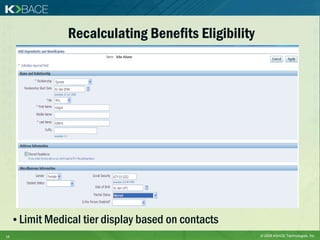
Recalculating Benefits Eligibility


     • Limit Medical tier display based on contacts
13                                                    © 2009 KBACE Technologies, Inc.
Displaying Instructions


14                             © 2009 KBACE Technologies, Inc.
Setting Default Enrollments


     • Default enrollments are displayed and can be changed

15                                                       © 2009 KBACE Technologies, Inc.
Updating Enrollments


     • Each employee chooses from a specified list based on their
      eligibility
16                                                         © 2009 KBACE Technologies, Inc.
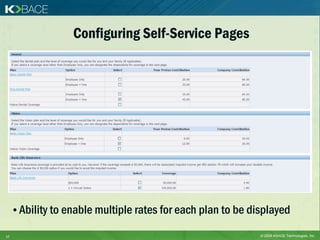
Configuring Self-Service Pages


     • Ability to enable multiple rates for each plan to be displayed

17                                                            © 2009 KBACE Technologies, Inc.
Designating Dependents


     • Allows eligibility profiles for dependents
18                                                  © 2009 KBACE Technologies, Inc.
Designating Beneficiaries


19                               © 2009 KBACE Technologies, Inc.
Confirming Enrollment


20                           © 2009 KBACE Technologies, Inc.
Signature Section


     • An optional signature section may be displayed within the Confirmation
       Statement if desired
     • The Confirmation Statement button launches a configurable PDF


21                                                                  © 2009 KBACE Technologies, Inc.
Benefits Administration (Admin)


22                                     © 2009 KBACE Technologies, Inc.
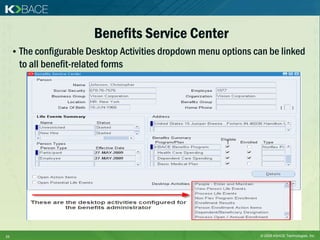
Benefits Service Center
     • The configurable Desktop Activities dropdown menu options can be linked
      to all benefit-related forms


23                                                                © 2009 KBACE Technologies, Inc.
Online Administration
     • Administrators are able to continue benefits selection process
      for employee


24                                                          © 2009 KBACE Technologies, Inc.
Questions & Answers
               Speaker:
               Jeff Eaton
               Email: jeaton@kbace.com
               Phone: 603-566-5767


               Recording & Presentation:
               http://kbace.com/index.php/events/
               webinars/online-archives


25                                       © 2009 KBACE Technologies, Inc.

Oracle Advanced Benefits Webinar Slides

  • 1.
    Oracle Advanced Benefits: Automated In-House Benefits Administration & Online Enrollments Jeff Eaton Practice Manager, Compensation & Benefits 1 © 2009 KBACE Technologies, Inc.
  • 2.
    Agenda • OAB Key Features • Life Event Processing • Online Benefits Enrollment (Employee) • Benefits Administration (Admin) • Q&A 2 © 2009 KBACE Technologies, Inc.
  • 3.
    OAB: Automated BenefitsAdministration • Oracle Advanced Benefits (OAB), allows for a large degree of Automation while offering flexibility to enforce the business rules required by your enterprise. 3 © 2009 KBACE Technologies, Inc.
  • 4.
    Key Features • Flexible data model helps you manage a wide variety of benefit plans • Helps you maintain enrollment history, capture enrollment changes, and calculate deductions • Life event processing allows you to control who, what, and when benefit changes can be made • Delivered Benefits Self Service enables web based real time enrollment • Enforce complex eligibility rules using eligibility profiles • An eligibility profile is a reusable set of eligibility criteria based on employment and/or indicative data of employees. 4 © 2009 KBACE Technologies, Inc.
  • 5.
    Key Features • Calculate and store multiple rates as applicable for each benefit • Supports a variety of calculation methods (Flat Amount, Compensation Based, Coverage Amount based, etc.) • Supports variable rates to calculate rate variations (Age Based, Employment Category Based, etc.) • Scheduled enrollment processing for annual enrollment and off cycle rate changes • Flexible Credits management • Effective communication with your employees using online instructions and confirmation statements 5 © 2009 KBACE Technologies, Inc.
  • 6.
    Key Features • Delivered tools to minimize implementation time: • Plan Design Copy – a tool to copy or move benefit plans within or between databases • Configuration Workbench – a tool to load enrollments and dependent/beneficiary designations from a spreadsheet • Benefits Service Center – A launch pad for benefit administrator to look up everything benefit-related 6 © 2009 KBACE Technologies, Inc.
  • 7.
    Life Event Processing 7 © 2009 KBACE Technologies, Inc.
  • 8.
    Life Event Processing • Benefit changes in OAB can only be done within an enrollment period • Life events can be made to trigger automatically when employment/indicative data changes for an employee • Examples – New Hire, Address Change, Salary Change, Part Time to Full Time, Termination • Delivered batch job picks up and processes all triggered life events. This can be scheduled to run nightly to process life events triggered for that day. • Once processed, the life event stays open for the enrollment period as specified in the configuration. 8 © 2009 KBACE Technologies, Inc.
  • 9.
    Life Event Processing • Employees can enroll/make changes to their benefits within the life event enrollment period • Control what the employees can change during a life event, for each benefit and life event combination • Example - Marriage Life Event; Restrict life insurance benefits, plan changes, and allow only tier changes for Medical, Dental and Vision • Delivered batch job can be scheduled nightly to close the enrollment period once the end date is reached • Specific defaults can be configured for each benefit and life event combination • Use life events to automatically recalculate life insurance coverage amount, rates, etc. when salary changes • Life events can be configured to run automatically in Recalculate-Only mode without opening an enrollment period if the only impact is on rates and coverage amount 9 © 2009 KBACE Technologies, Inc.
  • 10.
    Life Event Processing • OAB allows for employees to initiate certain life events on their own from benefit self service • Examples – Marriage/Add a DP, Birth or Adoption, Divorce/DP Separation, etc. • After adding contacts, employees can change their coverage tier, designate them as dependents and/or beneficiaries • The system can be configured to suspend elections until dependent certifications are received • OAB also supports enrollment certifications for Life insurance plans • Example – Certain changes can be suspended until evidence of insurability is submitted 10 © 2009 KBACE Technologies, Inc.
  • 11.
    Employee Online BenefitsEnrollment 11 © 2009 KBACE Technologies, Inc.
  • 12.
    Initiating the Enrollment • Text is configurable • Employees may add dependents and beneficiaries online 12 © 2009 KBACE Technologies, Inc.
  • 13.
    Recalculating Benefits Eligibility • Limit Medical tier display based on contacts 13 © 2009 KBACE Technologies, Inc.
  • 14.
    Displaying Instructions 14 © 2009 KBACE Technologies, Inc.
  • 15.
    Setting Default Enrollments • Default enrollments are displayed and can be changed 15 © 2009 KBACE Technologies, Inc.
  • 16.
    Updating Enrollments • Each employee chooses from a specified list based on their eligibility 16 © 2009 KBACE Technologies, Inc.
  • 17.
    Configuring Self-Service Pages • Ability to enable multiple rates for each plan to be displayed 17 © 2009 KBACE Technologies, Inc.
  • 18.
    Designating Dependents • Allows eligibility profiles for dependents 18 © 2009 KBACE Technologies, Inc.
  • 19.
    Designating Beneficiaries 19 © 2009 KBACE Technologies, Inc.
  • 20.
    Confirming Enrollment 20 © 2009 KBACE Technologies, Inc.
  • 21.
    Signature Section • An optional signature section may be displayed within the Confirmation Statement if desired • The Confirmation Statement button launches a configurable PDF 21 © 2009 KBACE Technologies, Inc.
  • 22.
    Benefits Administration (Admin) 22 © 2009 KBACE Technologies, Inc.
  • 23.
    Benefits Service Center • The configurable Desktop Activities dropdown menu options can be linked to all benefit-related forms 23 © 2009 KBACE Technologies, Inc.
  • 24.
    Online Administration • Administrators are able to continue benefits selection process for employee 24 © 2009 KBACE Technologies, Inc.
  • 25.
    Questions & Answers Speaker: Jeff Eaton Email: jeaton@kbace.com Phone: 603-566-5767 Recording & Presentation: http://kbace.com/index.php/events/ webinars/online-archives 25 © 2009 KBACE Technologies, Inc.