Kafka Streams
Presented by: Krishna Jaiswal
Lack of etiquette and manners is a huge turn off.
KnolX Etiquettes
 Punctuality
Join the session 5 minutes prior to the session start time. We start on time
and conclude on time!
 Feedback
Make sure to submit a constructive feedback for all sessions as it is very
helpful for the presenter.
 Silent Mode
Keep your mobile devices in silent mode, feel free to move out of session
in case you need to attend an urgent call.
 Avoid Disturbance
Avoid unwanted chit chat during the session.
Agenda
1. What is a Messaging System?
2. Introduction to Apache Kafka
3. Apache Kafka : Fundamentals
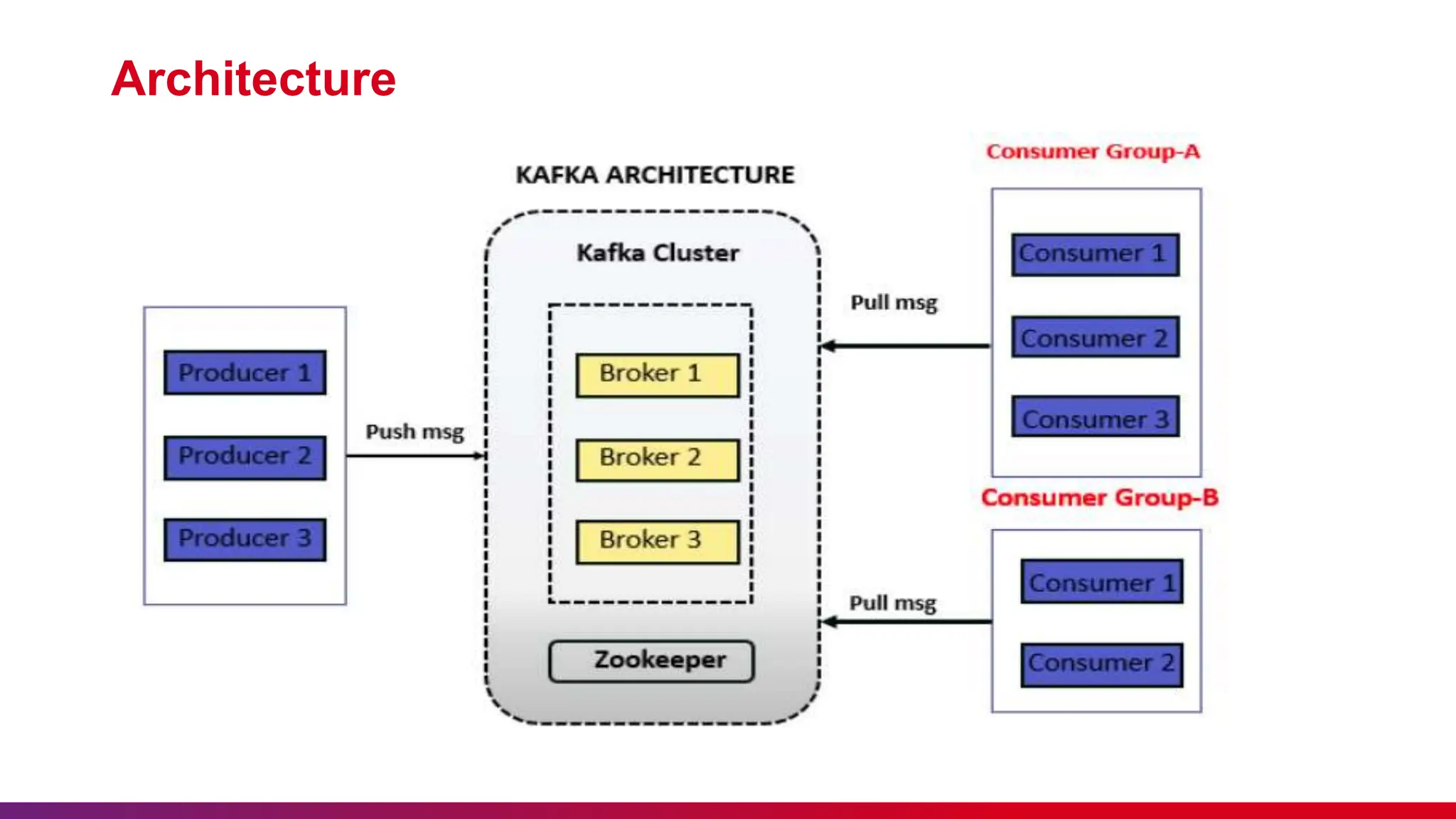
4. Architecture
5. Why Kafka Streams?
6. Introduction to Kafka Streams
7. Stream processing topology
8. Key concepts of Stream Processing
9. Advantages of Apache Kafka
10. Use Cases of Kafka
11. Demo
What is a Messaging System?
 A Messaging System is responsible for transferring data from one application to another, so the
applications can focus on data, but not worry about how to share it.
 Distributed messaging is based on the concept of reliable message queuing. Messages are queued
asynchronously between client applications and messaging system.
 Two types of messaging patterns are available − one is point to point and the other is publish-subscribe
(pub-sub) messaging system.
 Most of the messaging patterns follow pub-sub.
Introduction to Apache Kafka
 Apache Kafka is a distributed publish-subscribe messaging system.
 It is a robust queue that can handle a high volume of data and enables you to pass messages from one end-point to
another.
 Kafka is suitable for both offline and online message consumption.
 Kafka messages are persisted on the disk and replicated within the cluster to prevent data loss.
 Kafka is built on top of the ZooKeeper synchronization service.
 It integrates very well with Apache Storm and Spark for real-time streaming data analysis.
Apache Kafka : Fundamentals
 Topics :- A stream of messages belonging to a particular category is called a topic. Data is stored in topics. Topics
are split into partitions. For each topic, Kafka keeps a minimum of one partition.
 Partition :- Topics may have many partitions, so it can handle an arbitrary amount of data.
 Partition offset :- Each partitioned message has a unique sequence id called as offset.
 Replicas of partition :- Replicas are nothing but backups of a partition. Replicas are never read or write data. They
are used to prevent data loss.
 Brokers :- Brokers are simple system responsible for maintaining the published data. Each broker may have zero or
more partitions per topic.
Apache Kafka : Fundamentals
 Kafka Cluster :- Kafka’s having more than one broker are called as Kafka cluster. A Kafka cluster can
be expanded without downtime.
 Producers :- Producers are the publisher of messages to one or more Kafka topics. Producers send data to Kafka
brokers.
 Consumers :- Consumers read data from brokers. Consumers subscribes to one or more topics and consume
published messages by pulling data from the brokers.
 Leader :- Leader is the node responsible for all reads and writes for the given partition. Every partition has one
server acting as a leader.
 Follower :- Node which follows leader instructions are called as follower. If the leader fails, one of the follower will
automatically become the new leader.
Architecture
Why Kafka Streams?
• Kafka Streams are highly scalable as well as elastic in nature.
• Can be deployed to containers, cloud, bare metals, etc.
• It is operable for any size of use case, i.e., small, medium, or large.
• It has the capability of fault tolerance. If any failure occurs, it can be handled by the Kafka Streams.
• It allows writing standard java and scala applications.
• For streaming, it does not require any separate processing cluster.
• Kafka Streams are supported in Mac, Linux, as well as Windows operating systems.
• It does not have any external dependencies except Kafka itself.
Introduction to Kafka Streams
 In Apache Kafka, streams are the continuous real-time flow of the facts or records(key-value pairs).
 Kafka Streams is a light-weight in-built client library which is used for building different applications
and microservices.
 The input, as well as output data of the streams get stored in Kafka clusters.
 Kafka Streams integrates the simplicity to write as well as deploy standard java and scala
applications on the client-side.
Stream processing topology
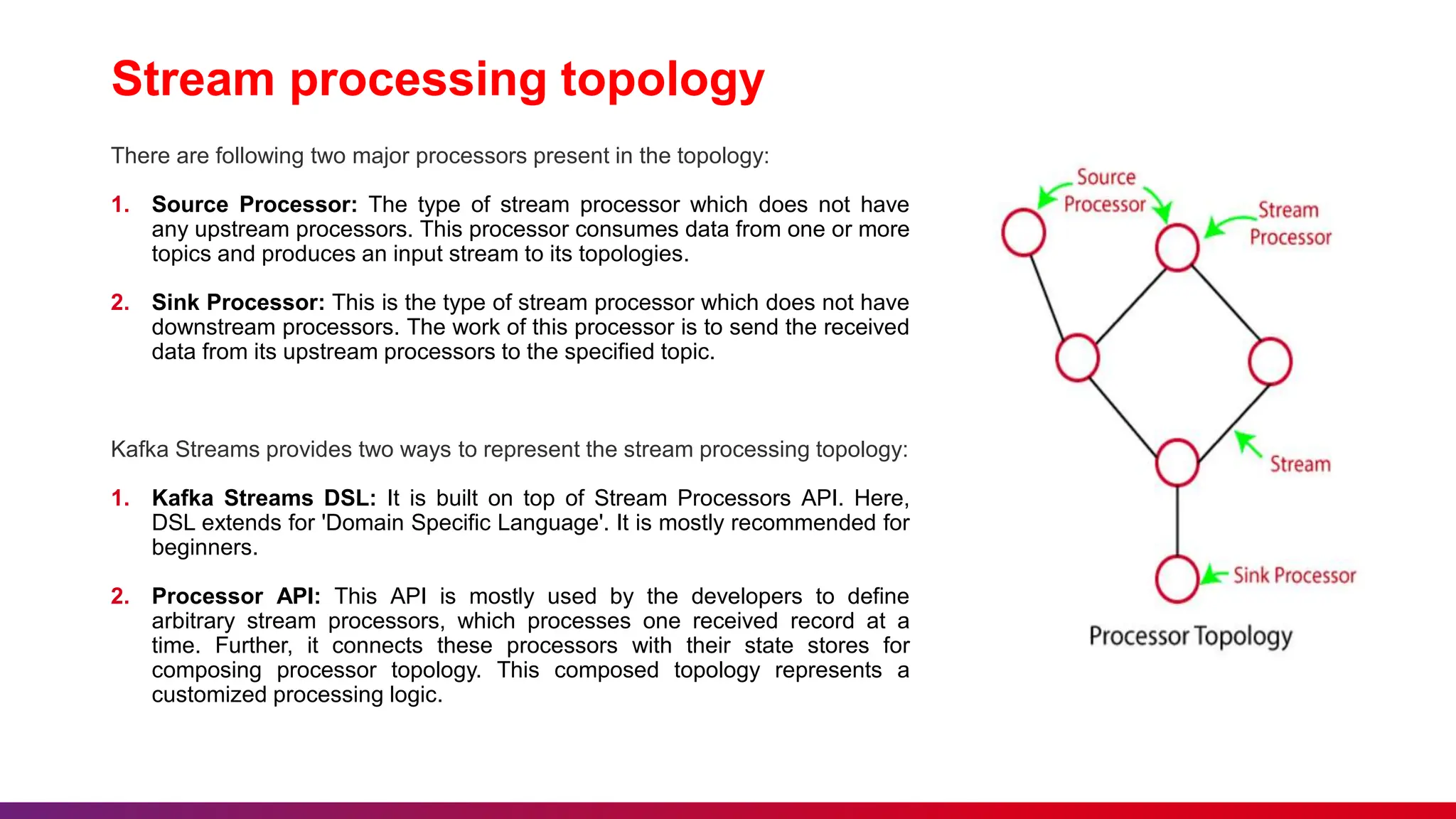
There are following two major processors present in the topology:
1. Source Processor: The type of stream processor which does not have
any upstream processors. This processor consumes data from one or more
topics and produces an input stream to its topologies.
2. Sink Processor: This is the type of stream processor which does not have
downstream processors. The work of this processor is to send the received
data from its upstream processors to the specified topic.
Kafka Streams provides two ways to represent the stream processing topology:
1. Kafka Streams DSL: It is built on top of Stream Processors API. Here,
DSL extends for 'Domain Specific Language'. It is mostly recommended for
beginners.
2. Processor API: This API is mostly used by the developers to define
arbitrary stream processors, which processes one received record at a
time. Further, it connects these processors with their state stores for
composing processor topology. This composed topology represents a
customized processing logic.
Key concepts of Stream Processing
1. Time:- In stream processing, most operations rely on time.
o Event Time
o Log append time
o Processing Time
2. State:- There are different states maintained in the stream processing
applications.
o Internal or local state
o External state
3. State Stream-Table Duality
4. Time Windows
Advantages of Apache Kafka
 Real-Time Processing
 Scalability
 Single Source of Truth
 No Need for Multiple Integrations
 Data Centralization
 Open-Sourceness
Use Cases of Kafka
 Website or User Activity Tracking
 Metrics
 Log Data Centralization
 Real-Time Stream Processing
 Message Broker
 Internet of Things
 Microservices
Demo
Thank you

Introduction to Kafka Streams Presentation

  • 1.
  • 2.
    Lack of etiquetteand manners is a huge turn off. KnolX Etiquettes  Punctuality Join the session 5 minutes prior to the session start time. We start on time and conclude on time!  Feedback Make sure to submit a constructive feedback for all sessions as it is very helpful for the presenter.  Silent Mode Keep your mobile devices in silent mode, feel free to move out of session in case you need to attend an urgent call.  Avoid Disturbance Avoid unwanted chit chat during the session.
  • 3.
    Agenda 1. What isa Messaging System? 2. Introduction to Apache Kafka 3. Apache Kafka : Fundamentals 4. Architecture 5. Why Kafka Streams? 6. Introduction to Kafka Streams 7. Stream processing topology 8. Key concepts of Stream Processing 9. Advantages of Apache Kafka 10. Use Cases of Kafka 11. Demo
  • 4.
    What is aMessaging System?  A Messaging System is responsible for transferring data from one application to another, so the applications can focus on data, but not worry about how to share it.  Distributed messaging is based on the concept of reliable message queuing. Messages are queued asynchronously between client applications and messaging system.  Two types of messaging patterns are available − one is point to point and the other is publish-subscribe (pub-sub) messaging system.  Most of the messaging patterns follow pub-sub.
  • 5.
    Introduction to ApacheKafka  Apache Kafka is a distributed publish-subscribe messaging system.  It is a robust queue that can handle a high volume of data and enables you to pass messages from one end-point to another.  Kafka is suitable for both offline and online message consumption.  Kafka messages are persisted on the disk and replicated within the cluster to prevent data loss.  Kafka is built on top of the ZooKeeper synchronization service.  It integrates very well with Apache Storm and Spark for real-time streaming data analysis.
  • 6.
    Apache Kafka :Fundamentals  Topics :- A stream of messages belonging to a particular category is called a topic. Data is stored in topics. Topics are split into partitions. For each topic, Kafka keeps a minimum of one partition.  Partition :- Topics may have many partitions, so it can handle an arbitrary amount of data.  Partition offset :- Each partitioned message has a unique sequence id called as offset.  Replicas of partition :- Replicas are nothing but backups of a partition. Replicas are never read or write data. They are used to prevent data loss.  Brokers :- Brokers are simple system responsible for maintaining the published data. Each broker may have zero or more partitions per topic.
  • 7.
    Apache Kafka :Fundamentals  Kafka Cluster :- Kafka’s having more than one broker are called as Kafka cluster. A Kafka cluster can be expanded without downtime.  Producers :- Producers are the publisher of messages to one or more Kafka topics. Producers send data to Kafka brokers.  Consumers :- Consumers read data from brokers. Consumers subscribes to one or more topics and consume published messages by pulling data from the brokers.  Leader :- Leader is the node responsible for all reads and writes for the given partition. Every partition has one server acting as a leader.  Follower :- Node which follows leader instructions are called as follower. If the leader fails, one of the follower will automatically become the new leader.
  • 8.
  • 9.
    Why Kafka Streams? •Kafka Streams are highly scalable as well as elastic in nature. • Can be deployed to containers, cloud, bare metals, etc. • It is operable for any size of use case, i.e., small, medium, or large. • It has the capability of fault tolerance. If any failure occurs, it can be handled by the Kafka Streams. • It allows writing standard java and scala applications. • For streaming, it does not require any separate processing cluster. • Kafka Streams are supported in Mac, Linux, as well as Windows operating systems. • It does not have any external dependencies except Kafka itself.
  • 10.
    Introduction to KafkaStreams  In Apache Kafka, streams are the continuous real-time flow of the facts or records(key-value pairs).  Kafka Streams is a light-weight in-built client library which is used for building different applications and microservices.  The input, as well as output data of the streams get stored in Kafka clusters.  Kafka Streams integrates the simplicity to write as well as deploy standard java and scala applications on the client-side.
  • 11.
    Stream processing topology Thereare following two major processors present in the topology: 1. Source Processor: The type of stream processor which does not have any upstream processors. This processor consumes data from one or more topics and produces an input stream to its topologies. 2. Sink Processor: This is the type of stream processor which does not have downstream processors. The work of this processor is to send the received data from its upstream processors to the specified topic. Kafka Streams provides two ways to represent the stream processing topology: 1. Kafka Streams DSL: It is built on top of Stream Processors API. Here, DSL extends for 'Domain Specific Language'. It is mostly recommended for beginners. 2. Processor API: This API is mostly used by the developers to define arbitrary stream processors, which processes one received record at a time. Further, it connects these processors with their state stores for composing processor topology. This composed topology represents a customized processing logic.
  • 12.
    Key concepts ofStream Processing 1. Time:- In stream processing, most operations rely on time. o Event Time o Log append time o Processing Time 2. State:- There are different states maintained in the stream processing applications. o Internal or local state o External state 3. State Stream-Table Duality 4. Time Windows
  • 13.
    Advantages of ApacheKafka  Real-Time Processing  Scalability  Single Source of Truth  No Need for Multiple Integrations  Data Centralization  Open-Sourceness
  • 14.
    Use Cases ofKafka  Website or User Activity Tracking  Metrics  Log Data Centralization  Real-Time Stream Processing  Message Broker  Internet of Things  Microservices
  • 15.
  • 16.