JavaScript Object Notation
JSON
Ela
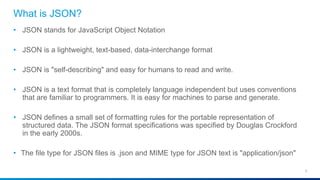
What is JSON?
2
• JSON stands for JavaScript Object Notation
• JSON is a lightweight, text-based, data-interchange format
• JSON is "self-describing" and easy for humans to read and write.
• JSON is a text format that is completely language independent but uses conventions
that are familiar to programmers. It is easy for machines to parse and generate.
• JSON defines a small set of formatting rules for the portable representation of
structured data. The JSON format specifications was specified by Douglas Crockford
in the early 2000s.
• The file type for JSON files is .json and MIME type for JSON text is "application/json"
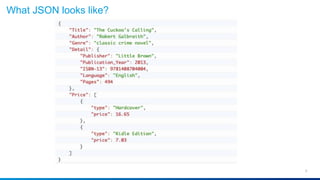
What JSON looks like?
3
History of JSON
4
• 1999 ECMAScript Third Edition
• 2001 State Software, Inc.
• 2002 JSON.org
• 2005 Ajax
• 2006 RFC 4627
How is JSON Used:
5
• Browser/server communication.
• Inter server communication.
• NoSQL database.
• Config files
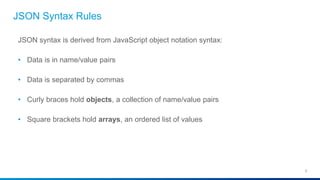
JSON Syntax Rules
6
JSON syntax is derived from JavaScript object notation syntax:
• Data is in name/value pairs
• Data is separated by commas
• Curly braces hold objects, a collection of name/value pairs
• Square brackets hold arrays, an ordered list of values
Object
7
• An object is an unordered set of name/value pairs.
• An object begins with { (left brace) and ends with } (right brace).
• Each name is followed by : (colon) and the name/value pairs are separated
by , (comma).
Examples:
{
“firstName”: “Peter”,
“lastName”: “Gruenbaum”
}
Array
8
• An array is an ordered collection of values.
• An array begins with [ (left bracket) and ends with ] (right bracket).
• Values are separated by , (comma) and can mix data types.
Examples:
• [4, 6, 23.1, -4, 0, 56]
• [“red”, “green”, “blue”]
• [65, “toast”, true, 21, null, 100]
Value
9
• A value can be a string in double quotes, or a number, or true or false or null, or
an object or an array. These structures can be nested.
Value
10
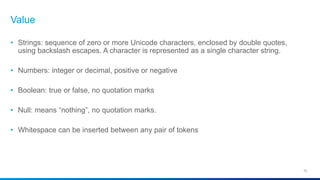
• Strings: sequence of zero or more Unicode characters, enclosed by double quotes,
using backslash escapes. A character is represented as a single character string.
• Numbers: integer or decimal, positive or negative
• Boolean: true or false, no quotation marks
• Null: means “nothing”, no quotation marks.
• Whitespace can be inserted between any pair of tokens
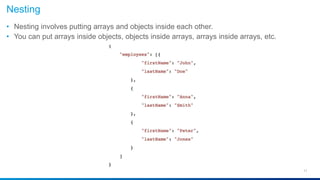
Nesting
11
• Nesting involves putting arrays and objects inside each other.
• You can put arrays inside objects, objects inside arrays, arrays inside arrays, etc.
12
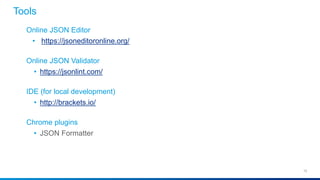
Online JSON Editor
• https://jsoneditoronline.org/
Online JSON Validator
• https://jsonlint.com/
IDE (for local development)
• http://brackets.io/
Chrome plugins
• JSON Formatter
Tools
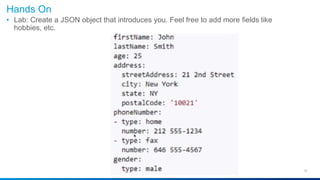
Hands On
13
• Lab: Create a JSON object that introduces you. Feel free to add more fields like
hobbies, etc.
JSON Parse
14
• A common use of JSON is to exchange data to/from a web server
• When receiving data from a web server, the data is always a string
• Parse the data with JSON.parse(), and the data becomes a JavaScript object
JSON Stringify
• A common use of JSON is to exchange data to/from a web server
• When sending data to a web server, the data has to be a string
• Convert a JavaScript object into a string with JSON.stringify()
References
15
• https://json.org/
• https://www.ietf.org/rfc/rfc4627.txt
• http://www.ecma-international.org/publications/files/ECMA-ST/ECMA-404.pdf
Json training

Json training

  • 1.
  • 2.
    What is JSON? 2 •JSON stands for JavaScript Object Notation • JSON is a lightweight, text-based, data-interchange format • JSON is "self-describing" and easy for humans to read and write. • JSON is a text format that is completely language independent but uses conventions that are familiar to programmers. It is easy for machines to parse and generate. • JSON defines a small set of formatting rules for the portable representation of structured data. The JSON format specifications was specified by Douglas Crockford in the early 2000s. • The file type for JSON files is .json and MIME type for JSON text is "application/json"
  • 3.
  • 4.
    History of JSON 4 •1999 ECMAScript Third Edition • 2001 State Software, Inc. • 2002 JSON.org • 2005 Ajax • 2006 RFC 4627
  • 5.
    How is JSONUsed: 5 • Browser/server communication. • Inter server communication. • NoSQL database. • Config files
  • 6.
    JSON Syntax Rules 6 JSONsyntax is derived from JavaScript object notation syntax: • Data is in name/value pairs • Data is separated by commas • Curly braces hold objects, a collection of name/value pairs • Square brackets hold arrays, an ordered list of values
  • 7.
    Object 7 • An objectis an unordered set of name/value pairs. • An object begins with { (left brace) and ends with } (right brace). • Each name is followed by : (colon) and the name/value pairs are separated by , (comma). Examples: { “firstName”: “Peter”, “lastName”: “Gruenbaum” }
  • 8.
    Array 8 • An arrayis an ordered collection of values. • An array begins with [ (left bracket) and ends with ] (right bracket). • Values are separated by , (comma) and can mix data types. Examples: • [4, 6, 23.1, -4, 0, 56] • [“red”, “green”, “blue”] • [65, “toast”, true, 21, null, 100]
  • 9.
    Value 9 • A valuecan be a string in double quotes, or a number, or true or false or null, or an object or an array. These structures can be nested.
  • 10.
    Value 10 • Strings: sequenceof zero or more Unicode characters, enclosed by double quotes, using backslash escapes. A character is represented as a single character string. • Numbers: integer or decimal, positive or negative • Boolean: true or false, no quotation marks • Null: means “nothing”, no quotation marks. • Whitespace can be inserted between any pair of tokens
  • 11.
    Nesting 11 • Nesting involvesputting arrays and objects inside each other. • You can put arrays inside objects, objects inside arrays, arrays inside arrays, etc.
  • 12.
    12 Online JSON Editor •https://jsoneditoronline.org/ Online JSON Validator • https://jsonlint.com/ IDE (for local development) • http://brackets.io/ Chrome plugins • JSON Formatter Tools
  • 13.
    Hands On 13 • Lab:Create a JSON object that introduces you. Feel free to add more fields like hobbies, etc.
  • 14.
    JSON Parse 14 • Acommon use of JSON is to exchange data to/from a web server • When receiving data from a web server, the data is always a string • Parse the data with JSON.parse(), and the data becomes a JavaScript object JSON Stringify • A common use of JSON is to exchange data to/from a web server • When sending data to a web server, the data has to be a string • Convert a JavaScript object into a string with JSON.stringify()
  • 15.
    References 15 • https://json.org/ • https://www.ietf.org/rfc/rfc4627.txt •http://www.ecma-international.org/publications/files/ECMA-ST/ECMA-404.pdf