JSON
bishrul haq
BSc IT , HND IT
• Extended from the javascript
• JSON is a language-independent data format
• Media type is application/json
• extension is .json
2BH | JSON
3
1. Always starts and ends with curly brackets { } name and value is
separated by a colon : more than one pair is separated by comma.
2. It is the most common data format used for asynchronous
browser/server communication, largely replacing XML which is
used by AJAX.
3. For arrays put the arrays between [ ].
4. For elements put the values directly separated by commas.
BH | JSON
key/name value pairs
• { "name" : "value" }
4
Objects are comma separated
• { "name1" : "value" , "name2" : "value", "name3" : "value"}
Arrays have square brackets with values separated by comma
• { "name" : [ { "name" : "value" }, { "name" : "value" }] }
BH | JSON
In computer science, a data structure is a data organization, management, and storage format that
enables efficient access and modification.
More precisely, a data structure is a collection of data values, the relationships among them, and the
functions or operations that can be applied to the data.
5
• Collection of name/value pairs : Think Object format
• Ordered list of values : Think Array format
BH | JSON
Number - double- precision floating-point can be digits, positive or
negative, decimal fractions, exponents.
• {"name": 10}
6
String - double-quoted Unicode with backslash escaping
• {"name": "Hello world"}
Boolean - true or false
• {"name": true}
Array - ordered sequence of values uses square brackets. Values are each
separated by a comma. Indexing starts with 0.
• {"name": [{"name1": 1}, "hello", "world"]}
BH | JSON
7
Object - unordered collection with key:value pairs. Wrapped with curly
brackets {}. Colons to separate key and name. Keys should be strings and have
unique names.
• {"name": {"name1": 1,"name2": 1}}
Null - just empty
• {"name": null}
BH | JSON
8
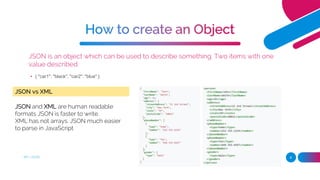
JSON is an object which can be used to describe something. Two items with one
value described.
• { "car1": "black", "car2": "blue" }
JSON vs XML
JSON and XML are human readable
formats JSON is faster to write.
XML has not arrays. JSON much easier
to parse in JavaScript
BH | JSON
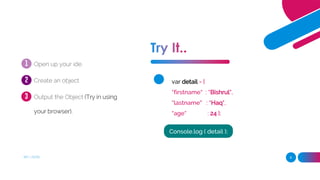
var detail = {
“firstname“ : “Bishrul",
“lastname" : “Haq",
“age“ : 24 };
Console.log ( detail );
Open up your ide.
Create an object
Output the Object (Try in using
your browser).
3
2
1
BH | JSON 9
10
Another good advantage of JSON is the ability to pass the value
or data into a JavaScript object.
var o = { foo: "bar" };
{ "foo": "bar" }
• JSON has double quotes while JavaScript can use single or doubles.
• JavaScript can include functions which is not available in JSON.
BH | JSON
11
Here are some examples for objects in JavaScript:
var haq= {};
haq.car1 = "black"
console.log(haq)
haq.car2 = "blue“
console.log(haq)
BH | JSON
var haq = {};
haq["car1"] = "black“
console.log(haq)
haq["car2"] = "blue“
console.log(haq)
var haq = {"car1" : "black" ,"car2" : "blue"};
console.log(haq)
12
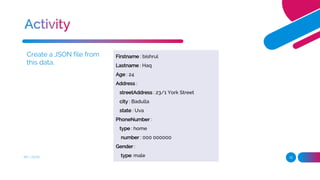
Create a JSON file from
this data.
Firstname : bishrul
Lastname : Haq
Age : 24
Address :
streetAddress : 23/1 York Street
city : Badulla
state : Uva
PhoneNumber :
type : home
number : 000 000000
Gender :
type: maleBH | JSON
13
You can use both the brackets or dot notations to add or get data.
BH | JSON
var bh= {}
bh.car1 = “black”
bh["car1"] = “blue”
console.log(bh);
14
The JSON.stringify() method converts a JavaScript value to a JSON string, optionally
replacing values if a replacer function is specified or optionally including only the specified
properties if a replacer array is specified.
The JSON.parse() method parses a JSON string, constructing the JavaScript value or object
described by the string. An optional reviver function can be provided to perform a
transformation on the resulting object before it is returned.
BH | JSON
var bh = {“firstname” : “Bishrul”, “lastname” : “haq”};
var obj = JSON.parse(json);
console.log(obj);
var bh ={ x: 5, y: 6 };
var obj = JSON.stringify(json);
console.log(obj);
15
• Create an object as shown below.
• Output the content in the console.
• Add it to your localhost using JavaScript.
BH | JSON
Person
Firstname : bishrul
Lastname : Haq
Age : 24
Firstname : bishrul
Lastname : Haq
Age : 20
16
If you have any questions or suggestions
please connect with me via an email.
info@bishrulhaq.com
BH | JSON

JSON in JavaScript

  • 1.
  • 2.
    • Extended fromthe javascript • JSON is a language-independent data format • Media type is application/json • extension is .json 2BH | JSON
  • 3.
    3 1. Always startsand ends with curly brackets { } name and value is separated by a colon : more than one pair is separated by comma. 2. It is the most common data format used for asynchronous browser/server communication, largely replacing XML which is used by AJAX. 3. For arrays put the arrays between [ ]. 4. For elements put the values directly separated by commas. BH | JSON
  • 4.
    key/name value pairs •{ "name" : "value" } 4 Objects are comma separated • { "name1" : "value" , "name2" : "value", "name3" : "value"} Arrays have square brackets with values separated by comma • { "name" : [ { "name" : "value" }, { "name" : "value" }] } BH | JSON
  • 5.
    In computer science,a data structure is a data organization, management, and storage format that enables efficient access and modification. More precisely, a data structure is a collection of data values, the relationships among them, and the functions or operations that can be applied to the data. 5 • Collection of name/value pairs : Think Object format • Ordered list of values : Think Array format BH | JSON
  • 6.
    Number - double-precision floating-point can be digits, positive or negative, decimal fractions, exponents. • {"name": 10} 6 String - double-quoted Unicode with backslash escaping • {"name": "Hello world"} Boolean - true or false • {"name": true} Array - ordered sequence of values uses square brackets. Values are each separated by a comma. Indexing starts with 0. • {"name": [{"name1": 1}, "hello", "world"]} BH | JSON
  • 7.
    7 Object - unorderedcollection with key:value pairs. Wrapped with curly brackets {}. Colons to separate key and name. Keys should be strings and have unique names. • {"name": {"name1": 1,"name2": 1}} Null - just empty • {"name": null} BH | JSON
  • 8.
    8 JSON is anobject which can be used to describe something. Two items with one value described. • { "car1": "black", "car2": "blue" } JSON vs XML JSON and XML are human readable formats JSON is faster to write. XML has not arrays. JSON much easier to parse in JavaScript BH | JSON
  • 9.
    var detail ={ “firstname“ : “Bishrul", “lastname" : “Haq", “age“ : 24 }; Console.log ( detail ); Open up your ide. Create an object Output the Object (Try in using your browser). 3 2 1 BH | JSON 9
  • 10.
    10 Another good advantageof JSON is the ability to pass the value or data into a JavaScript object. var o = { foo: "bar" }; { "foo": "bar" } • JSON has double quotes while JavaScript can use single or doubles. • JavaScript can include functions which is not available in JSON. BH | JSON
  • 11.
    11 Here are someexamples for objects in JavaScript: var haq= {}; haq.car1 = "black" console.log(haq) haq.car2 = "blue“ console.log(haq) BH | JSON var haq = {}; haq["car1"] = "black“ console.log(haq) haq["car2"] = "blue“ console.log(haq) var haq = {"car1" : "black" ,"car2" : "blue"}; console.log(haq)
  • 12.
    12 Create a JSONfile from this data. Firstname : bishrul Lastname : Haq Age : 24 Address : streetAddress : 23/1 York Street city : Badulla state : Uva PhoneNumber : type : home number : 000 000000 Gender : type: maleBH | JSON
  • 13.
    13 You can useboth the brackets or dot notations to add or get data. BH | JSON var bh= {} bh.car1 = “black” bh["car1"] = “blue” console.log(bh);
  • 14.
    14 The JSON.stringify() methodconverts a JavaScript value to a JSON string, optionally replacing values if a replacer function is specified or optionally including only the specified properties if a replacer array is specified. The JSON.parse() method parses a JSON string, constructing the JavaScript value or object described by the string. An optional reviver function can be provided to perform a transformation on the resulting object before it is returned. BH | JSON var bh = {“firstname” : “Bishrul”, “lastname” : “haq”}; var obj = JSON.parse(json); console.log(obj); var bh ={ x: 5, y: 6 }; var obj = JSON.stringify(json); console.log(obj);
  • 15.
    15 • Create anobject as shown below. • Output the content in the console. • Add it to your localhost using JavaScript. BH | JSON Person Firstname : bishrul Lastname : Haq Age : 24 Firstname : bishrul Lastname : Haq Age : 20
  • 16.
    16 If you haveany questions or suggestions please connect with me via an email. info@bishrulhaq.com BH | JSON